





Expert Review
TMDHosting has been around for more than 15 years, and it still sells itself on one thing: friendly, expert-managed hosting with real people on support. That is a bold promise for a budget-priced shared plan, so we did what we always do. We bought a Starter plan, put a WordPress site on it and hammered it with tests for about three weeks.
Most TMDHosting reviews repeat the sales page. This one has the real numbers: PageSpeed, GTmetrix, response times from 22 cities, uptime from our own monitor, two load tests, SSL and security checks, a benchmark run and a support ticket we opened ourselves. Some of it is really impressive, and one result made us stop and ask why. We will get to that.
Quick verdict: TMDHosting is a solid, fast, well-secured host with good support, but its Starter plan has hard resource limits that showed up fast under load. Pages scored 100 on PageSpeed, uptime was 99.98% and the support reply was detailed. If you want a small cached WordPress site, it works well. If you expect traffic spikes, plan on the Business tier or higher.
TMDHosting Review at a Glance
| What We Checked | What We Found |
|---|---|
| Mobile PageSpeed | 100 performance, LCP 0.9 s on a slow 4G test |
| Desktop PageSpeed | 100 performance, LCP 0.2 s |
| GTmetrix | Grade A, 92% performance, 98% structure, LCP 1.4 s |
| Server response (TTFB) | 90 ms from Mumbai, 279 ms from Delhi, 670 to 1,613 ms from the rest of the world |
| Uptime | 99.9839% since October 27, 2026 (five one-minute drops) |
| Load test | 10 users: 1,756 requests, 0 failures, p95 660 ms. 20 users: 30.84% failed on Starter |
| Security | SSL Labs A with TLS 1.3 and post-quantum key exchange, Security Headers A |
| WP Benchmark | Server score 5.8 on PHP 8.2, no persistent object cache |
| Cheapest shared plan | $9.52/mo on a 3-year term (regular $11.90/mo) |
| Refund | 30-day money-back guarantee |
What Is TMDHosting?
TMDHosting is a managed web hosting company that says it has been running for over 15 years. It sells cPanel shared hosting, WordPress hosting, managed cPanel VPS and managed dedicated servers on what it calls the TMD Cloud, a platform built on LiteSpeed web servers, CloudLinux and cPanel. Everything is sold as fully managed hosting, with TMD’s team looking after the platform.

The TMD Portal is where you manage services, domains and tickets, and every shared plan comes with a free domain, free domain transfer and no setup fee. Facilities are listed in nine places around the world, which is a bigger footprint than most budget hosts offer.

TMDHosting Awards and Recognition
TMDHosting’s own site quotes reviewers and customers, but it does not list a named award, awarding body or year. So we do not credit TMD with any awards. The badges at the top of this review are GoogieHost awards, and they come from our own tests: Great Uptime for the 99.98% we measured, Excellent Support for the detailed ticket reply, and Top Shared Hosting for the speed and security results on a plan that starts at $9.52 a month.
How We Tested TMDHosting
We tested a TMDHosting Starter shared hosting plan running WordPress on LiteSpeed with the LiteSpeed Cache plugin. The site is a plain demo theme, so these numbers show the platform and not a heavily tuned site. Between November 16 and 17, 2026 we ran the tests below, and our uptime monitor has been running since October 27.
| What We Checked | Tool | When |
|---|---|---|
| Page speed | Google PageSpeed Insights and GTmetrix | Nov 16 to 17, 2026 |
| Server response | FlyingPress TTFB test, a network and response check and a DNS check | Nov 17, 2026 |
| Uptime | HetrixTools, checks every minute | From Oct 27, 2026 |
| Load | k6 Cloud with 10 and 20 virtual users | Nov 17, 2026 |
| Security | SSL Labs and Security Headers | Nov 17, 2026 |
| Server benchmark | WP Benchmark tool | Nov 17, 2026 |
| Support | A real ticket about CPU and I/O limits | Nov 17, 2026 |
We tested the Starter plan with a plain demo WordPress theme and LiteSpeed Cache switched on. The uptime monitor has run for about three weeks, so treat it as an early result. A heavier site or a bigger plan will score differently.
TMDHosting Speed Test Results
Short version: TMDHosting pages loaded very fast in every speed test, with a perfect PageSpeed score and an A on GTmetrix. Response time only slows as you move away from the server.
Google PageSpeed Insights
This is the part TMD should be proud of. A fresh WordPress page scored a perfect 100 for performance on both mobile and desktop, with zero blocking time and no layout shift. Even on Google’s slow 4G phone test, the Largest Contentful Paint was 0.9 seconds.
| Metric | Mobile | Desktop |
|---|---|---|
| Performance | 100 | 100 |
| Accessibility | 100 | 100 |
| Best Practices | 100 | 100 |
| SEO | 82 | 82 |
| First Contentful Paint | 0.9 s | 0.2 s |
| Largest Contentful Paint | 0.9 s | 0.2 s |
| Total Blocking Time | 0 ms | 0 ms |
| Cumulative Layout Shift | 0 | 0 |
| Speed Index | 2.4 s | 0.5 s |
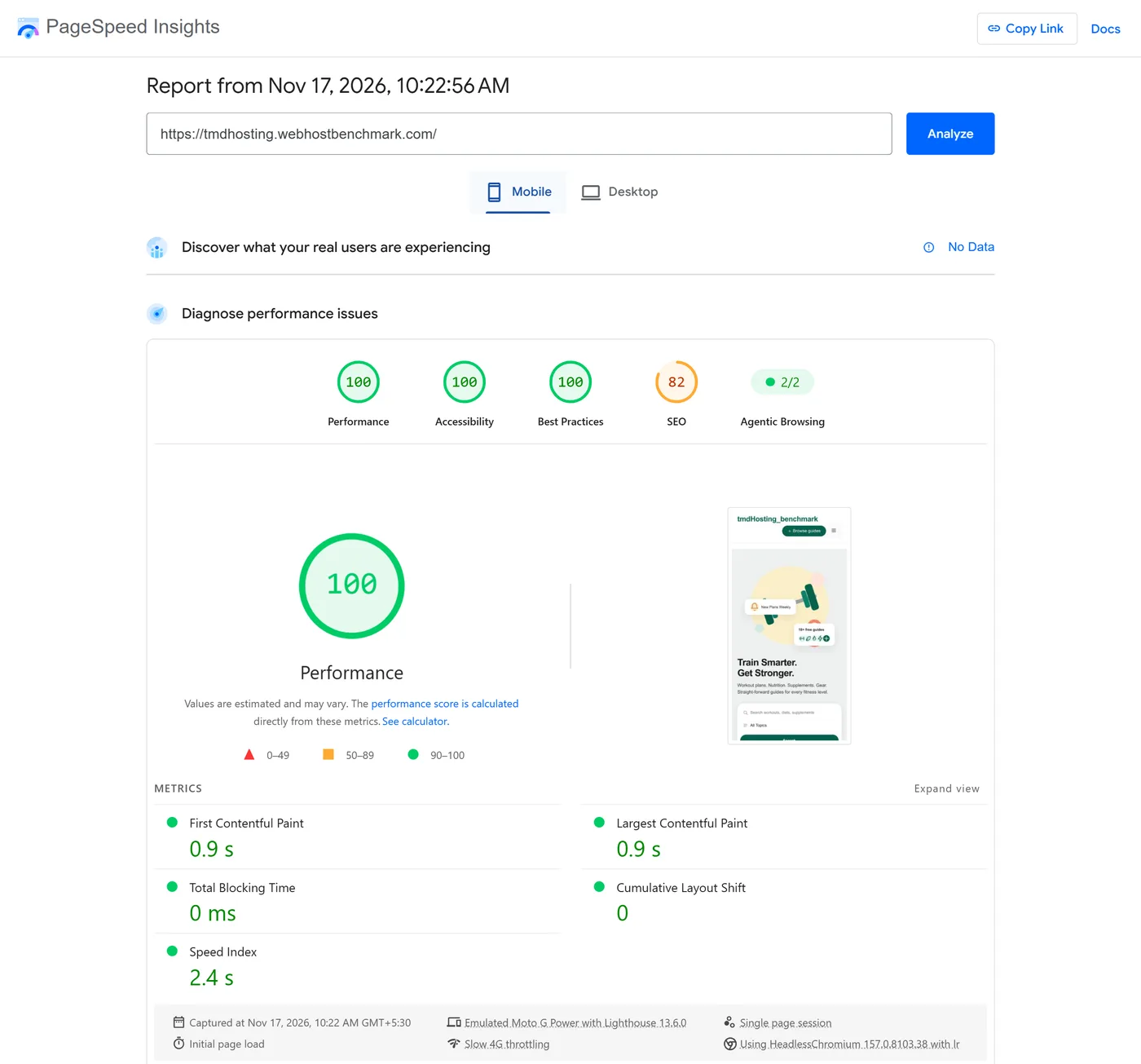
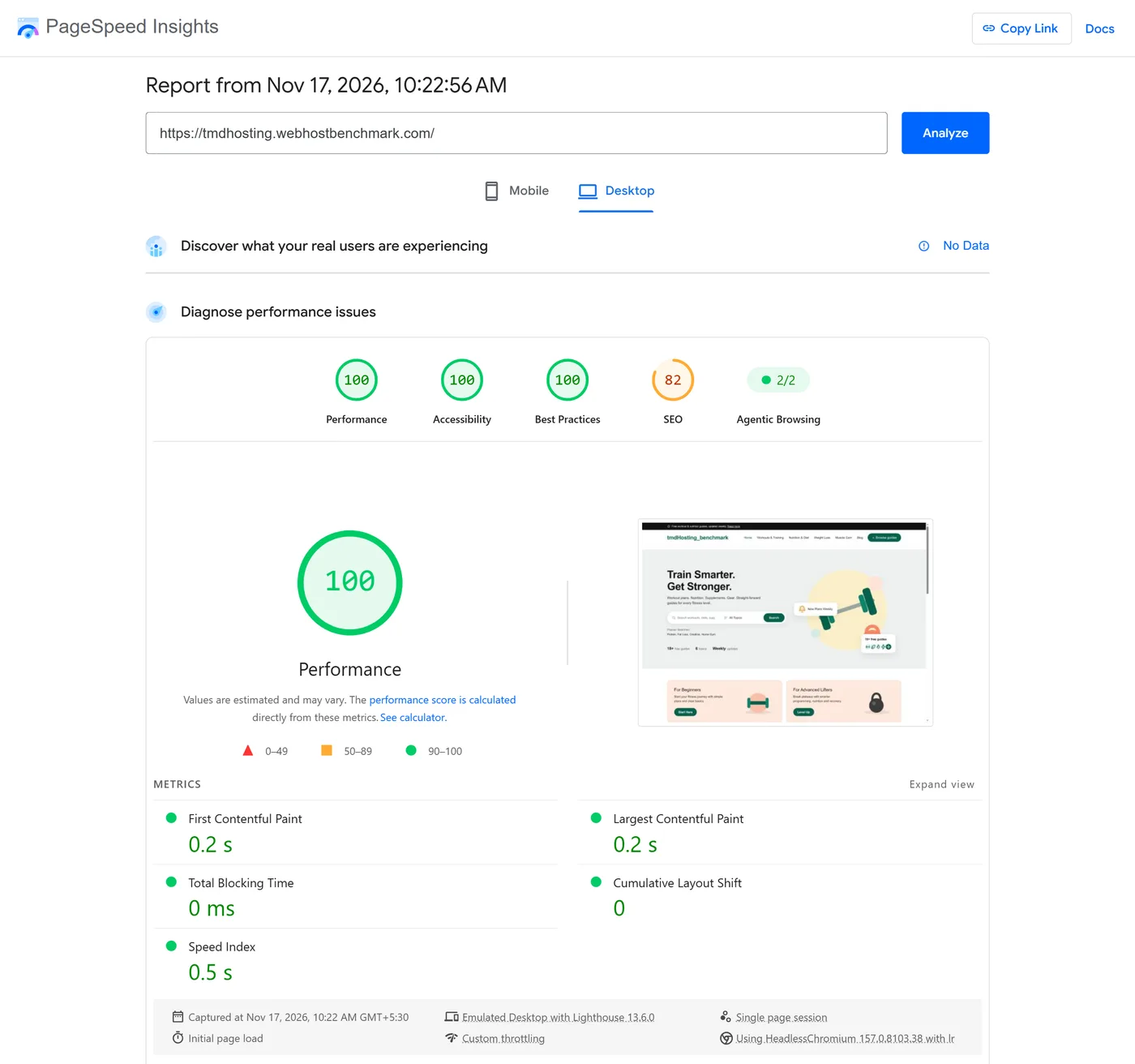
One honest caveat: a light demo page makes it easy to score 100. Your real site, with a heavy theme and plugins, will land lower. The SEO score of 82 is about the demo content, not the host.
GTmetrix Results
GTmetrix tested from Seattle and gave grade A, with 92% for performance and 98% for structure. The page was only 18.8KB across 5 requests and fully loaded in 1.6 seconds. Time to first byte was 685 ms from Seattle, which is the slowest part of the report and a clue about where the server sits.
| Metric | Result |
|---|---|
| GTmetrix grade | A |
| Performance and structure | 92% and 98% |
| Largest Contentful Paint | 1.4 s |
| Total Blocking Time and CLS | 0 ms and 0 |
| Time to First Byte | 685 ms (connect 470 ms, backend 215 ms) |
| Onload and fully loaded time | 1.3 s and 1.6 s |
| Page size and requests | 18.8KB, 5 requests |
GTmetrix’s top issues were an efficient cache policy for static assets and not using a CDN. Both are easy fixes on any host.
TMDHosting Server Response Time from 22 Locations
Time to first byte tells you how fast the server starts answering. We tested from 22 cities with the FlyingPress TTFB tool and the pattern was very clear: India and Asia were quick, and the rest of the world waited.
| Region | Location and TTFB |
|---|---|
| India | Mumbai 90 ms, Delhi 279 ms |
| Asia Pacific | Singapore 210 ms, Hong Kong 323 ms, Tokyo 424 ms, Seoul 484 ms, Sydney 502 ms |
| North America | Oregon 670 ms, Los Angeles 729 ms, Dallas 790 ms, Iowa 813 ms, Toronto 872 ms |
| Europe | Milan 1,162 ms, London 1,177 ms, Madrid 1,192 ms, Berlin 1,243 ms, Finland 1,301 ms |
| South America | Santiago 1,081 ms, São Paulo 1,275 ms |
| Middle East and Africa | Tel Aviv 1,444 ms, Johannesburg 1,535 ms, Doha 1,613 ms |
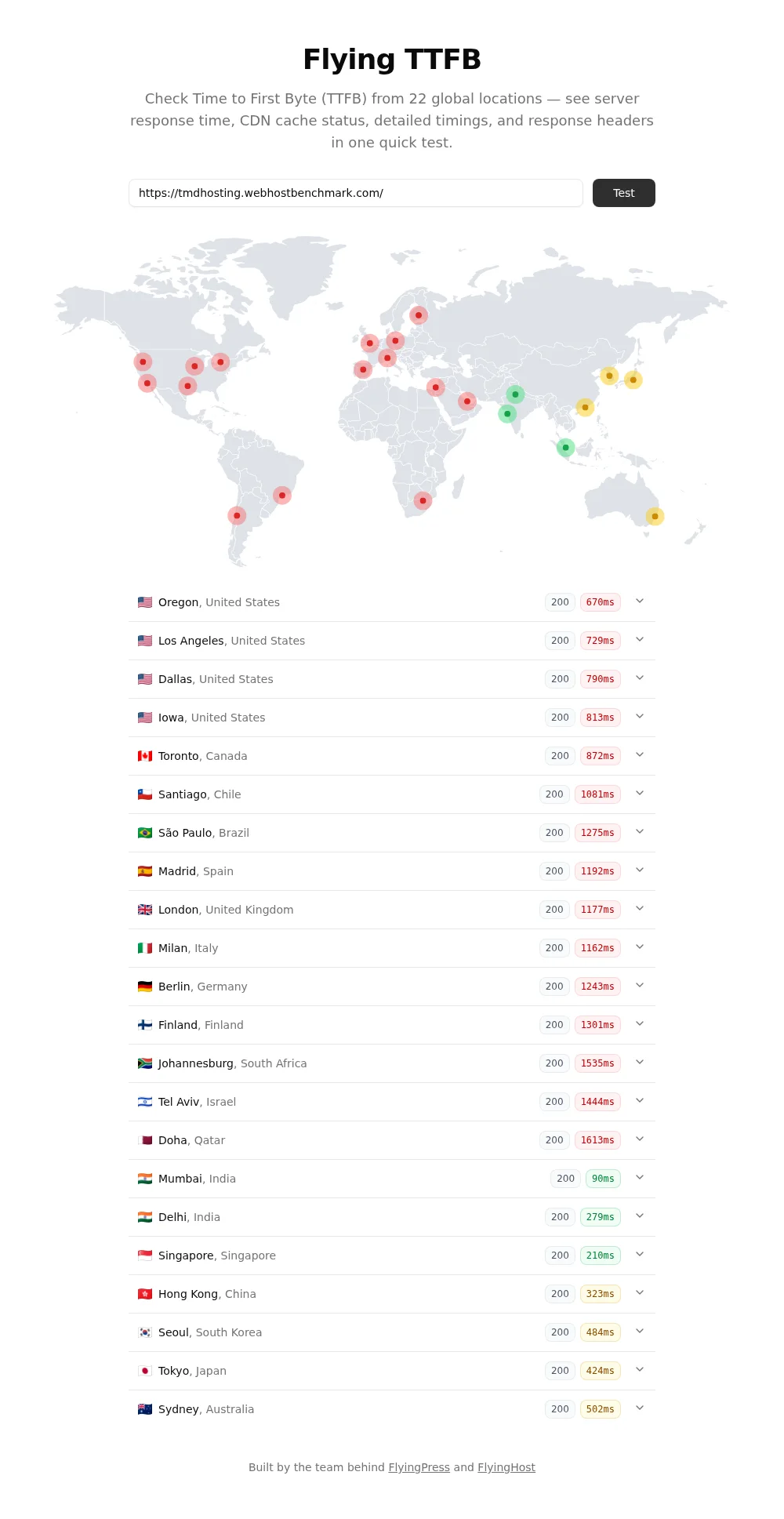
The average across all 22 locations was about 873 ms. Google suggests staying under roughly 200 ms, so only Mumbai passes that bar. The test server looks like it sits in India, since Mumbai answered in 90 ms. We could not read the exact data center from the account, so treat that as our best reading of the numbers. Either way, the lesson is the same: pick the TMD location closest to your visitors, or put a CDN in front of the site.
Choose your TMDHosting data center before you order, because moving later means a migration. Pick the facility closest to most of your visitors, and add a CDN if your audience is spread across several continents.
Network and Response Check
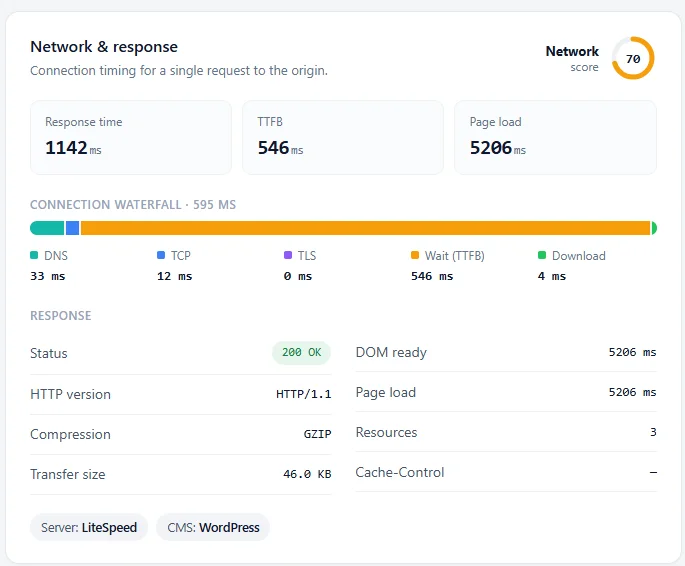
A separate single-request check showed DNS at 33 ms, TCP at 12 ms and a TTFB of 546 ms, with a 200 OK response, GZIP compression, a 46KB transfer and a LiteSpeed server. The overall network score was 70 out of 100, and the 5.2 second page load figure is far above what GTmetrix and PageSpeed measured, so treat it as a rough number from that tool.
| Check | Result |
|---|---|
| Response time | 1,142 ms |
| Time to first byte | 546 ms |
| DNS, TCP and TLS | 33 ms, 12 ms, 0 ms in the waterfall |
| Status and protocol | 200 OK over HTTP/1.1 |
| Compression and transfer size | GZIP, 46KB |
| Server and CMS | LiteSpeed and WordPress |
| Network score | 70 out of 100 |
DNS Resolution Test
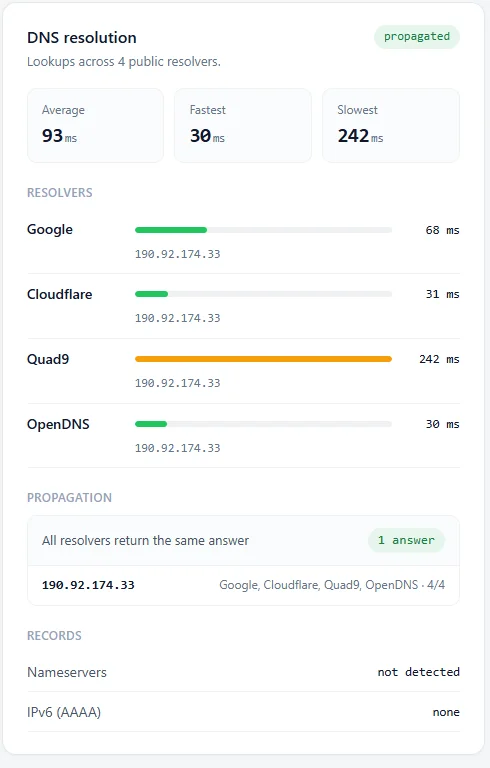
DNS answers came back in 93 ms on average across Google, Cloudflare, Quad9 and OpenDNS. OpenDNS and Cloudflare were fastest at 30 and 31 ms, Google took 68 ms and Quad9 was the slow one at 242 ms. All four resolvers returned the same IP address, so propagation was complete. The check found no IPv6 (AAAA) record and could not detect the nameservers.
| Resolver | Lookup Time |
|---|---|
| OpenDNS | 30 ms |
| Cloudflare | 31 ms |
| 68 ms | |
| Quad9 | 242 ms |
| Average | 93 ms |
TMDHosting Uptime Test
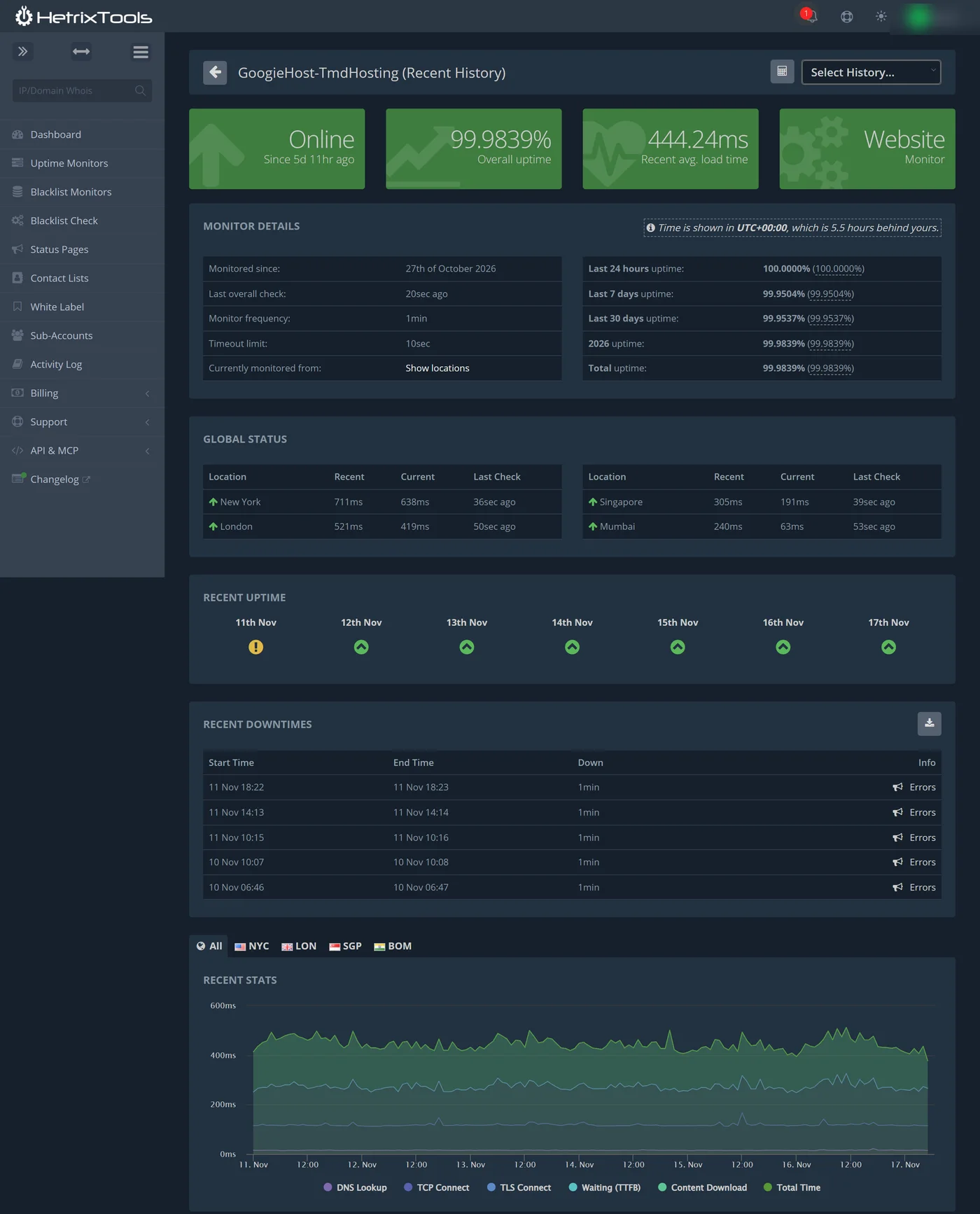
HetrixTools has watched the site every minute from New York, London, Singapore and Mumbai since October 27. Overall uptime so far is 99.9839%, with the last 24 hours at 100% and the last 7 days at 99.9504%. The monitor has run for about three weeks, so this is an early result and not a long-term record.
| Period | Uptime |
|---|---|
| Last 24 hours | 100.0000% |
| Last 7 days | 99.9504% |
| Last 30 days | 99.9537% |
| 2026 and total since October 27 | 99.9839% |
The downtime list is short: five drops of one minute each, on November 10 at 06:46 and 10:07 and on November 11 at 10:15, 14:13 and 18:22. That adds up to about five minutes in three weeks. Since November 12, nothing. The recent average load time was 444 ms, and by location it was 711 ms from New York, 521 ms from London, 305 ms from Singapore and 240 ms from Mumbai.
TMD’s own terms promise a credit when yearly downtime goes above 0.1%, which works out to a 99.9% uptime promise. We are comfortably inside that so far.
TMDHosting Load Test: Where Starter Hits Its Limit
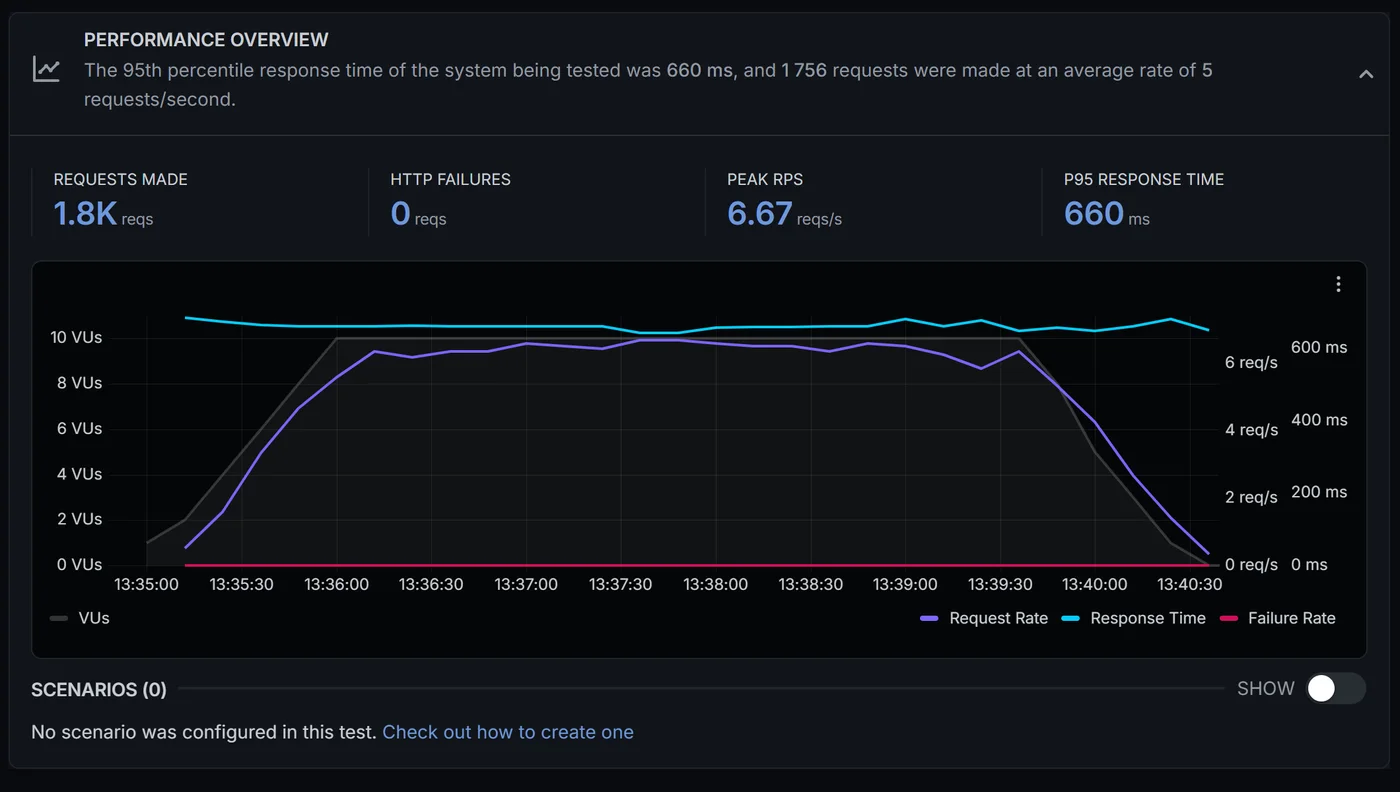
We ran two load tests, and they told two very different stories. With 10 virtual users for 5 minutes and 30 seconds, the site handled 1,756 requests with zero failures and a 95th percentile response time of 660 ms. That is a clean pass for a Starter plan.
| Test | Result |
|---|---|
| Virtual users and duration | 10 users, 5 min 30 s |
| Requests made | 1,756 at about 5 requests per second |
| HTTP failures | 0 |
| Peak requests per second | 6.67 |
| 95th percentile response time | 660 ms |
Then we pushed to 20 virtual users and 30.84% of the requests failed. That is where things got interesting, and it is also why we opened a support ticket. cPanel’s Resource Usage page showed 68 CPU faults and 1,100 I/O faults, and the account’s I/O limit was just 1 MB/s.
Why It Failed: Starter’s CloudLinux Limits
The reply to our ticket spelled out the Starter plan’s fixed CloudLinux limits, and these are worth knowing before you buy.
| Limit | Starter Plan |
|---|---|
| CPU | 100% of 1 core |
| Entry processes (concurrent connections) | 15 |
| I/O throughput | 1,024 KB/s (1 MB/s) |
| Physical memory | 1,024 MB (1GB) |
| IOPS | 1,024 |
| Processes (NPROC) | 100 |
Our 20-user test was simply bigger than 15 entry processes, so the extra requests queued or were rejected with 503 and 508 errors. The disk limit made it worse: TMD’s assistant noted that a disk read benchmark running on the account at the same time had already used 917.5 KB/s, which is 88% of the 1 MB/s cap. In other words, part of this was our own benchmark getting in the way, and that is fair to say. Still, the limits are real, and a busy uncached site will hit them.
These limits are fixed for the Starter plan. Page caching helps a lot, because cached pages skip PHP and the disk. Sites that expect more than about 15 visitors loading uncached pages at the same moment should start on Business or a managed VPS.
TMDHosting SSL and Security Test
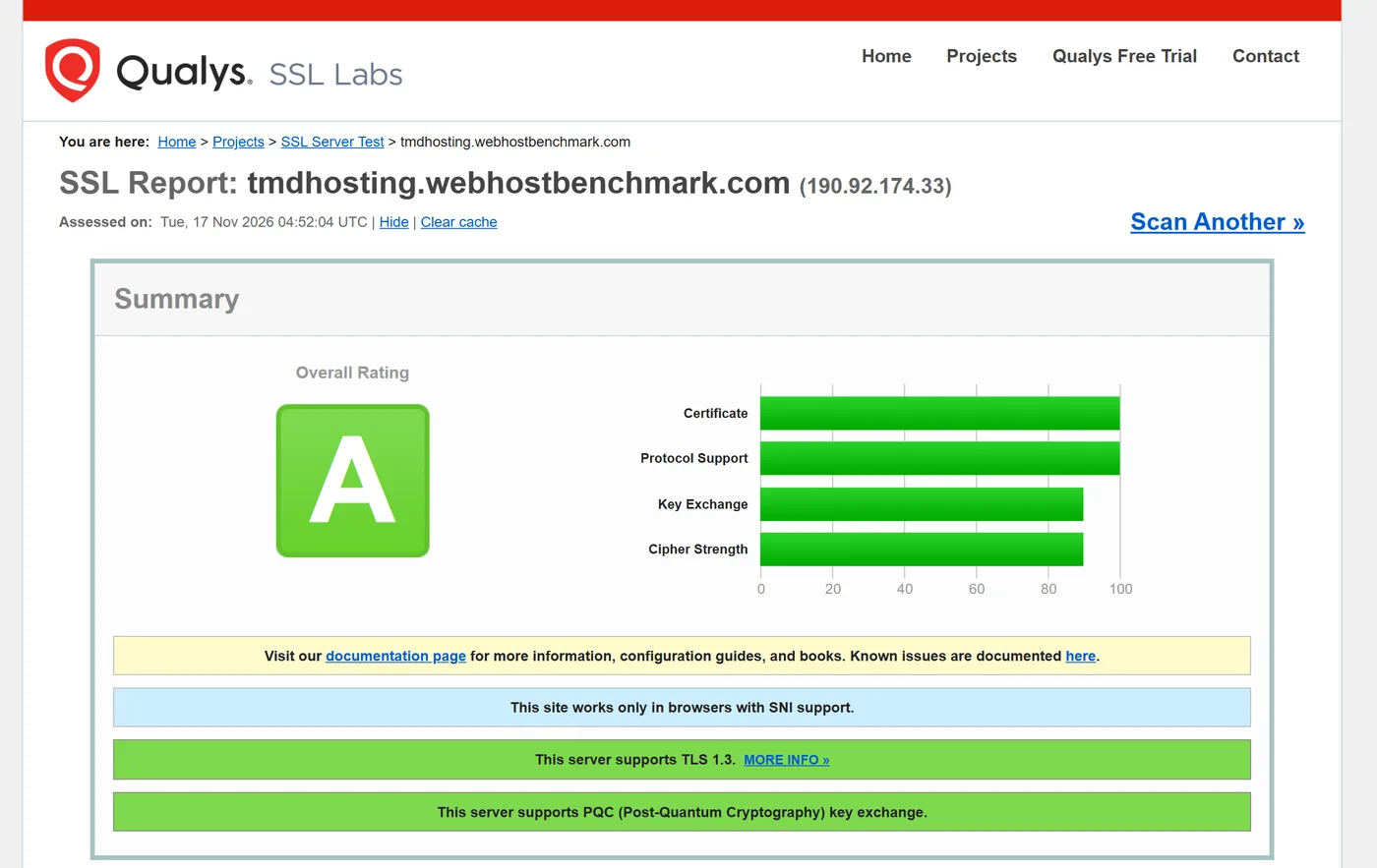
Security was a pleasant surprise. SSL Labs gave the site an A, with 100 for certificate and protocol support and about 90 for key exchange and cipher strength. The server supports TLS 1.3 and even post-quantum key exchange, which is still rare on budget hosting.
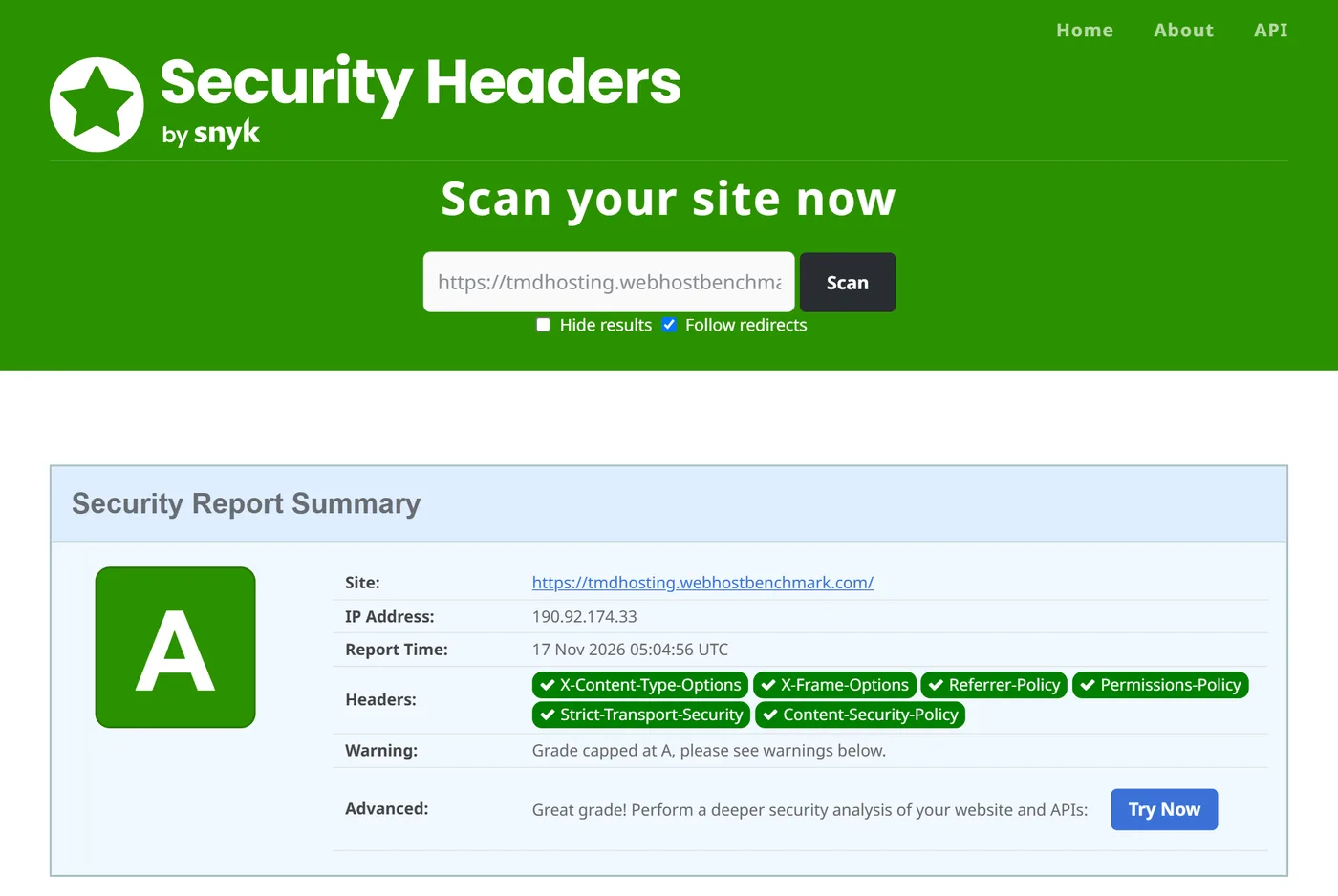
Security Headers also gave an A. Six headers were present: Strict-Transport-Security, Content-Security-Policy, X-Frame-Options, X-Content-Type-Options, Referrer-Policy and Permissions-Policy. The scan capped the grade at A and pointed to warnings below, so there is a little room left.
On top of that, TMD lists a CloudLinux-based environment, malware scanning, daily security audits by its team and N+1 redundancy on all components, plus SpamExperts filtering on mailboxes.
TMDHosting WP Benchmark: Server Performance Test
The WP Benchmark tool gave the server an overall score of 5.8 out of 10 on PHP 8.2.35. The CPU and memory side was strong, with iterative math at 9.33 and random binary operations at 8.25. The problem areas were the ones tied to disk and network access.
| Area | What We Saw | Verdict |
|---|---|---|
| CPU and memory | Iterative math 9.33, random binary 8.25, large text 7.24, floating point 6.89, recursive math 5.92 | Strong |
| Filesystem | Write, local copy and small file I/O all scored 0 | Limited by the 1 MB/s I/O cap |
| Database | Simple queries 8.1, temp tables 5.22, complex queries 4.76, large import 4.56 | Average |
| Object cache | Persistent object cache not enabled, score 0 | Missing |
| WordPress core | Option handling 8.02, hooks 7.97, taxonomy 7.99, JSON 7.57, content filtering 5, REGEX 0 | Good, with a REGEX gap |
| Compression and serialization | Base64 10, serialize 8.63, GZIP 7.93, deflate 5.13 | Good |
| Image processing | Image quality 8.01, GD filters 7.25, resize 5.18, thumbnails 4.56 | Average |
| Network | Download speed test scored 0 | Likely restricted on Starter |
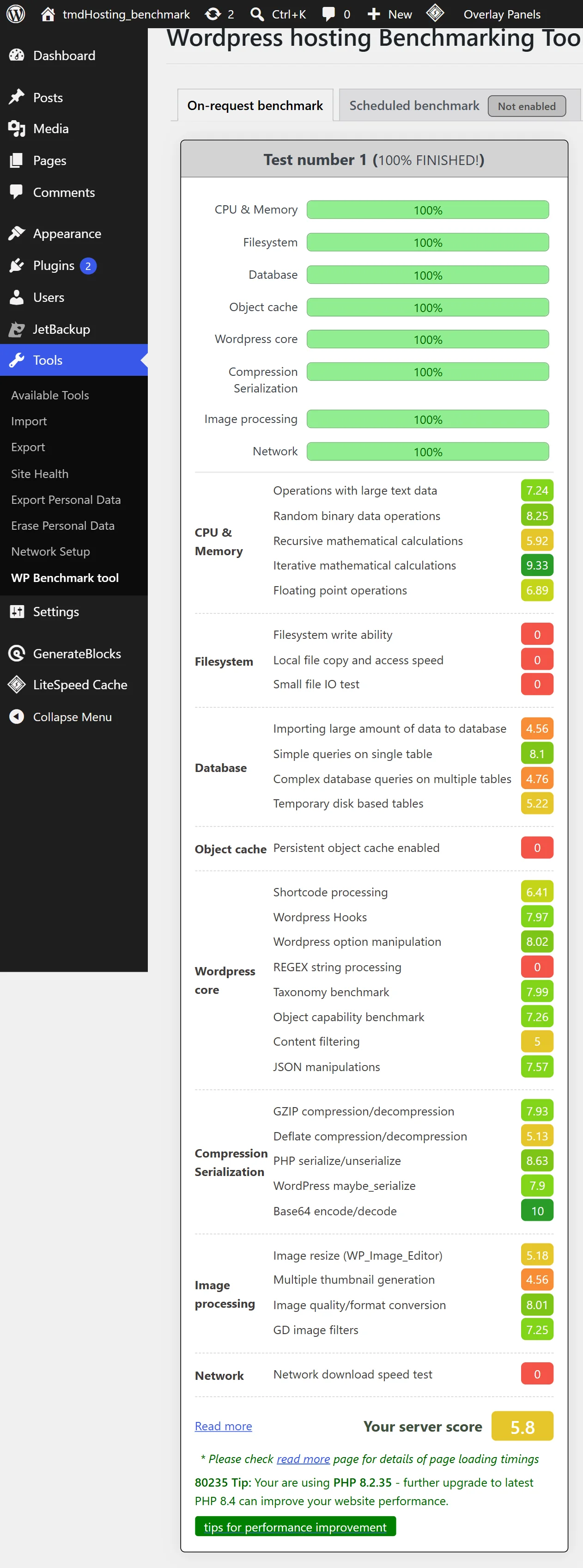
The zeros are the part to read carefully. Filesystem and network tests stress the disk, and the ticket tells us why they flatline: Starter caps I/O at 1 MB/s. So the 5.8 is a Starter-plan score, not a ceiling for TMD’s servers. The tool’s tip also said PHP 8.2.35 is behind and suggested PHP 8.4, which you can switch in cPanel.
TMDHosting Customer Support Test
TMDHosting support is promised 24/7 through tickets, live chat, Slack and phone, with a reply in under 15 minutes. We opened a ticket titled “Request to Investigate CPU and I/O Resource Limit Issues” and described the 68 CPU faults, the 1,100 I/O faults and the 30.84% failure rate. We asked three things: is the server throttling us, what can we optimize, and can the plan handle normal traffic.
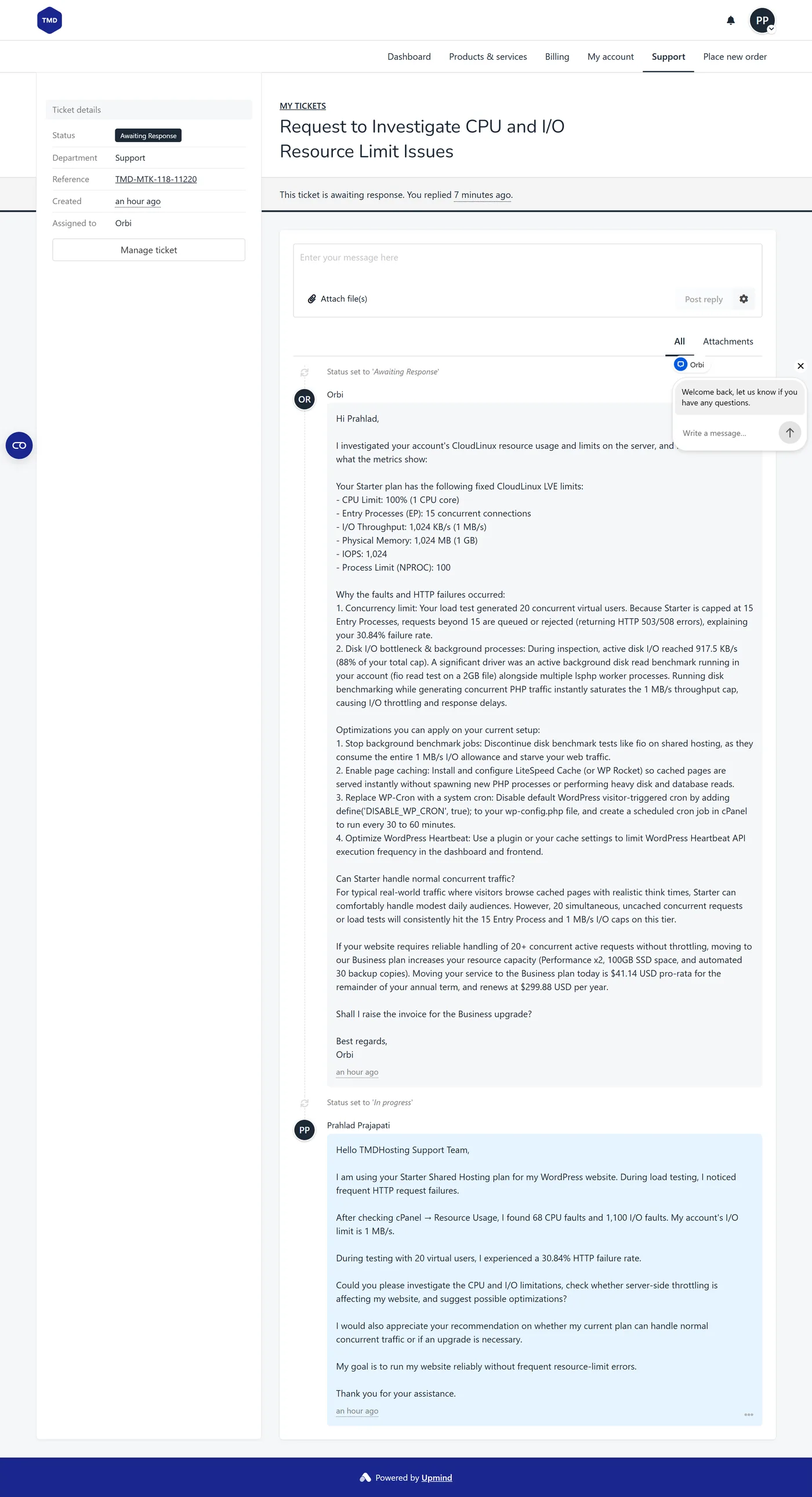
The first reply came from Orbi, the support assistant shown as the ticket owner, and it arrived within the hour, though we did not time it to the minute. It was better than we expected. It listed the exact CloudLinux limits, explained the failures, spotted our own background disk benchmark and gave four fixes: stop the benchmark jobs, enable LiteSpeed Cache or WP Rocket, replace WP-Cron with a real cron job every 30 to 60 minutes, and limit the WordPress Heartbeat.
It also answered the plan question honestly: Starter can handle modest daily traffic when visitors hit cached pages, but 20 simultaneous uncached requests will always hit the 15 entry process cap. And then it offered an upgrade to Business for $41.14 pro-rata, renewing at $299.88 a year. That is helpful advice with a sales pitch attached, which is normal, but worth knowing. We have not heard from a human yet, so we can only judge the first reply, and that one was good.
When you open a ticket, include numbers. We gave TMD our CPU fault count, the I/O fault count, the failure rate and the number of virtual users, and the reply was specific because of it.
TMDHosting Data Center Locations
TMD lists nine facilities on five continents. Its data center page names six of them, Chicago, London, Amsterdam, Singapore, Sydney and Tokyo, as available for all products. Mumbai, Johannesburg and Santiago appear in the full facilities list. Each facility is described as running over 500 Gbps of transit and peering capacity, on Supermicro servers with Juniper, Cisco and Dell network gear, and its facilities are certified under SSAE-16.
| Region | Locations |
|---|---|
| North America | Chicago, United States |
| Europe | London, United Kingdom and Amsterdam, Netherlands |
| Asia | Singapore, Tokyo, Japan and Mumbai, India |
| Oceania | Sydney, Australia |
| Africa | Johannesburg, South Africa |
| South America | Santiago, Chile |
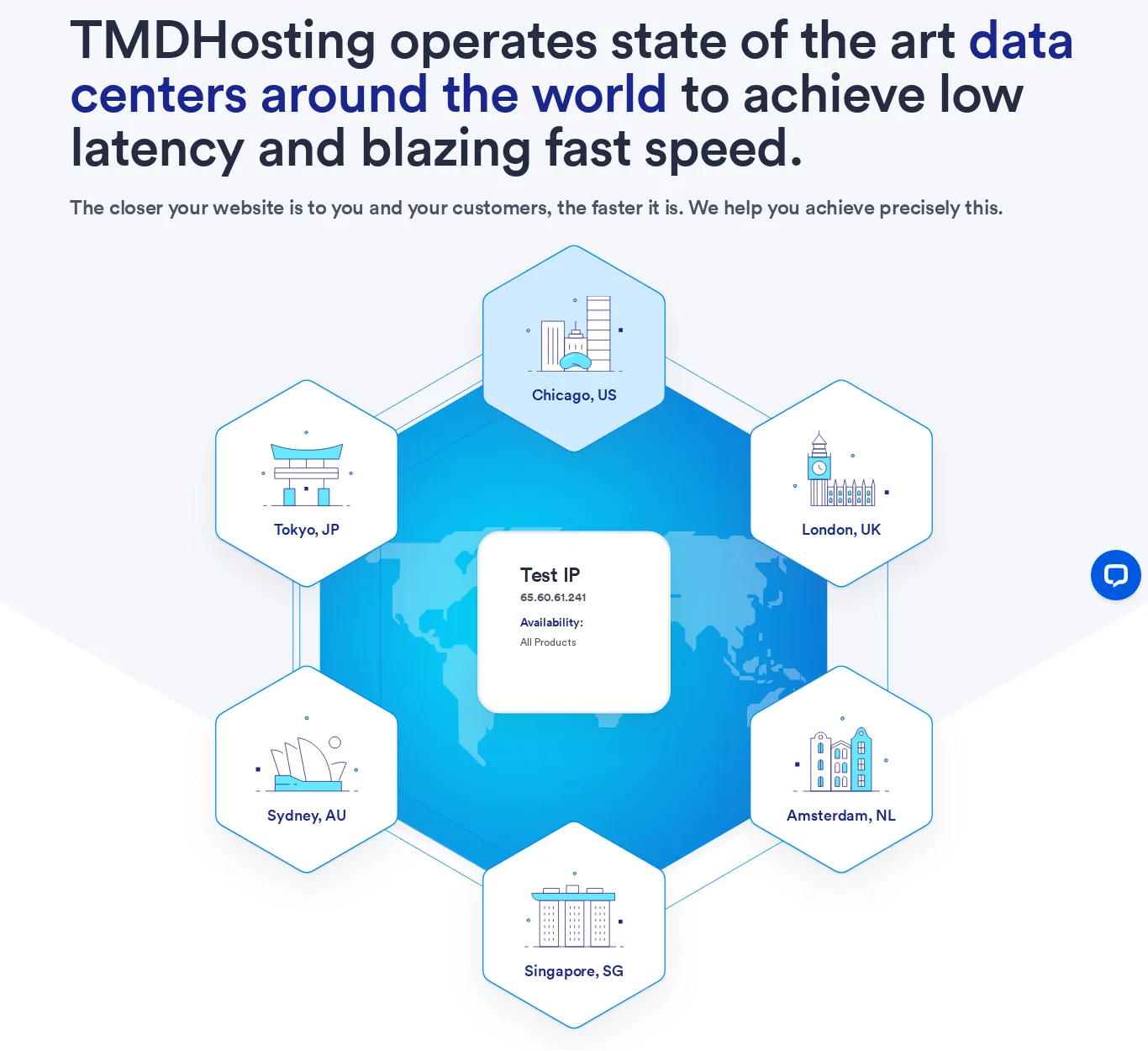
Our TTFB results make the case for choosing carefully. A site on the wrong continent scored slow, so match the data center to your audience when you order.
TMDHosting Pricing and Plans
TMD shows its shared hosting prices for a 3-year term, labeled as 20% off a regular monthly price. All plans include a free domain, free domain transfer, no setup fee, free SSL and a 30-day money-back guarantee.
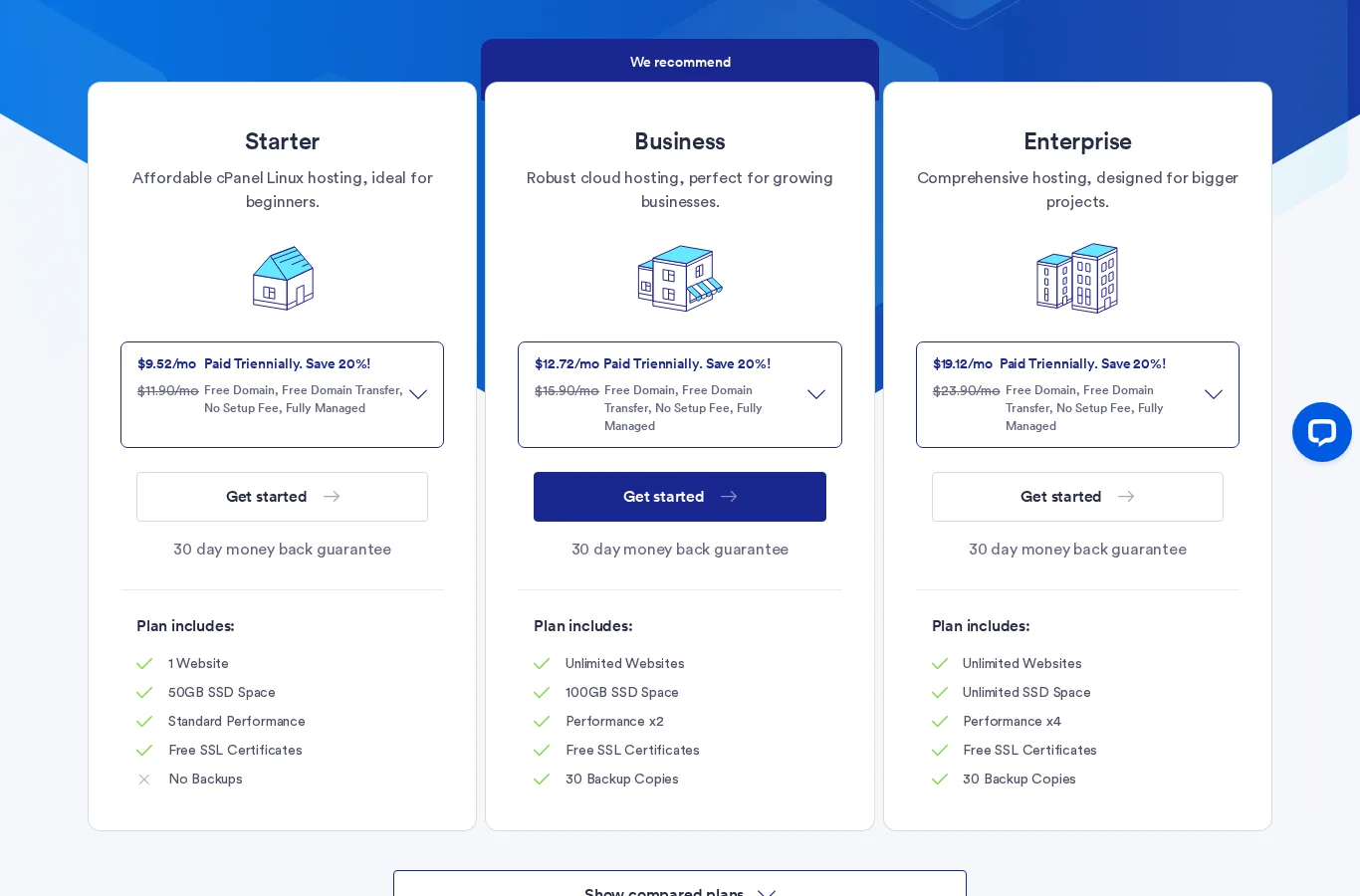
TMDHosting Shared Hosting Plans
| Plan | Websites and Storage | Performance and Backups | 3-Year Price | Regular Price | Get Deal |
|---|---|---|---|---|---|
| Starter | 1 website, 50GB SSD | Standard performance, no backups | $9.52/mo | $11.90/mo | Get Deal |
| Business | Unlimited websites, 100GB SSD | Performance x2, 30 backup copies | $12.72/mo | $15.90/mo | Get Deal |
| Enterprise | Unlimited websites, unlimited SSD | Performance x4, 30 backup copies | $19.12/mo | $23.90/mo | Get Deal |
TMDHosting WordPress Hosting Plans
| Plan | Websites and Storage | Extras | 3-Year Price | Regular Price | Get Deal |
|---|---|---|---|---|---|
| Starter | 1 website, 50GB SSD | 1-click staging, no backups | $9.99/mo | $12.49/mo | Get Deal |
| Business | Unlimited websites, 100GB SSD | 1-click staging, 30 backup copies, performance x2 | $13.03/mo | $16.29/mo | Get Deal |
| Enterprise | Unlimited websites, unlimited SSD | 1-click staging, 30 backup copies, performance x4 | $19.99/mo | $24.99/mo | Get Deal |
TMDHosting Managed VPS and Dedicated Servers
| Plan | CPU, RAM and Storage | Price | Get Deal |
|---|---|---|---|
| Managed cPanel 4GB | 2 cores, 4GB, 100GB NVMe | $69/mo | Get Deal |
| Managed cPanel 8GB | 4 cores, 8GB, 150GB NVMe | $109/mo | Get Deal |
| Managed cPanel 16GB | 8 cores, 16GB, 300GB NVMe | $169/mo | Get Deal |
| Managed cPanel 32GB | 16 cores, 32GB, 400GB NVMe | $279/mo | Get Deal |
| Managed dedicated server | From $159.99/mo (regular $199.99) | Fully managed | Get Deal |
TMDHosting Renewal Price: What You Really Pay
Here is the catch with the headline prices. They need three years paid upfront. Our own test account is on an annual term, and the ticket showed the Business plan renewing at $299.88 a year, which is $24.99 a month. That is nearly double the $12.72 headline, so the billing cycle matters a lot. If you plan to stay, pick the longer term. If you want to test the waters, expect to pay more per month.
If price is your main filter, compare it with the best cheap web hosting list before you commit.
Prices are in US dollars and can change. The $9.52 and $12.72 figures need a 3-year term paid upfront, and taxes are extra. The ticket showed a Business renewal of $299.88 a year on an annual term, so always confirm the price for your billing cycle in the TMD Portal before you pay.
TMDHosting Features
- LiteSpeed and CloudLinux: TMDHosting cPanel hosting runs on the LiteSpeed web server with LiteSpeed Cache and CloudLinux isolation, on all-SSD RAID-10 storage.
- cPanel and Softaculous: You get cPanel, the Softaculous one-click installer, multiple PHP versions and the latest MariaDB versions.
- Free Domain and Free Transfer: Every plan includes a free domain for the first year, and TMD’s specialists transfer an existing site for you with no downtime.
- 30 Backup Copies: Business and Enterprise keep 30 backup copies of files and databases. Starter has no backups, so plan your own.
- Email With Spam Filtering: Mailboxes are 2GB and protected by SpamExperts, and Cloudflare integration is available in cPanel.
- Staging for WordPress: WordPress plans include 1-click staging and cloning from the cPanel WordPress toolkit.
The Starter plan lists no backups. Set up your own backup routine from day one, or choose Business or Enterprise, which keep 30 copies of your files and databases.
TMDHosting Refund Policy and SLA
TMD gives a 30-day money-back guarantee on its products, except for domains, servers and certain third-party products. Older reviews, including an earlier version of this one, mention 60 days, but TMD’s current terms and plan pages say 30. That is still enough time to run your own speed and load tests, which we suggest you do in the first week.
The 30-day guarantee does not cover domains, servers or some third-party products. TMD also says setup and processing fees may apply and are not refunded, so read the terms before you order.
The uptime SLA is a credit, not a refund. If your server’s downtime passes 0.1% in a year, you can ask for a credit after at least 12 months of service, within 30 days of the year ending.
TMDHosting Pros and Cons
| ✅ Pros | ❌ Cons |
|---|---|
| 100 PageSpeed score on mobile and desktop | Starter caps at 15 entry processes and 1 MB/s I/O |
| A on SSL Labs and A on Security Headers, with TLS 1.3 | 20-user load test failed 30.84% of requests on Starter |
| 99.9839% uptime in our monitor | Starter has no backups |
| Detailed support reply within the hour | TTFB of 670 to 1,613 ms outside Asia without a CDN |
| Nine locations on five continents | No persistent object cache on our account |
| Free domain, free transfer and a 30-day refund | Headline prices need a 3-year term |
Is TMDHosting Good? Who Should Use It
- Small WordPress sites and blogs with caching on will fly on Starter.
- Site owners in India and Asia get very quick response times from the server we tested.
- People who want hands-on help will like the ticket reply we got.
- Busy stores and sites with traffic spikes should start at Business or a managed VPS.
- Global audiences should add a CDN or choose a nearby location.
Looking for TMDHosting alternatives? See our Hostinger review, Bluehost review, SiteGround review and Hosting.com review, or browse the best web hosting services and the best managed WordPress hosting.
TMDHosting Review Scorecard
| Category | Score | Why |
|---|---|---|
| Speed | 4.6 / 5 | 100 on PageSpeed, but slow TTFB far from the server |
| Uptime | 4.5 / 5 | 99.98% with five short drops |
| Support | 4.3 / 5 | Fast, detailed first reply, plus an upsell |
| Value | 3.8 / 5 | Good intro price, annual renewals cost far more |
| Ease of use | 4.3 / 5 | cPanel, Softaculous and a clear portal |
| Overall | 4.3 / 5 | Fast and secure, with tight Starter limits |
FAQ – TMDHosting Review
Is TMDHosting good?
Yes, with a caveat. In our tests it scored 100 on PageSpeed, held 99.98% uptime and earned an A for SSL and security headers. The caveat is the Starter plan’s resource limits, which a 20-user load test pushed past.
Is TMDHosting legit and safe?
Yes. It has been operating for over 15 years, runs a CloudLinux-based environment with malware scanning, and our test site passed SSL Labs with an A and Security Headers with an A.
How fast is TMDHosting?
Pages loaded very fast in our speed tests, with a 0.2 s desktop LCP. Server response depends on distance: 90 ms from Mumbai but 670 to 1,613 ms from most other regions, so choose a nearby data center or add a CDN.
How reliable is TMDHosting uptime?
HetrixTools showed 99.9839% uptime since October 27, 2026, with five one-minute drops and 100% over the last day. The monitor has run for about three weeks, so it is an early result.
How much does TMDHosting cost?
Shared hosting starts at $9.52 a month on a 3-year term, with a regular price of $11.90. WordPress hosting starts at $9.99 a month, managed VPS at $69 a month and managed dedicated servers at $159.99 a month.
Does TMDHosting include backups?
Business and Enterprise plans include 30 backup copies. The Starter plan lists no backups, so keep your own copies or upgrade.
What is the TMDHosting refund policy?
TMD offers a 30-day money-back guarantee on its products, except domains, servers and some third-party products. Some older reviews say 60 days, but its current pages say 30.
Where are TMDHosting data centers?
TMD lists nine facilities: Chicago, London, Amsterdam, Singapore, Sydney, Tokyo, Mumbai, Johannesburg and Santiago. Its data center page names the first six as available for all products.
How good is TMDHosting support?
TMD offers 24/7 support by ticket, chat, Slack and phone. Our ticket got a detailed reply within the hour that explained the plan limits and four fixes.
TMDHosting Review Verdict: Is It Worth It?
TMDHosting earned its good marks. The pages were fast, the security grades were strong, uptime stayed high and the support reply was thoughtful. If you run a small, cached WordPress site and you pick a data center near your visitors, Starter is a fair deal.
Just go in with open eyes. Starter’s CloudLinux limits are tight, the headline prices need a long term, and the numbers get less impressive far from the server. For anything busier, start at Business or look at a managed VPS, and run your own tests inside the 30-day refund window.
Rating Based on Expert Review




The kind and fast assistance was just the help I was searching for
The kind and fast assistance, the specific help I’ve got, and the guidance were great. I’m really glad to have such good assistance with your services.
Great support team and responsive customer care
I’ve had a very positive experience working with TMDHosting and their team. Throughout my recent interactions, the support staff showed professionalism, patience, and a genuine willingness to help and resolve matters properly.
I’d like to specifically thank the Technical Team, especially Viktor, Konstantin, Kancho, and Raqel, for their dedication and clear communication, as well as the Retention Team, particularly BEka and Dinda, for their understanding, support, and customer-focused approach.
It’s reassuring to work with a hosting provider that takes responsibility, listens carefully, and follows through until things are stable. I appreciate the effort and collaboration from everyone involved and look forward to continuing the partnership.
Consistently Excellent Support from TMD Hosting
I’ve been using TMD Hosting for some time now and have contacted their support team on several occasions. Every single time, the experience has been excellent.
The support is always prompt, professional, and reliable. No matter the issue, their team responds quickly and demonstrates true technical expertise. They don’t just give generic answers — they actually understand the problem and resolve it efficiently.
It’s very reassuring to work with a hosting provider whose support you can genuinely trust. TMD Hosting has proven to be dependable time and time again, and I highly recommend them to anyone looking for quality hosting backed by expert support.
Thank You Egy!
Thank you very much to Sutan Egy who got my website back on again quickly after it was down due to the maintenance message . Awesome customer service!
Terrible Customer Experience
I requested a cancellation the same day they charged me for renewal. They did not honor the cancellation and state I signed a bunch of paperwork I never signed. (I initially signed up 7 years ago and was on auto renewal after. The initial paperwork was never resent, despite 7 years passing.) The way they treat a longtime customer is ridiculous.
STAY AWAY FROM TMDHOSTING
STAY AWAY – they don’t understand anything and dont fix your problem. i have been without mail for a week now
I had an issue with my hosting account…
I had an issue with my hosting account and the support I received was excellent. Jansen Pusung was fast, professional, and very helpful. They resolved the problem quickly and explained everything clearly. Great service — thank you!
thanks carlo
The agent (Carlos A) was very supportive, active, polite and willing to help.