










Expert Review
Bluehost is one of the most famous names in web hosting, and you have probably seen it on WordPress.org’s list of recommended hosts. But does a big name still mean a fast, reliable and fairly priced host in 2026? We wanted real answers, not marketing claims.
So we set up a Bluehost plan, installed WordPress on a test site called googiebench.com and tracked it for more than a week. We measured uptime from four cities, ran Google PageSpeed Insights and a WordPress server benchmark, explored the new AI-powered dashboard and tested live chat support with a real technical question.
In this Bluehost hosting review, you will see every result with screenshots, the current prices and renewal rates, the pros and cons we found and who Bluehost is really right for.
⚡ Key Takeaways
✅ 100% uptime from 27 October to 4 November 2026
✅ PageSpeed 97/100 on mobile and 100/100 on desktop
✅ 8.9/10 in a WordPress server benchmark
✅ AMD EPYC server hardware (found over SSH, not shared by sales)
✅ Object cache enabled on the server side (4 of 4 cache tests scored 10/10)
✅ AI website builder with a 14-day free trial (billed separately from hosting)
⚠️ The dashboard is full of promo banners and upsells
⚠️ Live chat starts with an AI bot (about 5 minutes to a human), sales agents lack technical knowledge and there is no ticket option in the dashboard
⚠️ Starter renews at $9.99/mo after the $3.99/mo intro price
Bluehost Review at a Glance
| Our Findings | |
|---|---|
| 🚀 Speed | PageSpeed 97/100 on mobile and 100/100 on desktop |
| ⏰ Uptime | 100% from 27 October to 4 November 2026 |
| ⚡ Avg. Load Time | 161.35 ms across New York, London, Singapore and Mumbai |
| 🖥️ Server Score | 8.9/10 in the WordPress hosting benchmark |
| 👩🏻💻 Support | 24/7 chat and phone; AI chatbot first, a human took about 5 minutes |
| 💰 Pricing | From $3.99/mo on a 36-month term, renews at $9.99/mo |
| ♻️ Refund | 30-day money-back guarantee |
| 🌎 Data Centers | USA, Canada, UK, Netherlands, India and more |
Our verdict: Bluehost delivered perfect uptime, excellent PageSpeed scores and a strong 8.9/10 server score in our tests. It is a great fit for beginners and WordPress users who want an easy dashboard, but watch the renewal prices and be ready for an AI chatbot before you reach a human, which took us about 5 minutes.
What Is Bluehost?
Bluehost is a web hosting company founded in 2003 and based in Jacksonville, Florida. It is part of Newfold Digital, the group behind several well-known hosting brands, and it says it serves more than 5 million customers in over 100 countries.
Bluehost is best known for WordPress hosting. It is an official WordPress.org partner and recommended host, and its plans come with WordPress installed, a free SSL certificate from Let’s Encrypt, a free domain for the first year and a dashboard built for beginners. Besides shared and WordPress hosting, Bluehost sells WooCommerce, VPS and dedicated server plans.
What’s New at Bluehost in 2026?
If you last looked at Bluehost a few years ago, a lot has changed. Here is what we noticed in our account:
- New AI Dashboard: An “Ask Bluehost AI” search bar answers questions and finds settings across your account.
- AI Sites, AI Store and AI Agents: Build a website or an online store from a short description, with AI agents for extra tasks.
- AI All Access Pack: The dashboard promotes one $20/month subscription for ChatGPT, Claude, Gemini and Grok.
- NVMe Storage: Shared plans now list NVMe SSD storage, from 10 GB on Starter to 100 GB on eCommerce Essentials.
- DDR5 VPS and Dedicated Servers: VPS and dedicated plans run on DDR5 RAM with NVMe storage.
How We Tested Bluehost
We set up a Bluehost Personal Plan with a 1 GB disk quota and built a real WordPress blog on googiebench.com, with a theme, images and plugins like any normal site. Because of the small quota, we did not run heavy disk tests. Bluehost placed our account in its Mumbai, India data center. The domain uses Cloudflare DNS, which many site owners add for extra protection.
- Uptime and load time: HetrixTools checked the site every minute from New York, London, Singapore and Mumbai.
- Page speed: Google PageSpeed Insights (Lighthouse) on mobile and desktop.
- Server power: a WordPress hosting benchmark plugin that tests CPU, memory, database, cache, file system and more.
- Support: a real SSH access question in Bluehost live chat.
Bluehost Speed Test: Google PageSpeed Insights
This Bluehost speed test shows how a normal WordPress site performs. Speed matters because visitors leave slow sites and Google uses Core Web Vitals as a ranking signal. We ran Google PageSpeed Insights on our Bluehost test site on 4 November 2026, and the results were excellent.
| Metric | Mobile | Desktop |
|---|---|---|
| Performance score | 97/100 | 100/100 |
| First Contentful Paint (FCP) | 1.3 s | 0.3 s |
| Largest Contentful Paint (LCP) | 1.3 s | 0.6 s |
| Total Blocking Time (TBT) | 0 ms | 0 ms |
| Cumulative Layout Shift (CLS) | 0 | 0.003 |
| Speed Index | 4.4 s | 0.5 s |
| Accessibility / Best Practices | 100 / 100 | 100 / 100 |
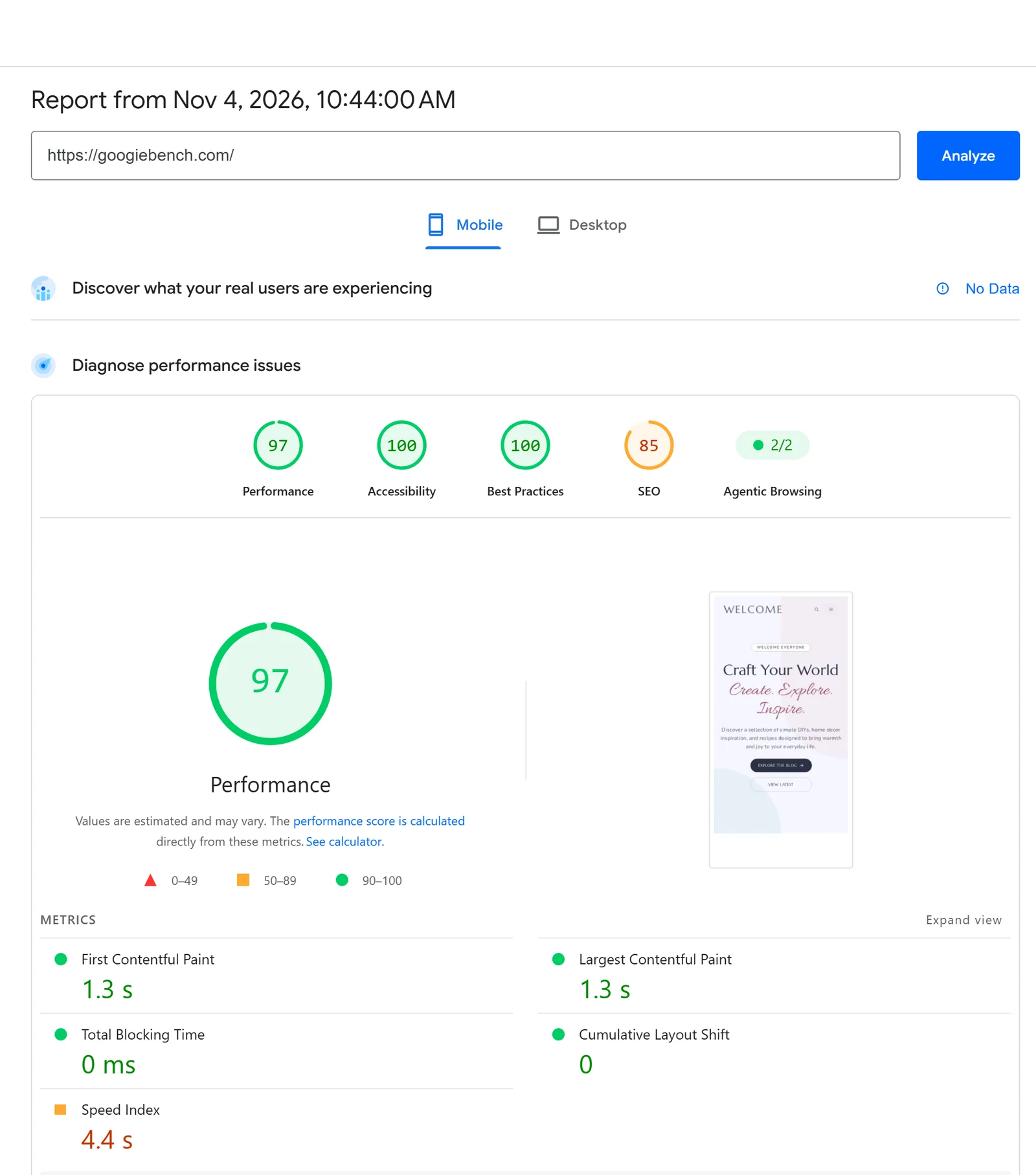
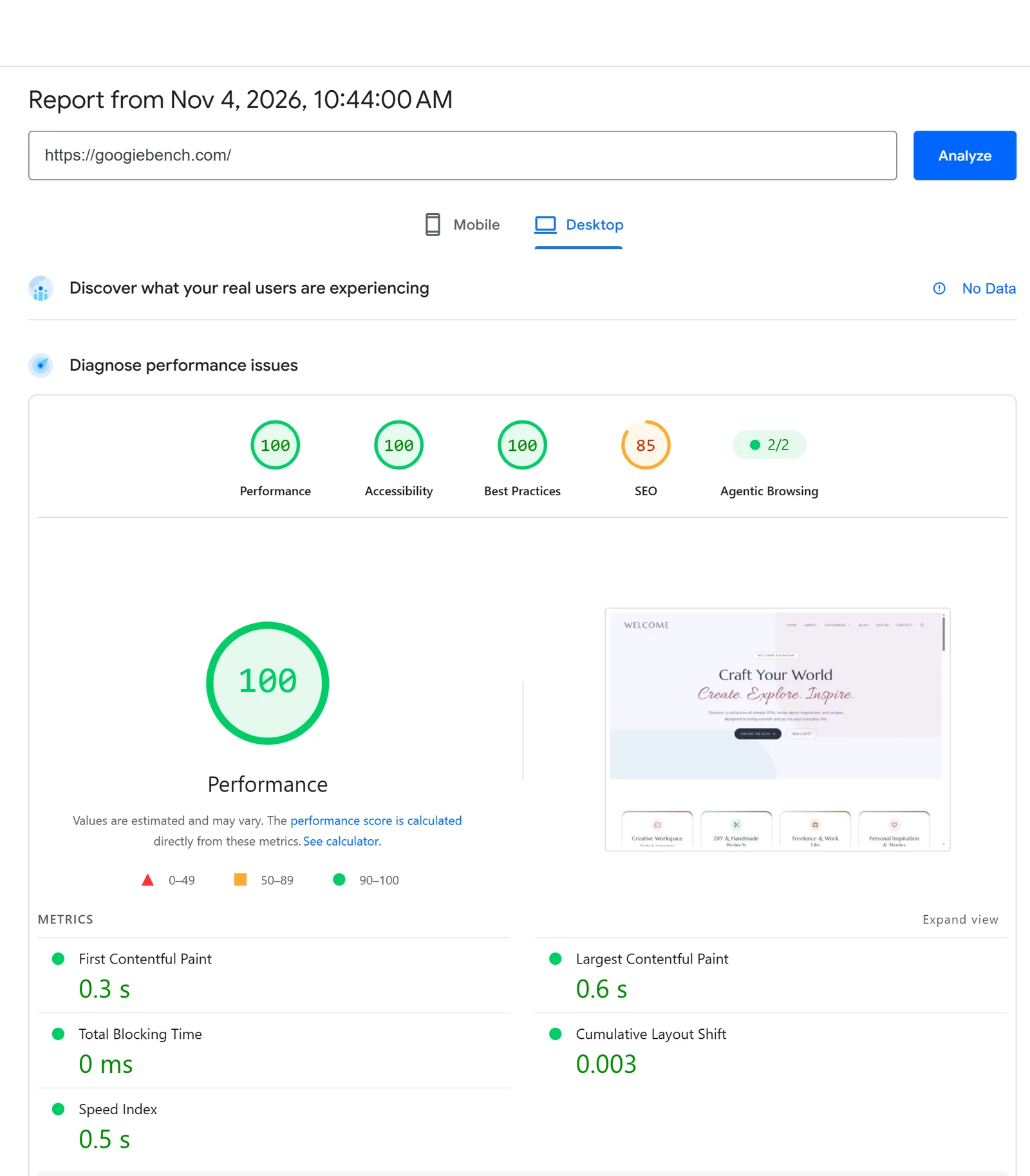
An LCP of 1.3 seconds on mobile is well inside Google’s 2.5-second “good” limit, and zero blocking time means the page responds instantly. The only weaker number was the mobile Speed Index of 4.4 seconds, which you can usually improve with image optimization and a caching plugin. Our WordPress speed optimization guide shows how.
Bluehost Uptime and Response Time Test
Uptime is the share of time your website is online. We added googiebench.com to HetrixTools on 27 October 2026 and checked it every minute from four locations. Here is what our Bluehost uptime monitoring showed:
| Check | Result |
|---|---|
| Overall uptime | 100.0000% |
| Downtime | None recorded |
| Average load time | 161.35 ms |
| New York | 129 ms |
| London | 139 ms |
| Singapore | 146 ms |
| Mumbai | 232 ms |
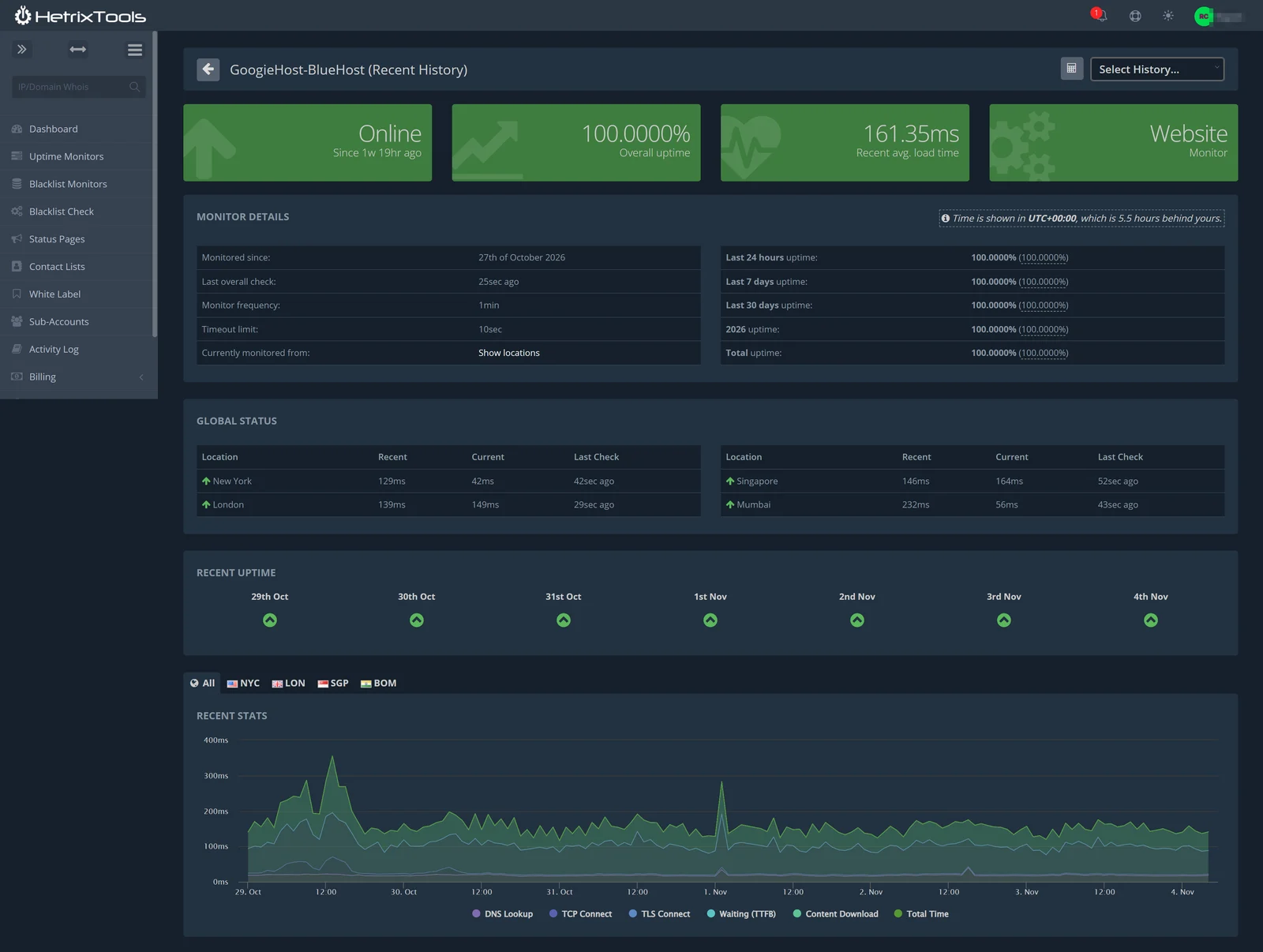
Our site never went down, and every day from 29 October to 4 November shows a green check. Bluehost backs its plans with a 99.99% uptime SLA, and our results matched it. Response times stayed between about 100 ms and 200 ms most of the time, with short spikes on 29 October and 1 November that did not cause any downtime.
Bluehost DNS, TTFB and Ping Tests (With Cloudflare)
We also ran DNS, network, TTFB and ping tests on googiebench.com. One important detail: our test domain sits behind Cloudflare, a free CDN and DNS service that many Bluehost customers add. That changes what these tools measure, so read each result with the notes below.
Bluehost DNS Test
| DNS Resolver | Lookup Time |
|---|---|
| 30 ms | |
| Quad9 | 46 ms |
| OpenDNS | 79 ms |
| Cloudflare | 524 ms |
| Average of 4 resolvers | 170 ms |
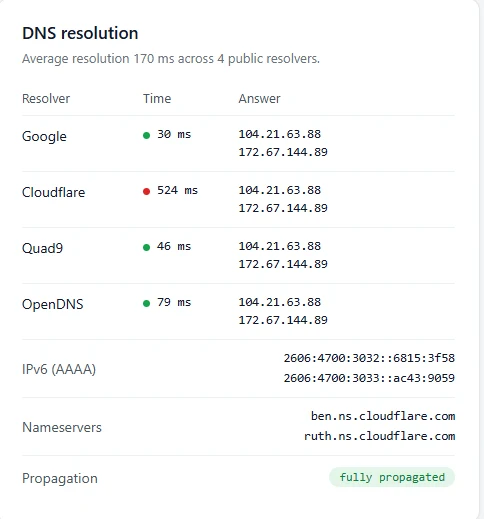
Three of the four resolvers answered in under 80 ms, and the slowest result, 524 ms from Cloudflare’s resolver, pulled the average up to 170 ms. The domain returned both IPv4 and IPv6 (AAAA) records, used Cloudflare nameservers and showed as fully propagated.
Bluehost Network and TTFB Test
The network test measured the time it takes to connect to the site and receive the first byte (TTFB):
| Network Step | Result |
|---|---|
| DNS lookup | 89 ms |
| TCP connect | 145 ms |
| TLS handshake | 219 ms |
| Time to first byte (TTFB) | 287 ms |
| Total response time | 288 ms |
| HTTP version | HTTP/2 |
| Compression | GZIP |
| Transfer size | 3.0 KB |
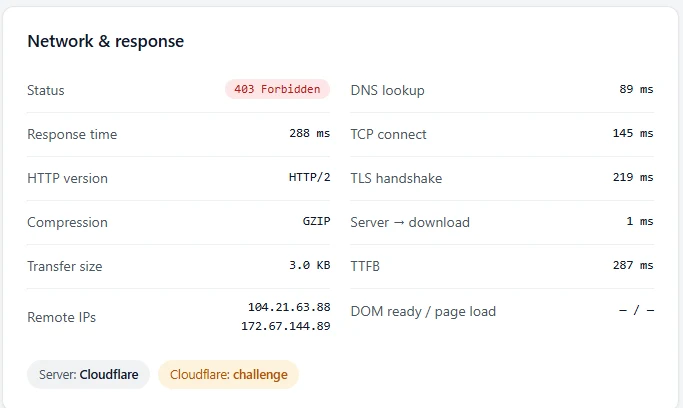
We then ran a TTFB test from 22 locations around the world. Every location got the same 403 page from Cloudflare’s bot check, so the timings show how fast Cloudflare answers, not how fast the Bluehost server is:
| Test Location | TTFB |
|---|---|
| São Paulo, Brazil | 36 ms |
| Dallas, USA | 38 ms |
| Toronto, Canada | 50 ms |
| Johannesburg, South Africa | 56 ms |
| Sydney, Australia | 99 ms |
| London, UK | 124 ms |
| Tokyo, Japan | 180 ms |
| Singapore | 256 ms |
| Mumbai, India | 273 ms |
| Delhi, India | 287 ms |
| Doha, Qatar (slowest) | 489 ms |

Bluehost Ping Test
A ping test from more than 50 locations got 4 out of 4 replies everywhere. Most locations answered in 0.6 to 2.5 ms, because the replies came from a nearby Cloudflare server:
| Test Location | Average Ping |
|---|---|
| Frankfurt, Germany | 1.5 ms |
| Amsterdam, Netherlands | 1.9 ms |
| London, UK | 2.2 ms |
| New York, USA | 2.4 ms |
| Los Angeles, USA | 1.9 ms |
| São Paulo, Brazil | 1.3 ms |
| Singapore | 2.0 ms |
| Tokyo, Japan | 2.1 ms |
| Rajpura, India | 14.4 ms |
| Hong Kong | 197.2 ms |

Important: These three tests measure Cloudflare, not Bluehost. Our test site sits behind Cloudflare, so the testing tools received Cloudflare’s bot-check page (403) and the IP addresses they reached, 104.21.63.88 and 172.67.144.89, belong to Cloudflare. A 1 to 2 ms ping shows how close Cloudflare’s servers are, not how fast Bluehost’s server is. Our HetrixTools uptime and load-time checks also went through Cloudflare. For raw server speed, use the PageSpeed and benchmark results in this review.
Why it matters: Putting Cloudflare in front of a Bluehost site gives visitors worldwide a fast answer from a nearby Cloudflare server, which hides the distance to the origin. It is a good setup, and it works with Bluehost. To measure the Bluehost server itself, switch the Cloudflare record to DNS only for a few minutes and run the tests again.
Bluehost Load Test: How Does It Handle Traffic?
We ran a 5 minute load test with Artillery, a free load testing tool, against our test site. It simulated 3,180 virtual visitors browsing the site and sent 9,540 requests at about 33 requests per second. None of the virtual visitors failed, and the mean response time was 17.9 ms.
| Load Test Metric | Result |
|---|---|
| Test duration | 5 minutes 2 seconds |
| Virtual users created and completed | 3,180 and 3,180 |
| Virtual users failed | 0 |
| Total requests | 9,540 |
| Request rate | 33 requests per second |
| HTTP status codes returned | 9,540 x 403 (Cloudflare) |
| Response time (min, mean, median) | 12 ms, 17.9 ms, 16.9 ms |
| Response time (p95, p99, max) | 22.9 ms, 27.9 ms, 167 ms |
| Downloaded data | 0 bytes |
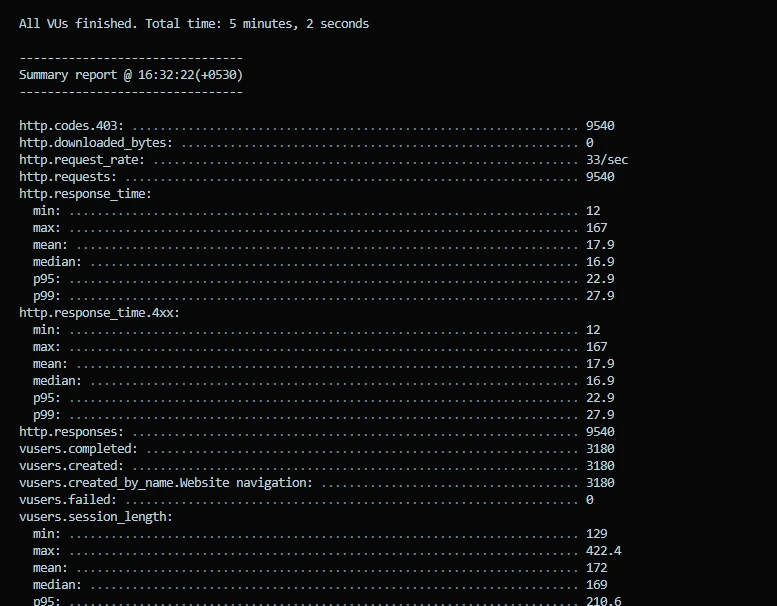
Important: Every one of the 9,540 requests got a 403 response and no page data was downloaded. Our test site sits behind Cloudflare, which treated the load test as a bot and answered from its own network. So this result shows Cloudflare absorbing a burst of traffic with no failures, not how many visitors Bluehost’s server can handle. We are not counting it as a Bluehost capacity score.
Tip: To measure Bluehost itself, switch the Cloudflare record to DNS only, or allow the tester’s IP address in Cloudflare, then run the same test again. Shared hosting is built for steady small and medium traffic. If your site regularly receives sudden spikes, a cache plugin, Cloudflare in front, or a VPS gives more headroom.
Bluehost SSL Test: Grade A on All Four Addresses
We scanned our test site with the Qualys SSL Labs server test, the standard check for HTTPS configuration. The report tested four server addresses and gave grade A on all four.
| Tested Address | Type | SSL Labs Grade |
|---|---|---|
| 2606:4700:3033::ac43:9059 | IPv6 | A |
| 2606:4700:3032::6815:3f58 | IPv6 | A |
| 172.67.144.89 | IPv4 | A |
| 104.21.63.88 | IPv4 | A |
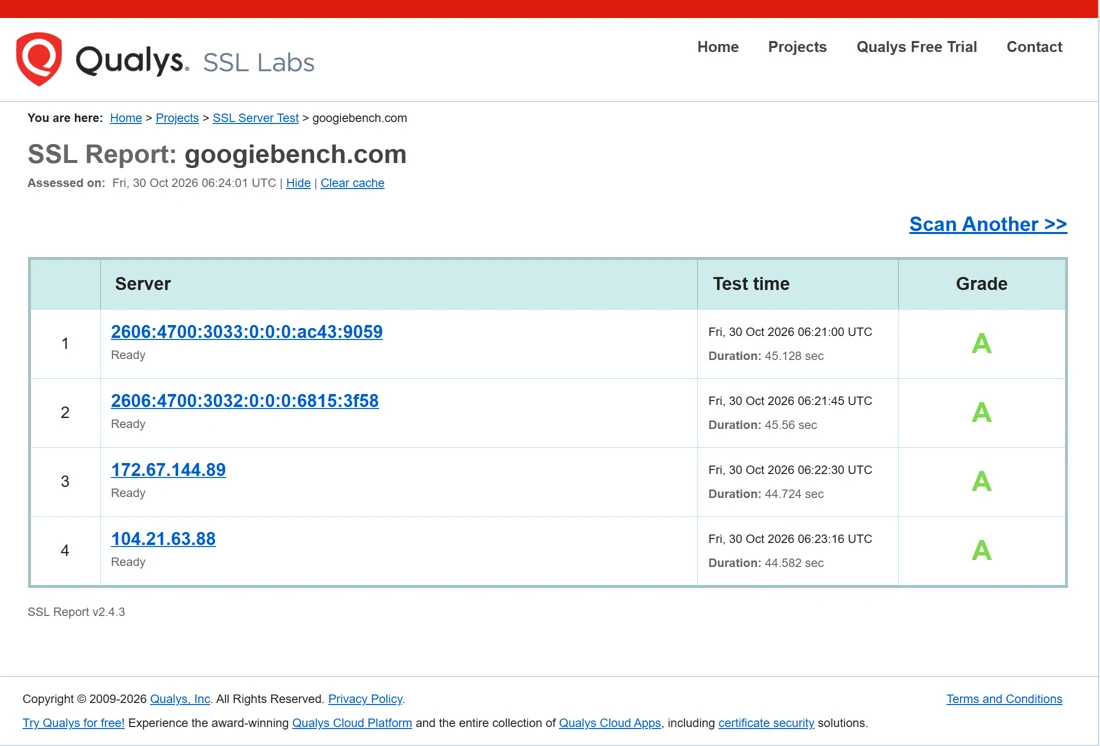
Important: All four addresses belong to Cloudflare, because our test site uses Cloudflare. The A grade therefore reflects Cloudflare’s HTTPS setup in front of the site. Bluehost includes a free SSL certificate on its plans, and with Cloudflare in front, visitors get a modern, secure connection either way.
Bluehost Server Performance Benchmark
Page speed tests mostly measure the front end, so we also tested the server itself with a WordPress hosting benchmark plugin. It runs real workloads on the server and scores each one out of 10. Bluehost scored 8.9 out of 10 overall.
| Test Area | Highlights | Score Range |
|---|---|---|
| CPU & Memory | Large text data 10, iterative math 10, floating point 9.44 | 7.04 to 10 |
| File System | Write ability 10, file copy 10, small file I/O 9.58 | 9.58 to 10 |
| Database | Simple and complex queries 10, large imports 8.04 | 5.08 to 10 |
| Object Cache | Persistent cache read, write and mixed use all 10 | 10 |
| WordPress Core | Hooks 10, JSON 10, options 9.78 | 6.49 to 10 |
| Compression | GZIP 9.82, PHP serialize 9.37, Base64 10 | 8.03 to 10 |
| Image Processing | GD filters 9.72, image resize 7.87 | 6.44 to 9.72 |
| Network | Download speed test | 8.67 |
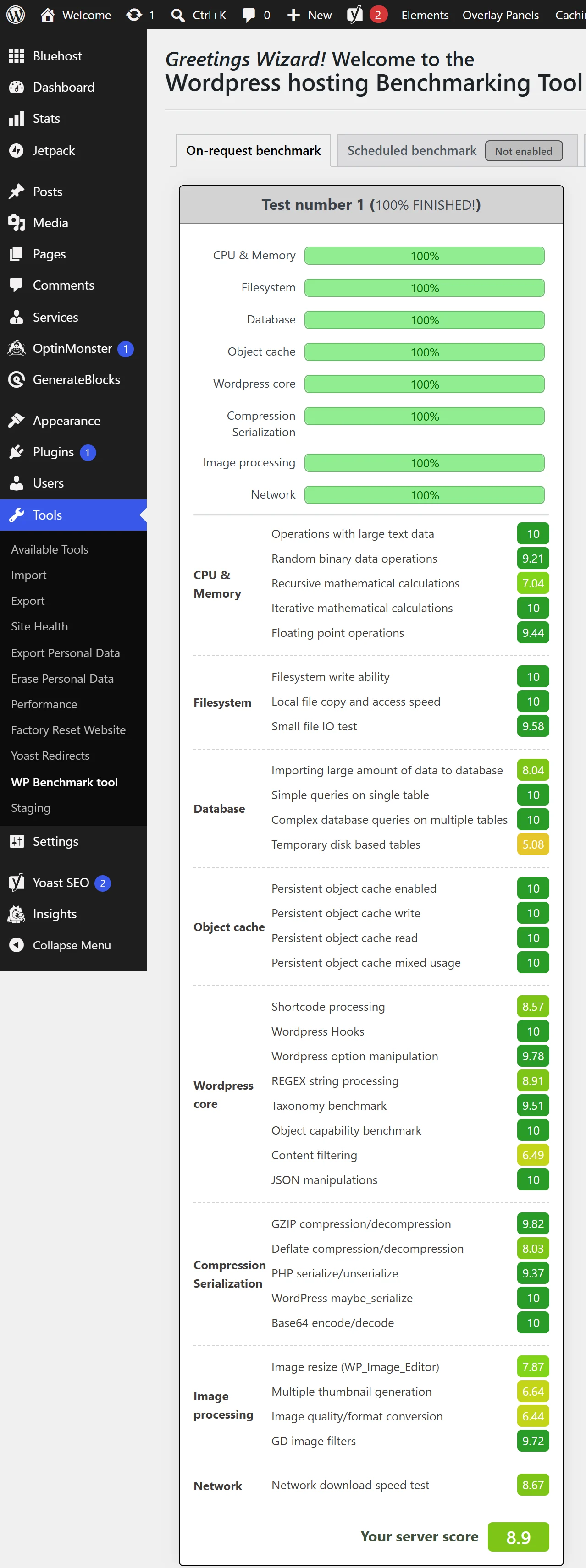
The file system, object cache and most database queries hit perfect scores, which is great for a busy WordPress site. The weakest results were temporary disk-based database tables at 5.08 and image format conversion at 6.44, so very heavy WooCommerce stores or image-heavy galleries may feel the limits of shared hosting sooner.
Bluehost Object Cache: Enabled on the Server Side
A persistent object cache stores database query results in memory, so a dynamic WordPress or WooCommerce site does not rebuild the same data on every visit. On our Bluehost account the persistent object cache was already enabled from the server side, and all four object cache tests in the benchmark scored a perfect 10/10: enabled, write, read and mixed usage.
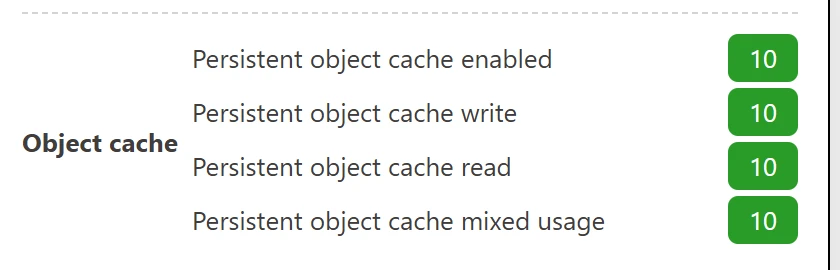
Why it matters: With server-side object cache you get faster database-heavy pages, such as WooCommerce carts and logged-in dashboards, without setting up caching yourself on the shared plan.
What CPU Does Bluehost Use? AMD EPYC, Checked Over SSH
Bluehost’s sales chat would not tell us which processors its shared servers use, so we checked ourselves. We ran the free Yet-Another-Bench-Script over SSH on our shared hosting account. Here is what the server reported:
| What We Checked | What the Server Reported |
|---|---|
| Processor | AMD EPYC 9J45 128-Core Processor |
| CPU cores our account sees | 20 at about 2.70 GHz |
| Virtualization | KVM virtual machine, AMD-V enabled |
| AES-NI | Enabled |
| RAM | 58.6 GiB |
| Disk | 1.3 TiB |
| Server uptime | 40 days, 14 hours |
| Kernel | 5.14.0 (Enterprise Linux 9) |
| Network provider | Oracle Corporation (AS31898) |
| Location | Mumbai, Maharashtra, India |
| IPv4 / IPv6 | IPv4 online, IPv6 offline |
Key finding: Two Bluehost chat agents refused to name the processor, but one benchmark command over SSH shows modern AMD EPYC hardware on Oracle Corporation’s network in Mumbai, with 58.6 GiB of RAM and 40 days of uptime.
Keep in mind: These figures describe the whole shared virtual machine, which other Bluehost customers also use, not the resources reserved for your plan. Our 1 GB disk quota also stopped the script’s disk and network tests part-way with “user block limit reached” and “Disk quota exceeded” errors, so we do not publish disk or network speed numbers from this run.
Our take on sales and support: Someone with technical knowledge can find this information over SSH, but most customers cannot. When we asked sales and support for basic technical details, we got a refusal, a sales pitch or a transfer. If you are not technical, do not expect Bluehost’s chat to explain your server, so check the details you need before you buy.
Bluehost Dashboard and Ease of Use
Bluehost has a brand-new dashboard built around AI. Instead of only cPanel, you get a clean portal with an “Ask Bluehost AI” search bar, AI Sites, AI Store and AI Agents, plus your websites, email, domains, hosting, security and billing in one menu.

The Hosting page shows your disk usage, websites, data center, nameservers (ns1.bluehost.com and ns2.bluehost.com), SSH keys, FTP access and the server IP. One click opens cPanel, cPanel Email or the File Manager, so developers still get the classic tools they know.
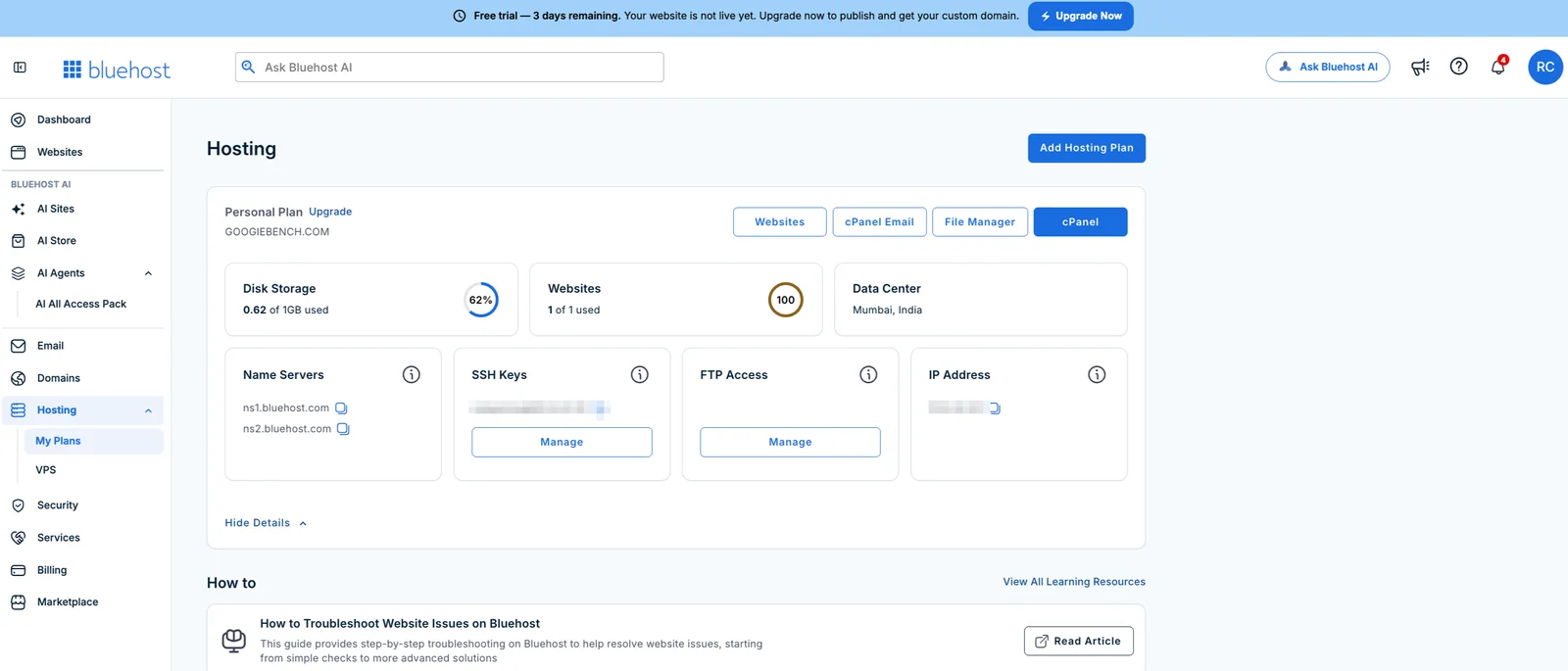
We liked how easy everything was to find. Two things to know: the Website Metrics panel only works after you connect a custom domain, and the dashboard shows a lot of promotions, which we list in detail below.
Bluehost Dashboard Ads and Promotions: What to Expect
The new Bluehost dashboard is full of promotional banners. Almost every page has an offer, an upgrade button or a paid add-on, so you should know what is coming before you sign up. These are all the promotions we saw in our account during the test:
| Where We Saw It | What the Promotion Said |
|---|---|
| Top banner on every page | “Free trial, 3 days remaining. Your website is not live yet. Upgrade now to publish and get your custom domain,” with an Upgrade Now button |
| Dashboard: security card | “Real Protection, Real Experts”: AI-powered detection and hands-on cleanup, 50% off with code BHSECURE50 |
| Dashboard: Black Friday bundle | “The more you add, the more you save”: 15% off one product, 20% off two and 25% off three or more, with a Build Your Bundle button |
| Dashboard: AI models card | “Four AI models. One $20 bill”: ChatGPT, Claude, Gemini and Grok in one subscription, also listed as AI All Access Pack in the sidebar |
| Dashboard: VPS card | A banner promoting Bluehost’s own VPS hosting plans |
| Dashboard: Website Metrics | Locked behind a “Connect Domain to Enable” button until you add a domain |
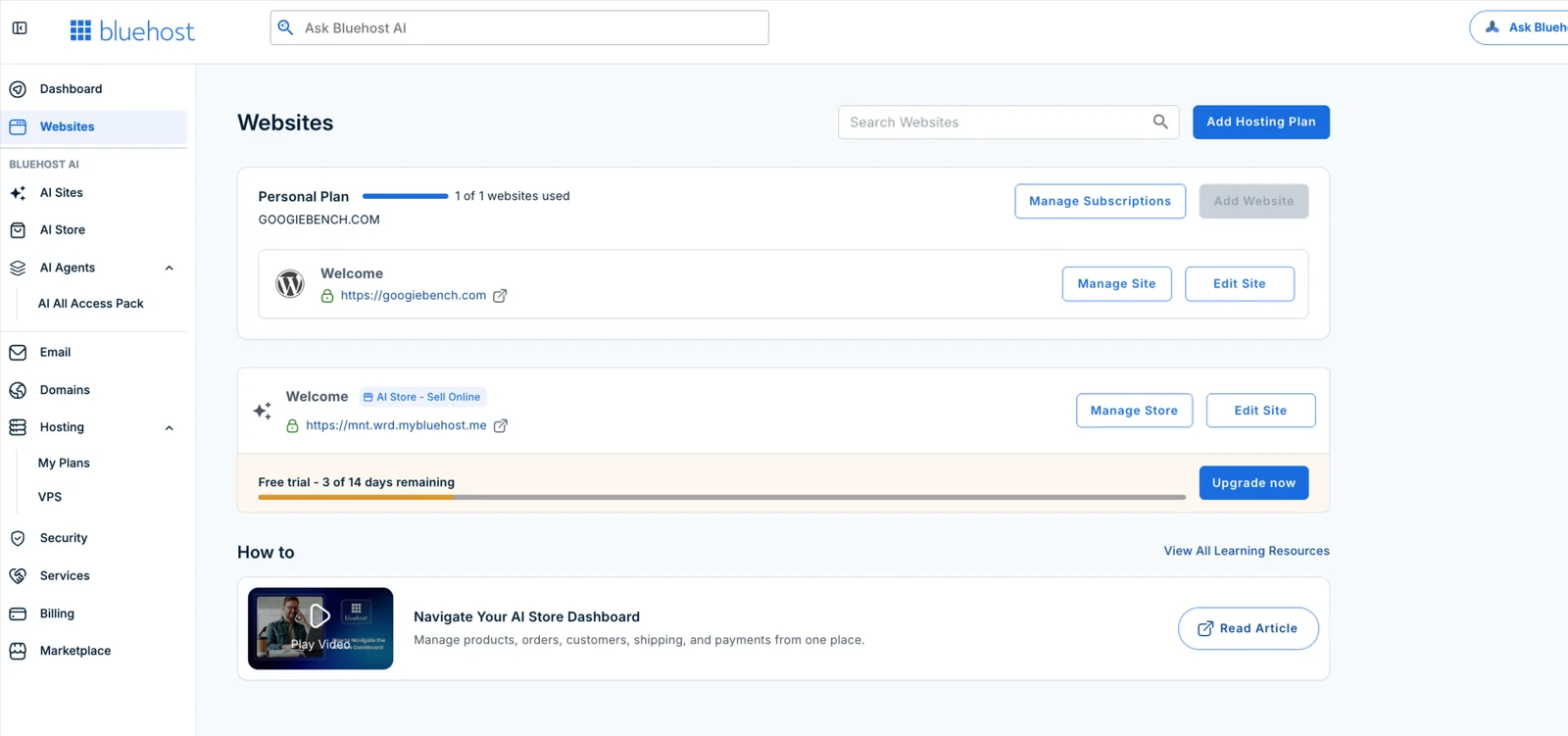
| Websites page | An AI Store free trial bar with an Upgrade now button, plus an Add Hosting Plan button |
| AI Sites page | A notice that the AI Website Builder is separate from your hosting plan, $9.99/month after the 14-day free trial |
Our take: None of this is a hidden fee, and the offers can be ignored, but the dashboard feels more like a sales page than a control panel, especially on a trial account. Do not click an offer in a hurry: check your cart, remove add-ons you did not plan to buy and compare the price with the plan you actually need.
Tip: The bundle discount depends on how many products you add, so only buy what you need. Hosting, a domain and security can be added later, after you have decided that Bluehost works for you.
Bluehost AI Website Builder: Does It Work?
Bluehost also sells an AI website builder, which the dashboard shows as AI Sites and AI Store. You describe your business in plain language, optionally add a logo, images or a site whose look you like, and the AI builds a full website. You then ask the AI to change copy, images or colors, or edit manually, and publish with one click to your own domain.
We opened our account and found the AI Store trial running there as “Free trial – 3 of 14 days remaining,” with a banner saying the site is not live until you upgrade and connect a domain. Bluehost says trial days run consecutively and do not extend, and a site is kept for 4 more days after the trial ends.
| Plan | Price | Storage | AI Credits/Month |
|---|---|---|---|
| Free trial | Free for 14 days | Temporary domain only | 10 AI edits |
| Get Online | $8.49/mo | 20 GB | 20 |
| Get Online Grow | $14.99/mo | 50 GB | 40 |
| Get Online Scale | $19.99/mo | 100 GB | 80 |
Important: Bluehost’s own dashboard says the AI Website Builder is separate from your hosting plan, and our account showed $9.99/month after the 14-day free trial. The public AI Website Builder page advertises plans from $8.49/mo, so check the live price before you subscribe.
Each AI Website Builder plan includes its own hosting, with a custom domain, SSL, CDN, weekly backups, malware detection and removal, and Yoast SEO Premium pre-installed. Each paid plan also gives 10 bonus AI credits in the first month.
| ✅ Good for | ⚠️ Keep in mind |
|---|---|
| Launching a simple business or portfolio site fast | AI credits are limited each month, so many edits use them up |
| Beginners who do not want to pick a theme | It is billed separately from your hosting plan |
| Quick online store ideas with the AI Store template | Heavy customization is easier on WordPress hosting |
Our take: The AI builder is a fast way to get a first version online, especially for small businesses. If you want full control, plugins and the lowest long-term cost, a regular WordPress hosting plan from the pricing section above is the better value.
Bluehost Customer Support Test
Bluehost offers 24/7 support by live chat and phone, and its about page promises real humans with an average response time under 2 minutes. We tested live chat with a real technical problem: SSH was enabled on our account, but the connection was closed on port 22.
- Live chat opens with Bluehost’s AI assistant, not a person. It answers first and promotes products, which felt frustrating when we already knew we needed a human.
- When we asked for a human agent, the bot collected our name and email and quoted a 2-minute wait, but it took nearly 5 minutes before a human joined the chat.
- The agent, Vithin, sent general steps to enable Shell Access in the Bluehost portal, with two help articles.
- We explained that Shell Access was already on and the connection still closed. The agent checked our account.
- The agent then suggested using the Terminal inside cPanel to access SSH.

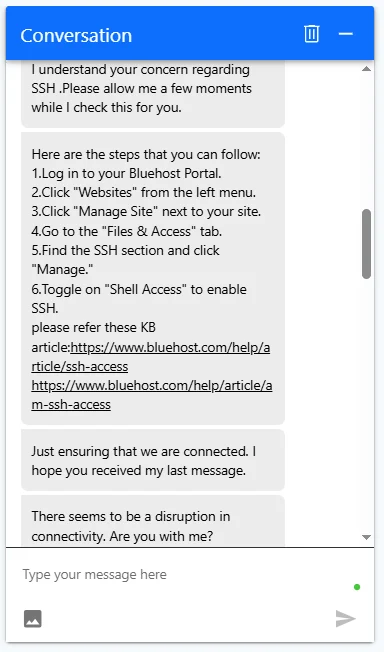


Our take: The AI chatbot is the most irritating part of Bluehost support. You have to get past it first, and reaching a human took nearly 5 minutes instead of the promised 2. The agent was polite, but the first answer was a copy of the help article, and we needed a follow-up to get a working option. Fine for simple questions, slow for urgent technical issues.
Where do you open a support ticket? We looked for a ticket option in the new dashboard and could not find one. The left menu lists Dashboard, Websites, AI Sites, AI Store, AI Agents, Email, Domains, Hosting, Security, Services, Billing and Marketplace, with no Support or Tickets link. Support starts from the live chat, where the AI assistant answers first and you ask it for a human, or from the phone number on Bluehost’s website. That is confusing if you prefer to write a detailed ticket and wait for an email reply.
Does Bluehost share its server hardware? We also asked live chat which CPU processors Bluehost uses in its shared hosting plans. The chat connected us to a Business Development agent, who replied that the processor details are confidential and cannot be shared. When we pointed out that we already had a shared plan, a second agent gave the same answer: they “do not have access to or permission to disclose” the CPU models, because the information “is not publicly available and may vary across our infrastructure.” Bluehost’s VPS and dedicated pages list cores and DDR5 RAM but no CPU models, so you cannot compare the real hardware before you buy. We found the answer ourselves over SSH, as shown in the hardware section above, but the sales and support team could not or would not help.
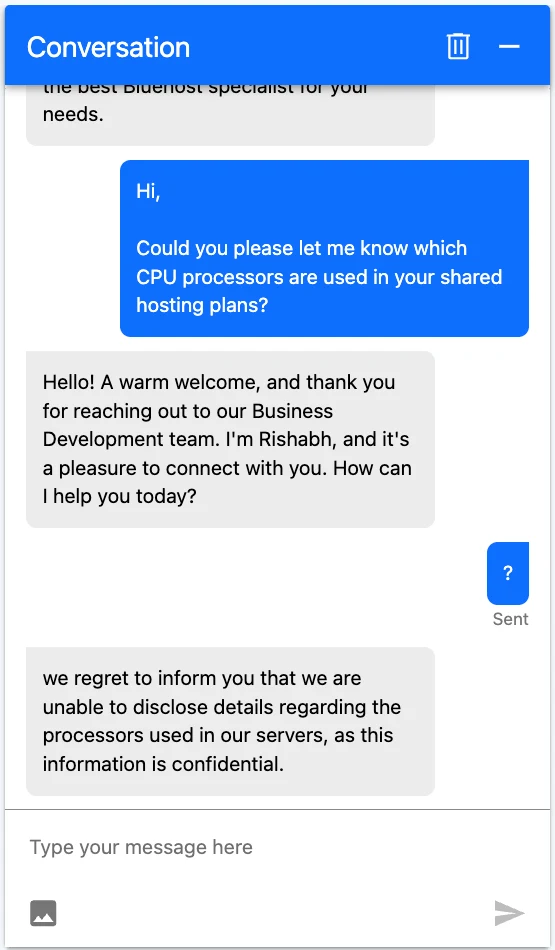
Sales agents, not technical experts. In another chat we said we already had a plan and needed help. The first reply was “we can share plan details with you,” which is a sales answer, and after we repeated ourselves the agent transferred us to “the right team.” Across our tests, the people on Bluehost live chat were mostly sales-focused and had limited technical knowledge, so technical questions were deflected, transferred or answered with a copy of a help article.

Bluehost Security Features
Every Bluehost plan includes a free Let’s Encrypt SSL certificate, and the shared plans add a free CDN and weekly website backups. In the dashboard, Bluehost also sells extra security with AI-powered malware detection and hands-on cleanup. When we tested, the dashboard offered 50% off that security add-on with the code BHSECURE50.
Our test site also used Cloudflare DNS in front of Bluehost, which adds DDoS protection and bot filtering. Bluehost works well with Cloudflare, so you can add it for free if you want an extra security layer.
Bluehost Data Center Locations
Bluehost runs data centers in several regions. Its VPS page lists Virginia and Arizona in the USA, Toronto, London and Amsterdam, and our own shared hosting account was placed in Mumbai, India, which is great news for visitors in South Asia. A network check over SSH showed the server on Oracle Corporation’s network in Mumbai, Maharashtra. Our Bluehost India review covers the Mumbai server and INR pricing in detail.
Bluehost does not let you pick every location on every plan, so if server location is important for you, check it during checkout or ask sales. For more location choice, compare Kamatera or Cloudways.
Bluehost Pricing and Plans
Bluehost pricing looks very low at first because these are introductory rates for a 36-month term. Here are the current shared and WordPress hosting plans with their renewal prices:
| Plan | Websites | NVMe Storage | Intro Price | Renews At |
|---|---|---|---|---|
| Starter | 10 | 10 GB | $3.99/mo | $9.99/mo |
| Business | 50 | 50 GB | $6.99/mo | $13.99/mo |
| eCommerce Essentials | 100 | 100 GB | $14.99/mo | $21.99/mo |
All three include a free domain for the first year, free SSL, a free CDN, weekly backups, a WordPress staging site and a Pro Email free trial. eCommerce Essentials adds WooCommerce tools for online stores.
Bluehost VPS Hosting
| Plan | CPU & RAM | NVMe | Intro Price (24 months) | Renews At |
|---|---|---|---|---|
| NVMe 2 | 1 vCPU, 2 GB DDR5 | 50 GB | $4.69/mo | $5.69/mo |
| NVMe 4 | 2 vCPU, 4 GB DDR5 | 100 GB | $9.49/mo | $11.99/mo |
| NVMe 8 | 4 vCPU, 8 GB DDR5 | 200 GB | $12.99/mo | $28.99/mo |
| NVMe 16 | 8 vCPU, 16 GB DDR5 | 450 GB | $25.99/mo | $49.99/mo |
VPS plans come with unmetered bandwidth, but cPanel costs $14.99/month extra. Compare them with the best VPS hosting providers before you buy.
Bluehost Dedicated Servers
| Plan | CPU & RAM | NVMe | Intro Price (36 months) | Renews At |
|---|---|---|---|---|
| Standard NVMe 32 | 8 cores, 32 GB DDR5 | 1,000 GB | $144.19/mo | $191.79/mo |
| Enhanced NVMe 64 | 16 cores, 64 GB DDR5 | 2,000 GB | $220.19/mo | $274.19/mo |
| Premium NVMe 128 | 32 cores, 128 GB DDR5 | 3,000 GB | $315.19/mo | $394.19/mo |
Current deal: During our test, Bluehost’s dashboard showed a Black Friday bundle with 15% off one product, 20% off two and 25% off three or more. Check the latest Bluehost offer before you buy.
Bluehost Renewal Prices: What You Really Pay
The biggest surprise for many Bluehost customers is the renewal bill. The intro price is paid upfront for the full 36-month term, and the plan then renews at the regular rate. Here is the real cost:
| Plan | Paid Upfront for 36 Months | Monthly Price After Renewal |
|---|---|---|
| Starter | $143.64 ($3.99 × 36) | $9.99/mo |
| Business | $251.64 ($6.99 × 36) | $13.99/mo |
| eCommerce Essentials | $539.64 ($14.99 × 36) | $21.99/mo |
Tip: Take the longest term you are comfortable with to lock in the intro rate, set a reminder before renewal and remove add-ons you do not use. Want a host that keeps prices lower over time? Compare InterServer or UltaHost.
Bluehost WordPress Features
WordPress is where Bluehost shines. In our Bluehost review test, these features made setup quick even for a brand-new site:
- WordPress Installed for You: Every shared and WordPress plan comes with WordPress ready to go, so you can start writing in minutes.
- AI Site Builder: AI Sites builds a starter website from a short description, which you can then edit in WordPress.
- Staging Site: Test themes, plugins and updates on a WordPress staging copy before you push them live.
- Free CDN and SSL: A free CDN and Let’s Encrypt SSL come with every shared plan for faster, secure pages.
- Weekly Backups: Shared plans include weekly website backups to help you recover from mistakes.
- Server-Side Object Cache: Persistent object cache is enabled on the server, so WordPress can cache database queries and load dynamic pages faster.
- WooCommerce Tools: eCommerce Essentials includes WooCommerce features for selling products online.
Bluehost Email Hosting
Bluehost shared plans include a free trial of Pro Email, which then renews at $2.50/month per mailbox. You can also open cPanel Email straight from the Hosting page. If you only need a few business inboxes, compare the cost with our list of the best email hosting for small business.
Is Bluehost Legit and Safe?
Yes. Bluehost has been in business since 2003, belongs to Newfold Digital, serves over 5 million customers and is an official WordPress.org recommended host. Every plan includes free SSL, and in our test the site stayed online 100% of the time with no security issues.
Bluehost Alternatives
Bluehost is not the only good option. If something in this Bluehost review does not fit your needs, these hosts are worth a look:
| Host | Consider It If You Want… | Our Review |
|---|---|---|
| YouStable | Budget hosting with servers in India, the USA and the Netherlands | YouStable review |
| UltaHost | NVMe hosting and VPS with 30+ data centers | UltaHost review |
| SiteGround | Premium managed WordPress hosting | SiteGround review |
| HostArmada | Cloud-based shared hosting | HostArmada review |
| ScalaHosting | Managed cloud VPS with SPanel | ScalaHosting review |
| DreamHost | Another WordPress.org recommended host | DreamHost review |
Still comparing? See our list of the best web hosting services.
Our Bluehost Review Scorecard
Here is how we rate Bluehost after our hands-on tests, out of 5:
| Category | Score | Why |
|---|---|---|
| Reliability | 4.9 | 100% uptime with no downtime in our test |
| Features | 4.9 | Free domain, SSL, CDN, staging, AI tools and cPanel |
| Ease of Use | 4.8 | Clean AI dashboard with classic tools one click away |
| Pricing | 4.6 | Low intro prices, but renewals are much higher |
| Support | 4.0 | AI chatbot first, sales agents with little technical knowledge, no ticket option |
| Overall | 4.6/5 | A strong, beginner-friendly WordPress host |
Bluehost Review: Pros and Cons
| ✅ Pros | ❌ Cons |
|---|---|
| 100% uptime in our test | Renewal prices are much higher |
| PageSpeed 97 mobile, 100 desktop | AI chatbot first; about 5 minutes to reach a human |
| 8.9/10 server benchmark score | No support ticket option in the dashboard menu |
| Beginner-friendly AI dashboard plus cPanel | Dashboard full of promo banners and upsells |
| Free domain, SSL and CDN | Weekly backups only on shared plans |
| Recommended by WordPress.org | cPanel costs extra on VPS |
| AMD EPYC server hardware with 58.6 GiB RAM (seen over SSH) | Sales and support would not share technical details |
Is Bluehost Good? Who Should Use It
- Beginners and bloggers who want WordPress installed and an easy dashboard.
- Small businesses that need a reliable site, email and a free domain in one place.
- WooCommerce starters who want store tools on eCommerce Essentials.
- Not ideal for developers who need deep technical support or anyone who wants low renewal prices.
Want lower renewals or faster support? Read our YouStable review, HostArmada review and InterServer review, or compare the best managed WordPress hosting.
Bluehost Refund Policy
Bluehost offers a 30-day money-back guarantee on hosting. If your plan included a free domain, Bluehost deducts the domain fee from your refund so you keep the domain. Add-ons and domains are usually not refundable, and there are no refunds after 30 days.
How to Buy Bluehost Hosting
- Visit the Bluehost website and choose Shared, WordPress, VPS or Dedicated hosting.
- Pick a plan and a billing term. The 36-month term gives the lowest intro price.
- Claim your free domain or connect a domain you already own.
- Create your account, remove add-ons you do not need and complete the payment.
- Open the Bluehost dashboard, install WordPress or use AI Sites, and launch your website.
FAQ – Bluehost Review 2026
Is Bluehost good in 2026?
Yes. In our tests Bluehost had 100% uptime, PageSpeed scores of 97 on mobile and 100 on desktop and an 8.9/10 server score. It is a good choice for beginners and WordPress sites, but renewal prices are high.
How fast is Bluehost?
Our Bluehost test site loaded with an LCP of 1.3 seconds on mobile and 0.6 seconds on desktop, and HetrixTools measured a 161.35 ms average load time across New York, London, Singapore and Mumbai.
What is Bluehost’s uptime?
Bluehost offers a 99.99% uptime SLA. Our test site had 100% uptime with no downtime from 27 October to 4 November 2026.
How much does Bluehost cost?
Bluehost shared hosting starts at $3.99/month on a 36-month term and renews at $9.99/month. Business costs $6.99/month and eCommerce Essentials $14.99/month.
Does Bluehost have 24/7 support?
Yes. Bluehost offers 24/7 live chat and phone support, but live chat starts with an AI chatbot. In our tests it took nearly 5 minutes to reach a human agent, and the agents were mostly sales-focused with limited technical knowledge.
Does Bluehost give a free domain?
Yes. Bluehost includes a free domain for the first year with its shared and WordPress hosting plans. After that, the domain renews at the normal price.
Does Bluehost have a data center in India?
Yes. Our Bluehost test account was hosted in Mumbai, India, and a network check over SSH showed Oracle Corporation’s network in Mumbai, Maharashtra. Bluehost also lists VPS locations in Virginia, Arizona, Toronto, London and Amsterdam.
Is Bluehost good for WordPress?
Yes. Bluehost is recommended by WordPress.org, installs WordPress for you and includes staging, a free CDN and an AI site builder, which makes it one of the easiest WordPress hosts for beginners.
Does Bluehost have an AI website builder?
Yes. Bluehost’s AI Website Builder, shown as AI Sites and AI Store in the dashboard, creates a site from a text description. It has a 14-day free trial, then costs about $8.49 to $9.99/month, billed separately from your hosting plan.
How do I open a support ticket with Bluehost?
We could not find a ticket option in the new Bluehost dashboard, because the left menu has no Support or Tickets link. Start from live chat, where the AI assistant answers first and you can ask for a human, or call the number on Bluehost’s website.
What CPU does Bluehost use?
Bluehost does not publish its CPU models, and two chat agents told us they could not disclose it. A benchmark script run over SSH on our shared hosting account showed an AMD EPYC 9J45 128-core processor on a KVM virtual machine with 58.6 GiB of RAM.
Does Bluehost have object cache?
Yes. In our test the persistent object cache was already enabled from the server side, and all four object cache benchmark tests (enabled, write, read and mixed usage) scored 10/10.
Does Bluehost work with Cloudflare?
Yes. Our test site ran on Bluehost with Cloudflare DNS and CDN in front, and pings from more than 50 locations were answered by Cloudflare in 0.6 to 2.5 ms in most regions. Bluehost also includes a free CDN on shared plans.
Can Bluehost handle high traffic?
Shared hosting suits steady small and medium traffic. Our load test of 3,180 virtual visitors was fully answered by Cloudflare, so it does not measure Bluehost itself. For regular spikes, use caching and Cloudflare, or move to a Bluehost VPS or dedicated server.
Is Bluehost SSL secure?
Bluehost includes a free SSL certificate. Our SSL Labs scan of the test site scored grade A on all four tested addresses, which belong to Cloudflare, so the grade reflects the Cloudflare layer in front of the site.
Does Bluehost use cPanel?
Yes. Shared hosting accounts can open cPanel, cPanel Email and the File Manager with one click from the Bluehost dashboard. On VPS plans, cPanel is an add-on for $14.99/month.
Does Bluehost include backups?
Yes. Bluehost shared plans include weekly website backups. For daily backups, add a WordPress backup plugin or keep your own copies.
Bluehost Review Verdict: Is Bluehost Worth It?
After a week of real testing, Bluehost earned its reputation. Our site stayed online 100% of the time, scored 97 and 100 on PageSpeed Insights and reached 8.9/10 in the server benchmark, and the new AI dashboard makes running WordPress easy even for first-time site owners.
The trade-offs are higher renewal prices, many upsells and a live chat that puts an AI chatbot in front of human agents, so reaching a person took us nearly 5 minutes. If you want a trusted, beginner-friendly WordPress host and plan to stay for the full term, Bluehost is a solid pick. Get Bluehost from $3.99/month and lock in the intro price for 36 months.
Rating Based on Expert Review




Bluehost Traps You and their Support is Terrible
Bluehost has grown so large by employing very low sign-up pricing with a huge increase in prices when it comes time to renew. At this point they have you and you are stuck with them, because it is quite difficult to change over to a new hosting company.
It truly is a trap!
Because of this Bluehost does not consider any specific customer as important or relevant. So, expect to be treated as just a number
Bluehost has extremely poor customer service
Bluehost has excessive telephone support wait times
When you do get through the operator they have very limited access and cannot resolve serious problems so they create a ticket for escalated support
The same is true for Bluehost Live Chat, who will ask you, exactly what you just asked them over and over again as if you are a 5 year old child, until you become infuriated. Eventually you will be given a support ticket for escalated support
Escalated support can only be contacted via email and are not open on weekends. Response times are usually 2 to 3 days and are usually just a canned response. So, if it is urgent or mission critical Bluehost will not lift a finger to help you or take any notice of any damage they are doing to you. Bluehost does not care less about you or your business, only your credit card number
If there is anything unusual such as an invalid Auth Code or EPP code, login issue, emails not being received, incorrect charges etc. it will literally take you months to have this resolved, if at all, because escalated support will just say the same thing over and over again no matter how many times you explain it to them
If you complain about this they just close the ticket and you have to start all over again
Recommendation: Do not use Bluehost. You will be overcharged, receive very poor service, and be treated very poorly
Communication issue
The worst service provider, we have never seen such a loosers. We feel BlueHost India has to strenghten their after sale service to 100%. We have been facing issue in email communication for last 1 month and also getting repeted spam mail its not been resolved yet. Even though connecting to client service team for more than 47 times, they are not able to give the solution and not even near to it. They do not provide their office address and their technical team contact too.
We have almost shut our mail communication for more than 3 weeks and we have faced the losses too.
We seek immediate response from bluehost.com and solve the issue as early as possible or we have to take next steps to allign ouverselves.
Bluehost review
Bluehost is an excellent choice for beginners since it comes with everything you need to get started with WordPress, from a free domain name and automatic WordPress installation to a free drag-and-drop page builder and thorough step-by-step instructions for every step of the way.
Easy and Nice, one of the best
My experience with BlueHost was one of the easier ones I’ve experienced over the years with hosting companies. Their ease of access to get started and running was really nice but more in-depth features could be applied and a more fluent/active support team otherwise a great starter company for people that are just getting into it 🙂
User Friendly
It was a wonderful experience, I really loved the way and easiness available here. Really user friendly. Keep up the good work. I always look forward to have such websites on board
Quite good, but not totally.
I tried BlueHost when I was looking for a good hosting service for my new hobby website. It was not exacly my type since I prefer something more complicated for some things, but I recommended BlueHost services to my cousin who was searching for something like that.
HOSTING
Thank , it’s a reliable hosting but little pricey and lack better support.
also this rule about atleast 150 characters is insane, it might do nothing but upset the community
Great Experience
It was a wonderful experience, I really loved the way and easiness available here. Really user friendly. Keep up the good work. I always look forward to have such websites on board.
great service
such an amazing hosting company, i am satisfied
Calidad precio
Su servicios son excelentes , y sus precios son sumamente competitivos!
One of the best hosting sites
The plans need to be modified in my outlook. Better options could be provided with better amendments and right prices. Rest assured about the reliability of bluehost. Support and reliability have no crosses