






Expert Review
I wanted to see how Verpex performs in real website usage, so I carried out a proper Verpex review. I purchased the Verpex Web Hosting Silver plan and hosted my WordPress website, verpex.webhostbenchmark.com, on it for testing.
As you can see in the screenshot below, this is the Verpex client dashboard for my active Web Hosting Silver plan.
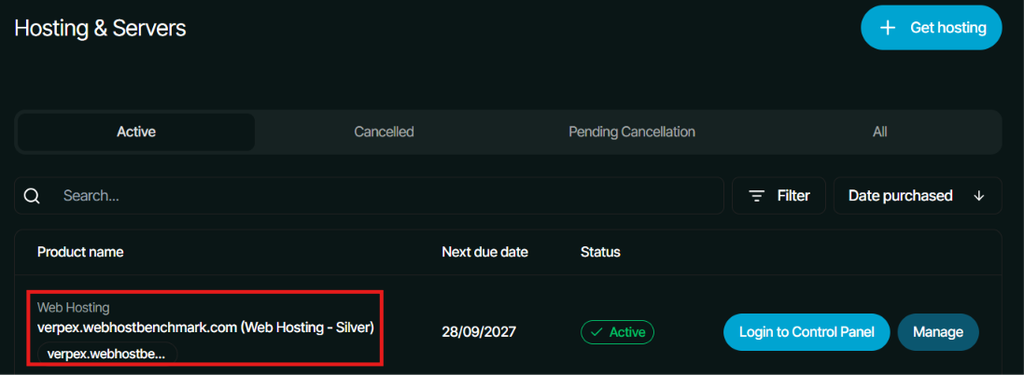
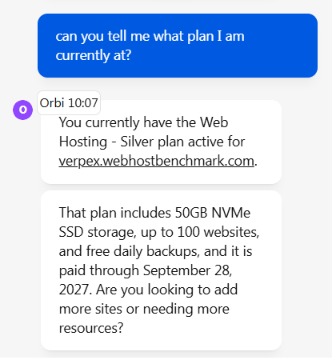
The Silver plan currently comes with 50GB NVMe SSD storage, 2GB RAM, 2 vCPU, unlimited email accounts and databases, free daily backups, free SSL, cPanel access and a high uptime guarantee (on their website it is written 99.99%, but I’ll run uptime test in this Verpex Review to see do they really stand on what they say).
My server is located in Mumbai, India, which gives me a useful setup for checking performance for visitors from India and nearby regions.
From here, I wanted to find out what actually happens when a real WordPress website runs on this hosting plan.
I tested the server hardware, loading speed, response time, uptime, DNS, SSL, network performance and traffic handling using recognised tools (that I’ve talked about below in the review). I also checked how the server behaves when several users access the website at the same time.
My aim is to give you a clear picture of how this Verpex Silver plan performed during my testing, so you can get a better idea of what to expect before choosing it for your own blog, business website or other WordPress project.
About Verpex
Verpex started with a different approach to hosting. The company was founded by people who already had experience in the hosting industry, which helped it build its own platform around website management, customer support and server performance.
The company has also expanded its infrastructure over time. I also found that Verpex puts considerable attention on making hosting accessible to users who may not have strong technical knowledge. Another area worth looking at is how Verpex approaches website performance and management.
Its hosting setup uses technologies such as LiteSpeed, NVMe storage, caching and automated backups on applicable plans, which are aimed at reducing loading times and making everyday website management easier.
The company also provides tools for common hosting tasks, so users do not have to manage every server-side setting manually.
Verpex also puts a strong focus on making the transition from another hosting provider easier. Free migration can save users the trouble of manually moving website files, databases and other hosting settings, which can be a difficult task for someone moving a live website for the first time.
Please refer to the tabular presentation below, that I’ve prepared to give you a proper overview about Verpex:
| Category | Verpex Details |
|---|---|
| Company | Verpex Hosting |
| Parent Group | World Host Group |
| Established | 2018 |
| Company Director | Sebastian De Lemos |
| Main Services | Shared Hosting, WordPress Hosting, Cloud Hosting, VPS Hosting, Reseller Hosting, Managed Hosting and specialised hosting options |
| Starting Price | Starts @ $0.60/month On Monthly Billing ($6 on Renewal) Web Hosting Plan |
| Uptime | Up to 99.99% (100% Tested Uptime) |
| Money-Back Guarantee | 30 days on Shared & Reseller hosting plans (Domain Registration & VPS plans are non-refundable) |
| Free Migration | Yes |
| Free SSL | Yes |
| Backups | Daily automated backups |
| Control Panel | cPanel (Web Hosting) / WHM (Reseller Hosting) |
| Web Server Technology | LiteSpeed on relevant hosting plans |
| Storage | NVMe SSD on current web hosting plans |
| Support | 24/7 support via live chat, tickets and email and call support |
| Server Locations | 40 World Wide Location (NorthAmerica, Latin America, Europe, Asia Pacific, & Middle-East) |
Data Center Locations
I also contacted Verpex’s live chat team to confirm the number and locations of its data centres. I wanted to check this because server location can make a real difference to website performance.

As you can see the screenshot of the conversation above, the support expert explained that Verpex offers coverage across 40 locations through its global cloud infrastructure. But this does not mean Verpex has physical servers in all 40 locations. The physical server locations are limited to the specific locations listed by the support team in the screenshot above.
For those who are not able to refer to the screenshot due to blur issue, I’ll list the server location below:
North America: US East (NY / North Virginia), US Central (Dallas), US West (San Francisco), Canada (Toronto / Montreal)
Europe: UK (London), Germany (Frankfurt), Netherlands (Amsterdam)
Asia-Pacific: India (Mumbai), Singapore, Australia (Sydney)
Latin America: Brazil (Sao Paulo)
Middle East: UAE (Dubai)
As a user, I would prefer to choose a server location that is geographically closer to most of my visitors, as this can help reduce latency and improve response times. I have added a screenshot of my live chat conversation above so readers can verify the information I received directly from Verpex’s support team.
One more thing I would like to report is that when I went on their official order page to see the same information (Number of data centers) I saw only selected data centers that were mentioned.

Note: The server locations shown during my order differed from the 40 global locations mentioned by the live chat agent, so I found this a little confusing. I recommend confirming the exact physical server locations with Verpex support before purchasing.
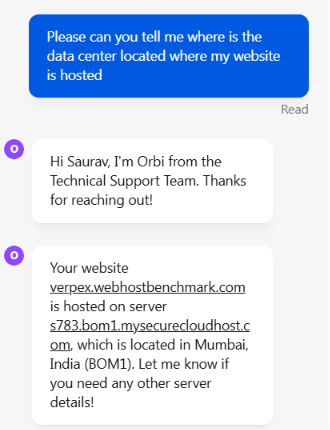
This means that my website visitors in India and nearby countries can quickly access my website and will have lowest latency. (I have confirmed this verdict in the tests later.)
MoneyBack Guarantee
I also used the same live chat session to confirm Verpex’s money-back policy.
The support expert told me that Verpex provides a 30-day money-back guarantee for Shared Hosting and Reseller Hosting, while the guarantee does not apply to VPS hosting or domain registrations. I wanted to confirm this directly with support because refund terms can differ between hosting products, and the introductory price alone does not tell the full story.
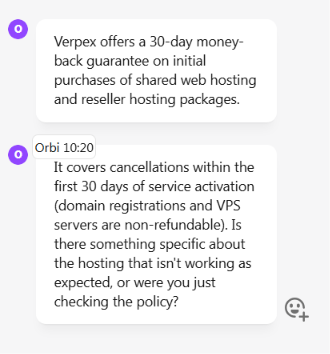
I have also added a screenshot of this conversation below as proof of the information provided by the Verpex support representative.
Tools I used to Review Verpex
I used a mix of recognised testing tools and my in-house tools to review Verpex from different performance angles. Instead of relying only on the hosting provider’s claims, I tested the server, website speed, load handling, uptime, response time, SSL, DNS and network performance myself. The table below shows exactly which tools I used and what I checked with each one.
| What Tool I Used | What I Tested | Why This Tool Is Used for Testing |
|---|---|---|
| WordPress Hosting Benchmark Tool | Server hardware and underlying hosting performance | I wanted to check how the Verpex server handled CPU-related work, memory operations, storage I/O, file operations and other server-side workloads. |
| k6 | Load handling and response time | I used k6 to see how my Verpex-hosted website behaved when multiple virtual users accessed it at the same time. This helped me check stability during higher traffic. |
| Google PageSpeed Insights | Desktop and mobile website speed | I wanted to check loading speed, responsiveness, layout stability and other page performance signals on both desktop and mobile. |
| Flying TTFB | Server response time from different locations | I used this tool to check how quickly my Verpex website started responding to visitors across 22 locations, including India, Asia, Europe and the Americas. |
| HetrixTools | Website uptime and monitoring | HetrixTools monitored whether my website stayed online over different periods and to check its response time from multiple locations. |
| Qualys SSL Labs | SSL/TLS security configuration | SSL Labs was used to examine the HTTPS setup, certificate, TLS protocols, key exchange and cipher strength of the Verpex server. |
| In-house DNS Testing Tool | DNS resolution and propagation | I tested the Verpex domain through Google, Cloudflare, Quad9 and OpenDNS to check whether the domain resolved consistently across major public DNS resolvers. |
| In-house Network & Performance Tool | Network response and page loading | I used my own testing tool to check server response, DOM-ready time, page-load time, transfer size and other network-related performance measurements. |
This combination gave me a broader view of Verpex because each test focused on a different part of the hosting setup.
Verpex Performance Test
A detailed performance testing session was carried out on my Verpex hosting plan using authentic and recognised tools to check server, load, speed, uptime, TTFB, SSL, DNS, and network performance.
I have added screenshots of the actual test results throughout this section, followed by an in-depth analysis of each test. This helps readers understand the results and see how Verpex performs during real website usage, traffic and different testing conditions.
Hardware Benchmark Testing
The first test here, is designed to assess the underlying server performance of my Verpex web hosting silver plan. This is a very useful test as the WordPress performance depends upon CPU work, memory, storage I/O, database activity, WordPress functions, image processing and network operations.
I used the WordPress Hosting Benchmark Tool, which runs server-side tests across these areas (mentioned above) and produces a combined score.
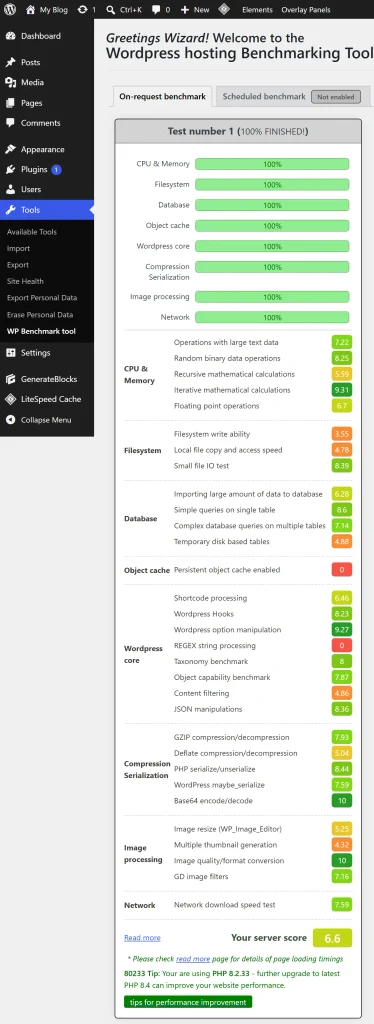
As per the screenshot of the test above, the Verpex test completed successfully across all the categories, with an overall server score of 6.6/10.
Three useful results are:
- Operations with large text data scored 7.22, suggesting the server can handle larger text-processing workloads reasonably well
- Recursive binary data operations reached 8.25. This shows stronger performance when repeatedly processing binary data
- Local file copy and access scored only 4.78, This points out to a potential storage-I/O limitation that could become noticeable during file-heavy workloads.
These metrics help explain where the overall score comes from.
All of it tells that Verpex is capable of running a regular WordPress website, but users with heavy media libraries, frequent backups, demanding plugins or file-intensive workloads should pay closer attention to storage performance.
Looking at these metrics makes the benchmark more useful because it shows not only how fast the server is, but where its strengths and limitations could affect the website in practice.
Load Testing
To check the server load time of Verpex, I used the k6 tool. I wanted to see how the Verpex hosting plan handles multiple virtual users accessing my WP website (https://verpex.webhostbenchmark.com/) at the same time.
I have not checked just one request, but I gradually increased the load and watched how the request rate and response time changed as the test reached a higher traffic level. The graph (in the screenshot below) shows the load increasing steadily to around 20 virtual users, after which the request rate stayed fairly stable for most of the test.
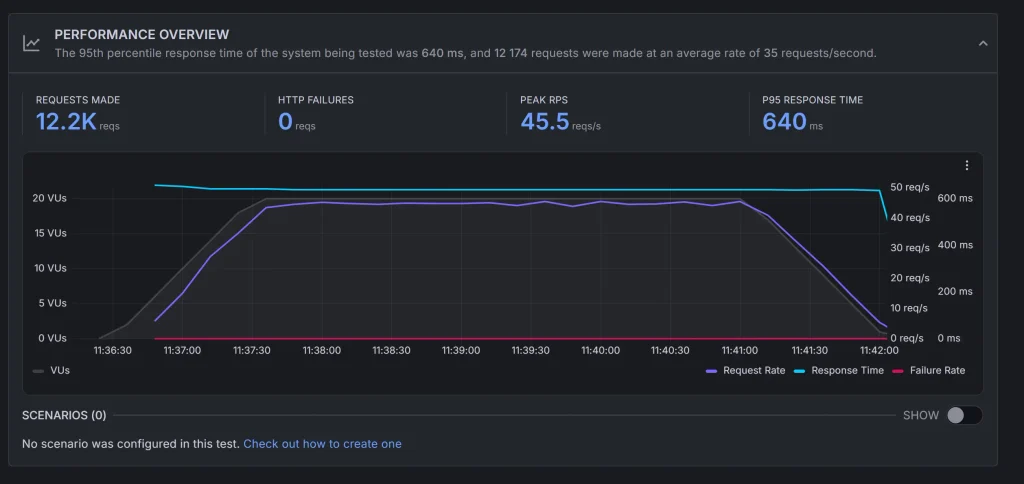
One more thing I want you to note is that the test completed with no HTTP failures, while the response time remained relatively steady. The 12.2K completed requests with zero HTTP failures show that the plan handled this particular workload consistently. At the same time, the 640 ms P95 response time tells me that some of the slower requests still took noticeably longer than the average request.
At the time of testing, only one website was hosted on the server. So, these results are based on the performance of that single website and its available server resources.
Please refer to this test as it tells you how your website (blog, e-store, or any content heavy site) would perform during a traffic spike (when several visitors arrive at your website at the same time.)
I therefore consider this good evidence of Verpex’s stability under the tested load. Since only one website was hosted during the test, the results also do not show how the server would perform with several websites sharing the same resources.
PageSpeed Testing
Google PageSpeed Insights was used to test the Verpex-hosted website on both desktop and mobile. The testing focused on more than just the final performance score, with the loading speed, responsiveness, layout stability and overall user experience carefully reviewed.
These results provide a practical view of how the hosting performs for visitors across different devices.
Speed Performance on Desktop
I wanted to see how quickly my website hosted on the server can load and how smoothly the page becomes usable for visitors on Desktop. For this test, I used Google PageSpeed Insights, which runs a proper analysis of the page and reports performance, accessibility, best practices, SEO and other loading-related signals.
The test was performed on (verpex.webhostbenchmark.com) my website. It gave a very strong overall performance result.
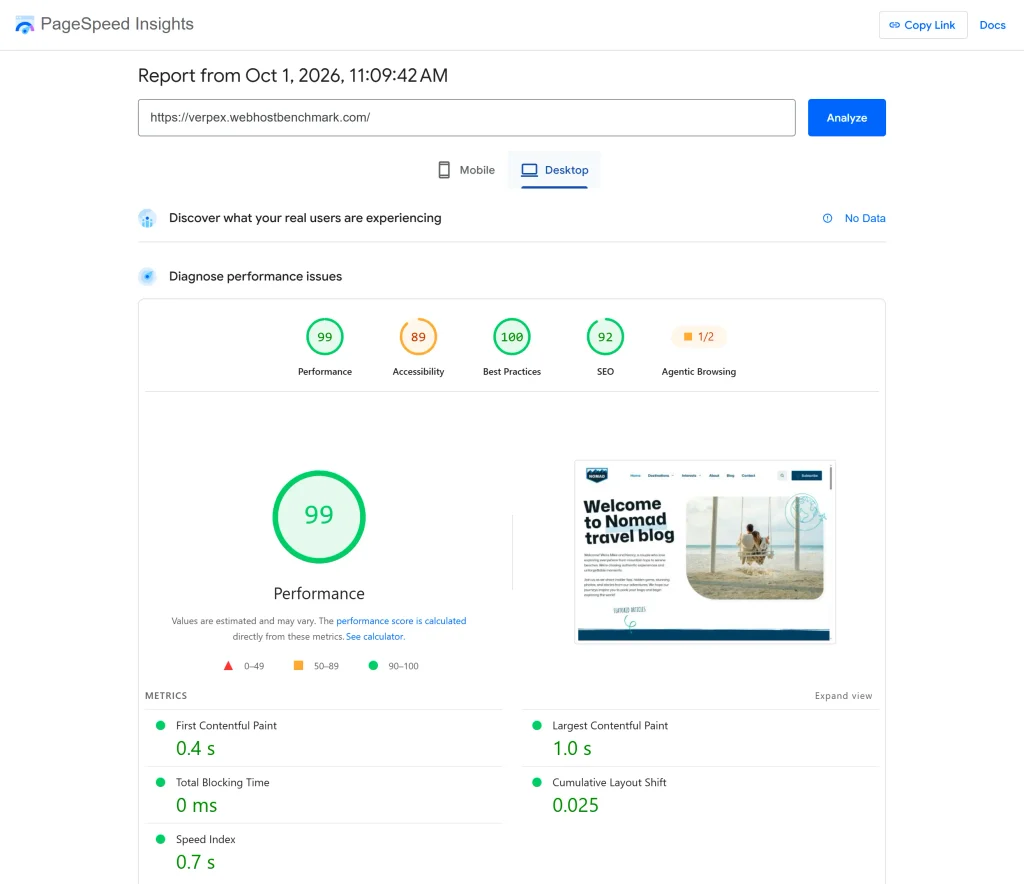
As per the screenshot of the testing result below:
- The page started rendering in about 0.4 seconds and reached its largest visible element in around 1 second.
- The browser had no meaningful blocking time.
That combination matters because visitors are able to see and interact with the page quickly.
For someone considering Verpex for a website, this is a good sign for desktop visitors, particularly for heavy content pages such as blogs or any business websites where a slow host can become noticeable during the initial load.
The very low layout shift also means the page stays relatively stable while loading, so users are less likely to experience content jumping around. The remaining gap is not really raw loading speed (the performance result is already excellent) but areas such as accessibility and SEO still can improve at the website level.
As for me, this test tells loud and clear that Verpex can provide a fast and stable desktop browsing experience.
Speed Performance on Mobile
After testing the speed on the desktop, I ran the same test of my Verpex-hosted website on mobile, because mobile loading can expose a lot of performance issues that are less obvious on a desktop connection.
Again, I used Google PageSpeed Insights to measure how quickly the page begins rendering, how soon the main content appears, if the browser is being held up by processing and how stable the layout remains during loading.
As you can clearly see that the mobile result is weaker than the desktop result, with the main difference coming from the page taking longer time to reach its important content and showing noticeably more layout movement.
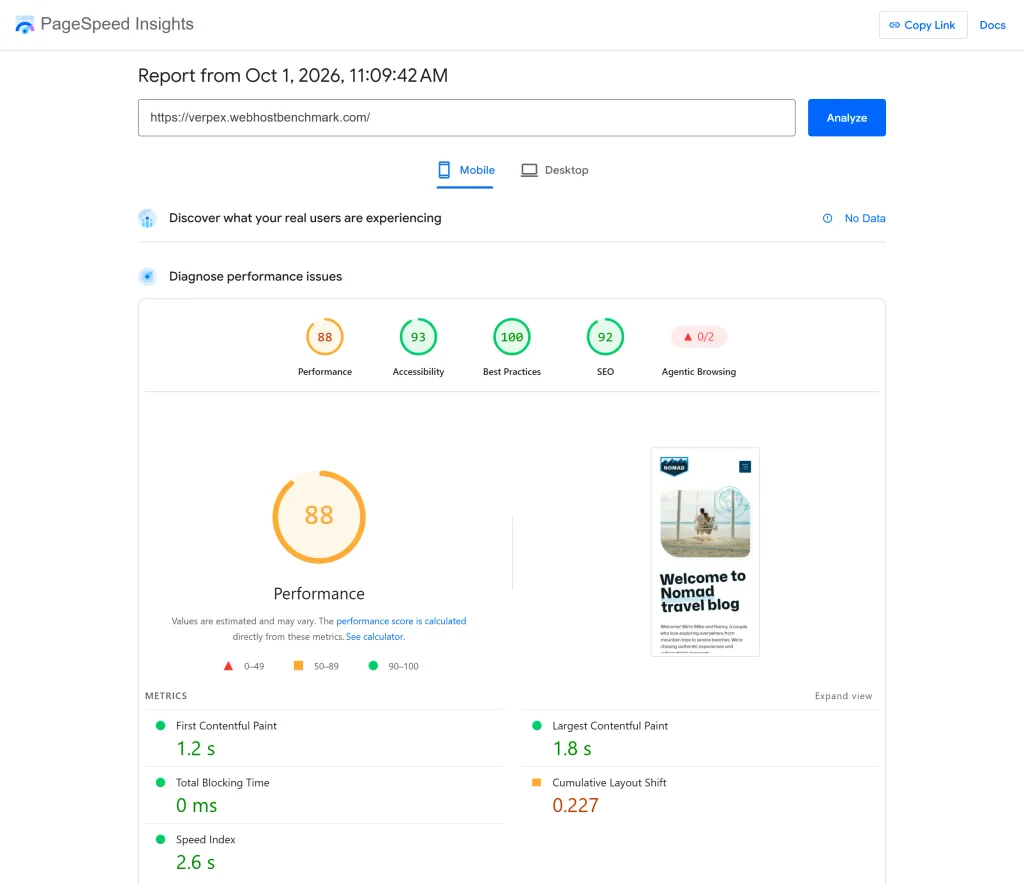
The browser still recorded 0 ms of blocking time, which is a good thing, but the slower Speed Index and the higher layout shift show that the mobile experience is more dependent on how the page’s content and elements are being loaded.
Here, the 88 performance result is still reasonably good and the page reaches its largest content in about 1.8 seconds, so this is not a case of a painfully slow mobile website. However, the 0.227 layout shift is the main weakness and could make the page feel less polished if visitors start interacting while elements are still moving into place.
If you are buying a Verpex web hosting plan for your website, this is an important test you should look at because a website can feel extremely fast on a desktop connection while behaving differently on a phone.
According to the testing done, Verpex appears capable of delivering a good mobile loading experience, but the test also shows that website-level optimization matters more on mobile, especially when it comes to keeping page elements stable during loading.
TTFB Test
The tool that I’ve used to check the TIME TO FIRST BYTE of my website hosted on Verpex’s web hosting silver plan, is Flying TTFB. I wanted to see how quickly the Verpex-hosted website starts responding to visitors from different parts of the world.
I tested it from 22 locations (as you can see in the screenshot below) because server response is usually different as it depends upon how far a visitor is from the hosting server (my hosting server is located in Mumbai, India).
The results showed a clear difference by location.
- Mumbai and Delhi were particularly quick, at around 131 ms & 78 ms
- Singapore, Hong Kong and Seoul also delivered relatively responsive results.
- Response times became noticeably higher across Europe, the Middle East, Africa, Australia and the Americas, with several locations going beyond 600 ms and some crossing the 1-second mark.
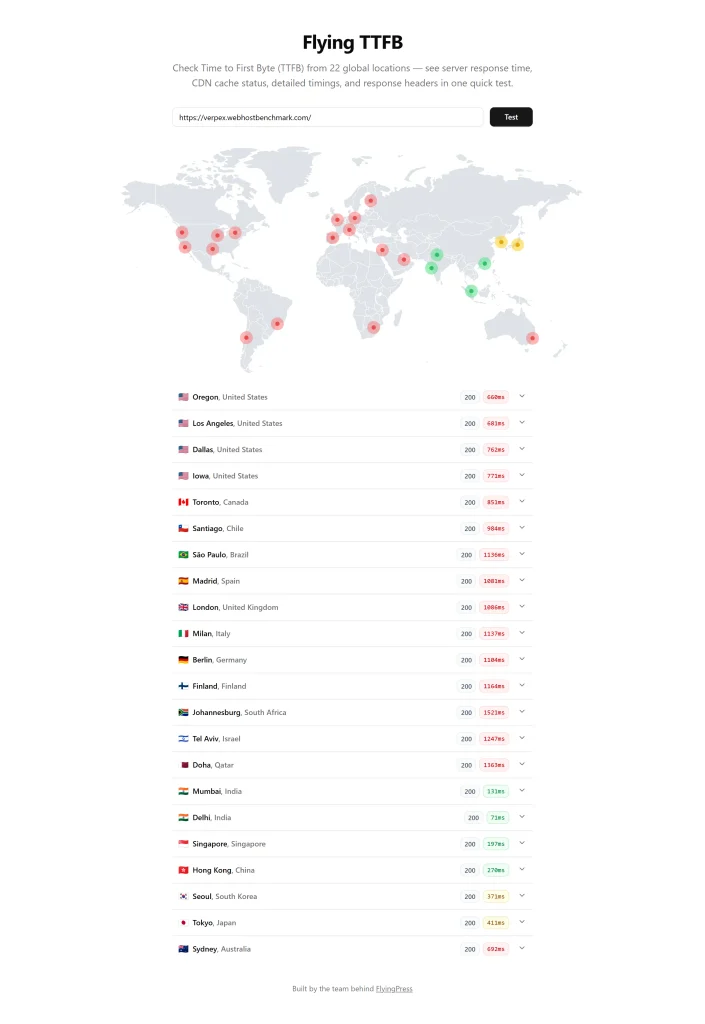
This tells me that Verpex can provide a quicker initial server response for visitors in India and nearby Asian regions than for visitors located farther away.
This means that it can be useful for websites whose main audience is based in India, as visitors closer to the server may get the first response more quickly.
International visitors may see a longer wait before the server begins sending the website content.
TTFB is only one part of the overall page-loading process, but this test gives me a useful indication of how responsive the hosting server is from different locations and how that response time may affect the time available for the rest of the page to load.
Uptime Testing
In order to see how my WP website (hosted on Verpex web hosting silver plan) behaves over time, I’ve used HetrixTools to check the uptime. This test is useful because a hosting plan can look fast during one check but still have problems with response consistency.
The monitoring result shows the website remained online with 100% uptime across the displayed monitoring periods. This includes the last 24 hours, 7 days, 28 days, and the 30-day period shown in the report.
The monitor was checking the website at 1-minute intervals. The dashboard also recorded a recent response/load time of 715.85 ms. It gave a more practical view of how quickly the website was responding to external monitoring requests.
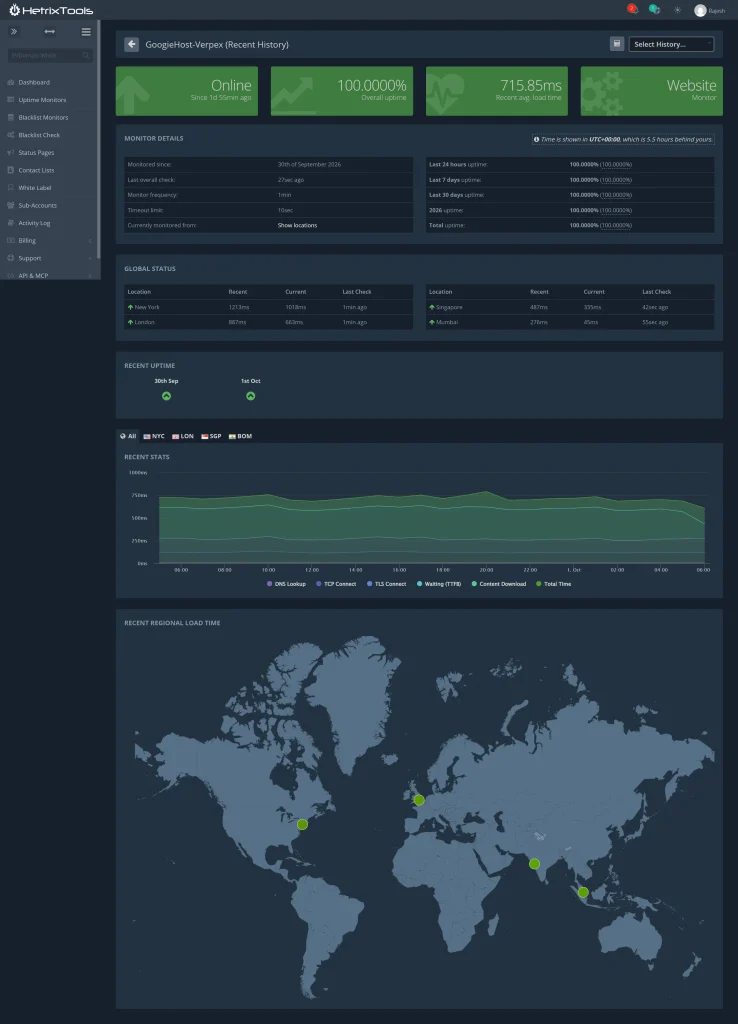
The global monitoring section (shown in the screenshot above) is also useful because it checks the website from different regions.
The results show successful checks from locations including New York, London, Singapore, and Mumbai, so the website was reachable from different parts of the world during the test. The response-time graph stays fairly steady for most of the recorded period.
SSL Testing
I used Qualys SSL Labs to test how securely the Verpex web hosting server handles HTTPS connections, because SSL configuration directly affects the safety of visitor data and how browsers trust the website.
What does this test do? This SSL testing session checks the server’s certificate, supported TLS protocols, key exchange, and cipher strength rather than only confirming that SSL is installed.
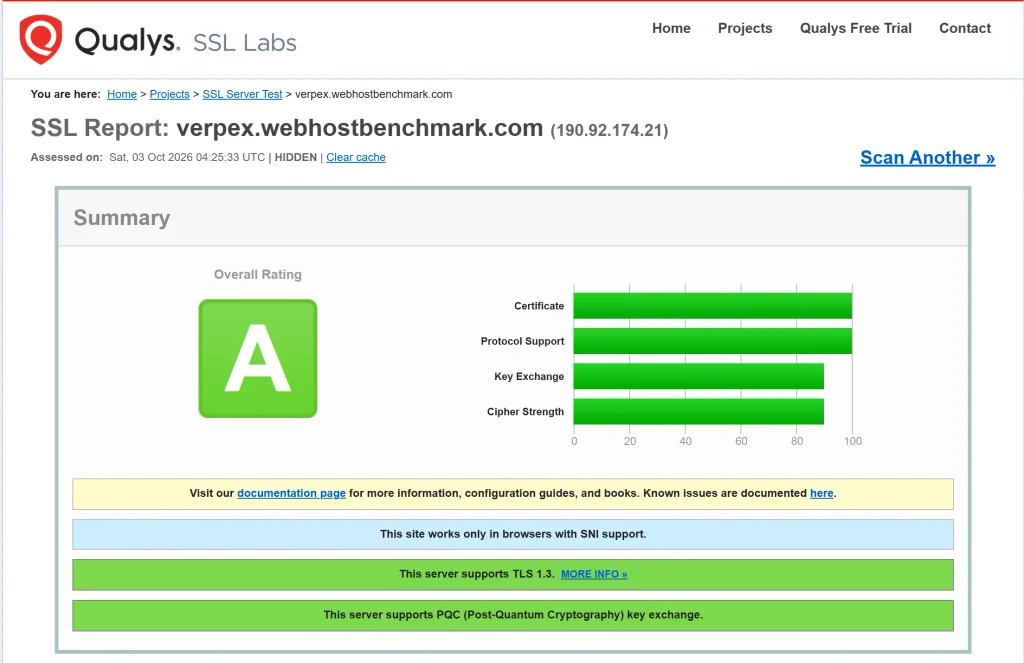
- Verpex received an A rating in the test. It tells that the basic SSL/TLS setup is strong, while the certificate and protocol support scored at the top level and the key-exchange and cipher-strength results remained high.
- The server also supports TLS 1.3, which gives the connection a modern security layer, and the support for Post-Quantum Cryptography key exchange is an additional positive sign for long-term security.
As per the test results and the screenshot above, Verpex server is not depending upon an outdated HTTPS setup that could weaken secure connections. The strong certificate and protocol configuration can help protect information moving between the visitor and website, while TLS 1.3 can provide a modern and efficient encrypted connection.
Important thing here: The report also shows that the site works only with browsers that support SNI, so very old browser environments may not be compatible.
DNS Resolution Testing
This test focused only on DNS resolution. Remember one thing, that it is totally different from testing the actual web server’s processing performance. DNS resolution involves translating a domain name into the server’s IP address before the browser can establish a connection.
Now, how did I run this test! See! I tested the Verpex domain (using an in-house testing tool) against four public DNS resolvers (Google, Cloudflare, Quad9 and OpenDNS), to see if the domain was consistently resolving and whether there was any variation.
The result was very consistent! All four resolvers returned the same IP address, with resolution times around 389 to 390 ms, while the test also reported that propagation was fully complete. This consistency is useful information here because it shows that the domain was correctly published and reachable through multiple major public DNS systems.
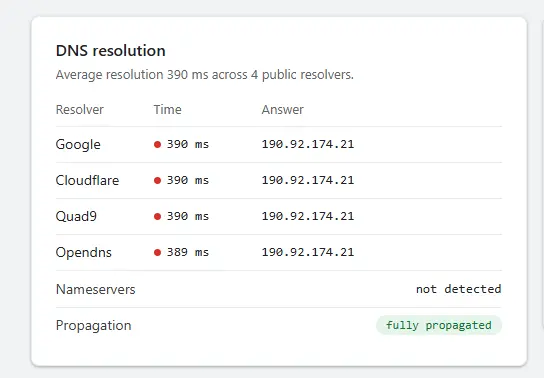
If you notice in the screenshot, the fully propagated status, that is shown, is the more important thing here because it tells that the DNS configuration was already visible across the tested public resolvers.
The roughly 390 ms resolution is higher than what you would normally expect from a very fast DNS lookup, but it should not be treated as equivalent to website loading time: DNS resolution is only one step before the browser connects to the server.
What is more encouraging here is the regularity between the four resolvers and the fact that they all returned to the same destination.
I checked the entire test properly. There was no evidence of inconsistent DNS responses or incomplete propagation in the test. (Inconsistency could cause some visitors to reach the site while others receive an outdated or missing DNS record.
Network and Response Testing
After DNS testing, I tested the network and page response performance of my website to see how quickly the server can respond when a visitor opens the website.
I used my in-house network & performance testing tool for this testing session to check the connection between the visitor and the hosting server, including the time spent before the page starts loading and how quickly the server delivers the requested data.
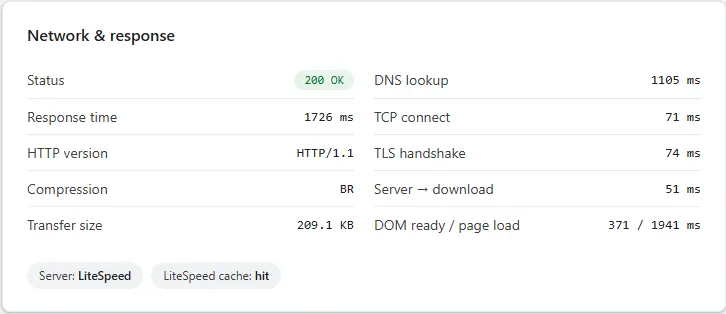
The test result shows that the server is using LiteSpeed with LiteSpeed Cache. It is an important thing as server-level caching can reduce the work required for repeated page requests.
The results point to a generally responsive hosting setup, with the main server connection and content delivery completing fairly quickly.
- The DOM-ready time of 371 ms is a good sign for how soon the browser can start working with the page.
- The full page-load figure of 1.94 seconds gives a more practical idea of what a visitor may experience.
It means that the pages should feel reasonably quick during everyday browsing. The 209.1 KB transfer size also suggests the tested page was not particularly heavy, so these results are useful as a baseline.
Easy to Use Client’s Dashboard UI
I have also attached a screenshot of the Verpex client dashboard UI to show how easily a new customer can manage hosting, account settings, services and contact the support team from one place.
The dashboard feels simple because the main options are clearly arranged in the left-side menu, while the top section gives quick access to domains, hosting, websites, emails, applications, billing and other account areas.
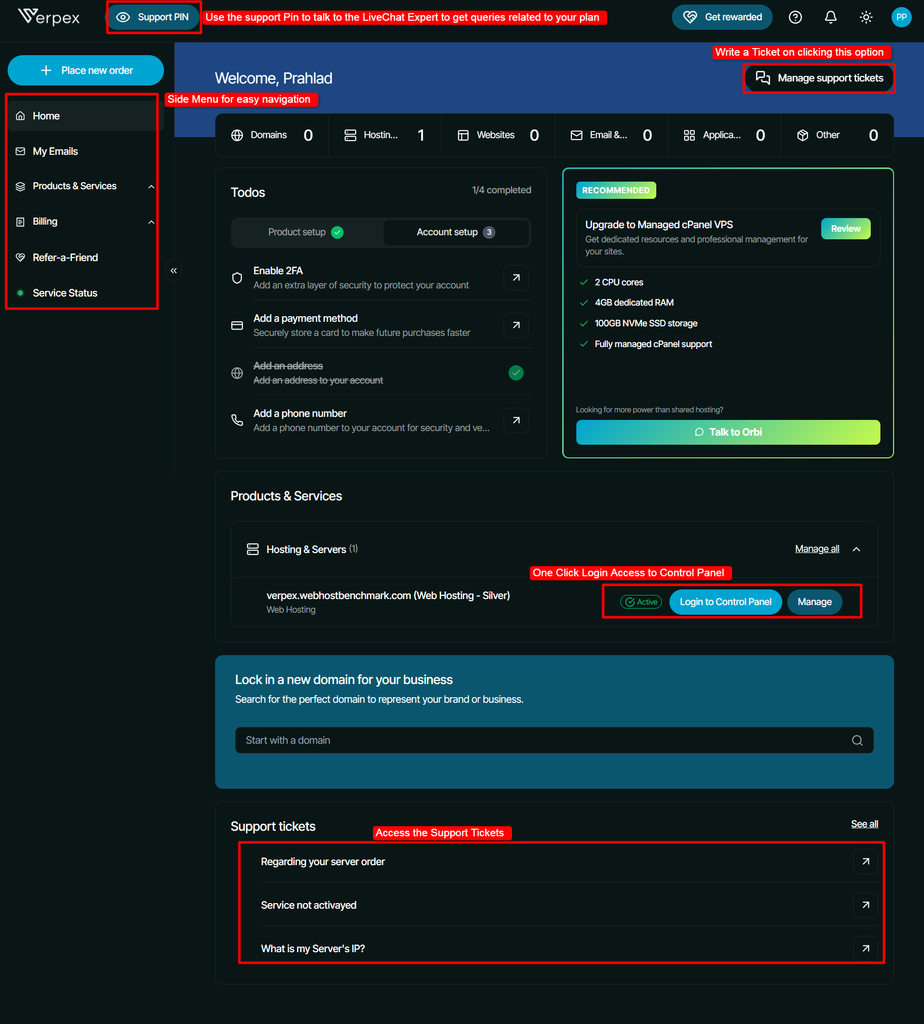
If you see the screenshot above, you can also see the Login to Control Panel option directly under the active hosting service, so you do not have to search through several pages to manage your website.
Support service is just as easy to reach, with existing tickets visible on the dashboard and a separate Manage Support Tickets option at the top.
I found that this layout can save time and reduce confusion, particularly for someone who does not have much technical experience and simply wants to manage their hosting, check an issue, or contact support quickly.
Support Channel Performance
I tested Verpex’s support channels at different times by asking different questions through Live Chat and Ticket Support. I wanted to see how quickly the team responded, how clearly they answered and how well they handled both basic and technical hosting queries.
Live Chat Support (Response Time: 5 Seconds)
For the live chat testing I mainly wanted to see how quickly I could get help when I had a basic hosting question.
The response came in around 10 seconds, which is excellent for live support.

The agent understood the question and provided a clear explanation of what was included with the hosting plan instead of making me wait or giving a vague response. The information was easy to understand and useful, especially for someone who is not familiar with hosting terminology.
Disclosure: I also used the live chat to confirm several other details during my testing, such as the number and locations of data centers, the money-back policy, and other hosting-related information, and I was able to get answers within seconds.
The live chat is particularly useful when you need a quick answer or guidance while working on your website. The fast response also makes it feel like you are actually talking to someone rather than waiting in a support queue.
I would consider this a strong point for beginners who may have small questions about their hosting, website setup, or available features.
Ticket Support (Response Time: 2 minutes)
The ticket test was more focused on technical troubleshooting, so I used it to see whether Verpex support could investigate an actual server-related problem.
I received a response in just 2 minutes (you can see the screenshot below), which is very quick for a technical support ticket. More importantly, the reply showed that the support team had looked at the server environment and checked several areas that could affect website performance, including resource usage, database activity, server logs and caching.
They also suggested specific things to monitor and check if the problem continued.
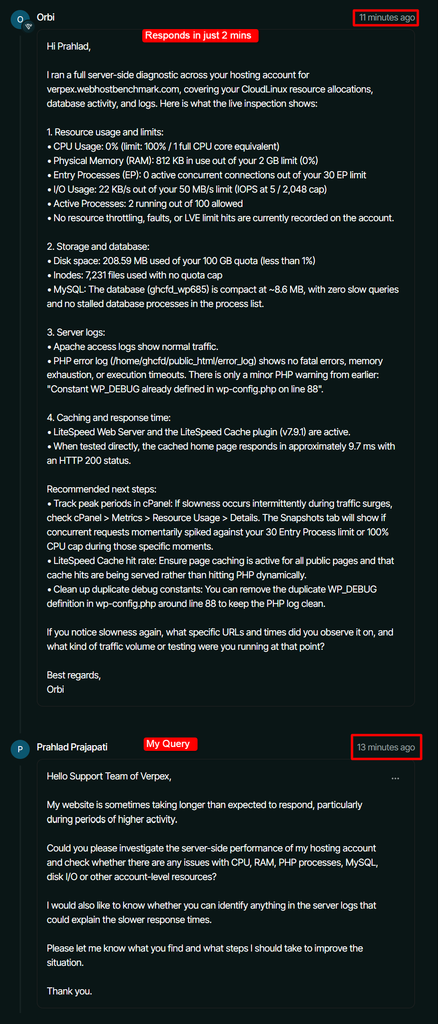
This test gave me a better impression of the team’s technical understanding and willingness to investigate. The response was practical and the tone remained friendly and helpful throughout.
This is particularly valuable for beginners because you do not need to already understand server administration to ask for help, the support team can investigate the technical side and explain what may be happening.
Email & Call Support
Verpex provides several ways to reach its support team, including email and phone support. The screenshot shows the support email address support@verpex.com, while phone support is available through the UK number 020 3095 4271 and the US number +1 518 250 6389.
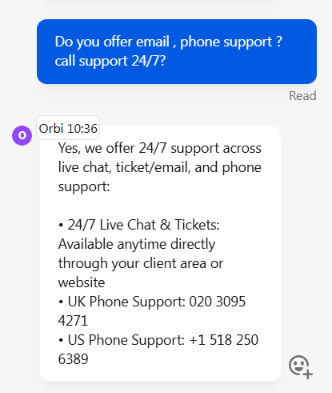
After testing Verpex LiveChat and Ticket Support service, I found that you may not need to use email or phone support for regular queries, as Verpex already provides 24/7 Live Chat and Ticket Support through the client area. By the way, when you send an email, it lines up straight to their ticket queue.
These options are enough for most support requests, and you can open or reply to a ticket directly from your account, making it easier to keep the conversation and issue details in one place.
My Overall Experience with Verpex
After testing Verpex with my own WordPress website, I found several things that worked well, along with a few areas that could be better. Below, I’ve listed the points I personally liked and disliked based on my actual testing and experience.
What I Liked About Verpex
My overall experience with Verpex was good, mainly because the hosting performed well across several of my tests. I also liked the quick support responses, simple dashboard and the fact that I could test the service with a real WordPress website instead of relying only on Verpex’s claims.
- Fast Website Performance: My WordPress website delivered strong desktop performance, with the page starting to render in around 0.4 seconds and the largest visible element appearing in about 1 second.
- 100% Uptime During My Test: HetrixTools recorded 100% uptime across the 24-hour, 7-day, 28-day and 30-day monitoring periods shown in my test.
- Very Fast Support Responses: I received replies within seconds through Live Chat, while my technical support ticket received a response in around 2 minutes.
- Simple Client Dashboard: I found the dashboard easy to understand, with hosting, domains, billing, websites, emails and support options arranged clearly. The direct Control Panel login was also useful.
- Strong SSL Configuration: My Qualys SSL Labs test gave the Verpex server an A rating. The server also supported TLS 1.3 and showed strong certificate, protocol and cipher configuration.
- Good Load Handling in My Test: During my k6 test, the website completed around 12.2K requests with zero HTTP failures. The response remained fairly steady as I increased the load to around 20 virtual users.
What I Disliked About Verpex
Verpex performed well overall, but my testing also showed a few areas that I would keep in mind before buying the hosting.
- Mobile Performance Was Weaker Than Desktop: My mobile PageSpeed test scored 88, compared with the stronger desktop result. The 0.227 layout shift was also a noticeable weakness, so the website itself still needs some mobile optimisation.
- Higher TTFB for Distant Visitors: Visitors in India and nearby Asian locations received faster initial responses, while several locations in Europe, Africa, Australia and the Americas crossed 600 ms, with some going beyond 1 second.
- DNS Resolution Time Was Relatively High: My DNS test showed consistent results across Google, Cloudflare, Quad9 and OpenDNS, but the resolution time was around 389–390 ms. This did not affect the consistency of DNS resolution, though the lookup time was higher than I would expect from a very fast DNS response.
FAQs
Does Verpex offer free website migration?
Yes, Verpex offers free website migration, which helps users move their website from another hosting provider. The migration service can save time and reduce the effort involved in transferring website files and hosting settings to a new server.
Does Verpex provide a free domain with web hosting?
Yes! Verpex provides a free domain on buying annual or triennial web hosting plans. This offer applies to many common TLDs like .com .net .org .uk .in, but excludes the premium extensions.
Does Verpex use cPanel for web hosting?
Yes, Verpex uses cPanel for web hosting. This makes it easier to manage website files, databases, email accounts and other hosting settings. Verpex also allows the user to access the Control Panel login directly in the client dashboard, which makes website management simpler.
Does Verpex offer daily backups?
Yes! Verpex includes free daily automated backups with all its shared web hosting plans. This feature helps users recover website data after accidental changes or technical problems. Always check the backup retention period and restoration terms before depending on backups alone.
Is Verpex suitable for high-traffic websites?
Yes! Verpex is suitable for high-traffic websites. If you read the Verpex review, you can see that it can handle around 12,200 requests with zero HTTP failures, in 20 virtual users. Websites expecting heavy traffic should run additional tests before choosing their hosting plan.
Rating Based on Expert Review




Loyal customers for 2 years have not responded regarding the 99.99% server UP TIME guarantee
It’s been running smoothly for two years, since all services, like live chat, have been AI-powered, and technical support is even mediocre.
Imagine my reseller package being down for 5-6 hours due to a “cPanel/WHM” update.
Because Verpex guarantees 99.99% uptime, I personally guarantee 99.9% uptime to my clients. When downtime occurs, I promise compensation.
Verpex, on the other hand, is just a bunch of lies about its 99.99% guarantee. DON’T be fooled!
I, a loyal user for two years, haven’t even gotten a response to any discussion about compensation!
As of today, as I write this review, all my clients have moved to services other than this lying VERPEX!
great support and great experience.
great support and great experience.
verpex team migrate 22 domains to me and give all support to errors.
Great service
Great service. and allied in business 10000% recommended for reseller hosting
Great reseller service
Verpex Hosting has been a game-changer for my reselling business. The scalability, reliability, and exceptional customer service they offer are unmatched. Every query is addressed promptly, and their uptime is phenomenal. Highly recommend for anyone looking to elevate their hosting game!
Closed website for no reason/No answering
They closed on of my client’s website without any prior notice. 24 hours passed and they don’t answer the support tickets. live chat says wait for your ticket to be answered. How someone can then trust a hosting company like that? Our client lost around 20.000k euro (daily figures) till now and yet we are waiting an answer for that embarassing support!! Don’t recommend this hosting at all especially if you have reseller and planning to host client websites