






Expert Review
I recently purchased a YouStable Linux VPS to test its performance in a real-world setup. I am currently using the vStart VPS, which comes with 1 CPU, 4 GB RAM, 50 GB NVMe SSD storage, 4 TB bandwidth, a dedicated IPv4 address and full root access. My VPS server is located in Mumbai, India.
I have hosted two of my websites on the same VPS server. One of them, digitalprahlad.com, runs on WordPress, while new.digitalprahlad.com is a custom PHP website.
This is the screenshot of the VPS vStart plan that I bought from YouStable and both the websites are live on this VPS. My testing is based on an actual working setup.
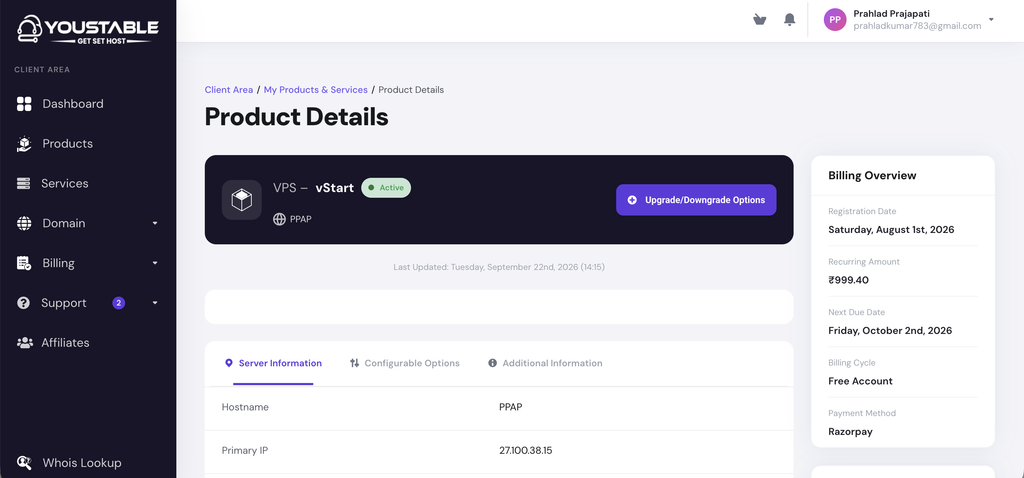
I checked the server performance using genuine and widely used testing tools to see how well the VPS handles real website traffic and different workloads.
I have included screenshots of my latest test results in this YouStable review, so you can see the actual performance data for yourself. I’ve also checked factors such as server response, website loading speed, resource performance and overall VPS reliability during my testing.
This gives you a clearer picture of how a YouStable Linux VPS performs when hosting real websites, including both a WordPress site and a custom PHP website.
About YouStable
I went through YouStable’s official company information and I used its hosting services to get a practical view of the company, its services and server performance.
YouStable is an Indian web hosting company founded in 2015 in Lucknow by Rajesh Chauhan.
YouStable offers Shared, WordPress, reseller, VPS, and dedicated hosting for different types of users. The company focuses on affordable plans with technologies such as NVMe SSD storage, LiteSpeed, CloudLinux and 24/7 support. YouStable says it serves 90,000+ customers and hosts 55,000+ websites across India, the USA, and Europe.
Below, I’ve added a small overview in a tabular form:
| Item | Our Finding |
|---|---|
| Name | YouStable |
| Owner | Rajesh Chauhan, CEO & Server Administrator |
| Hosting types | Shared, WordPress, cPanel, VPS, dedicated and other hosting solutions |
| Best for | Beginners, small businesses, WordPress sites, developers and growing websites |
| Starting price | Shared Hosting: Rs59 per month +3 months free on 3-year plan (Renewal at same price) |
| Refund | 30 days for Shared & WordPress, 7 Days for VPS & Cloud |
| Location | 3 locations (India, The US & The Netherlands) |
| Storage | NVMe SSD |
| Support | 24/7 and 365 days expert support via Live Chat, tickets, email and phone support (in Hindi & English) |
| Uptime | 98.8967% (I found this after testing uptime) |
| Measured speed & Uptime | Real-Time Tested Results + Screenshots listed below |
During my research, I verified YouStable’s current data-center availability and the 3 locations (that is, in the US, in the Netherlands and in India) from its website. I’ve also shown below how I contact their support team to verify information.
I found a built-in speed test useful for checking server response time and latency before selecting a location.

You can check the latency easily here. You just need to click on the location where you need to host your website >> Copy the test IPv4 provided by YouStable >> and click on the ping button to check how many packets transmitted, how many packets received in real-time.
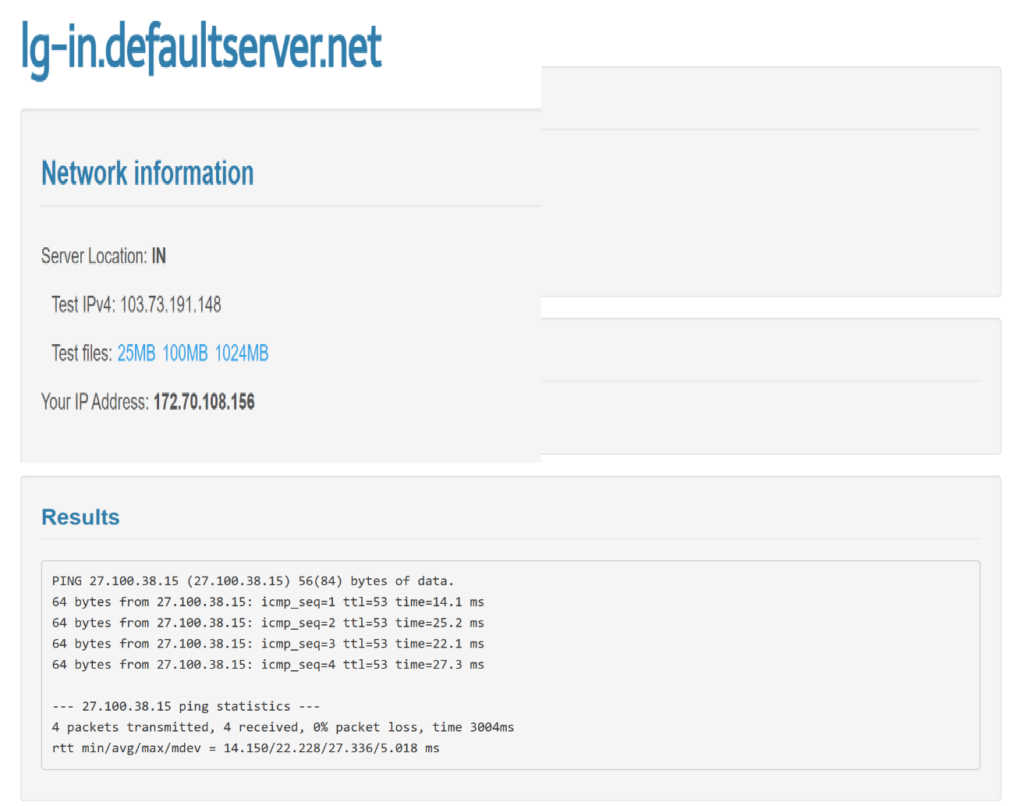
This feature I really found amazing (which makes YouStable really trustworthy).
I found that YouStable offers a 30-day money-back guarantee on Shared and WordPress hosting plans, while VPS and Cloud plans come with a 7-day money-back period. I also checked the terms carefully, as the guarantee has some exclusions covering renewals, upgrades, domain registrations and certain add-ons.
Along with checking the information provided by YouStable, I tested its hosting myself using two live websites, one running WordPress and the other built with custom PHP. This gave me actual performance data from a working hosting setup.
Tools I used to Review YouStable
For this YouStable review, I wanted to test my VPS using real and widely used testing tools instead of relying only on the specifications provided by the hosting company.
I have been running two websites on the same YouStable VPS (one WordPress website and one custom PHP website) so I used these tools to check different parts of the server, including hardware performance, load handling, page speed, response time, uptime, SSL, DNS and network performance.
This gives me a much more practical idea of how my server performs under a real working setup.
| Tool I Used | What I Tested | What the Test Tells You About My Server |
|---|---|---|
| WordPress Benchmarking Tool | CPU, RAM, filesystem, database, WordPress, compression, image processing and network performance | Shows how well the VPS handles different server workloads. |
| k6 | Load testing with multiple virtual users and repeated HTTP requests | Shows how the VPS handles traffic and repeated requests under load. |
| Google PageSpeed Insights | Page-loading performance for both my WordPress and custom PHP websites on desktop and mobile | Shows how quickly the real websites load and respond for visitors. |
| Flying TTFB | Server response time from different locations around the world | Shows how quickly the server starts responding to visitors in different regions. |
| HetrixTools | VPS uptime, downtime and response time | Shows how consistently my VPS remains available and how its response time changes over time. |
| SSL Labs | SSL/TLS configuration across the server endpoints | Shows how well the server’s HTTPS and SSL/TLS configuration is set up. |
| DNS & Network/Response In-house Testing Tools | DNS resolution, DNS response time, TCP connection, TLS connection, TTFB and complete page loading | Shows how the website connects from DNS lookup through the server response and final page load. |
After each test, I’ve added the actual screenshot from the testing tool’s dashboard/report below the relevant section. This lets you see the same results I used for my review and gives you a clearer idea of how my YouStable VPS performed in real-world testing.
YouStable Performance Test
After using my YouStable VPS with two websites hosted on the same server, I wanted to check how the server is performing. I have also added screenshots of the actual test results and tool dashboards throughout this section, so you can see the results I received during my testing for yourself.
Since both my WordPress website and custom PHP website are running on this VPS, these tests give me a practical picture of how the server is handling my websites after long-term use.
Hardware Benchmark Testing
I used the WordPress Benchmarking Tool (it is a wordpress plugin) that I installed to check how my YouStable server handles different types of workloads.
I have 2 websites hosted on this same server, with one running on WordPress and the other built with custom PHP, so the benchmark gives me a useful picture of how the server performs under real website workloads.
The test completed successfully across CPU & Memory, Filesystem, Database, WordPress Core, Compression/Serialization, Image Processing and Network, with an overall score of 8/10. This way, I got a useful picture of the server’s general performance.
This is the screenshot of the hardware benchmark testing results.
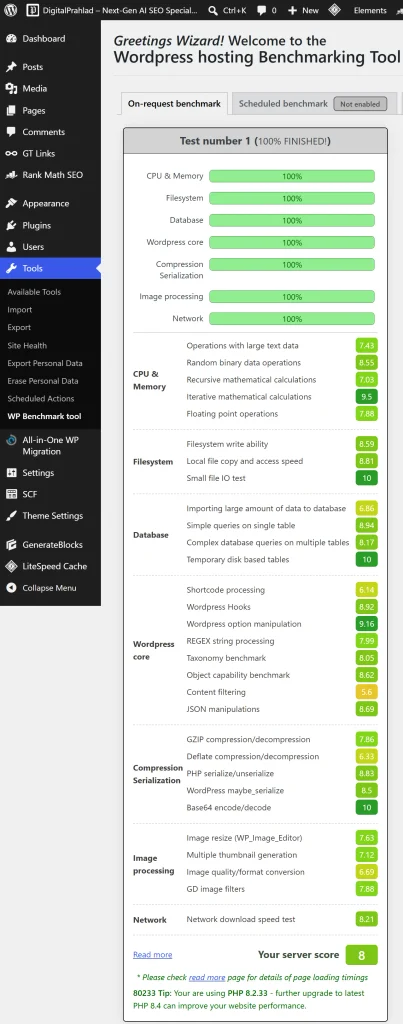
I’ve added a table of all the server scores below so that you can get a perfect idea about the performance.
| Test area | Score range | What it tells me |
|---|---|---|
| CPU & Memory | 7.43–9.50 | Good processing and memory performance |
| Filesystem | 8.11–9.30 | Fast file and storage operations |
| Database | 6.86–9.30 | Good database performance, with large imports taking longer |
| WordPress Core | 5.60–9.16 | Good overall WordPress processing |
| Compression/Serialization | 7.86–10 | Strong data processing performance |
| Image Processing | 6.69–7.86 | Decent image-related performance |
| Network | 8.21 | Good network download performance |
| Overall | 8/10 | Good server performance |
The WordPress results are useful because they show how the VPS handles common WordPress-level operations, not just basic CPU and memory workloads.
Most core WordPress tasks performed well, although a few operations were slower than others. Since I also host a custom PHP website on the same VPS, this benchmark does not directly measure its application code, but it does test the underlying server resources that both websites use.
Load Testing
k6 is the name of the tool that I used to test the server while hosting both of my websites on the same server, one WordPress website and the other a custom PHP website.
- During the test, k6 generated 45,306 requests at an average rate of around 130 requests per second, with the test reaching a peak of 177.42 requests per second.
- The server recorded 0 HTTP failures, which means every request received a successful response during this test.
The graph also shows the load being increased gradually to around 20 virtual users, then kept at that level for a sustained period. This is useful because the server was handling traffic for both websites at the same time.
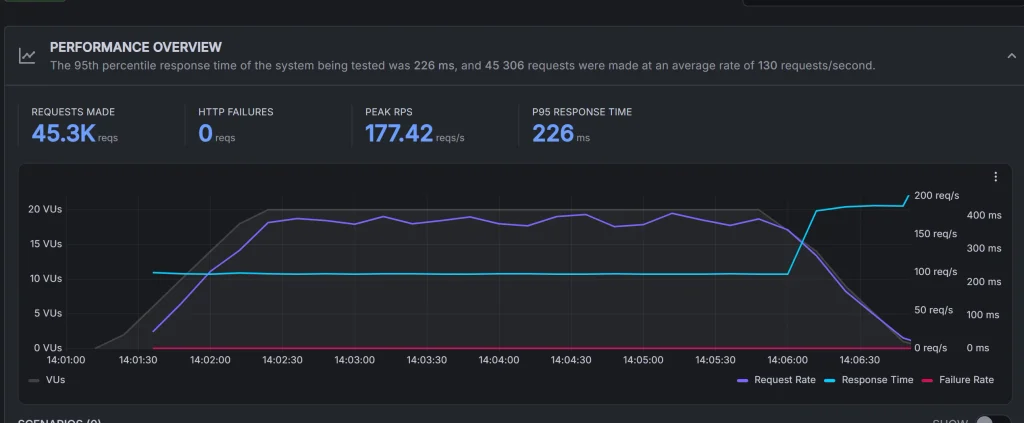
As you can see in the screenshot above, the response time was also quite consistent during the main part of the test. The 95th percentile (P95) response time was 226 ms, meaning 95% of the requests were completed within about 226 ms or less.
You can also see from the graph that the response time stays fairly steady while the server is handling the higher request rate, with no sudden spike in failures.
I found this result useful because both the WordPress site and the custom PHP site were running from the same server during the test, so the result gives a better picture of how the server handles multiple websites under load.
PageSpeed Testing
I also wanted to see how my two websites actually perform when a real visitor opens them, so I used Google PageSpeed Insights to test their loading speed on both desktop and mobile.
Since I have a WordPress website and a custom PHP website running on the same YouStable VPS, I tested both separately to see how the server performs with different types of websites.
I have included the actual PageSpeed screenshots below each test, so you can see the scores and loading metrics I received during my testing.
- WordPress Site
I started the PageSpeed testing with my WordPress website, digitalprahlad.com, which has been running on the same YouStable VPS. I tested the site on both desktop and mobile using Google PageSpeed Insights to get a more realistic picture of how it loads for visitors.
- Speed Performance on Desktop
I used Google PageSpeed Insights to check how quickly my WordPress website responds and becomes usable on the YouStable VPS. This test is useful because it looks beyond basic server response and shows how quickly visitors can actually see and interact with the page.
The desktop test returned a 99/100 Performance score, with the main content appearing quickly and very little script-related delay. The 0.008 CLS also shows that the page stayed stable while loading.
As per these results, I think that my VPS is providing a good base for fast WordPress page delivery during this test. I’ve added the complete PageSpeed results below so you can see the individual metrics and scores yourself.
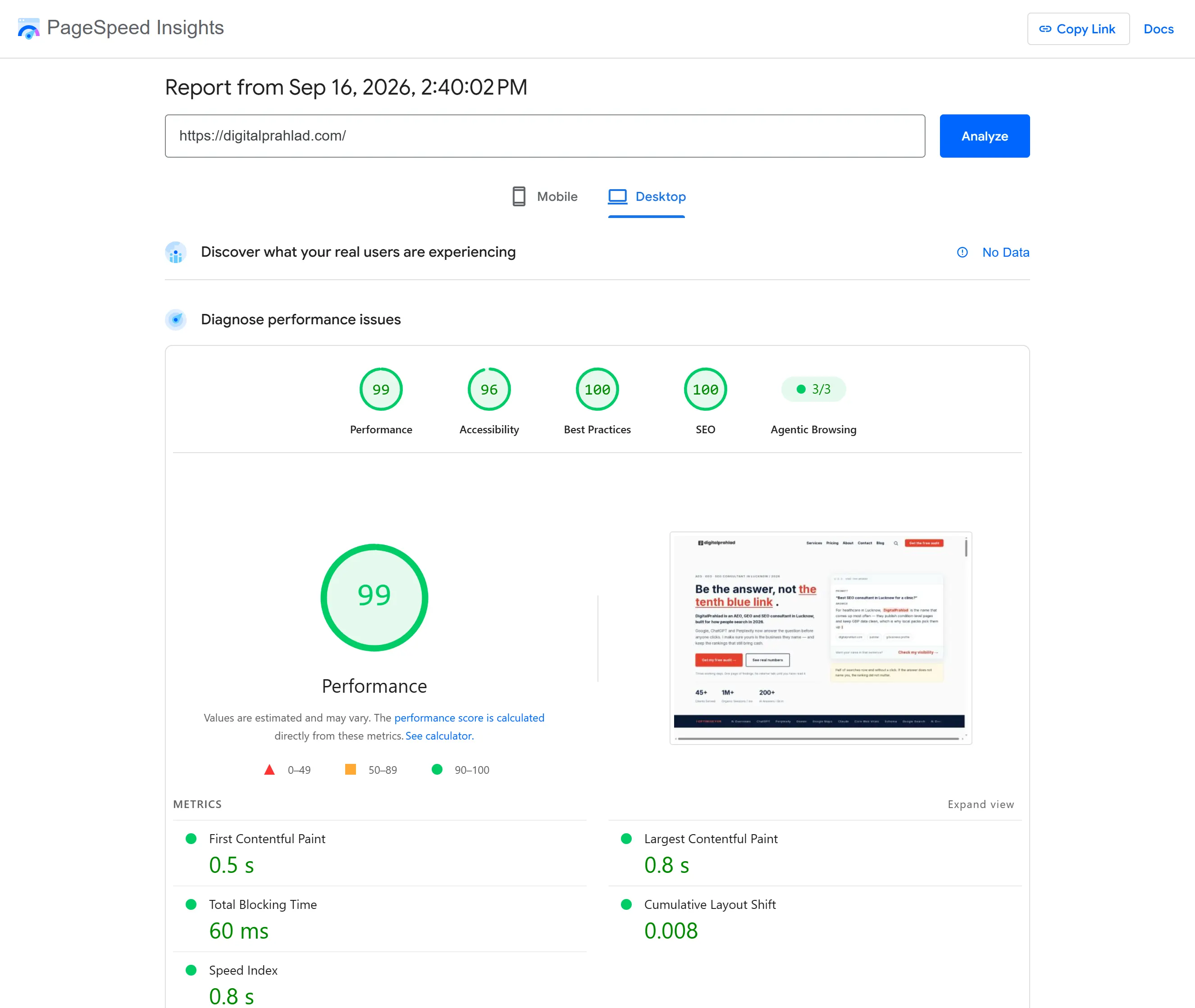
Keep in mind that PageSpeed results can change with caching, page content, network conditions, and the time of testing, so I use this result alongside my other server and website tests.
- Speed Performance on Mobile
I also checked my WordPress website on mobile because visitors often browse websites on phones, where slower loading can lead to people leaving before the page appears. Faster pages can make browsing feel smoother, help users reach content sooner, and support better engagement. It also matters for SEO because Google uses mobile page experience as part of its ranking systems.
This is the screenshot of the WordPress website speed test on Mobile conducted using Google PageSpeed Insight.
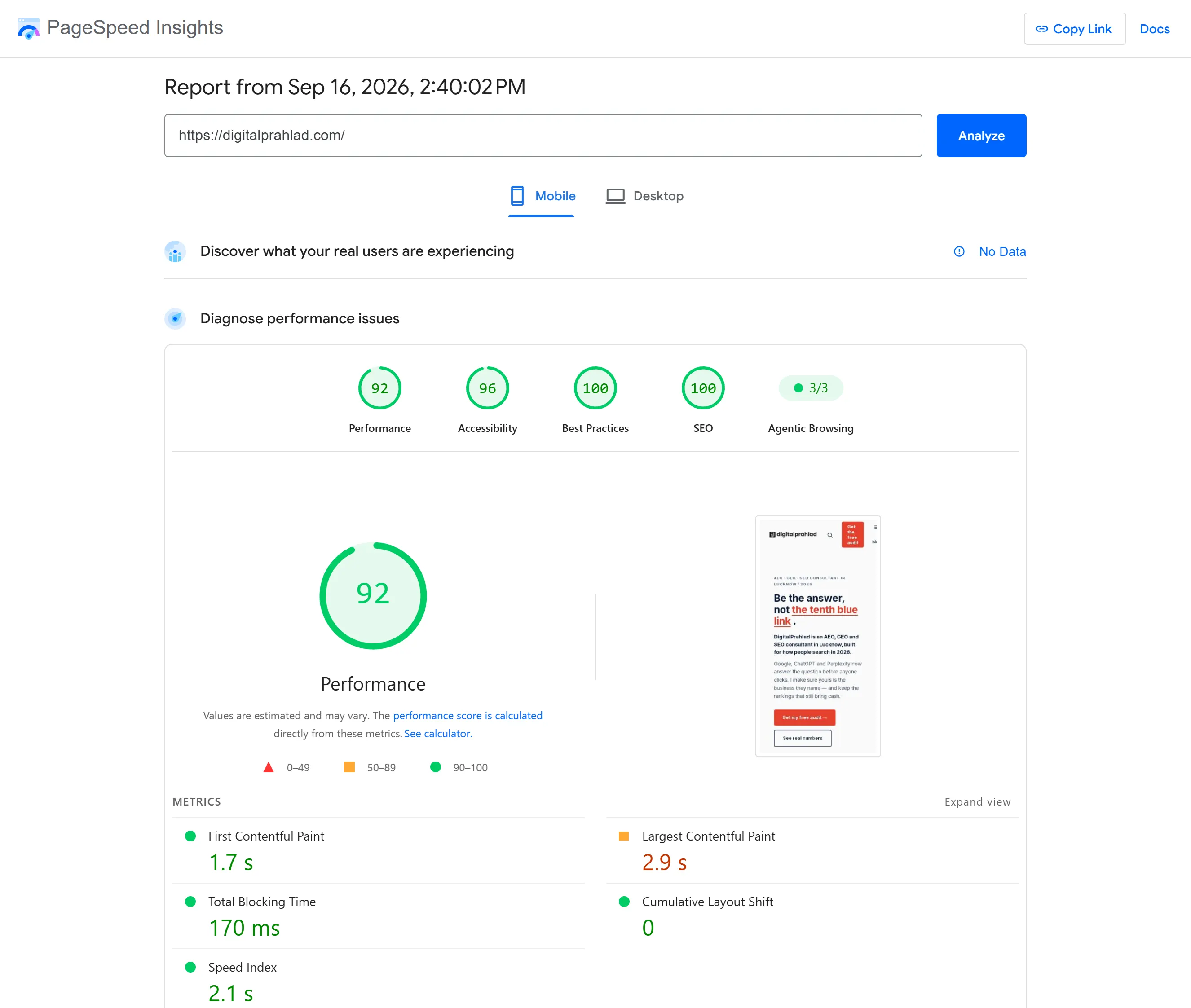
The 92/100 Performance score shows that the page loads well on mobile, while the 0 CLS means the layout stays stable during loading. The 2.9-second LCP is the main area I’d watch, as improving it could help visitors see the main content sooner.
- Custom PHP Site
Now, I tested my custom PHP website, new.digitalprahlad.com, which is also hosted on the same YouStable VPS. I used Google PageSpeed Insights to check how quickly the website loads on both desktop and mobile and to see how the server handles a lightweight PHP-based website.
Since this website does not use WordPress, the results give me another useful view of the VPS performance with a different type of website.
- Speed Performance on Desktop
Here I want to see how the YouStable VPS performs with a non-WordPress site.
The 100/100 Performance score, very fast content rendering and 0 ms blocking time suggest that the server is handling page requests efficiently without adding noticeable delays.
Below is the screenshot of the test results. Please refer to it to know about the performance.
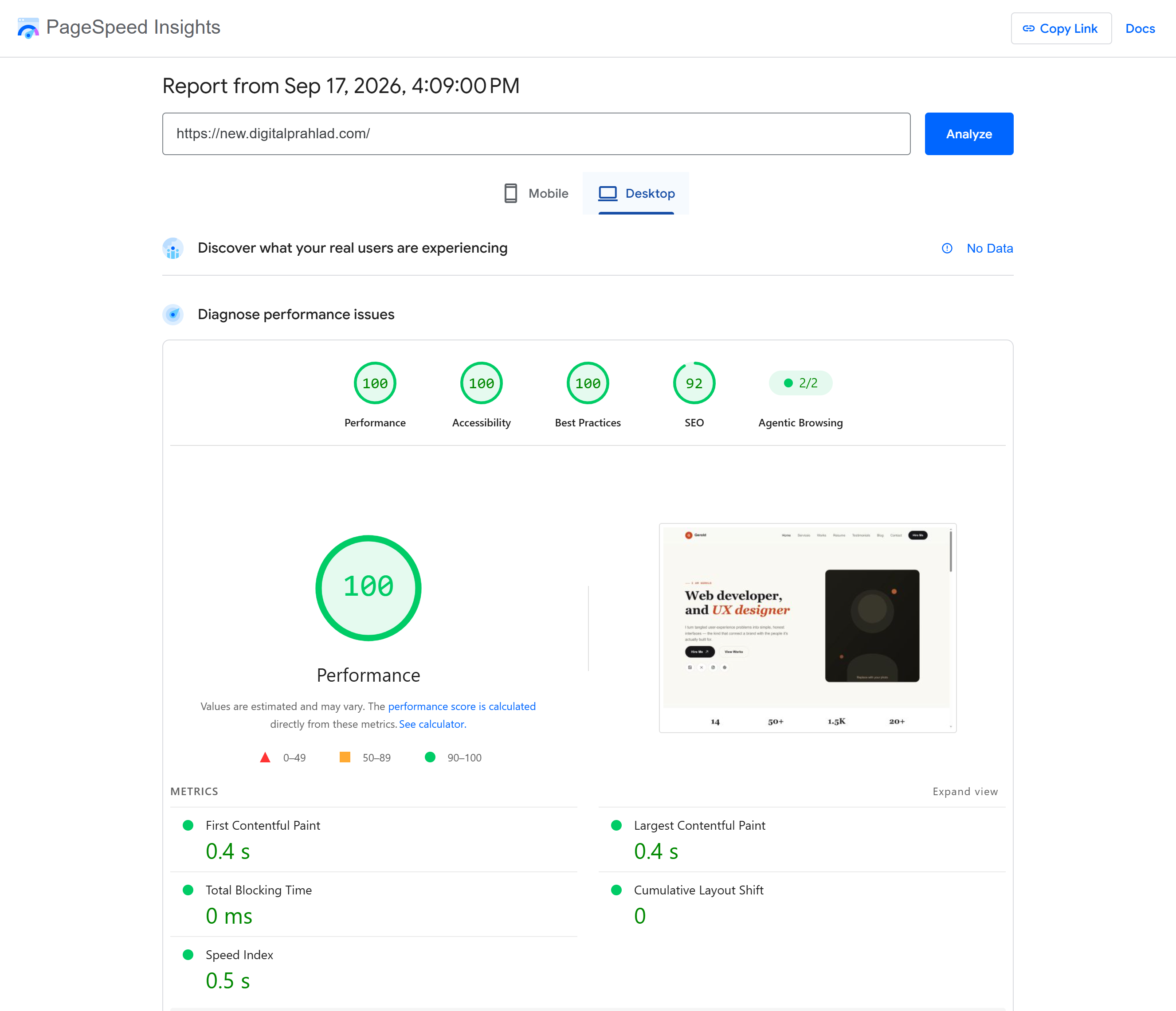
The 0 CLS, in the test above, also matters because visitors can view the page without content shifting around. These figures show that the VPS provides a strong foundation for fast, responsive custom PHP websites.
I would describe this testing result as a very strong performance result for a custom PHP website, especially because the page reached a 100 performance score while keeping both loading time and blocking time extremely low.
- Speed Performance on Mobile
I checked how my custom PHP website works on mobile and saw how the YouStable VPS handles a lightweight PHP-based website.
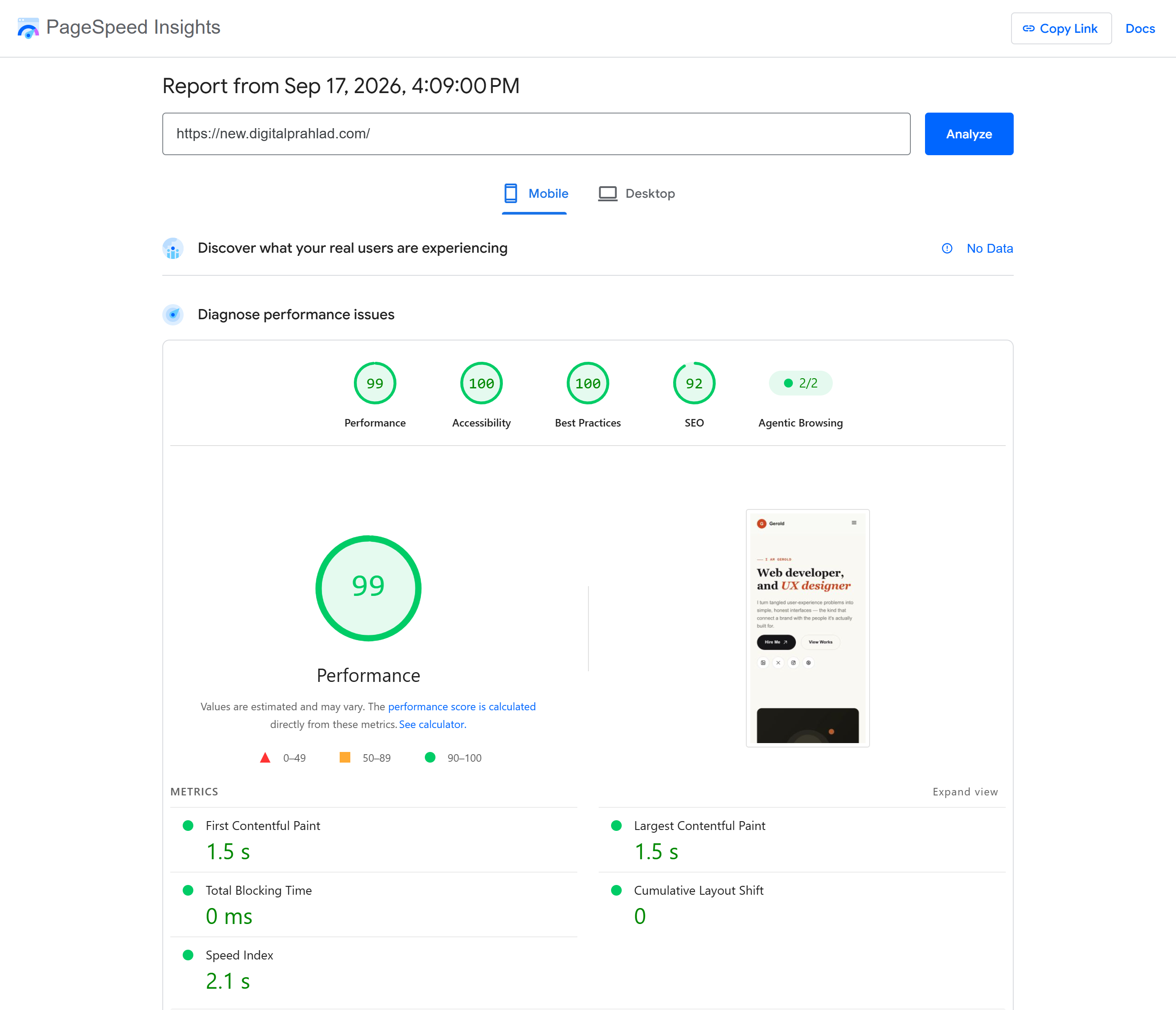
The strong Performance score shows that the server was able to deliver the page quickly, while the 0 ms blocking time indicates that the page remained responsive during loading.
The 0 CLS also shows stable page rendering, with no visible movement of elements.
This test highlighted that the YouStable VPS provides a fast and stable server base for PHP websites. It helps visitors access content quickly and browse the page smoothly on mobile devices.
TTFB Test
I also tested my YouStable VPS with Flying TTFB to see how quickly it starts responding to visitors from different parts of the world.
The server returned a successful HTTP 200 response from all 22 tested locations, showing that the website was reachable across every region tested. The response was quickest from locations closer to the server. For example, Mumbai responded in around 54 ms and Delhi in about 75 ms, while Singapore was around 176 ms.
As the distance increased, the response time also became higher. You can see the screenshot given below.
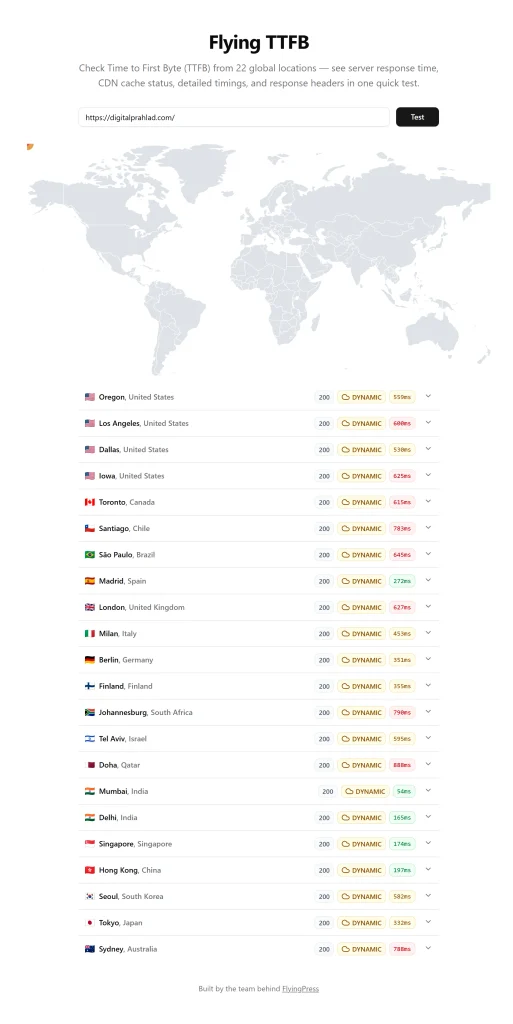
The results show that the VPS is particularly responsive for visitors in India and nearby Asian regions, while visitors farther away may experience a higher TTFB due largely to the physical distance between them and the server.
TTFB only measures the initial server response, not the complete page-loading time.
Since I have 2 websites hosted on this VPS, one WordPress and one custom PHP website, this test gives me a useful view of the server’s initial response across different regions.
I have listed the complete location-wise results below so you can compare the response times yourself.
Uptime Testing
I monitored my YouStable VPS with HetrixTools to check its availability and response over time.
The server was online during the latest check, with a 98.8967% overall uptime shown in the dashboard. The recent 24-hour period recorded 100% uptime, while the longer monitoring period showed some downtime.
As you can see in the screenshot below, the server is responding noticeably faster from locations closer to India while requests from Europe take longer.
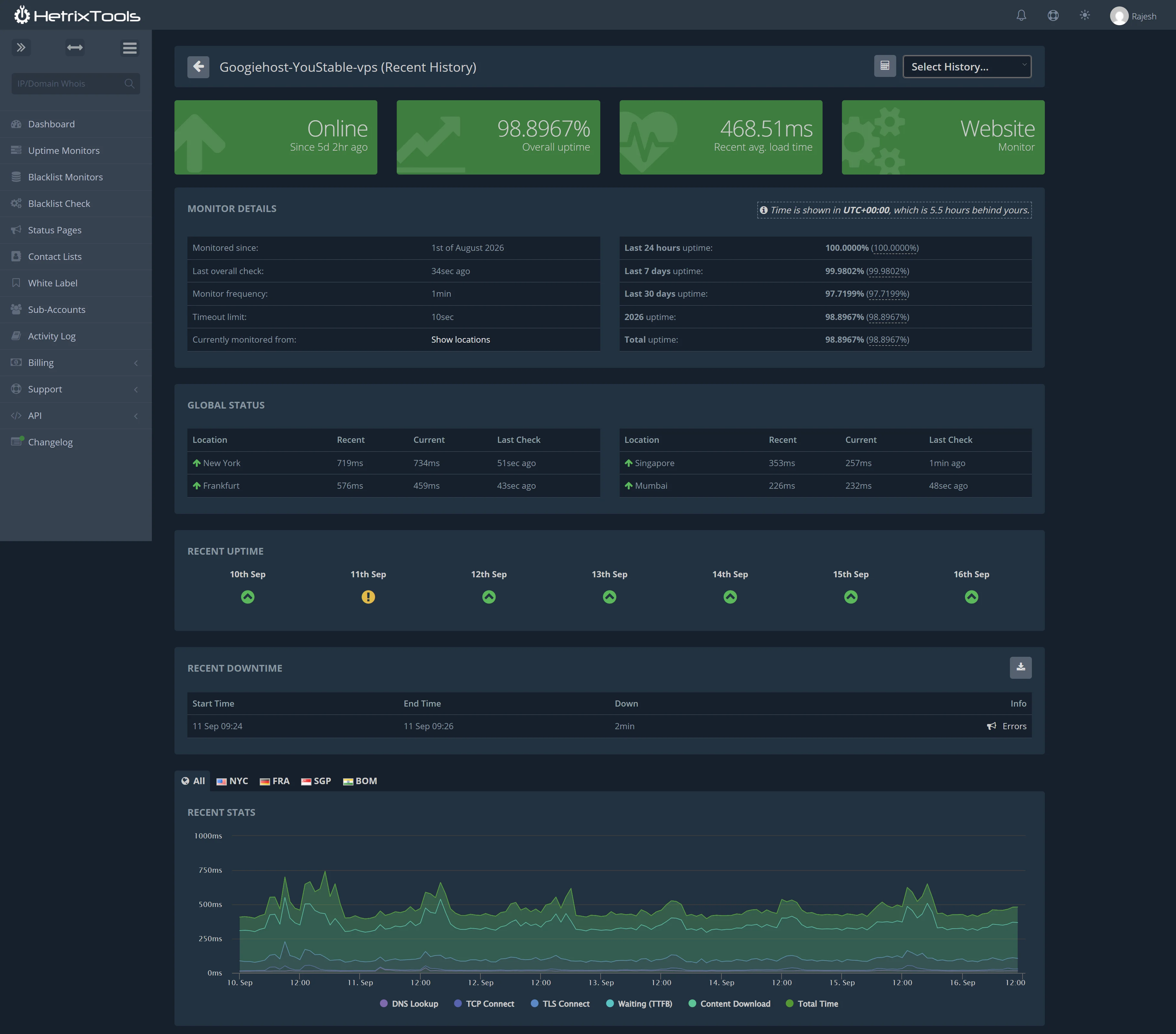
I also checked the actual downtime history.
The dashboard recorded a 2-minute downtime event on September 11, while response times generally remained in the 300 to 500 ms range, with some short spikes.
I see that my testing gives a more useful picture than a single uptime snapshot because it shows both availability and how the server responds from different locations over time.
I use ongoing monitoring as part of our testing process, so you can also check the latest server data on the GoogieHost Testing Lab. For details on how we test hosting performance and reliability, see our Review Methodology.
SSL Testing
I tested the server using SSL Labs, and the results were quite consistent across all four server endpoints shown in the report.
The test checked four different IP addresses, including both IPv4 and IPv6 addresses, and each server received a Grade B.
The testing itself took roughly 59 to 60 seconds per server, which was almost identical across all four endpoints.
I found that this consistency is useful because I have two websites hosted on the server (one WordPress website and another custom PHP website) so it shows that the SSL/TLS setup is working consistently across the server.
See the screenshot of the test results that I’ve attached below:
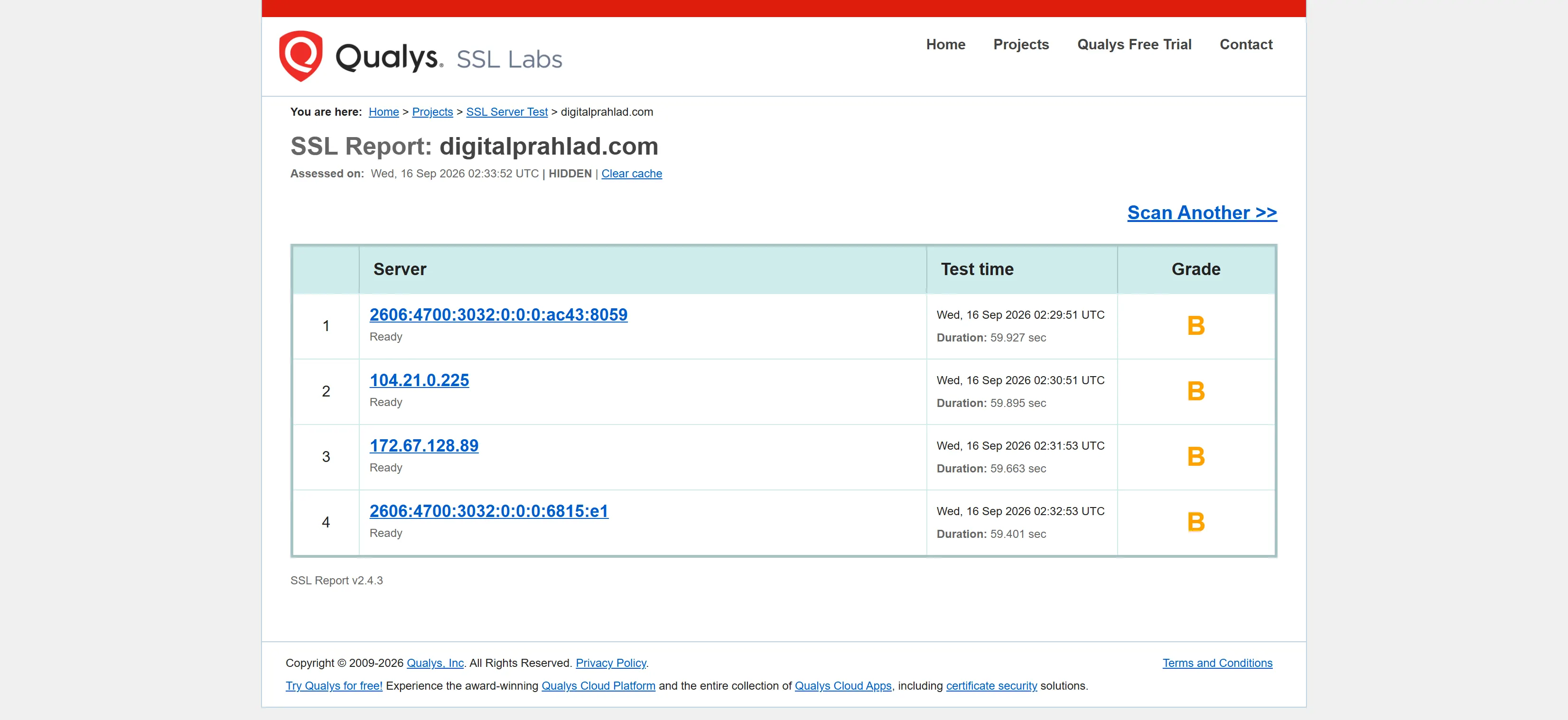
The report also shows every server as “Ready,” meaning all four endpoints were successfully tested.
SSL Labs is mainly checking the server’s SSL/TLS configuration and security settings.
So, from this particular test, I want to say that the server has a working and consistent HTTPS/SSL setup, but there are still some chances to improve the SSL configuration to reach a higher grade.
DNS Resolution Testing
To see how the domain handles DNS resolution, I used an in-house testing tool and checked it through four different public DNS providers:
- Google,
- Cloudflare,
- Quad9,
- OpenDNS.
All four resolvers returned the same IP addresses, 104.21.0.225 and 172.67.128.89, which means the domain was resolving correctly from each one.
The response times were different, though. Google was the fastest at 77 ms, while Quad9 took 148 ms, OpenDNS took 157 ms and Cloudflare took 163 ms.
So, Google responded noticeably faster in this particular test, but the other resolvers also completed the lookup successfully without any DNS error.
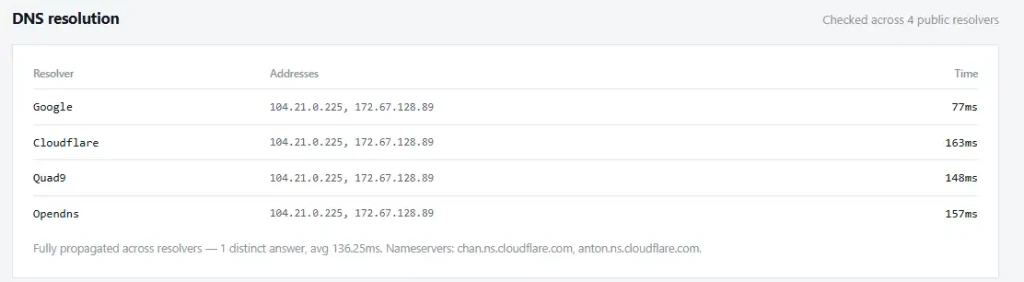
The test also confirmed that the DNS was fully propagated across all four resolvers, with an average resolution time of 136.25 ms.
The domain is using Cloudflare nameservers, shown in the test as chann.ns.cloudflare.com and anton.ns.cloudflare.com.
I wanted to check this before looking at the actual server response because DNS resolution happens before the browser starts communicating with the server. This gives me a useful starting point for the overall server testing.
Network and Response Testing
For Network and Response Testing, I used an in-house testing tool to see how quickly the YouStable server connects, responds, and loads the website.
Since I have two websites hosted on the same server, this gives me a better idea of how the server performs with different types of websites.
In the test, the DNS lookup took 179 ms, TCP connection took 117 ms, and TLS connection took 129 ms. The TTFB was 671 ms, which was the longest part of the connection and shows how long the browser waited for the server to start responding.
The TTFB mentioned here is the average response time across multiple testing locations. TTFB can also be measured separately from individual regions, which is why location-based tests may show different response times.
After that, the page reached DOM Ready in 1.02 seconds and the full page loaded in 1.34 seconds. The total transfer size was only 168.2 KB, so the website itself was quite small during this test.
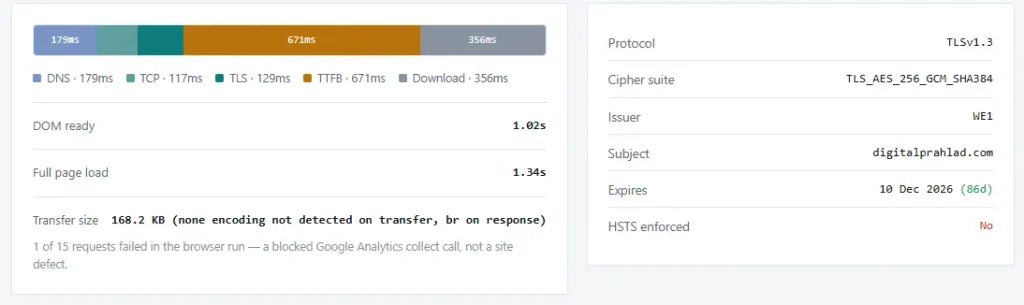
The website was using TLS 1.3 with the TLS_AES_256_GCM_SHA384 cipher, and the SSL certificate was valid until 10 December 2026.
I also noticed that HSTS was not enabled.
The test showed 1 failed request out of 15, but this was not a server or website failure (the tool identified it as a blocked Google Analytics request).
This result shows quick page loading. But the higher TTFB indicates that improving initial server response could make the website feel even faster.
Easy to Use Client’s Dashboard UI
When I first opened the Youstable client area, the dashboard felt quite simple to use.
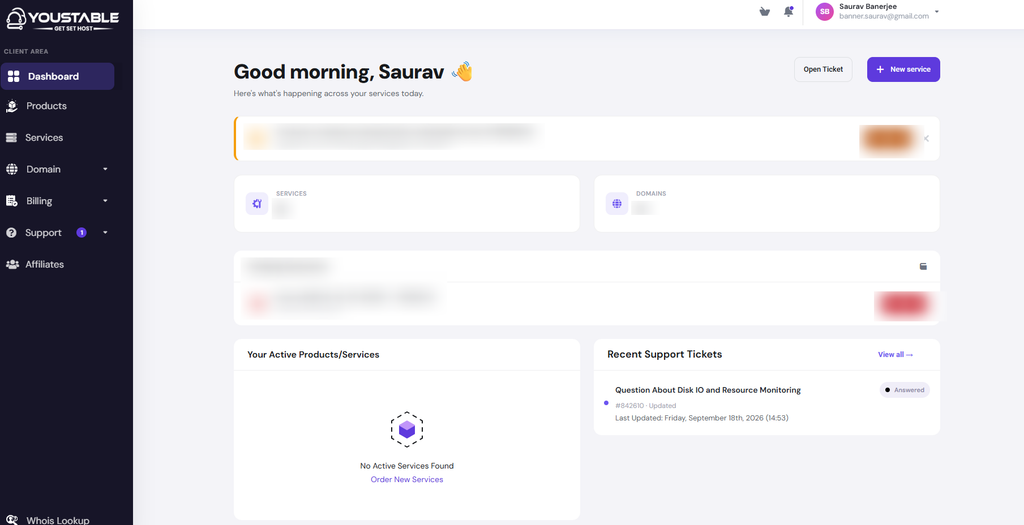
The left-side menu keeps the main sections such as Dashboard, Products, Services, Domain, Billing, Support, and Affiliates in one place, so I did not have to search around to find the basic account options.
The main screen also gives a quick overview of the account, with separate sections for services and domains. I like this approach because the dashboard does not feel overloaded with too many menus or technical information.
Even if someone is using a hosting dashboard for the first time, the layout is fairly easy to understand and the important areas are visible from the start.
From a user’s point of view, the dashboard also makes everyday account management feel simple.
The Recent Support Tickets section is useful because you can see your latest support activity without opening the support area separately. The Your Active Products/Services section also gives you a quick place to check whether you have any active services.
| Dashboard area | What I found | User experience |
|---|---|---|
| Left-side navigation | Dashboard, Products, Services, Domain, Billing, Support and Affiliates are clearly listed. | Easy to move between different account sections without searching. |
| Main dashboard | Shows a greeting and an overview of the account. | Gives a simple starting point when you log in. |
| Services & Domains | Separate cards provide quick access to service and domain information. | Makes important account information easy to find. |
| Active Products/Services | The screenshot shows no active service currently available. | Clearly tells the user the current service status. |
| Recent Support Tickets | Recent support activity is displayed directly on the dashboard. | Convenient for checking support requests without opening another page. |
| Overall UI | Clean layout with clearly separated sections. | Feels simple and manageable for regular hosting account use. |
While using the dashboard, the experience feels more like a simple account-control panel than a complicated hosting interface.
It gives you the basic information you need at a glance and keeps the navigation easy to follow.
YouStable Support Channel Performance
I also talked to the YouStable’s support team myself by contacting both Live Chat and Ticket Support with my questions.
My experience with both channels was really impressive (the responses were quick, friendly, and actually relevant to what I asked instead of giving me a generic reply).
I’ve added screenshots of both conversations below as proof of my testing, so you can see the response time and the answers I received for yourself.
This gave me a much better idea of how YouStable’s support team responds when I actually need help with my VPS.
LiveChat Support (Response Time: 10 seconds)
I tested YouStable’s live chat support by asking about the VPS hardware and resource allocation. I received a response in around 10 seconds, which was impressive for a support test.
The support agent was friendly and responded directly to my questions, confirming that the VPS instances were running on NVMe SSD storage and that the VPS plans include dedicated CPU and RAM.

The answer was short, but it gave me the information I was looking for without making me wait or go through unnecessary details.
| Support Channel | My Testing Experience |
|---|---|
| LiveChat | Response: <10 seconds. The support agent was friendly and answered my VPS questions immediately. The response was brief but clear, confirming NVMe SSD storage and dedicated CPU/RAM. I found it useful for quick pre-sales or technical confirmations. |
From my personal experience, the live chat worked well when I needed a quick technical confirmation before making a decision.
Ticket Support (Response Time: 5 minutes)
I also tested YouStable’s ticket support with a more detailed question about VPS resource usage, disk I/O, CPU, RAM, and how to check whether the server was experiencing any storage-related issues.
I received a reply in around 5 minutes, and this response was much more detailed than the live chat.
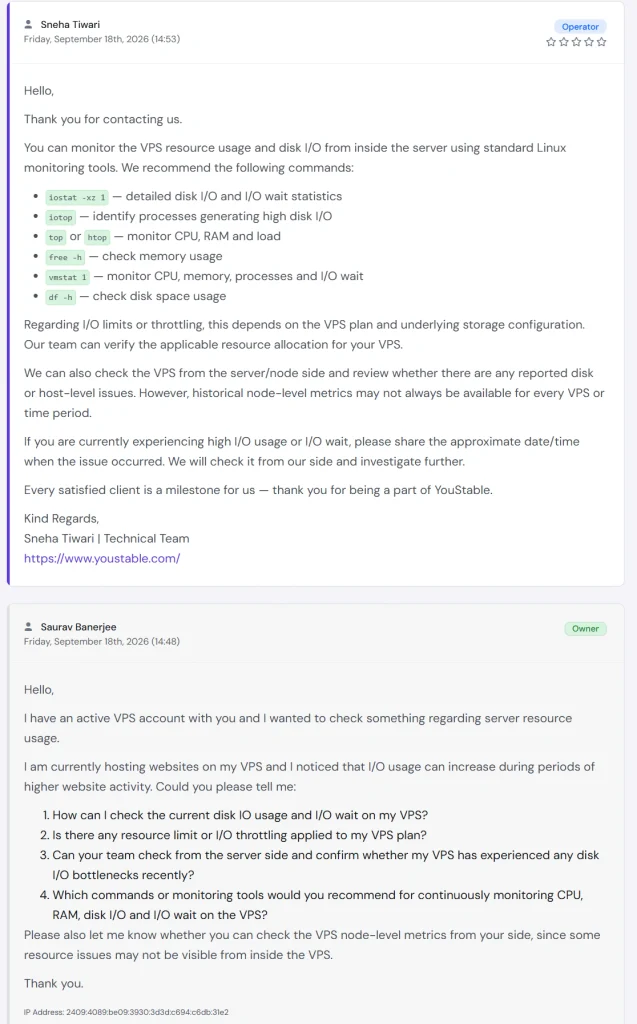
The support team provided useful Linux commands such as iostat, iotop, top/htop, free, vmstat, and df, and explained that I/O limits can depend on the VPS plan and underlying storage configuration.
| Support Channel | My Testing Experience |
|---|---|
| Ticket Support | Response: 5 minutes. The reply was more detailed and technically focused. The team provided practical Linux monitoring commands and offered to investigate server-side issues. I found this more useful for troubleshooting and deeper VPS-related questions. |
They also offered to check the server/node side for possible disk or host-level issues. I found the response friendly, technically useful and focused on actual troubleshooting.
Please Note: Apart from Live Chat and Ticket Support, I found that YouStable also offers email and phone support, which can be useful when you need help through a different channel. If you prefer contacting the team by email, I found that you can create a free YouStable account and raise a ticket with your question even without an active hosting plan. Phone support is another option for users who prefer speaking directly with the support team.
My Overall Experience with YouStable
See! My overall experience has been based on a real working setup. I’ve already shown you the screenshots of the test and I’ve also analysed each test above in detail. So, after actual use, I would describe my YouStable experience as a practical mix of good server performance and responsive support.
There are few technical areas that could still be improved as well.
What I Liked About YouStable
After using the YouStable VPS myself, a few things were really amazing that I’ve listed below. The India server location was particularly useful for my setup because my websites target visitors in India.
- Good fit for India-focused websites: The Indian server location makes sense if most of your visitors are in India or nearby regions. My testing showed noticeably quicker responses from Indian locations.
- Works with different website setups: I was able to run both WordPress and custom PHP websites on the same VPS, so I was not limited to one type of application.
- Convenient account management: I found the client area straightforward for managing services, domains, billing, and support. YouStable also supports multiple currencies, including INR, which is useful for Indian customers.
- Support was practical: What I liked about the support was not only the response time but also the technical nature of the replies. In my testing, the ticket team provided Linux commands that I could actually use for deeper troubleshooting.
- Multiple hosting & control-panel choices: YouStable offers different hosting setups, including cPanel and DirectAdmin options, which gives users more flexibility when choosing how they want to manage their server.
- Multiple payment options: It supports a wide range of payment methods, including UPI, RuPay, Google Pay, Paytm, Net Banking, Visa, Mastercard, American Express, and PayPal. I liked this flexibility because Indian users can use local payment methods.
What I Disliked About YouStable
After testing and using YouStable VPS, I also came across a few areas that I would keep in mind before choosing it.
- Initial server response could be faster: My network test recorded an average TTFB of 671 ms across multiple testing locations. The page is still loaded quickly overall, but the initial server response is one area I would like to see improved.
- Security configuration has room for improvement: My SSL Labs testing returned Grade B, and I also found that HSTS was not enabled. The HTTPS connection was working, but the server configuration could be tightened further.
- Location matters: The Indian server performed much better for nearby visitors than for users connecting from distant regions. If your audience is mainly outside India, I would pay closer attention to the latency from your target country before choosing the server location.
- Entry-level resources: My VPS has 1 CPU core and 4 GB RAM. That was enough for my current setup, but websites with heavier databases, larger applications, or consistently high traffic may need a higher-resource VPS.
- Some features require technical knowledge: Root access is useful, but it also means you have more responsibility for server-level configuration and troubleshooting. Beginners who want everything handled for them may find a managed setup more convenient.
For an India-focused website with moderate requirements, several of these limitations may have little practical effect, while users serving a global audience or running resource-heavy applications may need to consider them more carefully.
Disclosure: I host two websites on the same Linux VPS (one WordPress website and one custom PHP website) and I regularly test the server to see how it performs over time and I update it on my YouStable review so that you get real time information.
FAQs
Is YouStable hosting reliable?
Yes! YouStable hosting is reliable based on my testing. It delivered stable server performance and good response times during my testing. My HetrixTools monitoring recorded 98.8967% overall uptime, so as per my testing, the actual uptime can vary from the provider’s advertised guarantee.
Does YouStable offer a money-back guarantee?
Yes! YouStable offers a money-back guarantee on selected hosting plans. Shared, WordPress and reseller hosting plans come with a 30-day refund period, while VPS and Cloud Hosting plans have a 7-day refund period. Some services, renewals, upgrades and add-ons are excluded.
Is YouStable good for WordPress websites?
Yes! YouStable is a good option for WordPress websites. During my testing, my WordPress site scored 99/100 on desktop and 92/100 on mobile in Google PageSpeed Insights, showing good loading performance.
Does YouStable offer free website migration?
Yes! YouStable offers free website migration with selected hosting plans. The migration terms depend on the hosting package, so check the specific plan conditions before moving an existing website.
Is YouStable VPS managed or unmanaged?
YouStable VPS is semi-managed and is mainly suitable for users who want root access and server control. You get access to server settings, software and configurations with the VPS plan.
Is YouStable suitable for high-traffic websites?
Yes! YouStable is suitable for high-traffic websites, especially with its high-performing VPS and dedicated server options. In fact, it is one of the most reliable dedicated servers for wordpress blogs that we recommend.
Rating Based on Expert Review




My one stop centre
My go to space
nihr
its a great server
I want to take a moment to express how impressed I am with the service I received from GoogieHost.
I want to take a moment to express how impressed I am with the service I received from GoogieHost. From the very beginning, the entire process of setting up my website was seamless and straightforward. The platform is user-friendly, making it easy even for someone without much technical knowledge to create and manage a website effectively.
What truly stands out is the exceptional customer support. Whenever I encountered a problem or had a question, the support team was quick to respond and provided clear, helpful guidance. Their dedication to ensuring that everything runs smoothly is truly commendable.
In addition, the performance of my website has been outstanding. The loading times are fast, and I haven’t experienced any downtime, which is crucial for maintaining a professional online presence. The fact that they offer such high-quality service at no cost is genuinely remarkable.
Overall, I couldn’t be happier with my experience at GoogieHost. They provide everything you need to get your website up and running, and they do it with a level of quality and care that’s hard to find elsewhere. I highly recommend GoogieHost to anyone looking for reliable and free web hosting services.
Aditya Gupta
To be honest I did’nt have any experience about youstable. But got some search and found positive review. YouStable provides lot’s of useful features like free site migration, so many data center locations, ssd-driven servers, etc and all of them within affordable pricing.
it is very amazing
i like it because they provide webhosting at lowest price and any can but it .tey also provide free web hosting and experience was amazing I will share this website with all my it friends thank you keep up the work, website was easy to use I get my domain in less than 1 minute.
Excellent
Excellent it was the great exp with googie host. Co. Your email address * will not be published. Required fields are will not be published. Required fields are marked marked
surprising experience
experience was amazing I will share this website with all my it friends thank you keep up the work, website was easy to use I get my domain in less than 1 minute.
Good hosting provide
My search for a good hosting provider ends here.They provide good service & fast hosting speed.I appreciate there work they are doing to promote an Indian company as a equivalent competitor.
BEST HOSTING SERVICE
100% trustable and I’m very happy with your super fast customer support. I had the best experience. Worth sharing with friends and professionals. Keep rocking!
LOVE THIS HOSTING
I love this hosting, your servers are perfect, with a very low cost, it’s excellent to people start in the world of websites, or something like that, the best option ever in hosting web, thank u for your service.
Great Experince
experience was amazing I will share this website with all my it friends thank you keep up the work, website was easy to use I get my domain in less than 1 minute.
Bom!
Muito bom!
Serviço bom, ótima iniciativa, interface fácil de entender e utilizar.
Estou experimentando ainda mas já estou gostando!
já até comentei com outros usuários sobre o mesmo.
A very professional hosting available for affordable cost.
I love You Stable because of it’s professional interface and features which is a huge support for a web developer like me. It provides all the excellent features which will ensure that your website runs blazing fast and gives the visitor a seamless and smooth experience.
surprising experience
experience was amazing I will share this website with all my it friends thank you keep up the work, website was easy to use I get my domain in less than 1 minute.
Best site
This is the best platform you will ever get with good support. User interface is very easy to use and handle and also the pricing they provide is very reasonable.
Best customer support
Just starting with free hosting, now upgraded to YouStable affordable web hosting with excellent customer support.
excellent
There are many types of website hosting, but Googiehost is the best low cost web hosting site. They offer a variety of features to help you get started, including a free domain name, free SSL certificate, and more. Plus, their plans start at just $2.95 per month. So if you’re looking for a great way to get started with your own website, Googiehost is the way to go.
Best Website To Host your projetcs
Best Website To Host your projects. Cheaper than other platform. easy to host and manage file manger.
Low Cost of hosting. Reliability support features
youstable review
I have been very happy with the performance of my wordpress website on YouStable. It was very easy to set up and get going.
very good and reliable hosting with a good speed
Nice domain
Youstable is easy to use, with excellent performance. YouStable provides lot’s of useful features, I strongly recommend them. YouStable provides lot’s of useful features.
My Honest review all about it .
although everything was good but the plans should be some cheaper or features should be increased if the price is high and honestly telling one of the best thing in the world is help/support
i am giving it 5 star lovely . nice hosting and domains .
superb service
Super service they have a very good service they are providing a super key features of hosting , database and email forwarding , everything is super pretty cool
Sakib Khan
To be honest I did’nt have any experience about youstable. But got some search and found positive review. YouStable provides lot’s of useful features like free site migration, so many data center locations, ssd-driven servers, etc and all of them within affordable pricing.
Sakib Khan
Who has no idea about the YouStable. They are very reliable. I have some experience in Bluehost. They have the best speedy server and low latency for file accessing. The server price is comparatively higher than the same hosting provider. But it’s worth it when you are looking for reliable service. YouStable provides lot’s of useful features like free site migration, so many data center locations, ssd-driven servers, etc and all of them within affordable pricing.
best service
i was utterely impressed with YouStable, not just the pricing but the speed in which everything was setup to the support, thank you
Best Free Hosting
If want to deploy your project online and test it before it is actually ready for production or you are just starting a blog and do not have money to invest in hosting, you can start with free hosting provided by GoogieHost. Once you are sure that everything works for you as expected, you can upgrade to their premium hosting with a host of features and the best support.
Easy to set up hosting
I have been very happy with the performance of my wordpress website on YouStable. It was very easy to set up and get going.
Great customer services
I recommended YouStable for its excellent performance, Great 24/7 customer services , and excellent technical support.
Good Hosting Company
I use youstable is easy to use and have a good customers support
Loaded with features
YouStable provides lot’s of useful features like free site migration, so many data center locations, ssd-driven servers, etc and all of them within affordable pricing.