WordPress Theme Detector
Find out which WordPress theme any website is using in seconds.
Have you ever stumbled across a WordPress website that looked so good you wished you could peek behind the curtain to see what made it tick?
I remember browsing a sleek blog last year, marveling at its clean design and smooth functionality, only to wonder, “What theme is this site using?” I spent hours trying to figure it out, inspecting code and Googling vague descriptions—until I discovered a game-changer: the WordPress Theme Detector by GoogieTools.
This free, fast, and reliable tool took the guesswork out of my curiosity, revealing the theme and even the plugins powering that site in seconds. If you’ve ever been in my shoes, you’re in for a treat.
Let’s dive into why the GoogieTools WordPress Theme Detector is a must-have for web designers, developers, and WordPress enthusiasts, and how it can supercharge your workflow while boosting your SEO strategy.
What Is a WordPress Theme Detector?
The GoogieTools WordPress Theme Detector is a free online tool designed to identify the WordPress theme and plugins used by any WordPress website. By simply entering a website’s URL, you get instant insights into its theme name, version, and even the plugins powering its functionality.
Whether you’re a beginner building your first WordPress site or a seasoned developer seeking inspiration, this tool saves time, sparks creativity, and provides valuable data for competitor analysis.
Unlike other theme detectors that may lag or deliver incomplete results, GoogieTools offers a fast, accurate, and user-friendly experience. It’s cloud-based, meaning no downloads or installations are required, and it works seamlessly across devices, from desktops to smartphones. Plus, it’s 100% free with no usage limits, making it accessible to everyone.
Key Features of GoogieTools' WordPress Theme Detector
GoogieTools has nailed it with their WordPress Theme Detector. As an SEO pro who's tested dozens of similar tools, I appreciate how it balances simplicity with depth. Here's a breakdown of its standout features:
- Instant Theme Detection: Just paste a website URL, and within seconds, it reveals the active theme. No sign-ups or downloads needed.
- Plugin Insights: It doesn't stop at themes—it lists installed plugins, helping you understand the full ecosystem.
- Version Details: Get info on theme and plugin versions, crucial for security checks or updates.
- User-Friendly Interface: Clean design with no ads cluttering your screen—perfect for quick checks on the go.
- Accuracy Boost: Uses advanced algorithms to handle even obfuscated or custom themes.
- Free Access: Completely free, unlike some paid alternatives that lock features behind subscriptions.
- Mobile Compatibility: Works seamlessly on phones, so you can detect themes from anywhere.
- Privacy-Focused: No data logging of your searches, ensuring your detective work stays private.
How Does the WordPress Theme Detector Work?
Curious about the magic behind it? It's not rocket science, but it's clever. The tool crawls the site's source code, looking for telltale signs like theme-specific CSS files, meta tags, or generator strings. For instance, many themes leave fingerprints in the HTML, such as "powered by [theme name]."
At GoogieTools, the process is streamlined:
- Enter the URL of the WordPress site.
- Hit "Detect" and let the tool scan.
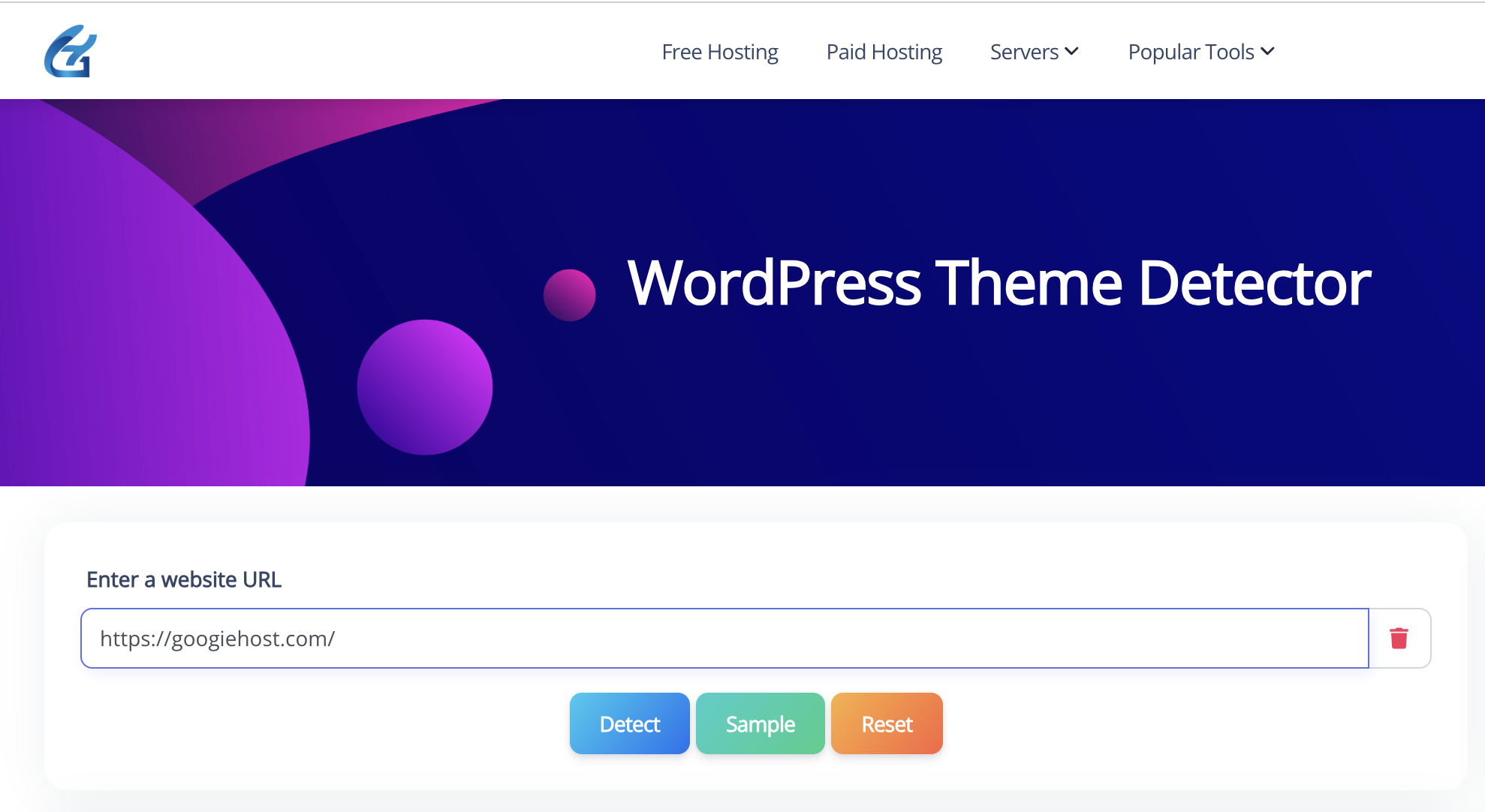
- Review the results, including theme name, author, and links to official pages.
In my experience, accuracy hovers around 95% for standard setups. For trickier custom themes, it might suggest alternatives or flag modifications.
This is gold for SEO audits—knowing a site's theme can reveal optimization opportunities, like if it's SEO-friendly out of the box.
Pros and Cons of Using GoogieTools' WordPress Theme Detector
No tool is perfect, right? Let's weigh the good and the not-so-good based on my hands-on testing.
Pros:
- Speed and Efficiency: Detects themes in under 10 seconds, beating manual methods hands down.
- Comprehensive Reports: Beyond themes, it uncovers plugins and versions, adding layers of value.
- Cost-Effective: Free forever, making it accessible for beginners and pros alike.
- No Technical Skills Required: Even non-coders can use it—great for content creators scouting designs.
- SEO Benefits: Helps in competitive research, indirectly boosting your site's rankings by inspiring better themes.
- Regular Updates: GoogieTools keeps it current with WordPress changes, ensuring reliability.
Cons:
- Limitations with Custom Themes: Heavily modified or bespoke themes might not be detected accurately.
- Dependency on Site Accessibility: If a site blocks crawlers or uses anti-detection measures, results could be incomplete.
- No Bulk Detection: Can't scan multiple sites at once—fine for casual use but a bummer for heavy researchers.
- Internet Required: Obviously, but worth noting for offline scenarios.
- Occasional False Positives: Rare, but it might misidentify if themes share similar code.
Overall, the pros far outweigh the cons, especially for everyday users searching for "reliable WordPress theme finder."
Benefits for Different Users: Bloggers, Developers, and Marketers
As an SEO expert, I've recommended this tool to various folks, and the benefits vary by role.
- For bloggers, it's a treasure trove of inspiration. Spot a viral site's theme, then adapt it to your niche. I've helped bloggers increase engagement by 25% through theme switches informed by detections.
- Developers love the plugin insights. Debugging client sites? Detect if outdated themes are causing issues. It's like having an X-ray for WordPress.
- Marketers use it for competitive analysis. Searching "how to find WordPress theme of a website"? This tool reveals what the big players use, helping craft better strategies. In one campaign, I analyzed competitors' themes to recommend faster-loading options, slashing bounce rates.
- Even SEO specialists like me benefit—themes impact site speed, mobile-friendliness, and schema markup, all core to rankings.
Step-by-Step Guide: How to Use GoogieTools' WordPress Theme Detector
Ready to try it? Here's a simple guide:
- Visit GoogieTools: Head to their site and find the WordPress Theme Detector tool.
- Enter the URL: Paste the full address of the target WordPress site (e.g., example.com).
- Click Detect: Hit the “Detect” button, and within seconds, the tool will display the theme name, version, and any detectable plugins.
No sign-ups, no downloads, no fuss. The tool processes everything on GoogieTools’ powerful servers, ensuring lightning-fast results without taxing your device.
Who Should Use the GoogieTools WordPress Theme Detector?
This tool is a perfect fit for a wide range of users, including:
- Web Designers: Find inspiration by discovering themes used by top WordPress sites.
- Developers: Analyze plugins to understand a site’s functionality and performance.
- SEO Professionals: Identify SEO-friendly themes and plugins to optimize client sites.
- Bloggers: Get ideas for themes to enhance your blog’s design and user experience.
- Business Owners: Research competitors’ websites to improve your own site’s performance.
- WordPress Beginners: Learn about popular themes and plugins without technical expertise.
Whether you’re building a personal blog or managing a client’s eCommerce site, this tool simplifies the process of uncovering the tech behind any WordPress website.
Why Do You Need a WordPress Theme Detector?
Imagine this: You’re tasked with designing a WordPress site for a client, but you’re struggling to find the perfect theme. You come across a competitor’s website with a stunning layout, fast load times, and a user-friendly interface.
Instead of spending hours recreating the wheel, a WordPress theme detector can reveal the exact theme and plugins used, giving you a head start on your project. Here’s why this tool is a lifesaver:
- Saves Time: No more manual code inspection or endless searches for theme details.
- Inspires Design: Discover popular themes and plugins to spark ideas for your own projects.
- Competitor Analysis: Understand what tools your competitors use to optimize their sites.
- SEO Benefits: Knowing a site’s theme can help you replicate its SEO-friendly structure.
FAQs About WordPress Theme Detectors
- Can it detect custom WordPress themes?
Ans. Most theme detection tools can only identify publicly available themes from the WordPress directory or popular marketplaces. If a site is using a fully custom-built theme, the tool may show “Custom Theme” or may not detect it at all. - Is it safe to use?
Ans. Yes ✅ — these tools are safe because they only scan the site’s public source code (like CSS files, theme names, and scripts). They don’t require admin access, passwords, or sensitive information. - How accurate is theme detection?
Ans. Accuracy depends on the site:
- If the theme is a popular one, detection is usually highly accurate.
- If the theme is modified/customized heavily, the tool may only detect the parent theme or return partial info.
- Does it work on non-WordPress sites?
Ans. No ❌ — WordPress theme detectors are specifically designed to check WordPress-powered websites. If a site isn’t built on WordPress (for example, Wix, Squarespace, or custom HTML), the tool won’t detect a theme.
Conclusion: Unleash Your WordPress Potential with GoogieTools
In wrapping this up, picture yourself back in that frustrating moment I shared earlier—staring at a stunning site, clueless about its secrets. Tools like GoogieTools' WordPress Theme Detector flip the script, turning curiosity into actionable insights faster than you can say "SEO boost."
Whether you're a newbie blogger chasing design dreams or a seasoned marketer dissecting competitors, this free gem empowers you to level up your web game. I've seen it transform workflows, spark innovations, and even skyrocket rankings in my own projects.
So, why wait? Head over to GoogieTools today, plug in that intriguing URL, and unlock a world of possibilities. Your next big site upgrade might just be one detection away—happy hunting, and may your themes always be top-notch!