Open Graph Checker
Check the Open Graph tags of any URL and fix how your links look when shared on Facebook, LinkedIn and X.
Have you ever thought why some links look stunning when shared on social media, with a rich image, a bold title, and compelling descriptions, while others show up as very plain and ugly URLs? You must be wondering why it happens.
The difference lies in Open Graph tags.
Open Graph tags are hidden places of code embedded in your webpage that control how your content appears when it is shared across platforms like Facebook and LinkedIn.
You need to get them right, and your links grab attention instantly, but if you get them wrong, your content gets ignored. This is exactly where this tool from GoogieHost, Open Graph Checker, comes in. Here, you just need to simply enter any URL, and you can see instantly how your Open Graph tags are set up and what's working.
You can even see what is missing and what needs to be fixed. You don't need any kind of coding knowledge for this.
What is the Open Graph Protocol?
The Open Graph Protocol (OG) is a framework that Facebook introduced in 2010 that uses meta tags to control how your web content displays when shared across social platforms like Facebook, X (formerly Twitter), and others.
Open Graph tags are snippets of HTML code that are placed in a webpage’s section that controls how the page appears when it is shared on social media platforms.
They define:
- Title of the page
- Description shown below the title.
- Preview image displayed
- URL of the page.
This tool lets you enter any URL and instantly see if these tags are correctly set up or not. It even checks the missing and the broken tags without manually reading the page’s source code. This tool acts like a health check for how your links look on social media.
Why You Need an Open Graph Checker Tool
Let us see why you need this tool:
- Faulty Previews Kill Engagement: In the world of social media, a broken or missing preview can instantly kill your content’s momentum, and it can stop clicks before they even start.
- Manual checks are a headache: To check Open Graph tags manually, which is a very tedious and error-prone task, especially if you are not a coder. This dedicated tool removes all this guesswork.
- Instant Scanning & Real Previews: An Open Graph Checker scans your page’s Open Graph tags and highlights the error. It even shows the real previews, which ensures that everything looks exactly as intended before you share.
- Unchecked Tags Cost You Traffic: Missing or broken tags lead to blank images and truncated text, which directly results in lower engagement and lost potential traffic.
- Better Tags Means Better Reach: Social platforms majorly favour well-structured content, so when your tags are correct, your posts even get more visibility and shares.
- It's Free: This tool does not need any technical knowledge. You just need to paste your URL, hit the check button, and you will get instant results at no cost.
Key Features of GoogieTools Open Graph Checker
Let's uncover the unique features that this tool has for you:
- Instant URL Scanning
Just copy and paste your webpage link into the tool. It will immediately read all your Open Graph tags and show you the result within seconds. There is no waiting time or any setup required.
- Detailed Error Reports
The tool doesn’t just say "Something is wrong." It will tell you exactly what is broken, like if there is a tag that is missing or the image size is not appropriate; either it is too small or the format is incorrect. This tool makes it very clear about what issues you need to fix.
- Live Previews Simulation
You can see a real visual preview of how your link will look when shared on Facebook or any other social media platform before you actually post it. What you will see is exactly what your audience is going to see.
- Platform-Specific Validation
Different platforms have different requirements. This tool checks your tags against each platform, like Facebook, Twitter, or any other social media platform. It makes sure that your link looks great everywhere.
- Suggestions for Fixes
It does not just point out problems; it tells you how to fix them. For example, it may suggest using a 1200x630 pixel image for the best display quality across platforms.
- Free with no Limits
You can run as many checks as you want because it needs no account, and no payment is required to use this tool. It is perfect for agencies or teams managing multiple websites at once.
- Mobile-friendly
This tool works smoothly on phones and tablets too, so if you are on the go and need a quick check, you can even do it from any device in seconds.
- Exportable Results
Download your full report and save it or share it with your team. It is very useful for client reporting and documentation, and it could also be used for collaborative work.
- Integration Hints
If you are not sure where to apply the fixes, then this tool will even guide you on how to add or update Open Graph tags directly in popular platforms like WordPress. All this requires no developer or technical expertise.
How to Use the Open Graph Checker Step by Step
If you want to understand this tool and use it like a pro, go through these easy and navigable steps:
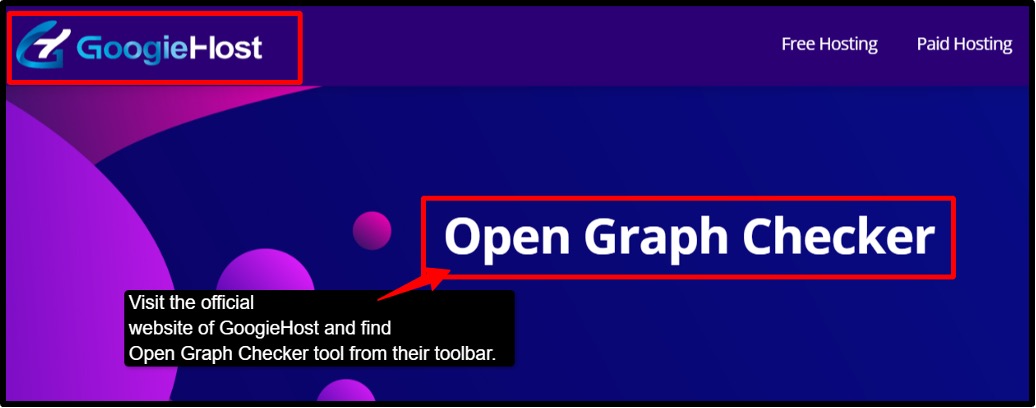
- Step 1: Visit the official website of GoogieHost >> Search and find the Open Graph Checker tool from their toolbar section.
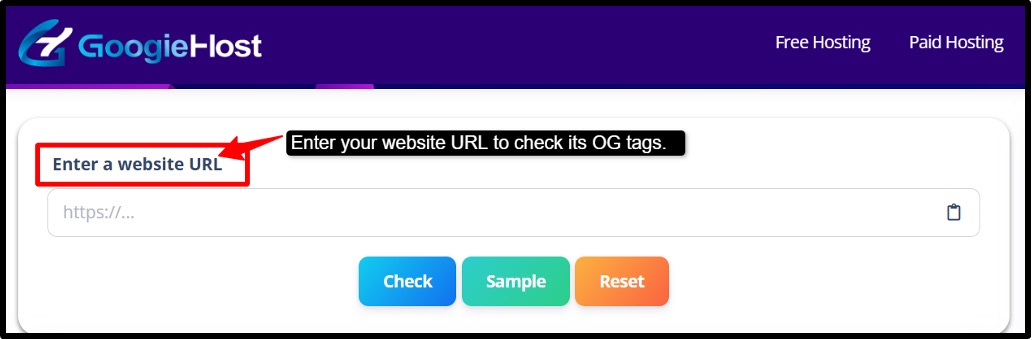
- Step 2: Now you will see a search input box on the page; simply copy your webpage link and paste it into that box.
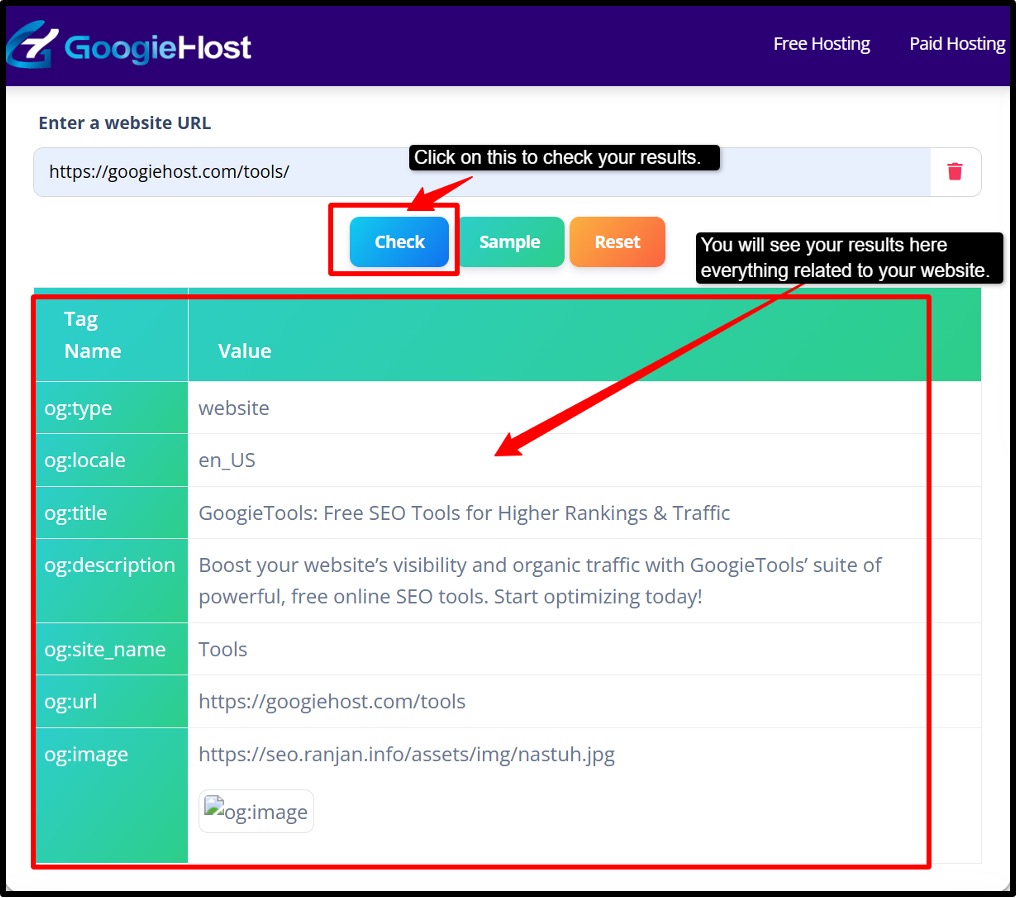
- Step 3: Hit the Check button >> This tool will immediately start scanning your page’s Open Graph tags.
- Step 4: View your results. Within seconds, this tool will show all OG tags found on your page: Missing >> Broken tags >> Image preview and title preview >> Any errors that need fixing.
- Step 5: Read the error report. Go through the results carefully. This tool will clearly highlight what is wrong and what is working correctly, so it's very easy to use and has a very easy-to-read format.
- Step 6: Apply the suggested fixes. If you use WordPress, the tool also gives hints on where exactly you need to make changes, and it needs no coding skills.
- Step 7: Re-check your page. After making the fixes, paste your URL again. Now, re-run the check again to confirm everything is working correctly.
- Step 8: Download or share the report with your team or client for reference.
Pros and Cons of Using an Open Graph Checker
Though this tool is free to use and has no limits, still every tool has some other strengths and weaknesses. Here is a breakdown of Open Graph Checker's pros and cons:
Pros:
- Faster diagnostics.
- Intuitive for all skill levels
- Better social previews mean higher click-through rates
- Completely free
- Consistent across multiple social platforms
- Boosts SEO.
Cons:
- Doesn't auto-fix issues, only identifies them
- Rare false positives after platform updates
- Single URL checks are not perfect for large sites
- Requires manual code edits after scanning
Who Can Benefit from GoogieTools’ Open Graph Checker?
This tool provides a lot of benefits to many users and helps them in many ways. Let's see the various benefits in detail:
- Bloggers
When you write a blog post and share it on social media, you obviously want people to click on it. But if your link shows a broken image or a boring title, nobody will bother at all. This tool makes sure your blog links always look attractive and click-worthy because it brings more readers to your site.
- E-commerce Owners
When someone shares your product page on any social media platform, it should show a clean image with the product name and details. A bad preview can very well stop a potential customer from even visiting your store, so this tool will help you to ensure that every shared product link looks professional and drives more sales.
- Digital Marketers
If you manage social media or SEO for multiple clients, then every shared link needs to look perfect. One broken tag can hurt the engagement factor and waste your ad budget, so this tool will help you quickly audit and fix all client pages before campaigns go live.
- Small Business Owners
You may not have a big marketing team or budget, but still, you need your brand to look professional online. The Open Graph tool lets you compete with other bigger brands by making sure your website links always make a strong impression on social media.
- Content Creators
If you have to share videos, portfolios, or any of your creative work, it really matters how your link looks when you share it among your friends or groups. A visually appealing preview makes people stop scrolling and actually click on it. It will help your work to get the attention it truly deserves.
It does not matter which industry you belong to. If you ever need to share a link online, then this tool makes sure that the link always looks its best.
Advanced Tips for Optimizing with an Open Graph Checker
You need to follow some advanced tips in order to optimize your Open Graph Checker and make it better.
- Every time you make changes to your webpage, of any kind, be it your title and description, you should always run the checker again. Even a small edit can accidentally break your tags without you realizing it.
- This tool works great on its own, but if you pair it with Facebook’s debugger, it gives you an even deeper look at how your link appears specifically on Facebook.
- Your preview image should be under SMB and saved in a common format like JPG or PNG. A large or unsupported image will either look blurry or ruin your link preview completely.
- If your page has video or audio content, add the org.video or org.audio tags that make your link more engaging.
- Most people who browse social media on their phones make sure it looks good on them. Check if it looks clean and proper on a small screen.
- Try two different titles or images for the same page and check both versions using the tool. You can check which one looks more appealing and use that.
Common Mistakes to Avoid with Open Graph Tags
These are some of the common mistakes that you should avoid when using this tool:
- Social media platforms change their requirements over time, so if you set your tags once and never check again, they can stop working. Review them regularly.
- When the checker flags an error, never ignore it because a small warning can even cause your link preview to break completely.
- Always add Twitter card tags alongside your OG tags if your main tags fall. These will act as a backup and keep your preview looking better and correct.
- A blurry and unrelated image in your preview kills engagement instantly, so always use a clear and relevant image with the proper size.
- After you fix your tags, social media platforms may still show the old broken preview because they saved it. So you need to force a refresh so the updated version shows up correctly.
FAQs About Open Graph Checker
Q1. What does an Open Graph Checker do?
Ans. When you share a webpage link on social media, and it shows a broken image, a wrong title, or a blank preview, that is an Open Graph tag problem. An Open Graph Checker scans your page and shows exactly which tags are missing or broken, and it even tells you how to fix them. So every link you share should always look clean and correct.
Q2. Why should I use an Open Graph Checker?
Ans. Every time you share a link without checking it, you are actually playing with your first impression. A missing tag or wrong image could make your link look broken and untrustworthy. It will cost you clicks and traffic to potential customers. An open graph checker removes that risk by making sure every link you share looks exactly the way it should every single time.
Q3. Is it free to use?
Ans. Yes, completely free. You don’t need to sign up, and there are no hidden charges or usage limits. You just need to simply paste, and you can get instant results as many times as you need.
Q4. Does it work for all social platforms?
Ans. Yes, it checks your tags against all major platforms like Facebook, LinkedIn, and many other famous social media platforms. Your link now looks perfect, no matter where it gets shared.
Q5. Can I test my link previews before publishing?
Ans. Yes, that is exactly what this tool is built for. You just paste your URL. Before going live, the tool shows you a real preview of how your link will appear on social media, giving you the chance to fix any possible issues before your audience sees it.
Why Choose GoogieTools' Open Graph Checker Over Competitors
Most of the other tools show you raw code and technical data that's really hard to understand, but GoogieHost kept it simple; it shows exactly what is wrong and why it is wrong.
Using Open Graph Checker, you can skip all that frustration you used to face with other platforms. It is free, simple to use, and works for everyone. You are a beginner or a seasoned developer. It fixes broken Facebook previews, improves how your content looks on social media, and even gives your SEO a nice little boost.
Just paste your URL, run the check, and see exactly what needs fixing. No paid tools, no complicated steps, just clean results.
Have a success story after using it? Share it with us. Would love to hear how it worked out for you.