Htaccess Redirect Generator
Generate ready-to-use .htaccess code for 301 and 302 redirects on Apache servers.
Have you ever clicked on a website link and landed somewhere completely different, like typing an old URL and magically reaching the new page without any error? That smooth jump is called a redirect, and it is powered by htaccess rules behind the scenes.
Htaccess Redirect Generator is a popular tool of GoogieHost, where you don’t need to write confusing server codes manually. Just enter your old and new URLs, generate the redirect code instantly, and keep your visitors moving to the right page without broken links or SEO loss.
The Htaccess Redirect Generator from GoogieHost is really helpful for this. It makes creating redirects easy and good for search engines, and you do not have to know how to code.
It supports 301 and 302 redirects, forces secure connections and ensure Google always finds the right version of your website.This way, your visitors and search engines, like Google, will always find what they are looking for on my website.
What is GoogieHost’s Htaccess Redirect Generator?
GoogieHost has a free tool that takes the headache out of writing, the HTTP Access Redirect Generator. Instead of going through documentation and wrestling with Apache syntax, you just tell it what you want.
Pick the type of redirect, enter your old and new URLs, and it writes the code for you, ready to copy and paste straight into your site.
It's handy for everyday stuff like switching your site to HTTPS, making sure www and non-www versions of your URL don't clash, updating old links after a redesign, or moving your site to a new domain without breaking everything.
How do I Use the Htaccess Redirect Generator?
Now lets understand and clearly follow these steps to see how the tool actually works and helps you:
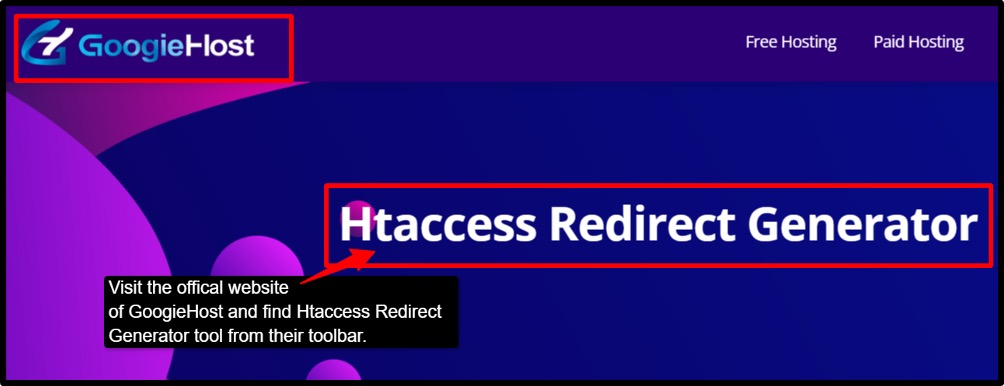
- Step 1: Visit the official website of GoogieHost >> Find the Htaccess Redirect Generator tool from their toolbar box.
- Step 2: Enter your domain in the box, type only the root domain, like (example.com).
- Step 3: Choose your redirect type. Pick one of the two options: either go with a redirect from www to non‑www (forces https://example. com) or the other option is redirect from non‑www to www (forces https://www.example. com). Select the type that best fits your preferred redirect type.
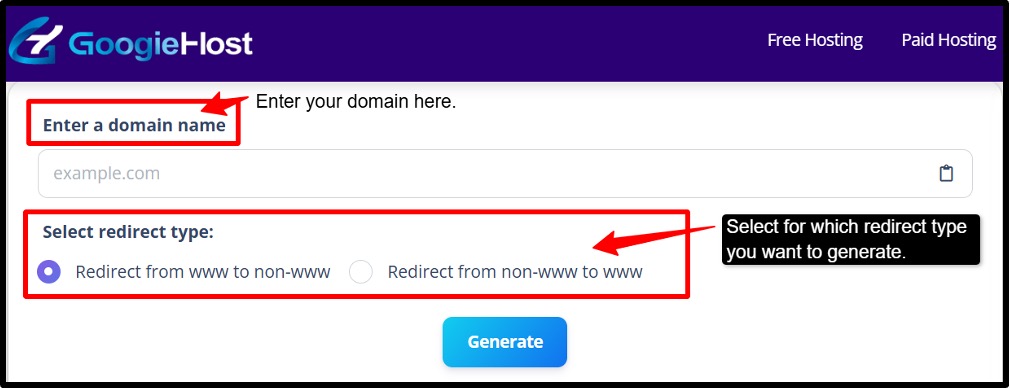
- Step 4: Now, click the blue button that says “Generate”. This button will then output your ready-to-use htaccess code for your chosen redirect domain type.
- Step 5: Backup your current htaccess. Before you make any changes, you need to download a copy of your existing htaccess from the root of your document’s site ( often public_html) using your hosting file manager or FTP.
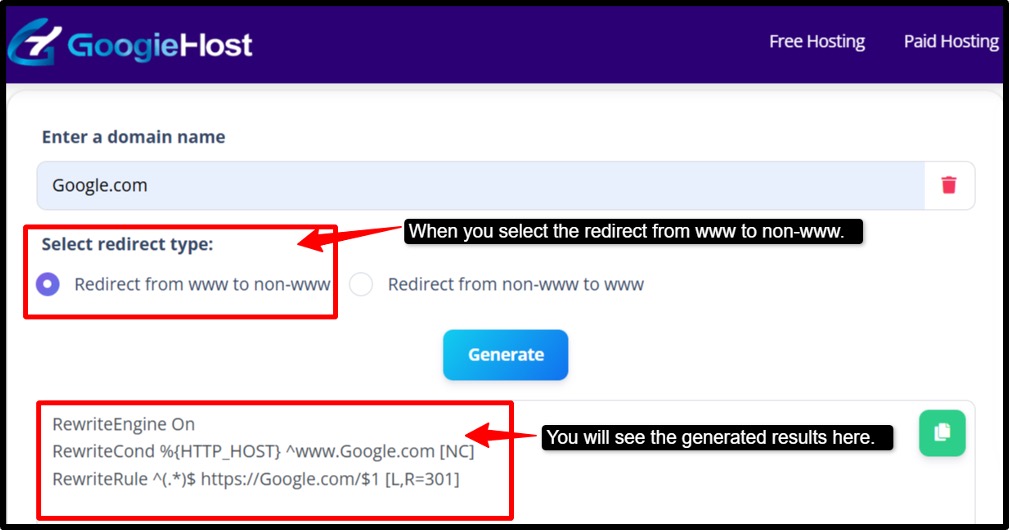
- Step 6: Open the .htaccess in a text editor and paste the generated rules where the other rewrite rules are given, like the WordPress or CMS rules that usually start with “#..Begin”.
- Step 7: Once you have updated your .htaccess file, save it and refresh your website >> Open a browser and try visiting both: http://example.com, http://www.example.com. Both should automatically land on your single preferred HTTPS version, even if it is www or non-www.
- Step 8: Check your HTTP status. Run both of the URLs using an HTTPS status checker tool, look for a 301 Moved Permanently response, confirming the redirect is set up correctly. Also, make sure there are no redirect chains like (A > B > C) or loops ( A > B > A), which can slow down your site or cause errors.
- Step 9: Don’t forget to clear all the caches after making changes, otherwise your visitors and tools may still see the old redirect behaviour. Clear caches at every level, like your server, any plugins, or your CDN.
- Step 10: Now go through the same redirect setup process for any staging environments or subdirectories that have their own .htaccess file. Just ensure none of the rules conflict with each other.
Just by following these many steps, you can easily use the tool and set your redirect process.
Who Benefits from the Htaccess Redirect Generator
Let's see some benefits that people get from using this tool:
- Website Owners
Imagine you have moved houses but forgot to update your address with everyone. People would show up at the old place and find nothing. The same thing happens when you move your website to a new domain. This tool acts like a forwarding address, and it automatically sends anyone visiting your old links straight to the right new page with no confusion.
- SEO Specialists
SEO specialists use this tool to protect their rankings dusring page moves, fixing broken links and to eliminate duplicate content. This tool makes sure those reputation points follow the page to its new location, so your Google rankings don’t take a hit just because a URL has changed.
- Developers & Agencies
When you are building websites for multiple clients, you need everything to follow the same rules. This tool helps you by saving you from manually writing the same code over and over. Just plug in the details and get clean, consistent redirect rules for every project that are fast and error-free.
- Bloggers & Creators
What if you rebranded your blog or deleted some old posts? Anyone who bookmarked or shared these old links will hit a dead end. This tool makes sure those links still take people somewhere useful, keeping your readers happy with your traffic intact.
- E-commerce Stores
Online stores change all the time, seasonal sales end, products get discontinued, and platforms get switched. But without redirects, customers land on error pages right when they are ready to buy. Again, this tool becomes your saviour and helps in keeping all your store links working smoothly, so you never lose a sale to a broken page.
- Sysadmins
A single website can actually be reached through several different URLs, like with www, without www, with HTTP, and with HTTPS. Using so many versions active all at once can confuse search engines and create security risks. Htaccess redirect generator helps in tying all those different versions together and points them to one clean, secure address.
Benefits of Using GoogieHost’s Htaccess Redirect Generator
Now, let's see the number of benefits you can avail using this tool:
- SEO safe by Design: This tool helps in generating 301 (permanent ) and 302 ( temporary) redirect rules that are built with search engines in mind. When you switch from HTTP to HTTPS or from www to non-www, your SEO authority will not be split across multiple versions; instead, it all flows to one place, keeping your rankings safe and consolidated.
- Fast & Error-Free: Writing redirect rules manually is tricky, and one small typo can break your entire site. This tool eliminates that risk by generating clean, pre-validated code snippets automatically. There is no guesswork and no debugging. You get just ready to use rules that work instantly.
- Popular Use Cases: It covers major use cases such as redirecting a single page, an entire folder, forcing HTTPS, setting a canonical domain, or handling trailing slashes. This tool has a preset for all of this, where you don’t need to write different code for every scenario, as it is all covered in one place.
- Lightweight and Secure: There is nothing to install or configure on your server. You simply generate the code, copy it, and paste it into your .htaccess file, and you are done. It is that simple, where there are no plugins, no software, and no security vulnerabilities from any of the third-party tools.
- Future-proof Structure: The rules that this tool generates follow industry best practices in terms of order and structure. This means they are less likely to clash with any existing rules in your .htaccess file, and they will continue working reliably even as your site grows and changes over time.
- Scale Works: You need to redirect just one specific page or hundreds of pages inside an entire directory; this tool handles both with ease. Pattern-based rules mean you don’t have to manually write a redirect for every single URL, and one rule can cover thousands of pages at once.
Why Choose GoogieHost’s Htaccess Redirect Generator?
Why you need this tool or why you should choose it has several reasons, such as:
- This tool is not just a random tool thrown overnight; instead, it has been built by people who actually work in hosting and SEO every day, so the rules it generates are tried, tested, and reliable in real-world situations.
- You don’t need to be a developer to use this tool. The interface is easy to use, with example presets to guide you. Once you fill in your details, the output is ready to copy and paste and requires no editing or decoding.
- The redirect rules it generates are lean and optimized. There is no unnecessary bloat, and they are structured to avoid the common problems like redirect chains (A > B > C ) or loops ( A > B > A) that slow down your site or break it entirely.
- You can generate as many redirect rules as you need, for as many projects as you want, completely free. There is no requirement for any account, no subscription, and no hidden paywalls; it is just open and easy to use.
- GoogieHost is an established name in the hosting world, which means this tool is not going anywhere. It comes with supporting resources, and as your website grows and your needs change, the tool grows with you too.
FAQs
Q1. Will my SEO be affected by these redirects?
Ans. No, as long as you use a 301 redirect for permanent moves, Google will transfer almost all of your page's ranking power to the new URL, and your rankings will stay safe. You just need to avoid two common mistakes:
- Redirect chains (A→B→C), where each extra hop slowly weakens your ranking strength and slows Google's crawl.
- Redirect loops (A→B→A), which break the page entirely.
Only use a 302 when the move is genuinely temporary, like an A/B test, because Google won't fully pass ranking power through a 302, and your new URL will struggle to rank.
Q2. How do I apply the generated .htaccess code to my website?
Ans. First, you need to back up your current .htaccess file through FTP or File Manager >> Then open the file from your root folder (public_html), paste your new redirect rules near the top above any existing rules, and save >> You can test it by opening the old URL in an incognito window and checking the correct 301 or 302 status >> Then, finally, clear your cache so that changes can happen instantly.
Q3. What happens if my .htaccess file has existing rules?
Ans. Place new redirect rules above any CMS rules, like WordPress, so they run first. If two rules target the same URL, keep only one; the first rule always wins, and the second is ignored. Always test after every change because one small mistake can silently send visitors to the wrong page without you knowing it.
Q4. Can I use this tool if my site is not on Apache?
Ans. The rules this tool generates are written for Apache servers, which use the .htaccess file, but the good news is that the logic is the same everywhere, only the syntax changes.
If you're on Nginx, you'll use rewrite or return directives inside your server block.
LiteSpeed, you're in luck because it usually reads .htaccess rules directly.
If you're using a cloud provider or CDN like Cloudflare, just set the same redirects through their dashboard under page rules or redirect rules.
If you're not sure which server you're on or how to translate the rules, ask your hosting provider — they deal with this daily and can usually sort it in minutes.