









Expert Review
Cloudways is one of the best-known names in managed cloud hosting, and it works differently from a normal web host. You do not rent a slice of a shared server. You pick a cloud company, such as DigitalOcean or Vultr, and Cloudways manages the server, the stack and the security for you. But does that model really give you a faster and more reliable site in 2026? This Cloudways hosting review answers that with real test data. We wanted real answers, not marketing claims.
So we launched a Cloudways Flexible server in Mumbai, installed WordPress on a test site called cloudways.webhostbenchmark.com and tracked it for more than a week. We measured uptime from four cities, ran Google PageSpeed Insights, GTmetrix, a TTFB test from 22 locations and a WordPress server benchmark, checked the server hardware over SSH, load tested the site and scanned its security headers and SSL.
In this Cloudways review, you will see every result with screenshots, the current prices, the pros and cons we found and who Cloudways is really right for.
⚡ Key Takeaways
✅ 100% uptime from 27 October to 5 November 2026
✅ PageSpeed 99/100 on mobile and 100/100 on desktop
✅ 38 ms TTFB in Mumbai, with every one of 22 test locations getting a cache hit
✅ Security Headers A+ and SSL Labs A on the test site
✅ Daily off-site backups, staging and Redis included
⚠️ WordPress benchmark score of 6.2/10, with persistent object cache not enabled
⚠️ Speed outside Asia was slower, 0.9 to 1.9 seconds TTFB, because no CDN is included
Cloudways Review at a Glance
| Our Findings | |
|---|---|
| 🚀 Speed | PageSpeed 99/100 on mobile and 100/100 on desktop, GTmetrix grade A |
| ⏰ Uptime | 100% from 27 October to 5 November 2026 |
| ⚡ Avg. Load Time | 523.46 ms across New York, San Francisco, Singapore and Mumbai |
| 🖥️ Server Score | 6.2/10 in the WordPress hosting benchmark |
| 🔒 Security | SSL Labs grade A and Security Headers grade A+ |
| 💰 Pricing | From $11/mo for 2GB RAM, 1 vCPU and 50GB storage, billed hourly |
| 👩🏻💻 Support | 24/7 chat and tickets listed; our High-priority ticket got a reply the same day |
| 🆓 Free Trial | 5 days on Flexible with no credit card |
Our verdict: Cloudways delivered perfect uptime, excellent PageSpeed scores and strong security results in our tests. The server benchmark was only average and the persistent object cache was off, so it rewards users who tune it. It is a great fit for WordPress and WooCommerce owners who want a managed cloud server without running Linux themselves.
What Is Cloudways?
Cloudways is a managed cloud hosting platform founded in 2011 and now part of DigitalOcean, as the dashboard shows. Instead of owning its own data centers, it sits on top of cloud providers and adds a management layer: a dashboard, a tuned server stack, backups, security and 24/7 support. You choose the cloud company, the server size and the location, and Cloudways sets the server up.

Cloudways is no longer only a hosting dashboard. Its homepage now shows the full product line under the headline “The Modern Cloud Platform that Grows With You,” with the line “Same trusted hosting, now more powerful. AI agents, WordPress, Node.js, and more, on a managed cloud hosting platform built for the AI era.” It names six products:
- Cloudways Copilot: AI-powered troubleshooting insights, such as checks for a server health problem.
- Cloudways Flexible: Your choice of cloud and app, with DigitalOcean, Vultr, Linode, AWS and Google Cloud and a vertical scaling slider.
- Cloudways AI Website Builder: Describe the site you want, for example a modern coffee shop website, and the builder designs it.
- Cloudways Autonomous: Autoscaling for high-traffic sites.
- Cloudways Velocity: Deploy Node.js apps in minutes, with frameworks such as Angular, React and Express shown.
- Cloudways AI Agents: Launch OpenClaw and Hermes agents on managed infrastructure.
The platform is known for WordPress and WooCommerce, but it also runs Laravel, PHP, Magento and other apps. Its pay-as-you-go billing is one of the main reasons people choose it, because you pay by the hour up to a monthly cap and can scale a server up whenever you need more power. Compare it with other cloud hosting providers and with Kinsta if you want premium managed WordPress.
What’s New at Cloudways in 2026?
If you last looked at Cloudways a few years ago, the dashboard has grown a lot. Here is what we saw in our own account:
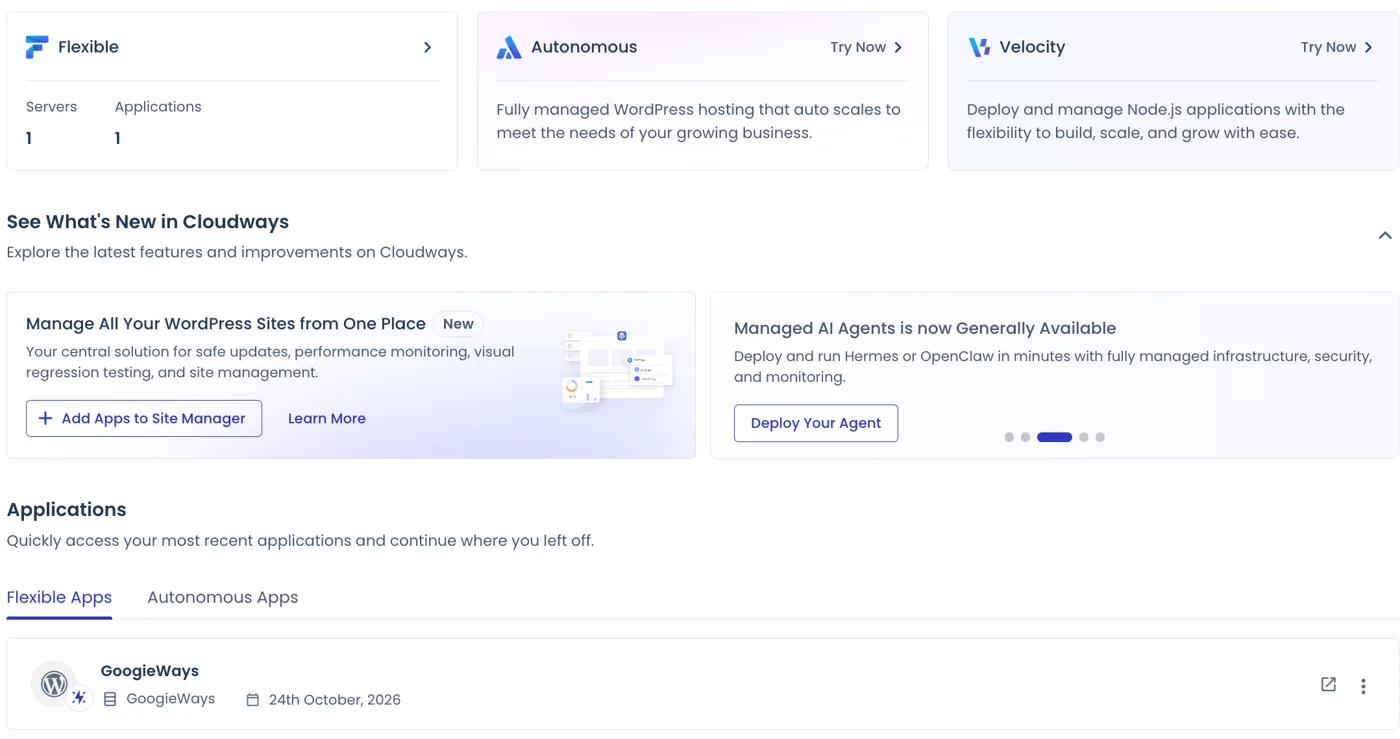
- Four Product Lines: Flexible is the classic pay-as-you-go server, while Autonomous, Velocity and Cloudways AI sit beside it in the left menu.
- Autonomous WordPress: A fully managed WordPress hosting plan that auto scales to meet the needs of a growing business.
- Velocity for Node.js: A separate product to deploy and manage Node.js applications with room to build, scale and grow.
- Site Manager: A central place to manage all your WordPress sites, with safe updates, performance monitoring and visual regression testing.
- Managed AI Agents: Now generally available, it lets you deploy and run Hermes or OpenClaw in minutes on fully managed infrastructure.
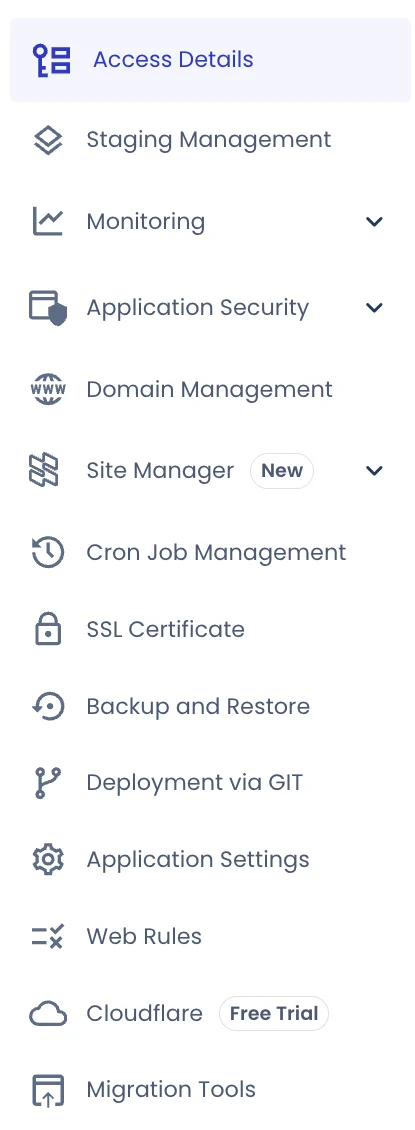
Inside our WordPress application, the menu lists Staging Management, Monitoring, Application Security, Domain Management, Site Manager, Cron Job Management, SSL Certificate, Backup and Restore, Deployment via GIT, Application Settings, Web Rules, Cloudflare (with a free trial) and Migration Tools. The Access Details page also shows database and Redis credentials, a Launch Database Manager button and a new Password Protection switch.
How We Tested Cloudways
We created a Flexible server on Vultr in Mumbai, India with 1 vCPU, about 2 GB of RAM and 50 GB of storage, then installed WordPress with the Conserve theme on cloudways.webhostbenchmark.com. The application name in our account is GoogieWays and it was created on 24 October 2026. A network check over SSH confirmed the Mumbai location. We used these tools:
- Uptime and load time: HetrixTools checked the site every minute from New York, San Francisco, Singapore and Mumbai, starting 27 October 2026.
- Page speed: Google PageSpeed Insights (Lighthouse) on mobile and desktop, and GTmetrix from Seattle.
- Network speed: a TTFB test from 22 global locations, a DNS test and a network and response check.
- Server power: a WordPress hosting benchmark plugin, Yet-Another-Bench-Script over SSH and Geekbench 6.
- Traffic and security: a load test with 20 virtual users, SSL Labs and Security Headers scans.
- Backups: the backup settings and an off-site backup in the Cloudways dashboard.
Note: We tested Cloudways support with a real ticket about SSH and ping access, and the support section also lists what Cloudways publishes on its own site. We did not test live chat in this round. Our test site is a small WordPress site, so results will differ for a heavy WooCommerce store.
Cloudways Speed Test: Google PageSpeed Insights and GTmetrix
This Cloudways speed test shows how a normal WordPress site performs. Speed matters because visitors leave slow sites and Google uses Core Web Vitals as a ranking signal. We ran Google PageSpeed Insights on 5 November 2026, and the results were excellent.
| Metric | Mobile | Desktop |
|---|---|---|
| Performance score | 99/100 | 100/100 |
| First Contentful Paint (FCP) | 0.9 s | 0.3 s |
| Largest Contentful Paint (LCP) | 0.9 s | 0.6 s |
| Total Blocking Time (TBT) | 0 ms | 0 ms |
| Cumulative Layout Shift (CLS) | 0 | 0.01 |
| Speed Index | 3.0 s | 0.8 s |
| Accessibility / Best Practices / SEO | 96 / 100 / 85 | 96 / 100 / 85 |
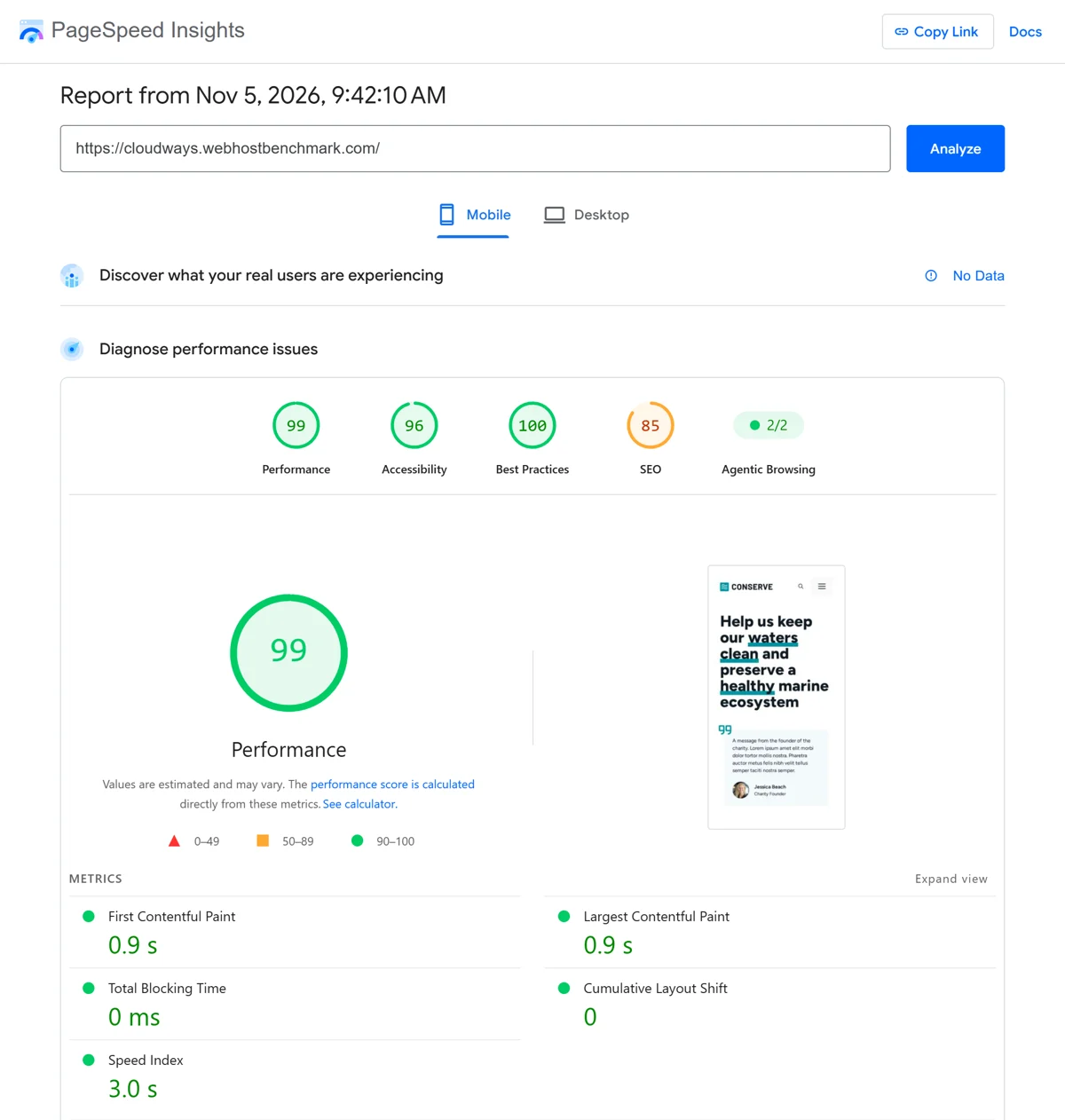
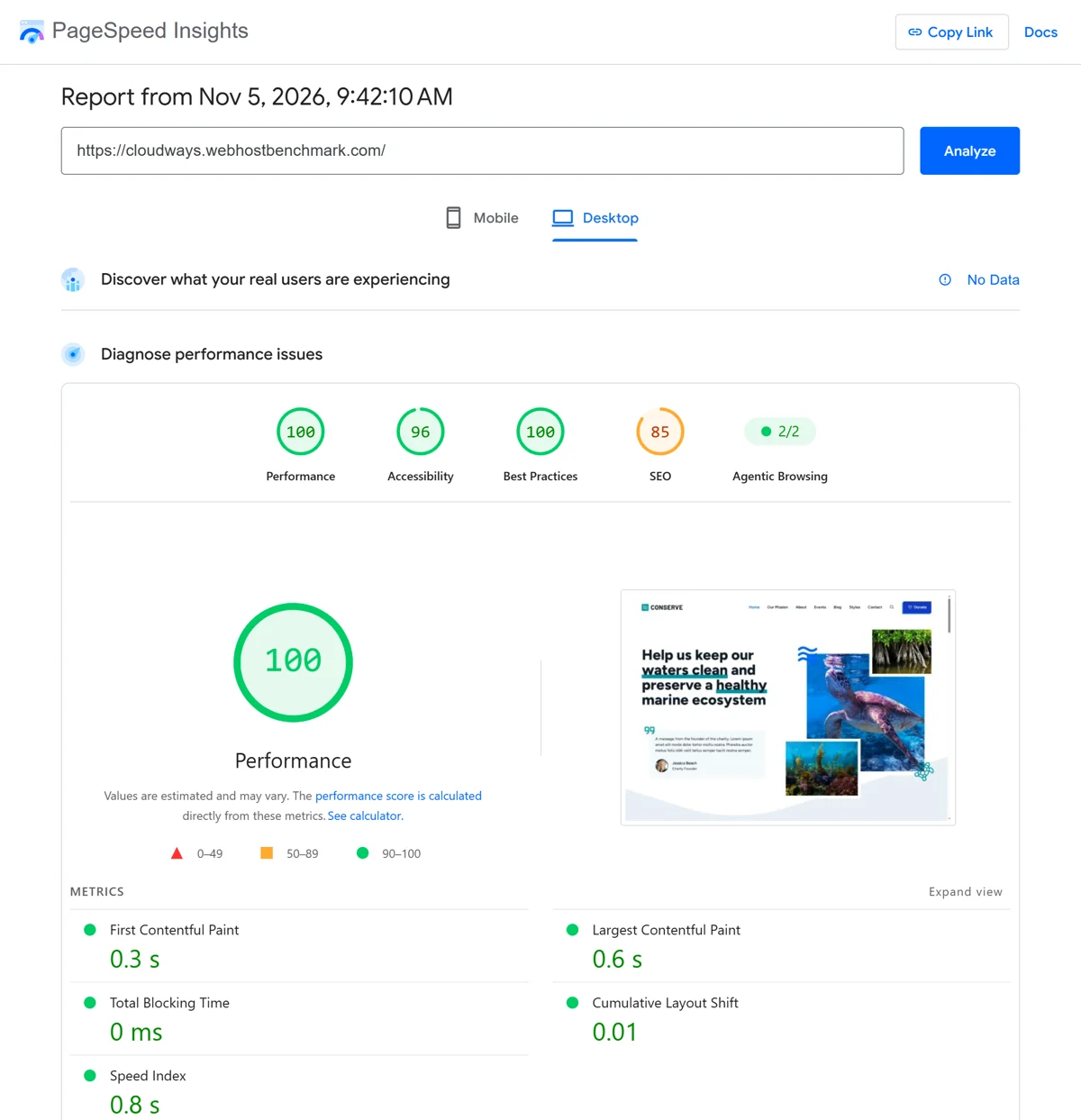
An LCP of 0.9 seconds on mobile is far inside Google’s 2.5-second “good” limit, and zero blocking time means the page responds instantly. The weakest number was the mobile Speed Index of 3.0 seconds, which better image handling can improve. SEO scored 85 because of site content, not hosting.
Cloudways GTmetrix Test
GTmetrix tests from Seattle, in the USA, which is a long way from our Mumbai server. That makes it a tougher test, and it still gave grade A with 88% performance and 92% structure on 4 November 2026.
| GTmetrix Metric | Result |
|---|---|
| Grade | A |
| Performance / Structure | 88% / 92% |
| Largest Contentful Paint | 1.8 s |
| Total Blocking Time / CLS | 0 ms / 0 |
| TTFB | 867 ms (connect 450 ms, backend 417 ms) |
| First Contentful Paint | 1.2 s |
| Fully loaded time | 2.3 s |
| Page size / requests | 366 KB / 20 |
| Test location and tool | Seattle, WA, USA; Chrome 154 and Lighthouse 12.6.1 |
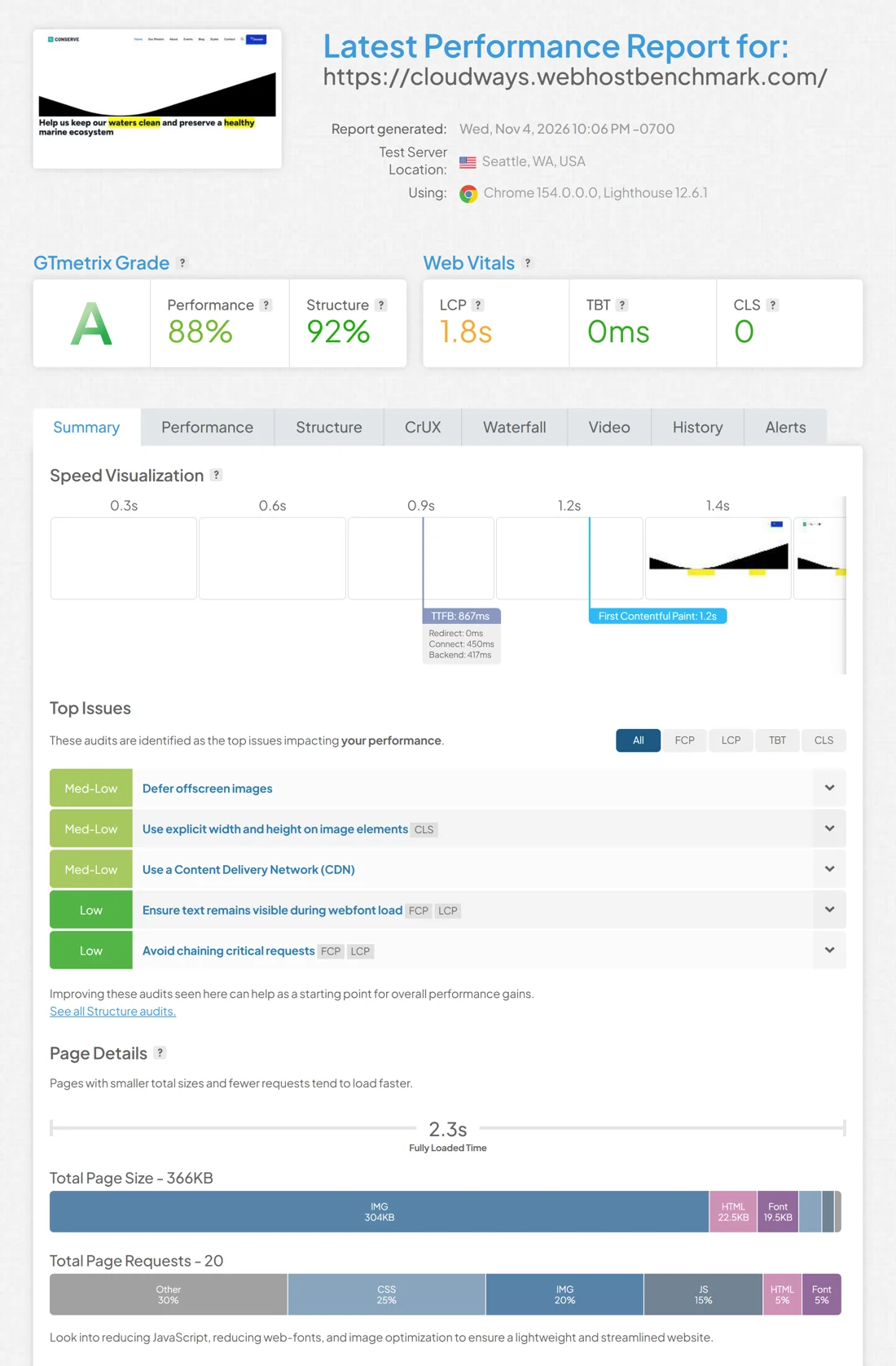
GTmetrix listed five top issues: defer offscreen images, use explicit width and height on images, use a content delivery network, keep text visible while web fonts load and avoid chaining critical requests. The CDN point matches what we saw in the TTFB test below, because Flexible plans do not include a CDN.
Cloudways Uptime and Response Time Test
Uptime is the share of time your website is online. We added the test site to HetrixTools on 27 October 2026 and checked it every minute from four locations with a 10-second timeout. Here is what our Cloudways uptime monitoring showed:
| Check | Result |
|---|---|
| Overall uptime | 100.0000% |
| Last 24 hours, 7 days and 30 days | 100.0000% each |
| Downtime | None recorded, every day from 30 October to 5 November was green |
| Average load time | 523.46 ms |
| New York | 881 ms recent, 785 ms current |
| San Francisco | 750 ms recent, 723 ms current |
| Singapore | 211 ms recent, 226 ms current |
| Mumbai | 252 ms recent, 90 ms current |
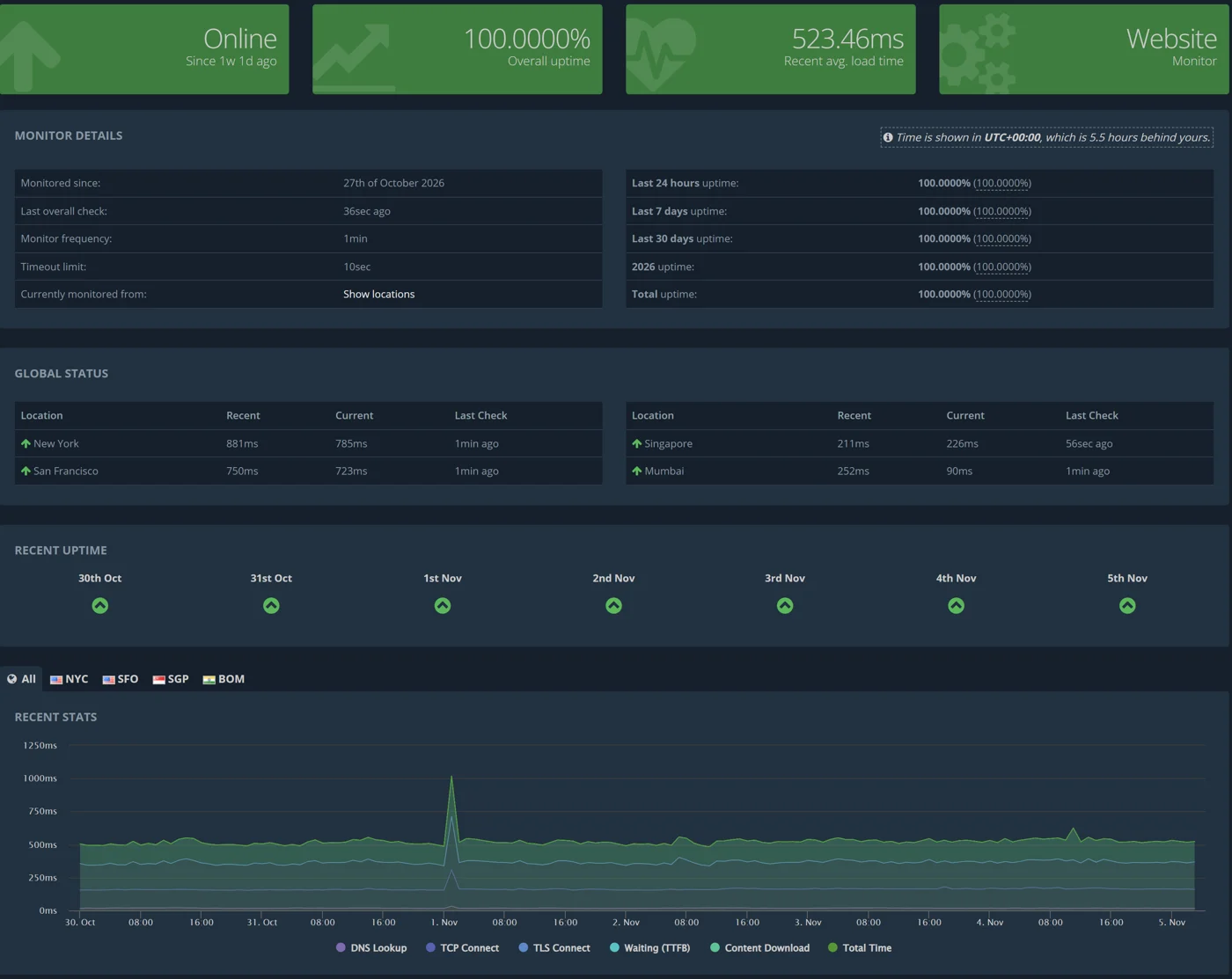
Uptime was perfect, and the load time chart stayed flat at about 500 ms, with one brief spike near 1 November that touched about 1 second and recovered at once. The numbers follow distance: Singapore and Mumbai answered in 90 to 252 ms, while New York and San Francisco needed 723 to 881 ms, which is normal for a single server without a CDN.
Cloudways TTFB Test From 22 Global Locations
Time to First Byte (TTFB) is how long a visitor waits before the first byte arrives. We tested our Mumbai server from 22 locations with a Flying TTFB test. Every location got a 200 response and a cache hit, so these numbers show how far the server is from each visitor, not how slow the site is.
| Region | Location | TTFB |
|---|---|---|
| Asia | Mumbai, India | 38 ms |
| Asia | Delhi, India | 102 ms |
| Asia | Singapore | 249 ms |
| Asia | Seoul, South Korea | 496 ms |
| Asia | Tokyo, Japan | 542 ms |
| Asia | Hong Kong, China | 543 ms |
| Oceania | Sydney, Australia | 848 ms |
| North America | Oregon, United States | 876 ms |
| North America | Los Angeles, United States | 887 ms |
| North America | Dallas, United States | 1,000 ms |
| North America | Toronto, Canada | 1,078 ms |
| North America | Iowa, United States | 1,089 ms |
| South America | Santiago, Chile | 1,311 ms |
| South America | São Paulo, Brazil | 1,519 ms |
| Europe | London, United Kingdom | 1,348 ms |
| Europe | Madrid, Spain | 1,367 ms |
| Europe | Berlin, Germany | 1,426 ms |
| Europe | Milan, Italy | 1,462 ms |
| Europe | Finland | 1,545 ms |
| Middle East | Tel Aviv, Israel | 1,628 ms |
| Middle East | Doha, Qatar | 1,701 ms |
| Africa | Johannesburg, South Africa | 1,926 ms |
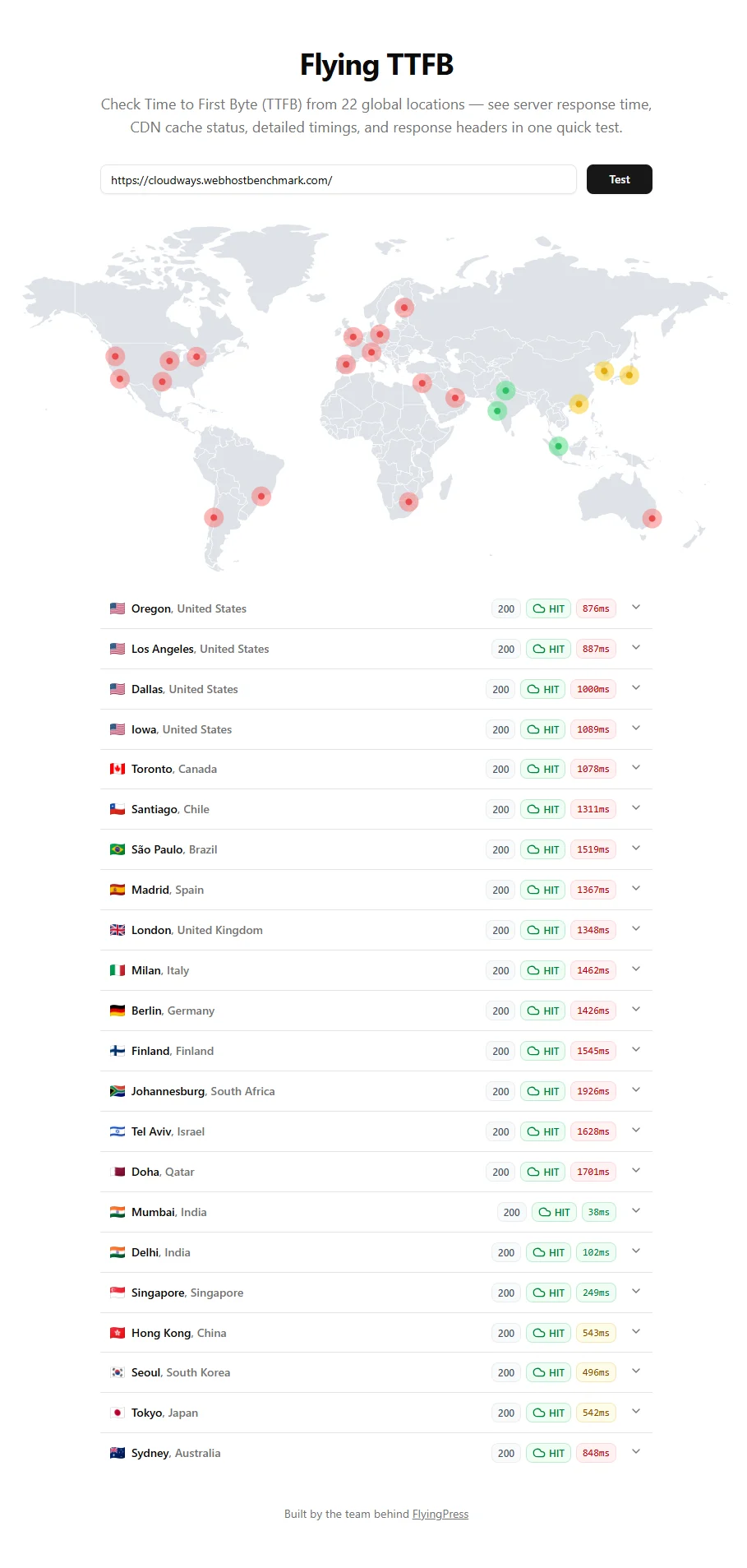
Important: A server in Mumbai is excellent for visitors in India and fine for Asia, but it is slow for Europe, the USA and Africa. Cloudways does not include a CDN on Flexible plans, so if your audience is global, add the Cloudflare add-on or pick a data center near most of your visitors.
Cloudways DNS Test
DNS turns your domain name into an address. Our DNS test averaged 197 ms across four public resolvers, and the DNS change was fully propagated.
| Resolver | Time |
|---|---|
| 18 ms | |
| Cloudflare | 656 ms |
| Quad9 | 39 ms |
| OpenDNS | 74 ms |
| Nameservers | Not detected |
| Propagation | Fully propagated |
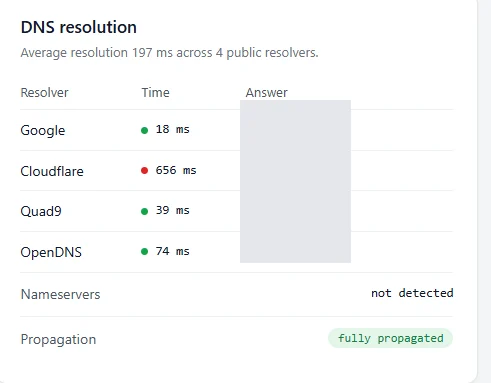
Three of the four resolvers answered in under 75 ms. The slow 656 ms from Cloudflare’s resolver pulled the average up, and it is a one-time lookup that visitors’ devices cache afterwards.
Cloudways Network and Response Test
| Check | Result |
|---|---|
| Status | 200 OK |
| Response time / TTFB | 147 ms / 144 ms |
| DNS lookup | 48 ms |
| TCP connect | 65 ms |
| TLS handshake | 109 ms |
| HTTP version | HTTP/2 |
| Compression | GZIP |
| Server to download | 3 ms |
| Transfer size | 22.4 KB |
| Server and cache | Nginx, cache hit |
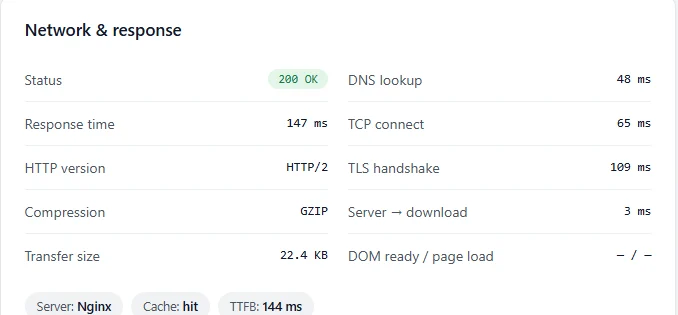
The page came from Nginx over HTTP/2 with GZIP compression, and a cache hit kept the TTFB at 144 ms. A small 22.4 KB transfer and a 3 ms download time show how light the cached page is.
Cloudways Server Performance Benchmark
Page speed tests mostly measure the front end, so we also tested the server itself with a WordPress hosting benchmark plugin. It runs real workloads on the server and scores each one out of 10. Cloudways scored 6.2 out of 10 overall on PHP 8.2.35.
| Test Area | Highlights | Score Range |
|---|---|---|
| CPU & Memory | Large text data 6.21, random binary data 7.15, recursive math 3.85, iterative math 8.24, floating point 4.44 | 3.85 to 8.24 |
| File System | Write ability 8.65, local file copy 9.23, small file I/O 9.57 | 8.65 to 9.57 |
| Database | Large data import 5.48, simple queries 8.93, complex queries 7.37, temporary disk tables 4.28 | 4.28 to 8.93 |
| Object Cache | Persistent object cache enabled: 0 | 0 |
| WordPress Core | Shortcodes 6.41, hooks 7.62, options 7.47, REGEX 6.46, taxonomy 6.87, object capability 6.54, content filtering 4.53, JSON 4.75 | 4.53 to 7.62 |
| Compression | GZIP 8.46, Deflate 4.01, PHP serialize 6.96, maybe_serialize 6.09, Base64 10 | 4.01 to 10 |
| Image Processing | Image resize 5.2, multiple thumbnails 3.61, format conversion 4.63, GD filters 5.91 | 3.61 to 5.91 |
| Network | Download speed test | 6.87 |
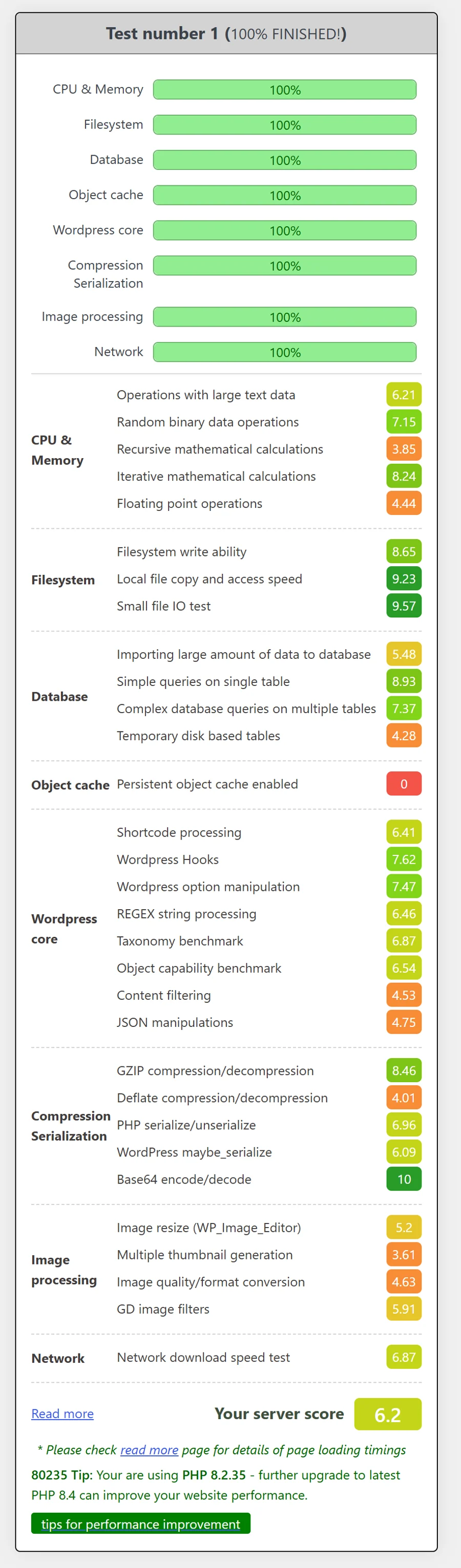
The file system was the star, with scores from 8.65 to 9.57, and simple database queries and GZIP compression were strong too. The weak spots were the single vCPU, which dragged down recursive math at 3.85 and image work such as thumbnail generation at 3.61, and temporary disk tables at 4.28. A 1 vCPU, 2 GB server is the entry size, so a bigger plan will score higher. The plugin also noted that upgrading to PHP 8.4 can improve performance.
Cloudways Object Cache: Not Enabled by Default in Our Test
A persistent object cache stores database query results in memory, so a dynamic WordPress or WooCommerce site does not rebuild the same data on every visit. In our benchmark the persistent object cache scored 0, which means it was not enabled on our site, even though the application shows Redis credentials in its Access Details page.
Why it matters: Cloudways says its Flexible plans include a free Redis cache, and Object Cache Pro comes on servers with 4 GB of RAM and above. If you run WooCommerce or a membership site, turn the object cache on after setup, because it is the quickest win for dynamic pages.
What CPU Does Cloudways Use? Intel Xeon on Vultr, Checked Over SSH
We ran the free Yet-Another-Bench-Script over SSH on our server and Geekbench 6 on the same machine. Here is what they reported:
| What We Checked | What the Server Reported |
|---|---|
| Processor | Intel Xeon (Cascade Lake) |
| CPU cores our server sees | 1 core at about 2.99 GHz |
| RAM, swap and disk | 1.9 GiB RAM, 2.3 GiB swap, 51.6 GiB disk |
| AES-NI | Enabled |
| Operating system | Debian GNU/Linux 12 (bookworm), kernel 6.1.0-54 |
| Network | IPv4 online, IPv6 offline; AS20473 The Constant Company, host Vultr Holdings LLC |
| Location | Mumbai, Maharashtra, India |
| Server uptime when tested | 11 days, 21 hours, 53 minutes |
| Geekbench 6.7.2 | Vultr VC2: single-core 1,023 and multi-core 992 |
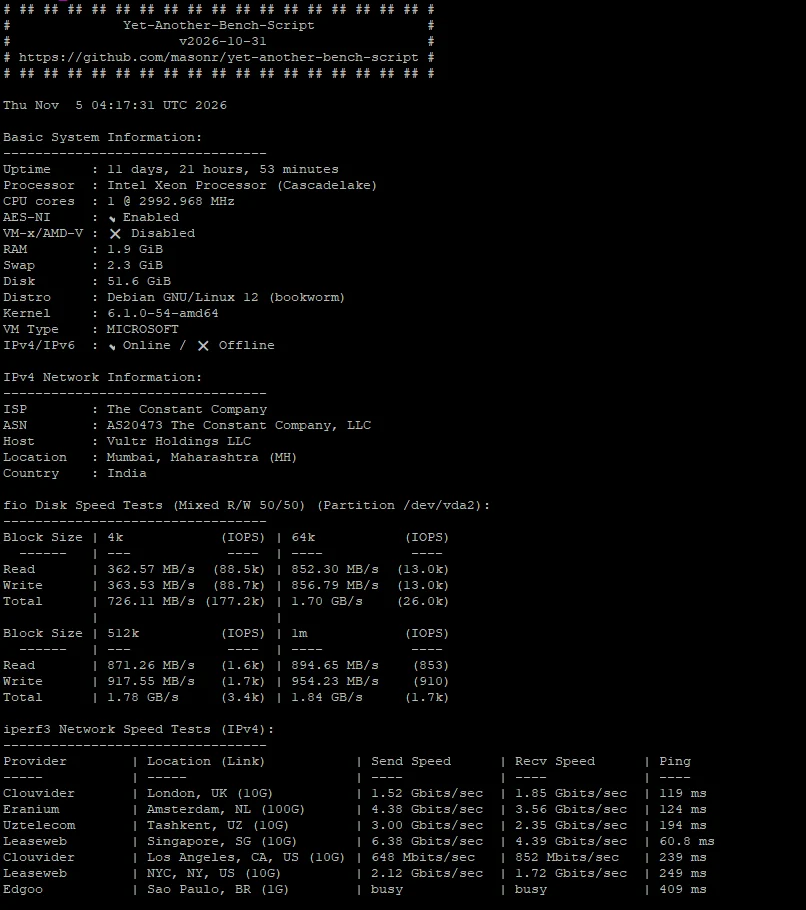
Cloudways Disk Speed (fio)
The fio test mixes reads and writes 50/50. Disk speed was very good for a small cloud server, and it explains the strong file system scores in the WordPress benchmark.
| Block Size | Read | Write | Total |
|---|---|---|---|
| 4k | 362.57 MB/s (88.5k IOPS) | 363.53 MB/s (88.7k IOPS) | 726.11 MB/s (177.2k IOPS) |
| 64k | 852.30 MB/s (13.0k IOPS) | 856.79 MB/s (13.0k IOPS) | 1.70 GB/s (26.0k IOPS) |
| 512k | 871.26 MB/s (1.6k IOPS) | 917.55 MB/s (1.7k IOPS) | 1.78 GB/s (3.4k IOPS) |
| 1m | 894.65 MB/s (853 IOPS) | 954.23 MB/s (910 IOPS) | 1.84 GB/s (1.7k IOPS) |
Cloudways Network Speed (iperf3)
| Provider | Location | Send Speed | Receive Speed | Ping |
|---|---|---|---|---|
| Clouvider | London, UK (10G) | 1.52 Gbits/sec | 1.85 Gbits/sec | 119 ms |
| Eranium | Amsterdam, NL (100G) | 4.38 Gbits/sec | 3.56 Gbits/sec | 124 ms |
| Uztelecom | Tashkent, UZ (10G) | 3.00 Gbits/sec | 2.35 Gbits/sec | 194 ms |
| Leaseweb | Singapore, SG (10G) | 6.38 Gbits/sec | 4.39 Gbits/sec | 60.8 ms |
| Clouvider | Los Angeles, CA, US (10G) | 648 Mbits/sec | 852 Mbits/sec | 239 ms |
| Leaseweb | NYC, NY, US (10G) | 2.12 Gbits/sec | 1.72 Gbits/sec | 249 ms |
| Edgoo | Sao Paulo, BR (1G) | busy | busy | 409 ms |
Singapore was the fastest route, with up to 6.38 Gbits/sec at a 60.8 ms ping, and Europe was close behind. The Sao Paulo test server was busy, so it returned no speed. These tests use the server’s own network, so they do not include the Cloudways dashboard layer.
Cloudways Geekbench 6 Result
Geekbench 6.7.2 on the same Vultr VC2 server scored 1,023 in single-core and 992 in multi-core. It reported an Intel Xeon Cascade Lake processor with 1 core at 2.99 GHz, 32 KB L1 caches, 4 MB L2, 16 MB L3 cache, 1.92 GB of memory and AVX-512 support.
| Workload | Single-Core | Multi-Core |
|---|---|---|
| File Compression | 974 | 928 |
| Navigation | 1,012 | 1,130 |
| HTML5 Browser | 1,164 | 1,023 |
| PDF Renderer | 1,143 | 1,123 |
| Photo Library | 952 | 1,048 |
| Clang | 1,305 | 1,350 |
| Text Processing | 1,130 | 1,055 |
| Asset Compression | 1,014 | 727 |
| Object Detection | 952 | 567 |
| Background Blur | 1,348 | 1,347 |
| Horizon Detection | 1,210 | 1,301 |
| Object Remover | 617 | 686 |
| HDR | 1,118 | 1,170 |
| Photo Filter | 616 | 1,018 |
| Ray Tracer | 946 | 934 |
| Structure from Motion | 1,048 | 983 |
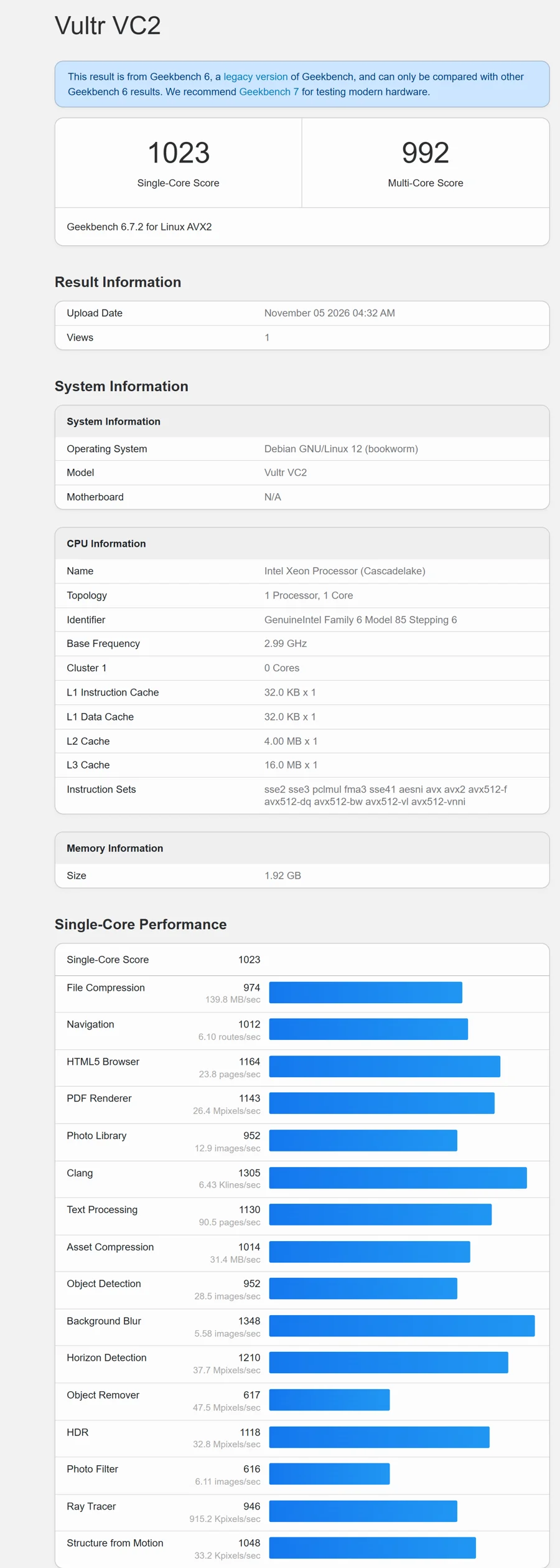
The single-core and multi-core scores are nearly the same because the server has only one core. Clang and background blur were the strongest workloads, and object remover and photo filter were the weakest.
Cloudways Load Test: How Does It Handle Traffic?
We load tested the site with up to 20 virtual users over about five and a half minutes. The test sent 3,458 requests at an average of 10 requests per second, peaked at 13.58 requests per second and recorded zero HTTP failures.
| Load Test Metric | Result |
|---|---|
| Virtual users | Up to 20 |
| Requests made | 3,458 (about 3.5K) |
| Average request rate | 10 requests per second |
| Peak request rate | 13.58 requests per second |
| HTTP failures | 0 |
| 95th percentile response time | 850 ms |
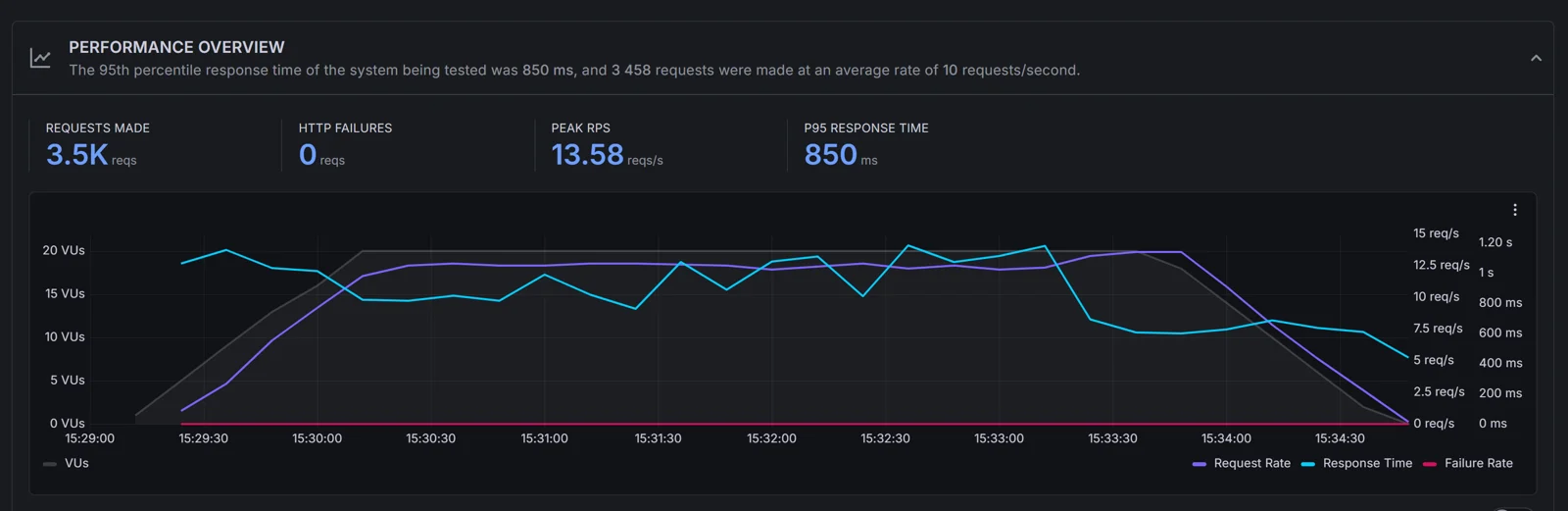
The server held steady for the whole test, and the response time chart stayed between roughly 500 ms and 1.2 seconds without errors. Important: This is a cached WordPress page on a 1 vCPU server, so it shows how a small cached site behaves, not how a busy WooCommerce store would. For sustained heavy traffic, move to a bigger server size or the Autonomous plan.
Cloudways Security Test: SSL Labs and Security Headers
Security is a big part of managed hosting, so we scanned the test site on 5 November 2026 with two standard tools.
Cloudways SSL Labs Test: Grade A
| SSL Labs Check | Result |
|---|---|
| Overall rating | A |
| Certificate and protocol support | Full score in the chart |
| Key exchange and cipher strength | About 90 out of 100 |
| TLS 1.3 | Supported |
| Post-quantum key exchange | Not supported |
| SNI | Required, so the site works only in browsers with SNI support |
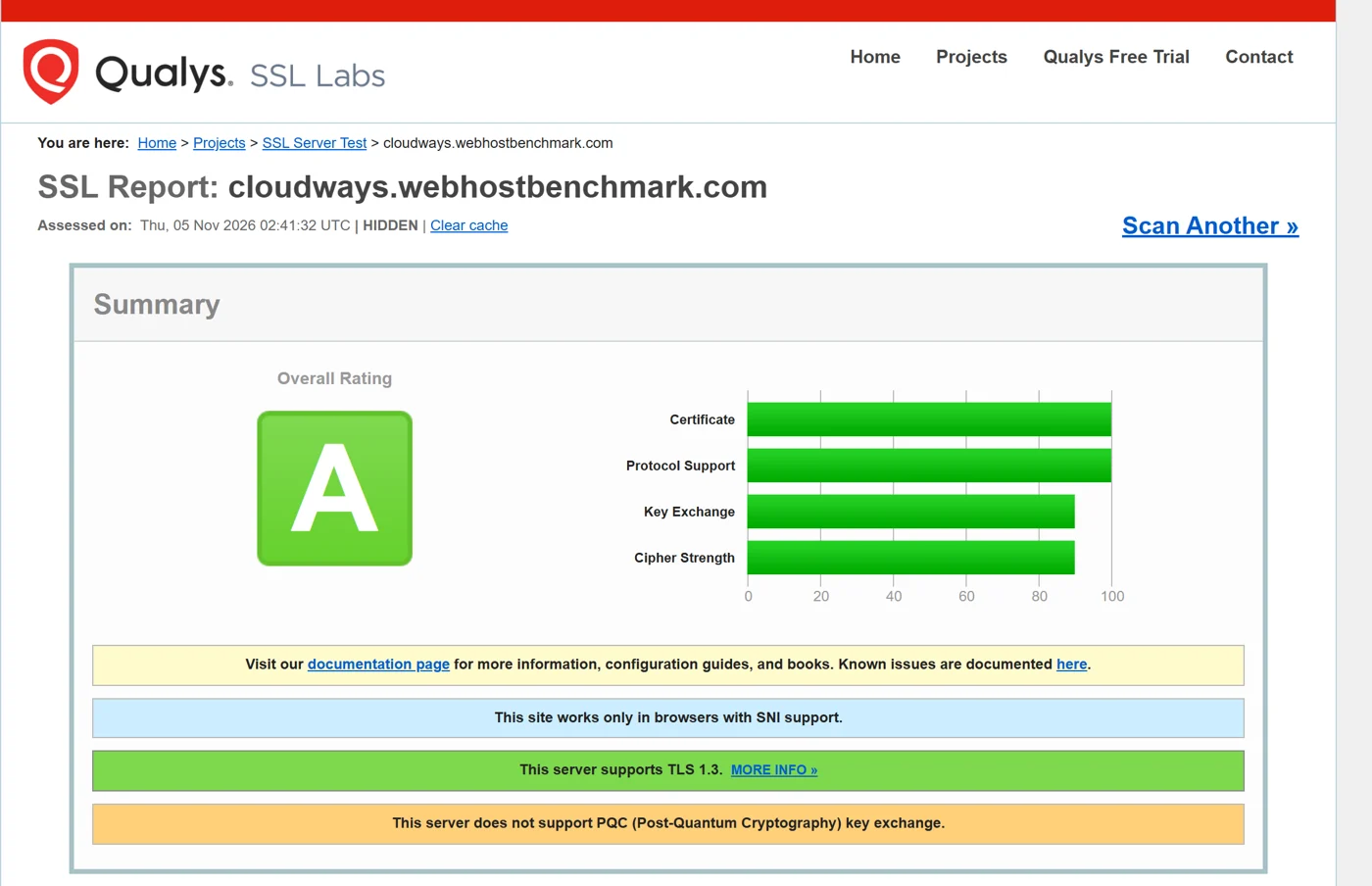
Grade A is a strong result and TLS 1.3 is supported. The only warning is that the server does not yet support post-quantum key exchange, which almost no hosts offer today. Cloudways includes a free Let’s Encrypt SSL certificate on all Flexible plans.
Cloudways Security Headers Test: Grade A+
Security Headers by Snyk gave the test site an A+, with six security headers present:
| Header | Value We Saw |
|---|---|
| X-Frame-Options | SAMEORIGIN |
| X-Content-Type-Options | nosniff |
| Content-Security-Policy | default-src ‘self’; script-src ‘self’; object-src ‘none’; base-uri ‘self’; frame-ancestors ‘none’ |
| Permissions-Policy | geolocation=(), microphone=(), camera=() |
| Strict-Transport-Security | max-age=31536000; includeSubDomains |
| Referrer-Policy | strict-origin-when-cross-origin |
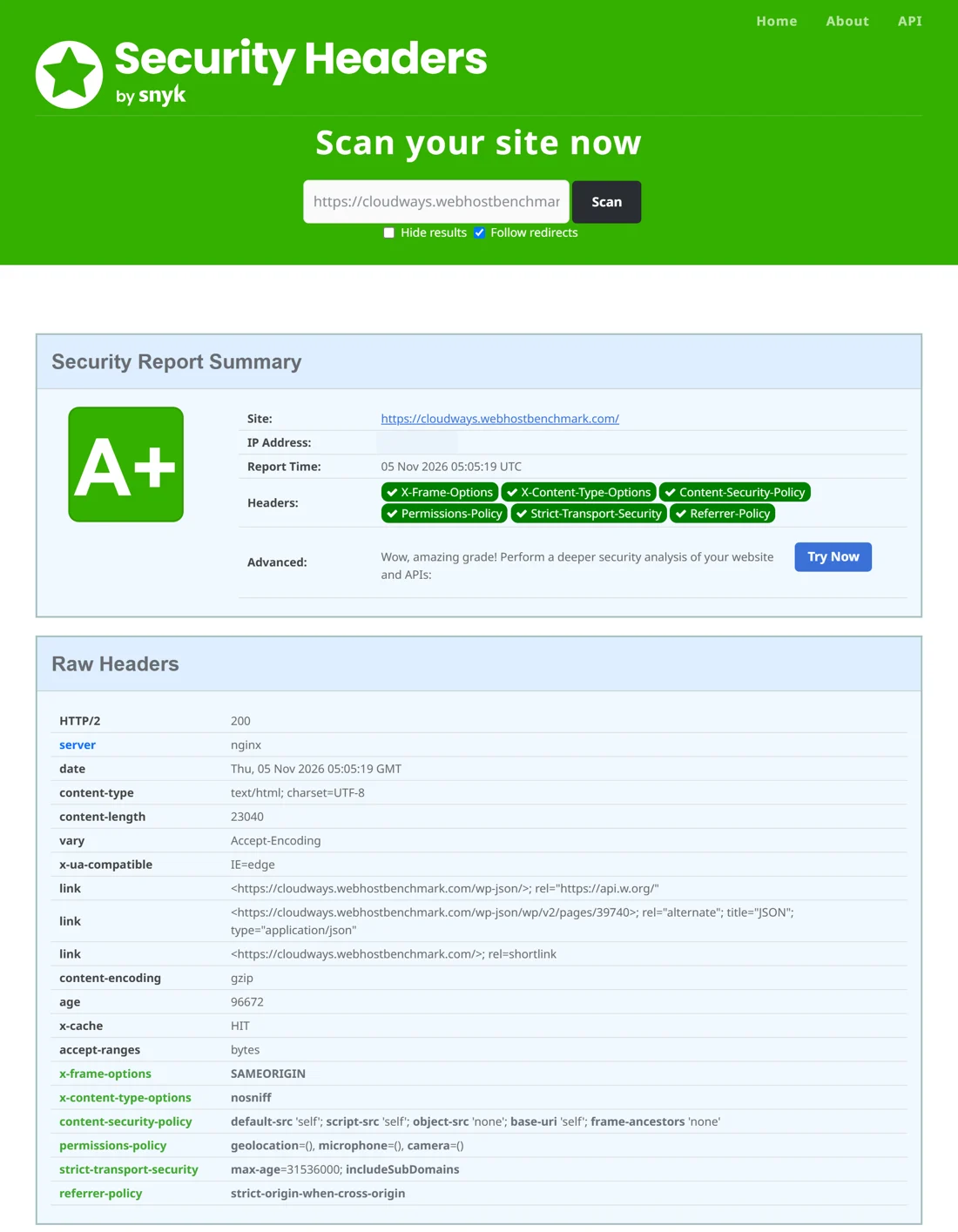
The raw headers also showed an Nginx server, an HTTP/2 200 response, GZIP encoding and a cache hit with an age of 96,672 seconds, about 27 hours. The tool listed three upcoming headers that were not set: Cross-Origin-Embedder-Policy, Cross-Origin-Opener-Policy and Cross-Origin-Resource-Policy.
Note: Headers such as Content-Security-Policy can also come from a plugin or the site’s own configuration, so we do not count the A+ as a Cloudways default. The platform side of security is the firewall, free SSL, the WordPress vulnerability scanner and password protection that Cloudways lists on its plans.
Cloudways Backups
Cloudways makes backups part of the server. The Backups page lets you choose the schedule, the frequency and how long copies are kept, and you can run an on-demand backup at any time. Our server used these settings:
| Backup Setting | What We Saw |
|---|---|
| Schedule time | 00:11 UTC |
| Backup frequency | 1 day |
| Backup retention | 1 week |
| Local backups | Off (switch available) |
| Off-site backup size | 113 MB, last updated 4 November 2026 |
| On-demand backup | Available with a Take Backup Now button |
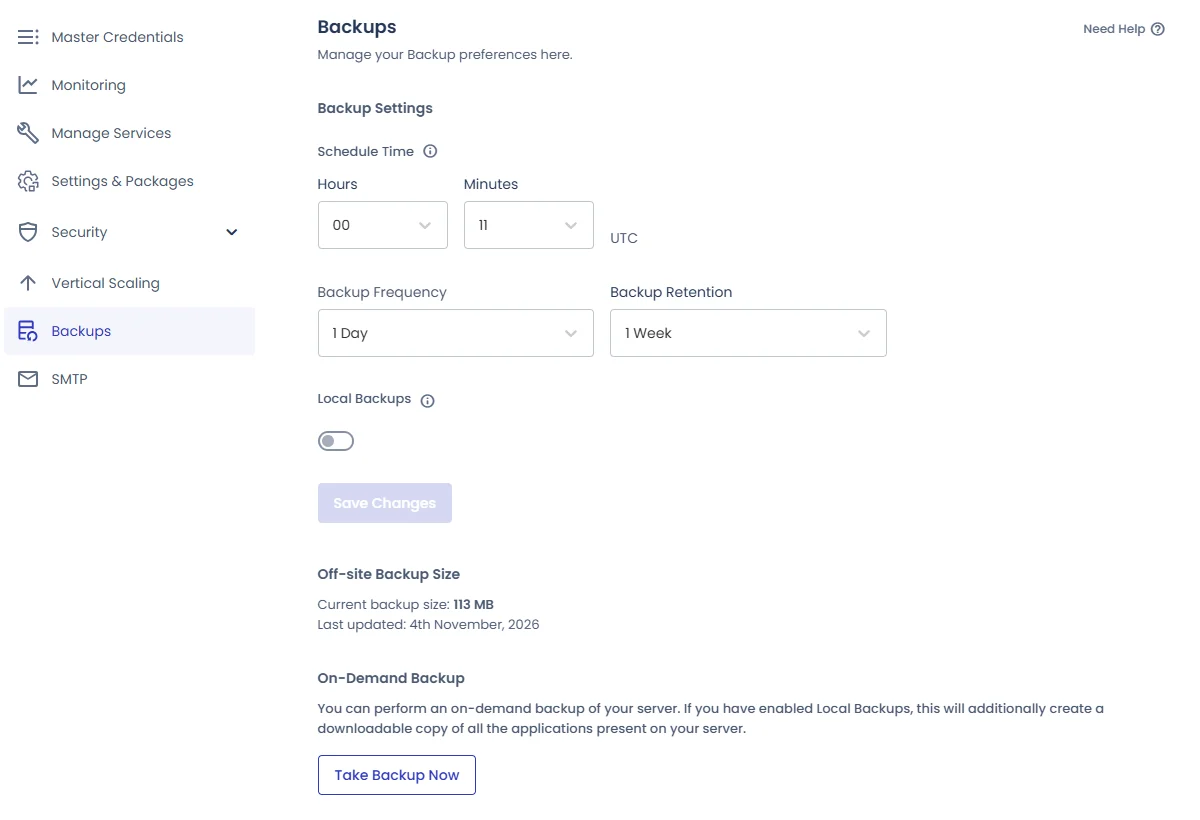
The server-level menu also lists Master Credentials, Monitoring, Manage Services, Settings and Packages, Security, Vertical Scaling, Backups and SMTP. According to Cloudways’ pricing page, automated backups are mandatory on Flexible plans and off-site storage costs $0.033 per GB, so the bill grows if your site is large.
Cloudways Features for WordPress Sites
Besides speed and security, these are the features Cloudways lists on its Flexible plans and that we saw in our account:
- Free Staging and Cloning: Create a staging copy of your site, test changes safely and push them live, with 1-click cloning on every plan.
- SafeUpdates and Site Manager: Update WordPress safely and manage many sites from one place, with performance monitoring and visual regression tests.
- Free SSL and Free Migration: A free Let’s Encrypt certificate and a free migration for your existing site.
- Redis and Object Cache Pro: A free Redis cache on every plan, with Object Cache Pro on servers with 4 GB of RAM or more.
- Built-in Firewall: A firewall with IP blocking and a free WordPress vulnerability scanner help block attacks.
- Vertical Scaling: Resize a server up from the dashboard when your traffic grows, with no migration needed.
- Git Deployment and Cron Jobs: Deploy code through Git and schedule cron jobs from the application menu.
- Web Rules and Cloudflare: Set redirects and web rules in the dashboard and add the Cloudflare CDN as a paid add-on with a free trial.
Cloudways Customer Support
Cloudways lists 24/7/365 support on every plan, and the dashboard puts help close at hand with a Support link in the left menu and a “Need a hand?” tab on every page. We opened a real ticket to test it, and you can read the result below. Here is every way you can reach Cloudways, based on its own support page.
Ways to Contact Cloudways Support
| Support Channel | How It Works | Available On |
|---|---|---|
| Live chat | 24/7/365 chat with the support team. On the free Standard level, a chat that is not solved in 15 minutes becomes a ticket. | All plans |
| Support tickets | Open a ticket from the dashboard. First response is 12 hours, or 3 hours for high-priority tickets, on the free level. | All plans |
| Cloudways Copilot | An AI assistant that gives instant troubleshooting insights. Cloudways warns that its output may contain errors. | Dashboard and website |
| Knowledge base | More than 100 help articles at support.cloudways.com, such as getting started and how to choose a provider. | Everyone |
| Phone and private Slack | A phone line and a private 24/7 Slack channel with senior engineers. | Premium support add-on only |
| Sales team and scheduled calls | A contact form to reach sales and a way to schedule a call for questions or guidance. No support email address is listed. | Everyone |
| Community and status page | The Cloudways User Group on Facebook for peer help, and status.cloudways.com to check platform incidents. | Everyone |
Our Cloudways Support Ticket Test
We opened a real ticket on 30 October 2026 at 11:37 with a problem on our Flexible server. SSH access failed, and online ping checkers showed 0 of 4 packets received from several locations. We set the priority to High, chose the Technical Support department and asked Cloudways to check whether SSH was enabled, whether a firewall or IP rule blocked it and whether ICMP ping was blocked by Cloudways’ infrastructure or by server-level firewall rules.
- The ticket form asked for the product (Flexible), the department (Technical Support), our server IP and the application name, and we attached a screenshot of the ping result.
- A support agent replied on the same day, because both the ticket and the first reply show “6 days ago” in our screenshot, which we took on 5 November.
- The first reply was a checklist, not a fix. The agent asked for our SSH username and port, the exact error message with a screenshot and our public IPv4 address from a what-is-my-IP site so Cloudways could check the SSH logs.
- The ticket’s last activity was on 3 November 2026, three days after we opened it, and it ended with the status Solved.
- The agent’s signature carried a promo for Cloudflare Enterprise on Cloudways at $1.99 per month instead of $200.
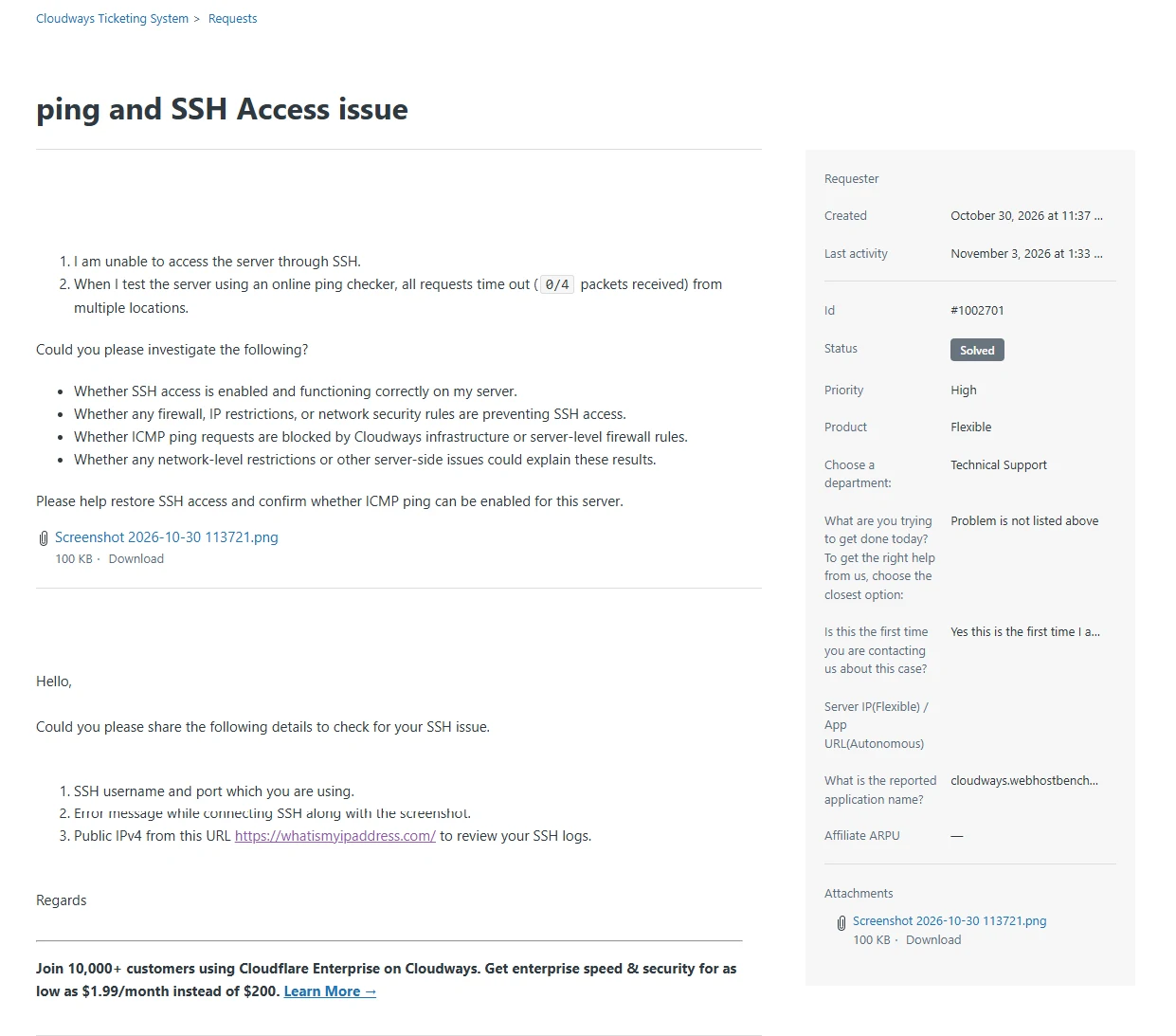
Our take: A same-day reply to a High-priority ticket is a good result on the free Standard level, where Cloudways lists a 3-hour first response for high-priority tickets. We cannot confirm the exact minutes, because the ticket page only shows days. The first answer was a standard checklist, so a technical problem like this needs more than one exchange, and the ticket took until 3 November to settle. The reply also carried an upsell, which was a small distraction.
Cloudways Support Plans: Standard, Advanced and Premium
Standard support is free. Two paid add-ons give faster answers and help with your site, not only the platform:
| Standard | Advanced | Premium | |
|---|---|---|---|
| Price | Free | $25/mo or 10% of your invoice, whichever is higher | $500/mo or 10% of your invoice, whichever is higher |
| Ticket first response | 12 hours | 6 hours | 2 hours |
| High-priority tickets | 3 hours | 30 minutes | 10 minutes |
| Live chat | Professionally trained team, turns into a ticket after 15 minutes | Senior team members, turns into a ticket after 30 minutes | Senior team members, unlimited chat time |
| Phone and Slack | No | No | Phone and a private 24/7 Slack channel |
| What it covers | Platform and infrastructure support, guidance on tools and the knowledge base | Everything in Standard, plus application help, priority support and a dedicated account manager | Everything in Advanced, plus private Slack and phone access |
Advanced and Premium add application support: plugin and theme troubleshooting, server error investigation, database issues, API troubleshooting, performance optimization and customization such as extra PHP packages or NGINX and Varnish configs. Note: The Cloudways page shows the Premium price as $500/month in one place and $100 in a comparison cell, so confirm it before you buy.
What support does not cover: On every plan, Cloudways does not handle website content or design changes, plugin or theme functionality changes, custom code debugging, application-level security, code audits, SEO or moving a site off Cloudways. Check our Cloudways vs Kinsta comparison to see how its support compares with other managed hosts.
Cloudways Data Center Locations
Cloudways runs on five cloud providers: DigitalOcean, Vultr, Linode, AWS and Google Cloud. Between them they offer more than 100 data center locations, and Cloudways’ own pages quote 116 locations on one page and more than 150 in a newer blog post, so check the dashboard for the exact list. Location choices depend on the provider you pick.
Our test server runs on Vultr in Mumbai, India, which gave Indian visitors a 38 ms TTFB in Mumbai and 102 ms in Delhi. Pick the data center closest to most of your visitors, because it is the biggest factor in speed for a single server, as our 22-location test showed.
Cloudways Pricing and Plans
Cloudways pricing is pay as you go. For DigitalOcean, Vultr and Linode, billing is hourly and capped at the monthly price, so you never pay more than the listed amount for a full month. AWS and Google Cloud are billed hourly using a 30-day month, and their prices vary by region. These are the plan sizes on the pricing page when we checked:
| Flexible Plan | RAM | vCPU | Storage | Bandwidth | Price |
|---|---|---|---|---|---|
| Micro | 2 GB | 1 | 50 GB | 2 TB | $11/mo |
| Small | 2 GB | 1 | 50 GB | 2 TB | $11/mo |
| Medium | 8 GB | 4 | 160 GB | 5 TB | $11/mo promo, $88/mo list |
| 8XL | 128 GB | 24 | 2,560 GB | 11 TB | $11/mo promo, $342/mo list |
Note: The pricing page showed a time-limited Black Friday offer at the time of writing, and the Cloudways homepage advertised 80% off all products, plans and add-ons for the first 2 months plus unlimited free managed migrations. Promotional and list prices can change quickly, so confirm the final total at checkout.
Flexible plans include free SSL, free migration, vertical scaling, a built-in firewall, free staging and cloning, a WordPress vulnerability scanner, free Redis, mandatory automated backups and 24/7 support. The Cloudflare CDN is an add-on that starts at $4.99 per domain per month.
Cloudways Autonomous Pricing
| Autonomous Plan | Price | Bandwidth | Disk | Baseline Servers |
|---|---|---|---|---|
| Free Trial | $0 for 3 days | 150 GB | 20 GB | 1 |
| Growth | $99/mo | 150 GB | 20 GB | 1 |
| Scale | $199/mo | 250 GB | 50 GB | 2 |
| Plus | $399/mo | 1,000 GB | 100 GB | 3 |
| Enterprise | Custom | Custom | Custom | Custom |
Autonomous is fully managed autoscaling WordPress hosting with Cloudflare Enterprise CDN, Object Cache Pro, load balancing and failover. Overages are charged for disk ($1 per GB), bandwidth ($0.04 per GB) and autoscaling servers by the hour.
Cloudways Velocity and AI Agents Pricing
Velocity, for Node.js apps, starts at $20/month for Starter with 2 GB RAM, 2 vCPU and 5 apps, and rises to $400/month for Business. Managed AI Agents for OpenClaw and Hermes start at $9.99/month for Scout with 1 vCPU and 2 GB RAM.
Cloudways Refund Policy and Free Trial
Cloudways offers a free trial instead of a money-back guarantee: 5 days on Flexible with no credit card, 3 days on Autonomous and 3 days on Velocity Starter and Professional. Its pricing page does not state a refund policy. Plans can be upgraded or downgraded at any time with no lock-in, and when you cancel you receive a final invoice for usage up to that date. Once an account is deleted, its data cannot be recovered, and tax already charged on past invoices cannot be refunded.
Cloudways Alternatives
Cloudways is not the only managed option. If something in this Cloudways review does not fit your needs, these providers are worth a look:
| Host | Consider It If You Want… | Our Review |
|---|---|---|
| Kinsta | Premium managed WordPress hosting on Google Cloud | Kinsta review |
| WP Engine | Managed WordPress with developer tools | WP Engine review |
| DigitalOcean | Cloud servers you manage yourself | DigitalOcean review |
| Vultr | Cloud servers in many locations | Vultr review |
| Linode | Cloud servers with predictable pricing | Linode review |
| Kamatera | Custom cloud servers with flexible sizes | Kamatera review |
Still comparing? See our guide to the best managed WordPress hosting.
Our Cloudways Review Scorecard
Here is how we rate Cloudways after our hands-on tests, out of 5:
| Category | Score | Why |
|---|---|---|
| Reliability | 4.9 | 100% uptime with no downtime in our test |
| Features | 4.8 | Staging, Redis, Git, SafeUpdates, backups and a firewall on every plan |
| Ease of Use | 4.5 | Clear dashboard, though server settings take learning |
| Pricing | 4.4 | Hourly billing with a monthly cap, but backups and CDN cost extra |
| Support | 4.2 | 24/7 chat and tickets; our ticket got a same-day reply asking for SSH details |
| Overall | 4.6/5 | A fast, flexible managed cloud host |
Cloudways Review: Pros and Cons
| ✅ Pros | ❌ Cons |
|---|---|
| 100% uptime in our test | Persistent object cache was not enabled in our benchmark |
| PageSpeed 99 mobile, 100 desktop | WordPress benchmark score of only 6.2/10 on the entry server |
| 38 ms TTFB in Mumbai and cache hits everywhere | TTFB of 0.9 to 1.9 seconds outside Asia without a CDN |
| SSL Labs A and Security Headers A+ | Cloudflare CDN is a paid add-on from $4.99 per domain |
| Daily backups, staging and free migration | Backups are mandatory and off-site storage is charged |
| Pay-as-you-go hourly billing with a monthly cap | No money-back guarantee, only a short free trial |
| Five cloud providers and more than 100 locations | Server management has a learning curve for beginners |
Is Cloudways Good? Who Should Use It
- WordPress and WooCommerce owners who want a managed server without running Linux.
- Agencies and freelancers who manage many client sites and need staging, cloning and Site Manager.
- Growing sites that want to scale up a server whenever traffic rises.
- Not ideal for total beginners who want a cheap one-click shared plan, or anyone who needs a money-back guarantee.
Want to compare more? Read our Cloudways vs Kinsta guide, our Kinsta review and the best cloud hosting providers.
How to Buy Cloudways Hosting
- Visit the Cloudways website and start the free trial, which needs no credit card.
- Choose Flexible, pick your cloud provider and a server size.
- Select the data center closest to most of your visitors.
- Launch WordPress or another app and connect your domain.
- Apply coupon code GHOST when you upgrade to a paid plan, then turn on the object cache, add a CDN if your audience is global and confirm your backup schedule.
Promo: Use coupon code GHOST to get 10% off your first 3 months, which means the first three monthly invoices, on any Cloudways plan. Claim the Cloudways offer. Cloudways was also advertising a Black Friday deal of 80% off all products, plans and add-ons for the first 2 months when we checked. Offers change often and may not combine, so confirm the final price at checkout.
FAQ – Cloudways Review 2026
Is Cloudways good in 2026?
Yes. In our tests Cloudways had 100% uptime, PageSpeed scores of 99 on mobile and 100 on desktop and security grades of A on SSL Labs and A+ on Security Headers. The server benchmark was only 6.2/10 on the entry server.
How fast is Cloudways?
Our test site had a 38 ms TTFB in Mumbai, an LCP of 0.9 seconds on mobile and a 523.46 ms average load time across four HetrixTools locations. TTFB was 0.9 to 1.9 seconds in Europe, the USA and Africa, because the server sits in Mumbai and no CDN was included.
What is Cloudways’ uptime?
Our test site had 100% uptime with no downtime from 27 October to 5 November 2026, checked every minute from New York, San Francisco, Singapore and Mumbai.
How much does Cloudways cost?
Cloudways Flexible plans start at $11/month for 2 GB RAM, 1 vCPU, 50 GB storage and 2 TB bandwidth. Autonomous starts at $99/month and Velocity at $20/month. Prices on the pricing page change with promotions, so confirm them at checkout.
Does Cloudways have a free trial?
Yes. Cloudways offers a 5-day free trial on Flexible with no credit card, a 3-day trial on Autonomous and a 3-day trial on Velocity Starter and Professional.
Does Cloudways have a money-back guarantee?
Cloudways does not state a money-back guarantee on its pricing page. It offers free trials, no lock-in and billing by the hour, and you receive a final invoice for usage up to the day you cancel.
Which cloud provider is best on Cloudways?
DigitalOcean, Vultr and Linode have the same price in every region and cap billing at the monthly price. Our test used Vultr, and AWS and Google Cloud prices vary by region. Pick the provider that has a data center close to your visitors.
What CPU does Cloudways use?
It depends on the provider. Our Vultr server ran an Intel Xeon Cascade Lake processor at about 2.99 GHz, with 1 core and 1.9 GiB of RAM visible. Geekbench 6 scored 1,023 single-core and 992 multi-core.
Does Cloudways have object cache?
Cloudways says Redis is included on Flexible plans and Object Cache Pro comes on servers with 4 GB of RAM and above. In our benchmark the persistent object cache scored 0, so we had to enable it ourselves.
Does Cloudways include a CDN?
Not on Flexible plans. The Cloudflare CDN is an add-on that starts at $4.99 per domain per month. Autonomous and Velocity plans include Cloudflare Enterprise CDN.
Can Cloudways handle high traffic?
A larger server or the Autonomous plan can. In our load test a 1 vCPU server handled 3,458 requests with no HTTP failures and a 850 ms 95th percentile response time, but that was a cached page. For heavy WooCommerce traffic, scale up the server.
Does Cloudways include backups?
Yes. Automated backups are mandatory on Flexible plans. Ours ran daily at 00:11 UTC with 1 week of retention, and off-site storage costs $0.033 per GB.
Is Cloudways secure?
Our test site scored A on SSL Labs and A+ on Security Headers. Cloudways also lists a built-in firewall, a free WordPress vulnerability scanner and free SSL on its plans.
Does Cloudways have a data center in India?
Our Cloudways server ran on Vultr in Mumbai, India, and a network check over SSH confirmed it. Cloudways also lists locations on DigitalOcean, AWS, Google Cloud and Linode, so check the dashboard for India options.
Is Cloudways good for WooCommerce?
Yes, because it offers vertical scaling, Redis, staging and backups on every plan. Use a server with at least 4 GB of RAM, enable the object cache and add a CDN for a busy store.
Does Cloudways have 24/7 support?
Yes. Cloudways lists 24/7/365 live chat and ticketing on every plan, with a first ticket response of 12 hours on the free Standard level. Advanced ($25/month or 10% of your invoice) cuts it to 6 hours, and Premium adds phone and a private Slack channel. In our ticket test, a High-priority ticket about SSH and ping access got a reply the same day.
Cloudways Review Verdict: Is Cloudways Worth It?
After more than a week of real testing, Cloudways earned its reputation. Our site stayed online 100% of the time, scored 99 and 100 on PageSpeed Insights, got an A on SSL Labs and an A+ on Security Headers and ran daily backups without any effort.
The trade-offs are an average 6.2/10 server benchmark on the entry server, an object cache that needed switching on, slower speeds outside the server’s region and extra charges for backups and a CDN. If you want a managed cloud server for WordPress and are happy to tune it, Cloudways is a solid pick. Start the Cloudways free trial and see how it performs for your site.
Rating Based on Expert Review



Amazing Support as Always
Once again, excellent service from Cloudways. Managing billing queries across our multisite setup can be complex, but your consistent support every month ensures everything runs smoothly. We truly appreciate being treated as valued customers, it makes all the difference!