9 Best Free Uptime Monitoring Tools in 2026


Keeping a website, server or app online isn’t just a technical responsibility anymore! It’s a huge part of delivering a smooth experience to your users.
Every minute your service goes down, you risk losing visitors. That’s why checking uptime is important. When you track uptime regularly, you get a clear picture of how your website or app is performing.
The best free uptime monitoring tools make this job easy by constantly keeping an eye on your services in the background. They check availability, detect errors, locate the issues and alert you via email or slack when something needs attention.
What you’re gonna find in this blog is that we’ve listed some of the best free uptime monitoring tools that offer features like live tracking, error detection, integration with other apps, simple dashboards, and free sign-up options. We’ve also shared details about their features and pricing so you can easily compare them.
How GoogieHost reviews these tools: our editorial team has independently evaluated all 9 of the tools listed below. For each one we record feature coverage, ease of setup, pricing tiers, documentation quality, integration breadth, and customer support, and refresh entries when the underlying product changes.
So, let’s dive in and explore the tools! Let’s read on!
What is an Uptime Monitoring Tool?
An uptime monitoring tool is a service or software that continuously checks whether your website, server, application, or other online service is up and running or has gone down.
It sends regular pings (it’s HTTP requests) to your system and alerts you if it doesn’t receive a proper response, meaning there could be a problem.This helps you know immediately when something breaks, so you can fix it before your users notice and especially before any serious damage happens.

Imagine you have a toy car and you want to know whether it’s working every minute. An uptime monitoring tool is like a helper who keeps checking your toy car (or website, app) to make sure it’s still on. It sends small signals (like ping or request) to your website or server at regular intervals.
If the helper doesn’t get a proper response, means if your site has gone down, it raises an alert.
9 Best Free Uptime Monitoring Tools in 2026
Now, let’s come to the main part of the blog! Here are 9 of the top free uptime monitoring tools in 2026, along with some of their features to help you understand what each offers and guide your choice.
⏰ TL;DR:
1. UptimeRobot – Overall Best Free Uptime Monitoring Tools
2. Datadog – Best Free Uptime Monitoring Tools
3. StatusCake – Powerful Free Uptime Monitoring Tools
4. Uptrends – Beginner Friendly Free Uptime Monitoring Tools
5. Better Uptime – Most Reliable Uptime Monitoring Tools
6. Site24X7 – All-in one Free Uptime Monitoring Tools
7. HetrixTools – Easy to Use Uptime Monitoring Tools
8. Uptime Kuma – Open-Source Uptime Monitoring Tools
9. Montastic – Simple And User-friendly Uptime Monitoring Tools
1. UptimeRobot – Overall Best Free Uptime Monitoring Tools
UptimeRobot, the first best uptime monitoring free tool provides one of the world’s leading monitoring services, trusted by millions of users for tracking website and app availability.
It offers a highly friendly dashboard where beginners can easily set up monitors in seconds and view real-time uptime stats. The free plan includes 50 monitors, making it great for hobby users, freelancers, or anyone starting out. You also get alerts through email and several integrations so you’re instantly informed when something goes wrong.

Even on the free plan, UptimeRobot provides essential features like HTTP, port, ping, and keyword monitoring to ensure your website is responding correctly. You can also track DNS changes, view response times, and see incidents from different locations with region-based checks.
Key Features
- Multi-Location Monitoring: UptimeRobot checks your website or server from different regions around the world. This helps you catch issues that only appear in certain locations. It ensures more accurate monitoring and fewer false alarms.
- SSL & Domain Expiry Tracking: It warns you before your SSL certificate or domain expires, so you never lose traffic or trust. Alerts come at 30, 14, and 7 days before expiration. This protects your website from sudden downtime due to missed renewals.
- Keyword & Custom HTTP Monitoring: You can track specific text on a webpage to confirm whether something appears or disappears. This is great for monitoring login states, API responses, or content updates.
- Status Pages & Incident Management: UptimeRobot allows you to create public status pages to inform customers about outages or maintenance. Incident management tools help teams track issues, tag members, and share updates.
Plans
- Free Plan: Yes! UptimeRobot offers a free plan that includes 50 monitors with a 5-minute check.
- Paid Plan: Paid plans start at $7 per month with a 60-second monitoring interval and advanced features.
Pros & cons
Pros
- Offers 50 free monitors, which is generous for beginners.
- Simple dashboard that anyone can understand.
- Multi-location checks reduce false downtime alerts.
Cons
- Limited integrations on the free tier.
Best For
- Bloggers
- Freelancers
2. Datadog – Best Free Uptime Monitoring Tools
Next, after UptimeRobot, we’ve listed Datadog, the best free uptime monitoring tool that gives users a simple and unified way to track website, API, and application availability from locations around the globe.
It offers a clean dashboard that brings together metrics, logs, traces, alerts, and synthetic test results, all in one place.New users can easily set up monitors, run browser tests, perform API checks, and keep track of DNS records or response times without any complicated setup. Datadog’s global test locations help teams spot issues that may only affect users in specific regions.

Even on its free trial, Datadog gives new users access to its synthetic monitoring suite, allowing them to test uptime, monitor latency, and automate browser-based checks with a no-code recorder. It supports multiple integrations, offers SLO tracking, and provides a visual dashboard that helps beginners correlate uptime data with backend metrics for faster troubleshooting.
Key Features
- End-to-End Synthetic Testing: It simulates real user actions using automated browser tests and API tests. Plus, Visualizes step-by-step breakdowns and screenshots help identify issues fast. This tool is perfect for catching checkout failures or slow pages before users see them.
- Global Location-Based Uptime Monitoring: Tests your website or API from multiple worldwide locations. It also helps identify region-specific downtime or latency spikes. This ensures your global users get consistent performance.
- Full-Stack Correlation (Unified Dashboard): Datadog connects synthetic test failures to backend logs, traces, and metrics instantly and reduces troubleshooting time by showing everything in a single pane of glass. It allows new users to understand root causes without deep DevOps experience.
- Automated DNS & SLO Tracking: Monitors DNS resolvability, lookup times, and DNS-related issues. It provides simple SLO dashboards for uptime health tracking and helps teams maintain reliability standards with clear uptime goals.
Plans
- Free Plan: Offers a 14-day free trial where all features can be tested
- Paid Plan: Contact the Sales Team for Custom plans
Pros & Cons
Pros
- Global testing locations for accurate uptime checks.
- Strong integrations with logs, metrics, and traces.
- Automated alerts and fast root-cause analysis.
Cons
- No permanent free plan for Synthetic Monitoring.
- Can become expensive for large-scale testing.
Best For
- Web developers
- SaaS founders
3. StatusCake – Powerful Free Uptime Monitoring Tools
StatusCake is a powerful uptime monitoring tool designed to help users keep their websites online and performing well. Its free lifetime plan gives beginners access to essential monitoring such as uptime checks, page-speed testing, domain monitoring, and SSL checks, making it a great entry point for anyone starting out.
The dashboard is easy to use, showing clear uptime graphs, alerts, test history, and performance logs so users can quickly understand issues. Even new users can set up tests within minutes and instantly start receiving alerts when their website goes down.

StatusCake also offers useful features like global test locations, no-false-positive alerts, and detailed response-time reports, which help users understand exactly where outages come from. With support for 14+ integrations including Slack, Discord, Teams, and more, alerts reach you wherever you work.
Key Features
- Free-for-Life Uptime Monitoring: StatusCake promises that its free plan will remain free forever. New users get 10 uptime monitors with 5-minute check intervals. This helps anyone track essential website performance without worrying about budget.
- Micro-Downtime & No False Positives: It can detect downtime as short as 10 seconds, while still filtering out false alarms. This means you get accurate alerts only when your site is truly down. It helps users stay focused and avoid unnecessary panic.
- Multi-Layer Monitoring: Uptime, Page Speed, Domain & SSL: Offers uptime checks, one page-speed monitor, SSL certificate monitoring, and domain expiration monitoring, all for free. It gives beginners full visibility over website security, performance, and reliability. This all-in-one approach saves time and provides deeper insights.
- 14+ Integrations for Instant Alerts: Supports Slack, Teams, Discord, Telegram, OpsGenie, Pushover, Datadog, and more. Users can receive alerts directly on their preferred platform in real time. This makes response faster and monitoring more flexible.
Plans
- Free Plan: Yes! It offers a Free-for-Life plan with uptime and SSL monitoring included.
- Paid Plan: Pricing available on their website (exact number not provided in text).
Pros & cons
Pros
- Offers uptime, domain, SSL, and page-speed monitoring for free.
- Supports 14+ third-party integrations for instant alerts.
- Global test locations help identify region-specific downtime.
- Beginner-friendly dashboard with clear uptime reports.
Cons
- Faster check intervals (like 30 seconds) are only for paid plans.
Best For
- IT teams
- DevOps engineers
4. Uptrends – Beginner Friendly Free Uptime Monitoring Tools
What’s good with Uptrends? First off, it offers a simple uptime monitoring tool for beginners and small website owners who want reliable alerts.
Its free plan includes worldwide monitoring, email alerting, detailed check data, and access to clean dashboards. Users can track uptime from multiple global locations like the US, UK, Canada, Germany, France, and more. Everything is managed from an easy-to-use dashboard where new users can quickly understand their website’s performance and status.
The platform provides essential uptime monitoring along with features like no-false-alert validation, downloadable reports (PDF / Excel), and real-time error detection. It also supports monitoring of servers, DNS, APIs, and web applications in paid tiers, making it flexible for future upgrades.
Key Features
- Worldwide Checkpoint Monitoring: Lets you monitor your website from countries around the world, including the US, UK, Germany, Canada, France, and the Netherlands. This helps you understand how your site performs for global audiences.
- No-False-Alert Verification: Before sending an alert, Uptrends tests your website twice from different checkpoints. This prevents unnecessary panic due to temporary or local issues. You only receive alerts that truly matter.
- Detailed Check Data & Reporting: Each check includes info like load time, bytes, IP address, and test location. You can also export your monitoring data in PDF or Excel for deeper analysis or long-term storage. This is extremely useful for tracking performance trends.
- User-Friendly Monitoring Dashboard: The free dashboards give a clear view of your site’s status, uptime, and errors. Beginners can easily spot trends, view logs, and understand overall performance at a glance.
Plans
- Free Plan: Yes! It offers a free website monitoring plan with email alerts and export options.
- Paid Plan: Paid plans start with $5.10 per credit per month & free 30-day trial on premium plans
Pros & Cons
Pros
- Generous free plan with essential monitoring features.
- Global checkpoint testing for accurate uptime results.
- No false alerts thanks to double-verification.
- Easy dashboards suitable for beginners.
- Detailed check logs with export options (PDF/Excel).
Cons
- SMS, integrations, and advanced alerts need paid plans.
Best For
- Startups
- Small businesses
5. Better Uptime – Most Reliable Uptime Monitoring Tools
This Uptime monitoring tool offers fast alerts and clear incident insights. Even on the free plan, users get 10 monitors, 10 heartbeat checks, and a free status page with 3-minute intervals.
The platform shows screenshots, error messages, and second-by-second timelines so even beginners can understand what went wrong instantly. Its dashboard is clean, modern, and easy for new users to navigate without any learning curve.
Better Uptime also includes SSL checks, DNS monitoring, domain-expiration alerts, CRON monitoring, and multi-location checks from around the world.

Integrations with tools like Datadog, AWS, Azure, Google Cloud, New Relic, Grafana, Zabbix, and more can be added within minutes. You also get response-time tracking, uptime logs, and a branded status page you can host on your own domain.
Key Features
- Screenshot & Error Timeline: Better Uptime captures a screenshot of your website at the exact moment it goes down. It also creates a second-by-second timeline of the incident, making debugging extremely simple.
- Playwright Transaction Monitoring: It uses a real Chrome browser to test key user actions on your website. This helps catch broken workflows like logins, forms, and checkouts before users see them.
- Smart Incident Merging: If many monitors fail at the same time, Better Uptime groups them into one clean incident. This prevents alert fatigue and keeps your phone from ringing nonstop. A single tap acknowledges everything and helps teams focus on fixing the issue.
- Traceroute & MTR for Timeouts: When your site times out, the tool automatically runs traceroute and MTR tests. This helps pinpoint if the issue is network-level or server-level. It’s extremely helpful for diagnosing complicated connection or routing problems.
Plans
- Free Plan: Better Uptime offers a free plan. Includes 10 monitors, 10 heartbeats, 3-minute checks, and a free status page.
- Paid Plan (Starting Price): Paid plan starts at $29 per month (as shown in the comparison section of the official website).
Pros & cons
Pros
- Very generous free plan with monitors, heartbeats, and a free status page.
- Clean, beginner-friendly dashboard with powerful debugging tools.
- Multi-location checks and screenshots for accurate incident insights.
Cons
- 3-minute check interval on a free plan may be slow for high-traffic sites.
Best For
- E-commerce owners
- Agencies
6. Site24X7 – All-in one Free Uptime Monitoring Tools
Let’s now see what Site24x7 has to offer! As per the reviews of other users, it happens to be an all-in-one uptime monitoring solution to help you keep your websites, servers, networks and cloud applications online at all times.
It checks your website’s availability from 130+ global locations at a fast 30-second interval, helping you detect downtime from the same places where your customers access your services. Even new users can easily monitor multiple resources using simple dashboards, real-time alerts and clear uptime reports.
Its free plan lets beginners test essential monitoring features without any cost. You can create monitors, track uptime, receive instant alerts, and even use integrations with tools like PagerDuty and ServiceNow. The dashboard is intuitive, showing uptime, response time, location-specific performance, and detailed reports including RCA, SLA tracking, DNS checks and status pages to communicate outages.
Key Features
- 130+ Global Monitoring Locations: Checks your website from over 130 worldwide test points to detect downtime from any region. This helps you understand location-specific performance and ensure a consistent user experience.
- AI-Powered Root Cause Analysis (RCA): The tool doesn’t just alert you about downtime! It explains why it happened. RCA gives a second-by-second breakdown of issues and speeds up troubleshooting for teams.
- Multi-Channel Instant Alerts: It sends alerts through email, SMS, voice call, push notifications, RSS feeds, and ITSM tools. Integrations with Jira, ServiceNow, and PagerDuty make the workflow smooth for teams. You get notified exactly when an outage happens, helping you respond quickly.
- Status Pages & SLA Reporting: You can create public status pages to share real-time service updates with customers. SLA reports help you track uptime accuracy up to four decimal points.
Plans
- Free Plan: It offers a free plan. It includes basic uptime monitoring features OK for beginners, such as monitors, alerts, reports, dashboards, and mobile app access.
- Paid Plan: Starts @ $9 per month premium plans.
Pros & cons
Pros
- Checks uptime from 130+ global locations.
- Offers fast 30-second monitoring intervals.
- Provides AI-powered RCA and detailed reports.
Cons
- Advanced features require paid plans.
- Too much learning for new users.
Best For
- System administrators
- App developers
7. HetrixTools – Easy to Use Uptime Monitoring Tools
It’s a powerful uptime monitoring tool (Hetrix Tool) that helps you keep your servers running smoothly. With its free-forever plan offering 15 monitors with 1-minute checks, beginners can start tracking uptime instantly.
The dashboard is simple, fast, and easy to understand, making it ideal even for new users. You can monitor uptime from 12 global locations, check response times, and get accurate alerts whenever downtime occurs.The free plan also includes essentials like public status pages, basic outage diagnostics, and multiple integrations such as email, Telegram, Slack, and more.

Users can track SSL expiry, domain expiry, nameserver changes, and even monitor server resources through the Server Agent. The platform is designed to be extremely beginner-friendly with a clean interface and instant notifications.
Key Features
- Multi-Location Accurate Outage Detection: HetrixTools checks your website from multiple locations at the same time, ensuring downtime alerts are reliable and not false positives. This parallel verification makes it more accurate than many other uptime tools.
- Advanced Diagnostics with Ping + MTR: During every outage, HetrixTools automatically collects error samples, ping tests, and MTR diagnostics. This gives users the exact technical information needed to troubleshoot faster.
- Domain, SSL & Nameserver Monitoring: The platform monitors domain expiry, SSL certificate validity, and unexpected DNS nameserver changes. This protects users from preventable downtime caused by expired domains or certificate failures.
- Customizable Public Status Pages & White-Label Reports: Users can create SEO-friendly public status pages to keep clients informed of uptime in real time. You can brand these with your own logo, colors, and domain using white-label options.
Plans
- Free Plan: Yes! HetrixTools offers a free-forever plan. Includes 15 uptime monitors, 1-minute intervals, global checks and a public status page.
- Paid Plan: Paid plans start from affordable entry-level pricing. They include more monitors, extra diagnostics and premium support. (Talk to the Sales Team)
Pros & Cons
Pros
- The free plan includes 15 monitors with 1-minute intervals.
- Very accurate outage detection across multiple locations.
Cons
- Advanced features like larger monitor limits require upgrading.
Best For
- Digital marketers
- Hosting providers
8. Uptime Kuma – Open-Source Uptime Monitoring Tools
The one and only openSource uptime monitoring tool, we’ve listed Uptime Kuma that’s a self-hosted uptime monitoring tool that makes it easy for new users to start monitoring websites, servers, APIs, databases, DNS records and even Docker containers.
Its dashboard is simple, clean, and friendly, showing uptime history, response times, and beautiful ping charts so users can instantly understand what’s happening with their services. The free plan supports all essential features, including unlimited monitors, multiple check types, SSL certificate monitoring, and fast 20-second monitoring intervals.

It also includes built-in notifications (95+ integrations) such as Telegram, Slack, Discord, Email, Twilio, and more, good for alerting users when a website or service goes down. Uptime Kuma offers multiple status pages, DNS monitoring, keyword monitoring, JSON checks, and basic location-specific monitoring through proxy support.
Key Features
- 20-Second Interval Uptime Monitoring: It can check a website, IP, port, DNS record, or API every 20 seconds, making it faster than most free monitoring tools. This helps users spot short downtimes quickly and stay ahead of service issues.
- Multi-Protocol Monitoring (HTTP, TCP, Ping, Docker, Databases, DNS and more): It supports many types of monitors including HTTP/HTTPS, TCP ports, DNS records and Docker containers. This makes it flexible for developers, server admins, and home-lab users.
- Beautiful and Interactive Dashboard: The UI is modern, fluid, and visually appealing with smooth graphs and real-time charts. Users can easily understand uptime percentages, response speeds, and error logs.
- Built-In Status Pages (Multiple Status Pages Supported): Users can create public or private status pages to share incidents, maintenance updates, or uptime data with customers. It supports multiple pages, each customizable with different services.
Plans
- Free Plan: Yes! Uptime Kuma is 100% free (Because it’s open-source, there are no restrictions in the free version)
- Paid Plan: No official paid plan
Pros & Cons
Pros
- Completely free and open-source
- Beautiful, user-friendly dashboard
- Supports many monitor types (HTTP, TCP, DNS, databases, Docker)
- 95+ notification integrations
Cons
- Must be self-hosted (no fully-managed cloud version)
- Limited multi-location checks unless using proxies
Best For
- Network engineers
- Product managers
9. Montastic – Simple And User-friendly Uptime Monitoring Tools
For the 9th one, we’ve put Montastic in the list, a simple and user-friendly uptime monitoring tool to help individuals and companies keep an eye on their websites and online services.
It offers a generous free plan suitable for beginners, allowing them to monitor up to 9 URLs every 30 minutes with access to status pages, custom branding, and real-time incident updates. New users can easily track response times, check service availability, and receive alerts whenever downtime occurs.

It also includes features like branded status pages, incident management, response-time history, SMS / email alerts, and webhooks for automation. Users can embed status badges, popups, or widgets into their apps or websites to keep visitors informed.
Key Features
- Branded Status Pages: This tool gives every user a custom subdomain along with options for logos and colors. This makes it easy to share real-time uptime information with customers.
- Response Time History: It tracks how fast your monitored URLs respond over time. You can view insights and display them directly on your status page. Great for understanding performance trends, not just uptime.
- Incident & Maintenance Management: Users can create incidents, schedule maintenance, and update service statuses easily. Automatic email notifications keep subscribers informed instantly. This helps reduce confusion during outages and builds user trust.
- Embeddable Widgets & Badges: Montastic allows you to embed service-status widgets anywhere, apps, websites, help desks, or Git README files. Users can instantly see uptime status without visiting a separate page.
Plans
- Free Plan: Yes! Montastic offers a free plan with 9 monitored URLs, 1 status page, and all features included.
- Paid Plan (Starting Price): Paid plans start at $10/month for the Business plan.
Pros & Cons
Pros
- Very beginner-friendly with a clean and simple dashboard.
- Generous free plan with real uptime monitoring.
- Includes branded status pages at no extra cost.
Cons
- The free plan checks URLs only every 30 minutes.
Best For
- Cloud architects
- Managed service providers
Key Features to Look for in an Uptime Monitoring Tool
You can’t just pick any free monitoring tool randomly! Some free tools might lack important security features or reliability, and choosing the wrong one defeats the purpose of monitoring uptime.
So, be careful and make sure the tool you pick actually has the features you need; otherwise, “free” might cost you more for downtime risk. Here are 6 important features to consider when choosing an uptime monitoring tool, along with a short explanation of why each matters:
- Check Frequency / Interval
How often the tool checks your service matters a lot. If the intervals are too wide (like every 10 minutes), downtime could go unnoticed for a long time. Choose a tool that offers frequent checks (1-5 minutes) in its free tier if fast detection matters to you.
- Monitor Types Supported
A good tool should support different kinds of monitoring: HTTP(s), ping, port, DNS, heartbeat, keyword, etc. If you only monitor your website’s URL, HTTP(s) may be enough; but for servers or services, you might need port or heartbeat monitoring.
- Alerting & Notification Methods
How the tool alerts you when things go down is crucial: email, SMS, Slack, webhooks, etc. You want to make sure the free plan supports enough channels so you don’t miss a downtime alert. Also check if you can set delay or repeated alerts which is something important if you don’t want a false alarm.
- Status Pages
A “public status page” helps you communicate your service status to your users or clients. Check if the tool’s free plan lets you create a status page, and how customizable it’s. Status pages can improve trust and this way you can see real-time and historic uptime/downtime.
- Data Retention & History
The longer the tool stores your monitoring history (uptime / downtime logs), the better you can analyze trends. If the tool only retains a few days or weeks of history, you might lose important data. For free tools, check how long they keep logs and uptime reports; some provide unlimited history, others don’t.
- Security & Reliability
Even a free tool should be trustworthy. It must not compromise your data or send false alerts. It should support secure checks (HTTPS), and ideally, have a stable infrastructure so monitoring is reliable. Check for reputation, user reviews, and whether it’s actively maintained.
How to Set Up an Uptime Monitoring Tool? (Step-by-Step Example)
Here, we’ve chosen UptimeRobot because its sign-in is easy, you can deploy monitors with just a few clicks, and the dashboard is user-friendly. We’ll walk you through the setup, and where relevant, we’ve indicated the points where you’ll see the important screens or options (you can imagine screenshots, or refer to their help site while doing it).
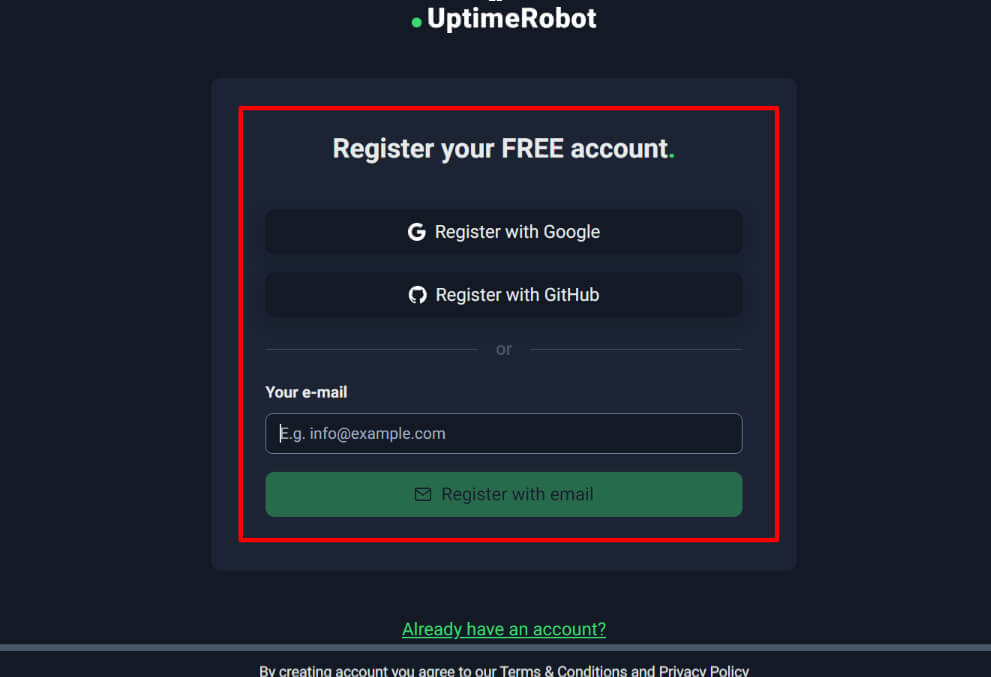
- Go to UptimeRobot >> Navigate to UptimeRobot.com >> Click on “Sign Up” + Register with your email. The sign-up process is simple and quick.
- Once logged in, you’ll land on the UptimeRobot dashboard, which shows options like Create a New Monitor >> Add your URL (you want to monitor) >> Click on Create Monitor >> You’ll be prompted to choose the type of monitor: HTTP(s), Ping, Port, Keyword or DNS.
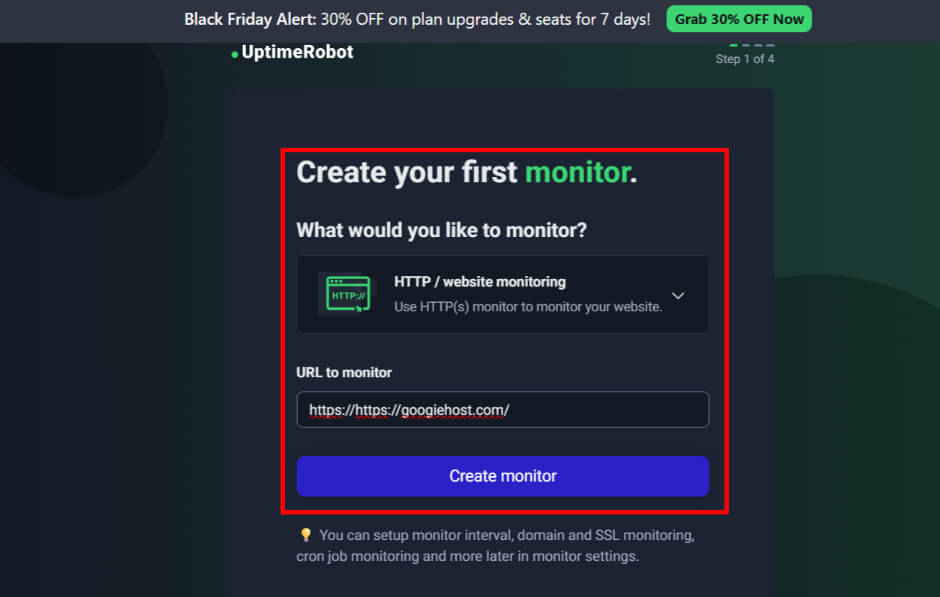
- Put in the URL or IP address you want to monitor >> Choose the monitor interval (how often UptimeRobot checks). On the free plan, typically 5 minutes is the default.
- Add alert contacts (email, Slack, Telegram, etc.) so that you will be notified when downtime is detected.
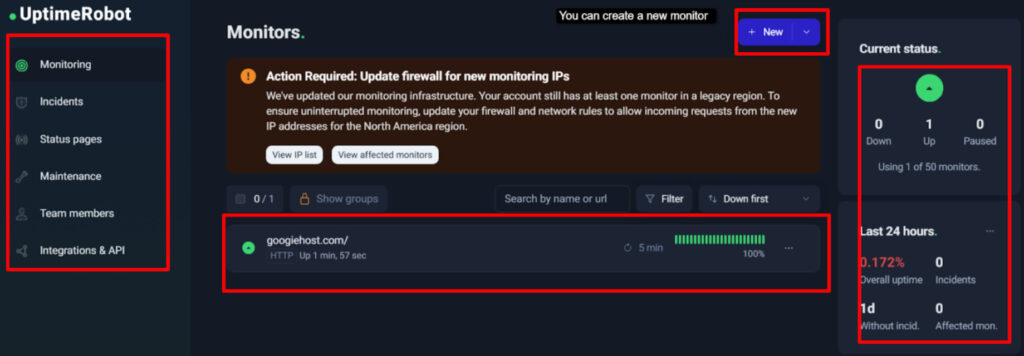
- View Status & Logs >> On the dashboard, you’ll see your monitors listed; you can click each monitor to view response time graphs, history of uptime / downtime and details of any incidents.
- Configure Notifications >> If needed, go to your “My Settings” or “Alert Contacts” to customize how and where you receive alerts (delay, repetition, type of notification).
That’s it! With these steps, you’ve set up a working uptime monitor that will continuously check your service for downtime and alert you if anything goes wrong.
FAQs
What is the best free uptime monitoring tool for beginners?
For beginners, UptimeRobot is the best free uptime monitoring tool. It has the simplest setup, clean dashboard and beginner-friendly controls. Anyone can start monitoring a website in just a minute without reading long guides or doing complex settings.
How often do free uptime tools check websites?
Most free tools check websites every 10 minutes, but some free tools UptimeRobot gives you a consistent 5-minute interval on the free plan. Some other tools claim the same but aren’t always reliable.
Can I monitor multiple websites for free?
Yes! You can monitor multiple websites for free. Many tools restrict you to just a few monitors or push you to upgrade early. UptimeRobot lets you add many websites without making you feel forced into a paid plan.
Do free uptime tools provide SMS alerts?
No! Most free uptime tools don’t offer SMS alerts, and the ones that do usually make you pay quickly. Email and app notifications are the standard. SMS is treated like a premium feature by almost every tool.
Are free uptime monitoring tools reliable?
Yes! Free uptime tools are reliable, but BetterStack and DataDog tend to be more stable than others. Some smaller tools give false alerts or lag behind real-time issues. They feel much safer to depend on for daily monitoring.
What’s the difference between uptime and performance monitoring?
Uptime monitoring simply tells you if your site is up or down. Performance monitoring goes much deeper and shows how fast or slow your site loads. Performance tools check things like server speed, request time, and load speed. Uptime tools only focus on availability.
Can I integrate uptime tools with Slack or Discord?
Yes! Many uptime tools support Slack and Discord, but BetterStack has the smoothest and most polished integrations. While others work fine, BetterStack’s alert workflow feels more modern and organized.
Which free tool offers the best status page customization?
If you want a good-looking status page for free, BetterStack easily offers the most attractive and customizable one. Its free status pages look more modern and professional. It also offer better visuals, more flexible layouts, and overall cleaner designs without needing to pay.
Is Uptime Kuma safe to use for self-hosting?
Yes! Uptime Kuma is safe for self-hosting. It’s open-source, actively updated and trusted by a large community. The only thing you must ensure is proper server security on your end. The tool itself is solid and reliable, and for self-hosted users, Uptime Kuma is easily the most popular choice.
How do We know if my site’s downtime is real or just a false alert?
The best way is to confirm downtime using a second uptime tool. Sometimes free tools send false alarms due to temporary network issues. If two tools show the same downtime at the same moment, it’s almost always real. If only one tool reports it and the others don’t, then it’s usually a false alert.
Conclusion
Monitoring your server’s uptime is one of the simplest and one of the most important things you can do to keep your website or application healthy. It helps you spot problems early, understand performance trends, and ensure your users always get the best possible experience.
Uptime monitoring tools make all of this effortless by offering instant alerts, performance reports, integrations, and automated checks that run 24/7.
What we’ve done in this blog is that we’ve included all the top providers so you can choose the one that matches your needs.
When selecting the best uptime monitoring tool, consider things like alert types, ease of use, integrations with other platforms, number of monitors included in the free plan, and how quickly the tool detects downtime. Also look at reporting features, customer support, and how simple it’s to set up and manage.
To summarize, these are the Best Free Uptime Monitoring Tools….
There are 9 (or more) great free uptime monitoring tools, and analysing them all one by one in depth can take a lot of time! That’s why we’ve added a small comparative table to give you a clear overview at a glance. This helps you quickly compare key features like check interval, number of monitors, and status-page support without going through each tool’s website.
Use it to pick the tool that suits your needs fastest.
| Tool Name | Check Interval | Free Monitors | Alert Options | Status Page | Free Trial |
| UptimeRobot | 5 mins | 50 | Email, SMS, Voice, Slack, Webhooks | Basic status page | Free Forever Plan |
| Datadog | 4mins to 10 mins | Not Fixed | Email, Slack, PagerDuty | – | 14 Days free trial |
| StatusCake | 5 mins | 10 tests | Integrations (Slack, Teams, etc.), SMS | – | 7 days free trial on Paid Plans |
| Uptrends | Different intervals | Unlimited | Email alerts | Dashboards but no public status-page | 30 days free trial |
| Better Uptime | 3 mins | 10 monitors | Slack & email Alerts | 1 Status Page | Free forever plan |
| Site24x7 | 30 seconds | 50 resources | Email, SMS, Voice, Webhooks, Mobile app | Status page available | 30 days free plan |
| HetrixTools | 1 min | 15 | Email, SMS, Telegram, Slack, Discord, Webhooks | Unlimited public status pages | Free Plan |
| Uptime Kuma | User Configurable | Unlimited | Email, Telegram, Discord, Webhooks | Fully customizable | Open Source |
| Montastic | 30 mins | 9 monitors | Email alerts | – | Yes (Free Plan) |



Table of Contents
- What is an Uptime Monitoring Tool?
- 9 Best Free Uptime Monitoring Tools in 2026
- 1. UptimeRobot - Overall Best Free Uptime Monitoring Tools
- 2. Datadog - Best Free Uptime Monitoring Tools
- 3. StatusCake – Powerful Free Uptime Monitoring Tools
- Key Features
- 4. Uptrends – Beginner Friendly Free Uptime Monitoring Tools
- 5. Better Uptime – Most Reliable Uptime Monitoring Tools
- 6. Site24X7 – All-in one Free Uptime Monitoring Tools
- 7. HetrixTools – Easy to Use Uptime Monitoring Tools
- 8. Uptime Kuma – Open-Source Uptime Monitoring Tools
- 9. Montastic – Simple And User-friendly Uptime Monitoring Tools
- Key Features to Look for in an Uptime Monitoring Tool
- How to Set Up an Uptime Monitoring Tool? (Step-by-Step Example)
- FAQs
- Conclusion
- To summarize, these are the Best Free Uptime Monitoring Tools….