









Expert Review
People looking to buy an offshore VPS from QloudHost may want to know how it performs under real hosting conditions before making a purchase. To give you a clearer picture, I purchased the QloudHost DMCA-Offshore VPS Entry Plan and hosted my own WordPress website, qloudhost.webhostbenchmark.com, on the server.

I used established benchmarking, website speed, load-testing, monitoring and security tools to assess the server’s CPU performance, storage speed, website loading times, uptime and response to concurrent traffic.
I also tested the desktop and mobile experience and contacted QloudHost’s support team to assess its response times and the quality of its answers.
Screenshots of the testing sessions are included throughout this review so you can examine the results and understand how the VPS performed under my test conditions before deciding if it suits your own hosting needs.
As you can see in the screenshot below, I purchased the Entry Plan from QloudHost.
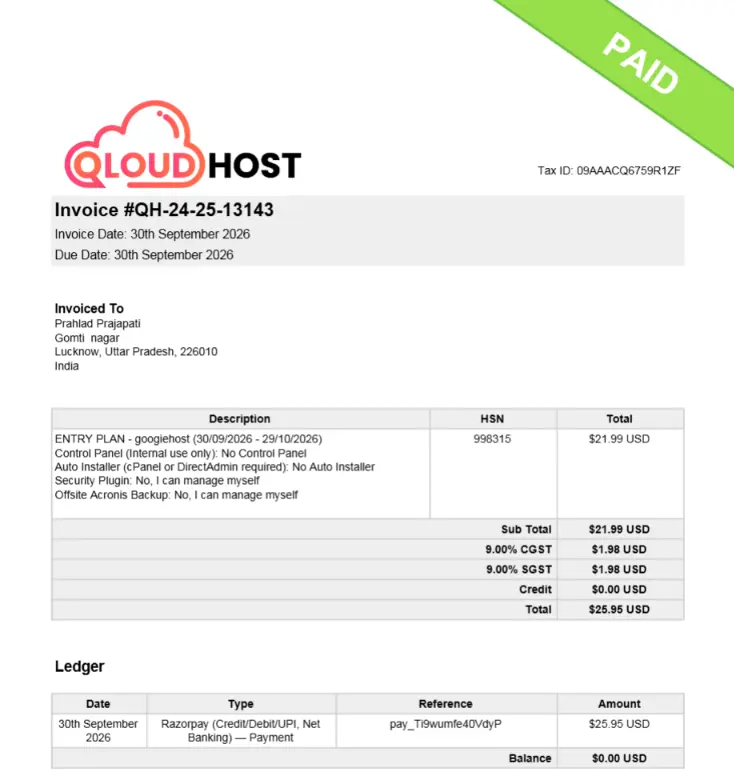
The ordering process and payment were really quick and took me just around 30 seconds to complete. Once the payment was successful, logging in to my QloudHost dashboard was also very easy. The entire process was smooth and straightforward, so I could access my account without any hassle.
About QloudHost: Overview
QloudHost is a web hosting provider that focuses on offshore hosting, DMCA-ignored hosting, and privacy-focused server solutions.
According to its official website, the company was founded in 2022 and provides hosting infrastructure in the Netherlands. The QloudHost services are designed for adult content publishers, whistleblower content creators and businesses in the adult industry that need greater control over their hosting environment.

Its services include shared hosting, WordPress hosting, offshore VPS, Windows VPS, and dedicated servers, along with features such as NVMe SSD storage, KVM virtualization, root access, DDoS protection, and 24/7 customer support.
The company also accepts cryptocurrency payments and offers a money-back policy for eligible hosting plans. Its offshore services operate under the laws that apply in the server’s location, so customers remain responsible for complying with applicable laws and QloudHost’s terms.
To understand more about QloudHost, I’ve included a table below to take a quick overview on it:
| Details | Information |
|---|---|
| Company name | QloudHost |
| Year established | 2022 |
| Official website | qloudhost.com |
| Main services | Offshore shared hosting, WordPress hosting, offshore VPS, Windows VPS, and dedicated servers. |
| Offshore VPS location | Amsterdam, Netherlands. |
| Starting offshore VPS price (Plan Reviewed) | $17.99/month on 3-Year billing plan; (Monthly plan is for $21.99 per month) |
| Entry plan specifications | 2 CPU cores, 4 GB RAM, 50 GB NVMe SSD, 1 TB bandwidth, one dedicated IPv4 address, and 1 Gbps network speed. |
| Virtualization | KVM virtualization for VPS hosting. |
| Main features | NVMe SSD storage, full root access, DDoS protection, offshore hosting, and privacy-focused hosting options. |
| Money-back policy | 14 days for VPS & 30 days for shared and WordPress hosting (Cryptocurrency payments are non-refundable) |
| Customer support channels | 24/7 expert support via Live chat, tickets and email. |
| Payment options | Card payments and cryptocurrency options, (BTC, ETH, USDT) |
| Best for | Adult Websites, WordPress projects, free speech blogs, anti-government forums, adult video streaming platforms. |
To verify the information in the table above, I also contacted the QloudHost support team and asked them questions about their services and hosting infrastructure.
For example, I specifically asked how many data center locations QloudHost has and where they are located.

The support team confirmed that its offshore VPS hosting is available in the Netherlands only, as shown in the screenshot below. I also contacted them to clarify other details about their plans and services, so I could include information based on my own communication with the team.
Tools I used to Review QloudHost
To assess QloudHost’s DMCA-Offshore VPS Entry Plan, I used established benchmarking, website speed, load-testing, security, and monitoring tools to examine different parts of its performance.
Each tool measures a specific aspect of the server or hosted WordPress website, giving a clearer picture of its processing power, response times, stability, and security. The screenshots included in this review show the results recorded during my testing sessions.
These results reflect the tools and conditions used during testing; they should not be taken as a guarantee of identical performance for every website or workload.
| What Tools I Used | What I Tested and Why It Matters |
|---|---|
| Geekbench | Measured single-core and multi-core CPU performance to assess the VPS’s processing capability. |
| Yet-Another-Bench-Script (YABS) | Checked server configuration, allocated CPU cores, RAM, storage, operating system and network performance. |
| fio | Measured disk read/write speeds and IOPS to assess storage performance for website files and database operations. |
| iperf3 | Tested network throughput between the VPS and remote endpoints, as well as between the server and my Windows computer. |
| WordPress Hosting Benchmarking Tool | Evaluated filesystem operations, CPU tasks, database queries, WordPress functions, compression, and image processing. |
| k6 | Simulated concurrent website traffic to measure request handling, response times, and HTTP failures under load. |
| Google PageSpeed Insights | Measured desktop and mobile performance scores to identify loading delays and areas for speed improvement. |
| FlyingPress Flying TTFB | Measured Time to First Byte across 22 global locations to compare initial server response times for visitors in different regions. |
| HetrixTools | Monitored website availability and response times to check for downtime and performance fluctuations. |
| SSL Labs | Evaluated SSL/TLS configuration, certificate details, encryption strength, and protocol support to identify security improvements. |
| In-house DNS Resolution Testing Tool | Compared DNS lookup times across Google, Cloudflare, Quad9, and OpenDNS to assess domain resolution speed. |
QloudHost Performance Test
To provide a real-world picture of QloudHost’s hosting performance, this review is based on its DMCA-Offshore VPS Entry Plan, which I purchased rather than testing a free trial or demo plan. I hosted my WordPress website, qloudhost.webhostbenchmark.com, on the server to see how it performed under different conditions.
The testing covered CPU processing, disk read/write speeds, network throughput, WordPress benchmarks, load handling, desktop and mobile speed, global response times, uptime, SSL security, and DNS resolution. I also checked how quickly the website responded to requests and how it handled concurrent traffic.
Screenshots from the testing sessions are included throughout this review so you can examine the results and get a clearer idea of what to expect when hosting your own website on a similar QloudHost VPS plan.
QloudHost VPS Performance Testing
I tested my QloudHost VPS performance by checking CPU benchmarks, system configuration, RAM and storage capacity, disk read/write speeds and network throughput across multiple locations to understand its processing power and overall hosting performance. These results help identify strengths and the areas that may need improvement.
CPU Performance Test
CPU performance plays an important role in how a VPS handles everyday tasks, from running websites and databases to processing PHP scripts and managing multiple requests.
To understand the processing capability available with my QloudHost VPS, I ran a Geekbench CPU benchmark on the Red Hat KVM virtualized system.
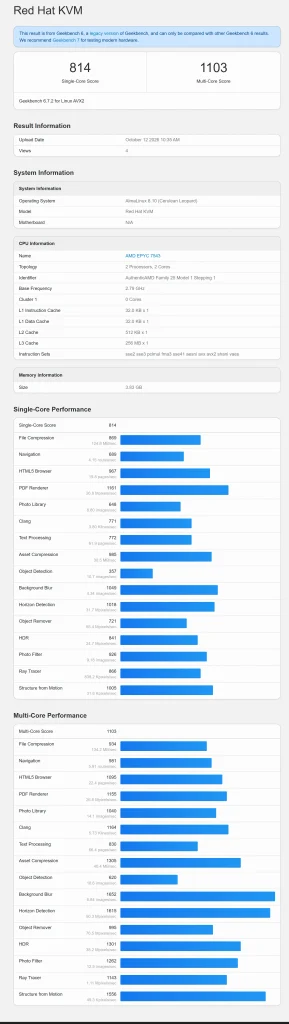
The test measures single-core performance, which tells me how properly the VPS handles tasks that depend on one CPU core and multi-core performance, which indicates how well it processes workloads across multiple cores.
The results recorded 814 for single-core performance and 1,103 for multi-core performance. The individual benchmark results also show variations across tasks such as file compression, navigation, image processing, background blur and ray tracing, with stronger scores in some multi-core workloads.
As you can see from the testing, VPS can handle routine hosting operations and lightweight applications even though the available processing power may become a limitation for CPU-intensive workloads.
I would consider these scores alongside the allocated CPU resources and the performance of the actual application before choosing this VPS for a production workload.
Basic System Information and Server Configuration
Before judging a VPS’s performance, it is important to understand the hardware, operating system, available memory, storage capacity and server location. These details help me understand what resources are available for running websites and whether the server configuration fits my hosting requirements or not.
Just for this initial check, I used the Yet-Another-Bench-Script (YABS) tool to collect the server’s system information. The screenshot below shows the configuration at the time of testing.
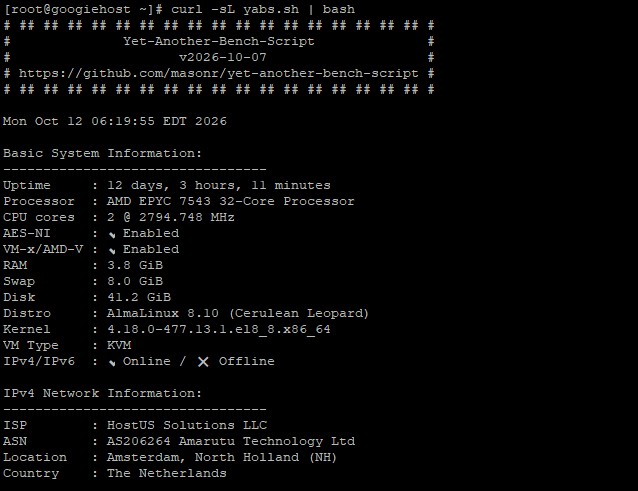
According to the screenshot, my QloudHost VPS server is running on an AMD EPYC 7543 32-core processor, with 2 CPU cores allocated to the VPS around 3.8 GiB of RAM, 8 GiB of swap, and 41.2 GiB of disk space.
It runs AlmaLinux 8.10 with a 4.18 kernel on a KVM virtual machine, and both IPv4 and IPv6 are reported as online. The server location is Amsterdam, North Holland, in the Netherlands, with HostUS Solutions LLC listed as the ISP.
The uptime at the time of testing was 12 days, 3 hours, and 11 minutes.
These details provide a useful starting point: the VPS has dedicated virtual resources and a European location, while the available RAM and disk space are important factors to consider when choosing workloads and planning website growth.
Disk Speed & Storage Performance Test
Storage speed is also important in how quickly a server can read and write website files and handle operations such as WordPress updates, uploads and backups.
To examine this part of the VPS, the YABS script’s fio disk speed test was used, which measures read and write performance with different block sizes using a mixed 50/50 read-write workload.
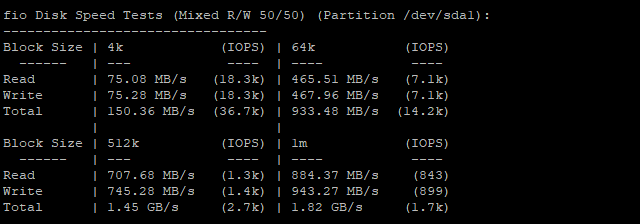
The screenshot of the result shows that:
- The 4K test delivered 75.08 MB/s read speed and 75.28 MB/s write speed, with approximately 18,300 IOPS for each operation.
- At 64K, the combined throughput reached 933.48 MB/s, while the larger 512K and 1M tests recorded combined throughput of 1.45 GB/s and 1.82 GB/s, respectively.
These results show that storage throughput increases with larger block sizes, while the 4K results give a useful indication of smaller, more frequent operations.
This test is important to check as the responsive storage can help with database activity, file handling and general server operations. These are synthetic benchmark results, so actual website speed will depend on database configuration and concurrent traffic.
Network Speed Test
A VPS needs a reliable network connection to exchange data with website visitors, APIs, databases and other online services.
For this thing, iperf3 network speed testing over IPv4, included in the YABS results, measures upload and download throughput between the VPS and several remote testing endpoints.
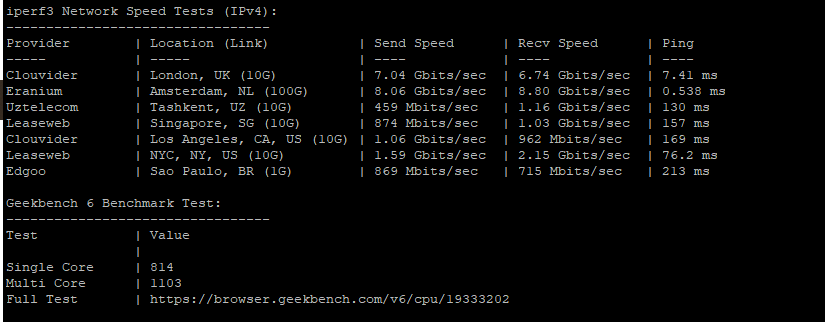
- The Amsterdam endpoint recorded 8.06 Gbit/s send speed and 8.80 Gbit/s receive speed, with an exceptionally low reported latency of 0.538 ms.
- The London endpoint also delivered strong results at 7.04 Gbit/s sending and 6.74 Gbit/s receiving, with 7.41 ms latency.
Performance varied across more distant locations:
- New York recorded 1.59 Gbit/s send and 2.15 Gbit/s receive
- Singapore reached 874 Mbit/s and 1.03 Gbit/s, respectively
- Sao Paulo recorded 869 Mbit/s send and 715 Mbit/s receive with 213 ms latency.
These results suggest that the server has strong network throughput, particularly toward nearby European endpoints.
The screenshot above also reports a single-core score of 814 and a multi-core score of 1,103. The single-core score gives an indication of performance on tasks that depend heavily on one processing core, while the multi-core score reflects performance across multiple cores working on supported tasks.
These figures provide a baseline for checking the VPS’s processing capability, especially for websites that depend on PHP and database operations.
Hardware Benchmark testing
A hosting plan can look impressive on paper, but its actual performance depends on how well the server handles everyday WordPress tasks.
To get a better idea of QloudHost’s performance, the WordPress Hosting Benchmarking Tool was used to assess CPU and memory, filesystem operations, database queries, WordPress core tasks and other related fields as seen in the testing screenshot.
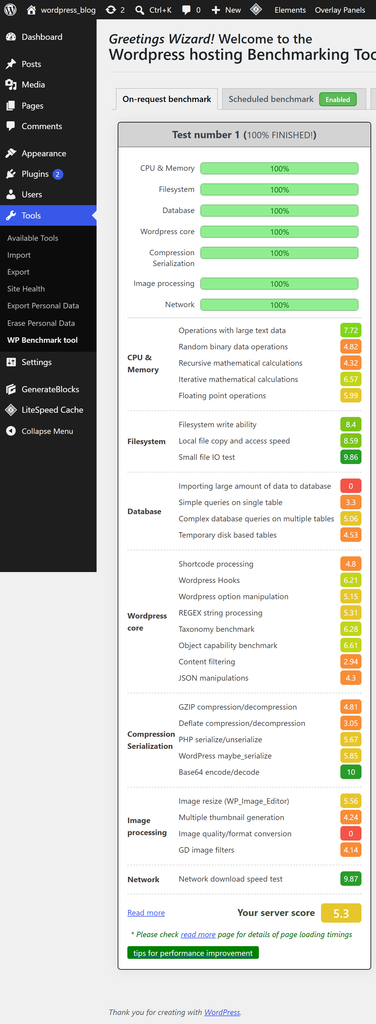
The screenshot above shows that all eight major test categories reached 100% completion, means the benchmark finished successfully. But, the individual scores paint a more detailed picture.
| Category | Benchmark Results |
|---|---|
| Overall, Network & Filesystem | Overall: 5.3; Network download speed: 9.87; Filesystem write: 8.4; Small-file I/O: 9.86 |
| CPU & Database | Random binary data generation: 4.82; Recursive mathematical calculations: 4.32; Simple database queries: 3.3; Complex multi-table queries: 5.06 |
| WordPress, Compression & Image Processing | WordPress hooks: 6.21; WordPress option manipulation: 5.15; Taxonomy: 6.26; Image resizing: 6.38 |
Anyone who is planning to host a WordPress website, these results suggest that QloudHost has some strong areas, particularly network performance and certain file operations, but its overall performance is not consistently high across all workloads.
As per the testing, I can state that the server can handle some routine tasks efficiently, while database-heavy operations, CPU-intensive processing and image-related work could benefit from further optimization.
Load testing
To understand how QloudHost handles multiple visitors on my WordPress website at the same time, I ran a load test to see whether the server could keep responding as requests increased.
See! Slow responses or failed requests can affect the visitor experience, especially on websites that receive regular traffic.
That is why I performed this test. I tested it using the k6 load-testing tool, and the results show that 4,244 requests were sent at an average rate of around 13 requests per second, with a peak rate of 15.42 requests per second.
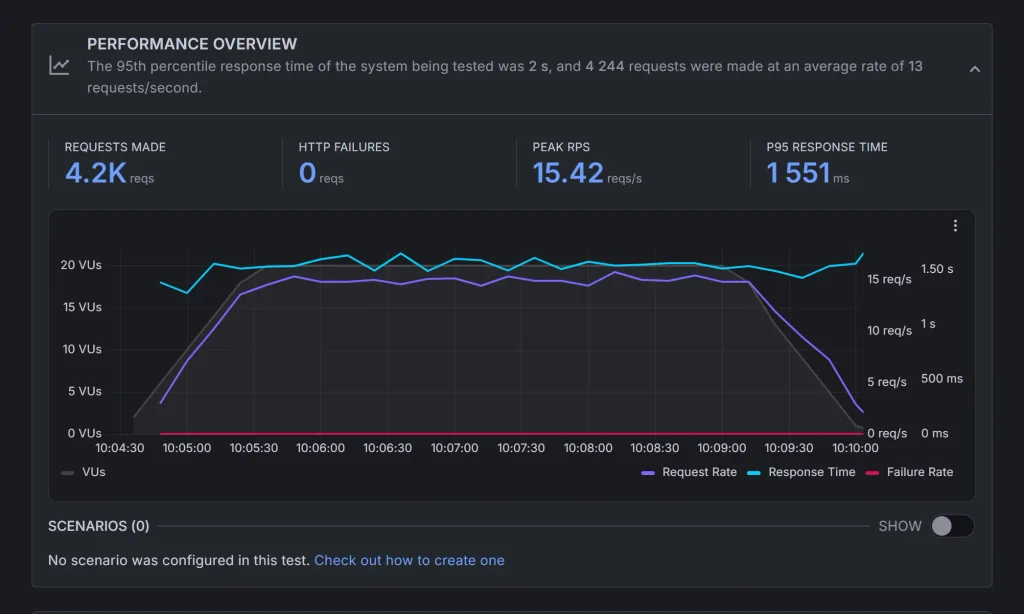
The server recorded zero HTTP failures, while the 95th percentile (P95) response time was 1,551 ms, or about 1.55 seconds. This means 95% of the recorded requests received a response within roughly 1.55 seconds, while the remaining 5% took longer.
- I saw in the graph that the test maintained around 17 to 19 virtual users during most of the main testing period, before the load dropped near the end.
- Response times stayed fairly steady, generally around 1.4 to 1.6 seconds, during this period.
The strongest result is that every request completed without an HTTP failure, even while the server handled concurrent users. But, the response time needs to improve, particularly for websites where visitors expect pages or API requests to respond quickly.
PageSpeed testing
I wanted to test the speed and overall performance of my WordPress website, qloudhost.webhostbenchmark.com, to see how well it performs under different browsing conditions.
For this, I used Google PageSpeed Insights to check the website on both desktop and mobile devices. The test covers important performance metrics that are discussed below. I’ve included screenshots of both test results below so you can see how my website performs on desktop and mobile, compare the scores and identify areas that may need improvement
Speed Performance on Desktop
The website performance and speed test on desktop determines how quickly visitors can access a website and navigate between pages.
This test helps me evaluate how efficiently the hosted website performs under desktop browsing conditions, particularly for users who expect a smooth and responsive experience.
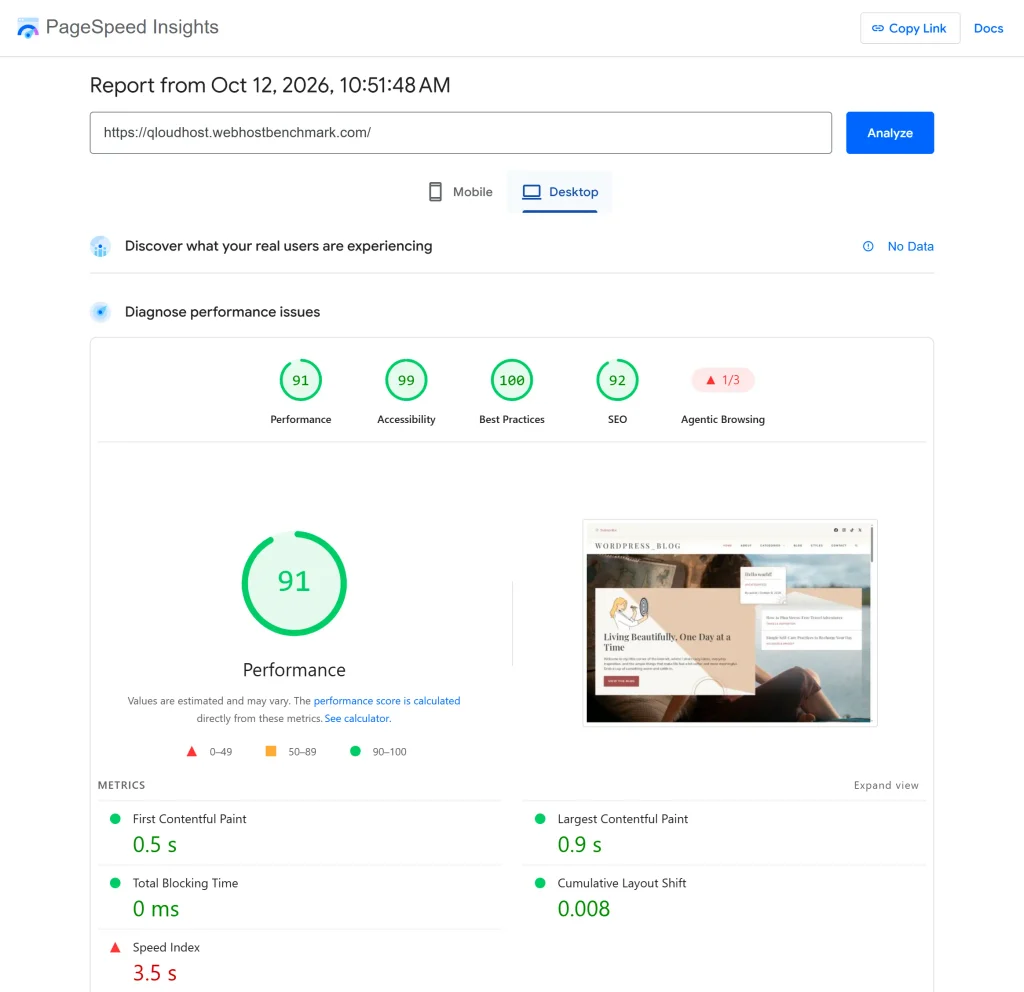
The Google PageSpeed Insights tool was used to assess the website’s performance through key metrics, including First Contentful Paint (FCP), Largest Contentful Paint (LCP), Total Blocking Time (TBT), Cumulative Layout Shift (CLS), and Speed Index.
The desktop results were encouraging, with a performance score of 91/100. You can see the rest of the scores in the screenshot of the testing session itself.
These testing results show that the website delivers a fast and stable desktop browsing experience, with little interruption during loading.
Speed Performance on Mobile
Site performance on the Mobile also needs a separate attention because smartphones often operate under more limited network conditions and have smaller screens, making loading delays more noticeable to visitors.
This test that I conducted, tells how effectively the website delivers its content on mobile devices and whether users can access important information without waiting too long.
Just like I used Google PageSpeed Insights tool to check the site performance on desktop, I’ve used the same tool to test my WP site speed on mobile against the same core performance metrics, allowing its loading behavior to be assessed independently of the desktop results.
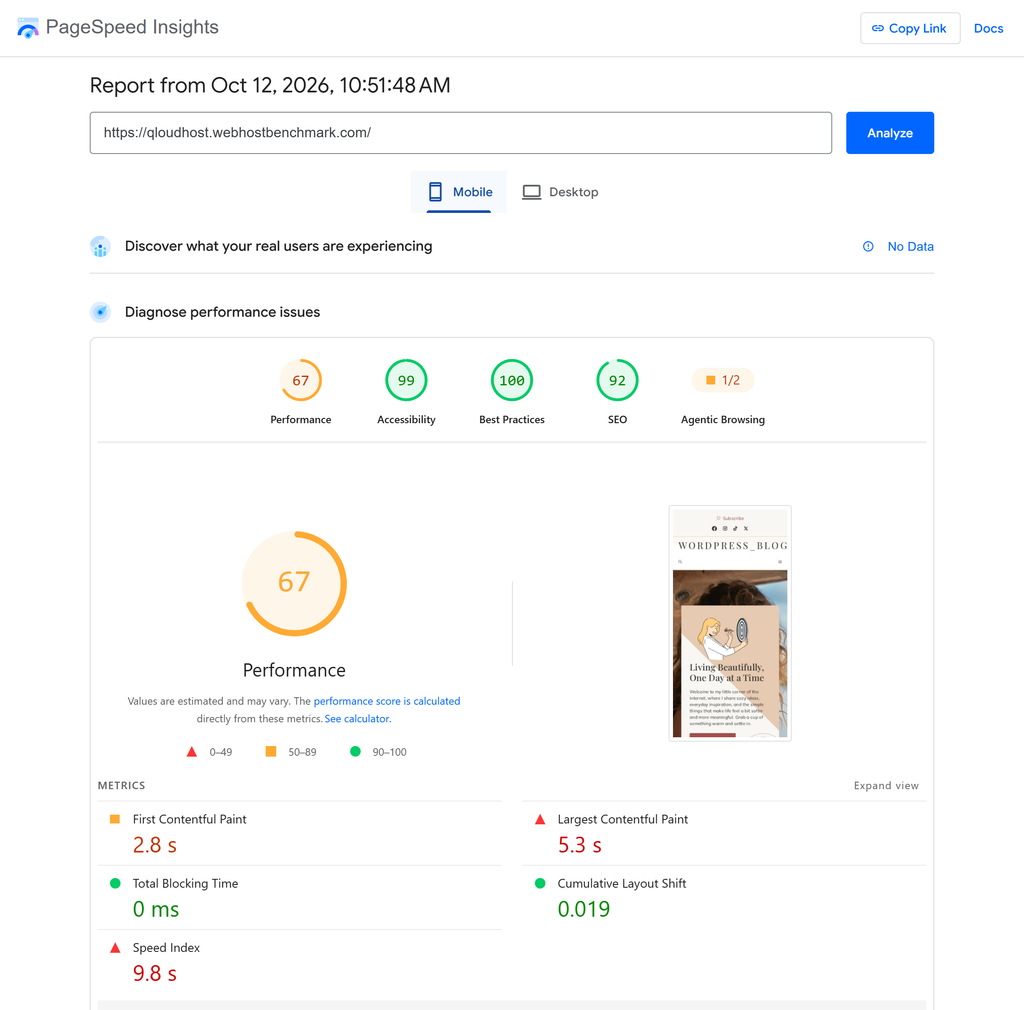
The screenshot shows a mobile performance score of 67/100, which is considerably lower than the desktop score of 91. The main thing here is the delay before the page’s primary content becomes visible, which may lead some mobile visitors to leave before the page finishes rendering.
Based on these results, I would prioritize optimizing the largest above-the-fold elements, reviewing image sizes and delivery, reducing render-blocking resources where possible, and checking whether unnecessary JavaScript or CSS is delaying content display.
These improvements could help bring the mobile experience closer to the strong performance demonstrated on desktop.
TTFB Testing
The time it takes a website to begin responding to visitors can affect how quickly pages start loading, especially for people connecting from different parts of the world. In this QloudHost review, I also tested global Time to First Byte (TTFB) to understand how quickly the server responds to requests from different locations.
The results come from the FlyingPress Flying TTFB tool, which measures response times across 22 global locations.
My WP site was tested from North America, South America, Europe, Africa, the Middle East, and Asia-Pacific, with each location returning an HTTP 200 status code.
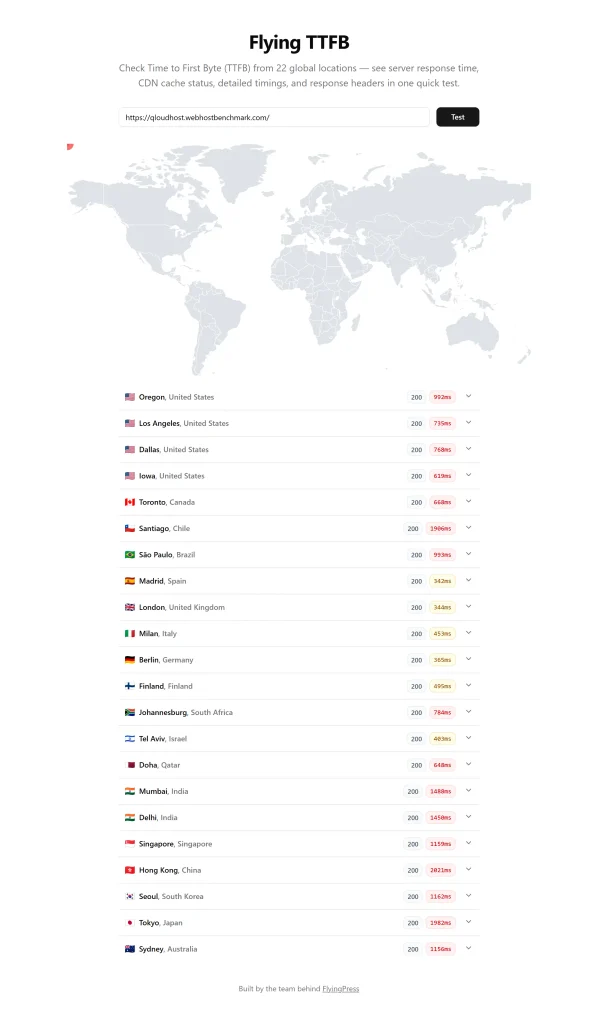
As you can see in the screenshot,
- It shows particularly fast responses from several US locations, like Dallas at around 70 ms and Los Angeles at 71 ms, while Toronto recorded 66 ms.
- European locations also delivered good results, with Madrid at approximately 132 ms and London at 304 ms.
- Response times increased across parts of Asia, including Mumbai at 1,448 ms, Delhi at 1,545 ms, and Tokyo at 1,928 ms.
These differences show that the server responds much faster from some regions than others. This testing means that my QloudHost VPS plan delivers a quicker initial response to visitors closer to its effective network path, while users who are far away could experience a slower start to page loading.
Uptime Testing
Website uptime is just as important as speed because visitors need to access a website whenever they want. To test this part of my QloudHost experience, the HetrixTools website monitoring dashboard checks whether the hosted website stays online and how its response time changes throughout the day.
The monitoring details show checks running every minute, with the service monitored from five locations.
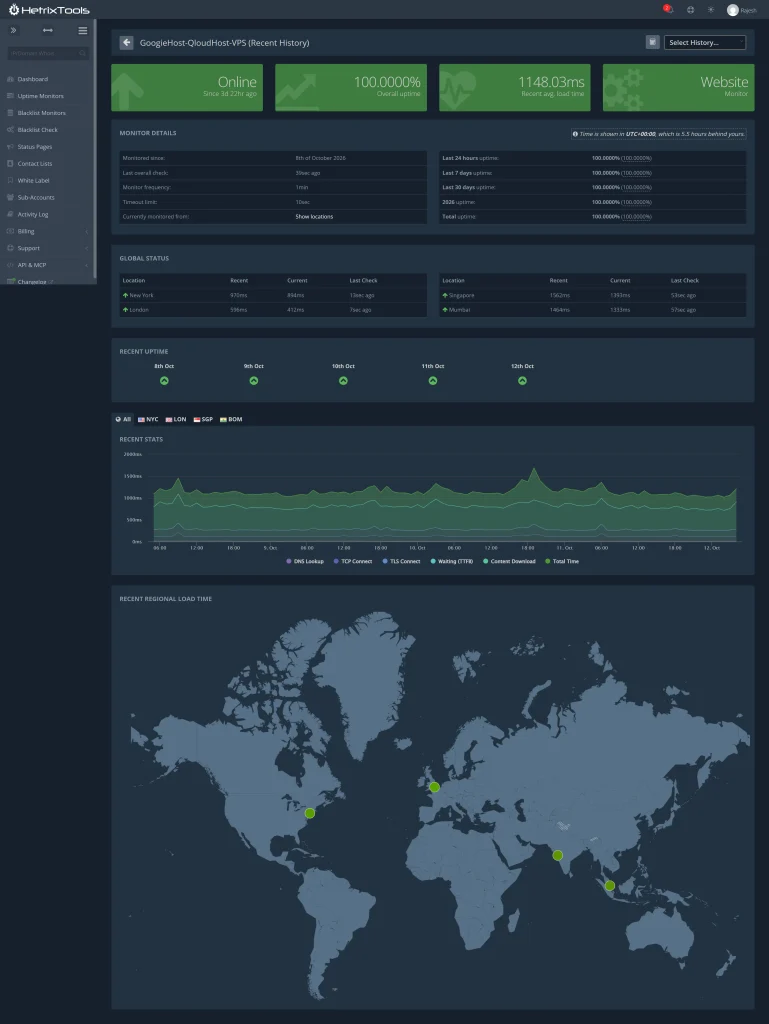
At the time when I captured the screenshot, the website was online and displayed 100% overall uptime, with 100% uptime also shown for the recent 24-hour, 7-day, 30-day, and longer reporting periods. But, the average load-time figure displayed at the top was 1,148.03 ms, or around 1.15 seconds.
The response-time graph shows some fluctuations and a noticeable spike, which tells me that the website did not respond at exactly the same speed throughout the monitoring period.
The regional status section also shows green indicators for locations including New York, London, Singapore, and Mumbai.
I can see that there is no downtime recorded in the displayed monitoring periods. A response time of around 1.15 seconds may add noticeable waiting time before visitors can interact with a page, depending on the page and how the metric is measured.
SSL Testing
A secure connection is really good for a website, whether it handles customer information, login credentials or simply serves content to visitors.
To test how well QloudHost protects connections to the tested server, the SSL Labs tool was used to conduct SSL Server Test to examine its certificate, protocol support, key exchange and cipher strength. The screenshot shows an overall grade of B for qloudhost.webhostbenchmark.com, resolving to the IP address 103.217.252.122.
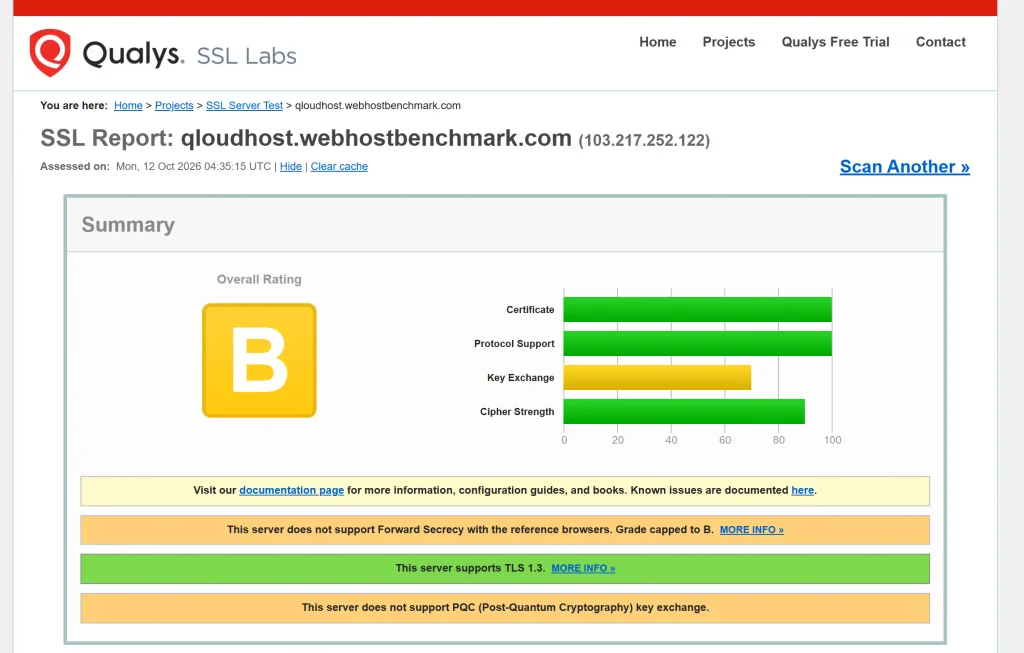
- The certificate and protocol support categories both received full scores in the summary graph, while cipher strength scored approximately 90 out of 100 and key exchange scored around 70.
- The report also confirms that the server supports TLS 1.3, which is a positive sign because it enables a modern, secure communication protocol.
- The testing session explicitly states that the server does not support Forward Secrecy with the reference browsers, which caps its grade at B.
In the test, the B rating indicates that QloudHost supports modern encryption but still has room to improve its TLS configuration, particularly its key exchange settings and Forward Secrecy support.
DNS Resolution Testing
DNS resolution determines how quickly a visitor’s browser can translate a website’s domain name into the server’s IP address before establishing a connection.
To examine this part of my QloudHost VPS setup, I used a DNS resolution testing tool (my in-house tool) that compares responses from public DNS resolvers, including Google, Cloudflare, Quad9 and OpenDNS.
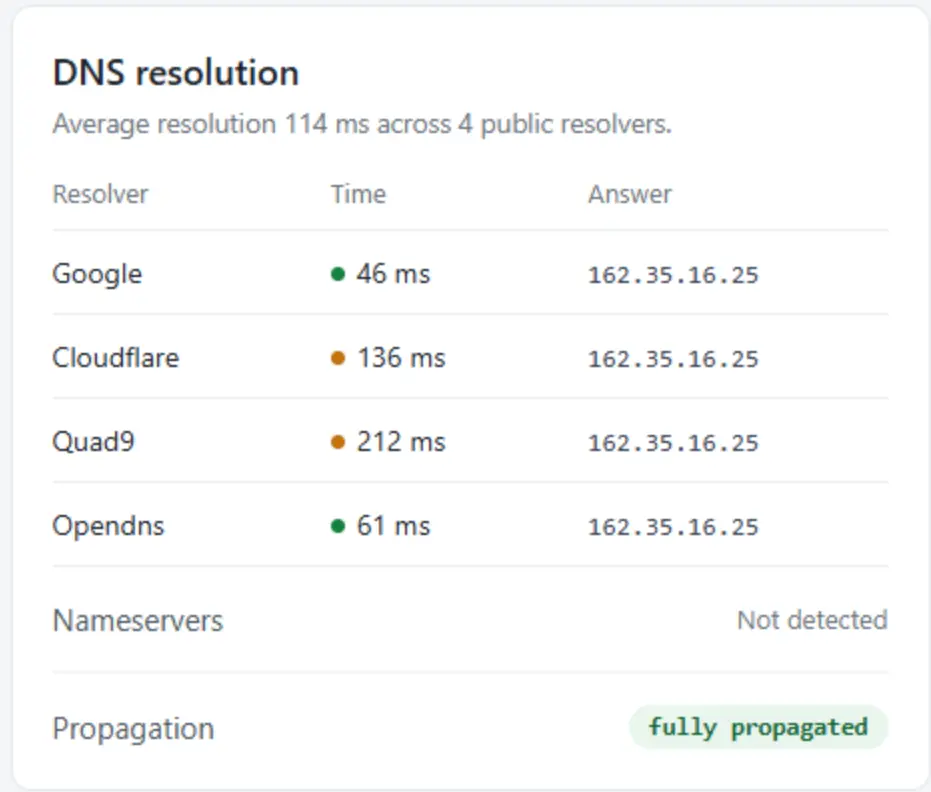
The screenshot reports an average resolution time of 114 ms across all 4 resolvers.
- Google returned the IP address in 46 ms
- OpenDNS in 61 ms,
- Cloudflare in 136 ms
- Quad9 in 212 ms.
All 4 resolvers returned the same IP address, 162.35.16.25, and the report marked DNS propagation as fully completed, although the authoritative nameservers were not detected by the tool.
I noticed that Google’s and OpenDNS’s responses were quicker in this test, while the higher times from Cloudflare and Quad9 increased the overall average. The completed propagation status is encouraging, but the average response time leaves room for improvement.
A consistently responsive DNS setup can help reduce the initial lookup delay when visitors first access a website.
Network and Response Testing
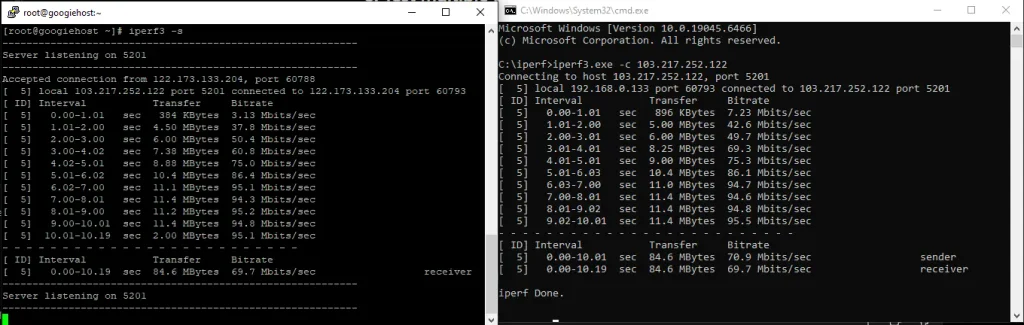
A server can handle website requests successfully but still face network limits when transferring larger amounts of data. I wanted to check the connection quality between my Windows computer and the QloudHost server, that is why I ran a bandwidth test using iperf3, a tool that measures network throughput between two systems.
The QloudHost server was configured to listen on port 5201, while the Windows client connected to its public IP address and transferred data for around 10 seconds.
According to the test results,
- The client reported a sender speed of 70.9 Mbps
- The server received data at an average rate of 69.7 Mbps, with approximately 84.6 MB transferred during the test.
- The per-second results also show that throughput increased gradually at the beginning and reached around 90 to 95 Mbps during the later intervals.
The small difference between the sender and receiver figures is normal in network testing and does not, by itself, indicate a problem.
This connection provided a stable transfer rate after the initial ramp-up, which is useful for moving files, transferring backups and handling data between connected systems.
Easy to Use Client’s Dashboard UI
My experience with the QloudHost dashboard was quite smooth, as the interface keeps the main options easy to find. The side panel gives quick access to Dashboard, Services, Billing, Support, and Affiliates, so I can move between different sections without wasting time.
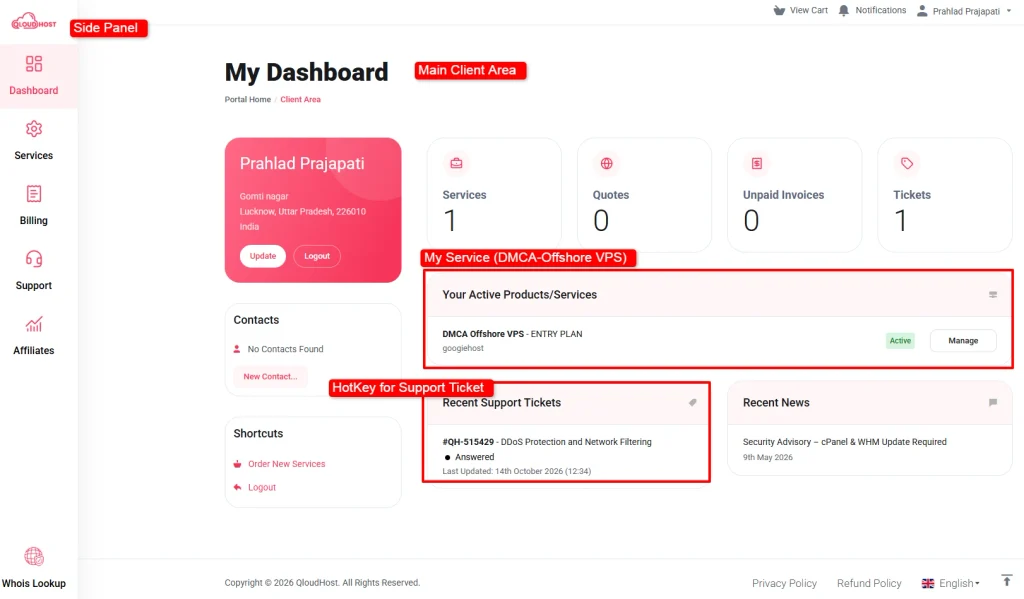
As you can see in the screenshot above, the main dashboard displays my active DMCA-Offshore VPS plan, its status, and the Manage button in a clear, visible area.
The service count, unpaid invoices, quotes, and support tickets are displayed in separate boxes, which makes it easy to check my account at a glance.
Another useful feature is the recent support tickets section, where I can quickly review an existing query and its latest update. The shortcuts for ordering new services and the visible support options also make common tasks easier to access.
I found the dashboard simple to navigate, with a clean layout that helps me manage my VPS service, check billing details, and find support options from one place.
QloudHost Support Channel Performance
I tested QloudHost’s live chat and ticket support to evaluate response times and answer quality. Live chat replied in 6 seconds, while ticket support responded within 5 minutes with clear, helpful information about my VPS plan.
LiveChat Support
The testing session was really positive, as I received a reply just 6 seconds after asking my question about the DMCA-Offshore VPS Entry Plan and the availability of an additional dedicated IPv4 address.

The support representative, Mikel, clearly explained that an additional IP address would not be provided with the VPS servers.
While I had several questions about QloudHost’s services, pricing, and other details, I contacted the support team at different times of the day to verify the information I included in this QloudHost review. I received timely replies during these interactions, which helped me confirm the details and get answers to my questions.
I also found the live chat convenient because I could ask questions directly instead of searching through multiple pages on the website. As per my experience, QloudHost’s live chat is a useful support option for customers who want quick answers about their VPS plans and service-related queries.
Ticket Support
I received a detailed response to my ticket question about the DMCA-Offshore VPS Entry Plan and its network-level DDoS protection.
I submitted my query on 14 October 2026 at 12:29, and John from the technical support team replied at 12:34, giving me a response time of just 5 minutes.
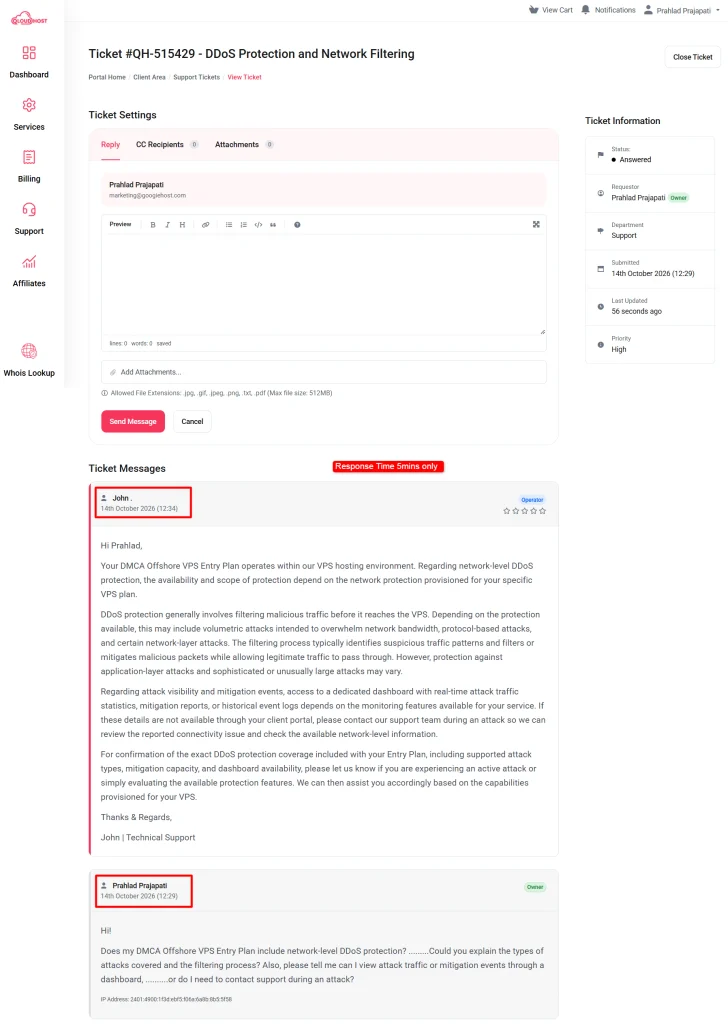
I asked about the types of attacks covered, how malicious traffic is filtered, and whether I could view attack traffic or mitigation events through a dashboard. John explained that the level of protection depends on the network protection provided with my VPS plan.
He also clarified that access to attack statistics and mitigation reports depends on the monitoring features available for the service, and suggested contacting support during an attack if I needed help checking network-level information.
I appreciated the detailed explanation because it helped me understand the available protection and what I needed to confirm about my plan.
QloudHost also offers email support for customers who prefer to contact the team through email. But, I found its ticket support system an easy option for asking technical questions and keeping track of replies in one place. New users can create an account and submit a support ticket directly instead of sending an email separately.
My Overall Experience with QloudHost
My experience with QloudHost was good, especially when it came to ordering the VPS, managing the service through the dashboard, and getting answers from the support team. I purchased the DMCA-Offshore VPS Entry Plan, hosted my WordPress website on it, and tested its performance using authentic paid testing tools.
QloudHost gave me a good starting point for hosting a website on an offshore VPS, although I would consider some of its limitations before choosing it for a demanding or international project.
What I liked about QloudHost
Most of the things were really good when testing QloudHost. The ordering process was simple, the server’s network performance was OK and even the customer support was responsive.
Here are the 6 things I liked most based on my experience.
- Quick ordering and payment process: Purchasing the DMCA-Offshore VPS Entry Plan was really simple and took me around 30 seconds to complete. After payment, logging into the dashboard was easy, so I could get started without unnecessary complications.
- Simple and easy-to-use dashboard: The dashboard keeps important sections such as Services, Billing, Support, and Affiliates within easy reach. I could also see my active VPS plan, service status, invoices and support tickets without searching through multiple pages.
- Fast responses from customer support: My live chat query received a reply in just 6 seconds, while a technical support ticket received a response within 5 minutes. The team also answered questions about plan details, data center locations and DDoS protection, which helped me verify information for this review.
- No HTTP failures during my load test: Using k6, I sent 4,244 requests at an average rate of around 13 requests per second, with a peak of 15.42 requests per second. The test recorded zero HTTP failures while handling approximately 17 to 19 virtual users during most of the main testing period.
- Good results in selected storage and WordPress benchmarks: The WordPress benchmark recorded a network download score of 9.87, filesystem write score of 8.4, and small-file I/O score of 9.86. The disk test also showed strong throughput with larger block sizes.
- Useful hosting features and an offshore location: The Entry Plan includes KVM virtualization, NVMe storage, root access, and a Netherlands-based server location. QloudHost also lists DDoS protection and several hosting options, including WordPress hosting, Windows VPS and dedicated servers.
What I disliked about QloudHost
The testing also uncovered a few drawbacks that you should also keep in mind before purchasing a plan. Some of these relate to my website’s performance rather than the VPS alone, so the results may differ depending on website configuration, caching, location, and workload. Still, these are the 3 areas I would pay attention to.
- Mobile website performance needs improvement: My WP site scored 91/100 on desktop but only 67/100 on mobile in Google PageSpeed Insights. The mobile result suggests that image delivery and unnecessary JavaScript or CSS may need further optimization.
- Response times were slower in some regions: The global TTFB test returned much higher response times from parts of Asia than from North America. For example, Toronto recorded 66 ms, while Mumbai reached 1,448 ms and Delhi 1,545 ms. This difference could affect the initial loading experience for visitors far from the server’s Netherlands location.
- Some performance results were inconsistent: Even though the load test recorded zero HTTP failures, the P95 response time was around 1.55 seconds and typical responses during the test were generally between 1.4 and 1.6 seconds.
FAQs
Does QloudHost provide root access on its offshore VPS plans?
QloudHost lists full root access as a feature of its VPS hosting, allowing users to install compatible software, configure server settings, and manage their hosting environment. However, users are responsible for server administration, updates, and security unless their plan includes additional management services.
Can I migrate my existing website to QloudHost?
You can migrate a compatible website to a QloudHost VPS, but the process depends on your current hosting environment, website files, database and server configuration. Before migrating, back up your website, verify the required PHP and database versions, and confirm whether QloudHost provides migration assistance for your chosen plan.
Can I upgrade my QloudHost VPS plan as my website grows?
Upgrading may be an option if your website needs more CPU, RAM or storage, but the available upgrade paths and associated costs should be confirmed with QloudHost support before purchasing. If you expect your traffic or resource requirements to grow, ask whether your data can be retained during an upgrade and whether downtime or additional migration work may be required.
What should I check before hosting a website on an offshore VPS?
Before choosing an offshore VPS, check the provider’s acceptable-use policy, applicable legal requirements, server location, backup options, DDoS protection terms and refund conditions. Also verify that the plan supports your website’s software and resource requirements. Offshore hosting does not exempt website owners from applicable laws or guarantee immunity from complaints, investigations or takedown requests.
Is QloudHost suitable for beginners?
QloudHost may suit beginners who are comfortable learning basic server administration, but a VPS generally requires more technical knowledge than shared hosting. Users may need to configure their web server, install software, manage updates and troubleshoot issues. Beginners who prefer a managed environment should confirm which administration services are included before purchasing.
Rating Based on Expert Review




VPS is faster then Vicetemple
Service used: VPS Hosting
Switched from: Vicetemple
I was previously hosting my adult tube website with ViceTemple because they advertised themselves as an adult-friendly and DMCA hosting provider. However, I kept receiving copyright removal notices several times a month (around 3–4 notices every month), which became frustrating and defeated the purpose of choosing an offshore host.
I eventually migrated my website to QloudHost, and the experience has been much better. I haven’t faced the same copyright notice issues, and the server performance and website speed are noticeably better than my previous host. The only area I think could use improvement is customer support. The support team is helpful, but response times on tickets could be faster. Overall, if you’re looking for reliable offshore hosting for adult websites with better performance and fewer DMCA-related hassles, QloudHost has been a solid choice for me.
truly supports adult content
Looking for a host that truly supports adult content? QloudHost has your back.
No takedowns, no awkward talks.
These guys are excellent
These guys are excellent. After purchasing the service yawin has assigned me a dedicated support member who setup my server in quick and helped me to setup my apps. Any issue that i had was resolved quick. Their speed is very developer friendly. I recommend them unreservedly.