How to Install an SSL Certificate in DirectAdmin | SSL Let’s encrypt
How to Install an SSL Certificate in DirectAdmin SSL Letsencrypt: SSL certificate is mandatory to set to the Direct Admin control panel to access the control panel insecure way.
Hence SSL certificate has to be installed on the hostname of the server.
Free and a valid SSL certificate is issued by Let’s Encrypt.
How to Install an SSL Certificate in DirectAdmin?
SSH to the server and type below command:
# cd /usr/local/directadmin/scripts # ./letsencrypt.sh request_single server.rajesh.com 4096 server.rajesh.com is the hostname
Setting up certificate for a hostname: server.rajesh.com
Generating 4096 bit RSA key for let's encrypt account...
openssl genrsa 4096 > "/usr/local/directadmin/conf/letsencrypt.key"
Generating RSA private key, 4096 bit long modulus
................................................................................................................................++
.........................................................................................................................++
e is 65537 (0x10001)Account has been registered.
Requesting a new certificate order…
Processing authorization for server.rajesh.com…
Waiting for domain verification…
Trying again…
1..2..3..4..5..
Challenge status: invalid. Challenge error: "type": "http-01", "status": "invalid", "error": { "type": "urn:ietf:params:acme:error:unauthorized", "detail": "Invalid response from http://server.rajesh.com/.well-known/acme-challenge/8RNbb7b7meoMInPzYbiI6QHThGV6d96Jm4kLpKtHeJE [69.172.201.153]: \"\u003c!DOCTYPE HTML PUBLIC \\\"-//W3C//DTD HTML 4.01//EN\\\"
\\\"http://www.w3.org/TR/html4/strict.dtd\\\"\u003e\\n\u003chtml\u003e\\n\u003chead\u003e\\n\
u003cmeta http-equiv=\\\"Conte\"", "status": 403 . Exiting...
This command will install new crt, key, and ca files. Now https redirection should be enabled for the DirectAdmin control panel and also directadmin.conf should be configured with a new certificate and keys with the below commands.
# cd /usr/local/directadmin
# ./directadmin set ssl 1
# ./directadmin set carootcert /usr/local/directadmin/conf/carootcert.pem
# ./directadmin set ssl_redirect_host your.hostname.com
# service directadmin restart
Change Direct Admin skin/theme | Easy to change ⚡️
Follow these simple steps to change the DirectAdmin skin/theme DirectAdmin Skin.
Install Let’s Encrypt certificate for the domain
A further SSL certificate can be installed on the domains hosted on the server for secure connection to the website.
To install SSL certificate on a Domain
-
Login to Direct Admin control panel as Admin.
-
Switch to User Access Level.
-
Navigate to Account Manager > SSL Certificates
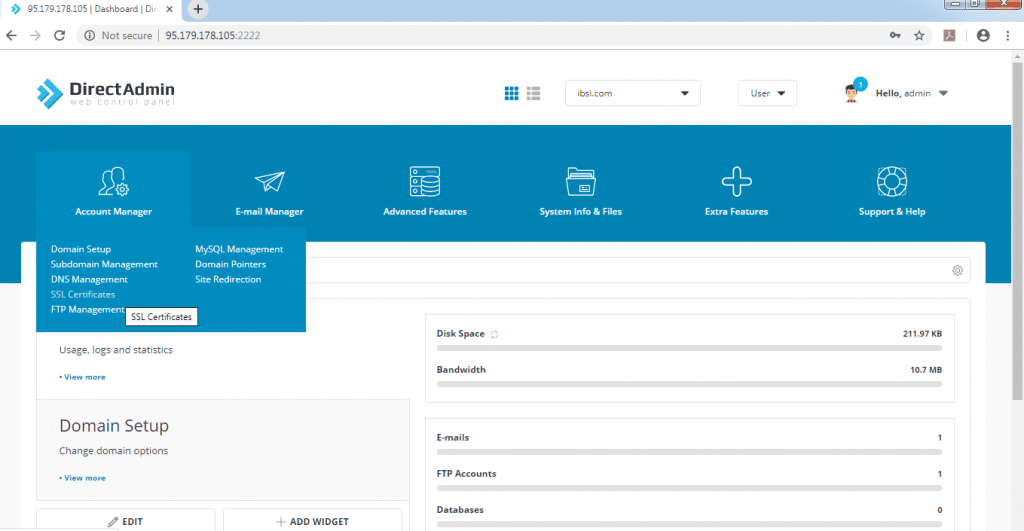
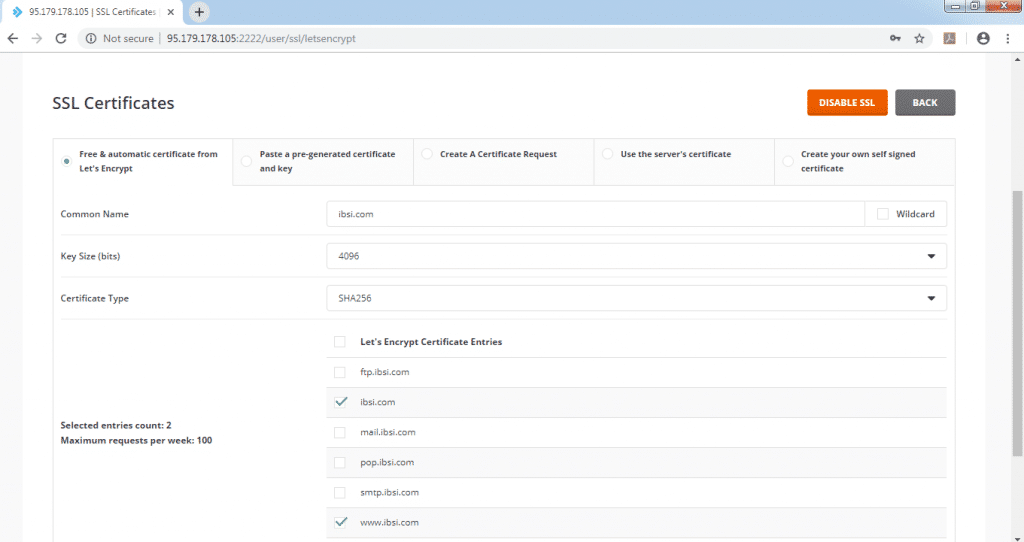
- Select the option Free & automatic certificate from Let’s Encrypt
-
Check the domain name is correct.
-
Select the certificate key size.
-
Select the subdomains to install the SSL certificate
Or
-
Check Wildcard to create a wildcard SSL certificate.
-
Click “Save” button to install the SSL Certificate by Let’s Encrypt
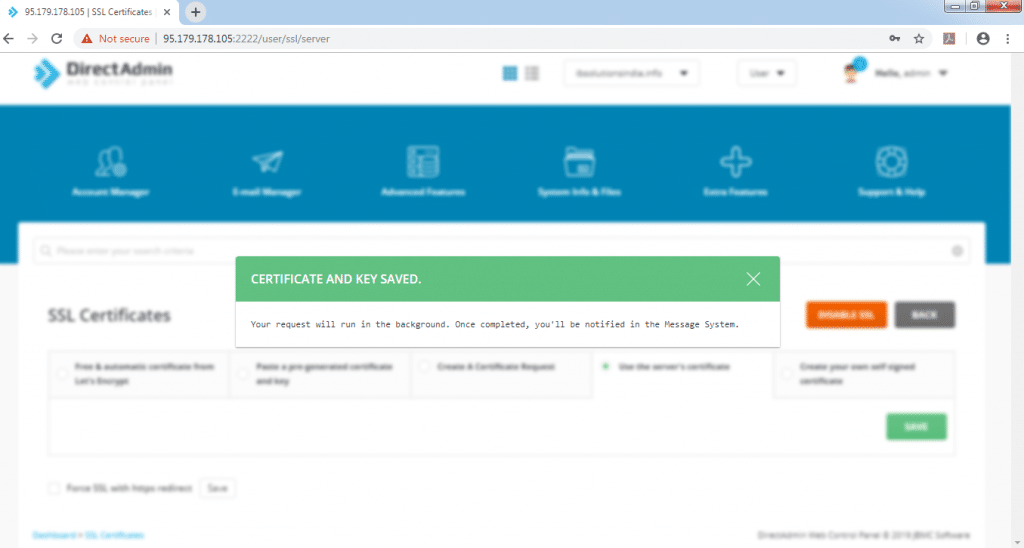
Certificate and Key are saved successfully and installed
Free SSL vs Paid SSL
I am going to bust the myths and explain the differences between Free SSL vs Paid SSL certificate. web hosting companies are bundling a free SSL certificate.
How to renew your digital certificate in DirectAdmin
Let’s Encrypt SSL certificate is by default set to auto-renew within 90 days of time span. If auto-renewal is failed, type the below command to renew it automatically
# cd /usr/local/directadmin/scripts
# ./letsencrypt.sh renew mydomain.com 4096 /path/to website
SSL Renewal after Migration
If the domain is migrated from cPanel to Direct Admin, copy all crt, key file to the DirectAdmin server, and configure directadmin.conf with copied SSL certificates.
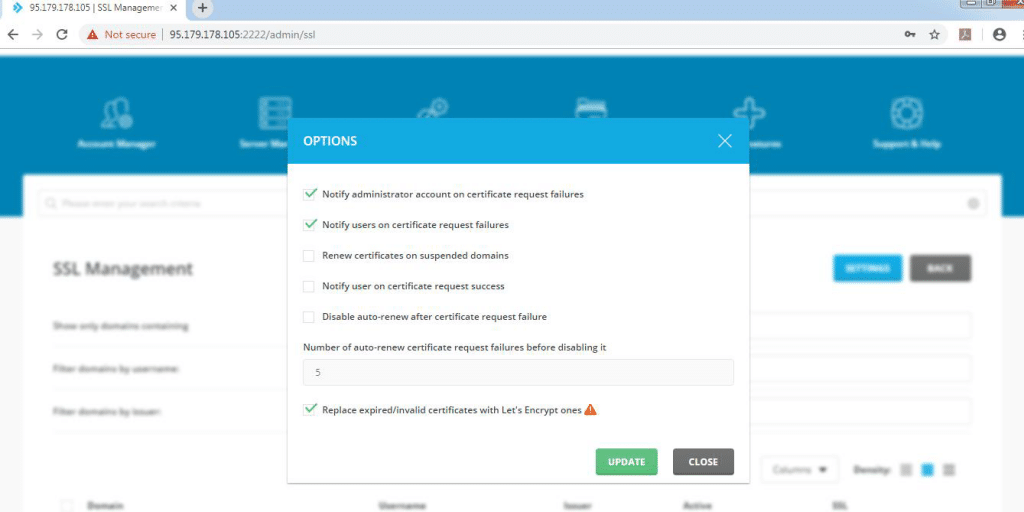
Further, if the certificates are found to be invalid or expired, Direct Admin control panel has the option to replace invalid certificates with a valid Let’s Encrypt certificate.
-
Login to Direct Admin control panel as Admin.
-
Navigate to Account manager > SSL Management > Settings
-
Check the option “Replace expired/invalid certificates with a valid Let’s Encrypt certificate one” and click Update.
FAQs
How do I install an SSL certificate in DirectAdmin?
Log into DirectAdmin as Admin, switch to User Access Level, navigate to Account Manager > SSL Certificates, select the free Let’s Encrypt option, verify your domain name and key size, then click Save to install the certificate.
Does Let’s Encrypt SSL auto-renew in DirectAdmin?
Yes, Let’s Encrypt SSL certificates are set to auto-renew within a 90-day cycle by default in DirectAdmin. If auto-renewal fails, you can manually renew using the letsencrypt.sh script from the command line.
How do I enable HTTPS redirect in DirectAdmin?
After installing the SSL certificate, enable HTTPS by running: directadmin set ssl 1, then set ssl_redirect_host to your hostname, and restart DirectAdmin. This forces all traffic through the secure HTTPS connection.
Can I install a wildcard SSL certificate in DirectAdmin?
Yes, DirectAdmin supports wildcard SSL certificates through Let’s Encrypt. In the SSL Certificates section, check the Wildcard option instead of selecting individual subdomains, then click Save to generate the wildcard certificate.
What should I do if SSL installation fails with an authorization error?
Authorization errors usually mean your domain DNS is not pointing to the server correctly. Verify your A records point to the correct server IP, ensure port 80 is open for the HTTP-01 challenge, and check that no firewall or proxy is blocking the .well-known/acme-challenge path.
I hope you will understand to Install an SSL Certificate in DirectAdmin if you’re facing any error please do comment in the comment section,
our hosting expert will revert you back.


// Related Articles