Table of Contents
- Is It Possible to Create a Website for Free in 2026?
- 5 Easy Steps to Create and Host a Website for Free
- Pros and Cons of Free Website Hosting
- Tips to Make Your Free Website Look Professional
- When Should You Upgrade to Paid Hosting?
- Free Website vs Paid Website (Quick Comparison Table)
- FAQs
- Final Conclusion



How to Create and Host a Website for Free in 2026
Really! You don’t require hundreds of dollars to set up a website by hiring a developer and buying expensive tools, just to start a blogging website.
In 2026, you’ll be amazed to know that you can start a WordPress website (means a website where you can start blogging, or you can create an online portfolio) for free and that too without spending even a single dollar.
Yes! A WordPress website for free.
As a student you can create your student profile online, you can add your school projects in the homepage and add your contact details using free WordPress widgets.
And if you’re wanting to start your own blogging but thinking how to create a free WordPress website, or doubting if a free WordPress website is free, or are there any hidden charges? Let’s tell you that it’s not like that.
It’s easy to create and host a website for free in 2026 in just 5 simple steps. Absolutely, right! In just 5 simple steps, we’re going to tell you how to create and host a website for free and we promise that you won’t get stuck anywhere.
To ensure that, we’ve added screenshots also to help you get a complete idea about the procedure and that you can follow the steps and do it on your own.
So, let’s get to the details right away.
Is It Possible to Create a Website for Free in 2026?
Yes! It’s possible to create a website for free in 2026. What you need is a plan for your website, a name for your online identity, content ready for your homepage, contact me page and my portfolio page and then you need a web hosting provider that offers free WordPress hosting.
We understand that you people are students and someone who doesn’t have money at all to start a website. Blogging websites give you regular money when viewers watch ads on your website, we know that. That’s why we’ve explained step-by-step how to start a WordPress website for free so that you can start a website for free without paying any money and you can start earning right away. You won’t require money to sign up also.
You get to use free website building tools like ready-made templates, simple editors and you also get AI website builders using which you can create the important pages of your website like homepage, about us page, contact us page, and other important pages. You also get a free CMS to manage your content as well.
So, what’s the difference between a website builder and CMS + Free Hosting? See!
- Website Builders are all-in-one tools where we can design, build and host our website in one place. Everything is simple and beginner-friendly. You can pick a template, edit content and publish.
- Whereas, CMS (also known as Content Management System) like WordPress is an application software that manages your content for your website. You don’t need to know coding to handle WordPress. Plus, it can connect with a free web hosting provider. This gives you more control and flexibility.
This way you have your website ready and also accessible online for your viewers.
But, let’s say your website is doing well, you’re getting high traffic on your website, do you think your free website hosting plan’s gonna work?
No! It won’t work and in fact your website would start lagging badly and would in turn affect your viewers experience.
It’s because the free WordPress plans have some common WordPress problems like
- You get limited storage like only upto 1GB to 2GB NVMe SSD storage, RAM in MB’s (which is little to run a full fledged website) and 99% uptime that means your website would lag if your website scales and starts getting more traffic.
- There are ads on your website (you’re viewers see these forced ads and get frustrated). Due to this issue your traffic can avoid coming back to your site due to interruption.
- Plus, you even get a free subdomain (It sounds great! Yaa, we know) but a subdomain is absolutely not professional at all. Subdomain means you get an online identity on someone else’s name, like john.googiehost.com This thing sounds totally unprofessional.
That’s why free WordPress websites and free hosting sounds great, but as you start scaling you’ll need to upgrade the plan.
Don’t worry! You can go with free platforms like GoogieHost & WordPress.com where you get a free WordPress website along with free hosting and when you need to scale, it also allows you to upgrade in just one click.
5 Easy Steps to Create and Host a Website for Free
So, first let’s talk about creating a website for free. Here, in this section of the post, we’ve listed step-by-step how to create and host a website for free in just 5 simple steps. If you follow the steps one by one you can build for yourself the best online platform where you can put your portfolio online and also add various sections to your website as well.
We’ve also added necessary screenshots so that if you’re not able to follow the steps, the screenshots could guide you well.
Step 1: Choose the Right Free Platform (Explain two options:)
The first step is to choose the right free platform. You have to choose the right website builder and also choose the best free WordPress hosting platform where your WordPress site’s gonna host. So, you see that we’ve three different things to choose. Below, we’ve provided a detailed way of what all options you have and what to choose for your website.
(Option A)
First, we’ve to choose the right website builder!
See! Website builders are tools that help you create your website. It creates all the pages as per your idea. What you need is just drag and drop the widgets and the important designs and put content in the pages by yourself.
This way you can create your homepage, contact us page, privacy policy, About Us page and the / My Projects or My Service pages as well. (important pages for your website if you want your website to rank on Google)
Please make sure the Website builder you choose:
- Is easy to use, has an easy interface, no complexity at all when using it.
- Has a drag and drop feature. This is a important feature for any website builder. It helps in creating web pages simply by clicking, dragging to a widget and dropping it to the desired location.
- Offers a quick setup. Make sure the website builder doesn’t take time in signing up and all. IT should be a easy going process and should offer a quick installation.
You don’t need to go around looking for the best site builder as we’ve already listed the top best website builder for students.
- GoogieHost: Offers a free SitePad Builder with easy drag and drop feature and quick setup as well.
- Wix: Also one of the best website builders, offers free 2000+ site templates. You can use these templates and even design it as per your own need.
- Weebly: For those who want to start an e-store online, they can use this platform. It offers drag and drop features, custom fonts, free image editor, site search and more
Now that you’ve chosen the website builder, now it’s time to see what CMS is and if we can get free hosting along with free CMS or not.
(Option B)
So, CMS is a content management platform where you keep your content (like text, image, videos) organized. You can even manage all your posts and pages properly, update them and even delete them as well.
As far as our research is concerned, we recommend you to choose WordPress. It’s one of the best CMS options so far due to its ease of use and no coding requirements.
- WordPress offers you a platform to manage the content of your website. You can install free plugins to boost the performance of your website like JetPack for backup, Yoast SEO plugin for onpage content optimization, MonsterInsight for Analytics.
- You can also go with GoogieHost, one of the best free WordPress hosting for students, as it offers free CMS installation + free hosting (only sign up with your information and your hosting gets activated in a matter of minutes)
In the further steps, we’ve used GoogieHost to show all the steps and the screenshots also. And if you choose another free hosting provider then also the steps will be somewhat the same. So there’s nothing to worry about.
Step 2: Get a Free Domain (Subdomain)
After choosing the best website builder and CMS + free hosting, it’s now time to give your website (your online platform) a name. It’s called a domain name.
Let’s clarify one thing before we start explaining this step is that with free hosting you don’t get a free domain, but what you get is a free subdomain.
A subdomain is also your platform but it’s affiliated with another domain like johnblogs.googiehost.com.
You see you don’t get an independent identity but still you can manage your website files online separately. It’s just that your resources are shared and you only have a normal online presence, good enough for a student or a struggling artist wanting to have his inventions online.
There’s a small difference between a free subdomain and a custom domain
On what BasisA Free Subdomain A Custom Domain How does it look like?
johnblogs.googiehost.com, johnblogs.com NatureIt isn’t Independent IdentityIt is an Independent Identity CostIt is for freeIt is for $10 to $15 per year.
If you’re just starting your website, like a student website for putting projects online, or just starting your own blogging site, in that case, a free subdomain is a good point to start.
And the moment you see high traffic coming to your website, or your content requirement has increased, you can upgrade your plan from free WordPress hosting to paid WordPress hosting in just a single click.
Let’s show you how you can book a free subdomain soon after you sign up for a free hosting plan. Here, we’re using GoogieHost to show the screenshot, if you want you can choose other providers too, but we assure you that the steps will be the same.
- First, go to the official website of GoogieHost >> Click the register now button.

- Then, you’re re-directed to Choose a domain checkout page >> Here, you need to click the Use Subdomain tab >> Enter the name you want to give to your new website (SauvikTest) >> Click the Check button and proceed.

See! It’s so easy to book a free subdomain for your website. It’s absolutely free and GoogieHost doesn’t charge any dollar for it.
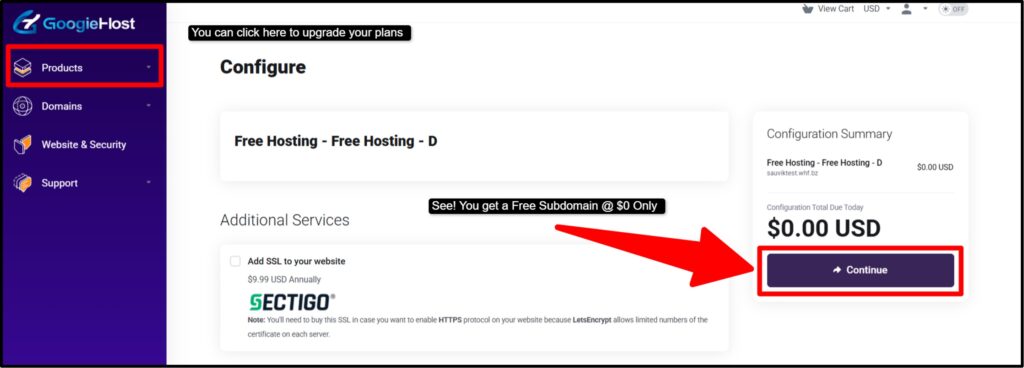
The entire registration process is easy and GoogieHost doesn’t charge money at all. The entire process is free. You just need to put in your details and your account will get activated within 1 hour of completing the registration.
Step 3: Design Your Website
Now that you’ve registered for free website hosting, you need to login to your client area and install WordPress.
See! Designing the website is an important step that you need to take to attract your viewers. It’s the color combination, logo of your website and the layout of your website that engages your audience.
Website Builders help you with that! If we talk about Wix, it offers 1000+ themes that you can choose as per the niche of your website. Like Wix, you have GoogieHost also that offers a free website builder, SitePad Builder. You can get multiple options to choose the best theme for your website.
Let’s take an example:
If you want to do blogging, in that case, go with one of these kinds of templates. You can choose the template as per the taste of your audience. Choose an academic blog, if your viewers are students, or you can pick trendy templates to showcase your lifestyle blogs.
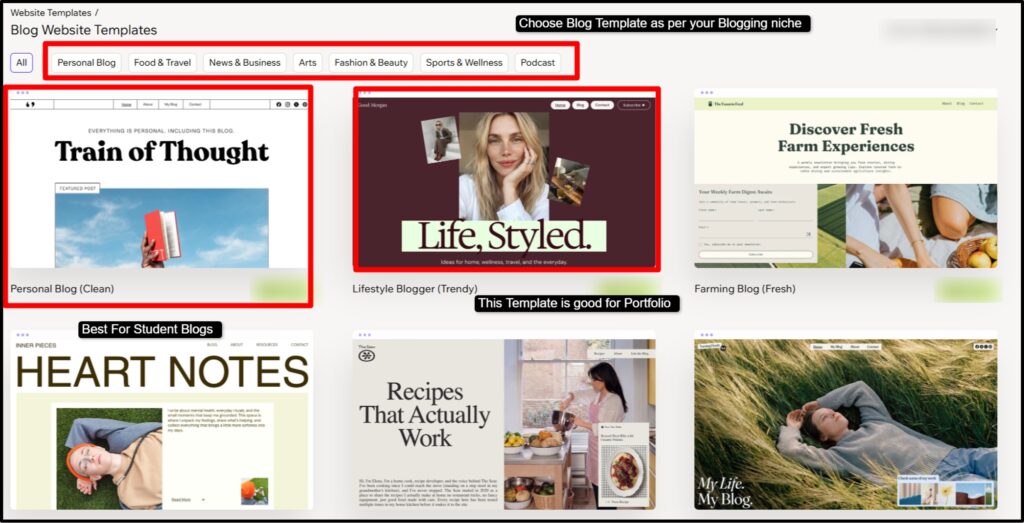
This screenshot shows you multiple templates that the website builder offers. All the templates are for free. You just need to click on them and set the layout and the color combination as per your likeness. Then, after doing all that, you need to add a logo for your website and while doing all that make sure the website is mobile-friendly.
Now, let’s talk about those who want to use WordPress. So, how are you going to install WordPress and design your website? It’s simple:
Again to remind you: Here we’ve used GoogieHost free hosting service to show the steps. If you want you can follow the same steps in other providers too. They’re almost the same.
- First use the login credentials (that you get during the time of service activation) >> Login to your client area (also called your dashboard).
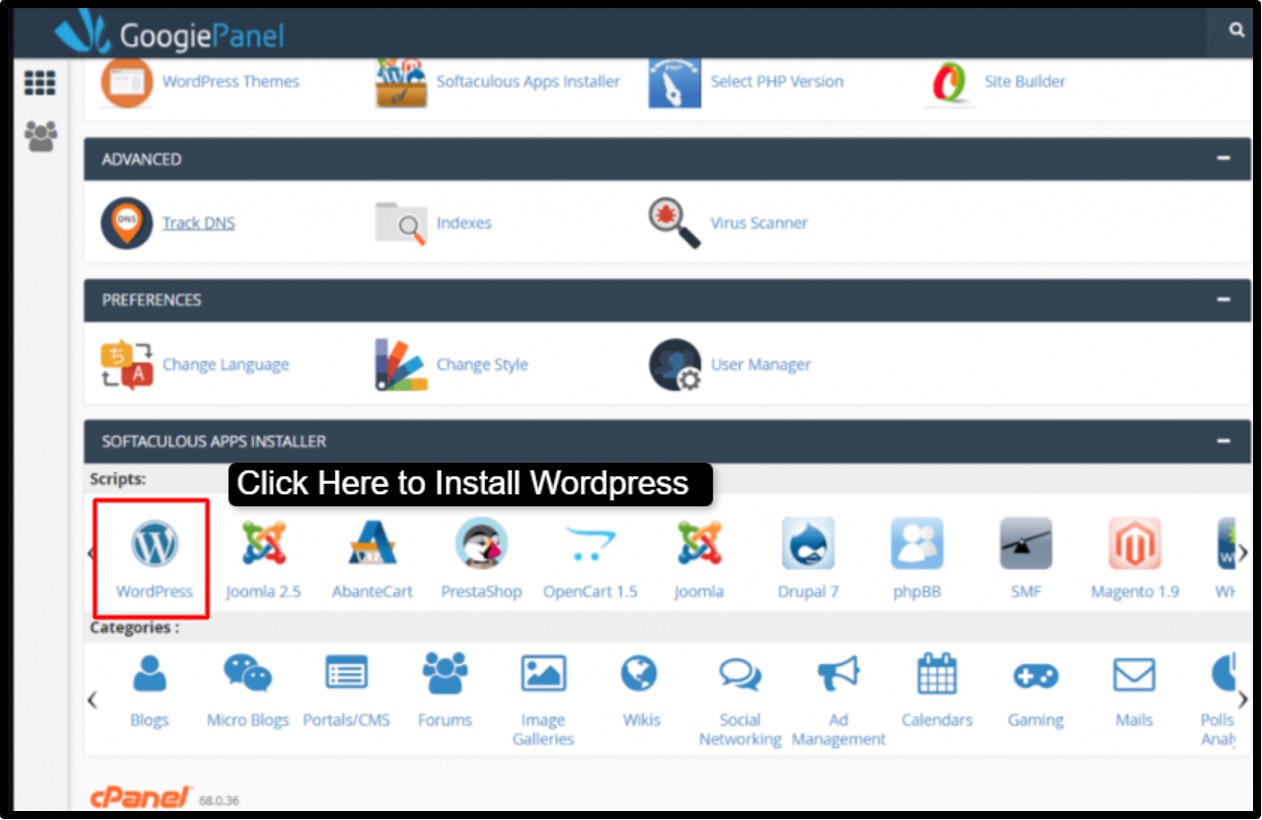
- Now, go to Softaculous >> Scroll down and click the “W” icon to install WordPress.
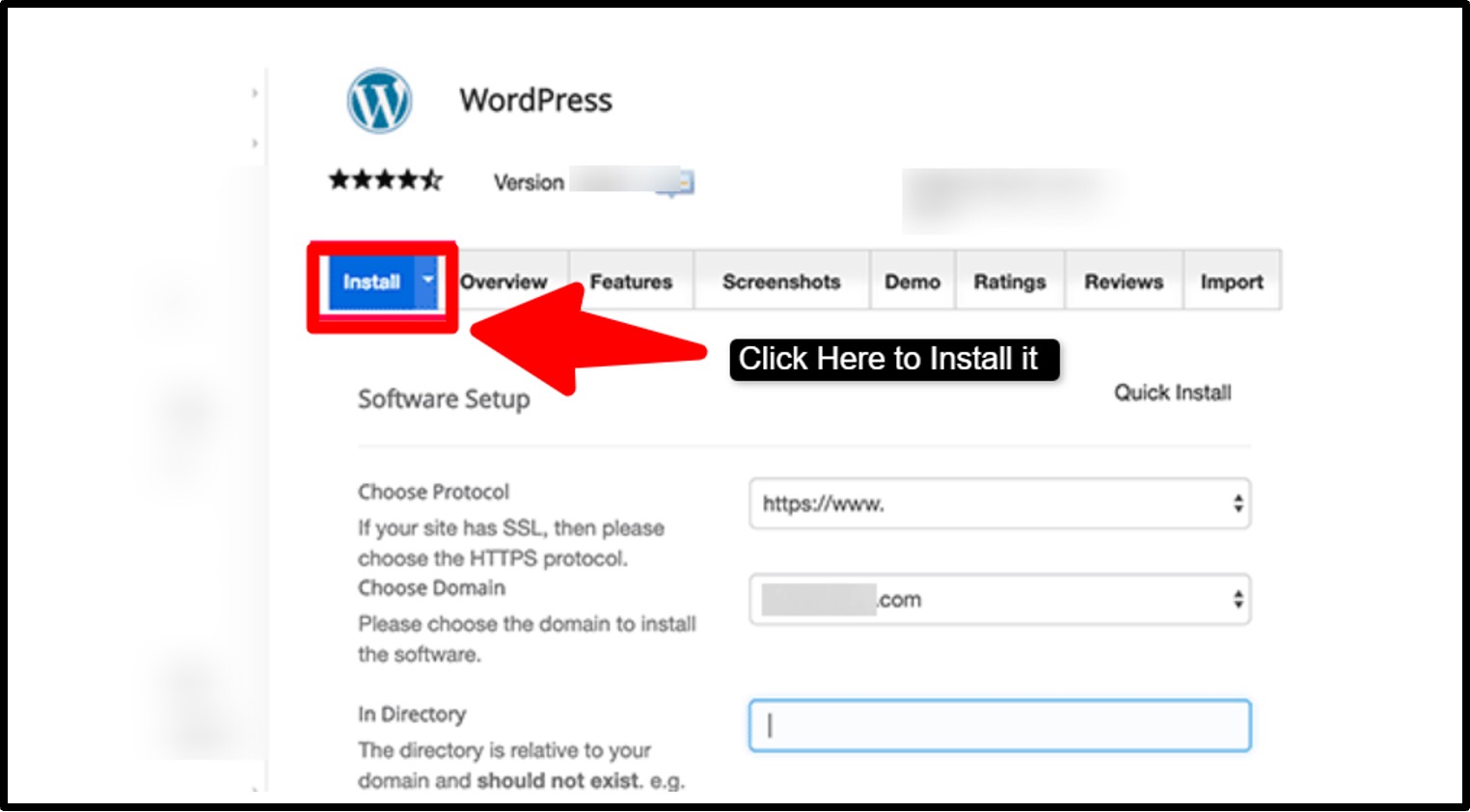
- This is how the WordPress installation interface looks like >> Click on the Install Button >> You need to wait for 2 minutes to get it fully installed and then open it.
- As you open it, you reach the Welcome to WordPress dashboard >> Here, you see that you have a side panel from where you can add new posts, install new plugins, see viewers’ comments and use tools to enhance the performance of your WordPress website.

- To start building the website using WordPress, first you need to go to the Appearance tab available in the side panel >> Then, from the drop down menu, choose the “Themes” button to see the best free WordPress themes.
- Choose the theme that fits your niche and install them for free.
Make sure that as you build your website, you add the important pages that are necessary to engage the viewers and are also important to rank the website.
We’ve discussed how to create essential pages and content below. Let’s read about it!
Step 4: Add Essential Pages & Content
This is where you need to do a maximum amount of brainstorming. Building a website isn’t the only thing that can give you outreach, it’s how you design multiple pages, how your content talks to your viewers and how you engage the audience to read and see your work more.
Let’s take an example to understand how to plan the essential pages and write the content. Here, we’re going to imagine a student who has built his first website and now he’s going to put more pages and content to it.
HomePage
- The first and most important page he needs to create is the homepage. This is where your viewers come first to see what you’re and what you offer. It should be highly attractive to catch the viewer’s eye at just one glance.

- See! This is how you have to create your homepage. You also need to add content to the homepage. This way you can lure them to read your blogs or know about your projects or portfolio
About Us Page
- This page tells the viewers your mission, your vision, when you started your online journey and what you plan to do. This way you develop a sense of trust among your audience and even google prefers websites that are well structured and organised.
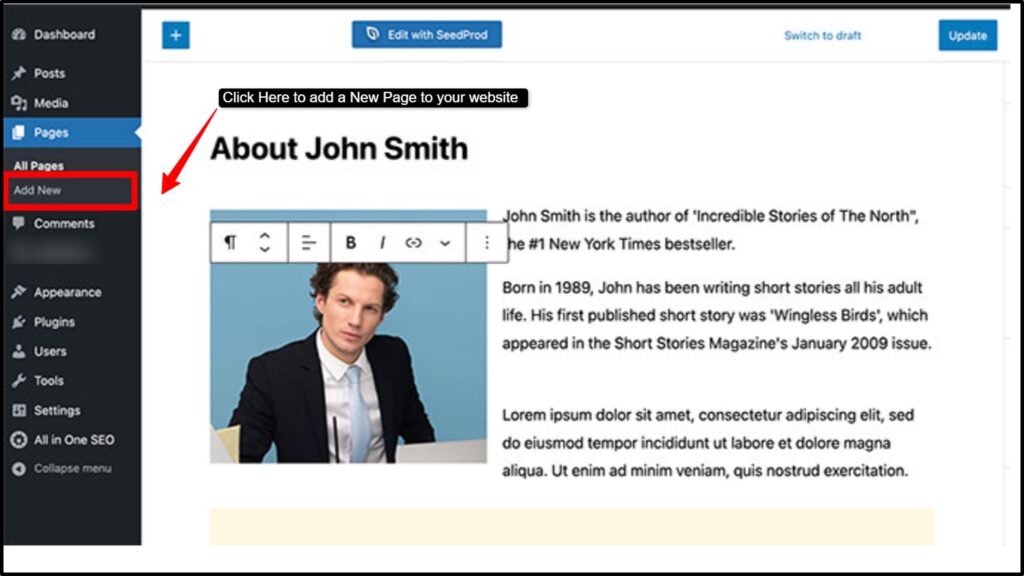
- This is a sample of an About page given above. It’s to show you how an About Us page should be created. Make sure to add your entire detail, what you’re (your post), what you do, when did you start, what you plan to do, your vision, everything.
Contact & Privacy Policy Page
- What makes the contact us page and privacy policy page so important? See! It’s like the viewers want to know who you’re and how to reach you if they have to say something or book an appointment.
- In the Contact Us page, you can design a form and publish it live, so that whoever wishes to reach you can easily do that by filling up the contact form.
- The Privacy Policy page is also important and you definitely have to put it in your website. The reason is that you need to declare how much transparency you maintain, how you use viewers’ data and that you don’t leak the data to third party ads websites to earn money.
- Adding Contact Us page and Privacy Policy Page helps you rank on google search engine. Why does this happen? It happens because google crawlers start trusting your website and its content expertise. It develops trust that your content is 100% genuine and you don’t leak viewers data.
If you create the above pages, we assure you that your website’s gonna do well in its initial stages. But there are few more tips that our research team (having a decade of experience in website and its optimization) has gathered in the form of lists below:
- Make sure the content you write must be in simple words. Don’t use technical jargon words that none understands. You need to be careful with the words you choose. Make sure it isn’t abusive and informal. Keep it simple to read for your viewers.
- Add images (colorful, HD images) that can enhance the quality of the content in your website. Nowadays, it’s seen that viewers normally see images and read headings that are catchy and make decisions based on it. So, make sure to follow this step well.
- Add engaging heading and do a proper internal linking in your website so that you can create a proper connection between one blog to another, one page to another. This way the viewers will be motivated to remain in the same website and get all the related content at one place.
And one more thing! Make sure to be regular. Add and update content on a regular basis or else your website won’t rank well. Rest of the things about how to rank the website, we’ve discussed it later in the last step.
Step 5: Publish and Host Your Website
Now, this is a short and easy step! By now you must have understood that you need to write engaging content for your pages of the website and click the “Publish” button to put your content live.
WordPress even allows you to preview your content to test how it’s gonna perform once it’s put live. Means you can check your content how it’s going to look when live, before you publish it. For that, you need to click the Preview button.
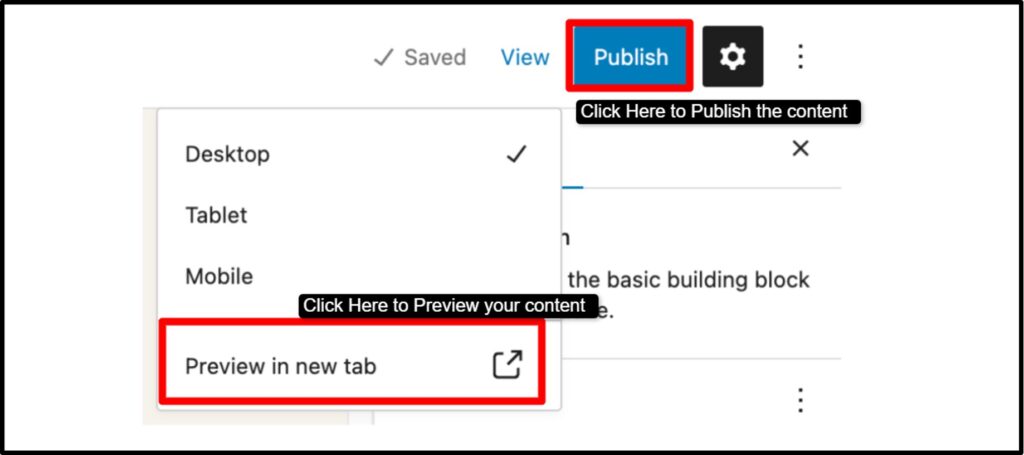
See! This is how the preview and the publish button is gonna look. It’s easy to access. In just one click you can put your content live. Plus, as you see, you can check your content, how it’s gonna look if viewed from a Mobile, Desktop and a Laptop.
Now to promote your blogging website, you can promote your website on social media platforms like on LinkedIn, Instagram and Reddit.
This way you can drive more traffic to your website. And more traffic means more outreach of your content (blogs). Let’s briefly tell you how you can rank your website.
To rank your website, you need to do a lot of research about the keyword you can rank your content in. For that you need to do a lot of brainstorming, use SEO tools like Ahref, Google Keyword Planner to find the keyword that gives you more reach with less competition.
And then you need to optimize your content as per the keyword. And to do that, there are two things you need to do:
- First is OnPage SEO: This means you need to optimize your website, its content that you publish. Make sure your content is in H1 H2 H3 headings, properly segregated. Plus, the focused keyword should appear in the meta title, meta description of your website. Plus the keyword should appear naturally in your content and you also need to make sure that the content fulfils user intent.
- Next is OffPage SEO: Here, in OffPage SEO, you need to write guest posts for other websites to get strong backlinks to improve the authority of your domain in which your content is expert in. You also need to write emails to various professionals having websites in the same domain for collaboration so that you get high quality backlinks for your website.
And lastly, when you follow all the steps provided above from step 1 to step 5, you can connect your website to Google Search Console to check the performance of your WordPress blogging website. And as per the insights you can add and update content in your website.
Pros and Cons of Free Website Hosting
Free Website hosting is a wonderful solution for a newbie, a student who is keen to have his own website. Free hosting offers everything required to go online, but in limits. That’s why, if your website starts scaling, in that case, these basic features with limitations start to be frustrating.
And that’s why, you need to upgrade also from free WordPress hosting to paid WordPress hosting when the time arrives. Let’s see some of free web hosting advantages and disadvantages:
Pros
- Start your website without spending any money upfront.
- Launch quickly using simple drag-and-drop tools.
- No technical setup or coding knowledge required.
- Perfect for testing ideas or learning website building.
- Maintenance and updates are handled by the platform.
Cons
- Limited control with ads and subdomain branding. Slower performance and restricted resources as you grow.
Here, we can see that free hosting has its own pros and even has cons as well.
Tips to Make Your Free Website Look Professional
See! Creating a professional-looking website on a free platform is 100% possible if you focus on simplicity and consistency. Instead of trying to add too many elements, aim for a clean layout that’s easy to navigate and visually balanced.
Pay attention to small details like image quality, font choices and branding elements, as they directly impact how visitors see your site. A fast-loading, well-organized, zero-messed up website looks better and also builds trust with your viewers.
By making smart design choices and ignoring unnecessary complexity, you can turn even a free website into something that feels polished and trustworthy.
- Use minimal design: Keep things simple and focused! Don’t overcrowd your pages with too many sections or colors. A clean layout helps visitors find what they need quickly and makes your website feel modern.
- Compress images: Large images can slow your site down a lot. Always compress them before uploading so your pages load faster. This improves user experience and keeps visitors from leaving early.
- Avoid too many plugins: It’s tempting to install many plugins, but that can slow things down. Use only what you need so your website stays fast, stable and easy to manage.
- Add favicon: A favicon is a small detail, but it makes a big difference. It helps your site look more complete and makes it easier for users to recognize your brand in tabs.
- Use clean fonts: Choose simple and readable fonts for your website. Stick to one or two font styles so your content looks consistent, easy to read and more professional overall.
If you regularly follow the tips when uploading content and managing your website, we can assure you that your website’s gonna look clean and professional. Your viewers will start trusting your content more and come to your website on a regular basis.
When Should You Upgrade to Paid Hosting?
You should upgrade to paid hosting as soon as your website starts getting high traffic from your viewers. You need to understand that free hosting only offers basic features that let your website run in initial stages where you get less traffic and you have less content on the website. But as you scale, you need more resources, and for that you need to switch to paid hosting.
Upgrading to paid hosting isn’t just about spending dollars, it’s about supporting your growth. If your website is becoming important to you, be it a side project or a small business, then investing in better performance and branding is the next natural step.
Let’s look at some clear signs that tell you it’s time to upgrade.
- When traffic increases: If you’re noticing more visitors coming to your website, that’s a great sign of growth. But free hosting often struggles to handle higher traffic, which can slow down your site or even cause downtime.
- When you want a custom domain: A custom domain instantly makes your website look more professional and trustworthy. If you’re serious about blogging or running an online store, having your own domain helps build a strong brand identity.
- When you start earning money: Once your website starts generating income, even a small amount, it makes sense to invest back into it. Paid hosting helps you offer a better experience to your visitors and customers.
- When you need better speed & security: Free hosting usually comes with basic performance and limited security. If your site is growing, you’ll want faster loading times and stronger protection to keep your data and visitors safe.
Free Website vs Paid Website (Quick Comparison Table)
It’s important to understand the difference between a free website and a paid website, before deciding which one to go for.
At the start, free websites work OK for learning and experimenting.
But as your goals grow, be it blogging, building a personal brand, or running a small store, you’ll start noticing the limitations. Paid websites give you more control, better performance, and a more professional image.
Let’s quickly compare both of them in a table form so that you can clearly see what is different between them and what things you get new in paid hosting when you upgrade the free hosting plan.
| Feature | Free Website | Paid Website |
| Domain | Uses a subdomain that looks less professional | Uses a custom domain that builds trust |
| Ads | Shows platform ads you can’t control | No forced ads, full control over your site |
| Performance | Slower speed with limited resources | Faster loading and better performance |
| Customization | Limited design and feature options | Full flexibility to design and add features |
| Security | Basic security with fewer protections | Advanced security to protect your site and users |
FAQs
Can I host a website for free in 2026?
Yes! You can easily host a website for free in 2026 using free website builders or hosting platforms like GoogieHost. It lets you create and publish a site without paying anything, but it comes with some limitations.
Is free hosting safe?
Yes! To some extent, free hosting is generally safe for basic websites like blogs or portfolios. But, it may not offer strong security features, so it’s not perfect at all for sensitive data sites or large business websites.
Can We use my own domain later?
Yes! If you already have a custom domain, you can easily use it later. Most hosting platforms, like GoogieHost, allow you to upgrade and connect your own domain anytime. You can start free and switch to a custom domain when you want a more professional look.
Do I need coding skills?
No! You don’t need coding skills to create a website. Most free website builders offer drag-and-drop tools, making it easy for newbies to create and manage a website without technical knowledge.
Which is the best free website builder?
Wix, WordPress.com and Weebly are the best free website builders. The best one depends on your needs, but all are beginner-friendly and easy to use. These website builders offer drag and drop features and even offer 100+ templates to give you options to choose the best layout for your website.
Can I earn money from a free website?
Yes! You can earn money through Google adsense, affiliate links, promoting services or selling your own services. But the problem with free website platforms is that it offers limited monetization options, so upgrading later can help you earn more.
How long does it take to create a website?
You can create a basic website in just half an hour using free tools. A more complete and polished website may take a few days, depending on your content and design. See! It totally depends upon the amount of content and massiveness of your website.
What are the limitations of free hosting?
Free hosting usually comes with forced ads on your website, limited storage, slower speed, and no custom domain. These limits can affect your website’s growth and professional appearance over time.
Final Conclusion
We have covered everything here. We talked about how a student, wanting to make his portfolio online, wanting to put his works and opinions online, how easily he can go for free web hosting, register a free subdomain (giving him a personal space online) and can upload the content and publish it on the website.
Even the artists, having a lot of art work to showcase online, or a person looking forward to start an online marketplace, even he can also go for the free website hosting and enjoy the advantages of it.
What free website hosting gives you is a basic feature that’s good enough to run a website with minimum requirements like 1GB SSD NVMe storage, 512 MB RAM and 99% uptime. But what will happen if your website starts getting high traffic and you still are on a free hosting plan? Your website would lag badly! That’s why you need to upgrade your hosting plan.
In this blog, we’ve also talked about how you can easily upgrade your hosting to a paid plan to ensure that your website remains accessible 24/7.
Follow the steps we’ve provided here in this post, and even use the screenshots to get the idea about the steps to avoid confusion and you can create and host a website for free.