
How to Start a WordPress Website for Free in 2026 (Beginner Guide)

Do you think that you need hundreds of dollars to start a WordPress blogging website? You’ll be happy to know that you can start a WordPress website for free.
Yes! Absolutely, for free.
But we’ve contacted a lot of people who say that when they hear “Let’s start a WordPress website for online product selling” they immediately think of buying hosting, purchasing a domain and buying premium plugins to make the site engaging.
Because of this, many students who want to publish academic projects & research online, or many professionals who want to create a simple online portfolio, never even try to start their own website because they think they need money to launch a website online.
How GoogieHost reviews these providers: our editorial team has published independent in-depth reviews for 2 of the providers listed below — including GoogieHost and WordPress.com. For each provider we record pricing, uptime, storage allocation, money-back guarantee window, free-trial duration, and promotional discounts, and refresh entries when plan structure, pricing, or performance changes.
The truth is that you can actually start a WordPress website for free, and it’s much easier.
Due to the combined hard work of our expert sales team and WordPress team, we’ve listed the procedure step by step of how to start a WordPress website for free. And please don’t worry if you think that it might be too technical for you, actually it’s absolutely not.
We’ll show you complete steps of how to choose free WordPress hosting, how to register a free subdomain, how to install WordPress and even how to create your first page on your website. We’ll also tell you the name of the provider from where you can get all these things together.
So, let’s get started!
What Do You Need to Start a WordPress Website?
See! Starting a website doesn’t require too many things.
In fact, you only need a few basic elements to launch a WordPress website. Don’t worry if these terms sound new to you right now as in the next section, we’ll show you how exactly you can get each of them for free and set them up step by step so you can start your WordPress website quickly.
These are the main things you need to start a WordPress website.
A Domain Name
A domain name is the address of your website on the internet. It’s what people type into their browser to visit your website. Just like every house has a physical address, every website has a unique domain name that helps users find it online.
A domain name looks like:
- johnblogs.com (this is a custom domain)
- johnblogs.googiehost.com (this is a subdomain)
If you’re a student creating a project website, your domain could be something like johnprojects.com. If you’re a professional building a portfolio website, you might choose something like johnportfolio.com. A good domain name usually reflects your brand and the purpose of your website.
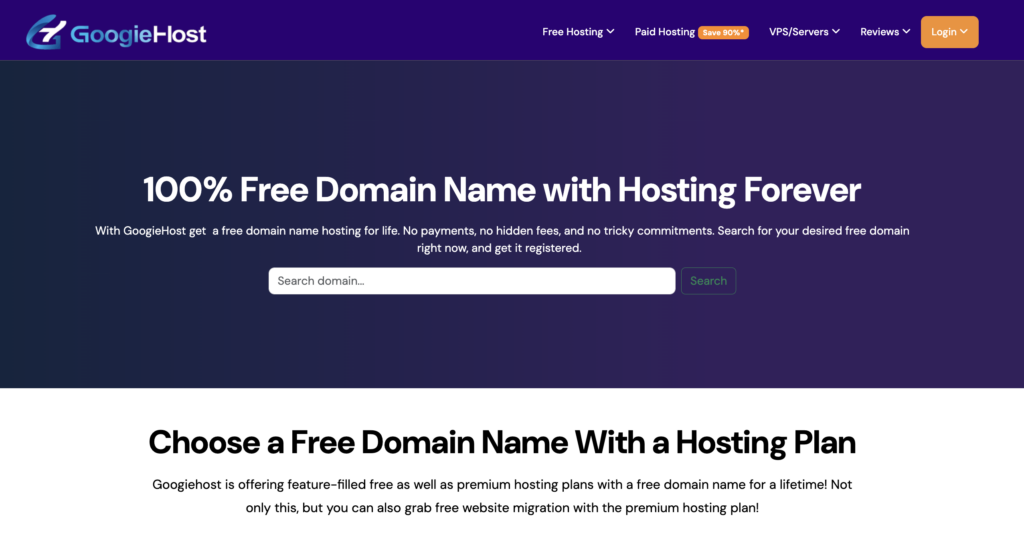
Normally, domain names cost money every year. But if you’re just starting and want to build a website for free, you can use a free subdomain provided by free hosting platforms (like GoogieHost). A free subdomain is simply a domain that includes the hosting provider’s name.
In the steps later provided in this guide, we will show you exactly how to register a free subdomain in just 2 minutes and connect it to your WordPress website.
Web Hosting
What is Web hosting? It’s the place where your website files, images, pages and content are stored. You can think of hosting as the space where your website actually lives on the internet.
When someone visits your website, the hosting server loads your website files and displays them in the visitor’s browser. Without hosting, your website can’t exist online.
For example, imagine you create a portfolio website with several pages (like HomePage, About Us, ServicePage). All of these pages, images and content are stored on a hosting server.
When a viewer enters your website address (the URL of your website), the server sends the website data to the browser (that the viewer is handling) so that he can view it.
Many people think hosting is always expensive, but there are actually many providers that offer free hosting for WordPress websites. Free hosting is perfect for newbies who want to learn WordPress, and want to start blogging.
WordPress
In simple words, we can understand WordPress as a software that allows you to create and manage your website easily and for that you don’t need any knowledge about HTML / CSS / JScript. It’s currently the most popular website platform in the world, powering millions of blogs and online stores.
The good thing about WordPress is that it’s completely free and newbie-friendly. Once WordPress is installed on your hosting, you get access to a dashboard where you can control your entire website.
From the WordPress dashboard, you can easily create new pages, write blog posts, upload images and videos and customize your website design. Everything can be managed from a simple dashboard, and you don’t need to write any code either.
Don’t worry about the installation process.
Many hosting platforms (especially GoogieHost) provide one-click WordPress installation, which means you can install WordPress in just one click.
WordPress Theme
A WordPress theme controls how your website looks and feels. It determines the design, layout, colors, fonts and overall appearance of your website.
Think of a theme as the design template of your website.
Now, instead of designing everything from scratch, you can simply choose a theme and instantly change the look of your website.
For example, if you want to create:
- A blog website: You can choose a blogging theme
- A portfolio website: You can choose a portfolio theme
- A project showcase website: You can choose a clean professional theme
Once the theme is installed, your website will automatically follow that design style.
The great thing about WordPress is that there are 100+ best free WordPress themes available. Many of these themes are professionally designed by WP experts and work perfectly.
Content
Finally, the most important part of any website is content. Content is the information, articles, images, or projects that you publish on your website.
Without content, you can say that a website is just an empty design. Content is what actually gives value to your visitors and helps you share your work with the world.
Please ensure the content matches the niche your website is about!
- If you’re a student, you can upload your academic work such as research papers, engineering projects. This can help you show your work to professors or to the internship recruiters.
- If you’re a professional, you can use your website to highlight your portfolio and your skills. For example, a writer can publish articles or blogs.
Once your WordPress website is ready, you can start adding content anytime. With time, your website becomes a digital portfolio that shows your work.
So, before we move forward to understand step by step how to start a WordPress website for free, please make sure that you know about the pre-requisites mentioned above.
Can You Start WordPress for Free?
Yes, you can start WordPress for free.
Many people think that launching a WordPress website requires money. Because of this reason, a lot of newbies never even try to start blogging or create their own website. The truth is that starting a WordPress website is 100% free and it’s possible to set up the site free of cost.
But the thing is that a free WordPress website has few limitations and it can’t handle website load if you’re getting 10k visitors on a daily basis. That’s why you should know when to choose free and when to choose paid WordPress.
Free vs Paid WordPress
See! A free WordPress setup allows you to create and launch your website without paying anything for a domain or hosting. You can use free web hosting platforms, a free subdomain and free WordPress themes to build your website.
A paid WordPress setup, on the other hand, usually includes buying a custom domain name, premium hosting and sometimes premium themes or plugins. Paid setups are great for businesses and professional websites, but beginners don’t necessarily need them right away.
So, why do users switch from free to paid versions? It’s because there are few limitations that WordPress.com offers.
Limitation of WordPress.com
One common way newbies start a free WordPress website is by using WordPress.com, which offers a free plan. See! It’s easy to use and quick to set up, but the free version of WordPress.com comes with several limitations.
Like, the free plan usually gives you a WordPress subdomain, which looks something like johnblogs.wordpress.com
You also get limited customization options, fewer themes, and restrictions on installing plugins. In some cases, WordPress.com may also display their own branding or ads on your website.
This setup can still work for beginners who simply want to start blogging quickly, but it may not provide the flexibility many users need if they want to build a professional service site.
Free Hosting + Self-Hosted WordPress Is Better
A better option for many newbies is using free hosting with self-hosted WordPress. This means you install WordPress on a free hosting provider instead of depending completely on WordPress.com.
With this setup, you usually get more flexibility. You can install different themes, customize your website design, create multiple pages, and manage your website more freely.
Even though you’re using free hosting, you still get the experience of managing a real WordPress website.
Who Should Start a Free WordPress Website?
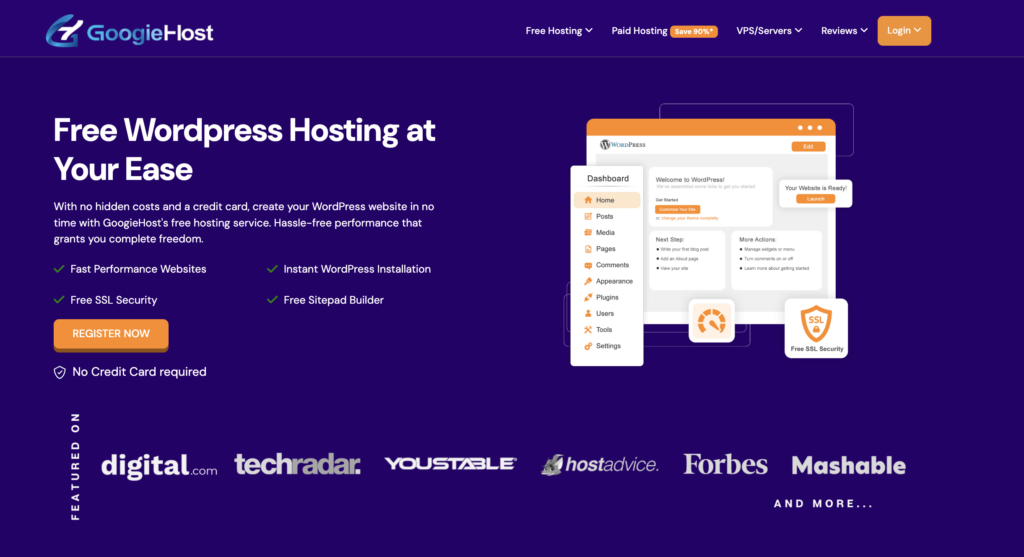
Starting a free WordPress website is a great idea for many types of users, especially beginners who want to explore the online world but by paying absolutely $0
- Students can create a website to publish academic projects, research work, coding assignments or case studies. Having a project website can also help when applying for internships.
- Bloggers and content creators can start writing blog posts and learn how blogging works without worrying about spending money. It allows them to practice writing, SEO and website management.
- Beginners who want to learn website creation can experiment with themes, pages and blog posts while understanding how WordPress works.
- Startup founders or professionals can also create a simple portfolio website to showcase their work, services or early business ideas online.
Starting with a free WordPress website is a low-risk way to build your online presence. Once your website grows you can always upgrade to a paid domain and hosting later.
Step-by-Step: How to Start a WordPress Website for Free
Now that you understand what a WordPress website needs, let’s actually see how you can start a WordPress website for free step by step. Don’t worry at all if it sounds technical, we’ll try keeping things simple.
By the end of these steps, you’ll have your own website live on the internet where you can start blogging or publish your academic projects.
To make things easier to understand, we’ll use GoogieHost as an example free WordPress hosting provider, because it offers free hosting, free subdomain support and WordPress installation tools.
The process is almost similar on many free hosting provider, so once you understand these steps, you’ll be able to set up a website on any platform.
Step 1) Choose a Free Hosting Provider
The first thing you need is web hosting, which is the space where your website files are stored.(already explained above). Without hosting, your website can’t exist online.
What to Look for in Free Hosting? How to choose the best free hosting? See! There are few important things you need to check before choosing any free hosting provider:
- Uptime: It means how often the hosting server stays online. A good hosting provider like googiehost, should offer high uptime (99% on free hosting & 99.99% on paid hosting) so that your website is always accessible to visitors.
- Control Panel: A control panel helps you manage your website easily. Most hosting platforms provide tools like cPanel or a custom dashboard where you can install WordPress and control your website settings. (GoogieHost offers DirectAdmin control panel)
- SSL Certificate: An SSL certificate secures your website and allows it to run on HTTPS instead of HTTP. This helps protect viewer data and also improves trust and SEO. Many free hosting providers offer free SSL certificates. (GoogieHost offers free LetsEncrypt SSL certificate)
Since we want to start a WordPress website for free, we will choose a free hosting provider. For this example, we’ll use GoogieHost, which offers free hosting suitable for beginners.
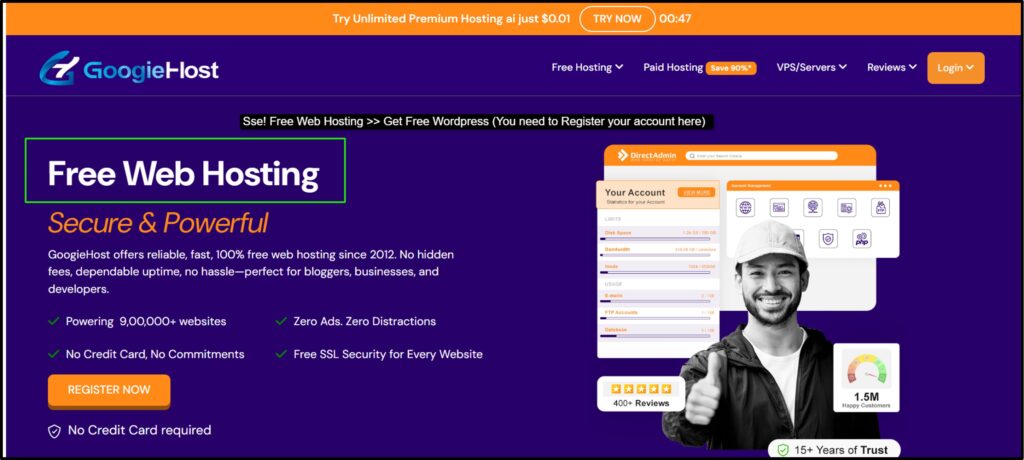
Googiehost allows you to launch your first website without any investment and learn how WordPress works before moving to paid hosting.
Step 2) Register a Free Domain or Subdomain
The next step is choosing your website address, also known as a domain name.
See! Custom domains like johnblogs.com cost a rental fee every year. But as we’re creating a free WordPress website, we will use a free subdomain.
Here, we’re using GoogieHost! It offers a free subdomain. You just simply need to go to click the Register Now button. There you’ll find a free subdomain register tab just like the screenshot given below.
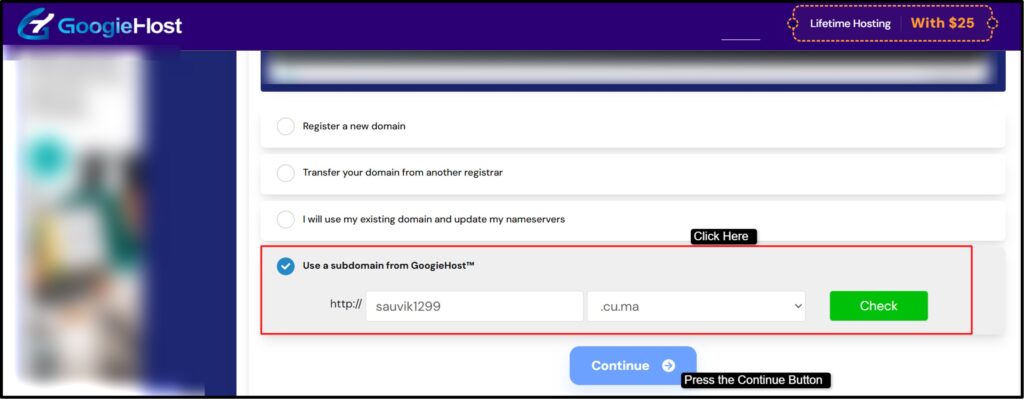
Now, click the tab that says “Use a subdomain from googiehost”.
Then, enter the name of your website that you’ve planned and click the continue button right after that. You’ll be directed to the checkout page where you can see that no amount is charged from you.

After pressing the checkout button, you’ll have to enter your personal information, your billing address and choose the appropriate payment option (don’t worry! You won’t be charged) to register your account with Googiehost. Then, press the continue button to proceed.
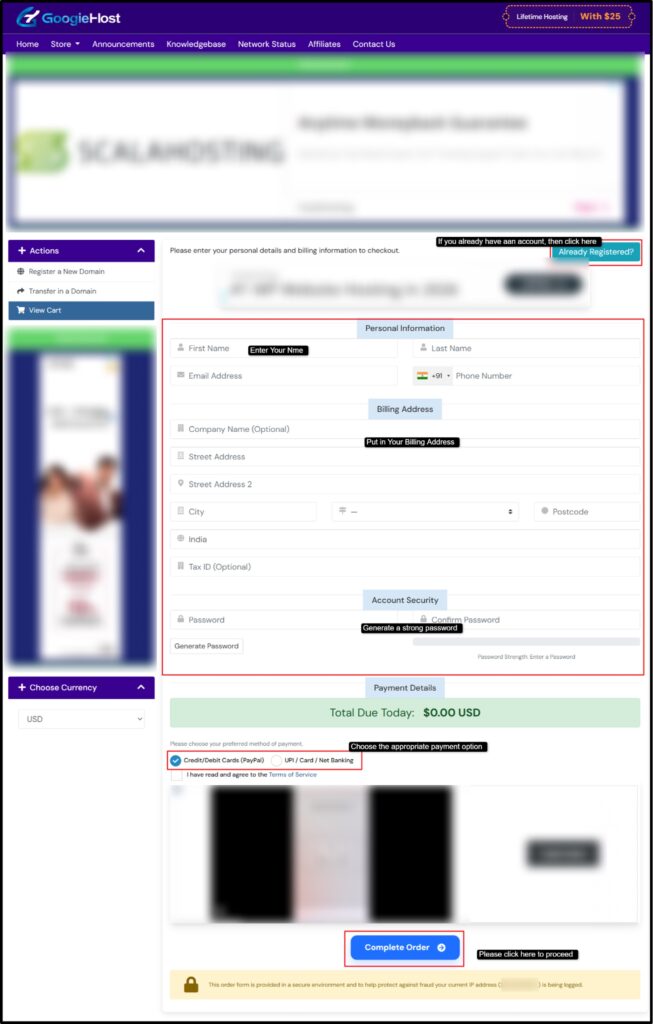
This way you get to register your free hosting account with GoogieHost! Now you need to wait for an email confirmation after which your account is 100% verified and functional. You can use your login credentials to sign in to your hosting account.
Step 3) Install WordPress (1-Click Method)
The third step is to login to your control panel account (you can directly login to the DirectAdmin control panel right from your client area). From there you have to click the service tab and choose the free hosting section you’ve signed in for (as marked in the screenshot given below)
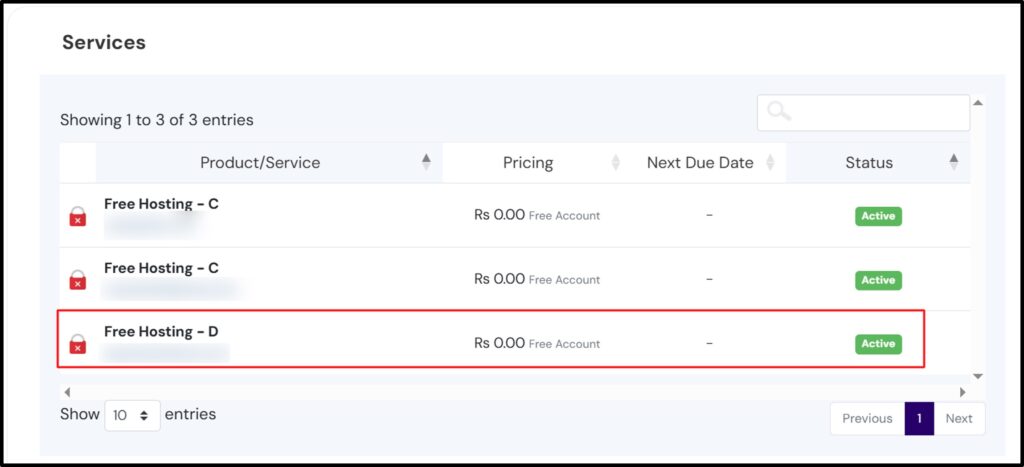
Then, you have to click the application tab (Softaculous method) to install WordPress in just one click.
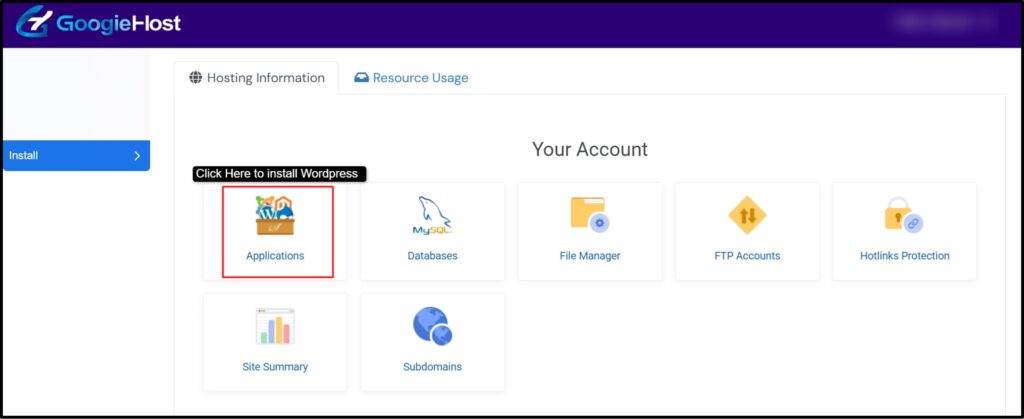
Now, simple steps are remaining! As you enter the application tab, click WordPress and install it instantly. Make sure your internet service is fast enough to get it downloaded in just a minute or two.
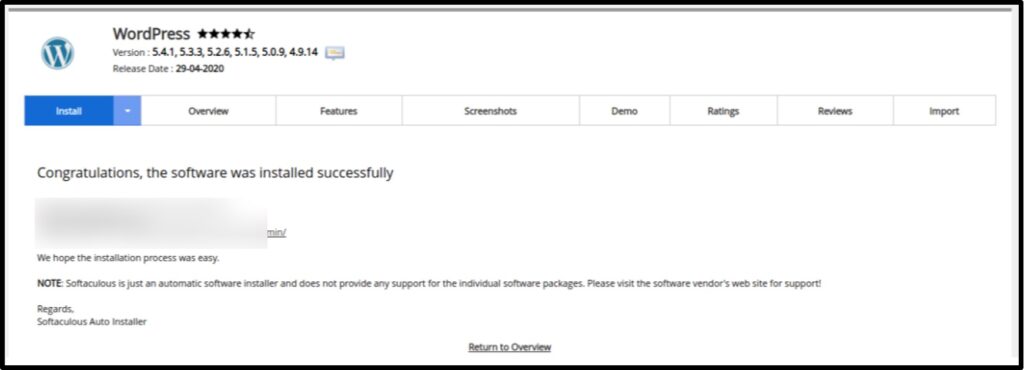
Within a few minutes, WordPress will be installed on your hosting account, and your website will be ready.
Step 4) Choose a Free WordPress Theme
Once WordPress is installed, the next step is choosing a WordPress theme, which controls how your website looks. A theme determines your website’s design, layout, fonts, colors and overall style.
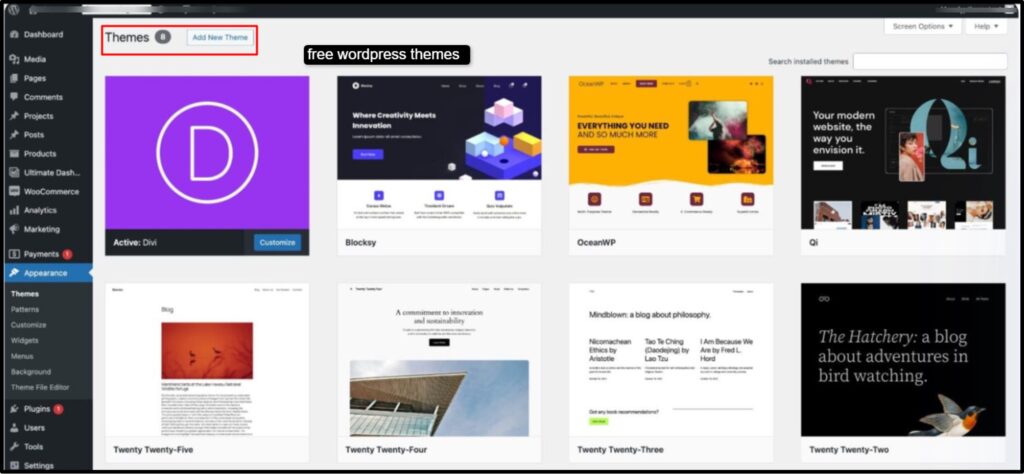
There are thousands of free WordPress themes available. Some popular beginner-friendly themes include:
- GeneratePress
- Astra
These themes are widely used because they’re lightweight and easy to customize. So, what makes a WordPress theme good?
See! When choosing a theme, look for a few important features.
- Mobile-Friendly Design: Most website visitors today come from mobile devices. A good theme should automatically adjust your website layout for phones and tablets.
- SEO-Ready: An SEO-friendly theme helps search engines understand your website better, which can improve your chances of ranking in Google search results.
- Lightweight and Fast: Fast websites provide a better user experience and also help with SEO. Lightweight themes load faster and improve performance.
Once you select a theme, you can install it directly from the WordPress dashboard in just a few clicks.
Step 5) Install Essential Free Plugins
WordPress plugins add extra features and functionality to your website. Think of plugins as small tools that extend what your website can do. You can search for plugins in the plugin section of WordPress.
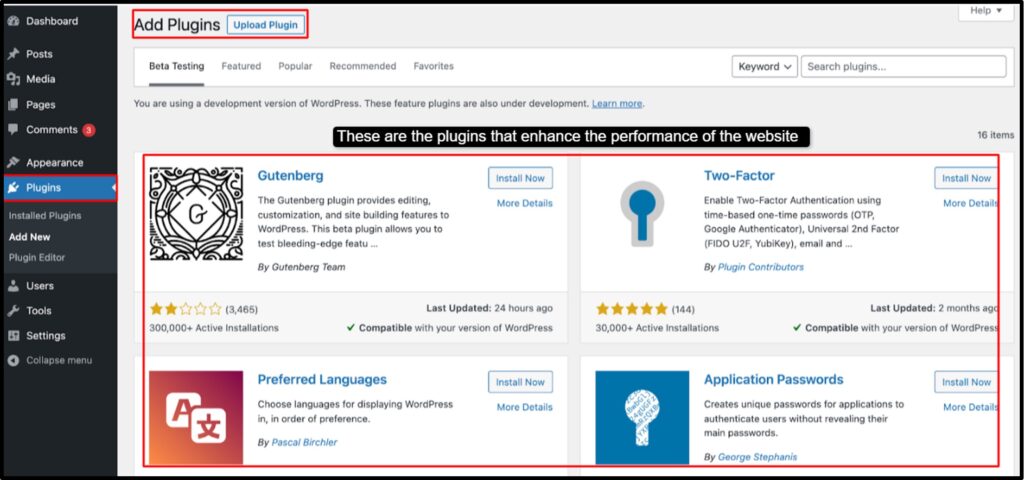
Even though there are thousands of plugins available, beginners only need a few important ones.
- SEO Plugin: An SEO plugin helps optimize your website for search engines. It allows you to add meta titles, descriptions, and optimize your content so it can rank better in Google.
- Security Plugin: Security plugins protect your website from hackers, spam, and malware. This is especially important when running a website on the internet.
- Caching Plugin: Caching plugins improve your website speed by storing temporary versions of your pages. Faster websites provide better user experience and also improve SEO rankings.
- Contact Form Plugin: A contact form plugin allows visitors to send messages directly through your website. This is important for portfolio websites, freelancers, and bloggers who want to receive inquiries.
All these plugins are available for free inside the WordPress plugin directory and can be installed directly from your dashboard.
Step 6) Create Your First Pages
Once your website design and plugins are ready, the final step is creating important pages for your website. It’s easy to create your first page. Just simply go to the pages tab from the side panel and click to Add New.
This way you can create the first page.
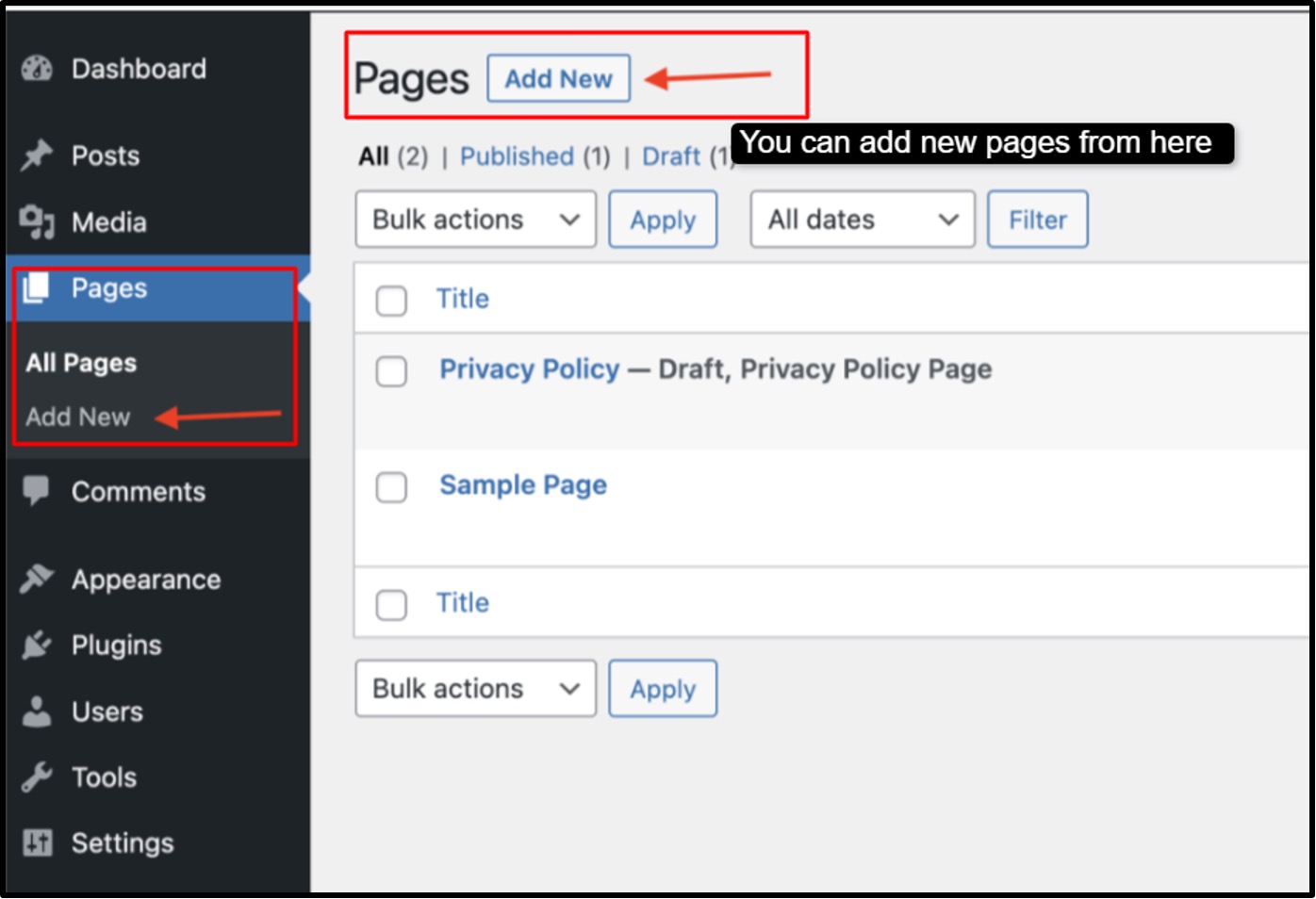
Every website usually includes a few important pages.
- Homepage: The homepage is the main page of your website. It introduces visitors to your website and gives them an overview of what your website is about.
- About Page: The About page tells visitors more about you. Students can describe their academic background and projects, while professionals can talk about their experience here.
- Contact Page: The contact page allows visitors to reach you easily. You can include a contact form, email address, or social media links.
- Terms and Privacy Policy: These pages explain how your website handles user data and outlines basic policies. Even simple blogs should include these pages to maintain transparency and trust.
Once you complete these steps, your free WordPress website will be fully set up and ready to publish content.
Choosing the right hosting provider is only one part of launching a business website. You should also understand domain, design, maintenance, and marketing expenses. Read our complete guide on How Much Does it Cost to Build a Website before finalizing your budget.
How Much Does It Cost to Start a WordPress Website?
One of the most asked questions newbies mention before starting a website is “How much does it cost to start a WordPress website?”
Many people think that starting a website requires a lot of money for registering a domain name, buying a hosting plan and installing a premium website designing plugin. But, if you think so and you’re not making a move yet, you’re simply delaying the creation of your own website.
To mention it in straight and simple words, you can create a WordPress website for free. You don’t need to spend money on your website at initial stages.
You get free hosting for your website (so that your website can load online and viewers from parts of the world can see your work), free subdomains (an isolated online field where you can upload your projects), and free WordPress themes.
After setting up the website for free, you still have many free things like:
- Install WordPress on free hosting
- Use a free subdomain for your website address
- Install free WordPress themes
- Add blog posts and pages
- Install free plugins for extra features
So you see that even though the setup is free, you can still access most of the important WordPress features needed to run a website.
Now, let’s say after starting a website for free, your website gets increased traffic. Your free WordPress hosting website can’t handle increased traffic load and high content storage, that’s why many users upgrade their websites once they start growing.
These upgrades are optional and usually help improve the website’s performance. They’re:
- Custom domain name (like johnblogs.com)
- Premium hosting for faster speed and 99.99% uptime (in free plan you get only >99% uptime)
- Premium WordPress themes with advanced design options
You have to upgrade your website resources, that’s known! But when do you need to upgrade, that many of you don’t know!
Upgrading your WordPress website becomes useful only when your website starts growing. That way you can switch from a free WordPress plan to a paid plan.
Free vs Paid WordPress Hosting Comparison
When you’re starting a WordPress website, one of the first things you will face is whether to go for a free WordPress hosting or paid WordPress hosting.
Students who want to create a project website usually start with free hosting because it allows them to launch a website without spending on anything. (Get free hosting, free subdomain, basic web resources for free)
Free hosting is a great way to learn how WordPress works and publish projects online. On the other hand, paid hosting is usually chosen by businesses, who want a faster and fully customizable website.
Understanding the difference between free WordPress hosting & paid WordPress hosting can help you decide which option is better for your needs, especially if you’re building a website for academic projects.
| On What Basis? | Free WordPress Hosting | Paid WordPress Hosting |
| Cost | Free hosting allows you to start a WordPress website for free. | It requires a monthly or yearly payment (@ $2 per month onwards) |
| Domain Name | Free hosting usually provides a subdomain, like johnblogs.googiehost.com. | Paid hosting allows you to connect a custom domain name like johnblogs.com |
| Performance & Speed | Free WordPress hosting is usually shared by many users, which may lead to limited site performance. | Paid WordPress hosting offers better server resources, which results in faster loading websites. |
| Storage & Bandwidth | Free hosting usually provides limited storage and bandwidth, which is OK for small blogs | It offers higher NVMe SSD storage capacity and bandwidth, allowing you to upload more content |
| Security Features | Free hosting includes basic security features but may not provide backups. | This includes stronger security, backups, malware protection and SSL certificates. |
So, we see that free WordPress hosting is a great way for students and struggling professionals to start learning website creation and publish projects online. It allows you to understand how WordPress works and build your first online presence.
Common Mistakes to Avoid on 2026
When students or first-time bloggers start building a WordPress website, it’s completely normal to make a few mistakes. Most people are excited to launch their website quickly, so they focus only on how the website’s gonna look without fully understanding how WordPress works.
These early decisions can sometimes create problems later like poor website visibility, slow loading speed of the website as the site grows. By understanding these WordPress website problems, you can save time and build a website that performs well.
In this section, we’ll show you some common mistakes students and beginners often make and explain how you can avoid these mistakes.
Choosing the Wrong Platform
One of the biggest mistakes that the beginners can make is selecting the wrong provider for their website. Many people confuse different versions of WordPress or choose a platform that limits their customization options.
Our research team has reported that some beginners start with a limited platform that doesn’t allow plugin installations or advanced customization. Later, they regret when they want to add new features, they realize that the platform can’t support their needs.
To avoid this problem, it’s important to choose one that allows growth, full customization and 100% control over your site.
Ignoring SEO from Day One
Search Engine Optimization (also called SEO in short) is important if you want people to find your website on Google. Here also, it’s seen that many beginners focus only on creating pages and forget to set up basic SEO practices from the start.
Ignoring SEO guidelines can make it harder for your WordPress website to appear in SERP (search engine results page) later. Things like optimizing H1 / H2 headings, writing proper meta content, using SEO-friendly URLs and organizing content properly as per user intent should be done from the beginning.
If you start with a simple SEO strategy, your website becomes discoverable and helps build long-term organic traffic.
Using Too Many Plugins
Plugins are one of the most powerful features of WordPress because they allow you to add new functionality without coding. However, beginners often install too many plugins thinking they will improve their website.
In reality, having too many plugins can slow down your site, create compatibility issues, and even introduce security risks. Some plugins may perform similar functions, which leads to unnecessary duplication.
A better approach is to install only essential and well-maintained plugins that add real value to your website.
Not Optimizing Website Speed
Website speed or how quickly your website loads, plays a important role in boosting user experience and improving Google rankings. Newbies upload large images, use heavy themes without realizing how these choices affect loading speed.
A slow website can give visitors a big headache and cause them to switch to another website before exploring your content. It can also negatively impact your website ranking performance.
To prevent this issue, beginners should optimize images to make it load quickly, use lightweight themes, enable caching, use a CDN (Content Delivery Network) to speed up loading for visitors across different locations, and choose the best free hosting provider that offers NVMe SSD storage to keep their website fast.
So, if you avoid these common mistakes it will help you build a proper performing WordPress website. With the right approach from the beginning, students can create WordPress websites for their projects that are fast and ready to grow in the future.
How to Make Money from your Free WordPress Website in 2026
There are a lot of students who want to earn pocket money for free without investing any money. For them, we would recommend that they start blogging for free and earn in dollars from google adsense. (by running google ads on their blogging WordPress website)
A free WordPress website, without investing money, beginners can start a blog, promote and sell products, do affiliate marketing and earn money from commission and also can earn by helping local businesses. A lot of successful bloggers actually started with a simple free WordPress website before turning it into a profitable blog.
Let’s understand the different ways you can monetize your website and choose the best method that can give you more money.
Blogging
It’s one of the easiest ways to make money with a free WordPress website.
You can start writing articles about topics you enjoy talking about or have knowledge about, such as education, AI technology, crypto & finance, travel, food, celebrities portfolio & trends, health, or student life.
As your blog grows and attracts viewers, you can monetize it through google adsense or affiliate links. Consistently publishing useful and informative blog posts helps improve topical authority and increases website traffic over time.
Affiliate Marketing
Affiliate marketing is another powerful way to earn money from your website.
In this method, you promote products or services from other companies using a special affiliate link. When someone purchases through your link, you earn a commission.
For example, you can write product reviews, create comparison articles, or recommend useful tools to your audience. Many companies offer affiliate programs, making it easy for beginners to start earning even with a small blog.
Google AdSense
Displaying ads on your website through Google AdSense is a simple way to earn passive income. Once your blog starts receiving traffic, you can apply for AdSense and allow Google to place ads on your website.
Every time visitors view or click on these ads, you earn a small amount of money. While it may start small, back-to-back traffic can turn it into a recurring source of income for bloggers.
Selling Services
Your WordPress website can also act as a portfolio or business website where you promote your skills and services. Students and professionals often offer services such as content writing, graphic design, website development, coaching or digital marketing services.
Local businesses and individuals searching on Google may find your website and hire you for your services. This method works well if you already have a skill you can offer.
Dropshipping
Dropshipping allows you to sell products online without maintaining inventory.
You simply create a website that lists products and when someone places an order, the supplier ships the product directly to the customer.
This business model is popular among beginners (especially when Andrew Tate talked about it) because it requires little investment. With the right product and marketing strategy, a WordPress website can become a small online store as well.
By exploring these monetization methods, newbies can turn a simple free WordPress website into an income-generating platform. The most important thing is to provide useful content and slowly slowly build an audience that trusts your website.
FAQ’s
Is WordPress free in 2026?
Yes, WordPress is free in 2026. WordPress is open-source, which means anyone can download it, install it and use it without paying any dollar. What many people usually pay for is the domain name, hosting service and the premium themes. But a newbie can still start a WordPress website completely free by using free hosting services and a free subdomain.
Can I start a WordPress website without buying a domain?
Yes, you can start a WordPress website without buying a domain. Many free hosting providers, one of them being GoogieHost, provides a free subdomain that you can use to launch your website. Instead of having a domain like johnblogs.com, your website may look something like johnblogs.googiehost.com.
What is the difference between WordPress.com and WordPress.org?
WordPress.com is a hosted platform where everything is managed for you, and it also offers a free plan to create a website quickly. WordPress.org, on the other hand, is the self-hosted version where you install WordPress on your own hosting. It gives you complete control over your website, themes, plugins and SEO settings.
Is free WordPress hosting safe and reliable?
Yes! Free WordPress hosting is safe and reliable if you choose a well-known and trusted hosting provider like GoogieHost. Many beginners use free hosting services to learn how to build websites or launch a simple portfolio or blog. But free hosting comes with few limitations like limited storage and the use of a subdomain instead of your custom domain.
Can I upgrade my free WordPress website later?
Yes, you can upgrade your free wordpress website later. You start your websites using free hosting and a free subdomain. Once your website starts growing and getting traffic, you can upgrade to a custom domain name, better hosting paid premium themes and plugins. WordPress makes it easy to upgrade your website, so starting with a free setup is the best way to begin your online presence.
Can I make money from a free WordPress website?
Yes, you can make money from a free WordPress website. You can start by writing blog posts and building traffic and then monetize your website through methods like google adsense, affiliate marketing, sponsored posts and by promoting services.
How long does it take to create a free WordPress website?
You can set up a free wordpress website in about 10 to 15 minutes if you follow the right steps. The process usually includes signing up for free hosting, registering a free subdomain, installing WordPress, choosing a free theme and creating important pages like Home, About and Contact page. Once these steps are completed, you can start publishing blog posts or portfolio content online right away.
Conclusion
After a lot of research, we found that a free WordPress website is the simplest option for a user who wants to start a blog or a portfolio website. And you can even say that it’s the best way to go online and establish a presence among the viewers without spending even a single dollar at all.
By following the steps in this post, beginners can easily set up their own website. Along with the steps, we’ve also added necessary screenshots and instructions so that you can quickly understand the process and build your website even if you’ve never done it before.
Once your website is set up, it can become your online platform for sharing your ideas, publishing academic projects and showcasing your portfolio (like, your work) to recruiters and universities around the world.
All you need to do is sign up for free hosting, register a free subdomain, install WordPress and create a few important pages on your website and that’s it. You’re 100% ready to start publishing your work online for free.
Within a short time, you’ll have your own WordPress website where you can blog and share your work.


1 thought on “How to Start a WordPress Website for Free in 2026 (Beginner Guide)”
Leave a Comment

Table of Contents
- What Do You Need to Start a WordPress Website?
- Can You Start WordPress for Free?
- Who Should Start a Free WordPress Website?
- Step-by-Step: How to Start a WordPress Website for Free
- How Much Does It Cost to Start a WordPress Website?
- Free vs Paid WordPress Hosting Comparison
- Common Mistakes to Avoid on 2026
- How to Make Money from your Free WordPress Website in 2026
- FAQ's
- Conclusion


Good Info About Free Web Hosting with Open Source Platform WordPress
Thanks in Advance.
Devang Barot
Contact/WhatsApp : +0091-9824440960