21 Best Free WordPress Themes in 2026 for Every Website

We know that finding the perfect free WordPress theme is difficult. You need something that loads fast and at the same time, looks professional and works smoothly on mobile, plus doesn’t break your site, but most free themes either feel too basic, slow down your website or require endless tweaking to look good.
If you’re using free WordPress hosting, the problem becomes even bigger because performance and lightweight design matter more than ever.
That’s exactly why this blog is important for you to read. We’ve carefully handpicked 20+ of the best free WordPress themes that work on free WordPress hosting environments.
Let’s say you’re wanting to start an e-store, this blog helps you quickly find a theme that’s fast and engaging, without wasting hours testing random options from the WordPress repository.
What makes this guide truly trustworthy is that every theme listed here has been personally tested by our WordPress expert team.
We evaluated speed, customization, mobile responsiveness and real-world usability to give you completely unbiased insights. So instead of guessing which free theme might work, you can confidently choose from options that are already proven to perform.
Short on time? Here Are the Best Free WordPress Themes in 2026
1. Astra – Astra is a lightweight, fast, and highly customizable WordPress theme that works well for blogs, business websites, portfolios, and online stores.
2. GeneratePress – GeneratePress is an excellent choice for users who prioritize performance, clean design, and fast-loading pages. It’s especially suitable for blogs, content websites, and lightweight business sites.
3. Neve (Themeisle Neve) – Neve combines a clean modern design with an easy-to-use customization experience. It’s a great option for beginners, startups, small businesses, and professional websites.
21 Best Free WordPress Themes 2026
Now, let’s not waste any time and jump straight into the best free WordPress themes you can use with your hosting. Below, we’ve not only listed the top options but also clearly mentioned who each theme is best suited for along with its key features.
This will give you a complete picture of every theme so you can compare confidently and choose the one that truly fits your needs.
⏰ TL;DR:
1. Astra – Best Overall Free Theme
2. GeneratePress – Best for Speed & Clean Code
3. Neve (Themeisle Neve) – Best for Fast-Loading Blogs & Small Business Sites
4. OceanWP – Best Free WooCommerce Theme
5. Kadence – Best for Design Control
6. Hestia – Best for Startups & One-Page Landing Sites
7. Blocksy – Best for Gutenberg + Modern Creators (YouTubers, Influencers)
8. Zakra – Best for Multi-Niche Professional Sites (LMS, Business)
9. Sydney – Best for Coaching, NGOs & Elementor Users
10. Spectra One – Best AI-Powered Builder
11. Ashe – Best for Personal Blogs & Portfolios
12. Hello Elementor – Best Blank-Canvas Theme
13. Storefront – Safest WooCommerce WordPress Theme
14. Customizr – Best Super-Fast Theme for Small Business
15. Hueman – Best Magazine-Style WordPress Theme
16. Kandinsky Bento – Best Minimal One-Page Personal Website Theme
17. Writee – Best for Community/Content-Focused Blogs
18. Rishi Theme – Best Core Web Vitals Theme
19. Spacious – Best for Podcasters & Authors
20. Responsive – Best for Tutors & LMS-Based Sites
21. Vantage – Best Zero-Budget Multipurpose Theme
1. Astra – Best Overall Free Theme

- 300+ Premium Starter Templates
- Premium Support
- 14-Days Refund Guarantee
- Business Owners: It’s good for business owners who want a professional website. Its starter templates and simple customization help them launch quickly.
- Freelancers: Freelancers get a lot of advantage from Astra’s ready-to-use templates and page builder compatibility. It helps them deliver websites faster.
- 145+ Premium Starter Templates: It offers a large library of niche-specific website templates. Users can import a full website with one click and customize it easily.
- Seamless Page Builder Integration: It even integrates smoothly with Gutenberg, Elementor, Spectra, and Beaver Builder. This gives users full creative freedom, while keeping the site lightweight.
- AI-Powered Website Creation (ZipWP): this feature can generate a complete website in under a minute. It automatically creates content, images, and layouts based on your business details.
- Automation with OttoKit and SureFeedback: Includes tools to automate tasks and manage client feedback. It connects your site to 1000+ apps. Together they streamline collaboration.
- Loading Speed is upto <0.5s (optimized load)
- Less than 50 KB core theme size
- Uses vanilla (pure) JavaScript for better efficiency
- 450 ms load time & 94 to 98% speed grade
- Some advanced customization features are only available in Astra Pro.
- New users may still need time to see all the options.
2. GeneratePress – Best for Speed & Clean Code

- 100’s of customization options
- World-Class Support
- Risk-Free Purchase
- Bloggers & Content Creators: Perfect for bloggers who want fast-loading, SEO-friendly websites. The lightweight structure ensures better user experience and improved PageSpeed scores.
- WooCommerce Store Owners: Works well for small to medium online stores needing flexibility and speed. The WooCommerce controls allow better layout and design customization.
- Block-Based Theme Builder: GeneratePress allows full visual site building using its block elements when paired with GenerateBlocks Pro. Users can design headers, footers, post templates, and more without touching code.
- Starter Sites Library: The theme provides professionally designed starter sites that can be imported in a few clicks. Users only need to replace text and images to launch quickly.
- Advanced Hook System: Developers can insert custom code or content anywhere in the theme using hooks. It offers precise control without editing core files. This makes the theme highly extensible and developer-friendly.
- Local Font Library: Users can upload custom fonts or install Google Fonts locally. The system automatically optimizes font files to reduce size by up to 50%. Local hosting also helps with GDPR compliance and performance.
- Page size is only 7.5 KB (extremely lightweight)
- HTTP requests (Only 2 by default)
- Zero code dependencies
- Built to help sites reach 100% PageSpeed scores
- Code quality is clean and optimized output for fast loading
- Major updates undergo month-long public testing
- Design flexibility may feel basic in the free version compared to heavy page-builder themes.
- Many advanced features require purchasing GP Premium or the full bundle.
3. Neve (Themeisle Neve) – Best for Fast-Loading Blogs & Small Business Sites

Neve
- Loads in under 1 second
- AMP-ready out of the box
- 100+ starter sites included
- Small Business Owners: Small businesses can quickly create professional websites using Neve’s starter sites and drag-and-drop customization. WooCommerce integration also makes it easy to add online selling features.
- Freelancers and Agencies: Developers and freelancers benefit from white-label options, flexible layouts, and compatibility with major page builders. It allows them to build and deliver client-ready sites efficiently.
- 110+ Starter Sites and Templates: The theme includes a large library of ready-to-import website templates. Users can launch a complete site in minutes and then customize as needed. New starter sites are added over time.
- Page Builder and Gutenberg Integration: Neve works seamlessly with Gutenberg and popular builders like Elementor, Brizy, Beaver Builder, Divi and Visual Composer.
- WooCommerce Enhancements (Pro): The Pro version adds advanced eCommerce features to improve conversions. It includes store-focused design improvements and layout controls. This makes Neve suitable for serious online stores.
- Global Color Palettes: You can manage site colors from one central place. Changes automatically apply across the entire website for consistent branding. Multiple palettes can be created for different design styles.
- 100% on Google PageSpeed Insights
- Load Time is Under 1 second (around 0.6s on default install)
- Theme Size is 28KB lightweight footprint
- Clean code, caching compatibility, and minification support
- Beginners may still need a page builder to unlock full design flexibility.
- Heavy customization or many plugins can reduce the speed advantage if not optimized properly.
4. OceanWP – Best Free WooCommerce Theme

OceanWP
- Full user control
- World Class Support
- Fully customizable
- School Students: OceanWP is great for school students who want to build simple projects, digital portfolios, or practice websites without spending money. Its free version already includes many design controls and ready-made templates that make learning WordPress easier.
- College Students: For college students, OceanWP works well for creating resumes, personal blogs, or academic showcase sites on a tight budget. The theme’s compatibility with Elementor and Gutenberg helps users design professional-looking pages quickly.
- Complete & Flexible Design: OceanWP is built as a highly flexible theme that can adapt to many website types such as blogs, portfolios, and online stores. Users can control layouts, colors, and structure globally or per page.
- Deep Customization Options: The theme offers extensive styling controls through the Customizer, allowing users to tweak headers, layouts, typography, and more. You can enable or disable features to keep the site lightweight.
- Strong WooCommerce Integration: OceanWP includes built-in features for WooCommerce stores like product quick view, mini cart, sticky add-to-cart, and shop layout controls. These tools help create fully functional eCommerce websites.
- SEO-Friendly Structure: The theme follows best SEO practices and includes basic schema markup support. Clean code and compatibility with major SEO plugins help improve search visibility. This makes it easier for websites to rank well in search engines.
- Lightweight theme with clean code designed for fast performance.
- Unused features can be disabled to reduce bloat and save resources.
- Built to deliver smooth loading and strong speed scores across sites.
- Site Booster plugin enhances speed, security, SEO, and overall efficiency.
- The free version is powerful but many advanced features and templates are locked behind the Pro bundle.
5. Kadence – Best for Design Control

Kadence WP
- Lightning-Fast Performance
- Easy to use
- Endless Customization
- Home-Based Entrepreneurs: Kadence is a strong fit for home-based entrepreneurs who want an affordable way to showcase and sell homemade products online.
- Local Shop Owners: Local business owners benefit from Kadence because it enables quick creation of clean, mobile-friendly websites that improve local visibility. The theme’s SEO-friendly structure also supports better discoverability in local search.
- Starter Templates Library: Kadence offers professionally designed starter templates for niches like ecommerce, agencies, and online courses. Users can import a template and customize it instead of building from scratch. This dramatically speeds up website creation.
- Advanced Typography Controls: Users can manage fonts, sizes, and styles globally through the WordPress Customizer. Support for Google Fonts and web-safe fonts ensures strong branding flexibility.
- Deep Plugin Integrations: Kadence integrates smoothly with popular tools such as page builders, ecommerce plugins, course platforms, and membership systems. These integrations help extend functionality.
- Responsive Design Controls: The theme includes built-in controls for desktop, tablet, and mobile styling. Users can fine-tune layouts for different screen sizes without extra plugins. This helps ensure websites look polished on all devices.
- Built specifically for lightning-fast performance architecture
- Optimized CSS pre-loading feature for faster rendering
- Lightweight codebase designed to reduce resource usage
- Advanced features and full design flexibility require the Pro version.
6. Hestia – Best for Startups & One-Page Landing Sites

Hestia
- 100+ Plugins
- One-Page Layout
- 80,000 Active Installations
- Startup Founders (At early stage): Hestia works well for early-stage founders who want to validate an idea without spending much on design tools. You can create a professional presence fast and upgrade later as your business grows.
- Affiliate Marketers (For the newbies): Beginners in affiliate marketing can use Hestia to test niche websites with low upfront costs. The theme’s SEO-friendly structure and blog customization options help publish content quickly.
- Slick Material Design: Hestia uses a clean material-design style that gives websites a modern and polished look. The layout focuses on readability and smooth visual flow. This makes business, portfolio, and landing pages feel more professional out of the box.
- Live Customizer Controls: The theme allows real-time editing through the WordPress Customizer. Users can tweak colors, homepage sections and layouts while seeing instant previews.
- Page Builder Compatibility: Hestia integrates smoothly with Gutenberg and popular builders like Elementor, Beaver Builder, and Divi. This flexibility lets users design complex pages without touching code. It’s especially helpful for non-technical users.
- WooCommerce Ready Designs: Built-in WooCommerce support helps users create online stores quickly. The theme includes product layouts, cart features, and store styling. Pro plans add advanced features like quick view, wishlists, and variation swatches.
- Delivers ultra-fast loading times out of the box (as claimed by the developer)
- Efficient resource usage suitable for shared and low-cost hosting
- Built with SEO-friendly, clean code structure
- Lightweight theme designed for fast loading
- Optimized source code for better speed scores
- Some starter sites and premium design controls require paid upgrades.
- Complex layouts may still depend on third-party page builders for full flexibility.
7. Blocksy – Best for Gutenberg + Modern Creators (YouTubers, Influencers)

Blocksy
- Advanced Customization
- E-commerce Integration
- Advanced WooCommerce Support
- YouTubers (New Creators): Blocksy is a great fit for new YouTubers who want a clean, fast website to support their channel and grow their audience. Its Gutenberg compatibility and customizable layouts make it easy to showcase videos, playlists, and blog content.
- Instagram Influencers: Micro Instagram influencers can use Blocksy to quickly build a stylish link-in-bio website that strengthens their personal brand. The live customizer, color palettes, and typography controls help create a visually consistent page that matches their Instagram aesthetic.
- Gutenberg-First Design: The theme is built from the ground up for the Gutenberg block editor. It supports wide and full alignments along with modern block layouts. This ensures seamless editing and a more native WordPress experience.
- Advanced Header Builder: Blocksy includes a drag-and-drop header builder with multiple header elements. Users can visually arrange menus, logos, and buttons for desktop and mobile. The live customization makes header design quick and flexible.
- WooCommerce Integration: It comes fully integrated with WooCommerce, including features like Ajax add-to-cart and product quick view. Store owners can customize product galleries and shop layouts easily.
- Real-Time Customizer: All design changes appear instantly in the preview window without refreshing. Users can adjust layouts, colors, typography, and sidebars on the fly. This speeds up the design process and reduces guesswork.
- Google PageSpeed Score is 95% (as highlighted on the site)
- Pingdom Performance Grade is 92%
- GTmetrix PageSpeed Score is 100%
- GTmetrix YSlow Score is 100%
- Uses code splitting to load scripts only when needed
- Lightweight theme core with lazy loading for images
- Beginners may still need time to explore the many customization settings available.
- Heavy use of third-party plugins can reduce the theme’s speed advantage.
8. Zakra – Best for Multi-Niche Professional Sites (LMS, Business)

Zakra
- Lightweight Performance
- One-click Demo Import
- Mobile-First Responsive Design
- Digital Marketing Learners: ZakraTheme is great for digital marketing learners because it’s SEO-friendly and works smoothly with major SEO plugins. Its fast performance and clean design help beginners understand how technical SEO and user experience impact rankings.
- Teachers: They can easily create educational websites using Zakra’s ready-made templates and LMS compatibility. It supports structured content, blogs, and resource pages, making it simple to upload notes and learning materials.
- 100+ Starter Site Templates: Zakra provides a large collection of pre-built website demos for niches like business, eCommerce, blog, portfolio, and LMS. Users can import a template with one click and customize it instead of building from scratch.
- Advanced Customization Options: The theme includes live customizer support for headers, footers, layouts, colors, and menus. Users can visually adjust design elements and instantly preview changes. This flexibility helps create a unique brand look without coding.
- Typography Controls with Google Fonts: Zakra lets users choose from a wide range of Google Fonts and fine-tune font size, weight, and spacing. Typography can be controlled for titles, menus, headings, and body text.
- Broad Plugin Compatibility: Zakra works smoothly with popular tools like Gutenberg, Elementor, Brizy, WPML, Rank Math, and Yoast SEO. This ensures users can extend functionality without conflicts.
- Built for lightning-fast performance (as per our research team)
- Designed to be lightweight for better efficiency
- Optimized to reduce page load delays across devices
- Clean codebase supports better crawlability
- Heavy customization with many plugins may reduce the speed advantage.
9. Sydney – Best for Coaching, NGOs & Elementor Users

Sydney
- Ease of Setup
- 25+ Professionally Designed
- Extensive Customization
- Coaching Class Owners: It’s perfect for coaching class owners who want a clean and professional website for students. You can easily showcase courses, class schedules, faculty details, testimonials, and contact forms.
- NGOs (Small Scale): Sydney is good for small NGOs that want to spread awareness on a limited budget. The free version offers essential features to share mission, events, donation details, and impact stories.
Key Features
- Header & Footer Builder: Sydney includes an intuitive drag-and-drop header and footer builder. You can create custom headers for desktop, mobile, and even off-canvas layouts. This gives full control over branding and navigation structure.
- Starter Sites Library: It offers 25+ professionally designed starter sites. You can import a complete website design in just a few clicks. This saves time and makes website setup beginner-friendly.
- Elementor Integration: Sydney integrates seamlessly with Elementor. The Pro version includes 65+ premium widgets from Addons Pro. This allows you to design advanced layouts without coding.
- WooCommerce Support: It supports WooCommerce for building online stores. Pro features include wishlist, product swatches, multistep checkout, and AJAX search. This makes it suitable for eCommerce businesses.
- Desktop Performance Score is 99%
- Mobile Performance Score is 96%
- Lightweight & SEO Optimized! It’s designed for fast loading and better rankings
- Has 100% optimized code structure. Ensures minimal resource usage.
- The free version offers limited starter sites (3 compared to 17+ in Pro)
- Some advanced design controls and premium widgets require upgrading to unlock full flexibility.
10. Spectra One – Best AI-Powered Builder

Spectra One
- Flexible Layouts
- Block-Based Design
- Sidebar Support
- Non-Profit Volunteers: Makes it easy for non-profits to create donation pages and community updates. With ready-made templates and dynamic content tools, volunteers can quickly launch event pages or cause-driven landing pages.
- Event Organizers: It helps you build promotional pages in minutes using pre-built patterns. You can add countdown timers, image galleries, sliders, and registration forms to increase engagement.
Key Features
- Ready-Made Templates & Patterns: It offers professionally designed templates that can be imported in one click. You can customize colors, fonts, and layouts to match your brand. This saves hours of design time and speeds up website launch.
- Spectra AI Integration: With built-in AI tools, it helps generate content and design layouts automatically. AI-powered patterns personalize sections based on your needs. This is perfect for users who struggle with content writing or page structure.
- Advanced Loop Builder: The loop builder helps display dynamic post grids and repeated content easily. You can filter by post type, categories, or custom fields. It’s great for blogs, news sites, and content-heavy websites.
- Popup Builder & Interactive Elements: Create popups with custom triggers and display rules. Add sliders, animations, modals, and countdown timers to boost engagement. This helps increase conversions and user interaction.
- Built with lightweight architecture and optimized clean code output.
- Uses Just-in-Time (JIT) compiler to load assets only when needed.
- React-powered framework ensures fast editor performance.
- Zero unnecessary dependencies and minimal external scripts.
- Since it works inside WordPress, you must already have WordPress installed to use it.
11. Ashe – Best for Personal Blogs & Portfolios

Ashe
- 800+ Google Fonts
- Live Preview Customizer
- Unlimited Color Options
- Personal Portfolio Creators: It’s perfect for creatives who want a stylish yet simple online presence. The featured slider, grid layouts, and image-focused design help showcase photography or artwork beautifully.
- Job Seekers: It works well for creating a clean and modern online CV or resume website. You can highlight achievements using featured sections and organize information neatly with different layouts and sidebars.
- Featured Slider: The theme allows you to display up to five recent blog posts in a stunning header slider. This helps grab visitors’ attention immediately. It’s perfect for highlighting important content.
- WooCommerce Ready: Ashe fully supports WooCommerce, so you can create an online shop easily. You can sell digital products, physical goods, or even services. It’s great for bloggers who want to monetize their website.
- Responsive & Retina Ready: The theme automatically adjusts to mobile phones, tablets, and desktops. It also supports high-resolution retina displays. Your content will look sharp and professional on all devices.
- Theme Customizer Options: With WordPress Live Customizer, you can change layouts, fonts, colors, and backgrounds in real time. You can enable or disable elements to create your own unique design.
- Lightweight and optimized for speed.
- Clean code structure for faster loading.
- Optimized for mobile responsiveness.
- Compatible with speed optimization plugins.
- Advanced WooCommerce customization options require upgrading to the Pro version.
12. Hello Elementor – Best Blank-Canvas Theme

Hello Elementor
- 150+ Professional Templates
- Complete Design System
- No Coding
- Tech Learners: Hello is perfect for beginners who want to practice WordPress without dealing with complicated theme settings. It provides a blank canvas, making it easier to understand how layouts, widgets, and structure work.
- Side Hustlers: If you’re testing a blog, Hello keeps your costs at zero. Its lightweight setup means faster loading pages, which helps attract and retain visitors.
- Lightweight Framework: Hello removes unnecessary design elements and bloat. This keeps the site structure clean and efficient. It ensures faster performance compared to heavy multipurpose themes.
- Full Elementor Integration: Built specifically for Elementor’s visual editor. Every widget, template, and feature works smoothly. You get full control without compatibility issues.
- Custom Headers & Footers: Design headers and footers visually using Elementor. Adjust fonts, colors, logos, and layout easily. You can even create dynamic or styled header effects.
- Built-in SEO Friendly Structure: The clean code base improves crawlability. Reduced bloat helps improve loading performance. Better performance contributes to stronger search visibility.
- Loading speed is under 0.25 seconds (less than 1/4 second load speed).
- Extremely lightweight (minimal resource footprint compared to typical multipurpose themes).
- The number of Active Installs is total 1M+ installs worldwide.
- Has been rated well! 4.2/5 stars on WordPress.org.
- Clean code structure with reduced bloat for faster rendering.
- It doesn’t include built-in design demos or pre-styled layouts like multipurpose themes.
13. Storefront – Safest WooCommerce WordPress Theme

Storefront
- User-Friendly Interface
- Shopping Cart and Checkout
- Customization and Flexibility:
- Dropshipping Beginners: Storefront works well for newbies who want to test dropshipping with simple product catalogs and minimal setup. Its native WooCommerce compatibility makes adding products, payment gateways, and shipping options straightforward.
- Local Service Providers: It helps to create a professional online presence quickly. The theme’s customizable layouts and widget areas help highlight services, contact details, and customer testimonials clearly.
- Native WooCommerce Integration: Storefront is built by WooCommerce core developers, so the compatibility is seamless and reliable. Product pages, carts, and checkout flows work smoothly out of the box.
- Lightweight & Extensible Codebase: The theme uses clean, minimal code that developers appreciate for customization. It’s easy to extend with hooks and child themes without breaking core functionality.
- Responsive Mobile-First Design: Storefront automatically adapts to desktops, tablets, and smartphones. Your store remains easy to browse and shop from on any screen size. This helps improve user experience and supports better conversion rates.
- Multiple Layout & Color Options: Users can personalize their store using built-in layout controls and color settings. You can adjust sidebars, full-width templates, and visual styles without heavy coding.
- Built with a lean, lightweight codebase to keep resource usage low.
- Optimized for fast WooCommerce loading when paired with good hosting.
- No heavy built-in page builder, which helps maintain quick page load times.
- Not good if you want highly creative layouts without using a page builder.
14. Customizr – Best Super-Fast Theme for Small Business

Customizr
- 100,000 active websites
- Mobile-Friendly Layout
- Fast Loading Speed
- Writers & Poets: It offers beautiful post layouts, featured images, author boxes, and related posts to keep readers engaged. With easy customization and no coding needed, publishing poems, short stories, or blogs becomes simple and enjoyable.
- Travel Enthusiasts: They can easily share photos, stories, and travel experiences using Customizr’s responsive design and post grid layouts. The built-in slider helps highlight featured destinations in an attractive way.
- Live Customization: It allows you to preview changes in real time using the WordPress Live Customizer. You can adjust colors, layouts, headers, and more before publishing. This makes website editing safe and beginner-friendly.
- Mobile-First Responsive Design: The theme is designed to look and work like an app on smartphones. It adapts perfectly to mobile, tablet, and desktop screens. This ensures visitors have a smooth experience on every device.
- WooCommerce Ready: It’s fully compatible with WooCommerce for creating online stores. It includes a clean product grid and header shopping cart feature. This makes selling products simple and professional.
- Built-In Full-Width Slider: It includes a customizable full-width slider with parallax effects and call-to-action buttons. The slider supports lazy loading to reduce page load impact. This helps highlight important content attractively.
- Validated HTML & CSS with W3C standards.
- SEO optimized structure for better rankings.
- Tested with the latest WordPress version (v6.9.1).
- Receives frequent updates (around 2 updates per month).
- Built-in design options may feel limited compared to modern drag-and-drop page builders.
15. Hueman – Best Magazine-Style WordPress Theme

Hueman
- 70,000 Websites Gobally
- Responsive Design
- Six Column Layouts
- Food Bloggers: It works great for new food bloggers who want to share recipes in a clean and organized layout. Its featured image support makes dishes look attractive and eye-catching. Multiple columns and sidebars help display recent posts or cooking tips easily.
- Fashion Enthusiasts: They can use Hueman’s magazine-style design to highlight outfit posts and trends. Custom colors and flexible headers help match the blog with personal branding.
- Mobile-Friendly Design: Hueman is 100% mobile-friendly according to Google standards. Your blog automatically adjusts to phones and tablets. This improves user experience and helps with search rankings.
- Featured Images Support: Every post can showcase a strong featured image. This is perfect for visual niches like food, travel, or fashion. It makes your homepage look engaging and dynamic.
- Translation Ready: Hueman supports multiple languages worldwide. This makes it easier to reach a global audience. It’s good for the creators targeting readers beyond one country.
- Custom Colors & Theme Options: You can easily change colors to match your niche or branding. Built-in theme options allow personalization without coding skills. It gives creative freedom while keeping the setup simple.
- The Mobile-Friendly Score is 100%
- It is PHP Compatible and Works on PHP 5.3+
- The number of Active Installations is around 20,000+ websites
- Total Daily Download Range is Typically between 40 to 100 downloads per day
- Optimized for fast loading on blogs and magazine sites
- Advanced design customization may require additional CSS knowledge.
16. Kandinsky Bento – Best Minimal One-Page Personal Website Theme

Kandinsky Bento
- SEO and Accessibility
- Active Installations and Support:
- One-Page Personal Website
- Non-Technical Users: This WP theme is perfect for users who want a professional-looking website without touching code. Its block theme structure and pre-built patterns allow simple drag-and-drop style editing inside the WordPress editor.
- Retired Professionals: They can use Kandinsky Bento to showcase their experience, consultancy services, or personal interests in a tidy single-page format.
- Block Theme (Full Site Editing): Kandinsky Bento is built as a modern block theme, meaning you can edit headers, footers, and layouts directly in the WordPress editor. This gives full visual control without needing page builders.
- Bento-Style Layout Patterns: The theme includes multiple ready-made bento patterns designed for personal websites. These help you structure content into neat visual sections quickly. You can mix and match patterns to create a unique single-page layout.
- Style Variations (3 Options): It offers three built-in styles: Default, Darkside, and Gray. Users can switch the entire look of the site instantly without redesigning. This makes quick visual customization convenient.
- Custom Design Controls: Support for custom colors, logo, menus, and featured images allows easy branding. You can align the site with your personal or professional identity. All controls are accessible within the WordPress customizer/editor.
- Lightweight block theme built for WordPress 6.5+
- Requires PHP 7.0 or higher
- Optimized one-column structure reduces heavy resource usage
- Designed for fast loading due to minimal design overhead
- Very new theme with relatively low active installations (90+).
17. Writee – Best for Community/Content-Focused Blogs

Writee
- E-Commerce Ready
- Developer-Friendly
- Ongoing Support:
- Community Groups: Writee works well for community groups that need a neat space to post updates and announcements. The clean blog layout makes news, event updates, and featured posts easy to highlight.
- Church: They can use Writee to share event schedules, sermons and community messages in a simple format. The slider section is helpful for showcasing important announcements or upcoming gatherings.
- Fully Responsive Design: Writee is completely mobile-friendly, meaning your blog looks great on phones, tablets, and desktops. The layout adjusts automatically to different screen sizes. This ensures a smooth browsing experience for all visitors.
- Custom Widgets (3 Included): The theme includes three custom widgets for added functionality. These help display recent posts, featured content, or other highlights. It allows you to make your sidebar more engaging and informative.
- Customizer Options: Writee integrates with the WordPress Customizer for live editing. You can change colors, logos, menus, and layout settings easily.
- Slider Options (Full-Width & Boxed): You can showcase featured posts using a stylish slider. Choose between full-width or boxed layout depending on your design preference. This helps highlight important content in a visually appealing way.
- Lightweight blog-focused design
- Optimized for responsive loading on mobile devices
- Clean code structure for stable performance
- Standard WordPress.com hosting optimization
Available on higher WordPress.com plans (Business), not all free plans.
18. Rishi Theme – Best Core Web Vitals Theme

Rishi Theme
- 33+ Free Pre-Built Starter Templates
- Page Builder Compatibility
- Lightweight Design
- Personal Brand Builders: If you’re building your name online, Rishi gives you a fast and professional foundation without spending money. You can control colors, fonts, and layouts to match your personality.
- Resume Builders: Instead of sending only a PDF CV, Rishi helps you create a personal website that feels modern and impressive. You can highlight skills, projects, testimonials, and achievements in a structured way.
- Lightning Fast Performance: Rishi loads in less than 500ms and maintains Zero CLS for smooth browsing. It’s built with clean code and modern frameworks. Your visitors won’t wait, and search engines love that.
- Header & Footer Builder: Create custom headers and footers with a drag-and-drop interface. Add logos, buttons, menus, copyright text, or social icons easily. No coding required! Just place elements where you want them.
- Live Customizer: See changes in real time while editing your site. Adjust layouts, colors, or fonts and instantly preview them. It saves time and removes guesswork.
- Advanced Color & Typography Controls: Choose from predefined color palettes or create your own. Manage colors globally or edit them individually for specific sections. You also get control over font size, spacing, and line height.
- The Loading Time is less than 500ms
- Let’s see the PageSpeed Insights (in Desktop)! It’s about 100% Speed Grade
- CLS (Cumulative Layout Shift) is in Zero
- It has built-in Webpack framework (with lightweight Vanilla JavaScript)
- The theme is officially closing down, with Pro support available only until the end of 2026.
19. Spacious – Best for Podcasters & Authors

Spacious
- 16 Free Starter Demos
- Multiple Widget Areas
- Responsive Design
- Podcast Starters: Spacious works well for podcast beginners who need a structured layout for publishing episode summaries and show notes. Its widget areas and blog-friendly design make it easy to organize episodes in a clean, readable format.
- Authors: New authors can use Spacious to showcase books, author bios, and lead-capture forms in a professional way. The theme’s clean typography and customizable sections help highlight book covers and announcements.
- 16 Free Starter Demos: Spacious includes a library of ready-made demo sites that can be imported in one click. These demos help beginners skip the design struggle and launch faster.
- WooCommerce Compatibility: The theme integrates smoothly with WooCommerce for building online stores. Users can sell products, books, or services without extra styling work. The shop pages remain responsive and consistent with the overall design.
- Page Builder & Gutenberg Support: Spacious works with the WordPress block editor and major builders like Elementor, Brizy, Beaver Builder, and SiteOrigin. This flexibility allows both beginners and advanced users to design freely..
- Speed-Optimized Structure: The theme is coded to load quickly and aims for fast page delivery. Its lightweight framework helps maintain smooth browsing. This makes it suitable for business sites that need quick first impressions.
- Designed to help sites load around ~1 second under ideal conditions
- Reduces unnecessary resource usage
- Smooth experience across devices and browsers
- Works efficiently with page builders without major bloat
- Heavy customization with multiple page builders can still impact performance.
20. Responsive – Best for Tutors & LMS-Based Sites

Responsive
- 20,000+ Cctive Installations
- WooCommerce Ready
- Customization Options
- Tutors: Responsive works well for tutors who want to list courses, showcase expertise, and add simple contact forms without hiring a developer. It supports LMS plugins like LearnDash, so you can structure lessons professionally.
- Hobby Bloggers: If you love gardening, gaming, crafts, or any passion project, Responsive gives you clean blog layouts and flexible design options. You can easily customize colors, sidebars, and featured images to match your hobby style.
Key Features
- 100+ Starter Templates: Responsive provides over 100 pre-built website templates designed with Elementor and the Block Editor. You can import a full demo site in minutes and customize it as needed. This saves time and helps beginners avoid starting from scratch.
- WooCommerce Ready: It fully supports WooCommerce for building online stores. You can create product pages, shopping carts, and checkout flows easily. Perfect for selling physical or digital products without complex setup.
- Page Builder Compatibility: Responsive works with page builders like Elementor, Beaver Builder, Brizy, and Divi. This means full drag-and-drop design flexibility. You don’t need coding skills to create advanced layouts.
- SEO Optimized Structure: The theme includes Schema.org microdata integration. It follows clean coding practices that help search engines understand your content better. This improves your chances of ranking well in search results.
- Designed with minimal bloat for faster performance.
- Optimized for quick rendering and smooth navigation.
- Works on PHP version 5.6 and above.
- Fully mobile-friendly across devices.
- 20,000+ active users indicate stable and consistent performance.
- High-traffic or complex eCommerce sites may need stronger hosting for best performance.
21. Vantage – Best Zero-Budget Multipurpose Theme

Vantage
- Flexible Layout Control:
- Full WooCommerce Integration
- Deep Page Builder Integration:
- Beta Project Testers: Vantage is great for beta testers who need quick landing pages without investing money. Its Page Builder integration makes layout creation simple and fast. You can test designs, collect feedback, and relaunch anytime without hassle.
- Anyone with Zero Budget: If you don’t want to spend on themes initially, Vantage gives you professional features for free. It supports eCommerce, custom branding, and responsive layouts without paid upgrades. It’s ideal for students, beginners, or startups building their first website.
- Page Builder Integration: Vantage works tightly with Page Builder by SiteOrigin. You can drag and drop elements to design custom layouts easily. No coding knowledge is required to create professional pages.
- WooCommerce Compatibility: It supports WooCommerce for building online stores. You can list products, manage payments, and sell digitally or physically. This makes it suitable for small business owners.
- Responsive & Retina Ready: The theme adapts smoothly to mobiles, tablets, and desktops. It looks sharp on high-resolution (retina) displays. This improves user experience and accessibility.
- Multiple Layout Options: It offers full-width templates, grid layouts, and sidebars. You can choose left or right sidebar positioning. This flexibility helps match different website styles.
Performance Level
- Vantage requires WordPress version 4.7 or higher to function properly.
- The theme works with PHP version 5.6.20 and above
- Based on recent download trends, Vantage receives between 90 to 150 downloads per day.
- Vantage holds a strong average rating of 4.6 out of 5 stars from over 165 user reviews.
- Advanced customization may require additional plugins.
How to Choose the Right Free WordPress Theme for Your Website?
Do you know that choosing the right free WordPress theme is essential to create an effective, engaging, and user-friendly website?? Now, with thousands of free themes available out there, it can be difficult to make the right choice. Here’s a step-by-step guide to help you select the perfect one:
- Firstly, Identify Your Website’s Purpose– Different themes are designed with specific purposes in mind like for blog, portfolio, e-commerce. So, choose a theme that fits with your niche.
- Ensure the theme is simple and good UX– Too much of complex themes can slow down your website and confuse visitors. Ensure the theme has easy navigation, a clean design without unnecessary features and it should be mobile responsiveness (important for good SEO)
- Choose themes that offer Customization Options– At times, Free themes often have limited customization options, but some allow you to change the colors, fonts, and layouts, add a logo and branding elements, and let you use widgets to extend functionality.
- Ensure multiple device & screen Responsiveness– A responsive WordPress theme ensures that your website looks great on mobile devices. Test the theme on the demo plans by resizing your browser window or using mobile preview tools.
- See if the themes have Compatibility with multiple Plugins– Check if the theme works well with essential plugins including SEO plugins, contact form plugins (WPForms), E-commerce plugins like WooCommerce.
- Look for SEO-Friendliness– A WordPress theme should follow SEO best practices like Fast loading speeds, Clean code, Proper use of HTML tags, Use tools like Google PageSpeed Analysis to know the theme’s demo performance.
- Test the Demo Before Installing– Most free themes provide demos that you can test. Look for Smooth navigation feature, matches your brand’s needs, and how easy it’s to locate important information or pages.
Free vs. Premium WordPress Themes
If you’re creating a WordPress website, one of the things that comes to mind is whether to use a free or premium theme. So, each of them comes with its own set of merits and demerits. Here’s a comparison that can help you decide which one fits your needs:
| Free WordPress Themes | Premium WordPress Themes |
| No financial investment is required | Prices typically range from $30 to $100 |
| Often lightweight and fast | premium themes include unnecessary features |
| Many websites use the same free themes | Many premium themes come with premium plugins |
| Developers may stop maintaining theme, due to security risks | Developers actively maintain and update premium themes |
| Basic customization options and fewer layouts. | Premium themes have premium plugins at no extra cost. |
| Less design variety | More design variety |
Many users upgrade after comparing free WordPress hosting vs paid hosting, as premium plans offer better performance, uptime, and customer support.
Best Themes for Specific Use Cases
Choosing the right WordPress theme is more important than many beginners realize. Different users have different goals, bloggers want readability and typography, businesses need trust-building layouts, and online stores demand deep WooCommerce integration.
Picking a theme that actually matches your use case saves time, improves performance, and helps your site grow smoothly. To make things easier, this guide filters popular WordPress themes by what they do best, so you can confidently choose the one that fits your exact needs.
Best for Blogging
Bloggers can go with Astra (It’s lightweight and highly customizable), GeneratePress (It focuses on performance and clean code, content looks professional and easy to read), Ashe (Designed specifically for lifestyle and personal blogs) and Writee (built with writers in mind, offering distraction-free layouts and strong readability)
Best for Business Websites
For those who are having business websites can go with Neve (It includes starter templates for agencies and startups), Hestia (works well for corporate due to its modern look and that it presents services clearly), Sydney (good for those who want strong branding & offers Elementor compatibility for easy customization)
Best for eCommerce (WooCommerce Compatible)
If you’re wanting to run an online store in that case, we have a lot of options that you can go with. First is OceanWP (one of the strongest WooCommerce-ready themes, offering deep shop customization), Kadence (provides powerful speed optimization, modern product layouts), StoreFront (built with modern eCommerce in mind, perfect for stores that want speed plus customization).
Best for Portfolio Websites
Struggling professionals who want maximum visibility among the talent hirers can use Spectra (offers modern block-based designs that work beautifully for portfolios), Kandinsky (features artistic, grid-based layouts that are perfect for designers and visual creators) and Sydney (Offers strong hero sections, helps build a strong personal brand presence)
Best for News & Magazine Sites
We also have brought options for the journalists and media personnels having online news blogs and magazine sites. First, you can go for Hueman (Excels at content-heavy magazine layouts with multiple widget areas), Responsive (Offers flexible grid layouts that adapt well to news and magazine formats), Spacious (supports magazine-style homepages with featured sections) and Astra (Includes several magazine starter templates and fast performance for content-heavy sites)
Understanding How to Install WordPress on Free Hosting helps beginners, so read our guide on selecting lightweight WordPress themes load faster and improve user experience on limited free hosting resources.
How to Install a Free WordPress Theme? [Step-Step Guide]
See! Installing a free WordPress theme is one of the easiest ways to change the look and feel of your website. In this guide, you’ll learn exactly how to install a free WordPress theme directly from your dashboard. We’ll walk through the process step by step using Hello Elementor, so you can follow along and get your site looking professional in just a few minutes.
Step1) First, you need to log in to your WordPress Dashboard (admin area) >> Go to: yourwebsite.com/wp-admin >> Enter your username and password >> Click Log In >> Once inside, you’ll see the WordPress dashboard.
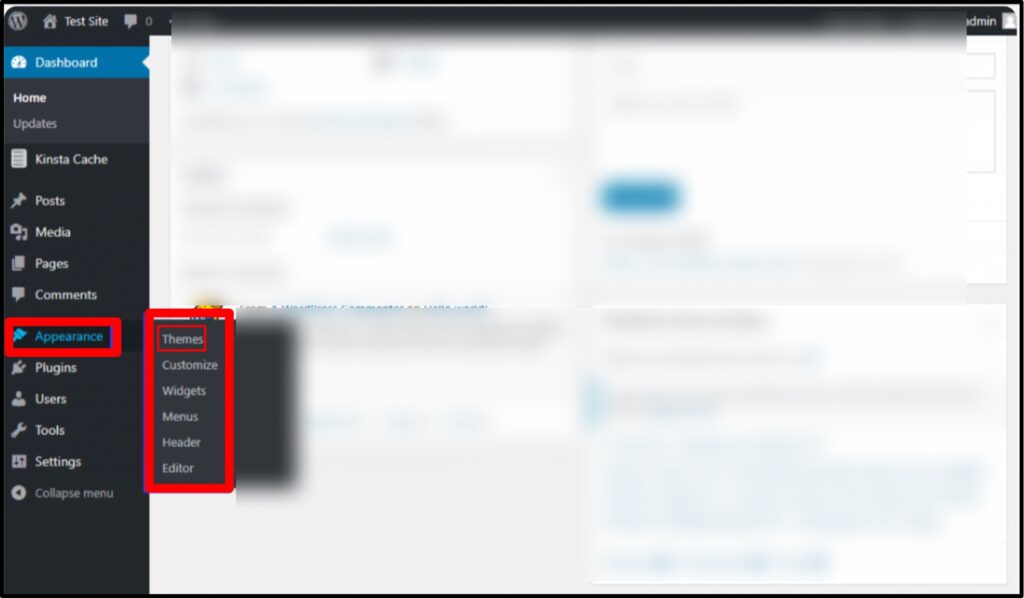
Step2) Now, navigate to themes >> From the left sidebar: Hover over Appearance >> Click Themes >> You’ll now see the Themes page showing your currently installed themes.
Step3) At the top of the Themes page >> Click the Add New Theme button >> This opens the WordPress theme library where you can browse free themes.
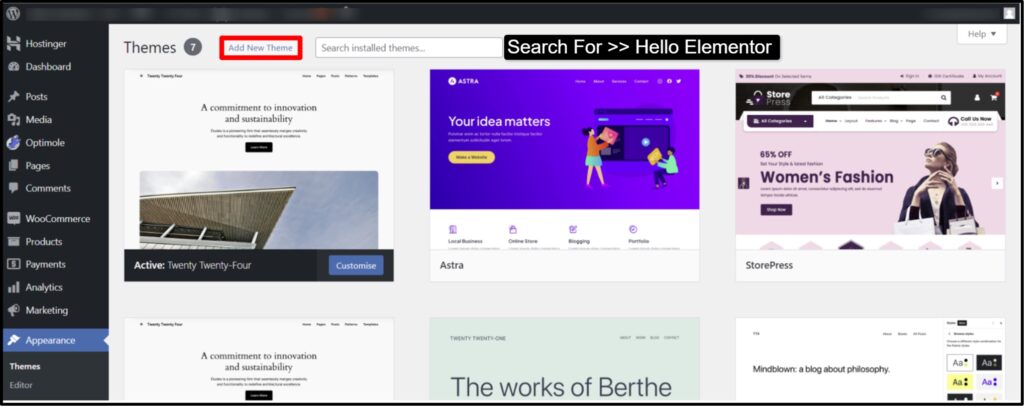
Step4) In the search bar on the right >> Type Hello Elementor >> Wait for the theme to appear >> You’ll see the lightweight Hello Elementor theme in the results.
We’ve chosen here, Hello Elementor! Why? As it’s incredibly lightweight, fast-loading and built to work easily with the Elementor builder, giving you maximum control over every pixel. If you want speed and performance, in that case, Hello Elementor is the best option.
Step5) On the Hello Elementor theme card >> Click the Install button >> Wait a few seconds for installation to complete >> WordPress will automatically download the theme from its repository.
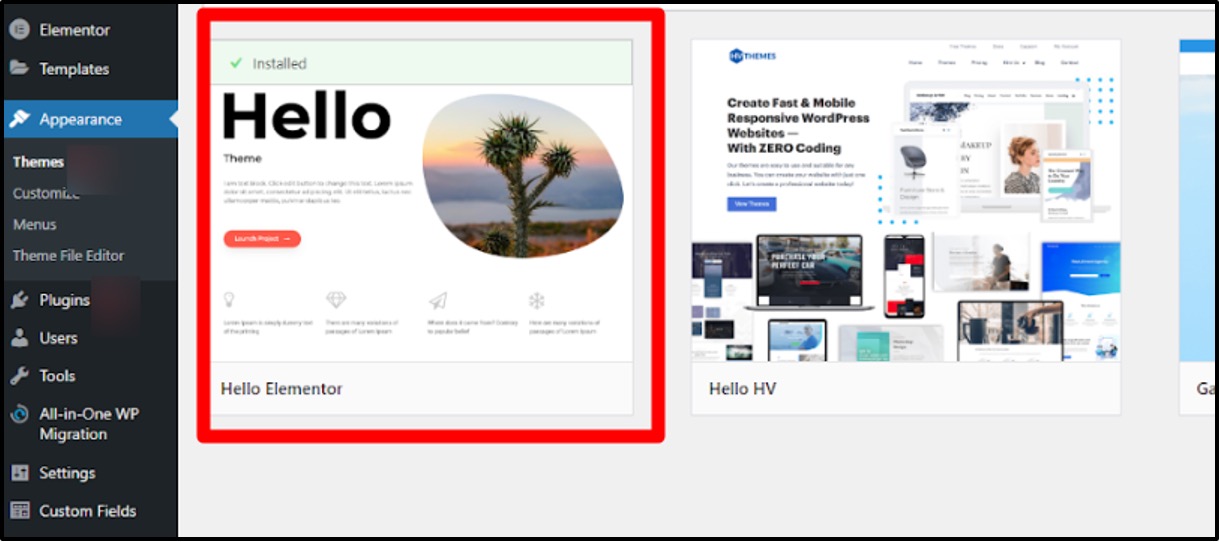
Step6) After installation finishes >> Click Activate >> Your website will now switch to the Hello Elementor theme.
And that’s how we successfully install a Free WordPress Theme on your free WordPress hosting! You just need to follow the steps properly mentioned above from scratch and you can get an engaging website for your audience.
Best Free WordPress Themes at a Glance
Short on time and just want the best free WordPress theme without digging through endless reviews? Take a quick look at the comparison table below.
| WordPress Theme | Performance | Customization | WooCommerce | Ease of Use | Hosting Fit |
| Astra | ⭐⭐⭐⭐⭐ | ⭐⭐⭐⭐⭐ | ✅ Yes | ⭐⭐⭐⭐⭐ | 🟢 Excellent |
| GeneratePress | ⭐⭐⭐⭐⭐ | ⭐⭐⭐⭐ | ✅ Yes | ⭐⭐⭐⭐ | 🟢 Excellent |
| Neve | ⭐⭐⭐⭐⭐ | ⭐⭐⭐⭐ | ✅ Yes | ⭐⭐⭐⭐⭐ | 🟢 Excellent |
| OceanWP | ⭐⭐⭐⭐ | ⭐⭐⭐⭐⭐ | ✅ Excellent | ⭐⭐⭐⭐ | 🟢 Very Good |
| Kadence | ⭐⭐⭐⭐⭐ | ⭐⭐⭐⭐⭐ | ✅ Yes | ⭐⭐⭐⭐⭐ | 🟢 Excellent |
| Hestia | ⭐⭐⭐⭐ | ⭐⭐⭐⭐ | ✅ Yes | ⭐⭐⭐⭐⭐ | 🟢 Very Good |
| Blocksy | ⭐⭐⭐⭐⭐ | ⭐⭐⭐⭐⭐ | ✅ Excellent | ⭐⭐⭐⭐ | 🟢 Excellent |
| Zakra | ⭐⭐⭐⭐ | ⭐⭐⭐⭐ | ✅ Yes | ⭐⭐⭐⭐⭐ | 🟢 Very Good |
| Sydney | ⭐⭐⭐⭐ | ⭐⭐⭐⭐⭐ | ✅ Yes | ⭐⭐⭐⭐ | 🟢 Very Good |
| Spectra One | ⭐⭐⭐⭐⭐ | ⭐⭐⭐⭐⭐ | ✅ Yes | ⭐⭐⭐⭐⭐ | 🟢 Excellent |
| Ashe | ⭐⭐⭐⭐ | ⭐⭐⭐⭐ | ✅ Yes | ⭐⭐⭐⭐⭐ | 🟢 Very Good |
| Hello Elementor | ⭐⭐⭐⭐⭐ | ⭐⭐⭐⭐⭐ | ⚠️ Via Elementor/WooCommerce | ⭐⭐⭐⭐ | 🟢 Excellent |
| Storefront | ⭐⭐⭐⭐⭐ | ⭐⭐⭐ | ✅ Native | ⭐⭐⭐⭐⭐ | 🟢 Excellent |
| Customizr | ⭐⭐⭐⭐ | ⭐⭐⭐⭐ | ✅ Yes | ⭐⭐⭐⭐⭐ | 🟢 Very Good |
| Hueman | ⭐⭐⭐⭐ | ⭐⭐⭐⭐ | ⚠️ Yes | ⭐⭐⭐⭐⭐ | 🟢 Very Good |
| Kandinsky Bento | ⭐⭐⭐⭐⭐ | ⭐⭐⭐⭐ | ❌ Not the focus | ⭐⭐⭐⭐⭐ | 🟢 Excellent |
| Writee | ⭐⭐⭐⭐ | ⭐⭐⭐⭐ | ✅ Yes | ⭐⭐⭐⭐⭐ | 🟢 Good |
| Rishi Theme | ⭐⭐⭐⭐⭐ | ⭐⭐⭐⭐⭐ | ✅ Yes | ⭐⭐⭐⭐ | 🟢 Excellent |
| Spacious | ⭐⭐⭐⭐ | ⭐⭐⭐⭐ | ✅ Yes | ⭐⭐⭐⭐⭐ | 🟢 Very Good |
| Responsive | ⭐⭐⭐⭐ | ⭐⭐⭐⭐⭐ | ✅ Yes | ⭐⭐⭐⭐⭐ | 🟢 Very Good |
| Vantage | ⭐⭐⭐⭐ | ⭐⭐⭐⭐ | ✅ Yes | ⭐⭐⭐⭐ | 🟢 Good |
FAQs
Are free WordPress themes safe to use?
Yes, Free WordPress themes are safe when used. However, you can avoid downloading the wordpress themes from unverified sources, as they may contain sort of malicious files and other related security issues. Always read the reviews, check the latest update, and ensure 100% compatibility with the latest WordPress version.
Can I customize a free WordPress theme?
Absolutely Yes!! Free WordPress themes offer quick customization options via the built-in WordPress Customizer. You can seamlessly modify layouts, color palettes, global fonts, and more. Some themes also support PageBuilders like Elementor for greater customization.
Are free WordPress themes SEO-friendly?
Yes!! For Sure!! Many free WordPress themes are built with SEO in mind, giving fast load times and optimized codes. However, SEO performance also depends on other factors, such as premium plugins, content quality, and website hosting. So, look for wordpress themes that mention SEO optimization in their features.
Can We use free WordPress themes for e-commerce websites?
Yes, some free themes, like those compatible with WooCommerce, are specifically designed for e-commerce stores only. However, free themes may have fewer other features compared to premium ones, so ensure that you choose a wordpress theme that aligns with your ecommerce store’s requirements.
What are the best free WordPress themes for beginners?
Some beginner-friendly or you can even say newbie-friendly free themes include Astra, that happens to be lightweight and fast with easy customization, then we have Neve, that’s perfect for blogs and small business websites, even we suggest OceanWP, that’s Beginner-friendly with great WooCommerce support and lastly, we recommend GeneratePress, Minimal and optimized for page builders like Elementor.
Can free WordPress themes be used for business websites?
Yes, many free themes are suitable for business or large scale enterprise websites. Just look for wordpress themes that offer portfolio sections, call-to-action buttons, business pitching hero section and engaging contact forms. For all that, we highly recommend Astra, Zakra, and Sydney.
Can I add plugins to free WordPress themes?
Absolutely! You can install and activate plugins with any free wordPress theme to extend functionality, such as SEO tools, contact forms, or performance optimization. Just make sure that the theme and plugins are highly compatible.
Can We use a free WordPress theme for multilingual websites?
Yes, many free wordpress themes are compatible with popular multilingual plugins. Be sure to check the theme’s documentation for compatibility or recommendations for multilingual setups.
Conclusion
Free WordPress theme is a game changer!! It gives a new turn to newbies who want to startup an online business but have no coding skills. So here, to help them out we have listed the top 21# best free WordPress themes that can seriously change the way of doing business or engaging with visitors.
Now, Choosing the best free WordPress theme can heavily change your website’s look, and performance. Free themes that we’ve mentioned in this article like Astra, Neve, OceanWP, GeneratePress, and Zakra offer a variety of customization options, fast loading speeds, and mobile responsiveness, making them suitable for news blogs, small business websites, and even e-commercial stores.
While free themes may lack some advanced features available in premium versions, they’re often enough to create a professional and an engaging website with Zero investment.
If you are building a niche online store, such as a jewellery brand, a general-purpose free theme may not always cover every need. In that case, see our roundup of best jewellery WordPress themes for options built specifically around product photography and WooCommerce.
Ultimately, the best WordPress theme depends upon your website’s requirements, so take your time to explore the demo versions, test customization options, and even ensure themes’ compatibility with various plugins that you intend to use. With the right free WordPress theme, you can build a sleek and functional website to achieve your organizational goals.



Table of Contents
- 21 Best Free WordPress Themes 2026
- 1. Astra - Best Overall Free Theme
- 2. GeneratePress - Best for Speed & Clean Code
- 3. Neve (Themeisle Neve) - Best for Fast-Loading Blogs & Small Business Sites
- 4. OceanWP - Best Free WooCommerce Theme
- 5. Kadence - Best for Design Control
- 6. Hestia - Best for Startups & One-Page Landing Sites
- 7. Blocksy - Best for Gutenberg + Modern Creators (YouTubers, Influencers)
- 8. Zakra - Best for Multi-Niche Professional Sites (LMS, Business)
- 9. Sydney - Best for Coaching, NGOs & Elementor Users
- 10. Spectra One - Best AI-Powered Builder
- 11. Ashe - Best for Personal Blogs & Portfolios
- 12. Hello Elementor - Best Blank-Canvas Theme
- 13. Storefront - Safest WooCommerce WordPress Theme
- 14. Customizr - Best Super-Fast Theme for Small Business
- 15. Hueman - Best Magazine-Style WordPress Theme
- 16. Kandinsky Bento - Best Minimal One-Page Personal Website Theme
- 17. Writee - Best for Community/Content-Focused Blogs
- 18. Rishi Theme - Best Core Web Vitals Theme
- 19. Spacious - Best for Podcasters & Authors
- 20. Responsive - Best for Tutors & LMS-Based Sites
- 21. Vantage - Best Zero-Budget Multipurpose Theme
- How to Choose the Right Free WordPress Theme for Your Website?
- Free vs. Premium WordPress Themes
- Best Themes for Specific Use Cases
- How to Install a Free WordPress Theme? [Step-Step Guide]
- Best Free WordPress Themes at a Glance
- FAQs
- Conclusion