Free LMS Hosting: Can You Run Online Courses for Free?

Free hosting for online courses works well for testing an LMS or for creating a demo. It also works well when you want to learn how an online learning platform actually works. But, running a live course with students (who are paying for the courses) is a different matter.
Limited server resources can affect lessons or it may affect thousands of students when they are logging into their account at the same time. This may disturb the overall learning experience.
So, does free hosting work for LMS projects beyond the testing stage? It all depends on the resources that your course needs. If you’re planning to launch an online course, you might be thinking if you really need to pay for hosting from the start.
See! You can explore several free options before investing in a hosting plan.
Platforms like Google Classroom and Gnomio offer hosted learning environments, while Moodle lets you download its open-source software and install it on a server of your choice. MoodleCloud and Coursebox AI are other options worth choosing, all depending on the features you need.
Each platform has different features and different usage limits. A free plan that works for testing your lessons may not be suitable for a course with regular student enrolments or paid access.
I am going to compare popular free LMS options, explain their limitations and help you decide when free hosting is enough and when WordPress hosting or a VPS is worth choosing.
Quick Answer: Yes! Free LMS hosting works for testing and learning how an online course platform works. But it may fall short when you start teaching those students who pay for your course. Limited storage and downtime (due to limitations in the free plan) can affect the student experience. For a live course, choose hosting based on your LMS requirements.
What “Free” Really Means for Online Course Hosting
“Free” in Free hosting for online courses means different things. It depends upon the platform you choose. Some services let you create a course and teach students through their own hosted platform. There are also some other hosting services that give you free LMS software that you must install on a server.
Now, before choosing an option, understand these three differences:
- Free LMS software: Moodle is a good example. You can download and use its software for free, but you’ll have to arrange your own hosting.
- Free hosted plan / trial: There are providers like MoodleCloud and Coursebox AI that host the platform for you. MoodleCloud offers a time-limited trial (50 users, 1GB storage and for 28 days). Coursebox AI has a free forever plan with limited course creation and AI credits (only the first 5 pages of the course is generated). Both options come with certain limits.
- Free hosted Moodle service: Gnomio offers a free Moodle website (free subdomain) with hosting included. But its free service has limits on users and other features, so check these before getting started.
The main difference is who manages the hosting and what you get for free. A free platform can be enough to test your lessons, but you should check its limits before depending on it for a live course.
Popular Free LMS Options: Comparison Table
The five options below serve different needs.
Some provide a complete hosted classroom, while others give you software or course-building tools. You can compare their free services before choosing one for your course that you want to host online.
| Option | Type | Free limit | Best for |
|---|---|---|---|
| Moodle (self-hosted) | Free, open-source LMS software | No software licence fee. You have to pay for hosting & domain. | Users who want control over their LMS and course data |
| MoodleCloud | Hosted LMS with a free trial | 28-day trial and up to 50 users and 1 GB storage. (Paid plan required to continue after the trial) | Beginners who want to test Moodle without managing a server |
| Gnomio | Free hosted Moodle service | Up to 500 registered users, 50 concurrent users, 50 courses and 2 GB SSD storage. | Teachers who want a ready-made Moodle classroom at no hosting cost |
| Google Classroom | Hosted classroom platform | Available at no extra cost through eligible Google accounts. Limits are as per the account or Google Workspace edition. | Schools, teachers, and tutors sharing assignments and learning materials |
| Coursebox AI | Hosted, AI-powered course creation and LMS platform | The free plan includes 3 mini-courses, limited AI credits, and Coursebox branding. The pricing page lists unlimited learners. | Creators who want to build and test courses with AI tools |
Which option should you choose?
- For complete control: Choose self-hosted Moodle, provided you can manage the server or pay someone to do it.
- For a quick Moodle trial: MoodleCloud handles the hosting, but the free trial expires after 28 days.
- For a free Moodle classroom: Gnomio offers hosting with stated user and storage limits. Check these limits before inviting a full class.
- For school assignments: Google Classroom suits teachers who need to distribute materials, collect work, and communicate with students.
- For AI-assisted course creation: Coursebox AI lets you build a few mini-courses before deciding whether its paid features are worth the cost.
One important thing: Moodle is free software, but running it online still costs money unless you find a free hosting service. If you want better performance and help with server management, you can also check out our guide to the best managed VPS hosting providers. YouStable is one of the hosting providers you can explore if you need managed VPS hosting for your Moodle website.
Hosted platforms handle the server for you. However, their free plans restrict storage, course creation, customisation or other features. Check the current terms before choosing one for a course that students will depend on.
When Free LMS Hosting Actually Works
Free LMS hosting can be a good starting point when you’re still learning or teaching a small group with basic requirements.
You can explore quizzes and student access before spending money on hosting. The trick is to match the free plan to your needs and understand its limits before inviting students who depend on the platform.
Solo Creators Testing an Idea
If you are planning your first online course, in that case, a free LMS lets you test lesson formats, upload study materials and try quizzes before paying for hosting. You can build a sample course and check how students would access it. This works well for a demo, before you start accepting paid student joinings.
Small Classes Under Platform Limits
Free hosting can work well for a small class, provided the number of students, storage needs, and course features stay within the platform’s limits. For example, Gnomio’s free service supports up to 50 concurrent users. Before using it for regular classes, test how lessons and quizzes perform with your expected number of students.
Schools Already Inside Google Workspace
Schools & tutors already using Google Workspace can start with Google Classroom to share notes, assign homework, collect submissions and communicate with students. It removes the need to set up and maintain a separate LMS server. It’s a really good choice for managing classroom activities, but schools needing a fully customised course website may need another platform.
Technical Users Who Want Full Ownership
If you have server administration skills, then you can choose the self-hosted option, Moodle. It gives you control over your LMS installation, plugins, course structure and all the data. You can test the software on a local machine before launching it publicly. If you want to run Moodle online you should know that it still requires suitable hosting, maintenance, backups and security updates, so free software doesn’t automatically mean free infrastructure.
When Free Hosting Falls Apart
Free LMS hosting can help you get started, but its limits become harder to manage as your course grows. The main problem is not just the number of registered students, but the problem is how many people use the platform at the same time or how much data they access or which activities they perform.
Here are six problems to watch for before you choose free hosting for regular classes.
Limited CPU and RAM
When several students log in, open lessons, or take quizzes at the same time, the server has to process more requests. A free hosting plan with limited CPU and RAM may respond slowly during busy periods. Students might struggle to open lessons or submit quizzes, particularly when several activities run at once.
Database Restrictions
An LMS depends on its database to manage student accounts, enrolments, quiz attempts, grades and course progress. Some free hosts limit database size, connections or processing resources. These restrictions can cause delays or failed requests when many students use the platform together.
Storage and File Limits
Your course materials need storage space and it can fill up faster than you expect. Videos, PDFs, presentations, assignments and student uploads all take up space. Once you hit the storage limit, you may need to delete existing files or upgrade your plan before adding new lessons. So, check how much storage your hosting plan offers before uploading your entire course.
Unreliable Uptime and Slow Response Times
A course website needs to be available when students want to study. Slow response times or unexpected downtime can interrupt lessons, scheduled classes and assessments. Free hosting services may offer limited uptime commitments or support, so check the provider’s terms before using the platform for important teaching activities.
Limited Backups and Recovery
Imagine losing student submissions, recent grades or course changes after a technical problem. Recovering that data can be difficult when automatic backups are unavailable or retention periods are short. Check how often the provider backs up your site, how long it keeps copies and whether you can restore your course yourself.
Software and Configuration Restrictions
Some free hosting services restrict PHP settings, scheduled tasks, background processes or server-level configuration. These limits can affect Moodle installations and WordPress LMS plugins that need specific software versions or settings. Before installing an LMS, compare its requirements with the host’s supported configuration.
Free hosting is a good starting point for testing your LMS, but these limitations can become frustrating as your course grows. Before choosing a free plan, think about your students’ needs, course size and expected traffic.
This will help you decide when free hosting is enough and when it’s time to switch to a paid hosting plan.
How to Decide Which Option Fits You
Choosing the right LMS depends on your budget, technical skills, course format and the number of students you expect to teach.
You might need only a free platform to test your first few lessons, or you may need a complete course website with student accounts, quizzes, payments and progress tracking.
Start with your current requirements, then choose an option that can support your next stage of growth.
If You’re Just Testing an Idea
If you’re planning your first online course and just want to test it, start with a free LMS instead of paying for hosting straight away.
Platforms such as Google Classroom and Gnomio let you explore how student access works. You can upload sample materials, organise topics and ask a few people to test the course before launching it publicly.
MoodleCloud is another option if you want to try Moodle without setting up a server. Its free trial gives you a chance to explore the platform, but you’ll need to consider a paid plan after the trial ends.
Coursebox AI may suit you if you want to experiment with AI-assisted course creation.
At this stage, focus on testing your course structure and identifying the features you actually need. Once you have a clear idea of how your course will work, you can decide whether free hosting is enough or a paid setup makes more sense.
If You Have Some Technical Skill
If you’re comfortable working with servers, databases and website configuration, self-hosted Moodle gives you more control over your learning platform. You can download the software, install it on a suitable server, choose supported plugins and customize the course environment according to your needs.
You can start by testing Moodle on your local computer or a development server. This lets you learn how enrolments, quizzes, assignments and course settings work before making the site available to students.
When you’re ready to publish your Moodle site, choose a hosting plan that meets Moodle’s system requirements. If you have some technical skill and want to experiment with Moodle or another PHP-based LMS, you can try free PHP hosting.
Make sure that before you install Moodle, you check that the hosting plan supports the required PHP version, memory limit, database access, storage space and scheduled tasks. Free hosting may work for basic experiments, but a full LMS with multiple students may need more server resources.
Some free hosts restrict the resources or settings an LMS needs.
Also, remember that self-hosting comes with ongoing work. You’ll need to manage software updates, security, backups, and server performance. A paid VPS can be a better option when you need greater control over server resources and configuration.
If you’re new to website building, you can first practise setting up a WordPress website on free hosting before installing an LMS plugin. This will help you get familiar with the WordPress dashboard and basic website settings.
Follow our step-by-step guide on how to install WordPress on free hosting. Once your website is ready, you can test an LMS plugin and check whether your hosting plan meets its requirements.
If You’re Already Selling Courses
If students are paying to access your courses, your priorities change. In that case, you’ll need a platform that can handle enrolments, student logins, quizzes, payments and course materials properly.
Slow pages or unexpected downtime can disrupt lessons and affect the experience students receive for their money. So, make sure of these things:
- Start by checking the limits of your current platform.
- Look at storage usage, server response times, database activity, backup options and the number of students who use the LMS at the same time.
- Remember that 500 registered students don’t necessarily create the same workload as 500 students taking a quiz simultaneously.
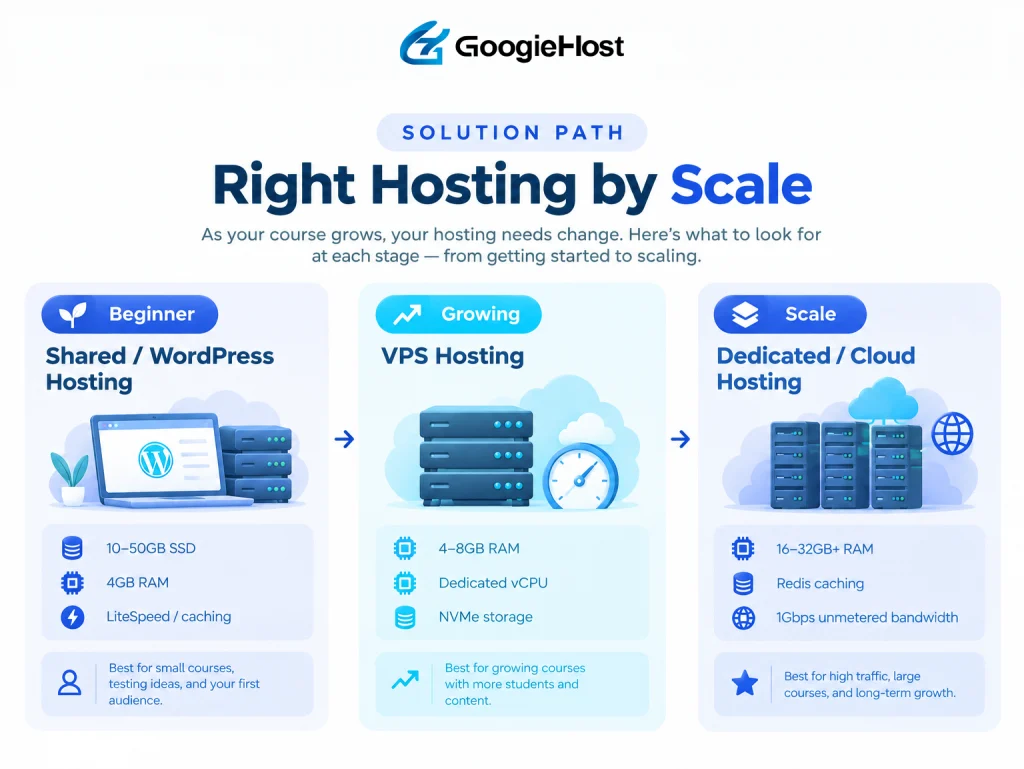
For a WordPress-based course website, managed WordPress hosting can be a practical starting point, provided the plan meets your LMS plugin’s requirements. You can explore our guide to the best LifterLMS hosting if you’re planning to build your course with that plugin.
A VPS is worth considering when your course needs more CPU and RAM, custom server settings, or greater control over background tasks.
Before upgrading, test your expected workload and check the provider’s backup, security, and uptime arrangements. Choose a plan that fits your actual needs rather than paying for resources your course doesn’t use yet.
When You Must Move to Paid Hosting
Free hosting can be enough for testing Moodle or running a small demo, but it may struggle as your number of students grows.
If your LMS starts loading slowly, runs out of memory, or needs more storage and scheduled task support, a paid hosting plan may be a better choice. To understand the differences in cost, performance, features and support, read our guide to Free Hosting vs Paid Hosting.
The right time to upgrade depends on your LMS and student activity. Here are the warning signs that suggest your current setup may no longer be suitable.
| Upgrade signal | Why it matters |
|---|---|
| 100+ students using the LMS simultaneously | Many concurrent logins, quiz attempts and database writes can strain limited server resources. |
| Lessons and quizzes load slowly | Slow responses may indicate CPU, RAM, database, or storage bottlenecks. |
| You are reaching the storage limit | Videos, PDFs, assignments and student uploads can fill your allowance. This leaves a little room for new course materials. |
| You are accepting payments for courses | Students expect reliable access to the content they purchased. Downtime or lost progress can lead to complaints, refund requests and lost revenue. |
| You need regular backups and quick recovery | Course content, enrolments, grades and student submissions need protection. A paid plan with suitable backup options can reduce the risk of losing important data. |
| Your LMS needs custom server settings | Some free hosts restrict PHP settings, scheduled tasks, background processes or other configuration options required by your LMS. |
| You need dependable support and uptime commitments | A course outage during a scheduled class or assessment can disrupt learning. |
| Your course traffic keeps growing | More active students and heavier database activity may require additional CPU, RAM or database capacity. A scalable hosting plan gives you room to adjust resources as demand changes. |
Remember: A poorly configured LMS may struggle with far fewer users, while a well-configured server may handle more. Test your expected workload before choosing a hosting plan.
What to Look for in Paid LMS Hosting
Once your online course starts attracting students, your hosting plan needs to handle logins, lessons, quizzes, assignments, and student records reliably. Now, just before you purchase a plan, check the following features to make sure the server meets your LMS requirements.
- SSD/NVMe storage: Faster file access for course materials and database operations.
- PHP 8.1+ and 256 MB+ PHP memory limit: Check compatibility with your LMS and its plugins. Follow the software’s current requirements.
- Free SSL certificate: Encrypts connections between students and your course website.
- Automatic backups: Protects course content, student records, and assignments.
- FFmpeg support: Useful for self-hosted video processing and transcoding, when your course setup requires it.
- 99.9%+ uptime SLA: Look for a written uptime commitment and clear compensation terms.
- DDoS protection: Helps protect your LMS from traffic attacks that could disrupt access during busy classes.
Before you buy: Compare these features with your LMS’s official system requirements and expected student activity. A suitable hosting plan should meet your current needs, protect your course data and give you room to grow as more students enrol.
FAQs
Is Moodle free forever?
Yes! Moodle’s core software is free and open-source. You can download and use it without paying a software licence fee.
Can I run an LMS on shared hosting?
Yes! You can run an LMS on shared hosting, but make sure that the hosting plan meets the software’s system requirements. A small Moodle or WordPress LMS website may work well for a class with modest traffic.
How much RAM do I need for 100 concurrent students?
There is no fixed RAM requirement for 100 concurrent students. The amount totally depends on your course content and the tasks students perform. A quiz session may use more resources than reading a lesson. So, always start with the software’s recommendations, then run load tests to estimate the amount of RAM that your course needs.
Do I need separate video hosting for my course videos?
Yes! Separate video hosting is usually a good choice for courses with many videos or regular student traffic. Streaming videos directly from your LMS server can consume bandwidth and server resources. A dedicated video platform can handle video delivery while your LMS manages lessons, enrolments, quizzes and student progress.
What’s the best free LMS for beginners?
Google Classroom is the best free LMS for beginners as it allows the newbie teachers to share assignments and learning materials for zero cost. If you have any other option in mind, just make sure to compare free-plan limits before deciding which platform is really good for your needs.
Can I sell courses on a free LMS?
Yes, you can sell your courses on a free LMS. It supports paid courses, but you may need payment integrations, enrollment controls and a way to restrict lessons to paying students. Please also check for any transaction fees and commercial-use terms before launching.
What happens when I outgrow a free plan?
When you reach a free plan’s limits, you may experience slow loading, run out of storage, or need features that the plan doesn’t provide. Check your upgrade options before problems arise.
Conclusion
Free hosting for online courses is a good starting point for testing an LMS, building demos, or learning how course platforms work. But the courses that require the students to pay need reliable performance regular backups.
If you’re starting with WordPress and an LMS plugin, consider WordPress hosting that meets your course requirements. For growing courses that need more RAM, CPU resources, and server control, a VPS may be a better fit.
Start with free hosting to test your idea, then upgrade when your students and course requirements call for it.