How to Choose the Best Free WordPress Hosting in 2026

Are you a student wanting to put your academic portfolio online but you don’t have extra pocket money to spend on hosting? Are you wanting to show your achievements, skill certificates, projects or your CV on your own website, without paying anything?
Once you’re ready to move beyond a free plan, our guide to the best WordPress hosting in India covers affordable paid options built for Indian website owners.
If you’re trying to find the answers to these questions, in that case, you’re absolutely at the right post where we’re gonna reveal to you how to choose the best free wordpress hosting in 2026 if you want to build a strong online presence by sharing your experience and projects.
Even if you’re wanting to start your own online store for your products, you should read this blog, as here, we’re going to help you understand how to choose the best free WP hosting to launch your e-store on a small scale. We’ll talk about what matters, like speed, storage, uptime, ease of use, limitations, and other related things.
By the end of this guide, you’ll clearly know what factors make a free WordPress hosting provider the right choice for you. 👍
Once you’ve picked your provider, follow our complete guide on how to start a WordPress website for free to get your site live in a few easy steps.
What to Expect From Free WordPress Hosting
You can expect a lot from free wordpress hosting! It’s a free starting point for students and startup bloggers who want to go online without spending even a single dollar. WordPress free hosting gives you the basic tools to publish your work and showcase your projects.
You might be thinking, Will my website load properly or will it look professional if We use free WP hosting?
The reality is, free WordPress hosting is built for newbies (students & struggling professionals) who want to start small. See! It doesn’t offer premium features, but it provides everything you need to create a portfolio (with your CV, projects and blogs), and a complete online presence.
So, let’s see what to expect (What you get) from free wordpress hosting:
Storage Limitations
It usually comes with limited storage space, which means you can upload a certain number of images, pages, and blog posts. Best free wordpress hosting for students, who are just starting out, this storage limit is more than enough. Since you don’t have a huge website in the beginning, limited storage encourages you to keep your content clean and organized.
Bandwidth Restrictions
Bandwidth limits control how many visitors can access your website in a month. Free wordpress hosting plans are built to handle small to medium traffic, which is absolutely perfect for personal portfolios and beginner blogs. In the early levels, you usually won’t receive massive traffic, so these limits rarely become a problem. It allows you to test your content and understand your audience.
Subdomain vs Custom Domain Support
The free wordpress hosting provider, like googiehost, offers a subdomain like xyz.googiehost.com, while some allow custom domains as an upgrade. For newbie bloggers, a subdomain is a great way to start as it lets you go online instantly without buying a domain. It still allows you to share your link on resumes or on LinkedIn.
Performance and Uptime Expectations
If you talk about premium-level speed, free hosting may not offer that, however, it usually provides stable uptime suitable for starting websites (like students’ project websites). Free wordpress hosting’s performance is generally smooth to handle the starting small traffic and website operations. This ensures your work remains visible to visitors whenever they check your website link.
Customer Support Access
Customer support in free hosting is usually limited to FAQs or knowledge bases. While you may not get instant LiveChat support, these resources are often helpful for beginners learning how WordPress works. You gain technical knowledge while solving small issues on your own. And when you decide to scale up, paid wordpress plans normally offer faster support options.
Key Features to Evaluate (Checklist)
Now, before choosing the best free WordPress hosting, it’s important to know exactly what to look for. That’s why below we’ve laid down all the important features you should check before making a decision. Think of this as your complete checklist, especially helpful if you’re just starting who has no technical background at all.
Instead of feeling confused by different hosting options, this checklist helps you clearly understand what matters and what you simply can’t ignore.
| Even if you’re just hosting a student portfolio or a simple blog, all these features affect how professional your site feels. |
Performance & Speed
When it comes to free WordPress hosting, performance and speed should be at the top of your checklist. A slow website can frustrate visitors and make them leave within seconds.
- Server Response Time: This means how quickly the hosting server acts when someone clicks to your website. The faster it responds, the quicker your site loads. Even on a free plan, you should look for decent response time so your content doesn’t feel laggy.
- Caching Support: It helps your website load faster by storing a temporary version of your blog pages. Some free hosting providers offer basic caching features, which can improve speed. This is also important because faster websites feel better to users and perform better on Google.
- CDN Availability: A CDN (also known as content delivery network) stores your website content on multiple servers around the world. This means that your visitors can access your site from the server that’s closest to them, improving speed. Even if your audience is small, having CDN support can make your site load faster globally.
Uptime Guarantee
What is Uptime? Uptime means how much time your website stays online and accessible to the viewers. If your website frequently goes offline, visitors won’t be able to see your blog. Even free hosting providers should offer an uptime guarantee >99%.
- Why Uptime Matters: Imagine, you’re sharing your website link with someone and they find it unavailable. That creates a bad impression instantly! Good uptime ensures your site is accessible whenever someone clicks on it.
- Average Uptime Expectations for Free Hosts: Free hosting may not offer 99.99% uptime like premium plans, but you should still expect more than 99% uptime. Anything lower than 99% can cause heavy downtime. Please check the uptime reviews before choosing a host.
Security & Backups
Security is something which you should never ignore, even when you go for free wordpress hosting. Your website contains your hard work, be it a blog post or a project detail. A good free hosting provider should offer basic protection features to keep your data 100% safe.
- SSL Certificate Availability: What does it do? See! An SSL certificate secures your website and shows “https” in the browser. It protects data and builds trust with visitors. Most free hosts now provide free SSL, and you should always make sure this feature is included.
- Automatic Backups: Backups are like your content’s safe house. If something goes wrong, you can restore your website easily. Free hosting offers limited automatic backups, and that’s a big advantage.
- Malware Scanning & Firewalls: Basic malware protection & firewall systems protect your site from hacking attempts. Even small websites can be targeted, (Let’s say, your project earns recognition worldwide) so this feature is important. It keeps your content safe and ensures your site remains secure.
Ease of Use
We know it well that if you’re just starting with a blogging wordpress website, free wordpress hosting can make your life easier. As a newbie, you want a platform that’s simple and beginner-friendly. A complex, difficult to understand dashboard can feel confusing for the students or if you’re new to website building.
- User-Friendly Control Panel: A simple (easy + simple interface) control panel helps you manage files, domains and settings easily. You don’t need technical skills to run a basic website. The easier it’s to navigate, the more confident you’ll feel managing your site.
- Site Management Tools: Basic tools like file managers, database access and best free WordPress themes installation options make managing your website smooth. These tools / plugins (you can install them for free on WordPress) allow you to customize your website.
- One-Click WordPress Install: It means that you can set up WordPress without any sort of technical knowledge. Instead of manual coding, you just press a button and your site is ready. This is good for student bloggers, this saves time and can devote extra efforts in building more projects.
Scalability
Even if you’re starting small, you should think about growth. What happens if your blog suddenly gets popular? As your traffic increases, you can also scale to greater & affordable wordpress hosting. This feature, Scalability, ensures your web hosting can handle that growth.
- Room to Grow with Traffic: Your hosting should allow some flexibility in traffic handling. Even if it’s limited, it shouldn’t crash immediately when you get more visitors. This gives you space to grow naturally.
- Upgrade Paths to Premium Plans: A good free host should offer simple upgrade options. When your website grows, you can move to a paid plan without migrating everything manually. This makes scaling smooth and stress-free.
Storage & Bandwidth
Now, let’s learn if your website content gets storage and proper bandwidth on a free wordpress hosting plan or not? And the truth is, Yes, It does! Storage and bandwidth decides how much content you can upload and how many visitors your site can handle. These are basic important features.
- Minimum Requirements to Avoid Issues: Make sure the free plan offers enough storage for images, pages and blog posts. low limits can cause issues quickly. You want enough space to run your site comfortably.
- Recommended Limits for Small Sites: For a small portfolio or beginner blog, moderate storage and bandwidth are usually enough. Choosing a plan with slightly higher limits ensures you won’t outgrow it too quickly. It gives your online presence a stable foundation.
Support & Resources
And Yes! You can also expect Support and valuable knowledgebase resources from free wordpress hosting service providers. Students and bloggers with no coding experience, need help at times when setting up a website, customizing it and fixing bugs when issues erupt. That’s why support and learning resources matter.
- Forums, Tickets, Live Chat, Docs: Free hosting usually provides help through documentation, forums or ticket systems. While live chat may be limited, good knowledge bases can solve most beginner problems. It helps you learn while fixing small issues.
- Speed of Issue Resolution: Support speed may not be instant on free plans, but it should still be reasonable. Quick issue resolution ensures your website doesn’t stay down for long. Reliable support builds confidence, especially when you’re just starting your online journey.
Types of Free WordPress Hosting
One more thing before we understand how to install WordPress on free hosting, it’s important to understand the different types of free wordpress hosting available. As a student building your academic portfolio or a struggling professional trying to create an online profile, every free option won’t suit your needs.
Some are great for quick and simple websites, while others give more flexibility + growth potential. When you understand the type of hosting you’re signing up for, you can see if it matches your goals or not
Free Subdomain Hosts (e.g., xyz.wordpresshost.com)
First, let’s understand what free subdomain hosting is. It means your website runs on the provider’s main domain. Instead of getting xyz.com, you get something like xyz.theprovider’sname.com.
This is one of the most common types of free WordPress hosting because it allows users to go online instantly and that too without buying a domain name. It’s good for students and struggling professionals who have limited or no budget to start an online presence.
You don’t have to spend money on a customized.com /.us domain, and you can still publish your portfolio or your resume or blog posts. It’s absolutely perfect for testing ideas and building confidence.
While it may look slightly less professional than a custom domain, it still allows you to create a functional and shareable website.
Free Trials vs Permanently Free Plans
When exploring free WordPress hosting, you’ll normally come across two options:
1) Free trials &
2) Permanently free plans.
Understanding the difference is important before signing up.
A free trial normally gives you access to premium hosting features for a limited time, like 7, 14, or 30 days. After that period, you must upgrade to continue using the hosting service. This option is good if you want to test high-quality hosting before paying for it.
However, it’s not a long-term free solution.
A permanently free plan, on the other hand, like that offered by GoogieHost, allows you to host your wordpress website for free without any time limits. These plans usually come with restrictions like limited storage or features. If you’re a student and don’t want to invest even a single cent, in that case, a permanently free plan is the best choice.
Let’s understand a Free Trial and a Permanently Free Plan with the help of a table:
| On What Basis? | Free Trial | Permanently Free Plan |
| TIME | Only for 7 to 30 days | Forever Free |
| COST | Requires payment to continue ($0.01 to $3) per month | No Cost at all ($0 per month) |
| FEATURES | Includes Premium features (99.99% Uptime, 10GB to 30GB NVMe SSD storage, 2GB to 4GB RAM) & Unmetered Bandwidth | Includes basic features (99% Uptime, Upto 10GB NVMe SSD Storage, 1GB RAM & limited Bandwidth) |
| BEST FOR | Testing (Developers / e-store) | Students to host school projects |
| RISK | Website may stop if not upgraded | Prolonged Downtime can be an issue here |
Community vs Proprietary Hosting
Another important distinction in free WordPress hosting is between community-based hosting and proprietary hosting platforms. This affects flexibility and customization.
Community hosting provides an open-source environment where users have more freedom to customize WordPress. These platforms often allow plugin installations. They’re good for users who want more control and are willing to learn basic technical management.
Now, proprietary hosting, on the other hand, is controlled entirely by one sole hosting provider. You get a simple dashboard, limited customization, licence to use the hosting service and predefined tools. It’s easier for newbies but may restrict advanced changes.
If you’re a struggling newbie professional, the choice then totally depends on your comfort level. If you want simplicity and zero technical stress, proprietary hosting is easier and if you want flexibility, in that case, community-based hosting gives you more room to experiment.
| On What Basis? | Community Hosting | Proprietary Hosting |
| Control Level | High Customization Freedom | Limited Customization |
| Plugins | Usually Allowed | Often Restricted |
| Technical Knowledge | May require basic learning | It’s 100% newbie friendly |
| Flexibility | More Flexible | More controlled environment |
| Best For | Users who want control & growth | Users who want simplicity |
Understanding these types of WordPress hosting helps you choose smarter. Instead of randomly selecting any free plan, you now know how to match the hosting type with your personal goals and budget.
How to choose the best free wordpress hosting in 2026 [Step-By-Step Guide]
Now, in this part, we’re going to learn how to choose the best free wordpress hosting in 2026, a proper step-by-step guide. We’ll explain the entire procedure so that you can get a complete idea about how to choose the best free WP hosting, how to install and use it to start a student blogging website. So, let’s get started right away:
We chose GoogieHost as it offers truly WordPress free hosting services with no payment details required, making it good for student bloggers or struggling professionals. With its easy sign-up process, you can get started in seconds and even receive a free subdomain to launch your site instantly.
It includes all the basic free WordPress hosting features you need, along with a simple one-click WordPress setup. On top of that, GoogieHost provides back-to-back LiveChat support from hosting experts, ensuring you always have help whenever you need it.
Step 1) First, go to the official site of GoogieHost’s free wordpress hosting (Simply, click at the link) >> Now, click the Register Now button to proceed further with the process. You’ll be redirected to free wordpress hosting vs paid wordpress hosting.

Step 2) As you click the Register Now button >> Press Proceed with Free button >> You even include a paid Lifetime web hosting service (If you feel like upgrading the wordpress hosting plan in near future, you can go with this free lifetime web hosting option).

Step 3) As per the screenshot given below, you first need to go to Use a SubDomain From GoogieHost tab >> Click that Tab >> Enter a name for your domain (keep it engaging) >> Select a free subdomain extension >> Press the Click Here button to proceed.

Step 4) After you’ve chosen your domain name and the free subdomain extension >> You reach the review page, See the order summary >> Press the Continue button.

Step 5) Now, you’re re-directed to a last step confirmation >> It’s simple >> Simply click the CheckOut button to carry on.
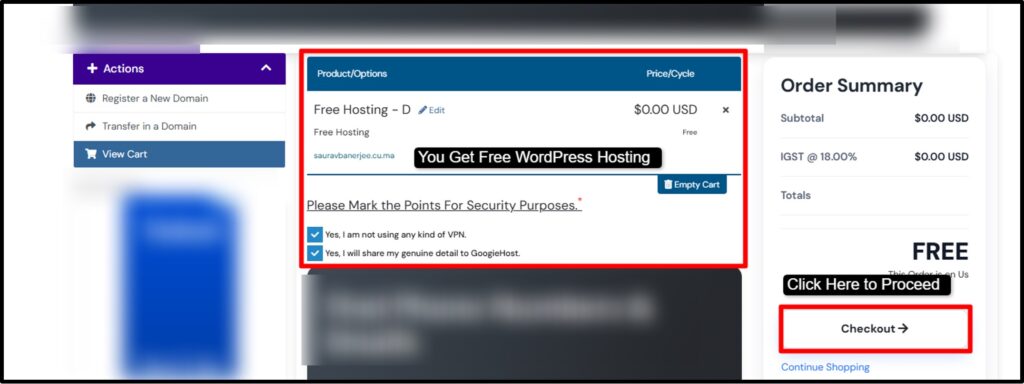
Step 6) Here, you need to create a new googiehost hosting account, if you’re new here >> Click the Create a New Account button, add all the necessary details like your name, billing address and generate password. If you’re already a member, simply click Existing Customer, enter your valid email id and password to Login >> Lastly, press the Complete Order button.

Step 7) Once your account activation process is completed by the GoogieHost support team >> Login to your GoogieHost free wordpress hosting account >> As you reach the dashboard, you need to click the Service Tab right below the Account Overview heading.

Step 8) You now reach the service page >> Select & Press the free subdomain service you have just registered for.

Step 9) Now, click the Go to DirectAdmin >> Scroll down and click the WordPress option. You can find the WordPress tab just below the Softaculous Apps Installer heading >> As you click WordPress, you need to install it.
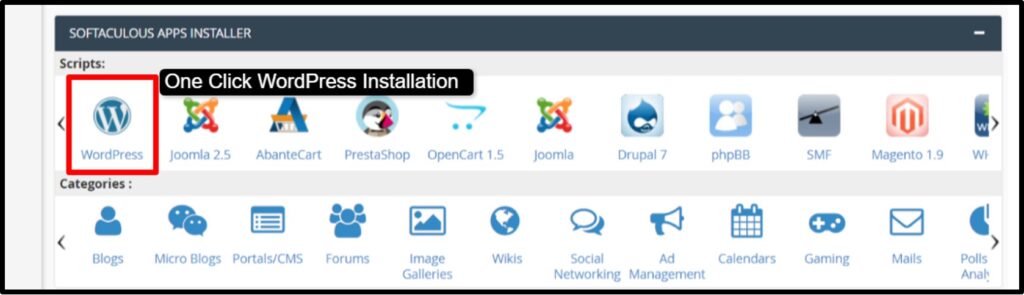
Step 10) After installing wordpress, Go to its admin and set up your first blogging website >> Use the drag and drop website builder feature to design all the pages of your project portfolio website and write engaging content to boost ranking in Google SERP.
If you follow the steps given above, we guarantee you that you’ll end up having a free wordpress website for your blogging or for your school projects. You can then use your website link and share it with the stakeholders who are interested in your work profile.
FAQs
Is free WordPress hosting safe to use in 2026?
Yes! Free WordPress hosting is safe to use in 2026 but only if you choose a trustworthy wordpress hosting provider. Good free hosts offer basic security features like SSL certificates, malware scanning and regular backups. Always check reviews and the security features before signing up to make sure your blogging site stays secure.
What are the main limitations of free WordPress hosting?
The main limitations of free WordPress hosting are limited storage, lower bandwidth, slower speeds and fewer customization options. Many free plans restrict plugins, themes or advanced features! You may also get a subdomain instead of a custom.com domain. Free hosting is good for starting, but it usually has some restrictions that can affect growth.
Can We use a custom domain with free WordPress hosting?
Yes! You can use a custom domain with free wordpress hosting. If you already have a custom domain, in that case, you simply need to add the custom domain when signing up for free wordpress hosting.
Is free WordPress hosting good for SEO?
Yes! Free WordPress hosting is good for SEO. Slow loading speeds & limited optimization tools can affect rankings. While you can still create quality content and use basic SEO settings and competitive rankings usually require better performance and control that paid hosting offers.
How much traffic can free WordPress hosting handle?
Free WordPress hosting is usually designed to handle low to medium traffic. It works well for personal blogs, student portfolios, or small startup experiments. If your site starts getting high traffic, you may experience slow loading times or temporary downtime.
Do free WordPress hosting providers show ads on my website?
No! Free WordPress Hosting doesn’t show ads on your website. GoogieHost’s free wordpress hosting doesn’t display ads on your website. However, if you go for another free wordpress hosting provider, remember to check the terms & condition how ads are handled before choosing a host.
Can I upgrade from free hosting to a paid plan later?
Yes! You can upgrade from free hosting to a paid plan later! If you upgrade to a paid plan, you can scale your website when you need more storage, better speed, advanced features, or when you need a custom domain.
Who should use free WordPress hosting in 2026?
Students (building academic portfolios), professionals (Creating online profiles), bloggers (testing ideas) and startups (experimenting with small e-stores) should use free wordpress hosting. It’s good for newbies who want to learn and go online without any sort of risk.
Conclusion
As per our in-house research reports, more people than ever are moving from offline to online. Over 70% of small businesses and professionals who built an online presence saw better visibility and growth opportunities within the first year.
Many of them started with a WordPress free hosting that played a big role in helping them take that first flight of growth. When you don’t have to worry about hosting costs, you can focus on building your brand.
Free WordPress hosting makes it simple! It lets you go online at $0 cost, designs your basic website layout, hosts your content and allows you to customize everything with drag-and-drop builders. You can add pages, upload images, write blogs, install themes and manage widgets, in just one click for free.
In this post, we’ve helped you understand how to choose the best free WordPress hosting and explained the important factors you should never ignore.
Now it’s your turn! Take the first step & Go online today.