Table of Contents
- Who This Guide Is For
- What to Expect from Free WordPress Hosting?
- Top 7 Best Free WordPress Hosting Options for Students 2026
- 1. GoogieHost - Overall Best Free WordPress Hosting for Students
- 2. Wix - Best Free WordPress Hosting for Students
- 3. Weebly - Simple, Smart and Free WordPress Hosting for Students
- 4. 20i - Fast, Reliable Free WordPress Hosting for Students
- 5. InfinityFree - Unlimited Free WordPress Hosting for Students
- Any Student-Specific Perks
- 6. FreeHosting - Best Free WordPress Hosting Platform for Students
- Any Student-Specific Perks
- 7. ByetHost - Fastest Free WordPress Hosting for Students
- How to Choose the Best Free WordPress Hosting (For Students)
- Step-by-Step: How to Set Up WordPress on Free Hosting
- Tips for Students Using Free Hosting
- Benefits of WordPress Skills for Students
- When to Upgrade to Paid Hosting
- FAQs
- Conclusion
- Top Free WordPress Hosting Providers Comparison 2026



7 Best Free WordPress Hosting for Students 2026
Are you a student? Wish to start your own website or portfolio? Choosing the best option in WordPress hosting is a crucial step for you. There are so many options when it comes to WordPress hosting, but not all of them are student-friendly, nor do they provide you with the desired result.
So if you’re a student looking for a good WordPress hosting option, then this blog will guide you through it all so that you don’t need to spend hours finding your best free WordPress option or need to spend a lot of money on it. In fact, many hosting options offer you free services.
Students who wish to create personal blogs, assignments, academic work, or any kind of project need to understand how the right WordPress hosting platform can actually make a difference to their work.
In this blog, we will guide you to explore some of the best free WordPress hosting for students that are free, beginner-oriented, and reliable at the same time.
Who This Guide Is For
This blog is a helpful guide for students who want to create their own website and are looking for free, easy-to-use options. If you’re a student and new to website creation, this guide is for you.
- Students who want to create a website on a budget. Between your tuition fees and school expenses, spending a lot of money on a website is completely impractical. Here, we will cover you with multiple student-friendly options.
- Even if you’re a beginner in web development or want to create your blog, choosing the right WordPress platform can make your journey easy. To work as a beginner, you need a simple platform with a straightforward setup and easy management. You don’t need to go into the technical skills to make your work complicated.
- Students who wish to create their portfolios or want to make small projects to show their talent or their skill on one platform. A portfolio website will be helpful for you, where you can present everything in one place. It will be easier for your teachers, supervisor, or collaborators to see your workspace and understand what you can do.
What to Expect from Free WordPress Hosting?
Free WordPress hosting is a great place for students to make their work professional and organized. For students, it’s a good starting point for those who wish to create their own website or blog without spending a lot of money.
It’s important to understand every aspect relating to WordPress hosting and how it works, what the benefits are, and how it’s going to help you academically. WordPress hosting offers several features and limitations compared to paid hosting platforms.
There are certain differences when it comes to free WordPress hosting and paid hosting.
Now, we will tell you about the limitations of the Free WordPress Hosting vs. the Paid WordPress Hosting
Limitations of Free WordPress hosting
Free WordPress hosting for students is a good starting point for beginners and students, but it has certain limitations to its use, like
- Performance: Multiple shared servers can slow down your process.
- Storage: Limited space is going to restrict the uploading of images and files.
- Uptime: websites even tend to go offline occasionally.
Limitations of Paid WordPress Hosting
Now, if we talk about the paid hosting solutions, though it offers better and advanced features but still have some limits like
- Performance: Shared servers affect the speed of the website.
- Storage: As per your plan, you get the space.
- Uptime: It’s reliable most of the time, but occasional downtime could happen.
See, there are a lot of options available for WordPress hosting platforms, be it free ones or paid ones. But let’s talk about the top free WordPress hosting options for students.
Top 7 Best Free WordPress Hosting Options for Students 2026
There are multiple options available in free WordPress hosting options that are available for students and even beginners who wish to create their own website, start blogging, and even learn about web development and practice the tools.
With time, your website will start to grow and will require better storage, more space, and advanced features to handle the heavy traffic, so you can always upgrade to the premium plans of the hosting options.
Specifically for students who are looking to gain practical experience and improve their skills, free WordPress hosting is the best solution to provide a risk-free and effective result.
After careful analysis, we have identified some of the best free WordPress hosting platforms, so let’s explore them all in detail.
1. GoogieHost – Overall Best Free WordPress Hosting for Students
2. Wix – Best Free WordPress Hosting for Students
3. Weebly – Simple, Smart and Free WordPress Hosting for Students
4. 20i – Fast, Reliable Free WordPress Hosting for Students
5. InfinityFree – Unlimited Free WordPress Hosting for Students
6. FreeHosting – Best Free WordPress Hosting Platform for Students
7. ByetHost – Fastest Free WordPress Hosting for Students
1. GoogieHost – Overall Best Free WordPress Hosting for Students
GoogieHost

Pros
- Good for learning and testing for Students.
- Easy WordPress installer, easy for beginners.
- Free subdomain provider.
- Students can easily create their own website.
- It provides a free SSL certificate.
Cons
- GoogieHost’s offering of free WordPress hosting offers limited storage as compared to paid hosting plans.
- Since free servers are shared among multiple users, it may take a longer time to load.
Summary
GoogieHost comes first in the picture to be called the best free WordPress hosting for students, as it’s popular, reliable, and fast in providing their 100% best WordPress hosting solutions. It’s a perfect hosting platform for students with no hidden charges and dependable uptime.
They cover their premium level of features in the free WordPress hosting, delivering the ultimate user experience and providing quality hosting.
Price: USD Free
Visit GoogieHostLet’s see some of its key features to understand it better.
- Free Web Hosting: GoogieHost offers free WordPress hosting for students, which requires no credit. This feature easily allows beginners and students to start on their website journey without any initial cost.
- NVme hosting: It means the free web hosting that uses the NVme (Non-Volatile Memory Express), which is a modern technology used by GoogieHost, is a type of storage that’s much faster than the old hard drives (HDD) and the regular SSD storage.
- Website migration: The migration services of GoogieHost help move a website easily from one hosting server or platform to another without losing the information. It means they transfer all the files, emails, or data so that the website even continues to work normally on any new host.
- Easy Control Panel: GoogieHost provides a reliable, effective, and easy control panel for students. For free users, it provides them with an amazing hosting platform that are suggested by the leading hosting platforms.
- 24*7 Support: GoogieHost completely believes in 100% customers satisfaction. Although they have a simple setup process, still if you face any issue, you can look upto their blog tutorials and even contact them via email for any instant help.
Best Use Case
GoogieHost is Best for:
- You can easily create a personal portfolio website, which is best for beginners and students, as you get free hosting along with a free subdomain. It readily supports WordPress. It’s easy to set up and requires no coding skills.
- Students can practice and learn web development and different testing projects. It allows you to test websites live on the internet and requires no money to buy the costly hosting, and learning also.
Any Student-Specific Perks
For students, GoogieHost is the best free WordPress hosting solution with ad-free hosting, providing them 1000 MB storage, free SSL certifications, making the educational journey perfect with no cost. It also offers them a lifetime membership for just @$25.
2. Wix – Best Free WordPress Hosting for Students
Wix

Pros
- Easy setup.
- Multiple template options.
- Creation with Wix becomes easy.
- Variety of features.
- Uses several tools to optimize your website for search engines.
Cons
- The free plan is hindered by a number of times because of ads about the Wix branding.
- Once you choose any template, it gets locked, as switching to another template becomes difficult, so choose your template wisely.
Summary
Wix is the one free WordPress hosting platform that says that you can do limitless creation and make your website journey successful with them. Wix is known for giving the best website creation services without any charges or knowledge of coding or programming.
Wix is a cloud-based hosting platform that allows students to easily use a drag-and-drop editor. This means that students can easily drag and drop text, images, or videos and create their website.
Price: USD Free
Visit WixLet’s dive into Wix’s key features
- Mobile editor: Especially for students, Wix has a mobile editor feature where students can easily create a mobile view that looks professional and functional. You can customize it with the number of elements Wix offers.
- Big App Market: It has a wider space for the app market, where you can gain access to multiple types of third-party apps, which will enhance your website and help your website to grow at the same time.
- Videobox: The videobox features allow you to edit and upload your video in a unique and creative way. You can also edit the play button and the design button. So, students who want to create a website relating to videos, it’s for you.
- Customize website templates: Customize your website templates as per your wish; you can make them as creative and engaging for the viewers. It could be for blogs, school assignments, or projects.
- In-built web hosting: Wix provides an in-built hosting service, which won’t require you to purchase any separate hosting services to make your website online. Students can gain a lot from this feature.
Best Use Case
Wix is considered the best for:
- Students can create a professional website with even coding. It provides a drag-and-drop editor (student_friendly) along with the ready-made templates, which again makes it easier for students to make the website.
- You can easily launch a small business or any store using this hosting platform. It works well in the e-commerce features, as you can easily list your products and set up payment.
Any Student-Specific Perks
Wix is considered among the best choices for students to create a website, learning about web development, and practice unique and creative tools. Access to a free domain for a year with 2 GB storage space.
3. Weebly – Simple, Smart and Free WordPress Hosting for Students
Weebly

Pros
- Drag-and-drop editor for students.
- Offers a free plan who want to start website creation.
- No coding skills required.
- Built-in free hosting plans.
- SSL Security.
Cons
- It has limited customization compared to other platforms.
- There are limits on the storage and resource availability on the lower or free plans.
Summary
Weebly is a free WordPress hosting platform that’s designed for students, beginners, and small business owners. It doesn’t require you to do the coding or programming and create your website hassle-free. It’s a beginner-friendly website builder where students can easily create their websites, blogs, and portfolios.
It comes with multiple ways of designing a website, along with its unique style of template options and coding skills. Students can use Weebly easily, as the setup is easy. Students can use this platform to showcase their academic performance.
Price: USD Free
Visit WeeblyLet’s focus on the key features that Weebly delivers:
- Drop-drag editor: This is a good and easy-to-use feature for students, as students can easily select, drag, and drop their images or texts along with the free layout customization.
- Creative website templates: Weebly offers a wide range of website template options that will automatically adjust to the look you need or what your desktop demands.
- Weebly eCommerce: Weebly has robust, built-in quality features, including inventory management with its advanced features. It’s considered optimal for small business owners.
- Marketing and SEO Tools: It offers several of the built-in marketing and SEO tools that could help in the creation of websites, attracting visitors, and making the website’s online presence presentable. These tools are helpful for beginners and students who learn about SEO and how it’s important for any website.
- Platform for Blogging: It allows bloggers to create creative website for their blogging and manage it well at the same time. You can easily create posts, organize them with different categories youn want to give and even allow the viewers to leave their comments.
Best Use Case
Weebly is known best for:
- Creating simple and personal websites for beginners. It’s much less complicated than other platforms like WordPress. You can easily make your personal portfolio, resume website, and basic blogs.
- Running a small business or any store is easy with Weebly, as it’s useful for small-scale selling, especially if your business is small and you want a simple and manageable process.
Any Student-Specific Perks
Students learn a lot from Weebly, which allows them to use the drag-and-drop feature easily and learn how the free hosting works. Great for students’ portfolios.
4. 20i – Fast, Reliable Free WordPress Hosting for Students
20i

Pros
- Fast Cloud-based hosting solution.
- High website performance.
- Easy use of the 20i control paneL.
- Strong security features.
- 24/7 customer support.
Cons
- It has a much higher cost in their paid plans as compared to the basic hosting ones. Compared to the cheap or the affordable ones, 20i can be a little expensive, especially for students.
- There are limits on the storage and resource availability on the lower or free plans.
Summary
20i is a popular, UK-based platform that provides high and effective performance. It’s much known for its speed and developer-friendly tools that help students and other small business owners to gain recognition for their work. This platform provides different hosting plans like shared hosting and focuses on speed, customization, and reliability.
If you’re a student, studying web development and computer science can be a bit challenging, but 20i offers a platform where you can learn as well as create, host, and manage the website.
Price: USD Free
Let’s find 20i key features:
- Autoscaling cloud hosting: The 20i platform uses this autoscaling technology that will automatically adjust the different server resources, like CPU, memory, or bandwidth, according to the traffic on the website.
- Easy Control panel: 20i provides an easy control panel where users or students can easily manage the different domains, websites, and data just from the use of a single dashboard.
- High performance: It uses the high-level frequency with optimized kind of databbases. It has load-balancing technology, which easily delivers fast website loading speeds.
- Secured features: This platform works on a highly advanced level of security features, giving an enterprise-level of security, like DDoS protection and malware scanning.
- Website migration: 20i provides various number of tools for website migration from other hosting providers without losing any data or files. It’s an important feature as safe migration allows better performance.
Best Use Case
20i is best used for:
- It’s an optimal choice for those who require fast cloud hosting along with the ability to manage a large number of websites. It’s a good choice when it’s about hosting professionally, building a serious looking website.
- It’s best for its advanced autoscaling technology and the tools that make it suitable for basic use by students and for advanced usage by small businesses.
Any Student-Specific Perks
Coming to students, we will say that it’s an amazing platform for students to learn professional hosting tools, and they can even practice the usage of multiple websites just by using their single account.
5. InfinityFree – Unlimited Free WordPress Hosting for Students
InfinityFree

Pros
- Completely free for students.
- No forced ads.
- Optimal choice for beginners.
- A generous amount of storage and unlimited bandwidth.
- Practicing projects like college assignments or portfolio websites.
Cons
- Since it works for free, the speeding and loading time takes much longer time and affects the performance of your website. Not preferred for heavy traffic.
- There's no customer support, as you can't have live chat, email, or any phone support, which is a big drawback for students or beginners.
Summary
InfinityFree is a completely free WordPress hosting platform where students can easily create and learn about various number of tools without paying any amount. It’s student friendly that will let you host websites for blogs, portfolios, or different projects. You can install WordPress easily with the easy setup process.
InfinityFree allows you to use your own domain or you can even choose a subdomain. The workspace of InfinityFree is easy to use and can be used for a number of activities by the students.
Price: USD Free
Visit InfinityFreeLet’s figure out some of the key features of InfinityFree:
- Storage & Bandwidth: It will allow you to have 5 GB of disk space, which is enough space for small websites or even for students who want to create their blogs or portfolios. Apart from storage, the bandwidth has no strict limit on the transfer of data.
- Subdomain and domain support: It provides the service of a free subdomain, like yoursesite.infinityfreeapp.com. You can much start as a free user and then can upgrade if you think your website needs more resources.
- Free SSL Security: It has a good supporting system like HTTPS, which provides options like Let’s Encrypt, ZeroSSL, and Cloudflare SSL. You can much trust the website security measures, making your website journey better and smoother.
- Technical support: This is a major point about InfinityFree as they provide their PHP support, the latest version, and also the MySQL, also known by the name MariaDB databases, which gives a limit of up to 400. Here you can easily make your own website and even run small web pages.
- Easy Installation: InfinityFree provides its users with a one-click installation where you just click and install WordPress, Joomla, phpBB, and Laravel. These are some of the best apps for beginners and for students who don’t want typical coding.
Best Use Case
InfinityFree is best used for:
- InfinityFree is considered the best for students for their college projects and makes their assignments better by practicing on websites.
- Making personal websites for blogs or for personal work, InfinityFree works well since the traffic received is low most of the time, and it’s good for basic and lightweight websites.
Any Student-Specific Perks
InfinityFree is an amazing WordPress hosting platform for students as it will remain completely free forever without any cost trial or any card. Students can easily learn about web development without experiencing any financial pressure.
6. FreeHosting – Best Free WordPress Hosting Platform for Students
FreeHosting

Pros
- Free for a lifetime.
- No forced ads.
- Powerful cPanel.
- Easily install WordPress.
- Handle small websites or blogs.
Cons
- You need to buy a domain as they don't provide any free subdomain.
- The customer support isn't good with FreeHosting because the small concern tickets raised are often ignored by their team, and the response is also slow.
Summary
FreeHosting is yet another best free WordPress hosting platform for students that will allow you to create and host any website with zero cost. It’s a platform providing ad-free hosting along with a large storage space. It’s a platform that could be your website supporter for a lifetime as there’s no expiry of their free services.
It can easily handle up to 30,000 daily visitors on the website. Supports the dynamic level of websites like PHP along with MySQL.
Price: USD Free
FreeHostingFreeHosting is yet another best free WordPress hosting platform for students that will allow you to create and host any website with zero cost. It’s a platform providing ad-free hosting along with a large storage space. It’s a platform that could be your website supporter for a lifetime as there’s no expiry of their free services.
It can easily handle up to 30,000 daily visitors on the website. Supports the dynamic level of websites like PHP along with MySQL.
Now, lets highlight some of the key features about FreeHosting:
- Free Lifetime Hosting: It provides with the 100% of free hosting services with no expiry as you can easily host your website as long as you want to run it or your domain exists.
- Customization of domain hosting: They don’t provide any free subdomain service, so you can host your own domain name easily.
- Bandwidth & Storage: FreeHosting provides 1 GB disk space for its free users along with unmetered bandwidth. This is considered enough for students who are beginners. If you want to run a small website for your business, then it’s enough for you.
- cPanel Control Panel: It has an industry-based cPanel dashboard that comes with the easy management of different files, domains, and databases. It gives a more professional look while working on it.
- Easy website building: FreeHosting has the feature of easy building of any website with their drag and drop editor, along with more than 170 templates available to choose from. If you have no coding knowledge, then FreeHosting is the best platform for you.
Best Use Case
FreeHosting is best used for:
- It’s considered the best platform if you already have your custom domain name (.com,.in, etc.) useful for learning and practicing tools, requires no investment, and you can experiment freely without any risk.
- The feature of cPanel is best for students to learn real hosting practices using the industry-level standard panel and learn about file management and email configuration.
Any Student-Specific Perks
FreeHosting is the best choice for students because of no hosting fee requirement. It’s useful for students who can afford only a domain but not the hosting prices. Students learn about professional kinds of hosting services with their unique use of cPanel.
7. ByetHost – Fastest Free WordPress Hosting for Students
ByetHost

Pros
- Beginner-friendly.
- Unlimited bandwidth service.
- It supports PHP and MySQL for running impressive websites.
- One-click installer feature.
- It provides a free SSL certificate.
Cons
- GoogieHost’s offering of free WordPress hosting offers limited storage as compared to paid hosting plans.
- Since free servers are shared among multiple users, it may take a longer time to load.
Summary
Get to use the best free WordPress hosting solutions with ByeHost, which offers both free and paid hosting services and has been powering millions of websites to date. It’s a well-known name for free hosting with no ads and has an optimal level of features.
Supports amazingly for beginners and students who want the experience of WordPress hosting. It includes Softaculous, a one-click installer for more than 400 apps. It offers free subdomains along with a custom domain.
Price: USD Free
Let’s see the key features of it:
- Performance & storage: It provides 1 GB of storage in its free hosting plan. The free plan serves unlimited bandwidth, and this provider runs on clustered servers, considered better than other free hosting platforms.
- Domain support: It allows users to have a free subdomain facility and can easily connect to the custom domain. A flexible platform for students.
- Email feature: You can easily use up to 5 email accounts in their free plan version, better than any other hosting provider.
- Advanced hosting technology: Their platform uses clustering technology for the websites across the 56 crore X servers, delivering speed and performance in hosting tools. They have NVMe storage along with the custom optimization.
- Instant activation: ByeHost is a platform where you can easily use the free hosting platform with its instant activation, making the user experience better and smooth.
Best Use Case
ByeHost is best used for:
- Students learning and practice the basics of website hosting, and it even provides different tools like FTP and a professional control panel.
- It’s best used for testing purposes before launching them. You can try out the new themes, new features, plugins, and codes. You can use it like a temporary server for your learning journey.
Any Student-Specific Perks
Students can avail free WordPress hosting services with no requirement for any cost. Just learn web development without any financial pressure on yourself and open multiple career options.
How to Choose the Best Free WordPress Hosting (For Students)
Students who are looking for free WordPress hosting platforms generally aim to learn about building a website, hosting projects, and creating their portfolio without spending their money.
We have given you multiple options mentioned about free WordPress hosting platforms and how they’re helping students grow academically and professionally, and to understand how to choose the best free WordPress hosting in 2026.
Let’s see some major pointers while choosing the best free WordPress hosting for students:
- Performance & uptime are two major points of concern because they affect how reliable and fast your website works.
- Performance means how quickly your website will do the loading process and respond to the number of visitors who open it.
- Uptime refers to the percentage of time your website is online and accessible to visitors.
- Moving forward is the storage and bandwidth that determine how much content is holdable by your website and the number of visitors it can handle.
- Storage will determine the amount of space available on your server to store the website files, images, and videos.
- Bandwidth, also called data transfer, means the amount of data transferred between your website and visitors when accessing any page or viewing any image.
- When students are choosing a free WordPress hosting platform, you should always keep in mind that the hosting provider should be offering an easy upgrade path, so that whenever you see your website is growing and is on a good rank, you will need more resources to manage the traffic, so for all this, you need advanced features.
There could be certain situations where you could face some common Problems With Free WordPress hosting, but the good part is that it can be easily fixed if you know what to do. If it’s about a slower website speed, then you can enable caching by using different plugins to resolve it.
Step-by-Step: How to Set Up WordPress on Free Hosting
Now, let’s understand these easy steps on how to make your account on these WordPress hosting platforms and make the account process smooth, starting from choosing a free hosting provider.
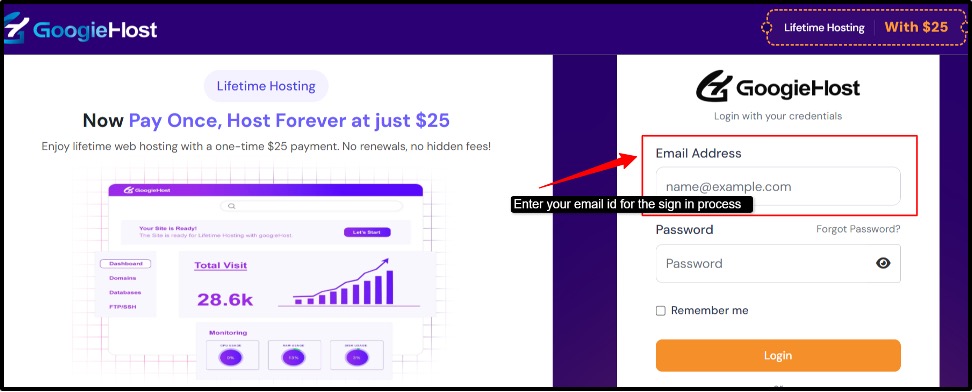
Step 1. Sign up: Visit the hosting website,>> look for the sign-up button,>> create a new account,>> click on the sign-in option,>> fill in the required details >> Name/Username, email address, and password.
Step 2. Install WordPress: After you sign up with the hosting provider >> Install the WordPress on your hosting account >> login your hosting control panel,>> find the WordPress installer >> click on the installation of WordPress,>> enter your details.

Step 3. Choose a theme: After you install WordPress >> the next step is to choose a theme. The theme will control the design>> colours >> layout, and will contribute to the overall appearance of your website.

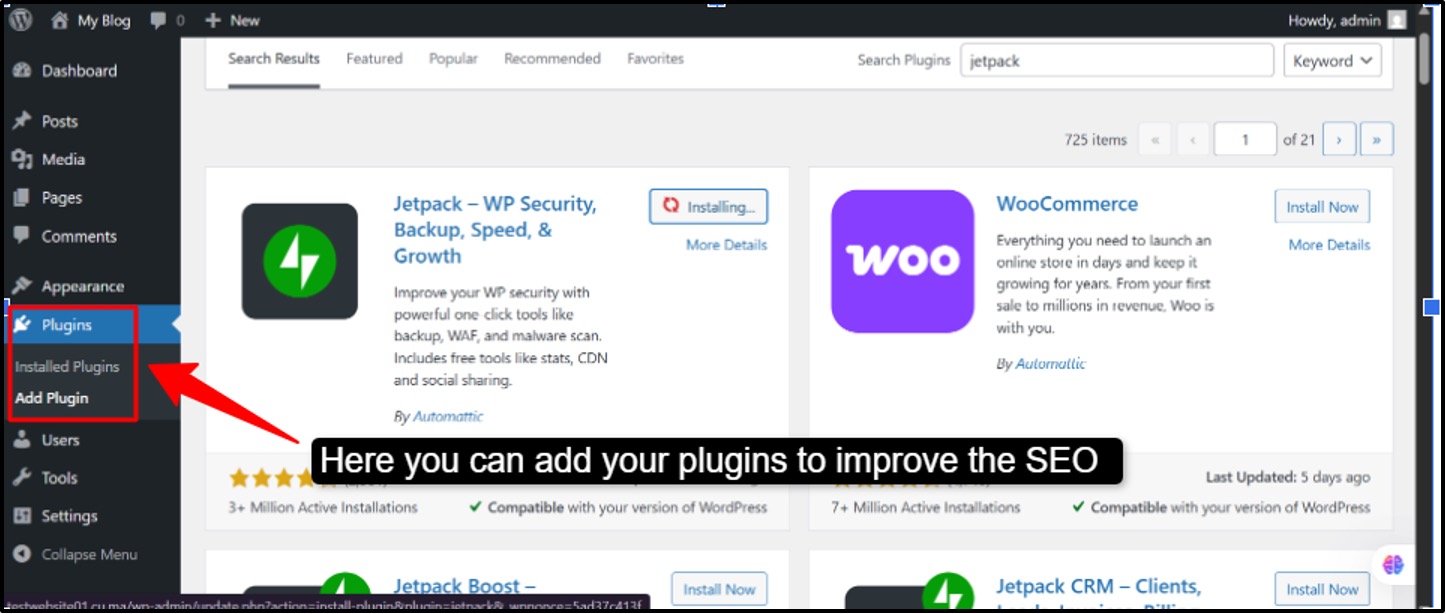
Step 4. Essential plugins for students: When a student is creating any website using WordPress, then you need to install some of the essential plugins that will improve the security, SEO, and performance of their website.
These plugins will make it easier for you to organise and manage a website, even if you don’t have a lot of technical knowledge.
Step 5. Going live: After you set up your website on WordPress, the final step is to make it live so that people can easily access it on the internet
Tips for Students Using Free Hosting
After giving detailed information about the WordPress hosting providers or platforms, let’s even look at some of the finer tips that students should definitely look for when they’re choosing the correct WordPress platform for their website.
- You should use lightweight or minimal themes for your website that can load quickly. There are many Free WordPress Themes to Use With Your Free Hosting services. You shouldn’t use the heavy or complicated themes which has lot of animations or features, as these unnecessary things can slow down your website during live time.
- Students should always optimize their images before uploading, like resizing the images, resizing the image according to their website, be it a blog or a personal website. Like, for eg, Blog images should be around 800-1200px image size. The smaller the size of the image, the faster the loading process will be.
- Caching is a major concern for you to understand; it’s like saving a ready-made version of your website so that next time the loading speed is faster. If you don’t want to generate the page again and again, then enabling caching is important to save time and effort, and do smart hosting.
- A backup is a copy of your website data, which has all the important files and databases. So, regular backup is important for the smooth running of the website. There’s no guarantee of uptime or data safety, so students should remember this tip of backup importantly.
Benefits of WordPress Skills for Students
If you’re a student, then learning WordPress skills won’t just grow you academically, but it will also enhance your work professionally. Learning this skill will allow you to have a bigger edge for your future goals, be it a job or working as a freelancer. Let’s see some of the major benefits that you shouldn’t miss out on.
- WordPress will help you create a professional, easy-to-navigate portfolio that will clearly showcase all of your skills along with your work. It will also allow you to share your personal story, and it will work on both mobile and laptops.
- Freelance opportunities are one of the biggest benefits of learning WordPress skills. You can easily start earning even when you’re studying. You learn about website development or website design, and it will open multiple options for you in the freelancing world of job opportunities.
Apart from these, other domains will also allow you to have a better exposure, so learning WordPress skills will benefit you in all ways possible.
- One of the most flexible and practical options for you is making a career in web development. It’s a interesting and creative way of learning about web development, building your website, and starting to earn even before you complete your degree.
When to Upgrade to Paid Hosting
So far, we have given all the important information about free WordPress hosting platforms, but now let’s talk about if you need to get an upgrade, then what you can do about it. Knowing when to upgrade from free to paid hosting is an important step.
- If your traffic starts increasing as more visitors are coming daily, leading up to the slower performance of your website, or even if your site crashes and shows errors time and again. Free hosting platforms generally can’t handle heavy traffic, so then comes the upgrade time for you.
- A custom domain is something that may feel optional at first, but then later on, you may want to switch to it. A custom domain is like your own website, which has names like: yourname.com instead of yourname.googiehost.com. So if you want to have a unique identity, then it’s time for you to upgrade.
- If you’re someone who wants to use WordPress for your professional or business-related work, then it’s possible that the free plans won’t work as per your requirements. Professional and business websites generally have heavy traffic, and you don’t want to have a slower website performance, and the paid hosting will only provide you with faster loading and better uptime.
If you’re just starting out, reading a complete comparison of free WordPress hosting vs paid hosting can help you avoid common mistakes beginners make.
FAQs
Is free WordPress hosting good for students?
Yes, WordPress hosting is good for students, especially if they want to learn the building of a website, or they need to practice WordPress. Students can also create small projects and improve their assignments.
Which is the best free WordPress hosting for students in 2026?
GoogieHost is considered the best among all of the free hosting options as it provides 1000MB SSD Storage, 100GB bandwidth, along with a free subdomain, or you can even connect to your domain. There are no forced ads with GoogieHost.
Can students use a custom domain with free WordPress hosting?
Yes, students can easily use a custom domain with many of the free WordPress hosting services, but it even depends on the hosting provider. Some free hosts even allow you to connect to your own domain, while others only come with a free subdomain.
Is free WordPress hosting safe to use?
Yes, free WordPress hosting is completely safe to use as it comes with advanced security features, and it provides limitations compared to paid hosting. It’s more of a safe option for learning web development, practicing making websites, and turning your academics into a professional field.
What are the limitations of free WordPress hosting?
Yes, WordPress hosting is useful for students academically, but it comes with several limitations. These restrictions can sometimes affect the website’s performance and growth. Its limitations include limited storage and slower website performance.
Can I install WordPress on free hosting?
Yes, you can install WordPress on many of the free hosting platforms. There are two simple ways of installation: a one-click installer, which makes it easy to set up your website in just a few minutes, and manual installation by downloading WordPress from its official website.
Is free WordPress hosting suitable for high-traffic websites?
No, free WordPress hosting is generally not suitable for high-traffic websites running on WordPress.
Can I upgrade from free hosting to paid hosting later?
Yes, you can easily upgrade from free hosting to paid hosting at any time if your website is growing and ranking better and needs better performance. Most hosting providers allow most of the users to easily migrate their website built on WordPress from a free plan to a paid plan.
Does free WordPress hosting include email accounts?
Usually, the free WordPress hosting doesn’t include professional types of email accounts, as most of the free hosting providers focus on basic website hosting for WordPress, so the email services are often not part of the free plan.
Conclusion
Free WordPress hosting is a great starting point for students to help them in their academics and also prepare them for future opportunities. Choosing several free WordPress hosting platforms like GoogieHost, InfinityFree, and ByeHost, it will be one of your smartest moves as a student because free WordPress doesn’t require any money, you don’t need advanced skills, all you need is your willingness to start and make your own website.
Free WordPress hosting will provide you with your own space where you can experiment freely, learn better, and even make mistakes, but it will help you to learn the real-world skills and make an insightful contribution in building your first portfolio.
So choose wisely, because WordPress hosting isn’t just your starting point, but it can mark your future.
Top Free WordPress Hosting Providers Comparison 2026
We have given a comparison table of some of the major features for your clear understanding and choice. Make sure you refer to this.
| Hosting Provider | Storage | Bandwidth | Free domain | WordPress support | Overall Rating |
| GoogieHost | 1 GB | 100 GB | Yes (subdomain + free domain option) | Yes (1-click install) | 4.5/5 |
| Wix | 500 MB | 500 MB | No (subdomain only) | No (Not real WordPress) | 4/5 |
| Weebly | 500 MB | Unlimited | No (subdomain only) | No | 3/5 |
| 20i | 10 GB | 250 MB/month | No (subdomain) | Yes | 4/5 |
| InfinityFree | 5 GB | Unlimited | No custom domain supported but not free) | Yes | 4.5/5 |
| FreeHosting | 10 GB | Limited/ unmetered | No | Yes | 3.5/5 |
| ByeHost | 1 GB | 50 GB | No (subdomain only) | Yes | 4/5 |


// Related Articles