Table of Contents
- Can You Host an HTML Website for Free in 2026?
- What You Need Before Hosting
- Best Free Platforms to Host HTML Websites in 2026
- How to Host an HTML Website for Free in 2026 (Step-by-Step Guide)
- Alternative Method: Upload via FTP
- Tips to Make Your Free HTML Website Look Professional
- Common Problems & Fixes
- Free Hosting vs Paid Hosting (Quick Comparison Table) (in Tabular form)
- Who Should Use Free HTML Hosting in 2026?
- FAQs
- Final Verdict



How to Host an HTML Website for Free in 2026 (Step-by-Step Guide)

A few years ago, putting a website online looked like something only website developers could do. And it also required a lot of investment to put the website live.
But, in 2026, things have completely changed.
Free website hosting has become much more newbie-friendly. If you have no idea about how to go online, you can easily do it using the free WordPress website theme.
For students learning web development and testing their first HTML page, newbies trying to understand how websites work in HTML codes, professionals creating their portfolio showcasing their skills, or startups building MVP for quick demos, free web hosting is the perfect way to get started and that too without spending even a single dollar.
Here, in this blog, our technical team has spent weeks putting together step-by-step procedures on how to host an HTML website for free. The process is simple, draft your html website on VScode, create separate files for HTML, CSS and JavaScript and then register for free hosting and deploy the website files finally to test your website on live server.
We’ll also tell you about the best free platforms to host HTML websites and understand exactly how to upload and publish a website step-by-step. Plus, we’ll also share some practical tips to help you transform a basic HTML page into a more professional website.
Let’s dive in 👍
Can You Host an HTML Website for Free in 2026?
Yes! You can host an HTML website for free.
But, if we talk about the early days, hosting an HTML website always meant choosing a plan, spending a large amount of money and dealing with complicated setups.
Now, the things look different.
Free hosting platforms allow anyone to take simple HTML, CSS and JavaScript files and put them live on the internet in just a minute. Platforms like GoogieHost, GitHub Pages, Netlify and Cloudflare Pages have made this process incredibly simple.
What makes this even more interesting is that these platforms aren’t just “free trials”. They’re fully free hosting companies that offer free website hosting solutions for static websites. They come with features like global CDN, HTTPS and even free subdomain as well.
So yes, hosting an HTML website for free is absolutely possible in 2026.
But like every free service, it comes with certain limitations. Free HTML hosting is only OK for static websites like portfolios, landing pages or simple school projects. Free hosting is more than enough and can get a site live in minutes for free.
Limitations of free hosting
Free hosting platforms are good for the newbies but they come with clear limitations:
- They’re static-only, means, no backend features like databases or server-side code.
- There are also limits on storage, bandwidth, and builds. For example, GitHub Pages has around a 1 GB size limit and bandwidth restrictions, which can become a problem for large or high-traffic websites.
- Advanced features like custom headers, server-side redirects, or full control over the server are also restricted, making them less suitable for complex applications.
If that’s the case, then when should we choose free HTML website hosting?
See! Free HTML website hosting is an excellent choice when the goal is simple and static (Only need to put My Portfolio Online). It works best for static websites such as personal blogs or landing pages. These platforms are optimized for serving pre-built files quickly.
It’s good for students and developers who want to test school projects or deploy themes or test plugins quickly.
When should you Upgrade
And now let’s say you have free hosting and you’re using it! Then suddenly your traffic spikes and your website starts taking time to load. This is the time you should upgrade your free hosting to paid hosting
An upgrade becomes necessary when a website grows beyond static content. If features like user login systems, databases, e-commerce functionality are needed, free hosting won’t be enough.
Paid hosting is also a better option when traffic increases, or when advanced features like scalability, better performance, are required. In such cases, upgrading ensures long-term growth for the website.
What You Need Before Hosting
Before putting a website live, a little preparation can make the entire process smooth. Many beginners jump straight into hosting. That isn’t how things are done!
Taking a few minutes to organize everything beforehand helps avoid common problems and saves time.
Think of it like getting ready before a big party. When everything is prepared like website html files, tools ready and access set up, the process becomes much easier. Once these things are ready, uploading and publishing the website becomes a simple step-by-step process.
- A ready HTML website (index.html required): The most important requirement is a complete HTML website ready to upload. The main file should be named index.html, as hosting platforms use it as the default entry point. Without this file, the website may show a blank page.
- Basic file structure (HTML, CSS, JS, images): A clean and organized file structure is important for a proper working website. HTML files should be linked correctly with CSS, JavaScript, and image folders. Keeping everything structured ensures that styles load properly and images display correctly.
- A GitHub account (now, this is optional but we highly recommend it): While not always required, having a GitHub account makes hosting easier on platforms like GitHub Pages. It allows users to upload code and deploy websites quickly. It’s especially useful for beginners learning modern development and how it works.
- Internet connection: A stable internet connection is important to upload files and access hosting platforms. Since hosting is done online, interruptions during uploads can cause serious problems. A reliable connection ensures a smooth publishing process.
Best Free Platforms to Host HTML Websites in 2026
There are a lot of free html hosting platforms that make it incredibly easy to host HTML websites for free, without needing advanced technical skills or a paid plan.
Below, we’ve carefully researched and listed the top best free platforms, each selected based on performance and real testing by our tech team. These platforms are widely used by beginners, making them perfect choices for anyone looking to publish an HTML website quickly.
1. GoogieHost: Free Hosting with cPanel
GoogieHost

Summary
First option, and one of our best free WordPress hosting options for students, is GoogieHost. It offers the best free hosting service to host HTML websites. GoogieHost is also a popular option for newbie and developers who want a free solution with real hosting features where they can test their plugins and themes.
It offers tools and resources that are usually seen in paid hosting, like SSL, SSD storage, and FTP access, making it a good choice for learning and testing small projects. It supports technologies like PHP, MySQL, and even CMS platforms, which means it goes beyond simple HTML hosting.
- Free SSL & Secure Hosting: GoogieHost provides a free SSL certificate with every hosting account, ensuring websites run on HTTPS. This improves security and helps websites appear more professional online.
- 1000MB SSD Storage & 100GB Bandwidth: The platform offers 1000MB SSD storage and around 100GB bandwidth, which is enough for small websites and learning projects. This ensures decent speed for beginners.
- No Ads on Your Website: GoogieHost doesn’t place forced ads on user websites. This allows full control over content and gives the website a cleaner, more professional appearance.
- FTP Access & Easy File Management: It provides FTP accounts and an online file manager, allowing users to upload and manage website files easily. This makes it simple to handle HTML, CSS and other project files efficiently.
If you want to launch a website without heavy investment, understanding how to get free.com domain name is a smart move. This guide provides practical steps and insights to help you claim your domain easily.
2. GitHub Pages: Best for Developers
GitHub Pages

Summary
GitHub is widely known as a code hosting platform, but it also provides one of the most powerful free hosting solutions through GitHub Pages. This feature allows users to host static websites directly from a repository by uploading HTML, CSS, and JavaScript files.
Once the files are pushed, the platform automatically publishes them as a live website, making the entire process simple. Websites can be deployed directly from code repositories, meaning every update can be tracked and published instantly. It also includes features like free HTTPS, global CDN delivery, making it good for documentation and landing pages.
- Custom Domain Support: It allows users to connect their own custom domain to hosted websites. This helps create a more professional online presence instead of using the default github.io subdomain.
- Version Control & Easy Updates: All website files are managed through Git repositories, allowing version control and easy updates. Any change pushed to the repository can instantly update the live website.
- Automated Deployment with Git Integration: Supports automatic deployment whenever changes are pushed to a specific branch. This “push-to-deploy” workflow makes hosting fast.
- Supports Multiple Project Sites: Users can create one main website and multiple project-based sites under the same account. This makes it perfect for hosting portfolios and multiple HTML projects.
3. Netlify: Best for Beginners
Netlify

Summary
Netlify has become one of the most powerful platforms for hosting HTML websites for free, especially for developers who want a modern deployment experience. It allows users to upload static websites (HTML, CSS, JavaScript) and instantly turn them into live websites with just a few clicks.
Its workflow is 100% developer-friendly. You can deploy the websites manually. With generous limits such as bandwidth, build minutes, and storage, it’s suitable for portfolios and testing projects. But, our research team found out that it uses a credit-based system, so usage is tracked and limited monthly, making it important to manage deployments properly.
- Free Hosting with Generous Monthly Limits: Netlify offers a free plan with no credit card required. This includes bandwidth, build minutes and also includes storage. This makes it perfect for beginners.
- Automatic Deployment from Git: Connects directly with GitHub or other repositories and automatically deploys websites whenever changes are pushed. This makes updates fast and eliminates the need for manual file uploads.
- Free SSL & Global CDN: Every website hosted here, gets free HTTPS and is delivered through a global CDN. This ensures fast loading speeds worldwide and provides secure connections for all visitors.
- Deploy Previews for Testing: It generates preview links for every update. This feature allows users to test changes before making them live. This is useful for collaboration and ensuring everything works correctly before publishing.
4. Vercel: Best for Fast Deployment
Vercel

Summary
Vercel is one of the most advanced platforms for hosting HTML websites. It’s good for those who want speed + automation and deployment tools. It allows users to deploy static HTML, CSS, and JavaScript websites instantly, by simply uploading files. You can even do that by connecting a Git repository. The platform is designed to make deployment easy, once code is pushed, the website is automatically built.
The free “Hobby” plan is built for personal projects and includes powerful features like automatic deployments and performance optimization. It also provides additional capabilities like serverless functions and analytics, making it more than just a basic hosting service.
- Free Forever Hobby Plan: Offers a free “Hobby” plan designed for personal projects and developers. It includes core hosting features, making it good for beginners.
- Automatic Deployment with Git Integration: Websites are automatically deployed whenever code is pushed to GitHub. This CI/CD workflow avoids manual uploads and makes sure updates are instantly reflected on the live website.
- Global CDN with High Performance: It uses a global content delivery network to serve websites quickly worldwide. This ensures fast loading speeds and consistent performance for users across different regions.
- Free SSL and Built-in Security: Every website hosted on Vercel includes automatic HTTPS with SSL certificates. It also provides security features like DDoS protection and firewall capabilities to keep websites safe.
5. Cloudflare Pages: Best for Performance
Cloudflare Pages

Summary
The next best alternative of Netlify is Cloudflare Pages, a powerful platform designed for hosting static websites like HTML, CSS, and JavaScript projects for free. It focuses on simplicity and security, allowing users to deploy websites directly from their code or by uploading files.
Once deployed, the website is automatically distributed across Cloudflare’s global network, ensuring fast loading times no matter where visitors are located. For HTML websites, Cloudflare Pages is an excellent choice because it combines free hosting with enterprise-level performance features. The platform also supports continuous deployment through Git integration, making updates seamless.
- Optimized for Static HTML Websites: It’s built specifically for static sites, making it good for hosting HTML, CSS, and JavaScript files. It delivers fast performance without requiring complex server-side configurations or setup.
- Global CDN for Ultra-Fast Speed: Websites are automatically served through Cloudflare’s global CDN network. This ensures low latency and fast loading speeds for users worldwide, improving overall user experience and performance.
- Free SSL and Strong Security: Every website includes free SSL certificates and benefits from Cloudflare’s built-in security features like DDoS protection. This keeps websites secure and ensures safe browsing for visitors.
- Continuous Deployment with Git: It connects with Git repositories and automatically deploys updates whenever changes are pushed. This simplifies the workflow and ensures that the live website is always up to date.
Our best technical team went beyond all reach and evaluated the best free platforms to host HTML websites and after a deep research, we’ve listed only those platforms above that offer deployment via Git Integration, Global CDN, Strong security, SSL certificates and ultra-fast speed in free plan.
How to Host an HTML Website for Free in 2026 (Step-by-Step Guide)
If you want to get your website live, it might sound complicated at first, but once you know the process of how to create and host a website for free in simple steps, it becomes easy.
This step-by-step guide is designed to walk through the entire process of hosting an HTML website for free. We’ll show you steps right from preparing files to publishing a live link and that too without any issue.
Each step has been carefully structured based on real testing by our team, so nothing important is skipped. To make things even clearer, screenshots have been included along the way, allowing you to see every action that we take.
Step 1) Create a Free Account
The First step is to create a free hosting account.
Here, we’ve chosen GoogieHost to show all the steps! GoogieHost’s user journey is smooth and there are no hidden charges at all. We’re going to use GoogieHost, register and account and also tell you how to host HTML website here
This is the main step that allows files to be stored and made accessible on the internet. The process is simple and only takes a few minutes, but it’s important to follow each step carefully to avoid any issues later.
First, visit the GoogieHost official website >> Then, go to the Free Hosting tab and Click Free Hosting for Students or Free Landing Page.
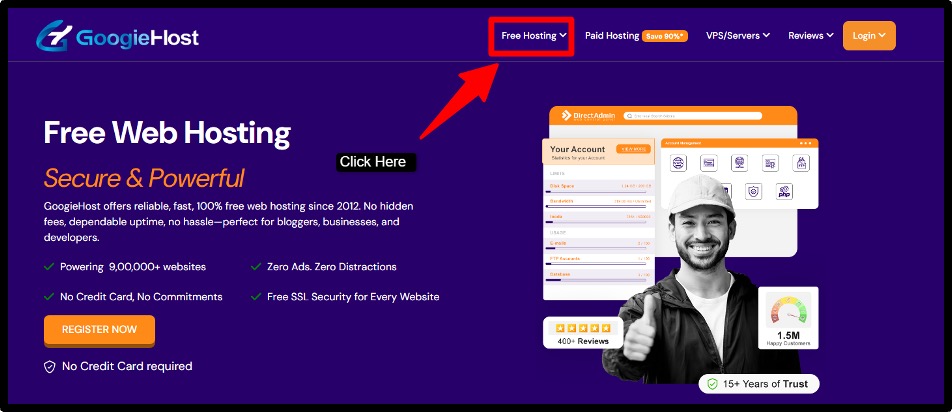
This is where the free plan comes with. Once there, click on the Register Now option to get started with free hosting.
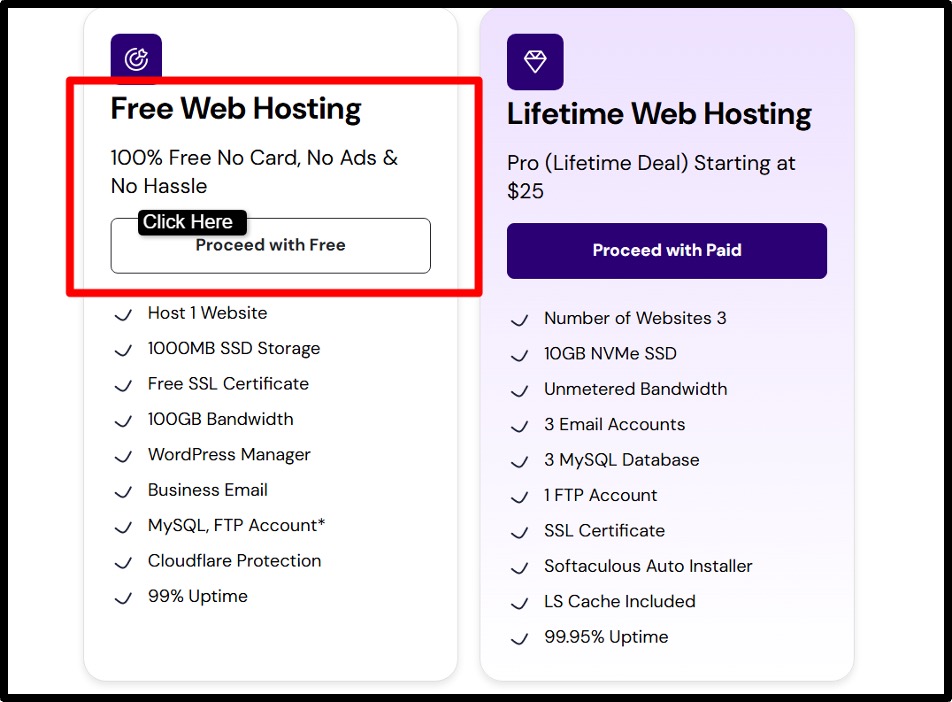
After that, click the Proceed with Free to get started.
If you plan to upgrade your hosting plan, you can also go with the Lifetime Plan. It’s only for $25 (One time payment). You don’t have to pay after this at all. Plus, you get all the premium website hosting features at this cost.
As you click the Proceed with Free Button, you’ll reach Choose a Domain Page.
Step2) Choose a Free Subdomain
Now, the next step is to choose a free subdomain, which will act as the website’s address. This is how the site will be accessed online, so it’s best to choose a name that’s simple and relevant.
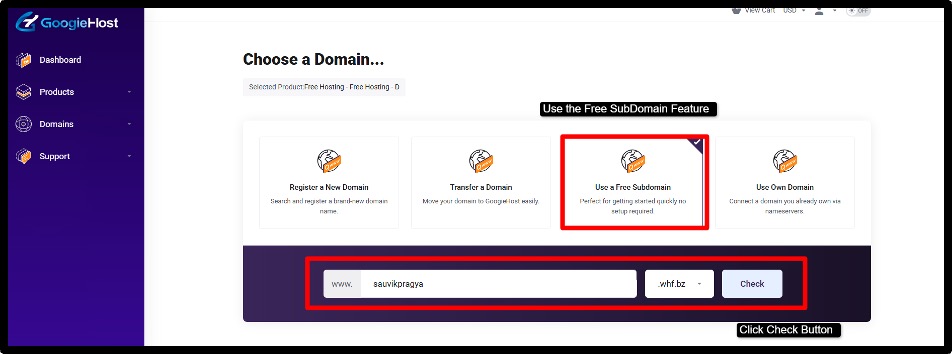
Why choose a free Subdomain? It’s because subdomain is included in the free plan and for your static HTML website, a free subdomain is more than enough to give you an online presence.
Search for an available subdomain >> Select one that isn’t already taken. Once selected, You’ll then have to review the configuration of your free hosting plan >> Then click the Continue Button Finally to register.
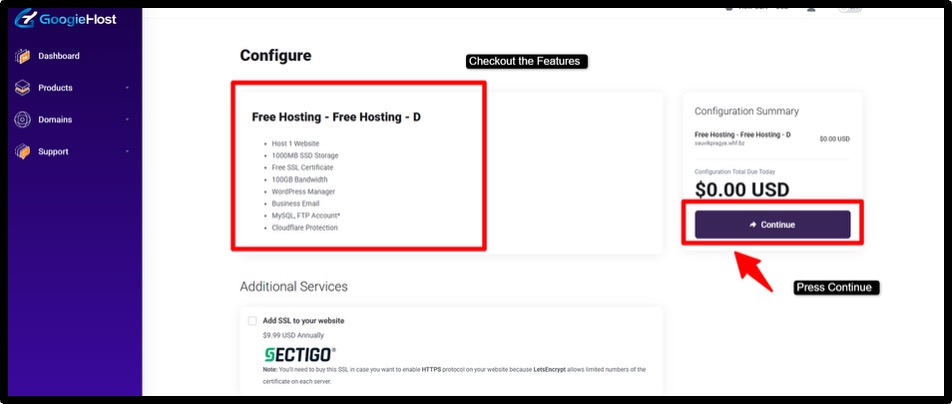
Just one more step towards your registration, you’ll need to sign up by filling in the required details such as email and basic information.
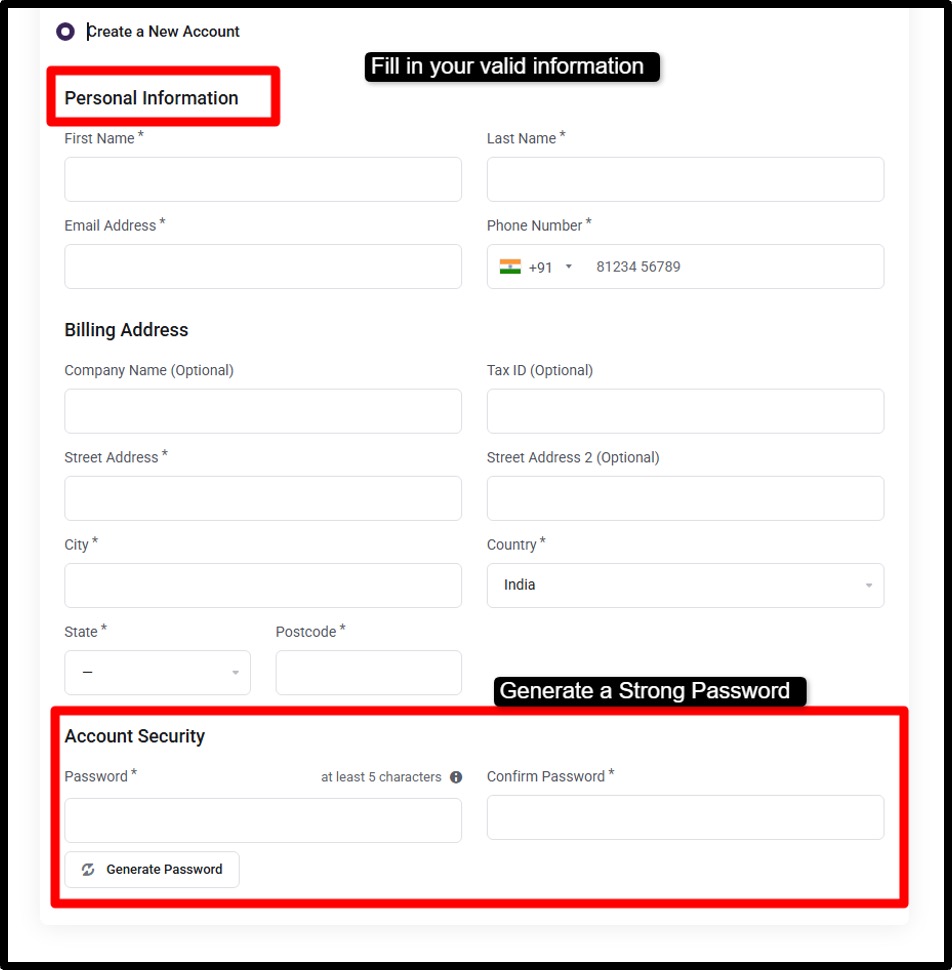
After submitting the form, a verification email will be sent.
Open the email and complete the verification process to activate the account successfully >> Set a strong and secure password for the hosting account to ensure safety access.
Finally, submit the application.
After approval, the hosting account and subdomain will be ready to use, allowing website files to be uploaded and published online.
Step3) Access cPanel Dashboard
Once the account and subdomain are set up, the next step is to access the control panel where all website management happens.
This is where files will be uploaded and organized. It may look technical at first, but it becomes easy to navigate once you understand it.
Start by logging into the cPanel dashboard using the login credentials created during signup.
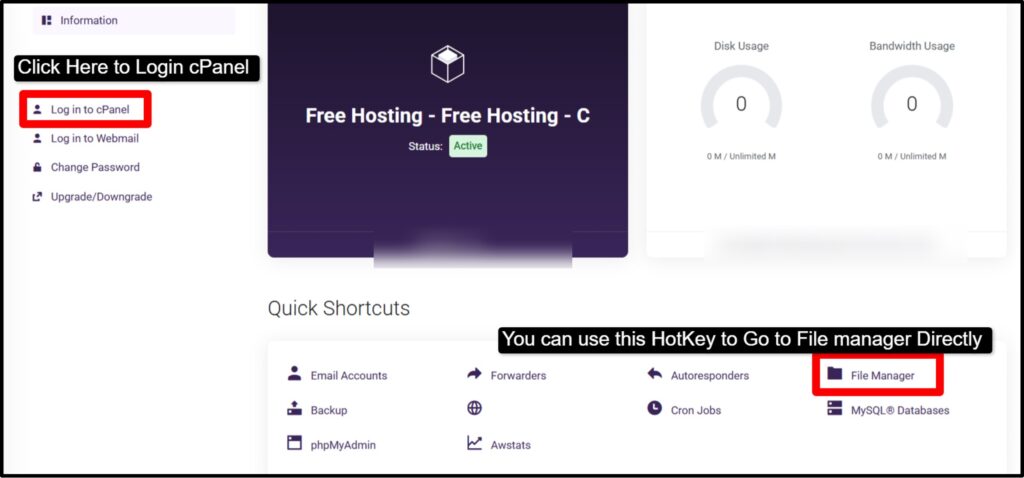
This dashboard acts as the main control center for the hosting account, providing access to all tools and settings needed to manage the website.
After logging in, locate and open the File Manager.

This is the section where website files are stored and managed.
From here, folders can be opened and HTML files can be uploaded and everything needed to make the website live can be handled in one place.
Step4) Upload HTML Files
With the dashboard open, this is the step where the website finally starts taking shape online.
All the files created locally now need to be uploaded to the server so they can be accessed through the browser (GoogleChrome). This step is simple, but placing files in the correct location is important.
- First, open the “public_html” folder inside the File Manager. (this is the main directory where all website files must be stored) >> Anything placed inside this folder becomes visible on the internet.
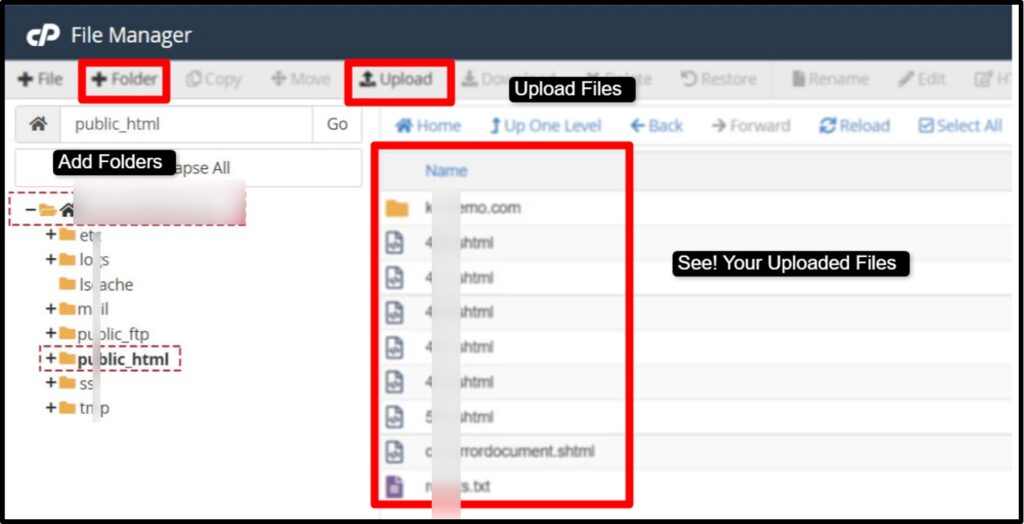
- Next, upload the index.html file along with all other assets such as CSS, JavaScript, and images >> Make sure all files are properly organized so links work correctly.
- If the files are uploaded in a compressed (ZIP) format, use the extract option inside the File Manager to unzip them, ensuring everything is placed correctly inside the folder.
Step 5) Test Your Website
After uploading the files, this is the moment where everything comes together.
The website is now live, but it’s important to test it carefully to make sure everything works as expected. A quick check at this stage can help catch small issues before others see them.
Start by opening the subdomain URL in a browser. This will load the live version of the website.
Go through each section slowly and make sure the page is displaying correctly, including text, images, and design elements.
Next, check the layout and functionality across different sections. Click on links, test navigation menus, and ensure buttons are working properly. If any links are broken or pages aren’t loading, revisit the file paths in the code and fix them.
Small adjustments here ensure the website runs smoothly and looks professional to visitors.
Alternative Method: Upload via FTP
Sometimes, uploading files through a dashboard or drag-and-drop interface doesn’t feel flexible enough, especially when managing multiple files. This is where FTP comes in as a more powerful method.
It gives direct access to the server, making file management faster + more organized.
For many newbies, FTP might sound technical at first.
But truly, it’s just another way of transferring files from a local computer to a hosting server. Once you understand it, it becomes a easy and reliable method. Developers often prefer it for its control and efficiency. It’s especially useful when working with larger projects.
FTP
So, in a nutshell, what is FTP? FTP (also known as File Transfer Protocol) is a method used to transfer files from a local computer to a web hosting server. It acts as a connecting bridge between your system and the server, allowing direct access to website files. This makes it easier to upload files without using a browser-based dashboard.
FileZila
You can use FileZilla.
It’s one of the most popular free FTP tools used to manage file transfers. It provides a simple interface where local files appear on one side and server files on the other. This makes it easy to drag and drop files between the computer and the hosting server.
Now, to connect using FTP, hosting providers give credentials such as hostname, username, password, and port. These details are entered into the FTP client to establish a secure connection.
Once connected, the server files become accessible, allowing full control over website content and structure.
Upload files to public_html
The public_html folder is the main directory where website files need to be placed.
Files uploaded here become visible on the internet. Putting HTML, CSS and other assets in this folder ensures the website loads correctly when accessed through the domain or hosting URL.
Tips to Make Your Free HTML Website Look Professional
A website doesn’t need a big budget to look impressive, instead it needs attention to detail.
Many beginners focus only on getting their site online, but the thing is how the website feels to the visitor. A clean layout, fast loading speed and small design can instantly change the appearance of your website. It’s often these little improvements that turn a simple HTML page into something that feels good.
A well-optimized, responsive website creates confidence in visitors, even if it’s hosted for free.
By applying a few smart techniques, any basic website can look amazing and leave a strong impression on the viewers.
Use responsive design
A professional website should look good on all devices, including mobiles, tablets, and desktops. Responsive design ensures that the layout automatically adjusts based on screen size.
This improves UX and keeps visitors engaged. You can use flexible layouts. It helps create a smooth and consistent design across different devices.
Optimize images
Large image files can slow down your website and make it feel unprofessional.
Optimizing images by compressing them (without losing quality) helps improve loading speed. Faster websites look better and keep users from leaving early.
Tools and proper formats like WebP or compressed JPEGs can enhance performance.
Minify CSS & JS
Extra spaces, comments and unused code in CSS and JavaScript files can increase file size. That’s why, minifying these files removes unnecessary elements and makes them smaller and faster to load.
This further improves website speed and performance, which directly impacts user experience and gives the site a better feel.
Add favicon
A favicon is the small icon that appears in the browser tab next to the website name.
It looks small, like a minor detail, but it adds a layer of professionalism and brand identity. It helps users recognize the website easily and gives it a more complete appearance.
Use free SSL
Security plays a important role in how professional a website appears. Free SSL ensures that the website uses HTTPS, which protects data and builds trust with visitors.
Modern browsers also label non-secure websites, so having SSL not only improves safety but also enhances credibility and search engine ranking.
Common Problems & Fixes
Creating and hosting HTML files online starts with great excitement. You upload the files and then open the link.
But at times, instead of a working website, it shows a blank page or shows an unexpected error. This can quickly turn that excitement into confusion.
The truth is, almost everyone faces these small common website problems at first, and they’re a natural part of the learning process.
What is important is how well you understand these problems that they’re simple to fix. Behind every issue is a small detail that’s missed. Maybe it can be a filename or a setting. Once these are located and corrected, the website works the way you imagined.
Website Not Showing
After publishing a website, opening the link and seeing nothing is a big headache.
In most cases, the issue comes down to the main file not being recognized. Hosting platforms look specifically for a file named index.html as the starting point. If it’s missing, or placed inside another folder, the website won’t load.
Another common reason is browser caching, where an older version of the page is stored. Renaming the file correctly and then refreshing the browser or clearing cache usually solves the problem.
CSS Not Loading
Sometimes the website loads, but it looks plain and unstyled, as if all the design work has disappeared.
This usually happens when the CSS file isn’t properly linked. Even a small mistake in the file path can break the connection between HTML and CSS.
Another common issue is case sensitivity! Servers treat “style.css” and “Style.css” as different files. Carefully checking the file path and matching the exact file name fixes this issue and restores the design instantly.
404 Error
A 404 error can feel confusing because it suggests that something is missing entirely.
This often happens when the hosting provider can’t find the correct file or page. It may be due to an incorrect repository name or wrong folder structure. Or it can also be a deployment setting that isn’t being properly configured.
For example, if the project is uploaded to the wrong directory, the platform can’t locate it.
Reviewing the repository name and ensuring files are in the correct location usually resolves the error and makes the website accessible again.
Free Hosting vs Paid Hosting (Quick Comparison Table) (in Tabular form)
The choice to choose between free hosting and paid hosting is difficult to make.
Many beginners begin with free hosting because it removes the biggest problem and that’s money. It allows ideas to take shape without investment, making it good for learning or launching a simple website quickly.
Now, with time, as projects grow and expectations increase, the limitations of free hosting start to become more problematic.
That’s usually when the shift toward paid hosting begins.
With better performance, more control and advanced features, paid hosting is designed for long-term growth and professional use. Both options serve different purposes, and understanding their differences can help in choosing the right path based on current needs and future goals.
| On What Basis? | Free Hosting | Paid Hosting |
| Cost | Completely Free | Monthly / Yearly Charges |
| Domain | Comes with a Free SubDomain | Custom Domain is Available |
| Performance | Limited Speed and Resources | Faster speed and Better Performance |
| Storage | Lower Limited | Higher Limits |
| Ads | May Show Forced Ads | No Forced Ads |
| SSL | Not Included Always | 100% Free Included |
| Support | Limited Support | Dedicated Support |
Before selecting a provider, it’s important to understand the differences between free WordPress hosting vs paid hosting, especially for limitations and long-term growth.
Who Should Use Free HTML Hosting in 2026?
Students, Bloggers (Who just want to start and learn how blogging is done), Developers (Newbie developers who just want to learn administration and test plugins) can use free HTML hosting. Free HTML hosting is built for anyone starting small but thinking to go big.
It offers a simple, no-cost way to bring projects online and gain real-world experience.
Students
Students can use free HTML hosting to practice coding, build academic projects and showcase assignments online. It helps in learning real deployment skills while creating a strong online presence for future opportunities.
Developers testing projects
Developers often need a quick environment to test ideas, demos or prototypes. Free hosting allows instant deployment, making it easier to experiment, debug, and share working versions without investing in paid infrastructure.
Portfolio websites
Free hosting is perfect for creating personal portfolios. Designers and freelancers can showcase their work online, share projects with clients, and build credibility without spending money on hosting services initially.
Landing pages
Simple landing pages for products, services, or campaigns can be hosted easily for free. It’s good for validating ideas, collecting feedback, or running short-term promotions without worrying about hosting costs.
Small temporary projects
For short-term or experimental projects, free hosting provides a quick solution. It works well for event pages, college projects, or temporary campaigns that don’t require long-term hosting commitments or advanced features.
FAQs
Is free HTML hosting safe?
Yes! Free HTML hosting is generally safe when using trusted and well-known platforms such as GitHub Pages, Netlify, or Cloudflare Pages. These services provide secure infrastructure and include HTTPS (SSL), which helps protect your website and its visitors. It’s always recommended to choose reliable platforms and avoid uploading sensitive or confidential data.
Can We host a website without buying a domain?
Yes! It’s completely possible to host a website without purchasing a domain. Most free hosting platforms like Googiehost, provide a free subdomain, such as yourname.googiehost.io, which allows your website to be accessible online for free.
Does free hosting include SSL?
Yes! Free hosting platforms include SSL certificates by default. This means your website will use HTTPS, which ensures a secure connection for visitors. Having SSL also improves trust and can positively impact SERP ranking. GoogieHost automatically enables SSL without requiring manual setup.
Can We host multiple websites for free?
Yes, You can host multiple websites for free. This is often done by creating separate repositories for each website.
Is GitHub Pages good for business websites?
Yes! GitHub Pages is good for simple business websites, especially static sites such as BlackFriday Sales landing page or informational sites. However, it isn’t good for complex business websites that require backend functionality, and advanced features like user authentication.
Can I run ads on free hosting?
Yes! You can run ads on free hosting. It actually depends upon the hosting platform’s policies. Some platforms like GoogieHost, allow monetization, while others may restrict commercial advertising. It’s important to review the terms and conditions of the hosting provider before placing ads on the website.
How long does free hosting last?
Free hosting can last forever, as long as the hosting platform is there. This includes keeping the account active, staying within usage limits such as bandwidth and storage and avoiding violations of terms. In some cases, accounts or websites may be suspended if they remain inactive for a long period.
Can I upgrade later?
Final Verdict
If you’re reading this blog, this means you’ve taken a strong step forward. This guide was created to help you go online for free. We’ve personally tested every platform, step and recommendation included here.
With over a decade of combined experience in hosting HTML websites, the process mentioned in this blog here has been carefully written to ensure simplicity.
Starting can often feel difficult as there are too many hosting platforms, too many choices and guides that skip important details. That’s why everything given here has been properly evaluated and checked, ensuring even complete beginners can follow along smoothly.
Each step has been tested and evaluated to make sure an HTML file can be successfully turned into a live website without unnecessary complications.