Table of Contents
- What is a VPN with Obfuscated Servers?
- 7 Best VPN with Obfuscated Servers for Privacy
- 1. NordVPN - Overall Best VPN with Obfuscated Servers
- 2. ExpressVPN - Best VPN with Obfuscated Servers
- 3. SurfShark - Affordable VPN with Obfuscated Servers
- 4. ProtonVPN - Privacy-Focused VPN with Obfuscated Servers
- 5. CyberGhost - Fast, Secure VPN with Obfuscated Servers
- 6. PrivateInternetAccess - Budget-Friendly VPN with Obfuscated Servers
- 7. Windscribe - Customizable VPN with Obfuscated Servers
- Key Features to Look for in a VPN with Obfuscation
- How to Set Up a VPN with Obfuscated Servers (Step-by-Step)?
- Why Privacy-Focused Users Need Obfuscated VPNs?
- FAQ’s
- Conclusion



7 Best VPN with Obfuscated Servers for Privacy (March 2026)
Do you use a VPN to access restricted websites? And if you have ever, then you might know that site figures out you’re using a VPN and blocks you anyway. This defeats the whole purpose of using a VPN in the first place.
Many websites, like streaming services or those in countries with heavy censorship, have advanced detection systems that can track VPN traffic. Once detected, your access is denied or instantly cut off.
To bypass this detection, let’s learn about VPN with obfuscated servers for privacy. These servers are specially designed to hide or disguise your VPN traffic and make it look as if it is from a normal internet user. This means websites and firewalls can’t tell you’re using a VPN at all, allowing you to access restricted content without raising any issues.
Let’s say you’re wanting to avoid censorship, firewall restrictions, or regional blocks, in that case obfuscated VPN servers help you stay undetected, secure and fully anonymous.
Here, we’ll talk to you about the top 7 most trusted VPN providers that offer true obfuscation features, allowing you to connect safely without being noticed. These services have been tested and verified for their performance, security, and stealth capabilities.
So read further to find out how these VPNs work, why obfuscation matters and which ones you can count on for 100% private and secure browsing.
What is a VPN with Obfuscated Servers?
A VPN with obfuscated servers refers to a special type of VPN that hides the fact that you’re using a VPN. It masks your encrypted VPN traffic to make it look like regular internet traffic, so no one, not even your ISP, government, or the website you’re visiting, knows you’re using a VPN. This gives you a private, secure and censorship-free browsing experience.
These servers are absolutely perfect for bypassing firewalls, streaming geo-blocked content or accessing restricted websites, all without being caught. You can surf and scrape data without anyone knowing, not even your internet provider.
7 Best VPN with Obfuscated Servers for Privacy
Now that we know what VPN with obfuscated servers is and how it works, let’s move on to the practical part, that is choosing the best one! We’ve tested a lot of VPNs and listed the top 7 best VPN with obfuscated servers that are 100% verified, top-rated and privacy-focused. These VPNs have delivered unbelievable results over the years.
To check our full findings and in-depth reviews, continue reading the article below.
⏰ TL;DR:
1. NordVPN – Overall Best VPN with Obfuscated Servers
2. ExpressVPN – Best VPN with Obfuscated Servers
3. SurfShark – Affordable VPN with Obfuscated Servers
4. ProtonVPN – Privacy-Focused VPN with Obfuscated Servers
5. CyberGhost – Fast, Secure VPN with Obfuscated Servers
6. PrivateInternetAccess – Budget-Friendly VPN with Obfuscated Servers
7. Windscribe – Customizable VPN with Obfuscated Servers
1. NordVPN – Overall Best VPN with Obfuscated Servers
As per our research team, NordVPN is the 1st Ranked VPN with Obfuscated servers that offers complete privacy by concealing the fact that you’re using a VPN! Even your ISP doesn’t come to know that!
NordVPN

Pros
- Bypasses VPN blocks and heavy censorship
- Enhances privacy by hiding VPN traffic from ISPs
- Provides access in restrictive regions like China and UAE
Cons
- Slower than regular VPN servers due to the extra scrambling
Summary
As per our research team, NordVPN is the 1st Ranked VPN with Obfuscated servers that offers complete privacy by concealing the fact that you’re using a VPN! Even your ISP doesn’t come to know that!
Price: USD 3.39 /month
Visit NordVPNAlong with a strict no‑user‑logs policy, these servers hide your true IP address and prevent any tracking of your online activity. The service also includes built-in threat protection that blocks malware, intrusive ads, and web trackers, further safeguarding your browsing privacy.
Plus, features like RAM‑only servers ensure no data persists on physical disks and kill switch functionality prevents data leaks if the connection drops. With AES‑256 encryption, NordLynx protocol, split tunneling, Double VPN, Onion Over VPN, and Dark Web Monitor, NordVPN delivers a full suite of advanced tools for maximum security and anonymity.
Key Features
- Conceals VPN Usage: Obfuscated servers disguise your VPN traffic as regular HTTPS data packets, making it same like the normal traffic. This feature is useful for bypassing VPN‑blocking firewalls and censorship in restrictive areas.
- Bypasses Internet Throttling and Blocks: These servers avoid ISP bandwidth throttling and network-level VPN filters, enabling access to blocked sites and smoother streaming even in highly restrictive networks.
- Ideal for High‑censorship Regions: Users in countries like China, Russia, Turkey, UAE, or Egypt can leverage obfuscated servers to maintain unrestricted access, with minimal risk of detection or blocking.
- Easy to Activate via Specialty Servers: Simply switch to OpenVPN protocol (TCP or UDP), then choose Obfuscated under Specialty Servers in the NordVPN app, and then connect to your desired location for easy and hidden access.
Pricing
- 2 Year Purchase Plan: $3.39 per month
Pros and Cons
Pros
- Bypasses VPN blocks and heavy censorship
- Enhances privacy by hiding VPN traffic from ISPs
- Provides access in restrictive regions like China and UAE
Cons
- Slower than regular VPN servers due to the extra scrambling
2. ExpressVPN – Best VPN with Obfuscated Servers
The next best alternative to NordVPN is ExpressVPN that offers VPN servers with advanced privacy and security features built to safeguard your online activity.
ExpressVPN

Pros
- Military‑grade AES‑256 encryption with Lightway and obfuscation.
- TrustedServer and a strict no‑logs policy.
- Advanced tunnel masking for letting you bypass censorship.
Cons
- Slightly higher subscription cost compared to some competitors.
Summary
The next best alternative to NordVPN is ExpressVPN that offers VPN servers with advanced privacy and security features built to safeguard your online activity.
Price: USD 4.99 /month
Visit ExpressVPNIt hides and masks your real device IP address by routing traffic through obfuscated VPN servers, preventing anyone from knowing what you’re doing online and from detecting that you’re using a VPN.
With a strict no‑logs policy and independently audited transparency, ExpressVPN ensures that none of your browsing or connection history is ever stored or traceable.
TrustedServer technology runs all servers purely in RAM, erasing all data at every re-start to remove the risk of retention. It also offers Lightway protocol, a lightweight and open‑source encryption. It delivers faster connection times, minimal battery use, seamless roaming between networks, and stronger security than legacy protocols like OpenVPN or IKEv2/IPsec.
Key Features
- Obfuscated VPN Servers: It is specially built to conceal VPN traffic from deep inspection systems, firewalls, or censorship regimes. They make VPN use appear like regular web traffic, enabling access from restrictive networks or countries.
- TrustedServer RAM‑Only Architecture: Each obfuscated server is run entirely in RAM. When powered off or rebooted, all data, including logs, accounts, and encryption keys, is wiped clean, preventing any residual data storage or seizure risk.
- Lightway Protocol with Obfuscation Compatibility: Lightway supports connection over obfuscated servers while maintaining ultra‑fast speeds, low latency, and stability across network changes. Your secure VPN tunnel remains efficient even when masquerading as normal traffic.
- AES‑256: Users get AES‑256 and encryption for obfuscated connections. Plus, NAT heartbeat support keeps the VPN tunnel alive on mobile networks, ensuring obfuscation remains effective and notifications aren’t delayed.
Pricing
- 2-Year Purchase Plan: $4.99 per month
Pros and Cons
Pros
- Military‑grade AES‑256 encryption with Lightway and obfuscation.
- TrustedServer and a strict no‑logs policy.
- Advanced tunnel masking for letting you bypass censorship.
Cons
- Slightly higher subscription cost compared to some competitors.
3. SurfShark – Affordable VPN with Obfuscated Servers
Now next in the list, we’ve Surfshark that offers a VPN solution backed by obfuscated servers, specifically made to bypass strict internet censorship and VPN detection technologies. These stealth servers jumble the VPN traffic, making it look like regular internet data, thus hiding your VPN usage from ISPs, firewalls, and surveillance-heavy governments.
SurfShark

Pros
- Ensures VPN usage remains invisible in censorship-heavy countries.
- Available on major platforms with a 30-day money-back guarantee.
- Offers unlimited device connections under one plan.
Cons
- Requires switching to the OpenVPN protocol manually in settings.
Summary
Now next in the list, we’ve Surfshark that offers a VPN solution backed by obfuscated servers, specifically made to bypass strict internet censorship and VPN detection technologies. These stealth servers jumble the VPN traffic, making it look like regular internet data, thus hiding your VPN usage fr
Price: USD 1.99 /month
Visit SurfSharkIt is built on a modified OpenVPN protocol! This feature ensures easy access even in restrictive environments. With over 3,200 servers in 100 countries, Surfshark guarantees global coverage, privacy, and speed.
More than just a VPN, Surfshark’s One+ suite includes tools like Antivirus, Search, Alert, and Alternative ID, offering all-around digital protection. Features like CleanWeb block trackers and ads, while Surfshark Alert instantly notifies you of data breaches. Their no-logs policy, 30-day money-back guarantee, and unlimited device support make it a reliable choice for personal or professional use.
Key Features
- Stealth VPN with OpenVPN Protocol: It uses a modified version of the OpenVPN protocol that automatically enables obfuscation. This hides VPN traffic as normal traffic, helping users bypass firewalls and VPN restrictions effectively without extra setup.
- Bypass Deep Packet Inspection: The obfuscated servers scramble data packets to defeat any detection by ISPs or government bodies. This ensures your VPN connection remains undetectable, even in high-surveillance environments like China or Iran.
- VPN Access on Restricted Networks: Absolutely perfect for schools and universities networks, Surfshark hides your VPN usage, allowing uninterrupted browsing even on networks that ban VPNs.
- Integrated Privacy with Obfuscation: With Surfshark One+, users get obfuscated VPN access along with Antivirus, Leak Alerts, private search, and Alternative ID. This makes Surfshark more than a VPN.a
Pricing
- Starter Plan (2-Year Purchase Plan): $1.99 per month
Pros and Cons
Pros
- Ensures VPN usage remains invisible in censorship-heavy countries.
- Available on major platforms with a 30-day money-back guarantee.
- Offers unlimited device connections under one plan.
Cons
- Requires switching to the OpenVPN protocol manually in settings.
4. ProtonVPN – Privacy-Focused VPN with Obfuscated Servers
What’s so special about Proton VPN! First off, it’s free! And second is that it offers one of the most privacy-oriented VPN experiences. Built by scientists from CERN and MIT, the service ensures complete anonymity by hiding your real IP address, enforcing a strict no-logs policy, and operating under Swiss privacy laws, one of the strongest privacy jurisdictions in the world.
ProtonVPN
Pros
- Stealth protocol easily bypasses VPN detection and censorship.
- Based in Switzerland with strong privacy laws and no-log policy.
- Offers a truly unlimited free plan with high security features.
Cons
- Live chat support is available only on paid plans.
Summary
What’s so special about Proton VPN! First off, it’s free!
Price: USD 2.99 /month
Visit ProtonVPNIt features Stealth, its custom obfuscated VPN protocol that makes VPN traffic look like normal web traffic, allowing users to bypass censorship, bans and firewalls with ease. On top of privacy, Proton VPN emphasizes advanced security and performance.
The NetShield Ad-blocker filters out trackers and malicious domains, while VPN Accelerator boosts performance by up to 400%, especially for long-distance connections. With support for up to 10 devices, 10 Gbps servers, open-source apps, and dedicated browser extensions, Proton VPN blends speed, security, and ease of use into one robust VPN package.
Key Features
- Stealth VPN Protocol: Proton VPN’s Stealth is a custom obfuscation protocol built on WireGuard over TLS, which disguises VPN traffic as regular HTTPS. This makes it extremely effective at bypassing VPN blocks and censorship in countries with heavy internet restrictions.
- Secure Core Routing: This double-hop system routes your connection through multiple servers in privacy-friendly countries (Switzerland, Sweden, Iceland) before reaching the final destination. It protects you from advanced threats like network-based surveillance and IP tracing.
- VPN Accelerator: A proprietary technology that improves VPN speed performance by up to 400%, even on high-latency networks. It works by optimizing the underlying code and reducing protocol inefficiencies, giving you smooth, buffer-free browsing and streaming.
- NetShield Ad-blocker: Proton VPN includes NetShield, a DNS-level filtering tool that blocks ads, trackers, and malware. It boosts page load speeds, enhances privacy, and reduces bandwidth consumption by preventing unnecessary data from loading in the first place.
Pricing
- VPN Plus+ (2-Year Purchase Plan): $2.99 per month
Pros and Cons
Pros
- Stealth protocol easily bypasses VPN detection and censorship.
- Based in Switzerland with strong privacy laws and no-log policy.
- Offers a truly unlimited free plan with high security features.
Cons
- Live chat support is available only on paid plans.
5. CyberGhost – Fast, Secure VPN with Obfuscated Servers
Now, next is CyberGhost VPN that offers obfuscated servers, designed to mask VPN traffic as standard HTTPS, helping you bypass deep packet inspection and ISPs that try to detect VPN usage. That means you can carry out sensitive activities, like web scraping, without revealing to your ISP that you’re scraping or bypassing restrictions.
CyberGhost
Pros
- Bypasses DPI restrictions so VPN use appears as normal HTTPS.
- Enables access to blocked sites and scraping without detection.
- Offers privacy stack (like no‑logs, RAM‑only, leak protection)
Cons
- May reduce connection speeds due to the extra layer of encryption.
Summary
Now, next is CyberGhost VPN that offers obfuscated servers, designed to mask VPN traffic as standard HTTPS, helping you bypass deep packet inspection and ISPs that try to detect VPN usage. That means you can carry out sensitive activities, like web scraping, without revealing to your ISP that you’re
Price: USD 1.99 /month
Visit CyberGhostIn environments that actively block VPNs, these servers keep your connection looking like normal browsing, helping you avoid detection and censorship. These obfuscated servers build on CyberGhost’s strong base of security and privacy tools, including AES‑256 encryption, DNS leak protection, a kill‑switch, and a strict no‑logs policy.
They ensure your traffic remains hidden and encrypted at all times, so even your ISP can’t see what you’re doing or that you’re connected to a VPN. Let’s say you’re scraping websites, accessing restricted content, or simply avoiding ISP monitoring, obfuscation enhances both anonymity and access.
Key Features
- Deep Packet Inspection Avoiding: These servers make VPN traffic appear like regular HTTPS, helping you bypass workplace, school, or ISP restrictions that use DPI to block VPN usage. By blending in with standard encrypted traffic, obfuscated servers avoid raising red flags.
- Bypass Geo‑Restrictions & Censorship: With obfuscation, you can access geo-blocked websites, social media, and streaming platforms even in networks that normally detect and block VPNs. Your connection appears entirely ordinary, so it slips past firewalls and censorship systems.
- Enhanced Privacy & Scraping Security: When combined with CyberGhost’s no‑logs policy, RAM‑only servers, and leak protection, obfuscation adds another layer of anonymity, perfect for web scraping or browsing without tracking.
- Secure Use over Public or Restricted Wi‑Fi: On shared or insecure networks, like public Wi‑Fi or corporate networks, obfuscation secures your activity by masking it completely, thwarting network-level blocking or snooping. It hides both that you’re using a VPN and what you’re doing.
Pricing
- 2-Year Purchase Plan: $1.99 per month
Pros and Cons
Pros
- Bypasses DPI restrictions so VPN use appears as normal HTTPS.
- Enables access to blocked sites and scraping without detection.
- Offers privacy stack (like no‑logs, RAM‑only, leak protection)
Cons
- May reduce connection speeds due to the extra layer of encryption.
6. PrivateInternetAccess – Budget-Friendly VPN with Obfuscated Servers
Private Internet Access (PIA) offers Obfuscated servers designed to hide VPN usage by disguising encrypted traffic as regular web traffic, perfect for bypassing VPN blocks on restrictive networks, like at work, school, or in censoring countries.
PrivateInternetAccess
Pros
- One‑click way to bypass VPN bans on restrictive networks.
- Offers PIA’s no‑logs, open‑source, RAM‑only server infrastructure for privacy & transparency.
- Works with multiple locations like the US, UK, NL, CH, JP, CA for access flexibility.
Cons
- Obfuscation may slow your connection significantly.
Summary
Private Internet Access (PIA) offers Obfuscated servers designed to hide VPN usage by disguising encrypted traffic as regular web traffic, perfect for bypassing VPN blocks on restrictive networks, like at work, school, or in censoring countries.
Price: USD 1.78 /month
Visit PrivateInternetAccessPIA implements this via its Multi-Hop / Shadowsocks proxy feature, which wraps OpenVPN traffic inside a normal-looking HTTPS tunnel for stealth connectivity across six server locations.
These obfuscated servers maintain the robust benefits of PIA, like strong encryption (AES‑256), RAM‑only servers, and an independently audited strict no‑logs policy, while operating in stealth mode. Though enabling obfuscation may reduce speeds (tests show around 25 % drop), it grants enhanced access in censorship-heavy environments and boosts user anonymity.
Key Features
- Traffic Cloaking via TLS Wrapping: PIA wraps OpenVPN connections within an additional TLS layer so all VPN traffic appears as standard HTTPS browser traffic, masking recognizable signatures from DPI systems and firewalls.
- Multi‑Hop via Shadowsocks Proxy: Wallops VPN detection by proxying traffic through an encrypted Shadowsocks server, adding another hop to better blend your traffic, especially useful in restrictive regions.
- Protocol Scrambling & Packet Morphing: It scrambles standard packet headers and morphs traffic timing/patterns so VPN signatures are obfuscated, further avoiding detection.
- Port Flexibility for Blocked Networks: Supports selecting common ports like 443, 8443, 853 or 80 on OpenVPN to evade blocking by LAN, corporate or school networks, especially when default VPN ports are blocked.
Pricing
- 2-Year Purchase Plan: $1.78 per month
Pros and Cons
Pros
- One‑click way to bypass VPN bans on restrictive networks.
- Offers PIA’s no‑logs, open‑source, RAM‑only server infrastructure for privacy & transparency.
- Works with multiple locations like the US, UK, NL, CH, JP, CA for access flexibility.
Cons
- Obfuscation may slow your connection significantly.
7. Windscribe – Customizable VPN with Obfuscated Servers
Lastly, Windscribe offers obfuscated servers under its Stealth and WStunnel modes. These are top-class built configurations that hide the fact that you’re using a VPN, by wrapping VPN traffic in SSL/TLS channels that make it appear like normal HTTPS data. This helps bypass DPI-based firewall systems, such as those found in certain countries, schools, or restrictive networks, where VPN usage is blocked.
Windscribe
Pros
- Generous free tier with core features available.
- No-identifying logs policy, AES‑256 encryption and RAM-only servers.
- Excellent flexibility with unlimited device support & ad/malware blocking.
Cons
- Obfuscation impacts speed and overall performance as well.
Summary
Lastly, Windscribe offers obfuscated servers under its Stealth and WStunnel modes. These are top-class built configurations that hide the fact that you’re using a VPN, by wrapping VPN traffic in SSL/TLS channels that make it appear like normal HTTPS data.
Price: USD 5.75 /month
Visit WindscribeThe Stealth protocol and WStunnel act as last-resort options when traditional protocols like WireGuard or OpenVPN are being detected or blocked. Both options are available when using OpenVPN-based connections.
They are particularly effective in heavily censored environments, allowing users to connect to Windscribe even when VPN traffic is actively blocked.
Key Features
- Stealth & WStunnel Obfuscation: Disguise VPN traffic as regular HTTPS, bypassing censorship and Deep Packet Inspection. These are perfect for accessing the internet in countries or networks that block VPNs, such as schools or authoritarian regimes.
- R.O.B.E.R.T. Blocker: R.O.B.E.R.T. is Windscribe’s customizable tool for blocking ads, trackers, malware, and specific domains or IPs. It improves speed and privacy by reducing unwanted traffic across all devices on your account.
- Unlimited Simultaneous Connections: With Windscribe, you can protect an unlimited number of devices using a single account, no extra fees or restrictions. It supports major platforms like Windows, macOS, Linux, Android, iOS, smart TVs, routers, and browser extensions.
- Split Tunneling with App & IP Control: Split tunneling lets you choose which apps or IP addresses go through the VPN and which use your regular internet. Windscribe offers both inclusive and exclusive modes for maximum flexibility and control.a
Pricing
- 1-Year Purchase Plan: $5.75 per month
Pros and Cons
Pros
- Generous free tier with core features available.
- No-identifying logs policy, AES‑256 encryption and RAM-only servers.
- Excellent flexibility with unlimited device support & ad/malware blocking.
Cons
- Obfuscation impacts speed and overall performance as well.
With so many VPN providers claiming to offer top-tier privacy and advanced features, choosing the right one is really confusing. The real challenge isn’t just about picking any VPN, it’s about trusting that the VPN you select can keep your IP address hidden.
Key Features to Look for in a VPN with Obfuscation
Can you really rely on just any XYZ VPN to bypass censorship and detection? To help you navigate this difficult choice, we’ve put together the top 6 features you absolutely must look for in a VPN with Obfuscated servers. These features ensure you can bypass VPN detection and enjoy a secure, unrestricted internet experience.
Advanced Obfuscation Technology
The feature is really very important. Please look for VPNs that offer proprietary or next-gen obfuscation tech like Stealth VPN, XOR, or Obfsproxy. This ensures your encrypted traffic looks like regular HTTPS traffic, fooling even the most aggressive VPN detection systems.
No-Logs Policy
Privacy means nothing if your data is stored. Ensure your VPN has a strict no-logs policy, preferably audited by a third party. This means none of your browsing data, IP addresses, or timestamps are stored ever.
RAM-Only Servers
Choose VPNs that run on RAM-based infrastructure. These servers wipe clean with every reboot, reducing the chance of long-term data storage or leaks, perfect for maximum privacy.
Automatic Kill Switch
A kill switch cuts your internet if the VPN disconnects. This is vital when using obfuscation, as you don’t want to suddenly start browsing with your real IP exposed. Look for VPNs with a reliable and customizable kill switch feature.
DNS Leak Protection
Even with VPNs, DNS leaks can expose your browsing habits. Make sure the VPN has built-in DNS leak protection and offers the ability to use its own private DNS servers.
Multi-Platform Support
Obfuscation should work across devices, not just on Windows or Android. Check if the VPN supports obfuscated servers on iOS, macOS, Linux, and routers, so your entire network stays protected.
How to Set Up a VPN with Obfuscated Servers (Step-by-Step)?
A lot of you might be eager to install, set up, and start using a VPN with obfuscated servers — and rightly so! Let’s say you’re trying to bypass censorship or access restricted sites, this setup gives you the power to browse freely. Don’t worry at all! We’ve done the hard work for you!
We subscribed to NordVPN, walked through the complete setup process, and documented every step with screenshots for easy guidance.
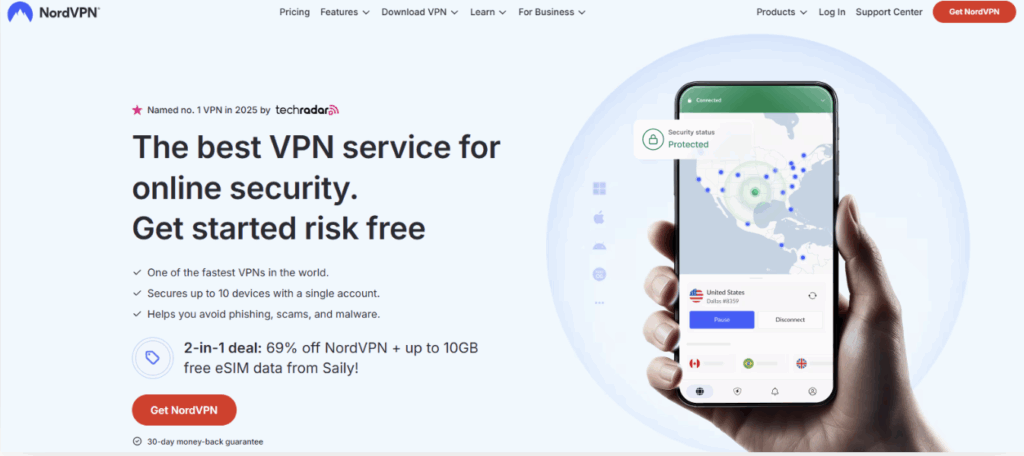
Step 1: Visit the VPN Provider Website >> Go to NordVPN’s official website (or any verified VPN that offers obfuscation).
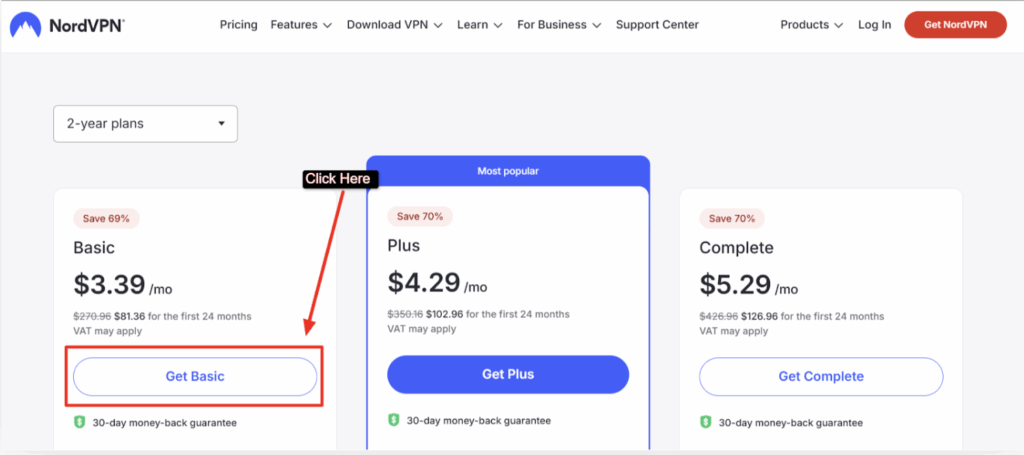
Step 2: Choose a Plan and Create an Account >> Pick a plan (monthly or yearly), create your account, and complete the payment process.
Step 3: Download the VPN App >> Download and install the app for your platform, Windows, Mac, Android or iOS.
Step 4: Log In to the VPN App >> Use your credentials to log in.
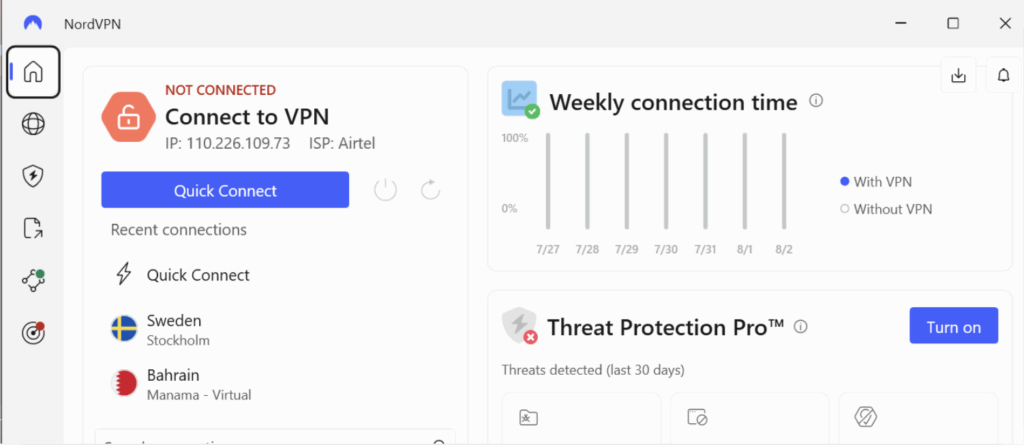
Step 5: Enable Obfuscated Servers (Stealth Mode) >> Go to Settings >> Find the “Obfuscated Servers” or “Stealth Mode” toggle >> Turn it ON (some providers enable it automatically when censorship is detected)
Step 6: Connect to an Obfuscated Server >> Choose a country/server under the “Obfuscated” section and click Connect.
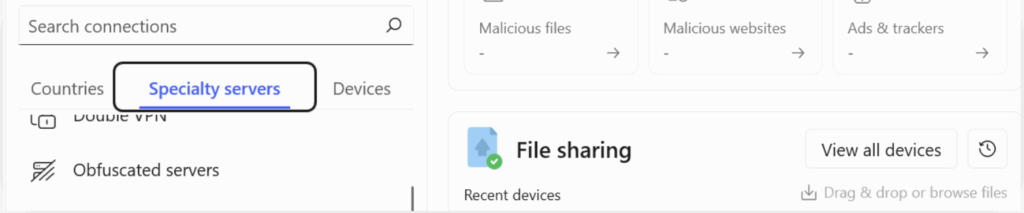
Step 7: Check if it’s Working >> Go to a site of your choice to verify your IP is masked or not and if there’s no DNS leaks or not.
Why Privacy-Focused Users Need Obfuscated VPNs?
An Obfuscated VPN, to simply put, hides the fact that you’re even using a VPN.
It’s the safest of all safety options that a VPN can offer. With obfuscated servers, no one on the internet (not even your ISP or a government firewall) can tell that you’ve turned on a VPN. This allows you to secretly access restricted websites, scrape data, bypass geo-blocks, and stream media, all without getting flagged, banned, or throttled.
Why Do You Need Obfuscated VPNs? Very Important Question!!
- Bypasses VPN Blocks & Censorship- Perfect for users in countries like China, UAE, Iran, or India where VPN usage is often blocked.
- Keeps ISP and Surveillance Out- Prevents your Internet Service Provider or any snooper from knowing you’re using a VPN, even deep packet inspection can’t detect it.
- Safe Access to Restricted Websites- Access academic databases, international content, blocked news platforms, or social media without raising red flags.
- Anonymous Web Scraping & Streaming- Do research, scrape content, or stream shows from other countries without risking detection or IP bans.
FAQ’s
Are obfuscated servers safe?
Yes, obfuscated servers are safe to use. They offer the good encryption and high security as regular VPN servers but with an added layer of privacy. Obfuscation hides the fact that you’re using a VPN, which helps protect you in countries with strong internet surveillance or censorship. It’s especially useful when accessing blocked websites in regions like China or the UAE.
What is the difference between obfuscation and a regular VPN?
A regular VPN encrypts your traffic but can still be detected as VPN traffic by firewalls. Obfuscation goes a step further, it disguises VPN traffic to make it look like normal internet use. This helps bypass VPN blocks and deep packet inspection used in heavily censored countries, making it perfect for users trying to access restricted content securely.
Can I use obfuscated servers for streaming or torrenting?
Yes! Obfuscated servers can be used for streaming and torrenting. In fact, they help avoid VPN bans on platforms like Netflix, BBC iPlayer, and Hulu. However, due to the extra layer of masking, you might experience slightly slower speeds compared to regular servers. Still, many premium VPNs optimize obfuscated servers for smooth streaming and P2P activity.
How do I know if obfuscation is working?
You can check if obfuscation is working by trying to access content that’s usually blocked when VPNs are detected, such as websites restricted by your government or streaming platforms that block VPNs. If the site loads successfully and doesn’t detect VPN use, obfuscation is working. Some VPN apps also label obfuscated servers, making it easy to choose and confirm.
Does every VPN support obfuscation?
No! Not every VPN supports obfuscation. It is usually available with premium VPN providers like NordVPN & SurfShark that are designed for use in restricted regions. Always check the provider’s features, terms like “Stealth VPN,” “Camouflage Mode,” or “Obfuscated Servers” indicate support for obfuscation.
Can obfuscated servers bypass the Great Firewall Of China?
Yes! Obfuscated servers are one of the most effective tools to bypass the Great Firewall of China. They disguise VPN traffic so well that Chinese censors often cannot detect and block it. For travelers, journalists, or residents needing unrestricted access to the open internet in China, using a VPN with obfuscation is essential.
Can obfuscated servers impact your internet speed?
Yes! Obfuscated servers can slightly reduce your internet speed. The extra process of hiding VPN traffic adds a bit of overhead. However, with a high-quality VPN and a stable internet connection, the speed drop is usually minor and acceptable, especially considering the benefits of accessing blocked or censored content securely.
Conclusion
As internet surveillance gets smarter, so do the systems that detect VPN usage. Many websites today use AI detection tools to identify and block connections from known VPN servers.
Once your VPN usage is detected, your access can be permanently restricted, no matter how harmless your intent was. This can be incredibly frustrating, especially when you’re trying to protect your privacy or simply access content from another region.
To solve this growing issue, we’ve listed verified names of 7 VPNs with powerful obfuscated servers that help you fly under the radar. These VPNs make sure no one, neither websites, ISPs, nor firewalls, can detect that you’re using a VPN in the first place. This keeps your connection safe and your device away from unnecessary blocks.
So if privacy, access, and complete internet freedom matter to you, these VPNs with obfuscated servers are your safest bet.
Looking for other VPN Server? Here you go-