
3+ Best Free Minecraft Server Hosting in 2026 (Tested)

Minecraft is a game where you get a gaming experience of fantastic adventure with limitless possibilities like mining, building safe zones, fighting, looting your enemy’s safe zones, and much more. It has come a long way since its launch and has become one of the most popular games in the world today.
Usually, people play it on their PCs, unaware of the fact that much better gaming can be experienced while you’re connected to a server. And we don’t want you to miss that same experience.
In this article, we have curated a list of the best free Minecraft server hosting providers.
In addition to the best companies that provide servers for Minecraft, we have listed some basic server specifications that will help you in choosing one of those best free Minecraft servers hosting 24/7 with mods. So without any further delay, let’s get started.


What is Free Minecraft Server Hosting?
Free Minecraft server hosting lets you run a dedicated Minecraft server, for a small community or just you and your friends, without paying for it. You still get the core benefits of regular hosting: a reliable server that boosts your gaming experience and keeps your world backed up and secure.
Usually, gamers choose servers instead of PCs because it runs smoothly on the servers, and PCs have some limitations. They may lag in the middle of the game and can completely ruin the gaming experience.
Services that give you specially optimised servers for Minecraft are called Minecraft server hosting. When that server comes at no cost to you, it is called free Minecraft server hosting.
Many service providers in the market offer free Minecraft servers, which you can use and then enjoy the game even more!
Minecraft Server Hosting Requirements
In this section, we have mentioned some basic server features required to host Minecraft and run smoothly without causing any kind of lagging or interruptions.
Java Edition vs. Bedrock Edition Support
Before picking a host, check which version of Minecraft it supports. Java Edition is the original PC version and supports mods and plugins through loaders like Forge, Fabric, Spigot, and Paper. Bedrock Edition is the version used on consoles, mobile, and Windows, and it enables cross-platform play, but it does not support Java mods.
Some free hosts only run Java Edition servers, so if you play on console or mobile and want crossplay, confirm Bedrock support before signing up. We have mentioned this per provider where relevant below.
Minimum Minecraft Server Hosting Requirements
Minecraft requires some specific configurations to run it smoothly. It depends upon the number of players joining the game, which we have explained below, so you check it out.
| The Number of Player | CPU specifications | RAM | Disk space(HDD) |
|---|---|---|---|
| 1-2 players | Pentium 4 2.0 GHz or AMD Athlon XP 2000+ | 1GB | 5 GB with backup storage. |
| 3-5 players | Intel core or AMD K8 with 3.4 GHz | 3 GB | 10GB with backup storage. |
| 6 and more | Intel Nehalem-based CPUs or AMD K10 with 3.6 GHz | 6GB | 18 GB with Backup storage. |
Recommended Minecraft Server Hosting Requirements
The specifications mentioned above are the basic ones required to run Minecraft. But here, we will recommend some specifications that you can choose for an ultra-smooth experience.
| The number of Players | CPU specifications | RAM | Disk space(HDD) |
|---|---|---|---|
| 1-2 players | Pentium 4 2.0 GHz or AMD Athlon XP 2000+ | 2 GB | 10 GB with backup storage. |
| 3-5 players | Intel core or AMD K8 with 3.4 GHz | 5 GB | 18 GB with backup storage |
| 6 and more | Intel Nehalem-based CPUs or AMD K10 with 3.6 GHz | 8 GB | 25 GB with backup storage. |
5 Best Free Minecraft Hosting Server Providers
For your convenience, we have filtered out some of the free Minecraft server hosting providers so that you don’t have to put extra effort in search of free hosting.
⏰ TL;DR And here is the list as follows.
1. Aternos – Overall Best Free Minecraft Hosting Server
2. Servers.pro – Trusted Free Minecraft Server Hosting
3. Mineforts – Top Picked For Initial Level Gamers
4. Minehut – Best For Bedrock Crossplay
5. FalixNodes – Best For Mods and Modpacks
1. Aternos – Overall Best Free Minecraft Hosting Server
Aternos
- Fully Customizable
- Mods & Plugins
- DDOS Protected
Aternos Features
- Full customization: Aternos servers have full customization settings, so you can configure them as needed. Users can also optimize server resources to boost performance.
- Automatic backups: Its systems include automatic data backup settings to ensure that your data and game achievements are completely safe on their servers.
- DDoS protection: DDoS stands for Distributed Denial of services attacks performed to make rushed users, which can either crash the server resources or eat up all your resources. Aternos server is completely secured against the DDoS attack.
- Easy integration settings: Aternos provides Minecraft-optimized servers, making it easy to integrate with Minecraft.
- Dedicated Minecraft servers: Aternos provides you with personal servers that are only assigned to you with none to share your resources with.
Aternos Pros & Cons
Its features seem pretty impressive, isn’t it? Now let’s discuss its pros and cons to understand the complete picture of its services.
Pros
- Personal servers for the unrestricted gaming experience.
- Free to use
- Mods and plugins can also be integrated.
- Unlimited slots.
- Real-time access
Cons
- Minimal plugins are available.
- No midfield config files are acceptable.
2. Servers.pro – Trusted Free Minecraft Server Hosting
Servers pro
- Fully Customizable
- Mods & Plugins
- DDOS Protected
Servers.pro Features
Here, in this section, we will discuss some of the key features that separate it from the other service providers in the market.
- Multi-admin options: With its easily configurable servers, you can share your servers’ complete control with your friends and play.
- Latest hardware technology: It uses the latest hardware to provide you with better performance and gaming experience.
- DDoS protection: If you have created a community, your servers are more prone to DDoS attacks, aiming to eat all resources with a rushed attack of fake users. But don’t worry server.pro provides you with complete security against DDoS attacks.
- Plugin installer: Server.pro offers to integrate plugins to your servers with any plugin that you want to use to boost server performance and gaming experience.
- Premium storage: It provides up to 80 GBs of NVMe SSD storage that can be upgraded with their premium plans. You can read here an in-depth server pro review.
Servers.pro Pros & Cons
Let’s discuss some of its pros and cons to get an exact idea of its services’ authenticity and reliability.
Pros
- Instant setup
- Latest hardware technologies
- File access
- Full DDoS protection.
Cons
- Limited players are allowed.
- No daily backups.
- Limited plugins
3. Minefort – Top Picked For Initial Level Gamers
Minefort
- Fully Customizable
- Mods & Plugins
- DDOS Protected
Minefort Features
Let’s quickly glance at their key features to get an exact idea of whether their servers are reliable or not.
- Free Services: In addition to 1 GB of storage, it provides multiple unique features with its servers free of cost.
- Play With the Team: At Minefort, you can create a team of a maximum of 10 players and enjoy the game without any restrictions.
- Full FTP Access: FTP stands for File Transfer Protocol, which transmits files between the server and the client. Full FTP access allows easy-to-install new plugins and uploads media files on your server.
- Latest Hardware Technology: Minefort uses the latest hardware technologies like NVMe SSD storage to provide you with blazing-fast performance.
Minefort Pros & Cons
Here in this section, we will discuss some of their pros and cons to understand their services better.
Pros
- Latest hardware technologies
- Easily integrated with plugins
- Smooth user interface
- Full access to your files.
- Can be easily upgraded for premium features
Cons
- Limited players are allowed
4. Minehut – Best for Bedrock Crossplay

Minehut
- Java + Bedrock Crossplay
- Unlimited Servers
- No Credit Card Needed
Minehut Features
- Java + Bedrock crossplay: Connect through mc.minehut.com on Java or bedrock.minehut.com on Bedrock, and both land on the same world.
- Unlimited servers: Create as many free servers as you want, each with its own 1 GB RAM allocation.
- Plugin support: Upload Bukkit and Spigot-style plugins straight through the web dashboard, no FTP setup needed.
- No credit card required: Sign up and start a server for free without entering any payment details.
Minehut Pros & Cons
Pros
- Genuine Java and Bedrock crossplay on the same world.
- No credit card required to sign up.
- Unlimited number of servers.
Cons
- Only 1 GB RAM and 10 player slots per server on the free tier.
- Plugin support only, no Forge or Fabric mod loaders.
5. FalixNodes – Best for Mods and Modpacks

FalixNodes
- Forge, Fabric & Modpack Support
- Java + Bedrock via GeyserMC
- No Credit Card Needed
FalixNodes Features
- Full mod loader support: Runs Forge, Fabric, and Quilt, in addition to Paper, Spigot, and Purpur for plugin-based servers.
- One-click modpacks: Install popular Modrinth and CurseForge modpacks directly from the server dashboard.
- Java + Bedrock via GeyserMC: Built-in GeyserMC support lets Bedrock players join your Java, even modded, server.
- No credit card required: The free tier does not ask for any payment details to sign up.
FalixNodes Pros & Cons
Pros
- Widest mod and modpack support of any free host on this list.
- Bedrock crossplay via GeyserMC, even on modded servers.
- No credit card required to sign up.
Cons
- Free servers can auto-stop after a period of inactivity and need a manual restart.
- Exact free-tier RAM limits are not clearly published and can change, so confirm current limits before committing.
11 Best Premium Minecraft Server Hosting Providers for 2026
The above-mentioned free Minecraft servers are impressive, aren’t they? But we recommend you go with premium services to get optimum performance and gaming experience because free services aren’t always worthwhile in the long run.
Here’s the list of the 11 best premium Minecraft server providers.
1. ScalaCube – 24/7 Free Minecraft Server Hosting
2. Apex Hosting – Best Minecraft Server Hosting Provider
3. BisectHosting – Cheap Game Server Hosting
4. HostHavoc – Powerful Minecraft Server Hosting
5. Hostinger – Overall Best Minecraft Server Hosting
6. Shockbyte – Best Gaming Server Provider
7. GameTeam – Affordable Gaming Service Provider
8. Sparked Host – Most Popular Minecraft Server Providers
9. GG Servers – Reliable Gaming Server Provider
10. Nodecraft – Powerful Gaming Servers
11. OmgServ – Free Minecraft Server Hostings
1. ScalaCube – 24/7 Free Minecraft Server Hosting
- Unlimited Slots
- Global Locations
- Mods & Plugins
ScalaCube, one of the most reliable 24/7 free Minecraft server hosting providers, offers unlimited slots, instant server setup, multiple server locations across the globe, mod packs and plugins to make a few changes in the gameplay.
Incredible backup system to store the gaming data and restore it at any time.
ScalaCube is also known for providing free MySQL, a free domain, and full root access to the Minecraft server to let you make necessary changes to the server as per the requirements.
ScalaCube Features
Let’s have a look at the excellent features that ScalaCube’s Minecraft server offers exclusively to gamers:
- Few Free Services: With ScalaCube’s Minecraft server hosting, get a free domain and a free MySQL service included in the server plan.
- Full Root Access: To let the gamers customize the game servers as per the requirement, ScalaCube offers Full Root Admin Access to the server.
- Incredible Mod Pack Support: Gamers wanting to make small changes in the gameplay experience, can use the ModPack and can even create their own ModPack.
- Advanced DDoS Protection: Protection is a must for securing gaming data and player information, ScalaCube Minecraft server offers advanced DDoS protection to save the data from malicious online attacks.
- Amazing backup system: To ensure the gaming data and the stored gameplay equipment are safe, ScalaCube’s amazing backup system restores the data in times of emergency.
ScalaCube Pros & Cons
Having discussed the incredible ScalaCube’s Minecraft server features, let’s see the merits and demerits of the servers:
Pros
- Free SubDomain
- 24/ LiveChatSupport Services
- Automated Backup
- Incredible Advanced DDoS Protection
- Unlimited Slots for adding Players
Cons
- Custom plans aren’t available
- Expensive plans
2. Apex Hosting – Best Minecraft Server Hosting Provider

- Easy Setup
- 24/7 Support
- DDOS Protected
Web hosting servers were prevalent in the market, but significantly fewer people were aware of the gaming server. ApexHosting was founded to solve the same issue: the lack of awareness about gaming servers.
Founded in 2013, ApexHosting built a robust hosting infrastructure and the best team of technical experts to help users at every stage of their gaming journey and make them comfortable with gaming servers.
Today, Apex Hosting has served more than 600,000 customers across 170 countries. Read Here: ApexHosting Review
Apex Hosting Features
Let’s look at their key features to get an exact idea about their reliability:
- Automated Data-backup: ApexHosting provides guaranteed offsite data backup that makes your data completely safe and secure.
- Blazing fast server performance: It provides your servers with special features to decrease the server latency as much as possible.
- Multiple Data centers: it provides you with multiple service options to choose all thanks to its widely distributed data centers.
- Excellent customer support: ApexHosting has built a dedicated team of technical experts to provide 24*7 customer support and help you get your problems fixed.
- Instant set-up: It provides ready-to-use robust servers within 5 minutes. Just after you place the order for your desired plans.
Apex Hosting Pros & Cons
Here in this section, we will discuss some of its pros and cons that will play a vital role in your decisions.
Pros
- Excellent customer support
- Free subdomain
- Reliable uptime guarantee
- Automatic Data backups
- 24*7 live customer support
Cons
- No dedicated IP is provided
- Relatively expensive plans
3. BisectHosting – Cheap Game Server Hosting

- Elegant Dashboard
- Dark/Light Mode
- Budget-Friendly
BisectHosting has built its user interface by giving it a elegant look that instantly attracts our eyes, and the best part is that you can also switch to dark/light mode as per your comfort.
But a good user interface of the website isn’t enough to choose their services; that’s why we looked at the key features included in their services.
While reading about its features we were impressed because some of them were good and are necessary to provide better performance and gaming experience.
BisectHosting Features
Here are some key features we found while reading about its services.
- Automated updates: The best part about Bisect hosting is that you don’t need to put extra effort into updating your server’s data. It will automatically update your data with its innovative update configurations.
- Blazing fast SSD storage: You will get the latest and most powerful NVMe SSD storage, which can boost your gaming experience.
- Bedrock version servers: Bedrock is the latest edition for gaming servers that are compatible with all types of OS like Android, iOS etc.
- Unmetered storage: Unmetered storage means you can use all your allocated storage without any interruption or restriction.
BisectHosting Pros & Cons
Here in this section, we have mentioned some key features to understand its services better.
Pros
- Full DDoS protection.
- Multiple server options
- Custom control panel
- Daily backup options
Cons
- No call support available
If budget is your main concern while launching a website, then learning how to get free.com domain name name can be a game changer. This article provides a clear explanation of the best platforms and techniques to get started without any investment.
4. HostHavoc – Powerful Minecraft Server Hosting

- Affordable Pricing
- Powerful Servers
- Instant Setup
Create your world of gaming with HostHovac at just the most affordable price in the market.
You will also get a money-back guarantee, which means you can cancel your services within a few clicks and get your money back too! HostHovac has been one of the leading Minecraft Server hosting providers since 2013.
Initially, it was registered in Canada, but later it expanded its services to almost every part of the world and currently is serving more than 5000 active customers across the globe.
HostHavoc Features
Here are the remarkable features of HostHovac that make it popular among gaming enthusiasts.
- Advance settings: HostHovac allows you to do system configurations or settings based on your needs.
- Money-back guarantees: It also offers you the option to cancel its services anytime within 3 days and get your every penny back.
- Complete control over your server: With Full root access, you can make any security changes on your server without any restrictions.
- High-performance Hardware: It has equipped its servers with the latest and blazing-fast hardware, like NVMe SSD storage, CPU cores, etc., to provide you with optimum performance.
HostHavoc Pros & Cons
Here are the pros and cons of its services that can help you to make your decisions wisely.
Pros
- Root access to the servers
- Blazing fast hardware technologies
- Money back guarantee
- 24*7 customer support
- Free DDoS protection
Cons
- slow customer support
5. Hostinger – Overall Best Minecraft Server Hosting

Hostinger
- Instant Setup
- 24/7 Support
- Free Domain
Hostinger is one of the most popular server hosting providers when it comes to web hosting, but significantly fewer people are aware of its Minecraft dedicated servers.
So let’s talk about its Minecraft server hosting services.
Hostinger is founded in 2004, Hostinger has recently started Minecraft server hosting services, which is why it’s comparatively less popular in the field of gaming servers, even though it has included impressive features in its plans.

Hostinger Features
Here in this section, we will discuss its features to understand its services better.
- Limitless plugins: Hostinger allows you to integrate as many plugins to your servers as you want to boost your server performance and gaming experience.
- Full-Root access: Hostinger provides you full root access to your server to configure its settings as per your needs.
- Maximum uptime guarantee: To provide you with a smooth gaming experience, its servers are configured to provide as maximum uptime as possible. They provide a 99.99% uptime guarantee with servers.
- Blazing fast performance: Hostinger has optimized its services to provide you with better speed and performance and decrease the latency as much as possible.
Hostinger Pros & Cons
Let’s quickly glance at their pros and cons to get a neutral perspective on its services.
Pros
- Instant and easy setup
- Full DDoS protection
- 99.99% uptime guarantee
- Blazing fast performance
- Full root access
Cons
- It has comparatively more expertise in web hosting.
6. Shockbyte – Best Gaming Server Provider

- Founded 2013
- Australia-Based
- DDOS Protected
Shockbyte was founded and registered in 2013 in Australia to provide best-in-class gaming servers to provide a better gaming experience.
It’s especially popular for its powerful gaming servers that you can also get for rent if you don’t want to own them forever. And in addition to Minecraft, it offers you many more games that you can upload to their server and enjoy!
Shockbyte Features
Let’s look at the key features that make Shockbyte one of the leading Minecraft server hosting providers.
- Top-notch security: Along with fast performance, Shockbyte provides you full security against DDoS attacks or any other malicious attacks.
- Instant setup: Just register on their website, configure your gaming server, and complete the payment. Your servers will be ready to use in just a while, thanks to its instant setup feature.
- Latest Hardware technology: Shockbyte provides the latest and best-in-class hardware technology. For example, it gives you gaming servers with the latest NVMe SSD storage for better performance.
- Money-Back Guarantee: It’s rare to see a money-back guarantee in the gaming servers, but Shockbyte offers to cancel services anytime within 72 hours of your purchase.
Shockbyte Pros & Cons
Its features seem amazing, right? Let’s go through its pros and cons to get the complete picture of its reliability.
Pros
- Latest and fast NVMe SSD storage
- Guaranteed DDoS protection
- 100% Uptime guaranteed
- 24*7 customer support
Cons
- Only Rental servers are available
7. GameTeam – Affordable Gaming Service Provider

- Budget-Friendly
- Newer Provider
- Instant Setup
GameTeam is one of the youngest gaming service providers on our list. It was established just a year ago, which makes it comparatively less reliable than the other Minecraft Gaming server hosting providers.
As mentioned on its website, GameTeam offers services across 16+ locations worldwide with affordable server plans and impressive features.
And the best part I liked about GameTeam is its elegant-looking dashboard which is provided to manage the resources.

GameTeam Features
Here in this section, we will discuss some key features required to understand its services better.
- 24*7 customer support: The best part about GameTeam is that it provides you 24*7 live customer support via chat, email, and tickets.
- Top-notch security: GameTeam ensures your data security by providing complete security against DDoS, script injection attacks,s or any kind of malicious attack.
- Enterprise-level hardware: It has equipped its services with the latest and fast hardware technology. For example, NVMe SSD storage.
- 99.99% uptime guarantee: Uptime tells you about your server’s availability. The more uptime it has, the better your server’s performance will be.
GameTeam Pros & Cons
Here in this section, we will discuss some of its pros and cons to understand its service better.
Pros
- 99.99% Uptime guarantee
- 24*7 customer support
- Latest NVMe SSD storage
- Full DDoS protection
Cons
- Less reliable.
8. Sparked Host – Most Popular Minecraft Server Providers

- Blazing-Fast
- Multi-Game Support
- Premium Servers
In addition to Minecraft, you can play a variety of games on Sparked Host’s premium gaming servers with blazing-fast performance and a better gaming experience.
It provides you with impressive features in its plans with Enterprise-Level hardware. Established in 2017, It’s one of the most popular Minecraft server hosting providers, primarily known for its robust, reliable, high-quality server infrastructure.
Sparked Host offers you multiple gaming server options to choose one of the best servers according to your needs. This is thanks to its widely distributed data centers.
Sparked Host Features
To better understand their service, we will have to discuss the key features that are included in their services: they’re as follows.
- Instant setup: It doesn’t matter how heavy resources you have chosen. Your servers will be activated and ready to use within a few hours of your payment.
- Excellent customer support: Sparked Host provides you 24*7 customer support with its Live chat, ticket, and Discord community, where the world’s best brains are available to solve your queries.
- Full DDoS Protection: With blazing-fast performance, it also provides top-notch security against DDoS or any other malicious attacks on your server.
- Affordable plans: The best part of Sparked Host is that it provides its users with reasonable services.
Sparked Host Pros & Cons
Let’s quickly glance its pros and cons to understand the complete picture of its service’s authenticity.
Pros
- Top-notch security
- Very affordable
- Multiple game options to play
- Excellent customer support
- Robust server infrastructure
Cons
- Slow customer support.
9. GG Servers – Reliable Gaming Server Provider

- Strong Reviews
- Reliable Uptime
- Instant Setup
If you’re looking for a reliable gaming server provider, then GG Server can be a perfect option for you. That is based on the customer reviews and ratings we have read on various trusted platforms.
The best part about GG server is that it uses the latest hardware technologies to provide best-in-class gaming servers with mind-blowing gaming experiences. For example, you will get blazing-fast NVMe SSD storage with upgraded storage capacity.
GG Servers Features
Here in this section, we have mentioned some key features that will help us choose the services wisely.
- Excellent customer support: GG Server provides 24*7 customer support with a dedicated technical team to solve your queries as quickly as possible. You can easily contact them via tickets, knowledge base, live chat and discord community.
- Powerful resources: In addition to its latest hardware technology, you get powerful resources like 250 Mbps uplink, 400 mb+ data storage etc.
- Unmetered Bandwidth: With GG Server, you get unmetered bandwidth which means you can use the allocated bandwidth resources without any restrictions.
- Free DDoS Protection: Usually, some service providers offer you DDoS protection as a paid option, but GG Server provides free DDoS protection in their services.
GG Servers Pros & Cons
Let’s discuss some of its major pros and cons to get an unbiased perspective of its services.
Pros
- Powerful resources
- Latest hardware technology
- Unmetered bandwidth
- Free DDoS protection
- Instant activation
Cons
- No call support is available.
10. Nodecraft – Powerful Gaming Servers

- Optimized Servers
- Multi-Game Support
- Instant Play
You can instantly play any game of your choice with Nodecraft’s powerful gaming servers and enjoy every part of it with optimized gaming servers.
It’s providing gaming servers in the market since 2012 and has satisfied every customer with its quality services.
It also offers you a free hosting trial that can be accessed without any credit card or initial payment with the same experience as in the premium services
Nodecraft Features
Here, in this section, we glance at some of their key features to understand their services in detail.
- Save and swap: This unique feature allows you to play and switch to any game. Its save and swap feature will automatically save your progress in the game so that you can restart your game at the same point you left it.
- Instant setup: You just need to order your desired server. It will be activated and ready to use in just a few hours.
- Cloud backup: It’s rare to see cloud backups in the gaming server, usually found in the web hosting server, but Nodecraft provides you with Cloud backup so that your data can restore even if any misfortune happens.
- Dedicated IP address: Nodecraft also provides a dedicated IP address to every user to protect their privacy and be anonymous while enjoying the game.
Nodecraft Pros & Cons
Let’s discuss some of its pros and cons the get the complete picture of its services.
Pros
- Full DDoS protection
- One click installation
- Free subdomain and dedicated IP
- Unlimited player slots
Cons
- Slightly more expensive
11. OmgServ – Free Minecraft Server Hostings

OmgServ
- Free Tier Available
- Premium Plans
- Minecraft Focused
In addition to premium gaming server plans, OmgServ also provides free Minecraft server hostings with almost the same but significantly limited resources.
Although its user interface wasn’t elegant or even impressive, we navigated to its services, features, and plans sections to understand whether its services are reliable or not.
And we found out that some of its features were interesting, and reliable and grabbed our attention which we have discussed in detail in the features section. Without any further delay, let’s quickly get into it.
OmgServ Features
Here are some key features mentioned to understand its service’s quality.
- Unmetered RAM: The best part about OmgServ is that it provides you with unmetered RAM, which means you can host as many games as you want over their allocated RAM without any restrictions.
- Unmetered SSD storage: Its premium allows you to use the complete allocated storage without any restriction or interruption.
- Full DDoS protection: DDoS protection is an essential feature that’s required to save your server from the fake users intended to eat up all your resources.
- Easy plugin integration: OmgServ offers services to more than 30,000 plugins to install and instantly boost your gaming experience.
OmgServ Pros & Cons:
Let’s examine its pros and cons to get a complete picture of its reliability.
Pros
- Unmetered resources
- Best-in-class server infrastructure
- Latest Intel Xeon series of CPU processors
- Custom IP address.
Cons
- Technical support is only available on a priority basis
How to Setup a Free Minecraft Server – Step by Step
You won’t believe but creating a free Minecraft server is as easy as enjoying Minecraft with your friends. By following the mentioned steps, you can also create your own Minecraft server, join the team or community and begin the adventure with a mind-blowing gaming experience.
- Choose one of the mentioned free Minecraft server hosting providers as per your wish (we recommend you to go with Aternos).
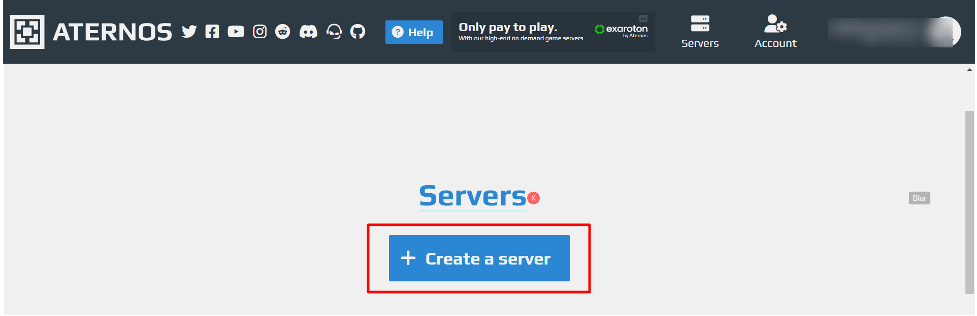
- Create your account and click on the “Create Server” button.
- Enter your Username and click on the next button.

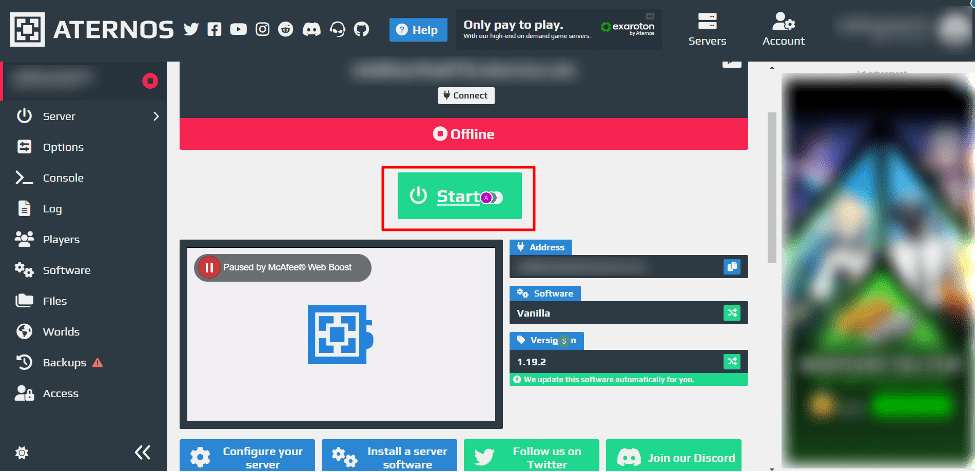
- Click on the Start button and initiate your server.
- You will see this kind of pop-up just click on the Yes, I accept the EULA

Initially, it will take a few minutes to configure your server, but once it’s ready, you can enjoy it anytime.
- Connect your server to the Minecraft direct connection section.
- Just hit on the Join server button, and congratulations! You’re all set to enjoy the game with your team or community.
How to Setup a Modded Minecraft Server for Free
Minecraft modded servers allow you to use modified game clients with third-party mods installed through which players can easily enjoy the modded version of Minecraft.
If you want to create a free Minecraft server and install mods over it, then just follow the mentioned steps:
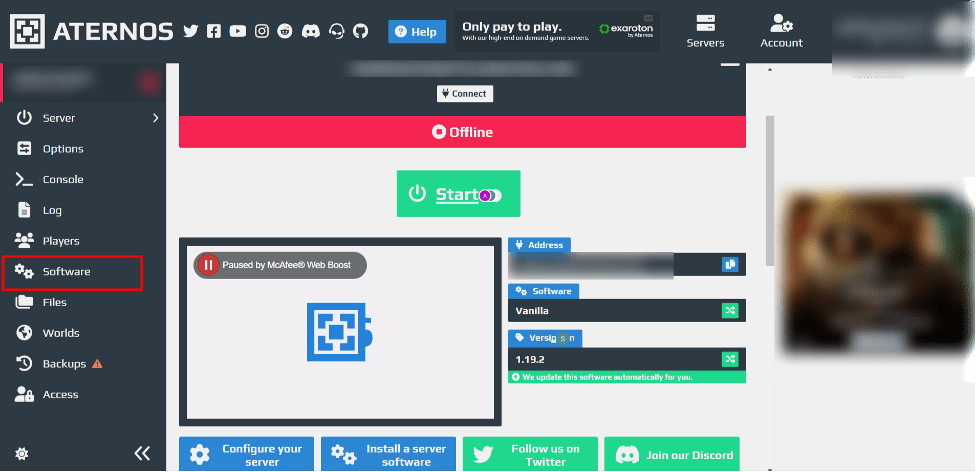
- Click on the “Software” section on the dashboard of Aternos (from where you initialized the server)
- Choose Forge as an option to install mods.

- Select the version.

- Reinstall the version you have chosen.

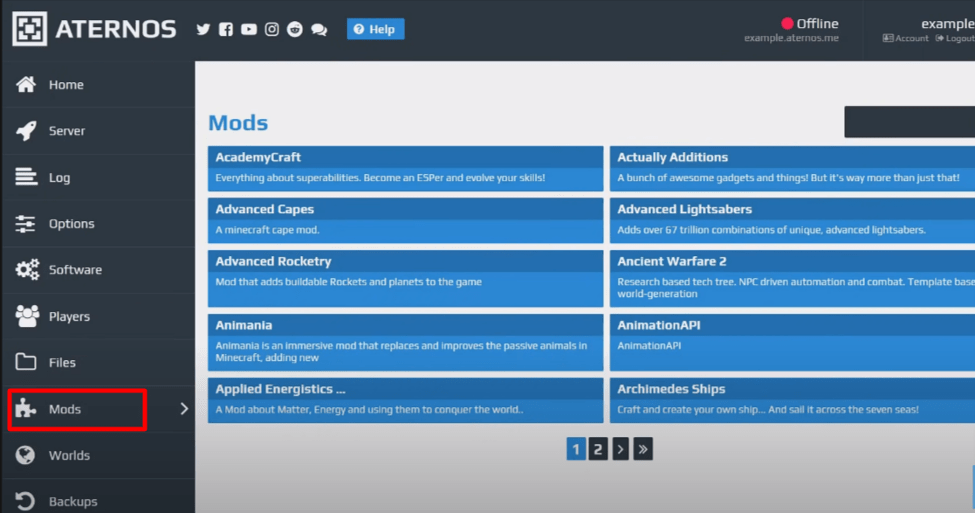
- Click on the Mods and get into the section.
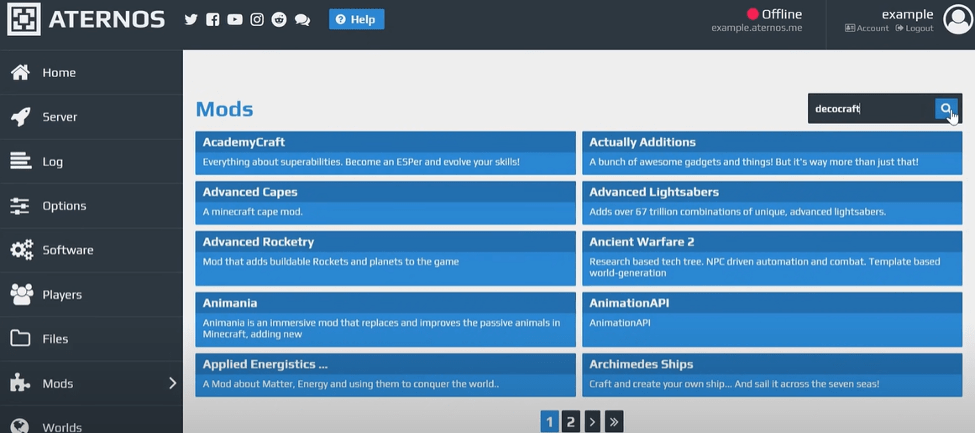
- Search for Decocraft at the search bar
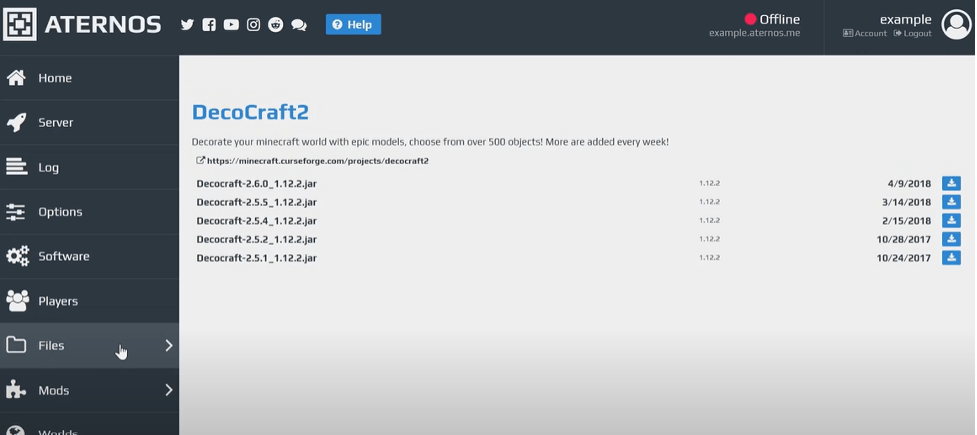
- Download the Mod files on the server.
- Now you have to install the dependencies and for that, go to the search bar, and type ptrlib
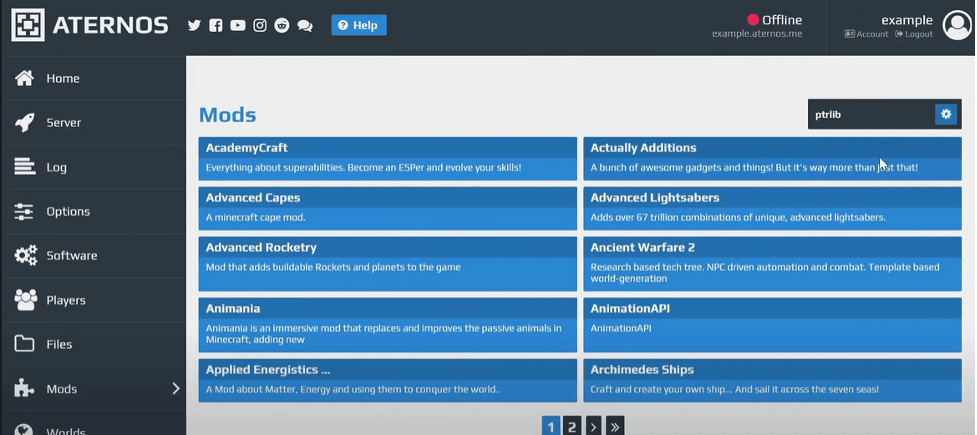
- Download the dependent files that are required to run the mods.
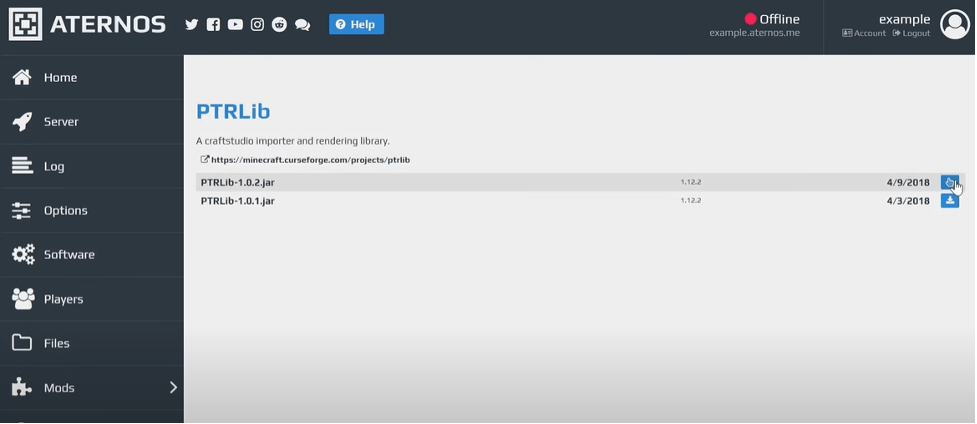
- Once the dependent files are downloaded, go to the Curse forge website and download the DecoCraft file.
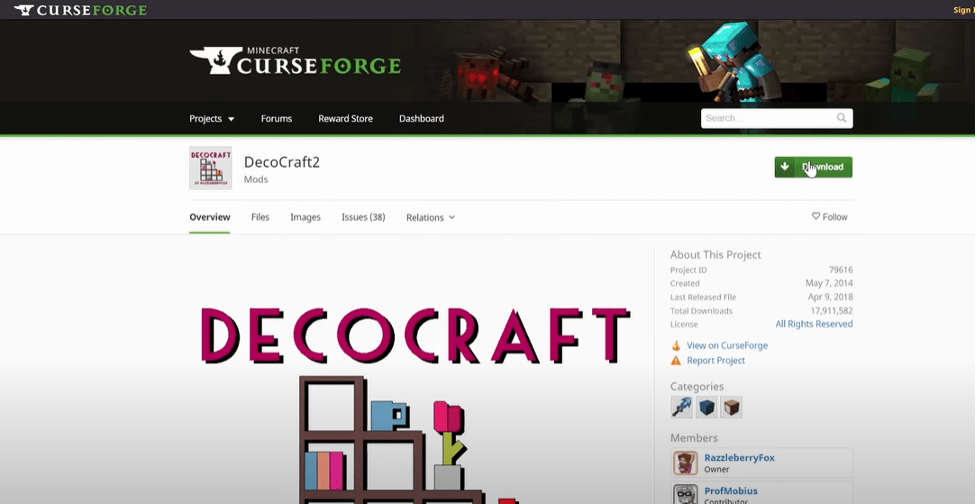
It will show you that the files aren’t safe for your PC but don’t worry they will harm your computer.
- Now copy the Downloaded files and paste them into the Minecraft programme files.

- Open Minecraft and connect it with your server.
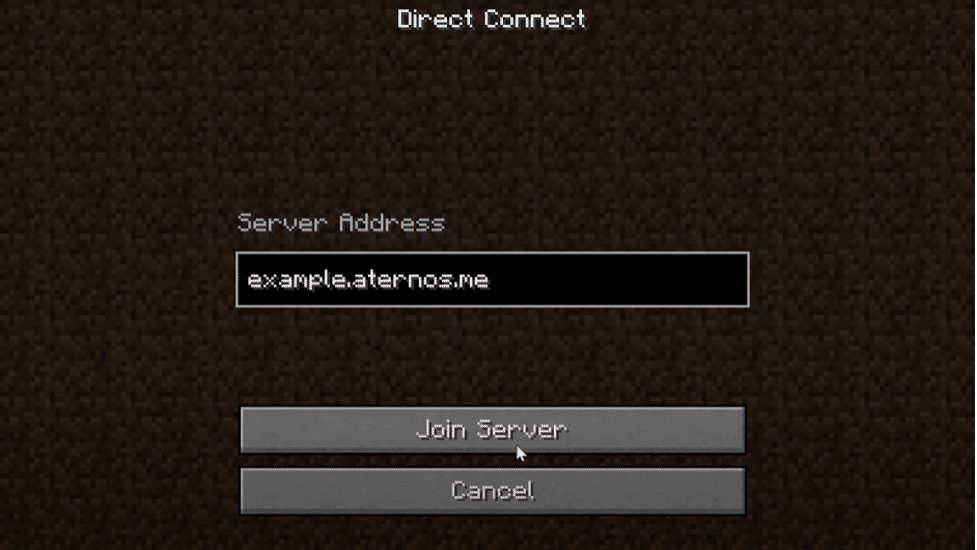
What to Look For In Best Free Minecraft Server Hosting?
Although we have already mentioned the best and free Minecraft server hosting provider to reduce your efforts, still section has covered some of the most essential features that you should keep in mind while buying a Minecraft server or choosing the free ones.
- Full DDoS protection
- At least 10 GB with backup storage
- Easy plugins integration
- 24*7 customer support
- Instant setup
- Unrestricted player slots
- Latest hardware technology
If you remember these points before buying a premium or free Minecraft server then you will definitely get best service provider possible.
Benefits of Running Your Own Minecraft Server
There are many benefits of playing Minecraft on a server instead of your personal computer, some of which we have mentioned below :
- Smooth and better gaming experience
- You can play multiple games other than Minecraft
- You can save all your achievements and progress with daily backup features.
- It helps you to join a team or even your community.
You can get rid of your PC’s heat issues.
FAQ’s – Best Free Minecraft Server
Is Minecraft free?
No, Minecraft isn’t free it costs you around $29.99, but you can definitely get a free Minecraft server hosting.
Are free Minecraft servers safe?
It depends upon the service provider you have chosen. We recommend you choose one of the above-mentioned service providers because these are the safest service providers in the market.
Why is my Free Minecraft server lagging?
It can happen due to low server specifications. We recommend you upgrade your server resources to get a smooth gaming experience.
How much RAM do I need for the Minecraft server?
We recommend you go for 5 GB RAM for optimum performance. Still, if you want an affordable option, then you can also go with at least 3 GB RAM.
Does Aternos or other free hosts run 24/7?
Not always. Aternos uses a queue system at busy times and puts your server to sleep after it sits idle, so it takes a minute or two to restart when someone rejoins. If you need true 24/7 uptime with no queue, that usually means a premium plan.
Can I install mods or modpacks on a free Minecraft server?
Yes, on Java Edition most free hosts support mod loaders like Forge and Fabric, plus plugin platforms like Spigot and Paper. Just check the host’s RAM limit first, since large modpacks can need more memory than a free plan offers.
Do free Minecraft servers support Bedrock Edition and crossplay?
It depends on the host. Bedrock Edition is used on consoles, mobile, and Windows, and not every free Java-based host supports it. Check each provider’s features section above to see which edition it runs before you sign up.
Conclusion – Best Free Minecraft Server
Between the 5 genuinely free picks and 11 premium options above, you have enough range to match almost any Minecraft setup. Aternos and Minehut cover casual play with friends, FalixNodes wins if mods and modpacks are your priority, and ScalaCube or Hostinger make sense once you are ready to pay for guaranteed uptime with no queues.
So if you’re a Minecraft lover or a pro gamer looking for free Minecraft server hosting, the list mentioned above will help you choose the best Minecraft hosting provider so that you can connect successfully with your team and enjoy. If you enjoy survival crafting games beyond Minecraft, our comparison of Palworld server hosting providers covers similarly reliable options. If you’re thinking about setting up a website for your gaming community or to share your gaming experiences, you can easily do it with one of the best free AI website builders out there.
We hope you found this article informative and helped you pick your server wisely. If you have any queries or doubts, feel free to comment below. We will try to respond as soon as possible.
In Short, These are the Best Free Minecraft Server Hosting in 2026
A quick look at all 16 Minecraft hosts covered here, free and premium, so you can compare pricing and pick the right one fast.
| Provider | Type | Starting Price | Rating |
|---|---|---|---|
| Aternos | Free | Free | 4.9 of 5 |
| Servers.pro | Free | Free | 4.9 of 5 |
| Minefort | Free | Free | 4.9 of 5 |
| Minehut | Free | Free | 4.2 of 5 |
| FalixNodes | Free | Free | 4.4 of 5 |
| ScalaCube | Premium | $2.00/mo | 4.9 of 5 |
| Apex Hosting | Premium | $3.99/mo | 4.9 of 5 |
| BisectHosting | Premium | $2.99/mo | 4.9 of 5 |
| HostHavoc | Premium | $3.75/mo | 4.9 of 5 |
| Hostinger | Premium | $6.99/mo | 4.9 of 5 |
| Shockbyte | Premium | $2.50/mo | 4.9 of 5 |
| GameTeam | Premium | From $0.49/GB | 4.9 of 5 |
| Sparked Host | Premium | $1.00/mo | 4.9 of 5 |
| GG Servers | Premium | $3.00/mo | 4.9 of 5 |
| Nodecraft | Premium | $5.96/mo | 4.9 of 5 |
| OmgServ | Premium | €9.99/mo | 4.9 of 5 |


3 thoughts on “3+ Best Free Minecraft Server Hosting in 2026 (Tested)”
Leave a Comment

Table of Contents
- What is Free Minecraft Server Hosting?
- Minecraft Server Hosting Requirements
- 5 Best Free Minecraft Hosting Server Providers
- 11 Best Premium Minecraft Server Hosting Providers for 2026
- 1. ScalaCube - 24/7 Free Minecraft Server Hosting
- 2. Apex Hosting - Best Minecraft Server Hosting Provider
- 3. BisectHosting - Cheap Game Server Hosting
- 4. HostHavoc - Powerful Minecraft Server Hosting
- 5. Hostinger - Overall Best Minecraft Server Hosting
- 6. Shockbyte - Best Gaming Server Provider
- 7. GameTeam - Affordable Gaming Service Provider
- 8. Sparked Host - Most Popular Minecraft Server Providers
- 9. GG Servers - Reliable Gaming Server Provider
- 10. Nodecraft - Powerful Gaming Servers
- 11. OmgServ - Free Minecraft Server Hostings
- How to Setup a Free Minecraft Server - Step by Step
- How to Setup a Modded Minecraft Server for Free
- What to Look For In Best Free Minecraft Server Hosting?
- Benefits of Running Your Own Minecraft Server
- FAQ's - Best Free Minecraft Server
- Conclusion - Best Free Minecraft Server




hey just to say there is two times the number “3” .
Thank you for correcting us
Minecraft Jav server and YouTube videos to server enjoy the server and Maxwell disserver to long time used to server and 24/7 to help this server no gender on nahi karna padega