
Independent Analytics Review 2026: Honest 6-Month Test

Most WordPress site owners know they should track their traffic, but few enjoy doing it. Google Analytics 4 asks you to learn a new interface, add a cookie banner and send visitor data to Google, and many bloggers simply stop looking at their numbers. Independent Analytics promises something simpler: a privacy-friendly dashboard inside your WordPress admin, with the data stored in your own database.
But a promise on a pricing page is not proof. So we did what we rarely see in other reviews: we ran Independent Analytics Pro on a real, busy blog for six months. Since 30 April 2026 it has recorded hundreds of thousands of sessions, and we measured what it costs in database space, what its tracking code adds to a page and which features we actually used.
In this Independent Analytics review, you will find our real numbers, every feature explained, the current prices, a free versus Pro comparison, how it stacks up against Google Analytics 4, Plausible, Matomo, MonsterInsights and Burst Statistics, and who should (and should not) install it.
⚡ Key Takeaways
✅ No cookies, no external servers and all data stored in your own WordPress database
✅ Six months of tracking on a busy blog, from 30 April to 6 November 2026
✅ A lightweight tracking snippet of about 13 KB that sends one background request per visit
✅ Free version with unlimited tracking, Pro from $49/year with every feature on every plan
✅ Campaign builder, click tracking, real-time view and email reports in Pro
⚠️ Our database used about 620 MB per million sessions, more than the 200 to 300 MB the developer estimates
⚠️ It cannot import your old Google Analytics data
Independent Analytics Review at a Glance
| Our Findings | |
|---|---|
| 🏷️ What it is | A WordPress analytics plugin and a privacy-friendly Google Analytics alternative for WordPress |
| 🧪 Our test | Independent Analytics Pro 2.16.2 on a live blog for 6 months, since 30 April 2026 |
| 📊 Data recorded | Six months of sessions, pageviews and visitor records on a busy blog |
| 🔒 Privacy | No cookies, no personal data stored and no external server, per the developer |
| ⚡ Tracking code | About 13 KB inline snippet that sends one background request |
| 💽 Database size | About 620 MB per million sessions on our site |
| 💰 Pricing | Free version, Pro from $49/year for 1 site, $79 for 3 sites, $199 for unlimited |
| ♻️ Refund | 30-day money-back guarantee, no free trial |
| ⭐ WordPress.org rating | 4.8/5 from 166 reviews and more than 100,000 active installs |
Independent Analytics

Pros
- No cookies and data stays in your own database
- Free version with unlimited tracking
- Campaigns, click tracking and user journeys in Pro
- Every Pro plan includes every feature
Cons
- Cannot import Google Analytics history
- Database grows fast on busy sites
Summary
Independent Analytics is a privacy-friendly WordPress analytics plugin with no cookies, data stored in your own database, a free version with unlimited tracking and Pro from $49/year with every feature on every plan.
Price: USD 49 /year
Visit Independent AnalyticsOur verdict: Independent Analytics is the easiest way we have found to see which posts bring traffic, where visitors come from and which campaigns work, without a cookie banner or a Google account. It is a strong fit for blogs, business sites and agencies. It is not a replacement for GA4 if you need Google Ads attribution, and you should plan for database growth on a busy site.
What Is Independent Analytics?
Independent Analytics is a WordPress plugin that tracks your visitors and shows the results in a dashboard inside wp-admin. Unlike Google Analytics, there is no external account, no tag and no connection to another company’s servers. The plugin records each visit through your own site’s REST API and keeps everything in your WordPress database, so you own the data.
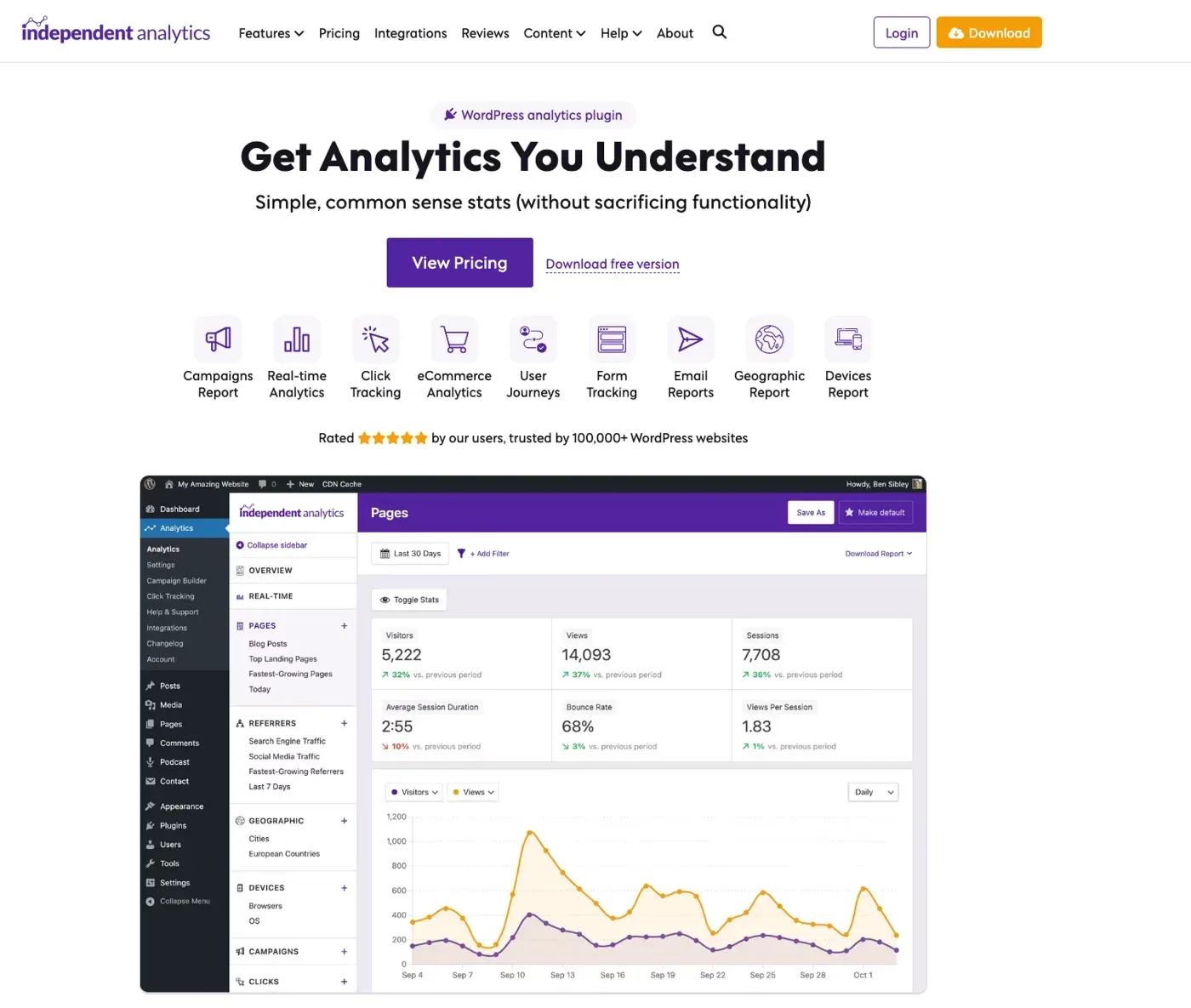
The homepage sells it as a WordPress analytics plugin with the line “Get Analytics You Understand” and the promise of “simple, common sense stats (without sacrificing functionality).” It lists nine headline features: Campaigns Report, Real-time Analytics, Click Tracking, eCommerce Analytics, User Journeys, Form Tracking, Email Reports, Geographic Report and Devices Report. It also says the plugin is rated five stars by its users and trusted by more than 100,000 WordPress websites, and it offers both a View Pricing button and a free version download.
The free version covers the basics: visitors, views and sessions, plus Pages, Referrers, Geographic and Devices reports, filters, CSV and PDF export, a dashboard widget and post view counts in the Posts list. The Pro version adds the reports that help you grow a site: campaigns with a link builder, click tracking, real-time visitors, user journeys, WooCommerce and other eCommerce analytics, form tracking and scheduled email reports.
Independent Analytics says it is used on more than 100,000 WordPress sites, and its WordPress.org listing shows a 4.8 out of 5 rating from 166 reviews. It requires WordPress 5.9 or higher and PHP 8.0.30 or higher. To compare it with the other options, see our guide to managed WordPress hosting so your host and your analytics work well together.
What’s New in Independent Analytics 2.16?
The plugin updates often. Version 2.16.0, released on 15 October 2026, brought several changes that matter to marketers:
- Redesigned Campaign Builder: The UTM link builder was rebuilt, with QR code generation and CSV exports, so you can print a campaign link.
- Optional Cloudflare Geolocation: You can use Cloudflare’s country data for visitor locations if your site runs behind Cloudflare.
- 18-Month Auto-Delete: A new retention option deletes old data after 18 months, which helps control database size.
- OpenAI Ad Clicks Tracked Separately: Clicks from OpenAI ads now show as their own source in the reports.
- Better Facebook Ad Accuracy: Facebook ad traffic is now attributed more accurately in the Referrers report.
Versions 2.16.1 and 2.16.2 followed in October, and 2.16.2 fixed newsletter form submissions being recorded. We ran 2.16.2 for this review.
How We Tested Independent Analytics
We did not test Independent Analytics on a demo site. We have run Independent Analytics Pro 2.16.2 on the GoogieHost blog since 30 April 2026, on a lifetime Pro license, and we use it to decide which posts to update and which campaigns to keep. For this review we read the numbers straight from the plugin’s database tables and from the live page source on 6 November 2026.
| What We Measured | Result on Our Blog |
|---|---|
| Tracking period | 30 April 2026 to 6 November 2026, about 6 months |
| Pages per session over the whole period | About 1.08 |
| Countries with visitors | 200 |
| Browsers detected | 66 |
| Campaigns created | 3 |
| Click tracking rules | 4 |
| Database space used | About 620 MB per million sessions |
| Saved reports | 20 |
What we did not test: Our blog has no online store and no forms, so the eCommerce and form tracking tables on our site are empty. The notes on those two features come from Independent Analytics’ own pages, not from our data, and we say so where it applies.
About the screenshots: our traffic is private, so only the Pages, Referrers and Devices images are ours, with numbers blurred. The rest come from the official Independent Analytics site (demo data).
Independent Analytics Setup: How Easy Is It?
Setup is the easiest part. There is no account, no tag to paste and no Google property to create:
- Install the free Independent Analytics plugin from the WordPress plugin directory, or upload the Pro plugin and enter your license key.
- Activate it. Tracking starts straight away, and a new Analytics item appears in the WordPress admin menu.
- Clear your cache once, so the tracking snippet shows on every page, whether you use one of the best WordPress caching plugins or a host-level cache. The developer says this is the one step people miss.
- Visit your site in a private browser window, then open the dashboard to confirm your visit appears.
- In Settings, choose which user roles and IP addresses to ignore, so your own visits do not count, and set automatic data deletion if you want it.
The whole process takes about five minutes. If your pages do not show up, the plugin FAQ says to clear your site’s cache and visit in a private tab.
Independent Analytics Dashboard and Features
Here is what Independent Analytics shows, report by report. The first four reports are in the free version, and the rest are Pro.
Overview and Filters
The Overview page is the first screen you see. In our dashboard it is made of modules: Site Traffic with a views and visitors chart, Top 10 Pages, Geographic Traffic on a world map, New vs. Returning Sessions and Site Metrics. Buttons let you add or reorder modules and download the report.
| Key Metric (Last 30 Days) | Result on Our Blog | Change vs Previous Period |
|---|---|---|
| Average session duration | 12:45 | Down 9% |
| Bounce rate | 98% | Up 1% |
| Views per session | 1.03 | Down 2% |
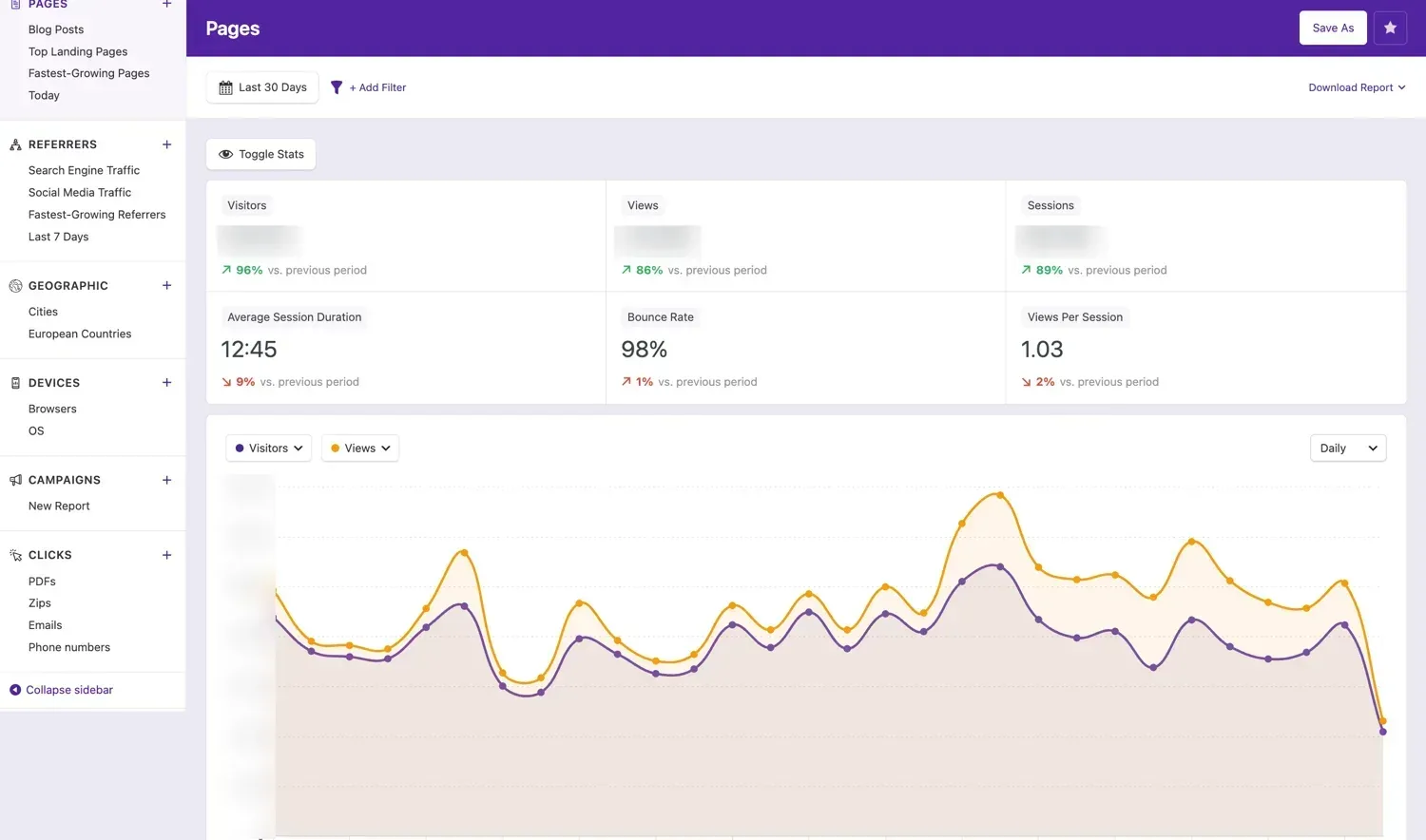
These figures come from our Pages report on 6 November 2026. We keep our exact visitor, view and session counts private, but the engagement numbers show how one screen summarizes a month at a glance, with the change against the previous period beside each tile.
You can filter any report by page, referrer, country, device, campaign and more, then save the filtered view as a report. We have 20 saved reports, and they load in one click. The left sidebar also ships with ready-made report shortcuts, listed below. Pro adds an Overview report with 10 customizable modules.
Built-in Report Shortcuts in the Sidebar
Independent Analytics adds its own sidebar inside the WordPress admin, and each report group has ready-made views you can open without building a filter:
| Sidebar Group | Ready-Made Views |
|---|---|
| Real-Time and Overview | Live visitors and the main dashboard |
| User Journeys | Form Submission, Clicks and Orders |
| Pages | Blog Posts, Top Landing Pages, Fastest-Growing Pages and Today |
| Referrers | Search Engine Traffic, Social Media Traffic, Fastest-Growing Referrers and Last 7 Days |
| Geographic | Cities and European Countries |
| Devices | Browsers and OS |
| Campaigns | New Report |
| Clicks | PDFs, Zips, Emails and Phone numbers |
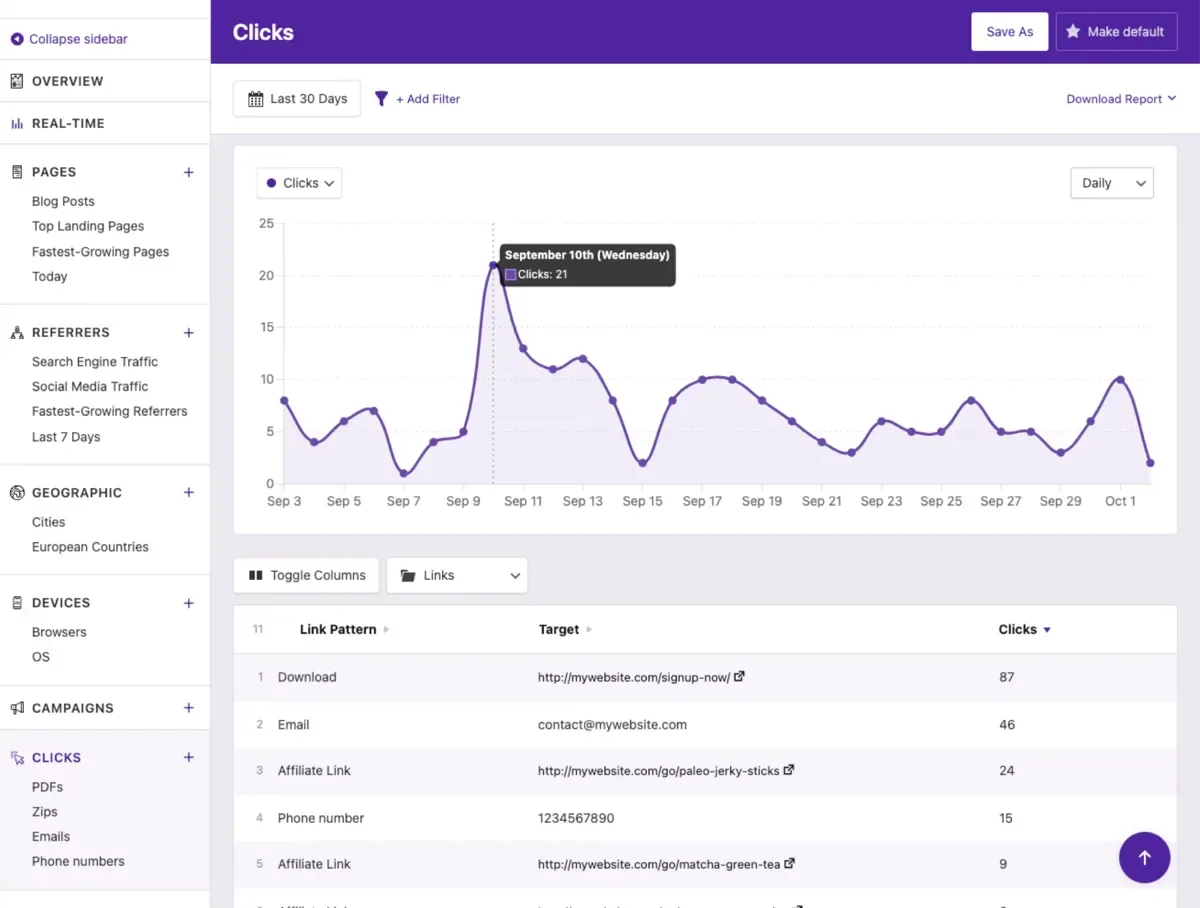
The main WordPress menu under Analytics also lists Settings, Campaign Builder, Click Tracking, Help and Support, Integrations, Updates and Account. The Clicks shortcuts show how far click tracking goes: it can follow PDF and Zip downloads, email links and phone number links, not only normal links.
Pages Report
The Pages report ranks your posts and pages by views, visitors and sessions, and the sidebar shortcuts include Blog Posts, Top Landing Pages and Fastest-Growing Pages. This is the report we open most, because it tells us which posts deserve an update. The free version also puts post view counts in the Posts list, so you can see traffic without leaving the editor.
Referrers Report
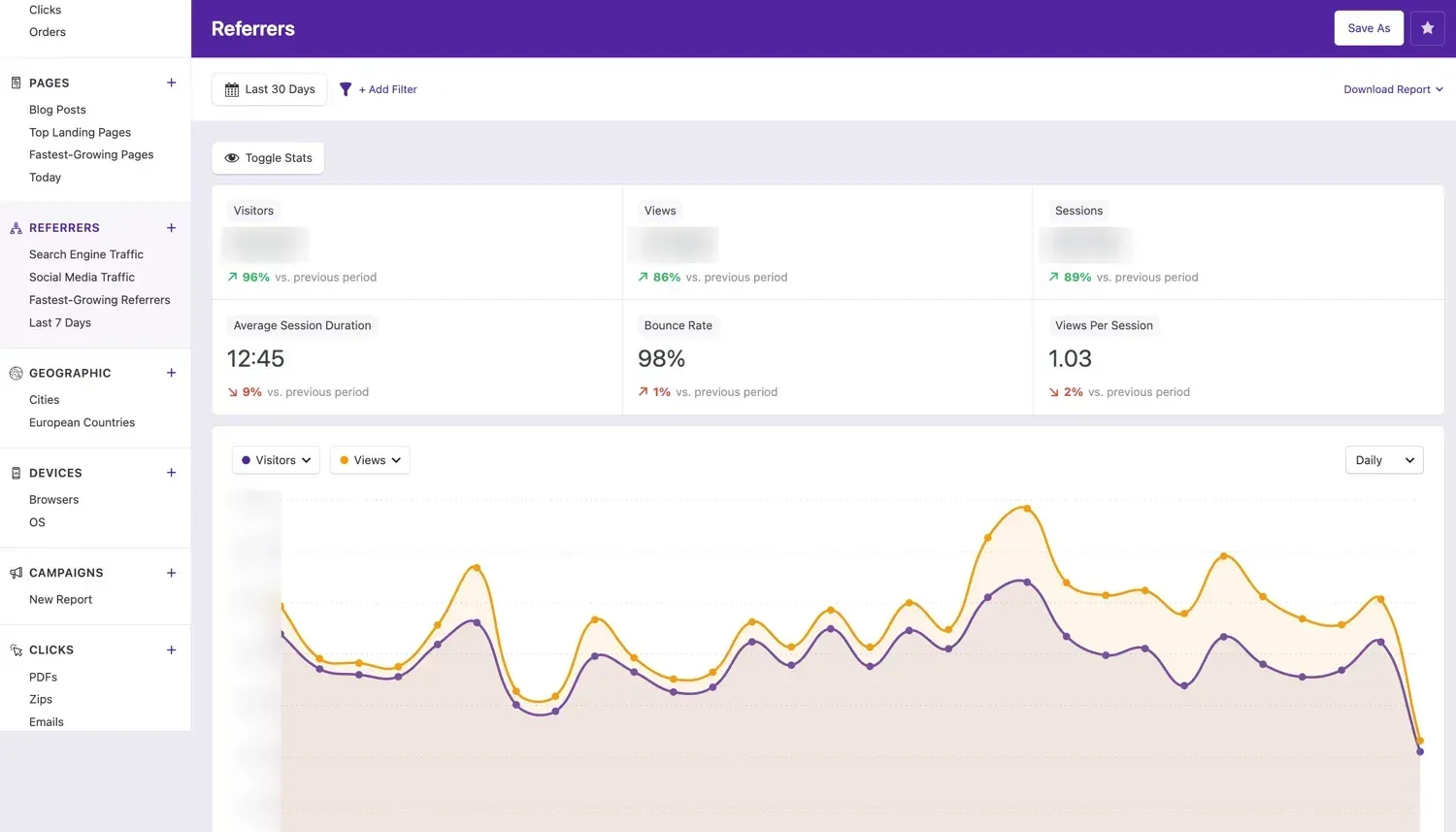
Referrers shows where visitors come from: search engines, social networks, other websites and direct visits. Our site has hundreds of recorded referrers. Because the plugin groups them by type, you can see search traffic separate from social traffic at a glance.
Geographic Report
The Geographic report breaks down visitors by country and city. Ours recorded visitors from 200 countries and thousands of cities, which is useful for choosing a server location and targeting content. Version 2.16 added optional Cloudflare geolocation for sites behind Cloudflare.
The report shows a world map shaded by traffic and a sortable table. In the last 30 days it listed 163 countries. Here are our top 10 by share of visitors:
| Country | Share of Visitors | Share of Views | Session Duration | Bounce Rate |
|---|---|---|---|---|
| United States | 20.9% | 13.21% | 7:34 | 99% |
| China | 9.75% | 39.54% | 15:02 | 98% |
| Germany | 8.32% | 5.05% | 5:04 | 100% |
| United Kingdom | 7.77% | 4.72% | 4:17 | 100% |
| France | 6.89% | 4.18% | 3:09 | 100% |
| The Netherlands | 6.77% | 4.12% | 4:05 | 100% |
| Japan | 6.38% | 3.96% | 9:21 | 100% |
| India | 5.87% | 5.91% | 16:27 | 91% |
| Poland | 4.52% | 2.77% | 4:40 | 100% |
| Brazil | 4.4% | 2.62% | 4:35 | 99% |
How to read it: The table shows why a country report needs judgment. China sent 9.75% of our visitors but 39.54% of our views, about 7 views per visitor against roughly 1 for most other countries, which looks like automated traffic. India shows the longest real engagement, with a 16:27 session duration and the lowest bounce rate at 91%. Independent Analytics ignores bots that identify themselves, but disguised bots still get counted, so pair it with Cloudflare or Wordfence and use filters before you act on a number.
Devices Report
Devices shows desktop versus mobile, operating systems and browsers. We saw 66 different browsers in our data. It answers the practical question of whether to design for mobile first.
| Device Type | Share of Visitors | Share of Views | Session Duration | Bounce Rate |
|---|---|---|---|---|
| Mobile | 77.81% | 48.83% | 13:48 | 99% |
| Desktop | 22.14% | 51.13% | 12:30 | 97% |
| Tablet | 0.05% | 0.03% | 4:05 | 91% |
| Console | Under 0.01% | Under 0.01% | Not shown | 100% |
| Wearable | Under 0.01% | Under 0.01% | Not shown | 100% |
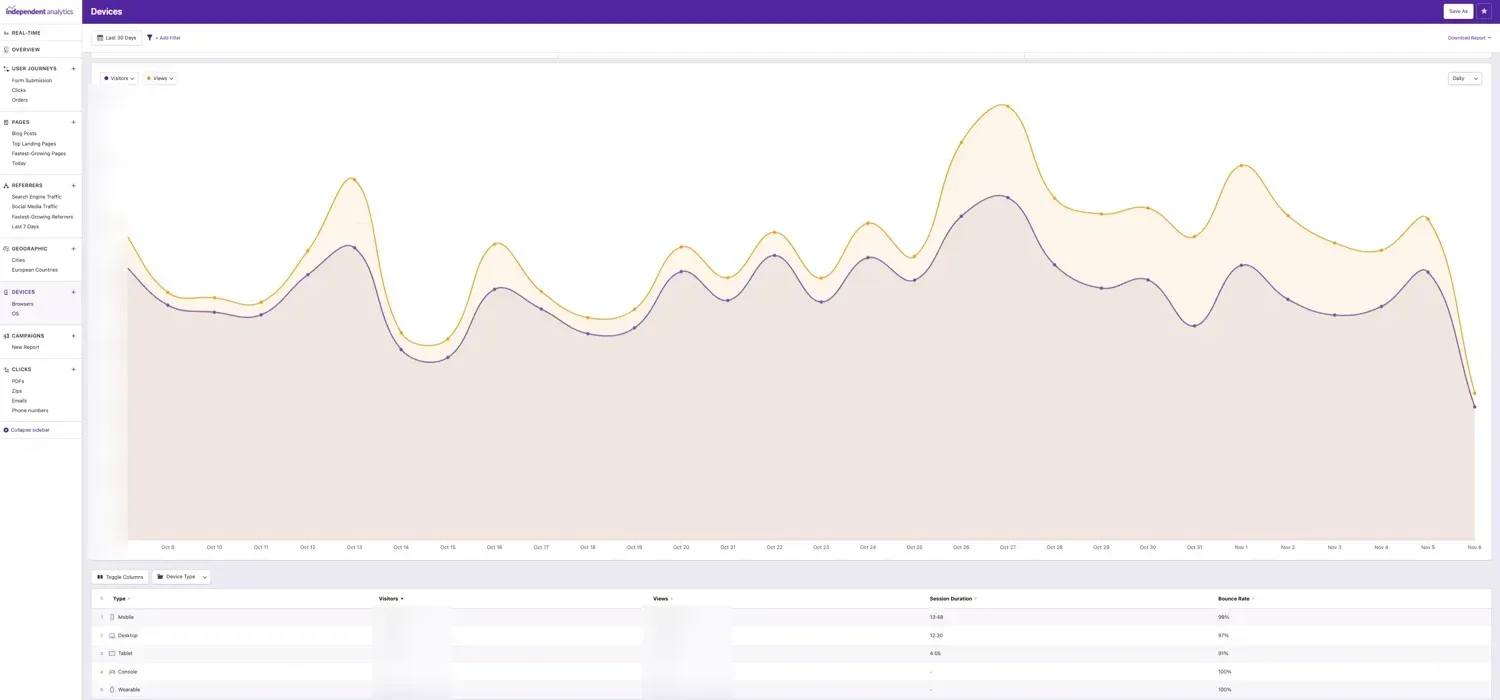
Mobile brought 77.81% of our visitors, but desktop visitors viewed slightly more pages in total, so a blog that looks good only on a phone would miss half of the page views.
Campaigns Report and Campaign Builder (Pro)
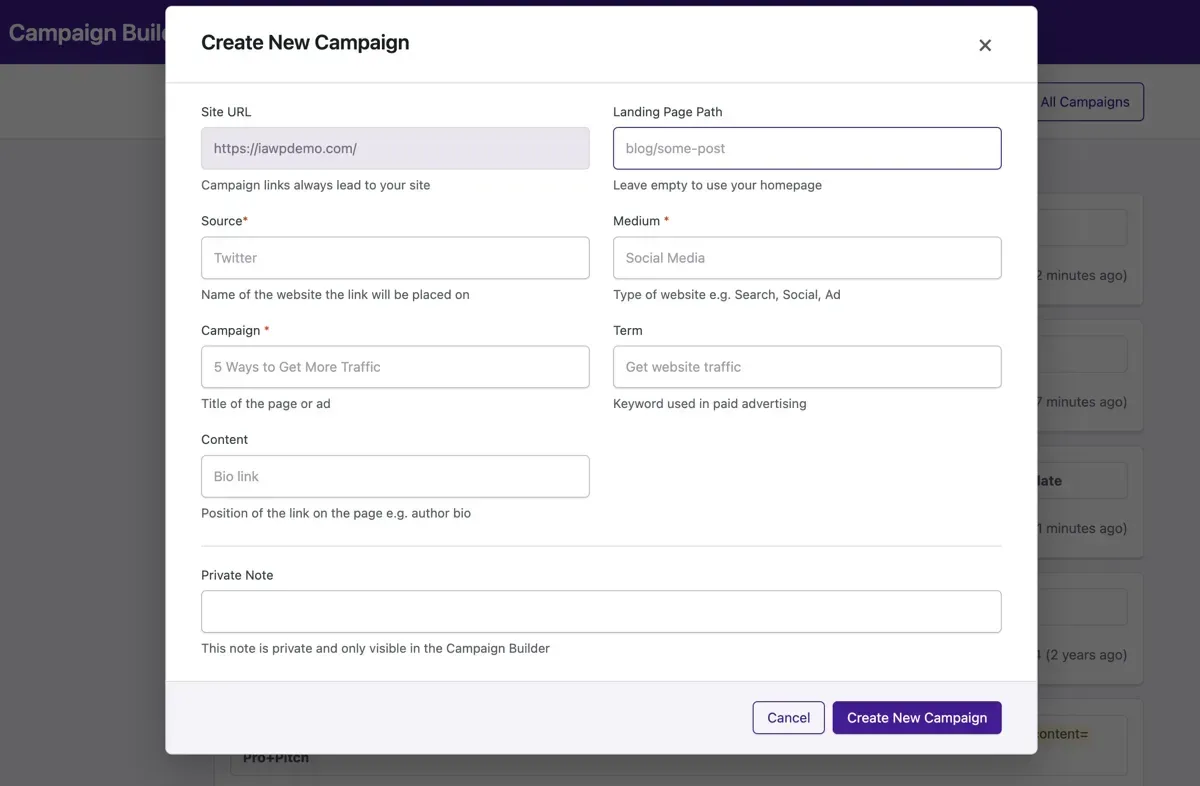
The Campaigns report tracks UTM links, with visitors, clicks, form submissions and eCommerce sales for each one. The built-in Campaign Builder creates tagged links for you, and the 2.16 redesign adds QR codes and CSV export. We have created 3 campaigns on our blog so far. If you run email, social or ad campaigns, this feature alone is worth the Pro price.
Click Tracking (Pro)
Click tracking records clicks on any link without code. You set link patterns, and the plugin counts every click that matches. We use 4 link rules, which show us which buttons and outbound links readers really use. Click data is buffered and written to the database in batches, which keeps the site fast.
Real-Time Report (Pro)
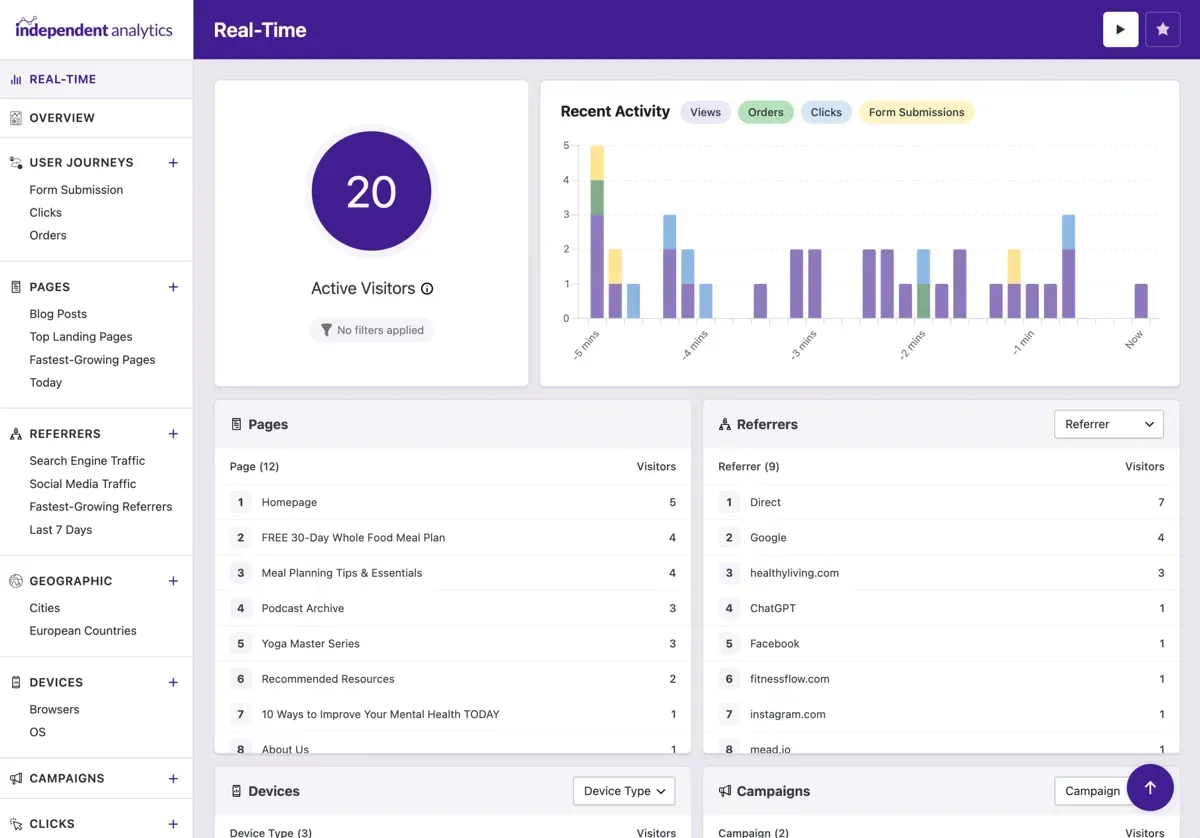
Real-time shows how many visitors are on your site right now, which pages they are viewing and where they came from. It is useful during a launch or when a post is shared widely.
User Journeys (Pro)
User Journeys shows a timeline of each visitor’s pages, referrer and actions. It helps you see how people move through your site before they convert, and it is one of the features reviewers praise most.
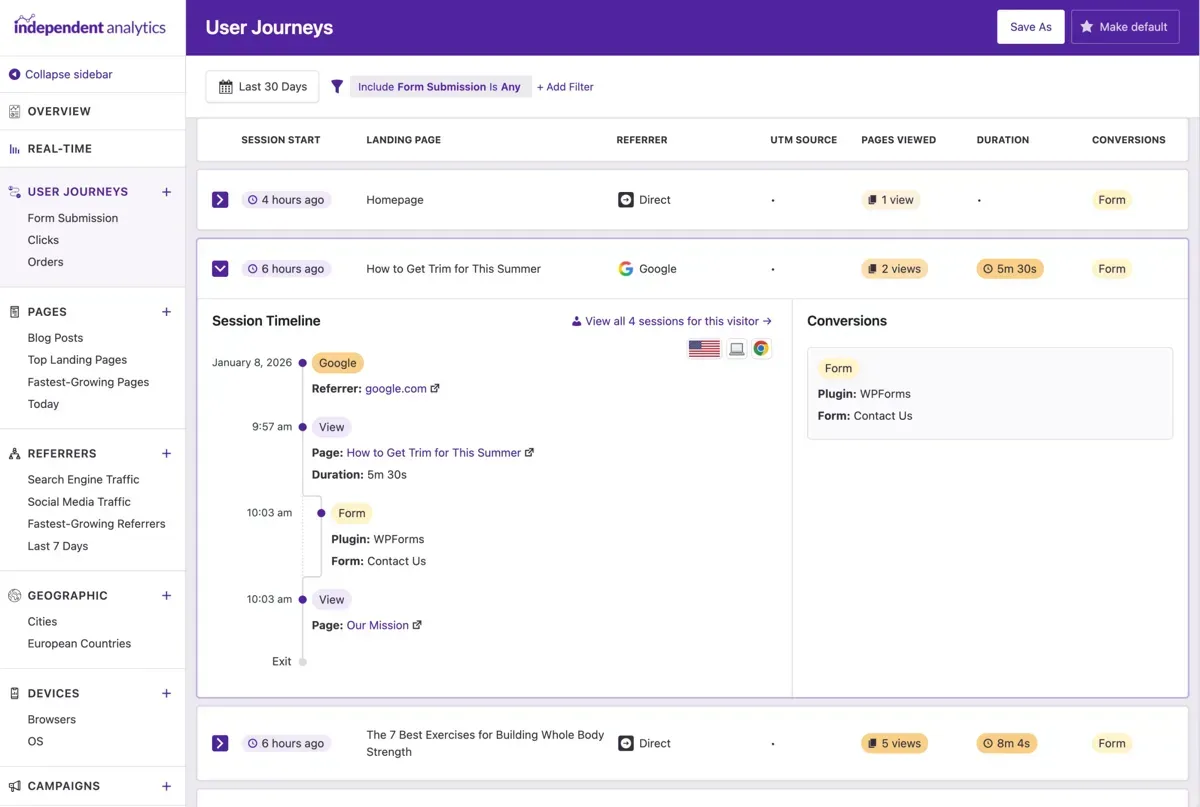
eCommerce and Form Tracking (Pro)
Pro can track sales from WooCommerce, Easy Digital Downloads, FluentCart, SureCart and Paid Memberships Pro, and show conversion rates by landing page, referrer and campaign. It also tracks form submissions through more than 20 form plugin integrations. We have not tested these on our blog, because it has no store or forms, so we rely on the developer’s description here. If you run a store, pair it with a host built for it, such as one from our list of the best WooCommerce hosting providers.
Email Reports (Pro)
Email reports send scheduled summaries to you or your clients. Agencies can use them as a simple client report, and the free version also lets you share dashboard access with authors and white-label it for non-admins.
Exports, Widgets and Developer API
Every report exports to CSV, and the free version also exports PDF. There is a WordPress dashboard widget, an admin toolbar view, an optional public view counter and a developer API for custom work.
More Independent Analytics Features Worth Knowing
The features page lists more than 40 smaller tools. These are the ones we would point out to a new user:
- Author, Category and Date Stats: Sort pages by author, post category, publication date or comment count to see which kind of content performs best.
- Landing Page and Exit Page Stats: Find the entrance pages that bring visitors in and the top exit pages where they leave.
- 404 Errors and On-Site Search: Spot broken URLs and see which terms visitors type into your site search.
- Growth Columns: See which pages and referrers are growing or shrinking fastest against the previous period.
- Custom Columns, Sorting and Date Ranges: Switch table columns on or off, sort by any metric and pick any date range.
- Privacy and Access Controls: Ignore user roles and IP addresses, white-label the dashboard for non-admins and share access with authors.
- Admin Toolbar, Widget and Public View Counter: Show views in the toolbar, on the WordPress dashboard and, if you like, publicly under a post.
- Dark Mode, RTL and Mobile-Friendly Dashboard: The dashboard supports dark mode, right-to-left languages and mobile screens, and a developer API is available.
- MainWP Extension: Check the stats of all your clients’ sites in one place through the MainWP extension.
Independent Analytics Integrations: Which Plugins Does It Work With?
Integrations are where Pro earns its price. According to the Independent Analytics integrations page, it lists 37 supported plugins across eCommerce, forms, email, and page builders and add-ons. Once an integration is on, the plugin records each order or form submission and ties it to the page, referrer, location, device and campaign that produced it.
| Integration Type | Plugins Listed | What It Tracks |
|---|---|---|
| eCommerce and memberships | WooCommerce, FluentCart, SureCart, Easy Digital Downloads and Paid Memberships Pro | Orders, conversion rates, total sales and refunds by page, referrer, location, device and campaign |
| Forms | Contact Form 7, WPForms, Gravity Forms, Fluent Forms, Ninja Forms, Bit Form, Formidable Forms, Avada Forms, SureForms, Forminator, WS Form, Everest Forms, JetFormBuilder, Kali Forms, ARForms, Core Forms, Request a Quote for WooCommerce, Amelia and WP Store Locator | Each form submission and its conversion rate |
| Email and newsletter | MailPoet, Mailchimp for WordPress, Newsletter and MailOptin | Sign-ups as conversions |
| Page builders and add-ons | Bricks Builder, Divi, Elementor Pro, Breakdance, Kadence Blocks, Superb Addons, Convert Pro, Hustle and Thrive Leads | Forms and pop-ups built with these tools |
Note: We have not tested these integrations ourselves, because our blog has no store and no contact forms, so the list comes from the developer’s page. The page ties eCommerce and form tracking to the Pro plugin. Before you buy, check that your own form or store plugin appears on the list.
Independent Analytics Free vs Pro
| Feature | Free | Pro |
|---|---|---|
| Visitors, views and sessions | ✅ | ✅ |
| Pages and Referrers reports | ✅ | ✅ |
| Geographic and Devices reports | ✅ | ✅ |
| Filters, saved reports, CSV and PDF export | ✅ | ✅ |
| Dashboard widget and post view counts | ✅ | ✅ |
| Ignore user roles and IP addresses, auto-delete old data | ✅ | ✅ |
| Campaigns report and Campaign Builder | ❌ | ✅ |
| Click tracking | ❌ | ✅ |
| Real-time analytics | ❌ | ✅ |
| User Journeys | ❌ | ✅ |
| WooCommerce and eCommerce analytics | ❌ | ✅ |
| Form tracking (20+ integrations) | ❌ | ✅ |
| Overview and Solo reports, email reports | ❌ | ✅ |
The free version has no limit on tracked visitors or how long you keep data, which makes it one of the most generous free analytics plugins. Upgrading to Pro keeps your existing data.
Independent Analytics Performance: What Does It Add to Your Site?
For this Independent Analytics review, we looked at the live HTML of our blog pages on 6 November 2026. Independent Analytics adds one inline script of about 13 KB to each page. It runs after the page loads and sends a single background request to your own site’s REST API using the browser’s fetch method with keepalive, so it does not block rendering. It stores nothing in the browser.
| Performance Check | What We Found |
|---|---|
| Tracking code | One inline script, about 13 KB, on every page |
| How it reports a visit | One background POST request to your own REST API |
| Cookies | None set by the plugin |
| Developer claim | A 100/100 PageSpeed score is still possible |
| Dashboard speed | The developer says dashboards can slow on sites with 1 million or more visitors a month |
Note: We did not run a before-and-after PageSpeed test for this review, so we cannot give you a score change. To speed up the rest of your pages, follow our WordPress speed optimization guide. The weight and loading method above are what we measured. If your site is fast today, the impact should be small, and a good host helps. See our list of the fastest WordPress hosting providers.
Database Size: The Hidden Cost of Self-Hosted Analytics
Because the data lives in your own WordPress database, it takes space on your own server. This is the cost most reviews skip, so our Independent Analytics review measured it. After six months, our Independent Analytics tables work out to about 620 MB per million sessions.
| Table | Share of the Plugin’s Database Space |
|---|---|
| Sessions | 75% |
| Views | 14% |
| Visitors | 9% |
| Cities | About 1% |
| Resources (pages) and all other tables | Under 1% |
That is more than the 200 to 300 MB per million sessions that the developer estimates. The difference may come from indexes and from our mix of data, so treat the developer’s figure as a minimum and plan for more. The sessions table alone holds 75% of the total.
What to do: Use the automatic deletion setting, which can limit data to 1 to 3 years, and in version 2.16 to 18 months. If you want to keep long-term history, run the plugin on a host with a generous database and fast storage.
Is Independent Analytics GDPR Compliant? Privacy and Cookies
In our Independent Analytics review, privacy stood out as the main reason people choose Independent Analytics over Google Analytics. According to the developer, the plugin does not use cookies, does not store personal data and does not communicate with external servers, and all data is created and stored in your WordPress database. Because of that, the developer says the free version does not need a cookie consent banner, as long as no other plugin on your site needs consent.
| Privacy Point | Independent Analytics | Google Analytics 4 |
|---|---|---|
| Where data is stored | Your own WordPress database | Google’s servers |
| Cookies | None set by the plugin | Uses cookies |
| Cookie banner | Not needed, per the developer | Usually needed in the EU and UK |
| Personal data stored | None, per the developer | Collected under Google’s terms |
| Who can see your data | You and your admins | You and Google |
One thing to check: Independent Analytics says it uses a fingerprinting technique to recognize repeat visitors, with visitor IDs hashed on your own server. The developer still describes this as compliant, but wording matters under privacy law. This is not legal advice, so ask your own advisor if your site is in a strict region.
About bots, the plugin ignores self-identifying bots such as search engine crawlers and uptime checkers. It does not stop disguised malicious bots, so the developer suggests Cloudflare or Wordfence for those. Our guide to the best free Cloudflare alternatives lists other options.
Independent Analytics Pricing and Plans
Independent Analytics is free in the WordPress plugin directory, and Pro is sold by the year or as a lifetime license. Every Pro plan includes every Pro feature, and only the number of sites changes:
| Plan | Sites | Per Year | Lifetime |
|---|---|---|---|
| Free version | Unlimited | $0 | $0 |
| Pro Standard | 1 | $49 | $147 |
| Pro Hobbyist | 3 | $79 | $237 |
| Pro Agency | Unlimited | $199 | $597 |
Tracked pageviews are unlimited on every plan. Annual plans renew automatically at the original price, and you can cancel any time. If a subscription expires you lose updates and priority support, but you keep the installed version, your data and your tracking. A 30-day money-back guarantee applies, and there is no free trial, though the free version works as one. Each sub-site on a multisite network needs its own license, unless your plan covers enough activations. We checked both the Annual and Lifetime views of the pricing page, and the prices above are the ones it shows for each plan.
Independent Analytics vs Google Analytics 4
Google Analytics 4 is free and very powerful, and it connects to Google Ads and Search Console. But it is complex, it uses cookies and it keeps your data on Google’s servers. Independent Analytics trades some depth for simplicity: you see traffic, sources, locations and campaigns in plain reports inside WordPress, with no cookie banner.
One important limit: Independent Analytics cannot import your Google Analytics history at this time. The developer suggests running both tools together for a few weeks or months while you switch. Our pick: use Independent Analytics for daily decisions, and keep GA4 only if you need Google Ads attribution.
Independent Analytics vs Burst Statistics
Burst Statistics is another WordPress-native tool. Its WordPress.org page shows more than 200,000 active installs and a 4.9 rating, and it is free with no tracking limits. Cookieless tracking is optional, because cookies are its default. Its Pro tiers add UTM tracking, geographic data and WooCommerce revenue. Independent Analytics gives you geographic data and the Pages and Referrers reports in its free version, and its Pro plans include every feature. Our pick: Burst if you want a free tool with goals, Independent Analytics if you want cookieless tracking by default.
Independent Analytics vs Plausible
Plausible is a hosted analytics service with cookieless tracking and an open source option. Its Starter plan is $9 a month for up to 10,000 monthly pageviews and Growth is $14 a month, with a 30-day free trial. It is not a WordPress plugin, so the data lives on Plausible’s servers unless you self-host. Our pick: Plausible for non-WordPress sites, Independent Analytics when you want your data inside WordPress with unlimited pageviews.
Independent Analytics vs MonsterInsights
MonsterInsights connects WordPress to Google Analytics 4 and shows its reports in your dashboard. Its Plus plan is $99.50 a year on an intro price and $199 at the normal price, and Pro is $199.50 on intro and $399 normal, with a 14-day refund window. Because it relies on Google Analytics, your data still goes to Google. Our pick: MonsterInsights only if you must stay on GA4, otherwise Independent Analytics costs less and keeps data local.
Independent Analytics vs Matomo
Matomo is a full analytics platform with a free self-hosted Community edition and a cloud service whose entry tier is 50,000 hits a month at 29 a month, per its pricing page. It has more advanced features than Independent Analytics, but it is heavier to run. Our pick: Matomo for large teams that need advanced analysis, Independent Analytics for everyone who wants simple, WordPress-based reports.
Independent Analytics Comparison Table
| Tool | Entry Price | Where Data Lives | Cookies | Best For |
|---|---|---|---|---|
| Independent Analytics | Free, Pro from $49/year | Your WordPress database | None | WordPress sites that want simple, private reports |
| Google Analytics 4 | Free | Yes | Google Ads and deep analysis | |
| Burst Statistics | Free, Pro optional | Your WordPress database | Optional cookieless | Free tracking with goals |
| Plausible | $9/month for 10k pageviews | Plausible’s servers or self-hosted | None | Non-WordPress and multi-site stacks |
| Matomo | Free self-hosted, cloud from 29/month | Self-hosted or Matomo Cloud | Configurable | Large teams that need advanced features |
| MonsterInsights | From $99.50/year intro | Yes | GA4 inside WordPress |
Independent Analytics Review: Pros and Cons
| ✅ Pros | ❌ Cons |
|---|---|
| No cookies, no external servers, data in your own database | Cannot import Google Analytics history |
| Easy five-minute setup and a clean WordPress-native dashboard | Database grows fast: about 620 MB per million sessions on our blog |
| Free version with unlimited tracking and no data cap | No Google Ads attribution |
| Every Pro plan includes every feature | Dashboards can slow on sites above 1 million visitors a month |
| Campaign builder, click tracking and user journeys | Fingerprinting wording needs a legal check in strict regions |
| Strong WordPress.org rating: 4.8 from 166 reviews | No free trial for Pro, only a 30-day refund |
Who Should Use Independent Analytics?
- Bloggers and publishers who want to see which posts perform and which referrers send readers.
- Small businesses and agencies that want simple reports and scheduled email reports for clients.
- Privacy-focused sites that want to avoid cookie banners and keep visitor data on their own server.
- Marketers who run campaigns and want UTM links, QR codes and click tracking in one place.
- Not ideal for teams that rely on Google Ads attribution, need years of imported GA data or run very high-traffic sites on weak hosting.
If your analytics database grows, hosting matters. Compare a cloud hosting provider with fast storage, or read our Cloudways review to see how a managed cloud server performs with a busy WordPress site.
Our Independent Analytics Review Scorecard
| Category | Score | Why |
|---|---|---|
| Ease of Use | 4.8 | Five-minute setup and clear WordPress-native reports |
| Reporting | 4.6 | Pages, referrers, campaigns, clicks and journeys, but no ad attribution |
| Privacy | 4.7 | No cookies and local data, with fingerprinting wording to check |
| Performance | 4.5 | A 13 KB snippet and one background request, but a large database |
| Value | 4.8 | Unlimited free tracking and Pro from $49/year with every feature |
| Overall | 4.7/5 | A strong, privacy-friendly analytics plugin for WordPress |
Want the SEO side as well? Our Rank Math review shows how Rank Math shows Search Console data inside WordPress, next to a privacy-friendly analytics plugin like this one.
FAQ – Independent Analytics Review 2026
What is Independent Analytics?
Independent Analytics is a WordPress analytics plugin that shows visitors, pages, referrers, locations and devices in your WordPress dashboard. It stores the data in your own database and does not use cookies or external servers.
Is Independent Analytics free?
Yes. The free version is in the WordPress plugin directory and has no limit on tracked visitors or data retention. Pro adds campaigns, click tracking, real-time, user journeys, eCommerce, form tracking and email reports.
How much does Independent Analytics Pro cost?
Pro costs $49 a year for 1 site, $79 for 3 sites and $199 for unlimited sites, or $147, $237 and $597 for a lifetime license. Every plan includes every Pro feature and has a 30-day money-back guarantee.
Is Independent Analytics GDPR compliant?
The developer says it is designed for legal compliance, uses no cookies, stores no personal data and keeps data on your server, so a cookie banner is not needed. It also says it uses a fingerprinting technique, so check your local rules or ask a legal advisor.
Does Independent Analytics slow down my site?
It adds one inline script of about 13 KB that sends a single background request to your own site. The developer says a 100/100 PageSpeed score is still possible. We did not run a before-and-after test, but we saw no loading problems on our blog.
Is Independent Analytics better than Google Analytics?
It is simpler and more private, and it keeps data in WordPress, but it is less powerful. Choose it for daily traffic decisions and keep Google Analytics only if you need Google Ads attribution or deep analysis.
Can I import Google Analytics data into Independent Analytics?
No, not at this time. The developer suggests running both tools together for a few weeks or months while you transition.
How much database space does Independent Analytics use?
The developer estimates 200 to 300 MB per million sessions. On our blog, the tables use about 620 MB per million sessions, so plan for more. You can set automatic deletion to limit the size.
Does Independent Analytics work with caching plugins?
Yes, but clear your cache once after installing so the tracking script appears on all pages. If views do not show up, clear the cache and visit your site in a private browser tab.
Does Independent Analytics track WooCommerce sales?
Pro can track sales from WooCommerce, Easy Digital Downloads, FluentCart, SureCart and Paid Memberships Pro, with conversion rates by landing page, referrer and campaign. We did not test this, because our blog has no store.
Does Independent Analytics filter bots?
It ignores self-identifying bots such as search engine crawlers and uptime checkers. For disguised malicious bots, the developer recommends Cloudflare or the Wordfence plugin.
What are the best alternatives to Independent Analytics?
Burst Statistics is a free WordPress option, Plausible is a hosted cookieless service, Matomo is a full platform, MonsterInsights connects to Google Analytics 4, and Google Analytics 4 itself is free. The comparison above shows the differences.
Independent Analytics Review Verdict: Is It Worth It?
After six months on a busy blog, Independent Analytics has earned its place on our blog. Setup took minutes, the reports answer the questions we ask every week, and the data never leaves our own server.
The trade-offs in this Independent Analytics review are real: the database grew faster than the developer’s estimate, you cannot import old Google Analytics data and there is no Google Ads attribution. If you want a simple, private and fast way to understand your WordPress traffic, start with the free version and upgrade to Pro when you need campaigns, click tracking or reports for clients.



Table of Contents
- Independent Analytics Review at a Glance
- What Is Independent Analytics?
- What’s New in Independent Analytics 2.16?
- How We Tested Independent Analytics
- Independent Analytics Setup: How Easy Is It?
- Independent Analytics Dashboard and Features
- Overview and Filters
- Built-in Report Shortcuts in the Sidebar
- Pages Report
- Referrers Report
- Geographic Report
- Devices Report
- Campaigns Report and Campaign Builder (Pro)
- Click Tracking (Pro)
- Real-Time Report (Pro)
- User Journeys (Pro)
- eCommerce and Form Tracking (Pro)
- Email Reports (Pro)
- Exports, Widgets and Developer API
- More Independent Analytics Features Worth Knowing
- Independent Analytics Integrations: Which Plugins Does It Work With?
- Independent Analytics Free vs Pro
- Independent Analytics Performance: What Does It Add to Your Site?
- Database Size: The Hidden Cost of Self-Hosted Analytics
- Is Independent Analytics GDPR Compliant? Privacy and Cookies
- Independent Analytics Pricing and Plans
- Independent Analytics vs Google Analytics 4
- Independent Analytics vs Burst Statistics
- Independent Analytics vs Plausible
- Independent Analytics vs MonsterInsights
- Independent Analytics vs Matomo
- Independent Analytics Review: Pros and Cons
- Who Should Use Independent Analytics?
- Our Independent Analytics Review Scorecard
- FAQ - Independent Analytics Review 2026
- Independent Analytics Review Verdict: Is It Worth It?