Table of Contents
- What is a VPN for Chrome?
- Top 9 Best VPN for Chrome in 2026
- 1. SurfShark- Overall Best VPN For Chrome
- 2. NordVPN - Budget-Friendly Chrome VPN
- 3. ExpressVPN - Best VPN for Chrome
- 4. CyberGhost- Streamer’s Choice Chrome VPN
- 5. ProtonVPN - Privacy-First VPN for Chrome
- 6. Private Internet Access (PIA) - Customizable VPN for Chrome
- 7. PrivadoVPN - Stealth VPN for Chrome
- 8. PureVPN - Versatile Chrome VPN
- 9. Windscribe - Speedy VPN for Chrome
- What are the Key Factors to Consider When Choosing a Chrome VPN?
- How to Install and Use a VPN for Chrome? A Step-By-Step Guide
- What’s the difference between VPN app vs Chrome extension?
- Why do you need a VPN for Chrome?
- FAQ’s
- Conclusion



9 Best VPNs for Chrome in March 2026: Secure, Fast & Easy to Use
Most users who want to use a VPN often go through a long, manual process, first opening the app, then digging through various settings to configure servers, protocols and privacy options before they can even connect.
This time-consuming setup not only feels like a problem but also leaves your device vulnerable during delay. If you’re trying to access a geo-restricted site or secure your data while using a public Wi-Fi connection, every second matters.
To make this whole experience easy, let us introduce you to the best free VPNs for Chrome. These aren’t full-fledged apps but lightweight Chrome VPN extensions that work automatically the moment you open a restricted site, join a free Wi-Fi at a coffee shop, or hop onto a P2P network.
Chrome VPN extensions remain active in the background, offering real-time protection and privacy without disturbing your browsing experience.
You don’t have to worry about configurations, switching on the VPN, or checking if it’s connected. These extensions are ready to roll the moment you’re online, making your browsing not just smoother, but also safer.
What is a VPN for Chrome?
So, what is a VPN for chrome? A VPN for Chrome is a simple browser extension that helps you stay safe and private online, right from your browser. Instead of downloading and installing a full VPN app on your device, you just add this lightweight extension to your Chrome browser, and it instantly starts protecting your internet activity.
It hides your real IP address, changes your virtual location, and encrypts your browser traffic so that no one, not hackers or ISPs can see what you’re doing online.
Let’s say there’s a guy who’s a digital marketer who often works from coffee shops and airports using public Wi-Fi. Before using a VPN, he noticed websites loading slowly, ads getting creepier and some tools blocked in certain countries while traveling.
Once he installed a VPN Chrome extension, all that changed. Now, he just opens Chrome, clicks on his VPN icon, and in one click, he connects to a secure server, no long setups, no tech headaches.
He can now access geo-blocked websites, keep his data encrypted, and enjoy faster browsing without worrying about online threats. That’s the beauty of a VPN for Chrome, it gives you instant online privacy and security without slowing you down.
Top 9 Best VPN for Chrome in 2026
Now that we know what a VPN Chrome extension actually is, below we’ve listed the top 9 best VPNs for Chrome in 2026. These extensions come full of powerful features like multiple global VPN servers, advanced VPN protocols, a Quick Connect option, one-click Kill Switch On/Off button, support for multiple device connections, and more.
⏰ TL;DR:
1. SurfShark – Overall Best VPN For Chrome
2. NordVPN – Budget-Friendly Chrome VPN
3. ExpressVPN – Best VPN for Chrome
4. CyberGhost –Streamer’s Choice Chrome VPN
5. ProtonVPN – Privacy-First VPN for Chrome
6. PrivateInternetAccess – Customizable VPN for Chrome
7. PrivadoVPN – Stealth VPN for Chrome
8. PureVPN – Versatile Chrome VPN
9. WindScribe – Speedy VPN for Chrome
1. SurfShark- Overall Best VPN For Chrome
First in the list, we’ve Surfshark, an award-winning VPN service known for its robust security, privacy tools, and user-friendly apps. It creates a secure internet connection using a network of over 3,200 RAM-only servers across 100 countries, ensuring that no logs are stored and that all user data remains confidential.
SurfShark

Pros
- SurfShark offers reliable performance and uptime.
- Easy to get started with an intuitive interface.
- Responsive customer support team.
- Competitive pricing for the features offered.
Cons
- Limited advanced customization options.
- Could improve documentation and tutorials.
Summary
First in the list, we’ve Surfshark, an award-winning VPN service known for its robust security, privacy tools, and user-friendly apps. It creates a secure internet connection using a network of over 3,200 RAM-only servers across 100 countries, ensuring that no logs are stored and that all user data
Price: USD 1.99 /month
Visit SurfSharkLet’s say you’re on public Wi‑Fi, browsing at home, or traveling, Surfshark encrypts your data using industry‑standard protocols like WireGuard and OpenVPN, giving you full control over your digital footprint.
Surfshark also offers a 30-day money-back guarantee, showing confidence in its service and giving users the peace of mind to test all features risk-free.
It is even mentioned by outlets like TechRadar, Forbes and CNET about Surfshark’s reliable performance, blazing speeds and excellent value compared to its other alternatives.
Key Features
- CleanWeb Ad & Malware Blocker: This feature filters out ads, trackers, malware, and phishing attempts right at the DNS level, even when the VPN tunnel isn’t active. This results in smoother, cleaner, and safer browsing across Chrome (also available on Firefox and Edge)
- Cookie Pop‑Up Blocker: Tired of constant Accept cookies option banners? Surfshark’s extension automatically rejects non‑essential cookie prompts in the background, reducing distractions and speeding up page loads, all without affecting your browsing experience
- Malware & Data‑Leak Alerts: The Chrome extension scans pages for malware risk and monitors the web for data leaks linked to your credentials. If a threat is detected, CleanWeb immediately sends an alert to help you act fast and stay protected
- Bypasser (Split Tunneling): Enjoy control with split tunneling via the Bypasser tool. You can exclude specific sites or apps, like local banking or streaming services, from the VPN, so they run directly while all other Chrome traffic remains secured through the VPN tunnel
Starting Price
- Starting Price: $1.99 per month (2 Year Purchase Plan + 3 Months Free VPN Extra)
2. NordVPN – Budget-Friendly Chrome VPN
What about NordVPN now? It is first of all, our tech-team’s favourite VPN chrome extension as it helps you stay secure online, wherever you are, from your morning coffee to a crowded airport lounge.
NordVPN

Pros
- NordVPN offers reliable performance and uptime.
- Easy to get started with an intuitive interface.
- Responsive customer support team.
- Competitive pricing for the features offered.
Cons
- Limited advanced customization options.
- Could improve documentation and tutorials.
Summary
What about NordVPN now? It is first of all, our tech-team’s favourite VPN chrome extension as it helps you stay secure online, wherever you are, from your morning coffee to a crowded airport lounge.
Price: USD 3.39 /month
Visit NordVPNIt protects your apps and browsing while giving you fast, reliable connections, so you can stream, shop, and browse without interruptions or worries.
Designed with mobile users and multiple devices in mind, NordVPN supports up to 10 devices on one subscription.
Plus, if you’re browsing on your phone, using your tablet at a hotel, watching shows on your smart TV, or protecting your router at home, you’re covered.
And with a strict no-logs policy, verified encryption standards, and global servers in over 125 countries, your privacy stays intact while you enjoy seamless online access.
Key Features
- Threat Protection Pro: Acts like an advanced security guard for your browser. It blocks ads, scans downloads for malware, stops phishing attempts, and alerts you about scam sites, keeping your browsing safe and smooth.
- Tracker Blocker: Automatically prevents third-party trackers from following you around the web. This means fewer personalized ads and cookies, and more privacy while you surf.
- Anti-Phishing Tool: NordVPN is the only VPN certified to protect you against phishing URLs. The Chrome extension warns you if you stumble onto fraud sites trying to steal your info.
- High-Speed VPN & No-Logs Guarantee: Delivers fast browsing speeds so you don’t lose streaming quality or slow down downloads. Plus, with its verified no-logs policy, nothing you do online gets stored, your online activity stays yours.
Starting Price
- Starting Price: $3.39 per month (2 Year Purchase Plan + 3 Months Free VPN Extra)
3. ExpressVPN – Best VPN for Chrome
Let’s talk about ExpressVPN, which is widely considered one of the best Chrome VPN options available. As a full-featured VPN, it doesn’t just protect your online activities, every subscription also includes built-in tools to enhance your security and privacy.
ExpressVPN

Pros
- ExpressVPN offers reliable performance and uptime.
- Easy to get started with an intuitive interface.
- Responsive customer support team.
- Competitive pricing for the features offered.
Cons
- Limited advanced customization options.
- Could improve documentation and tutorials.
Summary
Let’s talk about ExpressVPN, which is widely considered one of the best Chrome VPN options available. As a full-featured VPN, it doesn’t just protect your online activities, every subscription also includes built-in tools to enhance your security and privacy.
Price: USD 4.49 /month
Visit ExpressVPNWith features like a simple password manager (ExpressVPN Keys), an effective tracker blocker (Threat Manager), and a one-tap ad blocker, it makes staying safe online both simple and powerful.
ExpressVPN also offers flexible and user-friendly support! It comes with 24/7 live chat, a 30‑day money-back guarantee, and extras like private, encrypted DNS for faster browsing.
All in all, it’s not just a VPN, it’s a complete online protection package.
Key Features
- Instant VPN Control & Location Spoofing: The Chrome extension lets you launch and manage your VPN with a single click, directly from your browser. You can also change your geographic location, impacting HTML5 geolocation, to access regions‑restricted content safely and privately.
- WebRTC Leak Prevention: A standout feature of the extension is built‑in WebRTC protection. This prevents websites from discovering your actual IP address via browser-based real-time communications, keeping your identity safe even during video calls or streaming.
- Encrypted HTTPS Auto-Upgrades: The extension ensures your browser automatically upgrades connections to HTTPS when possible, adding a seamless layer of encryption to your web browsing beyond what the VPN provides.
- Cross-Platform App Control: The Chrome extension serves as a remote control for the ExpressVPN app. This integration enables you to manage server switching, connection settings, and more from within your browser, even if the core VPN session was established through the desktop client.
Starting Price
- Starting Price: $4.49 per month (2 Year Purchase Plan + 4 Months Free VPN Extra)
4. CyberGhost- Streamer’s Choice Chrome VPN
Next on this list, we’ve CyberGhost VPN that offers a simple yet powerful Chrome extension that helps you browse the internet with more privacy and freedom, all without signing up or paying a single dollar.
CyberGhost
Pros
- CyberGhost offers reliable performance and uptime.
- Easy to get started with an intuitive interface.
- Responsive customer support team.
- Competitive pricing for the features offered.
Cons
- Limited advanced customization options.
- Could improve documentation and tutorials.
Summary
Next on this list, we’ve CyberGhost VPN that offers a simple yet powerful Chrome extension that helps you browse the internet with more privacy and freedom, all without signing up or paying a single dollar.
Price: USD 2.04 /month
Visit CyberGhostIf you want to block ads, hide your IP address, or access restricted websites, this browser tool has everything you need.
With just one click, you can connect to secure servers in the US, Germany, the Netherlands and enjoy safe browsing instantly.
It’s fast, user-friendly and doesn’t limit your bandwidth! You get military-grade encryption, protection from trackers, and zero logs, meaning your online activity stays completely private.
Here, you don’t even need to create an account to use it. If you want even more features like a kill switch, access to 100+ server countries, and full device protection, you can always upgrade to the CyberGhost VPN premium app.
Key Features
- No Account Needed, Start Instantly: You don’t need to create an account or sign in to use the CyberGhost Chrome extension. Simply add it from the Chrome Web Store and click ON, that’s it.
- Blocks Ads & Online Trackers: Say goodbye to annoying pop-ups and creepy ads that follow you around the internet. CyberGhost’s extension has built-in ad-blocking and anti-tracking features.
- Free 256-bit AES Encryption for Browser Traffic: Even though it’s free, the Chrome extension uses military-grade 256-bit AES encryption, the same tech used by banks and governments. It encrypts your browser traffic, making sure hackers can’t see what you’re doing.
- Unlimited Browsing Without Bandwidth Caps: CyberGhost gives you unlimited bandwidth! It means that there’s no buffering, no slowdowns and no annoying messages saying you’ve hit your daily limit.
Starting Price
- Starting Price: $2.04 per month (2 Year Purchase Plan + 2 Months Free VPN Extra)
5. ProtonVPN – Privacy-First VPN for Chrome
What about ProtonVPN? It is one of the best free Chrome VPN extensions available in 2026.
ProtonVPN
Pros
- ProtonVPN offers reliable performance and uptime.
- Easy to get started with an intuitive interface.
- Responsive customer support team.
- Competitive pricing for the features offered.
Cons
- Limited advanced customization options.
- Could improve documentation and tutorials.
Summary
What about ProtonVPN? It is one of the best free Chrome VPN extensions available in 2026.
Price: USD 4.49 /month
Visit ProtonVPNIt offers 1 device connection on the free plan, access to up to 5 VPN servers, no ads or trackers, and a strict no-logs policy, making it a perfect choice for anyone who wants to browse safely without sacrificing speed or privacy.
What really makes ProtonVPN different is that it gives you freedom without limits. You get access to a private, secure, and ad-free internet experience, even on the free plan.
It’s ranked the #1 Best VPN by Wired. The company operates under Swiss privacy laws, which are some of the toughest in the world, so your personal data stays safe. If you’re a student, traveler, remote worker, or privacy-focused user, ProtonVPN helps you unlock the full internet experience with peace of mind.
Key Features
- Free Plan with No Ads or Tracking: Most free VPNs show ads or collect your data to make money, but not ProtonVPN. Its free Chrome extension is truly free, with no annoying ads, no pop-ups, and no tracking scripts following your online activities.
- NetShield Ad & Malware Blocker: It comes with NetShield, a powerful DNS filtering tool that protects your browser from privacy-invading ads, trackers, and harmful malware.
- High-Speed Servers with VPN Accelerator: This VPN chrome extension connects you to high-speed servers and uses a smart feature called VPN Accelerator to boost your VPN connection speeds by up to 400%.
- Bypass Censorship with Stealth Protocol: In regions where access to websites or social media is restricted, ProtonVPN offers its Stealth protocol, which helps you bypass censorship and access blocked content, even if VPNs are normally detected and blocked.
Starting Price
- Starting Price: $4.49 per month (2 Year Purchase Plan)
6. Private Internet Access (PIA) – Customizable VPN for Chrome
The PIA! One of the cheap VPN Chrome Extension can add to your browser for online privacy and freedom. It helps you browse the internet without borders using a wide global server network and shields your online activity from trackers and advertisers.
Private Internet Access
Pros
- Private Internet Access offers reliable performance and uptime.
- Easy to get started with an intuitive interface.
- Responsive customer support team.
- Competitive pricing for the features offered.
Cons
- Limited advanced customization options.
- Could improve documentation and tutorials.
Summary
The PIA! One of the cheap VPN Chrome Extension can add to your browser for online privacy and freedom.
Price: USD 1.78 /month
Visit PrivateWith just a few clicks, you can block ads, stop websites from accessing your webcam or microphone, and hide your real IP address to stay completely anonymous online. It’s easy to install and only needs Chrome version 48 or newer.
The PIA VPN chrome extension focuses on securing only your browser traffic, perfect for quick browsing, streaming, or surfing on public Wi-Fi.
What makes it even more special is its strong encryption, RAM-only servers (which remove all data on reboot), and built-in features like PIA MACE for blocking ads, trackers, and harmful sites. With PIA, your online freedom is just a click away, safe, secure, and truly private.
Key Features
- Advanced Ad, Tracker & Malware Blocker (PIA MACE): It comes with a built-in feature called MACE, designed to block annoying ads, online trackers, and even malware before they can harm your device.
- WebRTC Leak Protection: Your real IP address can sometimes leak through WebRTC, even when using a VPN. But with PIA’s Chrome extension, this risk is blocked instantly.
- Camera, Microphone & Location Control: PIA lets you take full control over who can access your webcam, microphone, and location. With just one setting, you can block websites from spying on you or asking for access to your device’s hardware.
- RAM-Only Servers & No Logs Policy: Unlike many VPNs, PIA uses RAM-only servers, which means no user data is ever written to a hard drive. Each time the server reboots, all data is automatically wiped, ensuring your browsing history stays private.
Starting Price
- Starting Price: $1.78 per month (3 Year Purchase Plan + 3 Months Free VPN Extra)
7. PrivadoVPN – Stealth VPN for Chrome
Now, we’ve PrivadoVPN that makes your online life safer with a super easy-to-use Chrome VPN extension. You can choose from 10 global server locations to browse securely, stream without limits, and stay anonymous, all from your Chrome browser.
PrivadoVPN
Pros
- PrivadoVPN offers reliable performance and uptime.
- Easy to get started with an intuitive interface.
- Responsive customer support team.
- Competitive pricing for the features offered.
Cons
- Limited advanced customization options.
- Could improve documentation and tutorials.
Summary
Now, we’ve PrivadoVPN that makes your online life safer with a super easy-to-use Chrome VPN extension. You can choose from 10 global server locations to browse securely, stream without limits, and stay anonymous, all from your Chrome browser.
Price: USD 1.11 /month
Visit PrivadoVPNLet’s say you’re on your phone, computer, or TV, PrivadoVPN protects your data with military-grade encryption.
Plus, there’s a 30-day money-back guarantee, and over 5,000 5-star reviews say it’s one of the best VPNs you can trust.
You don’t need to be techie to use it. With just three simple steps, create an account, download the Chrome extension from the Web Store, and sign in to connect, you’re instantly shielded online.
You even get 10GB of free data every month with no credit card required. Block ads and trackers, bypass geo-restrictions, and stay safe on public Wi-Fi with a single click.
Key Features
- Global Servers for Fast, Borderless Browsing: With the PrivadoVPN Chrome extension, you can connect to 10 international server locations to unlock region-specific content and enjoy faster browsing speeds.
- Incognito Mode Compatibility: It works perfectly even when you’re using Chrome’s Incognito Mode. This means your private browsing stays even more private, with your IP masked and traffic routed through a secure proxy.
- IP Masking & Identity Protection: One of the best features of this VPN chrome extension is IP masking. It replaces your real IP address with one from a selected location, making it nearly impossible for websites, hackers, or ISPs to track your online activity.
- Streaming-Optimized Proxy Support: PrivadoVPN’s Chrome extension is built with streaming support, so you can enjoy your favorite content from any country, directly in your browser.
Starting Price
- Starting Price: $1.11 per month (2-Year Purchase Plan + 3 Months Free VPN)
8. PureVPN – Versatile Chrome VPN
Let’s now learn about PureVPN chrome extension that is your all-in-one solution to browse safely, privately, and without limits, all from your Chrome browser. With just a single click, you can hide your IP address, unblock your favorite websites, and stop WebRTC leaks that might reveal your real location.
PureVPN
Pros
- PureVPN offers reliable performance and uptime.
- Easy to get started with an intuitive interface.
- Responsive customer support team.
- Competitive pricing for the features offered.
Cons
- Limited advanced customization options.
- Could improve documentation and tutorials.
Summary
Let’s now learn about PureVPN chrome extension that is your all-in-one solution to browse safely, privately, and without limits, all from your Chrome browser. With just a single click, you can hide your IP address, unblock your favorite websites, and stop WebRTC leaks that might reveal your real loc
PureVPN has servers in 65+ countries, helping you access global content and stay protected on any network, especially public Wi-Fi. Plus, the extension is lightweight and doesn’t slow down your browsing.
If you’re streaming Netflix or checking emails in a café, PureVPN keeps your data secure without compromising speed.
You can also try it risk-free with their 31-day money-back guarantee. With a 4.4/5 user rating in TechRadar and Forbes, PureVPN is trusted by thousands for fast and private online experiences right from Chrome.
Key Features
- Hide Your IP with 65+ Global Servers: With PureVPN, you can choose from servers in 65+ countries to instantly hide your real IP address. This helps protect your privacy and lets you appear as if you’re browsing from a different part of the world.
- Bypass Geo-Restrictions with Popular Websites: Want to watch Hulu, Netflix, or BBC iPlayer? The Popular Websites feature connects you to the best servers for your chosen streaming platform automatically.
- WebRTC Leak Protection: Many websites can use WebRTC to reveal your real IP address even when you’re using a VPN. PureVPN’s Chrome extension comes with built-in WebRTC leak protection, blocking this loophole and keeping your identity fully hidden while you browse online.
- Blazing Fast 20 Gbps Servers: Speed is a game-changer for browsing and streaming. PureVPN’s Chrome extension connects you to 20 Gbps high-speed servers, ensuring fast downloads, smooth video playback, and lag-free browsing.
Starting Price
- Starting Price: 2.16 per month (5-Year Purchase Plan)
9. Windscribe – Speedy VPN for Chrome
Now, last but not the least, we’ve Windscribe, designed to be an all-in-one privacy solution that goes well beyond basic VPN services.
Windscribe
Pros
- Windscribe offers reliable performance and uptime.
- Easy to get started with an intuitive interface.
- Responsive customer support team.
- Competitive pricing for the features offered.
Cons
- Limited advanced customization options.
- Could improve documentation and tutorials.
Summary
Now, last but not the least, we’ve Windscribe, designed to be an all-in-one privacy solution that goes well beyond basic VPN services.
Price: USD 5.75 /month
Visit WindscribeIt offers a massive global network (69+ countries, 134 cities), a powerful customizable blocker (R.O.B.E.R.T.) for ads and trackers, and airtight privacy, no identifying logs tied to IP.
With industry-leading encryption standards and support for multiple secure protocols (IKEv2, OpenVPN, WireGuard), it delivers strong protection and flexibility for users seeking serious digital privacy.
Windscribe’s VPN chrome extension includes advanced privacy tools like timezone and GPS spoofing, user-agent randomization, WebRTC blocking, and location warp. It’s a smart, efficient way to stay anonymous online within the browser realm, without affecting your entire system.
Key Features
- WebRTC Slayer: Prevents browser-based IP leaks by blocking WebRTC requests, keeping your real IP hidden during browser sessions.
- Time & Location Warp: Spoofs display timezone and GPS data to match your selected proxy location, enhancing anonymity and bypassing location checks
- Cookie Monster: Automatically deletes cookies when a tab closes, offering incognito-style privacy without using a private window.
- Split Personality + User-Agent Rotation: Randomizes browser parameters like user-agent and language settings to reduce fingerprinting and tracking across sites.
Starting Price
- Starting Price: $5.75 per month (1-Year Purchase Plan)
What are the Key Factors to Consider When Choosing a Chrome VPN?
Out of hundreds of VPN Chrome extensions available today, choosing the best one can feel like a herculean task. Some lack privacy, while others are free but unsafe. To help you avoid the confusion and get the perfect VPN for your Chrome browser, we’ve put together the main 5 points you need to consider when picking the right Chrome VPN extension for your needs.
Privacy & No-Log Policy
Always check if the VPN follows a strict no-log policy. This means the VPN provider doesn’t store any of your browsing data, location info, or personal details. A reliable VPN ensures your online activity remains completely private and away from hackers.
Speed & Performance
A VPN should not slow you down. Look for a Chrome VPN that offers fast server speeds, so you can browse, stream, or work without annoying lags or buffering issues. Trusted chrome VPN like NordVPN or ExpressVPN are known for lightning-fast speeds.
Server Locations
The more servers a VPN has, the more locations you can connect to. This helps you access geo-restricted content with ease, if it’s a blocked website or a Netflix library from another country.
Security Features
Make sure the VPN has encryption, WebRTC leak protection, and HTTPS enforcement. These features protect your device and browser from cyber threats and keep your identity safe while you’re online.
User Interface & Support
The extension should be beginner-friendly! A clean interface and easy-to-understand options make a huge difference, especially for non-tech users. Also, opt for services that offer 24/7 support in case you get an issue.
How to Install and Use a VPN for Chrome? A Step-By-Step Guide
Many of you are probably eager to know how to install and use a VPN for Chrome to protect your data, browse securely and access blocked websites. Don’t worry! We’ve got your back! Below is a simple step-by-step guide that shows you how to install a Chrome VPN extension (we’re using NordVPN as an example here). We’ve even added a few screenshots to help you see every step along the way.
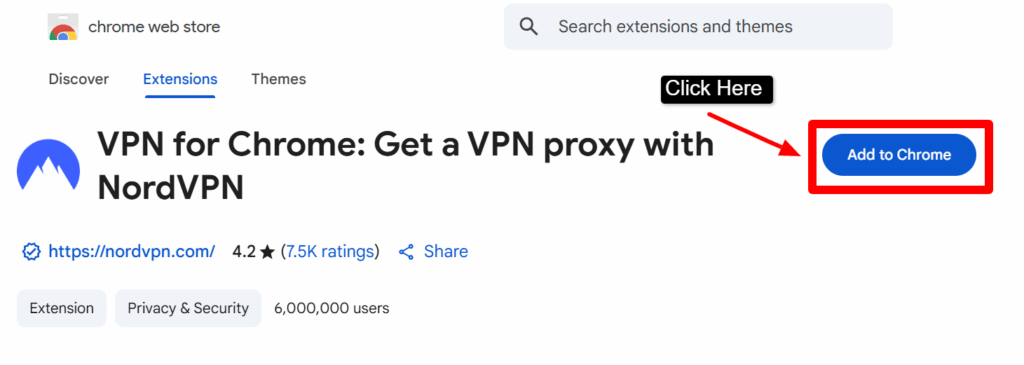
- Step1)) Go to Chrome Web Store >> >> Search for NordVPN Chrome Extension >> Click the extension.
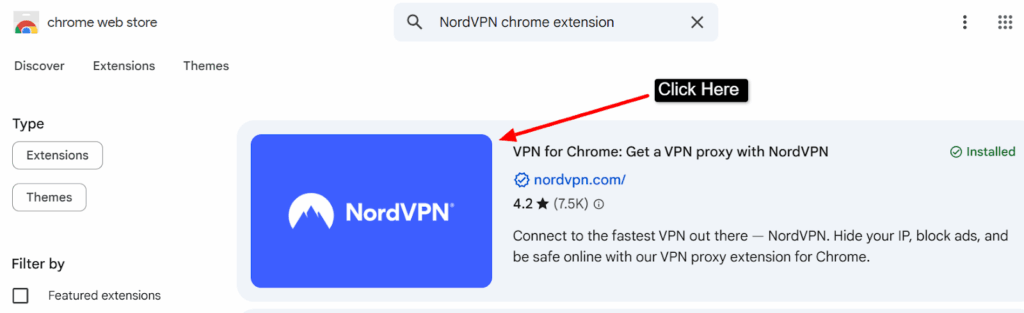
- Step2)) Click ‘Add to Chrome’ >> You’ll see a popup >> Click “Add Extension” to confirm.
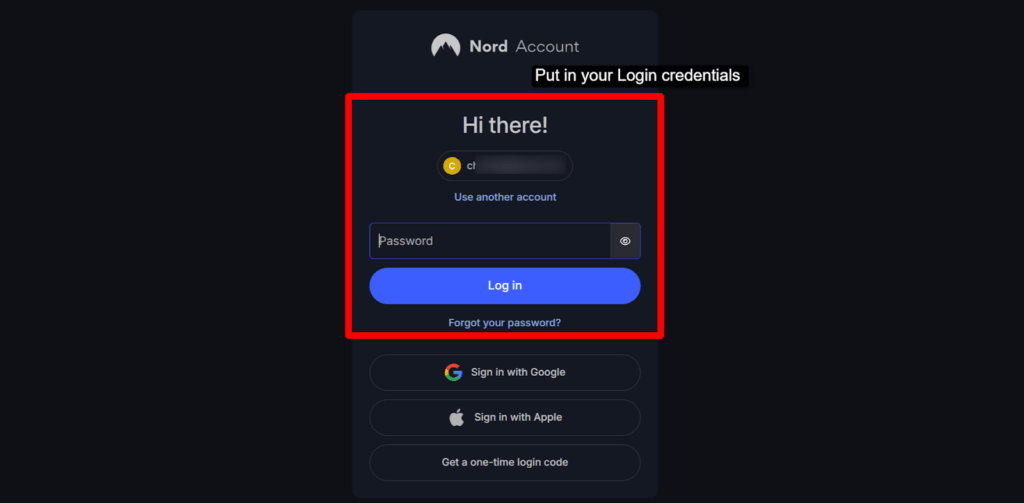
- Step3)) Once installed, click on the NordVPN extension icon near your address bar >> Click the Login button >> Put in your credentials.
- Step4)) After logging in >> Click “Quick Connect” to automatically connect to the best server >> You can also choose a country manually >> Enjoy Secure Browsing!
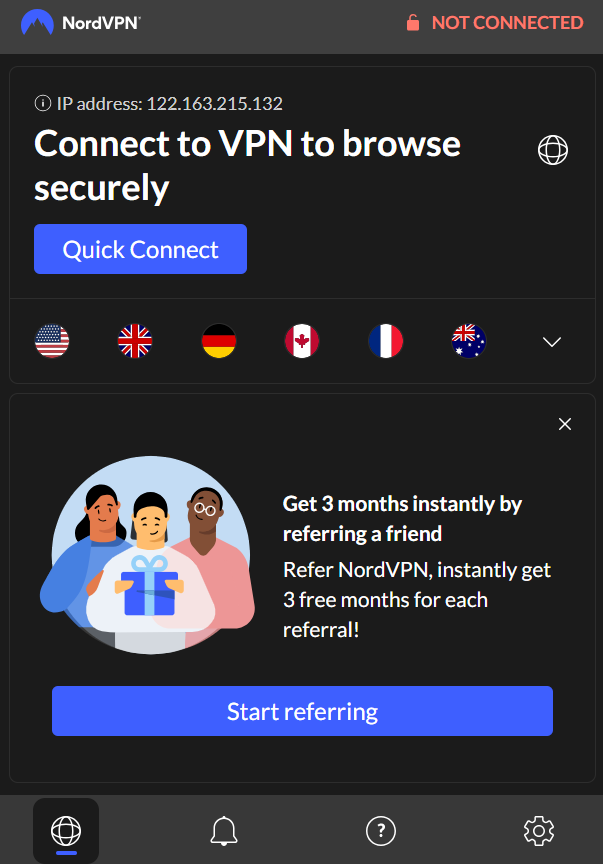
Now your Chrome browser is protected, and you can surf the web securely and access restricted content.
Why did we Choose NordVPN to show you the process of installation and to show how to use it? See! NordVPN is one of the most trusted VPN providers globally. It offers robust security, a strict no-logs policy, over 5,000 servers in 60+ countries, and blazing-fast speed. We chose NordVPN as its Chrome extension is user-friendly, making it perfect for even the newbies.
What’s the difference between VPN app vs Chrome extension?
Many users believe a VPN app and a Chrome VPN extension are the same, but that’s not true. In reality, they are two poles apart in how they work and the level of protection they offer. To help you understand better, we’ve created a small comparison table so you can clearly see the differences between a full VPN app and a Chrome VPN extension.
| VPN App | Chrome VPN Extension |
|---|---|
| Covers entire device (means all your apps) | Only secures your traffic in Chrome |
| Slightly more complex setup | Extremely easy to setup and easy to use |
| Full privacy on all apps & devices | Browsing securely within Chrome only |
| All settings including like Kill Switch, Split Tunneling | Basic encryption only |
Why do you need a VPN for Chrome?
A VPN encrypts your data and masks your identity online! When you’re connected to a VPN via Chrome, everything you do, like entering bank details, logging into social platforms, or even when you shop online, you’re protected from hackers, trackers and even your own ISP.
It’s like a digital invisibility HarryPotter’s cloak that keeps your internet activity secure and private.
Access Restricted Content
Let’s say it’s a streaming service, a blocked news site, or regional content, a VPN helps you unblock and access anything you want with just one click.
Secure Public Wi-Fi Usage
Public Wi-Fi at airports, cafes, or malls can be dangerous. With a Chrome VPN, your connection is encrypted, keeping you safe from cybercriminals.
Avoid Online Tracking
Trackers follow your digital footprints to target ads and collect data. A VPN hides your real IP address, keeping you anonymous from advertisers and trackers.
Bypass Censorship
In countries with internet censorship, a Chrome VPN can break through firewalls, giving you access to the free and open internet.
FAQ’s
Are Chrome VPNs safe?
Yes! Chrome VPNs are absolutely safe. Most Chrome VPN extensions are built with top-level security protocols that protect your browsing data from hackers and third parties.
As soon as you turn them on, they start encrypting your internet activity, keeping your identity and location hidden. Many VPNs like NordVPN and SurfShark also have strict no-log policies, so they don’t even store what you do online.
Do Chrome VPNs slow down browsing?
No! Chrome VPNs don’t slow down browsing. Good quality Chrome VPN extensions like NordVPN are designed to offer fast and stable speeds. In fact, many of them connect you to the nearest or fastest server automatically, so you won’t even notice any lag.
These extensions are lightweight and optimized for Chrome, so your streaming, gaming, or simple browsing goes on smoothly without interruptions.
Can Chrome VPNs unblock Netflix or YouTube?
Yes! Chrome VPNs can easily unblock Netflix and YouTube. With the right Chrome VPN extension, you can access content from any region without restrictions.
If Netflix shows are only available in the U.S. or YouTube videos blocked in your country, VPNs help you bypass those limits within seconds.
Does Google Chrome have a built-in VPN extension?
No, Google Chrome does not have a built-in VPN. Chrome doesn’t come with its own VPN feature. You need to install a third-party VPN extension from the Chrome Web Store. These are usually free or offer a free plan, and you can start using them right away after adding them to Chrome.
What’s the difference between a Chrome extension and a Chrome proxy extension?
A VPN Chrome extension fully encrypts your browser traffic and hides your IP, while a Chrome proxy just changes your IP address without any encryption. VPN extensions give you better privacy and security, while proxies are mainly for bypassing basic restrictions.
How do I access blocked content with a VPN on Chrome?
It’s super easy to access blocked content using a Chrome VPN. Just add a VPN extension to your browser, turn it on, and choose the country where the content is available. Once connected, you can instantly visit websites, watch videos, or use services that are blocked in your region.
How do I get a VPN extension for Google Chrome on an iPhone?
You can’t install Chrome VPN extensions on iPhone. VPN extensions are made for the desktop version of Chrome, not mobile. On an iPhone, you need to download a dedicated VPN app from the App Store. These apps do the same job as browser extensions and work across all your apps, not just Chrome.
How can a VPN for Chrome help you bypass censorship and empower free speech?
VPNs for Chrome are powerful tools for freedom. They hide your identity and let you access blocked websites, social media platforms, and news sources. In countries with heavy censorship, VPNs give you the freedom to speak, share, and browse without fear.
Conclusion
Using a Chrome VPN extension is one of the smartest ways to keep your device’s data protected from hackers and other online threats. With just one click, you can switch between multiple VPN servers across different locations, all without installing software or dealing with complex configurations.
Plus, these VPN extensions get into action immediately after you open your browser, offering seamless protection without requiring your attention.
In this blog, we’ve put together the top 9 best VPN Chrome extensions that offer strong data encryption, ad & tracker blocking, access to geo-restricted content, anonymous browsing, multiple VPN protocols, and server switching across global locations. These tools are built for speed, ease of use, and security, giving you complete peace while surfing online.
Still confused which one to pick? Then we highly recommend NordVPN’s Chrome extension. Why?
It’s stuffed with premium features like multiple high-speed servers, Threat Protection, Split Tunneling, IP Hiding and the ability to connect across multiple devices together. NordVPN ensures complete protection with minimal effort, when you’re streaming, torrenting, or just casually browsing.
Choose wisely! Your online privacy is just one Chrome extension away.
Looking for other VPN Server? Here you go-