Table of Contents
- What is VPN for Minecraft?
- 9 Best VPN For Minecraft in 2026
- 1. NordVPN - Overall Best VPN For Minecraft
- 2. ExpressVPN - Best VPN For Minecraft
- 3. SurfShark - Affordable VPN For Minecraft
- 4. ProtonVPN - Privacy Focused VPN For Minecraft
- 5. PrivateInternetAccess - Customizable VPN For Minecraft
- 6. CyberGhost - User-Friendly VPN For Minecraft
- 7. IPVanish - Reliable VPN For Minecraft
- 8. PrivateVPN - Secure and Simple VPN For Minecraft
- 9. PrivadoVPN - Best Security VPN For Minecraft
- Best Free VPNs for Minecraft
- Key Features to Look for in a Minecraft VPN
- How to Set Up a VPN for Minecraft?
- How We Test and Pick the Best VPNs for Minecraft in 2026?
- FAQ’s
- Conclusion



9 Best VPN for Minecraft in April 2026 – Safe & Fast Options
Do you play Minecraft and at the same time worry about your device’s security? Or maybe you love hopping into multiplayer Minecraft servers but also concerned about exposing your IP address? Do you often connect to public Wi-Fi to play minecraft and fear someone might see your data? Or are you tired of lag spikes and server blocks when trying to join your favorite Minecraft world from a restricted region?
If these questions feel relatable, then let’s get the answers. Minecraft is not just a game, it’s a whole universe of creativity, survival and competitive fun. But when you’re online, you’re also exposed to real threats like DDoS attacks, ISP throttling, privacy breaches or even regional bans. And let’s be honest, no gamer wants their Minecraft adventure interrupted by annoying security concerns.
That’s exactly why you need the best VPN for Minecraft. In this blog, we’re gonna tell you about the top Minecraft VPNs that not only hide your IP address and keep your identity anonymous but also encrypt your internet connection to protect you from all kinds of threats. Plus, these VPNs let you connect to a server close to your Minecraft server’s location, helping you reduce lag, bypass restrictions and play securely.
So if you’re looking for the best way to protect your gameplay and boost performance, keep reading! You’re about to find your perfect option!
What is VPN for Minecraft?
Let’s understand what VPN for Minecraft actually is! It is a tool that helps gamers stay safe and private while playing Minecraft online. When you connect to public or unsecured Minecraft servers, your internet connection can become vulnerable to hackers, malware, or third-party trackers.
That’s where you should use a VPN.
VPN means Virtual Private Network and it works by creating a secure and private tunnel between your device and the game server. This tunnel encrypts your internet traffic, which means no one can see what you’re doing or track your online activity.
If you’re playing on a server that’s not well protected, there’s a risk of malware or data leaks. A VPN helps reduce that risk by hiding your real IP address. This makes it much harder for hackers or anyone else to find out where you are or try to mess with your connection. It also keeps third-party ads or trackers from spying on your gameplay.
So, using a VPN while playing Minecraft isn’t just about privacy, it’s also about staying safe and enjoying the game without any interruptions.
9 Best VPN For Minecraft in 2026
Now that we know what a VPN for Minecraft actually is and how it helps secure your connection, protects your device from malware, and hides your IP to stop third-party tracking, all while giving you a smoother, lag-free gaming experience, we’ve put together a list of the 9 best VPNs for Minecraft in 2026.
These are the top choices for gamers who want to play safely and privately, especially while connected in a LAN mode.
⏰ TL;DR:
1. NordVPN – Overall Best VPN For Minecraft
2. ExpessVPN – Best VPN For Minecraft
3. SurfShark – Affordable VPN For Minecraft
4. ProtonVPN – Privacy Focused VPN For Minecraft
5. PrivateInternetAccess – Customizable VPN For Minecraft
6. CyberGhost – User-Friendly VPN For Minecraft
7. IPVanish – Reliable VPN For Minecraft
8. PrivateVPN – Secure and Simple VPN For Minecraft
9. PrivadoVPN – Best Security VPN For Minecraft
1. NordVPN – Overall Best VPN For Minecraft
See! Playing Minecraft online comes with its own set of risks, from DDoS attacks and lag spikes to exposing your IP address when joining multiplayer servers. This is where NordVPN can help you, specifically its Meshnet feature.
NordVPN

Pros
- NordVPN offers reliable performance and uptime.
- Easy to get started with an intuitive interface.
- Responsive customer support team.
- Competitive pricing for the features offered.
Cons
- Limited advanced customization options.
- Could improve documentation and tutorials.
Summary
See! Playing Minecraft online comes with its own set of risks, from DDoS attacks and lag spikes to exposing your IP address when joining multiplayer servers.
Price: USD 3.39 /month
Visit NordVPNMeshnet creates a secure, encrypted network between devices no matter where you or your friends are. It acts like a virtual LAN connection, allowing you to play Minecraft as if everyone is on the same local network, without needing to port forward or reveal your IP.
Another huge benefit is lag reduction and unlimited bandwidth. NordVPN is backed by ultra-fast servers running its own NordLynx protocol, built for speed and security. This means that you can explore, craft, and fight mobs without worrying about your connection dropping or slowing down.
Key Features
- Meshnet (a LAN for Private Minecraft Worlds): This feature lets you connect multiple devices as if they were on the same local network, no matter their physical location.
- DDoS Protection & IP Masking: One of the most annoying threats for Minecraft gamers is DDoS attacks, where someone intentionally crashes your server. NordVPN shields your IP address, ensuring no one can target your connection.
- Unlimited Bandwidth with Zero Throttling: NordVPN offers unlimited bandwidth! There are no caps, so if you’re gaming for 2 hours or 20, your connection remains fast and smooth.
- High-Speed Servers with NordLynx Protocol: It uses its own-built NordLynx protocol, designed to offer blazing speeds while maintaining strong encryption. This protocol ensures minimal ping and faster game responses.
Pricing
- Starting Price: $3.39 per month (2-Year Purchase Plan)
2. ExpressVPN – Best VPN For Minecraft
Next in the list we’ve ExpressVPN that makes your Minecraft journey safer, faster, and more enjoyable if you’re building massive structures, battling mobs or just exploring worlds.
ExpressVPN

Pros
- ExpressVPN offers reliable performance and uptime.
- Easy to get started with an intuitive interface.
- Responsive customer support team.
- Competitive pricing for the features offered.
Cons
- Limited advanced customization options.
- Could improve documentation and tutorials.
Summary
Next in the list we’ve ExpressVPN that makes your Minecraft journey safer, faster, and more enjoyable if you’re building massive structures, battling mobs or just exploring worlds.
Price: USD 4.99 /month
Visit ExpressVPNIt protects your connection using advanced VPN protocols like Lightway, OpenVPN, and IKEv2, which encrypt your internet traffic through a secure tunnel, keeping your IP address hidden and your data safe from hackers. This way, you can game confidently, even on public Wi-Fi or unsecured networks.
But ExpressVPN doesn’t just protect you, it also boosts your gameplay performance. If you’re dealing with lag spikes, high ping, or sudden throttling by your ISP, ExpressVPN helps by rerouting your connection through optimized VPN servers. With VPN servers spread across 105 countries, you can join friends in different regions, access new content, or bypass geo-restrictions.
Key Features
- Lower Ping for Lag-Free Gaming: It smartly selects the fastest path between your device and Minecraft servers. This means reduced latency and lower ping, helping you avoid frustrating delays during gameplay.
- Bypass Geo-Restrictions & Server Blocks: Let’s say minecraft is blocked on your school network or unavailable in your region, ExpressVPN helps you bypass those restrictions.
- DDoS Protection: Gamers are often targets of DDoS attacks, especially during multiplayer play. ExpressVPN hides your IP and encrypts your traffic with AES 256-bit encryption, stopping attackers in their tracks.
- Multiple-OS Compatibility: No matter where you play Minecraft, Windows, Mac, Android, iOS, PlayStation, ExpressVPN allows you to set it up on your router to protect every device on your network.
Pricing
- Starting Price: $4.99 per month (2-Year Purchase Plan)
3. SurfShark – Affordable VPN For Minecraft
What’s so interesting with the next VPN option, Surfshark? See! It makes Minecraft gaming super smooth and safe, especially with its 30-day money-back guarantee. That means you can try it risk-free and see if it really boosts your gameplay experience.
SurfShark

Pros
- SurfShark offers reliable performance and uptime.
- Easy to get started with an intuitive interface.
- Responsive customer support team.
- Competitive pricing for the features offered.
Cons
- Limited advanced customization options.
- Could improve documentation and tutorials.
Summary
What’s so interesting with the next VPN option, Surfshark? See!
Price: USD 1.99 /month
Visit SurfSharkYou can also use it on almost every device, from Windows, Android, iOS, to even game consoles via router setup. It keeps your IP address hidden, your data safe, and ensures your Minecraft connection isn’t manipulated by hackers.
But that’s not all! Surfshark comes stuffed with features that make your Minecraft sessions lag-free and private. You get faster speeds thanks to 3,200+ global servers, a Kill Switch that keeps your real IP secure if your VPN drops, and even VPN obfuscation to bypass Minecraft blocks on restricted networks.
Key Features
- Camouflage Mode: When you’re on a school network that blocks Minecraft or VPNs, Surfshark’s lets you sneak past those restrictions. It hides your VPN traffic so it looks like normal internet browsing.
- Kill Switch for Safety: Worried about your real IP leaking if the VPN disconnects? Surfshark’s Kill Switch is your emergency shield. It instantly cuts off your internet connection if the VPN drops, keeping your real IP address hidden.
- Rotating IP for Extra Privacy: With the IP Rotator, it changes your VPN IP regularly while you stay connected. That makes it even harder for anyone to track your online activity or find your real location.
- Bypasser: This feature lets you choose which apps go through the VPN and which don’t. For example, you can route just Minecraft through the VPN for full protection while using your normal internet for everything else.
Pricing
- Starting Price: $1.99 per month (2-Year Purchase Plan)
4. ProtonVPN – Privacy Focused VPN For Minecraft
If you’re a Minecraft player who loves lag-free gameplay without compromising your online privacy, ProtonVPN is the right choice. With secure VPN protocols like WireGuard and OpenVPN, IP masking, and a huge network of ultra-fast 10 Gbps servers (some located close to Minecraft servers), Proton VPN ensures that your connection stays private, protected and incredibly fast.
ProtonVPN
Pros
- ProtonVPN offers reliable performance and uptime.
- Easy to get started with an intuitive interface.
- Responsive customer support team.
- Competitive pricing for the features offered.
Cons
- Limited advanced customization options.
- Could improve documentation and tutorials.
Summary
If you’re a Minecraft player who loves lag-free gameplay without compromising your online privacy, ProtonVPN is the right choice. With secure VPN protocols like WireGuard and OpenVPN, IP masking, and a huge network of ultra-fast 10 Gbps servers (some located close to Minecraft servers), Proton VPN e
Price: USD 4.49 /month
Visit ProtonVPNYou can play Minecraft on public Wi-Fi or restricted school networks without worrying about ping spikes, IP bans, or DDoS attacks. What’s even more interesting is that the Proton VPN’s free forever plan is a perfect option for newbie gamers.
It allows you to connect 1 device and access 5 free server locations in the US, Netherlands, Romania, Japan and Luxembourg. Even with the free version, Proton VPN encrypts your data and hides your IP address, helping you stay anonymous on Minecraft servers.
Key Features
- Low-Ping Access to Minecraft Servers: It has a vast network of high-speed 10 Gbps servers, some of which are strategically placed near popular Minecraft server locations. This drastically reduces latency and helps gamers avoid lag, ensuring smooth multiplayer gameplay.
- IP Masking to Avoid Bans and Trackers: Minecraft players often get unfairly IP-banned on servers or blocked when switching networks. Proton VPN protects you by masking your real IP address, allowing you to change it instantly.
- Protection from DDoS and Malware Attacks: As you know that Minecraft is not immune to targeted DDoS or malware attacks, especially on public servers. Proton VPN includes NetShield Ad-blocker, which filters out malicious domains and tracking scripts in real-time.
- Bypass School and Network Restrictions: Can’t access Minecraft servers at school or college? Proton VPN’s custom Stealth protocol bypasses firewalls and VPN blocks, disguising your connection as regular traffic.
Pricing
- Starting Price: $4.49 per month (2-Year Purchase Plan)
5. PrivateInternetAccess – Customizable VPN For Minecraft
You should know how crucial performance and protection are when playing Minecraft multiplayer games online, especially on public servers or PvP maps. That’s where Private Internet Access PIA VPN truly is useful.
PrivateInternetAccess
Pros
- PrivateInternetAccess offers reliable performance and uptime.
- Easy to get started with an intuitive interface.
- Responsive customer support team.
- Competitive pricing for the features offered.
Cons
- Limited advanced customization options.
- Could improve documentation and tutorials.
Summary
You should know how crucial performance and protection are when playing Minecraft multiplayer games online, especially on public servers or PvP maps. That’s where Private Internet Access PIA VPN truly is useful.
Price: USD 1.75 /month
Visit PrivateInternetAccessPIA helps gamers enjoy Minecraft without restrictions by reducing ping, bypassing network blocks, preventing DDoS attacks, and avoiding ISP throttling. With PIA, Minecraft isn’t just more secure, it’s also smoother, even when playing on multiplayer servers or custom modded worlds.
What truly makes PIA so good for Minecraft players is how it directly improves the game’s overall performance.
The VPN routes your traffic through one of 154+ global servers, enabling a much shorter and optimized data path to your Minecraft server of choice. This results in lower ping, fewer latency issues and a better real-time experience, especially vital when timing and reflexes matter, like during PvP battles or when dodging Creepers.
Key Features
- Global Server Access for Lower Ping: It offers 154 server locations across 91 countries, giving Minecraft players the advantage of connecting to servers geographically closer to their target servers.
- DDoS Attack Protection: Minecraft servers, especially custom ones, can be vulnerable to malicious attacks like DDoS, which can freeze your game. PIA VPN hides your IP address and protects your personal information, effectively shielding you from these types of attacks.
- Bypass Country Restrictions: Many networks, such as those in schools, block gaming ports or websites altogether. With PIA, Minecraft gamers can bypass these restrictions thanks to encrypted tunneling that hides your online activity.
- Avoid ISP Throttling for Maximum Speed: ISPs often throttle bandwidth for high-traffic activities like gaming, leading to lag spikes and slowdowns. PIA VPN encrypts all your traffic, making it invisible to your ISP.
Pricing
- Starting Price: $1.75 per month (3-Year Purchase Plan)
6. CyberGhost – User-Friendly VPN For Minecraft
Now let’s learn about CyberGhost that offers advanced encryption, anti-leak protection and a strict no-logs policy, ensuring your Minecraft server connection is airtight, plus making it nearly impossible for third parties to track or attack your session.
CyberGhost
Pros
- CyberGhost offers reliable performance and uptime.
- Easy to get started with an intuitive interface.
- Responsive customer support team.
- Competitive pricing for the features offered.
Cons
- Limited advanced customization options.
- Could improve documentation and tutorials.
Summary
Now let’s learn about CyberGhost that offers advanced encryption, anti-leak protection and a strict no-logs policy, ensuring your Minecraft server connection is airtight, plus making it nearly impossible for third parties to track or attack your session.
Price: USD 2.04 /month
Visit CyberGhostLet’s say you’re building mega-bases or battling mobs on multiplayer servers, CyberGhost offers optimized servers for gaming that cut down lag, eliminate buffering, and keep your IP address masked. This means no DDoS attacks, no sudden disconnections and no compromised accounts at all.
What’s good is that CyberGhost VPN offers a 45-day money-back guarantee, making it a risk-free choice for new gamers. So, you can test all its gaming benefits without investing a single dollar. There’s also a 14-day refund policy on the 1-month plan and apps available for nearly every device, from Windows to gaming consoles.
Key Features
- Gaming-Optimized Servers for Lower Ping: Lag can ruin your Minecraft experience! CyberGhost solves this by offering specialized gaming servers optimized for low latency and reduced ping.
- Bypass IP Bans & Geo-Restrictions: You can easily bypass Minecraft IP bans and access blocked servers by masking your IP address. Simply connect to a different VPN server from CyberGhost’s global network across 100+ countries, and you’re back in the game.
- DDoS Protection to Secure Your Minecraft World: It protects your device and server by assigning you a new IP address, effectively hiding your original one. This means attackers won’t be able to target your network, keeping your gameplay stable.
- Smart DNS for Console Gaming: You can enjoy the benefits of a VPN on PlayStation, Xbox, and Nintendo Switch! This feature allows console Minecraft players to unblock servers and improve speeds without needing to install a VPN directly onto the console.
Pricing
- Starting Price: $2.04 per month (2-Year Purchase Plan)
7. IPVanish – Reliable VPN For Minecraft
See! Playing Minecraft like a true badass means more than just crafting better tools or beating the Ender Dragon! It is also about protecting your connection and unlocking the full potential of the game.
IPVanish
Pros
- IPVanish offers reliable performance and uptime.
- Easy to get started with an intuitive interface.
- Responsive customer support team.
- Competitive pricing for the features offered.
Cons
- Limited advanced customization options.
- Could improve documentation and tutorials.
Summary
See! Playing Minecraft like a true badass means more than just crafting better tools or beating the Ender Dragon!
Price: USD 2.19 /month
Visit IPVanishWith IPVanish VPN, you can secure your gaming experience with military-grade encryption that hides your IP address from eagle eyes, hackers, and DDoS attacks. Let’s say you’re running your own server or joining a global one, IPVanish gives you the freedom to play without fear of being tracked or attacked.
Plus, it also allows you to connect to servers in 140+ locations, helping you easily access restricted Minecraft servers in other countries, a must-have for players who love to explore modded servers, mini-games, and global communities. Thanks to unlimited bandwidth, you can play for hours without slowdowns.
Key Features
- Bypass IP Bans & Geo-Restrictions: If you’ve ever been IP-banned from a Minecraft server or live in a country with strict online gaming policies, IPVanish helps you get back in the game without missing a single minute.
- DDoS Protection & Threat Blocking: Minecraft servers and players can be common targets of DDoS attacks. IPVanish’s threat protection tools, including built-in malware and tracker blocking, shield your device and connection from malicious attacks.
- Lag-Free Gaming with Unlimited Bandwidth: It offers WireGuard protocol and blazing-fast servers, making ping stays low and stable. Plus, there’s no bandwidth throttling, meaning your ISP can’t slow you down mid-game.
- Secure Play on Public Wi-Fi: Its advanced encryption and secure VPN tunnel keep your data protected, even on public Wi-Fi networks. You’ll be able to log in to your Microsoft account and play securely.
Pricing
- Starting Price: $2.19 per month (2-Year Purchase Plan)
8. PrivateVPN – Secure and Simple VPN For Minecraft
What’s so special about PrivateVPN? It offers a seamless, secure, and ultra-fast gaming experience that’s perfect for Minecraft players. When you play with strangers on open networks, you’re constantly at risk of DDoS attacks, IP leaks and even targeted hacking. That’s where PrivateVPN comes in.
PrivateVPN
Pros
- PrivateVPN offers reliable performance and uptime.
- Easy to get started with an intuitive interface.
- Responsive customer support team.
- Competitive pricing for the features offered.
Cons
- Limited advanced customization options.
- Could improve documentation and tutorials.
Summary
What’s so special about PrivateVPN? It offers a seamless, secure, and ultra-fast gaming experience that’s perfect for Minecraft players.
Price: USD 2 /month
Visit PrivateVPNWith its military-grade 2048-bit encryption, no-log policy, and IP masking capabilities, you can safely explore Minecraft realms without revealing your identity or real location. Plus, with 200+ servers in 63 countries, you can unblock geo-restricted Minecraft content, connect to servers with the lowest latency, and enjoy smooth, lag-free gameplay.
The unlimited bandwidth and high-speed connections mean no more buffering. And thanks to its port forwarding support, Minecraft server owners can even host secure game worlds without exposing their personal IP address. If you’re serious about safe and high-performance Minecraft gaming, PrivateVPN delivers everything you need.
Key Features
- 2048-bit Encryption with AES-256 Protection: It secures your Minecraft sessions with 2048-bit encryption paired with AES-256, the same level used by militaries worldwide. This ensures your online identity and IP address remain invisible to hackers and even your ISP.
- Zero Data Logging & Swedish Privacy Laws: Operates under strict Swedish privacy laws that enforce a zero-logging policy. That means your browsing activity, gameplay sessions, server access history, and any in-game communication are never recorded.
- Port Forwarding for Minecraft Hosting: Offers a built-in port forwarding allowing you to easily open specific ports for your game server while still staying protected behind a secure VPN. This is perfect for gamers who want full control over their gameplay without risking IP.
- Up to 10 Simultaneous Connections: Let’s say you’re running a co-op Minecraft LAN party at home or connecting your PC, tablet, and mobile all at once, PrivateVPN lets you secure up to 10 devices simultaneously.
Pricing
- Starting Price: $2 per month (3-Year Purchase Plan)
9. PrivadoVPN – Best Security VPN For Minecraft
See! Getting blocked from Minecraft on school networks is really frustrating, especially when all you want is to show some creative gameplay or hop on a multiplayer server with friends.
PrivadoVPN
Pros
- PrivadoVPN offers reliable performance and uptime.
- Easy to get started with an intuitive interface.
- Responsive customer support team.
- Competitive pricing for the features offered.
Cons
- Limited advanced customization options.
- Could improve documentation and tutorials.
Summary
See! Getting blocked from Minecraft on school networks is really frustrating, especially when all you want is to show some creative gameplay or hop on a multiplayer server with friends.
Price: USD 1.11 /month
Visit PrivadoVPNPrivadoVPN helps you bypass these restrictions effortlessly by routing your internet connection through secure, global VPN servers. Be it Minecraft Java Edition or Bedrock, this VPN masks your IP address and makes it seem like you’re browsing from an unrestricted network.
It secures your connection while you play! PrivadoVPN uses advanced VPN protocols like OpenVPN, IKEv2, and WireGuard to offer military-grade encryption without sacrificing speed. You also get protection from DDoS attacks, online snooping, and data leaks thanks to its Kill Switch, zero-log policy, and split tunneling features.
Key Features
- Split Tunneling: It is good for Minecraft players who multitask. With this feature, you can choose which apps route through the VPN and which don’t.
- SOCKS5 Proxy (Faster Download Speeds, Lower Ping): It offers a SOCKS5 proxy that’s perfect for gamers who also need to download Minecraft mods or resource packs efficiently. It provides a secure yet ultra-fast way to move files, all while masking your IP.
- Kill Switch (Instant Protection Against Disconnects): Nobody wants to get caught mid-game with an exposed IP! PrivadoVPN’s Kill Switch feature ensures that if your VPN connection drops unexpectedly, all your internet activity immediately stops.
- Connect Up to 10 Devices: Why keep the fun to yourself? With the premium plan of PrivadoVPN, you can secure up to 10 devices simultaneously.
Pricing
- Starting Price: $1.11 per month (2-Year Purchase Plan)
Best Free VPNs for Minecraft
Now as a newbie gamer, it can be really tough to spend money on a premium VPN plan, especially when you’re just starting out in Minecraft and want to explore the multiplayer world safely. That’s why we’ve created this list of the top 3 free VPNs that offer strong security features without asking for a single dollar.
- ProtonVPN (Free Forever Plan): It is one of the few VPN providers that really offers a free-forever plan without any hidden charges or time limits. For Minecraft players, this is a goldmine, especially if you’re just beginning and want to stay safe without spending anything.
- SurfShark (7-Day Free Trial): See! SurfShark isn’t a completely free VPN, but it offers a 7-day free trial for Android, iOS, and macOS users, and you can fully explore its premium-level features during this trial.
- NordVPN (30-Day Money-Back Guarantee): It also doesn’t offer a traditional free plan, but it does come with a 30-day risk-free trial via its money-back guarantee. That gives you a full month of premium experience, totally free if you cancel in time.
Key Features to Look for in a Minecraft VPN
It’s really difficult! Getting the best VPN for Minecraft as a beginner is like searching for diamonds in a South African cave, there are plenty of good options, but only a few actually help you mine securely. To make your selection easier, we’ve listed 6 key points that matter the most when looking for a Minecraft VPN:
- Strong Security & Encryption: Look for VPNs that use AES-256-bit encryption. This keeps your data hidden from hackers, DDoS attackers, and other online threats, especially when you’re connected to public Wi-Fi or unknown multiplayer servers.
- No-Logs Policy: A good VPN never tracks or stores your online activities. This is important in Minecraft, where you might be accessing private servers or modded content. A zero-logs policy ensures complete privacy.
- Multiple Global VPN server location: More server locations mean better chances of finding a low-ping, fast connection. This reduces lag and improves your gaming experience. Choose VPNs that offer multiple global server options.
- Fast Connection Speed: Speed is everything in online gaming. A slow VPN can cause lag, rubber-banding, or even disconnections during gameplay. Look for VPNs known for high-speed connections, even on their free plans.
- Device Compatibility: Make sure your VPN supports all the devices you use, be it Windows, macOS, Android, or gaming consoles. Good if it allows multiple devices under one account.
- Kill Switch Feature: A Kill Switch automatically disconnects your internet if the VPN connection drops. This prevents accidental IP leaks, especially useful during competitive Minecraft battles or when hosting private servers.
How to Set Up a VPN for Minecraft?
Really excited to get a VPN, right? Every gamer wants a solution to secure their connection when connected to public Wi-Fi or access Minecraft servers! Here, we’re gonna tell you step-by-step how one can easily set up a VPN for Minecraft:
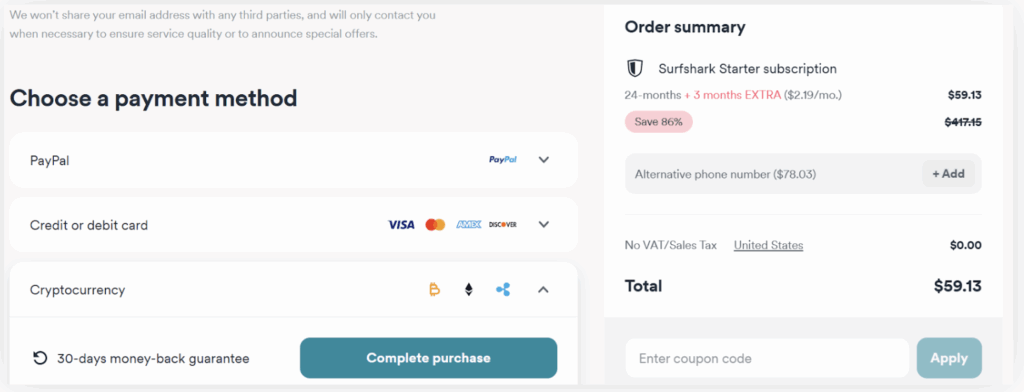
- Go to the official website of Surfshark >> Press Get Surfshark button >> Choose the best plan as per your requirement and budget.
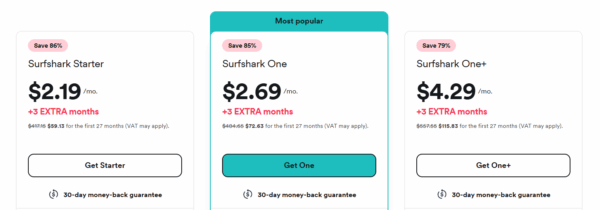
- Make the payment using appropriate billing details (if you want more privacy, choose BitCoin payment).
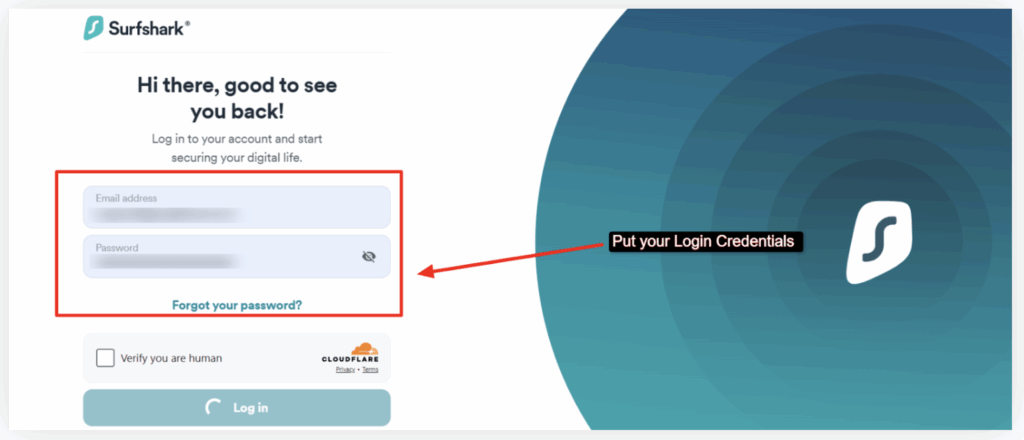
- After you make the payment, you can use your login data to access your Surfshark VPN account >> Enter your login information >> Press Login.
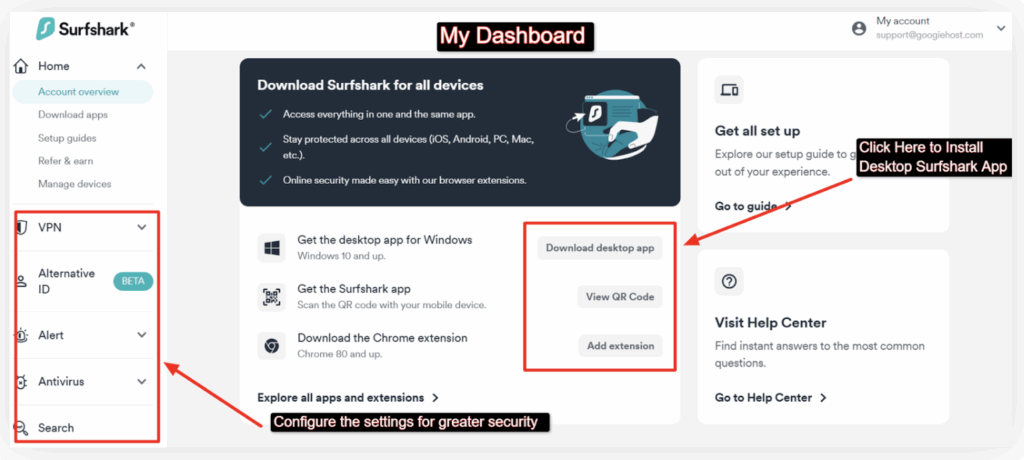
- Now, as you access your dashboard >> You can also see options like Alternative ID, AntiVirus, Surfshark search page and more on the left side panel >> Click at the Download Desktop App button to get the Surfshark app.
- Now, that’s how the Desktop Surfshark app looks like.
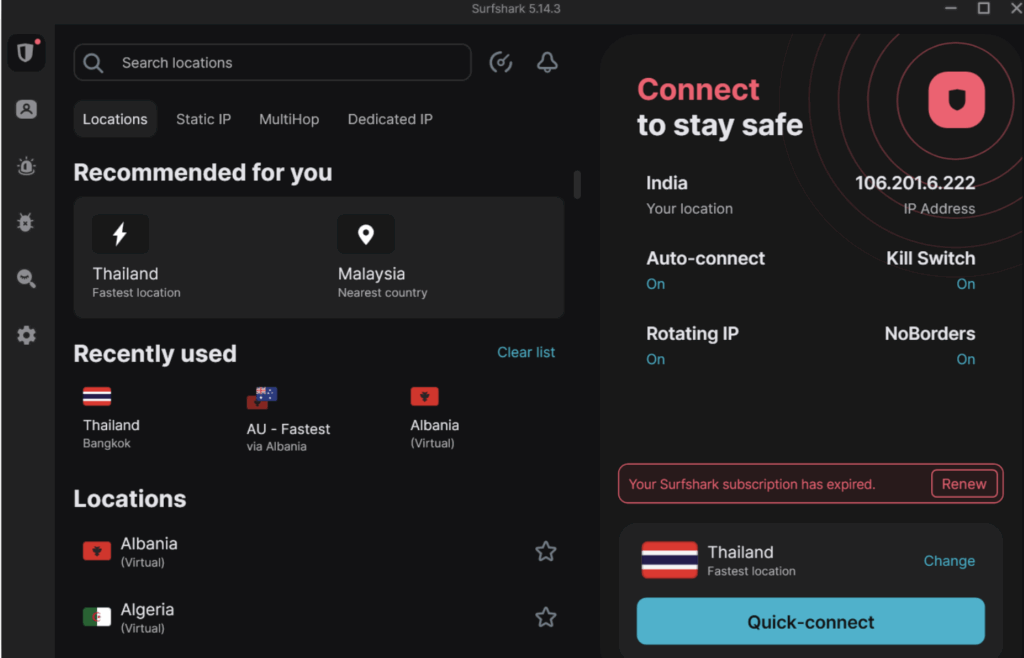
- Go to the search location bar >> Type (the location of the VPN you want) >> Choose the VPN server location near the minecraft server for faster connection speed >> In just a few seconds, your internet traffic is routed through the VPN server.
Make sure to follow the steps as it is and even refer to these screenshots with steps alongside! You’ll definitely be able to connect to the nearest VPN server to your minecraft server and get fast speed when playing along with that you’ll also get a secured environment as well.
How We Test and Pick the Best VPNs for Minecraft in 2026?
We don’t just randomly list VPNs, we test each one thoroughly so that you get a safe and smooth experience while playing Minecraft online. Our aim is to make sure that every option here offers good-quality performance, solid security and beginner-friendly features.
This is how we’ve evaluated each VPN provider mentioned in this blog:
- Performance Testing: We measure upload/download speeds and ping rates during actual Minecraft sessions. This tells us if the VPN slows down gameplay or boosts it.
- Security Features check: We check for the presence of encryption protocols, kill switch, DNS leak protection and malware blockers to ensure the VPN provides reliable security or not.
- User Experience and UI: VPNs that are too technical or confusing are not beginner-friendly. We prioritize those with simple dashboards, one-click connect and clear server selection interfaces.
- Server accessibility: We test server access from different regions to make sure the VPN can unblock Minecraft servers from anywhere and offer good speed worldwide.
- Trial and Refund Policies: We assess if the provider offers a genuine free plan, free trial, or money-back guarantee.
FAQ’s
Yes! When it comes to using a free VPN for Minecraft, you technically can, but a reliable free VPN is rare. Many free VPNs are slow, don’t offer strong privacy and often block gaming servers.
At times, it will! If your internet provider is throttling your gaming traffic, a good VPN can hide that and improve speeds. It can also connect you to a server closer to your Minecraft server, cutting down ping.
Absolutely, Yes it’s totally legal! As long as you’re not breaking the game’s rules or cheating, you’re fine. Using a VPN isn’t against Minecraft’s terms, and no laws are broken by using one.
Pick the one closest to where your friends or the Minecraft server is located. That happens to be the best country for VPN Minecraft. If you’re playing with someone in Europe, use a server in Europe. Closer servers mean less lag.
No, you don’t have to use that default port, but most people do. It’s the standard port Minecraft uses, so using something else means extra configuration.
To join a LAN world, both players need to be on the same network. Let’s say it’s your home Wi‑Fi, a LAN setup or a VPN that acts like a LAN (like for example: NordVPN Meshnet). Once connected to the same network, the host opens their single-player world to LAN, and others can see and join it in their multiplayer menu.
Only if your ISP is throttling gaming, you’ll experience a lag. With a fast, well-configured VPN using modern protocols like WireGuard or NordLynx, you might get smoother gameplay.
Yes, you can! Though consoles don’t have VPN apps, you can either set up the VPN router or share the connection from a PC. ExpressVPN and NordVPN make this easy with Smart DNS or router setups.
Conclusion
While playing Minecraft, facing issues like lag, geo-restrictions, DDoS attacks, server bans or even sudden disconnections due to poor network privacy is quite common. That’s why it’s super important to use the best VPN for Minecraft to enjoy a smooth, secure, and uninterrupted gaming experience.
With features such as VPN protocols, a kill switch, RAM-only servers, IP masking, obfuscated servers, and multiple server locations, a good VPN not only protects your identity but also boosts your gaming performance.
In this blog, we’ve shared the top 9 best VPNs for Minecraft, each with their standout features, be it a free trial offer, blazing speed, or affordability. We’ve also included the starting prices and key features of each VPN to help you make the best decision based on your gaming style and privacy needs.
So choose properly, and let your Minecraft adventure continue securely and lag-free!
Looking for other VPN Server? Here you go-