Table of Contents
- What is a VPN for Warzone ?
- 7 Best VPN for Warzone in 2026
- 1. SurfShark - Overall VPN Best for Warzone
- 2. NordVPN - Best VPN for Warzone
- 3. ExpressVPN - Budget-Friendly VPN for Warzone
- 4. CyberGhost - Fast, Secure and Anonymous VPN for Warzone
- 5. ProtonVPN - Privacy-First VPN for Warzone
- 6. PrivateInternetAccess - Customizable VPN for Warzone
- 7. Privadovpn - Streamer’s Choice VPN in Warzone
- Key Factors to Consider When Choosing a Warzone VPN
- How to Set Up a VPN for Warzone : A Step-By-Step Guide?
- Free vs Paid VPNs for Warzone
- Why do you need a VPN for Warzone?
- FAQ’s
- Conclusion



7 Best VPN for Warzone in March 2026 – Secure & Fast Connections
There are a lot of games that deliver thrilling experiences like in Call of Duty: Warzone. But the frustrating thing is that many players have reported Warzone isn’t accessible anymore.
Warzone Mobile, which was initially launched in a few selected regions like in Australia, Chile, Norway, and Sweden, has now been delisted from both the App Store and Google Play, leaving gamers across the globe unable to access it.
This restriction has left a number of gamers disappointed. But the good news is that we’ve got a solution! You can use the best VPN for Warzone. With the right Warzone VPN, you can bypass country restrictions and unlock the game no matter where you live.
Not only does a VPN restore your access to Warzone, but it also enhances your overall online gaming security. Advanced VPN protocols like WireGuard and IKEv2/IPSec, along with features like RAM-only servers and obfuscated servers, ensure that your connection remains private and hidden from your ISP or any government body trying to monitor your online gaming activities.
In this blog, we’ve put together a list of the 7 best VPNs for Warzone. Every VPN mentioned here has been personally tested and reviewed by our team to ensure you get the most reliable information possible.
What is a VPN for Warzone ?
A VPN for Warzone is a Virtual Private Network or in easy words, it is a tool that is designed to enhance your Call of Duty: Warzone gaming experience by changing your IP address and encrypting your internet connection.
It helps gamers access geo‑restricted Warzone servers, avoid DDoS attacks, reduce ping by connecting to closer VPN servers, and sometimes even find easier lobbies.
With a Warzone VPN, you get 100% privacy through encrypted tunnels, zero tracking of your online activities, protection from bandwidth throttling, and the ability to bypass regional bans or restrictions.
In short, it ensures a smooth and unrestricted gaming experience so you can focus only on winning battles without worrying about privacy risks or connectivity issues.
7 Best VPN for Warzone in 2026
Let’s not waste even a single minute and jump right into the list of the top 7 best VPNs for Warzone in 2026 that offer 100% security, zero tracking, built-in ad blockers, and back‑to‑back secured VPN connections. These VPNs guarantee uninterrupted access to restricted games, lightning‑fast servers for lag‑free matches, and a flawless gameplay experience while keeping your identity completely private.
⏰ TL;DR:
1. SurfShark – Overall Best VPN for Warzone
2. NordVPN – Best VPN for Watzone
3. ExpressVPN – Budget-Friendly VPN for Warzone
4. CyberGhost – Fast, Secure and Anonymous VPN for Warzone
5. ProtonVPN – Privacy-First VPN for Warzone
6. PrivateInternetAccess – Customizable VPN for Warzone
7. Privadovpn – Streamer’s Choice VPN in Warzone
1. SurfShark – Overall VPN Best for Warzone
Why SurfShark? Well, it’s all about delivering a seamless and secure Warzone Call of Duty experience, plus, it comes with a 30-day money-back guarantee. This means you can test it out without any risk to see if it really enhances your gameplay.
SurfShark

Pros
- SurfShark offers reliable performance and uptime.
- Easy to get started with an intuitive interface.
- Responsive customer support team.
- Competitive pricing for the features offered.
Cons
- Limited advanced customization options.
- Could improve documentation and tutorials.
Summary
Why SurfShark? Well, it’s all about delivering a seamless and secure Warzone Call of Duty experience, plus, it comes with a 30-day money-back guarantee.
Price: USD 1.99 /month
Visit SurfSharkIt works on nearly every platform, from Windows, Android, and iOS, to even gaming consoles via router installation. Surfshark shields your IP, secures your data, and ensures hackers can’t tamper with your Warzone connection.
And that’s just the beginning! Surfshark is packed with tools that make your Warzone sessions both smooth and private. You’ll enjoy faster connections through its 3,200+ global servers, protection from leaks with its Kill Switch, and even VPN obfuscation technology to get around Warzone restrictions on controlled networks.
Key Features
- Camouflage Mode: If you’re stuck on a school or workplace network where Warzone or VPNs are blocked, Surfshark’s Camouflage Mode lets you slip through unnoticed. It masks your VPN traffic so it appears like standard browsing.
- Kill Switch for Protection: Concerned about your real IP being exposed if the VPN cuts out? Surfshark’s Kill Switch has your back, it immediately stops your internet if the VPN drops, ensuring your IP stays hidden.
- Rotating IP for Maximum Privacy: Surfshark’s IP Rotator keeps switching your VPN IP while you stay connected, making it extremely difficult for anyone to monitor your online movements or pinpoint your location.
- Bypasser: This split-tunneling feature allows you to decide which apps should run through the VPN and which shouldn’t. For instance, you can channel only Warzone through the VPN for maximum security while leaving other apps on your regular connection.
Pricing
- Cheapest Deal: $1.99 per month (2-Year Purchase Plan)
2. NordVPN – Best VPN for Warzone
Playing Call of Duty: Warzone online isn’t always smooth gameplay, it comes with potential risks such as DDoS attacks, frustrating lag spikes, and the exposure of your IP address when joining multiplayer matches.
NordVPN

Pros
- NordVPN offers reliable performance and uptime.
- Easy to get started with an intuitive interface.
- Responsive customer support team.
- Competitive pricing for the features offered.
Cons
- Limited advanced customization options.
- Could improve documentation and tutorials.
Summary
Playing Call of Duty: Warzone online isn’t always smooth gameplay, it comes with potential risks such as DDoS attacks, frustrating lag spikes, and the exposure of your IP address when joining multiplayer matches.
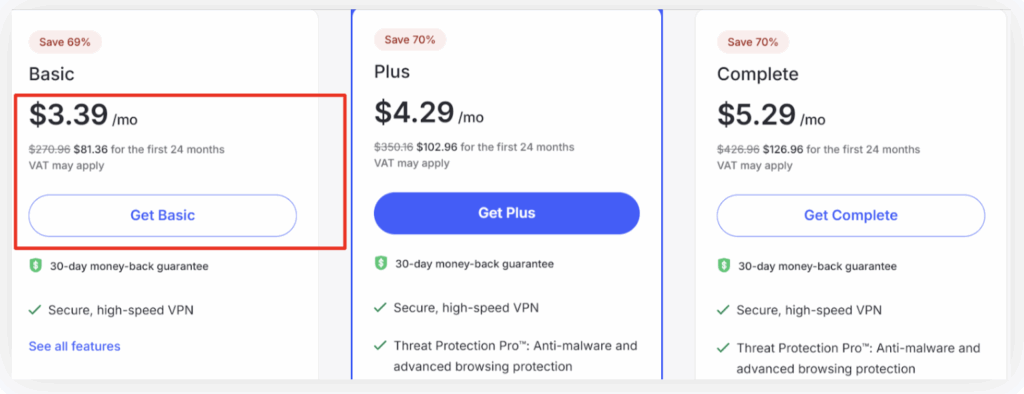
Price: USD 3.39 /month
Visit NordVPNThat’s where NordVPN proves to be a digital bodyguard, particularly with its powerful Meshnet feature. Meshnet establishes a secure, encrypted connection between devices regardless of location. It behaves like a virtual LAN setup, letting you enjoy Warzone with friends as though you’re all on the same local network.
Another major advantage is improved stability, reduced lag, and unlimited bandwidth. With ultra-fast servers powered by its exclusive NordLynx protocol, NordVPN ensures both speed and security. This allows you to loot, shoot, and survive without worrying about interruptions, slowdowns, or dropped connections.
Key Features
- Meshnet (Private Virtual LAN for Warzone): Meshnet lets you link multiple devices as if they were all on a single local network, no matter where your squadmates are located.
- DDoS Protection & Hidden IP: One of the biggest threats Warzone players face is DDoS attacks, where opponents deliberately flood your connection to knock you offline. NordVPN keeps your real IP hidden, making you untouchable from such attacks.
- Unlimited Bandwidth with No Throttling: NordVPN delivers unrestricted bandwidth! Whether you’re in a quick session or a marathon gaming night, you’ll always get a fast, smooth connection without limits.
- Lightning-Fast Servers with NordLynx Protocol: Built specifically for speed and strong encryption, NordLynx ensures low ping and ultra-responsive gameplay, keeping you ahead in every gunfight.
Pricing
- Cheapest Deal: $3.39 per month (2-Year Purchase Plan)
3. ExpressVPN – Budget-Friendly VPN for Warzone
Next on our list is ExpressVPN, a service that enhances your Warzone Call of Duty sessions by making them more secure, smoother, and more reliable, if you’re fighting a battle, teaming up with friends, or exploring new maps. It safeguards your online activity with advanced VPN protocols such as Lightway, OpenVPN, and IKEv2.
ExpressVPN

Pros
- ExpressVPN offers reliable performance and uptime.
- Easy to get started with an intuitive interface.
- Responsive customer support team.
- Competitive pricing for the features offered.
Cons
- Limited advanced customization options.
- Could improve documentation and tutorials.
Summary
Next on our list is ExpressVPN, a service that enhances your Warzone Call of Duty sessions by making them more secure, smoother, and more reliable, if you’re fighting a battle, teaming up with friends, or exploring new maps. It safeguards your online activity with advanced VPN protocols such as Ligh
Price: USD 4.99 /month
Visit ExpressVPNThese protocols create a secure, encrypted tunnel for your connection, masking your IP address and shielding your personal data from cyber threats. This ensures you can play with peace of mind, even when connected to public Wi-Fi or less secure networks.
But ExpressVPN isn’t only about security! It also improves your overall gaming performance. If you’re struggling with lag, high ping, or ISP throttling, ExpressVPN reroutes your connection through servers optimized for speed. With servers spread across 105 countries, you can squad up with friends from anywhere, unlock new content, and bypass region-based restrictions.
Key Features
- Reduced Ping for Smooth Gameplay: ExpressVPN automatically chooses the quickest route between you and the Warzone servers, cutting down on latency and lowering ping so you can avoid annoying delays in intense matches.
- Unblock Restrictions & Network Blocks: If Warzone Call of Duty is blocked on your school or office network, or restricted in your area, ExpressVPN gives you instant access by getting around those barriers.
- Protection Against DDoS Attacks: Competitive players are common targets of DDoS attacks. ExpressVPN conceals your IP and secures your data with AES 256-bit encryption, preventing attackers from interrupting your matches.
- Cross-Platform Compatibility: Let’s say you play Warzone on Windows, Mac, iOS, Android, or PlayStation, ExpressVPN offers connectivity for every device. You can even install it on your router to secure every device in your household.
Pricing
- Cheapest Deal: $4.99 per month (2-Year Purchase Plan)
4. CyberGhost – Fast, Secure and Anonymous VPN for Warzone
If you’re a Warzone Call of Duty player, CyberGhost VPN is the best choice for both security and smooth performance. With its strong encryption, anti-leak technologies, and a firm no-logs policy, it ensures your connection stays private and protected.
CyberGhost
Pros
- CyberGhost offers reliable performance and uptime.
- Easy to get started with an intuitive interface.
- Responsive customer support team.
- Competitive pricing for the features offered.
Cons
- Limited advanced customization options.
- Could improve documentation and tutorials.
Summary
If you’re a Warzone Call of Duty player, CyberGhost VPN is the best choice for both security and smooth performance. With its strong encryption, anti-leak technologies, and a firm no-logs policy, it ensures your connection stays private and protected.
Price: USD 2.04 /month
Visit CyberGhostIf you’re dropping into intense battle royale matches, CyberGhost’s gaming-optimized servers help reduce latency, cut down buffering, and keep your IP address hidden. This means you won’t have to worry about DDoS threats, random disconnects, or having your account put at risk.
One major advantage is CyberGhost’s generous 45-day money-back guarantee, which makes it practically risk-free for newcomers to try. Even the 1-month plan includes a 14-day refund period. Plus, its apps work across almost every platform you could think of, from Windows PCs to gaming consoles, so you can enjoy safe gaming on any device.
Key Features
- Gaming-Optimized Servers for Lower Ping: Nothing ruins a Warzone match faster than lag. CyberGhost offers specialized servers fine-tuned for gaming, helping you enjoy lower latency and smoother gameplay.
- Evade IP Bans & Geo-Blocks: Got locked out of a Warzone server? No problem. CyberGhost lets you change your IP by connecting to any of its servers in over 100 countries, giving you quick access back into the action.
- Protection Against DDoS Attacks: By assigning you a fresh IP and masking your real one, CyberGhost makes it nearly impossible for attackers to overload your network, keeping your Warzone sessions stable and uninterrupted.
- Smart DNS for Console Players: PlayStation, Xbox, or Nintendo Switch users aren’t left out, CyberGhost’s Smart DNS feature helps console gamers unblock restricted Warzone servers and boost connection speeds, all without installing a VPN directly on the console.
Pricing
- Cheapest Deal: $2.04 per month (2-Year Purchase Plan)
5. ProtonVPN – Privacy-First VPN for Warzone
If you’re a Warzone Call of Duty enthusiast seeking smooth, lag-free sessions without sacrificing your digital privacy, ProtonVPN is a powerful choice.
ProtonVPN
Pros
- ProtonVPN offers reliable performance and uptime.
- Easy to get started with an intuitive interface.
- Responsive customer support team.
- Competitive pricing for the features offered.
Cons
- Limited advanced customization options.
- Could improve documentation and tutorials.
Summary
If you’re a Warzone Call of Duty enthusiast seeking smooth, lag-free sessions without sacrificing your digital privacy, ProtonVPN is a powerful choice.
Price: USD 4.49 /month
Visit ProtonVPNStuffed with advanced tunneling protocols like WireGuard and OpenVPN, IP concealment, and a massive network of lightning-fast 10 Gbps servers (many positioned close to Warzone data centers), ProtonVPN guarantees a secure, private, and ultra-fast gaming experience.
Another standout aspect is ProtonVPN’s free forever plan, which is a great pick for new gamers. It supports one device connection and grants access to 5 complimentary server regions: the US, Netherlands, Romania, Japan, and Luxembourg. Despite being free, ProtonVPN still encrypts all your traffic and shields your real IP, ensuring you remain anonymous while battling in Warzone.
Key Features
- Low-Latency Access for Warzone Matches: With its wide network of cutting-edge 10 Gbps servers strategically placed near popular Warzone hubs, ProtonVPN drastically lowers latency. This minimizes lag and provides players with seamless, responsive gameplay.
- IP Concealment to Prevent Bans and Tracking: Warzone gamers often face unfair IP bans or connectivity blocks when switching networks. ProtonVPN safeguards you by instantly hiding and changing your IP address to keep you in the game.
- Defense Against DDoS and Harmful Attacks: Warzone lobbies aren’t immune to DDoS strikes or malicious intrusions, especially in public matches. ProtonVPN comes with its NetShield Ad-blocker, which actively filters out dangerous sites, trackers, and malware sources.
- Bypass School and Network Blocks: Struggling to join Warzone servers from campus or restricted networks? ProtonVPN’s Stealth protocol is designed to outsmart firewalls and VPN restrictions, making your connection appear like normal traffic and granting you uninterrupted access.
Pricing
- Cheapest Deal: $4.49 per month (2-Year Purchase Plan)
6. PrivateInternetAccess – Customizable VPN for Warzone
When it comes to enjoying smooth and secure Call of Duty: Warzone multiplayer sessions, both speed and protection are non‑negotiable. That’s where Private Internet Access (PIA) VPN comes in handy.
PrivateInternetAccess
Pros
- PrivateInternetAccess offers reliable performance and uptime.
- Easy to get started with an intuitive interface.
- Responsive customer support team.
- Competitive pricing for the features offered.
Cons
- Limited advanced customization options.
- Could improve documentation and tutorials.
Summary
When it comes to enjoying smooth and secure Call of Duty: Warzone multiplayer sessions, both speed and protection are non‑negotiable. That’s where Private Internet Access (PIA) VPN comes in handy.
Price: USD 1.75 /month
Visit PrivateInternetAccessIt ensures Warzone players experience uninterrupted gameplay by lowering ping, cutting through network restrictions, blocking DDoS attacks, and preventing bandwidth throttling from ISPs. With PIA, playing Warzone isn’t only safer, it’s also far more responsive. The advantage of PIA for Warzone fans is its ability to noticeably enhance in‑game performance.
By routing your connection through one of over 154 worldwide server locations, PIA creates a faster and more direct data path to the Warzone server you choose. This translates into reduced ping, minimized lag, and smoother real‑time gameplay, a critical edge when reaction times are everything, like during intense firefights or when avoiding ambushes.
Key Features
- Worldwide Server Coverage for Faster Connections: PIA provides access to 154 server sites in 91 countries, letting Warzone players connect closer to their desired game servers and enjoy faster, more stable matches.
- Protection from DDoS Attacks: Custom or competitive Warzone servers can sometimes be targeted by disruptive DDoS attacks. PIA shields your real IP and secures your data, making it nearly impossible for attackers to interrupt your match.
- Bypass Network and Regional Blocks: Many environments, like school or work networks, block access to online games. With PIA’s encrypted tunneling, Warzone players can break through these restrictions without being detected.
- Prevent ISP Throttling for Full Speed: ISPs often slow down connections during heavy gaming sessions. PIA hides all your online activity, stopping your ISP from throttling your bandwidth, which keeps your Warzone matches fast and stable.
Pricing
- Cheapest Deal: $1.75 per month (3-Year Purchase Plan)
7. Privadovpn – Streamer’s Choice VPN in Warzone
Facing blocks on school or college networks while trying to play Warzone Call of Duty can be really annoying, especially when all you want is to jump into an intense match or team up with your squad. With PrivadoVPN, you can easily get past these restrictions by channeling your traffic through secure global servers.
Privadovpn
Pros
- Privadovpn offers reliable performance and uptime.
- Easy to get started with an intuitive interface.
- Responsive customer support team.
- Competitive pricing for the features offered.
Cons
- Limited advanced customization options.
- Could improve documentation and tutorials.
Summary
Facing blocks on school or college networks while trying to play Warzone Call of Duty can be really annoying, especially when all you want is to jump into an intense match or team up with your squad. With PrivadoVPN, you can easily get past these restrictions by channeling your traffic through secur
Price: USD 1.11 /month
Visit PrivadovpnIf you’re playing the latest Warzone update or classic CoD modes, the VPN hides your real IP and makes it appear like you’re connecting from a free, unrestricted network. Your connection stays safe while gaming! PrivadoVPN uses modern tunneling protocols such as WireGuard, OpenVPN, and IKEv2, delivering top-tier encryption without slowing down your gameplay.
On top of that, it shields you from DDoS strikes, ISP spying, and accidental data leaks with its Kill Switch, strict zero-log policy, and smart split tunneling tools.
Key Features
- Split Tunneling (Perfect for Multitasking): Great for Warzone players who run multiple apps. It allows you to decide which programs use the VPN and which connect directly to the internet.
- SOCKS5 Proxy (Better Speed & Lower Ping): Perfect for Warzone fans who also need to download updates, patches, or large add-ons quickly. This feature ensures lightning-fast file transfers while still keeping your IP hidden.
- Kill Switch (Stops Exposure Instantly): Getting disconnected mid-match and leaking your real IP is the last thing you want! With PrivadoVPN’s Kill Switch, if the VPN ever drops, your internet activity halts immediately.
- Connect Up to 10 Devices (More Protection for More Gear): Don’t just secure your Warzone rig, cover all your devices. The premium PrivadoVPN plan supports up to 10 simultaneous connections, so your entire setup is protected.
Pricing
- Cheapest Deal: $1.11 per month (2-Year Purchase Plan)
Key Factors to Consider When Choosing a Warzone VPN
With so many VPN providers available, it’s really difficult to pick the best one for Warzone. Almost every service promises high-tech features, lightning-fast speeds, and competitive pricing. But since most of us are working with a limited budget and can choose only one, making the right decision becomes challenging. To help you out, we’ve put together the top 6 points you should keep in mind before choosing a Warzone VPN.
- Connection Speed: Warzone is an intense battle arena and slow speeds mean lagging. So, make sure your VPN provides ultra-fast servers with low latency to avoid frustrating delays.
- Server Locations: More VPN servers mean more chances of finding easier lobbies and stable connections. Look for a VPN with a wide global network, especially in regions where Warzone has lighter traffic.
- Security & Privacy: Your gaming sessions must be safe from hackers and snoopers. A good VPN uses AES-256 encryption and a strict no-logs policy to keep your data secure.
- Device Compatibility: Many people use different devices to access the game. So, if you’re on Windows, macOS, PlayStation, or Xbox, ensure the VPN supports your platform. The best services provide multi-device support for smooth gaming.
- Ease of Use: Not everyone is a techie. Choose a VPN with a user-friendly interface and quick setup so you can start gaming in minutes instead of hours.
- Pricing & Plans: Budget matters! Check for affordable long-term plans, discounts, and money-back guarantees so you don’t overspend while still getting premium features.
How to Set Up a VPN for Warzone : A Step-By-Step Guide?
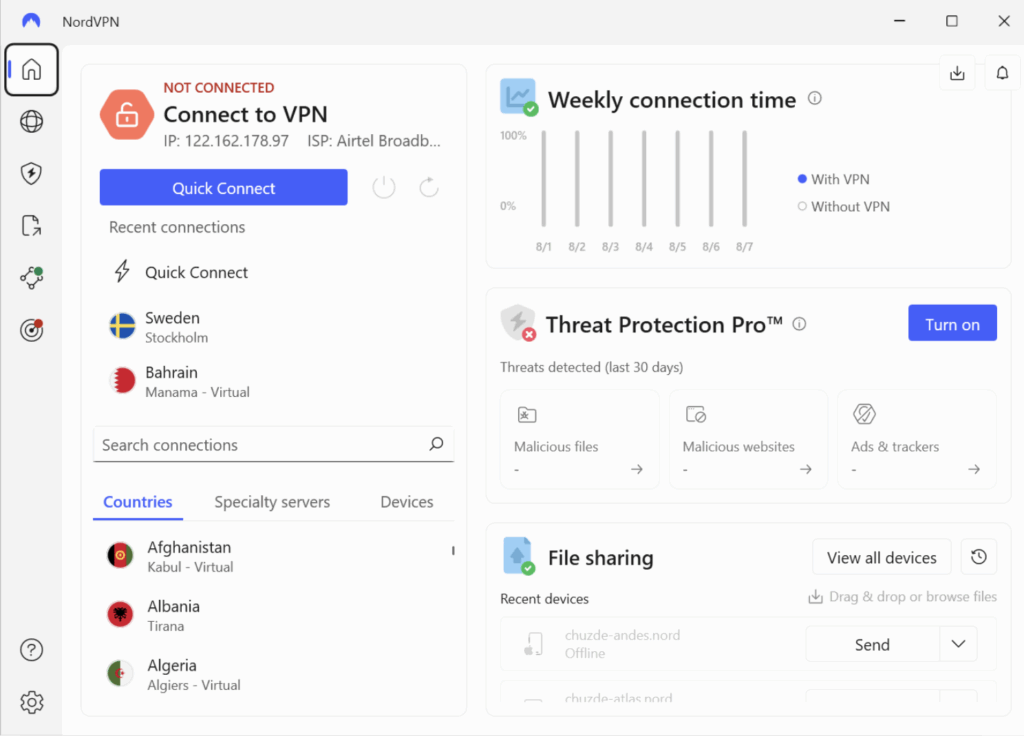
Our tech team has moved one step forward to help you understand the right way to set up a VPN for Warzone on your system. Let’s say you’re on Windows or macOS, the steps below will get you connected without issue. For this guide, we’ll use NordVPN, one of the most trusted and gamer-friendly VPNs.
Why We Chose NordVPN? It is because of its ultra-fast servers, gaming-optimized connections, and top-notch security. It also offers thousands of servers worldwide, making it easier to find smoother Warzone lobbies.
Follow the Steps given below:
- Go to the NordVPN official website.
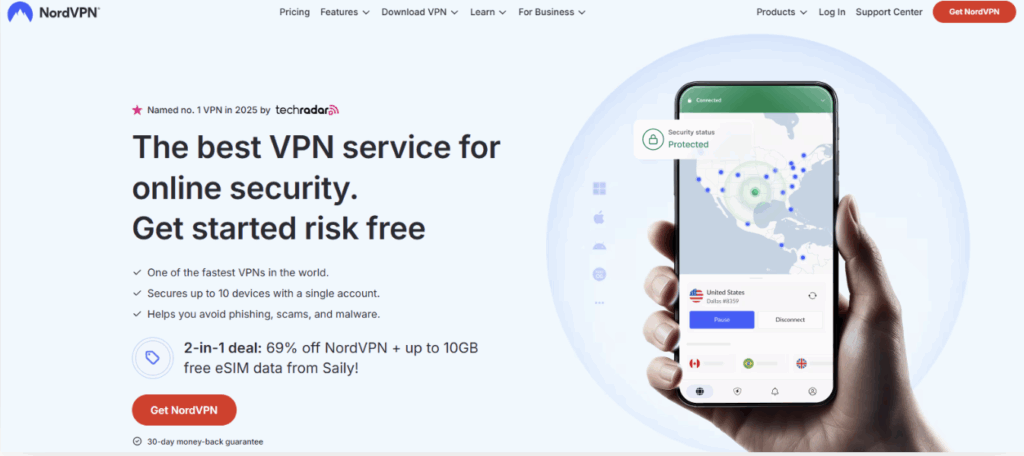
- Choose a plan that fits your budget
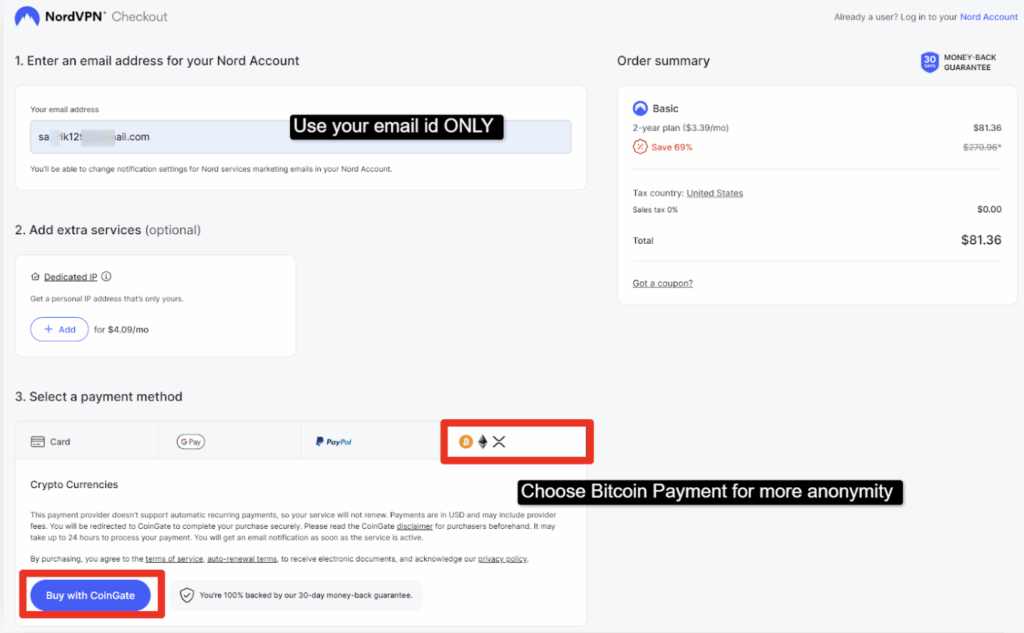
- Complete the signup process with your email >> Make the payment.
- Download the app for Windows / MacOS from the website >> Install it by following the on-screen instructions.
- After installing the NordVPN app >> Open the NordVPN app >> Log in using your credentials.
- This is how the dashboard looks like
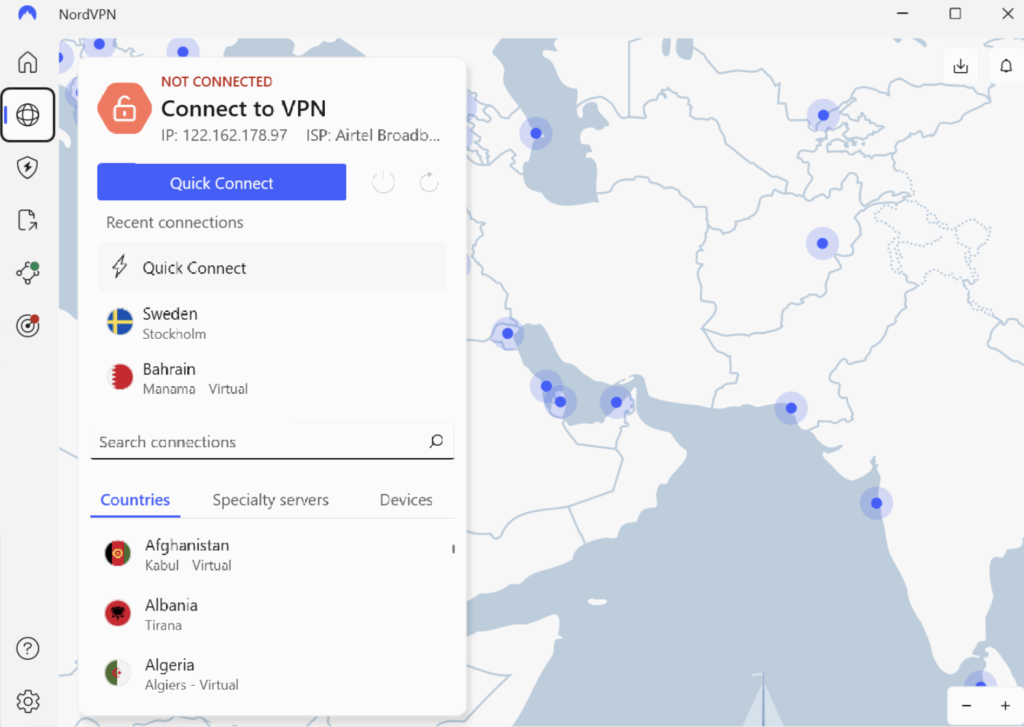
- Choose a Server Location (US/ UK/ Canada/ Australia)
- Select a region where Warzone lobbies are easier (often smaller regions or off-peak areas).
- Click “Quick Connect” if you’re unsure >> NordVPN automatically picks the best server.
- Launch Warzone
- Once connected >> Open Warzone.

- Enjoy smooth and secure gaming.
Free vs Paid VPNs for Warzone
A lot of people say that using a free VPN is just as safe and efficient as a paid one but that’s simply not right. A free VPN might be okay if you’re just connecting to free cafe Wi-Fi for casual gaming, but if you want to unlock Warzone fully and play without risks, a paid VPN is the way to go. Paid services not only secure your connection but also keep your activities away from prying eyes and trackers.
Here’s a quick difference table:
| Features | Free VPN | Paid VPN |
| Speed | Usually Slow | High Speed Servers |
| Security | Basic Encryption | Military-grade encryption (AES-256) |
| Server Access | Few Servers | 1000+ Servers located Globally |
| Device Connections | Only 1 connection per subscription is allowed | More than 5 connections per subscription are allowed |
Why do you need a VPN for Warzone?
Using a VPN for Warzone is one of the coolest ways to level up your gaming experience. It keeps your internet connection safe from hackers and DDoS attacks and also allows you to access restricted gaming content, cheat codes, and smoother lobbies within seconds.
On top of that, a VPN ensures your data is encrypted and private, so you can game freely without worrying about monitoring, tracking, or sudden disconnections.
- Access Easier Lobbies: By connecting to servers in less populated regions, you can enjoy less competitive matches, improving your chances of winning.
- Bypass Geo-Restrictions: A VPN lets you play Warzone even if it’s unavailable in your region. It unlocks global access so you never miss the action.
- Enhanced Security Against DDoS Attacks: Many gamers face targeted attacks to ruin matches. A VPN hides your IP, giving you extra protection against trolls and hackers.
- Stable Ping & Reduced Lag: With the right server, a VPN can reduce latency and keep your ping consistent, ensuring smooth and uninterrupted gameplay.
FAQ’s
Is it legal to use a VPN for Warzone?
Yes! It is completely legal to use a VPN for Warzone. VPNs are tools that protect your privacy and help you connect to different servers globally. As long as you use a VPN for security, privacy, or stable connection reasons and not for cheating or exploiting the game, you won’t face legal trouble.
Can you use a VPN on Warzone?
Absolutely yeah! You can use a VPN while playing Warzone. Many players use VPNs to lower their ping, avoid network throttling and sometimes get easier lobbies by connecting to less crowded servers. Setting up a VPN is simple, you just choose a server location, connect, and then launch Warzone. Keep in mind that the quality of your VPN matters; a poor service could increase lag instead of reducing it.
Can I get banned for using a VPN?
No, you generally won’t get banned just for using a VPN in Warzone. Activision doesn’t punish players simply for connecting through a VPN. The risk only comes when you use a VPN for suspicious activities, such as account sharing or manipulating game files. If you’re only using a VPN to improve your gameplay experience or reduce lag, you don’t need to worry.
How to get both lobbies in Warzone on PlayStation?
Getting bot lobbies in Warzone on PlayStation often involves using a VPN to connect to regions with less competition. Typically, regions with fewer active players during off‑peak hours are better for easier lobbies. You simply connect your VPN to a suitable server, restart your console, and launch Warzone. Keep in mind that this isn’t a guaranteed method, matchmaking still depends on several factors, including your skill level and recent performance.
What’s the best time and region for easier lobbies?
The best time for easier lobbies in Warzone is usually during off‑peak gaming hours in the server region you connect to. Late nights or early mornings in countries with smaller numbers of players often work best. Popular choices include regions like Egypt, South Africa, or certain Middle Eastern countries. Connecting to these regions through a VPN increases your chances of finding less competitive lobbies compared to peak hours in North America or Europe.
What’s the best time and region for easier lobbies?
The best time for easier lobbies in Warzone is usually during off‑peak gaming hours in the server region you connect to. Late nights or early mornings in countries with smaller numbers of players often work best. Popular choices include regions like Egypt, South Africa, or certain Middle Eastern countries. Connecting to these regions through a VPN increases your chances of finding less competitive lobbies compared to peak hours in North America or Europe.
What are the best VPN locations for Warzone?
Egypt, South Africa, Singapore, and sometimes Brazil during off‑peak hours are the best VPN locations for Warzone. The server performance depends upon your physical location and internet speed, so it’s worth testing a few regions to see where you get the best balance of low ping and easier lobbies.
How do streamers get both lobbies in Warzone?
Most streamers who get bot lobbies in Warzone use VPNs to connect to less competitive regions. They often schedule their games during off‑peak hours in those regions to increase their chances of getting easier lobbies. Some also use private lobbies or play with new accounts that have lower skill ratings.
Can I use a VPN on Xbox for Warzone?
Yes, you can use a VPN on Xbox for Warzone! The easiest way is to set up the VPN on your router, which covers your Xbox and all connected devices. Some VPN providers also support Smart DNS, which you can configure directly on your Xbox without changing the router settings. With the right setup, you’ll enjoy better privacy, reduced lag, and access to different Warzone servers.
Conclusion
See! This blog is absolutely not only about Call of Duty Warzone. If you ever find yourself out of your favorite game (not able to access) due to geo restrictions, the VPNs we’ve reviewed can help you get access and enjoy a smooth, uninterrupted gameplay experience.
The providers listed in this blog are 100% safe and reliable, and our technical team has rigorously tested their features, speed, and performance. When choosing a VPN, you may go by price, but we strongly recommend focusing on performance and security first.
If you want us to suggest you the best Warzone VPN, then we’d recommend NordVPN. Not only is it affordable, but it also comes with a 7-day free trial for Windows and MacOS, plus powerful features like obfuscated servers, RAM-only servers, a kill switch, and cutting-edge VPN protocols. With a massive global server network, NordVPN ensures both speed and security, making it the perfect choice for serious gamers.
So, choose your VPN wisely, unlock Warzone no matter where you are, and dive back into the action without limits.
Looking for other VPN Server? Here you go-