Automation, meaning doing a lot of tasks like sending whatsapp messages, marking important calendar dates, setting meetings automatically, is how modern users work. If we talk about social media managers for instance, they just want to send messages in a few clicks and zero repetition.
Manually managing big and repetitive tasks is something that’s a big problem and this is where an AI-driven automation tool like ClawdBot (now, OpenClaw) is truly useful.
It takes automation to a next level by turning command into real action. You can even fill forms automatically with its help. It understands instructions and what you want it to do and then it acts accordingly.
Now, since ClawdBot is a self-hosted AI assistant that runs on a local computer, your data never leaves your system. Messages and all the files stay completely under your control.
But, powerful automation needs powerful infrastructure. ClawdBot requires a compatible OS, at least 2 vCPUs, 4 to 8 GB RAM and enough storage to process tasks smoothly. If you want zero lag while executing heavy workflows, hosting it on a VPS server is the best choice.
In this post, we’ll tell you how to deploy ClawdBot on VPS server step by step, and help you choose the right VPS server so your files and sensitive data remain just as secure as if they were on your own system.
What Is ClawdBot?
ClawDBot (now known as OpenClaw) is an open-source, self-hosted AI assistant that works on your own local system hardware and connects to your everyday messaging apps like WhatsApp, Telegram, Discord, Slack, and even more.
Instead of just being just a chatbot, it executes tasks automatically, organizing email, managing calendars, automating workflows, filling out forms, controlling files on your machine and integrating with over 100 apps, all while keeping your data private.
Imagine Jack! Before, he used to spend his mornings manually sorting hundreds of emails and scheduling meetings. These repetitive tasks ate his productivity.

After he installed ClawdBot (OpenClaw) on his home computer and connected it to whatsapp and other messaging and emailing apps, he simply told the AI assistant “Organize my inbox” or “schedule meetings around my calendar” or “summarize today’s priorities”, OpenClaw automatically performed those actions across platforms.
What used to take hours for Jack, now took seconds once he used ClawDBot.
But why deploy ClawdBot on a VPS! Is it important? Is it compulsory? Let’s see!
See! ClawdBot can run on a local system, but local machines are limited by fixed RAM, storage, CPU cores and uptime. As automation tasks grow, like browser automation, background workflows and all, your system starts lagging. That’s why you need a VPS server to deploy ClawdBot.
Why Deploy ClawdBot on a VPS Server?
A VPS removes those limitations and gives ClawdBot the environment it needs to perform properly. Here’s why a VPS is the better choice:
- Full Control & Security: You get root access and complete control over the environment, reducing security risks while keeping your data private and isolated.
- Scalable in One Click: As your automation needs grow, you can instantly upgrade RAM, CPU, or storage, something impossible on a local system.
- More Resources, Better Performance: A VPS provides dedicated CPU cores, higher RAM and faster SSD NVMe storage, allowing ClawdBot to execute automation tasks smoothly.
- 99.99% Uptime, Zero Downtime: A VPS stays online 24/7, ensuring ClawdBot keeps running automations, monitoring servers and responding to messages at all times.
System Requirements for ClawdBot VPS Deployment
As discussed earlier, local systems aren’t good for hosting ClawdBot long-term because automation workloads scale, but local hardware doesn’t.
On the other hand, VPS resources can scale instantly (in just a few clicks), making them far more suitable for continuous AI automation. Before moving further, here are the system requirements you should know to deploy ClawdBot properly.
- CPU: At least 2 vCPUs (4 vCPUs recommended for heavy automation only)
- RAM: Minimum 4 GB & Recommended 8 GB for browser automation and multiple skills
- Storage: Within 20 to 50 GB SSD or NVMe storage
- Operating System: Ubuntu 22.04 or 24.04 LTS
- Docker Support: Required for smooth installation and containerized execution
- Stable Internet & Static IP: Needed for messaging integrations and webhooks
Choosing the Right VPS for ClawdBot
Once you know the system requirements, the next step is choosing a VPS provider that matches them. But hardware alone isn’t enough! You also need features that support automation, scalability, security and reliability. Below are the top 5 must-have VPS features for running ClawdBot efficiently.
- Easy Scalability: As your workflows grow, you should be able to upgrade RAM, CPU, or storage instantly. One-click scaling ensures ClawdBot keeps performing even as automation complexity increases.
- Reliable Backups & Snapshots: Automated backups protect your ClawdBot configuration and workflows. In case of failure or misconfiguration, you can restore everything instantly.
- 99.99% Uptime & 24/7 Support: Continuous automation requires uninterrupted uptime. A reliable VPS with expert support ensures ClawdBot stays online and issues are resolved quickly.
- Strong Security & Full Root Access: Full root access lets you control permissions, install dependencies and secure your environment. This is important for a self-hosted AI assistant handling sensitive data.
- High Performance CPU & NVMe Storage: Automation tasks depend heavily on incredible hardware and the processing power. NVMe storage and modern CPUs ensure ClawdBot executes commands, scripts and browser automations.
How to Install Clawdbot on YouStable VPS Server?
Now that we’ve covered what ClawdBot is, who it’s for and why deploying it on a VPS is the smartest move, it’s time to actually set it up.
For this deployment, We’ve chosen YouStable VPS Server! Why?
It offers scalable CPU and RAM, full root access for complete control, Docker support, a ClawdBot-ready environment, and all of this at a fair price with a 30-day money-back guarantee. In short, it checks every box needed for smooth AI automation.
So, let’s not waste time and jump straight into the step-by-step of buying a VPS from YouStable & then deploying ClawdBot on the VPS as well.
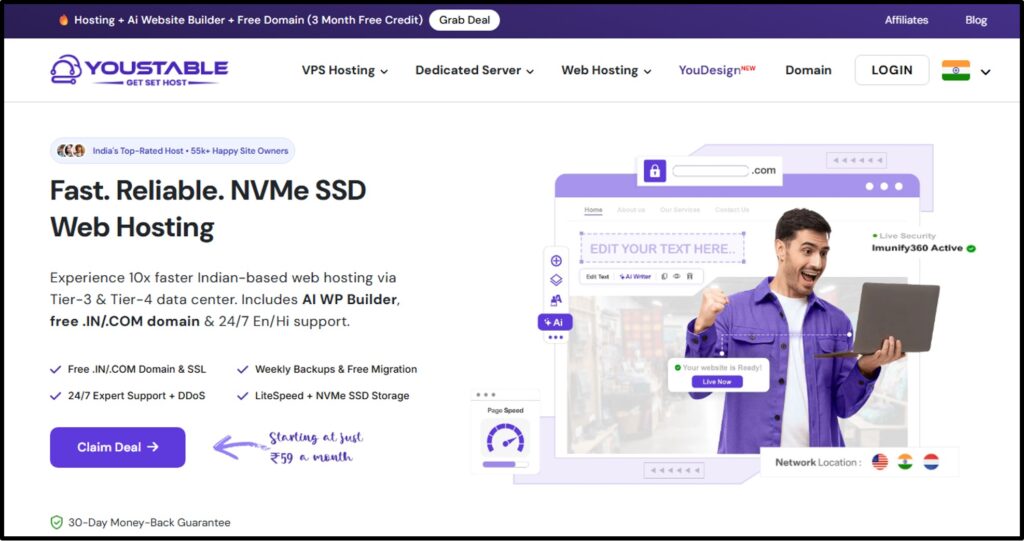
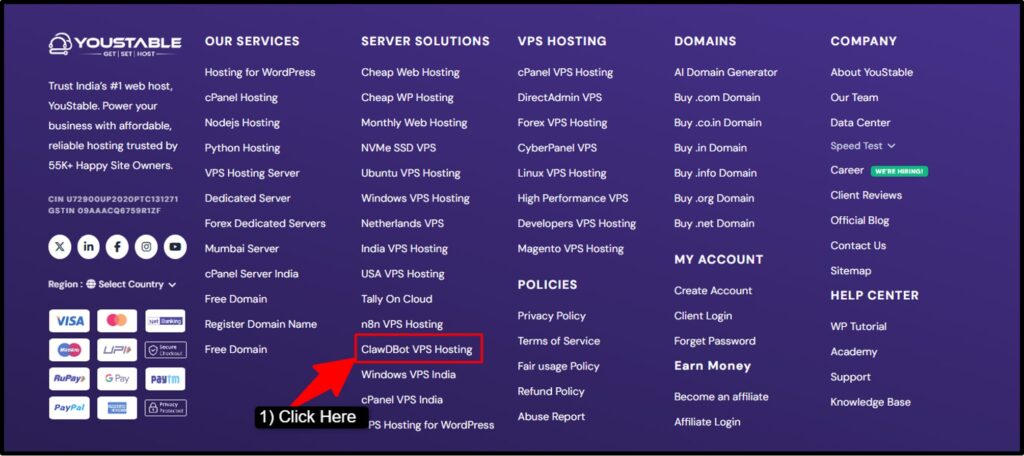
Step 1) Go to the official website of YouStable >> Scroll down to the footer section of the HomePage >> There, you’re gonna find YouStable ClawDBot VPS Hosting >> Click it to proceed.
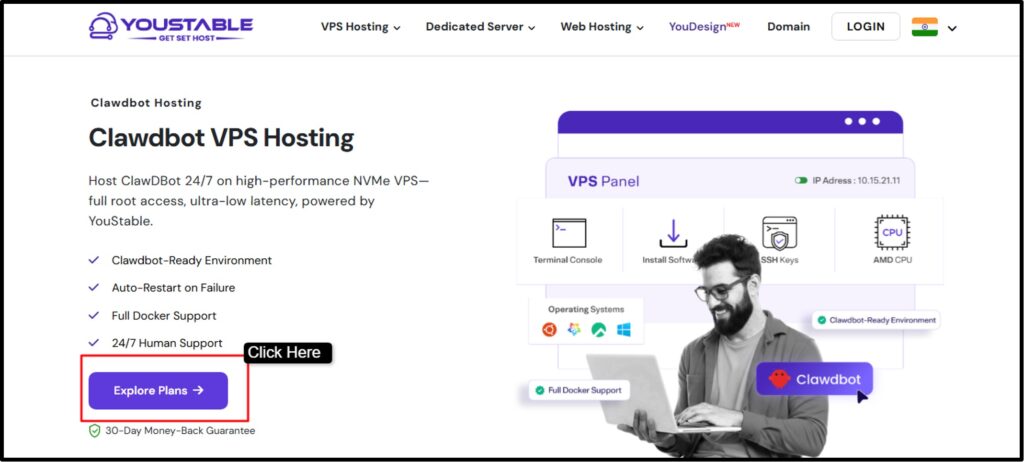
Step 2) As you click the ClawDBot VPS Hosting tab >> You’re re-directed to ClawDBot Hosting page >> Click Explore Plans
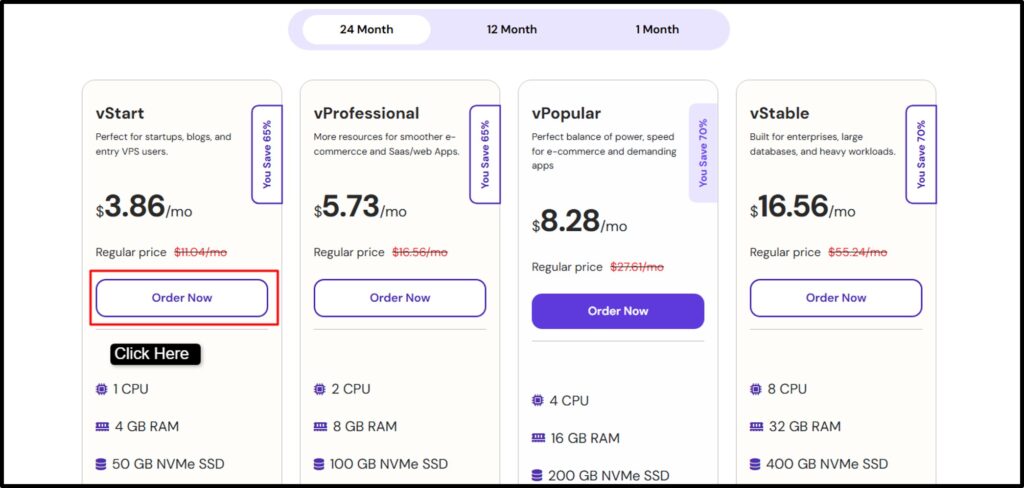
Step 3) Now, Out of all the plans, Choose the VPS plan that offers 1vCore CPU, 4GB RAM, 50GB NVMe SSD storage, 1 IPv4 address and 100% server control (The first Plan just @ $3.86 per month) >> Click Order Now.
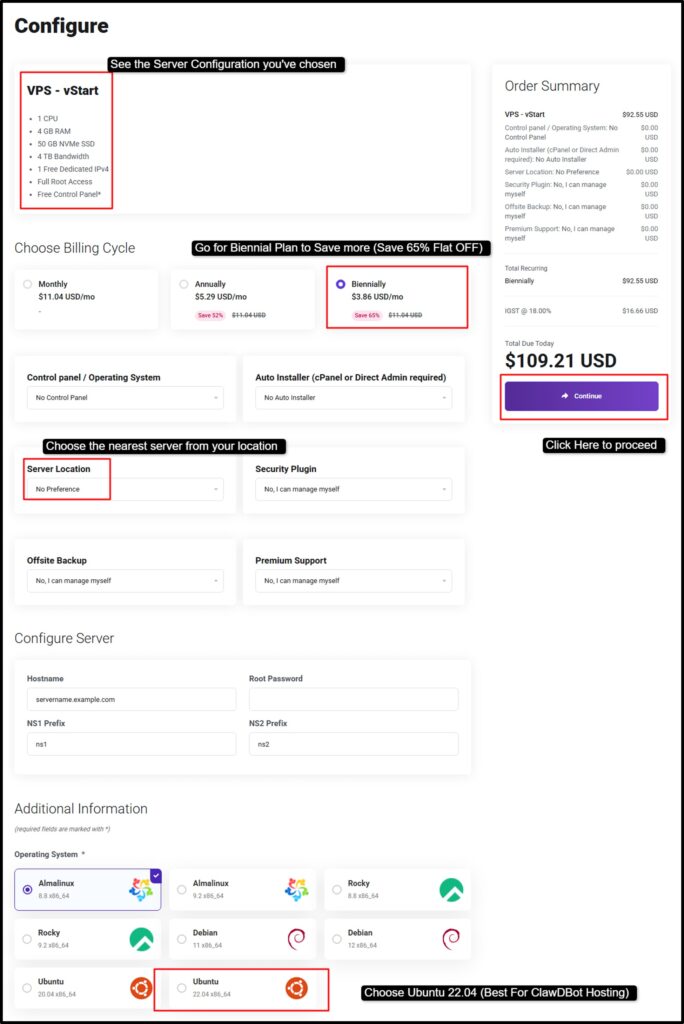
Step 4) Next step is to Check your server configuration >> Go for the Biennial Plan to Save more >> Choose the nearest VPS server location >> Select the Ubuntu 22.04 Version for ClawDBot VPS Hosting >> Finally, click Continue to proceed.
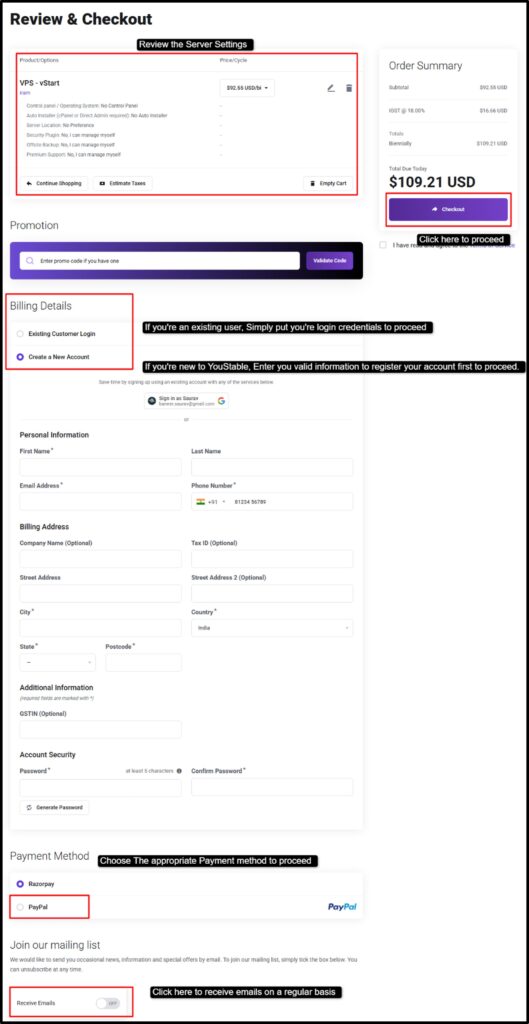
Step 5) As you click the continue button, you’re redirected to the Review & CheckOut Page >> Review your server setting >> Now, if you’re an existing user, simply put your login credentials to sign in to your client area >> And if you’re a new user, enter your valid information to register your account with YouStable >> Now click the Checkout option to proceed.
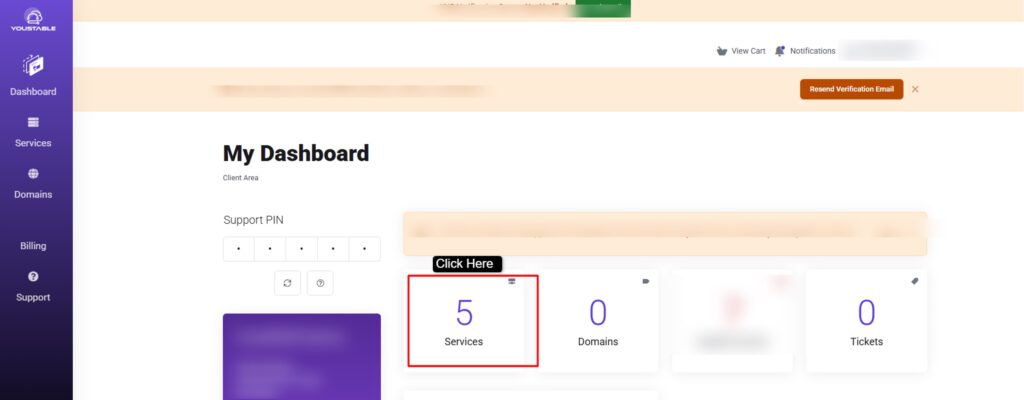
Step 6) Once your payment is done, YouStable will email you your VPS IP address, username, and root password >> Use the Login Credentials to sign in to your client area >> Go to Service Tab
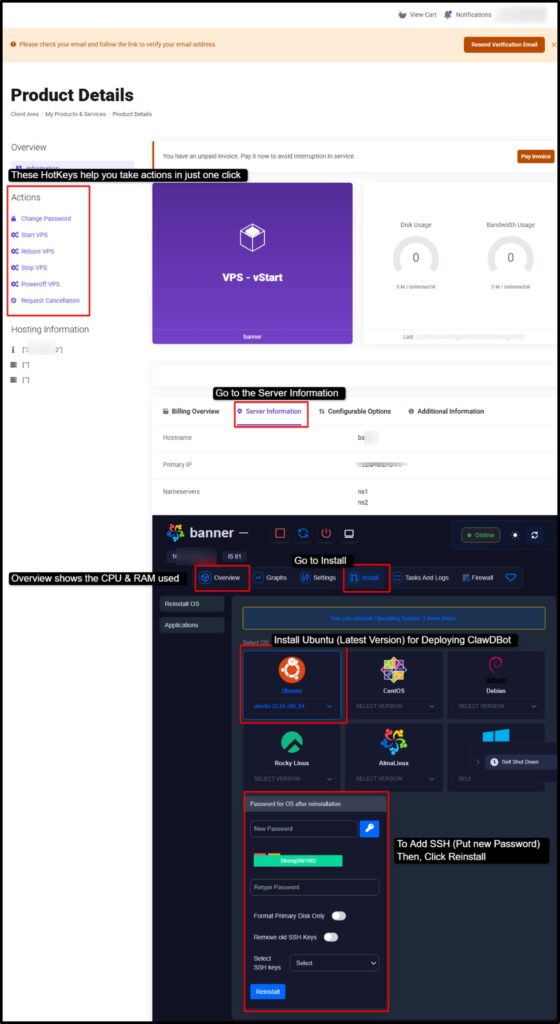
Step 7) Now, Click the VPS service you’ve purchased >> You’ll be redirected to the Server Page >> Scroll down and Click the Server Information Tab >> Then, Click Install tab, Choose Ubuntu 22.04 Version >> Put your password and Click Reinstall.
(ClawdBot runs well in Linux OS, Ubuntu Latest Version)
Step 7) Now, Connect to Your VPS via SSH >> Enter this Command {ssh root@your_vps_ip} >> Then, enter the root password.
Step 8) Finally, with just one simple command you can directly install OpenClaw (ClawDBot) on your VPS server >> Enter this Command {curl -fsSL https://openclaw.ai/install.sh | bash}
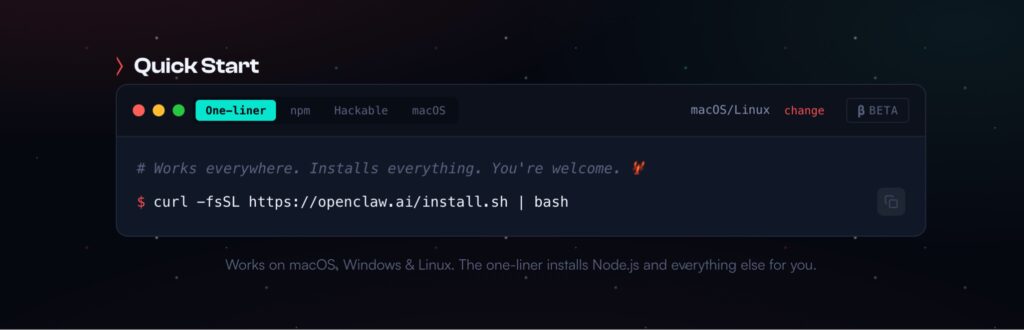
Your ClawdBot is now live on a secure YouStable VPS, running 24/7 without downtime. Now, if you want, you can add Whatsapp integration and automatically send messages, clear chatbox and even manage your calendars.
FAQs
Can I run ClawdBot on a free VPS?
Yes, but it isn’t recommended. Most free VPS plans offer limited CPU, RAM, and storage, which can cause ClawdBot to lag during automation tasks. For smooth operations with browser automation and multiple integrations, a paid VPS with dedicated resources is the better choice.
Which OS is best for running ClawdBot?
Ubuntu Linux 22.04 or 24.04 LTS is the best OS for running ClawdBot. It offers long-term support, excellent Docker compatibility, strong security updates, and wide community support, making it perfect for stable and secure ClawdBot deployments on a VPS.
How much RAM is needed to run ClawdBot?
ClawdBot requires a minimum of 2GB RAM, but 4 to 8GB is recommended for best performance. Higher RAM is important if you use browser automation, multiple plugins, persistent memory, or run several background tasks simultaneously.
Is a VPS better than shared hosting for ClawdBot?
Yes, a VPS is significantly better. Shared hosting can’t run ClawdBot because resources are shared among users, limiting its operations. A VPS provides dedicated CPU, RAM, root access, and full control over the environment, which ClawdBot needs to execute commands and automate workflows.
What is the cheapest VPS for deploying ClawdBot?
YouStable offers ClawdBot-optimized VPS hosting starting at just $3.86 per month with 1 vCore CPU, 4GB RAM, 50GB NVMe SSD storage, full root access, Docker support, and a 30-day money-back guarantee. It’s the most affordable option that meets all ClawdBot system requirements.
Conclusion
ClawdBot (now, OpenClaw) is an incredible solution that helps you run your machine, clears your inbox, sends messages, manages your calendar, checks you in for flight and the list goes on and on.
However, since ClawdBot runs on your local system, heavy workflows and continuous automations can quickly crash your system. That’s where a VPS server becomes important. A VPS provides the dedicated CPU, RAM, stable networking and 24/7 availability that OpenClaw needs to operate at full potential.
Here, we’ve clearly explained to you how to deploy ClawdBot on a VPS server step by step and for this setup, we’ve chosen YouStable as the best VPS provider.
With high-performance NVMe VPS, a ClawdBot-ready environment, full Docker support, 99.99% uptime for uninterrupted automation, full root access for complete control, and 24/7 expert support to help with any issue, YouStable makes running ClawdBot smooth, secure, and future-proof.
If you’re serious about automation, this setup is the best for you.
Deploy ClawdBot on VPS Today