



Expert Review
In this review, our research team has done an honest and an in-depth analysis of Blesta for hosting providers. Before we move ahead with the Blesta review, let’s first see a quick brief of what Blesta is.
Blesta is a self-hosted web hosting billing platform that handles client management, automated billing, service provisioning and support tickets, all under one roof. It’s 99% open-source, priced far below its main competitor WHMCS and trusted by thousands of hosting providers throughout the globe.
See! If you’re having a web hosting business and managing multiple clients, you already know that billing, automation and client management can take a lot of effort. That’s exactly where a platform like Blesta is helpful.
Here, we’re going to completely review Blesta! Our research team has spent about 3 successive months crawling every corner of the Blesta website, dug deep into its features, tested the demo, talked to the support team via live chat and ticket and compiled everything you need to make a decision.
We’re also gonna check out the dashboard and see how easy it’s to handle your clients day-to-day. Plus, every integration, growing marketplace and the reseller program for hosting providers who want to offer Blesta to their own clients, we’re gonna discuss everything.
So, let’s not waste time and let’s get started right away!
What is Blesta?
First, let’s understand, what is Blesta? Blesta is a self-hosted customer management, billing and support platform designed specifically for web hosting providers.
Founded by Phillips Data, Inc, Blesta was established in 2007. The platform was completely rewritten from scratch and relaunched again in 2013 (as Version 3) and it has been continuously improved ever since. As of now, in 2026, the current Blesta is of version 5.13.6, featuring a completely redesigned admin interface.
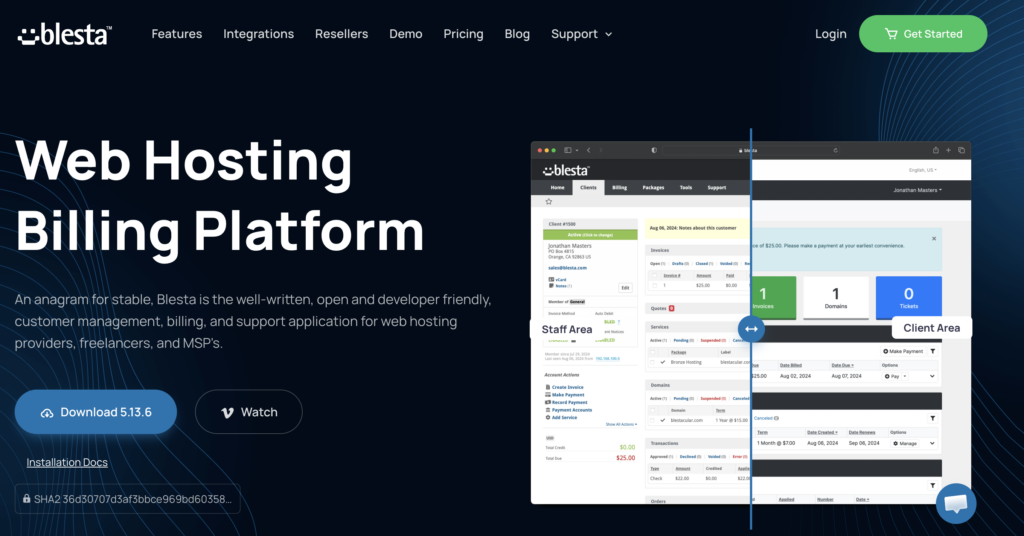
As per our research, it isn’t like any SaaS billing tool that charges a percentage of your revenue or locks you into cloud-only hosting, instead, Blesta is installed on your own server. You own your data. You control your environment. And because 99% of the code is open-source, your developers can read, audit, and even extend the code.
So, a common question that comes to mind is Who Exactly Is Blesta Built For? See! Blesta is a great tool for the web hosting providers selling Shared Hosting, VPS Hosting, or Dedicated Servers.
It’s even good for the domain resellers who want a one platform solution for selling and managing domains. Even freelancers can also buy Blesta tool subscription to manage professional recurring billing.
Blesta: Quick Overview
Just for a quick Blesta overview, we’ve added a proper table that contains everything about Blesta from scratch like who founded it, when it was founded, license type, starting price, does it offer free trial or not, the payment gateways it offers, API integrations, migration and more.
| Product Name | Blesta |
| Developer | Philips Data, Inc |
| Founded | 2007 |
| License Type | 99% OpenSource Code |
| Starting Price | $17.95 per month & ($350 One Time Payment) |
| Free Trial | 30 Days Free Trial (Easy Sign Up & No Credit Card) |
| Client Limit | Unlimited on all plans |
| Supported Language | 20+ Languages |
| Payment Gateways | 30+ Payment options |
| Control Panels | 12+ Supported |
| Domain Registrar | 11+ Included |
| Plugins Included | 25+ Plugins (From the Marketplace) |
| API | RESTful (JSON/XML/PHP) |
| Security Record | No reported compromises (100% Secure) |
| Migration | Yes! Migration from WHMCS or any platform is available |
A small note by our research team: For the vast majority of web hosting providers, especially those looking at affordable and long-term value, Blesta is the best choice. The lifetime license option alone can save you thousands of dollars compared to WHMCS over just a few years.
Later in this Blesta review, we’ll also see how Blesta is different from WHMCS and how to make the right choice among the two, all we’re gonna discuss later in the review section.
Is Blesta Right for You?
You now know so much about Blesta, do you think it’s the right tool for you? To find the answer to that question, first you need to understand what Blesta does and what problem you need to solve.
See! If you’re having a web hosting company and you’re having a big client base, let’s just say about 100 clients. It’s difficult to handle the billing, send reminders and update invoices, manage thousands of tickets and work like that and that too doing all that manually. So, that’s why Blesta helps users solve this problem.
Now, is Blesta the right tool for you? Yes! It’s the right choice if you want to own your billing software.
- It’s especially a great fit if you’re a developer and enjoy the flexibility that comes with open-source-style systems.
- Let’s say you’re running a small hosting setup or managing thousands of clients, Blesta scales well.
- It’s also a strong option if you’re currently using WHMCS but feel like costs are getting out of hand as your client base grows.
- On top of that, features like multi-company support (without needing extra add-ons) and transparent, auditable code make it appealing if security and control is important to you.
Blesta isn’t the perfect fit for everyone. For example, if you rely a lot on ready-made plugins and extensions, then WHMCS might still be a better choice since it has a much larger collection available.
It can also be a bit challenging if you’re not technical and don’t have someone who can help with server setup or management. And if your business depends on certain tools or integrations that are only available in WHMCS, switching over to Blesta could be difficult.
Also, if you’re looking for a simple, fully hosted solution where everything is managed for you and you don’t have to handle anything on your own, then Blesta might not be the best option for you.
Further in this article, we’ve properly compared Blesta and WHMCS so that you get a proper idea when to choose Blesta hosting and when to go for WHMCS hosting.
Blesta Features: What You Actually Get
After a careful go through of the Blesta website and after undergoing all the personal testing, we’ve put together information about what features Blesta offers, how the interface looks like, how the automation works, how invoicing is done, what is the status of security, all about domain management and more.
We’ve tried attaching screenshots wherever required so that you can get a proper overview about Blesta and we’ve even labelled the important parts of it. Please do refer to the images to understand the UX when you use the tool in future when you buy it.
Blesta isn’t a lightweight billing tool. It’s a comprehensive platform with a genuinely deep feature set. Let’s walk you through what you get out of the box.
The Dashboard & Client Management
The screenshot given below is of the staff area dashboard in Blesta. It’s organized around the concept of a client profile page.
Think of it as a command center for each customer, everything you need is accessible from one screen: services, invoices, payment history, support tickets, notes and contact information.
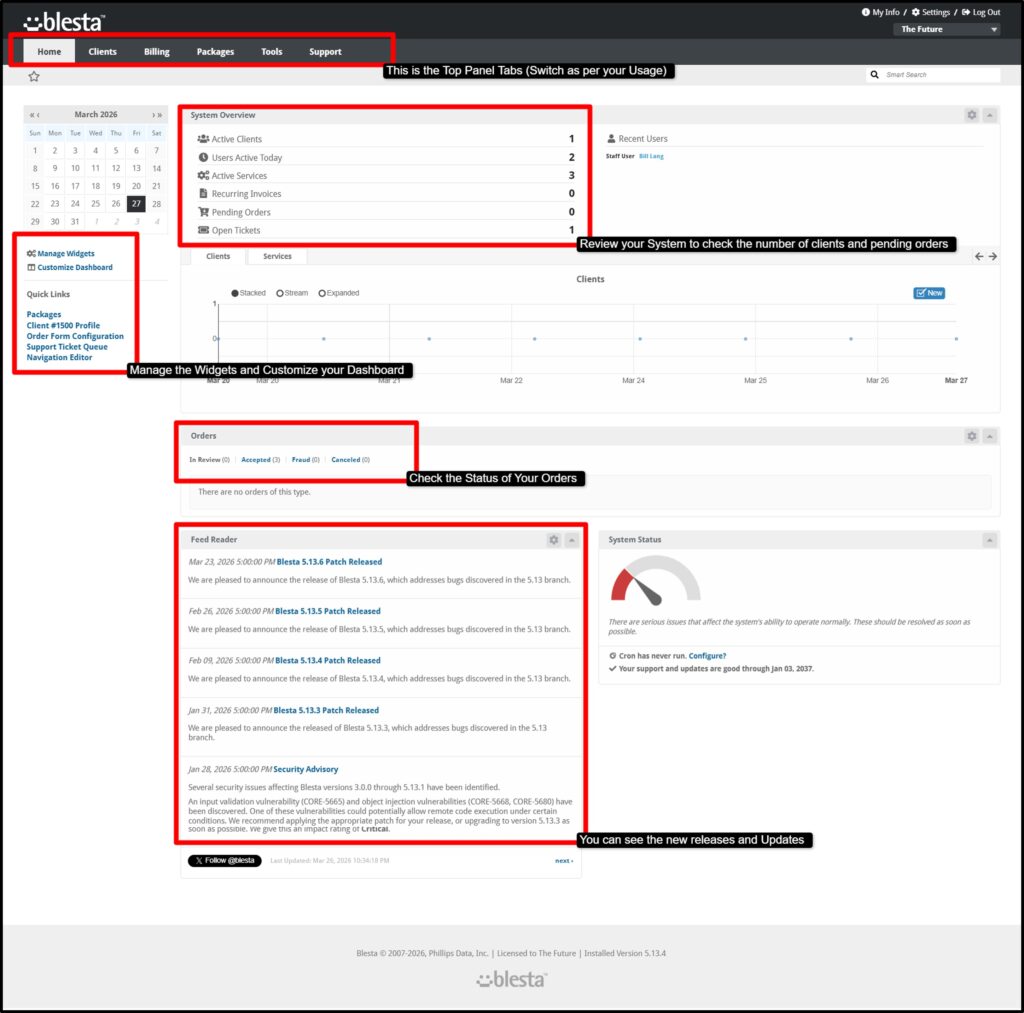
Staff can use the ‘Login as Client’ feature to fix issues from the client’s perspective without needing their password. Multiple contacts can be added per account, each with their own set of permissions.
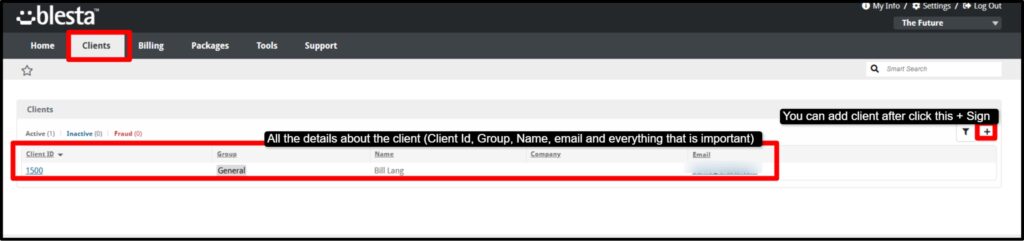
You can also organize clients into groups with custom settings applied to each group, a handy feature when you offer different service tiers.
Automated Billing & Invoicing
This is one area where Blesta is amazing.
Once you set it up, the entire billing system can run almost completely on autopilot. It automatically generates invoices before a service is due for renewal, based on the timing you configure. Payments can also be collected automatically using saved payment methods, so clients are charged without needing to manually pay each time.
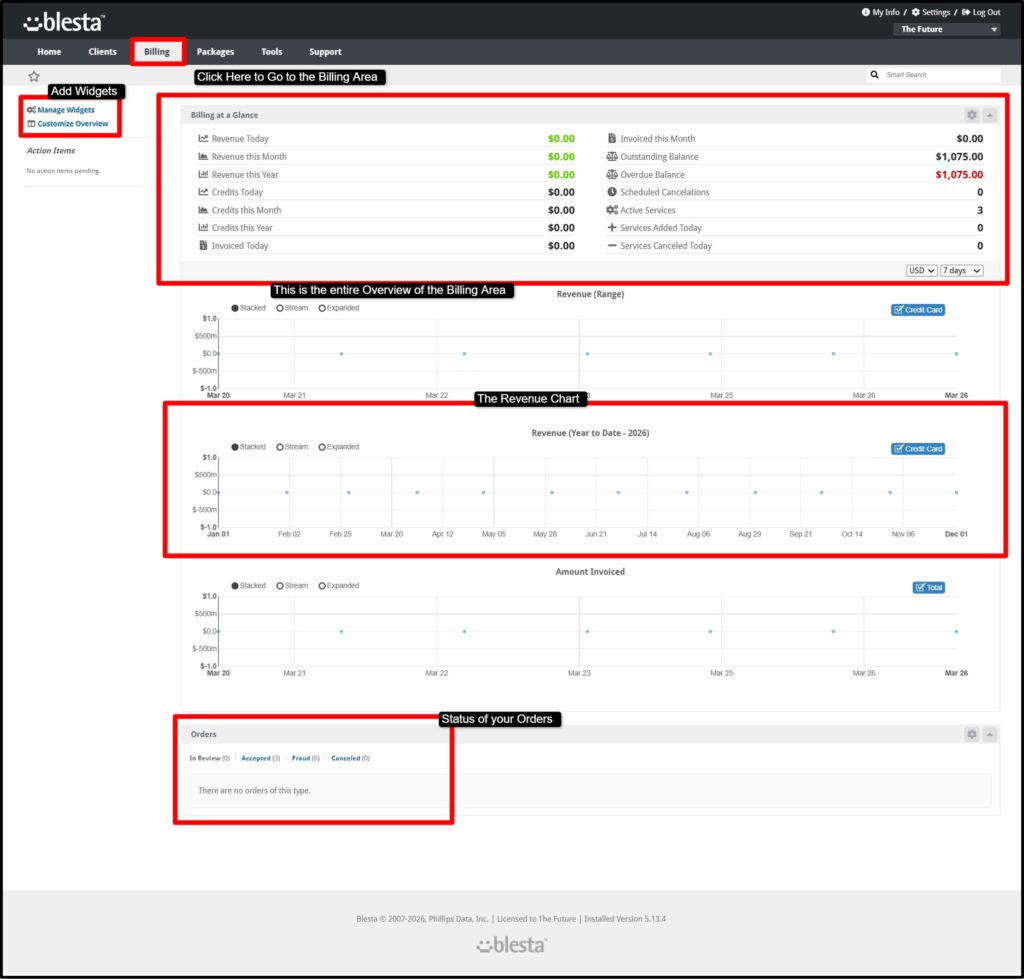
This saves time and also ensures more consistent cash flow for your business. See The screenshot given below. It gives you a complete shot of the client area.
Blesta also helps you handle overdue payments (the unpaid payment but the service is still going on) without constant follow-ups.
- You can set it to automatically apply late fees when invoices aren’t paid on time, and even suspend services if payments remain unpaid beyond a certain period.
- The moment a client clears their dues, the system can instantly restore their service. This kind of automation removes a lot of manual work and keeps everything running smoothly.
- Another useful feature is pro rata billing, which ensures fair charges when clients sign up in the middle of a billing cycle or upgrade their services. Instead of charging a full cycle, Blesta calculates the exact amount based on usage.
- On top of that, Blesta supports multi-currency billing with automatic exchange rate updates, making it perfect for businesses with international clients.
- It also handles different tax requirements, including inclusive and exclusive tax models, EU VAT validation (VIES), UK HMRC VAT validation, and up to two levels of tax rules.
These all features make billing more accurate and transparent for your customers.
Order Management & Service Provisioning
Blesta makes order handling simple and fully automated.
When a customer places an order through the built-in order form, the system can instantly set up their service without any manual work from your side. (The Client section screenshot is already shared above)
This is possible because Blesta supports a wide range of provisioning WHMCS modules that connect directly with popular hosting platforms.
Let’s say it’s shared hosting (like cPanel, Plesk, or DirectAdmin), VPS and cloud services (such as DigitalOcean, Proxmox, or SolusVM), or even game servers and streaming services, everything can be deployed automatically as soon as the order is confirmed.
It also supports domain registration, SSL certificates and security tools through multiple integrations, so you can sell and deliver complete hosting solutions from one system.
Along with that, Blesta includes built-in fraud detection using services like MaxMind and FraudLabs Pro. This helps identify suspicious or fake orders before they go through, protecting your business from potential losses.
Support Tools: Ticket System & Knowledge Base
Blesta comes with a fully integrated support system, so you don’t need to depend on third-party tools. The ticket system allows customers to create support requests directly from their client area, while staff can manage and respond to them from the admin panel.
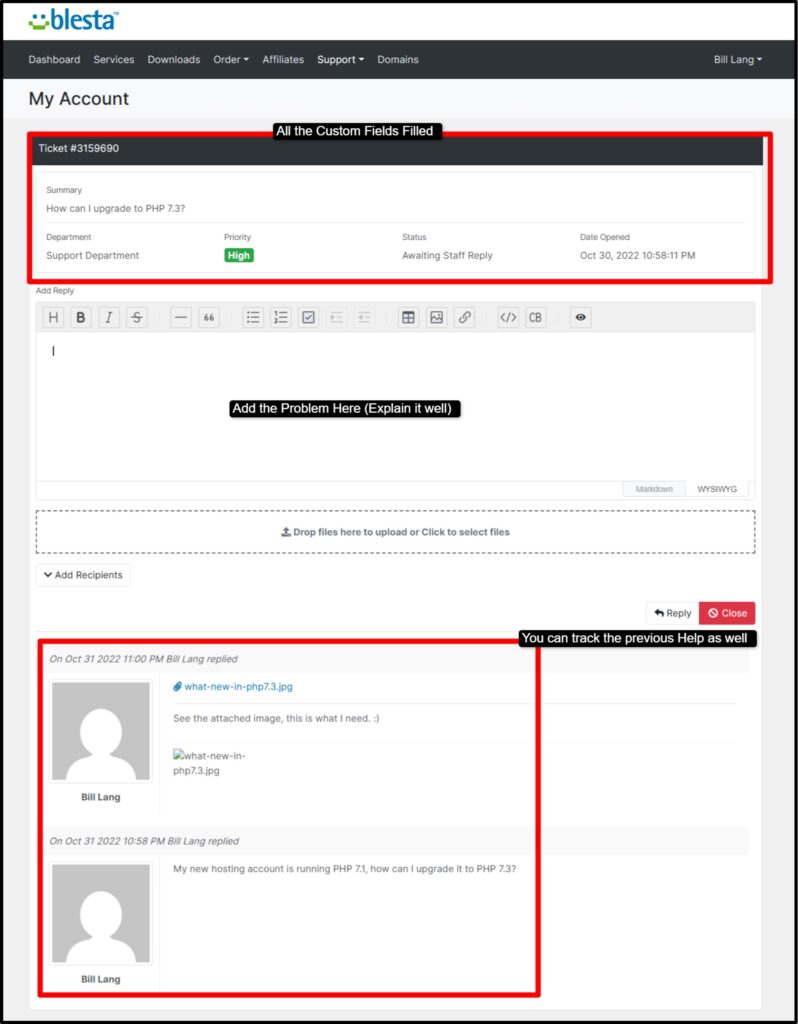
- Tickets can also be created via email, and the system offers advanced features to fill custom fields for different departments, priority levels, ticket statuses and automatic reminders or closing rules.
- Staff members receive notifications for updates, and clients can even include multiple recipients in a single conversation, making communication more flexible.
Alongside the ticket system, Blesta includes a built-in knowledge base where you can create helpful articles and guides. Customers can search for answers on their own before opening a ticket, which reduces the number of repetitive queries your support team has to handle.
In a nutshell, the ticket system of Blesta, supports:
- Ticket creation from the client area, staff area, or by email
- custom avatar support for staff
- Custom fields per ticket department
- Auto-close rules and ticket reminders
- Staff notifications
- Priority levels and ticket statuses
- Clients can add multiple recipients to a ticket thread
We’ve also checked out the Knowledge Base feature of Blesta.
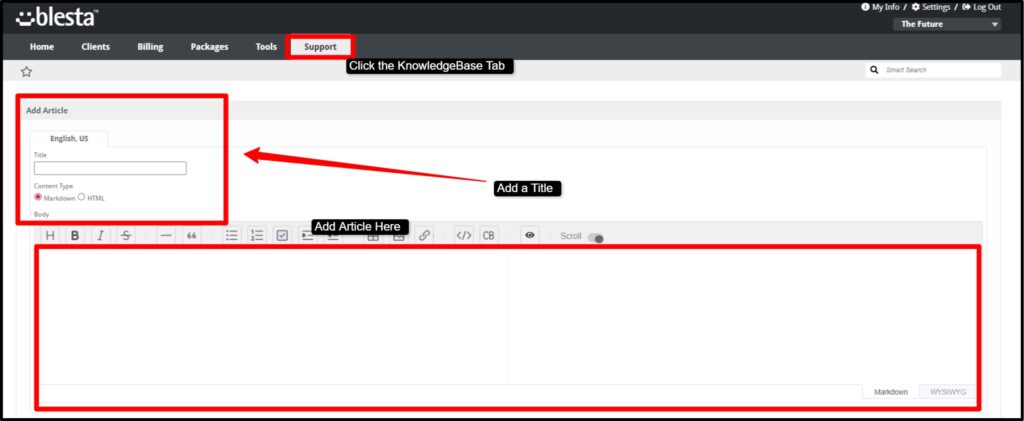
It lets you create articles that clients can search before opening a ticket, reducing support volume for common questions.
Domain Manager
Blesta includes a built-in Domain Manager that makes it easy to sell and manage domain names without needing extra tools.
Your customers can register new domains, transfer domains from other providers and renew them directly from their client area, which reduces the need for manual support.
On the admin side, you and your team can handle tasks more efficiently by making bulk updates, such as changing nameservers for multiple domains at once.

You can also search domains using keywords, keep everything synced with expiration dates, and set up automatic renewal reminders so clients don’t forget to renew.
In a nutshell, you can say that it simplifies domain management and saves a lot of time.
Security: The Best Track Record in the Industry
Blesta’s team makes a bold claim! The best security track record of any billing platform in the industry.
And based on publicly available information, this thing holds up (We’ve checked with the recent clients too). There have been no reported data breaches or compromises of Blesta installations.
The security feature set of Blesta includes:
- Two-factor authentication (TOTP)
- AES-256 and RSA encryption for sensitive data
- Password hashing with HMAC SHA-256
- IP blacklisting and email blacklisting
- Brute force protection
- Multiple CAPTCHA options (reCAPTCHA, hCaptcha, Cloudflare Turnstile)
- Step-up authentication for enhanced admin security
- Account access logging
- Reduced PCI scope via gateway integrations like Stripe
All security issues (if there are any) are shared publicly through security advisories and patches are always released before any known exploitation. These press releases can also be tracked from the staff’s portal as well.
Multi-Company Support
Blesta has built-in multi-company support, which means you can manage multiple hosting businesses from a single installation.
This is especially useful if you run different brands or services.
Each company can have its own unique branding, domain, settings and configurations, so they operate independently while still being controlled from one central system. This avoids the need to install and maintain separate billing systems for each business.
The additional cost for extra companies is reasonable, making it an easy solution for anyone managing multiple brands.
RESTful API & Developer Tools
Blesta is designed with developers in mind, offering a high level of flexibility and control.
Most of its codebase is open, allowing developers to review, customize, and extend the system as needed. It includes a full RESTful API that supports JSON, XML, and PHP. It makes it easy to integrate with other systems or build custom applications.
Webhooks allow real-time communication between systems, while the plugin and module system lets you add new features or integrations.
There’s also a theme system for customizing the look of both the client and admin areas, along with event hooks that allow you to automate actions based on specific triggers.
This makes Blesta a powerful choice for businesses that want deep customization.
Reporting & Analytics
Blesta provides built-in reporting tools to help you track and understand your business performance. You can access reports related to revenue, unpaid invoices, and other financial data.
The screenshot is already shared in this review above, where we’ve shown how the dashboard tracks revenue records and also performs reporting and analytics enabling data-driven decisions.
For example, reports show you how long invoices have been unpaid, which helps you manage cash flow more effectively. Reports can be exported in multiple formats such as CSV, PDF, or JSON, making them easy to share or analyze further.
You can also schedule certain reports to be generated and sent automatically, which is useful for teams that need regular updates without manually checking the system.
Migration & Import Manager
Moving from another billing platform can be stressful, but Blesta simplifies the process with its built-in Import Manager. It allows you to migrate important data from systems like WHMCS without needing third-party tools.
This includes clients, contacts, services, packages, invoices, transactions, and even support tickets. It also maintains relationships between users and accounts, ensuring your data stays organized after migration.
This feature makes switching to Blesta much smoother and reduces the risk of losing important information.
Customization & Themes
Blesta gives you full control over how your billing system looks and feels. You can customize the client and admin areas by changing colors, adding your logo, and adjusting layouts to match your brand identity.
Elements like navigation menus, dashboard widgets, and client panels can be rearranged or disabled based on your needs. For more advanced customization, you can use custom CSS or choose from third-party themes available in the marketplace.
This allows you to create a unique and professional-looking billing portal that feels like your own product rather than a standard system.
Localization & Multi-Language Support
Blesta, one of the best WHMCS alternatives, is designed to support businesses with a global customer base. It comes with over 20 languages already included, so you don’t need to install additional language packs. It also supports right-to-left languages, making it suitable for regions that require that format.
You can configure different time zones and localized date and time formats to match your users’ locations. Blesta supports multi-currency billing with automatic currency conversion, allowing customers to pay in their preferred currency.
This makes it much easier to serve international clients without extra setup or cost.
Blesta Pricing 2026: Real Cost Analysis
Let’s talk money as pricing is where Blesta genuinely performs amazingly.
Blesta offers three licensing models: Monthly, Owned (one-time), and Owned Lifetime. Every single plan includes unlimited clients and unlimited staff members.
| List of all the Plans | Price (in USD) | Billing Period | Number of Clients | Support (Yes / No) |
| Monthly Branded | $17.95 per month | Monthly | Unlimited Clients | Yes (Included) |
| Monthly Unbranded | $20.95 per month | Monthly | Unlimited Clients | Yes (Included) |
| Monthly flex | $23.95 per month | Monthly | Unlimited Clients | Yes (Included) |
| Owned Branded | $350 once (One Time Payment) | One Time | Unlimited Clients | Yes (1 Year) |
| Owned Unbranded | $425 once (One Time Payment) | One Time | Unlimited Clients | Yes (1 Year) |
| Owned Flex | $500 once (One Time Payment) | One Time | Unlimited Clients | Yes (1 Year) |
| Owned Lifetime | $1295 once (One Time Payment) | LifeTime | Unlimited Clients | Yes (3 Years) |
| Owned Lifetime Flex | $1495 once (One Time Payment) | LifeTime | Unlimited Clients | Yes (3 Years) |
A few important notes to understand the pricing structure:
Branded vs. Unbranded
The branded plan keeps a small ‘Powered by Blesta’ credit in the footer (means, the service isn’t white labeled). The unbranded version removes all Blesta branding from the client-facing areas. The Flex version adds the ability to run on multiple IPs, which is important for load-balanced or containerized environments.
Owned Licenses
It comes with 1 year of support and updates. After year one, you can renew support for just $62 per year, an incredibly low cost compared to most alternatives.
Lifetime licenses
You get software updates forever and support for 3 years. Please note that the lifetime licenses are non-transferable. Addon Companies cost $5/month per extra company on monthly licenses or $95 one-time per company on owned licenses.
Professional Services
If you need help getting started, Blesta also offers paid professional services:
- Installation Service: $35 (They install Blesta on your server)
- Upgrade Service: $45 (They handle upgrading your existing installation)
- Configuration Service: $125 (Offers basic configuration to get you up and running)
- Migration Service: $200 / $750 / Quoted (You get to migrate your data from another platform)
Cost Comparison Reality Check
If we talk about WHMCS, unlimited clients costs $1,999.95 per month. Whereas on Blesta, unlimited clients cost $20.95 per month.
So, we see that WHMCS is literally 95 times more expensive at the unlimited tier.
Even the Blesta Owned Lifetime license at $1,295 pays for itself in under one month compared to WHMCS’s unlimited plan.
Performance and Reliability
As per our research team’s report and personal testing, Blesta is designed to be fast, stable and dependable, but since it’s a self-hosted platform, its actual performance also depends on the quality of your server and infrastructure.
Means, that you have to host this tool on your own server. You need to make sure that the system requirements like {PHP 7.2 to 8.3 (8.2 recommended), MySQL 5.7.7+ & MariaDB 10.2.2+, and at least 32MB PHP memory (512MB+ recommended)} are upto the mark, then the rest things are fine.
That said, the software itself is built to be lightweight and efficient.
The development team of Blesta has focused heavily on keeping the code clean and optimized ever since its major rewrite in 2013. This means it runs smoothly even on modest setups, without unnecessarily slowing things down.
A big part of Blesta’s reliability comes from its powerful automation system. It uses cron jobs to handle more than 25 background tasks automatically.
These include:
- Generating invoices,
- Collecting payments,
- Suspending or unsuspending services,
- Updating exchange rates,
- Sending scheduled reports.
Once everything is configured, these tasks run quietly in the background, helping you save time and avoid human errors.
With consistent usage of Blesta, we’ve found that it has built a strong reputation for consistency. In the active clients’ review (we’ve discussed the customer’s review in great detail below), many users highlight how reliable its billing engine is, it processes invoices accurately and on time, without unexpected issues.
Businesses that depend on recurring billing find this feature (of handling billing workflow) especially important, because even small errors can create big problems. Blesta also takes data safety seriously by including built-in backup automation.
You can configure backups to be stored on remote destinations like S3 or SFTP, ensuring your billing data is always protected even if something goes wrong on your main server.
This adds an extra layer of reliability and peace of mind, making Blesta a solid choice for businesses that need both performance and long-term stability.
Integrations and Module Ecosystem
Blesta’s integration and module ecosystem is one of its strongest advantages that we’ve found for the hosting businesses that truly depend upon multiple tools working together smoothly.
A common problem when choosing billing software is that if it will support the tools you already use or not and in most cases, Blesta does.
It comes with a wide range of built-in integrations that cover:
- payment processing
- hosting control panels,
- cloud platforms,
- domain registrars, and more.
This means you can automate tasks like account provisioning, billing and service management easily without needing complicated custom setups.
Payments Integration
When it comes to payments, Blesta supports over 30 gateways, including major providers like Stripe, PayPal, and Authorize.net, along with non-merchant options, ACH payments, and even cryptocurrency gateways such as Coinbase Commerce and BitPay.
It also includes strong regional support, with gateways like Razorpay, PayUMoney, and CCAvenue for India, making it practical for businesses operating in different parts of the world.
Control Panel & Cloud Integrations
Other than the payment section, Blesta integrates with popular hosting control panels like cPanel, Plesk, and DirectAdmin, as well as VPS and cloud platforms like DigitalOcean, allowing automatic service provisioning as soon as a customer puts an order.
Domain Registrar Integrations
Blesta also connects with multiple domain registrars such as Namecheap, Enom, and ResellerClub, enabling seamless domain registration and management directly from the platform.
Along with that, Blesta supports specialty modules for game servers, streaming services, SSL providers, and security tools. Built-in fraud protection with services like MaxMind and FraudLabs Pro helps reduce risk during order processing.
If something you need isn’t available, Blesta’s marketplace is there. It offers additional plugins and themes, and even provides affordable custom development options, making it flexible enough to grow with your business.
Blesta vs WHMCS: Direct Comparison
The Blesta vs WHMCS question comes up everytime in the hosting community.
WHMCS has been the dominant option in web hosting billing for years, but it’s good to look for a change, right? That’s why, we’ve Blesta that fills in the gaps and in several important areas, it has already performed well. Here is our honest side-by-side WHMCS review and Blesta Review:
| Features | Blesta | WHMCS |
| Starting Price | $17.95 per month | $34.95 per month |
| Unlimited Clients | Yes | No (Capped at 250 Only) |
| OneTime Purchase Option | Yes (Only @ $350 One Time) | No |
| LifeTime License Option | Yes (Only @ $1295) | No |
| Source Code Access | 99% Open Source | IonCube Encoded |
| Multi-Company | Yes | No (3rd Party Only) |
| Built-in Migration tool | Yes (From WHMCS) | No |
| Security Advisories | Public (Press Releases) | Remains Silent |
| 2FA | Yes | Yes |
| RESTful API | Yes | Yes |
| Support Ticket System | Yes | Yes |
| KnowledgeBase | Yes | Yes |
| Affiliate System | Yes | Yes |
| Payment Gateways | 30+ | 40+ |
| Control Panel | 12+ | 15+ |
| Domain Registrar | 11+ | 15+ |
| Third-Party Marketplace | Growing | Larger Marketplace |
| Price for Unlimited Clients | $20.95 per month | $1,999.95 per month |
The comparison becomes clear when you look at what each platform does best.
Blesta is strong in areas like pricing, transparency and control. It’s significantly more affordable, especially in the long run, and gives you full access to its codebase.
This means you can see exactly how everything works and make changes whenever needed. It also includes features like native multi-company support without requiring extra add-ons, which is a big advantage for businesses running multiple brands.
On the other hand, WHMCS still has an upper hand when it comes to the size of its marketplace and the large number of third-party integrations available. However, this gap has been shrinking over time as Blesta continues to expand its ecosystem.
For developers
Blesta is often the preferred choice because of its open and flexible nature. You’re not restricted by encrypted code, so debugging, customizing and extending the platform is much easier.
On the other hand, WHMCS uses IonCube encryption, which limits access to its core code and makes deep customization more difficult.
From a business perspective
Especially if you’re thinking long-term, Blesta’s pricing model is a major advantage. Its one-time owned license (around $1,295) offers incredible value compared to WHMCS’s high recurring costs, which can go up to around $2,000 per month for large-scale usage.
With time, this difference can save businesses a significant amount of money while still providing a powerful and reliable billing solution.
Customer Support: What to Expect
What if you’re stuck with grave issues? Who are you gonna go to? Obviously, the support team of Blesta! But the question is how? Many of you have no idea about how the customer support team performs and are they helpful?
Below, we’ve added the support channels and even put screenshots along with them so that you can see the interface and how the support team handles the issues when reported.
Blesta offers several support channels, and understanding each one will help you set the right expectations:
LiveChat
The first support channel that they offer support from is Live Chat. It’s functional 24/7 without any break in between. There’s an entire team behind solving the tickets. They work in shifts so that the Live Chat is responded instantly without any delay.
We were constantly in touch with the support team and have tested their responsiveness back-to-back for 7 days. And we can say that the team is online round the clock. Below, we’ve added one of the conversations we had with the support team of Blesta.
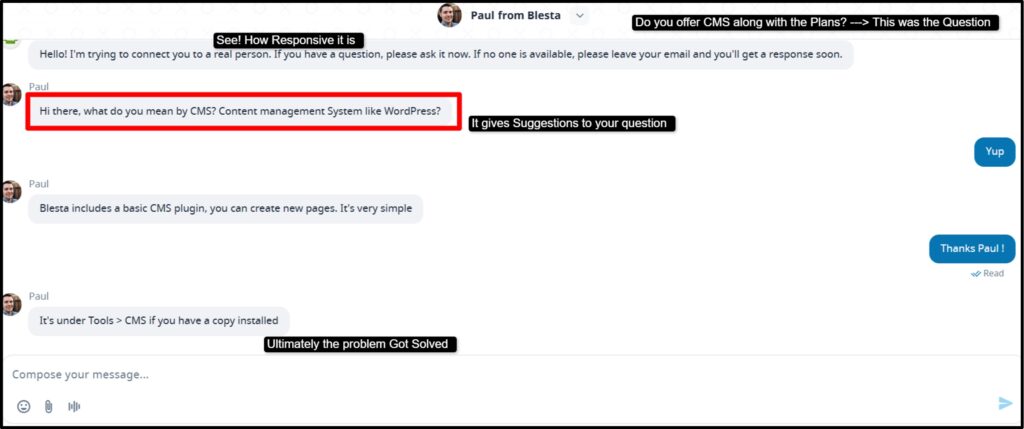
See! The support team is so responsive in the Live Chat window. You ask questions (be it, before billing, after billing about the product) and they answer friendly. The answer is informative and useful as well.
Official Ticket System
This is the primary support channel for license holders. Ticket Support is only available for the users who have bought the packages. But exclusively for you, we’ve bought the license and checked it for 7 consecutive days to see if the ticket support is responsive or not. And the results are gonna shock you!
They help you with an informative answer! They respond within a working day (the response depends upon the amount of tickets they have to resolve and the priority status)
Now, as you’re yourself a hosting company and you’re gonna manage the tickets yourself, below is the glimpse of the support interface where you can track all the tickets of your clients and even respond to them at the earliest.
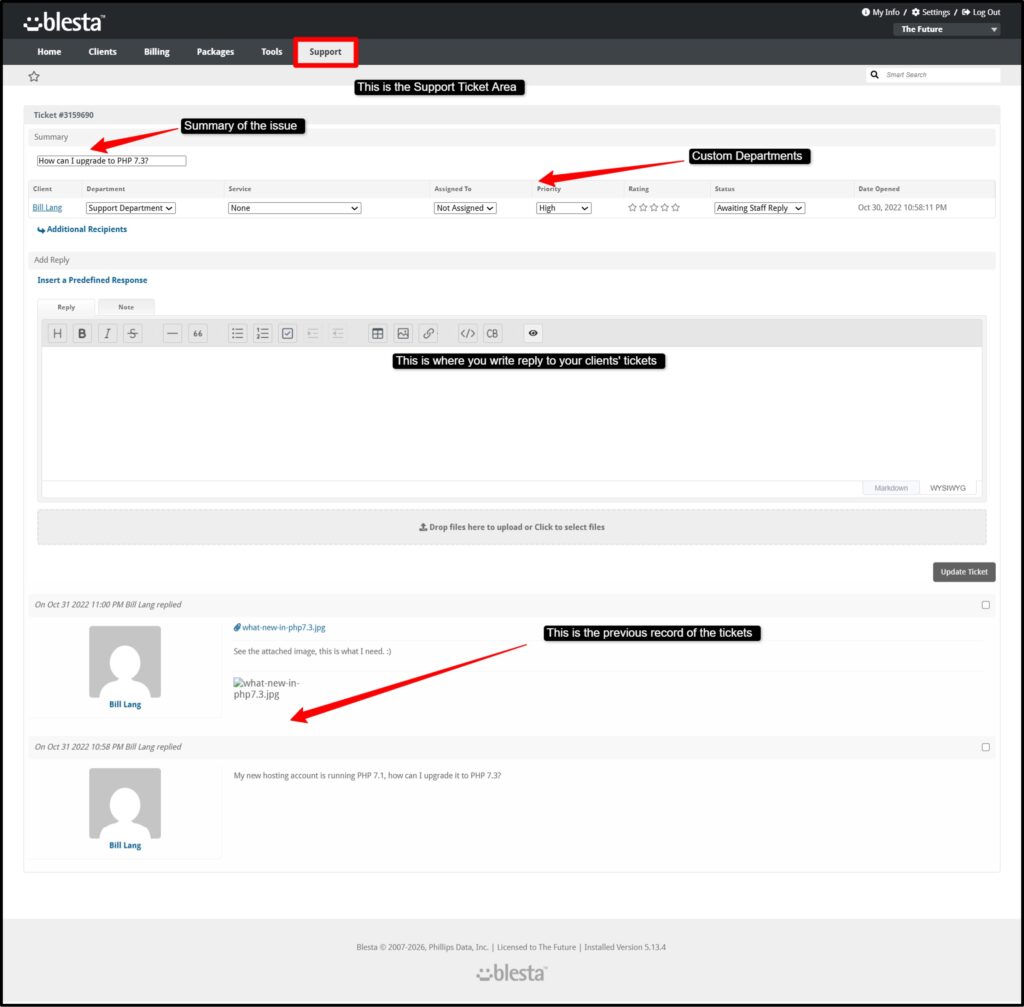
You respond to the tickets through the Blesta account portal. This way your entire workflow is organized and also no tickets are left unresolved.
Documentation
Blesta’s documentation at docs.blesta.com is comprehensive and easy to navigate, making it a strong first point of reference for users. It covers everything from initial installation and basic setup to advanced module configurations, API usage and developer-level customization.
The guides are written clearly, so even users with limited technical knowledge can follow along.
For most common tasks and troubleshooting scenarios, the documentation is detailed enough to help you resolve issues on your own without needing to contact support.
Community Forums
The Blesta community forums are active and a valuable resource for both beginners and experienced users.
Many common questions, especially related to setup, module configuration, integrations, and customization, have already been discussed and answered by knowledgeable users and developers.
This means you can often find solutions quickly just by searching existing threads. It also provides a space to ask new questions, share ideas and learn from others who are using Blesta in real-world scenarios.
Discord Server
Blesta also has an active Discord server where users can connect in real time and get quick help in a more casual and interactive environment.
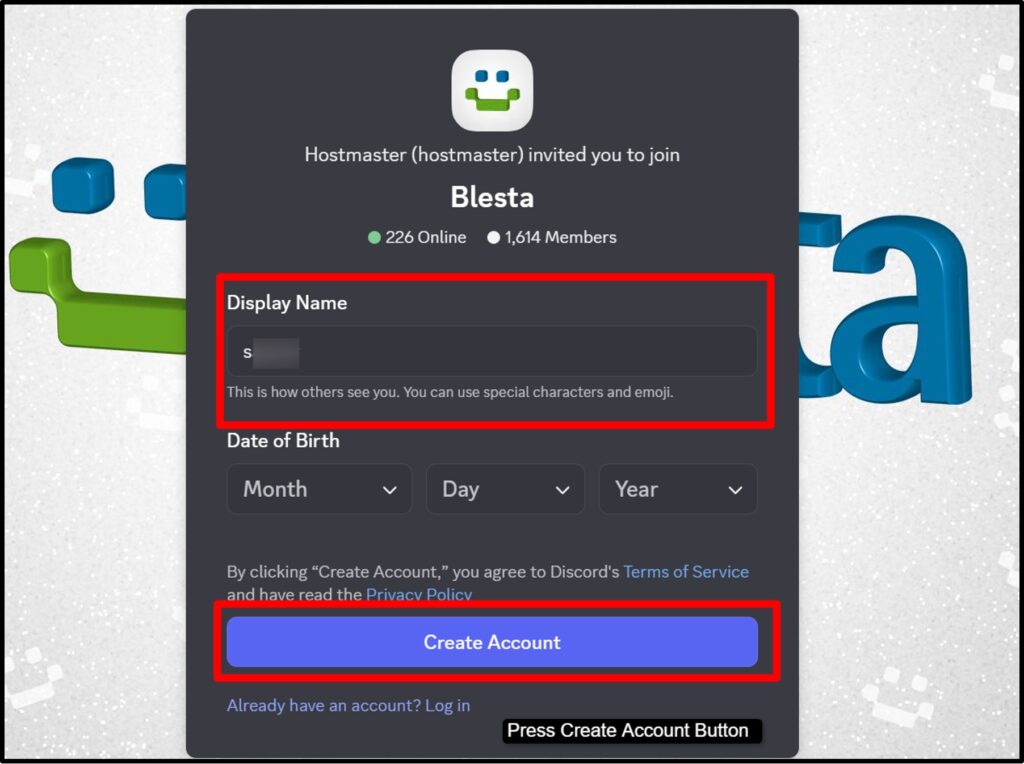
It’s especially useful for resolving smaller issues, asking quick questions, or getting opinions from other users. The conversational format makes it easier to explain problems and get faster responses compared to traditional support channels.
Members of the Blesta team are present on Discord, which adds credibility and ensures that accurate information is shared.
Feature Requests & Bug Reports
It also provides a dedicated feature request portal at requests.blesta.com, along with a bug reporting section in its forums. This allows users to suggest new features, improvements, or report issues directly to the development team.
One of Blesta’s strengths is how responsive the team is to feedback, they actively review suggestions and often implement useful ideas in future updates.
Many users have highlighted this responsiveness in their reviews, noting that it feels like the product is continuously improving based on real user needs.
What Real Users Say
We have pulled together representative feedback from real Blesta users across Trustpilot, G2, Capterra, and community forums so you get the full picture, the good and the bad.
The Positive Reviews
Blesta has completely changed our billing and automation processes with its exceptional open-code flexibility, allowing for seamless customization. What makes them more interesting is their responsive Live Chat and Ticket support team and their remarkable willingness to implement user-requested features promptly.
— Kleanthis Anastasakis, SystemFreaks Ltd.
Blesta stands out not just for its seamless functionality, but also for its exceptional customer support, which our resellers find invaluable for their day-to-day operations.
— Ryan Gray, Founder & CEO, NameHero
It bills on time, every time. The core functionality is rock solid.
— Phill Bandelow, VirtFusion Ltd.
The automation features save me hours each week, from recurring invoices to provisioning new accounts. It’s intuitive, reliable, and easy to integrate with other tools.
— Verified Trustpilot User, Canada (January 2026)
After moving from WHMCS to Blesta, I am satisfied with the Blesta development and support.
— Jamshed Datori, hostinpk.com
The Criticisms (Honest)
Not every experience has been perfect. Some users on G2 and community forums have raised legitimate concerns:
- Initial configuration complexity: Users migrating from WHMCS have noted that setting up Blesta from scratch, especially importing data and configuring order forms.
- Support response speed: A small number of users have mentioned waiting longer than expected for ticket responses, particularly for complex migration issues.
- Customization limits for non-developers: The client area customization, while functional, can feel limited for users who want deep front-end changes without writing code.
- Refund policy: Blesta doesn’t offer refunds on licenses, which is frustrating for users who couldn’t get their setup working within the trial period. This is worth noting, use the 30-day free trial seriously before purchasing.
So, if we see the above statements and reviews by other active users, Blesta is a good try. Issues that do arise tend to be configuration-related rather than platform problems, and most are resolvable with proper use of the documentation and community resources.
Alternatives to Blesta
While Blesta is an excellent platform, it isn’t the only option in the market. Here is a brief overview of alternatives you might consider:
| Blesta Alternatives | Best For | Pricing Model | Source Code |
| WHMCS | Established providers with large ecosystems | Monthly (tiered by clients) | Closed (IonCube) |
| Clientexec | Smaller hosting providers, simpler needs | Monthly / Annual | Closed |
| HostBill | Enterprise & white-label heavy customization | Monthly / Owned | Partially Closed |
| Ubersmith | MSPs and enterprise service providers | Subscription | Closed |
| Blesta | Developers, cost-conscious hosts, open-source | Monthly / Owned / Lifetime | 99& Open |
Of all these alternatives, Blesta offers the most compelling combination of price, openness, and built-in features for the web hosting market.
WHMCS remains the safest choice for those who need the largest possible ecosystem of third-party integrations and are willing to pay for it.
Pros
- Cheaper than WHMCS
- Unlimited clients on all plans
- One-time and lifetime purchase options
- 99% open-source
- Multi-company support
- 30+ payment gateways built in
- Built-in WHMCS migration tool
- Active Discord community
- Transparent security advisories
- 30-day free trial with no credit card
Cons
- Smaller third-party marketplace than WHMCS
- Requires your own server to host
- Some advanced customizations need developer skills
- Not ideal for non-technical users without server access
- Lifetime licenses are non-transferable
FAQS
Is Blesta free?
No, Blesta isn’t free, but it does offer a fully-featured 30-day free trial with no credit card required. After the trial ends, you’ll need to purchase a license, which starts at $17.95 per month. There’s no permanent free plan, but the trial gives you enough time to test everything properly.
Does Blesta include source code?
Yes, almost all of it. Around 99% of Blesta’s code is open and readable, with only a few files encoded for licensing purposes. This means developers can fully inspect, customize, debug, and even extend the platform, something that’s not possible with platforms like WHMCS, where the core is encrypted.
How many clients can I have on Blesta?
There are no limits. Every Blesta license, be it monthly or owned, allows unlimited clients and unlimited staff. You don’t have to worry about upgrading plans or paying extra as your business grows.
Is Blesta better than WHMCS?
Yes, however, It depends on your needs. Blesta is a better choice if you care about lower costs, open code, better transparency, and built-in multi-company support. WHMCS, on the other hand, still has a larger ecosystem of third-party modules and wider brand recognition. If you’re a developer or want to save money long-term, Blesta is the best option you should go with.
Does Blesta work with cPanel?
Yes, it works well with cPanel. Blesta supports full integration, allowing you to automatically create, manage, suspend and unsuspend hosting accounts using the cPanel/WHM API.
Can I migrate from WHMCS to Blesta?
Yes! You can migrate from WHMCS to Blesta and the process is straightforward. Blesta includes a built-in Import Manager that can transfer clients, services, invoices, transactions, and even support tickets from WHMCS. If you prefer expert help, Blesta also offers paid migration services starting at $200.
What payment gateways does Blesta support?
Blesta supports 30+ payment gateways, including major options like Stripe, PayPal, Authorize.net, Braintree, and Square. It also includes ACH payments (like GoCardless), cryptocurrency gateways (such as Coinbase Commerce, BitPay, and CoinGate), and many regional gateways like Razorpay, PayUMoney, and CCAvenue (India), Paystack (Africa), and PagSeguro (Brazil). This makes it suitable for businesses serving customers worldwide.
Final Verdict
After carefully reviewing everything for 30 days back-to-back, from Blesta’s features and pricing to real user feedback, the overall conclusion is clear.
Blesta is one of the best web hosting billing platforms available in 2026, especially for businesses that value transparency and long-term ownership. Its open codebase, strong feature set, and the option to purchase a lifetime license make it a unique offering in a market that’s mostly dominated by recurring subscription models.
If you’re already running a hosting business, especially on WHMCS, it’s definitely worth trying Blesta’s 30-day free trial. You can save a lot of money if you use Blesta, but beyond that, the platform offers a well-rounded set of features that can handle everything from billing to automation and support.
That said, it’s important to approach the trial period seriously.
Instead of rushing through it, it’s a good idea to fully test the platform, set up your order forms, connect your control panel, and run a few sample invoices to see how everything works in practice. If you do that, you’ll get a clear picture of what Blesta can offer.
And chances are, like many hosting providers already using it, you’ll find it to be a stable and long-term solution for your business.
Rating Based on Expert Review

Excellent Service
I recently migrated from WHMCS, and the first thing I noticed was the outstanding support. Paul was incredibly helpful throughout the migration process and made everything seamless.
Blesta feels much cleaner and more streamlined than WHMCS. The interface is less cluttered, and once you get used to the admin area, it becomes faster and easier to manage.
My only minor criticism is the admin text editor—it could be improved to allow inline linking within paragraphs instead of requiring HTML blocks, especially for knowledge base articles.
Overall, I’m very happy with Blesta and glad I made the switch.