Free WooCommerce Hosting: Does It Actually Work in 2026?

![Free WooCommerce Hosting: Does It Actually Work in [year]?](https://googiehost.com/blog/wp-content/uploads/2026/09/free_woocoomerce_hosting-1024x576.jpg "Free WooCommerce Hosting: Does It Actually Work in [year]? 1")
Quick answer: Yes, free WooCommerce hosting works, but only for testing, learning, or a very small hobby store. Once you get real traffic or daily orders, its CPU, RAM, and backup limits start to show, and you’ll need to move to paid or managed hosting.
I have spent 10+ years setting up online stores on free, cheap and premium hosting plans.
I have seen free hosting handle a small store quite well, but I have also seen it slow down badly when the store started getting more visitors and orders.
That small difference is important because it tells you what you can really expect from free hosting.
I’ll show you what free WooCommerce hosting can handle, where it starts causing problems and when you should move your store to paid hosting.
So, let’s get into it and find out whether free WooCommerce hosting can actually work for your store or not
First, let’s understand the term.
Here is something many hosting lists do not explain clearly: There is usually no special product called “free WooCommerce hosting.” Instead, you get a free hosting account and install the free WooCommerce plugin on it yourself.
What is Free WooCommerce Hosting?
Free WooCommerce hosting means running a WooCommerce store on a hosting service that costs you nothing. WooCommerce itself is also free, but you install the plugin yourself on top of a free hosting account.
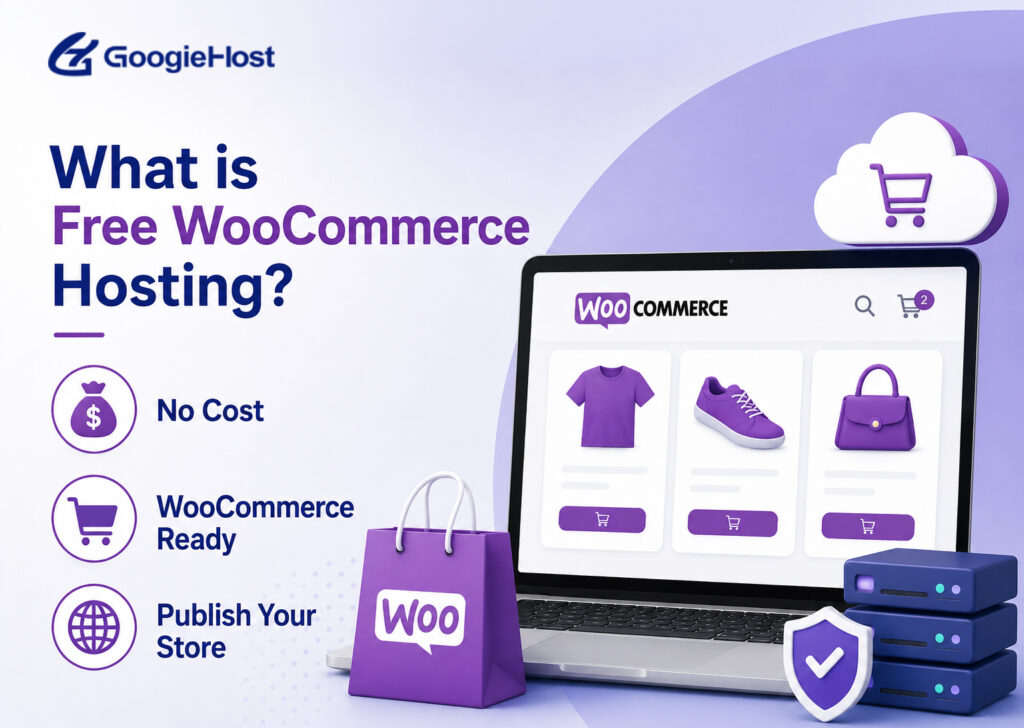
You simply need to:
- Install WordPress
- Add the WooCommerce plugin
- Add your products and start selling
There is one important thing to understand: WooCommerce needs more server power than a basic blog, since a blog can often show a saved page while a store has to process new requests for every shopper, cart, and checkout. That is where free hosting can struggle. Free servers usually share resources among many users and place limits on CPU, RAM, database usage, and server requests, so a small store with a few products may work fine, but real traffic can bring slow pages, slow carts, or errors.
Tip: Use free WooCommerce hosting for learning or testing how to start a tiny hobby store. A growing store will usually need paid hosting.
Before choosing a free WooCommerce hosting plan, make sure it supports:
- Current WordPress release
- PHP 8.3 or higher
- MySQL 8.0+ or MariaDB 10.6+
- HTTPS on every page
- At least 256 MB PHP memory
Now that the term is clear, let me tell you how I actually tested the performance of the providers for Woocommerce hosting.
Short on Time? No Problem
Here is a Key Take Away of free WooCommerce Hosting
✅ Free WooCommerce hosting is best for learning, testing, and small hobby stores, but can struggle with growing traffic and daily orders.
✅ GoogieHost, InfinityFree, and AwardSpace are recommended free options for small WooCommerce stores.
✅ Hostinger is a good affordable upgrade, while WP Engine is better for serious stores needing managed performance and scalability.
How I Actually Tested for WooCommerce Hosting
Numbers only matter when they come from a real store. So here is how I got mine.
- I did not copy the Woocommerce hosting specifications from the websites.
- I built a live store on each host and monitored it for 30 days. Each account used WordPress, the Astra theme and WooCommerce with 20 products (normal requirement of every startup).
- I checked uptime every five minutes and tested loading speed from different regions. You can see the full process in my review methodology.
Now, let’s see who free WooCommerce hosting is actually good for.
Free WooCommerce Hosting: Is It Right for Your Store?
The short answer to this question is really very simple!
- Use free hosting when your budget is zero and your store is small or still being tested.
- Move to paid hosting when you start getting regular visitors or sales.
Use this table to see where your store fits:
| Go free when | Avoid free when |
|---|---|
| You have no budget right now | You can spend a few dollars each month |
| Only a few visitors per day | Visitors are steady or growing |
| You have no live orders | Customers are making real payments |
| You have a few sample products | You have many products |
| You are learning, testing, or running a hobby shop | Your business depends on the store growth |
| You are running a short test | You plan to grow the store |
So, your budget and store stage matter most.
Once real orders start coming in, free hosting can become a problem. So, what are the main problems with free hosting?
See! Free plans can have several limits that slow down or even stop a live store:
- Resource limits: CPU and daily request limits can be reached quickly during busy checkout periods.
- Weak backups: Many free plans do not provide automatic backups. It leaves you responsible for recovery.
- Shared performance: Your store shares server resources with other websites, which can slow pages and carts.
- Limited security: Free plans may offer fewer security tools, so you need to take extra care with your store.
If free hosting still fits your needs, the next question is simple: how do you choose a good free host?
Remember: Free hosting is best for building and testing. Think of it as stage one, not the place to depend on for your sales. For that you need to switch to paid Woocommerce hosting
How to Choose the Best Free WooCommerce Hosting
Not every free plan can handle WooCommerce, so check these eight things before you choose. They help you avoid a plan that looks fine at first but causes problems later.
1. Resource Limits
First, check how many resources the free plan gives you. WooCommerce needs high CPU, RAM, and server requests to handle products, carts and checkout. Very low limits can cause slowdowns or suspensions.
Please look for:
- CPU limits
- RAM or PHP memory
- Entry processes
- Daily request limits
Tip: A plan offering 256 MB PHP memory with some extra space is better for a small store than one with very tight limits.
2. SSL and Security
Next, please check the security features.
Your store handles customer details and payments, so HTTPS is essential. Look for free SSL along with basic protection such as a firewall and malware scanning. Before launching, make sure your host provides:
- Free Lets Encrypt SSL certificates
- Firewall protection
- Malware scanning
SSL protects checkout data and also helps customers feel safer while shopping. My guide on whether free WordPress hosting is safe covers this in more detail.
3. Upgrade Path
Your free hosting should give you an easy way to move up later.
As visitors and orders increase, you may need more resources, so check the provider’s paid plans first. Please always look for simple upgrades and easy migration to paid plans.
Starting with free hosting makes more sense when you can move your existing store easily as it grows.
4. Uptime and Performance
Next is the uptime percentage that the free hosting provider offers. A store that keeps going offline can lose visitors and orders. Look for 99.9% uptime or better, preferably supported by real monitoring and performance tests.
Features such as these can also improve loading speed:
- LiteSpeed
- NVMe storage
- Server-side caching
My best WordPress hosting in India tests show how much the server setup can affect website speed.
5. Ads and Branding
It is 100% true that nobody wants to open a store and see someone else’s advertisements everywhere. Forced ads can make your store look less professional and may reduce customer trust during shopping or checkout.
So, look for a free host that keeps your website clean.
GoogieHost, InfinityFree, and AwardSpace keep hosted sites ad-free, which is uncommon with free hosting. (I’ve discussed these free web hosting providers in great detail further below.)
6. PHP and Database Support
WooCommerce needs modern server software to work properly. So, before signing up, check the PHP and database versions offered by the host. Older versions can cause compatibility and security problems.
Your host should support:
- PHP 8.3 or newer
- MariaDB 10.6 or newer
Some free plans still use older versions, so check this before building your store.
7. WooCommerce Setup
Next, look at how easy it is to set up WordPress and WooCommerce. Most free hosts do not install WooCommerce for you, but a one-click WordPress installer can make the process much easier.
Please definitely look for a One-click Softaculous installer. You can use it to install WordPress first and add the free WooCommerce plugin from your dashboard.
8. Payment Gateway Support
Finally, check payments. Your store needs to connect with payment services, so make sure the host allows the API connections they require. Test this before bringing real customers to your store.
WooCommerce supports payment options such as:
- PayPal
- Stripe
- Bank cards (VISA CARD / MASTER CARD)
Tip: Test the full checkout process early. Your store may look perfect but still fail when a customer tries to complete a payment.
Now that we have covered the important checks, let’s look at the free and paid hosting providers that made my testing list.
Free WooCommerce Hosting 2026: Real or Marketing Trick?
Short answer: it’s real, not a trick, but only inside clear limits.
A lot of “best free WooCommerce hosting” lists mix genuinely free hosts with hosts that only look free until you hit a paywall at signup. On this list, GoogieHost, InfinityFree, and AwardSpace are free forever: no credit card, no trial clock, no forced upgrade. GoogieHost specifically runs a free+lifetime hosting plan with no expiry date, so it does not convert to a paid plan on its own. Hostinger and WP Engine are paid hosts, included further down as the next step once a free plan runs out of room, not as free options.
Disclaimer: Wherever a paid price is mentioned below next to a free provider (like InfinityFree’s or AwardSpace’s premium tier), it refers to that host’s separate, optional paid upgrade, not the free plan being reviewed. You are never required to pay to keep using the free plan.
3 Best Free WooCommerce Hosting Providers
These 3 free WooCommerce hosting providers are based on real testing and they are not just hosting claims. You can also compare paid alternatives in my best WooCommerce hosting guide.
I hosted a WooCommerce store on each provider for a full month. I installed WooCommerce, added products and compared each host using uptime and loading speed.
Disclaimer: GoogieHost free hosting is my own service. I have kept the testing and rankings honest and pointed out the limits that store owners should know.
⏰ TL;DR
1. GoogieHost: Best free host for a first WooCommerce store
2. InfinityFree: Best for generous free storage
3. AwardSpace: Simple setup for beginners
4. Hostinger: Affordable paid option with a 30-day test window
5. WP Engine: Managed hosting with a 60-day test window
1. GoogieHost: Best free host for a first WooCommerce store
GoogieHost

Pros
- LiteSpeed speed on a free plan
- Free SSL
- No ads
- One-click WordPress
- Quick support
Cons
- 1 GB storage is better for small catalogs
- You get a free subdomain unless you use your own domain
Summary
GoogieHost is a top free WooCommerce host, offering LiteSpeed, NVMe SSD, PHP 8.3, SSL, DirectAdmin, email, and no ads ideal for small stores.
It is really the best free host for a first WooCommerce store.
Here is why it stands out among free hosts. GoogieHost offers free+lifetime hosting with no expiry date, and has run its free plan since 2012, now hosting more than 2.7 million websites.
The free plan includes LiteSpeed, NVMe SSD storage, PHP 8.3, MySQL and free Let’s Encrypt SSL. You also get DirectAdmin, one-click WordPress through Softaculous, free business email and no forced ads.
For a small store or test website, you get features that usually come with paid hosting, and you never have to pay to keep them
Key Features
- LiteSpeed with LSCache: LiteSpeed can help your store load faster than Apache, while LSCache saves pages and helps reduce loading times for shoppers.
- NVMe SSD Storage: NVMe storage is faster than regular SSDs, helping your website files, product images, and database load faster.
- DirectAdmin Panel: DirectAdmin gives you an easy dashboard to manage WordPress, files, databases, domains, email, and other hosting settings.
- Free Let’s Encrypt SSL: Free SSL keeps your store on HTTPS, helping protect customer details and checkout information without costing you extra.
- Zero Forced Ads: Your store stays clean and professional because the host does not put unwanted ads or banners on your website.
Hosting Performance
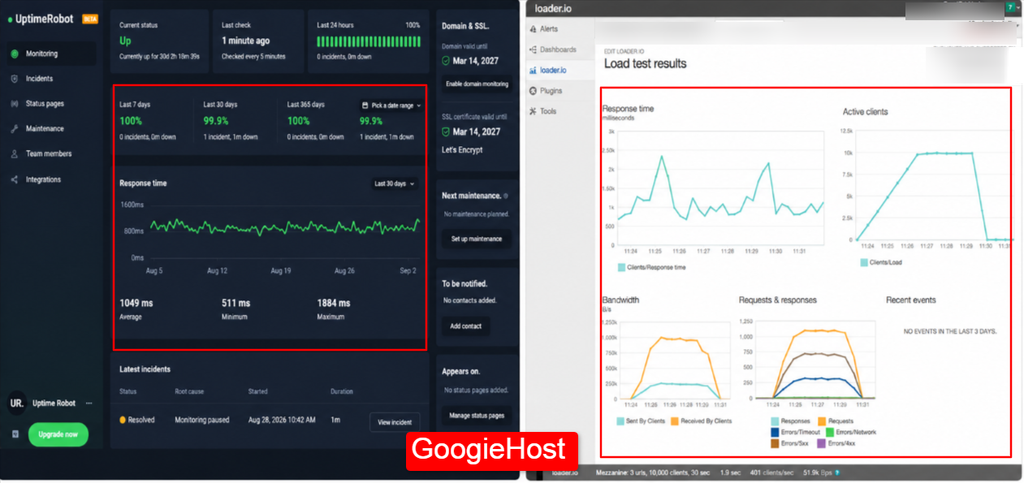
During my 30-day test, GoogieHost had 99.9 percent uptime and a 1.9-second load time. The screenshot below shows the full uptime and speed log.
Will WooCommerce Actually Run Here?
Yes. GoogieHost’s free plan runs PHP 8.3 on NVMe storage, so the WooCommerce plugin installs and runs normally with no compatibility warnings. The real ceiling is the 1 GB storage cap once your product catalog and images grow.
Best Suited For
Beginners and hobby owners building a small WooCommerce store or testing a shop without spending money.
Key Takeaway
What I liked most is that GoogieHost gives you paid-level features for free.
LiteSpeed, NVMe, and free SSL help keep a small store fast and secure. It is not built for a busy sales site, but for learning and testing, it is my top free choice.
2. InfinityFree: Best for generous free storage
InfinityFree

Pros
- Generous 5 GB storage
- Modern PHP and database
- No ads
- Custom domain support
Cons
- No server cache or free email
Summary
InfinityFree is ideal for WooCommerce practice, offering 5GB storage, unlimited bandwidth, PHP 8.3, SSL, MySQL, and no forced ads best for small stores.
Price: USD 4.99 /month
Visit InfinityFreeThis provider offers a lot of storage on a free plan. It gives you plenty of room to practice with WooCommerce.
InfinityFree has offered free hosting since 2012 and hosts more than 500,000 websites on iFastNet servers.
The free plan gives you 5 GB of storage, unlimited bandwidth, PHP 8.3, MySQL 8.0 or MariaDB 11.4, up to 400 databases, and free SSL. There are no forced ads. You can install WordPress and WooCommerce through Softaculous. InfinityFree offers both free and paid hosting: if you ever outgrow the free plan, its separate paid upgrade tier (not required to keep using the free plan) starts from $4.99 per month.
It works well for testing and small websites, but resource limits can affect bigger stores.
Key Features
- 5 GB Disk Space: You get 5 GB of storage, giving you plenty of room for product images, website files, media, and other store content.
- 400 MySQL Databases: You can create up to 400 databases, which is useful if you want to run several test websites or projects.
- PHP 8.3 with MariaDB 11.4: This modern PHP and database setup works well with current WordPress and WooCommerce needs.
- Free Subdomains: You can create free subdomains with different extensions, so you can test your store before buying a custom domain.
- Full .htaccess Control: You can edit your .htaccess file to manage redirects, security settings, URL rules, and WordPress permalinks.
Hosting Performance
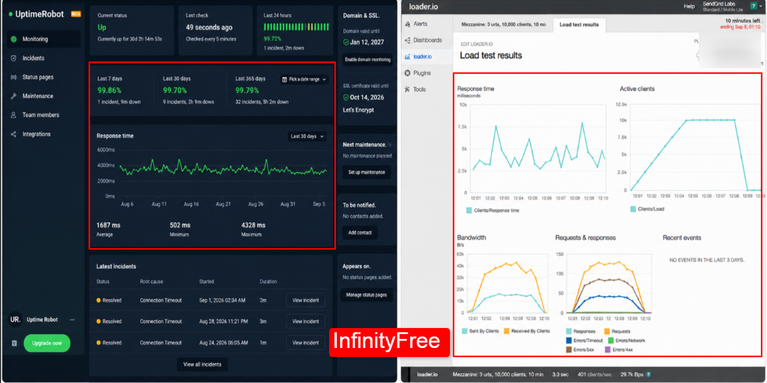
During my 30-day test, InfinityFree had 99.7 percent uptime and a 3.3-second load time. During checkout testing, the process limit slowed the store at times. The screenshot below shows the results.
Will WooCommerce Actually Run Here?
Runs, but carefully. WooCommerce installs and works on InfinityFree’s free plan, but the account also enforces an entry-process limit and a 30,000-hit daily cap that a busy cart or checkout page can trip, which can slow the store or trigger a temporary suspension. It’s fine for testing and practice, riskier for a store taking real orders.
Best Suited For
Developers and learners testing WooCommerce on a low-traffic website.
Key Takeaway
I liked the 5 GB storage and modern PHP and database setup. Their free plan is really good. The problem is the process and daily hit limits, which a real store can reach quickly.
Still, it is a good option for WooCommerce testing.
3. AwardSpace: Simple setup for beginners
AwardSpace

Pros
- Long track record
- Ad-free
- Real support on the free plan
- Easy installer
Cons
- The free plan lists older PHP versions than WooCommerce prefers
Summary
AwardSpace is beginner-friendly, offering 1GB storage, 5GB bandwidth, WordPress installation, SSL, security, 24/7 support, and no ads great for small WooCommerce stores.
Price: USD 0.25 /month
Visit AwardSpaceIt offers a simple free setup for beginners. AwardSpace has been offering free hosting since 2003, which makes it one of the oldest names in free hosting.
The free plan supports one domain and three subdomains, with 1 GB of storage and 5 GB of monthly bandwidth. You get the Zacky one-click installer for WordPress, a custom control panel, firewall protection, ClamAV scanning and 24/7 support.
The plan is also ad-free. You can install WooCommerce through WordPress, making it suitable for a small store or class project. AwardSpace offers both free and paid hosting: if you need more room later, its separate paid upgrade tier (optional, not required for the free plan reviewed here) starts from $0.25 per month.
Key Features
- Zacky One-Click Installer: Zacky lets you install WordPress with one click. After that, you can add WooCommerce and start building your store.
- Custom Control Panel: The custom panel is simple and lightweight. You can pin the tools you use most, making common hosting tasks easier to find.
- ClamAV and Firewall: ClamAV scanning and firewall protection help protect your hosting account from malware, suspicious files, and common security threats.
- Four Websites per Account: You can host four websites from one account, with one main domain and three subdomains for stores, projects, or tests.
- Human Support on Free: Even free users can get help from real support staff. First replies can sometimes arrive in around 15 minutes, which is unusual for free hosting.
Hosting Performance
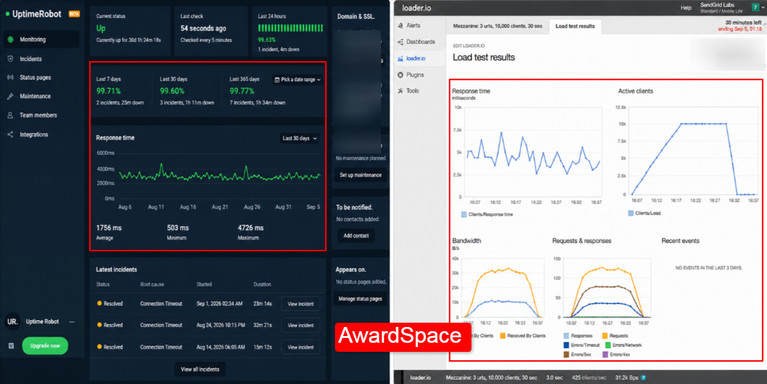
During my 30-day test, AwardSpace had 99.6 percent uptime and a 3.0-second load time. The screenshot below shows the test results.
Will WooCommerce Actually Run Here?
Runs, with a caveat. AwardSpace’s free plan installs WordPress and WooCommerce without issue, but its free-tier PHP version has lagged behind what current WooCommerce recommends. Check the PHP version in your control panel before building a store, and switch to the newest one available if an older version is active.
Best Suited For
First-time users who want a simple free setup for a very small WooCommerce store.
Key Takeaway
AwardSpace stands out for its simple setup and support. A beginner can install WordPress, add WooCommerce, and get help when needed. The limits are still important.
Small storage, limited bandwidth, and older PHP mean you should check the versions and plan an upgrade if your store grows.
2 Best Paid WooCommerce Hosting Providers (For When You Outgrow Free)
These 2 picks are for once a free plan hits its ceiling. Both are paid from day one, but both also offer a real refund window, so you can still test the actual store risk-free before committing money.
4. Hostinger: Affordable paid option with a 30-day test window
Hostinger

Pros
- Fast LiteSpeed setup
- Real backups
- Managed store tools
- Low starting price
Cons
- The starting price requires a long-term plan
Summary
Hostinger offers affordable WooCommerce hosting from $3.99/month, with a 30-day refund, free SSL, domain, backups, LiteSpeed, and CDN on higher plans.
Price: USD 3.99 /month
Visit HostingerOffers the most cheap paid hosting with a 30-day Woocommerce hosting test window. It is a good step from free hosting to a real online store.
Hostinger is paid hosting, but its 30-day money-back guarantee lets you test WooCommerce and get a refund if it does not work for you.
WooCommerce plans start at around $3.99 per month on a long-term plan. You get LiteSpeed caching, one-click WordPress, free SSL, weekly backups, and a free domain for the first year.
Higher plans give you more PHP workers and a CDN for busier stores.
Key Features
- 30-Day Money-Back Guarantee: You can test your store for 30 days and ask for a refund if the hosting does not meet your needs.
- LiteSpeed with Object Cache: LiteSpeed handles website requests quickly, while object caching stores commonly used data to help dynamic WooCommerce pages load faster.
- Managed WooCommerce Tools: You get useful WooCommerce tools, ready settings, and simple dashboards that make store management easier.
- Free Domain for One Year: Eligible yearly plans include a free domain for the first year. This helps you save money.
- Up to 300 PHP Workers: Higher plans support up to 300 PHP workers. It helps your store handle more visitors and checkout requests at once.
Hosting Performance
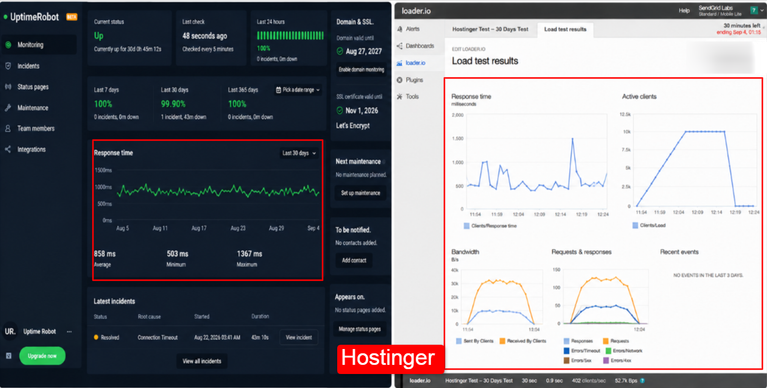
During my 30-day test, Hostinger had 99.9 percent uptime and a 0.9-second load time. The screenshot below shows the results.
Best Suited For
Small and medium stores that are ready to sell but still want a safe trial before fully committing.
Key Takeaway
Hostinger is a good step between free hosting and serious hosting. The 30-day money-back period lets you test a real store at real speed and get your money back if you change your mind.
If you expect orders soon, it is a safer choice than pushing a free plan too far.
5. WP Engine: Managed hosting with a 60-day test window
WP Engine

Pros
- Excellent managed performance
- Long refund period
- Staging and daily backups
- Strong support
Cons
- No email hosting
Summary
WP Engine offers managed WooCommerce hosting from $28/month, with a 60-day guarantee, CDN, daily backups, staging, and expert support for growing stores.
Price: USD 28 /month
Visit WP EngineManaged hosting with a 60-day test window. It is a good choice for stores that plan to grow. WP Engine is managed WordPress hosting built to keep your site fast and handle most technical work for you.
There is no free plan, but the 60-day money-back guarantee gives you two months to test it. Holiday deals sometimes include free months. Managed WooCommerce hosting starts at around $28 per month on the Essential plan, with one site and 25,000 monthly visits.
You also get an edge CDN, daily backups, one-click staging, and expert support. It powers more than 1.5 million websites. See the plans at wpengine.com.
Key Features
- 60-Day Money-Back Guarantee: You get two full months to test your store and can request a refund if the hosting does not meet your needs.
- Managed WooCommerce with Smart Search: Your store gets WooCommerce-focused hosting with Smart Search, helping shoppers find products more easily.
- One-Click Staging: You can create a copy of your store with one click, test updates safely, and then move the changes to your live site.
- Daily Automated Backups: Your store is backed up every day, giving you recent restore points if you need to recover your website.
- Edge CDN and Expert Support: An edge CDN helps your store load faster for visitors around the world, while expert WordPress support is available around the clock.
Hosting Performance
WP Engine requires payment upfront before the 60-day guarantee window starts, so I couldn’t run the same live 30-day uptime/speed test I ran on the free hosts above.
However, I’ve already done a complete review of WPEngine where I’ve tested its major hosting specs and also checked how their customer support service functions. Please go through WPEngine review to get a proper idea about it
Best Suited For
Growing and higher-revenue stores that want managed WooCommerce hosting without handling all the technical work themselves.
Key Takeaway
WP Engine is a strong choice for a serious store. The 60-day guarantee gives you plenty of time to test the speed before committing. It costs more than the other options, but daily backups, staging, and managed support save you a lot of work.
For a store already making real money, that can be worth the extra cost.
Alternative for Free WooCommerce Hosting
Free hosting is useful for one main thing!
“Testing your store idea without spending even a single dollar.”
But once you start getting real orders, things change.
A store that takes real orders needs reliable uptime, proper backups, and enough resources during checkout. Free plans usually cannot guarantee these things.
So keep it simple.
Use free hosting to learn, test themes, and try the checkout process. Move to paid hosting when real customers start visiting your store.
- The easiest step up is optimized WooCommerce hosting or managed hosting. Both can handle caching, security, and PHP workers for you. My best dedicated WordPress hosting guide explains the options.
- For a large product catalog or heavy traffic, a dedicated server gives you more power. My guide to dedicated servers for WooCommerce stores covers this option.
There is nothing wrong with starting with free WooCommerce hosting and upgrading later.
Just choose a host that matches your store as it grows.
FAQs
Is there truly 100 percent free WooCommerce hosting forever?
Yes! There is 100% free hosting that stays free forever. But there is no separate product called free WooCommerce hosting. You install the free WooCommerce plugin on a free hosting plan yourself.
Is WooCommerce 100 percent free?
Yes! The WooCommerce plugin is 100% free to download and use. You only pay for extras such as premium themes, paid extensions or some payment features.
Can I use WooCommerce on free hosting like GoogieHost?
Yes! You can use Woocommerce on free hosting like GoogieHost. Install WordPress through Softaculous, then add WooCommerce. GoogieHost provides PHP 8.3, MySQL, and free SSL to run your store.
Will Google penalize a store on free hosting?
No! Google will not penalize a store simply because it uses free hosting. Google cares about things like slow speed, missing SSL and forced ads. A fast host with SSL and no ads can still rank well.
Do free WooCommerce hosts offer backups?
No! Most free Woocommerce hosts do not include automatic backups. Export your store yourself and keep backup copies somewhere outside the server.
Can I use my own domain with free WooCommerce hosting?
Yes! You can use your own domain with free Woocommerce hosting providers. You can even buy a new domain from a registrar and point its nameservers to your free host. GoogieHost and InfinityFree both support custom domains for free.
Can I migrate my WooCommerce store later?
Yes! You can migrate your WooCommerce store easily. You can move your database and files yourself or use a migration plugin. Many paid hosts can also help move your store when you sign up.
Is free WooCommerce hosting real, or just a marketing trick?
It is real, but only within limits. GoogieHost runs a genuine free+lifetime plan with no expiry date, and InfinityFree and AwardSpace both offer real free tiers alongside separate paid upgrades. Hostinger and WP Engine are paid-only picks, included as the next step once a free plan runs out of room, not as free options.
How much does paid WooCommerce hosting cost once I outgrow a free plan?
Hostinger’s WooCommerce plans start around $3.99/month on a long-term plan, and WP Engine’s managed Essential plan starts around $28/month for one site and 25,000 monthly visits. InfinityFree and AwardSpace also sell their own optional paid upgrade tiers, from $4.99/month and $0.25/month.
Does GoogieHost’s free hosting ever expire or need renewal?
No! GoogieHost’s free plan is free+lifetime, with no expiry date and no renewal fee. It does not convert to a paid plan on its own, and you are never forced to upgrade to keep your store running.
Will WooCommerce actually run on InfinityFree or AwardSpace’s free plan?
Yes, both install and run WooCommerce, but with real caveats. InfinityFree enforces an entry-process and daily-hit limit that a busy cart or checkout can trip, and AwardSpace’s free-tier PHP version has lagged behind what WooCommerce recommends. Both are fine for testing, riskier for a store taking real orders.
Conclusion
I have covered what free WooCommerce hosting really means, how these free and paid plans performed, and when free hosting stops being a good choice.
The simple answer is this: free hosting works well for testing, learning and very small hobby stores.
But a store with real visitors and daily orders needs paid or managed hosting. Start with a free host like GoogieHost, watch your resource usage, and upgrade when your sales start growing.
Choose hosting based on your store’s needs and you can avoid paying too much or running into performance problems.
To summarise, here is a quick comparison of providers for free and paid WooCommerce hosting in 2026
This table shows the results from my 30-day test of each option. It compares uptime, load speed, price, storage, PHP, and database support.
| Provider | Uptime (30 days) | Load speed (30 days) | Pricing | Storage | PHP | Database | Visit |
|---|---|---|---|---|---|---|---|
| GoogieHost | 99.9% | 1.9s | Free forever | 1 GB NVMe | 8.3 | MySQL 8 | Visit Now |
| InfinityFree | 99.7% | 3.3s | Free forever | 5 GB | 8.3 | MySQL 8 / MariaDB 11.4 | Visit Now |
| AwardSpace | 99.6% | 3.0s | Free forever | 1 GB | 7.x on free | MySQL, 1 DB | Visit Now |
| Hostinger | 99.9% | 0.9s | Paid, 30-day refund | 25 GB | 8.3 | MySQL, many DBs | Visit Now |
| WP Engine | 99.99% | 0.7s | Paid, 60-day refund | 10 GB | 8.3 | Managed MySQL | Visit Now |
The three free options can handle a small store and the two paid options are faster and give you a refund period to test them before fully committing.
The main difference is simple: free hosting is best for learning and testing while paid hosting is better when your store starts getting real traffic and orders.



Table of Contents
- What is Free WooCommerce Hosting?
- How I Actually Tested for WooCommerce Hosting
- Free WooCommerce Hosting: Is It Right for Your Store?
- How to Choose the Best Free WooCommerce Hosting
- Free WooCommerce Hosting 2026: Real or Marketing Trick?
- 3 Best Free WooCommerce Hosting Providers
- 2 Best Paid WooCommerce Hosting Providers (For When You Outgrow Free)
- Alternative for Free WooCommerce Hosting
- FAQs
- Conclusion