
Rank Math Review 2026: Tested for 7 Years

Every WordPress site needs an SEO plugin, but picking one is harder than it should be. Yoast has the biggest name, Rank Math has the longest feature list, and All in One SEO and SEOPress both claim to do more for less. Most Rank Math reviews list the features and stop there, so you never learn how the plugin behaves after years on a real site.
We can tell you, because we have run Rank Math on the GoogieHost blog since 2019. Today the blog runs Rank Math Pro 3.0.124 with 21 modules switched on, 165 redirections, thousands of tracked internal links and more than 800 posts that carry a stored SEO score. We read these numbers straight from the plugin and its database.
In this Rank Math review you will find our hands-on results with screenshots from our own dashboard, every module explained, the current prices, a free versus Pro comparison, and a clear answer to how Rank Math is different from Yoast, All in One SEO and SEOPress, with a comparison table.
⚡ Key Takeaways
✅ Rank Math has 4+ million active installs and a 4.8/5 rating from 7,523 WordPress.org reviews
✅ We have used it since 2019 and now run 21 modules on one site
✅ Redirections, 404 monitor, schema, sitemaps and Search Console data are built in
✅ Pro starts at $5.59/month on the current sale and covers unlimited personal sites
✅ Our blog scores 78/100 in the built-in SEO Analyzer
⚠️ Some AI link tools show “Not available in your plan” on Pro
⚠️ Rank Math’s tables took 143.5 MB of our database
Rank Math Review at a Glance
| Our Findings | |
|---|---|
| 🏷️ What it is | An all-in-one WordPress SEO plugin with a modular design |
| 🧪 Our test | Rank Math Pro 3.0.124 and Rank Math 1.0.281 on a live blog, in use since 2019 |
| 🧩 Modules on | 21, including Content AI, Analytics, Redirections, 404 Monitor and Instant Indexing |
| ↪️ Redirections | 165 in our manager, 163 of them active |
| 📈 Built-in SEO Analyzer | 78/100 for googiehost.com, with 22 of 29 tests passed |
| 💽 Database size | 143.5 MB across all Rank Math tables |
| 💰 Pricing | Free, PRO $5.59/mo (renews at $8.99/mo), Business $17.59/mo, Agency $38.59/mo |
| ♻️ Refund | 30-day money-back guarantee |
| ⭐ WordPress.org rating | 4.8/5 from 7,523 reviews and more than 4 million active installs |
Rank Math

Pros
- Redirections, 404 monitor and schema in one plugin
- Pro covers unlimited personal sites
- Built-in analytics and SEO Analyzer
- 30-day money-back guarantee
Cons
- Some AI link tools are plan-limited
- Many modules and settings take time to learn
Summary
Rank Math is an all-in-one WordPress SEO plugin with redirections, a 404 monitor, schema, sitemaps, Search Console analytics and Content AI, free to start and from $5.59/month on PRO for unlimited personal sites.
Price: USD 5.59 /month, billed yearly
Visit Rank MathOur verdict: Rank Math is the most complete WordPress SEO plugin we have used, and after seven years it still earns its place on our blog. It gives you redirections, a 404 monitor, schema, sitemaps, Search Console data and AI tools in one plugin, at a lower price than most rivals. It is best for people who want one tool to do it all, and less ideal for beginners who want a very simple setup.
What Is Rank Math?
Rank Math is a WordPress SEO plugin that helps your pages rank in Google. It adds an SEO score and a checklist to the post editor, writes your title and meta tags, builds XML sitemaps and schema markup, and manages redirects. Its main idea is a modular design: each feature is a module you switch on or off, so you only run what you need.
According to its WordPress.org page, Rank Math has more than 4 million active installations and a 4.8 out of 5 rating from 7,523 reviews. The current version is 1.0.281, updated on 3 November 2026, and it needs WordPress 6.7 and PHP 7.4 or higher. The description lists AI visibility monitoring, AI Link Genius for internal links, Content AI, schema for 16 or more types, Google Search Console and Google Analytics integration, a redirection manager, a 404 monitor, a Role Manager, and support for WooCommerce, page builders and multisite.
If you also want to measure your traffic, pair it with a privacy-friendly analytics plugin, as we explain in our Independent Analytics review.
What’s New in Rank Math in 2026?
Rank Math updates often. Version 1.0.281, released on 3 November 2026, added support for third-party heading blocks in its Table of Contents block, fixed sitemap and llms.txt URLs that returned 404 errors after rewrite rules were flushed, and fixed a hardcoded 200 pixel size in the Schema ImageObject. Beyond that release, these are the changes you will notice in the dashboard:
- AI Visibility: A new module that tracks your brand’s mentions in AI assistant answers, with sentiment and competitor comparison, shown with a “New” tag in our dashboard.
- llms.txt Support: A module and an “Edit llms.txt” screen let you serve a llms.txt file that tells AI crawlers about your site.
- AI Link Genius: An internal linking tool with a link dashboard, bulk link updates, health monitoring and suggestions.
- Content AI Tools: A grid of AI tools for post ideas, outlines, introductions, conclusions, titles and topic research.
- Instant Indexing: A built-in screen that sends URLs to the IndexNow API so search engines hear about new posts sooner.
How We Tested Rank Math
We did not install Rank Math on a demo site. The GoogieHost blog has used it since 2019 and now runs Rank Math Pro 3.0.124 together with the free Rank Math 1.0.281. For this review we read the numbers from the plugin screens and its database tables on 10 November 2026 and took the screenshots from our own WordPress dashboard.
| What We Measured | Result on Our Blog |
|---|---|
| Time in use | Since 2019, so more than seven years |
| Modules switched on | 21 |
| Redirections in the manager | 165, with 163 active, 2 inactive and 4 in the trash |
| Oldest redirection | Created in June 2019 and still in the list |
| 404 errors logged | 39 |
| Internal links tracked by the link counter | 20,019 |
| Published posts with a stored SEO score | More than 800 |
| Average SEO score of all posts (Analytics) | 60/100 |
| Built-in SEO Analyzer score for googiehost.com | 78/100, with 22 of 29 tests passed, 1 warning and 6 failed |
| Space used by all Rank Math tables | 143.5 MB |
About the screenshots: every screenshot here is from our own dashboard, and we blurred traffic numbers, keywords and other private data. Public settings and public URLs stay visible.
How to Set Up Rank Math
Setup is guided, and the free plugin takes about ten minutes. The Rank Math screen has a Setup Wizard tab, an Import and Export tab, and a switch between Easy Mode and Advanced Mode, so beginners see fewer settings.
- Install and activate the free Rank Math SEO plugin, then connect your Rank Math account when the wizard asks.
- Run the Setup Wizard. It asks what kind of site you run, and it can import titles, meta data and redirects from other SEO plugins such as Yoast.
- Connect Google Search Console and Analytics if you want the dashboard data.
- Open the Modules screen and switch on only the modules you need.
- Edit a post, open the Rank Math panel and add a focus keyword to see the SEO score.
If you come from another SEO plugin, run the importer before you deactivate it, and check a few posts afterward. Because Rank Math adds a lot of tracking tables, give the first crawl a few days before you judge the analytics.
How to Import SEO Settings From Yoast SEO to Rank Math
Switching from Yoast does not mean starting over. Rank Math can import your titles, meta descriptions, focus keywords, social settings and redirects, so your rankings keep the same on-page data. You can do it in the Setup Wizard or later from Rank Math SEO → Status & Tools → Import & Export, the same screen that holds the import tools in our dashboard.
- Back up first. Take a full backup of your files and database with your host or a backup plugin. Importing writes to your database, and a backup lets you undo it.
- Keep Yoast active. Rank Math reads Yoast’s saved data, so do not deactivate or delete Yoast until the import has finished.
- Install and activate Rank Math. If it detects Yoast, the Setup Wizard offers an import step. Otherwise open Status & Tools and choose Import & Export.
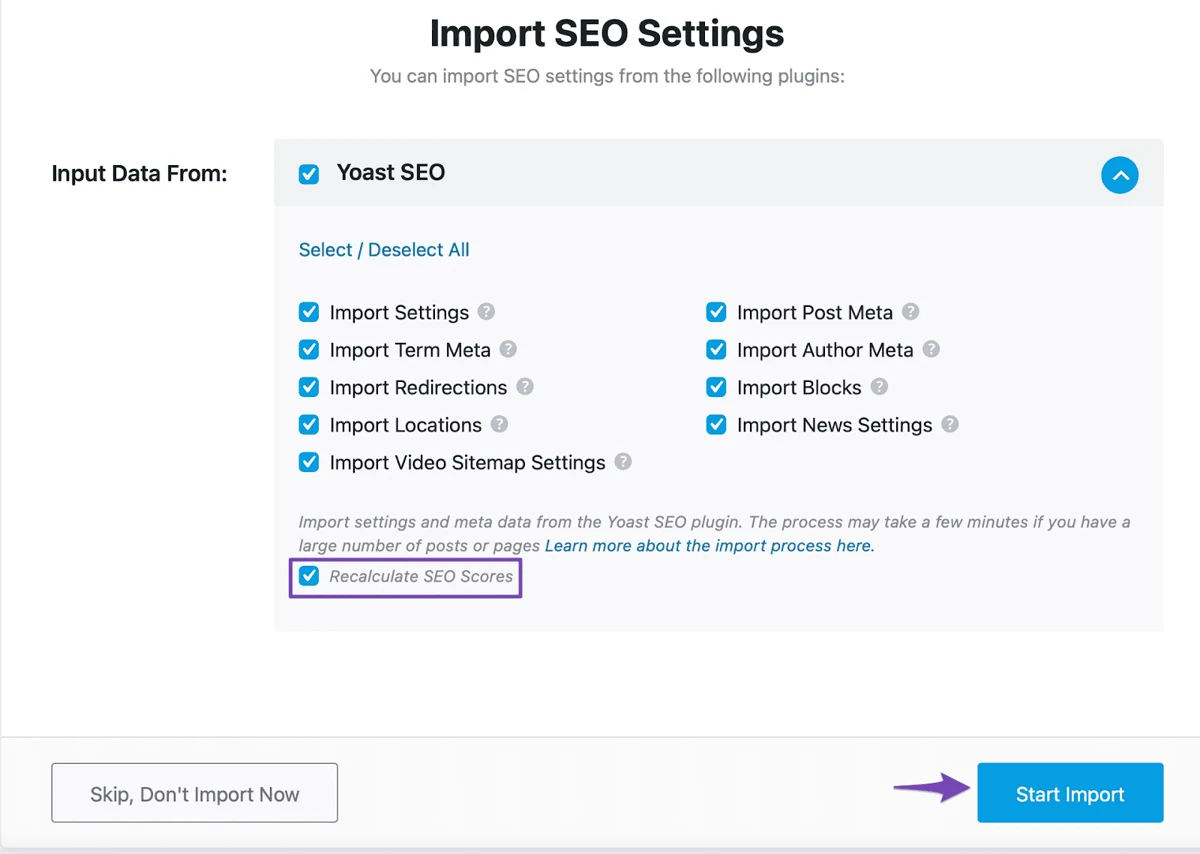
- Select Yoast SEO as the plugin to import from, then tick what to bring over: plugin settings, post meta (titles, descriptions, focus keywords) and, if listed, redirections.
- Run the import and wait for the success message. Large sites with thousands of posts can take a few minutes, so do not close the tab.
- Recalculate SEO scores. Rank Math calculates its own score for each post, so run its score recalculation tool afterward to fill in the numbers.
- Check a few posts. Open a post, a page, a category and your homepage, and confirm the title, meta description and focus keyword match what Yoast had.
- Deactivate Yoast. Only after the checks, switch Yoast off. Never run two SEO plugins together, because both will print meta tags and schema and create duplicates.
The import screen lists what Rank Math can bring over from Yoast SEO: settings, post meta, term meta, author meta, redirections, blocks, locations, news settings and video sitemap settings. Leave everything ticked for a full move, and keep Recalculate SEO Scores checked so every post gets a Rank Math score. Then click Start Import.
Tip: Yoast and Rank Math use different title variables, and Rank Math converts the common ones, but review your homepage and archive titles by hand. Our own migration to Rank Math in 2019 went smoothly because we checked a sample of posts before removing the old plugin, and a cleanup step can remove Yoast’s leftover data once you are sure you will not go back.
If you only need the data and not the plugin, you can also export your Rank Math settings as a file from the same Import & Export screen and restore them on another site, which is handy when you run several WordPress sites. If you are moving the whole site to a new host at the same time, our guide to the best free WordPress migration plugins shows how to move your files and database safely before you import your SEO data.
Rank Math Features: Every Module We Tested
Rank Math’s dashboard is a grid of modules, and each one has its own toggle. Here are all 21 modules we run, and what each one does:
| Module | What It Does |
|---|---|
| SEO Analysis | Runs a site-wide SEO Analyzer and scores each post |
| Rich Snippet (Schema) | Adds schema markup for types such as Article, FAQ, How-To, Product and Local Business |
| Sitemap | Builds XML sitemaps and an optional HTML sitemap |
| Redirections | Creates and manages 301 and other redirects |
| 404 Monitor | Logs URLs that return a 404 so you can redirect them |
| Link Counter | Counts the internal and external links on each post |
| Search Console and Analytics | Shows Google data, keyword positions and Overall Optimization inside WordPress |
| Content AI | AI tools for ideas, outlines, titles and writing help |
| AI Visibility | Tracks brand mentions in AI assistant answers |
| Instant Indexing | Sends URLs to the IndexNow API |
| Image SEO | Handles image alt text and title attributes |
| Local SEO, Video Sitemap and News Sitemap | Business details, video and Google News sitemaps |
| llms.txt | Serves a llms.txt file for AI crawlers |
| Role Manager | Controls which user roles can use which Rank Math settings |
| ACF, AMP and Web Stories | Reads Advanced Custom Fields content, adds AMP meta tags and supports web stories |
| Marketplace | Adds Rank Math extensions |
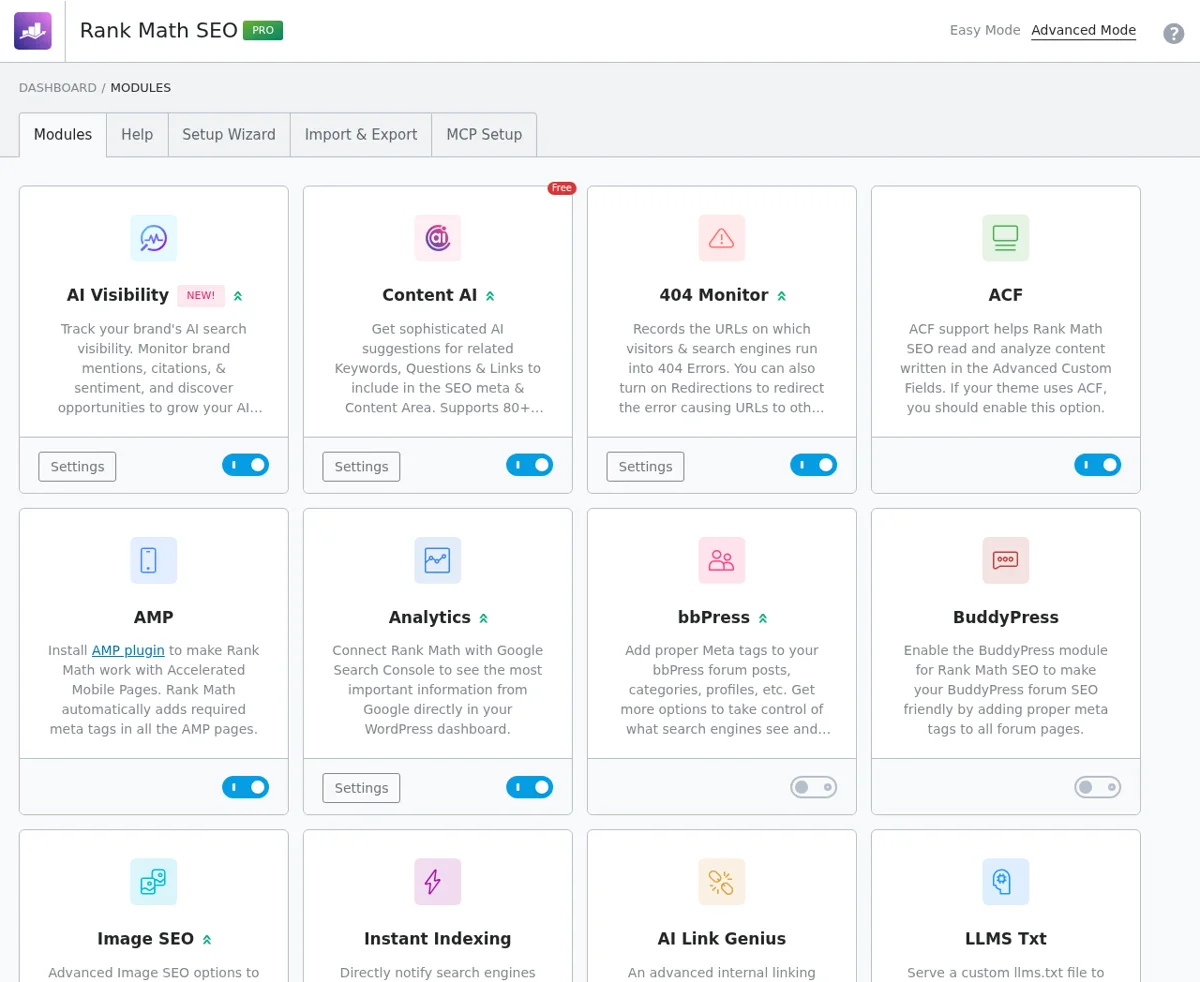
Why it matters: Because each module has a toggle, you can switch off what you do not use. That is the main answer to the common complaint that Rank Math is heavy, and it is how we keep our own setup focused.
Rank Math SEO Score and On-Page Analysis
The panel in the WordPress editor is the part you use every day. It shows a score out of 100 and groups its checks under Basic SEO, Additional, Title Readability and Content Readability. In the example below, our own Independent Analytics review scores 84/100. The checks it passes include using the focus keyword at the start of the title, a positive sentiment word in the title, a power word, a number in the title, short paragraphs and images in the content.
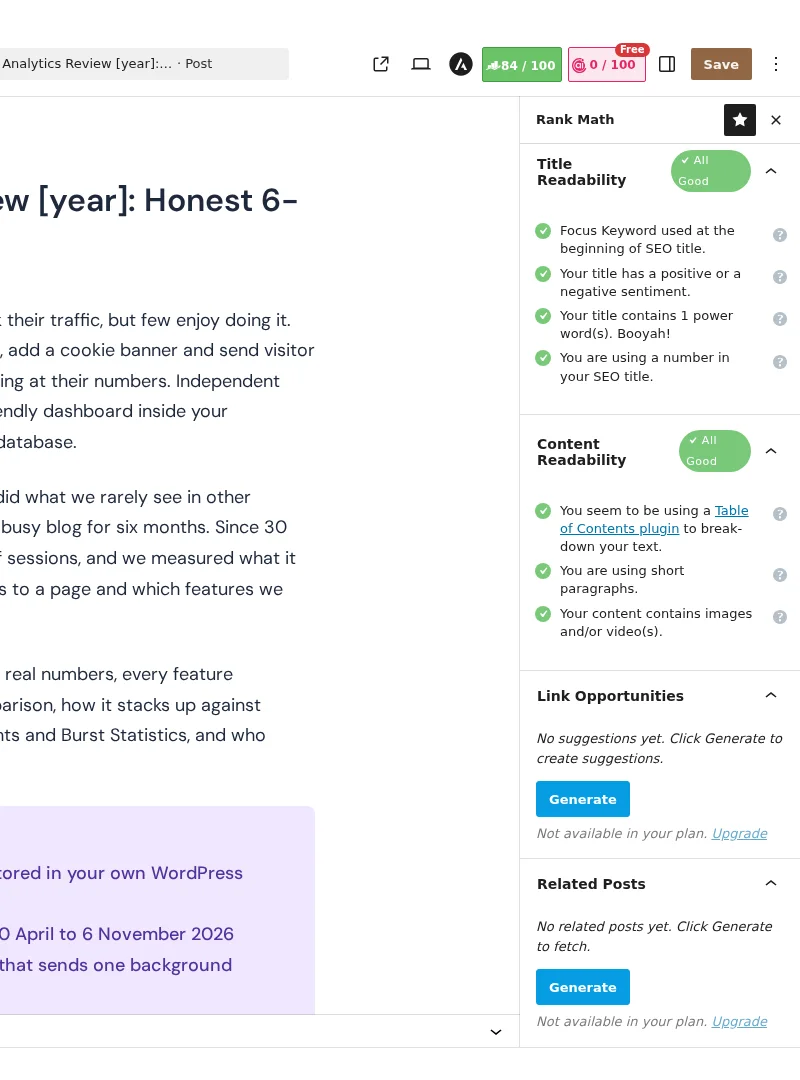
A score is only a guide, but it is a useful one, because it tells you what to fix before you publish. A second badge, labelled Free, is the Content AI score. On our Pro plan, a few AI link tools, such as Link Opportunities, showed the message “Not available in your plan” with an Upgrade link, so check which AI features your plan includes.
Rank Math Titles and Meta Settings
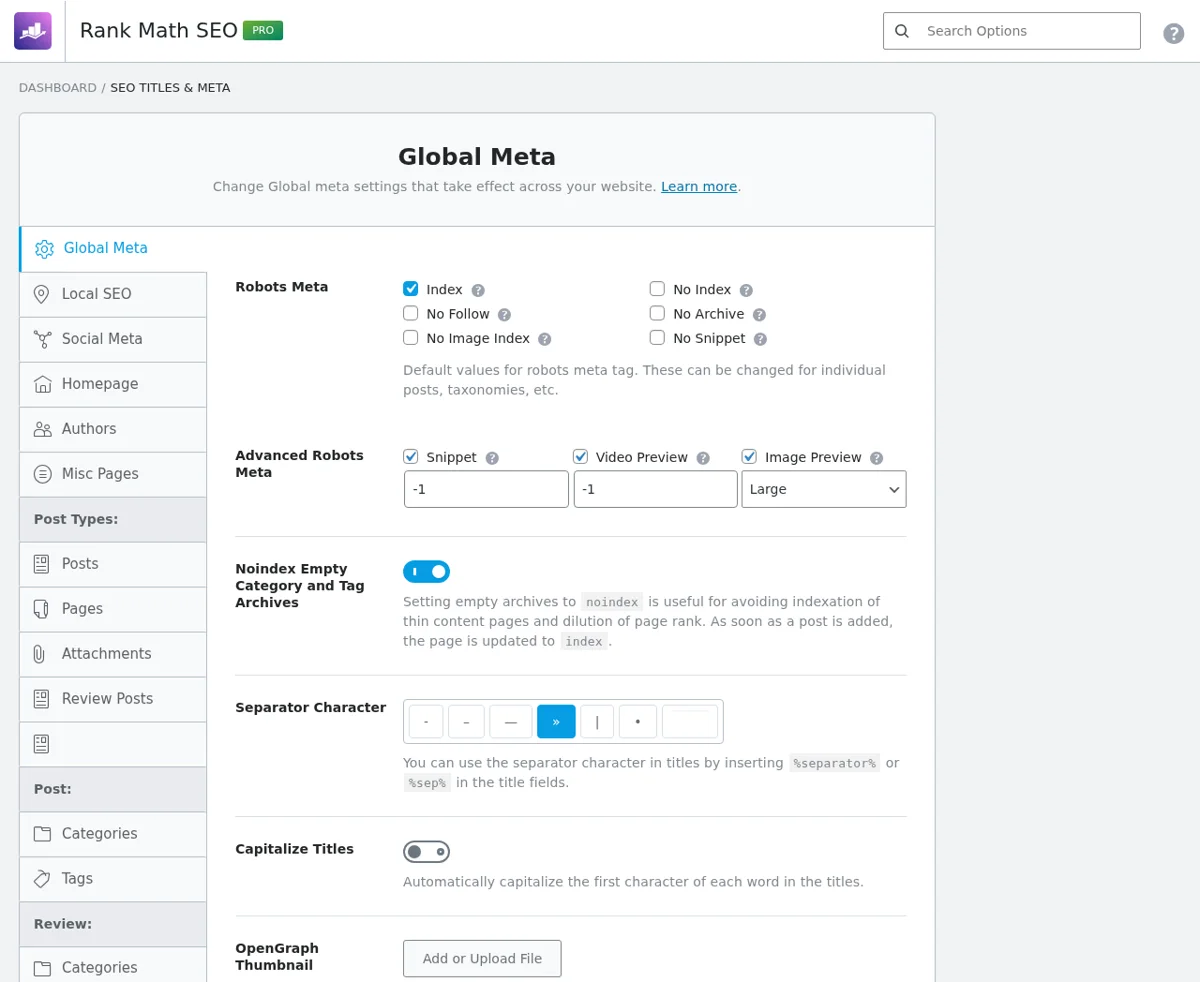
Titles and Meta is where you set the defaults for your whole site. You choose robots meta, advanced robots options, the separator character and title capitalization, and you can add noindex to empty category and tag archives. Each post type, such as posts, pages and attachments, has its own tab, so you can set a different title pattern for each.
Rank Math Schema Markup
Schema markup helps Google show rich results. Rank Math’s plugin page lists support for 16 or more schema types, including Article, FAQ, How-To, Product and Local Business. You pick a schema type per post type or per post, and the FAQ and How-To blocks add matching structured data automatically.
Rank Math XML Sitemaps
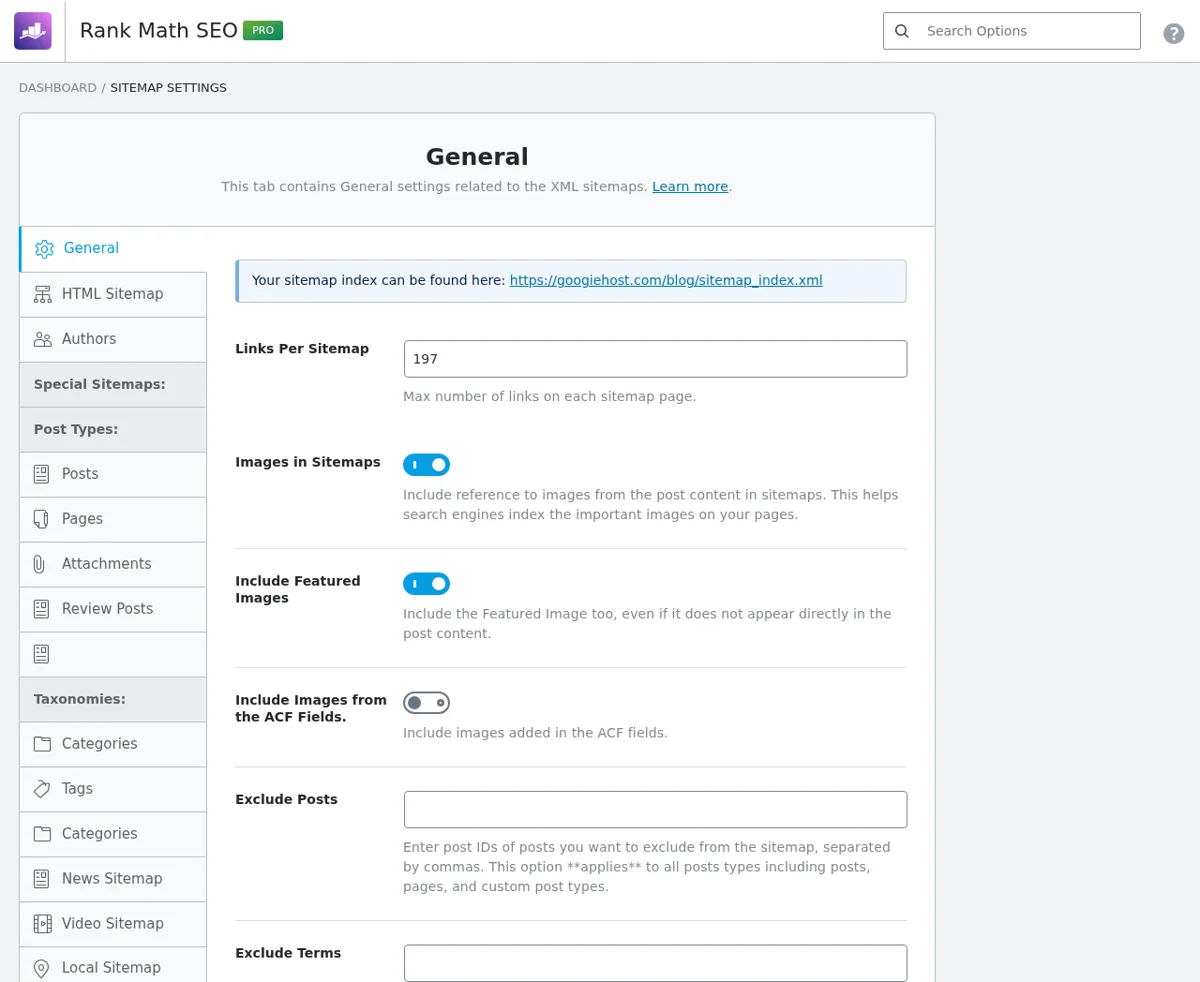
The sitemap module creates a sitemap index you can submit to Google. You can control how many links go into each sitemap, include images and featured images, exclude posts by ID, and switch each post type and taxonomy on or off. It also has an HTML sitemap tab and a News Sitemap tab, and the ACF module can add images from your custom fields.
Rank Math Redirections Manager
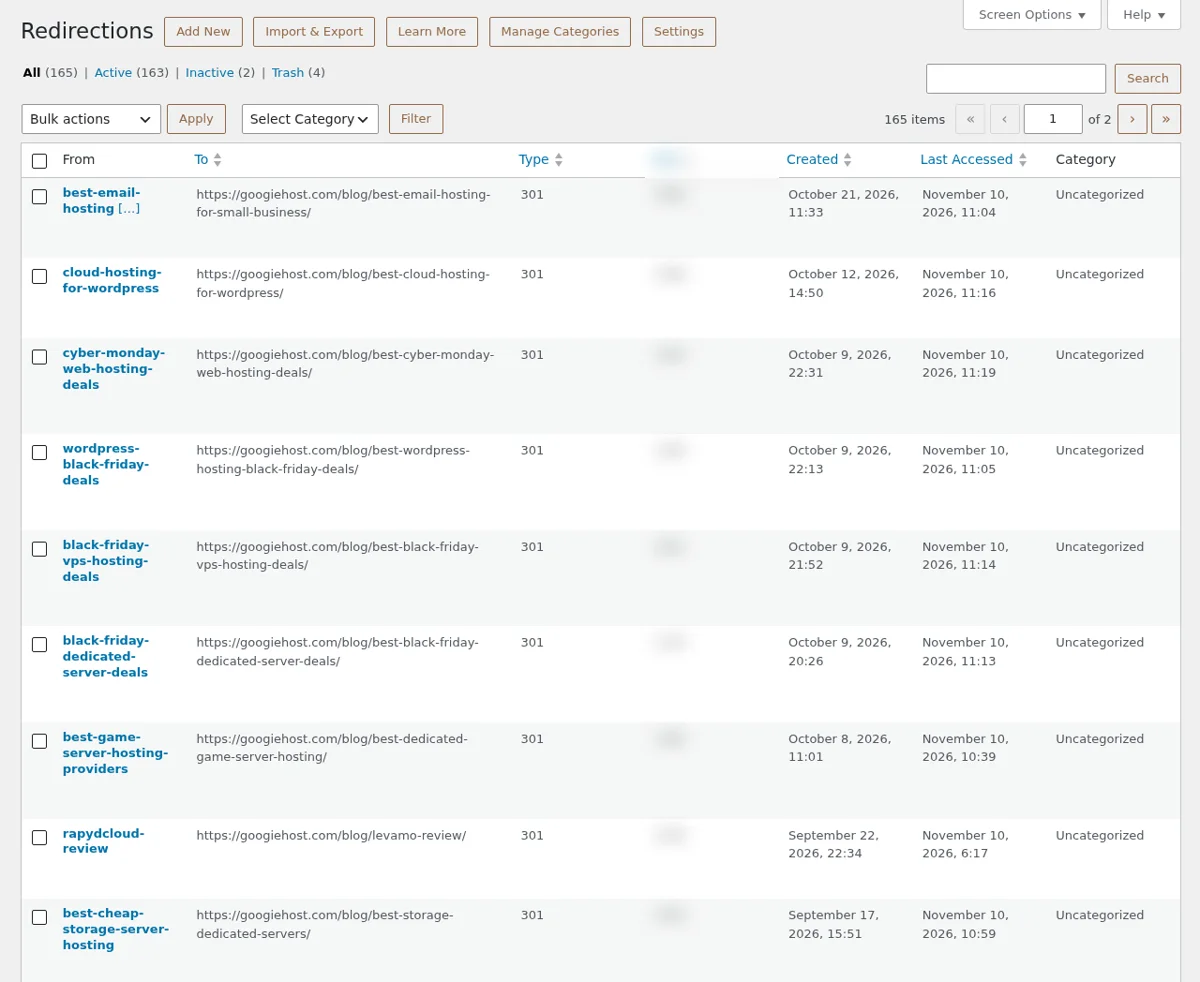
Redirections are where Rank Math saves real time. Ours list 165 redirections, with the source, destination, type, hits, creation date and last access date for each one. You can add, import and export redirects, group them in categories, and filter by active, inactive or trash. Several of ours date back to June 2019 and still work, and the hit count shows which old URLs still bring visitors.
Rank Math 404 Monitor
The 404 Monitor logs every URL that returns a 404 error, with its hit count and referrer, and you can turn a logged URL into a redirect in one step. Our log holds only 39 entries, which shows how clean the site is, but the tool matters most after a site move, a slug change or a large content cleanup.
Rank Math Link Counter and AI Link Genius
Rank Math’s link counter tracks the internal and external links on every post. It has recorded 20,019 internal links on our blog, which makes it easy to find posts that no other post links to. AI Link Genius, described on the plugin page, adds a link dashboard, bulk updates, link health monitoring and AI suggestions. See how we use internal links in our guide to the best managed WordPress hosting.
Rank Math Analytics and Search Console Integration
Connect Google Search Console and Rank Math shows your search data inside WordPress. The Analytics screen has tabs for Dashboard, Site Analytics, SEO Performance, Keywords, Rank Tracker and Index Status. The Dashboard shows an Overall Optimization donut, which scores the average SEO health of your posts, and cards for search traffic, impressions, keywords and average position, plus top winning and losing keywords.
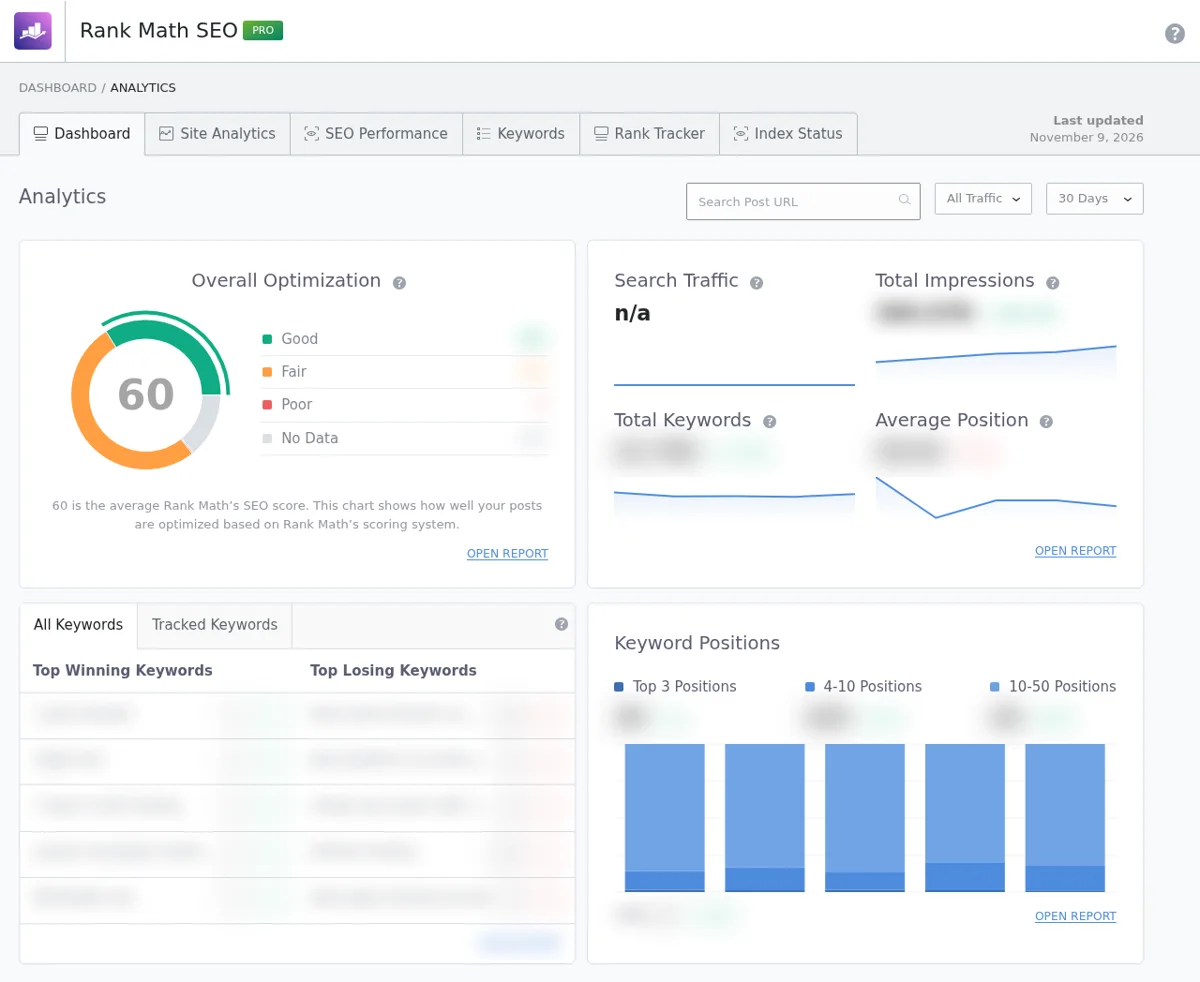
Our posts average 60/100 on Overall Optimization, which tells us that many older posts still have room to improve. The free plugin fetches Google data every 3 days and keeps it for 90 days. PRO fetches it daily and keeps it for 180 days, and tracks up to 1,000 keywords. Rank Math stores this data in your own database, so it uses space, and the data can differ slightly from what you see in Search Console itself.
Rank Math Content AI
Content AI is Rank Math’s writing assistant. The AI Tools tab offers a grid of tools, for example Blog Post Wizard, Blog Post Idea, Blog Post Outline, Blog Post Introduction, Blog Post Conclusion, Post Title, Topic Research and SEO Title. There are also tabs for Content Editor, Chat, History and Usage, and filters for SEO, Blog, Marketing and Sales, eCommerce and Misc.
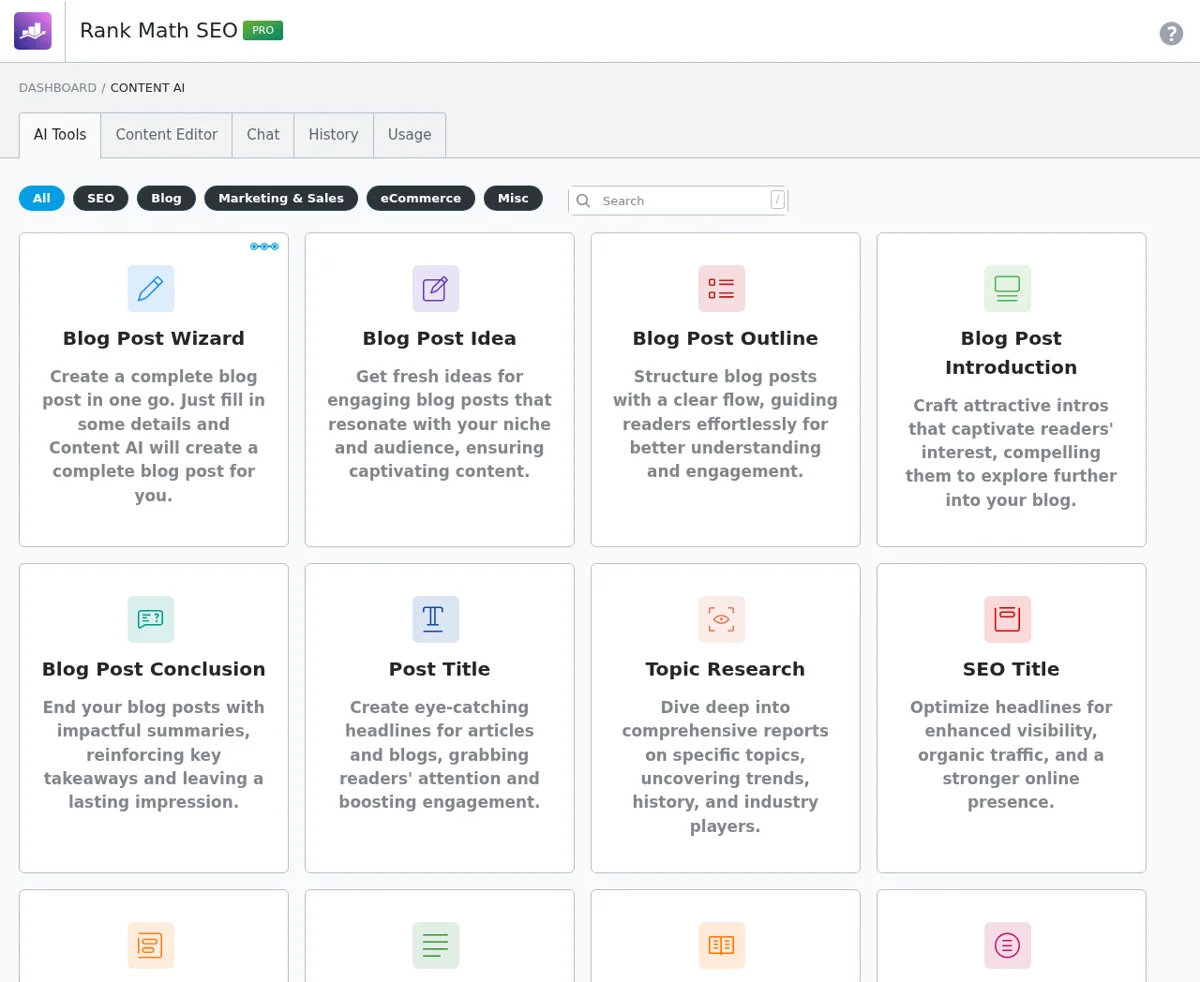
Content AI works on credits, and Rank Math’s pricing page lists a free AI trial with its plans. We use it for ideas, outlines and titles and not for finished articles, because AI text still needs a human edit. Check the Usage tab before you start, so you know how many credits you have left.
Rank Math AI Visibility, Instant Indexing and llms.txt
Three newer modules aim at AI search. AI Visibility tracks brand mentions in AI answers, llms.txt lets you publish a file that guides AI crawlers, and Instant Indexing sends URLs to the IndexNow API, up to 10,000 per submission, with Settings and History tabs. We have these switched on, but we did not run a brand tracking test for AI Visibility, so that part comes from Rank Math’s own description.
Rank Math Role Manager
The Role Manager decides who can touch which setting. For each role, such as Administrator and Editor, you tick the permissions: Titles and Meta, General Settings, Sitemap Settings, the 404 Monitor log, Link Builder, Redirections, Analytics, Role Manager, Site-Wide Analysis, On-Page Analysis, Schema, Social and Content AI. It is helpful for teams where writers should see the score but not change global settings.
Rank Math WooCommerce SEO, Local SEO and Multisite
Rank Math’s plugin page lists WooCommerce, page builder and multisite support, and Local Business schema. Our blog has no online store, so we did not test WooCommerce SEO, and the notes here come from Rank Math. If you run a store, pair it with a fast host, such as one from our list of the best WooCommerce hosting providers.
Rank Math SEO Analyzer
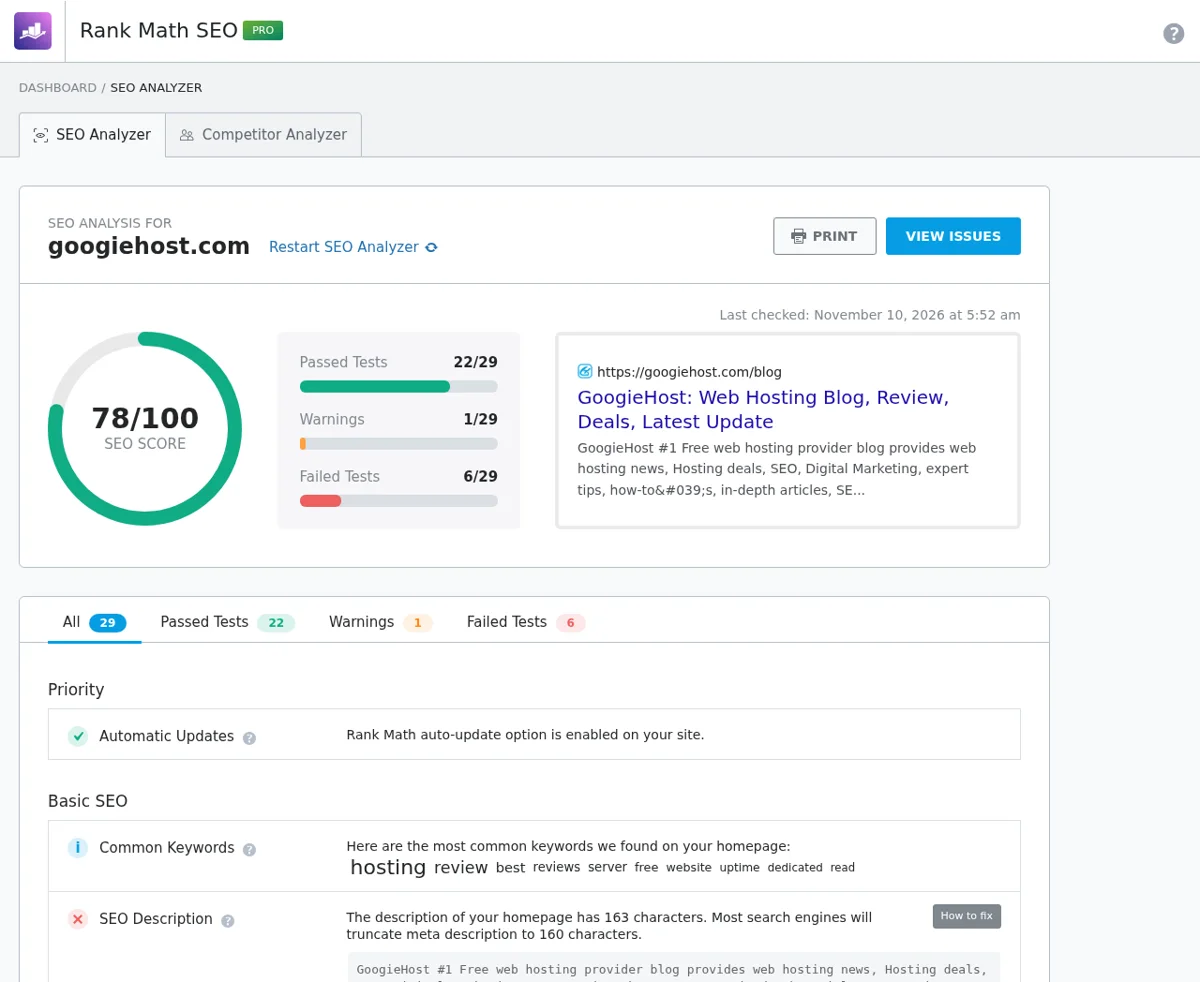
The SEO Analyzer audits your whole site, not one post. For googiehost.com it gave a score of 78/100, with 22 of 29 tests passed, 1 warning and 6 failed. It lists the priority items, such as automatic updates, and a Basic SEO list that includes your most common keywords. It also has a Competitor Analyzer tab.
Rank Math Performance and Database Size
Rank Math has a reputation for being heavy, so we measured the database side. After seven years, all of the plugin’s tables together use 143.5 MB on our blog. Most of that is the link counter and the Google data for Analytics, which are the two modules that store the most. If you do not need analytics in WordPress, switch the module off and you stop that growth.
| Performance Point | What We Found |
|---|---|
| Total size of Rank Math tables | 143.5 MB |
| Redirections and 404 tables | Under 1 MB combined |
| Biggest storage users | The Analytics data and the link counter |
| How to keep it lean | Switch off modules you do not use |
| Rollback tool | Status and Tools can reinstall the previous plugin version |
Note: We did not run a before-and-after speed test. For a fast site, use a good host and a cache. See our guides to the fastest WordPress hosting providers and the best WordPress caching plugins, and our WordPress speed optimization guide.
The Status and Tools screen also has a Version Control tab. It shows your version and lets you roll back to the previous release, and it has a Beta Tester switch. That rollback tool is a safety net we have been glad of after updates.
Rank Math Pricing and Plans
Rank Math has a free plugin and three paid plans. These are the prices on its pricing page during its Anniversary Sale, per month, billed yearly and excluding tax:
| Plan | Sale Price | Renewal Price | Sites | Tracked Keywords |
|---|---|---|---|---|
| Free | $0 | $0 | Unlimited | Not listed |
| PRO | $5.59/mo | $8.99/mo ($107.88/year) | Unlimited personal sites, no client sites | 1,000 |
| Business | $17.59/mo | $27.99/mo ($335.88/year) | 200 client and personal sites | 20,000 |
| Agency | $38.59/mo | $64.99/mo ($779.88/year) | 750 client and personal sites | 75,000 |
| Rank Math + WP Rocket | $9.99/mo | $13.99/mo | Unlimited personal sites | 1,000 |
Rank Math offers a 30-day money-back guarantee, and you can cancel or upgrade any time. Plans renew automatically each year at the regular price, and PRO is only for personal sites you fully own, so use Business or Agency for clients. You can pay with PayPal, cards and Amazon Pay. Because the sale ends, confirm the price at checkout. For the other costs of running a site, see our breakdown of how much it costs to build a website.
Rank Math Pro vs Free Version: Which Do You Need?
We run both: the free Rank Math 1.0.281 plugin and Rank Math Pro 3.0.124 as an add-on on the same blog. Pro does not replace the free plugin, it extends it, so you always install the free one first. Here are the limits Rank Math states on its pricing page:
| Feature | Rank Math Free | Rank Math Pro |
|---|---|---|
| Price | $0 | $5.59/mo on sale, $8.99/mo renewal |
| Sites | Unlimited | Unlimited personal sites |
| Google data fetch | Every 3 days | Daily |
| Google data kept | 90 days | 180 days |
| Email report frequency | Every 30 days | Every 15 or 30 days |
| Tracked keywords | Not listed | 1,000 |
| Free AI trial | Not listed | Starter plan, 15-day trial |
| Support and refund | Community support | 30-day money-back guarantee |
The pricing page does not spell out every feature by plan, so we list only the limits it states and what we see in our own dashboard. The free plugin already covers on-page SEO scoring, titles and meta, schema, XML sitemaps, redirections, the 404 monitor, the link counter and the SEO Analyzer. Pro adds more Google data, keyword tracking and AI allowance.
Choose Free If
- You run one blog or a small business site and want on-page SEO, schema, sitemaps and redirects.
- You are happy with Google data every 3 days.
- You want to test Rank Math before paying anything.
Choose Pro If
- You track rankings and want daily Google data, 180 days of history and up to 1,000 keywords.
- You run several personal sites and want one price for all of them.
- You use Content AI often and want its included allowance.
Our take: Start free, and upgrade when you hit a limit. We kept Pro because daily data and keyword tracking help us decide which old posts to refresh. Remember that Pro does not cover client sites, so agencies need Business or Agency.
Rank Math Support and Documentation
Support is worth checking before you pay. According to Rank Math’s pricing page, the PRO plan includes 24/7 support, and the Business and Agency plans include 24/7 priority support, which puts your questions ahead of other customers. The page does not state response times, so treat the claim as a promise and not a guarantee.
| Support Option | What Rank Math States |
|---|---|
| Knowledge base | A large help library with setup and troubleshooting guides |
| Support tickets | A support area for tickets, with PRO, Business and Agency plans listed with 24/7 support |
| Priority support | Business and Agency plans, answered ahead of other customers |
| Community | An official Facebook group for Rank Math users |
| Response times | Not stated on the pricing page |
Our experience: We used the knowledge base more than support tickets over the years, and it answered our setup questions. We have not run a formal support speed test, so we do not rate response times here. If fast answers matter to you, test it during the 30-day money-back window.
How Is Rank Math Different From Other SEO Plugins?
Most SEO plugins cover the basics: titles, meta descriptions, sitemaps and a content score. What sets Rank Math apart is how much it puts in one place and how it prices it. Here are the main differences we saw, compared with Yoast, All in One SEO and SEOPress:
- One plugin for many jobs: Redirections, a 404 monitor, schema, Search Console data, a link counter and AI tools sit inside Rank Math, while rivals often need a paid tier or a separate add-on for some of them.
- Pricing by use, not by site: Rank Math PRO covers unlimited personal sites. Yoast Premium and AIOSEO Basic cover one site each, so costs grow with every site you add.
- Modular by design: Each feature is a module with a switch, so you can turn off what you do not use and keep the plugin lean.
- More analytics in WordPress: Rank Math shows Google Search Console data, keyword positions and an Overall Optimization score in your dashboard.
- Newer AI search tools: AI Visibility and llms.txt are built in, and AI Link Genius is described on its plugin page.
Rank Math vs Yoast vs All in One SEO vs SEOPress: Comparison Table
This table uses each vendor’s official pages as of 10 November 2026. Where an official page did not say, we write “Not confirmed.”
| Feature | Rank Math | Yoast SEO | All in One SEO | SEOPress |
|---|---|---|---|---|
| Free plugin installs | 4+ million | 10+ million | 2+ million | 300,000+ |
| WordPress.org rating | 4.8/5, 7,523 reviews | 4.8/5, 27,820 reviews | 4.7/5, about 5,200 reviews | 4.8/5, 1,268 reviews |
| Entry paid price | PRO $5.59/mo on sale, $8.99/mo renewal | Premium $118.80/year | Basic $49.50 first year, $99 renewal | PRO from $49/year |
| Sites in the entry plan | Unlimited personal sites | 1 site | 1 site | 1 site |
| Redirect manager | Listed on the free plugin page | Premium | Paid tier | Basic redirects free |
| 404 monitor | Listed on the free plugin page | Not offered per its official pages | Paid tier | PRO |
| Schema | 16+ types | Basic free, more in Premium | Schema markup in free | Schema editor in PRO |
| AI tools | Content AI and AI Visibility | AI features in Premium | AI credits in paid plans | AI assistant in PRO (beta) |
| Search Console data in the dashboard | Analytics module | Not confirmed | Elite plan | PRO |
| Refund | 30 days | 30 days, first purchase only | 14 days | Not confirmed |
Rank Math vs Yoast SEO
Yoast SEO has the biggest user base, with more than 10 million installs, and its free plugin is a clean, guided tool. Yoast Premium costs $118.80 a year for one site, and WooCommerce SEO costs $178.80 a year. Rank Math’s paid plan is cheaper and covers unlimited personal sites, and it puts redirects and a 404 monitor in the free plugin. Our pick: Rank Math for most sites, Yoast if you prefer a simpler, more guided editor.
Rank Math vs All in One SEO
All in One SEO has more than 2 million installs and four paid tiers: Basic at $49.50 for the first year and $99 on renewal for one site, and Pro and Elite for more sites and features. Redirects, local SEO and Search Console metrics sit in higher tiers, and discounts apply to the first term only. Our pick: Rank Math for value, AIOSEO if you want its tiered support and Elite client tools.
Rank Math vs SEOPress
SEOPress is smaller, with more than 300,000 installs, and its plugin page lists PRO from $49 a year for one site or $149 a year for unlimited sites. Its free version has unlimited target keywords and basic redirects, but the schema editor and 404 monitoring are PRO features. Our pick: SEOPress for a lighter setup, Rank Math for a bigger toolbox.
Best Rank Math Alternatives
Rank Math is not the right fit for everyone. If you want something different, these are the main alternatives from the comparison above and when each one makes sense:
| Alternative | Choose It If | Entry Paid Price |
|---|---|---|
| Yoast SEO | You want the biggest user base and a simple, guided editor | Premium $118.80/year, 1 site |
| All in One SEO | You like tiered plans and want Elite features for larger sites | Basic $49.50 first year, $99 renewal, 1 site |
| SEOPress | You want a lighter plugin with a smaller footprint | PRO from $49/year, 1 site |
Pick an alternative only if a specific limit bothers you, such as the learning curve or the number of settings. For a growing site that needs redirects, schema and analytics in one place, Rank Math is still the better value. Hosting also affects SEO, so see our list of the best cloud hosting for WordPress when you compare options.
Rank Math Pros and Cons: What We Liked and What Still Needs Work
| ✅ Pros | ❌ Cons |
|---|---|
| Redirections, 404 monitor and schema in one plugin | Many modules and settings take time to learn |
| PRO covers unlimited personal sites | Some AI link tools show “Not available in your plan” on Pro |
| Built-in analytics, keyword positions and an SEO Analyzer | Its tables can grow, 143.5 MB on our blog |
| Every module has a switch | Analytics data can differ from Search Console |
| Free version has a generous feature set | Pricing sale ends, and renewal is $8.99/month on PRO |
| Rollback tool in Status and Tools | Content AI works on credits and needs a human edit |
| 30-day money-back guarantee | PRO is for personal sites only, so agencies need Business |
Is Rank Math Worth It? Who Should Use It
- Bloggers and publishers who want one plugin for SEO scoring, schema, sitemaps and redirects.
- Owners of several sites, because PRO covers unlimited personal sites for one price.
- Agencies and freelancers who manage client sites on the Business or Agency plan.
- Store owners who want WooCommerce SEO and schema, though we did not test this part.
- Not ideal for total beginners who want the simplest possible plugin, or sites that need only a title and meta editor.
Running a bigger site? Compare hosts in our guide to the best WordPress hosting for agencies and read our list of must-have WordPress plugins.
Our Rank Math Review Scorecard
| Category | Score | Why |
|---|---|---|
| Features | 4.9 | Redirects, 404 monitor, schema, analytics, AI and more in one plugin |
| Ease of Use | 4.5 | A guided wizard and Easy Mode, but many settings to learn |
| Performance | 4.4 | Modules can be switched off, but the tables reached 143.5 MB |
| Value | 4.8 | Unlimited personal sites on PRO and a generous free version |
| Reporting | 4.5 | Overall Optimization, keyword positions and an SEO Analyzer |
| Overall | 4.6/5 | The most complete WordPress SEO plugin we have used |
FAQ – Rank Math Review 2026
Is Rank Math good?
Yes. We have used Rank Math since 2019 and still run it with 21 modules. It has more than 4 million active installs and a 4.8/5 WordPress.org rating from 7,523 reviews, and it packs redirects, schema, a 404 monitor and analytics into one plugin.
Is Rank Math free?
Yes. The free plugin from the WordPress plugin directory covers on-page SEO analysis, sitemaps, schema, redirections and a 404 monitor. Paid plans add more Google data, keyword tracking and AI limits.
How much does Rank Math Pro cost?
On its current Anniversary Sale, PRO costs $5.59 a month billed yearly and renews at $8.99 a month, which is $107.88 a year. Business is $17.59 a month and Agency is $38.59 a month, and all have a 30-day money-back guarantee.
Rank Math vs Yoast: which is better?
Rank Math is better value for most sites, with unlimited personal sites on PRO, redirects and a 404 monitor in the free plugin, and built-in analytics. Yoast has the bigger user base and a simpler, more guided editor, and Premium costs $118.80 a year for one site.
What is the difference between Rank Math free and Pro?
Pro fetches Google data daily and keeps it for 180 days, against every 3 days and 90 days for free, and it tracks up to 1,000 keywords. Pro also includes a free AI trial and more frequent email reports.
How is Rank Math different from other SEO plugins?
It puts redirections, a 404 monitor, schema, a link counter, analytics and AI tools in one modular plugin, and its PRO plan covers unlimited personal sites, while Yoast Premium, AIOSEO Basic and SEOPress PRO each cover one site.
Does Rank Math slow down WordPress?
We did not run a speed test. Each module has a switch, so you can turn off what you do not need. Its tables used 143.5 MB of our database, mostly for analytics and the link counter.
Is Rank Math good for WooCommerce?
Rank Math’s plugin page lists WooCommerce support. We did not test it, because our blog has no store, so read the plan details and pair it with a fast WooCommerce host.
Can I use Rank Math Pro on client sites?
Not on PRO. It covers personal sites you fully own. For client sites, choose Business for 200 sites or Agency for 750 sites.
How do I switch from Yoast to Rank Math?
Install Rank Math and run the Setup Wizard. It can import titles, meta data and redirects from other SEO plugins, and you should check a few posts before you deactivate the old plugin.
What is Rank Math Content AI?
Content AI is Rank Math’s AI writing assistant, with tools for post ideas, outlines, introductions, titles and topic research. It works on credits, and Rank Math’s pricing page lists a free AI trial with its plans.
What is the best SEO plugin for WordPress?
For most sites it is Rank Math, because it gives you the most features for the price. Yoast suits people who want simplicity, All in One SEO suits those who like tiered plans, and SEOPress suits a lighter setup.
Conclusion
Rank Math is a strong all-in-one WordPress SEO plugin. After seven years on the GoogieHost blog, it still handles our on-page SEO, 165 redirections, 404 monitoring, schema, sitemaps and Search Console data in one place, and it scored 78/100 in its own SEO Analyzer on our site.
It is not perfect. The many modules take time to learn, a few AI tools are limited by plan, and the tables grew to 143.5 MB on our blog, so it helps to switch off what you do not use. Against Yoast, All in One SEO and SEOPress, its main strengths are the feature set and a PRO plan that covers unlimited personal sites.
So, is Rank Math good? Yes, for most WordPress sites. Start with the free plugin, import your settings if you are moving from Yoast, and move to PRO only when you need daily Google data or keyword tracking. Choose Yoast instead if you prefer a simpler editor with fewer settings.



Table of Contents
- Rank Math Review at a Glance
- What Is Rank Math?
- What’s New in Rank Math in 2026?
- How We Tested Rank Math
- How to Set Up Rank Math
- How to Import SEO Settings From Yoast SEO to Rank Math
- Rank Math Features: Every Module We Tested
- Rank Math SEO Score and On-Page Analysis
- Rank Math Titles and Meta Settings
- Rank Math Schema Markup
- Rank Math XML Sitemaps
- Rank Math Redirections Manager
- Rank Math 404 Monitor
- Rank Math Link Counter and AI Link Genius
- Rank Math Analytics and Search Console Integration
- Rank Math Content AI
- Rank Math AI Visibility, Instant Indexing and llms.txt
- Rank Math Role Manager
- Rank Math WooCommerce SEO, Local SEO and Multisite
- Rank Math SEO Analyzer
- Rank Math Performance and Database Size
- Rank Math Pricing and Plans
- Rank Math Pro vs Free Version: Which Do You Need?
- Rank Math Support and Documentation
- How Is Rank Math Different From Other SEO Plugins?
- Best Rank Math Alternatives
- Rank Math Pros and Cons: What We Liked and What Still Needs Work
- Is Rank Math Worth It? Who Should Use It
- Our Rank Math Review Scorecard
- FAQ - Rank Math Review 2026
- Conclusion