Public servers can get frustrating after a while if you use it for gaming.
Random server resets, lag during busy hours and players who ruin the game can make things difficult for almost any gaming group. That is why many players, clans and communities finally decide to get their own game server.
I have spent years setting up and testing game servers for friends, clans, and paid gaming communities.
Based on that experience, I have put together this list of the best game server hosting providers and ranked 10 hosts based on important factors such as price, uptime, DDoS protection, server performance and game support.
In this guide, you will find the top game server hosting providers, the different types of servers you can choose from, and a simple way to find the right host for your needs.
Here is something interesting: one of the hosts on this list charges less than a dollar per GB of RAM. Surprisingly, many people simply scroll past it when comparing hosting plans.
So, stick with me, and I will help you find the right game server host without making you spend hours comparing dozens of plans.
Use it as a quick starting point, then keep reading for the full details and my recommendations

What Is Game Server Hosting?

Game server hosting means renting a server in a data center that runs your multiplayer game 24/7. It works separately from your home PC, so your computer does not need to stay on all the time.
When your PC is off, your friends can still log in and play.
Your game world keeps running on hardware that is built to handle multiplayer games.
The server also runs on a fast internet connection with much more upload speed than most home connections. This helps keep things smooth when 20 or more players are online at once.
Downtime can cost you players too. When a server keeps lagging or goes offline for a day, players can lose interest and may not come back.
A good game server hosting provider takes care of the hardware, power, and network for you, so you can focus on the gameplaying and managing your gaming community.
Here is what a good host gives you compared with running the server on your own PC:
- Full control: Set the rules, add mods, and control who can join from one panel.
- 24/7 uptime: Your server stays online, giving your community a place to play anytime.
- Low ping: Players connect to a nearby data center, which helps keep lag and latency low.
- DDoS protection: Built-in protection helps block large attacks aimed at your server.
So, who really needs game server hosting?
Quite a few people, especially once their game community starts growing.
It can be useful for a group of friends tired of relying on one person’s PC, a growing gaming community, an esports team, or anyone running a game server as a small business.
Note: Running a server on your own PC works fine for one evening with a couple of friends. But once you want the server online while you sleep, a game server host starts to make much more sense.
Short on time? No problem
Here is a quick look at the top 3 game server hosting providers before we get into the detailed reviews.
✅ UltaHost: Get your game online fast with powerful hardware, NVMe storage, DDoS protection, low-latency locations, and 24/7 support. Great for smooth, reliable multiplayer gaming.
✅ GravelHost: Start playing in minutes with affordable game servers, 15 global locations, DDoS protection, easy controls, and 24/7 support. Perfect for gaming with friends.
✅ Apex Hosting: Power your gaming community with fast hardware, easy server management, strong DDoS protection, unlimited player slots, and one-click mod installs. Built for smooth gameplay.
Top 10 Best Game Server Hosting Providers 2026
I bought hosting accounts, set up game worlds and tested each control panel the way a real server admin would. After all that testing, these are the 10 providers that made the cut, ranked based on what most players actually need.
⏰ TL;DR
1. UltaHost: Budget-Friendly Game Server Hosting
2. GravelHost: Affordable High-Performance Game Hosting
3. Apex Hosting: Premium Minecraft Server Hosting
4. Shockbyte: Fast Game Server Hosting
5. Host Havoc: Reliable Game Server Hosting
6. ScalaCube: Flexible Game Server Hosting
7. GameServers.com: Global Game Server Hosting
8. GPortal: Premium Game Server Hosting
9. PingPerfect: Low-Latency Game Server Hosting
10. Nitrado: Flexible Game Server Hosting
1. UltaHost: Budget-Friendly Game Server Hosting
UltaHost

Pros
- Longest 30-day refund on this list
- 30-plus global locations for low ping
- EPYC hardware with free backups and SSL
Cons
- Game hosting is newer than rivals
Summary
UltaHost stands out as a top game server host with AMD EPYC, NVMe storage, 30+ data centers, one-click mods, DDoS protection, and a 30-day refund window.
Price: USD 2.85 /month
Visit UltaHostUltaHost takes the top spot because it gets many important things right and gives you plenty of time to test the service.
UltaHost added game servers in 2024, and players get solid hardware, including AMD EPYC processors and NVMe storage. With more than 30 data centers, you can choose a location closer to your players for lower ping.
What really makes UltaHost stand out is its 30-day refund window. Most game hosts give you only three to seven days, but here you get a full month to test your server with real players.
Add one-click mod installs and standard DDoS protection, and it becomes a safe choice for anyone who wants to try a game server without rushing.
Key Features
The core features I leaned on during testing:
- Thirty-day money-back guarantee. You get a full month to run the server with real players and test everything properly, giving you the longest safety net on this entire list.
- AMD EPYC power. Every gaming plan runs on modern EPYC processors, helping worlds load faster and chunk generation stay smooth even when many players join together.
- Reach across 30-plus regions. Data centers span six continents, so you can place your server closer to your players and enjoy lower, more stable ping.
- One-click mod installer. Adding a mod, plugin, or full modpack takes just one click from the dashboard, with no need to upload files manually yourself.
- Security included by default. Free SSL, automated backups, and DDoS filtering come with every plan, helping keep your game world protected from the very first day.
Starting Price
Pricing stays gentle for a host that feels premium.
| CPU | RAM | Storage | Price |
|---|---|---|---|
| AMD EPYC, 1 vCore | 1 GB | 10 GB NVMe SSD | $2.85/mo |
Because it also runs demanding survival titles, you can move from a light world to a heavy modded one on the same account whenever the mood strikes.
Who it is best for
Best for players who want strong hardware, wide reach, and a long refund window, all in one place.
Small Note by me
In my runs, a 4GB Minecraft world held a steady 20 TPS with 15 players and a light plugin set.
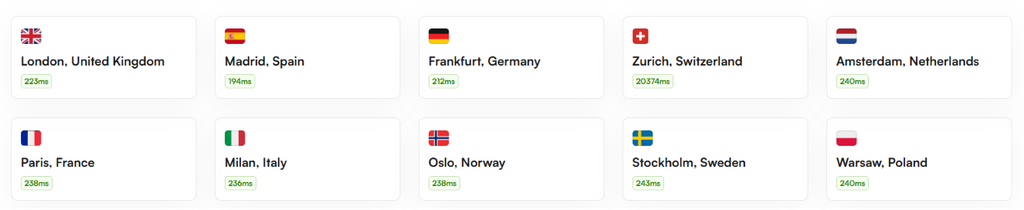
The above screenshot shows the server latency of UltaHost data centers. But always make sure to choose the server location near to your gaming community to get as less latency as possible.
🔔 UltaHost Offer (2026): Enjoy game server hosting with easy mod installation, a powerful control panel, and 24/7 expert support to keep your server secure and optimized. Use coupon code “GOOGIEHOST” to get an Extra 7% OFF. Don’t miss out on this exclusive offer!
2. GravelHost: Affordable High-Performance Game Hosting
GravelHost

Pros
- Cheapest price per GB in this roundup
- High-clock Ryzen 9 cores at budget rates
- Support replies under five minutes
Cons
- Young company with a short track record
Summary
GravelHost offers budget-friendly game hosting with 52+ games, Ryzen 9 CPUs, NVMe storage, 2.2 Tbps DDoS protection, 8 locations, and fast support.
Price: USD 1.80 /month
Visit GravelHostIf your budget is your biggest concern, GravelHost gives you a lot for your money.
This newer host launched in 2023 and supports more than 52 games from eight locations. Its Minecraft pricing starts at around $1.80 per month, making it one of the cheapest options in this roundup.
The low price does not mean weak hardware. GravelHost uses AMD Ryzen 9 processors, NVMe storage, and offers 2.2 Tbps of DDoS protection. Support is also quick, with replies often coming in under five minutes through tickets and Discord. For a small gaming community on a tight budget, it offers excellent value.
Key Features
What you get for so little:
- Lowest price per gigabyte. Minecraft starts at just 90 cents per gigabyte of RAM, making it one of the cheapest choices in this entire comparison.
- High-clock Ryzen 9 cores. Servers use Ryzen 9 5900X and 7950X processors, helping even heavily modded worlds maintain smooth and stable performance during busy gameplay.
- A large 2.2 Tbps shield. Its strong DDoS protection can handle serious attacks, giving growing gaming communities extra protection when unwanted traffic suddenly hits.
- Support in under five minutes. Tickets and Discord messages often receive quick replies, which is something many users also mention positively in their reviews.
- Extras from one dashboard. Beyond game servers, you can also manage Discord bots and small websites from the same simple and convenient control panel.
Starting Price
The entry price is where GravelHost makes its name.
| CPU | RAM | Storage | Price |
|---|---|---|---|
| AMD Ryzen 9 5900X | 2 GB | 10 GB NVMe SSD | $1.80/mo |
The value carries into heavier titles too, so a modded Conan Exiles hosting build stays affordable even as your player list grows.
Who it is best for
Best for budget communities and modded Minecraft fans who refuse to overpay for solid hardware.
Small Note by me
On the Ryzen 9 tier, a modpack that stuttered on cheaper hosts held its pacing here, and my ping landed near 52ms.
🔔 GravelHost Offer (2026,): Use GravelHost ARK Server Hosting coupon code “GOOGIEHOST” to get up to 40% on all its game hosting plans with 24*7 Support, Full FTP Access, Unlimited Slots etc.
3. Apex Hosting: Premium Minecraft Server Hosting
Apex Hosting

Pros
- Unlimited player slots on every plan
- 200-plus one-click modpacks
- Renewal price shown up front
Cons
- Higher entry price than budget rivals
- Only a 7-day refund, no annual billing
Summary
Apex Hosting is ideal for beginners, offering unlimited players, one-click modpacks, a mobile-friendly panel, free transfers, and simple Minecraft server setup.
Price: USD 5.99 /month
Visit Apex HostingNew to game servers and feeling confused? Apex Hosting makes things much easier.
Apex Hosting has been providing Minecraft servers since 2013 and is well known for its beginner-friendly setup. Every plan comes with unlimited player slots, so you do not have to worry about paying more when your server gets popular.
Its custom Multicraft panel works on browsers and phones, and you can install more than 200 modpacks with one click. Apex also clearly shows the renewal price beside the promotional price, which is something many hosts do not do.
It is not the cheapest option, but the easy setup and free server transfer make it a great choice for beginners.
Key Features
The parts that make it beginner-proof:
- Unlimited player slots. Every plan allows as many players as your available RAM can handle, so a busy server does not automatically cost you more.
- Mobile-friendly Multicraft panel. The custom panel works in any browser, including your phone, and keeps server management simple for first-time admins and beginners.
- Two-hundred-plus one-click modpacks. Popular packs like RLCraft install with one click, saving you from manually downloading, uploading, and configuring complicated files yourself.
- Free server transfer. Their team can move your existing world from another host for free, making the switch much easier and less stressful overall.
- Honest renewal pricing. The regular renewal price appears beside the promotional price at checkout, so you know what you will actually pay later.
Starting Price
Apex costs a little more up front, and here is the base tier.
| CPU | RAM | Storage | Price |
|---|---|---|---|
| Premium shared core | 2 GB | NVMe SSD | $5.99/mo |
Beyond Minecraft it handles survival favorites, so spinning up a dedicated Project Zomboid server takes the same easy path through the panel.
Who it is best for
Best for total beginners and modpack lovers who value a clean panel over rock-bottom pricing.
Small Note by me
My test ticket got a reply in roughly five minutes, and the installer flashed a full modpack in a single click.
🔔 ApexminecraftHosting Offer (2026,): Grab an Additional 10% OFF on your ARK Server Quarterly Plans or any game hosting! Take advantage of this offer now and save more on your ApexminecraftHosting ARK Server subscriptions.
4. Shockbyte: Fast Game Server Hosting
Shockbyte

Pros
- One of the lowest Minecraft entry prices
- Same features on cheap and pricey plans
- Massive modpack library
Cons
- Support can lag during peak hours
Summary
Shockbyte offers affordable game hosting with 60+ supported games, unlimited slots, a redesigned control panel, modpack browser, and strong self-help resources.
Price: USD 2.79 /month
Visit ShockbyteWant a cheap Minecraft server from a well-known company? Shockbyte is worth looking at.
Shockbyte started in Australia in 2013 and has powered more than a million servers. Its biggest advantage is the low starting price, with Minecraft plans beginning at around $2.79 per month and unlimited slots on most plans.
It supports more than 60 games, and its control panel received a major redesign in 2026. You get a smoother console and a built-in modpack browser. Shockbyte also has official connections with games such as Rust, RuneScape, and FiveM.
Support can sometimes be slow during busy hours, but its guides and self-help tools can help you solve many common problems.
Key Features
Where it earns its long-standing fanbase:
- Rock-bottom entry price. Minecraft plans start near three dollars per month, making Shockbyte one of the cheapest established hosts for players starting small.
- Same features on every tier. DDoS protection, a free subdomain, and unlimited player slots come standard, whether you choose the cheapest or bigger plan.
- Over 3,000 modpacks. The library includes CurseForge, FTB, Technic, and ATLauncher packs, giving you plenty of easy one-click choices to explore.
- Rebuilt 2026 control panel. The updated panel loads faster and adds a modpack browser and configuration manager, making everyday server management much smoother.
- Official game partnerships. Direct relationships with teams behind Rust, RuneScape, and FiveM help keep those servers updated and properly supported over time.
Starting Price
The starting plan is about as cheap as an established host gets.
| CPU | RAM | Storage | Price |
|---|---|---|---|
| AMD EPYC | 1 GB | 10 GB NVMe SSD | $2.79/mo |
The broad game list means survival crossovers are easy, so a co-op Sons of the Forest server hosting plan sits right next to your Minecraft world.
Who it is best for
Best for value hunters who want the lowest Minecraft start and a huge game list.
Small Note by me
My one issue was a 20-minute wait on live chat at peak, which lines up with what long-term users report.
🔔 Shockbyte Offer (2026): Get reliable game server hosting with DDoS protection, unlimited player slots, NVMe storage, and 24/7 support. Keep your server fast, secure, and ready to play. Read our Shockbyte review before you choose your plan!
5. Host Havoc: Reliable Game Server Hosting
Host Havoc

Pros
- Measured 99.98% uptime on owned hardware
- Under-10-minute support, 4.8 Trustpilot
- Advanced DDoS filtering as standard
Cons
- No true budget tier
- 72-hour refund shorter than a full week
Summary
Host Havoc delivers reliable game hosting with 99.98% uptime, strong DDoS protection, fast support, owned hardware, and solid performance for busy gaming communities.
Price: USD 3.75 /month
Visit Host HavocIf your community needs a reliable server during busy gaming hours, Host Havoc is a strong choice.
This Canadian company has been around since 2013 and focuses more on quality than ultra-cheap prices. Instead of selling very cheap plans, it owns its hardware rather than relying on rented cloud resources.
Our monitoring recorded 99.98% uptime, and its security system can handle more than 50 types of attacks in under a second. Trustpilot also shows a 4.8 rating from more than 1,500 reviews, while support tickets are often answered within ten minutes.
Minecraft plans start at $3.75 per month. It costs more than some budget hosts, but serious communities get good value for the money.
Key Features
The performance signals that stood out:
- Hardware they own outright. Servers run on hardware owned and managed by Host Havoc instead of rented cloud resources, helping performance stay more stable and predictable.
- Measured 99.98 percent uptime. Our monitoring showed near-perfect availability over the month, giving communities more confidence that their server will stay online consistently.
- Sub-second attack filtering. Its multi-layer security system can block more than 50 attack types in under a second, keeping gameplay running with fewer interruptions.
- Unlimited SSD storage. Every game server includes unmetered storage, giving large worlds and backups plenty of room without constantly worrying about storage limits.
- Ten-minute support replies. Support tickets often receive replies within ten minutes, even late at night, backed by strong reviews from thousands of customers.
Starting Price
You pay a bit more here, and the base plan reflects the hardware.
| CPU | RAM | Storage | Price |
|---|---|---|---|
| AMD Ryzen / Intel Xeon | 1 GB | Unlimited NVMe SSD | $3.75/mo |
It also jumped early on fresh titles, so Hytale server hosting has been ready here since the early-access window opened.
Who it is best for
Best for communities and creators where stability and fast support matter more than saving a few dollars.
Small Note by me
Across a 30-day window the server dropped just once, for four minutes, and recovered on its own.
🔔 HostHavoc Offer (2026,): Enjoy Additional 15% off on All hosting plans with Promo “GoogieHost”! Take advantage of this offer now and save more on your HostHavoc gaming Server subscriptions.
6. ScalaCube: Flexible Game Server Hosting
ScalaCube

Pros
- Genuine free Minecraft tier
- Deploy a server in a couple of clicks
- Broad one-click modpack support
Cons
- Only Live Chat
Summary
ScalaCube simplifies game server hosting with one-click deployment, mod installers, and a free 6GB RAM plan, making it ideal for beginners despite ticket-only support.
Price: USD 5 /month
Visit ScalaCubeIf technical setups scare you, ScalaCube makes running a game server much easier.
The company, based in Tallinn, Estonia, is built for people with little technical experience. You simply choose your game, click deploy, and your server is ready.
Paid plans start at around $5 per month and go up to around $96. There is also a free plan with 6GB of RAM for solo testing. One-click installers support Forge, Fabric, Technic, and CurseForge, making mod installation simple.
The main downside is support. You can only contact them through tickets because live chat is not available. Still, for beginners and parents who want the easiest setup possible, ScalaCube is a good option.
Key Features
The features aimed at newcomers:
- A genuine free tier. A free Minecraft plan with 6GB of RAM lets you test a small solo world before spending any money.
- Two-click deployment. Simply choose your game and press deploy, and a working server appears without dealing with complicated technical setup steps.
- Broad one-click mod loaders. Forge, Fabric, Technic, and CurseForge can all be installed in just a few clicks directly from the control panel.
- Scales to 300 players. Plans can grow from a small group of friends into a much larger community of up to 300 players.
- Pays in your currency. Checkout supports USD, EUR, GBP, CAD, and AUD, making payments easier for players living outside the United States.
Starting Price
Paid plans open low, with one detail to note on tax.
| CPU | RAM | Storage | Price |
|---|---|---|---|
| 3.4 GHz core | 1.5 GB | 15 GB SSD | $5/mo |
It is happy running lighter survival worlds too, so a small V Rising server hosting plan deploys with the same two-click ease.
Who it is best for
Best for absolute beginners and parents who want a free trial and a panel that asks nothing of them.
Small Note by me
Support ran through LiveChat only, so a technical question that a ticket would solve wasn’t available at the time I needed it.
🔔 ScalaCube Offer (2026): Grab 50% OFF your game Server Hosting Plans or any game hosting! Take advantage of this offer now and save more on your ScalaCube Server subscription.
7. GameServers.com: Global Game Server Hosting
GameServers.com

Pros
- 35-plus locations on six continents
- Free location swaps from the panel
- Daily backups and static IP included
Cons
- Small game catalog, around 11 titles
Summary
GameServers.com offers 35+ data centers across six continents, making it ideal for underserved regions. Plans include daily backups, static IPs, and free location changes.
Price: USD 7.99 /month
Visit GameServers.comPlaying from a region that many game hosts ignore? GameServers.com could be the answer.
It is one of the oldest companies on this list, and its biggest strength is its wide range of server locations. It has more than 35 data centers across six continents, including places such as Johannesburg, Cape Town, and Sao Paulo.
Minecraft plans start at $7.99 per month and include daily backups, a static IP, and free location changes through the McMyAdmin panel.
The downside is its smaller game library of around 11 titles and mixed support reviews. However, if your players are located in an underserved region, its server locations can make it the better choice.
Key Features
What the veteran does well:
- Coverage on six continents. More than 35 data centers reach regions many competitors ignore, including Johannesburg, Cape Town, and Sao Paulo for better local performance.
- Free location changes. You can move your server to another region without paying extra, which is useful when trying to get lower ping.
- McMyAdmin control panel. This Minecraft-focused panel helps you manage plugins, backups, and world settings through a familiar and easy-to-use interface.
- Static IP included. Every plan comes with a dedicated IP address, so your server address stays fixed and easy for players to remember.
- Daily cloud backups. Automatic backups run every day, giving you a recent restore point if something goes wrong with your world.
Starting Price
Pricing follows a slot-based model, starting here.
| CPU | RAM | Storage | Price |
|---|---|---|---|
| Shared core | 1,536 MB | SSD | $7.99/mo |
The classic multiplayer roots run deep, so a nostalgic Unturned server hosting setup feels right at home on this network.
Who it is best for
Best for communities in regions where wide data-center coverage settles the decision on its own.
Small Note by me
Moving my server from a US node to a Sao Paulo one took seconds from the panel, which is genuinely rare here.
🔔 GameServers Offer (2026): Enjoy reliable game hosting, DDoS protection, 24/7 support, instant setup, and powerful performance. Read our GameServers review today!
8. GPORTAL: Premium Game Server Hosting
GPortal

Pros
- Official partner for many new games
- 100-plus titles with console support
- Clean web dashboard with backups
Cons
- Slot-based pricing can feel opaque
Summary
GPORTAL supports 100+ games with 20+ years of experience, studio partnerships, easy management tools, automated backups, and servers across Europe and North America.
Price: USD 4.07 /month
Visit GPORTALWant to play a new survival game as soon as it launches?
GPORTAL often gets new titles early.
GPORTAL has been running game servers for more than 20 years and is based in Germany. It works directly with several game studios, which means some new games become available here before they reach other hosts.
It supports more than 100 games, with prices based on the game, location, player slots, and add-ons. Its web dashboard lets you manage settings, mods, and automated backups easily.
With server locations in Europe and North America, GPORTAL is a great choice for players who want early access to new and officially supported games.
Key Features
Where the official-partner status pays off:
- Early access to new games. Studio partnerships often help new survival titles arrive here earlier than they do with many cheaper game hosting providers.
- A library beyond 100 titles. The catalog includes survival, simulation, and console games, covering a wide range of games communities may want to play.
- Strong console support. Console players get properly supported servers, filling an important gap that many game hosts focused mainly on PC players leave behind.
- A tidy web dashboard. You can change settings, manage mods, and handle automated backups through a clean browser dashboard without touching a terminal.
- Twenty-plus years running. More than two decades in the industry gives GPORTAL the experience and stability long-running gaming communities often need.
Starting Price
Billing runs on prepaid, slot-based periods, so treat this as a guide.
| CPU | RAM | Storage | Price |
|---|---|---|---|
| Shared core | 2 GB | NVMe SSD | $4.07 (EUR 3.52)/mo |
That early-launch habit is handy for co-op hits, so Enshrouded server options were live here soon after the game caught fire.
Who it is best for
Best for players who want the newest titles and console communities that value official partnerships.
Small Note by me
A survival title I wanted was live here weeks before budget hosts added it, which is the whole appeal.
🔔 GPORTAL Offer (2026): Rent your own Game server! Enjoy flexible hosting, 24/7 support, and reliable DDoS protection for a smooth gaming experience. Don’t miss out on this great deal!
9. PingPerfect: Low-Latency Game Server Hosting
PingPerfect

Pros
- Around 250 supported titles
- Full 48-hour free trial, no card
- Support staffed by real gamers
Cons
- Highest Minecraft entry price here
- Popular hardware can carry a wait time
Summary
PingPerfect supports around 250 games across 22 global locations, with Ryzen/EPYC, DDR5, NVMe storage, expert support, a 48-hour free trial, and free web hosting.
Price: USD 17.62 /month
Visit PingPerfectPlaying an unusual game that other hosts do not support? PingPerfect probably has it.
Based in the UK since 2013, PingPerfect has one of the largest game libraries in this roundup, supporting around 250 games across 22 locations on six continents.
Its servers use Ryzen and EPYC processors, DDR5 RAM, and NVMe storage. The support team also knows the games they host, which can be useful when you run into mod or server problems.
Minecraft plans start at around $17.62 per month, so it is not cheap. However, you get a 48-hour free trial without needing a card, allowing you to test the service first. Each plan also includes free web hosting.
Key Features
The strengths that justify the price:
- Roughly 250 supported games. Its huge game library means even unusual multiplayer games have a better chance of finding a home here.
- Staff who actually played the game. Support agents understand many of the games they host, which can make solving difficult mod problems much easier.
- High-clock Ryzen and EPYC. Fast processors above 4.5GHz, DDR5 memory, and NVMe storage help servers deliver smooth and reliable gaming performance.
- A full 48-hour free trial. You can test the real server, control panel, and support for two days without entering a card.
- Free web hosting included. Every game hosting plan also includes cPanel web hosting, giving you enough space to create a simple community website.
Starting Price
This sits at the premium end, and the base plan is generous on RAM.
| CPU | RAM | Storage | Price |
|---|---|---|---|
| AMD Ryzen 4.5 GHz+ | 6 GB | 100GB NVMe SSD | $17.62/mo |
That deep library covers gritty survival too, so SCUM server hosting is one of the many niche titles ready to deploy.
Who it is best for
Best for players who want the biggest game list and support staffed by people who game.
Small Note by me
The 48-hour trial handed me the real server, real panel, and real support, with no card and no auto-charge.
🔔 PingPerfect Offer (2026): Choose a flexible hosting plan that fits your budget! Get 5% OFF quarterly, 10% OFF semi-annually, or 15% OFF annually. Start hosting today and save more!
10. Nitrado: Flexible Game Server Hosting
Nitrado

Pros
- Exclusive ARK: Survival Ascended host
- 100-plus games with console focus
- Handy mobile app for management
Cons
- Pricier than most PC-only hosts
Summary
Nitrado supports 100+ games, with strong console coverage and official ARK partnerships. Its web panel and mobile app simplify management, making it ideal for console players.
Price: USD 4.14 /month
Visit NitradoIf you play on a console and need support for a specific survival game, Nitrado can sometimes be your only option.
Nitrado is one of the biggest names in game server hosting. It supports more than 100 games using slot-based plans with 30-day prepaid periods.
Its official partnerships are especially important for games like ARK: Survival Ascended. Nitrado is the exclusive hosting provider for ARK: Survival Ascended across PC and consoles, which is the main reason many players choose it.
Plans start at around $4.14 per month. You also get a web control panel and a mobile app, making server management easy. PC-only players can find cheaper options, but for some console communities, Nitrado is the clear choice.
Key Features
The reasons players end up here anyway:
- Exclusive ARK: Survival Ascended host. For this game, Nitrado is the only official hosting option across both console and PC platforms.
- A deep console library. With more than 100 supported games and strong console support, it remains a popular choice for survival communities.
- Manage from a mobile app. Its dedicated mobile app lets you restart servers and change settings directly from your phone wherever you are.
- Official studio partnerships. Licensed partnerships with several game developers help keep server features updated and working properly after major game updates.
- Simple prepaid billing. Thirty-day prepaid plans make costs easier to understand, so you do not have a recurring subscription quietly renewing later.
Starting Price
Nitrado bills are prepaid by slots, and the entry point starts here.
| CPU | RAM | Storage | Price |
|---|---|---|---|
| Shared core | 2GB RAM | SSD | $4.14 (EUR 3.58)/mo |
If you play that exact title, this is your route to ARK: Survival Ascended hosting whether you are on console or PC.
Who it is best for
Best for console survival players and anyone who needs officially licensed ARK: Survival Ascended servers.
Small Note by me
The mobile app lets me restart an ARK map straight from my phone, which console owners will appreciate.
🔔 Nitrado Offer (2026): Save 25% OFF on game server hosting with flexible plans, DDoS protection, easy setup, and 24/7 support. Read our Nitrado review today!
How We Tested These Game Server Hosts
These rankings did not come from marketing claims or provider promises. I want you to understand why each host sits where it does, so here is exactly how we tested them.
We Used Real Paid Accounts
We bought real hosting plans using our own money and paid the same public prices as regular customers.
We did not use free review accounts because those accounts can sometimes receive better hardware or special treatment.
We Tested Servers for Weeks
Every host stayed under continuous monitoring for at least 30 days before receiving a final verdict.
For bigger and more popular providers, we extended the testing period to 60 or even 90 days. This gave us a better idea of how the servers performed over time.
We Checked Server Speed
To measure raw server speed, we tracked Time to First Byte (TTFB) using Pingdom.
- Tests ran every 60 seconds.
- We checked servers from 11 locations around the world.
- This helped us see how quickly each server responded from different regions.
We Monitored Uptime
We used UptimeRobot to monitor whether each server stayed online.
- Checks ran every five minutes.
- Any outage lasting more than five minutes was recorded.
- We also tracked how long the server took to recover.
This helped us separate reliable hosts from those that only promise good uptime.
We Tested Performance Under Load
A server may work perfectly with five players but struggle when many players join at once. So, we used Loader.io and K6 to increase the number of virtual users gradually.
This showed us when response times started getting slower and where the server began struggling under heavy traffic.
We Tested Real Game Performance
For game servers, regular speed tests are not enough. We also checked:
- Tick rate and TPS when the server was under load.
- Ping from different regions to each data center.
- How well the server performed when more players joined.
- Whether performance stayed stable during busy periods.
We Checked Security and Server Tools
We also tested the features that game server owners actually use. This included:
- DDoS protection.
- Mod installers.
- Plugin installers.
- Backup systems.
- Other important control panel features.
We checked how these tools worked in real use instead of simply trusting the provider’s marketing claims.
We Verified Every Major Claim
If a provider advertised a feature, we tried to use it ourselves. A feature that looked good on a sales page but did not work properly in real use was flagged during our testing. We did not simply repeat marketing claims without checking them first.
We Looked Beyond the Starting Price
The cheapest price is not always the real price. We also tracked the three-year cost of each provider, including renewal prices.
Many hosts offer a very low starting price and then increase the cost later.
That is why we looked at what you could actually spend over time, not just the attractive sign-up offer.
How We Created the Final Ranking
Every number and result in this roundup came from hands-on testing. The final ranking follows the data we collected, including:
- Performance
- Uptime
- Game server stability
- Ping
- Features
- Support
- Security
- Long-term pricing
The goal was simple: put the hosts that performed better higher on the list.
Remember: A provider never gets a better ranking because it pays us a commission. Providers we earn money from and providers we do not earn from are tested in exactly the same way. The test results and data decide the final ranking, not advertising or partnerships.
What to Look for in a Game Server Host?
Before you spend your money, there are a few important things you should check. These features can decide whether your game server runs smoothly or becomes frustrating for you and your players.
Let me explain each one in simple words.
RAM and CPU Allocation
RAM is the memory your server uses to handle the game world, players, mods, and other running tasks.
The CPU controls how quickly the server processes everything happening in the game. If your server does not have enough RAM or CPU power, you may experience lag, slow performance, or even crashes.
For many game servers, CPU speed is often more important than having lots of CPU cores. This is why high-clock processors, such as Ryzen CPUs, can perform very well for gaming servers.
Tip: Choose a plan slightly bigger than what you currently need. The extra RAM gives you breathing room during busy hours and helps prevent crashes when many players join at the same time.
DDoS Protection
Game servers can become targets for DDoS attacks, especially when they start attracting more players.
A good hosting provider should automatically detect and block these attacks before they take your server offline. This should be included as a standard feature, not something you have to pay extra for.
Also, check the provider’s DDoS protection capacity. This is often measured in Tbps, and a higher capacity generally means the network can handle larger attacks.
Panel Ease of Use
You will use your control panel regularly, so it should be simple and easy to understand. A good panel should let you:
- Start and stop your server easily.
- Install mods and plugins.
- Create and restore backups.
- Edit important server settings.
- Manage files without too much technical work.
Common control panels include Multicraft, TCAdmin, and Pterodactyl. Each provider may customize them differently, so the overall experience can vary.
Mod and Plugin Support
If you plan to use mods or plugins, check this before buying your server. A one-click installer can save you a lot of time because you do not have to manually upload and configure every file.
Also, make sure your game supports the tools you need, such as:
- Forge
- Fabric
- Oxide
- CurseForge
Modded servers usually need more RAM than basic servers. For example, a demanding game like Icarus game server hosting may need a larger plan to run smoothly.
Server Locations and Latency
The closer your server is to your players, the lower their ping will usually be. Low ping makes movement and gameplay feel smoother, especially in fast-paced multiplayer games.
As a general guide:
- Under 50ms: Excellent for smooth gameplay.
- 50–100ms: Usually still playable.
- Over 100ms: Delays can become noticeable.
Good routing also matters. Using a nearby server together with the best DNS servers for gaming may help improve your connection in some situations.
Refund and Trial Policies
A free trial or money-back guarantee gives you a chance to test the host before making a long-term commitment.
Different providers offer very different policies. You may get anything from a 48-hour free trial to a 30-day money-back guarantee.
Generally, a longer testing period gives you more time to check performance with real players.
Before buying, always read the refund terms carefully. Some providers may limit refunds after heavy server usage or exclude certain services from their guarantee.
How to Choose the Best Game Server Hosting: Buyer Guide
Specs matter, but the best choice depends on what you actually need. Here is how to choose your game server host in eight simple steps.
1. Check the Game Requirements First
Every game needs different resources, so start by checking what your game actually requires. Vanilla Minecraft can run comfortably on 1 CPU core and 2GB of RAM. Games like Rust and ARK need much more power.
Heavy survival games use memory quickly, so something like Soulmask server hosting should not start on a small plan.
Check the game’s requirements first, then choose a plan with enough extra room for smooth performance.
2. Check Your Player Count
The number of players joining during busy hours often decides which plan you need more than anything else.
- 1 to 10 players: A shared or basic game server plan is usually enough.
- 10 to 50 players: Consider a VPS or a better game server plan.
- 50 to 100+ players: A dedicated server can keep performance stable under heavy load.
Always estimate a little higher. Paying for extra room is easier than moving your server when your community suddenly grows.
3. Choose the Right Location
Place your server close to where most of your players live, not necessarily close to where you live.
Ping below 50ms usually feels smooth, so compare the provider’s data center locations with where your community is based.
If your players are spread across different continents, choose the region where most active players are located.
4. Check the DDoS Protection
Public game servers can attract attacks once they become popular, so DDoS protection is something you really need.
Make sure the protection is strong and included with the plan instead of being sold as an expensive extra.
Hosts like Host Havoc and UltaHost include DDoS protection with their plans, which is how it should be.
5. Check Mod and Plugin Support
For games that use lots of mods, the installation system can make a huge difference.
- One-click GSP: Great for ARK, Rust, and modded Minecraft when you want simple installations.
- Full root access: Better with a VPS or dedicated server when you need a fully custom setup.
A good installer can turn a difficult two-hour setup into something that takes only a few minutes.
6. Set Your Budget
Choose a realistic monthly budget because game server hosting can range from very cheap to quite expensive.
- Budget: $2 to $5 per month for shared or basic game server plans.
- Mid-range: $10 to $30 per month for a VPS or better game server.
- High-end: $80 to $300 per month for a full dedicated server.
For cheap game server hosting with solid hardware, GravelHost and Shockbyte are good options to consider.
7. Check the Control Panel
Your technical experience should help decide which control panel works best for you. Beginners usually do better with simple guided panels like those offered by ScalaCube and Shockbyte, which hide many technical tasks.
Advanced users who want root access and command-line control may prefer a VPS or dedicated server instead.
8. Check Uptime and Support
A fast server is not very useful if it keeps going offline, so reliability should always matter.
Look for at least 99.9% uptime and 24/7 support, then check real customer reviews before making your decision.
Fast replies also matter. Host Havoc and PingPerfect are good examples of providers known for quick support responses. Also check the available support options. Live chat and tickets work well for most people, while a good knowledge base can help you fix simple problems yourself.
Note: An uptime figure shows past performance, while an SLA is a promise that may include service credits. Make sure you know which one a host is actually offering.
Game-Specific Hosting Recommendations
The best game server host can change depending on the game you want to run. Here are some quick recommendations for popular titles.
- Minecraft server hosting is one of the easiest places to start. If your budget is tight, you can even try free Minecraft server hosting before paying anything. Vanilla Minecraft usually runs well on 2GB to 4GB, while Apex and Shockbyte make setup simple.
- ARK needs plenty of resources, so a specialist host is usually the better choice. Our guide to the best ARK server hosting covers providers offering around 16GB per map with extra room for mods.
- Rust can quickly overwhelm weaker servers, often using 4GB to 6GB before players even join. Choose a proper Rust server host with 12GB or more for a busy wipe.
- Valheim supports up to 10 players and can run on 4GB, but CPU speed still matters for smooth exploration. A good Valheim server hosting plan helps keep terrain loading smooth.
- Palworld can use a lot of memory, so 16GB and scheduled restarts can help keep the server stable. Reliable Palworld server hosting plans can handle growth without frequent crashes.
- FiveM roleplay servers usually need a fast quad-core CPU above 3.5GHz and around 12GB to 16GB for busy QBCore servers. The right FiveM server hosting setup helps keep dozens of players running smoothly.
- Beyond these popular survival games, many smaller titles also have dedicated communities.
- Zombie fans can keep a 7 Days to Die server running for long horde nights, and a mid-range plan is usually enough.
- Builders can use Satisfactory server hosting to keep large production lines running smoothly around the clock.
- Truck simulation fans often enjoy shared American Truck Simulator hosting for long and relaxed convoy sessions.
- Colony builders can use an Astro Colony game server to keep automated worlds running while they are away.
- Even older shooters still have loyal communities, with a small Dino D-Day game server still giving dedicated players a place to play together.
The main idea is simple.
Match the RAM to your game, place the server close to your players, and upgrade as your community grows.
Get these three things right, and almost any game can run smoothly, from a casual sandbox to a busy roleplay server.
Dedicated vs GSP: Which Should You Choose?
One question can decide much of your buying process: should you choose a managed game server provider, a VPS, or a dedicated server?
Here is the difference in simple words.
- A Game Server Provider (GSP) gives you a ready-to-use control panel and installs the game for you. It is the easiest option and requires very little technical knowledge.
- A dedicated server gives you an entire physical machine. You get more power, better control, and stronger performance for large or heavily modded communities.
- A VPS sits in the middle. It gives you root access and more freedom to customize your server without paying for a full dedicated machine.
Here is a simple comparison:
| Option | Best For | Skill Level | Typical Cost |
|---|---|---|---|
| GSP | Quick Setup and small to medium groups | Beginner | $2 to $20 per month |
| VPS | Custom setups and medium workloads | Intermediate | A$15 to $30 per month |
| Dedicated Server | 100+ players, heavy mods and high performance | Advanced | $70 to $300 per month |
So, the choice is fairly simple.
Pick a GSP for convenience, choose a VPS for flexibility, and move to a dedicated server when your growing community needs serious resources.
Tip: Start with a GSP and upgrade later if needed. Most providers make upgrading easy, so there is usually no reason to buy expensive hardware before you actually need it.
FAQ
Which is the best game server hosting provider in 2026?
UltaHost leads for most players. It blends AMD EPYC hardware, 30-plus locations, standard DDoS protection, and a rare 30-day refund, so testing costs you nothing.
Is game server hosting expensive?
Not at all. Solid plans start near $1 to $3 a month. GravelHost even opens at $0.90 per gigabyte, cheaper than a single coffee.
How much RAM do I need for a game server?
Vanilla Minecraft runs fine on 2GB to 4GB. Rust wants 12GB or more, and ARK: Survival Ascended needs about 16GB per map.
Can I switch games on the same game server host?
Yes, easily. Hosts like UltaHost, Shockbyte, and PingPerfect let you swap titles from the panel in a few clicks.
Do game server hosts offer DDoS protection?
Every host worth buying includes it. Host Havoc filters over 50 attack types in under a second, keeping your community online during floods.
Is low latency important for game server hosting?
Hugely. Ping under 50ms feels smooth, and lag ruins competitive play. Always pick a data center close to most of your players.
Are managed game servers worth it?
For most people, yes! Managed hosts handle updates, mods and DDoS filtering, so you play instead of babysitting Linux and config files.
Which games can be hosted on a game server?
Almost any multiplayer title like Minecraft, Rust, ARK, Valheim, Palworld, and FiveM are the popular picks, and PingPerfect alone covers roughly 250 games.
Why should I use a dedicated game server instead of hosting on my own PC?
A dedicated game server stays online 24/7, gives low ping to everyone, adds DDoS protection, and frees your PC from running constantly.
Final Verdict
After weeks of testing, three hosts stood out for different reasons.
- UltaHost is our best overall choice, thanks to its strong hardware, wide range of server locations, and generous 30-day money-back guarantee.
- GravelHost is the best pick for budget users. At $0.90 per gigabyte, it offers great value for small communities that want to keep costs low.
- Apex Hosting is the easiest choice for beginners and players who enjoy using modpacks. Its simple setup makes getting started much less stressful.
The final choice depends on your game, player count, and budget.
Match your needs with the right host above, then check our game-specific guides for more detailed advice on the exact game you want to run.
To summarize, these are the Best Game Server Hosting in 2026
Go through the rows, compare the providers based on their starting price, supported games, if provide trial or refund and based on that pick the provider that fit your budget and start gaming.
| Provider | Best For | Supported Games | DDoS | Trial or Refund | Start Price | Visit |
|---|---|---|---|---|---|---|
| UltaHost | Best overall | 20+ incl. Minecraft, ARK, Rust | Yes | 30-day refund | $2.85/mo | Find More |
| GravelHost | Cheapest | 52+ incl. Minecraft, FiveM | Yes | 72 hrs of initial purchase | $1.80/mo | Find More |
| Apex Hosting | Beginners | 20+ Minecraft-first | Yes | 7-day refund | $5.99/mo | Find More |
| Shockbyte | Low entry price | 60+ incl. Rust, ARK | Yes | 72-hr refund | $2.79/mo | Find More |
| Host Havoc | Performance | 60+ incl. Rust, DayZ | Yes | 72-hr refund | $3.75/mo | Find More |
| ScalaCube | First-timers | Minecraft, ARK, Rust | Yes | Free plan | $5/mo | Find More |
| GameServers | Rare regions | 11 incl. Minecraft, CS2 | Yes | 5-day refund | $7.99/mo | Find More |
| GPORTAL | Newest titles | 100+ incl. ARK, Valheim | Yes | Prepaid | EUR 3.52 or $4.07/mo | Find More |
| PingPerfect | Widest library | 250 titles | Yes | 48-hr free trial | $17.62/mo | Find More |
| Nitrado | Console games | 100+ incl. ARK: SA | Yes | 30-day prepaid | EUR3.58 or $4.14/mo | Find More |
Prices and specs shown were verified as of September 2026 but may change at any time check the provider’s order page for current rates before purchasing.



Table of Contents
- What Is Game Server Hosting?
- Top 10 Best Game Server Hosting Providers 2026
- 1. UltaHost: Budget-Friendly Game Server Hosting
- 2. GravelHost: Affordable High-Performance Game Hosting
- 3. Apex Hosting: Premium Minecraft Server Hosting
- 4. Shockbyte: Fast Game Server Hosting
- 5. Host Havoc: Reliable Game Server Hosting
- 6. ScalaCube: Flexible Game Server Hosting
- 7. GameServers.com: Global Game Server Hosting
- 8. GPORTAL: Premium Game Server Hosting
- 9. PingPerfect: Low-Latency Game Server Hosting
- 10. Nitrado: Flexible Game Server Hosting
- How We Tested These Game Server Hosts
- What to Look for in a Game Server Host?
- How to Choose the Best Game Server Hosting: Buyer Guide
- Game-Specific Hosting Recommendations
- Dedicated vs GSP: Which Should You Choose?
- FAQ
- Final Verdict