10 Best AI Website Builders for WordPress in 2026 September: [Top Picks]

It feels really exciting when you plan to start a website! But the manual process of building a website to gather viewers for your online stuff is really a time taking and a stressful job.
You need to learn a lot of coding for building a website that’s gonna take a lot of time or you need a developer to build a website for you that’s gonna take a lot of money.
Let’s talk about a newbie who wants to be a blogger and wants to earn money online. He only needs a website to go online but the process to build a website is really difficult (you should know coding or you need to have a handful amount of money)
So, then what’s the easy way out?
That’s exactly what we’re gonna talk about, an AI website builder for WordPress. With AI, the wordpress website builder designs your website for you, based on what you need, what your goals are and what content do you want your viewers to read.
You don’t have to think about website layouts, colors or fonts at all. In this blog, we’re gonna talk about the best AI website builders for wordpress, their features, current pricing and if they offer a free plan to test the service.
We’ve reviewed the top 10 AI website builders so you can easily choose the best option for your work.
What is an AI Website Builder for WordPress?
An AI website builder for WordPress is a smart AI tool that helps you build a complete WordPress website automatically, without any coding requirements.
It chooses the best themes, colors, fonts and layouts as per the niche of your website and it does everything for you automatically.
You just answer a few simple questions about your website and the AI designs pages, selects colors and places content in the right place. This makes website building easy for beginners.
This method is really helpful for newbie bloggers who want to earn money online and students who want to showcase their projects to teachers or universities online globally. The AI creates a clean and attractive website that keeps visitors engaged and builds trust.
Benefits of Using an AI Website Builder for WordPress
Many of you might be thinking, why not just hire a developer to build a website? See! It sounds like a good idea, but the reality is very different.
Hiring a developer is expensive, takes a lot of time and even after the website is ready, you often need to pay more for changes and updates. On the other hand, an AI website builder for WordPress is affordable and fast. You can create a stunning website in seconds, choose your preferred fonts and colors, without depending on anyone.
Let’s look at some more benefits you get by using an AI WordPress website builder.
Faster Site Creation
AI website builders create a full WordPress website in seconds. You don’t have to wait days or weeks for a developer to finish your site. This helps you go online faster and start working on your goals right away.
Smart Design Recommendations
The tool suggests the best layouts and colors as per your website type. You don’t need design knowledge or experience. This ensures your website looks professional and attractive to visitors and they stay longer on your website.
Content Automation
AI can help generate website text, H1 to H4 headings and even blog content on its own. This saves a lot of time, especially for newbies who don’t know what to write. You can edit the content later, but AI gives you a strong starting point.
SEO and Performance Insights
Most wordpress AI website builders guide you with basic SEO tips like OnPage optimization, KW placement for appearing in the first page on Google and performance improvements. The tools help structure your site in a Google-friendly way. This increases your chances of getting traffic.
Are AI Website Builders Suitable for WordPress?
Yes! AI website builders are absolutely suitable for WordPress websites. They are built to work smoothly with WP themes and page builders, making website creation much easier, especially for beginners. Instead of building everything manually, AI helps with layout, and content, while WordPress handles flexibility. This combination makes it simple to create websites: (The most suitable option to create a wp website)
Compatibility Considerations
Most AI website builders are 100% compatible with WordPress and work as plugins. They adjust designs based on your active theme and support popular plugins like SEO tools and security plugins. This ensures your website runs smoothly.
Do AI Builders Replace Developers?
AI website builders do not replace developers completely. They handle basic-level website creation, but complex features still need a developer. For most beginners and small businesses, AI builders are more than enough to get started.
Best Use Cases
AI website builders are best for bloggers, students, freelancers and small business owners having an e-store. They help launch websites quickly without spending even a single dollar. If you want a clean, fast and professional website, AI WP builders are the best choice.
10 Best AI Website Builders for WordPress in 2026
Here we’re going to tell you about the top best AI website builders for wordpress that are available right now. You can go through the details we’ve shared about what each one offers, its main features, pricing, and how easy it is to use.
After reading through them, you’ll be able to decide which AI builder fits your needs and budget the best. Just take your time, compare the options!
⏰ TL;DR
1. Youdesign: Overall Best AI Website Builder
2. Elementor AI: Best AI-Powered Website Builder
3. Divi AI: Best User-Friendly AI Website Builder
4. Wix AI: Easy AI Chat-Based Website Builder
5. Brizy AI: Scalable Custom AI Website Builder
6. SeedProd AI: Fast And Easy Professional AI Website Builder
7. ZipAI: No-coding Premium Website Builder
8. 10Web AI: Fast Multiple Websites Builder
9. Kubiobuilder: Beginner-Friendly Website Builder
10. Extendify: Personalised AI Website Builder
1. Youdesign: Overall Best AI Website Builder
First in our list, we’ve added YouDesign, one of the best AI website builders for WordPress, offered by YouStable, a trusted web hosting company in India known for affordable and reliable hosting services.
With YouDesign, you can turn your idea into a fully functional WordPress website in just 60 seconds. It also comes with a free domain for one year when you choose an annual hosting plan, which makes it a great value for beginners who want everything.
YouDesign makes website building extremely easy by using AI to design pages, write content, choose colors, fonts, and even add stock images for you.
It creates important pages like Home, About, Contact, and Services automatically. Plus, it also comes with a 30-day money-back guarantee, so newbies can try it risk-free and build confidence without worrying about losing money.
Key Features
- AI-Powered Website Creation in 60 Seconds: It lets you describe your website idea in simple words, and the AI instantly builds a complete WordPress site. It creates layouts and structures automatically.
- Built-In AI Content & Image Generation: The AI writes human-friendly content and adds free stock images that match your website niche. You don’t need to hire writers or designers.
- Drag & Drop Customization: Even after AI builds the website, you stay in full control. You can edit text, images, and sections using a simple drag-and-drop editor.
- SEO, Speed & Mobile Optimization by Default: Websites built with YouDesign are SEO-friendly and mobile-responsive from day one. Features like LSCache, NVMe SSD, free SSL, and CDN help your site load faster and rank better on Google.
Plans
- Free Plan: No Free Trial (Get 30 Days Money Back Guarantee)
- Paid Plan: Starts @ $2.42 per month (On Annual Plans)
Pros
- Creates a full WordPress website in just 60 seconds
- Free domain for 1 year with annual hosting plans
- 30-day money-back guarantee for risk-free use
Cons
- Works best when used with YouStable hosting
2. Elementor AI: Best AI-Powered Website Builder
Elementor AI, an AI-powered overall wordpress website builder that works directly inside the popular Elementor WordPress plugin, making it a powerful choice.
Instead of using external AI tools, Elementor AI is built right into the editor, so you can design, write content, generate images, and even create layouts without leaving WordPress.
It helps users turn ideas into real websites faster, even if they have never built a site before. It makes website building easy by helping with wireframes, page layouts, text writing, images and custom code, all guided by AI.
You can start with a free trial on any Elementor website, which is great for beginners who want to test it first.
The AI understands your business style using its AI Context feature, so content stays on-brand. While Elementor AI plans are non-refundable, the free trial helps new users explore features safely before investing.
Key Features
- Context-Aware AI (Brand Understanding): The AI learns your brand tone, business details, and design style using AI Context. This keeps all text consistent across the website. It’s very helpful for beginners.
- AI Site Planner (Idea to Wireframe): This helps you turn your idea into a full website plan in minutes. It creates content-rich wireframes and page structures automatically. This also gives newbies a clear starting point.
- AI Copilot for Smart Design Help: AI Copilot works like a smart assistant inside Elementor. It helps suggest layouts, sections, and content while you design. This makes building pages faster and less stressful for new users.
- AI Content, Images & Custom Code: It helps you write website text, generate images and even create custom CSS or code. Everything is royalty-free and ready to use. This saves money on writers and developers.
Plans
- Free Plan: Yes (Get it as a free trial with any Elementor website)
- Paid Plan: Starts @ $3.99 per month (Get 2400 credits & 3 AI NoteTaker Sessions)
Pros
- Built directly inside the Elementor editor
- Free trial available on any Elementor website
- Works across multiple websites with one subscription
Cons
- Non-refundable paid plans
3. Divi AI: Best User-Friendly AI Website Builder
After Elementor AI pro, we’ve added the name of Divi AI, a smart AI website builder made specially for WordPress users who use the Divi theme. It helps you design full web pages and create images just by giving simple instructions.
You don’t need to know coding, design, or writing skills to use it. Everything works inside the Divi visual builder, so you can see changes live as you build. This makes it very newbie-friendly and good for people building their first website.
Divi AI feels like having a designer and developer working for you. With one click, it can build entire pages with layouts, text, and images that match your brand.
You can fully edit everything using drag-and-drop tools. It also offers a risk-free money-back guarantee, so beginners can try it easily. Because it saves time and money on hiring professionals, Divi AI is one of the best choices for beginners.
Key Features
- AI Website Generation: Divi AI can create full websites or single pages using just a short prompt. It automatically designs layouts, adds text, and inserts images that fit your business. This removes the stress of starting from scratch.
- Automatic Writing & Editing: It works like a professional copywriter inside WordPress. It can write headlines, paragraphs, buttons, and even blog posts instantly. You can also improve existing content by changing tone, length or clarity with just one click.
- Easy Pic Generation: This tool can generate high-quality images based on your page content. You don’t need stock photos or design tools anymore. It can also edit, enhance, upscale or change existing images. This makes your website look attractive.
- AI Code: Divi AI can write custom CSS, HTML, and small scripts inside the builder. It understands Divi’s code, so designs work smoothly. Beginners don’t need to touch code. Advanced designs become simple with just a text instruction.
Plans
- Free Plan: No (But Offers a 30 Days Free Money Back Guarantee)
- Paid Plan: Starts @ $16.08 per month (On Annual Plans)
Pros
- Very beginner-friendly and easy to use
- Builds websites fast with AI layouts, text, and images
- Money-back guarantee for risk-free testing
Cons
- Requires learning Divi if you’re totally new to it
4. Wix AI: Easy AI Chat-Based Website Builder
The 4th best Elementor Alternative is Wix AI, the best AI website builder that helps beginners create a full, business-ready website in just seconds.
You simply chat with the AI, explain what kind of website you want, and it automatically builds a custom site for you. You don’t need design or writing coding skills to get started.
This makes Wix AI extremely beginner-friendly for first-time website creators.What makes Wix AI so different is that it doesn’t stop after building the site.
You can even easily change colors, text, and images using simple tools. It also adds business features like online stores, bookings, events, and contact forms automatically. Wix offers a 14-day money-back guarantee on paid plans, so beginners can try it without any risk at all.
Key Features
- AI Chat-Based Website Building Process: This tool builds your website through just a simple chat. You answer a few questions about your company and the AI creates a complete site for you.
- Built-In Business Tools: It automatically adds tools like online stores and payment options like UPI / Bank Transfer. You don’t need to install extra apps at all. This helps users start selling, taking appointments or managing clients right away.
- Prompt to Image Generation: Wix AI helps write website content and generate images with one click. You can adjust tone and wording easily. This saves time and removes the fear of writing or finding images.
- Hosting + Domain Included: Provides secure web hosting, fast performance and strong security with every plan. You can also get a free domain for one year on paid plans. Beginners don’t need to worry about anything at all.
Plans
- Free Plan: Yes (Offers a Free Basic Usage + A Free Sign Up program & 14 days Money Back)
- Paid Plan: Starts @ $2.77 per month
Pros
- Hosting, security, and tools included
- 14-day money-back guarantee on paid plans
Cons
- Limited control over backend customization
5. Brizy AI: Scalable Custom AI Website Builder
Now, the next option that we’ve included for our readers is Brizy AI! It is a scalable AI wordpress website builder that creates a website and even customize it as per your bigger plan.
You simply provide your business details or Google Business profile and the AI builds a nearly complete site for you automatically. There’s no need for coding or technical knowledge.
Everything from images & content to layout is generated to give you a professional-looking site instantly. Once your site is generated, Brizy AI lets you fully customize it using a simple drag-and-drop editor.
You can edit text, images, page structure, and icons to match your brand. All websites are SEO-friendly and 100% mobile-responsive. Paid plans include hosting and the ability to connect your own domain.
It also offers a money-back guarantee, making it an easy choice for anyone looking to launch a website.
Key Features
- Customization with Drag-and-Drop Editor: After AI generation, you can easily customize your website using Brizy’s visual editor. Change layouts, text, images, and icons with simple clicks.
- Industry-Ready Templates: It supports a variety of industries like restaurants, fitness, fashion and business. Each website is mobile-friendly and of pixel-perfect size.
- SEO Tools Included: Every Brizy AI website comes optimized for Google. The platform also includes built-in tools like online stores, forms, and scheduling. If you’re a newbie, in that case you can focus on your business while AI handles the setup.
- AI-Powered Website Generation: It builds your website in seconds using your business details or Google Business profile. It creates text, images, and layouts automatically. This saves beginners hours of manual work.
Plans
- Free Plan: Yes (Free Trial is Available)
- Paid Plan: Starts @ $59 per year (1-Year Plan)
Pros
- Very fast website creation in seconds
- No coding or design skills required
- Free trial with no credit card needed
- Mobile-friendly and SEO-optimized websites
Cons
- White-label option only for agencies or resellers
6. SeedProd AI: Fast And Easy Professional AI Website Builder
Built specifically for students, SeedProd AI is a student-friendly wordpress website builder that makes creating professional science project websites fast & easy.
With its AI assistant, you can generate full project site content, including text, images, and page layouts quickly in a matter of minutes. You don’t need coding to launch a project, SeedProd handles the hard work for you.
It’s perfect for students and newbie bloggers, who want a website instantly. You can even try it risk-free and get started immediately.

Once your website is generated, SeedProd allows full customization with a simple drag-and-drop editor. You can do layout settings, customize colors and blocks to match your brand perfectly.
Its templates are responsive and mobile-friendly, ensuring your site looks great on all devices. Its features save time and make website building effortless.
Key Features
- Easy Project-based Content Creation Automatically: SeedProd AI can write science project content for you instantly. You can generate headlines, paragraphs, product descriptions and even full landing pages.
- Drag-and-Drop Page Builder Feature: With its visual editor, you can easily build pages and layouts without coding. Move sections and blocks around with simple clicks. Preview your work live and make instant adjustments.
- AI Image Creation & Editing: Integrates AI image tools to generate custom visuals for your site. You can describe an image and let AI create it or edit existing images with simple instructions.
- WP Theme: It allows you to build full WordPress themes including headers, footers, posts and WooCommerce pages. Pre-made templates, smart sections, and responsive layouts make it easy to launch professional sites quickly. You can even set colors, fonts & shapes to make your site absolutely unique.
Plans
- Free Plan: 100% Risk-Free Get 14 days Money Back Guarantee
- Paid Plan: Starts @ $39.50 per month
Pros
- Instantly generates website content and layouts
- AI image generation for custom visuals
Cons
- Limited stock of pre-made templates
7. ZipAI: No-coding Premium Website Builder
See! Creating a website is absolutely easy and it can be done in seconds. ZipWP AI Website Builder makes it incredibly simple by turning your ideas into a fully functional WordPress website in just a few minutes.
You don’t need any coding skills, technical knowledge, or prior experience with WordPress, just describe your business or project in plain words, and the AI automatically takes care of the design, content, layout and even visuals for your website.With this AI website building tool, you get more than just a website.

It provides premium managed WordPress hosting, a free domain name, SSL security and daily backups, all built in.
Your website will be fast, mobile-friendly, and fully optimized, so visitors enjoy a smooth experience on any device. Even busy professionals can launch professional-looking websites.
Key Features
- AI building process: ZipWP uses AI to instantly design your website and generate content. You just explain your business, and within seconds, the AI builds a complete website with layouts, visuals, and text ready to go.
- WordPress Flexibility: Since it is built on WordPress, you get unlimited customization options. You can add plugins or custom code anytime. This gives you complete control over your website and allows it to grow with your business needs.
- AI Assistant: After the first draft of your website, the AI Assistant helps you tweak and improve it. Right from fixing grammar to editing content or adjusting layouts, the assistant makes it easy for anyone, even newbies to perfect their site.
- Blueprint Patterns: It lets you save and re-use website designs with specific blueprints. You also get access to a library of ready-made sections and pages. This means you can launch new sites faster, with professional designs.
Plans
- Free Plan: No (But Offers a 7 Days Money Back Guarantee)
- Paid Plan: Starts @ $9.99 per month (With Hosting) & $99 LifeTime (Without Hosting)
Pros
- Full WordPress flexibility with plugins and themes.
- Includes hosting and free domain for instant launch.
Cons
- AI-generated content may need small edits for perfection.
8. 10Web AI: Fast Multiple Websites Builder
Getting a website is simple if you’re running an agency and want to create multiple websites in different niches in really limited time.
Thanks to 10Web AI Website Builder! It allows you to create multiple 100% responsive websites in just a few clicks. You simply describe your business or idea, and the AI instantly generates a professional, ready-to-use website as per your needs.
You can customize all your websites in real-time using a drag-and-drop editor or AI Co-Pilot, add images and adjust colors.
It also comes with secure hosting, fast loading speeds, mobile responsiveness, SEO optimization and even a free domain.
Plus, 10Web offers a 30-day money-back guarantee, making it a risk-free choice for the newbies who want a professional online presence quickly and easily.
Key Features
- Easy layout creation via AI: 10Web can generate a complete website just by describing your business or idea. The AI creates layouts, pages and content automatically, saving hours of manual work.
- Drag-and-Drop Feature + AI Co-Pilot: You can personalize every part of your website with a simple drag-n-drop editor. AI Co-Pilot helps you fine-tune layouts as well. This feature ensures your website looks exactly the way you want.
- Ecommerce Integration: Supports online stores and WooCommerce integration, allowing you to sell products. You can manage inventory, payments, and product descriptions, all with AI assistance. It’s OK for anyone looking to start a store.
- Performance and Hosting: Every site is hosted on secure, fast servers with free SSL certificates and automated optimization for page speed. Mobile responsiveness, SEO tools and analytics are included from day one.
Plans
- Free Plan: Request for A Demo
- Paid Plan: Starts @ $10 per month (AI Builder + Shared Hosting Services)
Pros
- Beginner-friendly, no coding required
- AI generates full websites in minutes
- Free domain and secure hosting included
Cons
- Pricing can be high for small budgets
9. Kubiobuilder: Beginner-Friendly Website Builder
Kubiobuilder allows you to generate entire web pages instantly with just a few clicks. You don’t need any coding knowledge at all and the AI ensures your website looks modern, professional, and fully functional.
Even complete beginners can start building a website that feels polished and well-designed, without spending hours learning complicated tools.
This tool also provides a variety of ready-made starter sites and customizable content blocks, making it easy to design your website step by step. You can adjust layouts, headers, footers, hero images, and navigation menus to match your personal or business style.
With additional features like text regeneration and a 14-day money-back guarantee, KubioBuilder AI gives you the freedom to explore website building.
Key Features
- Quick Web Pages Creation: It allows you to create entire web pages automatically using AI. You can generate full pages or just individual sections, saving hours of design work. The AI adapts layouts to your needs, offering a variety of design styles.
- AI-created Images: With just a few keywords, it can create images as per your website’s content. There is absolutely no need for external design software as everything is integrated for an easy workflow.
- Customizable Starter Sites and Blocks: Offers a wide selection of pre-designed starter sites and content blocks. You can mix and match blocks, add pricing tables, forms or headers to build your site step by step.
- AI-Generated Content: The platform can generate high-quality text for your website, including product descriptions, content for blogs and readable + optimized headlines. You can adjust tone, fix grammar or regenerate content with one click (The better the prompt, the better the content you get).
Plans
- Free Plan: No (But Get a LifeTime AI website Builder Plan @ $175 Only)
- Paid Plan: Starts @ $84 per month (7500 AI credits)
Pros
- AI generates pages, text, and images quickly.
- Responsive designs that work on all devices.
- Offers a 14-day money-back guarantee.
Cons
- Advanced features require PRO subscription.
10. Extendify: Personalised AI Website Builder
Now, the last best AI builder that you should go for to build a WordPress website, is Extendify. It is a tool designed to make creating school & professional websites and Blogging websites simple and fast for everyone who knows zero coding.
Even if you are new to WordPress, Extendify helps you launch fully personalized websites in minutes using AI-powered templates, content, and visuals.
You don’t need coding skills at all, just your ideas and a few clicks and your website comes alive. It’s that easy!! Extendify offers smart AI tools that guide you at every step.
Its AI Agent lets you edit content and design using natural language, and the AI Writing Assistant generates engaging text automatically. The AI Image Generator creates stunning visuals, and the prebuilt Design Library allows you to add industry-specific patterns instantly.
Key Features
- Personalized AI Recommendations: This website builder guides users with AI-powered suggestions to improve their website. It gives dashboard tips, suggests tasks and helps you optimize content and design easily.
- Instant Localization: Your website can automatically adapt to any language. The AI detects the user’s language and adjusts content instantly, so your site can reach visitors worldwide. This makes it super easy for newbies to create English, French, German, Russian websites.
- No-Lock-In Native WordPress Sites: Sites built with Extendify are 100% native WordPress, means that you can move or edit them anytime you want. This ensures exclusive freedom and long-term control over your website, which is perfect for new users.
- Industry-Specific Block Patterns: The Extendify design library offers ready-made block patterns for different industries like blogs and online stores. You can add these blocks to your pages with a single click, and they automatically match your website’s style.
Plans
- Free Plan: No Free Trial
- Paid Plan: Starts @ $500 per month
Pros
- Easy for beginners to launch professional websites quickly.
- AI tools handle content, design, and image creation automatically.
- Works fully within WordPress, no extra builders needed.
Cons
- Really very expensive for small projects
Key Features to Look For AI Website Builders for WordPress
See! There are a lot of AI website builder options that are available online. You search it in Google and you’ll get a handful of choices. But which one is right for you? That’s the Big Question! You might see big promises everywhere, but not all AI builders deliver the same results.
That’s why we’ve listed the top 7 important points you should keep in mind when choosing an AI website builder for WordPress:
AI Design and Layout Suggestions
A good AI website builder should automatically suggest layouts and designs based on your website’s purpose. Let’s say it’s a blog, portfolio, or online store, the AI should know where to place content for maximum impact. This saves time and helps you avoid poor design choices.
Template Flexibility
This feature is really very important! Template flexibility is important because no two websites are the same. The AI builder should allow you to tweak layouts, colors and fonts even after the design is created. This gives you control while still enjoying the speed of AI-generated designs.
SEO Features and Recommendations
An AI website builder should help your site rank better on Google. Features like SEO-friendly structure, keyword suggestions and meta tag optimization create a big difference. This ensures your WordPress website is beautiful and also 100% visible online.
Integrations (Plugins, E-commerce, Forms)
The best AI WordPress website builders work smoothly with WordPress plugins, WooCommerce and form tools. This makes it easy to add contact forms, payment gateways or extra functionality. Strong integrations help your website grow as your needs increase.
Content and Image Generation
AI-powered content and image generation is a huge time-saver. The builder should be able to create basic text, headings and visuals that match your website’s theme. This is especially helpful for beginners who don’t know where to start.
Responsiveness & Mobile Design
Your website must look good on all devices, especially mobile phones. A strong AI website builder automatically adjusts layouts for different screen sizes. This ensures a smooth user experience and keeps visitors engaged.
Support & Learning Resources
Even with AI, help is sometimes needed (if you’re a newbie then in that case, you’ll be needing help at every step). A reliable AI website builder should offer good support via LiveChat by an Expert Staff, tutorials and guides. This makes it easier to learn, fix issues quickly and build your WordPress website with confidence.
Our Squarespace AI Website Builder Review with Squarespace Pricing Explained helps you compare subscription plans, AI website creation tools, customization flexibility, hosting performance, and marketing features for professional website development.
Step-by-Step: Using AI to Create a WordPress Website
There are hundreds of newbies out there who want to build a WordPress website using AI but have no idea where to start. The process may look really complex at first, but with the right steps, it becomes really simple.
In this section, we’ll help you learn everything from scratch! How to design your website using an AI WordPress website builder, How to start adding content, and How to bring traffic to your site and earn money. We’ll help you with everything.
Step1) Go to the Official website of YouDesign (Simply click at the Link mentioned) >> Scroll Down to the Pricing option >> Click the Get Started Button to proceed with the AI website builder plan.
For clear step-by-step guidance, we’ve used YouDesign as an example to help you understand how to create a stunning website using AI. YouDesign makes the entire process simple by guiding you through each stage with AI support. See! We’ve chosen YouDesign as it is easy to follow, you’re always free to choose any AI website builder that fits your needs.
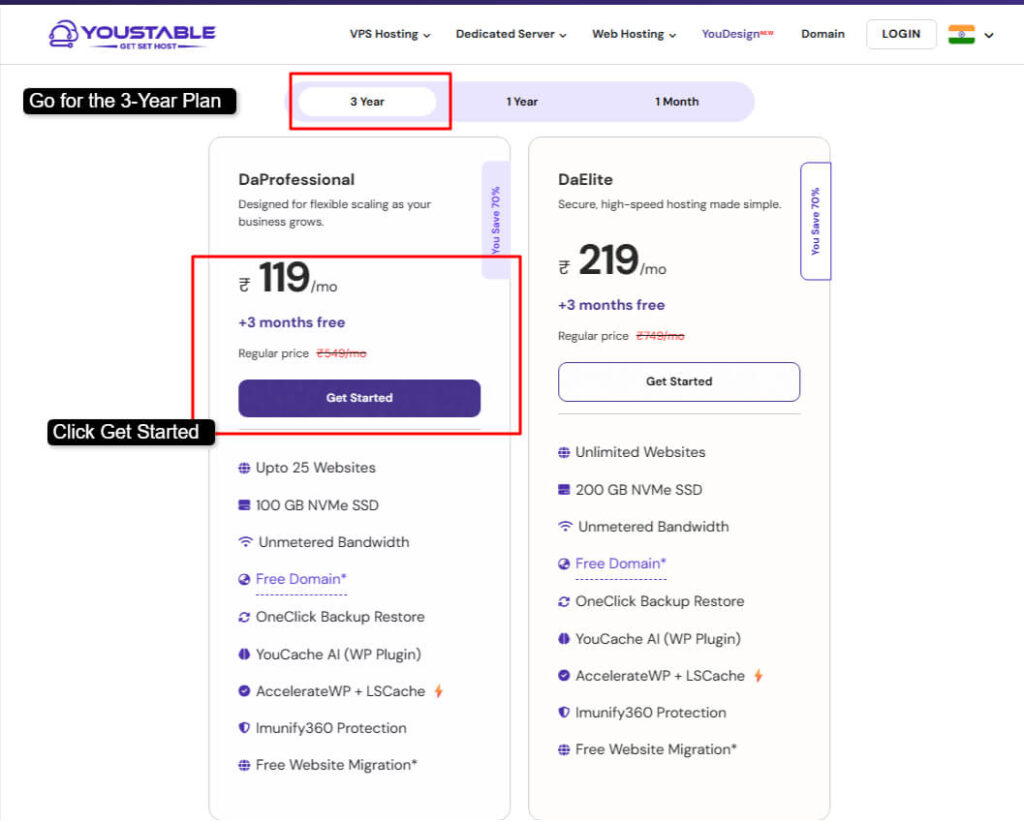
Step2) After choosing the plan >> If you’re starting a new website (then CLICK >> REGISTER A NEW DOMAIN). If you’re already having a domain (then CLICK >> USE OWN DOMAIN) >> Press Add to Cart / Use to proceed.
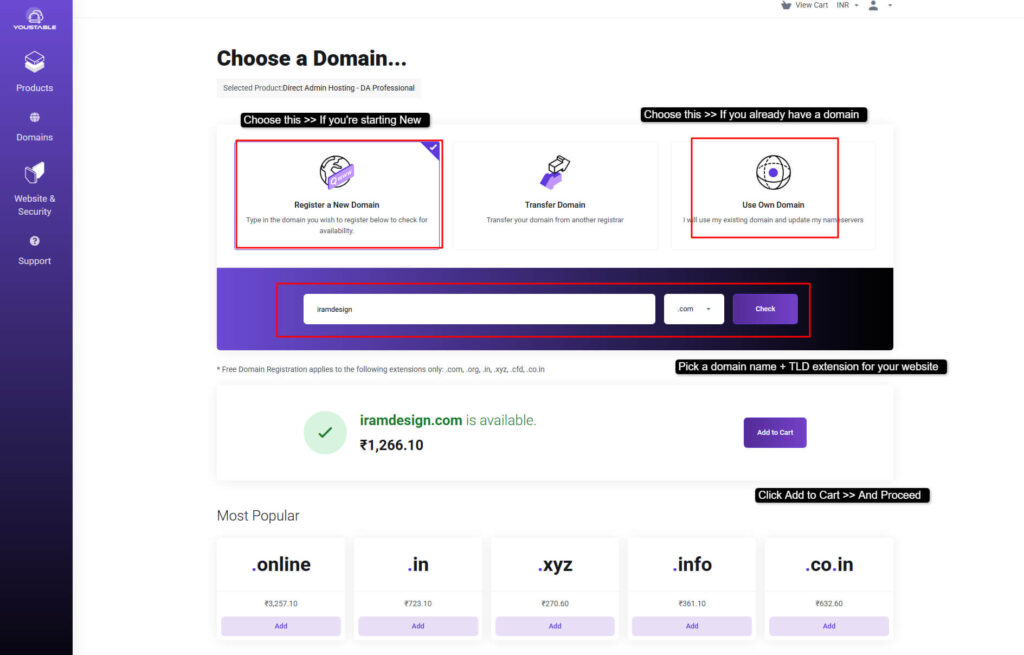
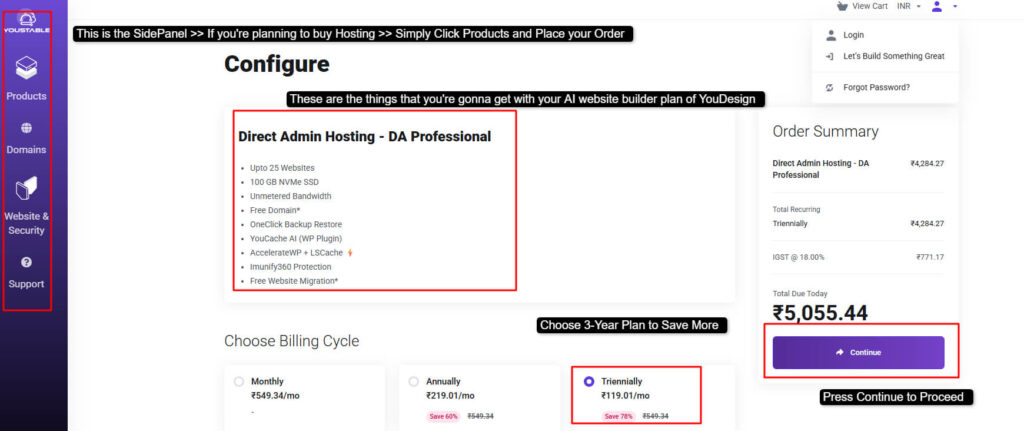
Step3) After choosing the best Domain for your website >> You’re re-directed to configuration page >> Review the services that you’re gonna get on your website builder plan >> Choose the 3-Year Billing period to Save More >> Click Continue to proceed
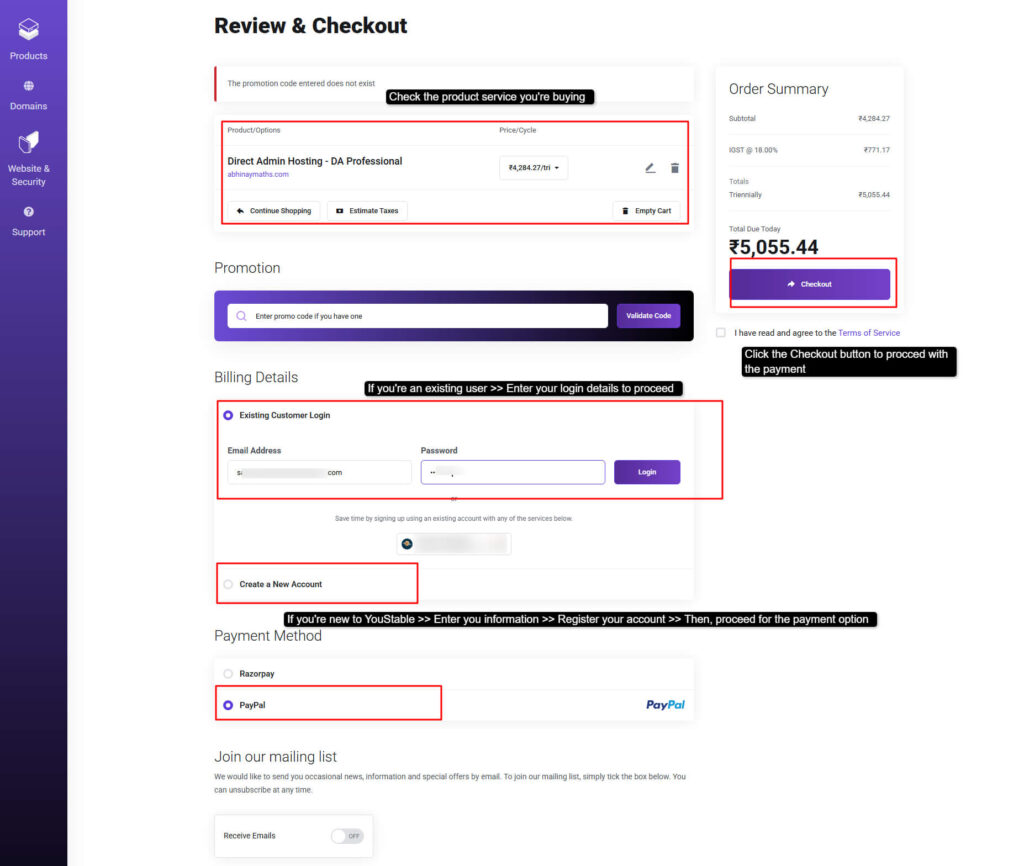
Step4) Now, you need to review the product for the last time >> Sign in to your YouStable Client Area account >> Or enter your details to register your account if you’re new here >> Then choose the payment option (PayPal) >> Click the Checkout button right away.
Step5) Log in to your account >> Let AI Design Your Website >> AI automatically creates your website layout, selects colors, fonts and places sections like headers, images, and text blocks.
Step6) Add Pages and Content Using AI >> Optimize Your Website for SEO >> Add keywords, meta titles, and descriptions using AI suggestions. (this helps your WordPress website rank better on Google and attract organic traffic)
Step7) Publish and Make Your Website Live >> Start Getting Traffic to Your Website >> The more helpful content you create, the more traffic you’ll attract.
Step8) Earn Money from Your Website >> Once traffic starts coming in, you can monetize your website. Use ads to grow your income over time.
Follow these steps one by one to see real results.
FAQs
What’s the best AI website builder for blogging?
YouDesign (designed by the Experts of YouStable) is the best AI website builder for blogging and one that understands content layout, readability and user engagement. It chooses for you clean blog layouts, readable fonts and balanced color schemes, helping you focus on writing while the AI handles the design. It also offers 100GB NVMe SSD storage, handles upto 25 websites, offers a free domain on Annual plans andamp; offers OneClick Backup Restore option as well.
Can AI generate images for WordPress?
Yes, AI website builders can generate and suggest images for WordPress websites. Many AI builders use smart image tools to create relevant visuals, banners and placeholders that match your content and theme. This saves time and helps maintain visual consistency across your website. andnbsp;
Can AI website builders work with any WordPress theme?
Most modern AI website builders are designed to work with a wide range of WordPress themes. They usually adapt layouts, colors and fonts to match the active theme, ensuring smooth integration.
Do AI website builders slow down WordPress websites?
No, it doesn’t! AI website builders do not slow down WordPress websites when properly optimized. In fact, many AI builders generate clean and lightweight code, which can improve performance. They often reduce the need for multiple plugins, helping websites load faster.
Can AI create a full WordPress website automatically?
Yes, AI can create a full WordPress website automatically within seconds. Right from homepage design and page structure to color selection and content placement, AI website builders handle everything.
Can I use AI website builders for WooCommerce stores?
Absolutely, you can! AI website builders work well with WooCommerce stores by creating product pages, shop layouts, checkout pages and conversion-focused designs. They help place call-to-action buttons, pitch andamp; highlight products and improve the shopping experience, leading to better sales.
Is coding knowledge required to use AI website builders?
No coding knowledge is required at all. AI website builders are made for non-technical users and beginners like for high school students or someone who doesn’t know HTML andamp; CSS. With simple prompts and guided steps, anyone can build a WordPress website without writing a single line of code.
Can AI help redesign an existing WordPress website?
Yes, AI can easily redesign an existing WordPress website. AI builders analyze the current structure and improve layout, colors, and spacing to make the site more modern and engaging. This is a fast and effective way to refresh outdated websites.
Will AI website builders replace web developers?
No! AI website builders will not replace web developers but will reduce the need for basic website development. You can only do the basic designing using AI website builder but the complex functionalities and logic is done only by a professional coder.
What is the future of AI website builders in WordPress?
The future of AI website builders in WordPress is very nice. AI will continue to become smarter, do self learning, offer more personalization, better SEO optimization for ranking high in Google and faster website creation. As AI evolves, it will make WordPress website building even easier.
Conclusion
AI website builders have completely changed the way WordPress websites are created. In just a matter of seconds, you can build a stunning website with the right colors and perfectly placed content. The AI automatically places elements in eye-catching sections of the page, helping visitors stay longer.
We learnt that most AI wordpress website builders offer powerful features like automatic layout generation, smart color selection, font pairing, mobile-friendly design, SEO-ready pages and quick content placement. You don’t need design skills at all.
If you’re confused which option to choose, in that case, we highly recommend YouDesign, an AI website builder that is perfect and also offers easy-to-use features for creating professional WordPress websites.
YouDesign is offered by YouStable, which provides cheap web hosting services starting at just $0.5 per month. With YouStable’s hosting plans, you get YouDesign access (Only @ 2.42 per month & you can handle upto 25 websites) and a free domain for one year, making it the right choice for beginners.
Comparison Table: Best AI Website Builders for WordPress
To help you get a clear idea of all the AI website builders at a single glance, we’ve added their names in a comparison table below. This table is designed to give you maximum information in a simple and easy-to-understand format. With this side-by-side comparison, you can confidently choose the best option.
| AI Website Builder For WordPress | Best For | Site Generation Time | WP Plugin | Pricing |
| Youdesign | Beginners & small business owners | 50 to 60 seconds | Yes! WordPress integration | $2.42 per month |
| Elementor AI | Designers, agencies, creators who want AI | 1 minute | Yes! Built into Elementor plugin | $3.99 per month |
| Divi AI | WordPress users who want integrated AI design | <60 Seconds | Yes! Built into Divi Builder | $16.08 per month |
| Wix AI | Total Newbies | Seconds to Minutes | No! Not for WordPress | $2.77 per month |
| Brizy AI | Easy AI site generation with an easy interface | Less Than 20 seconds | Yes! WordPress Brizy plugin | $59 per year |
| SeedProdAI | Beginners wanting complete site | 10 to 60 seconds | Yes! WordPress plugin | $39.50 per month |
| ZipAI | Quick WordPress site generator & content starter | 30 to 60 seconds | Yes! AI builder integrated via plugin | $9.99 per month |
| 10Web AI | Full AI WordPress site + hosting + WooCommerce support | In Minutes | Yes! Dedicated WordPress plugin | $10 per month |
| KubioBuilder | Lightweight AI page builder suited for beginners | In a minute | Yes! WordPress Kubio plugin | $84 per month |
| Extendify | Personalized site guides | Seconds (AI Launcher) | Yes! Extendify plugin | $500 per month |


Table of Contents
- What is an AI Website Builder for WordPress?
- Benefits of Using an AI Website Builder for WordPress
- Are AI Website Builders Suitable for WordPress?
- 10 Best AI Website Builders for WordPress in 2026
- 1. Youdesign: Overall Best AI Website Builder
- 2. Elementor AI: Best AI-Powered Website Builder
- 3. Divi AI: Best User-Friendly AI Website Builder
- 4. Wix AI: Easy AI Chat-Based Website Builder
- 5. Brizy AI: Scalable Custom AI Website Builder
- 6. SeedProd AI: Fast And Easy Professional AI Website Builder
- 7. ZipAI: No-coding Premium Website Builder
- 8. 10Web AI: Fast Multiple Websites Builder
- 9. Kubiobuilder: Beginner-Friendly Website Builder
- 10. Extendify: Personalised AI Website Builder
- Key Features to Look For AI Website Builders for WordPress
- Step-by-Step: Using AI to Create a WordPress Website
- FAQs
- Conclusion
- Comparison Table: Best AI Website Builders for WordPress