








Expert Review
I bought a Self-Managed VPS plan from ScalaHosting and tested it myself using my own websites (a wordpress website and a custom PHP website). I used authentic testing tools to check speed, uptime, TTFB, server performance, load handling and SSL in real time. I’ve shared the actual results with screenshots throughout this review, so you can see how the Scalahosting server performed.
I signed up for a Self-Managed VPS from ScalaHosting and I have been using the service for the past 4 years.
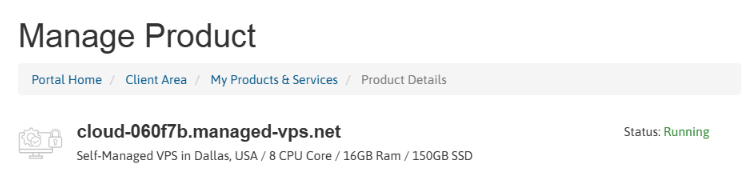
For this review, I’m using a VPS hosted in Dallas, USA, with 8 CPU cores, 16 GB RAM, and 150 GB SSD storage. The server runs on KVM x64 virtualization with an AMD EPYC CPU, and I’ll be using this setup as my testing machine throughout the review.
Hardware Specifications:
- CPU: AMD EPYC
- CPU cores: 8 CPU Core
- RAM: 16 GB
- Storage: 150 GB
- Virtualization: KVM
- Server location: Dallas, Texas
I’m going to put this ScalaHosting VPS through a series of real-world tests to see how the server performs under different conditions. I’ll check areas such as server speed, response time, uptime, CPU and RAM performance, website loading speed, network latency and overall reliability during my testing period.
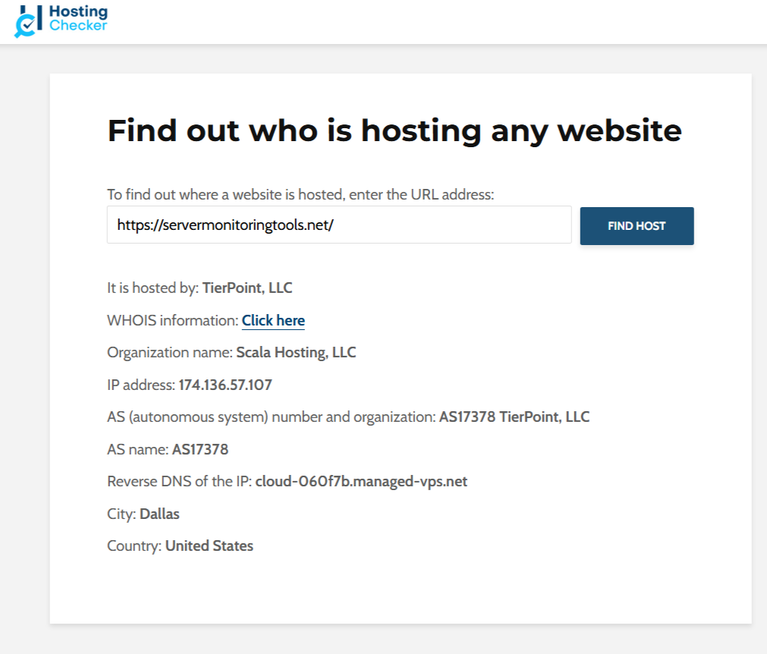
I have used the Hosting Checker tool to verify the hosting details of both websites I used for my ScalaHosting testing. The results below show that both websites are hosted on ScalaHosting, with the server located in Dallas, United States.
- WordPress Website
- Custom PHP Website
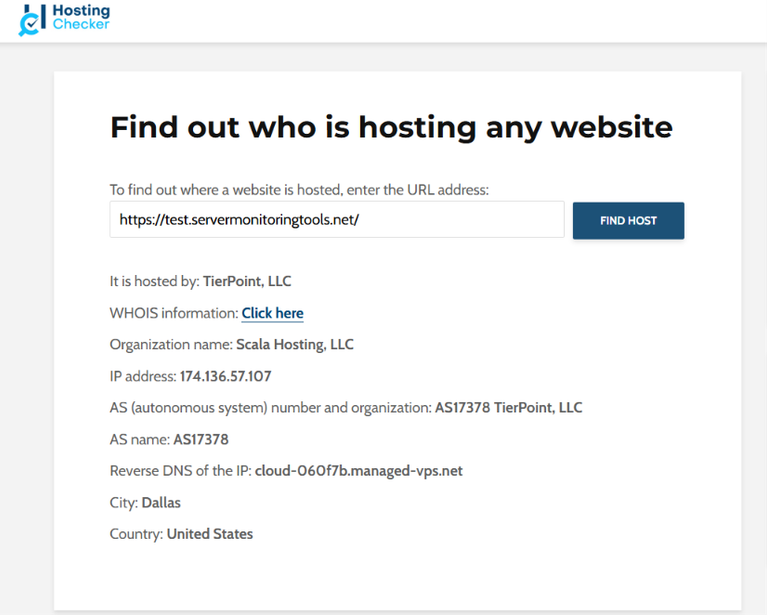
The reverse DNS also points to my ScalaHosting VPS hostname, which matches the VPS I’m using for these tests.
These screenshots help verify that the performance results in this review are based on websites I actually hosted and tested on ScalaHosting. I’ll share my testing results along with screenshots throughout the review, so you can see how this particular ScalaHosting server performed in actual use.
Tools I Used To Review ScalaHosting
For my ScalaHosting review, I used several tools to check different parts of my hosting experience. I wanted you to see real results for speed, uptime, server performance, TTFB, and SSL.
| Test I Performed | Tool I Used | What I Checked |
|---|---|---|
| WordPress Benchmark | WordPress Hosting Benchmarking Tool | I reviewed my VPS CPU, memory, filesystem, database, WordPress tasks, compression, image processing, and network performance. |
| Load Testing | K6 | I checked how my server handled repeated requests, response times, request rate, reliability, and failed requests. |
| Website Speed | Google PageSpeed Insights | I tested my website Performance score, FCP, LCP, TBT, CLS, Speed Index, Accessibility, Best Practices, and SEO. |
| Global TTFB | Flying TTFB | I saw how quickly my server started responding from different locations around the world. |
| Uptime Monitoring | HetrixTools | I monitored my website uptime, response time, recent load time, and regional response performance. |
| SSL Security | SSL Server Test (SSL Labs) | I checked my SSL rating, certificate, protocol support, key exchange, cipher strength, and TLS configuration. |
| DNS Resolution | DNS Resolution Test | I checked DNS lookup speed across Google, Cloudflare, Quad9, and OpenDNS. The average resolution time was 78.75 ms, and I also checked the nameservers and DNS propagation status. |
| Network Response | Network Response Test | I checked the server response and page loading breakdown, including DNS, TCP, TLS, TTFB, download time, total response time, page load time, HTTP status, transfer size, and loaded resources. |
Now that I’ve covered the tools I personally used, I’ll use these tests to show you the actual performance of my ScalaHosting VPS and the results I recorded during my testing.
About ScalaHosting
I went through ScalaHosting’s official company information and also used its hosting services myself to understand what the company is actually like beyond its marketing pages.
ScalaHosting is a privately operated hosting company that started in 2007. It initially offered reseller hosting and dedicated servers.
According to its official history, the company later moved to its own servers and network in 2010, launched SSD cloud hosting in 2014, and introduced its own SPanel control panel in 2017.

The company lists Vladislav G. as Co-founder, Chairman & CEO, Chris R. as Co-founder & CEO, and Lyubomir L. as Co-founder & Deputy Chairman. Its registered address is in Dallas, Texas.
From my own experience using ScalaHosting, the company puts a strong focus on its own tools, especially SPanel, SShield and WordPress Manager. After testing its services, I found this in-house approach to be one of the more noticeable parts of the ScalaHosting experience.
ScalaHosting is among one of the top recommendations for the Best Dallas Web Hosting providers with most features.
ScalaHosting Refund Policy
I checked ScalaHosting’s Terms of Service myself while testing the service, and the refund policy is more flexible than a basic 30-day money-back guarantee.
- New clients can request a full refund within 30 days for covered hosting services, while the policy also allows a partial refund for the unused portion of the service after activation. (This applies to web hosting, reseller hosting and VPS hosting)
- But, the guarantee has clear exclusions. That is why, I would not treat it as a blanket refund policy for everything ScalaHosting sells.
The current Terms of Service also confirm that existing clients placing new orders are not eligible for the money-back programme.
ScalaHosting Performance Test: 4 Years of Testing With 2 Websites (WP site & Custom PHP Site)
I tested my ScalaHosting VPS by hosting two websites on it for four years to see how it performs in real-world use. I also recorded the results and added screenshots throughout this section so you can see the actual numbers from my tests.
The following results give you a clear look at the hardware I received and the performance I experienced during my testing period.
Disclosure: I have been testing ScalaHosting since 2022 using two websites. One WordPress website (https://servermonitoringtools.net/) and One custom-built website (https://test.servermonitoringtools.net/). This long-term testing has helped me see how the hosting performs in real-world use. Below, I’ll share the performance results I recorded from these tests.
This long-term testing has helped me understand how ScalaHosting performs in real-world use.
Below, I’ll share the performance results I personally recorded from these tests.
First, I checked the hardware details of my ScalaHosting VPS in Dallas, Texas, to see exactly what resources were allocated to the server I’m using for my tests. I wanted to verify the actual hardware.
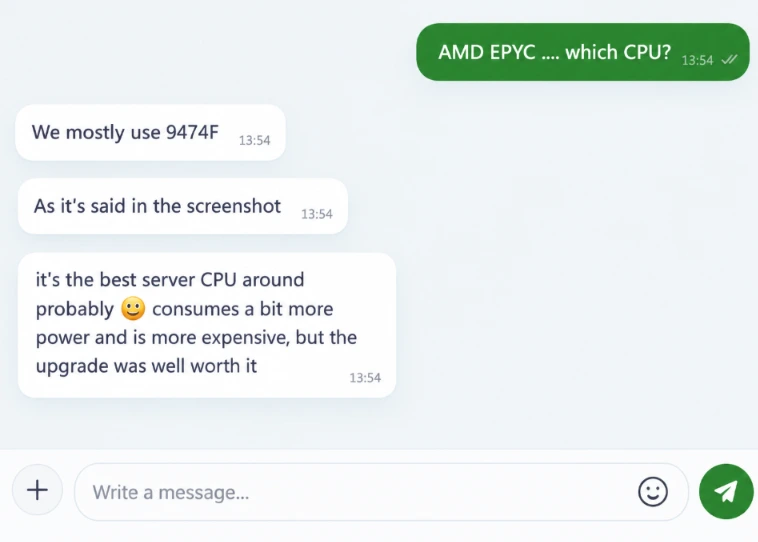
My VPS is running on an AMD EPYC processor with 8 CPU cores and 16 GB of RAM.
I also spoke with the ScalaHosting sales team through LiveChat and asked them about the CPU used on my VPS. They confirmed the AMD EPYC processor, which gave me another way to verify the hardware I was working with.
For my testing, this setup gives me enough resources to run multiple websites and performance tests at the same time.
It also lets me test workloads that need more resources than a basic shared hosting plan can provide.
Hardware Benchmark Testing
I ran the WordPress Hosting Benchmark on my ScalaHosting server to see how it handles different real-world tasks, and the report gave my server an overall score of 7.6/10. The CPU and memory tests were fairly strong, although performance varied by workload.
- I got 6.7 for large text operations, 7.75 for random binary data, 5.53 for recursive mathematical calculations, 9.57 for iterative calculations, and 8.08 for floating-point operations.
- The filesystem results were stronger, with 8.25 for write ability, 8.68 for local file copy/access speed, and 9.85 for small-file I/O.
- Database performance was also mixed but generally good: importing a large amount of data scored 5.01, simple queries 7.85, complex queries 8.05, and temporary database tables reached 10/10.
- The network download test scored 8.04, which is also a solid result for normal website activity.
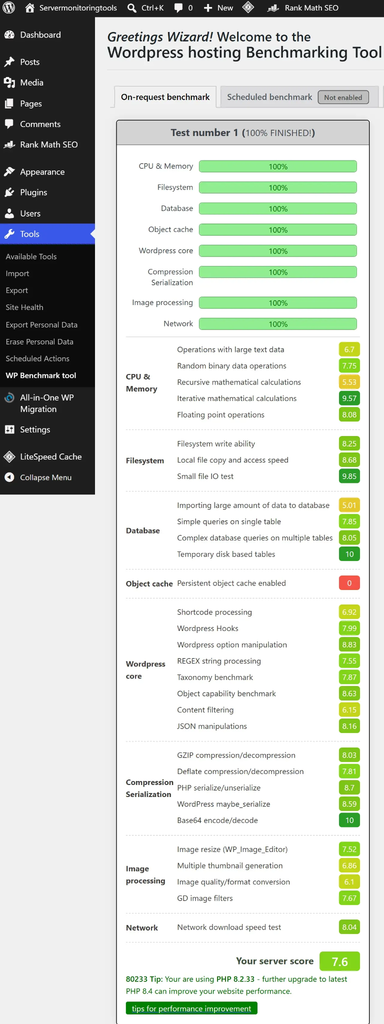
I also checked the WordPress-specific workloads, and most of the results stayed in a good range.
- WordPress shortcode processing scored 6.92, hooks 7.99, manipulation 8.83, REGEX processing 7.55, taxonomy 7.87, object capability 8.63, content filtering 6.15, and JSON manipulation 8.16.
- Compression and serialization were strong too, including 8.03 for GZIP, 7.81 for Deflate, 8.7 for PHP serialize/unserialize, 8.59 for WordPress maybe_serialize, and 10/10 for Base64 encoding/decoding.
- Image processing scored between 6.1 and 7.67, while image resizing reached 7.52.
- One thing I noticed is that the persistent object cache test scored 0, so this is an area worth improving rather than ignoring.
- The report also shows that the server was running PHP 8.2.33 and suggests moving to PHP 8.4, which may improve website performance.
I want to say that these results gave me a useful picture of how my ScalaHosting server handles CPU, files, databases, WordPress tasks, compression, images, and network operations under benchmark workloads.
Load Testing
I used k6 to run a load test on my ScalaHosting VPS and see how it handled repeated HTTP requests with multiple active users.
My server processed 4,929 HTTP requests, with 0 HTTP failures recorded throughout the test.
- Average request rate: 15 requests/second
- Peak request rate: 18.25 requests/second
- P95 response time: 106 ms
- Peak active users: around 20 VUs
- HTTP failures: 0
The 0 HTTP failures was a positive result. During this particular k6 test, I did not see any failed HTTP requests, even while the number of active virtual users increased.
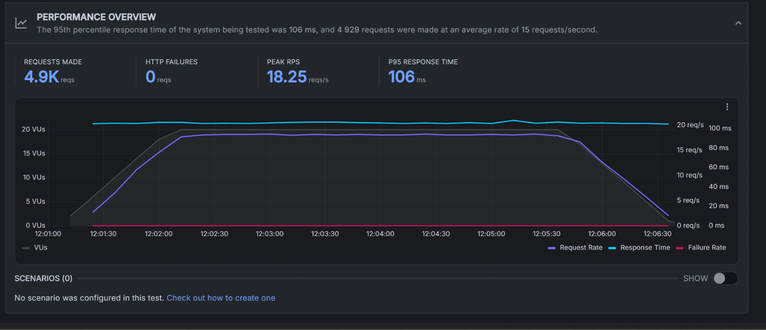
Looking at the performance graph, I could see the active virtual users gradually increasing until they reached around 20 VUs. The request rate also increased during the ramp-up period before remaining relatively stable for most of the test.
Toward the end, the number of active users and request rate gradually dropped as the test finished.
The response-time line stayed fairly consistent at around the 100 ms range throughout most of the test. The screenshot reports a P95 response time of 106 ms, meaning 95% of the recorded requests were completed within 106 ms or less.
So, based on this particular k6 test, the self-managed VPS handled 4,929 requests with 0 HTTP failures, reached a peak request rate of 18.25 requests/second, and recorded a 106 ms P95 response time. This gave me a useful view of how the VPS performed while handling around 20 active virtual users.
Load testing is done on a daily basis and live data is also available for you which you can check by yourself.
PageSpeed Testing
I’m using Google PageSpeed Insights to check the loading performance of both my custom PHP website and WordPress website hosted on the self-managed ScalaHosting VPS.
I’m focusing on key metrics such as Performance score, First Contentful Paint, Largest Contentful Paint, Total Blocking Time, Speed Index, and Cumulative Layout Shift.
I’ll add the actual PageSpeed results and screenshots as proof, giving you a clear view of how both sites perform on this VPS.
- WordPress Site
The PageSpeed Insights report for my WordPress website hosted on ScalaHosting shows a 100/100 Performance score on desktop, which is a strong result for the site.
- Speed Performance on Desktop
I also got 94 for Accessibility, 100 for Best Practices, and 100 for SEO. The report was generated on September 15, 2026 and the tested page returned enough data for PageSpeed to calculate these results.
What I particularly noticed was how quickly the main content appeared: First Contentful Paint (FCP) was just 0.3 seconds, while Largest Contentful Paint (LCP) was 0.6 seconds.
The Total Blocking Time was 0 ms, meaning the report did not detect measurable main-thread blocking during the test.
The Speed Index was 0.8 seconds, which also reflects the fast visual loading of the page.
The Cumulative Layout Shift (CLS) was 0.027, so the page remained quite stable while loading, with only a small amount of layout movement.
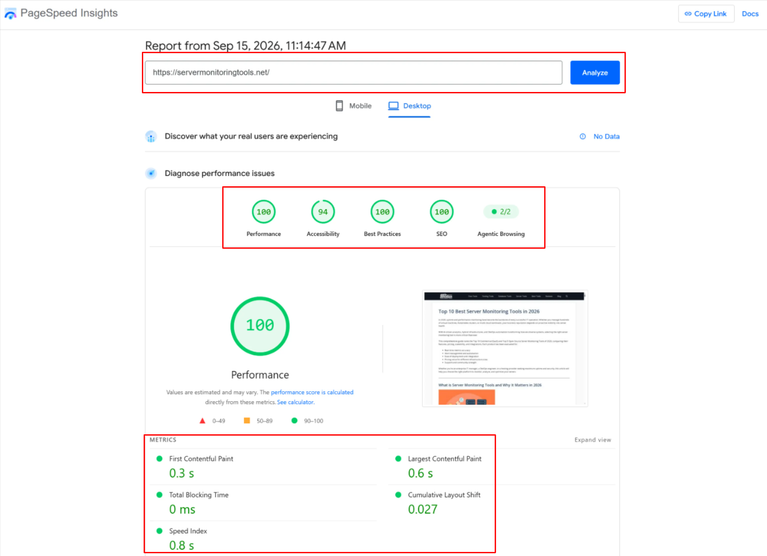
Please Note: I also noticed that the report shows “No Data” for real-user experience, so these scores are based on the PageSpeed test only and it is not Chrome’s collected real-user data for this page.
The report also displays 2/2 for Agentic Browsing, while the page preview confirms that the tested URL is my WordPress website.
Below, I’ve listed the key figures from my report:
| Metric | Result |
|---|---|
| Performance | 100/100 |
| Accessibility | 94/100 |
| Best Practices | 100/100 |
| SEO | 100/100 |
| Agentic Browsing | 2/2 |
| First Contentful Paint (FCP) | 0.3 seconds |
| Largest Contentful Paint (LCP) | 0.6 seconds |
| Total Blocking Time (TBT) | 0 ms |
| Cumulative Layout Shift (CLS) | 0.027 |
| Speed Index | 0.8 seconds |
The combination of fast FCP and LCP, zero blocking time, low CLS and the 100 performance score gives me a clear indication that the website is loading quickly and keeping the page stable during the test.
- Speed Performance on Mobile
Just like I checked the performance of my wordpress website on desktop, the same way I checked it on mobile. It showed a 99/100 performance score on mobile.
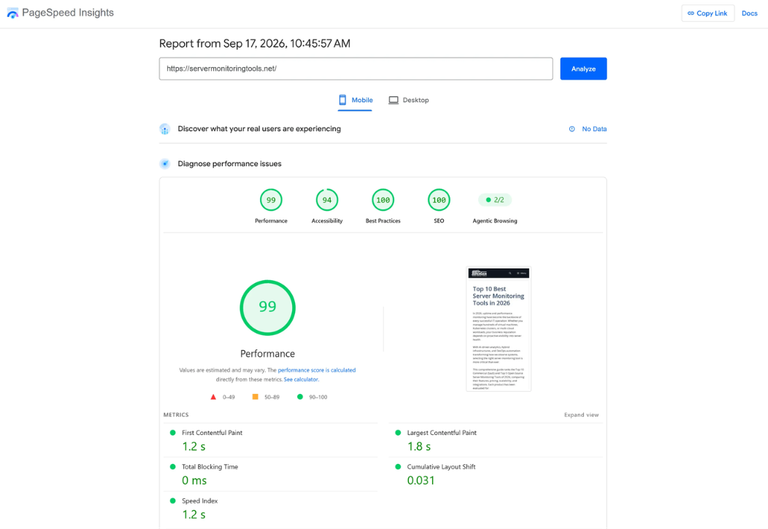
Above is the screenshot for the speed testing on mobile. I would suggest you to see the screenshot of the result and interpret it yourself in the way we’ve done above.
- Custom PHP Site
I also ran a test on my custom PHP website hosted on ScalaHosting and the PageSpeed results were quite strong.
- Speed Performance on Desktop
The site scored 99/100 for Performance, with 100/100 for Best Practices.
The page started showing content in just 0.7 seconds, while the largest content loaded in 0.8 seconds. I also got 0 ms Total Blocking Time, so the page remained responsive during the test.
The Speed Index was 0.9 seconds, and the CLS was only 0.015, which means the page loaded quickly with very little movement of its elements. I also got 93/100 for Accessibility and 91/100 for SEO, so there is some room to improve those areas.
Here, I’ve added the PageSpeed Insights in the list format (better for you to judge the results)
| Result | |
|---|---|
| Performance | 99/100 |
| Best Practices | 100/100 |
| First Contentful Paint (FCP) | 0.7 seconds |
| Largest Contentful Paint (LCP) | 0.8 seconds |
| Total Blocking Time (TBT) | 0 ms |
| Speed Index | 0.9 seconds |
| Cumulative Layout Shift (CLS) | 0.015 |
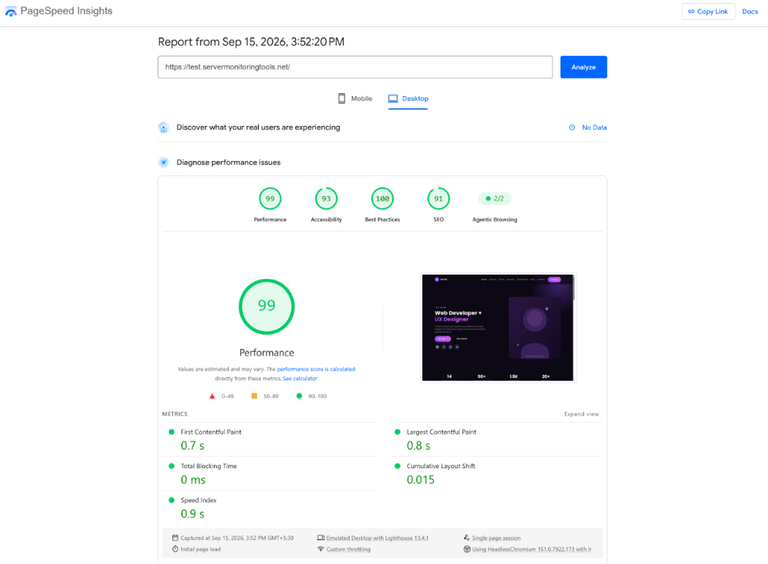
For a custom PHP website, I found these results a good indication that my ScalaHosting server is delivering the page quickly and smoothly.
- Speed Performance on Mobile
The performance score of the custom PHP site on mobile is 84/100. I’ve added the screenshot of the test result below.
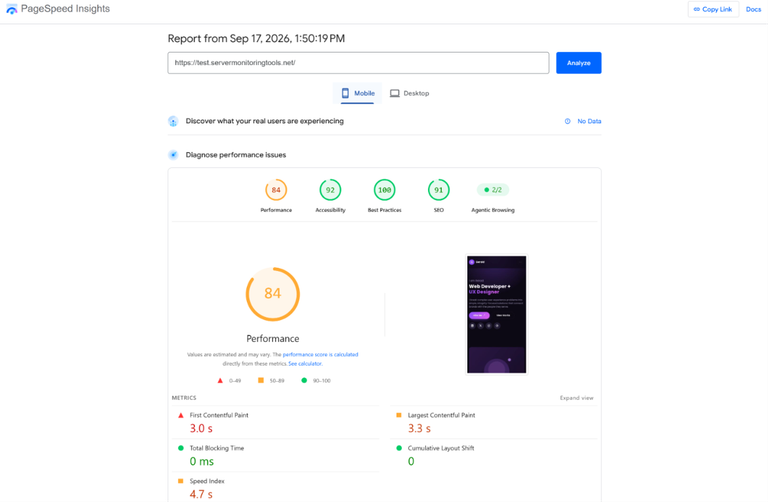
Please refer to the screenshot and interpret the results to see how my custom site performed on ScalaHosting’s VPS.
DNS Resolution Testing
I tested the DNS resolution of my domain hosted on the self-managed VPS across four public DNS resolvers.
The average resolution time was 78.75 ms across all four.
- Google and Cloudflare both returned 45 ms,
- OpenDNS was slightly faster at 44 ms.
- Quad9 was slower at 181 ms, which increased the overall average.
In my testing, all four resolvers returned the same server IP, 174.136.57.107, so my domain was resolving correctly without any mismatch between the DNS providers.
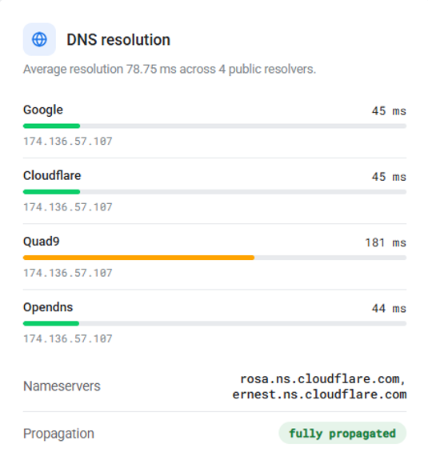
I also checked the nameservers and DNS propagation for my ScalaHosting VPS setup.
My domain was using:
- rosa.ns.cloudflare.com
- ernest.ns.cloudflare.com,
And the test showed the status as “fully propagated.”
From my experience running my website on the ScalaHosting Self-Managed VPS, this was a good sign because DNS resolution was working consistently across the public resolvers I tested.
The 44 to 45 ms results from OpenDNS, Google, and Cloudflare were particularly quick, while the 181 ms Quad9 result was noticeably higher but did not indicate a DNS failure.
Network and Response Testing
I tested both my websites’ network and response time and the result shows a 1550 ms response time with a 2111 ms DOM ready and page load time.
The test returned 200 OK, so the page loaded successfully without a server-side error.
The network breakdown shows DNS at 165 ms, TCP at 244 ms, TLS at 890 ms, TTFB at 245 ms, and download at 1094 ms.
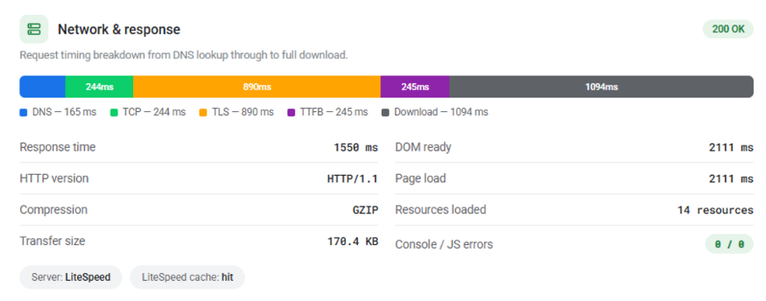
The 890 ms TLS time stands out as the biggest connection-stage delay, while the 245 ms TTFB shows that the server started responding in a reasonable amount of time once the connection was established.
I also found that the page transferred only 170.4 KB and loaded 14 resources, which is a relatively small amount of data for a webpage.
The test shows GZIP compression enabled, LiteSpeed as the server, and a LiteSpeed Cache hit, which means caching was working during my test.
Most importantly, I saw 0 JavaScript/console errors, so there were no browser-side errors affecting the test.
I saw that the server itself does not appear to be the main problem here; the higher total load time is more connected to the TLS and download stages, while caching, compression, and the clean error result are positive signs.
Please Note: I used my in-house testing tool to check DNS resolution and the network response time. I ran these tests on my own websites hosted on the ScalaHosting Self-managed VPS, so the results you see here come from my own testing setup. You can use these figures as a reference for my server’s performance, but the thing is that your results may be different based on your website location and traffic of your site.
TTFB (Time-To-First-Byte)
I also checked my ScalaHosting server’s Time to First Byte (TTFB) using Flying TTFB from 22 locations around the world to see how quickly the server started responding.
Across all locations, I recorded an average response time of about 454 ms.
The results were much faster in some regions, for example, Dallas returned 29 ms, while Los Angeles was 116 ms and Oregon was 139 ms.
I also noticed that the response time increased as the testing location moved farther away, which is normal for a server being accessed from different parts of the world.
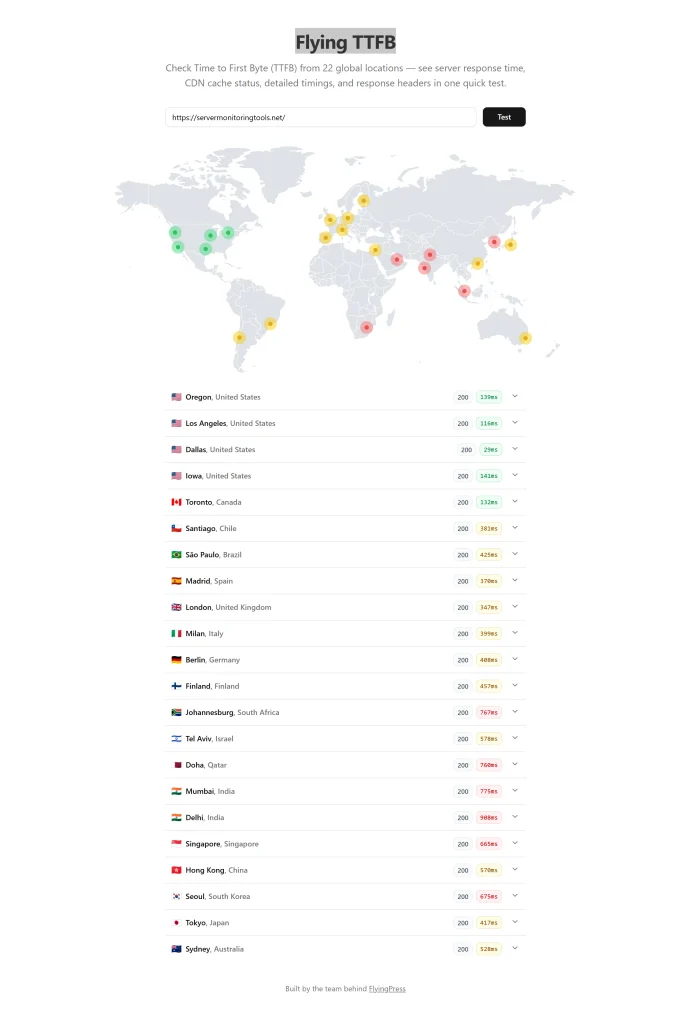
I was really surprised to see that every location in the report returned HTTP 200, so this means the server responded successfully throughout the test.
Some of the highest response times were Mumbai at 775 ms, Delhi at 908 ms, Johannesburg at 767 ms, and Doha at 760 ms.
Since my server is being tested from multiple global locations, I found this useful for understanding how distance affects response time.
I can say that this test gave me a clear picture of my ScalaHosting server’s global response performance.
Uptime Testing
I monitored my ScalaHosting self managed VPS with HetrixTools to check its uptime and response behavior over time.
The dashboard shows 100% overall uptime, and the same 100% uptime is recorded for the last 24 hours, 7 days, 30 days, the full 2026 period, and total monitoring history.
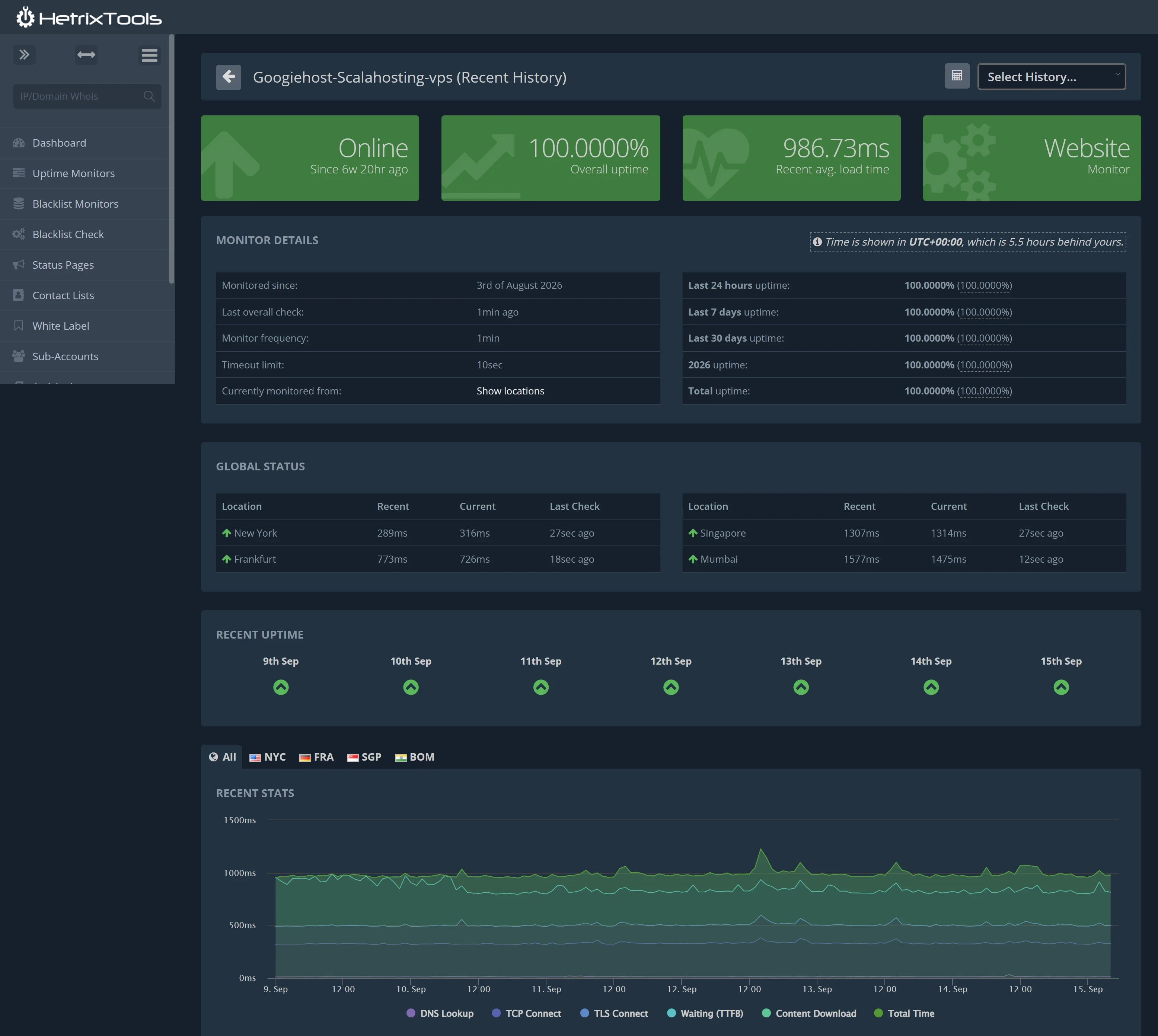
The server has been monitored since 3 August 2026, with a check running every 1 minute and a 10-second timeout limit. I also saw all green uptime markers from 9 September to 15 September, with no downtime shown in recent history.
The dashboard currently shows the website as Online, while the recent average load time is 986.73 ms.
I also checked the regional results (see the graph above the map) because I wanted to see how the server responds from different locations.
- New York recorded 316 ms current response time
- Frankfurt was 726 ms.
The higher times appeared farther away, with Singapore at 1,314 ms and Mumbai at 1,475 ms currently.
The recent stats graph also breaks the loading process into DNS Lookup, TCP Connect, TLS Connect, Waiting (TTFB), Content Download, and Total Time, which helped me see how the complete request time is built up.
The regional map confirms monitoring from these four locations, and throughout the period shown, I found the uptime record consistently at 100%, while response times naturally varied by location.
One thing I found worth mentioning is ScalaHosting’s uptime guarantee.
ScalaHosting challenges the users that if the server uptime drops below the guaranteed level, then you can request account credit as compensation.
The amount of credit depends on the uptime recorded during that month.
For example, 99.9% uptime means 0% credit, 99.8% gives 10%, 99.7% gives 20%, and the credit increases as uptime falls. If the uptime goes below 99%, the credit can reach 100%.
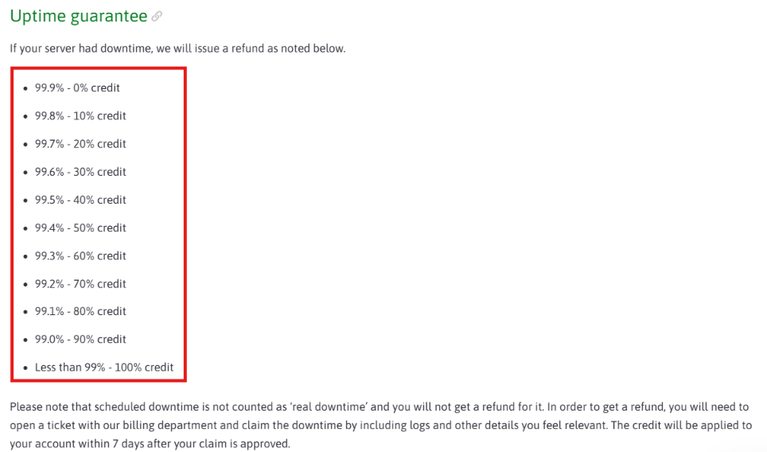
I found it a really useful part of the hosting package because it gives customers something to fall back on if there is significant downtime.
However, there are a few conditions to keep in mind.
- The guarantee does not apply to scheduled maintenance or planned downtime, so those periods are excluded.
- If I ever needed to claim the credit, I would need to contact ScalaHosting’s billing team and provide supporting details, such as downtime records or logs.
The claim also needs to be submitted within the stated claim period, so I would keep my monitoring records ready instead of waiting too long. This makes tools like HetrixTools useful because I can maintain my own uptime history as supporting evidence.
SSL Testing
I checked the SSL configuration of my website using the SSL Server Test (SSL Lab) and the result gave me an overall A rating.
The report was assessed on 15 September 2026 at 10:31 UTC for my domain, and I was happy to see that both Certificate and Protocol Support received 100/100.
The Key Exchange and Cipher Strength sections were also strong, sitting around the 90/100 range.
From my side, this shows that the SSL setup is properly configured and the server is using modern security settings for encrypted connections.
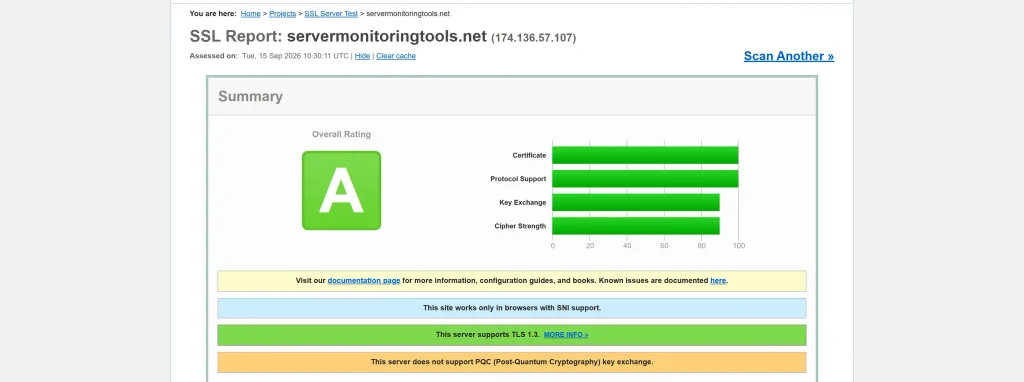
I also noticed two specific details in the report that are worth mentioning.
My server supports TLS 1.3, which is a modern TLS protocol, and the report says the site works with browsers that support SNI (Server Name Indication).
One limitation shown is that the server does not support Post-Quantum Cryptography (PQC) key exchange. I would treat this as a future-facing security feature rather than an indication that the current SSL setup is poorly configured.
Based on the results shown in my report, the important certificate and protocol checks passed at full marks.
The key exchange and cipher-strength checks remained at high levels.
Easy to Use Interface of the Client Area’s Dashboard
After spending time using ScalaHosting’s Client Area to manage my self-managed Cloud VPS, I found the dashboard much easier to understand than I expected (I thought it would be very difficult at first).
The first thing I noticed was the clean layout.
Most of the important options are placed in the sidebar, so I can move between different sections without opening several confusing menus.
I can quickly reach my hosting services, domains, invoices, support tickets, and additional services from the same dashboard.
I also found the My Services section useful because it gives me the important details of my VPS in one place, including the active plan, price, renewal information, and a Manage button. This saves me from searching through different pages whenever I want to check something about my hosting account.
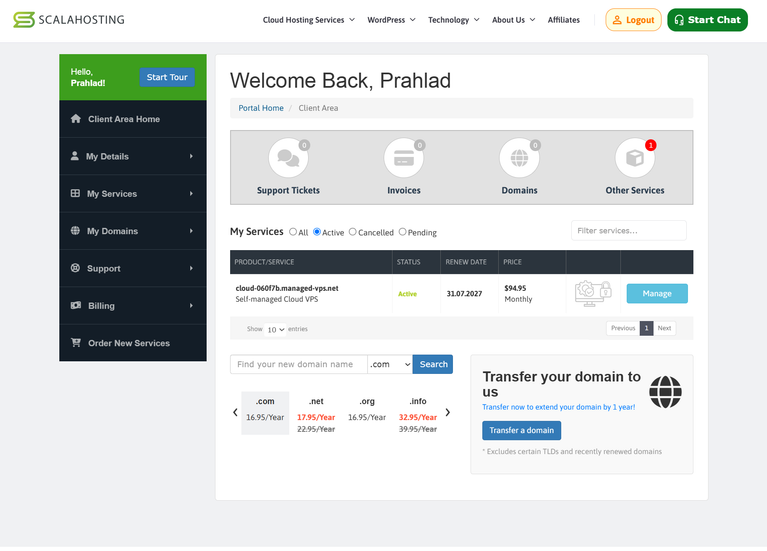
While using it, I also found the filtering option helpful, especially when there are several services listed in the account.
I also like having live chat available because sometimes I just need a quick answer rather than opening a formal support ticket.
Since I am using a self-managed VPS, I spend more time handling my own server-related tasks, so having the account and service information clearly organized makes the overall experience easier for me.
Another thing I noticed is that the dashboard does not feel overloaded with technical terms. The menu names are simple enough for me to understand what I will find after clicking them.
What I liked from my experience:
- Simple sidebar: I can find the main sections without searching through complicated menus.
- Clear service details: My VPS plan, price, renewal information, and management options are easy to access.
- Quick billing access: I can check invoices and account-related information from the same area.
- Domain management: I can manage existing domains and search for new ones.
- Support options: I can either open a support ticket or use live chat when I need assistance.
- Useful filters: They make it easier for me to find a particular service when multiple products are listed.
- Beginner-friendly layout: The labels and structure are simple enough that I don’t feel lost while navigating the dashboard.
This really worked well for me because I can keep billing, domains, support, and hosting services organized. The dashboard may not replace a server control panel for technical VPS management, but as a Client Area for managing my ScalaHosting account and services, I found it practical and easy to navigate.
ScalaHosting Support Channels: Performance Testing
I spent time testing its support through both live chat and ticket support.
My experience was generally good, but I noticed that the answers were not always the same when I asked the same question through both channels.
This was something I personally noticed during my testing and I think it is worth mentioning because I would expect to receive the same basic information whether I contact support through chat or a ticket.
It did not make the support unusable for me, but it showed me that my experience can depend on the support agent handling my question.
LiveChat (Got a Reply in 10 seconds)
I found the live chat more convenient when I wanted a quick answer.
I received a reply in just 10 seconds, so I could continue the conversation without waiting around. I used the chat to ask questions and found it useful for getting quick clarification.
| Support channel | My response-time test | Reply quality | My experience |
| Live chat | Got a Reply in 10 seconds | Good | I got a quick response and could continue the conversation immediately |
As per my experience, live chat worked better when I had a simple question that needed an immediate response, while ticket support felt more useful when I wanted a detailed reply that I could come back to later.
See! The screenshot of the LiveChat testing of ScalaHosting is below.

I also noticed an important difference when I contacted support as a new user versus an existing customer.
When I approached them as a new user, I was directed toward a sales representative, which makes sense for questions about plans or purchases. When I was dealing with my existing hosting service as an active customer, I was provided with technical assistance instead.
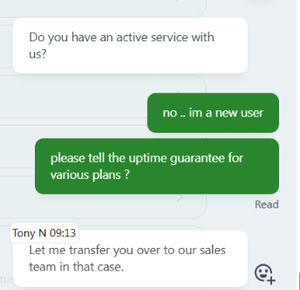
I found this distinction useful because it meant my existing hosting-related questions could be handled by the appropriate support side.
I want to say that ScalaHosting’s Live chat support is useful when I want speed, while ticket support is better when I want a more detailed written response.
I also learned that the type of help I receive can depend on whether I am contacting them as a new customer or an existing client.
Ticket Support (Got a Reply in 30 minutes)
I also tested ScalaHosting’s ticket support myself by sending the same question I had already asked through live chat.
I received a reply in around 30 minutes, which was slower than the 10-second live chat response but still reasonable for a ticket.
What I liked about the ticket was that I had a written conversation that I could keep and check again later.
The response was detailed and helpful, although I noticed that the answer was different from what I received in live chat.
I’ve added the screenshot above so you can see the conversation and judge the response for yourself.
| Support channel | My response-time test | Reply quality | My experience |
| Ticket support | Got a Reply in 30 Minutes | Excellent | I received a detailed written response, but the answer differed from live chat. |
This comparison was useful for me because I could check both response speed and the actual quality of the answers.
Based on my experience, I found ticket support more useful when I wanted a proper explanation in writing, while live chat worked better when I wanted an immediate conversation.
Email Support
I also contacted the Scala team through email with a technical question about improving my VPS performance.
I was pleasantly surprised by how quickly I received a response.
The support agent, Ross, checked my account and explained several practical ways I could improve my website speed.
I got a reply at 10:59 AM, with the email marked as received around 13 minutes earlier when I send an e-mail.
ScalaHosting lists different email addresses depending on what I need help with:
- billing@scalahosting.com – billing questions
- abuse@scalahosting.com – abuse-related matters
- support@scalahosting.com – technical support
- sales@scalahosting.com – sales and pre-sales questions
This was a good email support experience because I received a quick response and several actionable suggestions that I could actually consider for my websites. I also liked that the agent explained the performance improvements in simple terms instead of sending me a complicated technical answer.
The response also ended by confirming that support is available 24/7.
Phone Support
I did not personally test ScalaHosting’s phone support, so I don’t want to judge its response time or technical help based on assumptions. I did find that ScalaHosting provides a phone contact for pre-sales enquiries, giving potential customers another way to speak with the company before purchasing.
The ScalaHosting Support Team’s number is +1 469-217-6967.
Since I didn’t actually use this channel myself, I would treat it as an additional contact option rather than include it in my hands-on support results.
My Overall Experience With ScalaHosting
After using and testing ScalaHosting for 4 years consistently, I found my VPS reliable, fast, and easy to manage. My website performance was strong, while support and caching had some areas to improve.
What I liked
I found several things that made my experience really good, especially the server performance, uptime, and simple account management.
- Strong website performance: My WordPress site scored 100/100 for PageSpeed Performance, while my custom PHP site scored 99/100. Both showed fast loading times and 0 ms Total Blocking Time.
- Stable load-test results: I recorded around 4.9K HTTP requests with a 103 ms average response time and 0% reported failure rate. This gave me confidence in the VPS during repeated requests.
- 100% uptime during monitoring: My HetrixTools monitoring showed 100% uptime across the periods displayed, including the full 2026 period and total monitoring history.
- Good VPS resources: My VPS came with 8 CPU cores, 16 GB RAM, 150 GB storage, and an AMD EPYC processor, giving me enough resources for both websites and performance testing.
- Easy Client Area: I liked the simple dashboard because I could quickly access my VPS, invoices, domains, support tickets, and other services without feeling lost in complicated menus.
- Fast live chat support: When I needed a quick answer, I received a live chat reply in around 10 seconds. For me, this was useful when I had simple questions that needed immediate clarification.
What I disliked
While my overall experience was positive, I also noticed a few areas that I would keep in mind before choosing the service, especially around caching and support consistency.
- Persistent object cache scored 0: In my WordPress benchmark, the persistent object cache test scored 0. I see this as an area where my setup could be improved.
- Some benchmark results were mixed: While several CPU, database, and WordPress tests scored well, some workloads were lower, such as recursive calculations at 5.53 and large database imports at 5.01.
- Some Features Depend on Your Plan: While using ScalaHosting, I noticed that features like OpenLiteSpeed/LiteSpeed Cache and Object Cache are promoted on the website, but I also saw that some of them are available only with managed VPS plans. So, I recommend that you check your specific plan before assuming these features are included.
- Support answers differed: I asked the same question through live chat and ticket support, but I received different answers. This made me feel that the response could depend on which support channel or agent handled my question.
Bottom Line
After spending time testing ScalaHosting and using my self managed VPS for both of my websites, I found the overall experience reliable and performance-focused.
My websites loaded quickly, uptime remained strong and I liked how easy the Client Area was to manage.
I also appreciated the quick support responses when I needed help. At the same time, I noticed a few things I would check before choosing a plan, especially caching features, plan-specific tools, and differences in support answers.
My testing gave me a clear picture of what I can expect from ScalaHosting, rather than relying only on its website claims.
FAQs- ScalaHosting Review
Does ScalaHosting’s renewal price go up after the first term?
Yes! ScalaHosting uses OneTime discounted pricing for new users and the renewal rates go up after the first term. For example, current shared plans show $2.95 renewing at $11.95 monthly, depending on the plan.
Is ScalaHosting better for shared hosting or managed cloud/VPS hosting?
ScalaHosting offers both. Shared hosting uses shared resources, while managed Cloud VPS provides dedicated CPU, RAM, scaling, backups, security, and management for websites needing more resources.
Does ScalaHosting offer free website migration?
Yes! ScalaHosting offers free website migration, including files, databases, emails, and configurations. Its official site says migrations are handled by its support team without additional migration charges.
Does ScalaHosting offer a website builder?
Yes! ScalaHosting offers an AI WordPress Sitebuilder with templates, website-building blocks, AI website generation, and SEO tools, available with several hosting plans.
How many data centers does ScalaHosting have?
ScalaHosting lists three of its own data-center locations: Dallas, New York, and Sofia. Managed VPS customers can also use 13 additional AWS partner locations.
Are there any hidden costs with ScalaHosting?
No! ScalaHosting has no hidden fees for essential hosting features. However, optional paid add-ons can exist, so I would check the selected plan and checkout carefully.
Is there any promo code for ScalaHosting?
Yes! GOOGIEHOST is a ScalaHosting promo code that can provide an extra 10% OFF when applied during checkout, on top of eligible ongoing discounts.


This is a Good VPS hosting provider!
This is a Good VPS hosting provider! I haven’t faced any issues yet, and their server speed is good they try to solve my problem as early as possible. I can surely recommend them to others. Along with them Hostinger and DedicatedCore, are also very good VPS hosting providers considering quality and support.