10 Best SNMP Monitoring Tools in 2026

Have you ever faced unexpected network downtime that disturbed your entire workflow?
See! It’s practically normal that networks do show downtime at times, but the thing is that, not knowing the time when it happens is worse as our viewers suffer lagging issues or inaccessibility due to which it affects the site’s user experience.
One way to detect network flaws is by doing it manually! This process takes a lot of time and effort and a lot of investment on manpower. The best way to manage a network is by using AI automated features of the best SNMP monitoring tools.
A Simple Network Management Protocol tool, also called SNMP monitoring tool, detects lagging networks and performance degradation to help you know which area is malfunctioning. These issues can severely impact productivity if not identified and resolved on time before a minor issue becomes a major outage.
With the right monitoring solution, you can ensure your network runs smoothly.
So, let’s take a leap forward to know more about these best SNMP tools in detail.
What is SNMP Monitoring Tool?
An SNMP monitoring tool is a software that tracks and manages network devices like routers, switches, firewalls, servers, and printers 24/7.
It collects important performance data, detects issues such as downtime or unusual activity and alerts IT teams instantly. This helps to keep the networks healthy and secure, without constant manual checks. These tools are important for maintaining network reliability. They’re used by network administrators who need continuous visibility across their network infrastructure.

With SNMP monitoring, organizations can proactively fix issues, optimize performance, and ensure minimal disruptions, making it important in any modern IT setup.
Top 10 SNMP Monitoring Tools in 2026 (Paid + Free)
Now that we know what an SNMP monitoring tool is and why it’s important, let’s explore the top 10 list of the best SNMP monitoring tools of 2026. In this section, we’ll go through each tool’s features, pricing details, and if they offer a free trial or not. We’ve explained each tool in detail to help you get the right one.
⏰ TL;DR:
1. SolarWinds – Overall Best SNMP Monitoring Tools
2. Paessler PRTG – Best SNMP Monitoring Tools
3. ManageEngine OpManager – Affordable SNMP Network Monitoring Tool
4. EventSentry – Stay Alert and Secure SNMP Monitoring Tool
5. Atera – All-in-One RMM and SNMP Monitoring Tools
6. LibreNMS – Free, Open-Source SNMP Monitoring Tools
7. Observium – Powerful SNMP Network Monitoring Tool
8. NetCrunch – User-Friendly SNMP Monitoring Software
9. WhatsUp Gold – Effortless SNMP Monitoring Software
10. Netdata – Real-Time Performance SNMP Monitoring Tools
1. SolarWinds – Overall Best SNMP Monitoring Tools
Our tech team has first listed SolarWinds SNMP monitoring tool that helps IT teams keep track of their entire network in real time. It uses SNMP protocols to automatically discover devices like routers, switches, and servers across the network.
The tool gathers critical performance data such as uptime, bandwidth usage, and device health, presenting it in clear, customizable dashboards. Its user-friendly interface allows admins to view, analyze, and resolve performance issues quickly, ensuring the network runs smoothly and efficiently.

SolarWinds SNMP monitoring so acts as an all-in-one solution for detection, alerting, and quick problem resolution to maintain strong network performance.
Key Features
- Automated Device Discovery: Automatically scans and identifies all SNMP-enabled devices on the network, saving time and ensuring nothing is missed during setup.
- Advanced Alerting System: Sends instant alerts for performance drops, outages, or faults through email, SMS, or dashboard notifications. Alerts can be customized by severity and type, helping prioritize critical issues first.
- Customizable Dashboards and Reports: Displays performance data through visual maps, graphs, and charts that can be customized to highlight key network areas. This feature helps admins easily track bandwidth usage, uptime, and traffic patterns.
- Troubleshooting and Performance Optimization: Provides built-in tools for detecting performance bottlenecks and isolating problem areas in real time.
Free
- Free Plan: A fully functional 30-day free trial with access to all premium features for testing.
Paid
- Paid Plan: Starts @ $7 per node per month (offers continuous device discovery, customizable dashboards, alerting tools, and basic SNMP monitoring features)
Pro and Cons
Pros
- Easy installation and setup for SNMP-enabled devices.
- Real-time monitoring with customizable dashboards.
- Strong alerting and reporting features.
- Supports multiple protocols like SNMP and WMI.
Cons
- Paid versions can be expensive for small businesses.
2. Paessler PRTG – Overall Best SNMP Monitoring Tools
This tool helps you keep an eye on the health and performance of all your network devices in one place. It uses the SNMP protocol to continuously check devices like servers and all for uptime, bandwidth, and performance issues.
The platform automatically discovers devices on your network, visualizes data in easy-to-read dashboards and sends real-time alerts to prevent downtime. PRTG’s troubleshooting system allows you to find the root cause of problems instantly, helping you fix issues before they impact users.

With PRTG, you can maintain high network reliability and ensure smooth operations with minimal manual effort.
Key Features
- Preconfigured SNMP Sensors: This tool offers more than 80 built-in SNMP sensors for major manufacturers like Cisco and HPE. These sensors automatically detect and collect data from your devices, saving time during setup.
- Automatic Network Discovery: PRTG scans your entire network and finds all SNMP-enabled devices. It then automatically creates sensors for them, allowing quick setup and monitoring without manual configuration.
- Customizable Alert System: You can define their own alert rules and notification methods. When performance drops or thresholds are crossed, instant alerts help you act fast before problems grow.
- Visual Dashboards and Reports: PRTG turns data into colorful, interactive charts and graphs. This makes it easy to track performance trends and share reports with management.
Free
- PRTG offers a free version that lets you monitor up to 100 sensors (perfect for small networks or testing.)
Paid
- Contact the sales team
Pro and Cons
Pros
- Easy setup with auto-discovery
- Customizable alerts and notifications
- Supports all major device manufacturers
- Real-time dashboards and historical reports
Cons
- Can be resource-heavy on large networks
3. ManageEngine OpManager – Affordable SNMP Network Monitoring Tool
Next, our research team found ManageEngine OpManager SNMP network monitoring tool as one of the best that helps IT teams monitor firewalls and virtual machines in real-time. It uses the protocols to track device performance, detect faults instantly and prevent downtime.
The tool provides a simple dashboard with customizable widgets, clear performance graphs, and detailed topology maps for visualizing your entire network. Its alerting system quickly notifies you via email or SMS when performance thresholds are breached, allowing faster troubleshooting and proactive issue resolution.

The platform’s fault management engine provides instant insights, guiding users through root cause analysis and auto-remediation workflows.
Key Features
- End-to-End Network Monitoring: Monitors every connected device, be it physical, virtual or wireless, in real-time. It gives a complete view of performance metrics like CPU, memory, and bandwidth usage through interactive dashboards.
- AIOps-Powered Insights: This tool uses AI-based analytics to detect anomalies and predict potential issues before they impact performance. It automates repetitive tasks and reduces false alerts through intelligent correlation.
- Fault and Alert Management: It provides alerts that are color-coded on the basis of severity. It sends instant notifications via SMS or email and allows automated workflows to fix issues quickly without manual intervention.
- Network Visualization & Reporting: It offers dynamic Layer 2 maps, 3D rack views and business views for easy visualization. Generates detailed performance and health reports, helping with capacity planning and performance optimization.
Free
- Free Plan: 30-day fully functional trial available.
Paid
- Paid Plan: Contact the Sales Team
Pro and Cons
Pros
- Real-time SNMP monitoring with detailed device insights
- Intuitive and customizable dashboard interface
- Affordable and scalable pricing model
- Strong automation and AIOps capabilities
Cons
- Advanced reporting features require higher editions
4. EventSentry – Stay Alert and Secure SNMP Monitoring Tool
It’s a hybrid SIEM and network monitoring solution which gives IT teams full visibility into system performance and security. It monitors servers and network logs in real time, helping detect performance issues or security threats before they create a big trouble.
Using its advanced event log monitoring, SNMP polling, and real-time alerts, it ensures all network activities are tracked efficiently. The intuitive web-based interface allows users to view customizable dashboards, analyze reports, and respond quickly to issues through descriptive, context-rich alerts.
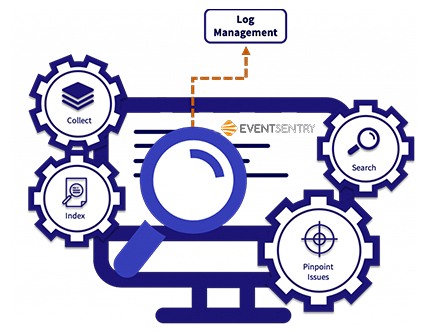
EventSentry works by securely collecting and correlating data from SNMP-enabled devices, servers, and logs, converting raw data into readable insights.
Key Features
- Real-Time Event & Log Monitoring: It constantly tracks event logs, SNMP traps and system metrics, providing instant notifications when thresholds are breached or issues occur.
- Security Event Correlation: This tool normalizes and correlates data across logs to identify unusual activities like unauthorized access or malware behavior.
- Descriptive Email Alerts: It delivers enriched email alerts with charts, DNS lookups and clear explanations so admins can troubleshoot faster.
- Web-Based Dashboards & Reports: This tool offers interactive, customizable dashboards with API access, making it easy to visualize performance and generate compliance-ready reports.
Free
- EventSentry offers a 30-day free trial with full feature access for evaluation.
Paid
- Starts @ $98 initial purchase (which includes complete log monitoring, SNMP performance tracking and one year of phone and email support)
Pro and Cons
Pros
- Comprehensive real-time monitoring and alerting.
- Easy-to-use dashboards and visual reports.
- Strong security event correlation and compliance tools.
- Flexible pricing with unlimited data storage.
Cons
- Interface may feel complex for small-scale users.
5. Atera – All-in-One RMM and SNMP Monitoring Tools
Atera’s SNMP Monitoring Tool allows IT professionals to easily monitor network devices like printers, routers, and NAS systems alongside computers and servers.
The interface is user-friendly and centralized, showing all monitored devices, their live statuses, and alerts in one dashboard. Atera’s monitoring system automatically detects network issues such as offline devices or hardware errors and sends instant alerts to the technician’s dashboard or email.

These alerts help IT teams act fast and fix issues before they affect users. With detailed graphs, Atera ensures easy troubleshooting and ongoing optimization of network performance.
Key Features
- SNMP Device Monitoring: This tool allows continuous monitoring of SNMP-enabled devices, giving real-time data on availability and performance. It ensures full visibility of routers, printers, and NAS devices through automated polling.
- Agent-Based Architecture: It uses installed agents on PCs or servers to monitor devices within the network, ensuring smooth communication even if the network has limited access points.
- Custom OID Tracking: You can use this feature by adding OIDs to monitor specific metrics unique to each device, providing personalized and detailed monitoring capabilities.
- Smart Alerts and Reports: The system automatically generates alerts for performance drops or device failures and provides detailed history graphs and reports for analysis and prevention.
Free
- Atera offers a free trial for new users.
Paid
- Contact the Sales Team.
Pro and Cons
Pros
- Easy setup with a clean and intuitive interface
- Supports a wide range of SNMP-enabled devices
- Real-time alerts and performance graphs
- Centralized monitoring for multiple customers
Cons
- Limited free plan duration
6. LibreNMS – Free, Open-Source SNMP Monitoring Tools
This tool, LibreNMS, is an open-source SNMP tool that automatically discovers and monitors your entire network, including routers, switches, firewalls, and servers.
It uses SNMP & LLDP and other protocols to detect devices and collect performance data in real-time. The system provides a simple, web-based interface that’s mobile-friendly and easy to navigate. It works by polling network devices at regular intervals to track uptime, bandwidth, and performance metrics.

Its alerting system is highly customizable, you can receive notifications via email, Slack or other channels. The platform also supports distributed polling to scale across large networks and includes an API for automation and integrations.
Key Features
- Automatic Network Discovery: It automatically detects all connected devices using SNMP, CDP, and LLDP, helping administrators quickly map and visualize their network without manual setup.
- Customizable Alerting System: The alert manager allows flexible notification settings, so users can define thresholds and receive alerts via multiple platforms like email, Slack, or Discord for instant response.
- Distributed Polling: This feature lets you scale monitoring across multiple servers, ensuring performance data is gathered efficiently even in large or multi-site networks.
- API and Integration Support: It includes a robust API that lets you manage devices, retrieve data, and integrate with tools like NfSen and Oxidized for advanced automation.
Free
- This tool is completely free and open-source.
Paid
- There’s no paid plan.
Pro and Cons
Pros
- Completely free and open-source
- Easy automatic network discovery
- Strong community support and integrations
- Highly flexible alerting options
Cons
- Requires technical setup and maintenance
- No official enterprise support plan
7. Observium – Powerful SNMP Network Monitoring Tool
Next, we have Oservium, a powerful network monitoring & management platform that uses SNMP Protocol to automatically discover and analyze devices across your network.
It continuously collects data such as bandwidth usage, device performance and system health, presenting it through a simple web interface. The tool’s automatic discovery system identifies devices without manual setup, while its detailed graphs makes it easy for administrators to visualize networks.

It simplifies troubleshooting by offering real-time fault detection and historical performance data that highlight trends and anomalies. When issues arise, its alerting system notifies administrators through email, allowing quick root-cause analysis.
Key Features
- Automatic Device Discovery: It scans your network using protocols like CDP and SNMP to automatically detect connected devices, saving time.
- Threshold & State Alerting: This tool automatically creates alert conditions based on performance metrics, notifying users of potential problems before they affect services.
- Traffic Accounting: Available in the Professional Edition, this feature tracks and logs bandwidth usage for billing or analysis, supporting both total transfer and 95th percentile accounting.
- Integration with Third-Party Tools: Observium integrates with tools like MySQL, allowing users to centralize data from multiple sources for easier analysis and management.
Free
- Free Plan (Community Edition): Perfect for small labs or home setups, it offers unlimited device monitoring.
Paid
- Contact the Tech Team for custom plans
Pro and Cons
Pros
- Easy-to-use web interface
- Automatic device and service discovery
- Comprehensive performance graphs and alerts
- Supports wide range of devices and OS
Cons
- Limited support in free version
8. NetCrunch – User-Friendly SNMP Monitoring Software
What’s so special about this tool, AdRem NetCrunch!
First off, it’s a powerful and user-friendly SNMP monitoring software that’s designed to give complete visibility into your entire network.
It works by using the SNMP protocols to automatically discover and analyze all network-connected devices. The software collects real-time data, detects issues instantly, and provides detailed reports through an intuitive dashboard.

The NetCrunch interface is clean, offering pre-built SNMP views, easy-to-read charts, and customizable dashboards for different network components. With over 125 preconfigured monitoring packs, it simplifies setup for any SNMP-compatible device.
The tool’s automated policy creation and advanced MIB compiler help in managing new devices effortlessly.
Key Features
- Comprehensive SNMP Support: NetCrunch supports SNMP v1, v2c & v3, ensuring compatibility and secure data transmission. It also handles traps and informs packets, helping users stay updated on every network event.
- Advanced MIB Compiler: The built-in MIB compiler makes adding new MIBs simple, keeping the monitoring setup current. It supports remote compilation and customization for any vendor device.
- SNMP Views & Customization: It offers predefined and customizable SNMP views using YAML, enabling users to tailor data visualization and interact directly with SNMP data.
- Automated Alerting & Policy Management: This tool detects faults in real time and triggers alerts instantly. Policies can be automated to isolate, diagnose, and resolve network problems efficiently.
Free
- It offers a 30-day free trial.
Paid
- The paid plan starts @ $2900 which includes everything, full SNMP support, real-time dashboards, basic alerting, and device discovery features.
Pro and Cons
Pros
- Easy setup with auto device discovery
- Deep SNMP integration with customizable MIBs
- Real-time alerts and troubleshooting tools
- Scalable for large enterprise networks
Cons
- Limited cloud integration options in lower plans
9. WhatsUp Gold – Effortless SNMP Monitoring Software
This tool continuously scans your environment, detects issues early, and alerts you instantly through email, SMS, or push notifications. The intuitive dashboard of WhatsUp Gold, makes it easy to visualize your entire infrastructure, from on-prem to cloud systems, ensuring quick troubleshooting and smooth operations.
With its secure, scalable design, WhatsUp Gold helps businesses of all sizes manage complex networks effortlessly. It uses SNMP polling to monitor routers, switches, servers, and other devices, collecting key performance data such as bandwidth, CPU load, and uptime.

The software’s interface is clean and user-friendly, featuring a real-time dashboard where users can view network maps, alerts, and device statuses at a glance.
Key Features
- Intelligent SNMP Device Discovery: It automatically scans your network to detect and map all SNMP-enabled devices, ensuring no critical asset is missed during setup.
- Advanced Performance Metrics: This feature provides in-depth visibility into device health, bandwidth usage, and performance trends, helping IT teams optimize network efficiency.
- Customizable Alerts & Automation: It allows users to set specific thresholds and automate responses, such as restarting services or sending notifications, to prevent downtime.
- Historical Reporting & Analysis: It stores performance data over time to help plan capacity upgrades, identify recurring issues, and make data-driven decisions.
Free
- WhatsUp Gold offers a free trial.
Paid
- You need to contact the tech support of WhatsUp Gold to GET A QUOTE
Pro and Cons
Pros
- Easy installation and intuitive interface
- Real-time alerts with customizable options
- Scalable across hybrid and cloud networks
- Strong reporting and historical analysis
Cons
- Advanced automation may require setup time
10. Netdata – Real-Time Performance SNMP Monitoring Tools
Lastly, we’ve Netdata that helps users identify traffic spikes, packet errors or device downtime before they cause issues.
With an easy-to-use web interface, NetData displays data in interactive dashboards, allowing users to track network health with simple visuals and detailed performance metrics. It works by polling SNMP devices using unique Object Identifiers to get live performance data, which is then visualized in real-time graphs.

The platform’s advanced analytics help in diagnosing root causes of issues, from bandwidth bottlenecks to hardware errors. Its alert system supports custom thresholds and instant notifications via email or chat, enabling immediate response.
Key Features
- Real-Time Performance Monitoring: It back-to-back collects and visualizes live SNMP data, offering second-by-second insights into network traffic, uptime, and errors. It ensures that users can detect problems instantly and act when downtime occurs.
- Custom OID Support: It allows you to manually add specific OIDs to monitor unique device metrics beyond defaults. This enables deep customization for specialized equipment and advanced performance tracking.
- Intelligent Alerting System: It can set custom thresholds for alerts based on performance metrics. The system instantly sends notifications through email or integrations like Slack, helping teams act quickly.
- Interactive Web Interface: This provides a clear dashboard with visual charts and detailed analytics. The interface simplifies device management and enables effortless monitoring as well across distributed networks.
Free
- NetData offers a Free Plan.
Paid
- Starts @ $4.50 per node per month
Pro and Cons
Pros
- Real-time and highly accurate SNMP data collection.
- Easy-to-use dashboard for visualization and control.
- Custom alerting for quick problem detection.
- Lightweight setup with minimal resource usage.
Cons
- Advanced configuration requires some technical knowledge.
What to Look for in an SNMP Monitoring Tool in 2026?
There are so many SNMP monitoring tools that are available online, but choosing the right one can be challenging. Each promises excellent performance, but not all are ONE-SIZE-FITS-ALL for your specific network setup.
That’s why we’ve listed the top 5 features you should always look for in a reliable SNMP monitoring tool before making your choice.
- Real-Time Monitoring and Alerts: Please make sure that the tool you choose should instantly detect network issues and alert your team in real time. This ensures that potential downtime or failures can be fixed before they impact users or operations.
- Scalability: As your business grows, so does your network. So, make sure you go for an SNMP tool that handles thousands of devices easily without slowing down or compromising accuracy.
- Customizable Dashboards: Look for a tool that lets you customize dashboards to display the data most relevant to you. This saves time and makes it easier to spot patterns or problems at a glance.
- Integration with Other Tools: The best SNMP monitoring software should integrate seamlessly with ticketing systems, cloud platforms, and other IT management tools to streamline your workflow.
- Detailed Reporting and Analytics: Comprehensive reports and performance analytics help you understand trends, optimize resources, and make data-driven decisions for network improvement.
How to Choose which Tool Suits Your Needs Best?
To choose the best SNMP monitoring tool is absolutely not about picking the most popular one but it’s to find what works best for your specific needs. Start by identifying your network size, type of devices, and how much automation you need.
Once you understand these basics, it becomes much easier to choose a tool that aligns perfectly with your goals and budget.
- Ease of Use and SetupThe tool should be user-friendly with a simple installation and configuration process.
- Scalability Make sure it can grow with your business without requiring a full system overhaul.
- Alerting and Notification System Look for intelligent alerts via email, SMS, or integrations like Slack for quick responses.
- Customization OptionsDashboards, alerts, and reports should be flexible enough to meet your unique needs.
- Pricing and LicensingAlways check if the pricing model fits your organization’s budget, especially for enterprise use.
- Customer Support and DocumentationA responsive support team and clear documentation make troubleshooting much easier.
FAQs
Is SNMP still relevant in modern cloud / hybrid / edge-first environments?
Yes! SNMP is still relevant even in modern cloud, hybrid, and edge-first environments. While newer APIs and protocols exist, SNMP remains the most widely supported method for network device monitoring. It’s lightweight, mature, and universally compatible with routers, switches, servers, and IoT devices.
What’s the difference between polling and traps? When to use each?
Polling and traps are two methods SNMP uses to communicate data. Polling is when the SNMP manager requests information at regular intervals, great for consistent performance tracking. Traps, on the other hand, are instant alerts sent automatically by devices when issues occur.
Does SNMP monitoring cover application-level metrics?
No! SNMP primarily focuses on infrastructure and network-level metrics such as CPU usage, bandwidth, packet loss, and device uptime. It doesn’t natively monitor application performance or user experience metrics.
How can I monitor non-SNMP devices?
Non-SNMP devices can be monitored using alternative protocols or integrations like REST APIs, WMI, SSH, or custom agents. Modern monitoring platforms often combine SNMP with these methods to cover a wider range of systems, like virtual machines, cloud services or storage arrays, that don’t use SNMP.
How do I choose proper polling intervals / thresholds?
It’s easy! For critical infrastructure, shorter intervals (30 to 60 seconds) ensure quicker detection of issues, while less critical devices can be polled every 5 to 15 minutes to save bandwidth. Thresholds should reflect realistic performance baselines, setting them too low can cause alert fatigue, while too high may delay responses to real problems.
Which tools are good in scenarios with 10s of thousands of devices?
For large-scale environments, tools like SolarWinds, Paessler PRTG, ManageEngine and NetData are few of the top choices. They’re built to handle massive infrastructures with efficient polling engines, distributed monitoring, and load balancing. These tools also offer automation, role-based access, and intelligent alerting, making them 100% perfect for enterprises managing tens of thousands of SNMP-enabled devices.
Conclusion
An SNMP monitoring tool is a necessity for maintaining healthy and reliable networks. These tools are used to track device performance, manage configurations and ensure seamless communication between systems.
The top 3 features that make them indispensable are real-time alerts, automated troubleshooting and detailed performance analytics, each ensuring that potential issues are detected and resolved before they disrupt operations.
We seriously know that getting the right SNMP solution can be challenging. Among all options, SolarWinds Network Performance Monitor is the best SNMP tool due to its accuracy, scalability, and advanced alerting capabilities. It simplifies complex network monitoring tasks, saves time, and ensures every device stays in perfect sync.
Spending money on a reliable SNMP tool is a smart thing to keep your network performance at its peak.
Comparison Table
To make things even easier, below we’ve added a comparison table that gives you clear insights into all the top SNMP monitoring tools in 2026. You’ll find details about each tool’s best features, pricing plans, and whether they offer free trials or versions.
This table will help you compare options side by side so you can make a confident, informed decision.
| Best SNMP Monitoring Tools in 2025 | SNMP Version Support (v1/v2c/v3) | Auto-Discovery / Topology Mapping | Alerting & Traps | Free Version Available? | Price per month |
| SolarWinds Network Performance Monitor | Full SNMP polling & traps | automatic device discovery and topology maps | Alerts & SNMP trap collection. | No permanent free edition | $7 per node per month |
| Paessler PRTG Network Monitor | Supported via SNMP sensors | Auto-discovery & network maps. | Alerting & SNMP trap receiver. | Free edition (100 sensors) 30-day trial | Connect to the Sales Team to Get the Quote |
| ManageEngine OP Manager | Full SNMP support | Yes! Layer 2 to 3 maps, switch-port mapping. | Alerting engine + SNMP trap. | Free edition (monitors up to 3 devices). | Connect to the Sales Team to Get the Quote |
| EventSentry | v1 / v2c / v3 supported | discovery & switch port mapping | alerts, SNMP notifications | free and 30-day trial of full product. | $98 (This price includes Everything) |
| Atera | SNMP support via network discovery agent & integrations | network topology via integrations. | alerting & notifications via RMM features | Trial available but not a permanent edition | Connect to the Sales Team to Get the Quote |
| LibreNMS | Supports SNMP v1/2c/3 for discovery & polling. | Automatic network discovery (CDP/LLDP/OSPF/BGP/ARP) and topology mapping. | Yes! Alerting engine, traps and customizable alerts. | Open-source & free | Free, no costs apply |
| Observium | SNMP-based discovery and polling | Auto-discovery and topology | Alerts and notifications & Rapid updates. | Community Edition = free (open) | Connect to the Sales Team to Get the Quote |
| NetCrunch | Full SNMP with monitoring packs. | Auto-discovery, topology and network maps | Alerting engine + trap support | Trial available | Pricing varies by edition (Connect to the Sales Team to Get the Quote) |
| WhatsUpGold | SNMP-based discovery & polling | Auto-discovery and layered (L2/L3) topology | Alerts, SNMP trap handling | WhatsUp Gold Free Edition | Connect to the Sales Team to Get the Quote |
| Netdata | SNMP support available & SNMP collector | SNMP service discovery, collectors can auto-detect SNMP devices | Alerting and notification rules | Netdata is open-source and free | It’s free |



Table of Contents
- What is SNMP Monitoring Tool?
- Top 10 SNMP Monitoring Tools in 2026 (Paid + Free)
- 1. SolarWinds - Overall Best SNMP Monitoring Tools
- 2. Paessler PRTG - Overall Best SNMP Monitoring Tools
- 3. ManageEngine OpManager - Affordable SNMP Network Monitoring Tool
- 4. EventSentry - Stay Alert and Secure SNMP Monitoring Tool
- 5. Atera - All-in-One RMM and SNMP Monitoring Tools
- 6. LibreNMS - Free, Open-Source SNMP Monitoring Tools
- 7. Observium - Powerful SNMP Network Monitoring Tool
- 8. NetCrunch - User-Friendly SNMP Monitoring Software
- 9. WhatsUp Gold - Effortless SNMP Monitoring Software
- 10. Netdata - Real-Time Performance SNMP Monitoring Tools
- What to Look for in an SNMP Monitoring Tool in 2026?
- How to Choose which Tool Suits Your Needs Best?
- FAQs
- Conclusion
- Comparison Table