Best Free WordPress News Themes in 2026 [Expert Picks]


I’ve worked with WordPress news websites across niches like sports, technology, entertainment and finance. Along the way, I’ve tested 60+ free WordPress themes, and I found that a theme can look great in its demo but feel very different once you start adding real articles and content.
For this guide, I set up 10 free WordPress news themes and tested them based on their features, performance, usability, customization options, and what you actually get in the free version.
I’ll also break down what each theme is best suited for, so you can pick one that fits your news website and the type of content you plan to publish.
💡 Key Takeaway
Here is a quick look at the top 3 free WP news themes that you can go for as per your need:
✅ ColorMag: If you need a dedicated news layout, in that case, ColorMag is the best option here. It is specifically built for news websites with category sections and engaging news grids.
✅ Astra: It is a good option for speed and flexibility. It is a lightweight multipurpose theme and it works well for content heavy wordpress sites, like news websites.
✅ Kadence: This WP news theme will give you more design control. It gives you flexible customization options, so you can shape the layout around your news content.
I’ve covered these themes in detail below. Along with these 3 picks, I’ve included more options to help you find a theme that matches your specific needs, be it customization, news-focused layouts or monetization.
Why Choose a WordPress Theme for a News Website?
A regular WordPress blog theme is fine for a few posts each week, but a news website is different. You may publish 10 to 15 articles a day across categories like sports, technology, entertainment, and business.
That’s why news websites need a theme that can handle lots of content and help readers find stories quickly.
A good news theme should offer:
- News-focused layouts for latest, featured, and trending stories
- Category sections to organize large amounts of content
- Ad spaces for website monetization
- Mega menus for multiple categories and subcategories
- Mobile-friendly layouts for readers on phones
- Good performance when your homepage has lots of posts and images
Without these features, you may need several plugins to build the same layout, which can add extra weight and maintenance.
So, a dedicated news theme gives you a better starting point for building a news, magazine, or newspaper-style website.
A theme alone does not decide your website speed or Google rankings. Your hosting, caching, images, and plugins also matter. For more on hosting performance, check out our guide on common problems with free WordPress hosting.
How We Tested These WordPress News Themes
Since this guide is called “Tested and Reviewed,” here’s exactly what I checked for every theme with full honesty.
I installed each theme on a fresh WordPress 7.1.2 setup with PHP 8.2, with no caching or extra optimization during the initial test. This helped me see what each theme offers on its own.
Here’s what I checked:
- Easy installation: How quickly can you install and set up the theme? Does it need extra plugins or offer a demo import?
- Free features: What do you actually get for free, and how much is locked behind the Pro version?
- News layouts: Can you display featured stories, latest news, category sections, grids, and breaking-news areas?
- Navigation: Can the theme handle lots of categories and subcategories with dropdowns or mega menus?
- Ad placement: Are there useful spaces for banners and other monetization options?
- Mobile experience: I checked the layouts on desktop, tablet and a mid-range Android phone.
- SEO basics: I checked the HTML structure, headings, and schema support using browser developer tools.
- Performance: I looked at the theme’s frontend size and overall page weight. Lightweight themes can add very little code, while heavier ones can add 200 KB or more.
- User trust: I checked WordPress.org ratings, active installations, and signs of ongoing development.
- Free vs Pro: I noted the main features you lose when staying on the free version.
Themes can change with updates, so it’s worth checking the latest version before installing one. If you want a detailed review of how we do the testing, you can also see our detailed testing methodology here.
10 Best Free WordPress News Themes for 2026
Now, let’s look at the 10 best free WordPress news themes. I’ve kept each review in the same format, so you can easily compare them.
⏰ TL;DR
1. Astra – Best for flexible, fast-loading news and content websites
2. ColorMag – Best for news, magazine, and newspaper-style websites
3. OceanWP – Best for customizable news sites with flexible navigation
4. Kadence – Best for modern news sites with advanced customization
5. GeneratePress – Best for performance-focused news and content websites
6. Neve – Best for mobile-first news blogs and content sites
7. Sydney – Best for news blogs and multipurpose content websites
8. Hueman – Best for content-heavy blogs and online magazines
9. Poseidon – Best for clean, editorial-style news websites
10. Editorial – Best for simple magazine and news websites
1. Astra (Provider: Brainstorm Force)

Summary
Astra is a lightweight WordPress theme with fast-loading layouts, flexible customization, page-builder support, schema features, WooCommerce compatibility, and starter templates.
Astra is a lightweight, multipurpose WordPress theme from Brainstorm Force with more than 1 million active installations.
Its base theme uses less than 50 KB of resources and works with Elementor, Spectra, Beaver Builder, and the WordPress block editor. It provides a fast foundation, while starter templates and page builders help you create magazine-style layouts.
It also includes schema markup, responsive design and extensive customization controls.
It supports WooCommerce for online stores and works well as a WordPress theme for a jewellery store or ecommerce setup.
Please note: Astra is a multipurpose theme, not a news-specific theme. It does not include built-in breaking news tickers or category widgets. You will need starter templates and a page builder to create a news layout.
Installation: 1+ million active installations
WordPress Rating: 4.9 out of 5
Key Features
- Lightweight Performance: Astra keeps its core lightweight with lean code and vanilla JavaScript. The official site lists a base resource footprint below 50 KB, which helps keep theme-level overhead low.
- 300+ Starter Templates: The Starter Templates library gives you pre-built website designs that can be imported and customized. Current Astra material lists more than 300 templates, with options designed for different niches and page builders.
- Header and Footer Builder: There is also a visual Header and Footer Builder that lets you arrange elements such as logos, menus, buttons, widgets, and social icons. You can build these sections from the WordPress Customizer instead of editing theme files.
- Page Builder Compatibility: You can use Elementor for visual page design, Spectra for block-based layouts, or Gutenberg for a more native WordPress workflow. This gives publishers more control over how they arrange headlines, articles, images, and other homepage sections.
- WooCommerce and SEO Support: It includes built-in schema markup and supports major SEO tools, while its WooCommerce integration provides controls for online store layouts. That makes the theme suitable for publishers who want to add merchandise or product sales.
Astra Theme Speed Testing Results
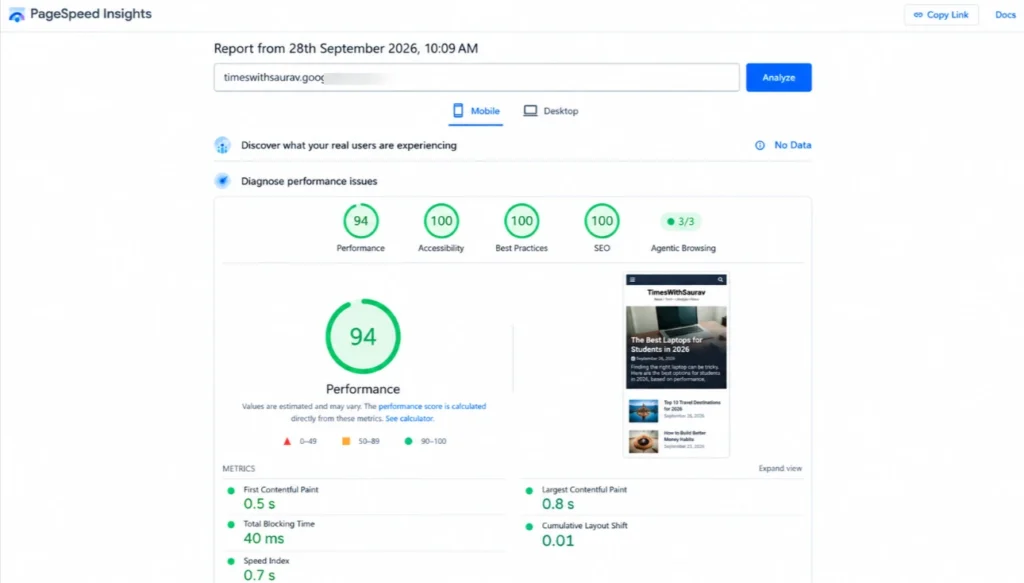
Here, I’ve shown how Astra can perform on a Lightweight WP news setup. I’ve done real testing of the page speed and to give you a quick idea. Below is the screenshot of the PageSpeed Insights result based on a clean installation with a basic news layout:
Page Speed in Mobile
Page Speed in Desktop
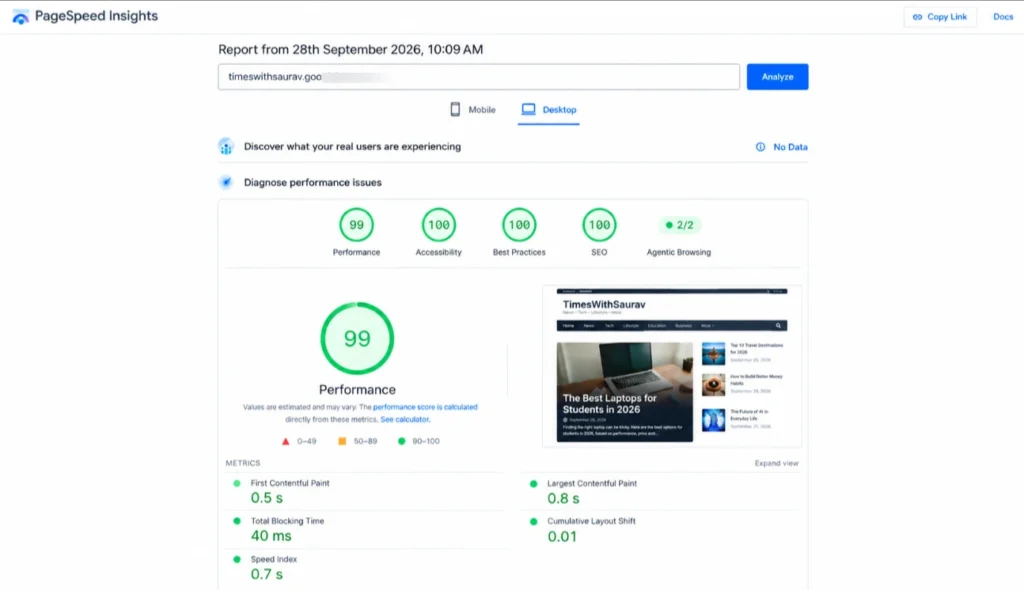
So, what do these numbers actually mean?
It means that
- Astra performs well in this type of setup because the theme keeps its front-end footprint relatively small.
- For a news website, the mobile LCP of 0.8s seconds is the figure I would highlight. News sites usually have more images, category blocks, advertisements and widgets than a bare WordPress installation, so actual results can be higher once you add those elements.
Just like I’ve tested the free WP news theme of Astra on mobile, I’ve conducted the tests of all the providers listed below and based on the real testing on mobile and desktop I’ve compared the options. Since I’ve already explained my testing process earlier in this article and shown you a screenshot of how I tested Astra, I haven’t added separate test screenshots for every theme.
Best Suitable For
Astra is best for publishers who prioritize page speed above everything else and are comfortable using a page builder to create their news layout from scratch.
Why We Recommend Astra
Astra is really a good option because of its speed. In my testing, it delivered a 99/100 mobile PageSpeed score, with an LCP of just 0.8 seconds. Based on these results, it is one of the faster free options I tested for a WordPress news website. The starter template library also gives you enough flexibility to build a functional magazine-style homepage without writing code.
For a broader comparison with other themes, check out our full roundup of best free WordPress themes.
2. ColorMag (Provider: ThemeGrill)

Summary
Built for news and magazine websites, ColorMag offers widget-based homepage layouts, featured content sections, ad areas, breaking-news elements, and ready-made demos.
ColorMag is the highest rated magazine theme on WordPress.org with a 4.9 out of 5 star rating from over 1,500 users and 40,000+ active installations.
It is not like the multipurpose themes above. ColorMag was built specifically for news, magazine, and newspaper websites.
The homepage is widget-based, meaning you can drag category sections, featured posts and ad widgets into place without even using code. It offers 30+ one-click starter demos covering niches like health, food, entertainment, sports, and fashion.
The free version also integrates with the Magazine Blocks plugin, a dedicated Gutenberg block library with 21+ blocks designed for news layouts including post grids, sliders, tabbed category sections and news tickers.
Installation: 40,000+ Active installations
WordPress Rating: 4.9 out of 5.
Key Features
- Widget-Based Homepage: You get to organize your homepage the way you want. You can use widgets to create separate sections for different categories, such as politics, sports, technology, and entertainment, right on your homepage.
- Magazine Blocks Plugin Integration: You also get more layout options inside Gutenberg. The Magazine Blocks plugin adds 21+ Gutenberg blocks, so you can easily create post grids, sliders, category sections, columns, and other magazine-style layouts.
- Built-In Ad Widget Areas: Here, you get to add ads without editing your theme code. The theme gives you dedicated widget areas for advertisements. You can place banners in areas like the header, sidebar, homepage, or between content sections.
- 30+ One-Click Starter Demos: Start with a ready-made news website. You get more than 30 starter demos designed for different news niches. Pick one you like, import it with one click, and replace the demo content.
- Breaking News Ticker and Featured Slider: You can put your important stories where readers can see them. The breaking news ticker works well for urgent updates, while the featured slider lets you showcase important or popular stories prominently on your homepage.
Best Suitable For
ColorMag is the best pick for anyone who wants a ready-made news website layout without depending on third-party page builders. It is built for publishers.
Why We Recommend ColorMag
Go with ColorMag WP news theme because it is one of the very few free themes designed from the ground up for content-heavy news publishing. The widget-based homepage means you do not need to learn Elementor or Gutenberg blocks to organize your categories, featured stories, and latest posts.
The only downside is that ColorMag is slightly heavier than minimalist themes like Astra or GeneratePress.
3. OceanWP (Provider: OceanWP (independent developer team)

Summary
OceanWP combines flexible customization with responsive layouts, post-format support, starter demos, WooCommerce integration, and an extension system for different website types.
OceanWP gives you a surprising amount of control even before you upgrade to the paid version. Instead of forcing every page to follow the same layout, it lets you change important design elements on individual pages.
For example, you can turn the header, footer, or sidebar on or off for a specific page.
This can be especially useful for news websites, where your homepage, article pages, and landing pages may need completely different layouts.
OceanWP also supports multiple post formats and works closely with Elementor. Its free version includes a large number of Customizer settings, giving you detailed control over colors, typography, spacing, and page layouts.
Installation: 400,000+ Active Installations
WordPress Rating: 4.9 out of 5.
Key Features
- Extensive Free Customizer Settings: You can get more control over your website design. The free version gives you a large number of Customizer options for colors, fonts, spacing, layouts, menus, and other design elements, so you can fine-tune your site.
- Multiple Post Format Support: Publish different types of content more easily. This theme supports multiple post formats, giving you more flexibility when publishing different content types. This can be useful for news, reviews, videos, images, and other posts.
- Free Blog and Magazine Demo Sites: Start with a ready-made design. It provides free demo websites for different types of sites, including blogs and magazines. You can import a design and then replace the demo content with your own.
- WooCommerce Compatibility: Turn your website into an online store. It works with WooCommerce and includes features designed to improve the shopping experience, including options that help simplify and optimize the checkout process.
- Extension-Based Architecture: Keep the core theme lightweight. OceanWP uses extensions to add extra functionality instead of putting everything into the main theme. You can add the features you need while keeping the core theme cleaner.
Best Suitable For
OceanWP is the right choice for publishers who want maximum customization control in the free version and prefer using Elementor as their page builder.
Why We Recommend OceanWP
OceanWP offers a broad range of customization options in its free version. That is why it is a practical choice for news bloggers who want more flexibility over their site’s layout. Its page-level settings let you create different layouts for different sections of your website. For example, you can use a full-width homepage, add a right sidebar to category pages for ads or widgets and use a different header layout for individual articles.
4. Kadence (Provider: Nexcess, StellarWP family under Liquid Web)

Summary
Kadence delivers a flexible header and footer builder, responsive design, starter templates, global color controls, Kadence Blocks integration, and WooCommerce support.
Kadence has more than 500,000 active installations on WordPress.org and holds an almost perfect user rating. It was added to the WordPress directory in 2020 and has grown quickly because the free version gives users plenty of design control.
The free Kadence Blocks plugin adds more options to the WordPress block editor. It provides extra blocks and layout tools, allowing you to create detailed magazine-style pages without buying a separate page builder.
On the official WordPress.org demo, Kadence scores 100 out of 100 on Google Lighthouse for both mobile and desktop performance.
Its header builder also gives you detailed control over your site’s navigation and layout.
Installation: 500,000+ Active Installations
WordPress Rating: 4.9 out of 5.
Key Features
- Drag-and-Drop Header and Footer Builder: You can build custom headers and footers without coding. Kadence lets you arrange logos, menus, buttons, search boxes, social icons, and other elements using a simple drag-and-drop builder with multiple layout rows.
- Global Color Palette: Using this feature, you can change your website colors from one place. The theme provides a global palette with 9 configurable colors. You can change your main colors once, and those colors can be reused across different parts of your website.
- Free Starter Templates: If you are a newbie, you can start your website with a ready-made design. This theme includes free starter templates for blogs, business websites, portfolios, and magazine-style sites. You can import a template and customize its content, colors, fonts, and layouts.
- Kadence Blocks Plugin: Add more design blocks to Gutenberg. The free Kadence Blocks plugin adds 15+ custom Gutenberg blocks, giving you more options for creating sections, layouts, buttons, galleries, forms, and other website elements.
- Conditional Page-Level Layout Controls: You get to control how individual pages look. It lets you change layout settings for specific pages. You can adjust elements such as headers, sidebars, titles, and page widths instead of using one layout everywhere.
Best Suitable For
Kadence is really good for beginners who want a professional look quickly and want maximum free design control through the block editor without relying on a third-party page builder.
Why We Recommend Kadence
Based on my experience, Kadence is a genuine option for users who want extensive design flexibility in the free plan. Its global color palette lets you manage the entire site’s color scheme from one panel, with changes applied consistently across different elements.
5. GeneratePress (Provider: Tom Usborne)

Summary
GeneratePress focuses on clean, lightweight code and performance, while providing responsive layouts, customization controls, block-editor support, and compatibility with major builders.
GeneratePress is my favorite theme when performance comes first.
The theme has more than 500,000 active installations and a very strong review profile. GeneratePress follows a simple thing, it gives you the basics and stays out of your way.
The free version is intentionally minimal, so you will need a page builder or GeneratePress Premium modules to create a more detailed magazine-style homepage. You get a very lightweight foundation, but you have to put more work into the design.
Installation: 500,000+ Active Installations
WordPress Rating: 4.9 out of 5-star
Key Features
- Less Than 10 KB Gzipped: A fresh GeneratePress installation adds less than 10 KB gzipped to the page size. That gives you a lightweight starting point before you add your news content, images, plugins and other features.
- 100/100 Google Lighthouse Performance: Built with speed as a priority. It can achieve a 100/100 Lighthouse performance score on both mobile and desktop in suitable test conditions, giving you a strong starting point for speed optimization.
- Clean and Semantic HTML: The theme keeps its code structure simple. It uses clean, semantic HTML with a proper heading structure. This gives browsers, screen readers, and search engines a clearer understanding of your page content.
- Gutenberg and Page Builder Compatibility: You can use the editor or builder you already prefer. It works with Gutenberg and major WordPress page builders, giving you more freedom to create custom layouts as your website grows.
- Detailed Layout and Typography Controls: Fine-tune how your website looks. The Customizer gives you control over layouts, spacing, fonts, colors, and other design settings. You can make detailed changes without editing theme files directly.
Best Suitable For
GeneratePress is a good fit for developers, speed-focused publishers, and website owners who care more about performance and Core Web Vitals than having a ready-made news design.
Why We Recommend GeneratePress
If you want a lightweight structure for news websites (for a good page speed), GeneratePress is the right choice for you then. It can help keep the initial page size low, which is useful for content-heavy websites with frequent article updates and higher traffic.
For high-traffic news sites, your hosting matters as much as your theme. Check our guide on best dedicated servers for high-traffic WordPress blogs.
6. Neve (Provider: ThemeIsle)

Summary
Neve uses a mobile-first approach with a lightweight design, starter sites, WordPress Customizer controls, page-builder compatibility, and flexible layouts for content websites.
Neve is another lightweight WordPress theme from ThemeIsle, with more than 200,000 active installations on WordPress.org. The theme itself weighs under 28 KB, putting it in the same lightweight category as GeneratePress.
One thing I like about Neve is its mobile-first approach. It starts with smaller screens and then scales the design up for tablets and desktops, which works well for websites where a large share of visitors come from phones.
Neve also includes a starter site library through its companion plugin. You can pick a ready-made template, import it, and customize it instead of building your entire website from a blank page.
The WordPress Customizer gives you plenty of control as well. You get a header and footer builder, global color settings, and different layout options, so you can shape the design without digging into the code.
Installation: 200,000+ Active Installations
WordPress Rating: a 4.7 out of 5 stars
Key Features
- Mobile-First Responsive Design: Your website starts with mobile users in mind. It is designed for smaller screens first and then adapts to tablets and desktops. Your content and layout can adjust smoothly across different screen sizes.
- Free Starter Site Library: You can start with a ready-made website instead of a blank page. This theme includes a library of starter websites with free templates you can import. You can then replace the demo content, images, colors, and other elements.
- Header and Footer Builder: You can design important parts of your website visually. The Customizer includes tools for building your header and footer. You can arrange elements such as menus, logos, buttons, and other content to match your site’s layout.
- Major Page Builder Compatibility: Choose the page builder you prefer. Neve works with popular page builders such as Elementor, Beaver Builder, and Brizy, along with the standard WordPress block editor.
- Vanilla JavaScript: Keep the theme’s code lightweight. Instead of relying on jQuery, Neve uses Vanilla JavaScript for its functionality. This helps reduce dependencies and contributes to faster page loading.
Best Suitable For
Neve is the right pick for publishers targeting a primarily mobile audience who want a fast, clean starting point with room to grow into Pro features later.
Why We Recommend Neve
Neve is a highly recommended WP news theme for news websites as it gets a good share of visitors from phones and tablets. In my testing, its lightweight setup performed well on mobile. This means that it can be helpful for publishers looking to keep article pages quick and responsive for mobile readers.
7. Sydney (Provider: aThemes)

Summary
Sydney provides responsive layouts, starter sites, customization options, header controls, typography settings, and page-builder compatibility for blogs, business sites, and content projects.
As per our research, Sydney offers a pro plan @ $63 per year for 1 site. Sydney is a business-first WordPress theme by aThemes with 80,000+ active installations.
It works with both Elementor and the WordPress block editor. Sydney offers 25+ starter sites with professionally designed templates that can be imported with one click.
While it was originally designed as a business theme, its flexible block patterns and Elementor integration make it a viable choice for magazine and news websites.
The theme includes full Google Fonts access, multiple header styles, a full-screen slider, sticky navigation and responsive design across all devices.
Installation: 80,000+ Active Installations
WordPress Rating: A 4.9 out of 5 stars.
Key Features
- 25+ One-Click Starter Site Demos: Get your website online faster with a ready-made design. You can choose from more than 25 starter demos and import one with a click. Then replace the demo text, images, colors, and other content.
- Elementor and Block Editor Compatibility: Build pages using the editor you already know. The theme works with Elementor as well as the WordPress block editor, giving you the freedom to create simple pages or more detailed magazine-style layouts.
- Sticky Navigation and Full-Screen Header Slider: Keep navigation visible and make important stories stand out. You can keep your main menu visible as visitors scroll and use a full-screen header slider to showcase featured articles, announcements, or important content.
- Block Patterns Library: You can build page sections faster with ready-made layouts. The block patterns library gives you pre-designed sections that you can insert into your pages and customize, saving you from building every layout from scratch.
- Customizer Design Controls: Adjust the look of your website without touching code. The Customizer lets you change colors, typography, spacing, and layouts, giving you plenty of control over the site’s appearance from one place.
Best Suitable For
Sydney works best for publishers who also need business website elements like service sections, testimonials and call-to-action areas alongside their news content.
Why We Recommend Sydney
I recommend Sydney when you need a theme that blends business credibility with news publishing. If you are running a company blog that also serves as a news outlet for your industry, Sydney gives you both sides.
The starter sites are well designed, and the Elementor integration is smooth.
8. Hueman (Provider: Press Customizr)

Summary
Hueman is designed for content-heavy websites, offering multiple-column layouts, customizable widgets, responsive design, sidebar controls, and traditional WordPress Customizer support.
Hueman has been one of the most popular free magazine themes on WordPress.org for years. It powers over 20,000 websites worldwide and maintains a strong rating among blog and magazine users.
The theme is designed around a multi-column layout with dynamic sidebars and widgets. It supports two and three column layouts, giving you flexibility to organize categories, featured content and sidebar areas the way you want.
Hueman works with the block editor and renders Gutenberg blocks cleanly within its layout. The Pro version adds a Featured Content Builder, infinite scrolling, and expanded font options.
Installation: 20,000+ Active Installations
WordPress Rating: A 4.9 out of 5 stars
Please note: Hueman is a classic theme built on the traditional Customizer and widget system. It does not use Full Site Editing.
Key Features
- 2 and 3 Column Layouts: You can choose how much content you want to show at once. You can use two-column or three-column layouts to arrange posts, images, and other content. This gives you more flexibility when creating a magazine-style homepage.
- Social Menu Integration: Connect your social profiles directly to your website. You can add links to your social media profiles through the menu system, making it easy for visitors to find and follow your accounts.
- Unlimited Color Customization: You get plenty of freedom when choosing colors for different parts of the website. You can create your own color scheme instead of being limited to preset combinations.
- Custom Options Panel: The custom options panel brings key configuration settings together, making it easier to adjust the theme and get your website ready without searching through multiple menus.
- Homepage Featured Slider: You can put your most important stories front and center. The featured slider lets you highlight selected posts on the homepage, giving important articles a more prominent position and helping visitors discover them quickly.
Best Suitable For
Hueman is best for bloggers transitioning to a magazine-style layout who want a simple, widget-driven design without learning page builders.
Why We Recommend Hueman
We recommend Hueman for its simplicity. Not every news website needs a complex setup with page builders and dozens of blocks. Hueman gives you a clean three-column magazine layout where you organize content through widgets.
9. Poseidon (Provider: ThemeZee)

Summary
Poseidon brings a clean magazine-style layout with a full-width slideshow, widget-based homepage, responsive design, featured content areas, and an editorial-focused presentation.
Poseidon keeps things simple. It uses a clean white layout, generous spacing, and readable typography to give your website a polished editorial look without loading it up with too many features.
The theme includes a full-width image slideshow on the homepage, multiple page templates, and a widget-based homepage that lets you decide how your content is arranged.
It is built mainly for blogs and magazine-style websites, so the focus is on making articles easy and comfortable to read. Compared with feature-heavy news themes, Poseidon takes a more minimal approach. That makes it a good option for publishers who want their content and images to take center stage rather than filling the homepage with dozens of elements.
Installation: Available from the WordPress theme directory. Install and activate in seconds. The theme is lightweight and does not require additional plugins to function.
WordPress Rating: 4.5 out of 5 stars
Key Features
- Full-Width Image Slideshow: You can give your featured stories a large visual presence. It lets you display selected stories in a full-width slideshow on the homepage. You can use it to highlight important articles, images, or featured content.
- Clean Typography and Spacious Layout: Make long articles easier to read. The theme uses clear typography and plenty of white space around your content. This creates a comfortable reading experience, especially for blogs and editorial websites.
- Widget-Based Homepage: Arrange your homepage without complicated page builders. You can use WordPress widgets to organize different parts of the homepage. Add content sections, recent posts, categories, or other widgets where you want them.
- Multiple Page Templates: Give different pages their own structure. It includes several page templates that you can use for different types of content. This makes it easier to create pages with layouts suited to their purpose.
- Lightweight Code: Keep the theme focused on the essentials. This theme avoids loading a large collection of unnecessary features. Its simpler approach keeps the theme relatively lightweight and leaves more room for your content and the plugins you actually need.
Best Suitable For
Poseidon is suitable for publishers who want a visually elegant, photo-focused news or magazine site with clean design and minimal clutter.
Why We Recommend Poseidon
For me, Poseidon works well for news websites that depend on visuals rather than long blocks of text. I like how it gives photography, travel stories and lifestyle features more area for display. The full-width slideshow puts important stories front and center, while the clean white-space layout keeps longer articles comfortable to read.
10. Editorial (Provider: Mystery Themes)

Summary
Editorial is a lightweight magazine theme featuring news tickers, widget areas, customizable layouts, responsive design, social options, and homepage sections for content-rich websites.
Editorial is a widget-based magazine theme from Mystery Themes, built mainly for news websites, online magazines, and editorial publications.
It works through the WordPress Customizer, so you can see your changes live as you build the site. You get custom widgets for displaying posts by category, along with a news ticker, tabbed content sections, and carousel sliders. This makes it easier to build a busy news homepage without relying on a separate page builder.
Editorial also gives you several layout choices for both the homepage and individual articles. Its active installation count is smaller than some other themes on this list, but its features are focused specifically on news publishing.
Some of the tools that other themes reserve for their Pro plans are available here as part of its core feature set.
Installation: 700+ Active Installations
WordPress Rating: 5 out of 5 stars from 33 reviews
Key Features
- Custom Magazine Widgets: You get to build your homepage around the content you publish. Editorial gives you widgets for category-based post sections and tabbed content. You can use them to organize stories by topics and keep your homepage easy to browse.
- News Ticker: Keep your latest or breaking stories visible. The built-in news ticker lets you display important updates in a scrolling bar. It is useful when you want readers to notice your latest stories quickly.
- WordPress Customizer With Live Preview: See your changes before they go live. Editorial works with the WordPress Customizer, so you can change layouts, colors, widgets, and other settings while seeing a live preview of the website.
- Multiple Homepage Layouts: You are not stuck with one homepage design. The theme gives you different layout options for arranging your posts and content sections. You can choose a structure that fits your publication and change it later.
- Social Media Integration: Make your social profiles easy to find. It includes social media icon widgets that let you add links to your profiles. Visitors can find and follow your social accounts directly from the website.
Best Suitable For
Editorial works well for small to mid-sized news websites that want a clean magazine-style layout using widgets. You can build the homepage without having to learn a separate page builder.
Why We Recommend Editorial
Editorial works well for publishers who want a simple way to build a professional-looking news website. The widget system is easy to understand, even for those new to WordPress. The built-in news ticker gives the homepage a familiar newsroom feel.
What Features to Look For While Choosing the Right WordPress Theme for Your News Site?
Now that you have seen the 10 themes, let me explain what actually matters when picking one.
A WordPress theme for a news website is not just a site design you like. You need a theme that can handle lots of articles, help readers find stories quickly, support ads, work well on mobile and keep your pages fast.
Here are the main things I suggest you check before you choose a theme.
Fast Loading Speed for High Traffic
News websites can get sudden traffic spikes when a story goes viral. That’s why a lightweight theme is important. Themes such as GeneratePress and Astra start with a small page size, which can help with loading speed.
But always remember that your theme is only one part of the picture. Hosting, caching, image sizes, plugins and CDN settings also affect your actual speed.
If you want better results, use a good caching setup with your theme. You can also check our WordPress caching plugins guide and our list of best dedicated servers for high-traffic WordPress blogs.
Ad Placement and Monetization Ready
You should choose a theme that gives you enough space to place ads naturally if you want to earn through ads from your news website.
Look for widget areas in places such as the header, sidebar, content area, and footer.
I want to suggest ColorMag as it includes ad widgets in its free version. You can go with Astra and OceanWP as it offers widget areas that can be used for ads. The main thing is to place ads where readers can see them without making the page difficult to read.
Header banners, sidebar ads, and carefully placed in-content ads are common options for news websites.
News-Focused Layout and Design
A news homepage needs to show a lot of information while still staying easy to browse.
Look for features such as featured stories, latest-news sections, category blocks, story grids, breaking-news tickers, sidebars, popular posts and related articles. Your article pages should also have a clean layout with readable text, featured images, author details, and related content.
ColorMag and Editorial are designed around these needs. If you want multipurpose themes, in that case, you can go with Astra, Kadence, and OceanWP as they offer similar layouts but may need more setup.
SEO and Schema Markup Support
A good news theme should have clean code. It should also have a proper heading structure and a layout that Google can easily understand.
Schema markup can also help Google identify the type of content on your pages like news articles or reviews.
Astra & GeneratePress include schema-related features. They include SEO plugins such as Yoast SEO and Rank Math that can add more structured data options.
Keep in mind that a theme alone cannot get your website higher in search results. Your content, links, site speed, technical SEO and your site’s UX all play a role.
Category and Tag-Based Navigation
News websites often have many categories and that’s why your navigation needs to keep everything organized.
Readers should be able to move easily between sections such as Politics, Sports, Technology, Entertainment, and Business. Dropdown menus are useful for smaller sites, while larger sites may benefit from mega menus that can show several categories and subcategories together.
Kadence and ColorMag provide useful menu and navigation options in their free versions. More advanced menu features, such as mega menus, may require a Pro version or an additional plugin.
For a site with 15 or more categories, check the menu structure carefully before choosing a theme.
If you’ve just started, your main focus should be on speed and engaging layout. Also focus on ad space, mobile design, SEO, and navigation. Please do not choose a theme just because its demo looks attractive.
Your hosting, plugins, images, and content setup will also affect the performance of your website.
Which Free WordPress News Theme Is Right for You? (Quick Decision Guide)
I know choosing a WordPress news theme is really difficult (especially when you’re just starting) when several themes offer similar features. And now, based on my testing, here’s a quick way to narrow down the options according to what you need.
I need maximum speed for high-traffic news. Which theme should I choose?
You should choose GeneratePress. It is a good option if speed is the main thing that you want. It has a lightweight setup and keeps the page size low. Just remember that hosting, caching, images and plugins also affect your website’s real-world speed.
I’m a beginner and want a ready-made news website. Which theme should I choose?
You can go with ColorMag which makes sense here. Its ready-made layouts give you sections for featured stories, categories, sliders and ads, so you can get a news-style homepage running with less manual work.
I have many news categories and need better navigation. Which theme should I choose?
OceanWP is worth using for this need. It offers plenty of customization and menu controls, which can help you organize multiple categories and subcategories more easily.
I’m building a visual or photo-heavy news website. Which theme should I choose?
Poseidon is a good option for image-focused websites. Its spacious layout, slideshow and clean typography give photos and visual stories more room.
Which free theme should I consider for speed?
In my testing, GeneratePress, Kadence and Astra performed well at the theme level. Your actual loading speed can still change based on hosting, caching, images, plugins and the amount of content on your site.
I want more news features without paying. Which theme should I choose?
ColorMag is a strong option for news websites that need a dedicated news-focused layout. Its free version includes useful features such as category sections, news widgets, ad areas and a breaking-news ticker. It gives you the basic tools to build a structured news homepage.
The best choice really comes down to what your website needs most: speed, easy setup, navigation, visual content, or built-in news features.
You can use the detailed reviews below to compare all 10 themes before making your choice.
Popular WordPress News Themes We Left Out (And Why)
You may be wondering why some popular WordPress themes didn’t make this list. For this guide, I’ve included both dedicated news themes and lightweight multipurpose themes that can be configured for news publishing. I focused on themes that offer a useful free version and the features needed to build a functional news website.
I didn’t include the following WP themes on my list:
JNews
JNews is built for publishers who need flexible layouts, page builder support, and monetization features. But it is also a premium ThemeForest product and does not offer a suitable free version for this list.
Newspaper by tagDiv
Newspaper is one of the best-known premium news themes, with more than 157,000 sales on ThemeForest. It comes with the tagDiv Composer, lots of pre-built demos, and many tools for news and magazine websites. But it is a paid theme and does not have a free version on WordPress.org, so I left it out of this list.
Jannah
Jannah is another premium theme made specifically for news and magazine websites. It offers different layouts, advertising options, and publishing features, but there is no free version that fits the criteria of this guide. That’s why it isn’t included here.
These themes aren’t left out because they are poor options. They are left out because they don’t fit the free theme requirement of this guide. So, if you are also considering paid themes, you can research Jannah, Newspaper and JNews separately.
Free vs Paid WordPress News Themes: What Do You Actually Get?
This is something I often see people asking when they are deciding between a free theme and a paid upgrade. A free theme can be enough to get your news website started, while paid plans usually add more design controls, templates, support, and advanced features.
| Feature | Free Version | Paid Version |
|---|---|---|
| Basic installation | Yes | Yes |
| Starter templates | Limited | Larger library |
| Customization | Basic colors, fonts, and layouts | More advanced controls |
| News widgets and blocks | Depends on the theme | More options |
| Ad placement | Basic widget areas | More advanced options |
| Mega menus | Usually basic dropdowns | Advanced menu options |
| Header and footer tools | Available in some themes | More controls |
| WooCommerce | Basic support | More store features |
| Support | Community forums | Priority support |
| Updates | Yes | Yes |
| Starter demos | Limited | More choices |
The exact features can vary from one theme to another, so I recommend checking the theme’s current free and Pro feature list before upgrading.
If you are starting a new website, in that case, the free version can be enough to get started. You can always upgrade later when you need more features.
How to Install News Themes in WordPress
I find the easiest way to install a free WordPress news theme is directly from the WordPress dashboard. The whole process usually takes just a few minutes.
- Step 1: Open your WordPress dashboard: Go to WordPress Dashboard >> Appearance >> Themes >> and click Add New Theme.
- Step 2: Search for your theme: In the search box, type the name of the theme you want to install, such as ColorMag, Astra, or Kadence.
![Best Free WordPress News Themes in 2026 [Expert Picks]](https://googiehost.com/blog/wp-content/uploads/2026/09/install_astra.webp "Best Free WordPress News Themes in 2026 [Expert Picks] 14")
- Step 3: Install the theme: Find the theme in the search results >> Click Install >> Wait for WordPress to finish installing it.
![Best Free WordPress News Themes in 2026 [Expert Picks]](https://googiehost.com/blog/wp-content/uploads/2026/09/astra_wordpress.webp "Best Free WordPress News Themes in 2026 [Expert Picks] 15")
- Step 4: Activate the theme: Once installed, click Activate >> Now, go to Appearance >> Customize or open the theme’s own settings page if it provides one.
- Step 5: Import a starter website if available: If the theme offers starter sites or demo templates, go to its Starter Sites / Demo Import section >> Choose a news layout >> Click Import.
- Step 6: Customize your website: Go to Appearance >> Customize >> Change your logo, colors, fonts, menus, homepage layout, and other settings.
![Best Free WordPress News Themes in 2026 [Expert Picks]](https://googiehost.com/blog/wp-content/uploads/2026/09/image-23-1024x679.png "Best Free WordPress News Themes in 2026 [Expert Picks] 16")
That’s it. Your new theme is now active.
Starting WordPress from scratch? Our guide on how to install WordPress on free hosting walks through the full process, including hosting setup.
Can You Migrate Your News Website to a Different Host?
Yes! Your WordPress theme isn’t permanently fixed to your hosting provider. You can move your news website to another host and take your theme, posts, pages, plugins, media, and settings with you. Your hosting provider and your WordPress theme are separate, so changing one does not require changing the other. Before moving your website, I recommend taking a complete backup first. A backup gives you something to fall back on if anything goes wrong during the migration. You can also check our list of the best free WordPress backup plugins.
Looking for a hosting company that handles migration for you? You can also check our guide to free website migration services.
FAQ
Can I change my WordPress theme later?
Yes, you can change your WordPress theme later. Your posts, pages, images, and other content are stored in your WordPress database, so changing the theme does not normally delete them. Before switching, take a full backup of your website.
What is the best free WordPress newspaper theme?
ColorMag is one of the best free WordPress newspaper theme options because it is built specifically for news and magazine publishing, with features like category sections, ad widget areas, magazine blocks, and starter demos. Astra is also worth the choice for publishers who want a lightweight multipurpose theme that can be configured for news sites.
How can I keep a content-heavy news website fast?
A news website can become slow when it has many images, plugins, scripts, and articles. You can improve performance by using good hosting, enabling caching, compressing images, keeping only the plugins you need, and choosing a lightweight theme.
Can I monetize my WordPress news website?
Yes, you can monetize your WordPress news website. There are several ways to make money from a WordPress news website. Common options include display ads such as Google AdSense, affiliate marketing, sponsored articles, paid memberships, and newsletter subscriptions.
How can I get a WordPress theme for free?
The safest option is to download free WordPress themes from the official WordPress.org theme directory or directly from the theme developer’s website. Avoid websites offering cracked or pirated versions of premium themes.
Are free WordPress news themes legal to use?
Yes! Free WordPress news themes are legal to use. Free themes available through the official WordPress.org directory are generally released under the GPL license. This allows users to use the software according to the license terms.
Conclusion
The right choice comes down to what you need from your news website.
A dedicated news theme can give you category sections, magazine layouts, news widgets and other publishing-focused features out of the box. A multipurpose theme can be a better fit when you want more flexibility to shape the design yourself.
Speed is also important, especially for mobile readers and content-heavy sites.
Look at your theme’s customization options, layout features, ad placement and how easily you can organize your content before deciding.
Quick Comparison of all Free WordPress News Themes in 2026
For a quick overview of all the top free WP news themes, I’ve added a small table in which I’ve listed all the options along with a few of their specifics like what they are best for, are they free or not and what are their ratings.
| Theme | Best For | Paid Version Available? | Ad widget area | Rating |
|---|---|---|---|---|
| Astra | Maximum speed, versatile layouts | Yes | Yes (via widgets) | 4.9/5 |
| ColorMag | Dedicated news/magazine publishing | Yes | Yes (built-in) | 4.9/5 |
| OceanWP | Maximum free customization control | Yes | Yes (via widgets) | 4.9/5 |
| Kadence | Design flexibility in free tier | Yes | Yes (via blocks) | 4.9/5 |
| GeneratePress | Core Web Vitals and raw performance | Yes | Yes (via widgets) | 4.9/5 |
| Neve | Mobile-first performance | Yes | Yes (via widgets) | 4.7/5 |
| Sydney | Business + news hybrid websites | Yes | Yes (via Elementor) | 4.9/5 |
| Hueman | Simple magazine-style blogs | Yes | Yes (via widgets) | 4.9/5 |
| Poseidon | Visual/photo-heavy editorial sites | Yes | Yes (via widgets) | 4.5/5 |
| Editorial | Small news sites with widget layouts | Yes | Yes (via widgets) | 5/5 |



Table of Contents
- Why Choose a WordPress Theme for a News Website?
- How We Tested These WordPress News Themes
- 10 Best Free WordPress News Themes for 2026
- 1. Astra (Provider: Brainstorm Force)
- 2. ColorMag (Provider: ThemeGrill)
- 3. OceanWP (Provider: OceanWP (independent developer team)
- 4. Kadence (Provider: Nexcess, StellarWP family under Liquid Web)
- 5. GeneratePress (Provider: Tom Usborne)
- 6. Neve (Provider: ThemeIsle)
- 7. Sydney (Provider: aThemes)
- 8. Hueman (Provider: Press Customizr)
- 9. Poseidon (Provider: ThemeZee)
- 10. Editorial (Provider: Mystery Themes)
- What Features to Look For While Choosing the Right WordPress Theme for Your News Site?
- Which Free WordPress News Theme Is Right for You? (Quick Decision Guide)
- I need maximum speed for high-traffic news. Which theme should I choose?
- I’m a beginner and want a ready-made news website. Which theme should I choose?
- I have many news categories and need better navigation. Which theme should I choose?
- I’m building a visual or photo-heavy news website. Which theme should I choose?
- Which free theme should I consider for speed?
- I want more news features without paying. Which theme should I choose?
- Popular WordPress News Themes We Left Out (And Why)
- Free vs Paid WordPress News Themes: What Do You Actually Get?
- How to Install News Themes in WordPress
- FAQ
- Conclusion