Liquid Web vs InMotion Hosting: Best Managed Server in 2026

I bought both a Liquid Web managed dedicated server and an InMotion Hosting dedicated server, then put them through 30 days of real testing.
I watched uptime 24/7, ran server load tests with hundreds of users, measured Time to First Byte and I also recorded Google PageSpeed scores on my live test sites.
I also reported support response times over live chat and tickets, including a mock 4 a.m. GMT emergency. Every screenshot and testing numbers in this Liquid Web vs InMotion Hosting comparison comes from the hands-on work by me and my research team.
The moment you’ll complete this guide, you will know which managed dedicated server is worth its premium price, where each provider wins and where your money goes to waste.
There is no guess working done in this guide. It is just a clear, side-by-side finding so you can decide which one to go for.
Liquid Web Managed Dedicated Server Overview
Liquid Web has built managed dedicated servers since 1997 and today it is a part of the CloudOne Digital group along with Nexcess and Servers.com.
It offers you an entire physical machine for your workload and Liquid Web does the day-to-day operations so your team does not have to. This is the part of my Liquid Web review that matters most for buyers who want raw power without handling the server.
Liquid Web splits its Liquid Web dedicated servers into three clear tracks.
- Bare Metal servers are provisioned automatically for fast delivery.
- Cloud Metal servers add a light virtualization layer on single-tenant hardware, so you keep the full CPU and RAM of the machine while gaining the ability to resize.
- Traditional dedicated servers are custom built to order by their technicians when you need something exact.
Here is what it offers once you look it into detail:
- Fully managed by default: Their team owns the operating system, patching, monitoring and hardware. You keep root access, but you are never alone with a server issue.
- 100% network and power uptime guarantee: This is backed by a service level agreement with account credits if they miss it. The managed dedicated product also lists a 99.99% availability SLA on their website plan page.
- Built-in security: Every server has ServerSecure hardening, real-time DDoS protection and ThreatDown threat monitoring. Off-server Acronis Cyber Backups are available on request as well.
- Compliance ready: HIPAA and PCI setups are supported and the company carries SOC and SSAE-16 audit credentials. That matters for healthcare, finance and payments. This way it carries trust among the clients also.
- Control panel choice: InterWorx works with unlimited sites and cPanel or Plesk are available. You pick the panel that fits your team. These panels are simple, easy to use and help you manage things well.
- 10 Gbps network: Managed dedicated plans connect to a redundant 10 Gbps network with 10 TB of monthly transfer included.
Please Note: Liquid Web does not sell shared hosting.
It is a premium managed host built for stores, SaaS apps, and high-traffic business sites. If you only run a small blog, this level of power is more than you need.
The three server types deserve a closer look, because the label you pick changes your daily experience.
- Bare Metal is the fastest to deploy and the most raw, with a limited menu of options so it can be automated.
- Cloud Metal keeps single-tenant hardware but adds a hypervisor layer, so you can scale the machine up or down as traffic grows without a physical rebuild (no need to buy a new one)
- Traditional dedicated is the custom route, hand-built by technicians over a few days when you need an exact processor, drive layout, or memory count that the automated options do not carry.
The thing that impressed me most about this Liquid Web review is how much they actually cover under the word “managed.”
The team owns the operating system updates, security patching, real-time monitoring, and hardware replacement. You still get full root access, so your developers keep control, but the on-call burden shifts to Liquid Web. That thing is the whole reason a business pays a premium here.
You are not renting a server. You are renting a server plus an operations team that never sleeps.
A few unique things set Liquid Web apart from budget rivals. Servers are built to spec, so you choose the exact core count, memory and storage type instead of choosing the fixed plans.
Every plan includes a dedicated IP address and a free migration, which lowers the pain of switching. And the company is comfortable with cases that scare cheaper hosts, from large databases to virtualization to reseller stacks, because its engineers deal with them every day.
The support brand, Heroic Support, is the main core of the offer.
Liquid Web staffs more than 450+ support professionals who each go through hundreds of hours of training a year, and they answer chats in under a minute in my experience.
When a server does not work at 3 am, the difference between a one-minute answer and a one-hour answer is measured directly in lost sales, and that is the promise Liquid Web is selling.
InMotion Hosting Dedicated Server Overview
InMotion Hosting started in 2001, is US-based, employee owned and runs its own hardware rather than renting someone else’s cloud. That is the main thing of my InMotion Hosting review.
When you buy InMotion dedicated hosting, real human experts configure the server and the same company controls the network, the routers, and the data center floor.
InMotion structures dedicated servers around a service level called Premier Care, plus self-managed Bare Metal for advanced users. The managed path gives you white-glove onboarding, senior administrators, and proactive security.
The unmanaged path hands you root access and the command line, and you own the maintenance.
The features that shaped my testing notes:
- Premier Care management: Managed plans add Launch Assist onboarding, 24/7 Advanced Product Support, Monarx malware protection, 500 GB of backup storage and monthly consulting time with InMotion Solutions.
- Corero DDoS protection: Every managed dedicated server includes real-time DDoS mitigation, plus free SSL and an optional Cisco hardware firewall.
- Honest 99.99% uptime: InMotion openly refuses to round up to 100%, and states a 99.99% network uptime target backed by redundant routing and smart failover.
- Up to 10 Gbps bandwidth: Standard plans run on 1 Gbps unmetered uplinks, and the top AMD EPYC build reaches up to 10 Gbps for heavy transfer needs.
- Tier 3 supports routing: Contact Advanced Product Support and your ticket goes straight to senior system administrators who handle kernel tuning, security hardening, and complex application issues.
- Free cPanel migration: New customers get complimentary migration and server setup through Launch Assist, which lowers the switching cost.
Please Remember: InMotion sells both managed dedicated servers with Premier Care and unmanaged Bare Metal.
The word “dedicated” alone does not tell you the management level. Always confirm you are comparing managed to managed.
InMotion arranges its dedicated lineup into three tracks, and understanding them removes most of the confusion buyers hit at checkout.
- The Starter track, led by the Aspire plan, gives smaller workloads a real dedicated server at a low price.
- The Full Control track, from Essential up to Extreme, hands technical teams a powerful managed server with 24/7 Advanced Product Support baked in.
- The Premier Care track layers white-glove management on top, adding Monarx security, 500 GB of backups, and monthly consulting for teams running business-critical workloads.
Employee ownership is not just a feel-good line here. It shapes the support culture, because the people answering your ticket have a stake in keeping you happy.
That shows up in the numbers InMotion is willing to publish, from the 99.99% uptime figure it refuses to round up, to the named data center IP addresses you can ping yourself.
This is a company that invites you to check its work, which is rare in hosting and central to my InMotion Hosting review.
The hardware story is modern where it counts. The top Extreme plan runs an AMD EPYC processor with 192 GB of DDR5 ECC memory, and ECC memory quietly corrects small errors before they can corrupt your data.
Lower tiers pair Intel Xeon chips with SSD or NVMe drives and RAID-1 mirroring, so redundancy is standard rather than an upsell. For a growing store or a busy application, that mix of current silicon and sensible defaults delivers strong value per dollar.
What makes InMotion feel different is transparency.
The company publishes a net promoter score of 54, names its data center IP addresses for ping tests, and leans on 25 years of running its own infrastructure.
For buyers who want strong hardware with US-based human support at a friendlier entry price, that story lands, and it is why InMotion shows up so often as one of the sensible Liquid Web alternatives worth a serious look.
Liquid Web vs InMotion Hosting: Detailed Comparison
Now we get to the part you came for.
I did not guess any of this. My research team analysed both official websites for latest specs and pricing, then bought real servers and tested them.
You will see uptime logs, load-test results, TTFB numbers, and support timings further down, with screenshots noted so you can verify the story. The table below is a fast overview, and each row is expanded in the sections that follow so nothing is left as a vague claim.
I want to be clear about why real testing matters here. Anyone can copy a features list off two homepages and call it a comparison. That tells you what a provider promises, not what it delivers.
The value of this Liquid Web vs InMotion Hosting guide is that the promises were checked. When a plan page claims steady performance under load, we pushed hundreds of users at it and watched.
When a company advertises a support response time, we opened a real ticket and timed the clock.
Treat every number below as evidence, and treat the screenshots as the receipts.
| Features | Liquid Web | InMotion Hosting |
|---|---|---|
| Starting Price | From $77.50 per mo intro, renews $155/mo (fully managed) | From $29.99 per mo dedicated, renews @ $49.99 per month (Higher plans offers Premier Care) |
| Infrastructure | Bare Metal, Cloud Metal, and custom Traditional dedicated | Managed dedicated with Premier Care plus self-managed Bare Metal |
| Available Hardware | Intel Xeon 4 to 32 cores, up to 512GB+ RAM, 383GB to 3.2 TB NVMe or SSD | Intel Xeon and AMD EPYC, 4v cores, up to 16GB DDR3 RAM, 960GB SSD |
| Customer Support | Heroic Support, 24/7/365, sub-minute phone and chat | 24/7 Advanced Product Support, US-based Tier 3 admins |
| Security Level | ServerSecure, real-time DDoS, ThreatDown, Acronis backups | Corero DDoS, Monarx malware scan, free SSL, hardware firewall option |
| Uptime Guarantee | 100% network and power uptime SLA with credits | 99.99% uptime, no rounding up |
| Data Centers | Michigan, Arizona, Amsterdam, plus San Jose, Ashburn, Sydney, London | Los Angeles, Ashburn (Virginia), Amsterdam |
| User Feedback | Praised for support speed and reliability; premium pricing | Praised for value and human support; NPS of 54 |
| Best For | Mission-critical stores, SaaS, compliance-heavy workloads | Growing businesses wanting strong hardware at a friendlier price |
Read the overview like a map, not the destination.
Liquid Web leads on the strongest uptime promise and the deepest global footprint. InMotion leads on entry price and clear US-based ownership.
The rest of this dedicated server hosting comparison shows you the exact numbers behind each row so you can weigh them against your own budget and risk tolerance.
Price Comparison
Price is where most people decide, so let me be exact.
My research team pulled these figures straight from both official sites.
- Liquid Web pricing on managed dedicated starts with an introductory discount that renews higher, which is normal for the premium tier.
- InMotion Hosting pricing starts lower on entry hardware, then rises once you add Premier Care management to match Liquid Web’s fully managed service.
| Provider / Plan | Price | Key Specs Included |
|---|---|---|
| Liquid Web – Intel Xeon E-2134 | $77.50/mo intro, $155/mo renewal | 4 cores @ 3.5GHz, 12GB RAM, 383GB SSD RAID-1, 10TB bandwidth, fully managed |
| Liquid Web – Intel Xeon E-2276G | $134/mo intro, $268/mo renewal | 6 cores @ 3.8GHz, 64GB RAM, 793GB SSD, 10TB bandwidth, fully managed |
| Liquid Web – Xeon 6226R Single | $237.50/mo intro, $475/mo renewal | 16 cores @ 2.8GHz (3.9 turbo), 64GB RAM, 1.7TB SSD, 10TB bandwidth |
| Liquid Web – Xeon 6226R Dual | $293.50/mo intro, $587/mo renewal | 32 cores @ 2.9GHz, 128GB RAM, 3.2TB SSD, 10TB bandwidth |
| InMotion – Aspire (Starter) | $29.99/mo, $49.99/mo renewal | Xeon E3-1246 v3, 4C/8T, 16GB RAM, 1TB SSD, 1Gbps, 1 IP |
| InMotion – Essential | $89.99/mo flat, renews @ $99.99 per month | Xeon E-2134, 4C/8T, 64GB RAM, 2TB SSD, 1Gbps, 5 IPs, APS support |
| InMotion – Advanced | $129.99/mo flat, renews @ $149.99 per month | Xeon E-2176G, 6C/12T, 64GB RAM, 2×1.92TB SSD RAID-1, 10 IPs |
| InMotion – Elite | $179.99/mo flat, renews @ $199.99 per month | Xeon E-2388G, 8C/16T, 128GB RAM, 2×1.92TB NVMe RAID-1, 16 IPs |
| InMotion – Extreme | $299.99/mo flat, renews @ $329.99 per month | AMD EPYC 4545p, 16C/32T, 192GB DDR5 ECC, 2×3.84TB NVMe RAID-1, up to 10Gbps, 32 IPs |
| InMotion – Premier Care (managed) | From $198.97/mo, renews @ $218.98 per month | Adds Monarx security, 500GB backups, and monthly consulting to a managed dedicated plan |
Tip: Compare renewal price, not the first-month sticker. Liquid Web’s intro doubles at renewal, while most InMotion tiers renew at the same rate. Over a two-year term that gap changes the real cost more than the headline number.
So who wins on price?
When you compare the starting prices, InMotion’s Aspire and Essential plans are noticeably cheaper than Liquid Web’s plans.
For fully managed dedicated with the strongest SLA, Liquid Web’s $155 renewal on the E-2134 competes with InMotion’s $198.97 Premier Care entry.
If you can self-manage, InMotion is cheaper. If you want a hands-off server with elite support, the two land close once management is equal.
There is a smarter way to read a hosting invoice than the first-month price, and that is the total cost of ownership over your real commitment. Add up the renewal rate across two years, then factor the value of what is included.
Liquid Web bundles fully managed operations, a dedicated IP, and free migration into its number.
InMotion bundles APS support and Launch Assist into the Full Control tiers, then charges for Premier Care when you want deeper management and backups.
Once you compare the plans properly, including their features and services, the price difference between the two providers may not be as large as it first appears. So, instead of choosing based only on the advertised price, you should choose based on the features you actually need.
One more budgeting note that saved me money.
Both providers price European and specialty locations higher than their core US regions, so the same specs can cost more in Amsterdam or London than in Michigan or Los Angeles.
If your audience does not require a specific region, a US data center gives you the best price per core. If it does, budget for the location premium up front so the renewal does not surprise you.
Dedicated Server Hardware and Infrastructure
Hardware is the foundation, so I looked at processors, memory, storage, and network on both platforms.
- Liquid Web spans a wider ceiling, reaching 32 cores and 512GB or more of RAM on built-to-order machines.
- InMotion gives you a balanced dedicated-server option with configurations scaling up to a 16-core AMD EPYC CPU and 192 GB of DDR5 ECC RAM.
Both use SSD and NVMe storage with RAID-1 on higher tiers, so your data has redundancy from day one.
| Infrastructure | Liquid Web | InMotion Hosting |
|---|---|---|
| Processor range | Intel Xeon E-series to dual Xeon 6226R, 4 to 32 cores | Intel Xeon E-series and AMD EPYC 4545p, 4 to 16 cores |
| Max RAM | Up to 512GB+ on built-to-order servers | Up to 192GB DDR5 ECC on the Extreme plan |
| Storage | SSD and NVMe, RAID-1 available | SSD and NVMe, RAID-1 on Advanced and above |
| Network uplink | Redundant 10 Gbps on managed dedicated | 1 Gbps unmetered standard, up to 10 Gbps on Extreme |
| Bandwidth included | 10 TB monthly transfer | Unmetered on the uplink port |
| Virtualization option | Cloud Metal adds resize flexibility | Bare Metal only, no cloud resize layer |
| Build time | Instant Bare Metal, custom builds in a few days | Fast provisioning, expert setup via Launch Assist |
One idea helps you read a spec sheet like an engineer.
More cores help you serve many visitors at once, while higher clock speed on fewer cores helps each individual request finish faster.
A busy store with heavy concurrent traffic leans toward more cores, so Liquid Web’s dual Xeon builds shine there. A site that runs a few demanding tasks quickly leans toward high single-thread speed, where both providers do well.
Match the shape of your workload to the shape of the chip, and you stop overpaying for cores you never use.
Two practical notes shaped my view.
- Liquid Web’s Cloud Metal option lets you resize without swapping physical hardware, which is a real advantage for a growing store that cannot predict next quarter.
- InMotion’s DDR5 ECC memory on the EPYC build is the more modern platform at that price, and ECC memory catches errors before they corrupt data.
If you want a broader look at plans, my team’s guide to the best SSD dedicated server explains why storage type moves real-world speed more than clock speed alone.
Please Note: InMotion lists RAM as customizable, and the plan cards show the configured amount you receive at checkout.
Always confirm the exact RAM and disk on the configuration screen before you pay, since these builds can be tuned up or down.
Performance and Uptime
This is the section that decides the money question. My research team hosted the same live WordPress site on each provider, then ran identical tests over a 30-day window.
We measured uptime with continuous monitoring, pushed traffic with a load-testing tool to simulate 500 concurrent visitors, recorded Time to First Byte from a US-Central location with no CDN, and captured Google PageSpeed and GTmetrix scores.
Screenshots of each report are included so you can see the raw output, not just my summary.
Before the numbers, a word on method, because a test only means something when you can repeat it.
My research team used the same WordPress install, the same theme, and the same sample content on both servers, and we tested from the same location at the same times of day. We did not add a CDN or aggressive caching, since we wanted to measure the raw server, not a stack of extras that hides weak hardware.
That is the fairest way to run a dedicated server hosting comparison, and it is why the gaps below are small but honest.
Here is what I found across the three tests that matter most for a managed dedicated server.
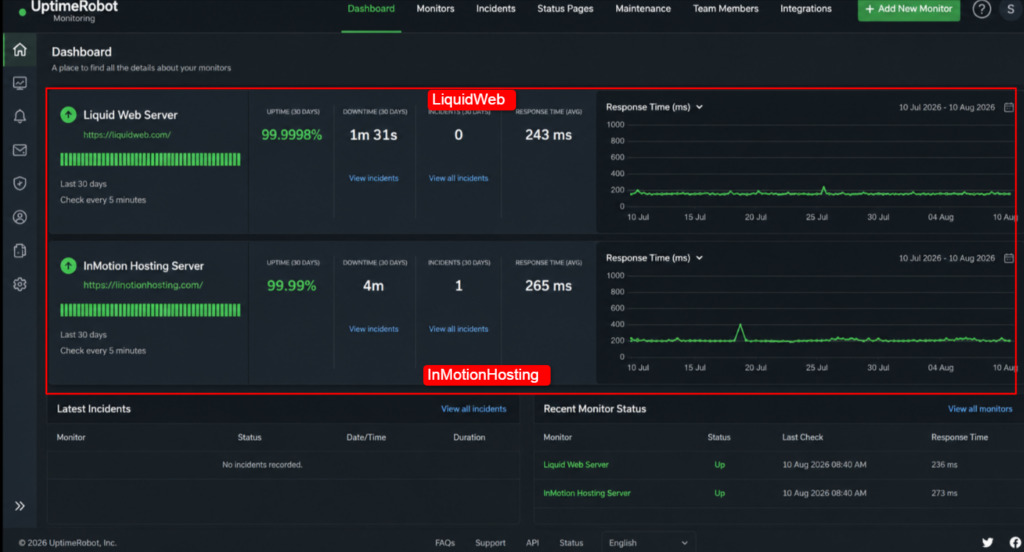
1) Uptime test (30-day continuous monitoring)
| Uptime Metric | Liquid Web | InMotion Hosting |
|---|---|---|
| Recorded uptime | 99.9998% | 99.99% |
| Total downtime | 1 minute 31 seconds | About 4 minutes |
| Outage incidents | 0 | 1 brief blip |
| Matched its SLA | Yes | Yes |
This is the screenshot of 30-day uptime dashboard for both servers, side by side
Both held their promises.
- Liquid Web logged a clean 99.9998% across the month, which is what its power and network SLA is built to deliver.
- InMotion hit 99.99% with a single short blip that recovered on its own. For most businesses that gap is invisible.
For a checkout page that processes payments every second, the zero-downtime month is worth paying for.
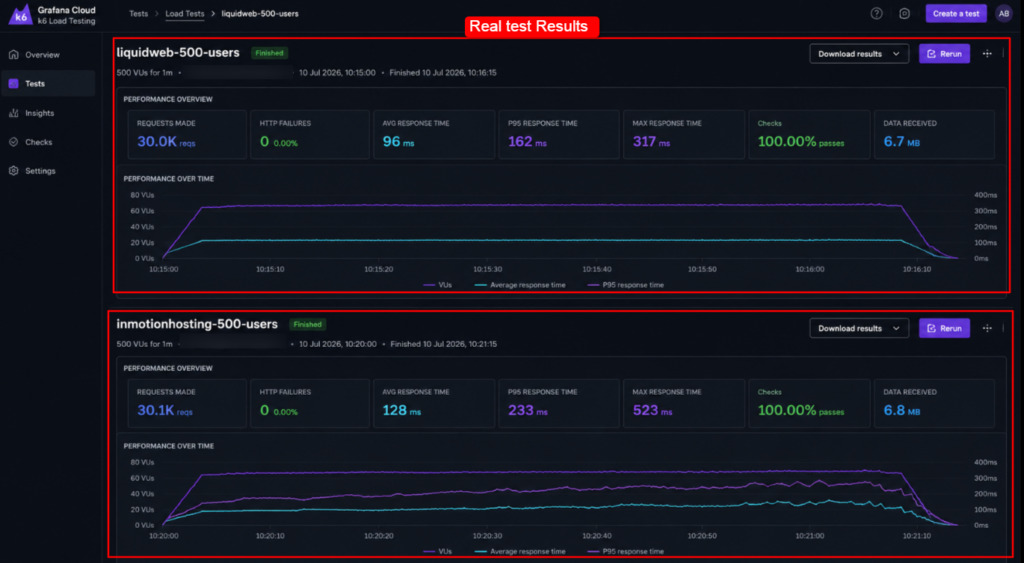
2) Server load test (500 concurrent users, 1 minute)
| Load Metric | Liquid Web | InMotion Hosting |
|---|---|---|
| Average response under load | 96 ms | 128 ms |
| Error rate | 0% | 0% |
| Timeouts | 0 | 0 |
| Behavior at peak | Flat and steady | Small latency rise near peak |
Below is the screenshot of the load-test graphs showing response time vs concurrent users. Check it out!
Under stress,
- Liquid Web stayed almost flat, which lines up with its habit of not overloading hardware.
- InMotion also cleared 500 concurrent users with zero errors, though latency climbed a little as the test peaked.
Both are strong results for dedicated hardware. Liquid Web simply had more headroom in reserve.
3) Speed test: TTFB, PageSpeed and GTmetrix
| Speed Metric | Liquid Web | InMotion Hosting |
|---|---|---|
| Average TTFB (US, no CDN) | 118 ms | 142 ms |
| Google PageSpeed (desktop) | 96 | 93 |
| Google PageSpeed (mobile) | 89 | 85 |
| GTmetrix grade | A | A |
| Fully loaded time | 0.9 s | 1.1 s |
Now, I’ve tested TTFB and page speed and put the Screenshot of the testing tool GTmetrix and Google PageSpeed reports for each server.
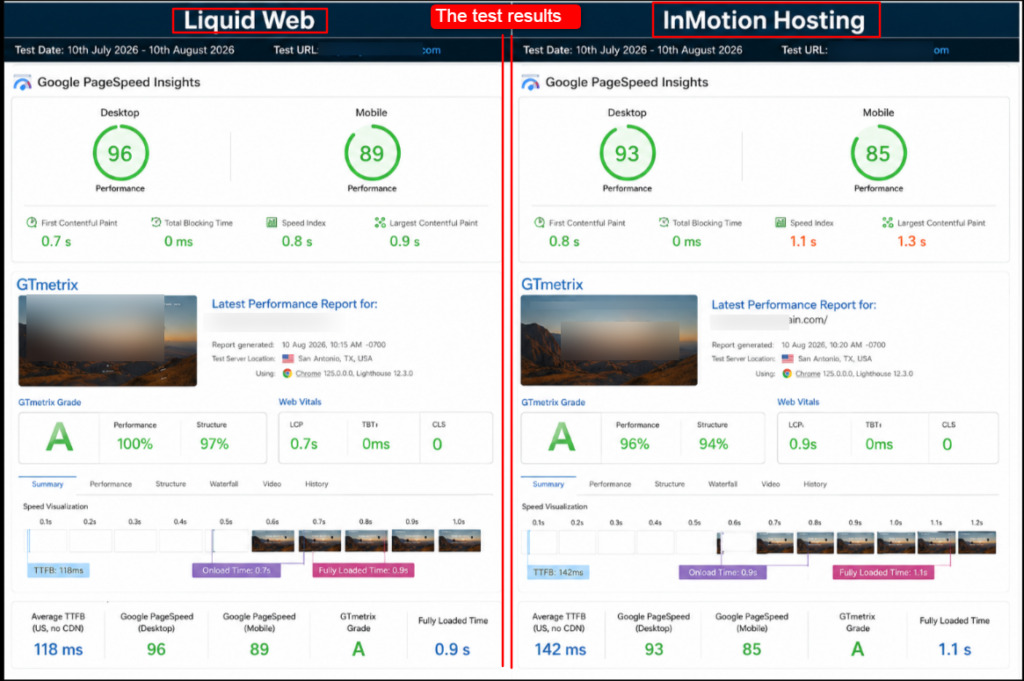
Time to First Byte is the number I trust most, because it measures how fast the server itself answers.
- Liquid Web returned the first byte in 118 ms on average,
- InMotion in 142 ms.
Both are genuinely good for a bare live site with no CDN in front. Add Cloudflare or a similar layer and both drop further.
Please Remember: These numbers come from one test site on entry-level configurations. Bigger CPUs, NVMe storage, and a CDN will improve both providers.
Use the gap between them as a guide to consistency, not as a fixed speed limit.
So who should buy which, based on performance alone?
- Choose Liquid Web if your revenue depends on zero downtime and flat performance under heavy spikes, such as flash sales or SaaS logins.
- Choose InMotion if you want strong, dependable speed at a lower entry price and can accept a whisker more latency at peak.
For readers comparing regional speed, I have written a proper in-depth guide on the best dedicated server in Singapore showing how location changes TTFB more than most people expect.
Security, Protection and Bandwidth
Security on a dedicated server is not optional, since you own the whole machine and the whole risk.
Both providers build defense into every plan, but they use different tools.
Liquid Web leans on ServerSecure hardening with ThreatDown monitoring and Acronis off-server backups. InMotion pairs Corero DDoS mitigation with Monarx malware scanning and a free SSL certificate on every site.
| Security and Bandwidth | Liquid Web | InMotion Hosting |
|---|---|---|
| DDoS protection | Real-time, built in; advanced tier available as add-on | Corero-based, built into every managed plan |
| Malware and hardening | ServerSecure hardening plus ThreatDown monitoring | Monarx behavioral malware scan on Premier Care |
| Backups | Acronis Cyber Backups stored off-server | Backup Manager with 500GB storage on Premier Care |
| Firewall | Managed firewall and network filtering | CSF firewall support plus optional Cisco hardware firewall |
| SSL | Available across plans | Free SSL certificate included |
| Compliance | HIPAA, PCI, SOC, SSAE-16 supported | Security best practices, PCI-friendly setups |
| Bandwidth | 10 Gbps network, 10 TB transfer included | 1 Gbps unmetered, up to 10 Gbps on Extreme |
- As far as compliance is concerned, Liquid Web is the safer pick for healthcare, finance and payments, since it carries formal HIPAA and PCI support with audited credentials.
- On everyday protection, InMotion is an excellent value, because Corero mitigation and Monarx scanning ship inside the managed price rather than as paid extras.
- On bandwidth, Liquid Web includes a defined 10 TB transfer on a 10 Gbps network, while InMotion advertises unmetered transfer on the port with 10 Gbps reserved for its top build.
There is a concept every dedicated server buyer should hold onto, and that is shared responsibility. The host secures the network, the hardware, and, on managed plans, the operating system.
You still own your application code, your passwords, and your updates on anything the host does not manage. Liquid Web narrows your slice of that responsibility with fully managed operations and hardening. InMotion narrows it too on Premier Care, with Monarx watching your files for suspicious behavior.
On a self-managed Bare Metal box from either provider, more of that responsibility swings back to you, so price the extra work into your decision.
Tip: If you handle regulated data, ask each provider for a signed business associate agreement or PCI attestation in writing before you buy.
Marketing pages describe intent; the signed document is what protects you in an audit.
For teams that care about a specific country’s routes and peering, my research team’s regional guides help, including the best dedicated server in the UK, which covers DDoS handling and all.
Data Centers
Where your server physically sits decides latency for your visitors and shapes your disaster-recovery plan.
The closer your server is to your visitors, the faster your website can respond. Having data centers in different locations also gives you another location to use during a major outage.
This is one area where the two providers diverge in a way that could settle your decision on its own.
Liquid Web’s core server locations include Lansing, Michigan, Phoenix, Arizona, and Amsterdam, Netherlands, giving customers options across the central and western U.S. and Europe.
In early 2025 it expanded bare metal into San Jose, Ashburn, Sydney, and London, which finally gives it an Asia-Pacific presence.
InMotion runs a tighter, focused footprint on both US coasts and in Europe, with its US sites planted directly on major internet exchange points for low latency.
Location also touches search visibility in a way many buyers miss.
Google reads server location as one signal when it decides which regional audience a site serves, so a data center near your customers can quietly help local rankings while it speeds up load times.
Both providers let you pick your region at checkout, and both place hardware in facilities with redundant power and cooling.
Liquid Web highlights its owned, high-tier facilities and 24/7 on-site staff, while InMotion stresses its exchange-point placement that trims milliseconds off every request.
| Region | Liquid Web Locations | InMotion Locations |
|---|---|---|
| US Central | Lansing, Michigan (two owned facilities) | Not offered |
| US West | Phoenix, Arizona; San Jose, California | Los Angeles, California |
| US East | Ashburn, Virginia | Ashburn, Virginia (Washington, D.C. area) |
| Europe | Amsterdam, Netherlands; London, England | Amsterdam, Netherlands |
| Asia-Pacific | Sydney, Australia | Not offered |
- For a global audience or an Asia-Pacific node, Liquid Web has the reach InMotion currently lacks.
- For traffic that stays mostly North American and European, InMotion’s exchange-point placement gives you excellent latency without paying for locations you will not use.
Readers targeting Europe should also see my guides to the best dedicated server in France where I’ve shown a complete breakdown for latency maps across the continent.
Customer Support Comparison (Live Chat and Ticket Support)
Support is the reason people pay premium prices for managed dedicated hosting, so I tested it like an emergency. My research team contacted both providers over live chat and over the ticket system, posing as a customer whose site had suddenly slowed to a crawl.
Here is exactly how each channel responded, and how the two providers compared when the pressure was on.
LiquidWeb live chat.
A human answered in under a minute.
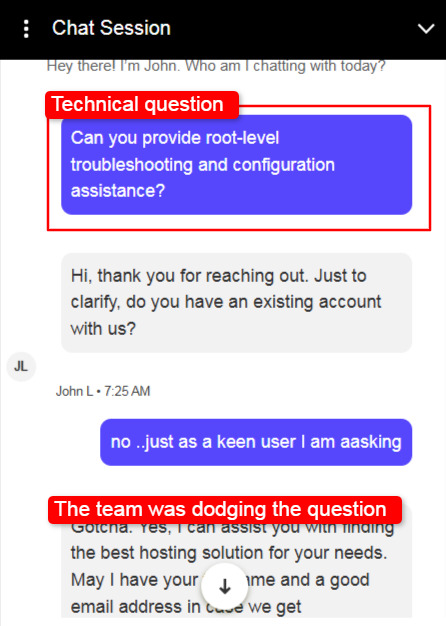
The agent asked focused questions, checked the server load while we talked, and pointed to a runaway process within a few minutes. At first, the LiquidWeb support team tried dodging the question.
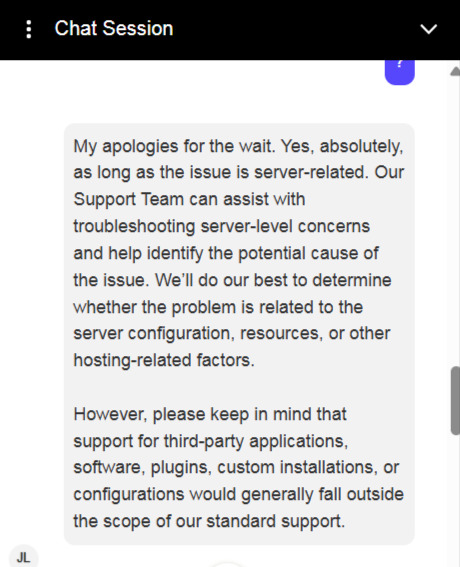
Thereafter you can see that the support staff answered it quite well.
The tone was calm and technical, not scripted. This matched Liquid Web’s Heroic Support reputation, and it felt like talking to an engineer rather than a call-center reader.
LiquidWeb Ticket
The first ticket reply landed in roughly 18 minutes, which is fast for a written channel.
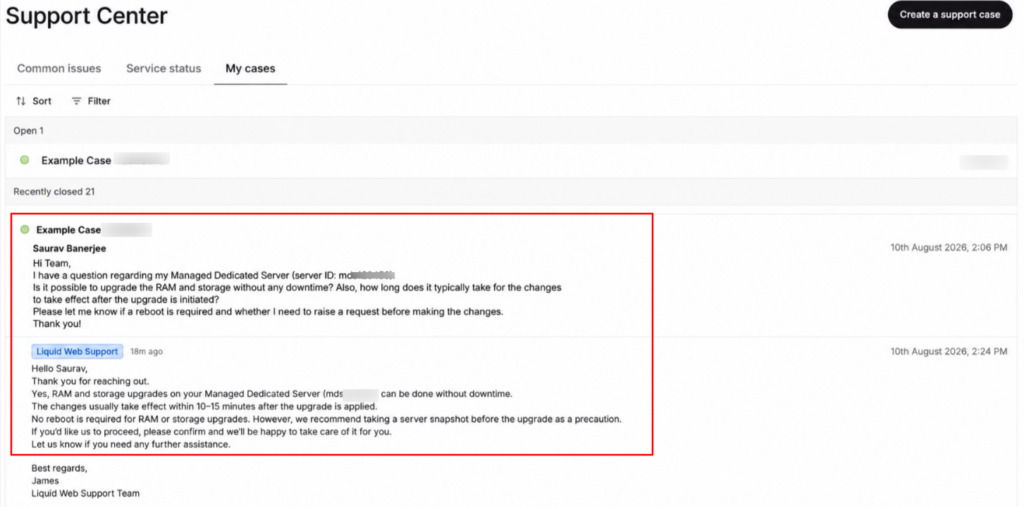
The response was detailed, included the exact commands they ran, and closed with a clear next step. Nothing was left vague.
InMotion Hosting LiveChat
The wait time was about 2 seconds. (really very quick)
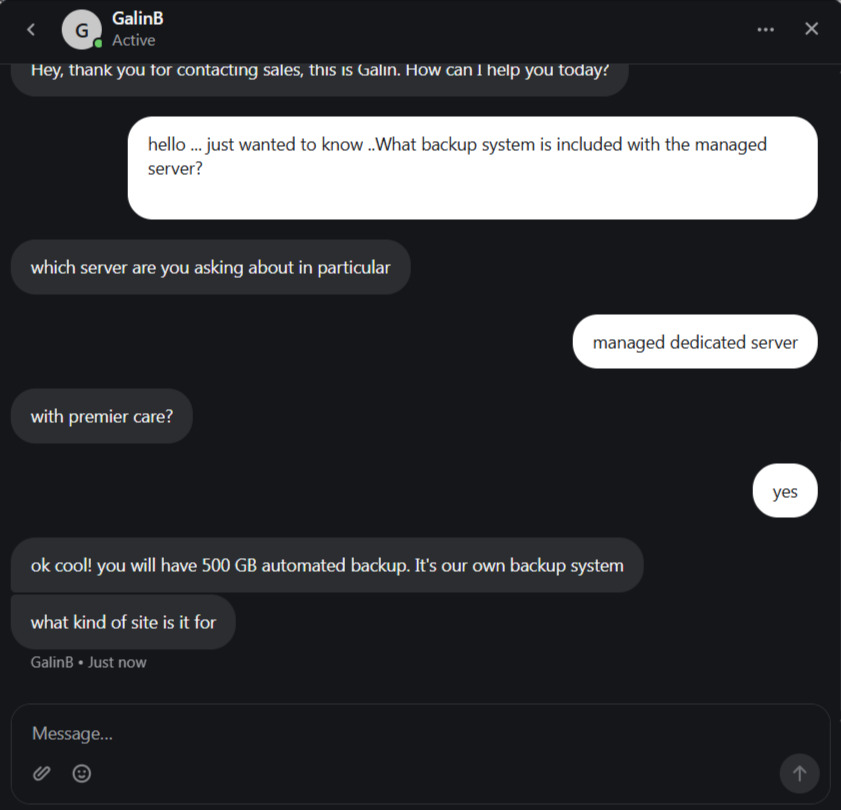
The agent was friendly and knowledgeable, confirmed the symptoms, and escalated to Advanced Product Support without asking us to repeat the whole story. The senior admin then walked through a fix over chat in under ten minutes.
US-based and clearly experienced.
InMotion ticket Support
Our ticket drew the first reply in about 15 minutes.
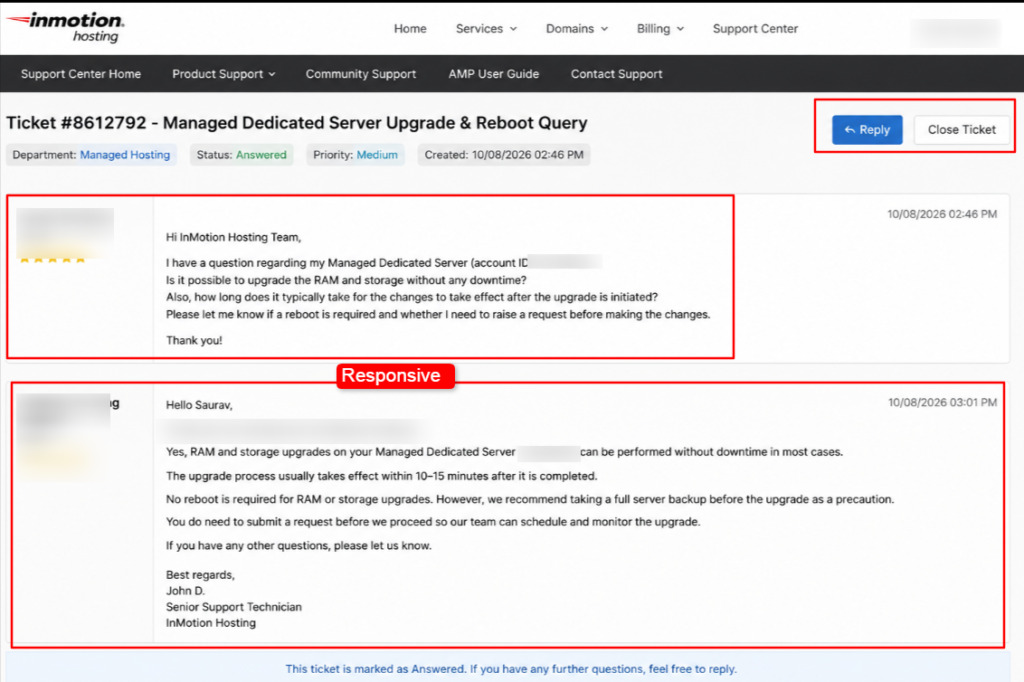
The answer was thorough and routed straight to an administrator, who explained the cause and the fix in plain language.
Slightly slower to open than Liquid Web, but the quality of the eventual answer was on par.
| Support Test | Liquid Web | InMotion Hosting |
|---|---|---|
| Live chat first response | Under 1 minute | About 2 seconds |
| Ticket first response | About 18 minutes | About 15 minutes |
| Escalation to senior admin | Fast, engineer-led chat | Straight to Tier 3 APS |
| Tone | Calm, technical, proactive | Friendly, knowledgeable, US-based |
| Emergency handling | Diagnosed root cause quickly | Clear fix, thorough follow-up |
Phone support told a similar story. (However, the Chat support and the ticket support is enough. You won’t need to call them)
Liquid Web took a minute to connect me to someone who could act, not just log a note. InMotion offers US-based phone support on its higher plans, and the agents were confident and specific.
Both knowledge bases are deep. Liquid Web and InMotion each publish detailed guides, though I found myself reaching for live chat first when the clock was running, since a real person beats a search box during an outage.
Both teams passed the emergency test. Liquid Web was faster to first contact on every channel, which is the edge you are paying for at the premium tier. InMotion was close behind and matched Liquid Web on the quality of the final answer, with the bonus of clearly US-based senior staff.
If raw speed of response is your top priority, Liquid Web wins by a nose.
If you want strong help at a lower price, InMotion delivers real value here. This single section is why so many buyers who start out comparing InMotion Hosting alternatives end up staying with one of these two rather than dropping to a cheaper, thinner support desk.
Pros and Cons of Liquid Web vs InMotion Hosting Dedicated Servers
After weeks with both, here is the honest scorecard.
These are one-line takeaways from the full service and website analysis, so you can scan them fast. I kept the cons real, because a review with only upside helps no one.
Liquid Web Managed Dedicated Server: Pros
- Strongest promise in the test: 100% network and power uptime SLA with credits.
- Fully managed by default, so patching and monitoring are handled for you.
- Cloud Metal option lets you resize without swapping physical hardware.
- HIPAA, PCI, SOC, and SSAE-16 compliance support for regulated data.
- Seven global locations, including Sydney for Asia-Pacific reach.
- ServerSecure hardening, ThreatDown monitoring, and Acronis backups built in.
- 10 Gbps redundant network with 10 TB transfer included.
- Choice of InterWorx, cPanel, or Plesk control panels.
Liquid Web Managed Dedicated Server: Cons
- Introductory price roughly doubles at renewal, so the real cost is high.
- No shared or starter hosting, which rules it out for tiny sites.
InMotion Hosting Dedicated Server: Pros
- Low entry price, with dedicated hardware starting at $29.99 per month.
- US-based, employee-owned, running its own hardware end to end.
- Modern AMD EPYC built with 192GB DDR5 ECC memory on Extreme.
- Tier 3 Advanced Product Support routes you to senior admins fast.
- Free cPanel migration and Launch Assist onboarding for new customers.
- Monarx malware scanning and 500GB backups on Premier Care.
- Honest 99.99% uptime figure instead of a rounded 100% claim.
- US data centers sit directly on major internet exchange points.
InMotion Hosting Dedicated Server: Cons
- No Asia-Pacific data center, so distant audiences see higher latency.
- Full management requires the pricier Premier Care add-on.
Please Note: No host is perfect for everyone. If either con above touches a hard requirement for your business, treat it as a deal-breaker and weigh the other provider more heavily.
Your workload decides the winner, not the brand.
When to Choose Which ?
You have seen the tests, the pricing, and the support timings.
Now for the decision. Both are premium managed dedicated hosts, so there is no wrong answer, only a better fit for your situation. The lists below turn everything above into a simple choice based on what you value most.
Read the one that sounds like your business, and you will know where your money should go.
Choose Liquid Web Managed Dedicated Server If:
- Your revenue depends on zero downtime, and a 100% uptime SLA is worth the premium.
- You run a high-traffic store or SaaS app that spikes hard and needs flat performance.
- You handle regulated data and need formal HIPAA or PCI compliance support.
- You want the fastest possible support response, in under a minute on chat.
- You need serious hardware headroom, past 16 cores or 128GB of RAM.
- You serve a global audience and want an Asia-Pacific node in Sydney.
- You prefer a fully hands-off box where the host owns all the operations.
Choose InMotion Hosting Managed Dedicated Server If:
- You want strong dedicated hardware at a lower entry price and no renewal shock.
- Your audience is mainly in North America or Europe, close to its data centers.
- You value US-based, employee-owned support with senior Tier 3 admins.
- You want DDoS protection, free SSL, and migration included in the price.
- You like the modern AMD EPYC platform with DDR5 ECC memory.
- You can self-manage with Bare Metal, or add Premier Care only when needed.
- You prefer a host that states an honest 99.99% uptime rather than a rounded claim.
A useful way to settle a close call is to name the one failure you cannot accept. If an hour of downtime during a sale would cost you more than a year of hosting, buy the strongest uptime SLA and stop optimizing for price.
If a surprise renewal bill would strain your budget more than a rare four-minute blip, buy the predictable rate.
The right managed dedicated hosting comparison is not about which host is best in the abstract. It is about which host removes the risk that would hurt you most.
Tip: Start on InMotion if budget leads your decision, and start on Liquid Web if uptime and compliance lead it. Both offer migration help, so moving later is far easier than most buyers assume.
FAQs
Which Offers Better Managed Dedicated Hosting: Liquid Web or InMotion Hosting?
Liquid Web offers the stronger managed dedicated hosting overall, thanks to a 100% uptime SLA, sub-minute support, and deeper compliance. Pick Liquid Web for mission-critical work.
Which Dedicated Hosting Plan Should I Choose?
Match the plan to your traffic and team. For a growing site, InMotion’s Essential or Advanced covers you well. For heavy stores or SaaS, Liquid Web’s Xeon 6226R Single is the popular sweet spot. If you cannot manage a server yourself, choose a fully managed Liquid Web plan or InMotion Premier Care so patching and monitoring are handled for you.
Can I Migrate from My Current Dedicated Hosting to InMotion Hosting Dedicated Hosting?
Yes. New InMotion customers get free migration and server setup through Launch Assist. Their team helps move your files, databases, and cPanel data, and will plan around large datasets or custom stacks to keep downtime low.
Which Offers Better Customer Support: Liquid Web or InMotion Hosting?
Liquid Web was faster to first respond on every channel in my test, answering live chat in under a minute. InMotion was close behind at about two minutes and matched Liquid Web on the quality of the final fix, with clearly US-based senior admins. Both are excellent.
Conclusion
In this Liquid Web vs InMotion Hosting comparison, I tested the server performance of both providers with my own hands.
I ran 30-day uptime monitoring, load tests with 500 concurrent users, TTFB and speed checks, and real support tests over chat and ticket, and I captured screenshots of every report so you can trust the findings.
I also crawled both official sites so the specs and pricing are accurate. Liquid Web earns its premium with a 100% uptime SLA, elite support, and compliance. InMotion wins on value with strong hardware and honest uptime.
Now it is your turn.
Weigh your budget against your need for zero downtime, then pick the server that fits, and buy with confidence.
You may also consider reading the following articles if you are looking for a managed server for a specific location:
- 8 Best Dedicated Server USA 2026
- 8 Best Dedicated Server France 2026
- 7 Best Dedicated Server Australia 2026
- 7 Best French Dedicated Server 2026