How to Run a Telegram Bot 24/7 for Free: Why You Need a VPS

Your Telegram bot replied to every message all morning. Then you closed your laptop for lunch, and it went silent. Do you know what happens if you do that? Your users keep on waiting and nobody answers.
I have run into that exact wall many times. My team builds and hosts Telegram bots for a living, and we have tested almost every free option you can imagine.
Here is the short version.
A bot on your own machine dies the moment that machine sleeps. A bot on the right server stays awake around the clock.
In this guide I will show you how I keep a bot online every hour of every day, at zero cost to start and why a proper VPS server solves the problem for good.
I have deployed this setup myself, start to finish. I will walk you through the exact path I take, step by step, in plain words. Nothing skipped.
- We have shown the entire VPS setting up process using YouStable VPS plan.
- Let me tell you that YouStable is my own brand.
- I have kept every claim in this guide grounded in real deployments my team has run, so you get honest guidance.
- I do not want to sell anything to you. Just pure guidance. That’s it!
Before we talk servers, let us understand what a bot truly needs. Once you see the three basics, the rest of this guide clicks into place fast.
What Does a Telegram Bot Need to Stay Online 24/7?
A Telegram bot is a small program that talks to Telegram over the internet. To answer users at any hour, it needs three simple things running all the time.
The first need is a live connection to the internet that never drops.
Let us look at what that means in practice.
Continuous Internet Connectivity
Your bot must stay linked to Telegram every second.
The moment that link breaks, messages gather up and your users feel that no one’s there to answer the questions. A stable connection is the foundation of everything.
Telegram hands your bot new messages in one of two ways. You pick the method that fits your setup.
Receiving Updates From Telegram
Your bot asks Telegram, “Any new messages for me?” Telegram replies with the fresh updates. Your code reads them and acts. This loop repeats forever while the bot is awake.
Webhook vs Polling Methods
There are two update styles. Long polling means your bot keeps asking Telegram for updates. A webhook means Telegram pushes updates straight to your server the instant they arrive.
- Long polling: Simplest to start, resumes on its own after a restart, needs no public web address.
- Webhook: Faster at scale, but needs a public address and an SSL certificate on your server.
For the first bot I always start with long polling. It is forgiving and quick. You can move to webhooks later once traffic grows.
A steady connection means little on a weak machine. Your bot also needs dependable hardware underneath it.
Reliable Server Resources
A bot sips resources, yet it still needs a small, steady slice of a computer that stays powered on. Here is what each piece does in plain terms.
- CPU: the brain that runs your bot code and handles each incoming message.
- RAM: short-term memory that holds your running bot and its active tasks.
- Storage: the disk that keeps your bot files, logs, and any saved user data.
- Network uptime: the guarantee that your server stays connected and reachable at all times.
A basic bot runs happily on 1 shared core and 1 GB of RAM. My team often starts bots on a small Ubuntu VPS server and scales up later.
Connection and hardware still are not enough on their own. Your bot also has to keep running after you log out.
Background Process Support
A bot that only runs while you watch it is not truly online. It must keep working in the background (when you’re not watching it), day and night, on its own.
Why Bots Must Run Continuously
Users message bots at 4 AM, on weekends, during holidays. Your bot cannot pick office hours. It has to be awake the whole time to be useful and trusted.
Importance of Process Management
A process manager is a small helper that keeps your bot alive. It restarts the bot after a crash or a reboot, so you never babysit it by hand.
A 24/7 bot needs three things:
- a process manager that restarts it on its own.
- a connection that never drops,
- a machine that stays on, and
Now the money question. Can you keep a bot online for free? The honest answer is layered, so let us walk each free option and what it really gives you.
Can You Run a Telegram Bot for Free?
Yes, you can run a bot at no cost for testing. Free routes exist and work for a while. They just come with limits that bite once your bot starts working more heavily.
The most obvious free route is the computer already on your desk. It costs nothing extra, so let us weigh it honestly.
Running a Bot on Your Personal Computer
Your own laptop or desktop can host a bot for practice. It is fast to set up and free. The trouble starts the moment real things come on the way.
Pros
- Zero extra cost to begin
- Instant setup on hardware you own
- Great for learning
Cons
- Bot dies the second you shut the lid
- Power outages take it offline instantly
- Internet interruptions break the connection
- Your electricity bill quietly climbs
Two everyday events kill a home-hosted bot fast.
A power outage cuts the machine dead. An internet interruption snaps the link to Telegram. Both happen more than you expect.
The next free route lives in the cloud. Free tiers sound perfect on paper, so let us see where they trip up.
Using Free Cloud Platforms
Free cloud tiers give you a slice of a real data center at no cost. They feel professional. Then their limits show up at the worst moment.
Free Tiers and Limitations
Free plans cap what you get. You share resources with many other users, and the platform can pause or throttle your bot the moment it grows busy.
Sleep Mode Issues
Many free tiers put your app to sleep after a short idle window. A sleeping bot answers nobody. It wakes slowly, and users see long, awkward delays.
Monthly Usage Caps
Free plans hand you a monthly allowance of run time or bandwidth. Cross that line and your bot stops until the next month resets. Your service simply vanishes.
A third free route is basic free hosting accounts. They target simple websites, so a bot pushes them past their comfort zone.
Using Free Hosting Services
Free hosting is built for small static pages, not for a program that runs forever. A bot asks for more than these accounts want to give.
Restricted Resources
Free hosting hands you a tiny sliver of CPU and RAM. A bot with a few users can exhaust that slice quickly and start dropping messages.
Limited Uptime Guarantees
Free plans rarely promise steady uptime. Your bot can go dark for hours, and support will shrug. You get what you pay for, which is very little.
Performance Bottlenecks
Shared free servers get crowded. When a neighbor spikes, your bot slows to a crawl. Replies lag, users leave, and your bot earns a bad name.
Free hosting works fine for testing and learning. For a bot people actually rely on, it falls apart. That gap is exactly why a paid VPS wins.
Let us zoom in on the specific traps of free hosting. I have hit every one of these in real projects, so I will name them plainly.
The Biggest Problems with Free Telegram Bot Hosting
Free hosting fails in patterns, not at random. Six problems show up again and again. Knowing them saves you from a painful, public bot outage later.
The first trap is the one that catches almost everyone. Your bot falls asleep on its own.
Automatic Sleep Mode
Free platforms sleep idle apps to save their own resources. Your bot naps, then wakes slowly on the next message. Early users hit a wall of silence.
The second trap is the ceiling on power. You simply do not get enough.
Resource Restrictions
Tight CPU and RAM caps choke a growing bot. Add a few features or users, and the bot stalls, lags, or crashes under the smallest load.
The third trap is the one you cannot plan around. Downtime arrives with no warning.
Unpredictable Downtime
Free servers reboot and fail on their own schedule. Your bot vanishes for minutes or hours. You often learn about it from an annoyed user, not an alert.
The fourth trap threatens your data and your token. Free hosting rarely guards either well.
Security Concerns
Shared free servers mix your bot with strangers. Weak isolation puts your bot token and user data at real risk. One breach nearby can spill onto you.
The fifth trap shows up the day something breaks. There is nobody to call.
No Technical Support
Free plans skip real support. When your bot goes down at midnight, you fix it alone, often digging through forums while your users keep messaging into the void.
The sixth trap is the rug pull. The rules can change under you at any time.
Platform Policy Changes
Free providers alter their terms whenever they wish. A tier you rely on can shrink or close overnight. Your bot pays the price for a decision you never made.
I have watched free-tier bots drop offline mid-launch, right as traffic peaked. The sleep timer fired, replies stalled, and the project looked broken to every new user.
For anything past a hobby test, I move bots onto a low cost VPS server early. It costs a little and removes every trap above in one step.
So what fixes all of this? A VPS. Let me explain what it is and why my team reaches for one on nearly every serious bot.
Why a VPS Is the Best Solution for Telegram Bots
A VPS, also known as Virtual Private Server, is your own slice of a powerful server. It stays on all the time and answers only to you. That changes everything.
Your bot stays awake, always. Let’s see the reasons why need a VPS to run telegram bots:
True 24/7 Uptime
A VPS runs all the time in a data center with backup power and network. Your bot never sleeps, never waits on your laptop and answers users at any hour.
The next benefit is control. The server is all yours and you can shape it as you like.
Full Control Over Your Environment
You get root access, which means full admin rights to control the server and make changes in it.
You install any language, library, or tool your bot needs and you set the server exactly as you need. Security comes next, and full root access is a big step up from free hosting.
Better Security
Your VPS is isolated from other users.
You control the firewall, the logins, and the updates. My team hardens each box the same way we would for a WireGuard VPS setup.
Growth is also very easy here. Your server can get bigger the day your bot does.
Easy Scalability
Has your bot gotten popular overnight? If yes, then in that case you need to add CPU, RAM, or storage and that too in a few clicks.
A VPS grows with you, so success never becomes a crash.
Affordable Monthly Cost
A small VPS starts @ the price of a couple of coffees a month.
For steady, private, always-on 24/7 hosting, this option (that we just talked about above) is a genuine thing for any bot owner. One more benefit that the bot owners get is that one server can carry many bots.
Ability to Host Multiple Bots
A single VPS can run several bots side by side.
You can also park other tools there, like an (n8n automation host), and share the same box.
- Start on a small plan and grow only when your logs show real strain.
- Paying for power you never use is the most common beginner mistake I see.
Let us put the two side by side.
This table given below, is the summary that I normally show to my clients and even to my readers who are on the verge of taking either a free hosting or a premium paid VPS hosting.
It settles the debate quickly.
VPS vs Free Hosting for Telegram Bots
The difference is clear once you line up the features that matter. Read across each row and the winner for a real, always-on bot becomes obvious.
| Feature | Free Hosting | VPS |
|---|---|---|
| 24/7 Uptime | Patchy | Full |
| Sleep Mode | Frequent | Never |
| Root Access | Blocked | Full 100% Access |
| Custom Software | Restricted | Any package |
| Scalability | Capped | On demand (OneClick) |
| Reliability | Low | High |
| Security | Shared risk | Isolated |
Free hosting wins on price alone.
- A VPS is good on every point that keeps a bot alive for every time 24/7. For a deeper understanding, you can even see shared vs VPS vs dedicated guide.
- Need a heavy server for a busy bot? A 10Gbps VPS plan handles large traffic spikes that free hosting could never survive.
Now let us size your server (like Big or Small). You do not need anything huge. I will match specs to three common bot types so you pick the right option.
Minimum VPS Requirements for a Telegram Bot
Right-sizing saves money. Bots are light, so start small. Here are the specs my team uses as safe starting points for each bot size.
Most readers here fall into the first group. A simple bot does not load to a server.
Small Personal Bot
A reminder bot, an alert bot, or a simple responder fits comfortably on the smallest plan. This is where nearly every first bot should begin.
- 1 vCPU
- 1 GB RAM
- 20 GB SSD
The second group serves a business or a busy community. It handles more people at once.
Medium Business Bot
A support bot or an order bot with normal daily traffic wants a bit more resources. These server requirements keep replies snappy as your user base climbs.
- 2 vCPU
- 2 GB RAM
- 40 GB SSD
The third group runs at real scale. Thousands of users hit it every day.
High-Traffic Bot
A large public bot, a game bot, or a bot with heavy processing needs strong hardware. Give it room so it never stutters at peak hours.
- 4+ vCPU
- 4+ GB RAM
- 80 GB SSD or more
For full control at these sizes, my team favors an unmanaged Linux VPS. You handle the server yourself and pay less for the same raw power.
Location matters if you want good speed. So, pick a data center near your users. A well-placed server, like a fast Sweden VPS, reduces reply lag for that region.
Here is the part you came for. I will now tell you the entire telegram bot deployment on a VPS the exact way I do it.
Follow along and your bot will be live and always on.
How to Deploy a Telegram Bot on a VPS
This is the complete path, start to finish, with nothing skipped. Do each step in order. By the end your bot will answer users 24/7 on its own server.
Everything starts inside Telegram itself. You create the bot and grab its secret key.
Step1: Create a Telegram Bot
A Telegram bot is born through an official helper account. You never need a phone number for the bot. The whole thing takes about two minutes.
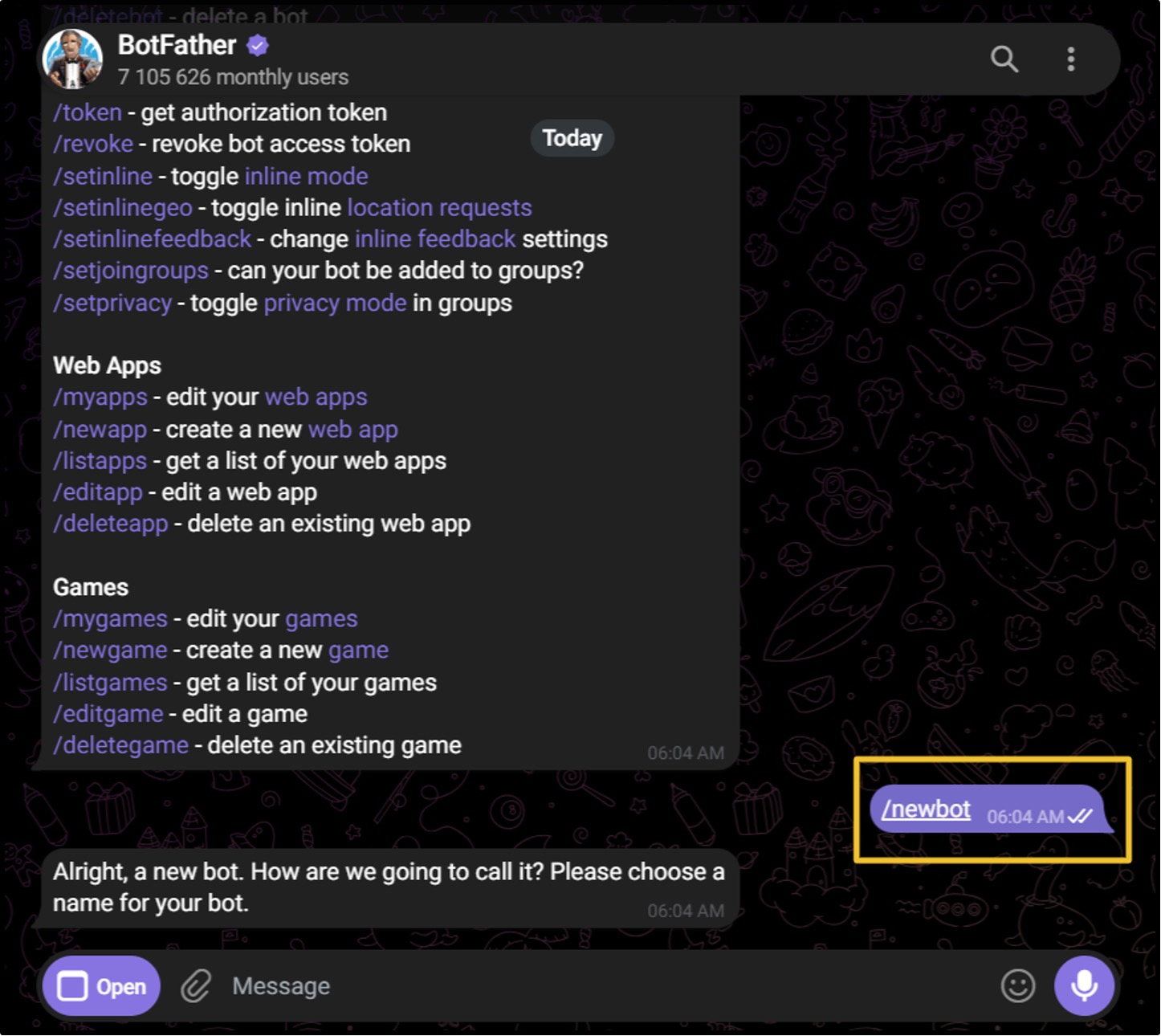
- Using BotFather: BotFather is Telegram’s official bot maker.
Here is the click path I follow every time to spin up a fresh bot from scratch.
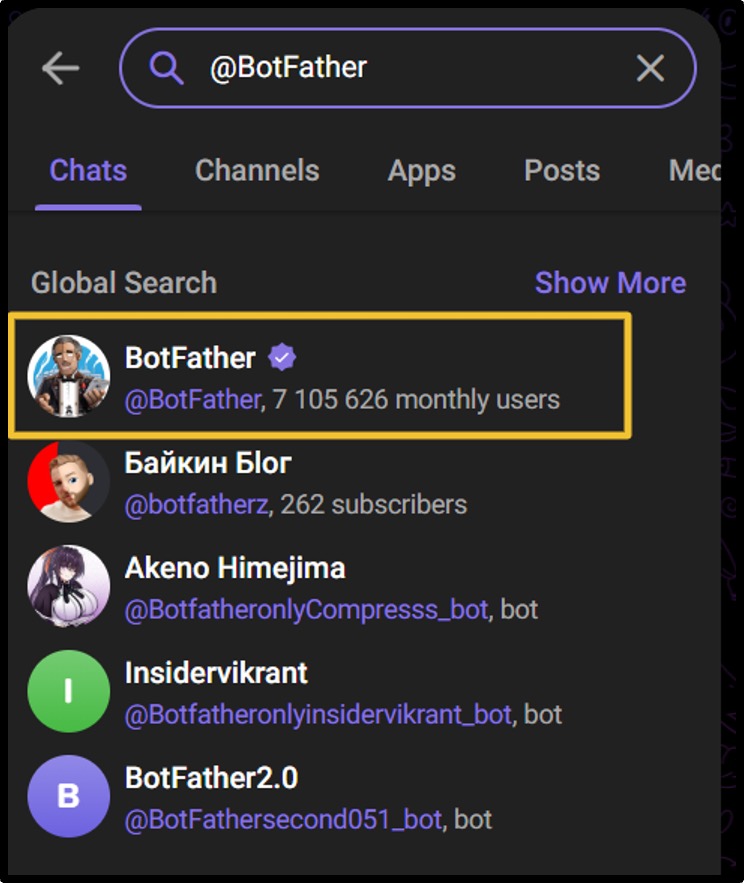
- Open Telegram >> search @BotFather >> open the verified account >> send /newbot
- Type a display name >> type a username ending in bot.
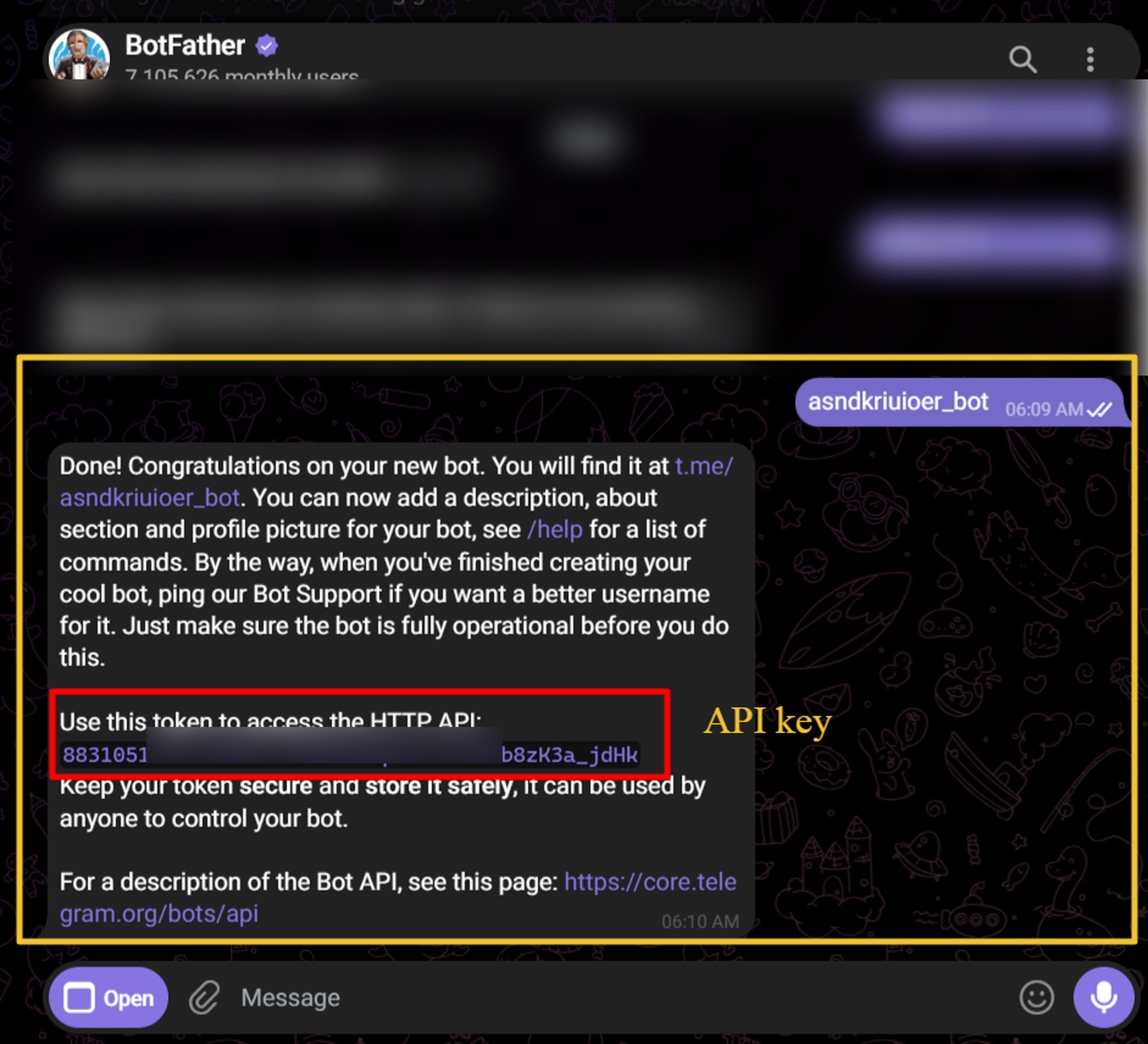
- Obtain the API Token
BotFather then hands you a token that looks like a long code. Treat it like a password. It grants full control of your bot to anyone who holds it.
- Never paste your token into a screenshot, a public repo, or a chat.
- Store it safely. Leaked it by accident? Send /revoke to BotFather and get a fresh one at once.
With your token in hand, you need a home for the bot. That home is your VPS.
Step2: Rent a VPS
Pick a plan that matches your bot size from the specs above. Choose Ubuntu as the operating system. It is beginner-friendly and every bot library runs well on it.
Payment options vary by provider. Some even let you buy a VPS with WebMoney, so a card is not the only route to get started today.
To show you the exact deployment of the bot on a VPS and further related steps, I’ve bought a VPS plan from YouStable, not because it is my company, but because it offers full root access, high uptime, secure SSH access, easy payment and that too in just @ $3.67 per month on 2-Year Plan.
Once the VPS is live, your provider emails an address and a password.
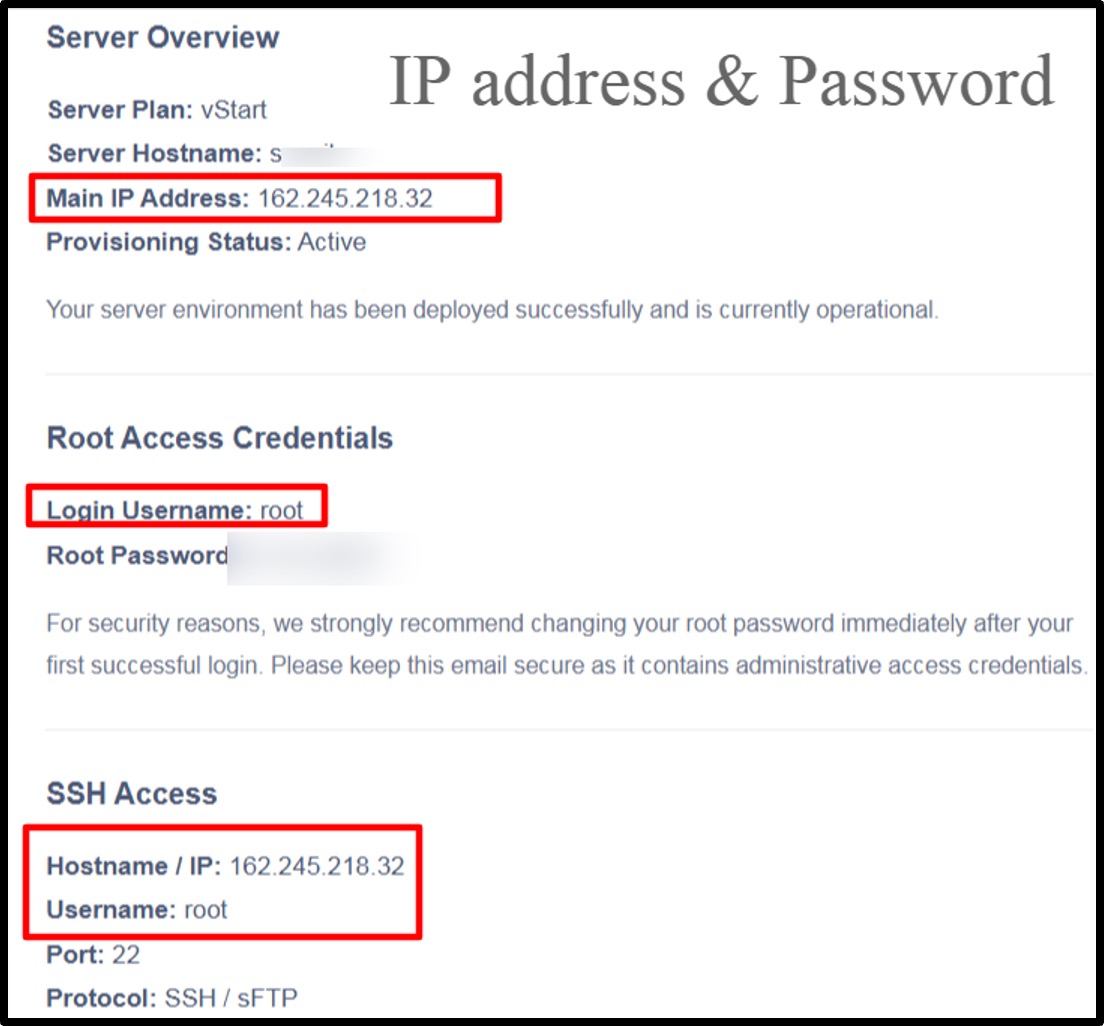
Now you log in to the server itself.
Step3: Connect via SSH
SSH is a safe way to control your server from your own computer. On Windows use a tool like PuTTY. On Mac or Linux, use the built-in terminal.
| ssh root@your-server-ip |
Type the command above, press enter, then enter your password. You are now inside your server.
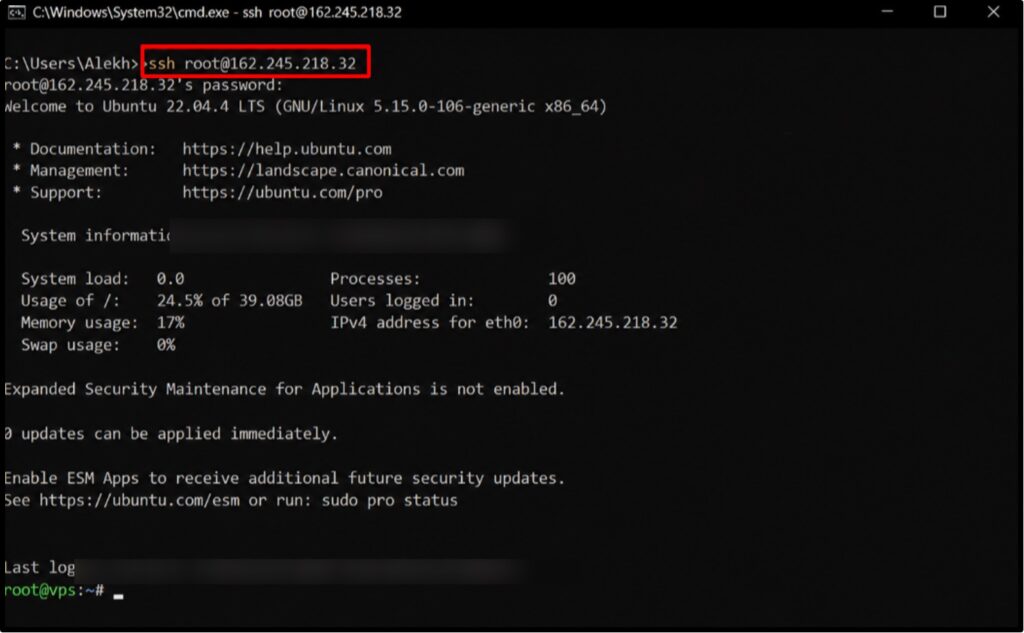
Everything from here happens in that same window. A fresh server needs its tools before your bot can run. You install them once.
Step4: Install Required Software
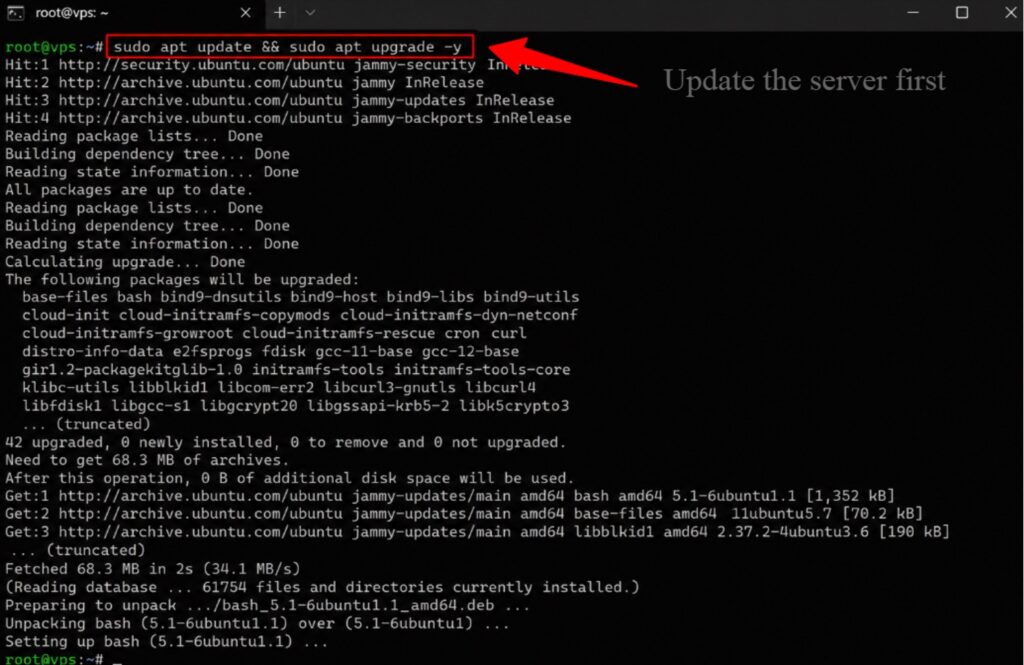
First, update the server so everything is current. Then install the language your bot is written in. Most Telegram bots use Python or Node.js.
| sudo apt update && sudo apt upgrade -y |
Python
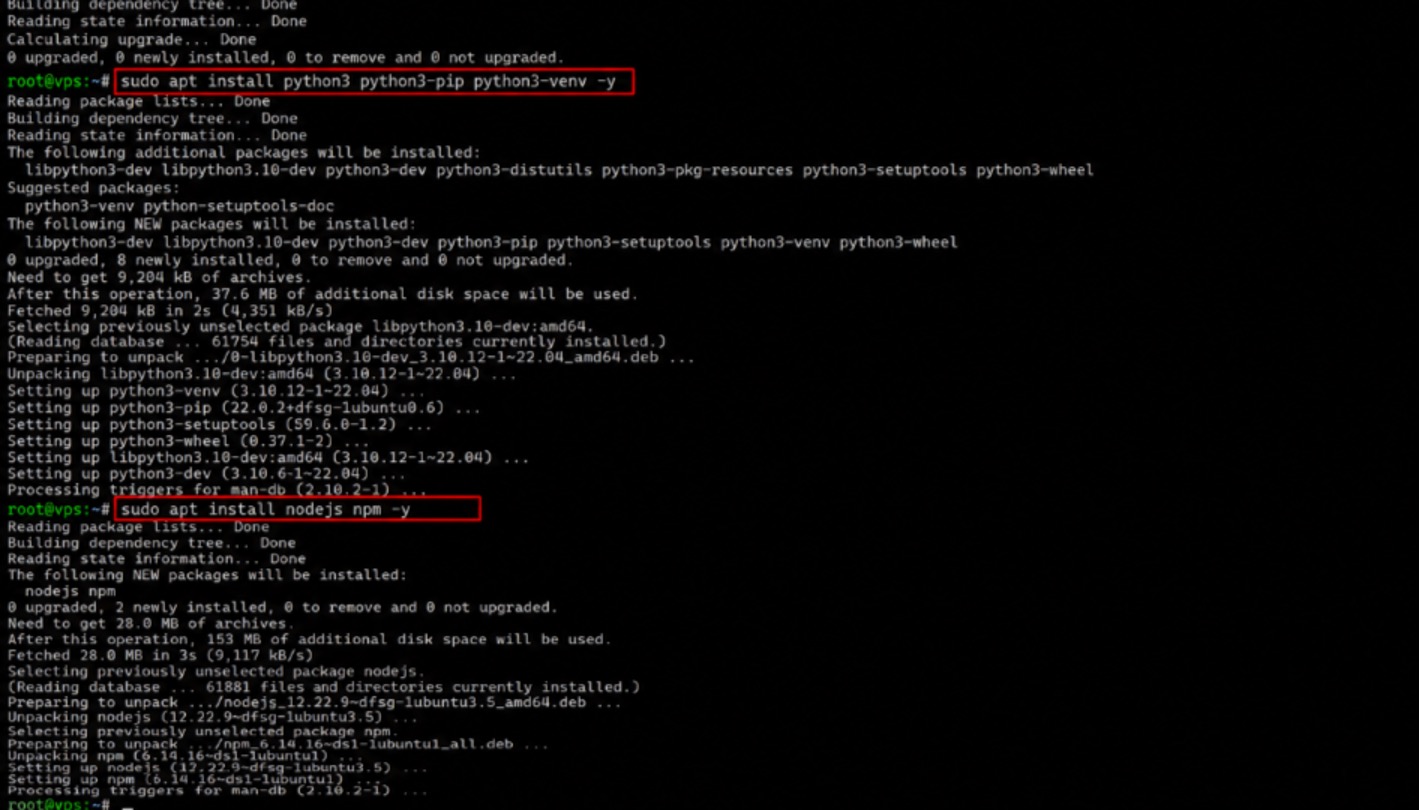
Python is the most common choice for bots. It is easy to read and has a well-loved library. Install it and its tools with one line.
| sudo apt install python3 python3-pip python3-venv -y |
Node.js
Node.js suits bots built in JavaScript. Plenty of popular bot frameworks run on it. Install Node and its package manager together.
| sudo apt install nodejs npm -y |
Docker (Optional)
Docker packs your bot and its tools into one tidy box. It is optional, yet handy for clean setups. We cover it fully in the next section.
Your tools are ready. Now you move your actual bot code onto the server.
Step5: Upload Bot Files
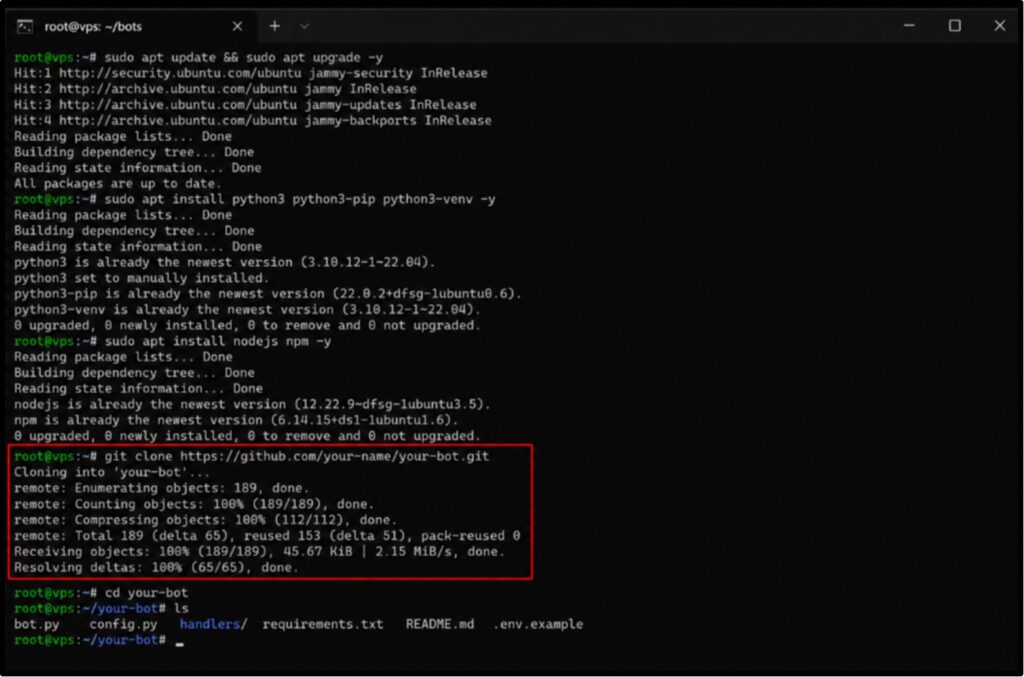
You can pull your code from a Git repository or copy files over directly. Git is the cleaner path, since updates later become a single command.
| git clone https://github.com/your-name/your-bot.gitcd your-bot |
This mirrors how my team ships larger tools too, such as when we install OpenClaw on a VPS server. Same clone, same tidy folder, every time.
Code is on the server. Time for the exciting moment. You start the bot and watch it come alive.
Step6: Run the Bot
Install your bot’s libraries, then launch it once by hand to confirm it works. Send it a message in Telegram and watch for the reply.
| pip3 install -r requirements.txtpython3 bot.py |
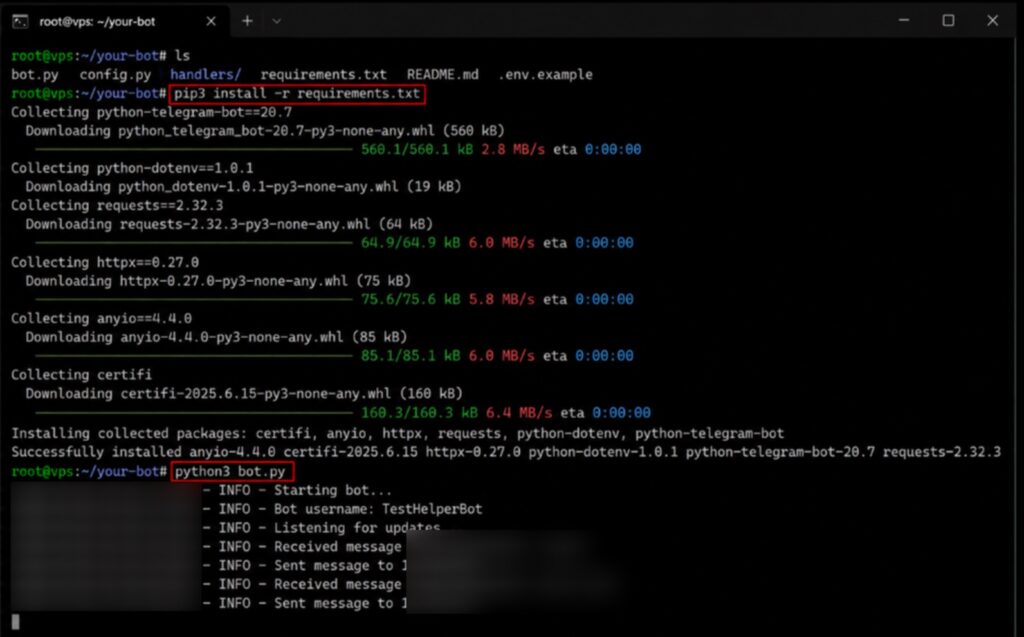
Got a reply in Telegram? Wonderful. Your bot works. There is one catch, though. Close this window now and the bot stops.
Let us fix that for good.
This final step is the secret to true 24/7 uptime. You hand the bot to a keeper that never sleeps.
Step7: Keep It Running
A process manager runs your bot in the background and restarts it after any crash or reboot. This is the same trick my team relies on to deploy ClawdBot on a VPS server. Pick one of these three trusted tools.
Systemd
Systemd is built into Ubuntu already. You write a tiny service file and it keeps your bot alive forever. This is the method my team uses most.
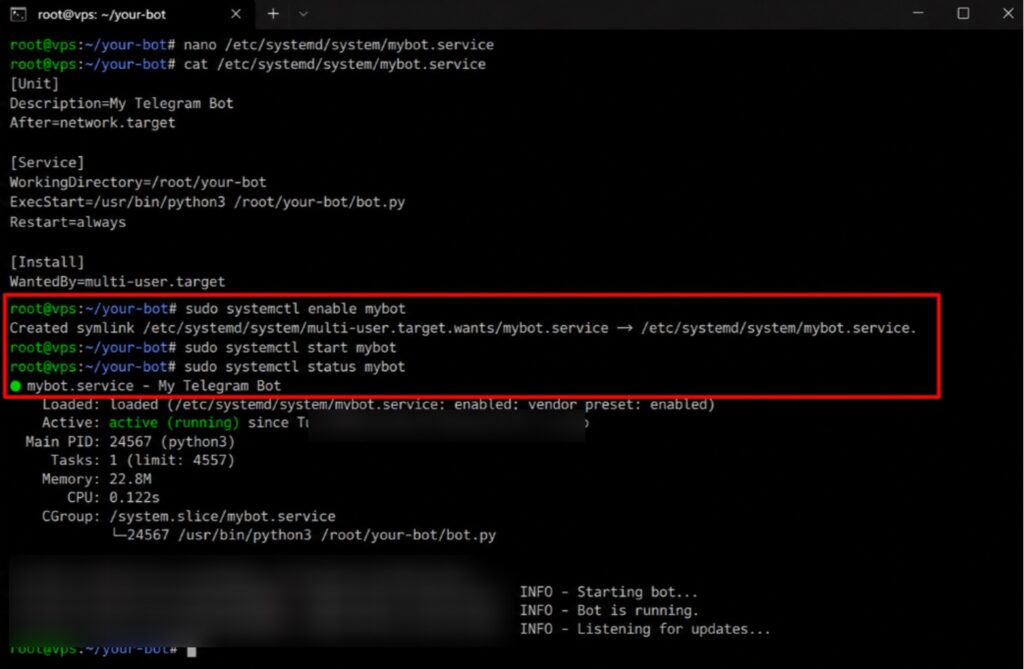
| [Unit]Description=My Telegram BotAfter=network.target [Service]WorkingDirectory=/root/your-botExecStart=/usr/bin/python3 /root/your-bot/bot.pyRestart=always [Install]WantedBy=multi-user.target |
Save that file, then turn the service on. From now on your bot starts on boot and revives itself after any crash, with zero help from you.
| sudo systemctl enable mybotsudo systemctl start mybotsudo systemctl status mybot |
PM2
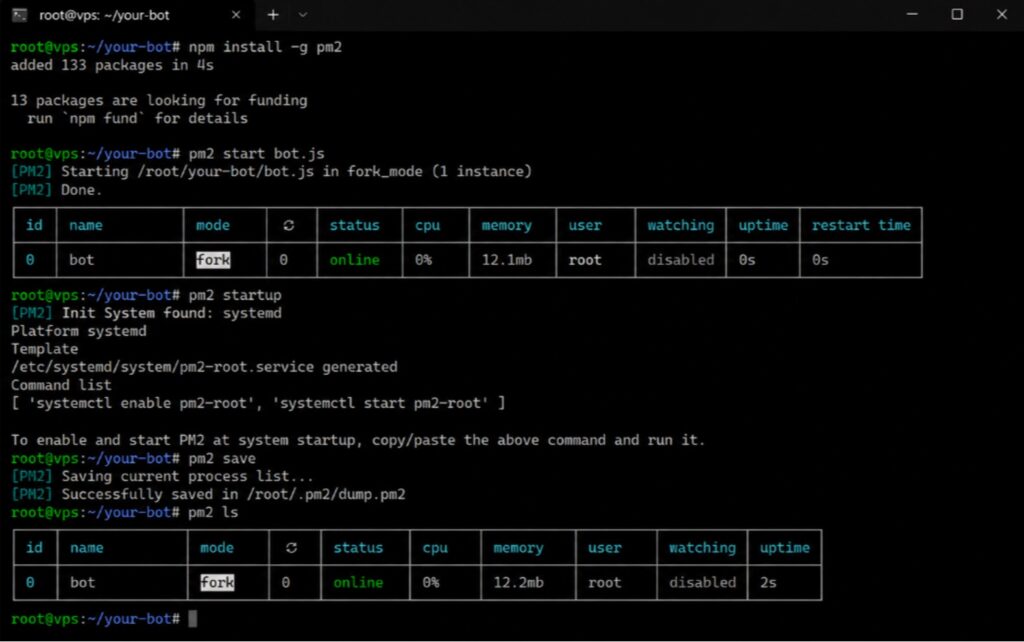
PM2 is a favorite for Node.js bots. It starts, watches, and restarts your bot with short, friendly commands. It also survives server reboots.
| npm install -g pm2pm2 start bot.jspm2 startuppm2 save |
Supervisor
Supervisor is a simple, reliable option that works with any language. You point it at your bot, and it keeps that process running quietly in the background.
The process manager is the real hero of 24/7 uptime.
A bot lacking one stops the moment you log out. A bot with one runs for months untouched.
Let us talk about Docker, since many readers ask. It is optional, but it makes both life much tidier once you get the hang of it.
Using Docker for Telegram Bot Deployment
Docker wraps your bot and everything it needs into a single package called a container. That package runs the same way on any server, every single time.
The first reason people love Docker is consistency. Your bot behaves the same everywhere.
Why Docker Simplifies Management
Docker bundles your code, your libraries, and your settings into one unit. You stop fighting the classic “it worked on my machine” problem. Setups become repeatable.
Getting started means building your container from a small recipe file. It is shorter than you might think.
Creating a Docker Container
You write a short file that lists your base image, your files, and your start command. Then you build it and run it with two simple commands.
| docker build -t my-telegram-bot .docker run -d –restart always my-telegram-bot |
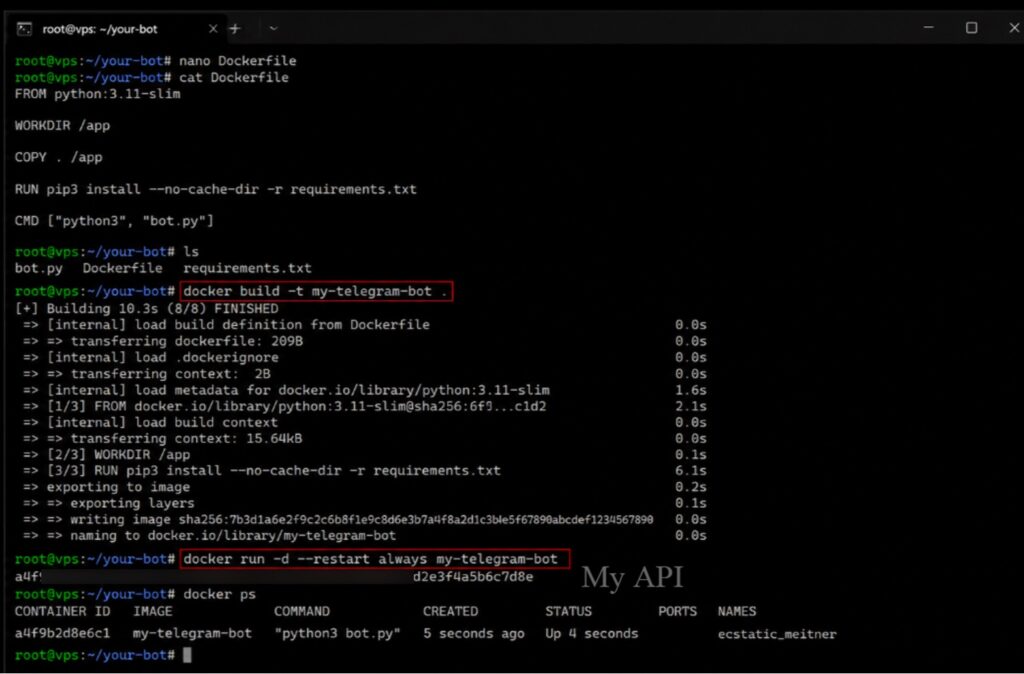
Notice that last flag. It quietly solves the uptime problem for you in one word.
Automatic Restarts
The restart flag tells Docker to bring your bot back after a crash or a reboot. Your container behaves like a bot with a process manager already built in.
Docker also makes changes painless. You can update or roll back in seconds.
Easy Updates and Rollbacks
Ship a new version by building a fresh image and swapping it in. A bad update? Roll back to the old image at once. My team uses this to deploy n8n on VPS hosting too.
Docker shines when you run many bots on one box. Each bot lives in its own container, so a problem in one never spreads to the others.
Let us talk about real numbers. People assume a VPS is pricey. It is not. Here is what you actually pay across three tiers.
How Much Does It Cost to Host a Telegram Bot on a VPS?
A VPS for a Telegram bot is cheap. Prices scale with power, so you pay for what your bot truly uses. Here is the range across common tiers.
| Tier | Typical Price | Best For |
|---|---|---|
| Budget | $3 to $10/mo | Small personal bots |
| Mid-Range | $10 to $20/mo | Business and support bots |
| Enterprise | $40+/mo | High-traffic public bots |
The budget tier covers most first bots with room to spare. It is where I tell beginners to start.
Budget VPS Options
A budget VPS around $4 to $10 a month runs a small bot with ease. This single line item replaces every free-tier headache we listed earlier. Money is very well spent.
The middle tier suits bots that carry real daily traffic. It buys comfort and speed.
Mid-Range VPS Plans
A mid-range plan near $10 to $20 a month handles busy support and order bots. Developers who want extra tooling often pick a developer-focused VPS here.
The top tier is for bots at serious scale. Thousands of users, heavy tasks, no compromise.
Enterprise Deployments
Large bots that never sleep want strong, dedicated power, often with an unlimited bandwidth VPS. At this level, reliability pays for itself many times over.
One comparison puts the price in perspective. Weigh the fee against the cost of going dark.
Cost Comparison with Downtime Losses
A few dollars a month feels like nothing next to a bot that fails during a launch. Lost users, lost sales, and a bruised reputation cost far more than any plan.
Every price here is a general market range as of 2026.
Exact figures shift by provider and region, so always check the live plan page before you buy.
A live bot is a small door into your server. Let us lock that door properly. These are the habits my team applies to every deployment.
Security Tips for Running Telegram Bots
Security is really important once your bot is public. A few simple habits keep your token, your server, and your users safe. Here is the short list I never skip.
Your token is the crown jewel. Guard it above all else.
Protect API Tokens
Keep your token in an environment variable, never inside your code. That way it stays out of your files and out of any repo you push online.
Next, close every door you are not using. A firewall does this for you.
Enable Firewall Rules
Turn on the built-in firewall and open only the ports your bot needs. A tight firewall blocks most drive-by attacks before they ever reach your bot.
Passwords get guessed. Keys do not. Switch to keys for login.
Use SSH Keys
Replace password logins with SSH keys, which are far harder to crack. Then disable password login entirely. This one change stops most brute-force attempts cold.
Old software has known holes. Keep yours patched and current.
Keep Software Updated
Run updates regularly so security fixes land on your server fast. Outdated packages are the easiest way in for an attacker, and updates close those gaps quietly.
Things go wrong sometimes. A backup turns a disaster into a minor hiccup.
Enable Automatic Backups
Schedule regular backups of your bot files and data. When something breaks, you restore in minutes instead of rebuilding everything by hand from memory.
These five habits take under an hour to set up once. That hour has saved my team from every serious incident we might have faced over the years.
Let me save you from the errors I see most. Each one is easy to avoid once you know it exists. Learn from other people’s pain, not your own.
Common Telegram Bot Hosting Mistakes
Most bot outages trace back to a handful of avoidable mistakes. I have made a few of these myself. Here are the ones that bite hardest, and the fix for each. The first mistake is trusting free hosting for something that matters.
It ends in tears.
Relying on Free Hosting for Production
Free tiers are for testing, not for a live service people depend on. Move to a paid VPS the moment your bot becomes real. Your users will thank you.
The second mistake skips the one step that guarantees uptime. Do not forget the keeper.
Forgetting Automatic Restart Configuration
A bot with no process manager stops the moment it crashes or the server reboots. Set up systemd, PM2, or Docker restarts on day one, every time.
The third mistake leaves you blind. You cannot fix what you cannot see.
Ignoring Server Monitoring
With no monitoring, you learn about downtime from angry users. Set simple alerts for CPU, memory, and uptime so problems reach you first, not your audience.
The fourth mistake is the most dangerous of all. A leaked secret hands over your bot.
Exposing Sensitive Credentials
A token pushed to a public repo can be found in minutes. Keep secrets in environment variables and scan your code before you ever push it online.
The fifth mistake shows up only when it is too late. Back up before you need it.
Not Backing Up Bot Data
A server can fail at any time. With no backup, your bot and its data vanish. This lesson holds across every tool we run, including our OpenClaw VPS hosting.
Every mistake here is free to avoid. A process manager, a backup, hidden secrets, and basic monitoring cover you against almost every outage a bot will ever face.
You likely still have a few quick questions. Here are the ones I hear most, answered straight and short so you get your fix fast.
FAQ’s: How to Run a Telegram Bot 24/7 for Free
Can I Host a Telegram Bot Completely Free?
Yes, Only for testing. Your own computer or a free cloud tier can host a bot at zero cost. For a bot that stays online 24/7 and reliable, a low-cost VPS is the real answer.
Why Does My Bot Stop After a Few Hours?
Your host most likely put it to sleep, or you closed the session that ran it. Move the bot to a VPS and add a process manager. It will then run non-stop.
How Much RAM Does a Telegram Bot Need?
A small bot runs fine on 1 GB of RAM. Busy business bots do well with 2 GB. Only high-traffic bots with heavy tasks need 4 GB or more.
Is a VPS Necessary for Small Bots?
For a quick test, a VPS is optional. For a small bot you want online day and night, Yes. A VPS keeps it awake when your own machine cannot.
Can I Host Multiple Telegram Bots on One VPS?
Yes. One VPS can run several bots at once, as long as the CPU and RAM can carry the load. Many builders pair bots with tools like a Joomla VPS site on the same box.
What Is the Cheapest VPS for Telegram Bots?
YouStable VPS plan starting @ $3.67 per month on a 2-Year plan is the cheapest VPS for telegram bots. A budget VPS like YouStable’s runs a small bot with ease.
Should I Use Docker or PM2?
Use PM2 for a quick, simple Node.js bot. Use Docker when you run many bots or want clean, repeatable setups. Both keep your bot alive, so pick the one that fits your comfort.
Trading or forex bots have their own timing needs. For those, my team points people to a VPS built for MT4 and MT5, which is tuned for low latency.
Let us bring it all together. After every test my team has run, the verdict is clear and simple. Here is exactly where I land.
Final Verdict: Free Hosting vs VPS for Telegram Bots
Free hosting is a fine place to learn. It costs nothing and gets you started. It falls apart the moment your bot matters to real people.
A VPS fixes every gap. True 24/7 uptime, full control, real security, and easy growth, all for a few dollars a month. That is the honest trade-off.
My advice after years of doing this is plain. Test for free, then move to a small VPS the day your bot goes live. You will never look back.
You can start on a free Windows VPS to test, then scale up when your bot is ready for the world.



Table of Contents
- What Does a Telegram Bot Need to Stay Online 24/7?
- Can You Run a Telegram Bot for Free?
- The Biggest Problems with Free Telegram Bot Hosting
- Why a VPS Is the Best Solution for Telegram Bots
- VPS vs Free Hosting for Telegram Bots
- Minimum VPS Requirements for a Telegram Bot
- How to Deploy a Telegram Bot on a VPS
- Using Docker for Telegram Bot Deployment
- How Much Does It Cost to Host a Telegram Bot on a VPS?
- Security Tips for Running Telegram Bots
- Common Telegram Bot Hosting Mistakes
- FAQ's: How to Run a Telegram Bot 24/7 for Free
- Final Verdict: Free Hosting vs VPS for Telegram Bots