How to Install Nginx or LiteSpeed on Direct Admin

How to Install Nginx on Direct Admin Control Panel easy setup guide:
Nginx Vs Litespeed Web Server
Nginx is open-source software that runs in Linux Servers as Web Servers, Reverse Proxy Servers, Load balancers, Media Caching etc. Nginx is mainly used as Web Server and it replaces Apache in many cases.
Nginx consumes little Memory, CPU and Network Bandwidth in the server. Nginx works in the asynchronous model. Nginx runs on one Master Process instead of creating multiple threads for each request.
Nginx serves 100x to 1000x requests per server which are faster than Apache. I have already explained in our previous article Nginx Vs Apache which is better for cPanel Hosting.
Litespeed Web Server
Litespeed is a lightweight web server that’s developed and owned by the company Litespeed Technologies.
Litespeed web server again replaces Apache webserver. But Litespeed is highly compatible with all Apache Modules like mod_security, mod_rewrite etc.
Litespeed web server has three releases.
Opensource Litespeed webserver runs in plain Linux Servers and doesn’t have GUI interface. This is used in small and non-commercial web servers.
This edition is licensed version which runs in Medium Web servers with less traffic. This edition can be installed along with control panels like WHM/cPanel or Direct Admin servers. This edition gets integrated with the control panels and can be managed within the control panel with GUI interface
This edition is similar to Standard Edition, which can be installed and integrated with WHM/cPanel and Direct Admin Web Servers. This edition is developed to run on large web servers with high-traffic
Litespeed web server is majorly used in Web Servers with Media Streaming. It handles concurrent connections with less memory and CPU usage.
Apart from Web Server, Litespeed is also used as Load Balancer, Cache Accelerator etc. Litespeed handles sudden spikes in traffic as well as DDOS attacks.
Direct Admin Control Panel Setup | Powerful Guide
#1 Powerful guide for Direct Admin Control Panel Setup 🔥 Follow these simple steps to setting up Direct Admin Control Panel | Apache, Custom Logo, Php, SSL
How to Install nginx in Direct Admin Server
Nginx can be installed in a DA server via CustomBuild 2.0
If the CustomBuild version is less than 2.0, upgrade CustomBuild as below, Login to Direct Admin control panel as Admin. Navigate to Extra Features > CustomBuild. Click the Upgrade button available on the left-right side of the control panel.
Now ssh the server and navigate to /usr/local/directadmin/custombuild
Run below command to set the options.conf to use Nginx and php-fpm
#./build set webserver nginx
Changed webserver option from apache to nginx
#./build set php1_mode php-fpm Changed php1_mode option from mod_php to php-fpm #./build update #./build all d #./build rewrite_confsAfter install Nginx check the Nginx status with below command
# lsof -i :80
COMMAND PID USER FD TYPE DEVICE SIZE/OFF NODE NAME nginx 3246 root 12u IPv4 631306 0t0 TCP server.rajesh.com:http (LISTEN) nginx 3246 root 13u IPv4 631307 0t0 TCP localhost:http (LISTEN) nginx 3247 nginx 12u IPv4 631306 0t0 TCP server.rajesh.com:http (LISTEN) nginx 3247 nginx 13u IPv4 631307 0t0 TCP localhost:http (LISTEN)Litespeed installation on DirectAdmin Server
Before Litespeed installation (install nginx), visit the Litespeed store and obtain a License. The free license is available for a Server with Single Domain with less than 2G of RAM.
# bash <(curl https://get.litespeed.sh) your_serial_no
After Litespeed installation, cross-check LiteSpeed web server is up and running as below
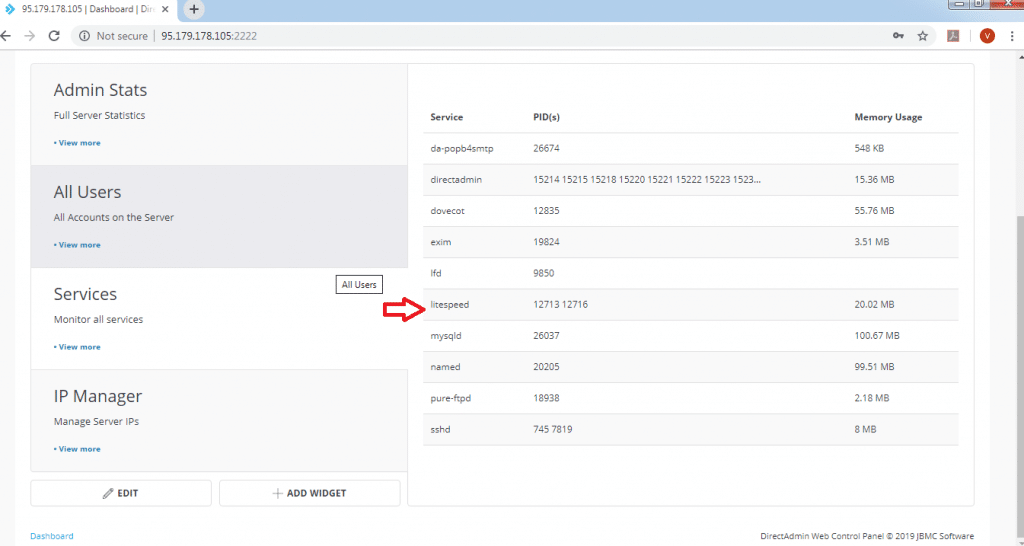
# lsof -i :80 COMMAND PID USER FD TYPE DEVICE SIZE/OFF NODE NAME litespeed 12713 root 11u IPv4 987842 0t0 TCP *:http (LISTEN) litespeed 12713 root 14u IPv6 987843 0t0 TCP *:http (LISTEN) litespeed 12716 apache 11u IPv4 987842 0t0 TCP *:http (LISTEN) litespeed 12716 apache 14u IPv6 987843 0t0 TCP *:http (LISTEN)Login to DA as admin and navigate to Services in Dashboard. Check for LiteSpeed is running as service.
Add Server Level Caching
Edit the file /etc/httpd/conf/extra/httpd-includes.conf and add the below entries
<IfModule Litespeed> CacheRoot /home/lscache/ </IfModule>Add Virtual Host Caching
Create a file /usr/local/directadmin/data/templates/custom/cust_httpd.CUSTOM.2.pre Add below entries to the file
<IfModule Litespeed>
CacheRoot lscache
</IfModule>
Enable mod_security
Execute below command to enable mod_security with the Litespeed webserver
# cd /usr/local/directadmin/custombuild
#./build set modsecurity yes
#./build set modsecurity_ruleset comodo
#./build modsecurity
To apply the changes, execute below commands
# cd /usr/local/directadmin/custombuild
#./build rewrite_confs
Conclusion
Lightspeed web server remains an alternative of all WebServers like Nginx or Apache due to below reasons.
Also read: Needed to install and configure apache server
Also read: Cheap asp net hosting
Also read: Free laravel hosting
Also read: Free nodejs hosting
FAQs
Is Nginx better than Apache for DirectAdmin?
Nginx outperforms Apache in most benchmarks, especially for serving static content and handling concurrent connections. On a DirectAdmin server, Nginx uses significantly less memory and CPU compared to Apache. If your server hosts multiple websites or handles high traffic, Nginx is the better choice. Apache still has advantages for.htaccess-heavy configurations, but Nginx with php-fpm is the preferred setup for modern DirectAdmin servers.
How do I switch from Apache to Nginx on DirectAdmin?
SSH into your server and navigate to /usr/local/directadmin/custombuild. Run./build set webserver nginx to change the web server option, then run./build set php1_mode php-fpm to switch PHP mode. After that, run./build update,./build all d, and./build rewrite_confs to apply the changes. Verify Nginx is running with lsof -i :80. The entire process takes about 10 to 15 minutes depending on your server.
Does LiteSpeed require a paid license?
LiteSpeed has both free and paid options. The OpenLiteSpeed version is completely free and open source, but it lacks control panel integration. The Standard and Enterprise editions require paid licenses from LiteSpeed Technologies. However, LiteSpeed offers a free starter license for servers with a single domain and less than 2GB of RAM. For production DirectAdmin servers hosting multiple sites, you will need a Standard or Enterprise license.
Can you use LiteSpeed with the free version of DirectAdmin?
Yes, LiteSpeed works with both the free and paid versions of DirectAdmin. DirectAdmin offers a free license for personal use that supports a limited number of domains. You can install LiteSpeed on a DirectAdmin server regardless of the license tier. The LiteSpeed plugin integrates with DirectAdmin through CustomBuild 2.0, so you get the same GUI management features with any DirectAdmin license.
What is the difference between Nginx and LiteSpeed?
Nginx is fully open source and free, while LiteSpeed has both open source and commercial editions. LiteSpeed is drop-in compatible with Apache modules like mod_rewrite and mod_security, making migration from Apache easier. Nginx requires separate configuration syntax. LiteSpeed also includes built-in page caching (LSCache) that works with WordPress and other CMS platforms out of the box. Nginx needs third-party caching solutions. For raw performance they’re comparable, but LiteSpeed offers better Apache compatibility and built-in caching features.
Get Managed DirectAdmin Hosting