How to Start a Web Hosting Business in 2026: Reseller Guide


I have started web hosting businesses from scratch more times than I can count.
I have built them, tested every step and handed a few web hosting businesses (from zero to profitable business) over to my clients who now run them full time and are earning recurring income from that business.
One of them began with zero coding skills and today serves a steady base of paying customers. That is the exact path I want to walk you through.
This guide on how to start a web hosting business shows you the reseller hosting route, the same model my team and I have tested more than ten times.
You do not need a server room. You do not need to write code.
I promise you that all the steps to start a web hosting business will be as easy as eating food. Every step here is explained in plain language, with screenshots at the tricky parts, so you finish with your own hosting company.
But first let me start with the basics before we touch any settings. This part matters, because the whole model rests on one simple idea that anyone can grasp in a minute.
What Is a Reseller Hosting Business?
A reseller hosting business is a business setup where you buy hosting resources from a web hosting provider, split the resources into smaller packages and sell those packages to your own customers under your own brand.
Think of it like renting a large flat and then letting out single rooms.
You pay one rent to the landlord. You collect rent from each room separately and you keep the difference. The landlord looks after the building. You look after your tenants.

Here is a real example.
A small design studio in Pune buys one reseller plan. They create separate hosting accounts for each of their fifteen website clients. Each client pays them monthly. The studio pays the provider once. That gap is the profit.
Now let me show you how the pieces fit together.
How Reseller Hosting Works
The logic is simpler than most people expect.
You sit as a friendly middle layer between a big hosting company and small website owners who want a personal touch. Three moves make the whole thing run, and here they are.
- Buy hosting resources from a provider: You purchase one reseller plan that gives you a pool of storage, accounts, and bandwidth to share out.
- Create your own hosting packages: You slice that pool into small plans, like a 5GB plan or a 20GB plan, and set your own prices.
- Sell them under your own brand: Your customers see your name, your logo, and your prices. They have no idea a bigger company sits behind you.
That last point is where the real magic sits. Your brand stays front and center the whole time.
Who Should Start a Hosting Business?
This model does not suit everyone equally. Some people already sit on a client base that needs hosting and do not realise the money they leave on the table.
Match yourself to any group below and this fits you well.
- Web designers: You build sites already, so hosting is a natural add-on that pays you every month.
- Digital agencies: You manage many client sites and can bundle hosting into your service fee.
- Freelancers: You want a steady income stream that does not depend on chasing a new project each month.
- Entrepreneurs: You like recurring revenue and a business you can run from a laptop.
- IT consultants: Your clients trust your tech advice, so hosting from you feels safe to them.
The next reason seals it for beginners.
Why Reseller Hosting Is Perfect for Beginners
Starting any tech business sounds scary at first. The good news is that reseller hosting removes the two things that usually stop people cold: heavy costs and technical upkeep.
Here is why it works so well when you are new.
- No server management: The provider runs the hardware, the updates, and the security. You handle customers, not machines.
- Low startup costs: You begin with the price of one plan and a domain, not thousands in equipment.
- Recurring revenue model: Customers pay every month, so your income grows steadily instead of resetting to zero.
Let me explain why this is the right time to jump in.
Why Start a Web Hosting Business in 2026?
Timing shapes results in any business, and right now the ground is really very good for a new hosting company. More people are building websites than ever, tools have become simpler and customers happily pay each month for something that just works.
Below are five reasons that make this year a smart entry point.
Growing Website Demand
Every small shop, creator, and freelancer wants a website today. New businesses register daily, and each one needs a place to live online. That steady flow of website owners becomes your steady flow of hosting customers.
Recurring Monthly Revenue
Hosting is not a one-time sale. A customer who signs up in January often stays for years. Ten loyal clients paying you monthly create a base income that lands in your account like clockwork.
Low Initial Investment
You are not buying servers or renting an office. One reseller plan and a domain get you trading. That means you can test this reseller hosting business with the money you might spend on a single dinner out.
Work From Anywhere
Your entire operation lives online. A laptop and an internet connection are all you carry. Many people run a hosting business from home, from a cafe, or from a beach town, and their customers never notice the difference.
Easy Upselling Opportunities
Hosting opens the door, yet the real profit often hides in the extras. Once a customer trusts you with their website, they happily buy related services from you too. These add-ons lift your average income per client.
- Domains: Sell and renew domain names for a small yearly markup.
- SSL certificates: Offer paid security upgrades for shops and business sites.
- Website maintenance: Charge a monthly fee to keep client sites updated and backed up.
- Email hosting: Provide professional branded email accounts as a paid tier.
Now let me show you the provider I trust for all of this.
Why Choose Verpex Reseller Hosting?
I have run resellers on several providers over the years, and Verpex is near the top for startups. The plans are clean, the tools are friendly, and the branding features let you look like a real hosting company from day one.
Here is why I recommend you choose Verpex for reseller hosting service:
White-Label Hosting
Verpex lets you hide the provider completely. You add your own logo, your own colours, and your own nameservers to the control panel. Your clients see your brand every time they log in, which builds a real white label hosting business.
Free WHM & cPanel Access
You get WHM, the master dashboard for creating and managing client accounts, paired with cPanel that your customers already know. This WHM reseller hosting setup is the industry standard, so help and tutorials sit everywhere online.
Free Website Migration
Moving sites is the part beginners dread. Verpex handles it for you at no cost, from your first site to your hundredth. That means you can bring existing clients over to your Verpex reseller hosting without touching a single file yourself.
NVMe SSD Storage
Speed keeps customers happy. Verpex runs NVMe SSD storage on AMD EPYC servers, which load sites far faster than older drives. Fast sites mean fewer complaints and better search rankings for your clients.
Global Data Centers
You can place client sites close to their visitors. Verpex offers locations like London, New York, Sydney, and Singapore across five continents. A local server keeps sites quick for the people who matter to your customers.
24/7 Customer Support
When you are new, backup matters. Verpex support runs around the clock through live chat, phone, and tickets. When a client problem stumps you at midnight, someone is there to help you sort it out.
Beginner-Friendly Management
The whole panel is built for people who are not server experts. Menus are clear, one-click installers set up WordPress in seconds, and daily backups run on their own. You manage a business, not a machine.
Scalable Growth Options
You start small and grow without pain. Begin with fifteen accounts and move up to a hundred or more as clients arrive. There is zero messy migration, so scaling this reseller hosting for beginners stays smooth.
Let me put real numbers next to those features now.
Understanding Verpex Reseller Hosting Plans
Verpex keeps its reseller lineup simple, which I like for newcomers.
The plans are named by the number of cPanel accounts you get, so you always know your client ceiling at a glance. My research team pulled the current specs straight from the Verpex site, listed below.
| Plan | cPanel Accounts | Disk Space | RAM per cPanel | Price per month (1-Year Billing) |
|---|---|---|---|---|
| Reseller 15 | 15 | 50GB NVMe SSD | 2GB LVE RAM | $17.16 per month |
| Reseller 30 | 30 | 100GB NVMe SSD | 2GB LVE RAM | $20.42 per month |
| Reseller 60 | 60 | 180GB NVMe SSD | 2GB LVE RAM | $29.95 per month |
| Reseller 100 | 100 | 300GB NVMe SSD | 2GB LVE RAM | $59.40 per month |
Every plan comes with unlimited bandwidth, unlimited email accounts, unlimited databases, daily backups, free SSL certificates, a free domain, a 99.99% uptime guarantee and a 30-day money-back guarantee.
Entry-Level Plans
The Reseller 15 plan is your starting block.
It gives you 15 cPanel accounts and 50GB of fast NVMe storage, which is plenty for your first batch of clients. Renewal sits around $22 a month, with lower promotional pricing on longer billing terms.
Mid-Tier Plans
Once clients begin to come, the Reseller 30 and Reseller 60 plans give you room to breathe. You jump to thirty or sixty accounts and up to 180GB of storage.
This tier suits a growing reseller hosting business that has proven it can sell.
Agency-Focused Plans
The Reseller 100 plan is built for serious operators. You get a hundred cPanel accounts and 300GB of storage, enough to run hosting as a full income.
Agencies that manage dozens of client sites land here comfortably.
Which Verpex Plan Is Best for Beginners?
I get this question in every chat, so let me answer it plainly. You do not need the biggest plan to start. You need the one that matches your first year, not your dream year.
- Recommended starting point: The Reseller 15 plan. It costs little and holds enough accounts to prove your model works.
- Budget considerations: Pick a plan you can pay for even with zero clients in month one. The entry plan keeps that risk tiny.
- Number of expected clients: Count the people you can realistically attract and give them your business in ninety days. For most beginners, that number sits under fifteen.
- Growth potential: You can upgrade any time with no data move, so there is zero reason to overbuy on day one.
Start on the Reseller 15 plan and upgrade only once you have filled ten accounts. Paying customers should fund your bigger plan, not your savings.
The next question everyone asks me is about the money needed to get going.
How Much Does It Cost to Start a Hosting Business?
Let me be your personal guide book here and tell you about every dollar you spend here. The beauty of this Reseller 15 model is how little cash it takes to open your doors, so do not let the fear of big costs hold you back.
Expected Monthly Operating Costs
Your core cost is the reseller plan, around $14 to $18 a month on the entry tier.
Add a domain name at roughly $13 for the year (screenshot for that is added below in the steps). A billing tool comes through Verpex, so you skip that expense.
Total monthly running cost stays close to $20 for a beginner.
Potential Revenue Examples
Here is where it gets fun.
Say you charge each client $8 a month for hosting. Fill ten of your fifteen accounts and you collect $80 a month. Take away your $20 cost and you keep about $60 in profit.
Fill all fifteen at $8 and you reach $120 a month. Scale to the hundred-account plan later, add domains and email and the same simple math turns into a serious monthly income.
So what is the minimum you need in the bank before you begin?
Keep just $30 ready. That’s it!
That covers your first month of the entry reseller plan, your domain name and a small buffer for a logo or an extra tool. With that $30 in place, you have everything you need to follow the steps below.
Hosting prices and promotional offers change often. Every figure here was checked against the official Verpex site while writing, yet you should confirm the live price and current WHMCS terms at checkout before you pay.
Right, here is where I show you exactly how to build this from scratch.
Make sure the $30 we discussed is ready in your bank account. I will drop screenshots at the tricky spots to guide you through.
Step 1: Purchase a Verpex Reseller Hosting Plan
Your web hosting business starts with just one purchase. Go to the Verpex website and open the reseller hosting page from the top menu.
- Go to Reseller Hosting >> Reseller cPanel Hosting >> pick the Reseller 15 plan for now.
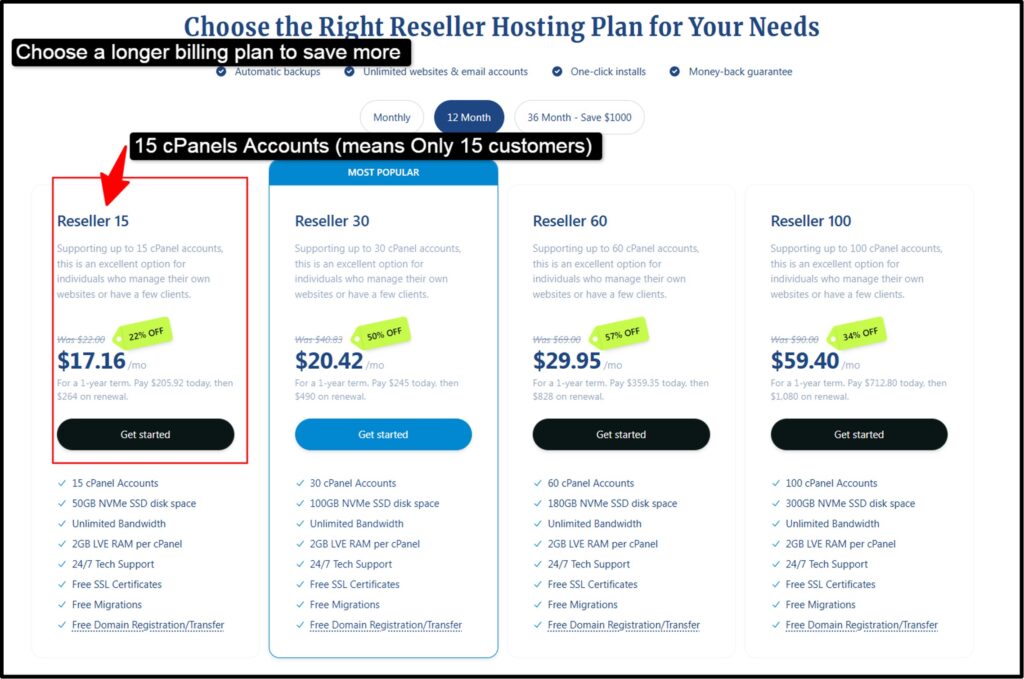
- Next, choose your billing term. A longer term like twelve or thirty-six months drops your monthly price, so pick the longest one your $50 allows.
- Select a server location close to your future customers, like London or Singapore for an Indian audience.
- Create your Verpex account with your email, fill in your details and complete the payment.
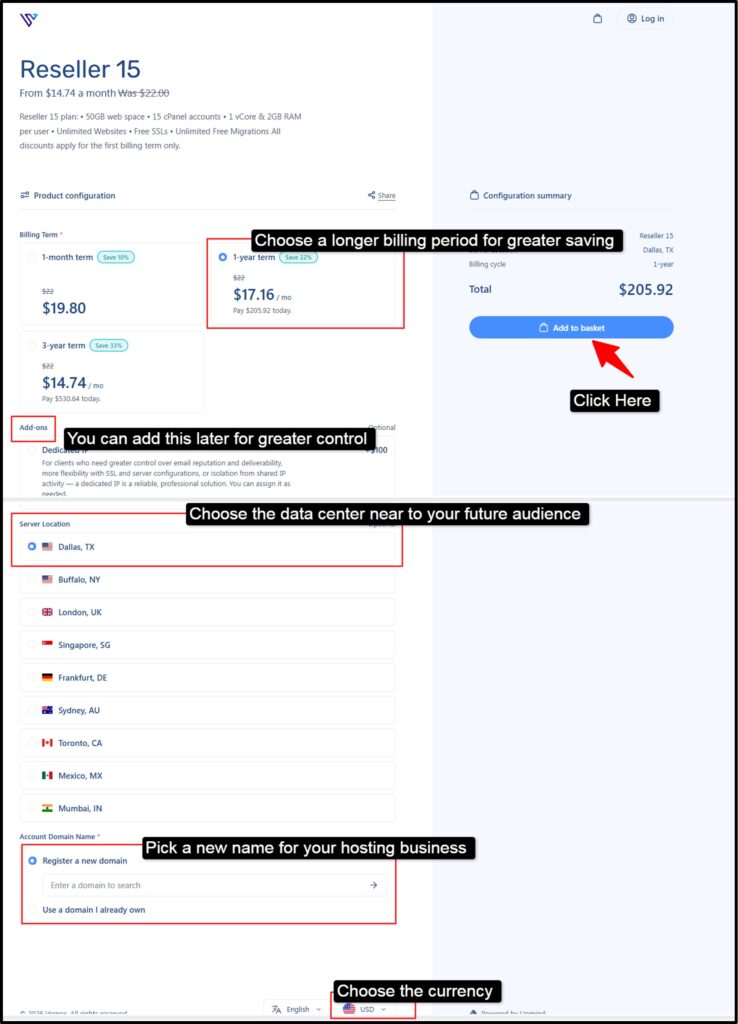
- Setup runs instantly, so within minutes you receive your WHM login by email. Keep that email safe. It is the master key to your new hosting company.
Step 2: Create Your Hosting Brand
Before you sell anything, you need a name people remember.
- Think of something short, clean and easy to spell, like HostingDildo or HostingJack.
- Check that the matching domain is free, then register it >> You can grab it right inside Verpex or through any domain registrar (like GoDaddy or YouStable).
- Design a simple logo next. You do not need a designer. Free tools like Canva let you make a clean logo in a few clicks.
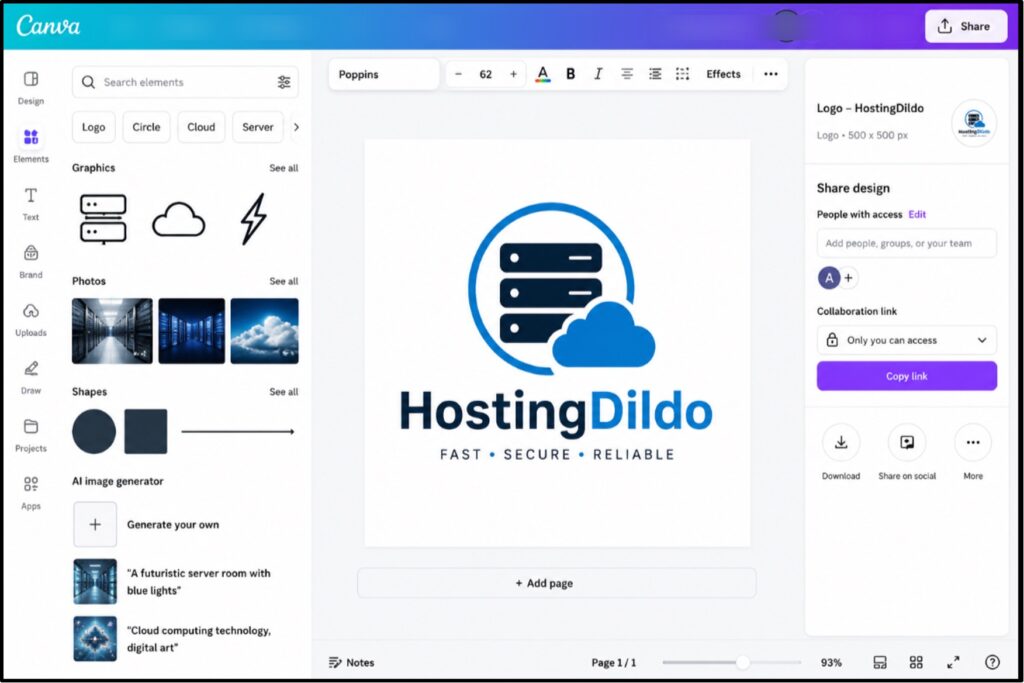
- Pick two colours and one font, and stay consistent.
Your brand is how customers keep you apart from the other big hosting companies. A good name and a neat logo make a one-person operation look like a trusted company.
Spend an hour here. It pays off every time a customer sees your invoice or your panel.
Step 3: Set Up Your Hosting Website
Now you need a shop window. Your website is where visitors read your plans and click buy.
- Log in to your own WHM >> Create one cPanel account for your main site. Go to cPanel >> Softaculous Apps Installer >> WordPress >> Install. (Install WordPress through Softaculous in one click)
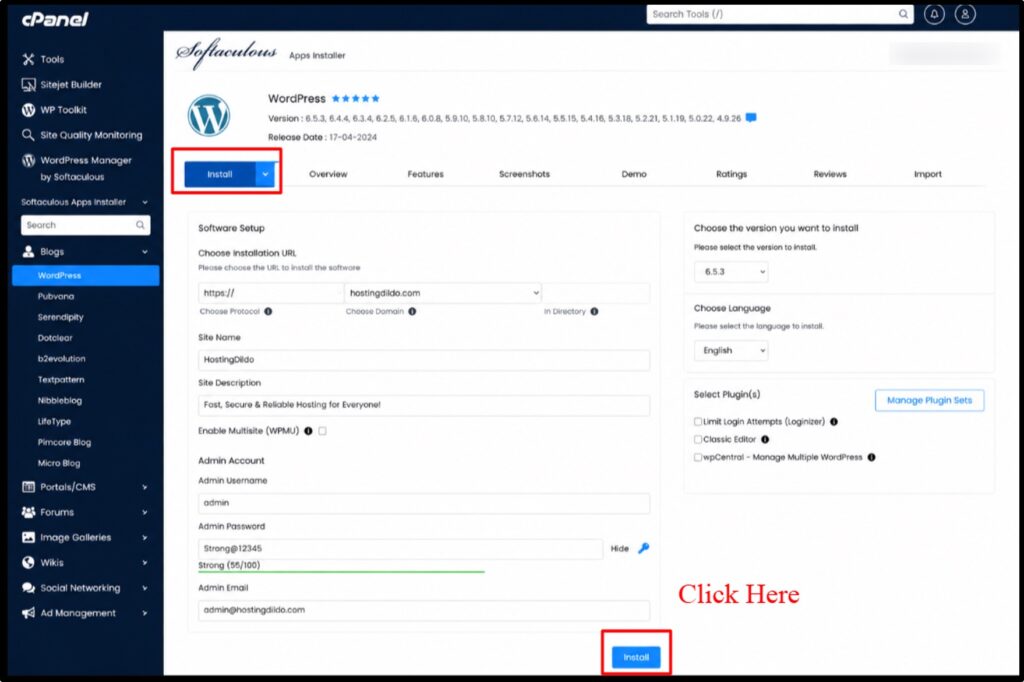
Pick a clean hosting theme, then build four simple pages:
- Home,
- Shared
- VPS and Dedicated
- Pricing,
- About Us,
- Contact
- Privacy Policy .
Write plainly. Tell visitors what they get, show your prices and add a clear buy button >> Keep the design light and fast.
Your own site is your first proof that you know hosting, so load it quickly and keep it tidy.
A messed up unclean site scares customers away before they read a single word. (so make sure that the color palette is friendly and eye warming)
Step 4: Configure WHM + Create Hosting Packages
This is like the engine room of your reseller hosting business. WHM is where you build the plans your customers will buy.
- Log in to WHM using the details from Step 1. Go to WHM >> Packages >> Add a Package.
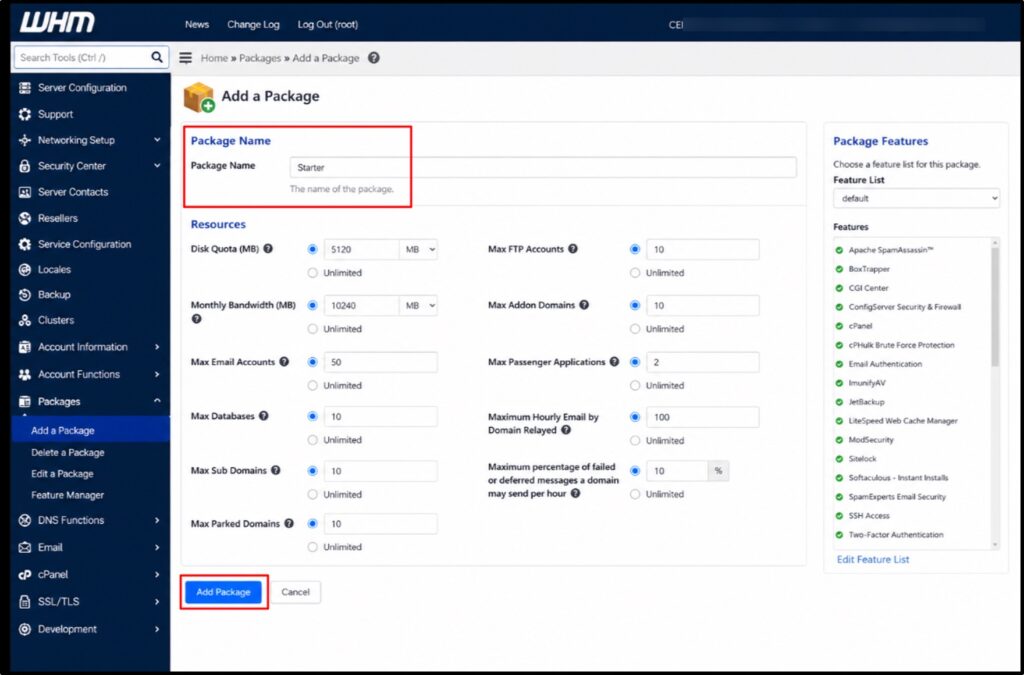
- Here you set the limits for one plan: disk space, bandwidth, email accounts and databases >> Create three simple packages to start, like Starter with 5GB, Business with 15GB and Pro with 40GB.
- Give each of the hosting packages a clear name and sensible limits.
- These packages become the plans you list on your website >> Keep them easy to understand >> Most customers do not know what a gigabyte holds, so add a plain line like good for a small blog or fits a busy shop.
- Clear plans sell faster than clever ones.
Step 5: Enable White-Label Branding
Here you erase every trace of Verpex so your brand stands alone.
Two settings do this thing.
- First, set up custom nameservers. Go to WHM >> Basic WebHost Manager Setup >> Nameservers, and enter ns1.yourbrand.com and ns2.yourbrand.com. Verpex lets you create these free of charge.
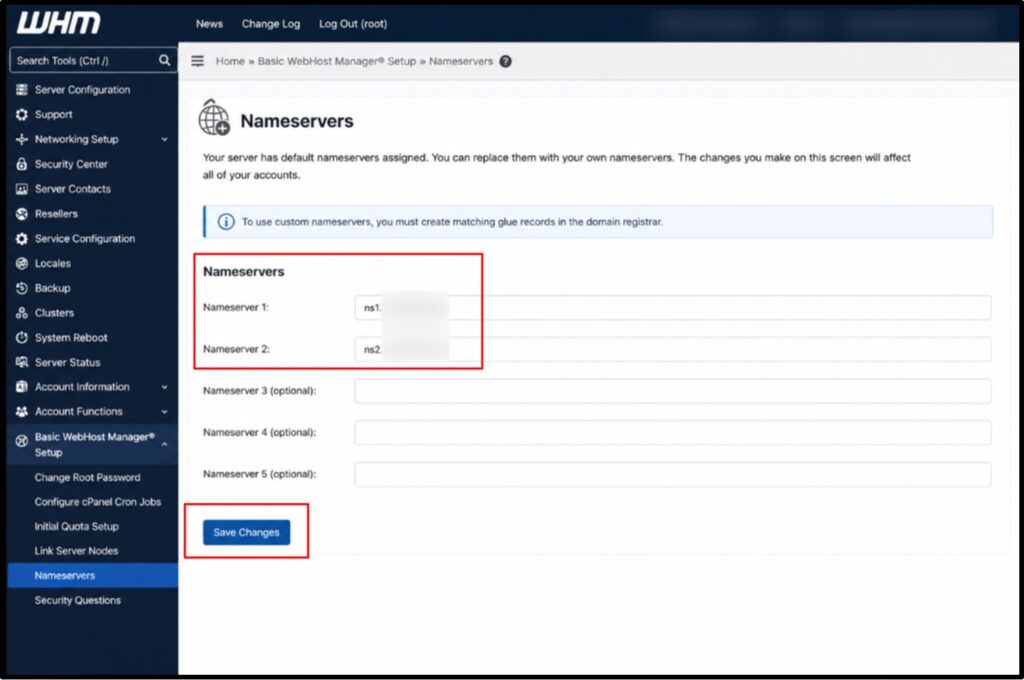
- Second, brand the cPanel your clients see. Upload your logo >> Set your colours so their login screen shows your company, not the provider >> Now when a customer logs in, they see your name from top to bottom.
This white label hosting business look is what lets a beginner charge real prices.
People pay more when the service feels like a proper company. Take your time on this step. It turns a rented plan into a brand of your own.
Step 6: Set Up Automated Billing + Client Management
You do not want to chase payments by hand every month.
A billing system does it for you. Verpex bundles WHMCS, the tool that handles sign-ups, invoices, and account creation on autopilot. Install it and connect it to your WHM.
- Go to WHMCS >> Setup >> Products/Services >> add your three packages with your prices.
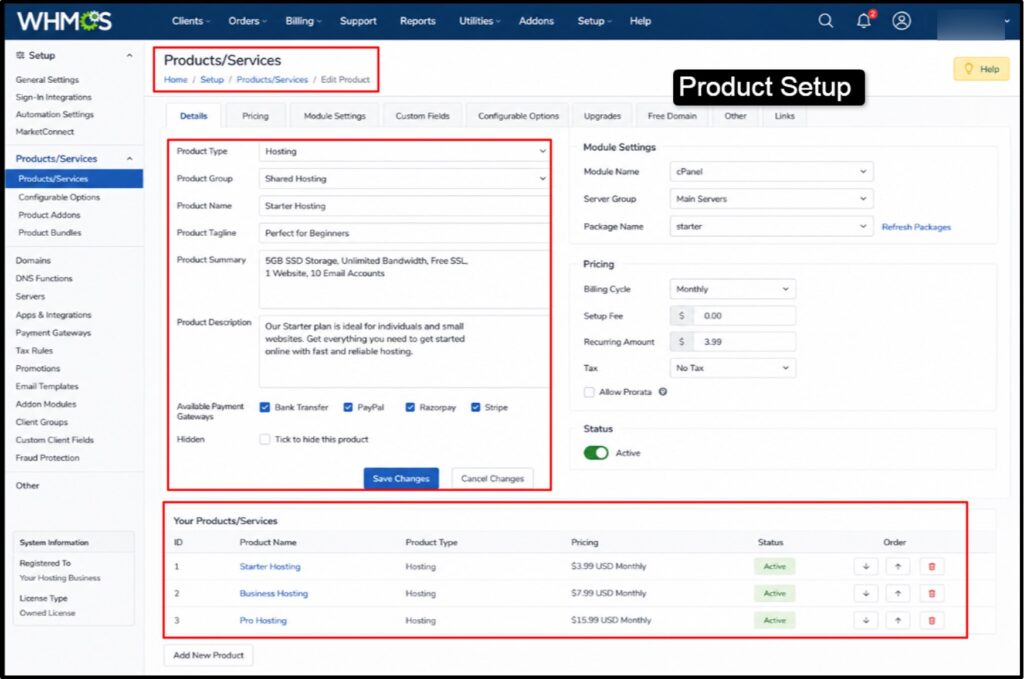
- Link your payment gateway next, like PayPal or Stripe, so money lands directly in your account.
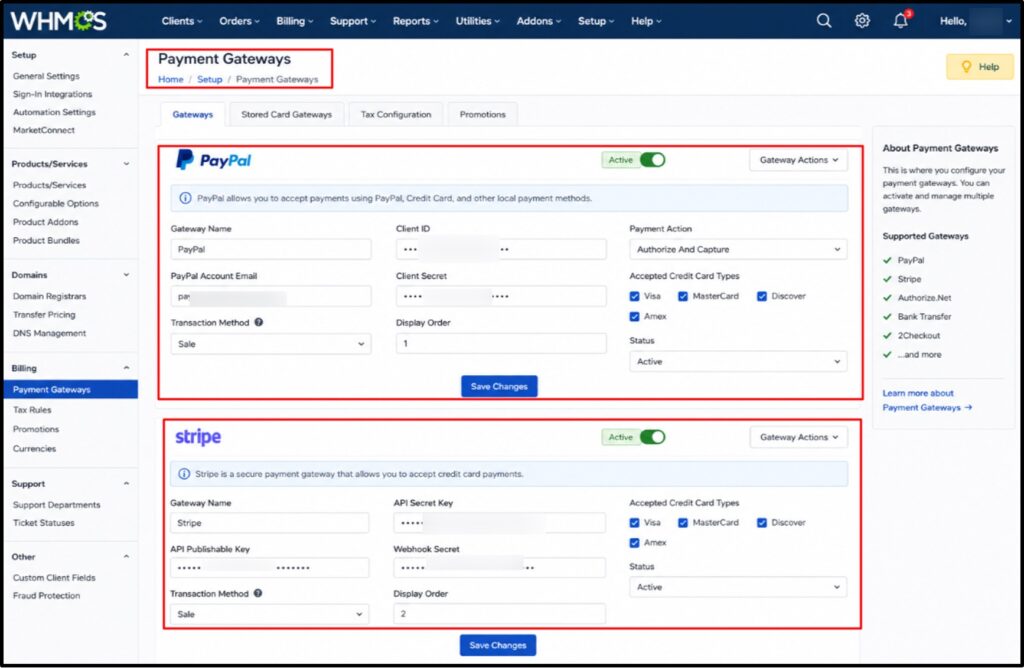
- Once this runs, a customer can visit your site, pick a plan, pay and get their hosting account created automatically.
You wake up to new customers already set up. This one system turns a side project into a real hosting business that runs while you sleep.
Step 7: Configure Email Hosting for Customers
Business owners want email that matches their domain, like info@theirshop.com.
Your plans already include this, so it becomes an easy selling point. Inside each client cPanel, email accounts live under the Email section.
- Go to cPanel >> Email Accounts >> Create.
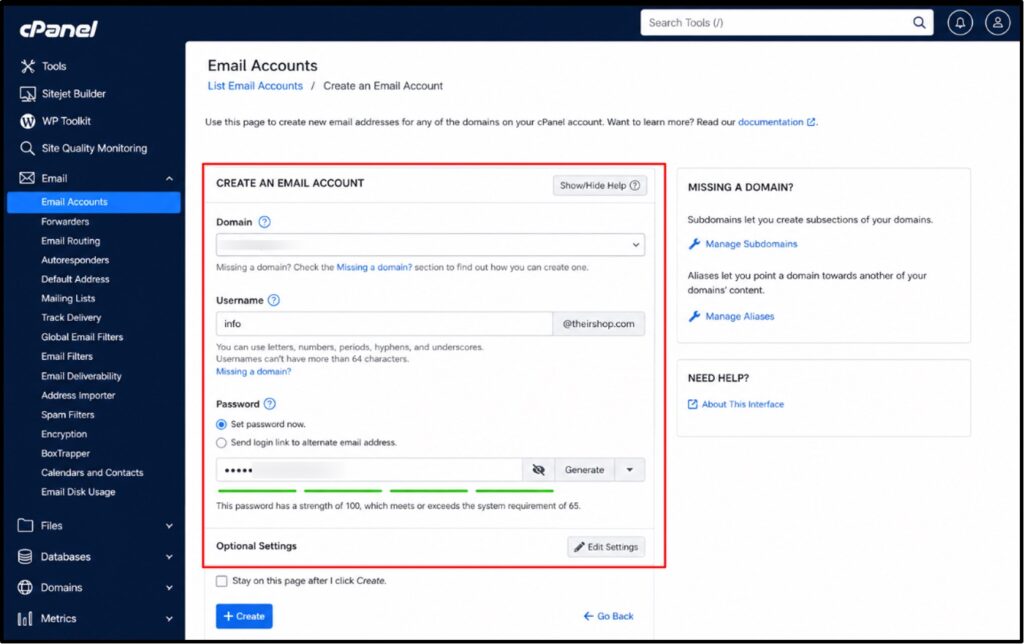
- Set a mailbox size and a password, and the account is live. Verpex routes outgoing mail through trusted services, so client emails land in inboxes, not spam folders.
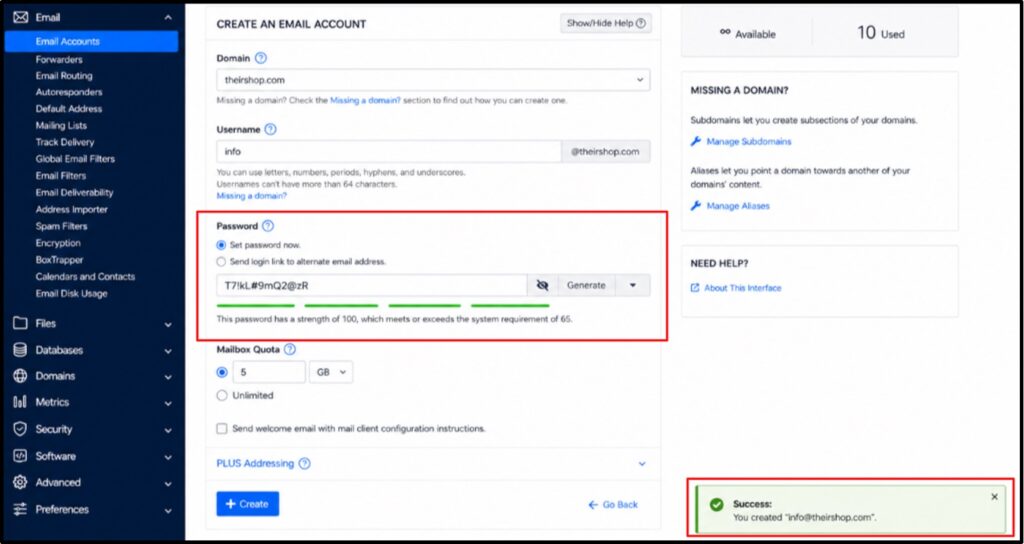
You can hand this task to clients or do it for them as a paid setup.
Professional email is something small businesses gladly pay for. Offer it inside a higher plan or as a small add-on. It costs you nothing extra and adds real value.
Step 8: Add Value-Added Services
Hosting alone earns well, yet the addons are where smart resellers make extra business.
Once a client trusts you, selling them more is easy.
- Start with domains. Register and renew them for a small markup each year.
- Add SSL upgrades for shops that want extra trust at the checkout.
- Offer a monthly care plan that covers updates, backups, and small fixes.
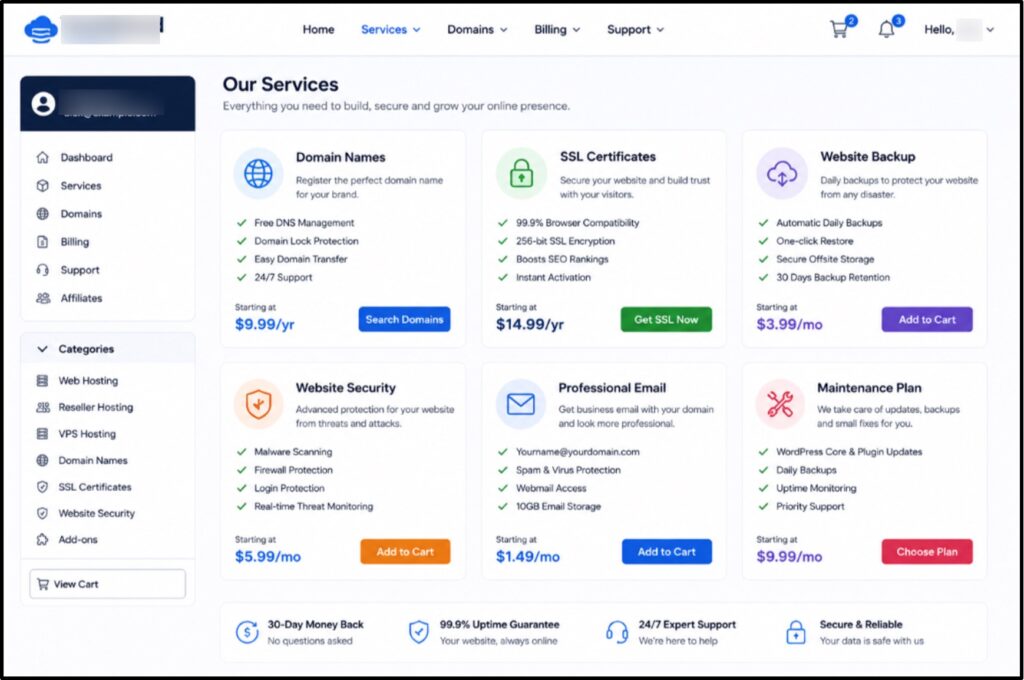
- You can also sell professional email as a separate tier.
Bundle two or three of these into one monthly package and your income per client jumps. A customer paying $8 for hosting might happily pay $25 for hosting plus care plus email.
Same client, triple the revenue. These add-ons lift your reseller hosting profits sharply.
Step 9: Create Hosting Plans Customers Actually Want
Many beginners build plans around specifications. Customers do not think in specs. They think about problems. So name and shape your plans around real needs.
- A blogger wants a cheap, simple plan.
- A small shop wants speed and security.
- An agency wants room for several sites.
Build three plans that speak to those people directly.
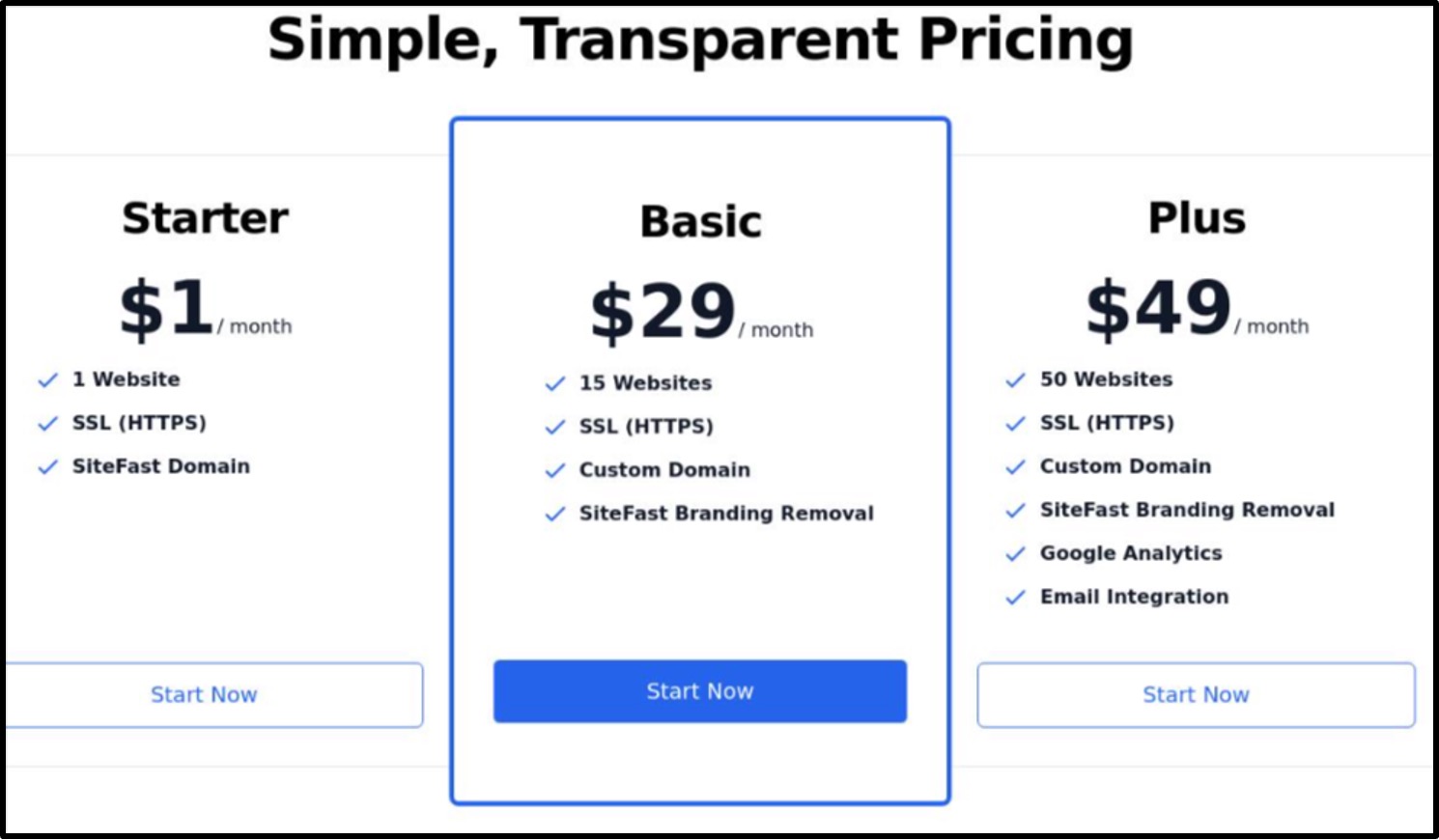
Call them something friendly, price them clearly, and list the benefits in plain words next to each. Avoid drowning people in numbers.
One honest line like “Handles about 10,000 visitors a month” does more than a wall of technical limits.
Price your middle plan as the one you want most people to pick, since buyers tend to choose the safe middle option.
Plans built around people and not built around specs, sell far more often.
Step 10: Attract Your First 10 Hosting Clients
This is the step that turns a setup into a business.
Your first ten customers are the hardest, so start with people who already know you. Message past design clients, local shop owners and friends who run small sites.
Offer to move their site over for free, since Verpex migration costs you nothing.
Post in local business groups and offer a simple first-month deal. Ask every happy client for one referral.
Word of mouth is the cheapest marketing a hosting business from home can use.
Ten clients might sound like a mountain today.
Sign one a week and you clear it in under three months. Keep people happy, and those first ten quietly become thirty.
That is how you sell web hosting services without a big ad budget.
Your first 15 clients care more about your help than your price. Answer fast, fix quickly! They will stay for years and send friends your way.
How to Support Your Hosting Customers
Support is the part that keeps your business alive.
In hosting, the company that answers fastest usually keeps the customer. You do not need to be a server expert to give great support, because Verpex backs you up behind the scenes. Here is how to handle it well from day one.
- Set up a simple help channel: A support email or a ticket system inside WHMCS is enough to start. Give clients one clear place to reach you.
- Answer quickly: A reply within a few hours beats a perfect reply that comes tomorrow. Speed builds trust faster than anything else.
- Lean on Verpex for hard problems: When a client issue goes beyond you, open a ticket with Verpex support. Their team runs 24/7 and helps you solve it.
- Keep a short FAQ: Write plain answers to the five questions clients ask most, like how to reset a password. Send the link and save hours.
- Handle support with care and your customer loss stays low. Low customer loss is the quiet secret behind every profitable reseller hosting business. Now let me warn you about the traps.
Common Beginner Mistakes to Avoid
I have watched many people start this business, and the same few slips trip them up again and again. Learn these now, and you skip months of pain.
- Pricing too low: Cheap plans attract needy customers and thin profits. Charge a fair price for good service instead of racing to the bottom.
- Overbuying resources early: Do not grab the biggest plan on day one. Start small and upgrade with customer money.
- Ignoring backups: Confirm daily backups are on for every account. One lost site can sink your reputation fast.
- Weak support: Slow replies push customers to leave. Treat every message as a chance to keep a paying client.
- No clear brand: A messy name and a missing logo make you look temporary. A clean brand earns trust and higher prices.
Dodge these five, and you are already ahead of most people who try this. Next, let me show you where this road can lead.
Scaling Your Hosting Business Beyond Reseller Hosting
Reseller hosting is the perfect start, yet it is not the ceiling.
As your customer base grows, you can move up to bigger infrastructure and keep more control and profit. Here is the natural path forward once you outgrow your reseller plan.
- Upgrade to a larger reseller plan: Move from fifteen accounts to sixty or a hundred as clients arrive, with no data migration.
- Step up to a VPS: A virtual private server gives you more power and control for demanding client sites.
- Move to a dedicated server: Once you host hundreds of sites, your own dedicated machine lowers the cost per client.
- Add a team: Bring in help for support and sales so you can focus on growth.
Before we wrap up, let me settle the big comparison people always raise.
Verpex Reseller Hosting vs Starting Your Own Server
A lot of beginners wonder if they should skip reselling and buy their own server straight away. I have done both, so let me save you the expensive lesson. The table below lays out the honest difference between the two paths.
| Feature | Verpex Reseller Hosting | Self-Managed Server |
|---|---|---|
| Startup cost | Around $14 to $18 a month | Hundreds of dollars |
| Technical skill | Beginner friendly | Advanced server admin needed |
| Server maintenance | Handled by Verpex | Fully your job |
| Setup time | Ready in minutes | Days of configuration |
| Security and updates | Managed for you | You patch everything |
| Support | 24/7 expert help | You are on your own |
| Best for | Beginners and growing resellers | Experienced tech teams |
The table makes it clear for a beginner. Reselling gives you a real hosting company without the heavy lifting of running hardware.
Start here, grow, and buy your own server only when the numbers truly call for it.
FAQs: How to Start a Web Hosting Business
Is a reseller hosting business profitable?
Yes! A reseller hosting is profitable and the profit grows with each client. Your main cost is one plan, around $14 to $18 a month. Ten clients at $8 each bring $80 a month, so you keep roughly $62 in profit. Fill more accounts and add extras like domains and email and a single entry plan turns into a steady monthly income with healthy margins.
Do I need technical or coding skills to start a hosting company?
No, you do not need technical skills to start a hosting company. The hosting company runs the servers, the updates and the security for you. Your job is to create packages in WHM, set prices and help customers. The panels use simple menus and one-click tools.
How many web hosting clients do I need to make a profit?
Very few. On the entry plan at about $18 a month, three clients paying $7or $8 each already cover your cost. Everything after that is profit. Most beginners take the profit within their first month, once they bring over a handful of people they already know.
Can I use my own brand name in place of Verpex reseller hosting?
Yes, you can use your own brand name in place of Verpex reseller hosting. Verpex offers white-label hosting, so you add your own logo, colours, and custom nameservers. Your customers see your brand every time they log in and pay. There are no Verpex mentions on their side.
What is the difference between reseller hosting and a VPS?
Reseller hosting gives you a share of a managed server, split into cPanel accounts you sell, with the provider handling upkeep. A VPS gives you raw server power and full control, but you manage it yourself.
Conclusion: How to Start a Web Hosting Business
It is really as easy as eating food to start a web hosting business.
Pick the Verpex Reseller 15 plan, brand it as your own, build a clean site, and sign your first ten clients from people you already know.
Keep the $30 we discussed ready, follow the ten steps in order, and support your customers well. I have walked this path many times and handed it to others who now thrive.
Today is the day you’ll have your own web hosting business. Go and Scale your company.



Table of Contents
- What Is a Reseller Hosting Business?
- Why Start a Web Hosting Business in 2026?
- Why Choose Verpex Reseller Hosting?
- Understanding Verpex Reseller Hosting Plans
- Which Verpex Plan Is Best for Beginners?
- How Much Does It Cost to Start a Hosting Business?
- Step 1: Purchase a Verpex Reseller Hosting Plan
- Step 2: Create Your Hosting Brand
- Step 3: Set Up Your Hosting Website
- Step 4: Configure WHM + Create Hosting Packages
- Step 5: Enable White-Label Branding
- Step 6: Set Up Automated Billing + Client Management
- Step 7: Configure Email Hosting for Customers
- Step 8: Add Value-Added Services
- Step 9: Create Hosting Plans Customers Actually Want
- Step 10: Attract Your First 10 Hosting Clients
- How to Support Your Hosting Customers
- Common Beginner Mistakes to Avoid
- Scaling Your Hosting Business Beyond Reseller Hosting
- Verpex Reseller Hosting vs Starting Your Own Server
- FAQs: How to Start a Web Hosting Business
- Conclusion: How to Start a Web Hosting Business