Table of Contents



How to Deploy n8n on VPS Hosting: Beginner’s Guide 2026
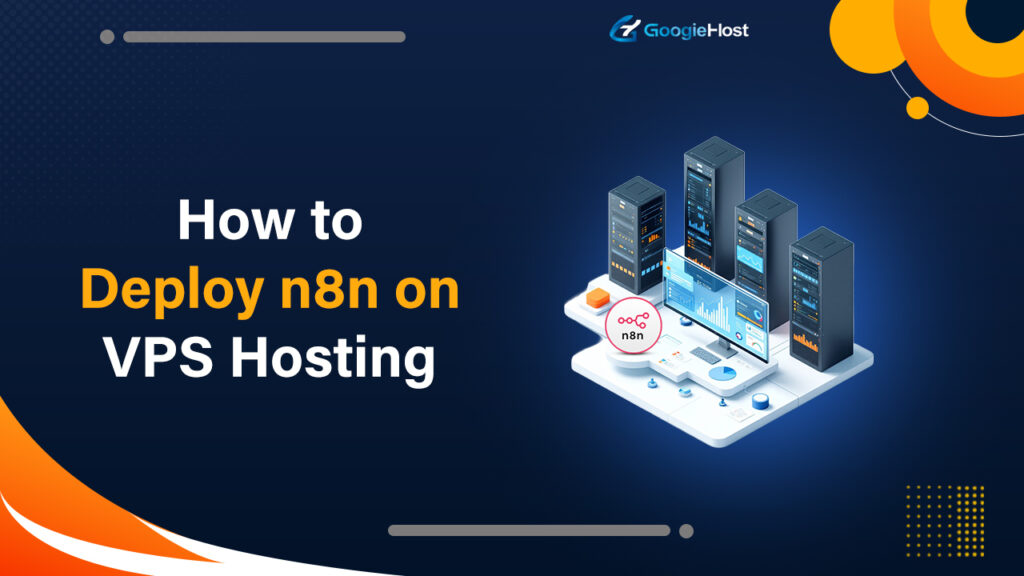
Gotten tired of searching for the right technique on how to deploy n8n on a VPS server? With so many blogs and videos, giving too complex solutions, it’s frustrating. But don’t worry, in this blog, we’re gonna share an easy method to set up n8n on your VPS server, with a step-by-step guide and properly labeled screenshots to help you throughout the process.
All you need to do is follow the steps one by one, and wherever required, just copy and paste the exact commands we’ve provided below. This guide is made especially for the newbies, so you don’t have to be a techie guy to get n8n running on your VPS.
So, by the end of this blog, you’ll have n8n successfully deployed and ready to automate your workflows. Let’s get started! 👍
How to deploy n8n on VPS Hosting? (Step-by-Step Guide with Screenshots)
To show you how to deploy n8n on VPS hosting, we’ve rented VPS servers from Hostinger and also from YouStable. First, we’re gonna show you how to setup n8n on a VPS from Hostinger:
Hostinger VPS
- Go to the official website of Hostinger >> Click to Services drop down button >> Click on the n8n VPS Hosting option.
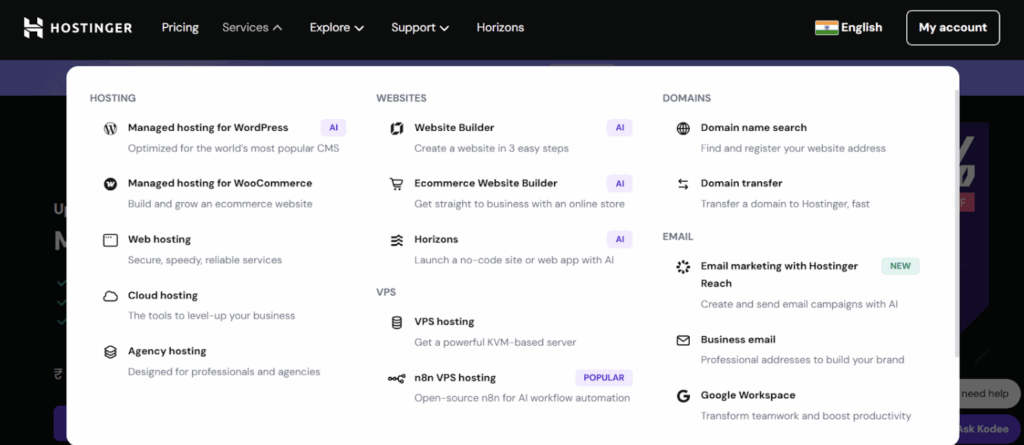
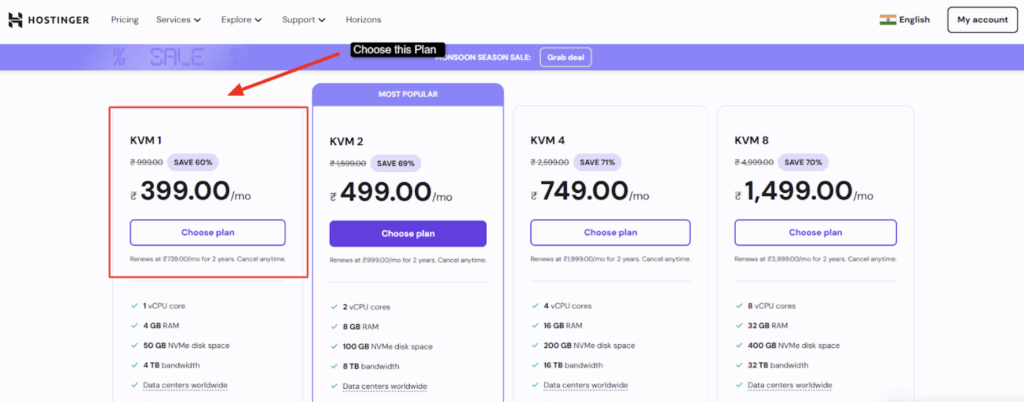
Choose the VPS plan that offers first, bare minimum web resources to ensure that n8n runs seamlessly without interruption, so for that, Hostinger’s VPS KVM1 Plan is the best as per the need and affordability. Bare Minimum Requirements for n8n self-hostCPU: 1vCore RAM: 2GB Storage: 10GB NVMe SSDOS: Ubuntu 20.04 version
- Choose the KVM 1 VPS plan >> Click the Choose Plan key to proceed with the server configuration and the checkout process.
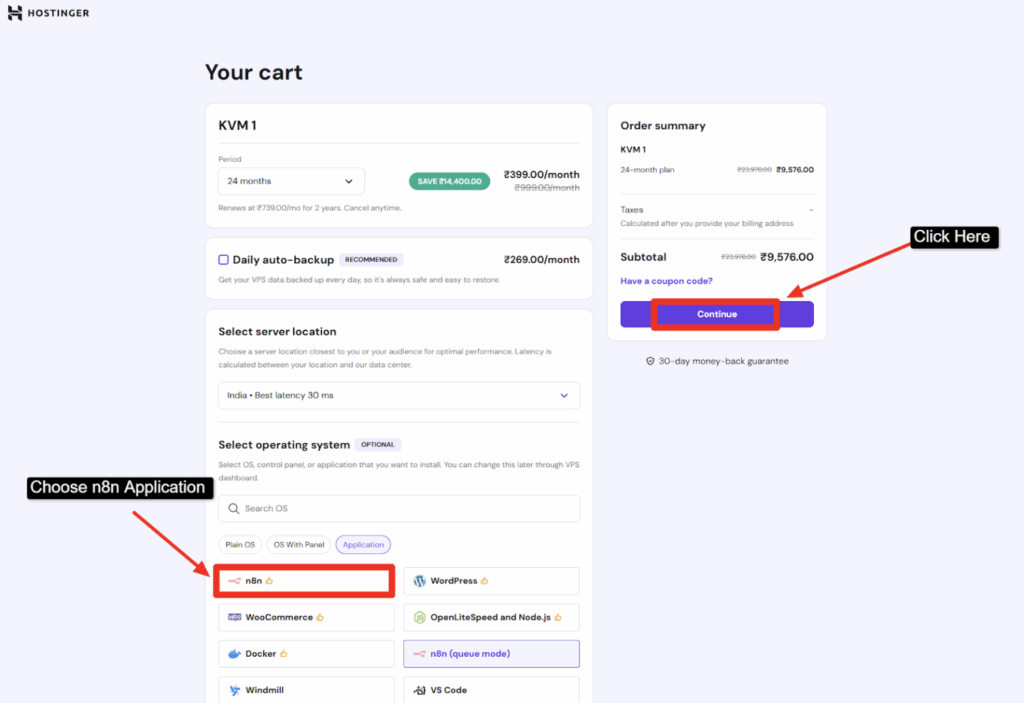
- Review the billing amount >> Go to Select Operating System >> Click Application Tab >> Choose n8n >> Finally, press the Continue button to move to the payment section >> Choose the card payment option >> Make the payment >> Wait for the confirmation email from the Hostinger team.
- Now, after you get the confirmation email >> Go to Hostinger website >> Click My Account tab >> Use your Login id and Password to sign in to your VPS hosting account.

- Right after you press the Login button >> You can access the dashboard of your hostinger account >> The VPS gets activated in just 5 mins >> You can also track the performance of your web resources CPU, RAM usage and storage >> Now go to OS & Panel tab in the left side menu >> And click the Operating System tab.
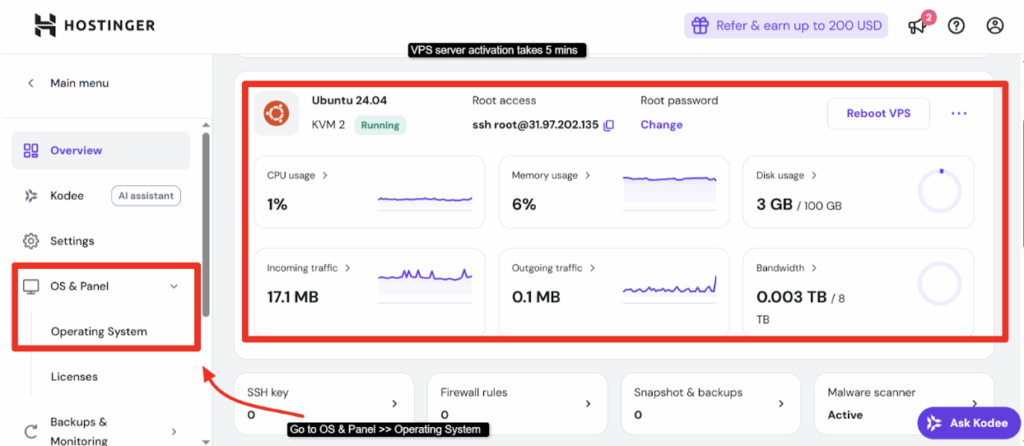
- Scroll down >> And click n8n application under the developer tools section as shown in the screenshot below >> press the Confirm button to start the installation process.
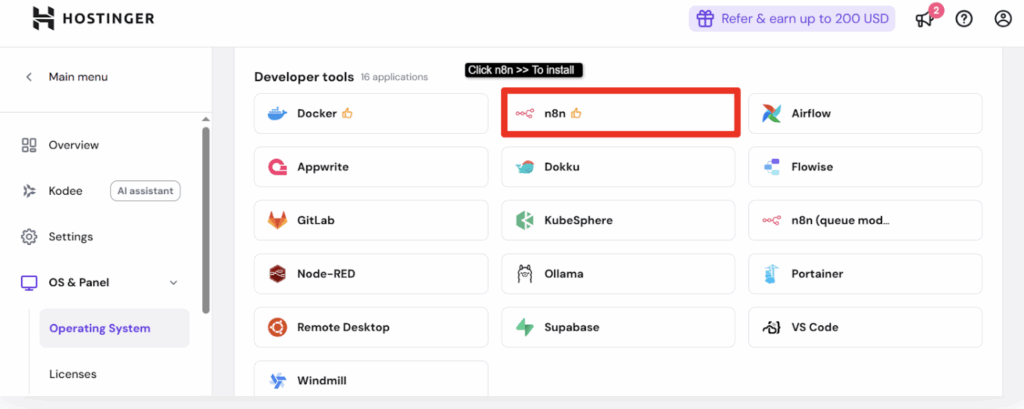
One great thing about Hostinger is that it offers a one-click n8n self-host installation, so you don’t have to mess with code, download extra tools, or go through complex setups. Just click, sit back for 10 mins and let the hosting get ready on its own.
- Let the n8n hosting setup! It normally takes 8 to 10 mins!
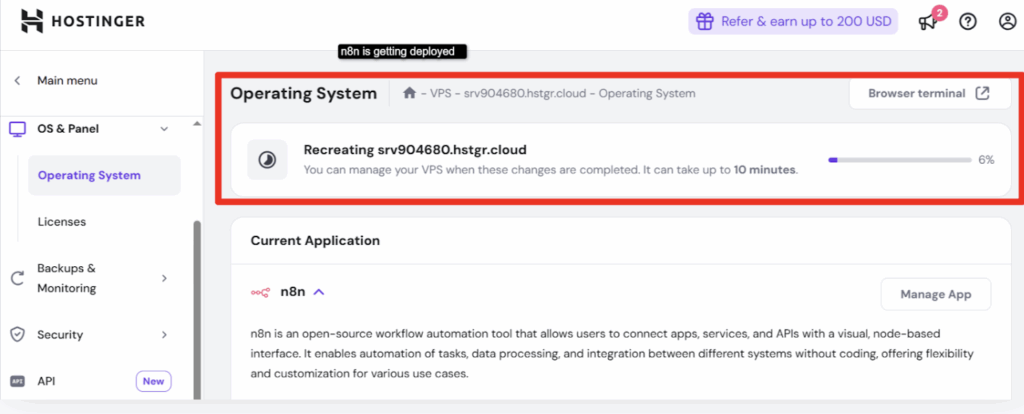
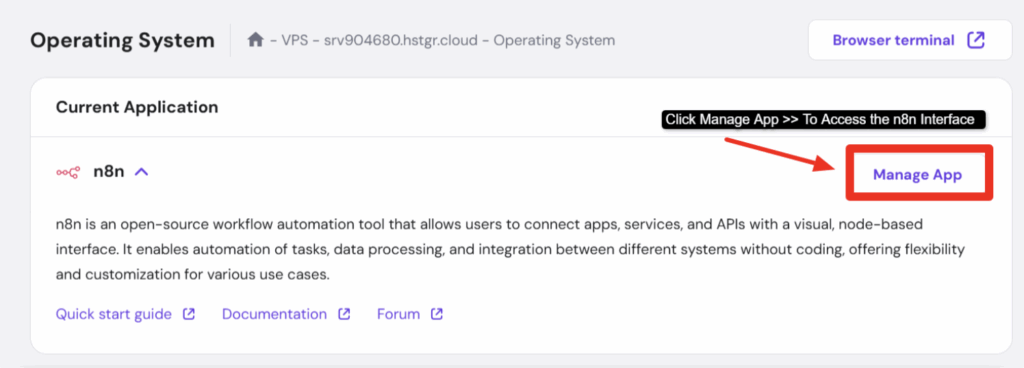
- Now, as the n8n hosting gets installed >> Go to the Manage App tab as shown in the screenshot below >> As you do so, you’re re-directed to the n8n account login page.
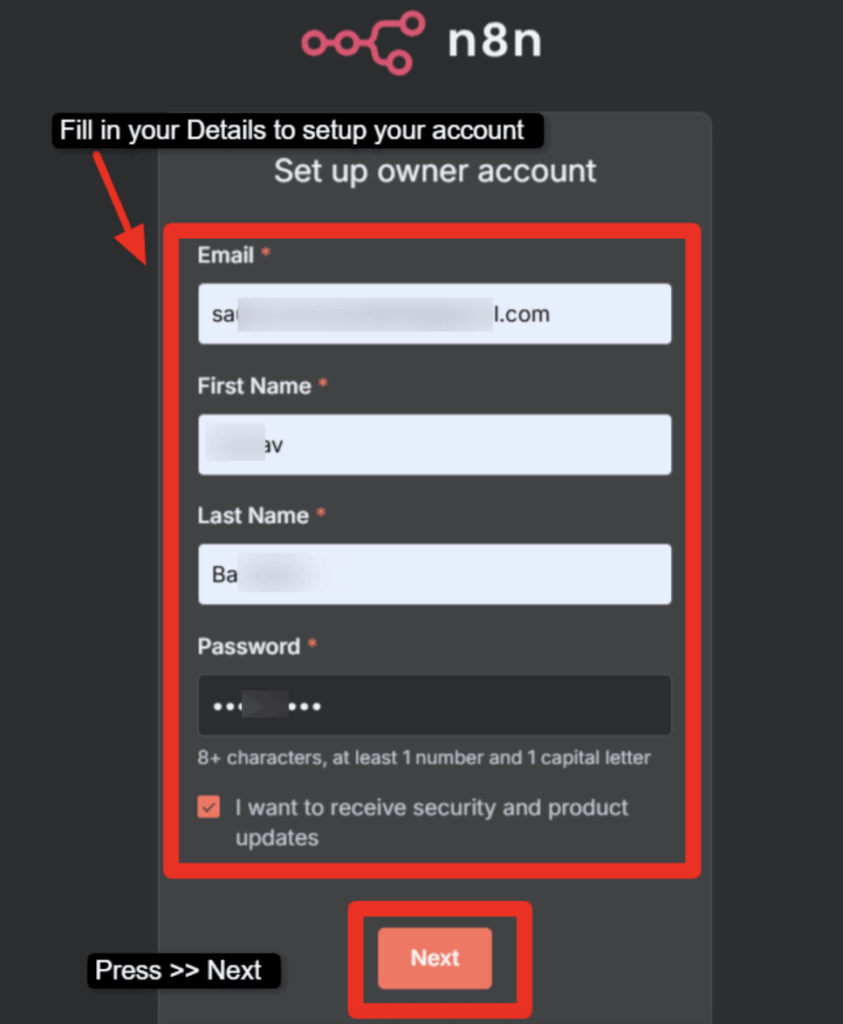
- Add your registered email id, your name and generate a password >> Then lastly press the next button to complete the login process and access the n8n interface.
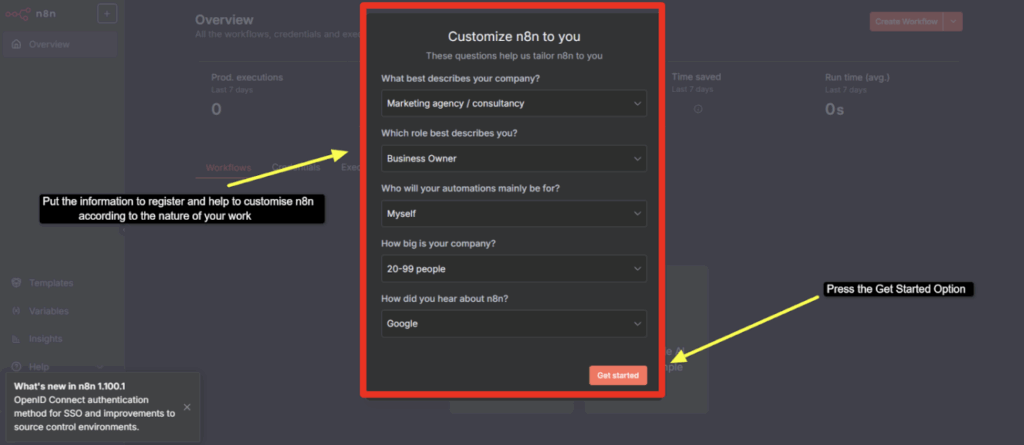
- To help n8n customize your workflow, it asks you to answer a few relevant questions >> Answer the questions >> Press Get Started button right away.
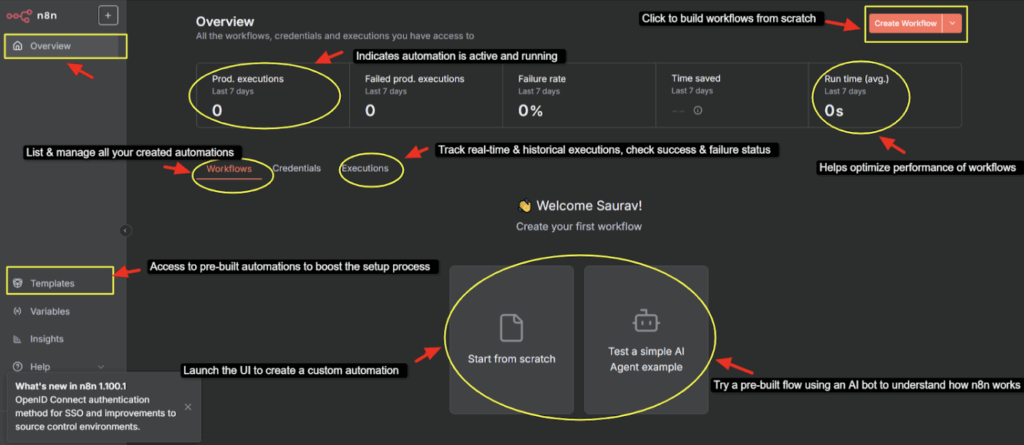
- As you do so, you reach the n8n dashboard >> Here, you can see that you get options to create Workflow, helps you optimize the performance of workflow and even offers you pre-built AI bots to help you understand the entire function right from scratch.
n8n hosting is easy to deploy if you’re using a Hostinger VPS, but what if you want an n8n hosting VPS server at an affordable price? To this we’re gonna suggest your YouStable.
YouStable VPS
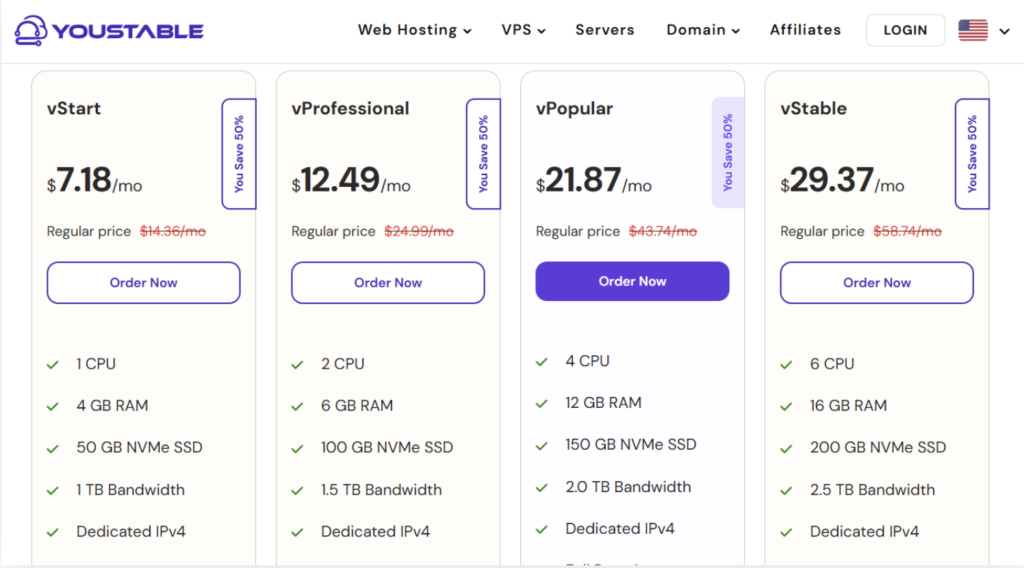
- Go to the official website of YouStable n8n VPS Hosting >> Choose the best VPS plan as per the need and your budget >> Press Order Now tab and move to proceed with the payment option.
- After making payment >> You VPS takes 5 to 10 mins to setup >> Now, go to the Login button on the YouStable’s website >> Press in the Login details >> Click on the Login button and you’ll be re-directed to the client area of YouStable.
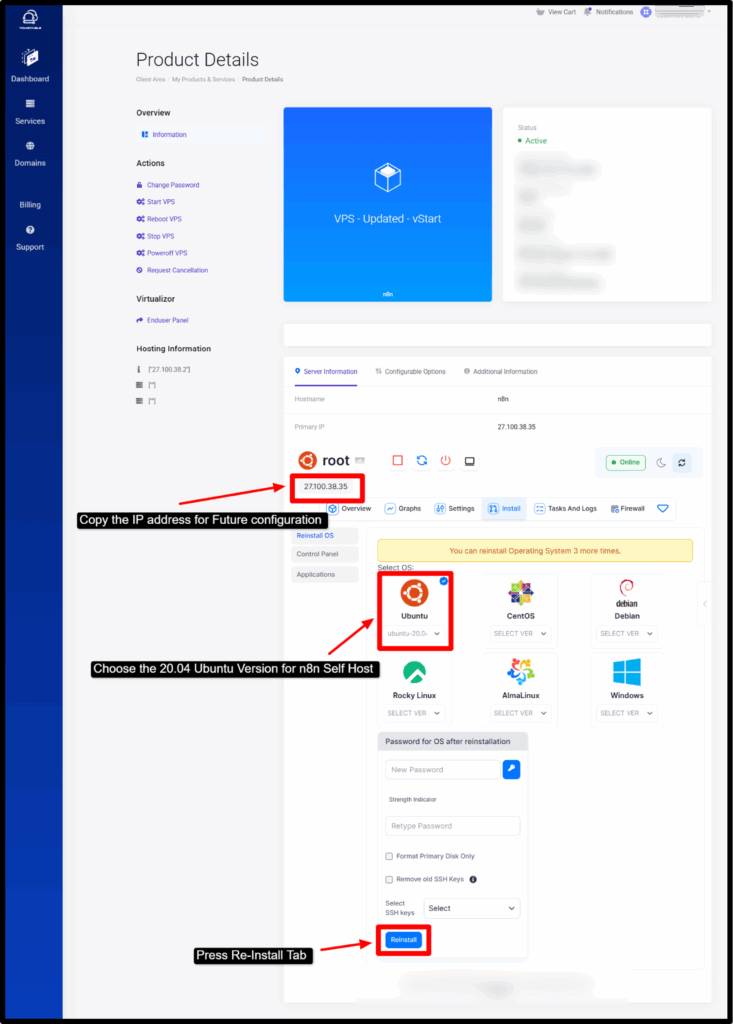
- Go to Services Tab >> Select the VPS plan where you’re wanting to deploy n8n self-host >> Now first, copy the IP address of your VPS server and paste it somewhere (as it’ll be used in further steps) >> Go to Applications tab provided in the left side panel >> Choose Ubuntu 20.04 Version and Click the Re-Install tab provided at the end of the page.
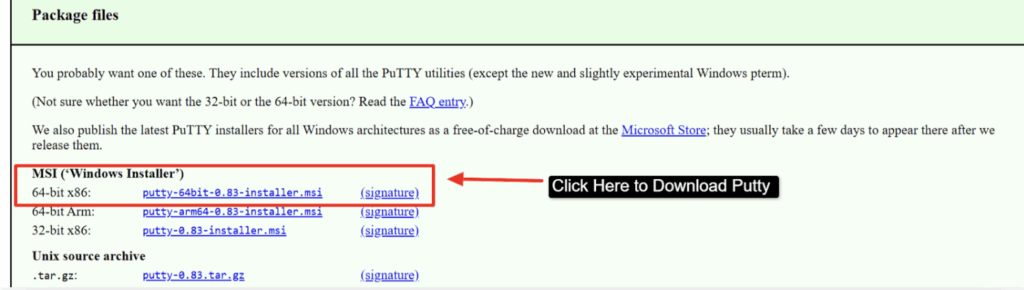
- After deploying Ubuntu >> (You’ll need to Connect your VPS with SSH) >> For that, Download Putty >> You need to put in some commands in this tool to access your VM.

- Click the 64-Bit Installer Putty as shown in the screenshot below >> Click it to download Putty.
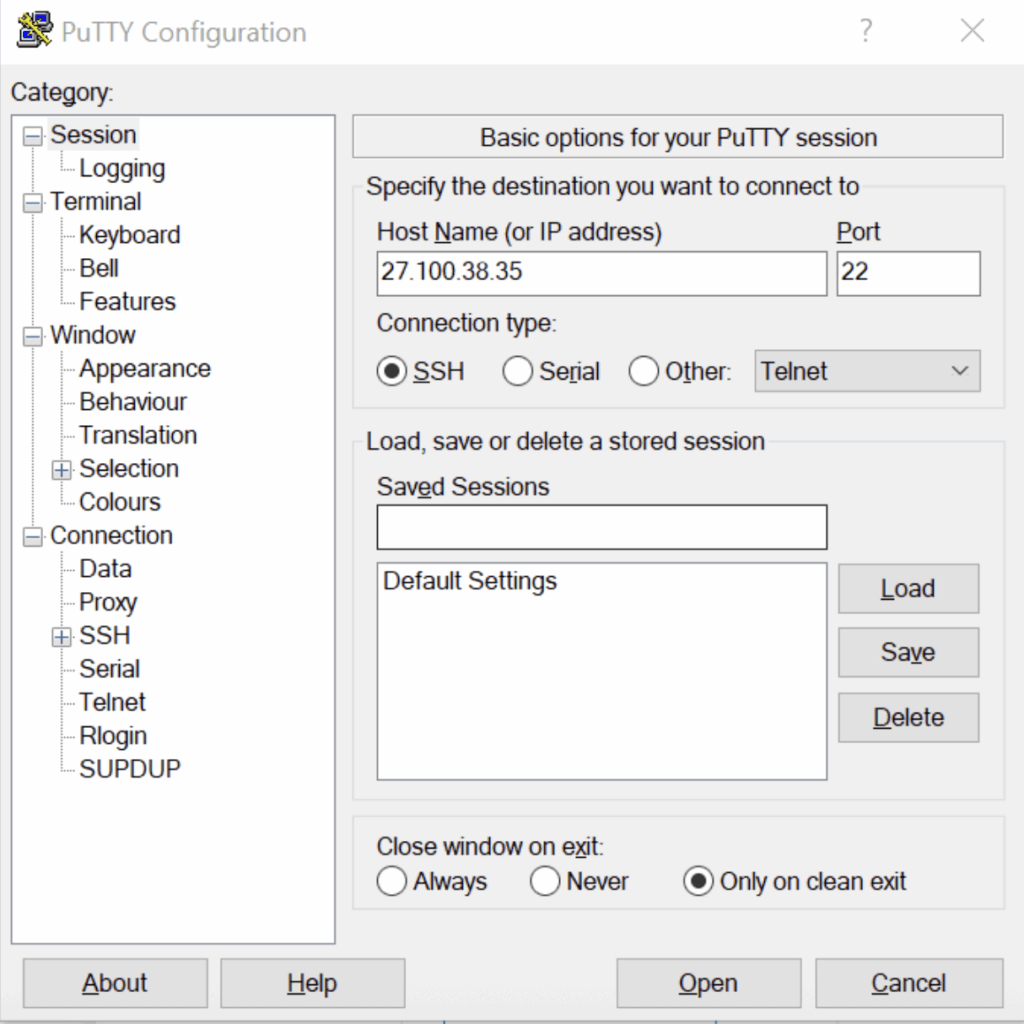
- Now after installing, Open Putty >> Paste your VPS IP address inside the Host Name Box >> Press Open.
- Step1) You need to write in the commands given below in PuTTY: Put in your server IP Address {ssh root@your-server-ip}
- Step2) Create Docker Compose for n8n >> Copy Code {apt update && apt install docker.io docker-compose -y}
- Step3) Create a docker-compose.yml file >> Copy Code: {version: “3” services: n8n: image: n8nio/n8n restart: always ports: – “5678:5678” environment: – DB_TYPE=sqlite – N8N_BASIC_AUTH_USER=admin – N8N_BASIC_AUTH_PASSWORD=YourSecurePassword volumes: -./n8n_data:/home/node/.n8n}
- Step4) Launch and Verify n8n Container >> CopyCode: {docker-compose up -d}
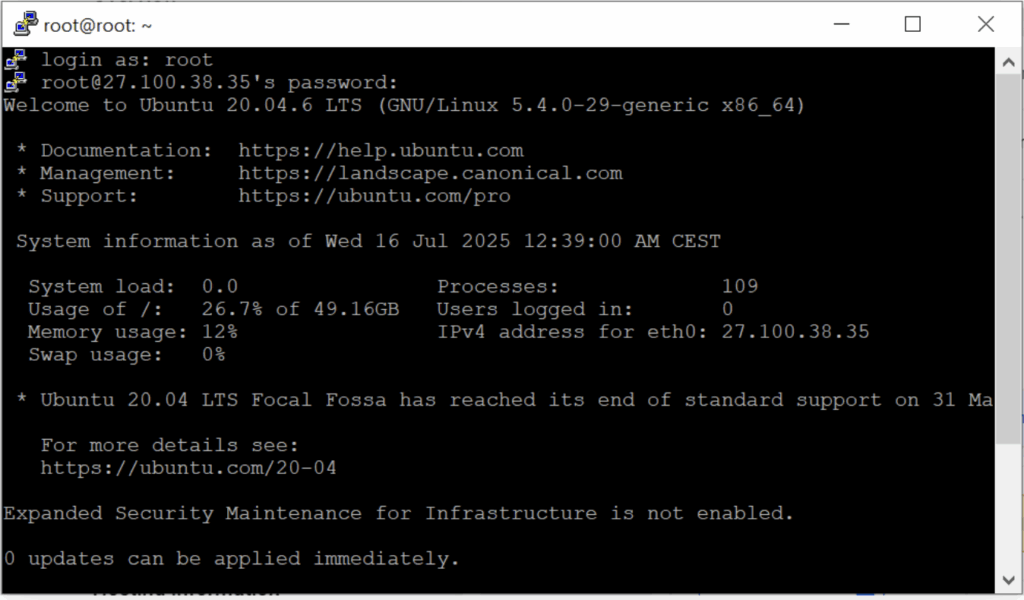
Once you completely add all the command to the tool as given above, you get access to the n8n login page >> or type http://your-vm-ip:5678 on your Google Chrome >> Then you can access your n8n Interface, which would look like this:
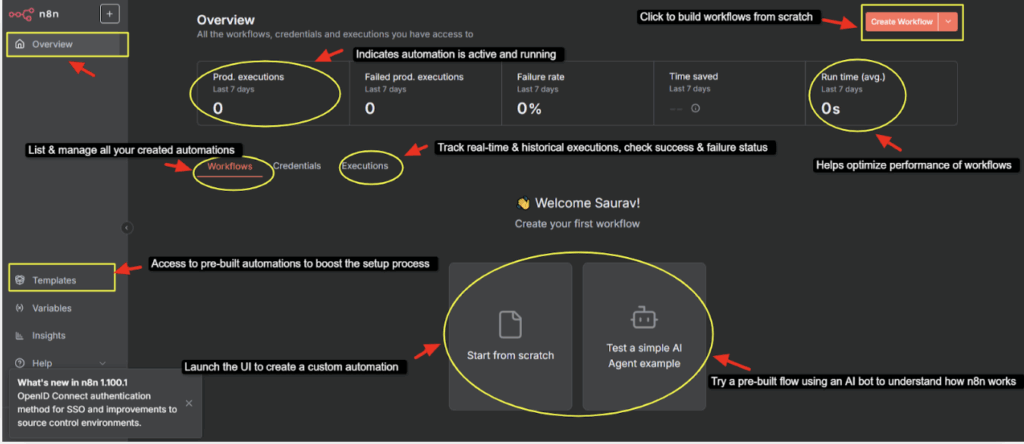
See! It’s true (as evident from the steps above) that YouStable’s n8n VPS plan requires you to perform some coding thing from your end to deploy n8n successfully on the VPS. Nevertheless, YouStable’s pre-installed Docker, Root Access, Free SSL, dedicated IP, Hindi 24/7 LiveChat and anytime guaranteed support, makes it a perfect choice among the newbies.
What are the Top 3 Best n8n VPS Hosting providers?
Now that we know how easily you can deploy n8n self-host on a VPS server using platforms like Hostinger and YouStable, we highly recommend choosing Hostinger, YouStable, or UltaHost for your n8n hosting. These three providers make the installation process super simple, just like you saw, no mess, no headaches. Plus, managing your n8n setup on these VPS servers is also smooth and beginner-friendly. Let’s dive in and learn more about each one of them!
1. Hostinger – Budget Friendly n8n Hosting Provider
As you know, n8n is a free-to-use workflow automation tool that allows you to connect all your favorite apps and data in one platform. With Hostinger’s VPS-based n8n hosting, what you can do is that you can design and run unlimited workflows and executions from a user-friendly dashboard.
Let’s say you’re processing data or automating tasks, it all happens securely in a high-performance environment. Hostinger gives you complete control with scalable resources and access to community-built nodes, making it easy to extend your automation.

Installation is just a single click away, so you can quickly launch and manage your workflows. Backed by 99.9% uptime, your automations run smoothly.
Key Features
- Unlimited Workflows & Executions: It gives you complete freedom to create as many workflows and automation processes as you need with no restrictions on the number of executions.
- One-Click Installation with Full Dashboard Control: Installing n8n on your VPS is effortless thanks to Hostinger’s one-click deployment system. Once installed, you get access to a visual dashboard that makes building and managing workflows easy, even with no coding knowledge.
- Flexible Resources: Need more RAM, CPU, or storage as your automation grows? Hostinger’s VPS plans allow you to scale resources instantly, so your server never gets interrupted.
- 99.9% Uptime & Secure Hosting Environment: With a 99.9% uptime guarantee, your workflows run reliably 24/7. Plus, you get the benefits of VPS-level isolation, security, and full root access, ensuring your automations are protected from issues.
Pricing
- Starting Price: $4.99 per month
🔔 Hostinger Offer 2026 : Hostinger currently offers up to 64% OFF on VPS Hosting for Limited Time Offer. Get an Extra 7% OFF with the Coupon code “SAVEBIG”.
2. YouStable – Best n8n Hosting Provider
After Hostinger, you can also look forward to hosting your n8n automation workflows on YouStable’s lightning-fast VPS infrastructure, designed for speed, stability, and full control.
With NVMe SSD-powered servers, full root access, and a 99.99% uptime guarantee, your n8n instances run faster, smoother, and uninterrupted, be it one simple workflow or thousands of automations.
The hosting environment is pre-optimized for n8n with Docker or Node.js and essential tools are already installed, so you can skip the hassle and start creating workflows instantly. YouStable also offers auto-restart on failure, weekly automated backups, and dedicated human support to keep your workflows secure and always online.
Key Features
- Pre-Configured for n8n Workflows: YouStable’s VPS comes pre-installed with n8n, Node.js and important dependencies, removing all manual setup hassles. The server is specially configured to support real-time automation, ensuring workflows run smoothly and restart automatically.
- Lightning Fast NVMe SSD Performance: It ensures your workflows execute with ultra-low latency and zero lag. Let’s say you’re handling massive webhook loads or high-frequency API calls, NVMe technology guarantees quick data processing.
- Advanced Security for Your Workflows: Keep your automation safe with enterprise-grade security built right into the hosting stack. YouStable offers real-time DDoS protection, firewalls, brute-force protection, and automatic malware scans.
- 24/7 Human Support: Got stuck in the middle of automation? YouStable’s real-human support team is available 24/7 via chat, ticket, or phone. From helping with setup to performance optimization, the support experts are always ready to assist.
Pricing
- Starting Price: $7.18 per month
🔔 YouStable Offer 2026 – Get YouStable powerful VPS hosting for half the price. Sign up today and save 50% on your first year. Perfect for growing websites and businesses.
3. UltaHost – Best n8n Hosting for Developers
Lastly, you even have an option to host your n8n automations on UltaHost’s high-performance VPS servers, purpose-built for speed, uptime, and control. With full root access and 24/7 expert support, you’re equipped to run powerful automation workflows effortlessly.
If you’re wanting to scale up a startup or manage complex tasks, UltaHost delivers unmatched VPS reliability starting at a affordable price.
From instant setup and DDoS protection to 99.99% uptime and built-in security updates, UltaHost simplifies automation at every step.

Enjoy optimized environments for n8n, free SSL certificates, auto-healing servers, and advanced caching, all backed by fully managed hosting and industry-leading performance.
Key Features
- Optimized for n8n Automation: The VPS servers of UltaHost are built for n8n automation, offering seamless performance with an optimized tech stack including Apache, NGINX, MySQL / MariaDB, and advanced caching like Redis and Memcached.
- Full Root Access with OS Customization: Get full root control of your VPS server, allowing you to install custom software, configure the environment, and choose from multiple Linux or Windows OS options.
- Built-In Enterprise Security: With BitNinja protection, dedicated firewalls, IP whitelisting, regular security patching, and malware scanning, your automations and data remain secure.
- 24/7 Real-Time Monitoring & Support: UltaHost offers 24/7 monitoring and real-time support through live chat, ticketing, and a rich knowledge base. Be it troubleshooting, performance tuning, or free website migration, their team acts as an extension of your tech squad.
24/7 Real-Time Monitoring & Support: UltaHost offers 24/7 monitoring and real-time support through live chat, ticketing, and a rich knowledge base. Be it troubleshooting, performance tuning, or free website migration, their team acts as an extension of your tech squad.
Pricing
- Starting Price: $4.80 per month
🔔 UltaHost Offer 2026 : For a limited time, you can get a UltaHost VPS for up to 40% Off! Don’t miss out! Get an Extra 7% OFF happy Coupon code GOOGIEHOST.
Conclusion
That’s it! You’ve now seen how simple it can be to deploy n8n on your VPS server when you follow the correct steps. The screenshots provided at every stage are carefully labeled to make your navigation easy and error-free, so you don’t get stuck or confused during any part of the process.
In this blog, we’ve used VPS plans from Hostinger and YouStable to walk you through the installation process. That means you don’t have to jump from one blog to another trying to figure out if the steps will work for your VPS provider. Everything is neatly packed into this one post to save you time and effort.
Just make sure to follow the steps exactly as we’ve shown, and you’ll have n8n up and running on your server in no time!
FAQs
What is n8n and why should I self-host it?
n8n is a free, open-source workflow automation tool that lets you connect apps and automate tasks. Self-hosting gives you full control over your data, no usage limits, and the ability to customize workflows without depending on third-party cloud services.
What are the minimum VPS requirements to run n8n?
You need at minimum 1 vCore CPU, 2GB RAM, and 10GB NVMe SSD storage running Ubuntu 20.04. For heavier workflows with multiple integrations, consider upgrading to 2 vCores and 4GB RAM for smoother performance.
Which VPS provider is best for n8n hosting?
Hostinger is the easiest option with one-click n8n installation starting at $4.99/month. YouStable offers affordable VPS with Docker support at $7.18/month. UltaHost provides developer-friendly features with BitNinja security at $4.80/month. All three support n8n well.
Do I need coding knowledge to deploy n8n on a VPS?
With Hostinger, no coding is needed thanks to their one-click installation. With YouStable or other providers, you need basic familiarity with SSH and a few Docker commands, but the process is straightforward if you follow the step-by-step guide.
Can I run n8n alongside other applications on the same VPS?
Yes, you can run n8n alongside other applications using Docker containers. Just make sure your VPS has enough RAM and CPU resources. For running n8n with other apps, we recommend at least 4GB RAM and 2 vCores to avoid performance issues.
Deploy n8n on Your VPS Today