
Redirect Checker






Website redesigning is really a nice way to upgrade and engage the visitors. But the issue is that along with it, the URL changes and it drops the traffic suddenly.
One of the most common reasons behind this is poor redirect management.
Old URLs may lead to 404 errors, some pages may fall into broken redirect chains and Google struggles to crawl the site properly. This really harms your SEO rankings along with that it also creates a frustrating UX for visitors landing on dead pages.
This is a common issue for bloggers and for those who do SEO of websites. Managing redirects manually can quickly become a headache.
GoogieHost’s Redirect Checker Tool makes this process simple by instantly showing what’s happening behind each URL, be it a 301, 302, redirect loop, or a 404 error, so issues can be fixed quickly and efficiently.
In this guide, you’ll learn everything about the Redirect Checker Tool and how to use it with ease. We assure you that no technical knowledge or coding skills are needed to handle this tool.
Just follow along to keep your website running smoothly and optimized for better performance.
Introducing GoogieTools Redirect Checker: Your Free SEO Sidekick
GoogieTools is really a good tool to check the Redirects. It is a clean, browser-based tool designed to keep things simple and fast.
You just need to enter a URL, and it instantly maps the entire redirect path, showing HTTP status codes, redirect hops and response times in a clear, easy-to-read format. It helps uncover hidden issues like 404 errors, redirect loops and unnecessary chains that can slow down performance and confuse search engines.
As per the active user’s reviews on this redirect checker tool, it is a really fast and accurate approach for SEO professionals. What makes it even better is how accessible it is for everyone.
It is built for those searching for an “online redirect checker free,”. It works perfectly for
- Bloggers fixing broken links
- Business owners maintaining site health
- SEO professionals auditing larger websites.
There’s nothing to install or configure. Just open the tool and get instant insights. It’s a quick, reliable way to understand how redirects behave and improve total website performance.
Key Features of the Redirect Checker Tool
After checking many SEO tools, it’s 100% clear that easy-to-use features make the biggest difference and GoogieTools’ Redirect Checker delivers exactly that.
It’s designed to give reports about how redirects behave. This way it helps the users (like those who really want to know about the redirects) quickly see the issues like broken links, long redirect chains, or incorrect status codes.
It improves crawlability and fixes performance issues as well. These features make it a perfect choice for anyone looking to keep their website optimized and error-free.
- Full Redirect Path Tracing: This feature follows the complete journey of a URL from the starting point to the final destination. It clearly shows every step along the way, including important status codes like 301 (permanent redirect) and 302 (temporary redirect).
- Mobile & Desktop Testing: This feature checks how redirects behave across different devices, ensuring your website performs smoothly on both mobile phones and desktop systems without inconsistencies.
- Chain Detection: It detects long redirect chains and unnecessary loops that can slow down your website. These issues often go unnoticed but can negatively impact SEO performance and user experience by increasing load time and confusing search engines.
- Status Code Analysis: This breaks down server responses in a simple way, explaining what each code means, such as 200 OK for successful pages or 404 Not Found for missing content, so you can quickly identify and fix problems.
- Exportable Reports: After running checks, results can be downloaded in CSV or PDF format. This makes it easy to share findings with teams, clients, or keep records for future SEO audits.
- Bulk URL Checking: Instead of testing one link at a time, this feature allows checking multiple URLs together (up to 10 at once). It’s especially useful during large site audits or when managing many pages, saving both time and effort.
- Response Time Metrics: It measures how quickly each redirect happens, helping identify slow-loading paths. Faster redirects improve user experience and support better rankings by aligning with Core Web Vitals standards.
How to Use the Redirect Checker: A Straightforward Step-by-Step Guide
This tool is really easy to use! We’re going to use it and show you how it works from scratch so that you can repeat the same process and get the best out of it:
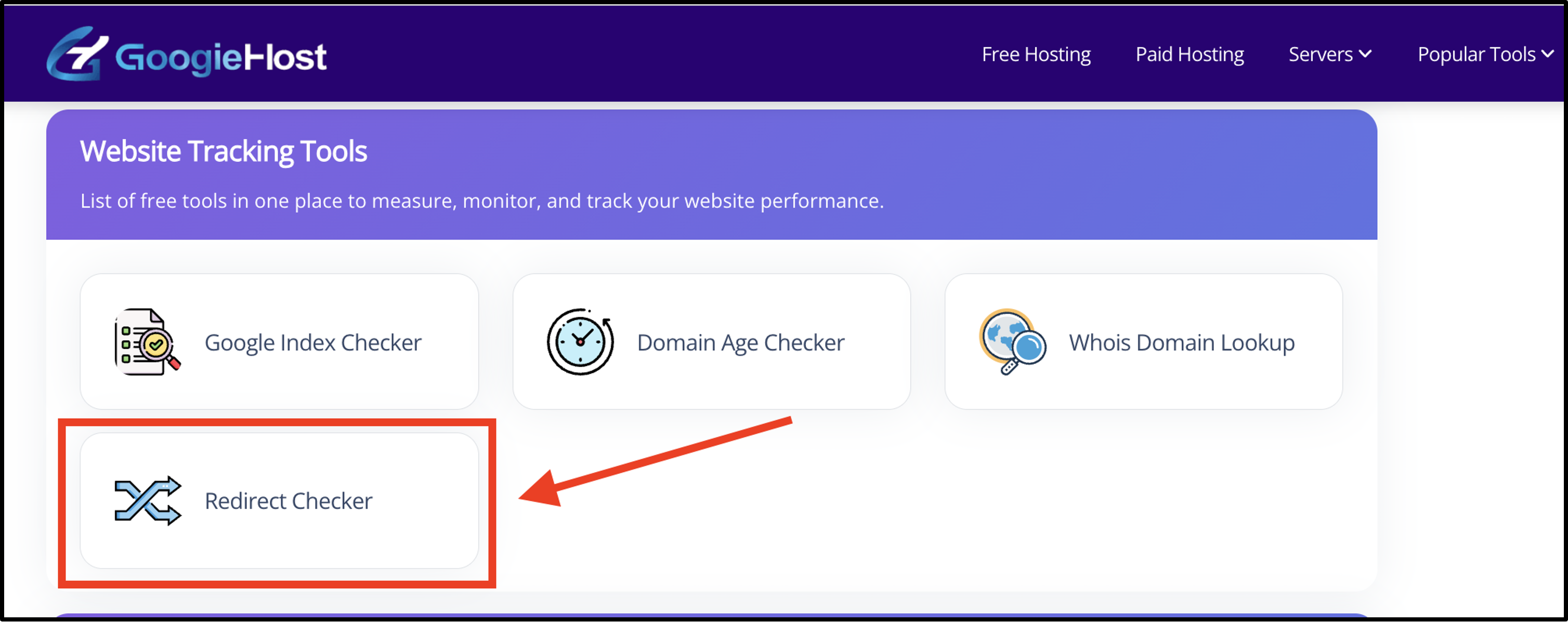
- First of all, Go to the official website of https://googiehost.com/tools/ >> Scroll down and Click Redirect Checker right below the heading of Website Tracking Tool.
- Then, input your URL >> Type the full address (like "https://google.com.") >> Hit the Check Button >> Results pop up in seconds.
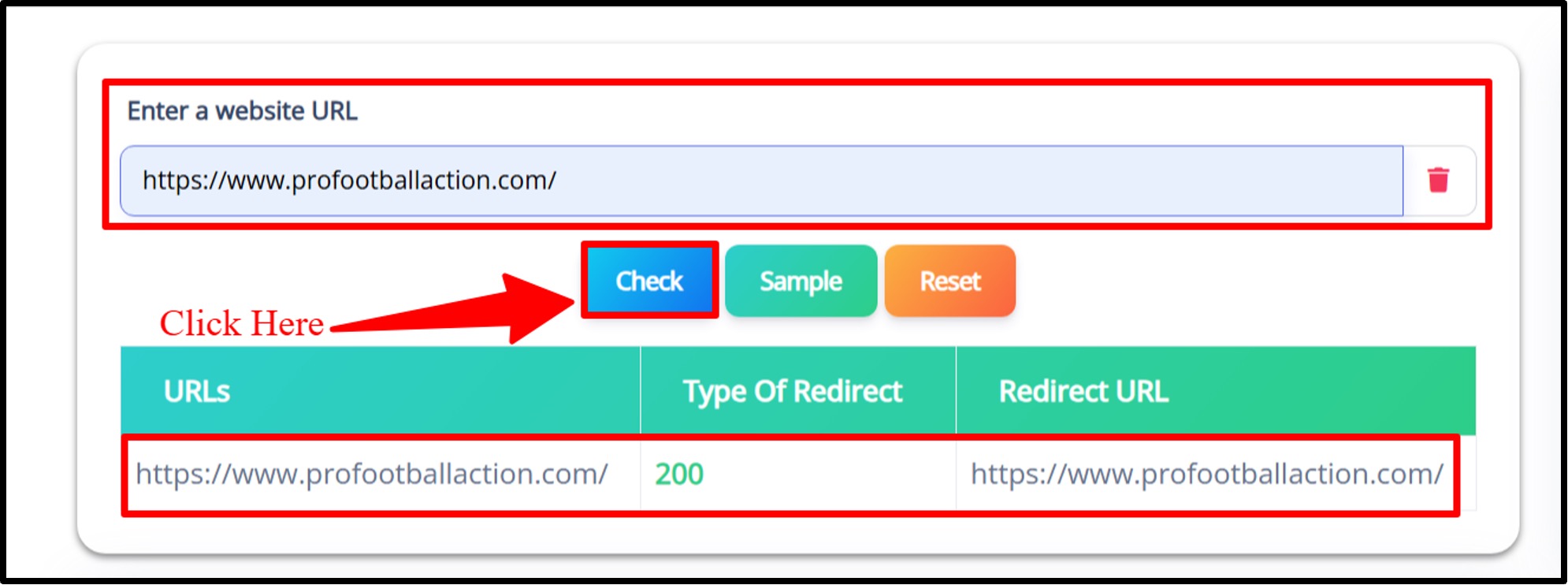
- Look for green flags (good redirects) or red alerts (issues), with fix suggestions.
See! It's really easy to use this tool!
Pros and Cons of the GoogieTools Redirect Checker
Check the Pros and Cons out. This way you can judge the overall performance and reliability of the Ridirect Checker tool.
Pros
- Completely free to use with no usage limits.
- Simple and clean interface that’s easy for beginners and efficient for professionals.
- Provides accurate results, including issues like HTTP to HTTPS mismatches.
- Fast scanning process that delivers results without delays.
- Offers helpful suggestions to fix redirect-related errors.
- No sign-up or registration needed to start using the tool instantly.
Cons
- Does not store or show past scan history.
- Works only when connected to the internet.
- Lacks advanced visual reports or graphical data displays.
Benefits of Using a Redirect Checker Regularly
See! The regular use of a redirect checker helps keep a website healthy, stable and SEO-friendly over time. It ensures that all redirects are working correctly and that users and search engines are reaching the right pages without errors.
This habit becomes especially important during website updates, migrations or redesigns, where small redirect mistakes can lead to big performance drops.
Let’s see some of the benefits of using a redirect checker regularly:
- SEO Preservation: Maintains search rankings by ensuring link value passes correctly through proper redirects without losing authority.
- Improved Site Speed: Removes unnecessary redirect chains that slow down page loading and reduce overall user experience quality.
- Error Prevention: Detects broken links and 404 errors early, preventing negative impact on crawlability and website performance.
- Migration Mastery: Confirms all redirects work correctly after site changes, ensuring smooth transitions during rebranding or migration.
- Competitor Spying: Helps analyze how competitors manage redirects, offering useful insights for improving your own SEO strategy.
Common Reasons for Redirect Issues and How to Avoid Them
Redirect issues often appear due to simple but costly mistakes during website updates or maintenance. Common causes include incorrect .htaccess configurations and temporary redirects that are never updated to permanent ones.
Overusing 302 redirects instead of 301 can also hurt SEO since link authority may not pass properly. In many cases, HTTPS and HTTP mismatches create duplicate paths, while poorly configured rules lead to infinite redirect loops that break page access.
These problems can quietly damage rankings, reduce crawl efficiency, and affect user experience.
Using a reliable redirect checker helps detect these issues early and ensures smooth, error-free navigation across the site.
Why You Need a Redirect Checker in Your SEO Toolkit
Redirects play a quiet but powerful role in keeping a website healthy, yet even small mistakes can create major SEO and usability problems.
A redirect checker becomes an essential part of any SEO toolkit because it helps uncover hidden issues, protect rankings, and ensure smooth navigation for users. It removes guesswork and gives clear insights into how every URL behaves across the site.
Let’s see other reasons you need a Redirect Checker in your SEO toolkit:
- Fix Broken Redirects: Detects 404 errors, broken links, and redirect loops that stop pages from loading properly and affect both users and search engines.
- Boost SEO Performance: Ensures link authority flows correctly through proper redirects, helping pages maintain stronger visibility and better search rankings.
- Improve User Experience: Keeps visitors moving smoothly across pages without landing on error pages or dead ends that create frustration.
- Save Time: Automates redirect checking so there’s no need to manually trace each URL, making audits faster and more efficient.
- Monitor Site Changes: Helps verify redirects after migrations, redesigns, or HTTPS updates so the website continues to function without interruptions.
FAQs About Redirect Checker
Quick hits on questions I've answered endlessly:
Q1. What is a redirect checker?
Ans. A redirect checker is a tool that shows where a URL leads and tracks the full path, including 301, 302, and meta-refresh redirects, helping you understand how links behave.
Q2. Is GoogieTools’ Redirect Checker free?
Ans. Yes! It is completely free to use with no charges, no limits, and no hidden fees.
Q3. Can it detect redirect loops?
Ans. Yes! It quickly identifies redirect loops and long chains so you can fix them before they affect SEO or user experience.
Q4. Why should I check redirects?
Ans. Checking redirects helps prevent SEO loss, fix broken links, improve page speed, and ensure users reach the correct pages without errors.
Q5. Does it work for HTTPS URLs?
Ans. Yes! It supports both HTTP and HTTPS URLs and clearly shows the full redirect path for each.
Q6. How often should I use a redirect checker?
Ans. Use it after URL changes, site migrations, or traffic drops to ensure all redirects are working correctly and no errors exist.
Conclusion: Redirect Your Way to SEO Stardom with GoogieTools Redirect Checker
Redirect issues may look small at first, but they can quietly affect traffic, rankings, and overall site performance. Broken links, 404 errors, redirect chains and loops, even a simple mistake can block users from reaching the right pages.
GoogieTools Redirect Checker brings everything into one place, making it easy to understand how every URL behaves and where things need attention. It turns a confusing technical process into something simple, clear, and quick to handle.
Using this tool regularly helps keep your website clean, fast, and search-friendly. It protects SEO value, improves user experience, and ensures every page leads exactly where it should. Be it a website update or routine check, it helps prevent issues before they grow.
With smoother redirects and fewer errors, your site stays healthy and ready to perform better across search engines.