
JSON to JSON Schema




A couple of years ago, I was knee-deep in a project building an API for a client’s eCommerce site. The JSON data was flying back and forth, but validating it was a nightmare. I spent hours manually crafting JSON Schema, only to realize I’d missed a property or botched the syntax—cue the endless debugging sessions.
Then I stumbled upon a JSON to JSON Schema converter, and it was like someone handed me a magic wand. Fast forward to today, and the GoogieTools JSON to JSON Schema Converter has become my go-to for streamlining data validation. This free, user-friendly tool takes raw JSON and generates accurate JSON Schema in seconds, saving developers and data engineers from coding headaches.
In this article, we’ll explore why this tool is a game-changer, how it works, and how it can supercharge your development process while boosting your site’s SEO with structured data.
What Is the GoogieTools JSON to JSON Schema Converter?
The GoogieTools JSON to JSON Schema Converter is a free online tool that transforms raw JSON data into a JSON Schema. JSON Schema is a powerful standard for defining the structure and data types of JSON objects, ensuring data integrity and consistency in APIs, databases, and applications. Simply paste your JSON, and the tool generates a schema that you can use to validate your data.
Unlike complex coding or pricey developer tools, GoogieTools makes schema creation effortless. It’s cloud-based, requires no downloads, and works seamlessly across devices—perfect for developers, data analysts, and SEO professionals looking to implement structured data. Plus, it’s 100% free with no usage limits, making it accessible to all.
Why Do You Need a JSON to JSON Schema Converter?
Back when I was wrestling with that eCommerce API, I realized that manual schema creation was eating up time and introducing errors. A JSON to JSON Schema converter solves this by:
- Automating Schema Creation: Converts JSON to schema instantly, reducing manual coding.
- Ensuring Data Accuracy: Validates JSON data to prevent errors in APIs or databases.
- Saving Time: Eliminates hours of debugging and schema writing.
- Boosting SEO: Structured data like JSON Schema can enhance search engine visibility with rich snippets.
The GoogieTools JSON to JSON Schema Converter simplifies this process, making it a must-have for developers and anyone working with structured data.
Key Features of the GoogieTools JSON to JSON Schema Converter
The GoogieTools JSON to JSON Schema Converter is packed with features to streamline your development workflow. Here’s what sets it apart:
- Instant Schema Generation: Paste JSON data and get a JSON Schema in seconds.
- User-Friendly Interface: Simple design requires no technical expertise beyond basic JSON knowledge.
- Error-Free Output: Produces clean, valid JSON Schema compliant with the latest standards.
- No Installation Needed: Cloud-based tool works on any device with an internet connection.
- Free and Unlimited: No fees or usage caps, unlike premium tools like Postman or Stoplight.
- Customizable Schema: Supports complex JSON structures, including nested objects and arrays.
- Copy-and-Paste Ready: Outputs schema code you can easily integrate into your project.
- SEO Benefits: Enables structured data implementation for enhanced search visibility.
These features make the tool a go-to for developers, data engineers, and SEO pros alike.
How to Use the GoogieTools JSON to JSON Schema Converter
Using the GoogieTools JSON to JSON Schema Converter is as simple as it gets. Follow these steps to generate your schema:
- Visit GoogieTools: Navigate to the GoogieTools website and select the JSON to JSON Schema Converter tool.
- Paste Your JSON: Input your raw JSON data into the provided text box.
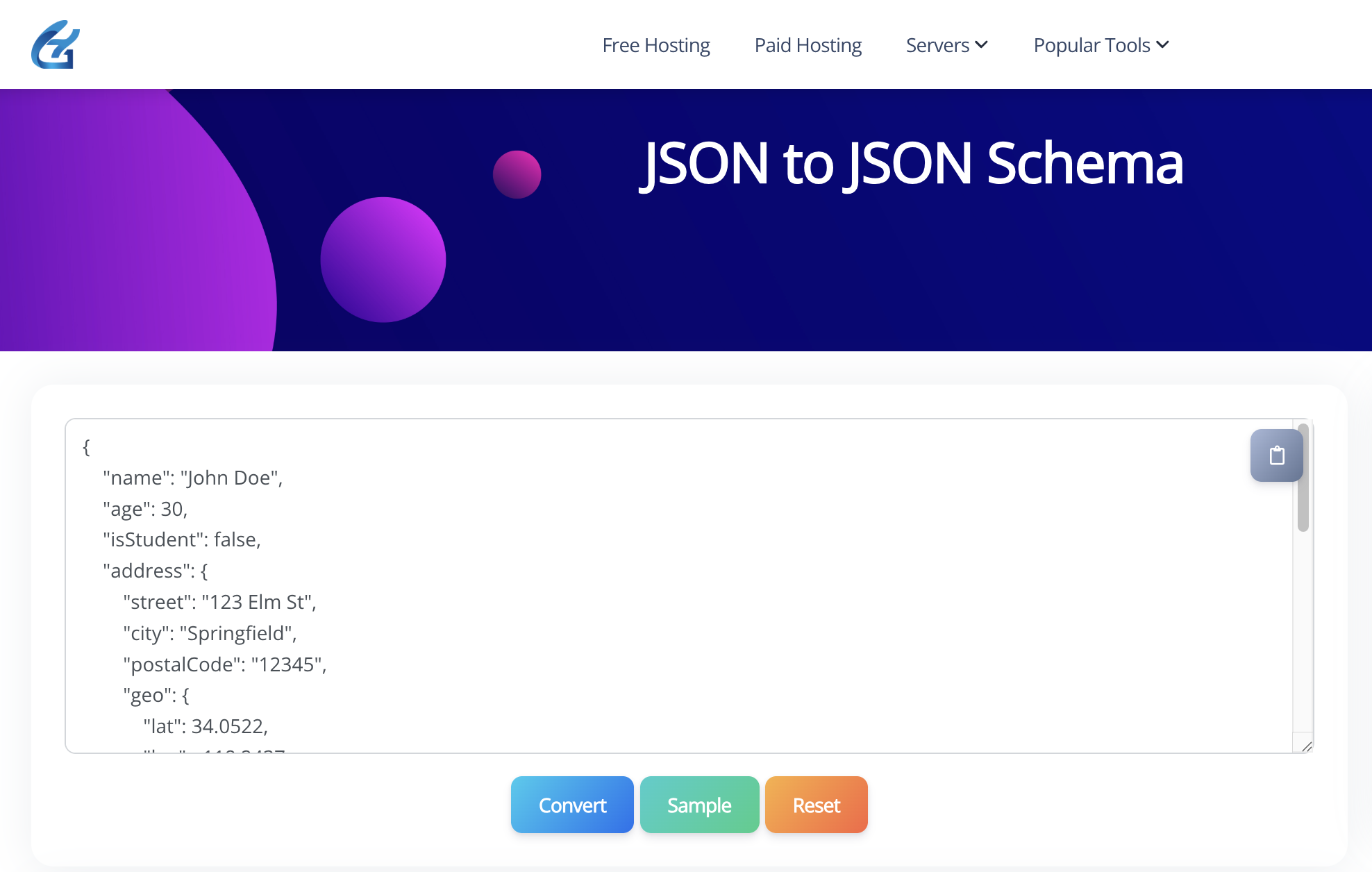
- Generate Schema: Click “Convert” to create the JSON Schema instantly.
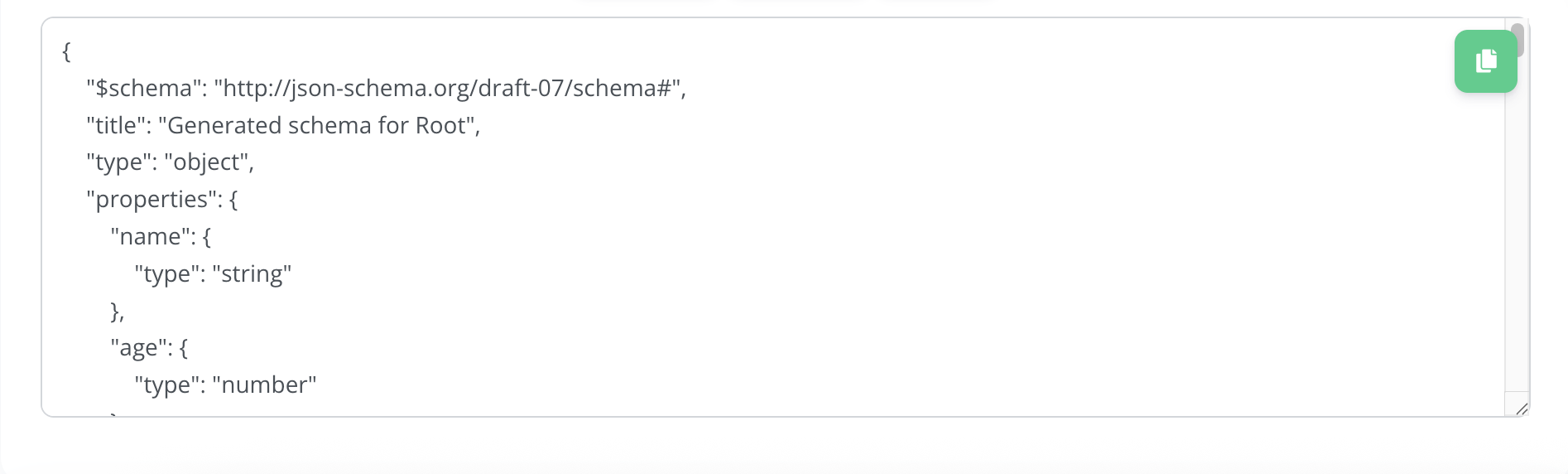
- Copy and Use: Copy the generated schema and integrate it into your API, database, or website.
The tool processes your JSON in real-time, delivering accurate schema code without requiring sign-ups or downloads. It’s that easy!
Pros and Cons of the GoogieTools JSON to JSON Schema Converter
Every tool has its strengths and limitations. Here’s a balanced look at the GoogieTools JSON to JSON Schema Converter:
Pros
- Free to Use: No cost or subscription, ideal for developers on a budget.
- Fast and Accurate: Generates valid JSON Schema in seconds.
- No Coding Skills Needed: Simplifies schema creation for non-expert users.
- SEO-Friendly: Supports structured data for better search engine visibility.
- Device Compatibility: Works on desktops, tablets, and smartphones.
Cons
- Limited to JSON Schema: Doesn’t generate other schema types like XML or GraphQL.
- Basic Customization: May require manual tweaks for highly complex schemas.
- No Analytics: Focuses on schema generation, not performance tracking.
Despite these minor limitations, the tool’s simplicity and effectiveness make it a top choice for JSON Schema creation.
Who Should Use the GoogieTools JSON to JSON Schema Converter?
This tool is perfect for a wide range of users working with JSON data or SEO:
- Developers: Automate schema creation for APIs, databases, or web applications.
- Data Engineers: Ensure data consistency in large-scale systems or analytics platforms.
- SEO Professionals: Implement structured data to boost rich snippet visibility and rankings.
- Webmasters: Add JSON Schema to websites for better search engine performance.
- Beginners: Learn JSON Schema basics without diving into complex coding.
- eCommerce Owners: Validate product data to enhance user experience and SEO.
Whether you’re building an API or optimizing a website, this tool simplifies the process of working with structured data.
How It Enhances Your Development Workflow
The GoogieTools JSON to JSON Schema Converter streamlines your workflow in several ways:
- Saves Time: Automates schema creation, reducing hours of manual coding.
- Reduces Errors: Generates accurate, standards-compliant schema to prevent validation issues.
- Improves SEO: Enables structured data for rich snippets, driving more clicks.
- Simplifies Collaboration: Share clean schema code with team members or clients.
- Supports Scalability: Handles complex JSON structures for large projects.
For instance, I used the tool for a client’s travel app, generating a schema for their booking API in minutes. This ensured data consistency, reduced errors, and even helped their site rank higher with structured data.
How It Compares to Other JSON Schema Tools
While tools like JSONSchema.net or Stoplight offer similar functionality, GoogieTools stands out for its simplicity and cost:
- Vs. JSONSchema.net: JSONSchema.net offers advanced features but can be complex; GoogieTools is more beginner-friendly.
- Vs. Postman: Postman includes schema generation but requires a paid plan for full features, while GoogieTools is free.
- Vs. Manual Coding: Writing JSON Schema manually is time-consuming and error-prone; GoogieTools automates the process.
For developers needing quick, reliable JSON Schema without the cost, GoogieTools is a top contender.
FAQs for JSON to JSON Schema Tool
Q1. Is this tool free to use?
Ans. Yes, GoogieTools’ JSON to JSON Schema converter is completely free and requires no sign-up.
Q2. Can I generate a schema for complex JSON data?
Ans. Yes. The tool supports nested objects, arrays, and complex structures, generating accurate schema definitions.
Q3. Do I need coding skills to use this tool?
Ans. No. Just paste your JSON into the tool, click generate, and it will instantly create a schema.
Q4. Can I edit the generated JSON Schema?
Ans. Yes, you can customize or modify the schema after generation to fit your exact requirements.
Q5. Is my data safe when I use this tool?
Ans. Absolutely. The tool processes JSON locally in your browser and doesn’t store or share your data.
Q6. Where can I use the generated JSON Schema?
Ans. You can use it in API validation, data modeling, form validation, and ensuring data consistency across applications.
Conclusion: Streamline Your Workflow with GoogieTools JSON to JSON Schema Converter
The GoogieTools JSON to JSON Schema Converter is a developer’s dream, turning complex JSON data into clean, valid schema in seconds. Whether you’re building APIs, validating datasets, or boosting your site’s SEO with structured data, this free tool delivers instant results without the hassle of coding or costly software. Its user-friendly design, error-free output, and SEO benefits make it a must-have for developers, data engineers, and SEO pros alike.
By simplifying data validation and enabling rich snippets, the tool aligns with Google’s E-E-A-T guidelines, ensuring your content is authoritative, trustworthy, and user-focused. From saving time to driving organic traffic, the possibilities are endless. Ready to take your development and SEO to the next level? Visit GoogieTools, paste your JSON, and generate your schema today. Your projects—and search rankings—will thank you!

Aman Singh
CREATIVE HEAD
Enjoy the little things in life. For one day, you may look back and realize they were the big things. Many of life's failures are people who did not realize how close they were to success when they gave up.