Get HTTP Headers
View the full HTTP response headers of any URL to debug caching, redirects, security headers and server setup.
Have you ever thought about what information your browser sends and receives every time you visit a website? The Get HTTP Headers tool by GoogieHost helps you uncover those hidden details in seconds.
You are a developer or a website owner, or you are only curious about the internet; this tool offers how websites communicate and offers a quick and easy way to inspect HTTP headers without any technical steps.
It goes from checking server responses and security settings to troubleshooting website issues. You can get HTTP headers that give you valuable insights that can improve performance and address security issues. Using just a URL, you can instantly reveal important server information and response codes.
For example, if a website is not loading properly, a quick header check can reveal the issue, such as either your server being down or blocking requests.
What Are HTTP Headers?
HTTP headers are small pieces of information exchanged between a web browser (client) and a web server whenever a webpage, image, or any file is requested. They provide important details about the request and response, helping both sides communicate effectively.
Imagine sending a package through a courier service:
- The package is the webpage data.
- The label on the package contains information such as the sender, receiver, and delivery instructions.
HTTP headers work like that, a label only. They carry details about the data being transferred. It works behind the scenes every time you visit a website. They help browsers and servers exchange important information such as content type, security settings, and caching rules.
Why You Need an HTTP Headers Tool
You need this tool for many good reasons, like the following:
- You can check website responses instantly without using complex commands or developer tools.
- It helps in identifying SEO issues such as incorrect redirects, missing canonical headers, and crawlability problems.
- You can improve your website security by detecting missing security headers and configuration errors.
- Analyze caching settings to understand how browsers and servers store website content.
- You can easily troubleshoot website performance issues that may affect loading speed and user experience.
- Verify server information, including content type, status codes, and server configurations.
- Simplify the debugging process by quickly accessing critical HTTP response data from any URL.
- It is very useful for developers, marketers, and SEO professionals who need fast technical insights.
- You can save a lot of time and effort by viewing header information in a simple and user-friendly format, and optimize website performance and SEO by identifying technical issues before they impact your rankings.
Key Features of GoogieTools: Get HTTP Headers
Now we will uncover some major features of this tool so you can understand better:
- Instant URL Analysis
Simply paste any website URL into the tool, and it will instantly fetch the HTTP headers associated with that website. This saves time and eliminates the need for manual commands or technical tools.
- Detailed Breakdown
The tool displays important header information such as the HTTP status code and server type. It also displays content type, content length, and more. This will help users to understand how a website communicates with browsers and search engines.
- Redirect Chain Tracking
If a URL redirects visitors to another page, the tool shows every step in the redirect path. This is useful for identifying redirect loops, broken redirects, and SEO-related issues.
- Security Header Checks
The tool highlights important security headers such as Content Security Policy (CSP), X-Frame-Options, and Strict-Transport Security. These headers help protect websites from common cyber threats and security vulnerabilities.
- Caching Insights
It displays scratching-related headers like Cache-Control, Expires, and ETag. This information helps website owners optimize page loading speed and improve user experience.
- Mobile and Desktop Views
The tool can analyze how a website responds to different devices and user agents. This helps developers verify that content is being served correctly to both mobile and desktop users.
- Export Options
Users can download the header results for future reference or reporting purposes. This makes it easier to share findings with clients, developers, or even team members.
- Free Unlimited Access
The tool can be used as many times as needed without registration or usage limits. This makes it convenient for frequent website audits and troubleshooting tasks.
- Error Handling
It quickly identifies common HTTP errors such as 404 (Page Not Found), 403 (Forbidden), and 500 (Server Error). This helps users diagnose and resolve website issues faster.
- User-friendly Interface
The clean and simple design makes the tool easy to use for both beginners and experienced professionals. You can access detailed HTTP header information without any technical expertise.
These features altogether make the tool an all-rounder and will make it easy for you.
How to Use Get HTTP Headers Step by Step
Using the Get HTTP Headers tool on GoogieHost is simple and requires only a few steps:
- Step 1: Visit the official website of GoogieHost >> Search and find the Get HTTP Headers tool from their toolbar section.

- Step 2: Enter the Website URL >> Paste the complete URL of the website you want to analyze.
- Step 3: Click on the Check button>> it will start to analyze.
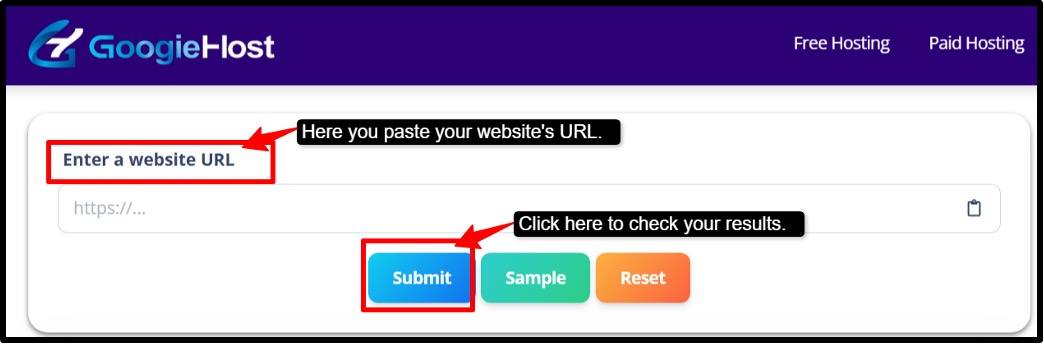
- Step 4: Review the Results >> The tool will instantly fetch and display the website’s HTTP headers, like status codes, server details, and content type.
- Step 5: Check Redirects and Errors >> Review for any redirects, response codes or error messages to identify potential SEO performance.
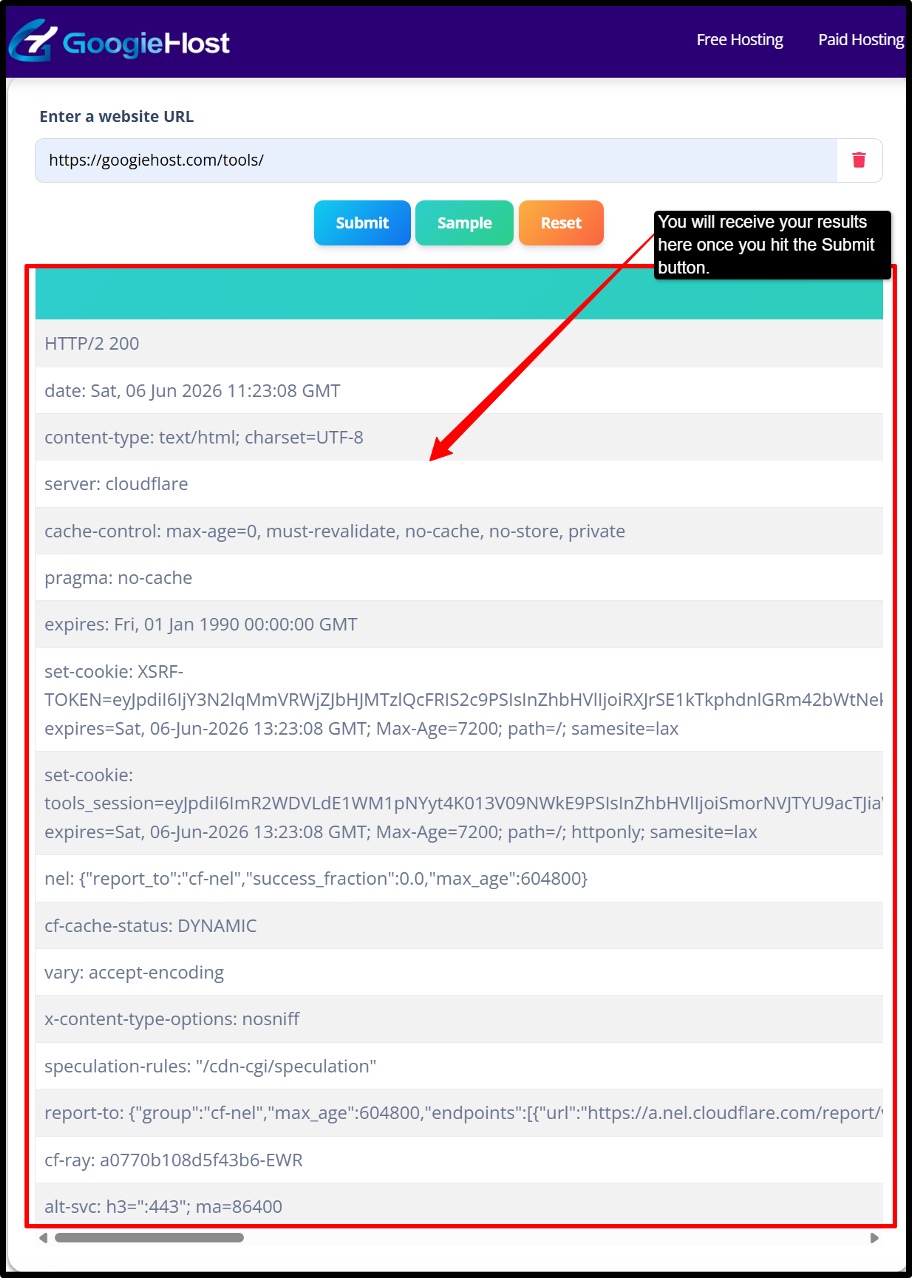
- Step 6: Analyze Security and Caching Headers >> Look for security-related headers and caching directives to understand how the website handles protection with performance.
- Step 7: Export or Save results (if needed) >> Download or save the results for future reference, like reporting and website audits.
Pros and Cons of Using a Get HTTP Headers Tool
Here is a clear and concise breakdown of this tool:
Pros:
- Faster than command-line methods
- No tech expertise needed
- Improves SEO and crawlability
- Free alternative to tools like Screaming Frog
- Covers both request and response data
- Useful for debugging, security, and performance
Cons:
- Identifies issues but won't fix them
- Can't access login-protected pages
- Data-heavy; has a learning curve
- Requires an internet connection.
Benefits for SEO and Web Development
HTTP headers quietly do a lot for your SEO. The right headers stop duplicate content issues and faster-loading pages, which Google rewards with better rankings.
- Identify SEO issues quickly: You can easily detect redirects and broken links. You can even identify the status code errors that may affect search engine rankings.
- Improves Website Security: Check for important security headers and find potential weaknesses before they become problems.
- Optimize Website Performance: Analyze caching and compression headers to help improve page speed and user experience.
- Simplify Troubleshooting: It quickly diagnoses server errors, configuration issues, and response problems without the need for advanced technical tools.
- Save time and effort: You get detailed HTTP header information instantly from any URL, making website audits faster and more efficient.
Advanced Tips for Working with HTTP Headers
Advanced HTTP header analysis goes beyond simply viewing response codes. It is something more than that.
The following tips will help you make better use of HTTP headers to optimize your site and troubleshoot issues more effectively. It ensures a smoother experience for both users and search engines.
- You can use different user agents to see how search engines access and interpret your pages.
- Check headers after website updates and migrations, and even after server changes, to catch issues early.
- Use the header data alongside speed-testing tools so that you can identify optimization opportunities.
- Keep your website aligned with modern security and performance best practices.
- Compare headers to understand how competing websites handle security, caching, and performance.
- Confirm that all HTTP requests are properly redirected to HTTPS for secure browsing.
Common Mistakes to Avoid with HTTP Headers
HTTP headers play a really important role in website performance and SEO. Small configuration mistakes can lead to slow loading times and security risks.
Here are some common mistakes that you should avoid when you are using HTTP headers.
- Too many redirects can slow down your website and make it harder for search engines to crawl your pages efficiently.
- Failing to configure security headers can leave your website more vulnerable to common online threats and attacks.
- Poor caching configurations may cause outdated content to be displayed or negatively impact website performance.
- Incorrect content type headers can prevent browsers from properly displaying web pages, images, and other resources.
- Always test how these headers are working on mobile devices, as it can lead to performance and compatibility issues for mobile users.
By avoiding these common mistakes and regularly reviewing your HTTP headers, you can improve your website’s security and performance.
FAQs About Get HTTP Headers
Q1. Is the get HTTP headers tool free?
Ans . Yes, most HTTP header checker tools are completely free to use.
Q2. Can I use it on HTTPS websites?
Ans. Yes, it works on both HTTP and HTTPS sites. HTTPS just means the connection is encrypted, and headers are still readable.
Q3. Do I need coding knowledge?
Ans. No, online tools let you paste a URL and instantly see headers, and for advanced users, basic command-link knowledge helps but is not required.
Q4. Can it detect redirect chains?
Ans. Yes, most tools show the full redirect chain (301, 302, etc.), so you can trace every hop from the original URL to the final destination.
Q5. Does it work on mobile devices?
Ans. Yes, browser-based header tools work on mobile, but some headers will reflect your mobile browser, which may return different results than desktops.
Why Choose GoogieTools' Get HTTP Headers Over Competitors
HTTP headers can make or break your website, and debugging them used to be a painful and time-consuming process. GoogieHost makes it easy to instantly see what is going on under the hood of any website.
This free tool will help you to boost your SEO by spotting missing or broken headers and improve your security by checking if protection headers are in place. It will help in speeding up your site by identifying what might be slowing it down.
Start using it today, fix your headers and watch your Google ranking improve