
YouTube Embed Code Generator






As per our research, there was a common challenge that used to exist and still is there among many content creators and that was adding a YouTube video to a blog post.
Like, let’s say you have a YouTube video, the “best hiking trails in the Rockies,” but embedding it (or putting the video in your blog) became a serious issue. You needed to adjust HTML code, fix width and height and also you needed to make sure the video worked on mobile devices took hours.
Sometimes the video looked too big, sometimes too small and sometimes it just would not respond properly on different screens.
Bloggers want a quick way to generate embed code without worrying about formatting issues. Instead of manually coding, we’re gonna talk about a tool that handles everything automatically and correctly.
That’s where the Youtube embed code generator from GoogieTools becomes incredibly useful. It works like a smart assistant that instantly creates clean, ready-to-use embed code. There is no need to adjust complicated settings or test multiple screen sizes. The tool helps generate responsive embed code that works well on desktops, tablets, and mobile devices.
Here, we will explore how this free YouTube embed code generator works and why it can be the best option for embedding the youtube videos on your websites.
Let’s get started! 👍
What is a YouTube Embed Code Generator?
A YouTube embed code generator is an online tool, built by GoogieHost, that creates the HTML code needed to embed a YouTube video directly into your website or blog. There’s absolutely no need to copy and paste messy snippets from YouTube's share button. This tool customizes it for you.
You can think of it as a shortcut for "how to embed YouTube video" without going into coding manuals. You:
- Input the video URL,
- Change the settings like width, height, autoplay and privacy options and then,
- Out comes a clean, ready-to-use embed code.
Tools like GoogieTools' version make this process free and user-friendly, which is 100% perfect for newbies, who have no idea about coding.
Why is YouTube embed code generator important? See! Embedding videos can boost your site's dwell time, which Google loves. According to SEO stats, pages with videos see up to 157% more organic traffic.
So, if you're searching for a "free YouTube embed tool," you've landed in the right spot.
Why You Need a YouTube Embed Code Generator in 2026
As per the trend in 2026, video content is more important than any other thing. Millions of people watch videos daily, and businesses, bloggers and creators use videos to attract and engage visitors.
|
Manually creating embed codes and adjusting technical settings is outdated. |
- Adding YouTube videos to a website helps increase time spent on the page, improve engagement and also builds trust.
- Many websites lose rankings simply because their videos load slowly or do not work properly on mobile devices. Poorly embedded videos can hurt user experience, which directly affects SEO.
- A YouTube Embed Code Generator solves this problem by creating clean and optimized embed code.
- It ensures the video works smoothly on all screen sizes and follows important privacy standards like GDPR.
- If someone is searching for “how to generate YouTube embed code for a website,” using a tool like the one from GoogieTools makes the process simple.
Just paste the video link, choose a few settings and the tool handles the rest, including better loading options and customization features. This keeps the website fast, user-friendly and more attractive to both visitors and search engines.
Key Features of GoogieTools' YouTube Embed Code Generator
The YouTube Embed Code Generator from GoogieTools is designed to make video embedding simple and stress-free. It offers practical features that help both beginners and experienced website owners add videos professionally without touching complex code.
Let’s understand each feature clearly in easy words.
- Easy URL Input: The tool works in the simplest way possible. Just copy your YouTube video link and paste it into the box. There is no need to find the video ID or edit any technical settings.
- Customization Options: Not every website layout is the same, so flexibility matters. This tool allows you to adjust the video’s width and height to fit your page design. You can maintain the correct aspect ratio so the video doesn’t look stretched.
- Advanced Controls: If you want more control over how the video plays, the generator gives you useful options. You can enable autoplay so the video starts automatically, set it to loop, mute it when it starts, or hide player controls for a cleaner look.
- Privacy-Enhanced Mode: Privacy is important, especially with regulations like GDPR. The tool can generate a privacy-enhanced embed code that prevents YouTube from storing cookies until someone actually plays the video.
- Preview Functionality: Before copying the code, you can see a live preview of how the video will look. This helps you check size, layout, and settings instantly. It saves time because you don’t have to paste the code into your website just to test it.
- No Ads or Watermarks: Some free tools add their branding or unwanted ads into the embed code. GoogieTools keeps it clean. The generated code is simple, professional, and free from extra branding.
- SEO-Friendly Features: The tool also supports better SEO practices. It helps structure the embed properly so search engines can understand that your page contains video content. This can improve visibility and increase the chances of ranking better.
How to Use GoogieTools' YouTube Embed Code Generator: A Step-by-Step Guide
Are you ready to use GoogieTools’ Youtube embed code generator tool? Let’s dive in! Using this tool is really very simple. Here's a proper step-by-step guide to help you embed a youtube video in your blog or in your important business website like a pro:
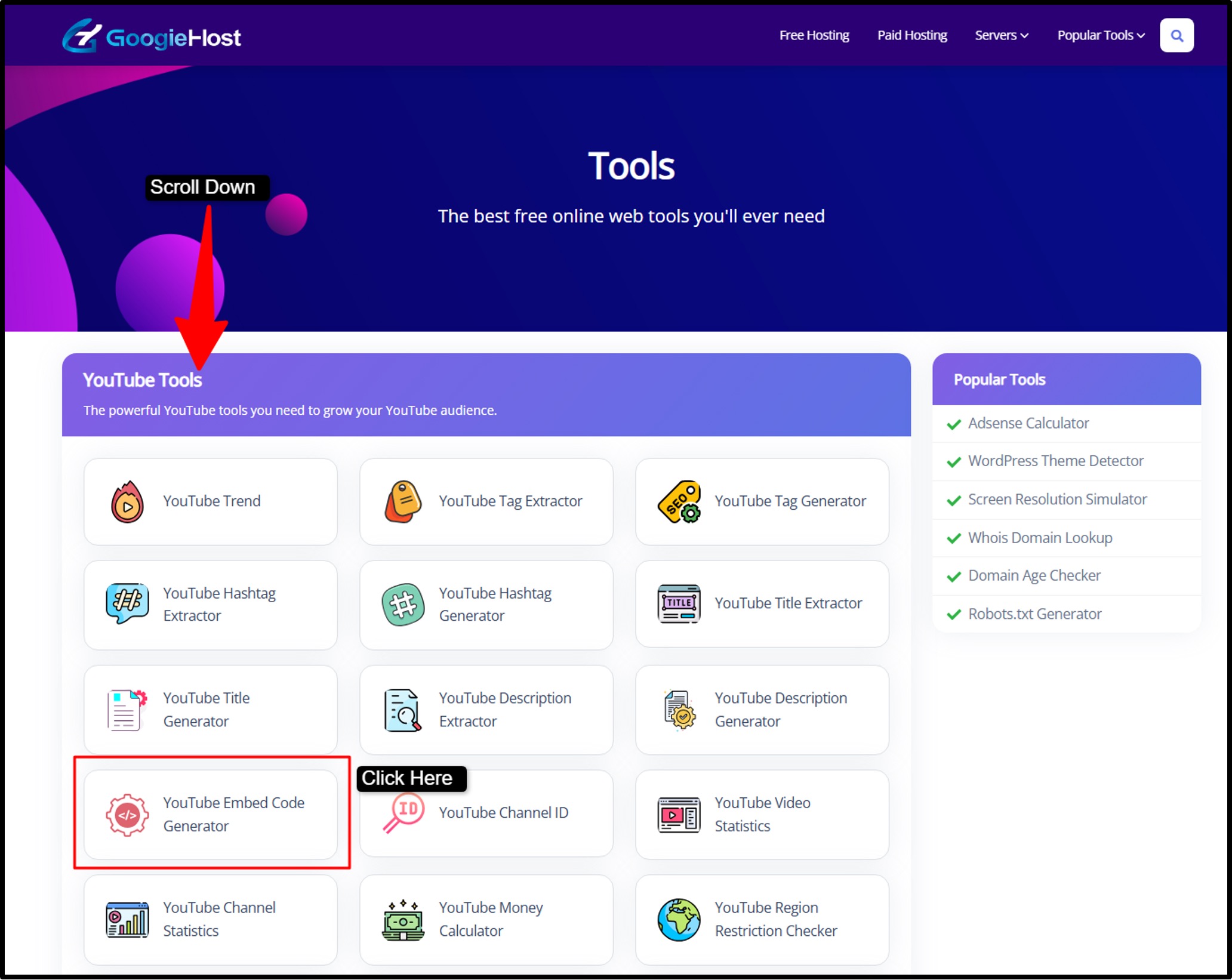
Step1) Go to the official website of GoogieTools/tools >> Scroll down the page >> Choose YouTube Embed Code Generator as given in the screenshot below.
Step2) As you open the tool >> Enter YouTube Video URL (Copy the link of the YouTube video you want to embed and paste it into the input field.) >> Then, set the video size >> Enter the width and height you prefer (like: 560x315).
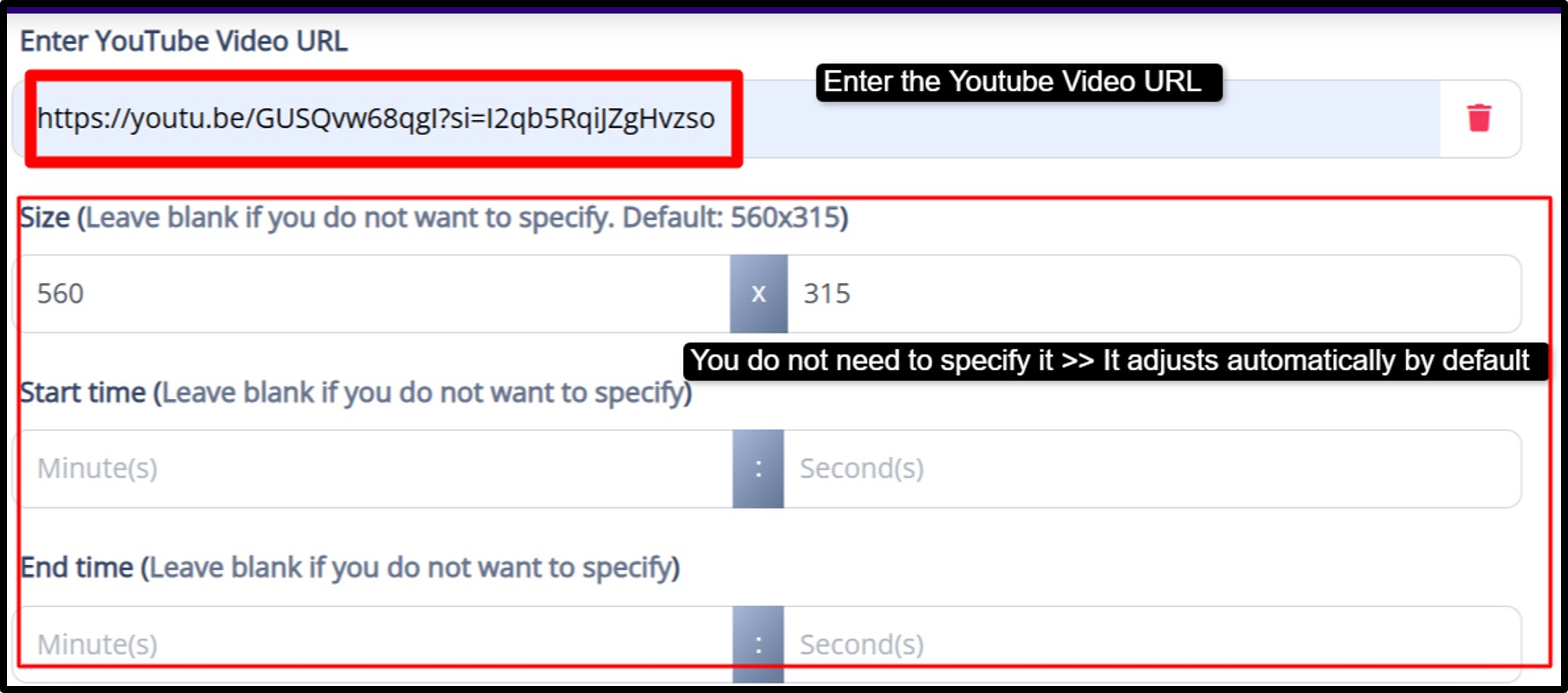
Step3) Set Start Time & End Time >> Add a specific start time (in seconds) if you want the video to begin playing from a particular point >> Add an end time (in seconds) if you want the video to stop at a certain point >> then, customize how the video behaves: Autoplay, Loop, Mute, Hide Controls.
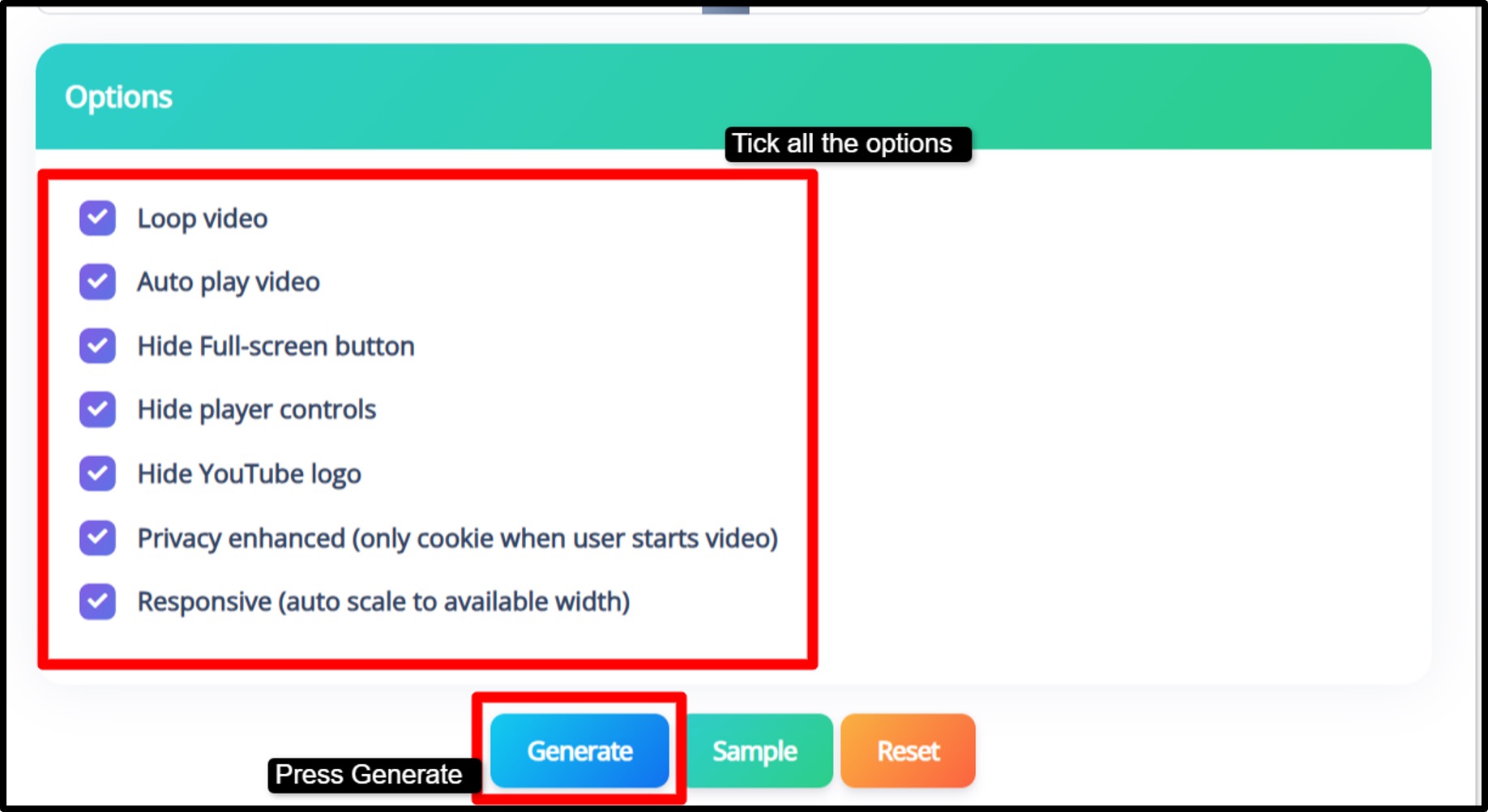
Step4) Finally, generate & copy code >> Copy the <iframe> code provided >> Paste it into your website’s HTML where you want the video to appear

This way by following the steps given above, you can embed the youtube video in your blogs or in your website to engage your viewers.
Pros and Cons of Using a YouTube Embed Code Generator
Using a YouTube Embed Code Generator can make video integration much easier, but like any tool, it comes with both advantages and limitations. However, it may not cover every advanced need. Here’s a clear and honest look at the pros and cons.
Pros
- Saves time by generating embed code instantly.
- Easy to use with no coding knowledge required.
- Offers customization to match your website design.
- Completely free and accessible anytime.
- Helps improve page speed and video SEO.
- Works smoothly on platforms like WordPress, Blogger, and Shopify.
Cons
- Limited to YouTube videos only.
- Requires an internet connection to use.
- Too many settings may confuse beginners.
- Supports one video at a time, not bulk generation.
Benefits of Embedding YouTube Videos on Your Website
Embedding YouTube videos on your website is more than just making your pages look attractive. It is a smart digital strategy that improves SEO performance and conversions. Videos make content more interactive and help visitors understand information faster compared to plain text.
- Cost-Effective Marketing: Instead of uploading the same video multiple times, embedding allows you to use your existing YouTube content directly on your website.
- Increased Engagement: Videos naturally grab attention and keep visitors on your page longer. When users spend more time on your site, search engines see it as a positive signal. This can improve your rankings because longer dwell time often indicates valuable content.
- Better SEO Rankings: Search engines like Google prefer pages that include multimedia elements such as videos. When you embed a relevant YouTube video and surround it with keyword-rich content, it strengthens your page’s relevance.
- Higher Conversion Rates: Videos build trust. Product demos, tutorials, and reviews help visitors understand benefits clearly. Many businesses notice better sales when videos are added to product pages because customers feel more confident before making a purchase.
- Accessibility Improvements: YouTube supports captions and descriptions, which make content easier to understand for a wider audience. This improves user experience and makes your website more inclusive.
Common Use Cases for YouTube Embed Code Generator
A YouTube Embed Code Generator is helpful in many real-world situations because it removes technical complexity and makes embedding fast and simple.
Bloggers
Bloggers often add tutorials, reviews, or walkthrough videos inside their articles. For example, a “how-to” guide becomes more useful when readers can watch step-by-step instructions directly within the post.
E-Learning Websites
Online course platforms use embedded videos for lessons and training sessions. This allows students to watch lectures without leaving the website.
E-Commerce Stores
Online shops embed product demonstrations, customer reviews, and unboxing videos. Seeing a product in action increases trust and helps customers make buying decisions.
Corporate Websites
Companies embed introduction videos, webinars, or service explainers to present their brand professionally and clearly.
Non-Profit Organizations
Non-profits use embedded videos to share awareness campaigns and impact stories without needing advanced technical skills.
Tips for Optimizing Embedded YouTube Videos for SEO
Embedding a video is only the first step. Proper optimization ensures that your embedded content supports your SEO goals.
- Use Descriptive Titles: Make sure the video title and surrounding headings clearly describe the topic. Include relevant keywords naturally so search engines understand the context.
- Add Proper Descriptions: Write helpful text around the video explaining what viewers will learn. This gives search engines more information and improves keyword relevance.
- Use Schema Markup: Video schema markup helps search engines display rich snippets, such as video thumbnails, directly in search results. This can improve click-through rates.
- Optimize for Mobile: Ensure the video is responsive and adjusts to different screen sizes. Since many users browse on mobile devices, mobile-friendly embeds are essential for rankings.
- Enable Lazy Loading: Lazy loading delays video loading until users scroll to that section. This improves page speed, which is an important ranking factor.
- Track Performance: Monitor how visitors interact with your embedded videos using analytics tools. Track engagement, time on page, and conversions to understand what works best.
When embedding is done correctly, videos enhance user experience and also strengthen your overall SEO strategy.
Frequently Asked Questions (FAQs) About YouTube Embed Code Generator
Got questions? I've got answers based on years of experience.
Q1. What is the best way to embed a YouTube video?
Ans. The best way is to use a tool like the GoogieTools YouTube Embed Code Generator. It provides a ready-to-use <iframe> code that you can copy and paste into your website’s HTML. This method is fast, reliable, and customizable.
Q2. Is the YouTube Embed Code Generator free?
Ans. Yes, the tool is 100% free to use. You don’t need to sign up or pay! Just paste the video link, customize settings, and copy your embed code.
Q3. Can I embed private YouTube videos?
Ans. No, private videos cannot be embedded unless the uploader has given permission. Only public or unlisted videos can be embedded on websites.
Q4. How do I make YouTube embeds autoplay?
Ans. While generating the code, simply select the Autoplay option. Once embedded, the video will automatically start playing when the page loads.
Q5. Does embedding affect my site's loading speed?
Ans. Embedding YouTube videos may slightly impact loading speed because the video player is loaded from YouTube’s servers. However, since YouTube uses optimized delivery, the effect is usually minimal.
Q6. Is this tool safe to use?
Ans. Yes, the GoogieTools YouTube Embed Code Generator is safe. It doesn’t store your data or require login, it simply creates an embed code based on your inputs.
Conclusion: Unlock Effortless Video Magic with GoogieTools Today
Embedding YouTube videos is not at all a challenging task now, especially after reading this blog🙂. With the YouTube embed code generator from GoogieTools, adding videos to your website becomes quick and professional.
There is no need to struggle with HTML code or worry about mobile responsiveness. The tool simplifies everything and helps you focus on creating valuable content instead of fixing technical issues.
Using the right embed tool can also improve your website’s performance. Properly embedded videos enhance user experience, increase time spent on your pages, and support better SEO results.
If you want a faster and smarter way to embed videos, this free tool is a practical solution. Generate the code, place it on your website, and enjoy a smoother experience for both you and your visitors.

Aman Singh
CREATIVE HEAD
Enjoy the little things in life. For one day, you may look back and realize they were the big things. Many of life's failures are people who did not realize how close they were to success when they gave up.