
Adsense Calculator






A few years ago, I was a budding blogger, pouring my heart into crafting posts that I hoped would resonate with readers. I’d heard about Google AdSense as a way to monetize my site, but the numbers were a mystery.
How much could I earn with my traffic? Was it worth tweaking my ad placements? I spent hours scouring forums, crunching numbers on a spreadsheet, and second-guessing my strategy—until I stumbled upon an AdSense calculator that changed everything.
Fast forward to today, and the GoogieTools AdSense Calculator has become my go-to tool for demystifying ad revenue. This free, user-friendly tool takes the guesswork out of Google AdSense earnings, helping bloggers, YouTubers, and website owners optimize their income.
In this article, we’ll explore why the GoogieTools AdSense Calculator is a game-changer, how it works, and how it can boost your monetization strategy while aligning with top SEO practices.
What Is the GoogieTools AdSense Calculator?
The GoogieTools AdSense Calculator is a free online tool designed to estimate your potential Google AdSense earnings based on key metrics like page views, click-through rates (CTR), and cost-per-click (CPC).
By inputting these variables, you get instant, accurate projections of your monthly or yearly revenue. Whether you’re a beginner dipping your toes into AdSense or a seasoned publisher optimizing ad performance, this tool simplifies the process of forecasting earnings and planning your content strategy.
Unlike complex spreadsheets or paid tools, GoogieTools offers a sleek, intuitive interface that delivers results in seconds. It’s cloud-based, requires no downloads, and works seamlessly across devices, making it accessible for everyone from bloggers to digital marketers.
Plus, it’s completely free with no usage limits, ensuring you can experiment as much as you need without breaking the bank.
Key Features of the GoogieTools AdSense Calculator
The GoogieTools AdSense Calculator is packed with features that make it a standout tool for content creators and digital marketers. Here’s what you get:
- Instant Revenue Estimates: Input page views, CTR, and CPC to get real-time earnings projections.
- Customizable Inputs: Adjust variables like daily page views, monthly impressions, or ad click rates to suit your site’s performance.
- User-Friendly Interface: Simple design ensures even beginners can use it without a learning curve.
- No Installation Required: Runs entirely online, saving your device’s resources.
- Device Compatibility: Works on desktops, tablets, and smartphones for on-the-go calculations.
- Free and Unlimited: No subscription fees or limits on usage, unlike some premium tools.
- Accurate Projections: Built with reliable algorithms to deliver precise estimates.
- SEO Insights: Helps you align content strategies with high-CPC keywords for better earnings.
These features make the tool an essential part of any AdSense user’s toolkit, whether you’re managing a blog, a niche site, or a YouTube channel.
How to Use the GoogieTools AdSense Calculator?
Using the GoogieTools AdSense Calculator is as easy as pie. Follow these simple steps to estimate your AdSense earnings:
- Visit the Tool’s Page: Navigate to the AdSense Calculator via Googiehost’s tools menu. There you'll see fields for:
- Page Impressions
- Click Through Rate (CTR)
- Cost Per Click (CPC)
- Buttons labeled Calculate, Sample, and Reset
- Enter Your Estimates
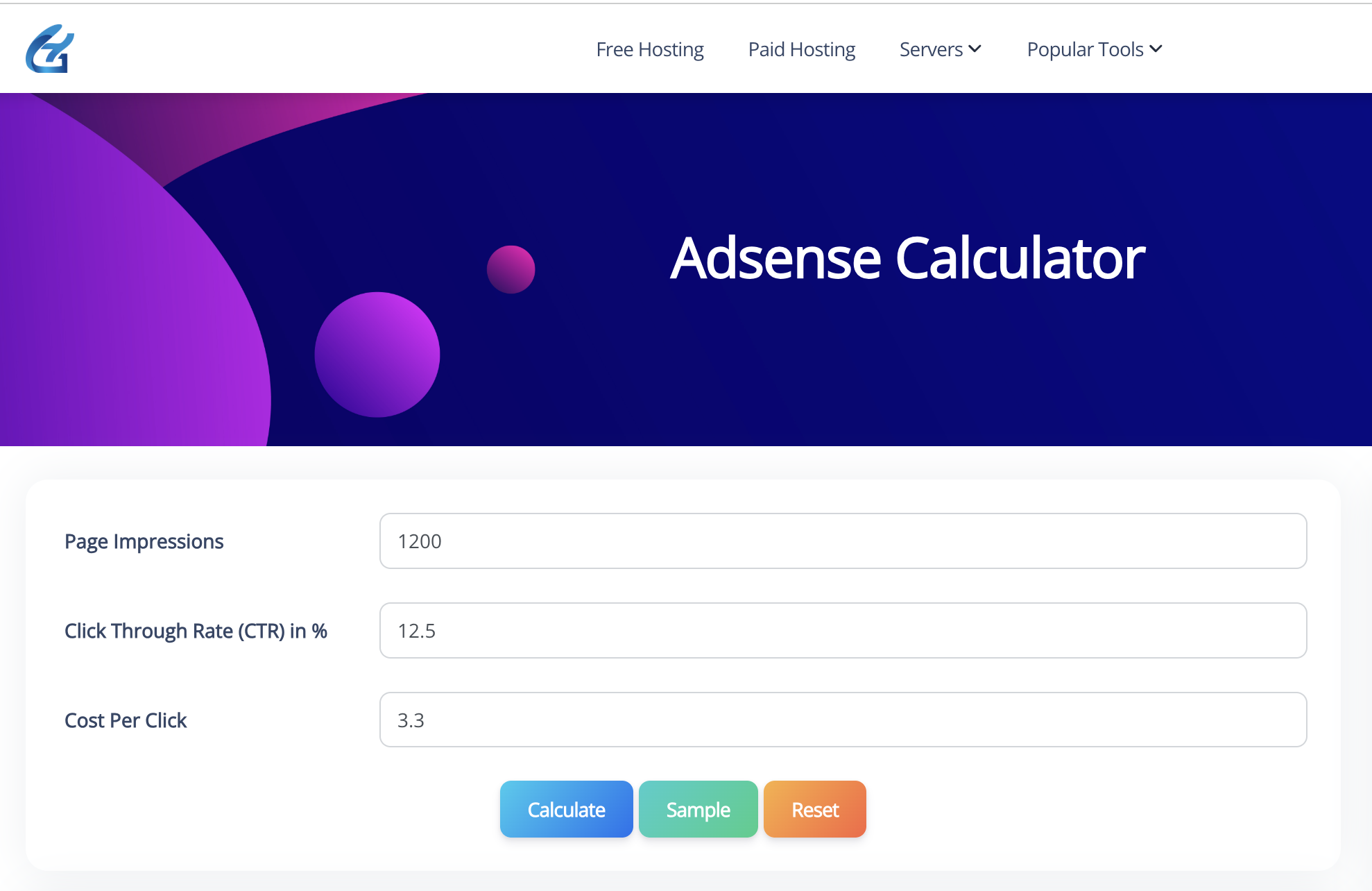
- Page Impressions: Input your expected number of ad impressions (e.g., daily or monthly).
- CTR (%): Enter the estimated percentage of impressions that result in clicks.
- CPC: Provide the average revenue per click (in USD or your preferred currency).
- Click “Calculate”: After filling in the values, click Calculate to get your estimated earnings.
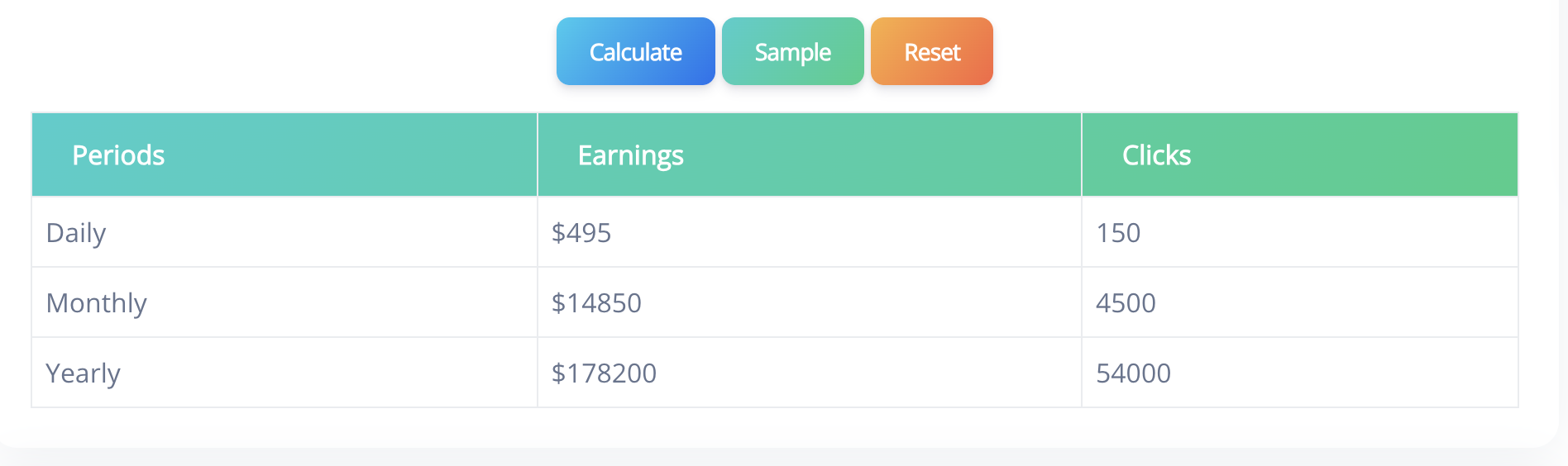
- Use “Sample” (Optional): Clicking Sample likely populates the fields with example values so you can see how the tool works in action.
- “Reset” to Start Over: Click Reset to clear all inputs and enter new values.
The tool processes your inputs instantly, displaying clear results that you can use to plan your monetization strategy. No sign-ups or downloads are required, making it a hassle-free experience.
How the AdSense Calculator Boosts Your SEO Strategy?
As an SEO expert, I know that monetization and SEO go hand in hand. The GoogieTools AdSense Calculator isn’t just about crunching numbers—it’s a strategic tool that can enhance your on-page SEO efforts.
Here’s how:
- Target High-CPC Keywords: Use the calculator to test scenarios with different CPCs, helping you identify lucrative niches to target in your content. For example, keywords like “insurance” or “online trading” often have higher CPCs, boosting your AdSense earnings.
- Optimize Content for Engagement: Higher CTRs come from engaging, well-structured content. The calculator shows how improving user experience (e.g., with short paragraphs and clear headings) can increase ad clicks.
- Focus on Search Intent: By aligning content with user intent (e.g., informational or transactional queries), you can attract more targeted traffic, which translates to higher page views and ad revenue.
- Improve Site Performance: Fast-loading, mobile-friendly sites reduce bounce rates, keeping visitors on your page longer and increasing ad impressions. The calculator helps you quantify the impact of these improvements.
By using the insights from the AdSense Calculator, you can create content that ranks higher on Google, Yahoo, and Bing while maximizing your earnings.
Pros and Cons of the GoogieTools AdSense Calculator
Like any tool, the GoogieTools AdSense Calculator has its strengths and limitations. Here’s a balanced look:
Pros
- Free to Use: No cost or subscription, making it accessible for all budgets.
- Fast and Accurate: Delivers reliable earnings estimates in seconds.
- No Downloads Needed: Cloud-based tool works on any device with an internet connection.
- SEO-Friendly Insights: Helps you target high-CPC keywords and optimize content for better ad performance.
- Beginner-Friendly: Intuitive interface requires no technical expertise.
Cons
- Estimates Only: Results are projections based on inputs, not actual earnings.
- Limited to AdSense: Doesn’t account for other monetization methods like affiliate marketing.
- Requires Accurate Inputs: Inaccurate metrics (e.g., guessed CTR or CPC) may skew results.
Despite these minor limitations, the tool’s simplicity and effectiveness make it a top choice for AdSense users.
Who Should Use the GoogieTools AdSense Calculator?
This tool is perfect for a wide range of users looking to monetize their online presence:
- Bloggers: Estimate earnings to decide if AdSense is worth the effort for your blog.
- YouTubers: Calculate potential revenue from video ad placements.
- Website Owners: Plan ad strategies for niche sites or eCommerce platforms.
- SEO Professionals: Use earnings projections to guide keyword research and content optimization.
- Digital Marketers: Test ad performance scenarios to maximize client revenue.
- Beginners: Learn how AdSense works without diving into complex analytics.
Whether you’re just starting out or scaling a content empire, the GoogieTools AdSense Calculator provides actionable insights to boost your income.
How It Compares to Other AdSense Calculators
There are other AdSense calculators out there, but GoogieTools stands out for its simplicity and accessibility. Unlike paid tools that require subscriptions or complex setups, GoogieTools is free and requires no account.
Compared to alternatives like Omni Calculator or AdSense Revenue Calculator, it offers a cleaner interface and faster results. While some tools provide advanced analytics, GoogieTools focuses on delivering quick, reliable estimates, making it ideal for users who want actionable insights without overwhelming data.
Why Do You Need an AdSense Calculator?
When I first started with AdSense, I was overwhelmed by the variables—page impressions, CTR, CPC, and more. I’d tweak ad placements or publish new content, but I had no clear way to predict how those changes would impact my earnings. That’s where an AdSense calculator comes in. It takes the guesswork out of monetization, letting you:
- Estimate Earnings: Understand how much you can earn based on your current traffic.
- Optimize Ad Performance: Test different CTR and CPC scenarios to maximize revenue.
- Plan Content Strategy: Focus on high-value niches or keywords to boost CPC.
- Save Time: Get instant results without manual calculations or guesswork.
The GoogieTools AdSense Calculator is particularly valuable because it’s designed with simplicity and accuracy in mind, making it a must-have for anyone serious about monetizing their website or YouTube channel.
FAQs About AdSense Calculators
Q1. What is the most accurate free AdSense calculator?
Ans. GoogieTools' stands out for its data-driven estimates, ideal for "reliable Google AdSense earnings calculator."
Q2. Can an AdSense calculator predict YouTube earnings?
Ans. Yes, by inputting video views and CPM—great for creators.
Q3. How do I improve my AdSense CTR based on calculator insights?
Ans. Optimize ad placement and content relevance; I've seen 1-2% boosts from this.
Q4. Is GoogieTools' AdSense calculator mobile-compatible?
Ans. Fully, for quick checks on the go.
Q5. Does it account for ad block effects?
Ans. It allows manual adjustments for realistic projections.
Conclusion
The GoogieTools AdSense Calculator is your secret weapon for unlocking the full potential of Google AdSense. Whether you’re a blogger dreaming of passive income, a YouTuber aiming to monetize your channel, or an SEO pro optimizing client sites, this tool delivers instant, accurate insights to guide your strategy.
Its free, user-friendly design and reliable projections make it a must-have for anyone looking to maximize ad revenue without the hassle of manual calculations.
By aligning your content with high-CPC keywords, optimizing ad placements, and creating engaging, SEO-friendly pages, you can turn calculator insights into real-world results.

Aman Singh
CREATIVE HEAD
Enjoy the little things in life. For one day, you may look back and realize they were the big things. Many of life's failures are people who did not realize how close they were to success when they gave up.