
YouTube Description Generator






Here is a quick story about how we started using Youtube to put videos online. When we first started, we put a lot of effort into a series of cooking tutorials, simple “easy weeknight dinners” filmed in a small kitchen. We spent hours editing each video and uploaded them. While we used to do all that, we spent less time on the video description box.
What should go in that description box? A simple summary? Or just a few random links?
At that time (in early days), Youtube video descriptions were just done anyhow, like text with no keywords, no strong hook and no real strategy. And due to that very few views and almost no engagement were there in the video.
Everything changed when we started writing SEO-friendly descriptions manually but that too took a lot of time and effort. If GoogieTools’ YouTube Description Generator had been available back then, it would have saved us countless hours by creating ready-to-use, keyword-rich descriptions that attract viewers naturally.
Let’s see how youtube description generator tool improves visibility, saves time and helps your videos rank on Google as well.
So, let’s dive in.
What Is a YouTube Description Generator and Why Do You Need One?
A YouTube description generator is an AI-powered tool that quickly creates clear and SEO-optimized text for your video descriptions. You simply enter your topic or keywords, and the tool builds a ready-to-use description with a strong summary, smart CTA’s, and helpful links, all naturally optimized for search.
Why does Youtube description generator matter? It matters because your video description helps YouTube understand what your video is about. A well-written description improves discoverability, increases clicks, and supports higher rankings. Without proper optimization, even great videos can stay hidden.
If we talk about the latest YouTube trend that is going on, a strong description can improve viewer retention, boost search visibility and turn casual viewers into loyal subscribers, especially for tutorials, how-to videos and vlogs where clear context makes all the difference.
Key Features of GoogieTools' YouTube Description Generator
This tool comes packed with smart features that make writing YouTube descriptions fast and simple. It is designed especially for creators who want better SEO without spending hours writing. Here’s what makes it powerful:
- Customization Options: You can easily adjust the tone, length, and style of the description. Let’s say you want a casual, friendly voice or a more professional tone, the tool lets you match the description to your brand and audience.
- Batch Processing: If you: upload videos in bulk, this feature saves a lot of time. You can generate descriptions for multiple videos at once instead of creating them one by one, perfect for content creators who work in batches.
- SEO Insights: The tool also provides helpful feedback, such as relevance or SEO scoring. This helps you understand whether your description is strong enough and what you can improve to get better rankings and visibility.
- AI-Powered Generation: Just enter your video topic or main keywords, and the tool automatically creates a complete, ready-to-use description. It adds important elements like an engaging opening hook, useful timestamps (if needed), and clear calls to action that encourage viewers to like, comment, or subscribe.
- Keyword Optimization: The generator naturally adds both short-tail and long-tail keywords into your description. For example, it can include phrases like “free YouTube description generator” or “AI YouTube description generator for SEO” in a natural way.
- Export and Integration: Once your description is ready, you can copy it with one click or download it instantly. It also connects smoothly with other GoogieTools features, such as title generators, so you can optimize your entire video workflow in one place.
- Mobile-Friendly Design: You can create and edit descriptions even from your phone. The tool supports emojis, clean formatting, and easy readability, which helps your descriptions look more attractive on both mobile and desktop.
Together, these features make the tool more than just a description writer, it becomes a complete SEO assistant that helps grow your YouTube channel faster and smarter.
How to Use GoogieTools' YouTube Description Generator: A Step-by-Step Guide
Now, let’s see how to use googietools’ youtube description generator. We’re going to provide a proper step-by-step approach so that you can easily follow it and even refer the screenshots provided alongside the steps.
Step1) First, go to the official website of GoogieHost >> Scroll down the page >> Choose YouTube Description Generator as specified in the screenshot below
Step2) Now, there are some Input Fields that you need to fill out one by one >> Enter information “About the Video”. Write a brief explanation of the video’s content >> Then, provide a section-by-section breakdown of the video with corresponding times (e.g., “00:00 – Introduction,” etc.).
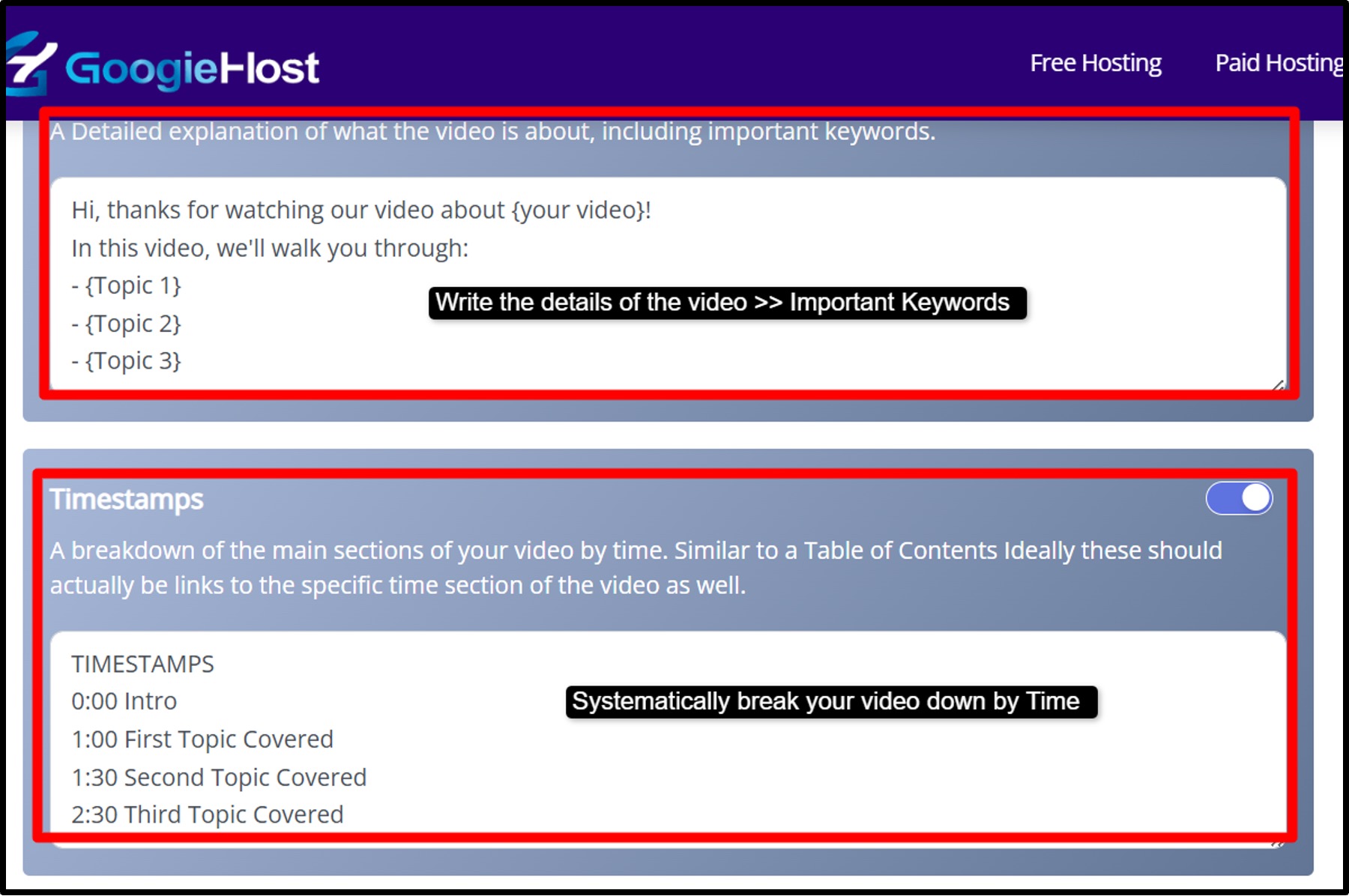
Step3) Now, Put in the information About the Channel >> Describe what your channel is about, your content style, posting frequency, niche, and unique angle >> Also, suggest related videos or playlists that viewers might be interested in.

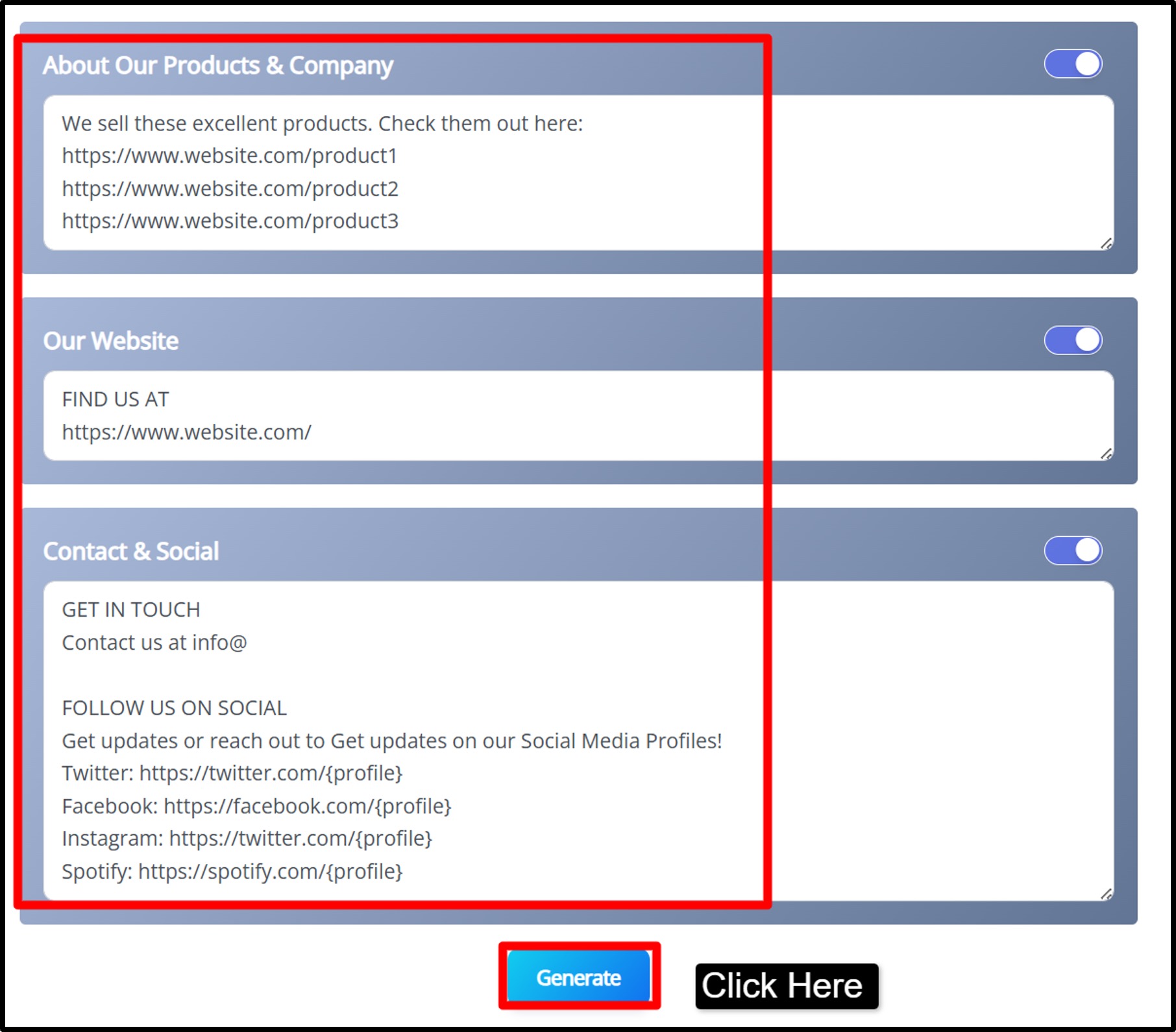
Step4) Write “About Our Products & Company” >> Share brief information about your brand, business, or services tied to your content >> Include your website URL or other key links >> Add your social media handles, email addresses, or other contact info >> Finally click the Generate button.
Step5) As you click the generate button >> The tool assembles the description based on your inputs >> Review the description >> Copy it by pressing Copy selected words >> Paste it into the description box in your YouTube video editor.
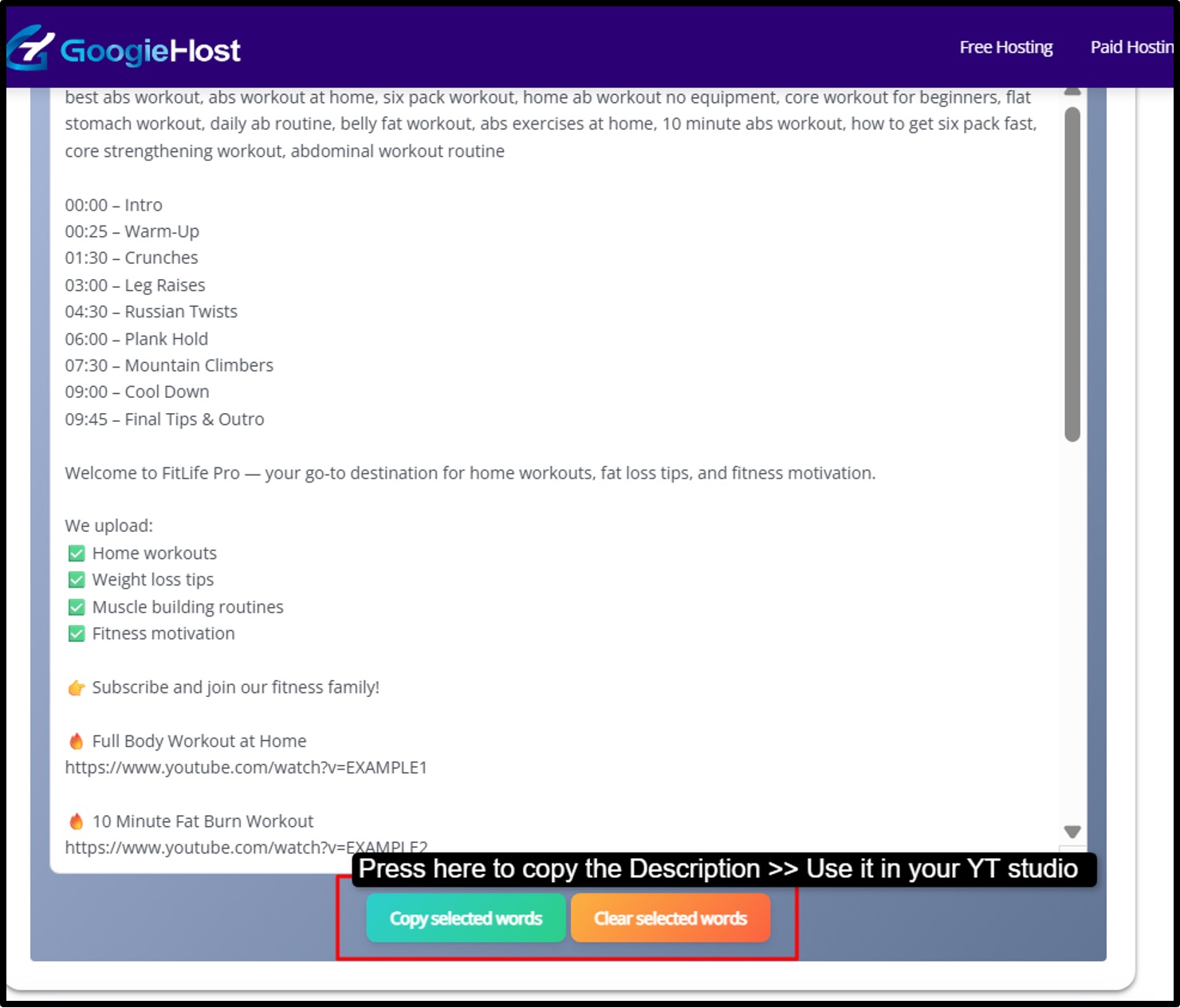
Follow the steps given above and you can get your description for your video ready in a matter of seconds.
Pros and Cons of Using a YouTube Description Generator
Let's balance the scales with honest pros and cons to guide your decision.
Pros:
- Saves time by automating description writing.
- Improves SEO with smart keyword placement.
- Keeps tone consistent across videos.
- Boosts engagement with built-in hooks and CTAs.
- Free and easy to access for all creators.
Cons:
- May sound generic without personal edits.
- Can reduce originality if overused.
- Depends on trends that may quickly change.
- Limited customization in basic versions.
Best Practices for YouTube Descriptions to Boost Visibility
If you want your videos to rank higher and attract more viewers, writing a strong YouTube description is very important. Over years of SEO optimization, one thing has remained consistent: a well-structured, keyword-rich and user-focused description can significantly improve visibility, engagement, and watch time.
A YouTube description is not just a summary of your video; it is a powerful SEO tool that helps YouTube understand your content and recommend it to the right audience. When used strategically, it can turn an average-performing video into a high-ranking one.
Now let’s break down each tip in simple and practical words:
- Incorporate Keywords Smartly: Use your main keyword (like “YouTube SEO”) naturally in the first few lines because YouTube reads that first. Also include longer phrases to target specific searches.
- Add Timestamps: Timestamps divide your video into sections (00:00 Intro, 02:15 Tips, etc.). This helps viewers jump to the part they want. It improves user experience and increases watch time, which helps rankings.
- Include CTAs (Call-To-Actions): Tell viewers what to do next, like, comment, subscribe, or visit a link. Simple lines like “Subscribe for more SEO tips” or “Download the free guide below” can increase engagement and conversions.
- Keep It Concise Yet Informative: Aim for around 150 to 200 words. That’s enough to explain your video clearly without overwhelming the reader. Focus on value, clarity, and important keywords.
- Optimize for Mobile: Most people watch YouTube on their phones. Use short paragraphs, line breaks, and sometimes emojis to make the description easy to read on small screens.
- Link Strategically: Add important links like your website, social media, or related resources. But don’t overload the description with too many links, it can look spammy and reduce trust.
- Test and Iterate: Try different versions of descriptions for different videos. Check YouTube Analytics to see which videos perform better. Improve future descriptions based on what works.
Following these simple but powerful habits can help your videos rank better, get more clicks and grow your channel faster.
The Role of Descriptions in YouTube SEO: Why Generators Are Essential
A YouTube description is not just extra text under your video, it plays a big role in SEO (Search Engine Optimization). It helps YouTube understand what your video is about. When YouTube clearly understands your content, it can show your video to the right audience in search results and recommendations.
Descriptions act like signals to the algorithm. They contain important keywords that tell YouTube and even Google what your video covers. This improves your chances of ranking higher.
There are two main types of keywords you should use:
- Short-tail keywords (like “YouTube SEO”) help you reach a broad audience.
- Long-tail keywords (like “free AI YouTube description generator tool”) target more specific searches with less competition.
Long-tail keywords often bring highly interested viewers because they are searching for something very specific. When descriptions are properly optimized with the right mix of keywords, many creators notice a strong boost in visibility and views.
This is where description generators become helpful. Tools like GoogieTools analyze trends and suggest relevant keywords and structured descriptions.
Instead of guessing what to write, you get SEO-focused text that improves your chances of ranking, especially in competitive niches where standing out is harder.
Common Mistakes to Avoid When Generating YouTube Descriptions
Even when using AI tools, mistakes can reduce your results. Let’s understand each one clearly.
- Keyword Stuffing: Adding too many keywords makes your description look spammy. For example, repeating “YouTube SEO tips” again and again does not help, it actually harms rankings.
What to do instead: Use keywords naturally in sentences.
- Ignoring Accuracy: Sometimes AI-generated descriptions may include details that don’t fully match your video. If your description promises something the video doesn’t deliver, viewers may leave quickly.
What to do instead: Always review the generated text and make sure it accurately fits your content.
- Skipping Edits: If you copy and paste AI output without editing, it may sound generic. Your brand voice and personality matter.
What to do instead: Add your personal touch. Adjust tone, add your style to make it feel authentic.
- Forgetting Links: Descriptions are a powerful place to add links, your website, affiliate links, social media, or related videos. If you skip them, you miss traffic and conversion opportunities.
What to do instead: Add important links clearly and strategically, but avoid adding too many.
- Overlooking Analytics: Many creators generate a description and never check results. Without tracking performance, you won’t know what works.
What to do instead: Use YouTube Analytics to see which videos rank better.
Frequently Asked Questions About YouTube Description Generators
Quick answers to common curiosities:
Q1. Are they suitable for all types of channels?
Ans. They work for nearly every niche be it vlogs, tutorials, reviews, gaming, business, and more.
Q2. Will YouTube penalize AI-generated descriptions?
Ans. No! YouTube doesn’t penalize AI-generated text as long as it follows community guidelines and isn’t spammy.
Q3. Does it work for Shorts?
Ans. Yes! Absolutely. You can generate descriptions for both standard videos and YouTube Shorts.
Q4. Can I customize the output?
Ans. Most tools let you edit and personalize the generated text to better fit your brand voice.
Q5. Does it support multiple languages?
Ans. Some platforms offer multilingual support, making it easier to reach a global audience.
Why Choose GoogieTools' YouTube Description Generator Over Others?
When it comes to choosing a reliable YouTube description generator, GoogieTools clearly stands out because it focuses on real SEO performance rather than just generating generic text. Many basic tools simply rewrite a summary of your video, but GoogieTools goes deeper by creating descriptions that are structured to rank.
It naturally places important keywords where they matter most, especially in the first few lines, which helps YouTube and even Google better understand your content. This improves visibility and increases the chances of your video appearing in search results and suggested feeds.
What makes GoogieTools even more appealing is that it provides these advanced features for free, making professional-level optimization accessible to beginners and growing creators. It even supports batch generation, which is extremely helpful for content teams or channels managing multiple uploads.
So, in a nutshell, we can say that the GoogieHost YouTube Description Generator is a smart optimization assistant that helps creators improve rankings and scale their channels efficiently without technical complexity.

Aman Singh
CREATIVE HEAD
Enjoy the little things in life. For one day, you may look back and realize they were the big things. Many of life's failures are people who did not realize how close they were to success when they gave up.