
YouTube Channel Banner Downloader




 Ever been scrolling through YouTube and suddenly stopped by a channel banner that just looks perfect? The colour pop, the design feels polished and better, and you instantly think, "I wish I could get something like that for my own channel.”
If you are a content creator searching for inspiration, or you are a marketer who is studying competitor branding, or you are just a normal fan who loves unique and great designs, then you should definitely grab the YouTube banner, but then again, using this facility is not always as easy as it should be. Many times, screenshots often turn blurry, cropped, or unusable.
That is exactly where GoogieHost’s YouTube channel banner downloader comes into the picture. It is a very simple tool to use and download, yet it is very powerful in terms of the impact it leaves. This tool will help you download high-quality banners in seconds with no hassle and no issues.
I actually came across this tool while I was working on a branding project, where I wasted hours trying to capture some of the decent banner images for my project manually. This tool has completely changed the game. In this blog, I will guide you about everything you need to know about it, how it works, its important features, and how it can make your workflow better and easier with good banners.
What is the YouTube Channel Banner Downloader?
With only a few clicks, you can obtain high-resolution YouTube channel banners with GoogieTools' free web utility, the YouTube Channel Banner Downloader. This application makes it easier for marketers, graphic designers, and content producers to access channel banners for research, inspiration, and creative initiatives.
This tool pulls the official banner straight from YouTube's servers rather than depending on screenshots or apps from third parties that could jeopardize security or quality. It's quick, simple, and doesn't require any technological expertise; all you have to do is paste the channel URL!
Key Features of the YouTube Channel Banner Downloader
GoogieTools’ YouTube Channel Banner Downloader is packed with features that make it stand out. Here’s what you can expect:
- Instant Downloads
This tool is especially built for simplicity and speed. All you need to do is paste the channel URL, and within seconds, your banner will be ready to download and use. There are no complicated steps or waiting, only quick results. It is helpful when you are working on tight deadlines or need multiple banners quickly for your research.
- High-Quality Images
One of the biggest advantages of the YouTube channel banner downloader is allowing you to download high-quality images in their original resolution. There will be no blurry screenshots and no pixelated edges, and your banners will be professional and high-quality. This is perfect for designers and creators who need clear references or high-quality assets.
- No Software Required
Everything will be directly working on your browser, as there is no downloading of apps or any kind of extensions. It will save you a lot of time; there is no hassle for installation, and it will work instantly on any of your systems. It is a very convenient web-based solution for you.
- Device compatibility
This tool works very smoothly across all of the devices, including laptops, tablets, and smartphones. So, no problem if you are working from your office setup or browsing on your phone. You can easily access this tool from anywhere and anytime without facing any limitations.
- Supports all public channels.
You can download the banners from any of the public YouTube channels. If you are a small creator or a growing influencer, this tool will make it very easy for you to analyse the competition, design your inspiration, and conduct better market research. There will be no restrictions as long as the channel is publicly accessible.
- No Watermarks
Unlike many free tools, this YouTube banner downloader will give you clearer images without any watermark or branding. It is very important because it maintains a professional look, and there are no distractions in the images. It is made so that it is ready to use for your presentations. You will get exactly what you want to see, which is pure and original.
- Privacy as First Approach
The YouTube channel downloader is designed in a way that it keeps its clients' privacy as its first approach. It will not store your data or save your research history, nor will it require your login or personal details. This ensures a safe and secure experience, especially for users who value privacy.
Because of these capabilities, the tool may be used by both novices and experts.
How to Use the YouTube Channel Banner Downloader: A Step-by-Step Guide
The YouTube Channel Banner Downloader from GoogieTools is very easy to use. Take these easy steps:
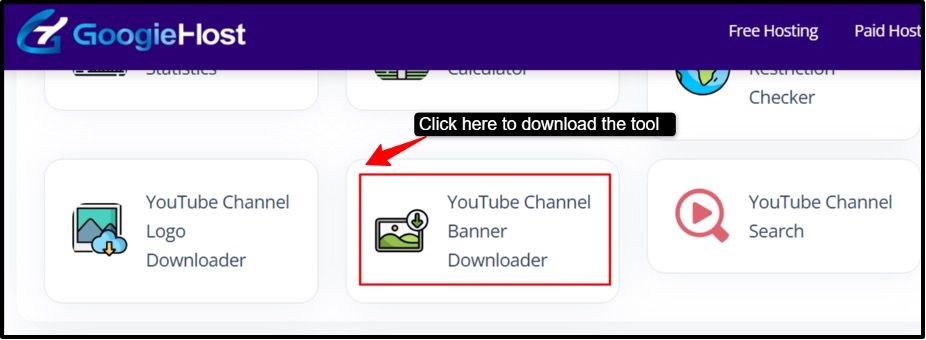
Step 1. Go to the tool: Go to the YouTube Channel Banner Downloader site in GoogieHost's collection of free web resources.
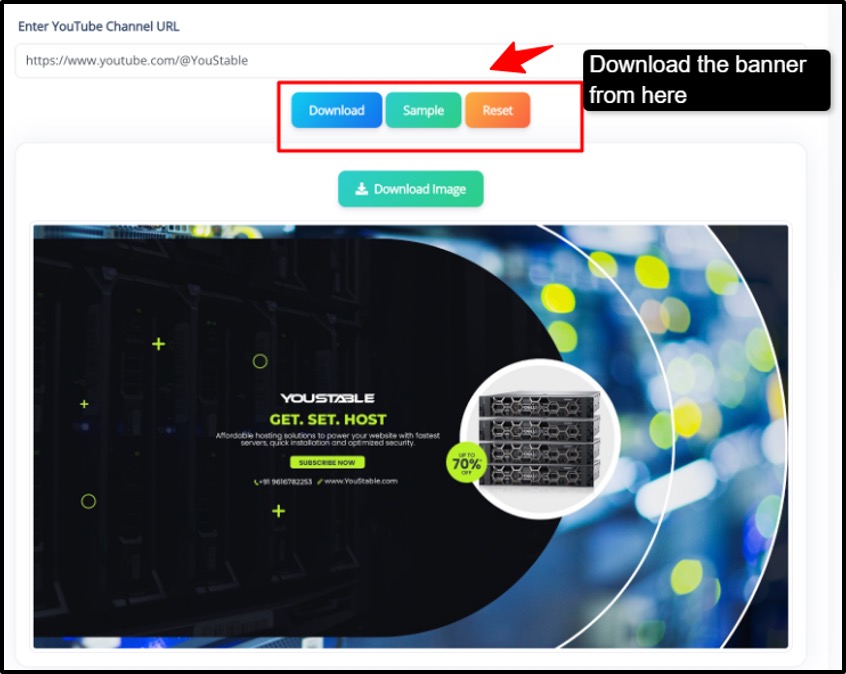
Step 2. Enter the URL of the YouTube channel: Find the "Enter YouTube Channel URL" input form. Paste the full URL of the channel whose banner (channel art) you want to download.
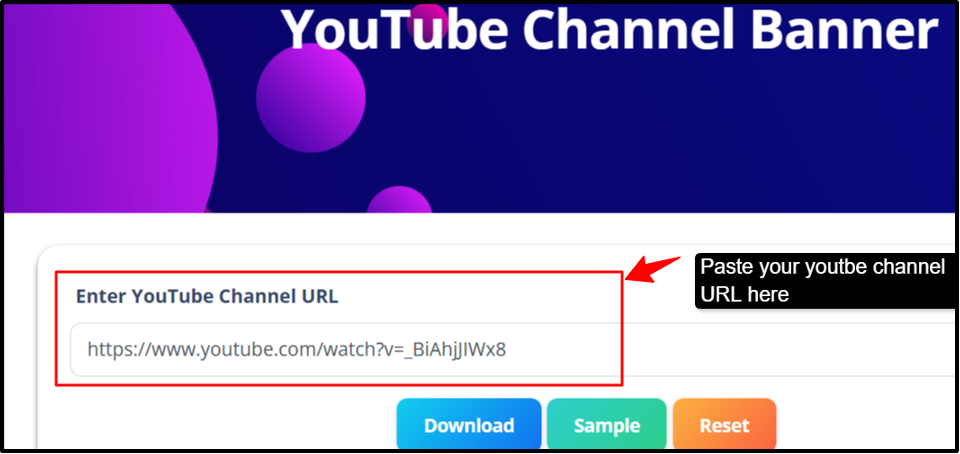
Step 3. Download the Banner: The tool will immediately retrieve the banner when you click the "Download" button. Save it in PNG or JPG format to your device.
Pro Tip: To prevent downloading the incorrect banner, make sure the URL is right. Similar-sounding channels can lead to confusion!
Who Can Benefit from This Tool?
For a variety of users, the YouTube Channel Banner Downloader is ideal. Here are some ways that other organisations can utilize it:
- Content Creators: If you are a YouTuber or you are planning to start your own channel, then this tool can be a game-changer for your branding. You can easily analyse the banners from the top-performing channels in your niche. You can learn directly from the successful creators and apply the proven design ideas to your own channel.
- Marketers: Especially those who are working in digital marketing or branding. This tool will be very helpful for competitive analysis and strategy building. You can easily collect banners from competitors in seconds and even study how the brands position themselves visually.
- Graphic Designers: Designers can use this tool as a creative and inspirational means for building mood boards using the real YouTube banner designs. Explore the trending styles and colour schemes. You can even use the references to improve your own designs or client projects.
- Researchers: If you are someone who is studying branding, digital media, or visual communication. This tool will become a valuable research resource to analyze patterns in banner designs across industries. Instead of using the theoretical examples, you get the real, up-to-date data from the actual YouTube channels.
- Fans: Many people are not professionals; they are just fans, so this tool serves them greatly, too. It is good for personal use and interest. You can easily save banners from your favourite YouTube channels and use them for fan edits and your collections.
Regardless of your goal, this tool expedites and professionalises the process.
Pros and Cons of the YouTube Channel Banner Downloader
Each tool has advantages and disadvantages. This is a fair assessment of the YouTube Channel Banner Downloader:
Pros
- Free to use with no signup required.
- Downloads premium banners quickly and efficiently.
- Simple, user-friendly interface for all skill levels.
- Provides consistently high-resolution images.
- Ad-free experience with strong security.
Cons
- Requires an internet connection to use.
- Cannot download banners from private or restricted channels.
- Supports downloading only one banner at a time (no bulk downloads).
The tool's quality and convenience can easily exceed the disadvantages
Benefits of Downloading YouTube Channel Banners with GoogieTools
The benefits extend beyond downloads. As a specialist who has optimised material for high ranks, I am aware of how this tool fosters productivity and creativity.
- For creators, research "best YouTube banner designs" to improve your own. Identify colour and layout trends that draw in viewers. It will help you analyse top creators' branding styles like the font, colours and layouts.
- It will let you study the competitors' visual strategies and positioning. Analysing competitors is beneficial for marketers. To save time on research, gather "YouTube channel art samples" for strategies.
- It is perfect for building visual mood boards for branding projects. You can easily collect banners with different themes and colour palettes. It is used for mood boards by designers. Get "creative YouTube banners" and legally remix concepts.
- It is useful for educators to teach digital marketing, branding and content strategy. You can use real-world examples to demonstrate branding concepts, such as "MrBeast YouTube banner download."
In terms of SEO, adding these resources to your website can enhance its look and increase indicators like time on site for higher ranks on "YouTube tools for producers."
Why Use GoogieTools’ YouTube Channel Banner Downloader?
Why use a specialist program to download YouTube banners? Here's why it's essential:
- Save time: You can use this tool to avoid the trouble of manually taking screenshots or altering poor-quality photos.
- High-Resolution Downloads: Obtain banners in their original format, ideal for business use.
- Super Simple to Use: All you need is a URL and a click; no technical knowledge is required.
- Totally Free: There are no hidden costs or subscriptions, so everyone can use it.
- Safe and Secure: Steer clear of dangerous websites that could infect you with malware.
This tool produces results without the hassle, whether you're researching branding trends, making a mood board, or developing a portfolio.
FAQs
Q1. Is it free to use the YouTube Channel Banner Downloader?
Ans. Indeed, there are no additional costs, and the YouTube Channel Banner Downloader from GoogieTools is completely free.
Q2. Does using it require downloading software?
Ans. No program installation is necessary because the utility is fully online.
Q3. Is it possible to take banners from YouTube channels that are private?
Ans. No, only public channels with viewable banners can use this feature.
Q4. What format do the downloaded banners come in?
Ans. Depending on the channel's settings, banners are normally downloaded in either PNG or JPG format.
Q5. Is downloading YouTube channel banners permitted?
Ans. In general, downloading for study, inspiration, or personal use is acceptable, but to avoid copyright issues, review the channel's terms for commercial usage.
Q6. Is the tool compatible with mobile devices?
Ans. Indeed, it works flawlessly with PCs, tablets, and cellphones.
Why Choose GoogieTools' YouTube Channel Banner Downloader Over
GoogieTools' YouTube Channel Banner Downloader is your pass to hassle-free, high-quality banner downloads, whether you're a fan honouring your favorite YouTuber, a marketer analysing branding trends, or an artist seeking inspiration. This application makes capturing YouTube banners less frustrating with its user-friendly design, free access, and dedication to quality. Simply paste a URL, click, and download, no more hazy screenshots or dangerous websites.
Are you prepared to advance your projects? Try the YouTube Channel Banner Downloader at GoogieTools right now to see how simple it is to get beautiful banners in a matter of seconds. Don't wait to help your next project shine, it's quick, free, and made just for you!

Aman Singh
CREATIVE HEAD
Enjoy the little things in life. For one day, you may look back and realize they were the big things. Many of life's failures are people who did not realize how close they were to success when they gave up.