
YouTube Channel Search





Welcome to the ultimate place where curiosity meets discovery! This YouTube channel search is all about searching smarter, finding faster, and unlocking the answers you’ve been looking for, and that is one video at a time.
A few years ago, while I was working as a freelance writer in digital marketing, I had to find new and unique fitness YouTube channels, not the popular ones everyone already knows.
I used to spend hours just typing random keywords, scrolling through irrelevant results, and getting distracted by algorithm-driven videos. It felt frustrating and time-consuming. Honestly, it was like searching for a needle in a haystack. I just wanted a smart way to filter channels based on things like keywords, location, or subscribers.
Discover YouTube channels the smart way. Our tool helps you search, filter, and analyze channels effortlessly so that you can find exactly what you need without any hassle.
So if you are also one of those who have struggled to find the right YouTube channels, this blog will help you. I’ll break down everything in a much simpler way, so you can search better and find exactly what you need.
What is a YouTube channel search tool?
Fundamentally, a YouTube channel search tool is a sophisticated finder that facilitates channel discovery beyond YouTube's standard search. To find precisely what you need, it delves deeper using criteria like keywords, subscription ranges, or upload dates.
This approach is made easier with GoogieTools' YouTube Channel Search, a free online powerhouse. It displays pertinent channels with information like descriptions and statistics as you enter your criteria. It is ideal for searches like "YouTube channel search free tool" or "advanced YouTube channel discovery," saving you from having to scroll endlessly.
For artists, advertisers, and viewers looking for specific content within the vast YouTube ecosystem, this is more than simply an elegant search bar.
Why You Need a YouTube Channel Search Tool in Your Toolkit
Have you ever looked for niche channels, such as "vegan cooking lessons under 10k subscribers"? They are frequently buried beneath popular ones in YouTube's native search. That is sliced through using a specialized tool.
I've found that tools like these increase productivity when it comes to content optimization for popular websites. When searching for "how to find YouTube channels simply," this is crucial. It makes it easier to find new favourites, identify partners, and analyze trends.
Precision is important in a world where YouTube has billions of channels. With the help of this tool, you can locate "secret YouTube channels" that complement your hobbies or professional objectives.
Key Features of GoogieTools' YouTube Channel Search
What distinguishes our "best YouTube channel search online" service from others? This is a bullet-point summary of its powerful features that make it easy to use.
- Keyword-based search
This feature will allow users to find YouTube channels by simply typing specific words or phrases. For example, if someone searches for “tech review channels," this tool will display channels that match or relate closely to that topic. This makes searching faster and more efficient, as users don’t need to manually browse through unrelated content.
- Filter Options
This feature will help you to refine search results and make them more accurate. Users can easily sort channels based on criteria like the number of subscribers, total views, locations, or the date the channel was created. These features prove better for users who are looking for specific types of channels, like the newly created ones, popular creators' channels, or any other unique content.
- Explained Results
It will offer you complete, detailed information about each of the channels in one place. Instead of just showing the channel name, the tool will also include descriptions and statistics like the subscribers, views, and counts, along with the direct links to the channels. This will make your search more precise, and it will be tailored to your needs.
- No Login Required
You do not need to create an account or sign in to use this tool. This simply means that you can start searching instantly without sharing any of your personal details. It is going to be fast and convenient, and also give you utmost privacy since you will be browsing anonymously.
- Export Functionality
This will let you download your search results in a CSV file, proving to be an important feature if you are someone who is doing research, managing influencer lists, or analysing your possible competitors. You can easily open the file in Excel or Google Sheets and then organise or study the data very easily.
- Mobile Optimization
This tool has been designed to work very smoothly on all of the mobile devices. If you are a mobile user or a tablet user, the interface will adjust automatically so you can search comfortably on the go. This makes it very easy for users who don’t always have access to a desktop.
- Real-time Updates
This feature brings you or presents you with the fresh data directly from YouTube’s API, meaning that the information you see is up-to-date. Subscribe to views, counts, and channel details that are regularly refreshed so users can rely on accurate information and current data.
- No Unnecessary Ads
Unlike many other free tools, this platform will focus on offering a clean and distraction-free experience. You will not get interrupted by any of the ads while searching, making the process better and smoother.
These characteristics are the result of user-centric design, which was influenced by years of input from SEO tools.
How to Use the YouTube Channel Search Tool: Step-by-Step Guide
It's easy to get started. If you're wondering "how to utilise the YouTube channel search function," check out this easy tutorial.
Step 1: Visit the Tool << Go to GoogieHost's YouTube Channel Search page; it's one of their free YouTube-related tools.
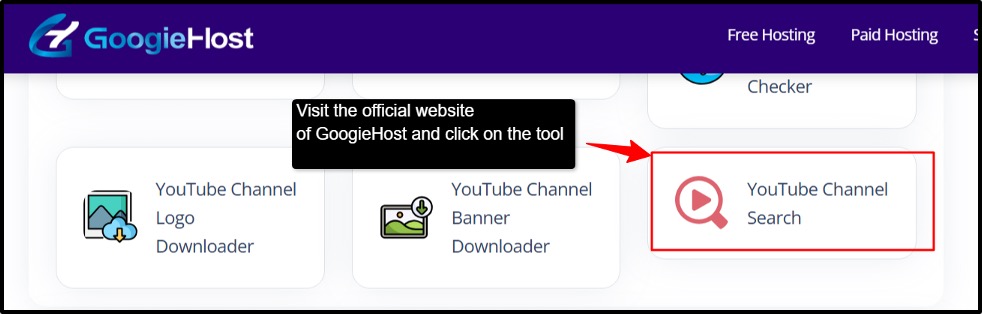
Step 2: Type in the name of the channel. << Enter the name of the channel you are looking for in the "Channel Name" search box. Like, India Today.
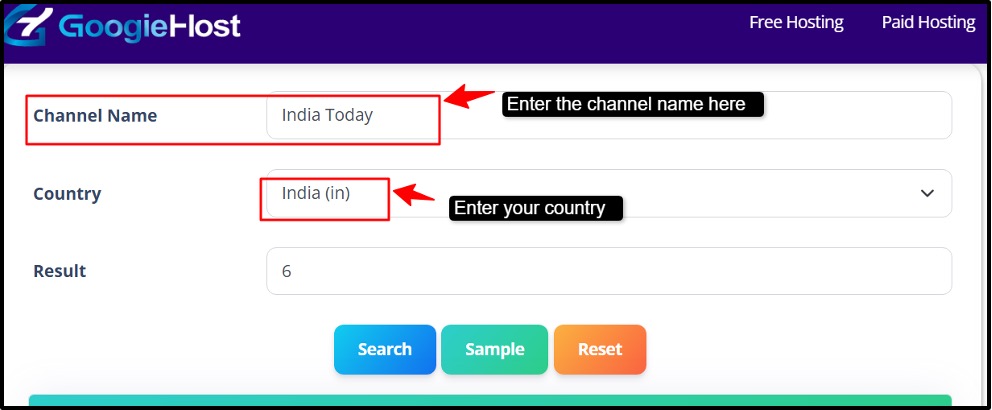
Step 3: Select the Country (Optional) to focus your search on a particular area. Pick the country from the option list. For example: India
Step 4: Choose the Outcome (Optional). Here, you can click on a particular result to see additional information or make sure it's the channel you're looking for once the tool displays a list of channels that match.
Step 5: Click "Search" >> Hit the "Search" button >> Results for channels that correspond to your query will be retrieved promptly by the tool.
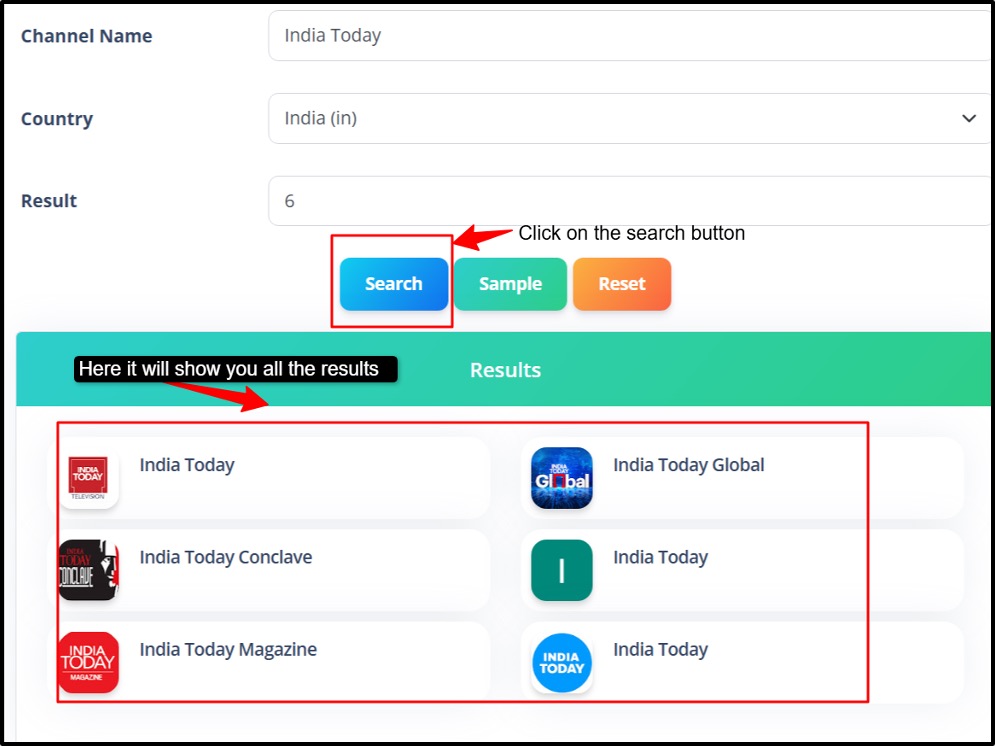
Step 6: Examine the Outcomes. A set of streams with the name you entered and their details will be shown by the tool. For example, output: "GoogieHost" in the US has ten matching channels.
Step 7: Refresh and Try Again: To reset your search and seek out a different channel name, use the Reset option.
Pros and Cons of Using a YouTube Channel Search Tool
Pros
- Real-time Insights.
- Free plan with budget-friendly upgrades.
- Easily save and share results.
- Finds relevant channels fast.
- Shows trending creators.
Cons
- Favors popular channels.
- Repetitive results.
Benefits of Using GoogieTools’ YouTube Channel Search Tool
What makes GoogieTools superior to other tools or YouTube's built-in search? Let's examine the advantages:
- Time-Saving: Instead of manually searching and scrolling through countless channels, the tool will quickly filter and show you the most relevant results. This will save you hours of effort and will allow you to focus more on the content creation or strategy rather than research.
- Targeting Optimization: It allows you to find channels based on specific niches, keywords, or audience types. This means you are not just getting random results; you are reaching exactly the kind of creators or audiences that match your results.
- Competitive Advantage: You can easily understand what top creators in your niche are doing, their content style, frequency, and growth patterns. This insight will help you to stay ahead by adapting smarter and better strategies and spotting the trends early.
- Collaboration Opportunities: This tool will help you discover creators who align with your niche and audience, making it easier to find the right people for collaborations. This can boost your credibility, reach, and overall channel growth.
Who Should Use the YouTube Channel Search Tool?
This tool is intended for a variety of users, such as:
- Content Creators: Content creators can use this tool to find inspiration, analyze successful channels in their niche, and understand what type of content performs well. It helps them to identify the trending topics, content gaps, and audience preferences, making it easy for them to make it more engaging and competitive.
- Marketers: This tool is valuable for marketers to identify influencers and channels that align with their target audience. It helps in planning influencer marketing campaigns, analyzing competitors' strategies, and understanding audience behaviour. This will lead to better and more precise targeting, better campaign performance, and improved return on investment (ROI).
- Business Owners: Business owners can use this tool to find channels relevant to their industry for promotions, partnerships, and brand visibility. It will help them understand how competitors are using YouTube, how the messaging works, and how they can position their own brand effectively.
- Researchers: They can also benefit from this by analyzing trends, audience engagement patterns, and content strategies across different channels. It will offer useful data for studying digital media behaviour and content consumption habits, and make their research more data-driven.
- Casual Viewers: Even casual viewers can use the tool to discover new and interesting channels based on their interests. Instead of relying only on recommendations, they can explore more about their niche content, making their viewing experience more enjoyable.
This tool can improve your experience and approach, regardless of your level of YouTube expertise.
Common Use Cases for YouTube Channel Search Tools
Let's examine real-world situations when this technique works well.
- Content Creation: It will help the creators to find the trending topics and successful channels in their category. It helps with the idea creation for content style, format and audience engagement and improves planning.
- Market Research: This will enable you to make an analysis of competitors and industry trends. It will help to understand audience preferences and content demand. Supports better marketing and content strategies.
- Networking: This tool will make it easy to find creators in the same niche and open opportunities for collaborations and partnerships. It will also help to build connections within the creators' community and will help you grow.
- Education: In education, it will help you to discover informative and skill-based channels and will provide your the access to expert knowledge and tutorials.
- Personal Entertainment: You can easily find content based on personal interests and will be introduced to new and diverse channels to explore, contributing to the overall viewing experience.
Similar techniques have been used by me in my writing career to find instances for articles, increasing their standing and ranks.
Frequently Asked Questions About YouTube Channel Search Tools
Answering frequently asked questions to improve performance for "YouTube channel search FAQs."
Q1. Is it free to use GoogieTools' YouTube Channel Search?
Ans. Yes, GoogieTools provides a feature-rich free tier. Additional filters and export options are available with premium plans.
Q2. Is it possible to locate channels in particular niches?
Ans.Yes, of course! To locate channels in areas like gaming, elegance, education, and more, use the niche-specific filters.
Q3. How reliable is the information that the tool provides?
Ans. In order to ensure excellent precision for subscriber counts, stream metrics, and other metrics, the tool collects real-time data from YouTube's public API.
Q4. Can I export the results of my search?
Ans. It is possible to save the results as CSV files, which facilitates data organization and analysis.
Q5. Is the tool suitable for beginners?
Ans. Yes, without a doubt! From novices to specialists, users of all skill levels can utilise the user-friendly interface.
Search Tools for YouTube Channels in the Future
In the future, anticipate AI improvements for sentiment analysis and predictive searches. To stay ahead, we at GoogieTools are developing an "AI-powered YouTube channel finder" technology.
This sets us up for "top YouTube tools 2026," accommodating changing user demands.
Why Choose GoogieTools' YouTube Channel Search Over Competitors
As we wrap up our conversation, it's evident that tools like GoogieTools' YouTube Channel Search are revolutionising the huge YouTube ecosystem, from my haystack-hunting days to the simplified searches of today. Whether you're searching for "free YouTube channel search by keyword" or delving into "advanced YouTube channel finder on the internet," this tool offers convenience, accuracy, and insights without the baggage.
As a seasoned SEO expert who has spent years navigating the rankings maze, I can vouch for its ability to generate ideas, save time, and foster relationships. Finding channels is only one aspect of it; another is seizing opportunities to advance your business, content, or binge-watching sessions.
So why accept haphazard outcomes? Dive in, investigate, and start making discoveries. It's only a search away to find your next favorite channel (or collaboration). Happy hunting, and may your YouTube excursions be incredibly fulfilling!

Aman Singh
CREATIVE HEAD
Enjoy the little things in life. For one day, you may look back and realize they were the big things. Many of life's failures are people who did not realize how close they were to success when they gave up.