
Meta Tag Generator






Meta tags are the small but mighty snippets in a page’s HTML that shape how a page appears in search results and how users decide to click. A well-optimized title and description can lift visibility and improve click-through rates, even if they aren’t direct ranking factors themselves.
Keeping meta titles within a practical pixel/character range and writing compelling, relevant descriptions helps prevent truncation and encourages more qualified clicks.
What is GoogieHost’s Meta Tag Generator?
GoogieHost’s Meta Tag Generator is a free, beginner‑friendly tool that creates SEO‑ready meta titles, descriptions, and optional keyword tags in seconds. It guides toward current best‑practice lengths for desktop and mobile, so snippets look clean and clickable in Google’s results.
The tool focuses on clarity, intent, and user-friendly phrasing aligning with how modern search evaluates snippets and how users choose what to click.
How do I Use the Meta Tag Generator?
Follow these steps exactly as they appear on the screen in the image.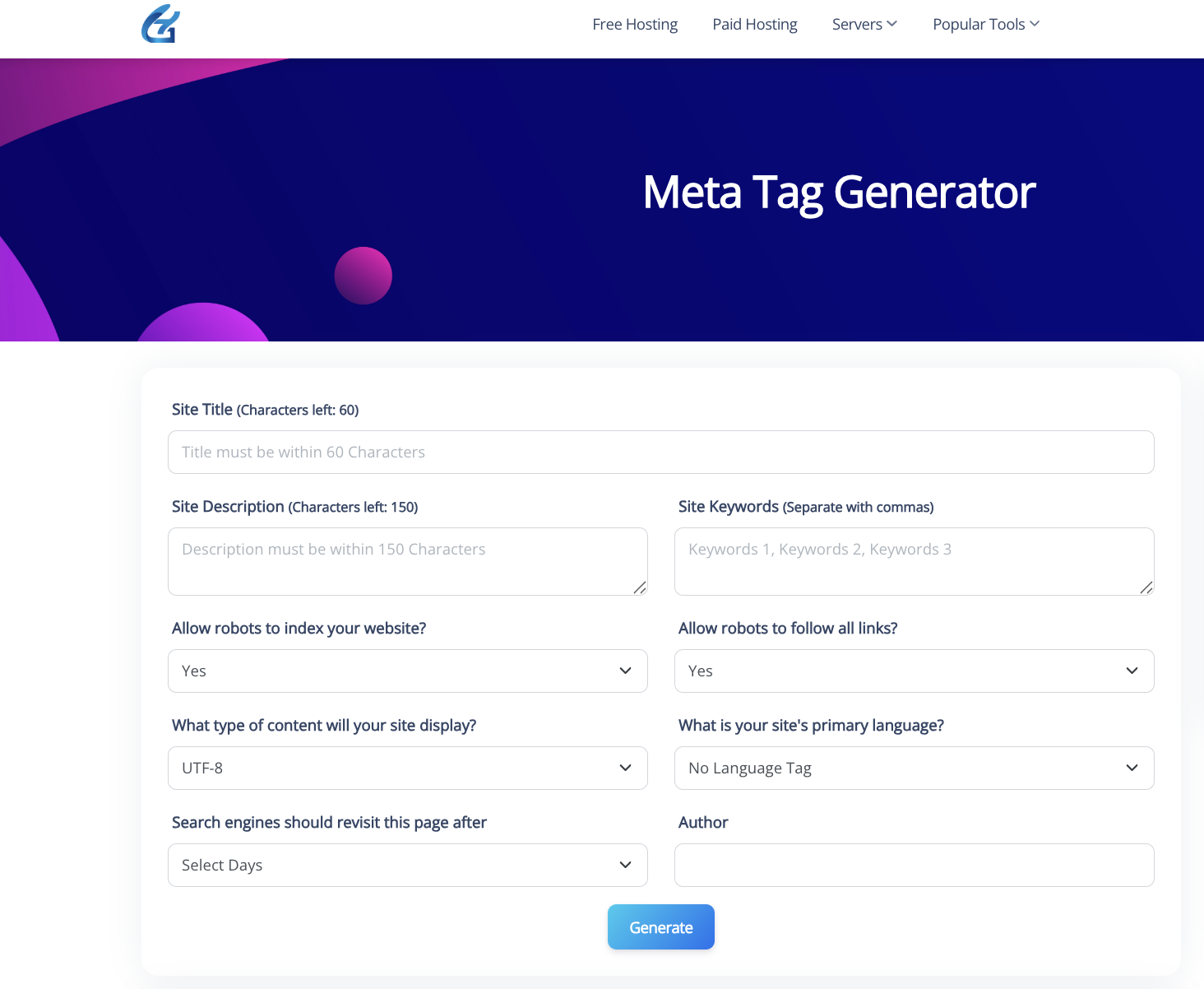
Step 1: Open the tool
- Go to the Meta Tag Generator page and make sure the form is visible.
Step 2: Fill Site Title
- Click “Site Title”.
- Write a clear, unique title within 60 characters.
- Put the primary keyword near the beginning and include your brand at the end if space allows.
Step 3: Add Site Description
- In “Site Description”, write a compelling summary within 150 characters.
- Explain the value of the page and include a natural keyword variation.
Step 4: Enter Site Keywords (optional)
- In “Site Keywords”, add 3–6 comma‑separated phrases that describe the page.
- Keep them relevant and avoid stuffing.
- Note: Some search engines ignore this tag; use it mainly for completeness.
Step 5: Robots—Indexing and Following
- “Allow robots to index your website?” Choose:
- Yes for public pages.
- No for private/test pages.
- “Allow robots to follow all links?” Choose:
- Yes to pass link equity normally.
- No only for pages you don’t want bots to follow.
Step 6: Content Type/Charset
- “What type of content will your site display?” Leave UTF‑8 unless you have a specific encoding requirement.
Step 7: Language
- “What is your site’s primary language?” Pick the correct language locale (e.g., en, en‑US, hi‑IN) for better targeting.
Step 8: Revisit/Robots revisit-after (optional)
- “Search engines should revisit this page after” select a suitable interval or leave default if unsure. Many engines ignore this, but it won’t harm.
Step 9: Author (optional)
- Add the author or organization name for reference, if desired.
Step 10: Generate the tags
- Click the blue “Generate” button.
- The tool will output ready-to-use meta tags based on your inputs.
Step 11: Copy and implement
- Copy the generated code snippet.
- Paste it into your page’s <head> section or the SEO fields in your CMS:
- SEO Title = Site Title
- Meta Description = Site Description
- Additional tags as provided (robots, keywords, etc.)
Step 12: Verify
- Save and publish your page.
- View source to confirm the tags appear once and correctly.
- Test the URL with your Meta Tags Analyzer or a SERP snippet preview to ensure the title/description aren’t truncated.
How do I use the Meta Tags Analyzer?
- Enter a page URL or paste your content/topic. The analyzer scans your inputs, surfaces preview snippets, and flags potential issues like long titles/descriptions likely to be truncated in SERPs.
- Adjust your title to fit typical display limits (measured in pixels, not just characters), then refine wording for relevance and CTR.
- Tweak the description for clarity and intent, keeping it concise and aligned with page content so Google is more likely to show it as written.
- Copy the generated tags and add them to the page HTML or CMS fields for Title/SEO Title and Meta Description.
Who benefits from the Meta Tag Generator
- Bloggers and content creators wanting clean, click‑worthy snippets without manual counting.
- Webmasters/SEOs managing many pages who need fast, consistent metadata that respects pixel constraints.
- SMBs and startups seeking quick on‑page wins that improve SERP presentation and clicks.
- Agencies streamlining QA to reduce Google rewrites and truncation across devices.
Benefits of Using GoogieHost’s Meta Tag Generator
- SERP‑smart lengths: Optimizes by pixel width, helping avoid cut‑offs and ellipses across desktop and mobile.
- Higher CTR potential: Clear, relevant titles and descriptions entice more clicks even though descriptions aren’t direct ranking factors.
- Fewer rewrites: Concise, non‑boilerplate titles reduce the chances of Google replacing your title with other page elements.
- Workflow speed: Rapid, consistent meta creation for multiple pages while keeping to modern best practices.
Why Choose GoogieHost’s Meta Tag Generator?
- Built for today’s SERPs: Uses current guidance on pixel‑based limits and practical ranges to keep snippets intact.
- Focused on intent and clarity: Encourages natural, user‑first phrasing that aligns with how Google selects and displays snippets.
- Friendly and fast: No learning curve—generate, preview, and implement in minutes with agency‑grade consistency.
FAQs
What is the recommended length for meta titles and descriptions?
- Meta titles: Aim to fit within typical display widths—commonly about 50–60 characters or roughly up to ~600px, as Google measures in pixels and may truncate longer titles.
- Meta descriptions: About 150–160 characters is a practical guidance; Google often shows around 120–158 characters depending on device and pixel width.
Can I use this tool for multiple pages?
Yes. Generating unique, page‑specific titles and descriptions at scale is a best practice; avoid duplicates across pages for clarity and better presentation in SERPs.
Does the Meta Tag Generator create keywords meta tags too?
Yes, but note: Google ignores the meta keywords tag and has for years; it offers little to no SEO value for Google, though some other engines or internal site search might still read it.
Will using a Meta Tag Generator guarantee higher rankings?
No tool can guarantee rankings. Meta descriptions aren’t a ranking factor, and titles can be rewritten by Google; however, well‑crafted metadata can improve click‑through rates and how your page is understood and displayed, which supports overall SEO performance.

Aman Singh
CREATIVE HEAD
Enjoy the little things in life. For one day, you may look back and realize they were the big things. Many of life's failures are people who did not realize how close they were to success when they gave up.