
YouTube Money Calculator






Hello, YouTube producers! Let's discuss the time when you begin to question, "How much can I actually make from my YouTube channel?" I recall when I started my first channel in 2020, which was a cooking vlog.
Reaching 1,000 subscribers made me very happy, but the real question was, "Is this worth my time financially?" I was given some figures via YouTube's monetization dashboard, but it felt like a puzzle with missing pieces.
It was like turning on a light in a dark room when I discovered resources like GoogieTools' YouTube Money Calculator. All of a sudden, I was able to organize my content strategy, create reasonable goals, and predict my earnings. This tool is your ticket to clarity if you want to make money out of your passion for YouTube.
I'll go over everything you need to know about GoogieTools' YouTube Money Calculator in this article, including its features, advantages, and how to utilize it to increase your revenue while ranking highly on Google, Bing, and Yahoo.
Let's get started and convert those views into cash!
What Is the YouTube Money Calculator from GoogieTools?
Based on views, interaction, and other important criteria, GoogieTools' YouTube Money Calculator is a robust and easy-to-use tool that helps creators estimate their future YouTube revenue. This tool gives you precise information on how much money your channel can make, regardless of whether you're a novice just reaching the monetization threshold or an experienced creative hoping to grow.
It reduces complicated YouTube monetization criteria, such as audience demographics, CPM (cost per thousand impressions), and RPM (revenue per thousand impressions), to simple figures.
The tool helps you produce videos that rank higher on YouTube and search engines since it is optimized for YouTube monetization success and complies with SEO best practices. It's about giving you the power to make wise choices that will expand both your channel and your financial account, not just about crunching numbers.
Important Features of the YouTube Money Calculator from GoogieTools
Let's examine the key characteristics that make the YouTube Money Calculator revolutionary for creators. These features are intended to assist you in optimizing for search engine rankings and YouTube SEO while maximizing profits.
- Earnings Estimates in Real Time
The tool automatically determines possible revenue based on industry-standard CPM and RPM rates once you enter the number of views on your channel. For more precise estimations, you can change factors like location and niche.
- Demographic Insights for the Audience
The tool estimates greater or lower CPMs by analyzing the geography, age, and interests of your audience. For instance, compared to other regions, visitors from the United States or the United Kingdom frequently generate larger ad revenue.
- Analysis of Niche-Specific CPM
CPM rates vary by niche (e.g., IT, finance, gaming). To assist you in concentrating on high-earning subjects, the calculator offers niche-specific estimations.
- Breakdown of Video Performance
Check out how each video affects your revenue. To determine which films generate the most revenue, the technology monitors parameters such as watch time, click-through rate (CTR), and engagement.
- Optimizing Keywords for Revenue
To optimize your video titles, descriptions, and tags for increased visibility and ad income, get long-tail and short-tail keyword recommendations. "How to make money on YouTube 2025," for instance, might draw valuable viewers.
- Insights on Competitor Revenue
Are you curious about the top channels making money in your niche? To calculate their revenue and gain insight into their tactics, enter the URL of their channel.
- Adaptable Reports
Create comprehensive reports in CSV or PDF format to monitor profit trends or distribute them to sponsors and partners.
- Connectivity to YouTube Analytics
For smooth data syncing, link your YouTube account. Accurate estimates are ensured by the tool's real-time data extraction from YouTube Studio.
How to Make the Most Money Using GoogieTools' YouTube Money Calculator?
Are you prepared to monetize your YouTube channel?
This is a step-by-step tutorial on how to use the YouTube Money Calculator, which is geared toward both SEO and YouTube monetization.
Step 1: Visit the GoogieHost tools section >> Open the money calculator 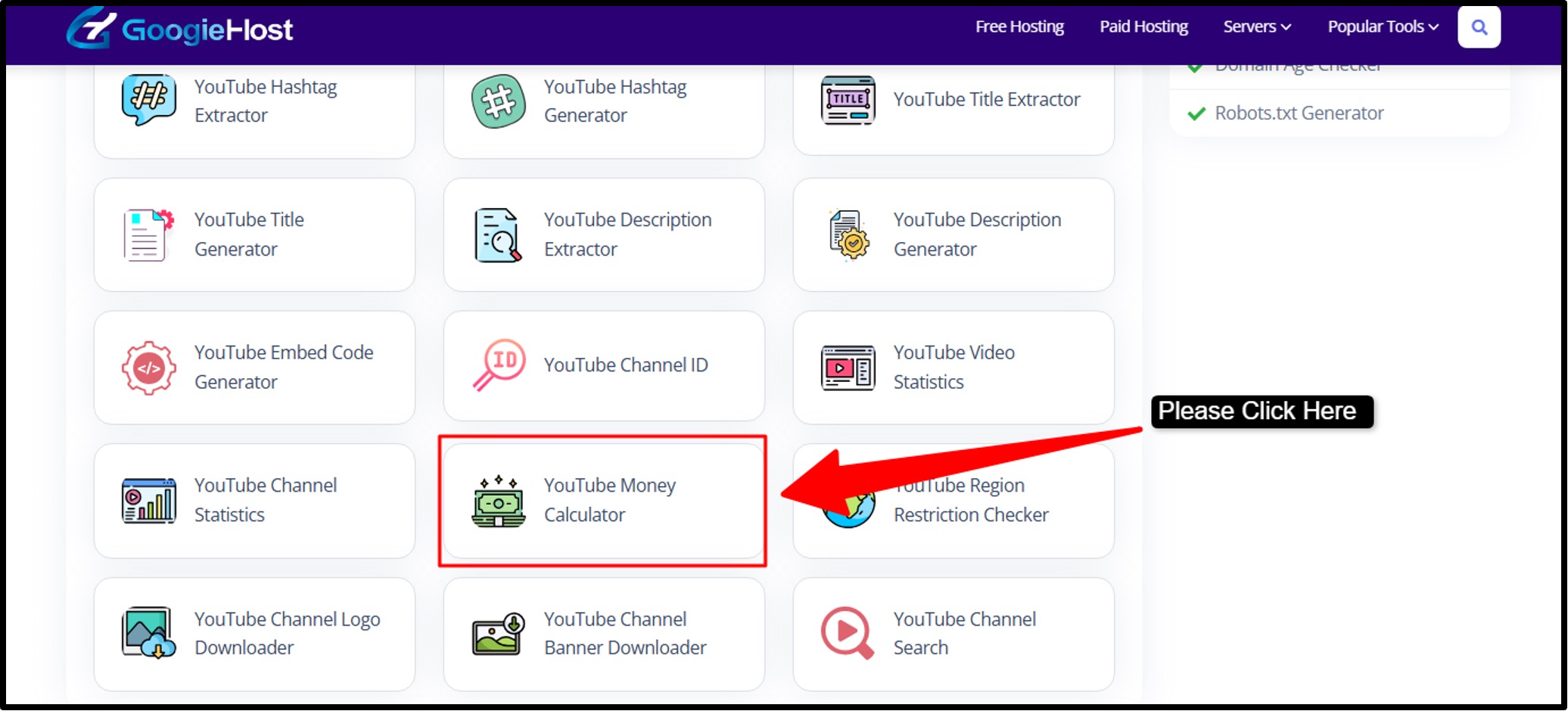 Step 2: Here, you will see input boxes >> Here, you need to enter your data >> For the YouTube money calculator, you will see the daily views section, where you will find the average views for your videos per day.
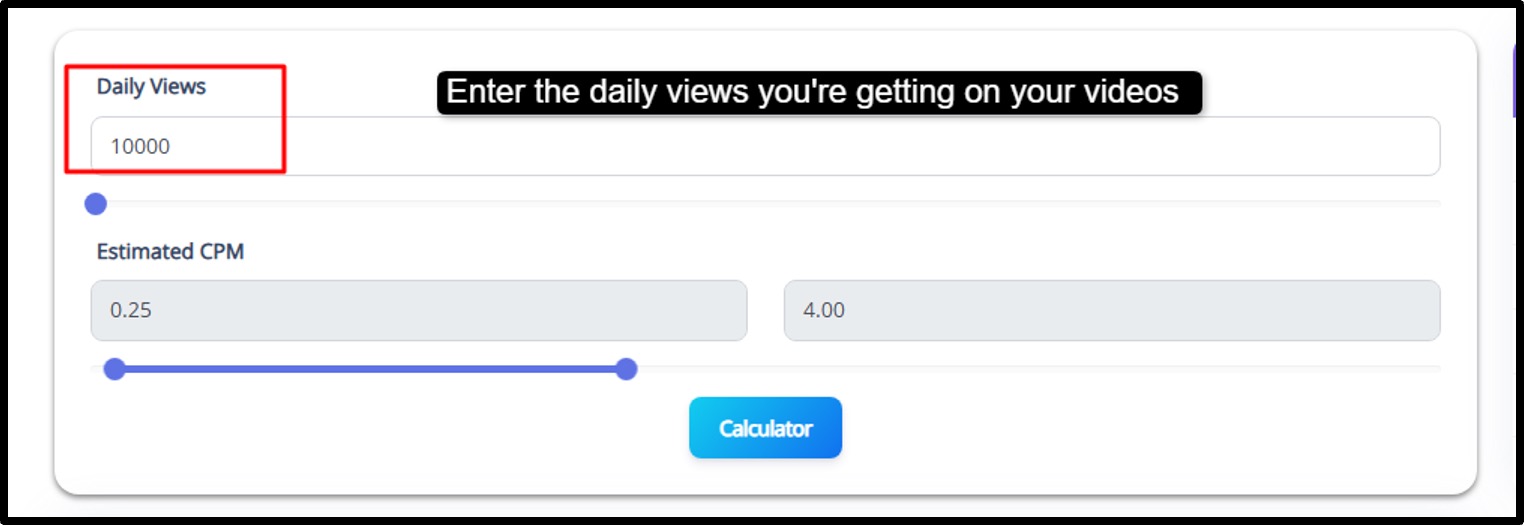 Step 3: The estimated CPM, where you will see how much the advertisers pay per 1000 views. Let’s say, if your daily views are around 10,000, then the estimated CPM would be around $3.
 Step 4: In the last step, you process your inputs >> press the "Calculator" button >> the tool will show you your estimated daily, monthly, and yearly earnings.
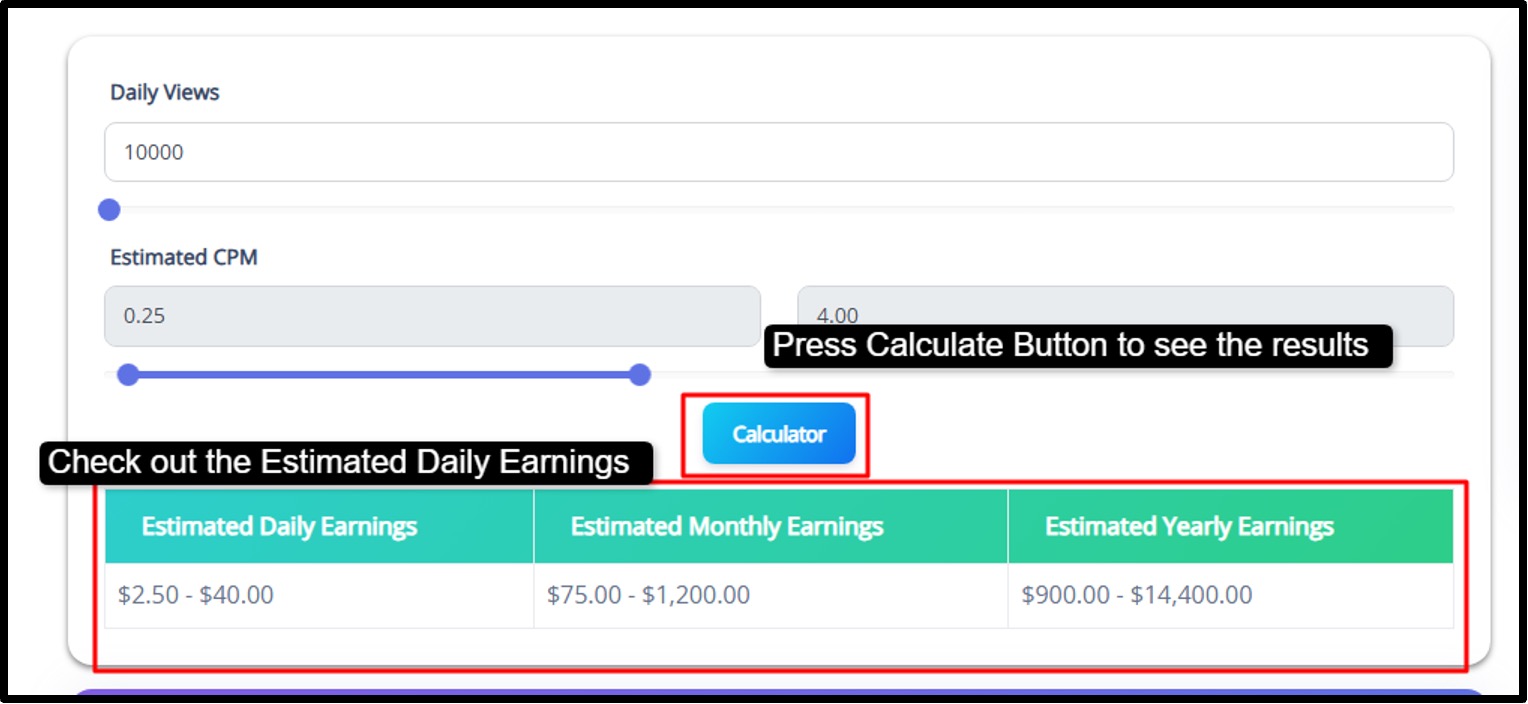
If you follow the screenshots as they are, you can use the tool easily and also calculate the amount of earnings you’re gonna get as per the estimated CPM and the number of views on your videos.
Benefits and Drawbacks of the YouTube Money Calculator from GoogieTools
To give you a good idea of what to expect, let's examine the advantages and disadvantages.
Advantages
- Precise Estimates: Offers trustworthy profit forecasts based on current data and industry standards.
- User-Friendly Interface: Both novices and experts can easily navigate the dashboard.
- SEO Optimization: You may improve your ranking on YouTube and search engines by using keyword tools and video analytics.
- Competitor Analysis: To increase your revenue, learn from the highest earners in your niche.
- Free Tier: Affordable paid plans are available for more sophisticated tools, while basic functions are available for free.
- Time-saving: You can concentrate on content production by doing away with laborious calculations.
Drawbacks
- Estimates, Not Guarantees: Results are approximations since earnings depend on viewing behavior and ad demand.
- Premium Features Cost Extra: A paid subscription is needed for sophisticated capabilities like competition information.
- YouTube-Centric: The tool may not be appropriate for creators on other platforms because it concentrates on YouTube revenue.
Advantages of Knowing How Much You Could Make on YouTube
Your approach to content development changes when you are aware of the commercial possibilities of your channel. These are the main benefits:
Advantages of Financial Planning
- Budget Creation: Establish personal or corporate spending plans based on anticipated YouTube revenue.
- Investment Choices: Calculate the amount that should be reinvested in marketing, editing software, or equipment.
- Setting Objectives: Establish goals based on milestones, such as "reach $1000/month by year-end.
Enhancements to Content Strategy
Optimize your niche by concentrating on subjects that strike a balance between profitability and enthusiasm.
- Upload Scheduling: Arrange content schedules to coincide with periods of high revenue.
- Building an audience: Focus on groups that usually bring in more money from advertisements. By concentrating on high-CPM subjects while preserving audience engagement, I've leveraged these insights to increase my channel's revenue in only six months.
Why a YouTube Money Calculator Is Essential
Guessing your earnings won't cut it if you're serious about making money on YouTube. Data is essential for content planning, audience targeting, and income maximization.
The YouTube Money Calculator from GoogieTools is essential for the following reasons:
- Estimated Profits Accurately: Determine how much you can make from your films based on engagement and views.
- Enhance Your Content Strategy: To increase your CPM, find high-earning topics and audience demographics.
- Establish Realistic Objectives: With accurate income forecasts, plan the expansion of your channel.
- Save Time: With a few clicks, you can obtain immediate insights instead of performing calculations by hand.
- Boost SEO: Make content that performs better on YouTube and search engines by using earnings data.
You're left in the dark without a tool like this, which can result in lost chances. You can take charge of your YouTube monetization journey with the aid of GoogieTools.
Common Questions Regarding YouTube Money Calculators
The following are brief responses to frequently asked "YouTube money calculator" questions:
Q1. How reliable are the money calculators on YouTube?
Ans. Yes. For reputable channels with reliable stats, the majority of high-quality calculators—including GoogieTools—achieve 80–90% accuracy. With more data points, accuracy increases.
Q2. Can I figure out how much money I make from channels that aren't mine?
Ans. Yes, you can use available information like average views and subscriber count to estimate the profitability of any public channel.
Q3. Do calculators consider YouTube Premium revenue?
Ans. Based on the Premium subscription rates of your audience, sophisticated calculators such as GoogieTools incorporate YouTube Premium revenue into their predictions.
Q4. How frequently should I use a calculator for money?
Ans. The answer is that monthly computations aid in monitoring development and modifying tactics. During times of significant expansion, weekly calculations offer more detailed insights.
Q5. Do all calculators produce the same results?
Ans. No, different tools produce different estimates because they employ different algorithms and data sources. GoogieTools is renowned for its thoroughness and accuracy.
Why GoogieTools' YouTube Money Calculator Is Better Than Others
Are you prepared to realize the full financial potential of your YouTube channel? GoogieTools' YouTube Money Calculator is your road map to financial success on the platform, not simply another online tool. I've witnessed the importance of precise earning estimates in my late-night analytics sessions and in assisting several creators in realizing their value.
This calculator gives you the clarity you need, whether you're a seasoned creator planning your next major milestone or you're just beginning your "how much money can YouTubers make" inquiry. Make data-driven decisions that truly make a difference instead of speculating about the worth of your channel.
Go to GoogieTools now, enter your numbers, and find out the true value of your material. You'll be glad you took this important step toward success on YouTube.
Prepared creators are rewarded by the system. Are you prepared to take your cut?

Aman Singh
CREATIVE HEAD
Enjoy the little things in life. For one day, you may look back and realize they were the big things. Many of life's failures are people who did not realize how close they were to success when they gave up.