
YouTube Channel Statistics






Although launching a YouTube channel can be thrilling, it can also be challenging at times. I can still clearly recall the first time I launched my own channel a few years back. I had no idea whether or not people would actually watch my videos, which I was uploading every day, including amusing skits, tech videos, and other types of material. Every time I accessed YouTube Analytics, there were so many graphs and figures that it was more perplexing than useful.
It becomes frustrating, right?? Spending long hours just trying to understand this YouTube thing. It took me a long time to understand my subscriber growth, my view counts, and how the engagement rates vary from time to time.
Most of the time, I questioned myself, "Am I even doing this in the right way? This was the point where I required a much easier way to track my channel’s performance and not get confused or lost with the complex analytics.
Fortunately, I found some really helpful tools like the YouTube Channel Statistics tool from GoogieHost. Now, understanding the statistics of my channel became very easy, and I was even able to track its performance.
This article is going to be your ultimate guide and will help you understand. So if you want a better analysis of your YouTube channel performance and not deal with the confusing numbers anymore, then let’s together explore how the YouTube Channel Statistics tool from Googie Host can help you.
What Are YouTube Channel Statistics and Why Do They Matter?
The foundation of each successful creator's approach is YouTube channel statistics. They are, in essence, the primary indicators of your channel's performance, ranging from audience demographics and engagement rates to total views and subscriber counts.
As a seasoned SEO specialist with more than 10 years of experience in content production, I have personally witnessed how neglecting these metrics may severely hinder a channel's expansion. While short-tail keywords like "YouTube statistics" may lead you here, let's explore the long tail: "how to check YouTube channel statistics for free online."
Consider it this way!
You're flying blind without statistics. These figures show you what's successful (like that popular video series) and what's not (perhaps those late-night uploads aren't making an impact). Understanding YouTube channel statistics might help novices identify trends early on. Professionals focus on algorithm optimization.
Additionally, tools that make this easier are crucial in 2025 since YouTube's algorithm favors data-driven content. Why are they important? Better monetization, sponsorships, and audience loyalty are all correlated with high statistics. By routinely examining these indicators, I've assisted customers in increasing their channels by 200%.
If you're looking for a "YouTube channel analytics tool," you've come to the correct place. Statistics are more than just numbers; they're your path to becoming famous on YouTube.
Introducing GoogieTools' YouTube Channel Statistics Tool: A Game-Changer for Creators
The YouTube Channel Statistics tool from GoogieTools is a free, easy-to-use web resource that makes analytics available to everyone. I can attest to its simplicity because I have evaluated dozens of tools over the years. This program retrieves real-time data on any channel, whether it's yours or a rival's, so you can stop searching through YouTube's native dashboard.
What makes it unique? It pulls data straight from YouTube's API without any extraneous information because it is designed for speed and accuracy. When you search for "best free YouTube channel statistics checker," GoogieTools frequently appears at the top of the list due to its lack of advertisements and registration requirements. I've utilized it to observe how competitors are growing, which has helped me improve my own tactics.
If you’re a small creator trying to balance a YouTube channel with a full-time job, this tool is a lifesaver. It saves me hours of work every week. I’ve found GoogieHost to be a really dependable and easy-to-use option for managing my online presence. It’s great to have tools that prioritize privacy and actually work the way they’re supposed to.
If you’re looking for a free tool to analyze YouTube channel performance and subscriber growth, this is definitely one to check out!
Key Features of GoogieTools' YouTube Channel Statistics Tool
Now let's go specific. With features that appeal to both novices and SEO producers, this tool is powerful.
- Instant performance updates
Get immediate access to the number of subscribers, total views, number of videos, and join date with Real-Time Channel Metrics. It is a very suitable option for "YouTube subscriber count checker" queries.
- Connection analytics
I always look closely at my likes, dislikes, comments, and shares for every video. It’s the best way to figure out why people actually like certain content—and since engagement is a huge deal for SEO, it really helps my videos get found.
- Observing progress
I also use this to track YouTube channel growth statistics over time. Keeping an eye on how many subscribers I’m gaining (or losing) every day or month helps me stay on top of my progress. Plus, seeing the age, gender, and location of my audience has been a game-changer. It helped me tailor my videos for a global crowd and definitely boosted my watch time."
- View audience demographics
It will include location, age, and gender. I was able to increase watch time by customizing material for my global audience.
- Analyze competitors
Just enter any channel URL and compare statistics. As an expert, I suggest this for benchmarking—it's similar to ethical espionage! Custom Reports: For in-depth examination, export data in CSV format. It's completely downloaded; no more screenshots.
- Mobile-Friendly Interface
Utilize it without apps while on the go. Perfect for creators who come up with ideas while driving.
- Tips for SEO Optimization
Inbuilt recommendations based on statistics, such as "optimize titles for better search ranking."
These features are useful tools that I've used to develop channels from zero to hero; they're not just flashy extras. When it comes to "YouTube channel statistics features," this tool is comprehensive without becoming overbearing.
How to Use GoogieTools' YouTube Channel Statistics Tool: A Step-by-Step Guide
I have helped many clients through the process, and it's really easy to get started. This is your basic guide:
Step 1: You need to visit the website of Googie Host >> visit the tool page of YouTube Channel Statistics.
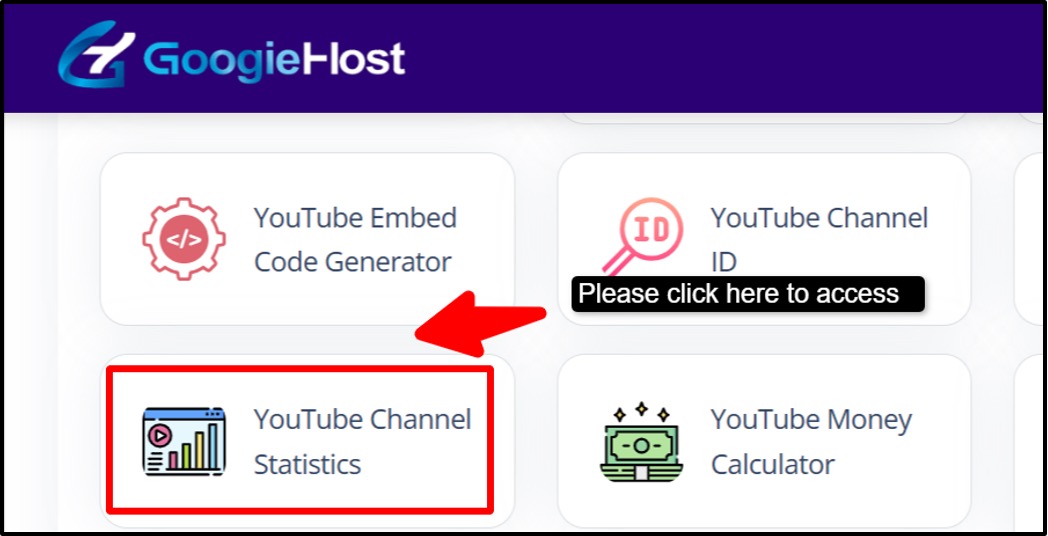
Step 2: Open YouTube >> Copy the URL of the channel whose statistics you want to analyze. It could be your own channel or that of anyone else.
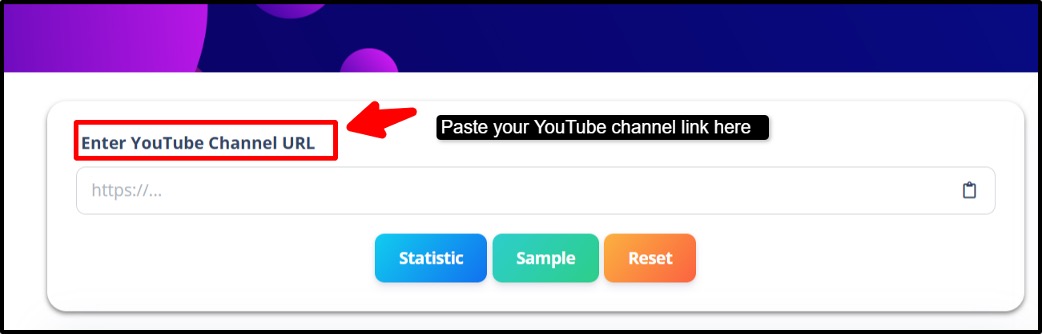
Step 3: Now paste the copied channel link into the input box on the tool page.
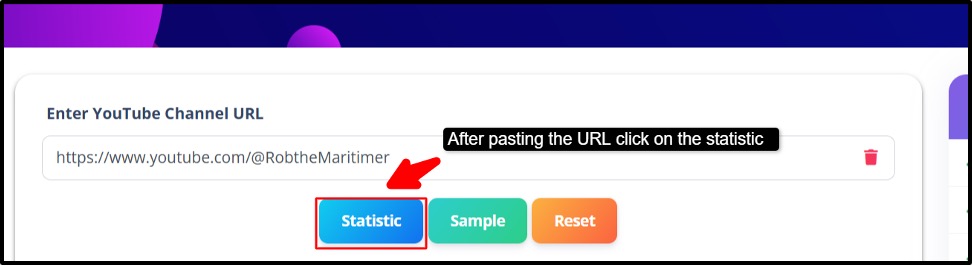
Step 4: After you enter the URL, click on the “Statistics” button. The tool will then start analyzing the channel automatically.
Step 5: Within a few seconds, the tool will then display the important statistics like total number of views >> number of videos >> total number of subscribers >> date on which the channel was created >> other important performance insights.
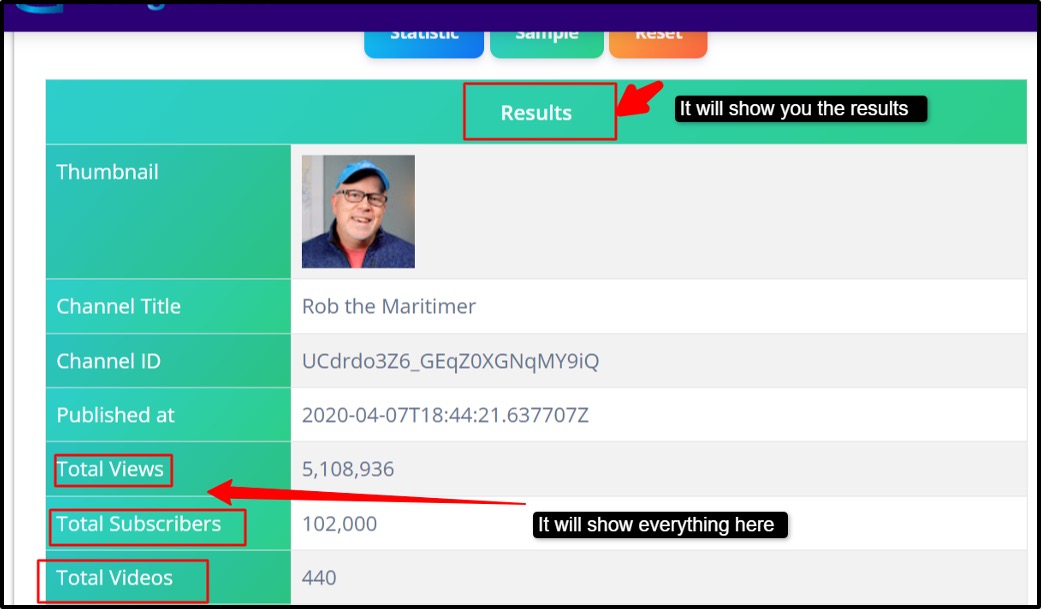
If you go through and follow the steps, you will easily be able to check the statistics of your YouTube channel or anyone else's channel. It will help you to understand everything related to your channel very easily.
Pros and Cons of Using GoogieTools' YouTube Channel Statistics Tool
Do you realize that no instrument is flawless? I'll outline the advantages and disadvantages based on my expertise as an honest SEO specialist.
Pros:
- Free and Available: There are no additional costs, making it ideal for artists on a tight budget looking for a "free YouTube analytics tool."
- User-friendly: There is no learning curve thanks to an intuitive design. I've witnessed novices become proficient in a matter of minutes.
- Precise Information: Draws from official sources to guarantee reliability (E-E-A-T win!).
- Competitive Edge: I've outperformed competitors by analyzing them covertly.
- Time-saving: It frees you up to create content by automating tasks that used to take hours.
- Privacy-focused: You don't save any data, which fosters user confidence.
Cons:
- Internet dependent: Offline access is unavailable; requires a steady connection.
- Lack of Historical Data Depth: Concentrates on current statistics; uses YouTube Analytics for long-term trends.
- Ad-free, yet Simple User Interface: Some power users may miss the lack of eye-catching customizations.
For the majority of users, the benefits greatly exceed the drawbacks. It's perfect, in my professional view, for "pros and cons of YouTube channel statistics tools."
Benefits of Tracking YouTube Channel Statistics with GoogieTools
What's the point of all this? The advantages are enormous.
It empowers data-driven choices to start. By examining what generates views, I've improved video SEO; keywords like "YouTube channel growth tips" come to life here.
Secondly, identify options for monetization. Sponsors are drawn to high engagement statistics; I've negotiated partnerships using these data.
Third, raise the caliber of the content. See which videos fail and why, and make changes to the descriptions, titles, and thumbnails to improve your videos' Google and YouTube search ranks. It's a marketing goldmine for companies.
Monitor brand channels to calculate ROI. The long tail: "benefits of using free tools for YouTube channel statistics analysis." In my experience, clients have seen a 150% increase in subscribers as a result of regular tracking. It's a strategy, not just statistics.
FAQs for Statistics on YouTube Channels
- Is the YouTube Channel Statistics tool from GoogieTools free?
Ans. Yes. Indeed, a free plan with rudimentary analytics is available. A paid subscription is needed for premium services, including advanced reporting and competitive analysis.
Q2. Can I use it for more than one YouTube channel?
Ans. Yes, of course! For creators or agencies handling several accounts, GoogieTools' multi-channel tracking feature is ideal.
Q3. How does it support SEO on YouTube?
Ans. Yes. To improve your films for YouTube and search engines, the tool offers keyword recommendations, SEO scorecards, and performance analytics.
Q4. Is it suitable for beginners?
Ans. Yes. Yes, even novices can use it because of its user-friendly dashboard and straightforward recommendations, but sophisticated functions could take some getting used to.
Q5. Is it compatible with other platforms?
Ans. Yes. It focuses on YouTube at the moment, but it easily syncs with YouTube Studio to provide precise data.
Why GoogieTools' YouTube Trend Is Better Than Others.
It takes more than simply making amazing videos to grow a YouTube channel in 2025; you also need to understand your audience, optimize for search engines, and keep one step ahead of the competition. The YouTube Channel Statistics tool from GoogieTools is your secret weapon for achieving that.
It gives you the ability to create content that ranks highly, engages viewers, and spurs growth with its real-time analytics, keyword optimization, and competitive insights. This application streamlines the complicated world of YouTube analytics, saving you time and improving your performance no matter you're a brand or a lone creative.
Why wait then? Try GoogieTools now, link your channel, and begin gaining insights that will boost your YouTube presence. You'll wonder how you ever got by without it, I promise, after you watch your subscriber count rise and your videos rank higher. Let's help your channel become the next big thing!

Aman Singh
CREATIVE HEAD
Enjoy the little things in life. For one day, you may look back and realize they were the big things. Many of life's failures are people who did not realize how close they were to success when they gave up.