
YouTube Video Statistics






Many YouTube creators upload a video and simply wait for the views to come. But growing on YouTube isn’t that simple. Hours go into editing clips, writing catchy titles, designing thumbnails, and adding tags, all with the hope that the algorithm will finally notice the content.
Sometimes even a well-edited video with useful information and a strong title can completely flop. Very few views, no comments and almost no engagement.
In moments like this, it becomes clear that creating content without real data or insights makes it difficult to understand what went wrong if it’s the thumbnail, tags, upload timing or tough competition.
That’s where the GoogieTools YouTube Video Statistics tool becomes useful.
Instead of guessing, it helps analyze YouTube videos, reveal key statistics, and show performance metrics that matter. By studying successful videos and their data, creators can improve YouTube SEO, optimize content, and build a smarter strategy to grow their channel.
What Are YouTube Video Statistics and Why Do They Matter?
YouTube video statistics refer to the performance checker that measures how a video is performing on the platform. These metrics include important indicators such as views, watch time, likes, comments, shares, click-through rate (CTR), audience retention and engagement rate. Together, they provide a clear picture of how viewers interact with your content and how well your video is performing within the YouTube ecosystem.
See! If you’re having a YT channel, you should no longer depend on guesswork when creating content. Instead, analyzing YouTube statistics allows you to identify content trends, understand viewer behavior, and optimize videos for better performance.
YouTube’s algorithm in 2026 increasingly prioritizes viewer satisfaction signals, including watch duration, engagement quality, and session time. This means creators who actively monitor and optimize their video statistics are far more likely to improve video visibility, search rankings and recommendations.
Plus, YouTube SEO plays an important role in discoverability. Short-tail keywords such as “YouTube statistics” attract a broad audience, while long-tail queries like “how to check YouTube video statistics for free” or “analyze YouTube video performance metrics” often drive highly targeted traffic.
Understanding these search behaviors can help creators structure their content for both search engine visibility and user intent.
Why Choose GoogieTools' YouTube Video Statistics Tool?
With so many YouTube analytics tools available online, choosing the right one can be really difficult, especially for beginners. This is where GoogieTools’ YouTube Video Statistics Tool proves as the right option.
It offers a simple and completely free way to analyze YouTube videos, making it useful for everyone, from new content creators to experienced marketers.
- One of the biggest advantages of this tool is its ease of use. See! YouTube Studio allows you to analyze videos from your own channel, but this tool lets you check the statistics of any public YouTube video. This means you can study your own content and also analyze competitor videos.
- The tool is designed to provide important video performance insights without complicated dashboards. You can quickly check key metrics such as views, engagement and overall video performance. This makes it perfect for creators who want to monitor YouTube video performance metrics.
- Another major benefit is speed & accessibility. The GoogieTools platform loads quickly and provides results in seconds, allowing you to analyze videos instantly and make faster content decisions.
- Plus, the tool is mobile-friendly, which means you can easily check video statistics from your smartphone or tablet. Let’s say you are researching content ideas, studying competitors or optimizing your next upload, you can access important YouTube insights anytime and anywhere.
So, we can see that it helps creators understand what works on YouTube, discover improvement opportunities and make smarter decisions that can increase visibility, engagement and channel growth.
Key Features of the YouTube Video Statistics Tool
GoogieTools’ YouTube Video Statistics tool is designed to make video analysis fast and actionable. It provides all the essential metrics creators need to understand performance, optimize content, and grow their channels efficiently.
With this tool, you can gain insights into your own videos, study competitors and make data-driven decisions without complicated dashboards or paid subscriptions.
Here’s a breakdown of its key features and how they help you:
- Real-Time View Counts: Track the latest number of views for any video instantly. Helps identify trending content and monitor “YouTube video view statistics” to adjust strategies quickly.
- Engagement Metrics: Access likes, dislikes, comments, and shares. Understand audience sentiment and refine content strategies for higher interaction and improved “YouTube engagement analysis.”
- Watch Time Insights: Estimate average watch duration per video. Crucial for YouTube’s algorithm, this feature helps creators boost retention and “improve YouTube video retention rates.”
- Subscriber Impact: Check how a video affects your subscriber growth. Enables creators to plan content that attracts, retains, and grows their audience efficiently.
- SEO Data: View titles, descriptions, tags, and thumbnail info from top-performing videos. Helps optimize your own content for search and YouTube discoverability.
- Competitor Analysis: Analyze any public video URL to study rivals’ stats ethically. Gain insights into strategies that work and improve your own content performance.
- Export Options: Download reports in simple formats for presentations or record-keeping. Makes sharing insights easier and helps track performance over time.
- No Account Needed: Use the tool free and anonymously. Perfect for creators searching for a “free YouTube video statistics checker” without signing up or paying.
How to Use GoogieTools' YouTube Video Statistics Tool: A Step-by-Step Guide
Getting started with the GoogieTools YouTube Video Statistics tool is simple and quick. With just a few steps, you can analyze any YouTube video and understand how it is performing. Follow the steps below to check YouTube video statistics instantly.
Step1) Visit the Tool Page >> Go to the GoogieTools website >> Open the YouTube Video Statistics section. (This is where the analysis begins.)

Step2) Paste the YouTube Video URL >> Copy the link of the YouTube video you want to analyze and paste it into the input field >> You can check your own videos or analyze trending videos from other creators.

Step3) Click the Statistic Button >> Once the link is added, click the Statistic button. Within seconds, the tool starts processing the data and prepares the statistics.
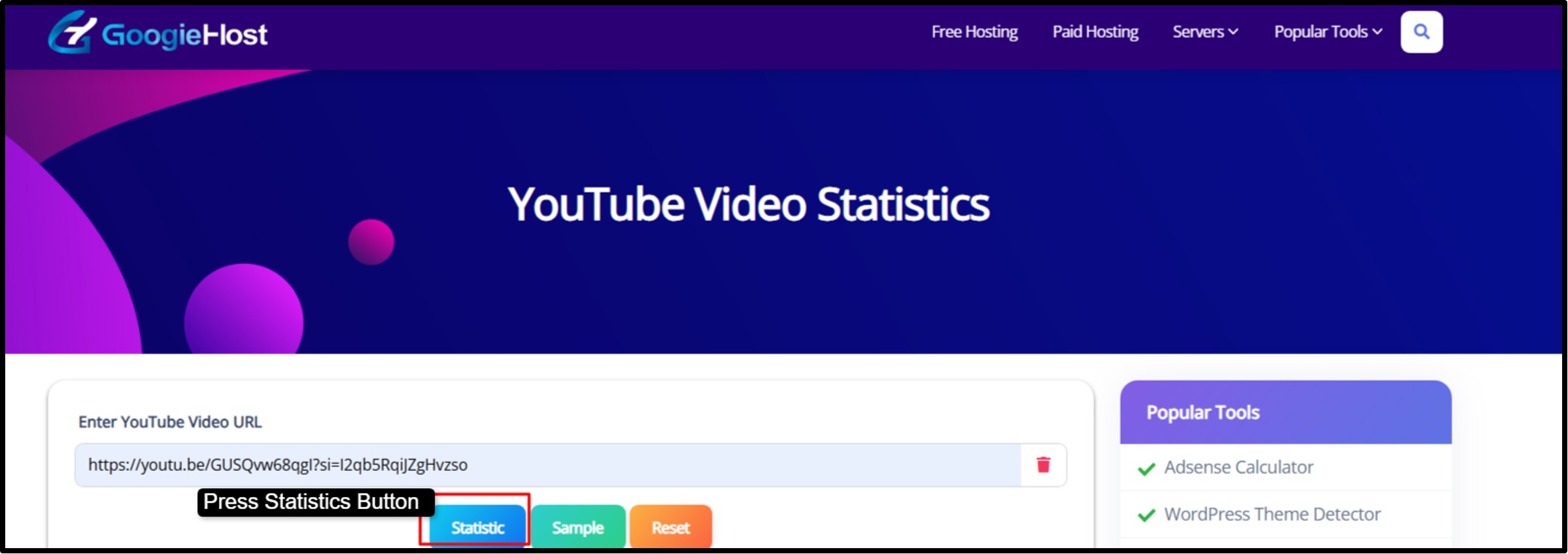
Step4) Explore the Statistics Dashboard >> You will see visual graphs for views over time, charts for engagement metrics and detailed information about likes, comments and other performance indicators.

Step5) Apply the Insights to Improve Your Strategy >> Once the data is reviewed, we can use these insights to improve video performance.
Follow these steps above to properly use this YouTube Video Statistics!
Pros and Cons of Using GoogieTools' YouTube Video Statistics Tool
Like any tool, it's not perfect, but the upsides far outweigh the downs. Let's break it down honestly, based on my expert analysis.
Pros:
- No hidden costs, unlike premium analytics suites
- Intuitive design means no steep learning curve.
- Covers everything from basic "YouTube video stats checker" to advanced metrics.
- Analyze others' videos to benchmark your performance.
- Pulls data quickly, with high uptime.
- No data collection on users, building trustworthiness.
Cons:
- Can't access private or unlisted ones, which is standard but worth noting.
- It shows current stats, not future trends (though you can infer from patterns).
- Exports are simple; advanced users might want more customization.
Benefits for Different Users: Content Creators, Marketers, and More
GoogieTools’ YouTube Video Statistics tool isn’t just for YouTubers. It’s a versatile resource for anyone working with video content. Let’s say you’re creating, marketing, or analyzing videos, this tool helps you make smarter decisions using real data.
- For Content Creators: Track “YouTube video performance analysis” to discover which topics and formats resonate most with your audience. By focusing on high-engagement content, you can increase views and grow subscribers faster.
- For Digital Marketers: Measure the success of campaigns with “YouTube ad video statistics.” Combine insights with keyword research, including long-tail keywords, to improve SEO, increase visibility, and maximize ROI.
- For Business Owners: Monitor your brand’s videos with “corporate YouTube video stats.” Learn which messaging connects best with viewers, optimize content strategy, and strengthen your brand presence on YouTube.
- For Researchers & Educators: Analyze trends and data with “YouTube trends and statistics.” It’s perfect for studying viewer behavior, content patterns, or creating reports for educational purposes.
The main advantage?
It makes advanced YouTube analytics easy and accessible for everyone, even beginners. By providing clear insights without complicated dashboards, the tool helps you make data-driven decisions, improve video performance, and stay ahead of the competition.
Frequently Asked Questions (FAQs) About YouTube Video Statistics
Q1. What is the best free tool for YouTube video statistics?
Ans . One of the best free tools is GoogieTools’ YouTube Video Statistics Tool, which lets you check essential video data like views, likes, comments, and engagement without needing advanced setup.
Q2. How can I check YouTube video stats without owning the channel?
Ans . You can use a free tool like GoogieTools—just enter the video URL, and it will fetch publicly available statistics. No login or ownership of the channel is required.
Q3. Why is watch time important in YouTube statistics?
Ans . Watch time measures how long viewers spend watching your video. It’s a key ranking factor in YouTube’s algorithm because it shows whether people find your content engaging. More watch time usually means better visibility.
Q4. Can I use this for competitor analysis?
Ans . Yes, absolutely. By checking stats of other channels’ videos, you can analyze what type of content works best in your niche and improve your own video strategy.
Q5. Is GoogieTools' tool mobile-friendly?
Ans . Yes, the tool is mobile-friendly and works smoothly on smartphones and tablets, so you can check video stats on the go.
Conclusion:
See! Creating videos without data is like looking for the right path in the dark.
GoogieTools’ YouTube Video Statistics tool helps change that by giving creators, marketers, and business owners quick access to important metrics such as views, watch time and SEO insights. With these insights, you can understand how a video performs and make smarter decisions that improve your content strategy.
By analyzing video statistics, you can identify high-performing content and focus on topics that truly connect with your audience. We can also study engagement, watch time, and retention patterns to improve video structure, titles, thumbnails, and calls-to-action.
These insights also help track growth trends, understand audience behavior, and observe what works within your niche.
Simply add a video URL, review the insights, and start improving your next upload with real data guiding every decision.

Aman Singh
CREATIVE HEAD
Enjoy the little things in life. For one day, you may look back and realize they were the big things. Many of life's failures are people who did not realize how close they were to success when they gave up.